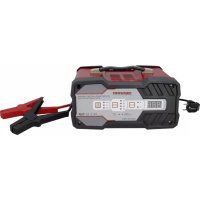
AB JS012 - Battery charger Absaar - Free user manual and instructions
Find the device manual for free AB JS012 Absaar in PDF.


| Product type | Battery charger |
| Brand | Absaar |
| Model | AB JS012 |
| Input voltage | 230 V ~ 50 Hz |
| Charging voltages | 6 V or 12 V |
| Compatible battery types | Lead-acid, AGM, Gel (standard, AGM, Gel) |
| Charging current (slow mode) | 2 A for batteries 4-30 Ah |
| Charging current (fast mode) | 12 A for batteries 25-120 Ah |
| Starting current | 75 A (engine start function) |
| Display | LCD screen (voltage or charge percentage) |
| LED indicators | Selected value, charge status, polarity fault |
| Functions | Slow charge, fast charge, engine start, battery type selection |
| Protection | Protection against reverse polarity (red LED), short circuit |
| Protection rating | IP20 (indoor use only) |
| Usage | Indoor only, well ventilated |
| Maintenance | Clean the clamps after use, store in a clean and dry place |
| Repairability | Repairs by qualified technician only |
| Dimensions (approx.) | Not specified in the manual |
| Weight (approx.) | Not specified in the manual |
Frequently Asked Questions - AB JS012 Absaar
User questions about AB JS012 Absaar
0 question about this device. Answer the ones you know or ask your own.
Ask a new question about this device
Download the instructions for your Battery charger in PDF format for free! Find your manual AB JS012 - Absaar and take your electronic device back in hand. On this page are published all the documents necessary for the use of your device. AB JS012 by Absaar.
USER MANUAL AB JS012 Absaar
In this operating manual, the following symbols are used:

DISPOSAL: Do not dispose this product as unsorted municipal waste. Collection of such waste separately for special treatment is necessary.

Read operator's manual


Indoor use only!

Explosion Hazard!

Observe warnings and safety guidelines!

Danger of electric shock!
Intended use:
The charger AB-JS012 is intended for charging 6/12V acid-lead/AGM/GEL batteries
Do not use it for any other purpose.
The charger is solely approved private use. Any other use or modification of the charger is considered inappropriate and involve substantial hazards. The manufacture assumes no liability for damages arising from improper use.
Warning!
Familiaries yourself with all charger functions and learn how to correctly use the device before first using it. For this purpose, please carefully read the following operating instructions. Store this manual in a safe location. When passing the charger on to other, be sure to also include all documentation.
| Model Charging | Current and capacity of batteries Engine Starting current | |
| AB-JS012 (2A) / 4 | -30Ah (12A) / 25-120Ah | 75A |
Safety:
General safety guidelines:
Read all safety guidelines and instructions. Non-compliance with safety guidelines and instructions can cause electric shock, fire and/or serious injury. Keep all safety guidelines and instructions for future reference.

Warning!

Life-threatening danger to infants and children. Never allow children to play with components or nting parts, they could be swallowed and result in suffocation.
This device is not intended for use by persons (including children) with reduced physical, sensory or mental abilities or who lack experience and / or knowledge, unless they are supervised by a person who is responsible for their safety or unless they receive instructions from this person on how the equipment is to be used. Children must be supervised in order to ensure that they do not play with the device
The manufacturer is not responsible for damages caused by:
* Improper connection and / or operation.
* Exterior force, damage to the device and / or damage to parts of the device caused by mechanical impact or overload.
* Any type of modification to the device.
* Use of the device for purposes that are not described in this instruction manual.
* Consequential damages caused by non-intended and / or improper use, and / or defective batteries.
* Moisture and / or insufficient ventilation.
* The unauthorised opening of the device. This will viod the guarantee.
Safety notices for charger:
- SAVE THESE INSTRUCTIONS - This manual contains important safety and operating instructions for battery charger.
- Before using battery charger, read all instructions and cautionary markings on battery charger and battery.
- Non-rechargeable batteries cannot be charged with this battery charger.
- During charging, the battery must be placed in a well ventilated area. Keep the working area tidy to reduce the risk of fire, electric shock and explosion. Do not cover the charger and battery pack with a cloth while charging.
- The battery charger contains components which can produce arcs and sparks when in use. WARNING: Explosive gases. Prevent flames and sparks. Provide adequate ventilation during charging.
- To prevent fire or explosion, only use in a well-ventilated area. When charging, it is prohibited to start the engine or perform ignition and other dangerous actions. Do not charge in a garage or other enclosed space. Provide adequate ventilation during charging.
- Never touch battery terminals or battery clamps whilst the device is connected to alternating current.
- Use a power source with the voltage specified on the nameplate of the charger.
- Check the input voltage (230V \~ 50Hz) and ensure that it corresponds to the mains voltage, otherwise the charger may be damaged.
- If an extension cable is used, the cable diameter must be sufficient for the power required by the charger
- Do not charge the battery packs in presence of flammable liquids or gases.
- Never short circuit the device or connect the inlets and outlets of the device using metal objects. Only use the supplied connecting cables to connect the device to a battery.
- Always make sure that the charger is disconnected from the mains when you connect it and disconnect it to a battery.
- Never place the device over or close to the battery to be charged. Gases from the battery make the charger corrode and damage it. Set up the charger as far away from the battery as the direct current cable allows.
- Ensure that the device is always stored in a safe place. Do not expose the device to rain or snow or other wet conditions. Avoid pouring or dripping water or other liquids over it. If water penetrates electrical devices, the risk of electric shock increases.
- To protect against the risk of electrical shock, do not immerse the unit, cord or plug in water or other liquid.
- Ensure that all plugs and cables are free of moisture. Never connect the device to the mains with wet or moist hands.
- Never carry charger by cord or yank it to disconnect from receptacle.
- After charging or before attempting any maintenance or cleaning, unplug the charger from the power
source.
- Do not operate or disassemble charger if it has received a sharp blow, been dropped, or otherwise damaged in any way; take it to a qualified serviceman. Incorrect use or reassembly may result in a risk of electric shock or fire.
- All maintenance work must be conducted by qualified electricians.
- Never disassemble the device, incorrect assembly may cause electric shock or fire.
- For the protection class is IP20. The product shall not be used outside the room, where it is the rainy and snowy.
- As the casing can generate heat during charging, it is prohibited to cover the vent of casing.
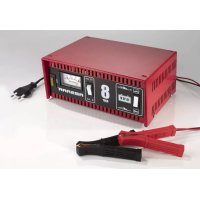
Product View:

- Positive( + ) and negative( - ) polarity clamps
- LCD display, which displays the battery voltage or percentage of the charging battery. You can select the displayed values by press the "Display" button

- LED light to display which value is selected.
- LED light to indicate charging process, if the light flicks, it means that the charger is running at reconditioning mode. It lights up permanent during charging.
- Red LED light up? means the output clamps is wrong connected. You should connect red clamp to the positive terminal of the battery and black one to the negative.
- Charging battery select button, according to the battery you connect, you can push the "Battery" button to choose different battery types and charging voltage 6V or 12V. If wrong charging voltage is selected, the LCD display will display"FUL" and there will have no output current

- LED Display and Engine Start function select button, according to your requirement, you can choose
different charging current. If fast mode is selected, the max. charging current will be 12A and 2A at slow mode.
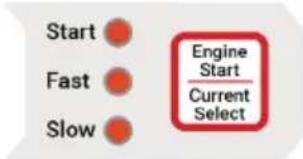
Press the “Engine Start” button and hold for more than 3 seconds, it will come into “Engine Start” process, then you can use it to start you vehicle at the cycle no more than 5S on and 180S off, max. 5 cycles allowed.
Note that 2A charging current is suit for 4-30Ah batteries and 12A charging current is better for the capacity of 25-120Ah batteries.
Charging:
a. connect the rec clamp to the plus pole and the black clamp to the minus pole
b. connect the charger to 230V socket
c. The charger's LED display will flash to show voltage of battery.
d. Press "BATTERY SELECT" button?user can choose the battery's type which need charge. (Such as STD or AGM or GEL?
e. Press "CURRENT SELECT" button, you can choose the charge current you need.
?Such as FAST or SLOW?
f. After 5 seconds, till the digital on LED display and "Charging" indicator lights permanent it means the charger is under charging working condition.
g. When the charger is charged, the LED display will be show "FUL".
Jump Start
a. Charge the battery for 10-15 minutes according to steps a-f in the charging operation section above.
i. Press the button of "ENGINE START" for 3 seconds, the indicator below "ENGINE START" will be lighted, then you can start your vehicle
ii. At most for 5 seconds, the charger will stop the starting mode and turn into rest mode. Meanwhile, for the next time to go to start mode will be count down and showed on LED Display like:180 - 179 - 178 - ...3 - 2 - 1.
b. If you need to exit “ENGINE START” mode, press “ENGINE START” once, the light below “ENGINE START” will turn off, which represents that the charger has already exited “ENGINE START and turn into charging mode.
i. Do not crank engine for > 5s
ii. Wait approximately 180s between starting attempts
iii. Do not attempt to start more than five times. If five attempts fail, the vehicle's battery should be recharged 15-30 minutes
When the display show FUL, please disconnect the charger from the battery, it is not designed to use the charger as maintenance charger
End charging process:
- Unplug from the AC outlet.
- Disconnect the black clamp
- Disconnect the red clamp
Cleaning, Care and Service
Your charger can be kept functional for years with minimum care.
* After charging process is completed, clean the clamps. To prevent corrosion, wipe off any battery fluid that has come into contact with the clamps.
* Roll up the cables properly when you store the charger. This helps to prevent damage to the cables and the charger.
* Occasional cleaning of the charger casing with a soft cloth keeps the surface shiny and helps to prevent corrosion.
* Store the charger in a clean and dry location.
Service
Leave the repair of the device to qualified technical personnel. Thus, the safety of the device is guaranteed and maintained.
Introduction:
Adresse Postale:
B.P. 146
L-4902 Bascharage
ABSAAR®
OVER 40 YEARS OF GERMAN TECHNOLOGY
MSA International S.A. - PED, Avenue de l'Europe - L-4802 Lamadelaine TEL: +352 26 65 65 - FAX: +352 26 65 651 - e-Mail: info@msainternational.com
Brand : Absaar
Model : AB JS012
Category : Battery charger