Assist Easy - Remote control LOEWE - Free user manual and instructions
Find the device manual for free Assist Easy LOEWE in PDF.



| Product type | Universal remote control |
| Brand | Loewe |
| Model | Assist Easy (ref. 71540) |
| Power supply | 2 CR2032 batteries (3 V each) |
| Approximate weight | 100 g (with batteries) |
| Approximate dimensions | 200 x 50 x 20 mm |
| Main functions | Control of TVs, audio, radio, SoundVision, SoundBox, AirSpeaker, MediaVision 3D, Apple TV, etc.; teletext, EPG, recording, playback, navigation, volume |
| Infrared range | Approximately 10 meters (standard use) |
| Compatibility | Loewe devices (TV chassis SL1XX, SoundVision, SoundBox, AirSpeaker, MediaVision 3D, etc.) and Apple TV |
| Programming | Key combinations to configure devices and audio functions |
| Factory settings | Resettable via OK button |
| Care and cleaning | Soft slightly damp cloth; avoid acidic or abrasive products |
| Safety precautions | Protect from water, humidity, heat, shocks, open flames; do not open; use suitable batteries |
| Batteries | CR2032 / DL2032; + pole facing up; do not dispose with household waste |
| Spare parts and repairability | CR2032 batteries commercially available; no user-serviceable parts |
| General information | Free user manual available online; private domestic use; limited warranty |
| Country of origin | Germany (Loewe Technologies GmbH) |
Frequently Asked Questions - Assist Easy LOEWE
User questions about Assist Easy LOEWE
0 question about this device. Answer the ones you know or ask your own.
Ask a new question about this device
Download the instructions for your Remote control in PDF format for free! Find your manual Assist Easy - LOEWE and take your electronic device back in hand. On this page are published all the documents necessary for the use of your device. Assist Easy by LOEWE.
USER MANUAL Assist Easy LOEWE
Operation instructions
Mode d'emploi
text_image
Diagram showing two circular components with arrows labeled 1 and 2, indicating rotation or assembly steps.Twist the battery compartment lid out in an anti-clockwise direction and then remove it. Insert a CR2032/DL2032 battery. The plus pole of the battery must point upwards here. Replace the battery compartment cover onto the remote control (observe the markings).
F Piles
GB Scope of delivery
- Assist Easy remote control
• 2 CR2032 batteries
• These operating instructions
natural_image
Symbol of a trash bin crossed with no text or numbers, representing waste sorting or restriction (no text present)natural_image
Symbol of a trash bin crossed with no text or numbers, representing environmental restriction (no text present)by purchasing the Loewe Assist Easy, you have acquired a highly versatile remote control. You can operate various Loewe devices with this remote control. So that you can use the Assist Easy remote control to the best advantage in your surroundings, some settings might have to be made. You can find this on page 16.
For your safety
The operating and safety instructions in this manual are limited to the range of functions of the Loewe Assist Easy remote control Art.Nr.71540. That means: these instructions only describe how you call up a certain function with the Assist Easy, but not what exact effect this function has on the particular unit and what consequences this could have.
It is imperative that you also comply with the operating and safety instructions of the particular unit.
For your own safety, and to prevent damage, protect the remote control from:
- Dripping or splashed water and dampness
- Cold, heat and large temperature variations
• Impacts and mechanical stresses - Excessive heating by direct sunlight. naked flames and candles
• Ingress into the inside of the device
This remote control has been designed exclusively for use in domestic environments. The terms of the warranty only cover this normal use.
Only clean the remote control with a slightly moist, soft cloth. Do not use sharp or abrasive cleaners under any circumstances.
Do not insert rechargeable batteries in the battery compartment of the remote control.
The batteries used must not be exposed to excessive heat such as sunlight, fire or any other such heat sources!
Operating Loewe units
The audio functions of the TV button can be configured:


Press the MENU button and colour button at the same time and hold them down for 5 sec. The LED above the TV button flashes twice
| Function Button combination | Unit |
| Audio Functions | MENU + green AudioVision/MediaVision 3D |
| MENU + yellow Mediacenter | |
| MENU + blue Loewe TV * |
The AUDIO and RADIO buttons can be configured to operate certain Loewe products:



Press the button down that you wish to configure (AUDIO or RADIO) and then press REC/AUX at the same time; hold the buttons down for 5 sec. The LED over the selected button flashes twice. Input the button combination from the table below (press the buttons one after another).
| Button combination Unit | |
| Red Loewe TV Radio | |
| Green Loewe Mediacenter | |
| Blue + yellow Loewe BluTech | Vision Interactive/3D |
| Yellow Loewe AudioVision | |
| Green + blue Apple Remote | |
| Green + yellow Apple TV | |
| Green + yellow + blue | SoundBox * (RADIO) |
| Blue | SoundVision * (AUDIO) |
| Red + blue AirSpeaker | |
| Red + green + yellow | MediaVision 3D |
| Red + green + yellow + blue | Reset all settings |

Press OK
The LED above the button for the unit flashes twice.
* Default setting
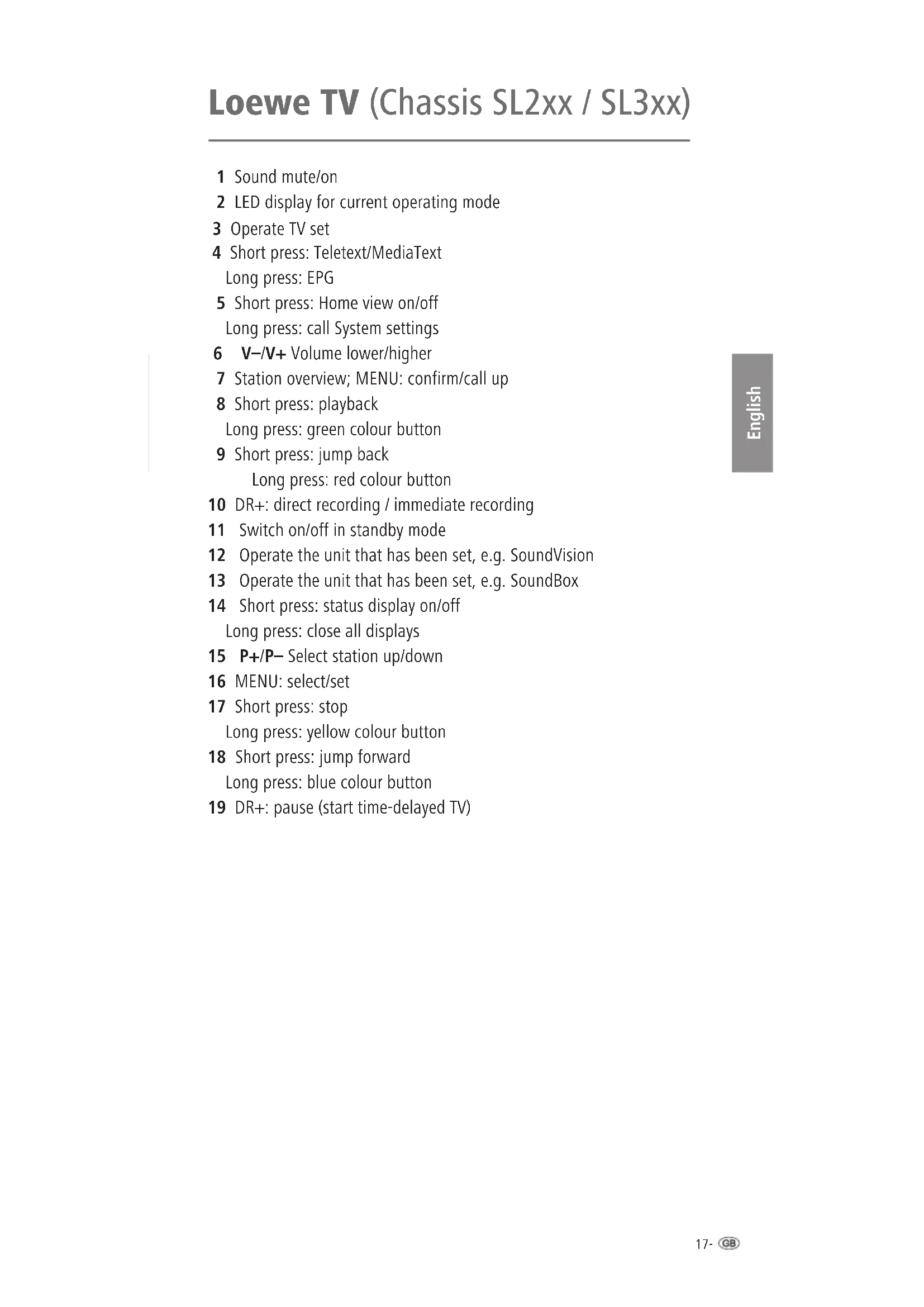
1 Sound mute/on
2 LED display for current operating mode
3 Operate TV set
4 Short press: Teletext/MediaText
Long press: EPG
5 Short press: Home view on/off
Long press: call System settings
6 V-/V+ Volume lower/higher
7 Station overview; MENU: confirm/call up
8 Short press: playback
Long press: green colour button
9 Short press: jump back
Long press: red colour button
10 DR+: direct recording / immediate recording
11 Switch on/off in standby mode
12 Operate the unit that has been set, e.g. SoundVision
13 Operate the unit that has been set, e.g. SoundBox
14 Short press: status display on/off
Long press: close all displays
15 P+/P− Select station up/down
16 MENU: select/set
17 Short press: stop
Long press: yellow colour button
18 Short press: jump forward
Long press: blue colour button
19 DR+: pause (start time-delayed TV)
Loewe TV (Chassis SL1xx)
1 Sound mute/on
2 LED display for current operating mode
3 Operate TV set
4 Long press: Teletext
Long press: EPG
5 Short press: Media Portal
Long press: hide menu
6 V-/V+ Volume lower/higher
7 Station overview; MENU: confirm/call up
8 Short press: playback / time-delayed TV
Long press: green colour button
9 Short press: jump back
Long press: red colour button
10 DR+: recording / direct recording
11 Switch on/off in standby mode
12 Operate the unit that has been set, e.g. SoundVision
13 Operate the unit that has been set, e.g. SoundBox
14 Short press: status display on/off
Long press: TV menu on/off
15 P+/P− Select station up/down
16 MENU: select/set
17 Short press: stop
Long press: yellow colour button
18 Short press: jump forward
Long press: blue colour button
19 Freeze frame on/off; DR+: pause (start time-delayed TV)
Loewe SoundVision
1 Sound mute/on
2 LED display for current operating mode
3 Operate TV set
4 Sleep function
5 Short press: "Main menu"
Long press: hide menu
6 V-/V+ Volume lower/higher
7 MENU: confirm/call up
8 Short press: playback
Long press: AUPEO!: Love
9 Short press: select title down
Long press: AUPEO!: Ban
10 Manage Favourites
11 Short press: Switch on/off in standby mode
Long press: Switch off in Energy Saving Mode
12 Operate the unit that has been set, e.g. SoundVision
13 Operate the unit that has been set, e.g. SoundBox
14 Short press: info menu
Long press: Options menu
15 P+/P- Select title/radio station up/down; In the menu: browse
16 MENU: select/set
17 Short press: stop
18 Short press: select track up
Long press: MusicID
19 Pause
Loewe AirSpeaker
1 Sound mute/on
2 LED display for current operating mode
3 Operate TV set
4 No function
5 No function
6 V-/V+ Volume lower/higher
7 No function
8 Playback
9 Select title down
10 Audio source selection through several presses
11 Switch on/off in standby mode
12 Operate the unit that has been set, e.g. SoundVision
13 Operate the unit that has been set, e.g. SoundBox
14 No function
15 No function
16 No function
17 Stop
18 Select track up
19 Pause
Loewe SoundBox
1 Sound mute/on
2 LED indicator light for current operating mode
3 Operate TV set
4 Short press: time
Long press: alarm
5 Short press: iPod: Menu
Long press: RADIO: save radio stations
6 V-/V+ Volume lower/higher
7 In the menu: confirm/call up; iPod: select/playback
8 Short press: playback/pause
Long press: random replay order
9 Short press: select title down
Long press: wind down
10 Audio source selection through several presses
10 and at the same time 16 ◀ : FM radio: search forwards;
10 and at the same time 16 ▶: FM radio: search forwards
11 Switch on/off in standby mode
12 Operate the unit that has been set, e.g. SoundVision
13 Operate the unit that has been set, e.g. SoundBox
14 Short press: display functions
Long press: settings menu
15 P+/P− radio station up/down
16 ▲▼ Index up/down; ◀▶ select in the iPod menu
17 Yellow colour button: short press: stop Long press: repeat
18 Short press: select title up
Long press: wind up
19 Short press: continue pause/playback
Long press: snooze/sleep mode
Loewe MediaVision 3D
1 Sound mute/on
2 LED display for current operating mode
3 Operate TV set
4 Short press: Sleep Timer
Long press: title recognition
5 Short press: "Home" menu
Long press: Menu: hide menu
6 V-/V+ volume up/down
7 In the menu: confirm/call up
8 Short press: playback
Long press: green colour button
9 Short press: select title down
Long press: red colour button
10 Repeat
11 Switch on/off in standby mode
14 Short press: title menu
Long press: DISC: disc menu (DVD)
15 P+/P− select title/radio station up/down
16 Select/set
17 Short press: stop
Long press: yellow colour button
18 Short press: select track up
Long press: blue colour button
19 Pause
12 Operate the unit that has been set, e.g. SoundVision
13 Operate the unit that has been set, e.g. SoundBox
Environmental protection
Cardboard box and packaging
In line with national regulations regarding the disposal of packaging materials, we pay a fee to authorised recyclers who collect packaging from dealers. Nevertheless, we recommend that you keep the original cardboard box and the rest of the packaging materials so that the device can, if necessary, be transported in the safest possible conditions.
The device
natural_image
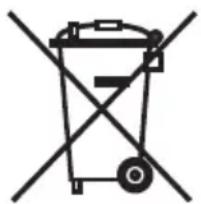
Symbol of a trash bin with no text or labelsAttention: The EU Directive 2002/96/EC governs the proper return, handling and recycling of used electronic appliances. Old electronic appliances must therefore be disposed of separately. Never dispose of this device in normal domestic waste! You can hand in your old device free of charge at designated collection points or to your dealer if you buy a similar new device.
Additional details about return (also for non EU countries) are available from your local municipal authority.
Batteries for the remote control
natural_image
Symbol of a trash bin crossed with no text or numbers, representing waste sorting or restriction (no text present)The batteries provided contain no harmful materials such as cadmium, lead or mercury.
In accordance with the Battery Directive, used batteries should no longer be disposed of in the domestic waste. You can dispose of used batteries free of charge at the collection points in retail outlets. Your dealer will also have a collection point for used batteries.
Imprint
All rights reserved including translation.
Subject to changes. The basic functions of the particular appliance are described in these instructions - not the optional upgrading. We do not give any guarantee that all the functions described in these instructions are compatible with the software type used in your appliance. Please contact your specialist retailer for all such matters.

Introduction
Cher client,
natural_image
Symbol of a trash bin crossed with no text or labelsnatural_image
Symbol of a trash bin crossed with no text or numbers, representing waste sorting or disposal (no text present)TV Loewe (Chassis SL1xx)
natural_image
Symbol of a trash bin crossed with no text or labelsnatural_image
Symbol of a trash bin crossed out by two diagonal lines, representing no waste or restriction (no text present)natural_image
Symbol of a trash bin with no text or labelsnatural_image
Symbol of a trash bin crossed with no text or numbers, representing waste sorting or restriction (no text present)natural_image
Symbol of a trash bin crossed with no text or labelsnatural_image
Symbol of a trash bin crossed with a diagonal line, representing no waste or discharge (no text or labels)natural_image
Symbol of a trash bin crossed with no text or numbers, representing environmental restriction (no text present)natural_image
Symbol of a trash bin crossed with no text or numbers, representing no waste or elimination (no text present)natural_image
Symbol of a trash bin crossed with no text or labelsnatural_image
Symbol of a trash bin with no text or labelsnatural_image
Symbol of a trash bin with no text or labelsnatural_image
Symbol of a trash bin crossed with no text or numbers, representing waste sorting or disposal (no text present)No.8 Jinghu Rd Xinhua St Huadu Reg GZ PRC
1e+86(0)20 226/5666
Fax 186-020-22675777
E-mail: service@Icewe mg.com
Xiamer Lenoite Investment Co. Ltd
26F 34 Xinglin Bay Operation Center,
No./78 xinglinwan Avenue,
Jim District, Xiamon, Fujian, PRC
Tel: 86-700 088 1566
E-mail: service@leowe-tnt.com

Hadjikyriakes & Sers 1c.
121 Prodromos Str., P.O Box 2:587
1511 Necasia, Cyprus
Tel: 357-22872111
Fax +357 - 22 66 33 91
E-mail:savvas@hadjikyriakos.com.cy

52Sys CS s.r.o
Secorrkova 14/8/8
10200 Praha 10 - Hoslivar.
Česká republika
Tel: 420 234 706 700
Fax +420 234 706 701
Customer Care Center
ndustr estraße 11
02:30 Espoo, Finland
Tel +35894/850900
www.celeuroparts.fi

Loewe UK Limited
1st Floor, 237A Kensington High S.
London
W8 6SA, UK
Tel +44 - (0) 207 368 1100
Fax +44 - (C) 207 368 1101
E-mail: enquir es@ioewe-uk.com
Issagog «i Emberiki E ados S.A.
321 Mesog on Av.
152 31 Chalandri Athens, Hellas
Tel+30 2106721200
Fax+30 2106/40204
E-mail:christina_argyrepoulou@ise-bel.gr

Plug&Play Ltd
Bednjarska 8, 10000 Zagreb
Hrvatska (Kroatia)
|e|+38514929683
Fax 1385 4929 682
+ mail: info@loewe.hr

Loewe Italiana S.r.
Via Monte Balco. 14/P - 14/N
Clear electronic entertainment Ltd
13 Noah Mozes St.
Agish Ravac Building
Tel Aviv 6/442 Israel
Tel +9/2-3-6091100
Fax 1972-3-6092200
F-mail: info@loewe.co.i
Service
IND
Vorplus Ultra Home Automation Pvt Ltd
First Floor. No. 615, Second Mar Road
Indiranagar Stage I. Indiranagar
Bergalore 560038
India
To -91804214599
E-mail: jimmy@nplusl.tra.in
IR
Pars Rova Taramosh
_OEWE Gallery
3 Sharati S.. Opp. Schell St.
P.O Box 1914965537
Tenan, ran
Te -98 21 22391661
E-Mail:info@tarameshgroup.com\~
JOR
ACCU-TECH Solutions Co.
1-Kharla A-Ashja'l Street
Jabal Al-We oder
P.O Box 9668 Arman 2291 Jordan
Te: +962-6-465-9985
Tax:-962-6-465-0119
- Mall:info@acoutech solutions.net
KSA
_OEWE Show Room
Olaya Street, Near Kingdom Center
RIYADH, SAUDI ARABIA
P.O Box 92831 Riyadh 11663
1e-96611464092
ax+965-11-4640759
= mail: hkk, kjian@gmail.com
LV
Kpertners, SIA
A.Čaka iela 80
© by Loewe Technologies 24.04.15
PL
3LOGIC Sp.z.c.o.
ul. Zakopiańska 153
30-435 Kraków
Tel +48 - 12 640 20 00
Fax +48 - 12 640 20 01
www.3logic.pl
RI
V2 Indonesia
btn Intiland tower
J. Jendera Sudirman 32
Jakarta 10220. INDONESIA
Tel: +62-2157853547
E-mail: service@v2indonesia.com
RL
I Centro SAL
Cemmaizeh. Rme
Building 328 1st Floor Beirut Lebanon
Tel +9611446777 / 1587446
Fax+9611582446
E-mail: info@icontrol-leb.com
RUS
Service Center | oewe
Ap.eksarsky per 4 podjezd 5A
105005 Moscow, Russia
Tel 17-4999404232 (exl.454)
Fax 17-4957307801
E-mail: service@ocwc-cis.ru
s
EET Europarts AB
Locwe Sweden
Box 4124
11 changi south street 3
03-01 builders centre
Singapore 486122
Tel +65 - 6745 2028
Fax +65 - 6546 7861
E-mail: service@atlas-sv.com
TR
ENKAY GROUP
SERV SPLUS MUSTERI HIZMETLERİ
Alemcag Cao. Site Yolu No:18
Umrariye, Istanbul, TÜRKİYE
1e14444784
E-mail: irfo@servisplus.com.br
UAE
Dubai Audio Center
P.O. Box 32836. Sheikh Zayed Road
Dubai UAE
Tel: 1971-43431441
Fax +971- / 343 77 48
E-mail: service@duba.audio.com
ZA
Volco Enterprise Close Corporation
Unit 8
7 or Mastiff (Roac)
Longlake Ext 1. Lingoro Business Park
2165 Johannesburg
1el+2/116081228
Fax 12711608740
E-mail: v63@mweb.co.za
[Non-Text]
[Non-Text]
![LOEWE Assist Easy - [Non-Text] - 1](/content/2026/04/607431/images/93d5e446011c698c325f614faabb1346fc7902202787c4df5db1ef6f23c99e71.jpg)