
Speaker 2go - Loudspeaker LOEWE - Free user manual and instructions
Find the device manual for free Speaker 2go LOEWE in PDF.


| Product type | Portable Bluetooth speaker |
| Brand | Loewe |
| Model | Speaker 2go |
| Dimensions (W x H x D) | 240 x 105 x 51 mm |
| Weight | 1.3 kg |
| Power supply | 110-240 V, 50/60 Hz, 12V DC/2.0A power supply included |
| Battery | Li-polymer, 2 x 1250 mAh, 7.4 V, battery life 8 h, charging 3 h |
| Wireless connectivity | Bluetooth 2.4 GHz (A2DP, aptX, AVRCP, HFP), NFC (Easy Pairing) |
| Wired audio input | AUX IN (3.5 mm stereo jack) |
| USB charging for external devices | USB 2.0 Type A, 500 mA |
| Audio output power | 40 W total (music) / 20 W (sinus) |
| Frequency response | 80 Hz - 20 kHz |
| Speakers | 2 full-range speakers, 1 bass reflex speaker |
| Hands-free function | Yes, with built-in microphone |
| Table Stand Flex | Adjustable listening angle with notches |
| Operating temperature | 5 °C to 40 °C |
| Operating humidity | 30 % to 85 % (without condensation) |
| Standby power consumption | ≤ 0.5 W |
| Package contents | Speaker 2go, power supply, 3.5 mm audio cable, carrying case, instruction manual |
| Battery warranty | Battery subject to wear, not replaceable by user |
| Care and cleaning | Soft damp cloth without detergent or abrasive |
| Safety | Do not expose to moisture, do not obstruct air circulation, avoid extreme volumes |
Frequently Asked Questions - Speaker 2go LOEWE
User questions about Speaker 2go LOEWE
0 question about this device. Answer the ones you know or ask your own.
Ask a new question about this device
Download the instructions for your Loudspeaker in PDF format for free! Find your manual Speaker 2go - LOEWE and take your electronic device back in hand. On this page are published all the documents necessary for the use of your device. Speaker 2go by LOEWE.
USER MANUAL Speaker 2go LOEWE
natural_image
Black LOEWE-branded electronic device with visible grille and sound grille (no text or symbols on body)Bedienungsanleitung, Operating instructions, Mode d'emploi, Istruzioni per l'uso, Instrucciones de manejo, Gebruiksaanwijzing, Betjeningsvejledning, Käyttöohje, Bruksanvisning
Speaker 2go - 3 -
Bedienungsanleitung
Inhaltsverzeichnis
natural_image
Line drawing of a rectangular electronic device with a lid and base (no text or symbols)natural_image
Symbol of a trash bin crossed with no text or labelsnatural_image
Diagram showing a device with an arrow pointing to a component, no text or symbols present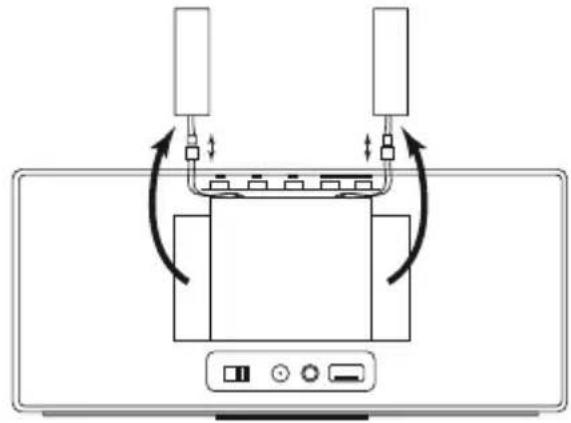
natural_image
Diagram of a device with two connectors and a central display panel, showing bidirectional arrows indicating movement or connection (no text or symbols present)Akkus und Batterien

natural_image
Symbol of a trash bin crossed out by two crossed lines, representing no waste or restriction (no text present)“© 2012 CSR plc and its group companies.”
The aptX® mark and the aptX logo are trade marks of CSR plc or one of its group companies and may be registered in one or more jurisdictions."

Operating instructions
Table of contents
WELCOME!......18
Delivery specification....18
About this instruction manual 18
Performance....18
For your safety....19
Control elements ......21
Start-up 22
Charging the built-in battery 22
Switching on....22
Switching off....22
Cable connection....23
Connecting the audio source via an audio cable 23
Charging the audio source 23
Bluetooth link....24
Linking the audio source via Bluetooth 24
Linking the audio source via Connectivity Easy Pairing 25
Audio playback....26
Handsfree function.... 27
Table Stand Flex 27
Technical data 28
Legal details....28
Environmental protection 29
Battery 30
Legal information....30
Conformity / Manufacturer's declaration ....30
Speaker 2go - 18 -
Operating instructions
WELCOME!
Thank you
for choosing a Loewe product!
Loewe stands for the highest standards of technology, design and user friendliness. This applies equally for TV, video, audio and accessories. Neither technology nor design is an end in itself, but both are intended to provide our customers with the best possible audio and visual experience. Our design is not influenced by short-term, fashionable trends. You have, after all, purchased a high-quality piece of equipment that you do not want to be tired of tomorrow or the day after.
Delivery specification
- Speaker 2go
- Power adaptor
• Audio cable, 3.5 mm jack - Carrying bag
• This instruction manual
About this instruction manual
The information in these instructions refer to the product Loewe Speaker 2go (part no. 52231xxx).
For best results regarding safety and the longevity of the set, we recommend you read the chapter "For your safety" before switching it on for the first time (page 19).
Performance
Connection options
Bluetooth 2.1 + EDR
Connectivity Easy Pairing (for connection with NFC-enabled devices)
USB charging function for external devices
Socket for power adaptor
AUX IN stereo audio input 3.5mm jack
Replay functions
Playing audio files (aptX, SBC)
Bluetooth handsfree equipment
Speaker 2go - 19 -
Operating instructions
For your safety
For your safety, and to avoid unnecessary damage to your unit, please read and follow the safety instructions below:
Intended use and ambient conditions
This device is intended exclusively for rendering audio signals. It must not be used in rooms with a high level of humidity (e.g. bathroom, sauna) or a high dust concentration. The manufacturer's warranty is only valid for use in the specified permissible environment.
If the unit is used outdoors, make sure that it is protected from moisture (rain, dripping water and splashing water or dew). High humidity and dust concentrations lead to leakage currents in the device. This can result in a shock hazard by touching it or even fire.
If you have moved the unit out of the cold into a warm environment, leave it switched off for about an hour because of a possible formation of condensation.
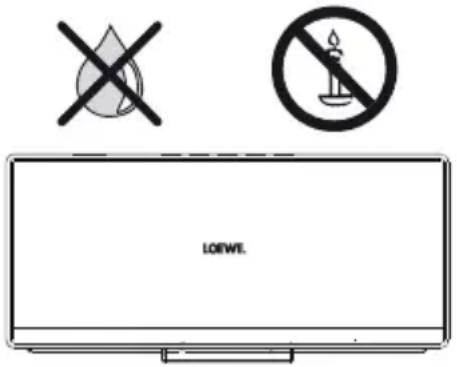
Do not place objects containing liquids on top of the unit. Protect the device against dripping and splashing water.
Candles or naked flames must be kept away from the unit at all times to prevent it from catching fire.
Never place the device in a location where it is exposed to vibrations. This can lead to material overload.
Power supply
Incorrect voltages can damage the unit. This device may only be connected to a power supply with the voltage and frequency indicated on the type plate using the supplied power adaptor. The power adaptor of the unit must be easily accessible so that the device can be disconnected from the mains at any time. When unplugging the power adaptor from the mains, pull at the adaptor body and not at the cable.
Lay the connecting cable so that it cannot be damaged. The connecting cable may not be kinked or laid over sharp edges, stood on or exposed to chemicals; the latter also applies to the unit as a whole. A power adaptor with damaged insulation can cause electric shocks and poses a fire risk.
Supervision
Do not allow children to use the device without supervision or to play in the immediate vicinity of the device. The device could tip over, be pushed off or pulled down from the stand surface and injure someone. Do not allow the switched-on device to run unattended.
Speaker 2go - 20 -
Operating instructions
For your safety
Air circulation and high temperatures
Ensure that there is at least 3 cm free space on the sides and above the set for air circulation, if the set is placed in a cabinet or on a shelf.
Like any electronic device, your unit requires air for cooling. Obstruction of the air circulation can cause fires.
Prevent metal items, needles, paper clips, liquids, wax, or similar items, from getting into the interior of the device through the openings of the device covers. Such objects can cause short circuits in the unit, which could possibly cause a fire.
If something should get into the interior of the set then immediately unplug the mains plug of the device and contact the field service for more information.
Set-up
Place the unit on an even, firm, horizontal surface. Particularly ensure that the set does not protrude to the front when placed in or on pieces of furniture.
Set up the device where it is not exposed to direct sunlight and where it is not exposed to additional heating by radiators.
Volume
Loud music can lead to ear damage. Avoid extreme volume especially over long periods.
Thunder storms
In the event of a thunderstorm, pull out the mains plug and all connected cables from the device. Overvoltage caused by lightning strokes can damage the device via the mains. The mains plug and all connected cables should also be pulled out during long periods of absence.
Repairs and accessories
Warning: To rule out the danger of an electric shock, do not remove the cover. There are no parts inside the unit that can be repaired by the user. Have your device repaired or serviced by authorised technicians only.
Only use original accessories, if possible.
Cleaning and care
i Switch off the device with the main switch prior to cleaning.
Clean the device with a soft, moist, clean and colour-neutral cloth only, without any aggressive or scouring cleaning agents.
Speaker 2go - 21 -
Operating instructions
Control elements

natural_image
Line drawing of a rectangular electronic device with buttons and display (no text or symbols)
natural_image
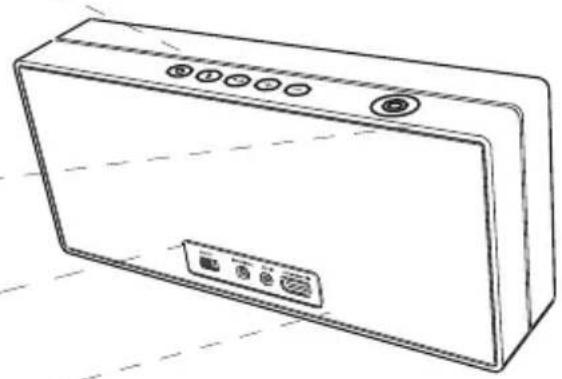
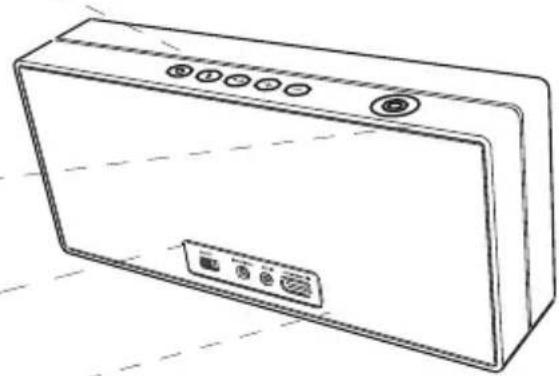
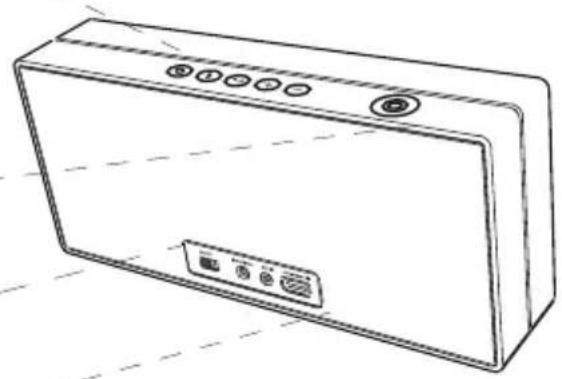
Line drawing of a rectangular electronic device with a label pointing to its front panel (no text or symbols on the device itself)1 Switch on/off to standby mode
② LED indicator (power / charge state)
3 Bluetooth key
4 LED indicator (Bluetooth)
5 Key for handsfree talking
6 LED indicator (handsfree talking)
⑦ +/- Adjust the volume
8 LED indicator (volume/mute)
9 Microphone for handsfree talking
10 Connectivity Easy Pairing Antenna (for connection with NFC-enabled devices)
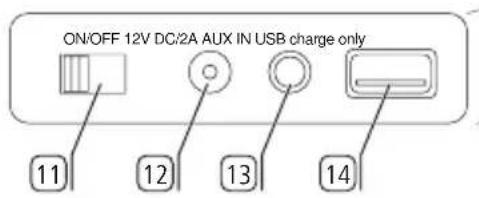
11 ON/OFF - Battery slide switch
12 12V DC/2.0A - Socket for power adaptor
13 AUX IN - Stereo audio input 3.5mm jack
14 USB charge only - USB socket for charging external audio sources
15 Table Stand Flex - Listening angle adjustable by latching
Speaker 2go - 22 -
Operating instructions
Start-up
Charging the built-in battery
The battery in the device is already installed ex factory. Before the first use, the battery must be charged for about 3 hrs. With a fully charged battery the Speaker 2go is operational for about 8 hrs.
Insert the plug (S) into the socket 12 at the rear side of the Speaker 2go. Then plug the power adaptor (N) into a 110-240V 50/60Hz mains socket.
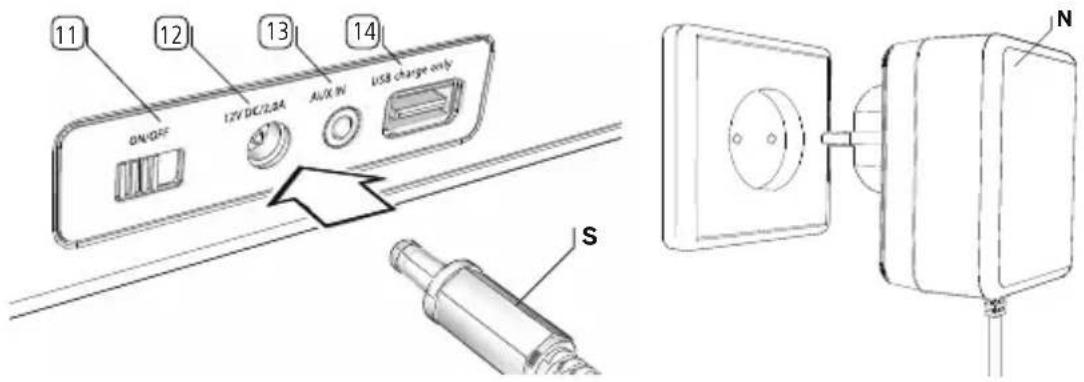
The battery charge level is shown by the LED indicator ^2 .
LED pulsing red: Device standby, charging battery
LED pulsing white: Device standby, battery fully charged
LED lights up white: Device switched on
Switching on


Set the slide switch 11 to the ON position.
Turn on the Speaker 2go using the key①. The LED indicator ② lights up.
During battery operation the battery capacity level is shown by the LED.
Battery capacity more than 25%: LED lights up white.
Battery capacity 11% to 25%: LED lights up red.
Battery capacity 5% to 10%: LED blinking red.
Battery capacity is below 5%: Speaker 2go switches off (safety buffer).
Switching off

Switch the Speaker 2go to the standby mode using the key①.
The LED indicator ② goes off.
After 10 minutes without audio playback or key operation, the Speaker 2go automatically switches to standby mode.

When the speaker is not used for a longer time and before a transport, set the sliding switch ^11 to the OFF position.
Speaker 2go - 23 -
Operating instructions
Cable connection
Connecting the audio source via an audio cable
You can connect your Speaker 2go to your audio source, e.g. mobile phone, music player, etc., using an audio cable with 3.5mm jack plug (included in the set of equipment supplied).
Use the audio cable (S) with 3.5mm jack plug to connect the analogue stereo audio output of your audio source (A) with the AUX IN stereo audio input of the Speaker 2go.
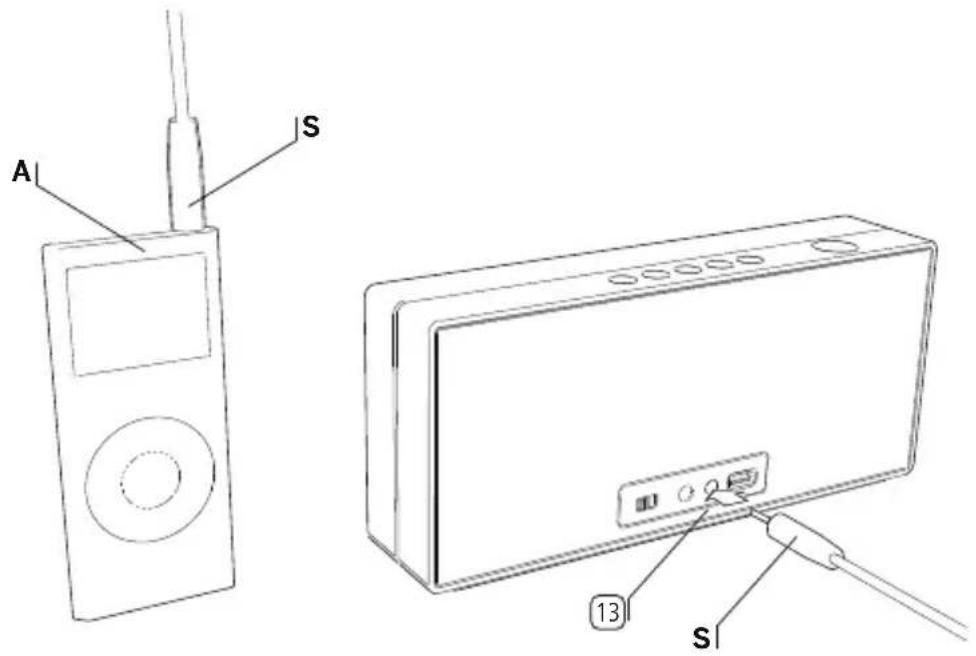
The audio signal (page 26) is now replayed via the audio cable.
Charging the audio source
You may charge the battery of your audio source, e.g. a mobile phone, via your Speaker 2go. To do so, use an USB cable with type A jack plug (available from your dealer) suitable for your audio source.

Insert the type A plug of the USB cable into the USB socket ^14 USB charge only of the Speaker 2go.
With power adapter, charging will take place independent on setting of sliding switch 11. Without power adapter, charging function is only activated with sliding switch 11 at ON position.
If the battery capacity of the Speaker 2go is below 25%, external devices will no longer be charged.
Speaker 2go - 24 -
Operating instructions
Bluetooth link
Linking the audio source via Bluetooth
You can link your Speaker 2go to an audio source, e.g. smartphone, tablet PC, etc. using a wireless Bluetooth connection. The audio sources must support the Bluetooth A2DP protocol.
i The distance between your Speaker 2go and the audio source must be no more than 10m (line of sight).
i Up to 5 audio sources can be memorized by the Speaker 2go via Bluetooth. However, only one active connection is possible at a time.

Press the key ③ on the Speaker 2go for a long period (approx. 3 sec).
You hear a signal tone. The LED indicator④ (Bluetooth) will flash.
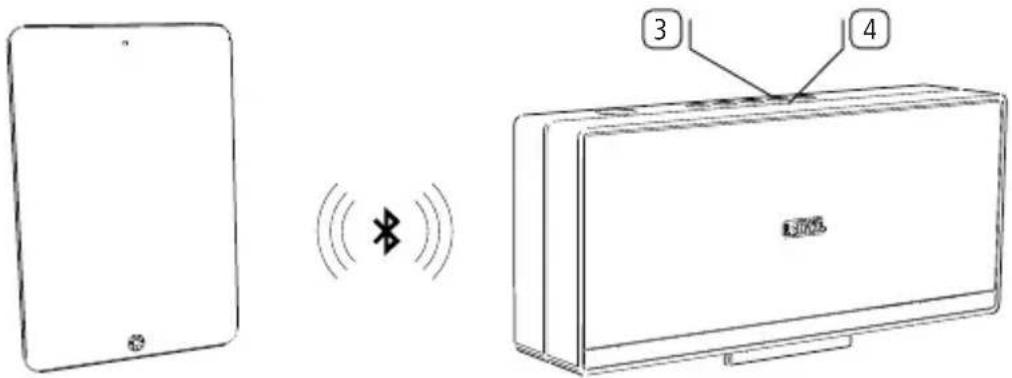
Enable the Bluetooth function of your audio source. If necessary, get help from the instruction manual of your audio source.
If necessary, confirm the Bluetooth Search function of the audio source.
Now, Bluetooth devices will be searched near the audio source.
Select Speaker 2go.
If a code is requested, enter 0000.
After the linking is completed you hear a signal tone. The LED indicator ^4 lights up permanently; the Speaker 2go is now ready for audio playback (page 26).
For some audio sources, the link must be explicitly enabled before music playback can be heard from the Speaker 2go.

When switching the speaker 2go to standby using the① key, the audio source will be delinked.
After switching the Speaker 2go on again using the ① key, the Speaker 2go tries to link to the audio source. In this situation the LED (Bluetooth)④ pulses.
After successful linking the LED ^4 will light up permanently.
Speaker 2go - 25 -
Operating instructions
Connectivity Easy Pairing Link
Linking the audio source via Connectivity Easy Pairing
It is very simple to link your Speaker 2go to your audio source, e.g. smartphone, tablet PC, etc., when using the Connectivity Easy Pairing function (linking with NFC-enabled devices). For this purpose, the audio source must support the NFC function.

Enable the NFC function and the Bluetooth function of your audio source. If necessary, get help from the instruction manual of your audio source.
Hold your audio source (A) in the direction of the Connectivity Easy Pairing antenna 10 of the Speaker 2go.
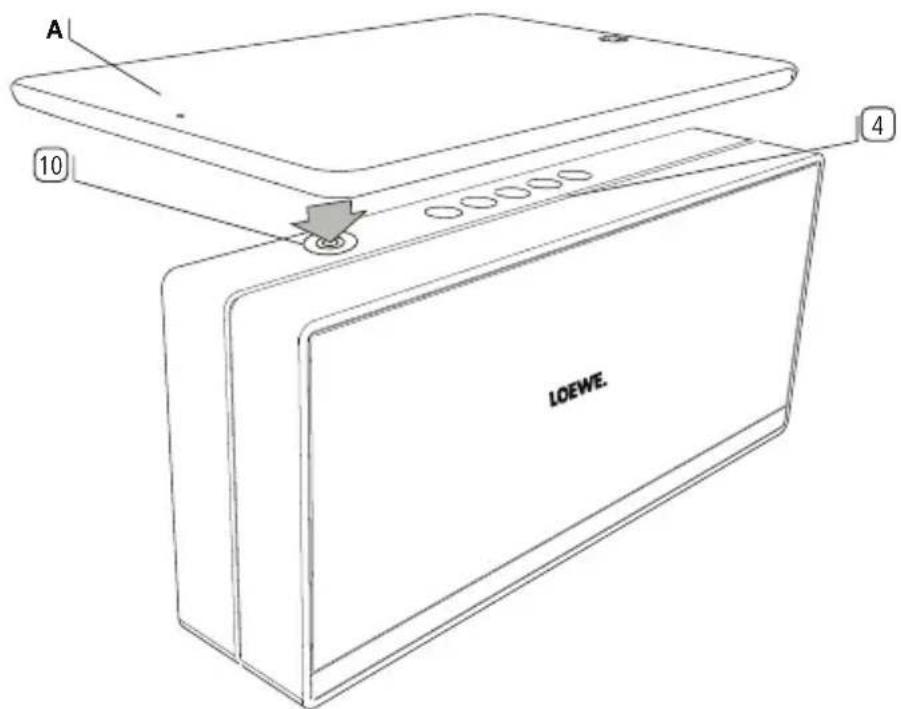
If necessary, confirm the request of your audio source for linking to the Speaker 2go.
After the linking is completed you hear a signal tone. The LED indicator 4 (Bluetooth) lights up permanently.
Now, the Speaker 2go is linked to your audio source via Bluetooth and is ready for audio playback (page 26).
For some audio sources, the link must be explicitly enabled before music playback can be heard from the Speaker 2go.
Speaker 2go - 26 -
Operating instructions
Audio playback
Audio playback
The Speaker 2go must be linked via Bluetooth (page 24) or Connectivity Easy Pairing (page 25) or connected via audio cable (page 23) to your audio source and turned on (page 22).
For playback, the following sequence applies: Handsfree operation prior to Bluetooth audio playback prior to wired playback. This means that playback of audio content via the audio cable is only possible when audio content is neither played back from a device linked via Bluetooth nor via the integrated handsfree equipment.
Start the audio playback on your audio source.

When using an audio cable connection (page 23) adjust the volume of your audio source to a high level and select the desired volume on the Speaker 2go to avoid interfering noise.

Adjust the volume on the Speaker 2go with the +/- keys ⑦. The volume can be adjusted in 24 steps which are represented visually by six LEDs of the LED indicator ⑧ (volume).
Pressing briefly the +/- key⑦ increases or decreases the volume by one step. When keeping the + or - key pressed you traverse the whole volume range. The maximum volume is indicated by two flashes of all six LEDs with full brightness.
i Loud music can lead to ear damage. Avoid extreme volume especially over long periods.

Mute the Speaker 2go by pressing the + and - keys ⑦ simultaneously. All six LEDs of the LED indicator ⑧ (volume) flash with full brightness, all other LEDs are dimmed. By pressing the + or - key ⑦ the muting is cancelled. The LED indicator shows the original volume again.
Speaker 2go - 27 -
Operating instructions
Handsfree function
Table Stand Flex
Handsfree function
The Speaker 2go must be switched on and linked via Bluetooth (page 24) or Connectivity Easy Pairing (page 25) to your mobile phone.
In case of an incoming call, a ring tone sounds. The LED indicator ^6 (handsfree talking) flashes. An audio playback will be paused in this case.

Answer the incoming call by pressing the key 5 on the speaker 2go or the corresponding key on your mobile phone.
The LED indicator ⑥ lights up (handsfree talking).
When speaking turn your face to the top⑨ of the Speaker 2go.

Adjust the volume on the Speaker 2go with the +/- keys (see also page 26).

Finish the telephone conversation by pressing again the key 5 on the Speaker 2go or the corresponding key on your mobile phone.
i Loud ambient noise impairs the quality of the handsfree function. Make sure there is a quiet environment or abstain from using the handsfree function if there is no proper environment.
To achieve a high level of intelligibility between callers, speak only alternately. The distance between the caller and the Speaker 2go should be between 0.3m and 1.2m.
Table Stand Flex
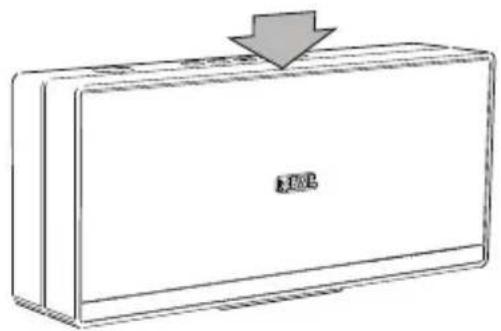
The Table Stand Flex ^15 allows you to change the pitch of Speaker 2go and thus the angle of audio beam. For adapting the pitch, press the central top of Speaker 2go.

natural_image
Line drawing of a rectangular electronic device with a lid and base (no text or symbols)i Adapting the pitch works on solid, plain surfaces only.
| Speaker 2go - 28 - |
| Operating instructions |
| Technical data |
Technical data
| Speaker 2go part no. 52231xxx | |
| Operating temperature 5 °C ... 40 °C | |
| Humidity 30 % ... 85 % (no condensation) | |
| Dimensions (approximate) 240 x 105 x 51 mm (W x H x D) | |
| Weight 1.3 kg | |
| Mains voltage 110 - 240V, 50/60Hz | |
| Max. power consumption 24 W | |
| Standby power consumption <= 0.5 W | |
| Built-in rechargeable battery Li-polymer, 2 x 1250mAh, 7.4V | |
| 12V DC/2.0A Socket for supplied power adaptor | |
| USB 2.0, type A, charging function, 500mA | |
| AUX IN 3.5mm jack, 1.0Vrms, 10k Ohm | |
| Fitting | 2 full-range speakers, 1 bass reflex speaker |
| Transmission range | 80Hz to 20kHz |
| Output power (music/sine): | 40W overall (2x10W + 20W) / 20W overall (2x5W + 10W) |
| Wireless transmission | Bluetooth 2.4GHz, 10m transmission range NFC |
| Bluetooth protocols | A2DP, 2.1+EDR, AVRCP 1.4, HS, HFP 1.6 (Wideband Speech), aptX decoder, AEC |
Legal details
Loewe Technologies GmbH Editorial date 12/15-3.1 TB Industriestraße 11 © Loewe Technologies GmbH, Kronach D-96317 Kronach
All rights including translation, technical modifications and errors reserved.
Speaker 2go - 29 -
Operating instructions
Environmental protection
Environmental protection
Cardboard box and packaging
In line with national regulations regarding the disposal of packaging materials, we pay a fee to authorised recyclers who collect packaging from dealers. Nevertheless, we recommend that you keep the original cardboard box and the rest of the packaging materials so that the device can, if necessary, be transported under the safest possible conditions.
The device

natural_image
Symbol of a trash bin crossed with no text or labelsAttention: The EU Directive 2002/96/EC governs the proper return, handling and recycling of used electronic appliances. Old electronic devices must therefore be disposed of separately. Never dispose of this device in normal domestic waste! You can hand in your old unit free of charge at identified collection points or to your dealer if you buy a similar new unit.
Other details about return (also for non-EU countries) are available from your
local authorities.
Before disposing of the device, please remove to the two built-in batteries and dispose of them separately.
To open the device, use a pointed object with which you lever out the grille on the rear panel, remove the two batteries and disconnect the cables.

natural_image
Diagram showing a device with an arrow pointing to a screen, no text or symbols present
natural_image
Diagram of a device with two connectors and a central connector, showing bidirectional arrows indicating movement or connection (no text or symbols present)Batteries

natural_image
Symbol of a trash bin crossed with no text or numbers, representing no waste or disposal (no text present)The built-in battery does not contain any pollutants such as cadmium, lead, or mercury.
In accordance with the Battery Directive, used batteries should no longer be disposed of in the domestic waste. You can dispose of used batteries free of charge at the collection points in retail outlets. Your dealer will also have a collection point for used batteries.
| Speaker 2go - 30 - |
| Operating instructions |
| Battery |
| Legal information |
Battery
The rechargeable batteries are consumables and therefore not covered by the warranty. Customers are not allowed to replace defective rechargeable batteries. In case of a defective rechargeable battery please contact your dealer.
CAUTION: Danger of explosion if Li-polymer battery is incorrectly replaced (reverse polarity / short circuit). Replace rechargeable battery only with the same or equivalent type.
Legal information
“© 2012 CSR plc and its group companies.
The aptX® mark and the aptX logo are trade marks of CSR plc or one of its group companies and may be registered in one or more jurisdictions."

Conformity / Manufacturer's declaration

Loewe Technologies hereby declares that this product meets the essential requirements and other relevant provisions of Directive 1999/5/EC and all applicable EU directives.
You can find the complete declaration of conformity in the product selection at:
www.loewe.tv/int/my-loewe
Speaker 2go - 31 -
Charger la source audio....37
Couplage Bluetooth....38
Couplage de la source audio via Bluetooth 38
Couplage de la source audio via Connectivity Easy Pairing 39
Lecture audio....40
Raccordements possibles
Bluetooth 2.1 + EDR
Connectivity Easy Pairing (pour connecter des dispositifs NFC)
natural_image
Line drawing of a rectangular electronic device with buttons and a control panel (no text or symbols)
natural_image
Line drawing of a rectangular electronic device with a label pointing to its side (no text or symbols on the device itself)
natural_image
Line drawing of a rectangular electronic device with a label 'R100' on the front panel (no other text or symbols)natural_image
Symbol of a trash bin crossed with no text or labelsnatural_image
Diagram showing a device with an arrow pointing to it, no text or symbols present
natural_image
Diagram of a device with two connectors and a central battery pack, showing bidirectional arrows indicating internal connections (no text or symbols present)Batteries et piles

natural_image
Symbol of a trash bin crossed with no text or numbers, representing environmental restriction (no text present)“© 2012 CSR plc and its group companies.”
The aptX® mark and the aptX logo are trade marks of CSR plc or one of its group companies and may be registered in one or more jurisdictions."


natural_image
Line drawing of a rectangular electronic device with buttons and a control panel (no text or symbols)
natural_image
Line drawing of a rectangular electronic device with a label pointing to its base (no text or symbols on the device itself)
natural_image
Line drawing of a rectangular electronic device with a lid and base (no text or symbols)natural_image
Symbol of a trash bin crossed with no text or labelsnatural_image
Diagram showing a device with an arrow pointing to a battery pack inside a laptop (no text or symbols present)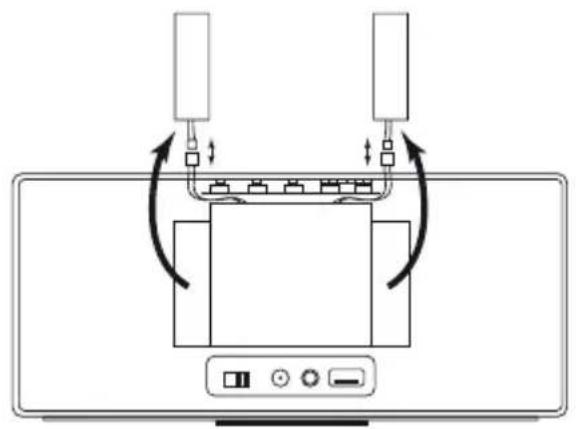
natural_image
Diagram of a device with two connectors and internal components, showing bidirectional arrows indicating connection (no text or symbols)natural_image
Symbol of a trash bin crossed with no text or labelsTable Stand Flex....69
Datos técnicos....70
Aviso legal....70

natural_image
Line drawing of a rectangular electronic device with buttons and a control panel (no text or symbols)
natural_image
Line drawing of a rectangular electronic device with a label pointing to its base (no text or symbols on the device itself)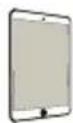
natural_image
Line drawing of a rectangular electronic device with a lid and base (no text or symbols)natural_image
Symbol of a trash bin crossed with no text or labelsnatural_image
Symbol of a trash bin crossed with a diagonal line, representing no waste or discharge (no text or labels)“© 2012 CSR plc and its group companies.”
The aptX® mark and the aptX logo are trade marks of CSR plc or one of its group companies and may be registered in one or more jurisdictions."


natural_image
Line drawing of a rectangular electronic device with buttons and display panel (no text or symbols)
natural_image
Line drawing of a rectangular electronic device with a label pointing to its base (no text or symbols on the device itself)
Selecteer Speaker 2go.
Connectivity Easy Pairing-koppeling
Audiobron via Connectivity Easy Pairing koppelen
natural_image
Line drawing of a rectangular electronic device with a lid and base (no text or symbols)natural_image
Symbol of a trash bin crossed with a diagonal line, representing no waste or discharge (no text or labels)natural_image
Diagram showing a device with an arrow pointing to a component, no text or symbols present
natural_image
Diagram of a device with two connectors and a central display panel, showing bidirectional arrows indicating movement or connection (no text or symbols present)Accu's en batterijen

natural_image
Symbol of a trash bin crossed with two crossed lines, representing no waste or restriction (no text present)“© 2012 CSR plc and its group companies.”
The aptX® mark and the aptX logo are trade marks of CSR plc or one of its group companies and may be registered in one or more jurisdictions."

Batteriets opladningsniveau vises via LED-indikatoren ^2 .

Connectivity Easy Pairing-parring
Parring af en audiokilde via Connectivity Easy Pairing
natural_image
Line drawing of a rectangular electronic device with a lid and base (no text or symbols)natural_image
Symbol of a trash bin crossed with no text or labelsnatural_image
Diagram showing a device with an arrow pointing to a component, no text or symbols present
natural_image
Diagram of a device with two connectors and internal components, showing bidirectional arrows indicating connection (no text or symbols)Batterier
natural_image
Symbol of a trash bin crossed with no text or labels“© 2012 CSR plc and its group companies.”
The aptX® mark and the aptX logo are trade marks of CSR plc or one of its group companies and may be registered in one or more jurisdictions."

Konformitet / Producenterklæring


natural_image
Line drawing of a rectangular electronic device with buttons and display (no text or symbols)
natural_image
Line drawing of a rectangular electronic device with a label pointing to its front panel (no text or symbols on the device itself)
natural_image
Technical line drawing of a wall-mounted electrical outlet connected to a rectangular device (no text or symbols)
natural_image
Line drawing of a rectangular electronic device with a lid and base (no text or symbols)natural_image
Symbol of a trash bin crossed with no text or labelsnatural_image
Diagram showing a device with an arrow pointing to a screen and a control panel (no text or symbols)
natural_image
Diagram of a device with two cables connected to a central display unit, showing bidirectional arrows indicating signal or connection (no text or symbols present)Akut ja paristot

natural_image
Symbol of a trash bin crossed with no text or numbers, representing environmental restriction (no text present)“© 2012 CSR plc and its group companies.”
The aptX® mark and the aptX logo are trade marks of CSR plc or one of its group companies and may be registered in one or more jurisdictions."

www.loewe.tv/int/supportportal.
Speaker 2go - 115 -
Bruksanvisning
Innehåll
HJÄRTLIGT VÄLKOMMEN! 116
Bluetooth-koppling....122
natural_image
Line drawing of a rectangular electronic device with buttons and display panel (no text or symbols)
natural_image
Line drawing of a rectangular electronic device with a label pointing to the front panel (no text or symbols on the device itself)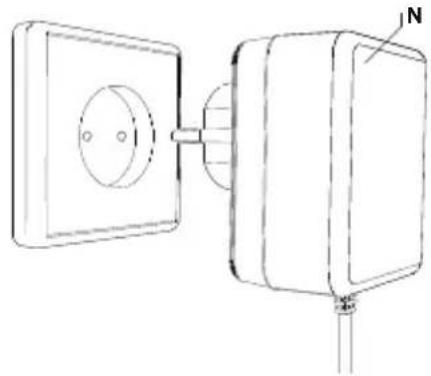
natural_image
Technical line drawing of a wall-mounted electrical outlet connected to a rectangular device (no text or symbols)Connectivity Easy Pairing-koppling
natural_image
Line drawing of a rectangular electronic device with a lid and base (no text or symbols)natural_image
Symbol of a trash bin crossed with no text or labelsnatural_image
Symbol of a trash bin with no text or labels“© 2012 CSR plc and its group companies.
The aptX® mark and the aptX logo are trade marks of CSR plc or one of its group companies and may be registered in one or more jurisdictions."

www.loewe.tv/se/supportportal
AUS
Qualifi Pty Ltd
24 Lionel Road
Mt.Waverley VIC 3149 Australia
Tel +61-03-8542 1111
Fax +61-03-9543 3677
E-mail: info@qualifi.com.au
CZ
BaSys CS s.r.o.
Sodomkova 1478/8
10200 Praha 10 - Hostivar,
Česká republika
Tel +420 234 706 700
Fax +420 234 706 701
1st Floor, 237A Kensington High St
London
W86SA, UK
Tel +44 - (0) 207 368 1100
Fax +44 - (0) 207 368 1101
E-mail: enquiries@loewe-uk.com
B NL L
Loewe Opta Benelux NV/SA
Uilenbaan 84
Customer Care Center
Industriestraße 11
No.8 Jinghu Rd. Xinhua St. Huadu
Reg. GZ, PRC
Tel +86-(0)20-22675666
Fax +86-(0)20-22675777
E-mail: service@loewe-mg.com
E
Gaplasa S.A.
Xiamen Tenote Investment Co. Ltd
26F 3# Xinglin Bay Operation Center,
No.478 xinglinwan Avenue,
Jimei District, Xiamen, Fujian, PRC
Tel +86-400 088 1566
E-mail: service@loewe-tnt.com
F
Loewe France SAS
Rue du Dépôt,
Clear electronic entertainment Ltd
13 Noah Mozes St.
Agish Ravad Building
Tel Aviv 67442, Israel
Tel +972 - 3 - 6091100
Fax +972 - 3 - 6092200
E-mail: info@loewe.co.il
CY
Hadjikyriakos & Sons Ltd.
121 Prodromos Str., P.O Box 21587
1511 Nicosia, Cyprus
Tel +357 - 22 87 21 11
Fax +357 - 22 66 33 91
E-mail: savvas@hadjikyriakos.com.cy
FIN
EET Europarts
Loewe Finland
Metsänneidonkuja 12
02130 Espoo, Finland
Tel +358 9 47 850 900
www.eeteuroparts.fi
IND
Nonplus Ultra Home Automation Pvt Ltd
First Floor, No. 615, Second Main Road
Indiranagar Stage I, Indiranagar
Bangalore 560038
India
Tel +91 80 41114599
E-mail: jimmy@nplusultra.in
IR
Pars Royal Taramesh
LOEWE Gallery
3 Shariati St. Opp. Soheil St.
P.O Box 1914965537
Tehran, Iran
Tel + 98 21-22391661
E-Mail: info@tarameshgroup.com
JOR
ACCU-TECH Solutions Co.
1-Kharija Al-Ashja'i Street
Jabal Al-Weibdeh
P.O.Box 9668 Amman 11191, Jordan
Tel: +962-6-465-9985
Fax: +962-6-465-0119
E-Mail: info@accutech-solutions.net
KSA
LOEWE Show Room
Olaya Street, Near Kingdom Center
RIYADH, SAUDI ARABIA
P.O Box 92831 Riyadh 11663
Tel +966-11-4640927
Fax +966-11-4640759
E-mail: hkkurkjian@gmail.com
LV EST
Kpartners, SIA
A.Čaka iela 80
Building 328 1st Floor Beirut, Lebanon
Tel +961 1446777 / 1587446
Fax +9611582446
E-mail: info@icontrol-leb.com
RUS
Service Center Loewe
Aptekarsky per.4 podjezd 5A
105005 Moscow, Russia
Tel +7 - 499 940 42 32 (ext. 454)
Fax +7 - 495 730 78 01
E-mail: service@loewe-cis.ru
S
EET Europarts AB
Loewe Sweden
Box 4124
11 changi south street 3
03-01 builders centre
Singapore 486122
Tel +65 - 6745 2028
Fax +65 - 6546 7861
E-mail: service@atlas-sv.com
TR
ENKAY GROUP
SERVISPLUS MUSTERI HIZMETLERI
Volco Enterprise Close Corporation
Unit 8
7 on Mastiff (Road)
Longlake Ext 1, Lingbro Business Park
2165 Johannesburg
Tel +27 11 608 1228
Fax +27 11 608 1740
E-mail: v63@mweb.co.za



- Akkus und Batterien
- WELCOME!......18
- For your safety....19
- Control elements ......21
- Start-up 22
- Cable connection....23
- Bluetooth link....24
- Audio playback....26
- Handsfree function.... 27
- Table Stand Flex 27
- Technical data 28
- Legal details....28
- Environmental protection 29
- Battery 30
- Legal information....30
- Conformity / Manufacturer's declaration ....30
- Thank you
- Delivery specification
- About this instruction manual
- Performance
- Connection options
- Replay functions
- For your safety, and to avoid unnecessary damage to your unit, please read and follow the safety instructions below:
- Intended use and ambient conditions
- Power supply
- Supervision
- Air circulation and high temperatures
- Set-up
- Volume
- Thunder storms
- Repairs and accessories
- Cleaning and care
- Charging the built-in battery
- Switching on
- Switching off
- Connecting the audio source via an audio cable
- Charging the audio source
- Linking the audio source via Bluetooth
- Linking the audio source via Connectivity Easy Pairing
- Audio playback
- Handsfree function
- Table Stand Flex
- Legal details
- Environmental protection
- Cardboard box and packaging
- The device
- Batteries
- Battery
- Legal information
- Conformity / Manufacturer's declaration
- Couplage Bluetooth....38
- Lecture audio....40
- Raccordements possibles
- Batteries et piles
- Table Stand Flex....69
- Datos técnicos....70
- Aviso legal....70
- Audiobron via Connectivity Easy Pairing koppelen
- Accu's en batterijen
- Parring af en audiokilde via Connectivity Easy Pairing
- Batterier
- Konformitet / Producenterklæring
- Akut ja paristot
- HJÄRTLIGT VÄLKOMMEN! 116
- Bluetooth-koppling....122
- AUS
- CZ
- Česká republika
- B NL L
- E
- F
- CY
- FIN
- IND
- IR
- Shariati St. Opp. Soheil St.
- JOR
- KSA
- LV EST
- RUS
- S
- 03-01 builders centre
- TR
Brand : LOEWE
Model : Speaker 2go
Category : Loudspeaker