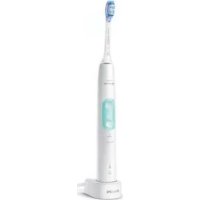
Sonicare Protect Clean HX6481 - Electric toothbrush PHILIPS - Free user manual and instructions
Find the device manual for free Sonicare Protect Clean HX6481 PHILIPS in PDF.
 FR
FR
 AZ
AZ
 BG
BG
 CS
CS
 DA
DA
 DE
DE
 EL
EL
 EN
EN
 ES
ES
 FI
FI
 HE
HE
 HU
HU
 HY
HY
 IT
IT
 KA
KA
 KK
KK
 KY
KY
 LT
LT
 LV
LV
 MK
MK
 NL
NL
 NO
NO
 PL
PL
 PT
PT
 RO
RO
 RU
RU
 SK
SK
 SL
SL
 SQ
SQ
 SV
SV
 TG
TG
 TK
TK
 UK
UK
 UZ
UZ
| Product type | Electric toothbrush |
| Brand | Philips |
| Model | Sonicare Protect Clean HX6481 |
| Dimensions (handle) | Height approx. 18 cm, diameter approx. 2.5 cm |
| Weight (handle only) | Approx. 130 g |
| Power source | Rechargeable Li-Ion battery, charging via charging station or USB travel case, input voltage 5 V DC, USB adapter included |
| Battery life | At least 28 brushing sessions of 2 minutes (14 days with twice-daily use) after full charge |
| Charging time | Up to 24 hours for a full charge |
| Brushing modes | Clean, White, Gum Care (depending on model) |
| Intensities | 3 levels: low, medium, high |
| Main features | Sonic technology, QuadPacer (4-quadrant timer), SmarTimer (auto shut-off at 2 min), EasyStart (gentle start), pressure sensor, brush head replacement reminder (BrushSync), automatic mode selection based on head |
| Pressure sensor | Yes, alerts by vibration change and orange light when pressure is excessive |
| Brush head technology | BrushSync: communication between head and handle for replacement reminder and mode selection |
| Brush head replacement | Every 3 months, or sooner if visible wear; orange indicator on handle |
| Included accessories | May vary: charger, travel case, UV sanitizer, smart brush heads |
| Care and cleaning | Handle: damp cloth; head: rinse after use; charger: unplug and wipe; sanitizer: weekly cleaning (do not immerse) |
| Safety | Automatic shut-off, excessive pressure protection, UV harmful to eyes/skin, do not use if UV bulb stays on with door open |
| Compatibility | Can be used with orthodontic appliances and dental restorations (if properly attached) |
| Warranty | International warranty, exclusions: brush heads, damage due to misuse, normal wear |
| Spare parts and repairability | Replacement brush heads available; battery not user-replaceable; recycling at end of life |
Frequently Asked Questions - Sonicare Protect Clean HX6481 PHILIPS
User questions about Sonicare Protect Clean HX6481 PHILIPS
0 question about this device. Answer the ones you know or ask your own.
Ask a new question about this device
Download the instructions for your Electric toothbrush in PDF format for free! Find your manual Sonicare Protect Clean HX6481 - PHILIPS and take your electronic device back in hand. On this page are published all the documents necessary for the use of your device. Sonicare Protect Clean HX6481 by PHILIPS.
USER MANUAL Sonicare Protect Clean HX6481 PHILIPS


natural_image
Illustration of an open book with a grid pattern on the left and a curved arrow pointing to the right (no text or symbols)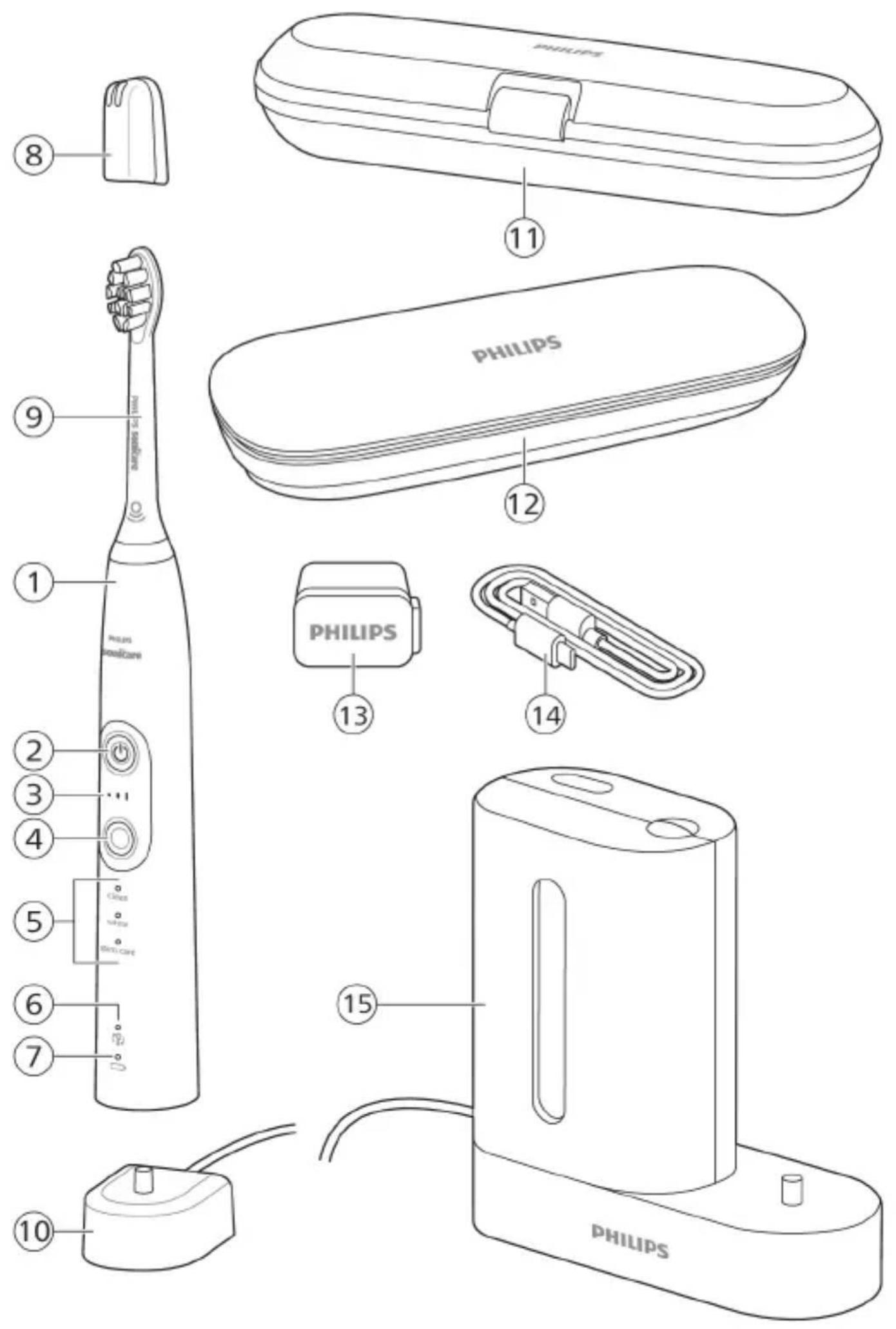
English 6
Azərbaycanca 27
Čeština 50
Dansk 72
Deutsch 94
Español 119
Français 142
Hrvatski 165
Italiano 187
Latviešu 210
Lietuviškai 232
Magyar 254
Nederlands 276
Norsk 299
O'zbek 320
Polski 343
Português 367
Română 390
Shqip 413
Slovenščina 436
Slovensky 457
Srpski 479
Suomi 501
Svenska 524
Türkmençe 546
Ελληνικά 568
Български 593
Кыргызча 617
Македонски 641
Русский 665
Точикй 690
Українська 715
Қазақша 738
Ruijtntu 761
Jusunyunn 788
הכלה 814
Introduction
Welcome to the Philips Sonicare family!
This toothbrush enables you to obtain superior plaque removal, whiter teeth and healthier gums. Using
Sonicare's combination of gentle sonic technology and clinically developed and proven features, you can be confident that you're getting the very best clean, every time.
Further support and product registration are available to you at: www.philips.com/support
Important safety information
Only use the product for its intended purpose. Read this important information carefully before you use the product and its batteries and accessories, and save it for future reference. Misuse can lead to hazards or serious injuries.
Warnings
- Keep the chargers and UV sanitizer away from water.
- After cleaning, make sure the charger and/or sanitizer is completely dry before you connect it to the wall socket.
- This appliance can be used by children and persons with reduced physical, sensory or mental capabilities or lack of experience and knowledge if they have been given supervision or instruction concerning use of the appliance in a safe way and understand the hazards involved. Cleaning and user maintenance shall not be made by children without supervision.
- Children shall not play with the appliance.
- Only use original Philips accessories or consumables. Only use the charger provided with the product. If supplied, only use the original USB cable and USB power supply unit.
-
This appliance contains no user-serviceable parts. If the appliance is damaged, stop using it and contact the Consumer Care Center in your country. Devices with cord only: If the cord is damaged, replace the charger with sanitizer with a new one.
-
Do not use the charger and/or sanitizer outdoors or near heated surfaces.
- Do not clean any part of the product in the dishwasher.
- This appliance has only been designed for cleaning teeth, gums and tongue.
- Keep the sanitizer out of the reach of children at all times.
- Stop using the sanitizer if the UV light bulb remains on when the door is open. UV light can be harmful to the human eye and skin.
- Only operate the sanitizer with the protective screen in place.
- Do not touch the UV sanitizer's UV light bulb when it is hot.
- Stop using a brush head with crushed or bent bristles. Replace the brush head every 3 months or sooner if signs of wear appear.
- Avoid direct contact with products that contain essential oils or coconut oil. Contact may result in bristles dislodging.
- Stop using the appliance and consult your dentist/doctor if excessive bleeding occurs after use, if bleeding continues to occur after 1 week of use or if you experience discomfort or pain.
- If you have had oral or gum surgery in the previous 2 months, consult your dentist before you use this appliance.
- If you have a pacemaker or other implanted device, contact your doctor or the manufacturer of the implanted device prior to use.
- If you have medical concerns, consult your doctor before you use this appliance.
- This appliance is a personal care device and is not intended for use on multiple patients in a dental practice or institution.
Battery safety instructions
- This appliance contains batteries that are only replaceable by skilled persons.
- Only use the product for its intended purpose. Read this information carefully before you use the product and its batteries and accessories, and save it for future reference. Misuse can lead to hazards or serious injuries. Accessories supplied may vary for different products.
- Only use original Philips accessories and consumables. Only use detachable supply unit TCBxxxx, HX6100, HX6110, HX6160 or WAAxxxx.
- Keep product and batteries away from fire and do not expose them to direct sunlight or high temperatures.
- If the product becomes abnormally hot or smelly, changes color or if charging takes longer than usual, stop using and charging the product and contact Philips.
- Do not place products and their batteries in microwave ovens or on induction cookers.
- Do not open, modify, pierce, damage or dismantle the product or battery to prevent batteries from heating up or releasing toxic or hazardous substances. Do not short-circuit, overcharge or reverse charge batteries.
- This appliance contains batteries that are non-replaceable. When the battery is at end of life, the appliance shall be properly disposed of, see section on recycling.
- If batteries are damaged or leaking, avoid contact with the skin or eyes. If this occurs, immediately rinse well with water and seek medical care.
- When you handle batteries, make sure that your hands, the product and the batteries are dry.
- To avoid accidental short-circuiting of batteries after removal, do not let battery terminals come into contact with metal object (e.g. coins, hairpins, rings). Do not wrap batteries in aluminium foil. Tape battery terminals or put batteries in a plastic bag before you discard them.
- Charge and use the product at a temperature between 0 °C and 40 °C (32°F and 104°F).
Storage and transportation conditions
Temperature -10°C to 60°C (14 °F to 140 °F).
Electromagnetic fields (EMF)
This Philips appliance complies with all applicable standards and regulations regarding exposure to electromagnetic fields.
Radio Equipment Directive
Hereby, Philips declares that electric toothbrushes with radio equipment type (Bluetooth, NFC) are in compliance with Directive 2014/53/EU.
- The Bluetooth radio frequency interface in applicable products operates at 2.4 GHz.
- The maximum output power by the Bluetooth appliance is 3 dBm.
- The NFC radio frequency interface in applicable products operates at 13.56 MHz.
- The maximum RF power transmitted by the appliance is 30.16 dBm.
The full text of the EU declaration of conformity is available at the following internet address:
www.philips.com/support
Note: The Features of different models may vary. Some models may not be equipped with Bluetooth or NFC.
The following symbols may appear on the product: Read Operator's Manual.

natural_image
Simple line drawing of an open book with no text or symbols visible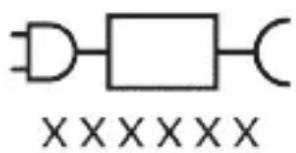
Detachable Power Supply Part: The "xxxxxx" indicates the model number of the approved chargers to be used.
Intended use
ProtectiveClean power toothbrushes are intended to remove adherent plaque and food debris from the teeth
to reduce tooth decay and improve and maintain oral health. ProtectiveClean power toothbrushes are intended for personal use. Use by children should be with adult supervision.
Your Philips Sonicare (Fig 1.)
1 Handle
2 Power on/off button
3 Intensity indicator
4 Mode/intensity button
5 Mode indicator
6 Brush Head Replacement Reminder
7 Battery indicator
Accessories:
8 Brush head cap
9 Smart brush head(s)
10 Charging base
11 Travel case
12 Charging travel case
13 USB-A wall adapter
14 USB-A cable
15 UV sanitizer and charger
Note: Accessories included may vary based on the model purchased.
Getting started
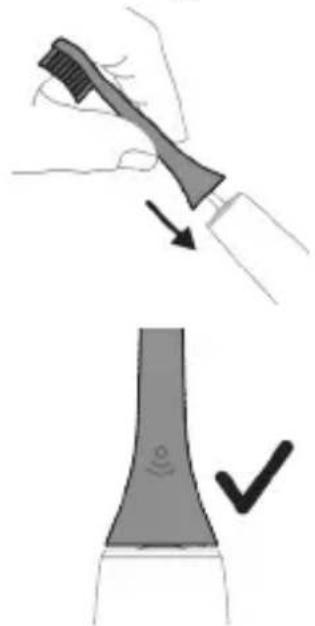
natural_image
Illustration showing a hand brushing a tooth with a brush, and a close-up of a tooth being smoothed (no text or symbols)1 Align the brush head so the bristles point in the same direction as the front of the handle.
2 Firmly press the brush head down onto the metal shaft until it will not go any further.
Note: It is normal to see a slight gap between the brush head and the handle.
Using your Philips Sonicare toothbrush
If you are using your Sonicare toothbrush for the first time, it is normal to feel more vibration than when using a non-electric toothbrush. It is common for first-time users to apply too much pressure. Only apply gentle pressure and let the toothbrush do the brushing for you. Please follow the brushing instructions below for the best experience.
To help you transition to your new Sonicare power toothbrush, use a lower setting for the first 1-2 weeks then transition to a higher setting.
Brushing instructions
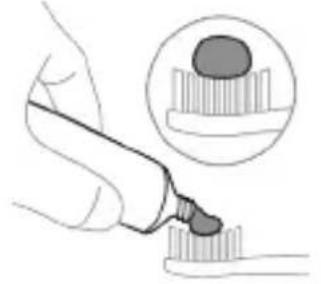
natural_image
Illustration of a hand using a pipette to apply liquid onto a surface, with an inset showing a droplet on a surface (no text or symbols present)1 Wet the bristles and apply a small amount of toothpaste.
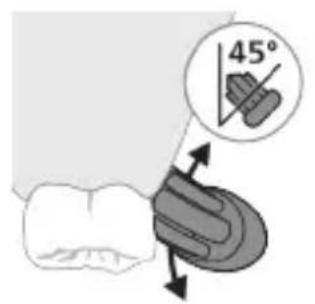
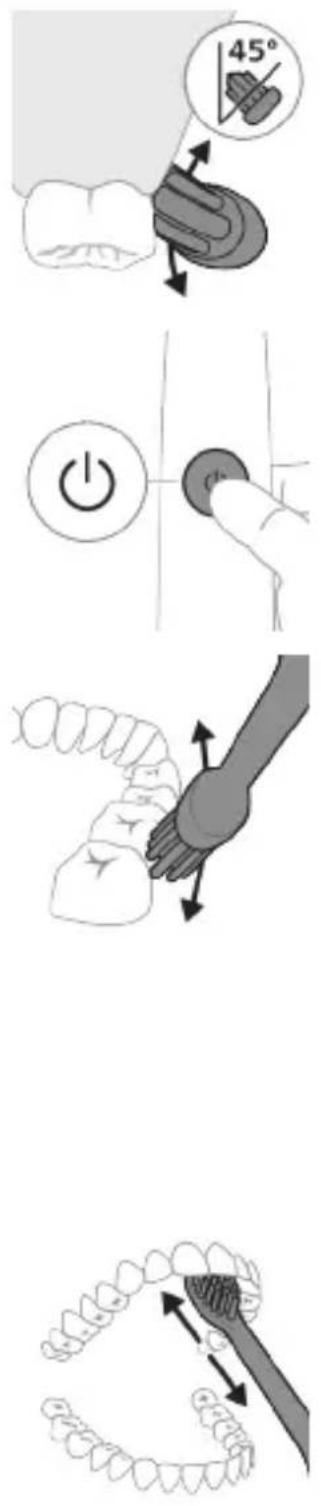
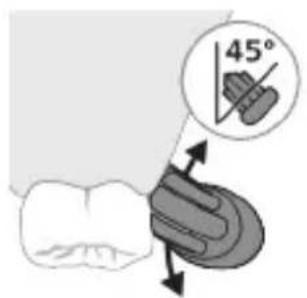
2 Place the toothbrush bristles against the teeth at a slight angle (45 degrees), pressing firmly to make the bristles reach the gumline or slightly beneath the gumline.
Note: Keep the center of the brush in contact with the teeth at all times.
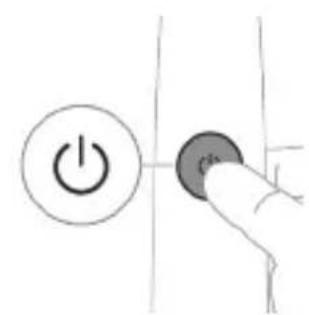
3 Press the power on/off button to switch on the Philips Sonicare.
natural_image
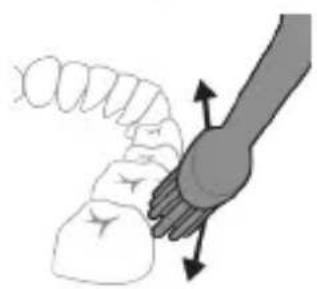
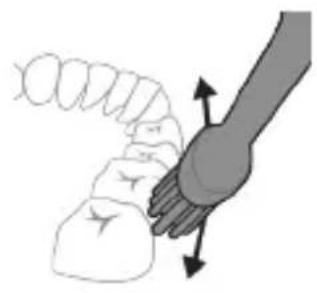
Illustration of a hand holding a segmented object with directional arrows indicating movement (no text or symbols)4 Gently keep the bristles placed on the teeth and in the gumline. Brush your teeth with small back and forth motion so the bristles reach between the teeth. Continue this motion throughout your brushing cycle.
Note: The bristles should slightly flare. It is not recommended to scrub as you would with a manual toothbrush.
natural_image
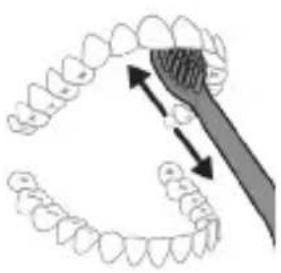
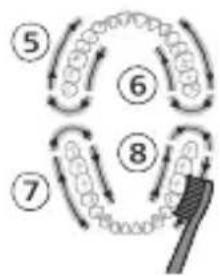
Illustration of dental arching technique showing tooth arrangement and tooth removal (no text or symbols)Note: If you apply too much pressure, you will be alerted by a change in vibration of the handle and the brush head replacement reminder flashing amber.
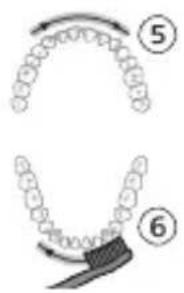
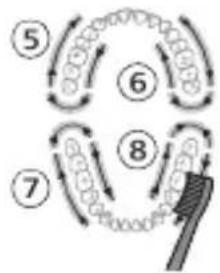
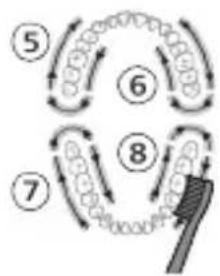
5 To clean the inside surfaces of the front teeth, tilt the brush handle semi-upright and make several vertical overlapping brushing strokes on each tooth.
6 After you have completed the brushing cycle, you can spend additional time brushing the chewing surfaces of your teeth and areas where staining occurs. You can also brush your tongue, with the toothbrush switched on or off, as you prefer.
Note: Your Philips Sonicare toothbrush is safe to use on braces (brush heads wear out sooner when used on braces) and dental restorations (fillings, crowns, veneers) if they are properly adhered and not compromised.
QuadPacer
flowchart
graph TD
    A["①"] --> B["②"]
    B --> C["③"]
    C --> D["④"]
    D --> E["③"]
    E --> F["②"]
    style A fill:#f9f,stroke:#333
    style B fill:#f9f,stroke:#333
    style C fill:#f9f,stroke:#333
    style D fill:#f9f,stroke:#333
    style E fill:#f9f,stroke:#333
    style F fill:#f9f,stroke:#333
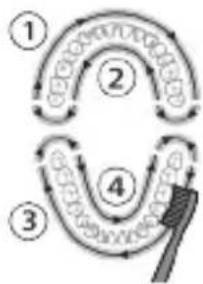
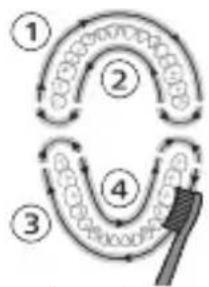
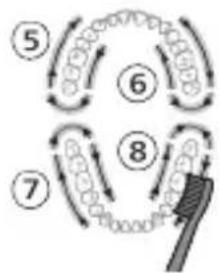
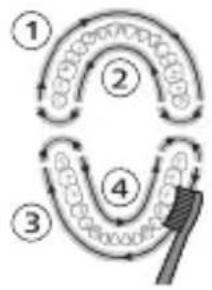
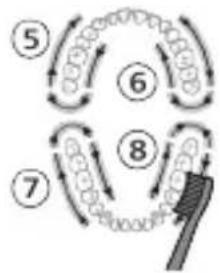
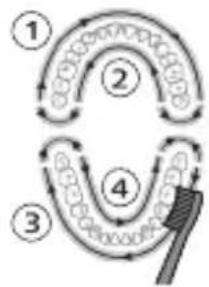
To make sure you brush evenly throughout the mouth, divide your mouth into 4 sections using the QuadPacer feature. The QuadPacer divides the brushing time into 4 equal segments and indicates when you should move to the next area. The segments are indicated with a brief pause in vibration. The toothbrush automatically stops at the end of the brushing session.
Note: Additional time may be added when you use the White or Gum Care Modes.
Modes
Your power toothbrush is equipped with up to 3 modes: Clean, White and Gum Care (specific models only). Based on the smart brush head you use, the optimal mode and intensity will be selected automatically by the BrushSync technology. To manually change the mode, press the mode/intensity button when the toothbrush is off. All brush heads work with each mode.
Clean White Gum Care
| Benefit For exceptional everyday clean | Removes surface stains | Gently massages gums |
Total brushing time
2 minutes 2 minutes and 30 seconds
3 minutes
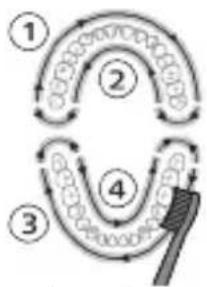
How to brush Brush each segment for 30 seconds.
Brush each segment for 30 seconds
Brush each segment for 30 seconds

flowchart
graph TD
    A["Stage 1"] --> B["Stage 2"]
    B --> C["Stage 3"]
    C --> D["Stage 4"]
    D --> E["Brush"]
flowchart
graph TD
    A["①"] --> B["②"]
    B --> C["③"]
    C --> D["④"]
    D --> E["④"]
    style A fill:#f9f,stroke:#333
    style B fill:#ccf,stroke:#333
    style C fill:#cfc,stroke:#333
    style D fill:#fcc,stroke:#333
    style E fill:#ffc,stroke:#333
flowchart
graph TD
    A["①"] --> B["②"]
    B --> C["③"]
    C --> D["④"]
    D --> E["④"]
    style A fill:#f9f,stroke:#333
    style B fill:#ccf,stroke:#333
    style C fill:#cfc,stroke:#333
    style D fill:#fcc,stroke:#333
    style E fill:#ffc,stroke:#333
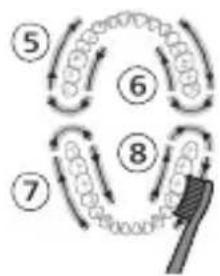
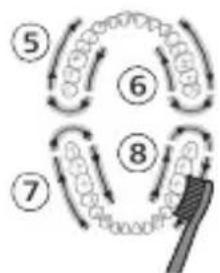
then brush segments 5 and 6 for 15 seconds each to brighten and polish front teeth.
then brush segments 5, 6, 7 and 8 for 15 seconds each to gently stimulate and massage your gums.
flowchart
graph TD
    A["Step 5"] --> B["Step 6"]
    B --> C["Step 7"]
    C --> D["Step 8"]
    D --> E["Feedback Loop"]
    style A fill:#f9f,stroke:#333
    style B fill:#f9f,stroke:#333
    style C fill:#f9f,stroke:#333
    style D fill:#f9f,stroke:#333
    style E fill:#ccf,stroke:#333
Intensities
natural_image
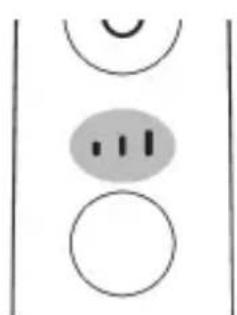
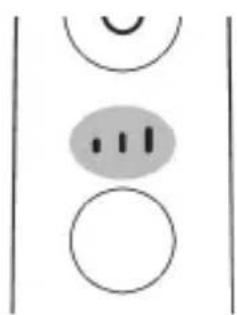
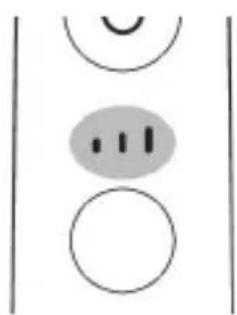
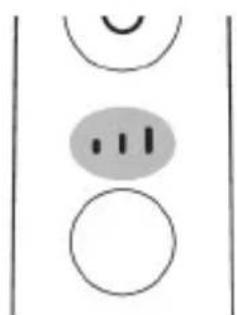
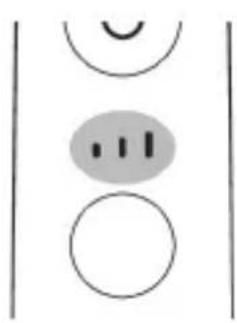
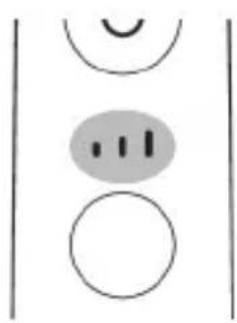
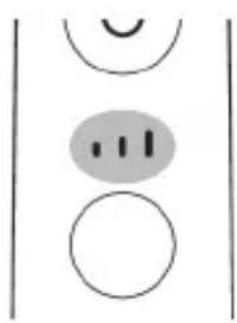
Simple diagram with three circles and a central oval, no text or symbols presentYour power toothbrush comes with 3 different intensity settings:
- low intensity (one bar)
- medium intensity (two bars)
- high intensity (three bars)
When attached to the handle, the smart brush head will automatically select the recommended intensity (specific models only). If you wish to change to a different intensity, you can do so by pressing the mode/intensity button while brushing. The intensity cannot be changed as long as the handle is powered off or paused.
BrushSync technology
natural_image
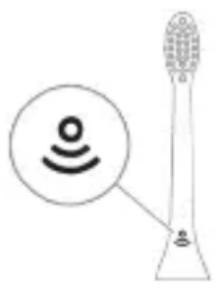
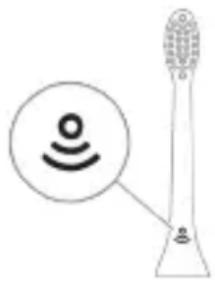
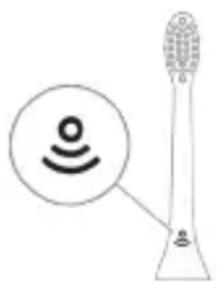
Illustration of a toothbrush with a sensor icon and signal symbol (no text or labels)BrushSync technology enables your brush head to communicate with your handle using a microchip. The symbol at the bottom of the brush head indicates that the brush head is equipped with this technology.
BrushSync technology enables:
- Brush Head Replacement Reminder
- BrushSync Mode Pairing
Philips Sonicare offers a wide range of smart brush heads, equipped with BrushSync technology. To explore our full range of toothbrush brush heads, and find the brush head that is best for you, go to
www.philips.com/toothbrush-heads for more information.
Features
- Pressure Sensor Feedback
- Quadpacer
- SmarTimer
- EasyStart
- Brush Head Replacement Reminder
- Brush Head Mode Pairing
Pressure Sensor Feedback
natural_image
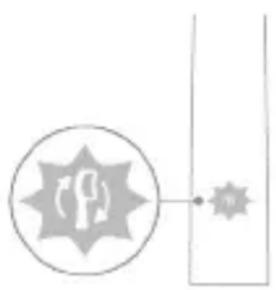
Simple line diagram with a circular icon containing a parking sign and a starburst symbol connected to a vertical line (no text or labels)Your Sonicare toothbrush measures the pressure you apply while brushing, to protect your gums and teeth from damage.
If you apply excess pressure, the handle changes its vibration and the brush head replacement reminder icon flashes amber until you reduce the pressure.
Note: Your product comes with the Pressure Sensor activated. To deactivate this feature (see 'Activating or deactivating features').
Quadpacer
The QuadPacer is an interval timer that helps you to brush evenly through the mouth by dividing your mouth into 4 sections. (see 'Brushing instructions')
SmarTimer
The SmarTimer indicates that your brushing cycle is complete by automatically switching off the toothbrush at the end of the brushing cycle.
Dental professionals recommend brushing no less than 2 minutes twice a day.
Note: If you press the power on/off button after you started the brushing cycle, the toothbrush pauses. After a pause of 30 seconds, the SmarTimer resets.
EasyStart
EasyStart
This Philips Sonicare model comes with the EasyStart feature deactivated. The EasyStart feature gently increases the power over the first 14 brushings to help you get used to brushing with the Philips Sonicare.
Disclaimer
When the Philips Sonicare toothbrush is used in clinical studies, it must be used in clean mode at high intensity with the handle fully charged and the EasyStart feature deactivated.
To activate EasyStart (see 'Activating or deactivating features').
Brush Head Replacement Reminder
Your Philips Sonicare is equipped with BrushSync technology that tracks the wear of your brush head.
Note: This feature only works with Philips Sonicare smart brush heads with BrushSync technology.
1 When you attach a new smart brush head for the first time, the handle recognizes that you have a Philips brush head with BrushSync technology and begins tracking brush head wear.
2 Over time, based on the pressure you apply and the total time the brush head has been used, the handle tracks brush head wear in order to determine the optimal time to replace your brush head. This feature guarantees the best cleaning and care of your teeth.
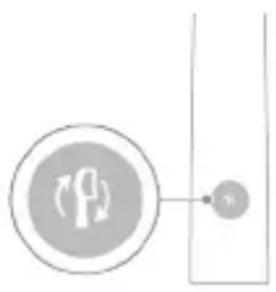
3 When the brush head replacement reminder indicator lights up amber, you should replace your brush head.
All smart brush heads come with the brush head replacement reminder feature activated. To deactivate the brush head replacement reminder see 'Activating or deactivating features'.
Brush head mode pairing
Note: Features included may vary based on model purchased.
Brush heads with BrushSync technology are equipped with a microchip which communicates with the handle and automatically pairs it with the recommended mode and intensity. Most brush heads with BrushSync technology will auto pair to Clean Mode. Brush heads with specific benefits will pair with the corresponding mode (when available), examples include:
- G2 Optimal Gum Care or G3 Premium Gum Care: Gum Care mode
- W3 Premium White or W(c) DiamondClean (compact): White mode
Note: If you choose to change mode/intensity from the recommended setting, the brush head will remember the your chosen setting for future brushing sessions.
Activating or deactivating features
You can activate or deactivate the following features of your toothbrush:
- EasyStart
- Brush Head Replacement Reminder
- Pressure Sensor Feedback
Note: You can only activate or deactivate the brush head replacement reminder when a smart brush head is on the handle.
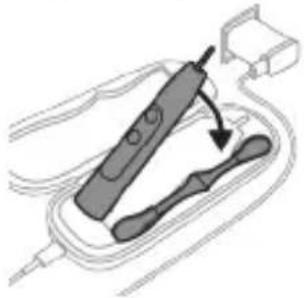
Step 1: Place the handle on the plugged in charger/charging travel case.
natural_image
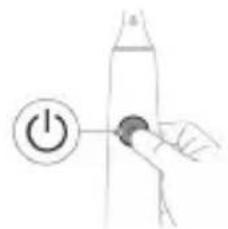
Simple line drawing of a hand pressing a button on a cylindrical object with an 'Power' icon (no text or symbols)Step 2: Press and hold power on/off button for:
| EasyStart Brush Head Replacement Reminder | Pressure Sensor Feedback | |
| Up to 3 seconds Up to 5 seconds Up to 7 seconds | ||
| ↓ ↓ ↓ | ||
| Step 3: Let go of the power on/off button when you hear: | ||
| 1 beep 1 beep and then 2 beeps | 1 beep, 2 beeps and then 3 beeps | |
| ↓ ↓ ↓ | ||
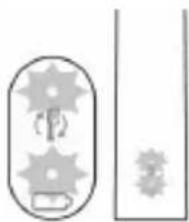 | If you see the battery indicator and the brush head replacement reminder light flash green 2 times and hear 3 tones from low to high, then the feature has been activated. | |
| OR | ||
 | If you see the battery indicator and brush head replacement reminder light flash amber 1 time and hear 3 tones high to low, then the feature has been deactivated. | |
UV sanitizer
Note: Accessories included may vary based on the model purchased.
With the UV sanitizer you can clean your brush head after every use.
Unplug the sanitizer, discontinue use and call Consumer Care if:
- The UV light bulb remains on when the door is open.
- The window is broken or missing from the sanitizer.
- The sanitizer gives off smoke or a burning smell while it is operating.
Note: UV light can be harmful to the human eye and skin. This device should be kept out of reach of children at all times.
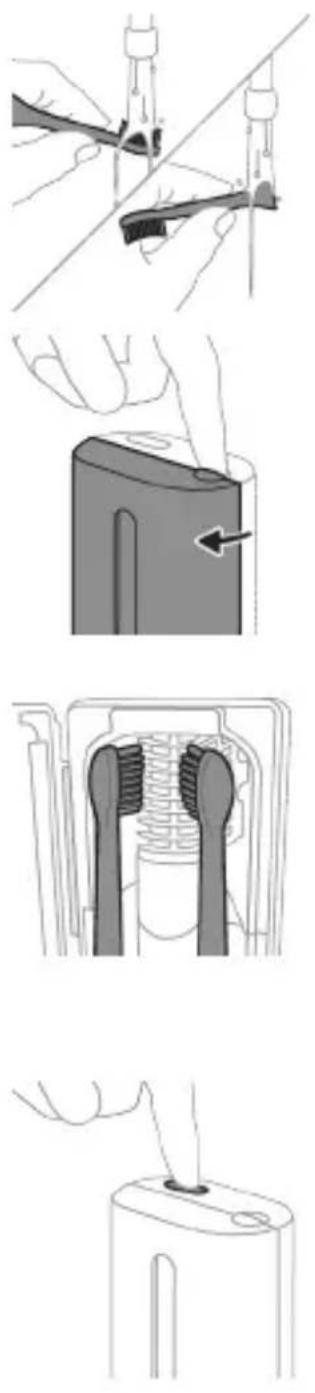
1 After brushing, rinse the brush head and shake off excess water.
Warning: Make sure that the brush head cap is not on the brush head when the brush head is being cleaned in the sanitizer.
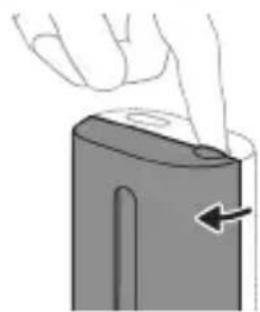
2 Place your finger in the door recess on top of the sanitizer and pull open the door.
3 Place the brush head on one of the 2 pegs in the sanitizer with the bristles facing the light bulb.
Note: Only clean Philips Sonicare snap-on brush heads in the sanitizer.
Note: Do not clean Philips Sonicare for Kids brush heads in the sanitizer.
4 Make sure the sanitizer is plugged into a live outlet of appropriate voltage.
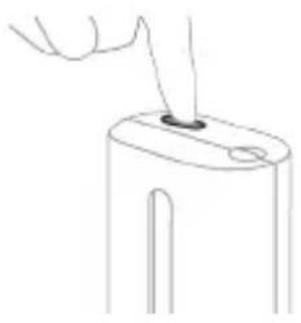
5 Close the door and press the green power on/off button once to select the UV clean cycle.
Note: You can only switch on the sanitizer if the door is properly closed.
Note: The sanitizer stops operating if you open the door during the sanitizer cycle.
Note: The sanitizer cycle takes approximately 10 minutes and then switches off automatically.
The sanitizer is in operation when the light glows through the window.
Charging and battery status
This Philips Sonicare toothbrush is designed to provide at least 28 brushing sessions, each session lasting 2 minutes (14 days if used twice per day) on a fully charged battery. The battery indicator shows the battery status when you complete the 2-minute brushing session, when you pause the toothbrush, or while it is charging.
Note: It can take up to 24 hours to fully charge the battery before first use, but you can use the Philips Sonicare toothbrush before it is fully charged.
Charging
natural_image
Simple line drawing of a device with a star-shaped label and an arrow pointing to a small component (no text or symbols)Charging on charger or UV Sanitizer
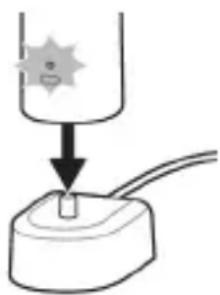
1 Plug the charger or sanitizer into an electrical outlet.
2 Place the handle on the charger or sanitizer.
- The handle emits 2 short beeps to confirm that the handle is placed properly.
- The flashing light of the battery indicator shows that the toothbrush is charging.
- When the handle is fully charged on the charger, the battery indicator lights up green for 30 seconds and then switches off.
Charging with the travel case
natural_image
Diagram of a handheld electronic device with a hand holding a connector (no text or symbols visible)Note: Accessories included may vary based on the model purchased.
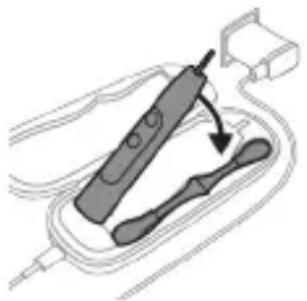
1 Insert the USB cable to the charging travel case.
2 Connect the attached USB cable to the 5V DC input power either from:
- The USB adapter provided.
- A UL-listed or certified to ANSI/UL 60950-1 personal computer's standard USB connector.
- A UL-listed or certified to ANSI/UL 60950-1 LPS power supply with USB output port.
- A UL-listed or certified 1310 Class 2 power supply.
Important: The wall adapter must be a safe extra low voltage source, compatible with the electrical ratings marked on the bottom of the device.
3 Place the handle in the charging travel case.
- The handle emits 2 short beeps to confirm that the handle is placed properly.
- The flashing light of the battery indicator shows that the toothbrush is charging.
4 The travel case will charge your toothbrush until your toothbrush is fully charged.
- When the handle is fully charged, the battery indicator lights up green for 30 seconds and then switches off.
Note: Charging the handle with the charging travel case may take longer than on the charger.
Battery status
Battery status (handle on plugged in charger/charging travel case)
When the handle is placed on the charger or in the charging travel case, the battery indicator shows the battery level.
Battery status Battery indicator
| Charging Flashes green |
| Full Solid green for 30 seconds and then switches off |
Battery status (when handle is not placed on charger/in charging travel case)
When the toothbrush is awake, the battery indicator at the bottom of the handle shows the battery level.
Battery status Battery indicator Sound
| Full Solid green - | |
| Partially full Flashes green - | |
| Low Flashes amber The handle emits 3 | beeps after brushing |
Battery status Battery indicator Sound
Empty Flashes amber The handle emits 2 sets
of 5 beeps after brushing
Note: To save energy, the battery indicator will switch off when not in use.
Note: When the battery is completely empty, the toothbrush switches off. Place the toothbrush on the charger or in the charging travel case to charge it.
Note: To keep the battery fully charged at all times, you may keep your toothbrush on the charger when not in use.
Cleaning
Toothbrush handle
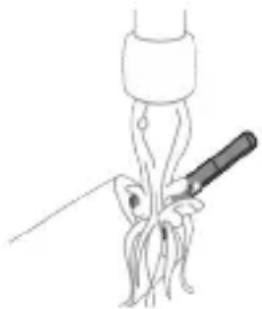
natural_image
Line drawing of a medical procedure involving a tool and a surgical instrument (no text or symbols)1 Remove the brush head and rinse the metal shaft area with warm water. Make sure you remove any residual toothpaste.
Caution: Do not push on the rubber seal on the metal shaft with sharp objects, as this may cause damage.
2 Wipe the entire surface of the handle with a damp cloth.
Note: Do not tap the handle on the sink to remove excess water.
Brush head
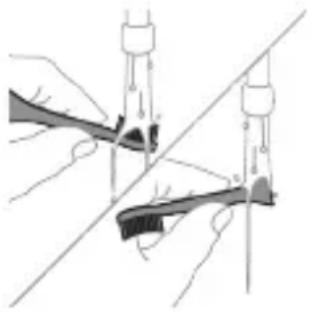
natural_image
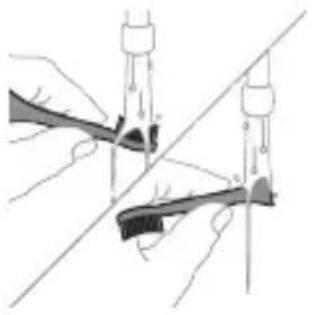
Illustration of two hands using a tool to tie a pair of pins (no text or symbols present)1 Rinse the brush head and bristles after each use.
2 Remove the brush head from the handle and rinse the brush head connection with warm water at least once a week. Rinse the travel cap as often as needed.
Charger
1 Unplug the charger before you clean it.
2 Wipe the surface of the charger with a damp cloth.
Travel case
Rinse with warm water and use a damp cloth to clean inside of travel case.
Cleaning the Sanitizer
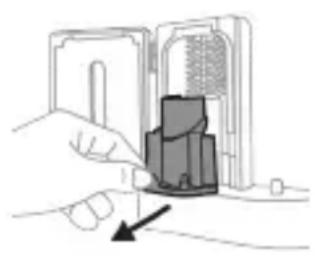
natural_image
Illustration of a hand inserting a component into an electronic device (no text or symbols visible)Warning: Do not immerse the sanitizer in water or rinse it under the faucet.
Warning: Do not clean the sanitizer when the UV light bulb is hot.
For optimal effectiveness, it is recommended to clean your sanitizer weekly.
1 Unplug the sanitizer.
2 Pull the drip tray straight out. Rinse the drip tray and wipe it clean with a damp cloth.
3 Clean all interior surfaces with a damp cloth.
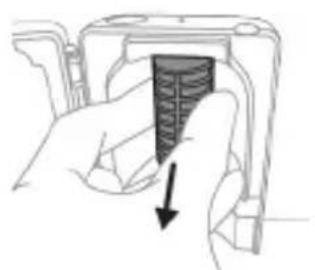
4 Remove the protective screen in front of the UV light bulb.
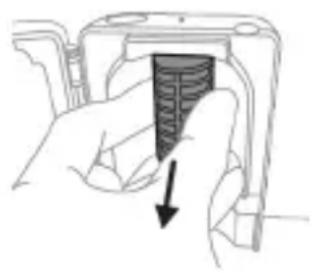
natural_image
Hand holding a device with a textured internal component and a downward arrow indicating action (no text or symbols)To remove the screen, grasp the edges next to the snaps, gently squeeze and pull out the protective screen.
5 Remove the UV light bulb. To remove the light bulb, grasp it and pull it out of the metal clasp.
6 Clean the protective screen and the UV light bulb with a damp cloth.
7 Reinsert the UV light bulb.
To reinsert the light bulb, align the bottom of the light bulb with the metal clasp and push the bulb into the clasp.
8 Reinsert the protective screen.
To reinsert the screen, align the pegs on the screen with the slots on the reflective surface near the UV light bulb. Push the screen straight into the slots on the sanitizer.
9 Place the drip tray back in the UV sanitizer.
10 After cleaning, make sure the sanitizer is completely dry before you connect it to the mains.
Storage
If you are not going to use the product for an extended period of time, unplug it from the electrical outlet, clean it and store it in a cool and dry place away from direct sunlight.
Replacement
Replace Philips Sonicare brush heads every 3 months to achieve optimal results. Use only Philips Sonicare replacement brush heads.
Locating the model number
Look on the bottom of the Philips Sonicare toothbrush handle for the model number (HX64XX, HX68XX).
Warranty and support
If you need information or support, please visit www.philips.com/support or read the international warranty leaflet.
Warranty exclusions
What is not covered under warranty:
- In mouth attachments including brush heads and nozzles.
- Damage caused by use of unauthorized replacement parts or unauthorized brush heads.
- Damage caused by misuse, abuse, neglect, alterations or unauthorized repair.
- Normal wear and tear, including chips, scratches, abrasions, discoloration or fading.
- UV light bulb.
Recycling
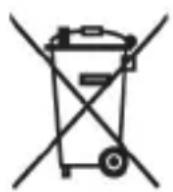
- This symbol means that electrical products and batteries shall not be disposed of with normal household waste.
- Follow your country's rules for the separate collection of electrical products and batteries.
- The UV light bulb of the sanitizer contains mercury. Do not throw the UV light bulb away with the normal household waste at the end of its life. Hand it in at an official collection point for recycling.
The built-in rechargeable battery must only be removed by a qualified professional when the appliance is discarded. Before removing the battery, make sure that the battery is completely empty.
Removing the rechargeable battery
The built-in rechargeable battery must only be removed by a qualified professional when the appliance is discarded. Before removing the battery, make sure that the battery is completely empty.
Take any necessary safety precautions when you handle tools to open the appliance and when you dispose of the rechargeable battery. Be sure to protect your eyes, hands, fingers, and the surface on which you work.
When you handle batteries, make sure that your hands, the product and the batteries are dry.
To avoid accidental short-circuiting of batteries after removal, do not let battery terminals come into contact with metal objects (e.g. coins, hairpins, rings). Do not wrap batteries in aluminum foil. Tape battery terminals or put batteries in a plastic bag before you discard them.
To remove the rechargeable battery, you need a towel or cloth, a hammer and a flat-head (standard) screwdriver. Observe basic safety precautions when you follow the procedure outlined below.
1 To deplete the rechargeable battery of any charge, remove the handle from the charger, turn on the toothbrush and let it run until it stops. Repeat this step until you can no longer turn on the toothbrush.

2 Remove and discard the brush head. Cover the entire handle with a towel or cloth.
3 Hold the top of the handle with one hand and strike the handle housing 0.5 inch above the bottom end. Strike firmly with a hammer on all 4 sides to eject the end cap.
Note: You may have to hit on the end several times to break the internal snap connections.
4 Remove the end cap from the toothbrush handle. If the end cap does not release easily from the housing, repeat step 3 until the end cap is released.
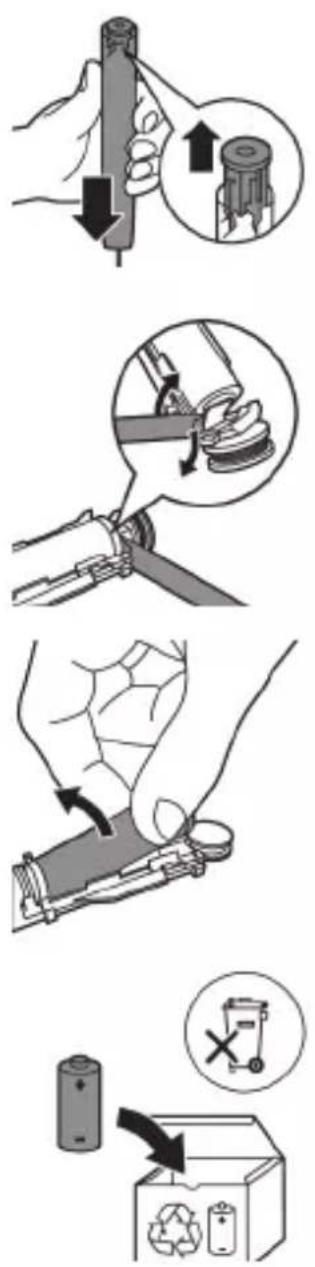
5 Holding the handle upside down, press the shaft down on a hard surface. If the internal components do not easily release from the housing, repeat step 3 until the internal components are released.
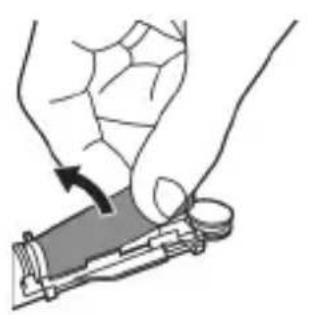
6 Wedge the screwdriver between the battery and the black frame at the bottom of the internal components. Then pry the screwdriver away from the battery to break the bottom of the black frame.
natural_image
Illustration of a hand holding a device with a circular component, no text or symbols present
7 Insert the screwdriver between the bottom of the battery and the black frame to break the metal tab connecting the battery to the green printed circuit board. This will release the bottom end of the battery from the frame.
8 Grab the battery and pull it away from the internal components to break the second metal battery tab.
Caution: Be aware of the sharp edges of the battery tabs so as to avoid injury to your fingers.
9 Cover the battery contacts with tape to prevent any electrical short from residual battery charge.
The rechargeable battery can now be recycled and the rest of the product discarded appropriately.
Note: Do not throw away the appliance with the normal household waste at the end of its life, but hand it in at an official collection point for recycling. By doing this, you help to preserve the environment.
Giriş
www.philips.com/support
natural_image
Simple line drawing of an open book with no text or symbols visiblenatural_image
Illustration showing a hand brushing a tooth with a brush, and a close-up of the tooth being smoothed (no text or symbols)natural_image
Illustration of a hand using a pipette to apply liquid onto a surface, with an inset showing a droplet on a surface (no text or symbols present)natural_image
Simple diagram with three circles and a vertical line, no text or symbols presentnatural_image
Diagram of a microphone with signal icon and connection point (no text or symbols)natural_image
Simple line drawing of a gear and star symbol (no text or labels)natural_image
Simple diagram showing a circular icon with a traffic signal inside and a small circle connected to a vertical line (no text or symbols)natural_image
Hand holding a button with a power symbol (no text or labels)natural_image
Three-step diagram illustrating a mechanical assembly process: tool insertion, component disassembly, and final assembled assembly (no text or labels)natural_image
Line drawing of a hand inserting a small object into a cylindrical device (no text or symbols)natural_image
Simple line drawing of a device with a star-shaped sensor above a base, no text or symbols present.natural_image
Illustration of a handheld electronic device with a hand holding a cable, showing internal components and wiring (no text or symbols)natural_image
Line drawing of a medical procedure showing a tool interacting with an anatomical structure (no text or symbols)natural_image
Illustration of hands using a tool to adjust or install a mechanical component, with no visible text or symbols.natural_image
Illustration of a hand inserting a component into an electronic device (no text or symbols visible)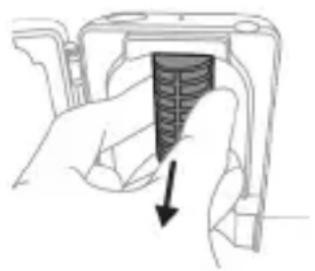
natural_image
Hand holding a device component with a black arrow pointing to a textured section (no text or symbols visible)
adrese: www.philips.com/support
www.philips.com/support
natural_image
Simple line drawing of an open book with no text or symbols visible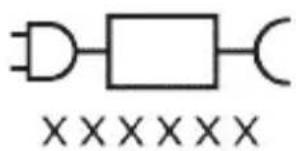
natural_image
Illustration showing a hand brushing a tooth with a brush, and a close-up of the tooth being smoothed (no text or symbols)natural_image
Illustration of a hand using a pipette to apply a product to a toothbrush, with an inset showing a textured surface (no text or symbols)Clean White Gum Care
flowchart
graph TD
    A["Step 5"] --> B["Step 6"]
    B --> C["Step 7"]
    C --> D["Step 8"]
    D --> E["Arrow to brush-like element"]
    style A fill:#f9f,stroke:#333
    style B fill:#f9f,stroke:#333
    style C fill:#f9f,stroke:#333
    style D fill:#f9f,stroke:#333
    style E fill:#ccf,stroke:#333
Úrovně intenzity
natural_image
Simple diagram with three circles and a vertical line, no text or symbols presentTechnologie BrushSync
natural_image
Diagram of a toothbrush with a circular icon showing a sensor symbol (no text or labels)natural_image
Simple line diagram showing a gear icon with directional arrows and a star symbol, no text or labels present.natural_image
Simple line drawing of a hand pressing a button on a bottle, with a power button icon nearby (no text or symbols)natural_image
Illustration of a mechanical device with four steps: pinning, cutting, pressing a button, and holding a base (no text or symbols present)natural_image
Simple line drawing of a device with a star-shaped sensor above it, no text or symbols present.natural_image
Diagram of a handheld electronic device with a hand holding a plug, showing internal components and an arrow indicating motion (no text or symbols present)natural_image
Line drawing of a medical procedure involving an incision or needle inserted into tissue (no text or symbols)natural_image
Illustration of two hands holding a tool with a ruler and connecting rod (no text or symbols)natural_image
Illustration of a hand inserting a component into a device (no text or symbols visible)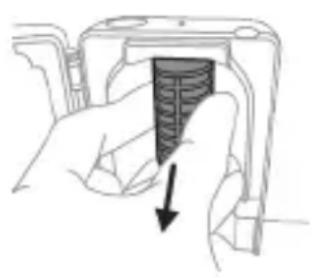
natural_image
Hand holding a device with a black arrow pointing to a textured interior (no text or symbols visible)natural_image
Illustration showing two-step mechanical assembly process: top shows a hand holding a tool, bottom shows a hand holding a component with arrows indicating motion (no text or symbols)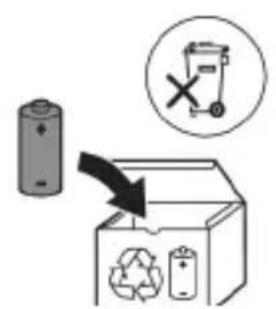
www.philips.com/support
natural_image
Simple line drawing of an open book with no text or symbols visible
natural_image
Illustration showing a hand brushing a tooth with a brush, and a close-up of the tooth being smoothed (no text or symbols)natural_image
Illustration of a hand using a pipette to apply a substance to a surface, with an inset showing a magnified view of the object (no text or symbols present)Clean White Gum Care
natural_image
Simple diagram with three circles and a central oval, no text or symbols presentnatural_image
Diagram of a toothbrush with a sensor icon and signal symbol, no text or labels presentnatural_image
Simple line diagram showing a circular icon with a road sign and a star-shaped symbol connected to a vertical line (no text or labels)natural_image
Simple line drawing of a hand pressing a button on a bottle, with a power button icon nearby (no text or symbols)natural_image
Illustration of a medical procedure showing step-by-step steps in handling a tool, including grip, device placement, and insertion (no text or symbols)natural_image
Simple line drawing of a laboratory setup with a test tube and a test tube mounted on a base (no text or symbols)Opladning på oplader eller UV-renser
natural_image
Diagram of a handheld electronic device with a hand holding a cable, showing internal components and wiring (no text or symbols)natural_image
Line drawing of a hand holding a tool interacting with a bundle of noodles (no text or symbols)natural_image
Illustration of two hands using a tool to tie a pair of objects, no text or symbols presentnatural_image
Illustration of a hand inserting a component into a device (no text or symbols visible)natural_image
Hand holding a device with a textured internal component and an arrow indicating direction (no text or symbols)natural_image
Illustration of a hand holding a cylindrical object with arrows indicating force direction, and an inset showing a magnified view of the object's tip (no text or symbols present)natural_image
Diagram of a mechanical assembly with a magnified inset showing a tool interacting with a component (no text or symbols present)natural_image
Illustration of a hand holding a device with a black arrow indicating rotation (no text or symbols)www.philips.com/support
www.philips.com/support
natural_image
Simple line drawing of an open book with no text or symbols visible
natural_image
Pure electrical circuit lines without any symbolsnatural_image
Illustration of a hand holding a toothbrush with a directional arrow indicating force or movement (no text or symbols)natural_image
Simple line drawing of a curved object with a checkmark (no text or symbols)natural_image
Illustration of a hand using a pipette to apply liquid onto a surface, with an inset showing a droplet on a surface (no text or symbols present)natural_image
Diagram of dental arching technique showing tooth arrangement and tooth penetration (no text or labels)Clean White Gum Care
flowchart
graph TD
    A["Step 5"] --> B["Step 6"]
    B --> C["Step 7"]
    C --> D["Step 8"]
    D --> E["Final Step"]
Intensitätsstufen
natural_image
Simple diagram with three circles and two vertical lines, no text or symbols presentnatural_image
Illustration of a toothbrush with a sensor icon and a magnified view of its tip (no text or symbols)natural_image
Simple line drawing of a gear symbol with a starburst icon and a small arrow pointing to it (no text or labels)natural_image
Illustration of two hands using a tool to measure a rifle, no text or symbols presentnatural_image
Simple line drawing of a mechanical setup with a component and a base, no text or symbols present.natural_image
Diagram of a handheld electronic device with a hand holding a plug, showing internal components and wiring (no text or symbols)natural_image
Line drawing of a fork being inserted into a tube (no text or symbols)natural_image
Illustration of hands using a tool to connect two objects, one holding a pen and the other holding a tool (no text or symbols present)Ladegerät
natural_image
Illustration of a hand inserting a component into an electronic device (no text or symbols visible)natural_image
Hand holding a device with a black arrow pointing to a textured interior (no text or symbols visible)natural_image
Illustration of a hand holding a small electronic device with a circular button, no text or symbols present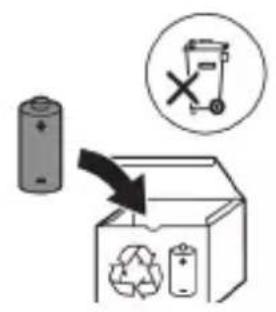
natural_image
Simple line drawing of an open book with no text or symbols visiblenatural_image
Illustration showing a hand brushing a tooth with a brush, and a close-up of the tooth being smoothed (no text or symbols)natural_image
Illustration of a hand using a tool to apply a product to a toothbrush, with an inset showing a textured object (no text or symbols present)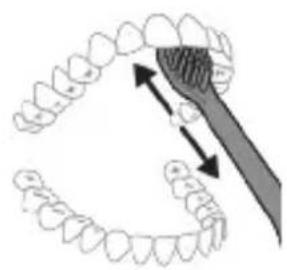
natural_image
Diagram showing dental tool interacting with teeth and jawbone structure (no text or labels)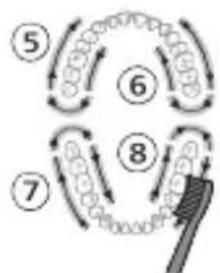
flowchart
graph TD
    A["Step 5"] --> B["Step 6"]
    B --> C["Step 7"]
    C --> D["Step 8"]
    D --> E["Arrow to brush"]
    style A fill:#f9f,stroke:#333
    style B fill:#f9f,stroke:#333
    style C fill:#f9f,stroke:#333
    style D fill:#f9f,stroke:#333
    style E fill:#ccf,stroke:#333
Intensidades
natural_image
Simple diagram with three circles and two vertical lines, no text or symbols presentnatural_image
Diagram of a toothbrush with a sensor icon and connection point, no text or symbols presentnatural_image
Simple line drawing of a gear and a gear symbol (no text or labels)natural_image
Simple diagram showing a circular icon with a traffic symbol and a small circle connected by a line (no text or labels)natural_image
Simple line drawing of a hand pressing a button on a bottle, with a power button icon nearby (no text or symbols)natural_image
Simple diagram showing gear and gear icons inside a capsule shape and a separate rectangular block with gear-like elements (no text or symbols)natural_image
Simple diagram showing gear and gear icons inside a rounded rectangle, with no text or symbols present.natural_image
Three-step diagram illustrating a mechanical assembly process: tool positioning, component insertion, and final assembly (no text or symbols)natural_image
Line drawing of a hand inserting a small object into a device (no text or symbols)natural_image
Simple line drawing of a device with a star-shaped sensor above a base, no text or symbols present.natural_image
Illustration of a handheld electronic device with a hand holding a cable, showing internal components and a pointer indicating motion (no text or symbols present)natural_image
Line drawing of a medical procedure showing a needle inserted into tissue (no text or symbols)natural_image
Illustration of two hands using a tool to lift or stand, with no visible text or symbolsnatural_image
Illustration of a hand inserting a component into an open device (no text or symbols visible)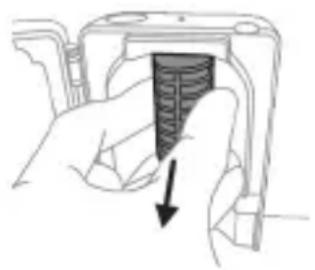
natural_image
Hand holding a device with a black arrow pointing to a textured interior (no text or symbols visible)natural_image
Illustration of a hand holding a small object with an arrow indicating motion (no text or symbols)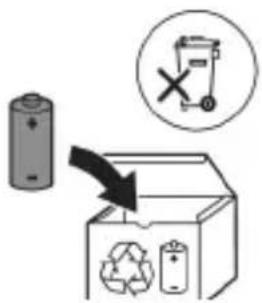
natural_image
Illustration showing a hand brushing a tooth with a brush, and a close-up of a tooth being adjusted (no text or symbols)natural_image
Diagram of dental arching with tooth structure and tool (no text or labels)Clean White Gum Care
natural_image
Simple diagram with three circles and a central oval, no text or symbols presentnatural_image
Diagram of a microphone with signal icon and connection point (no text or symbols)natural_image
Simple line diagram showing a circular symbol with a road sign and a star-shaped connector (no text or labels)natural_image
Illustration of two hands using a tool to adjust or install a mechanical component, with no visible text or symbols.natural_image
Simple line drawing of a device with a star-shaped label and a downward arrow pointing to a small component (no text or symbols)natural_image
Illustration of a handheld electronic device with a hand holding a plug, showing internal components and wiring (no text or symbols)natural_image
Line drawing of a hand holding a pen over a bundle of noodles (no text or symbols)natural_image
Illustration of two hands using a tool to lift or adjust a wooden object, with no visible text or symbols.natural_image
Illustration of a hand inserting a component into a device (no text or symbols visible)natural_image
Hand holding a device with a black arrow pointing to a textured interior (no text or symbols visible)natural_image
Simple line drawing of an open book with no text or symbols visible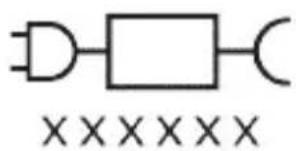
Odvojiv dio jedinice za napajanje: „xxxxx” označava broj modela punjača odobrenih za uporabu.
Namjena
natural_image
Illustration showing a hand brushing a tooth with a brush, and a close-up of the tooth being smoothed (no text or symbols)natural_image
Illustration of a hand using a tool to apply a product to a toothbrush, with an inset showing a magnified view of the product (no text or symbols present)1 Smočite vlakna četkice i nanesite malu količinu paste za zube.
Clean White Gum Care
| Prednost Za odličnosvakodnevnočišćenje | Uklanjanjepovršinskih mrlja | Nježno masiradesni | |
| Ukupno vrijemečetkanja | 2 minute 2 minute i30 sekundi | 3 minute | |
Kako četkati Četkajte svaki segment 30 sekundi.
flowchart
graph TD
    A["Stage 1"] --> B["Stage 2"]
    B --> C["Stage 3"]
    C --> D["Stage 4"]
    D --> E["Shipped Point"]
četkajte svaki segment 30 sekundi
flowchart
graph TD
    A["1"] --> B["2"]
    B --> C["3"]
    C --> D["4"]
    D --> E["End"]
flowchart
graph TD
    A["Step 5"] --> B["Step 6"]
    B --> C["Step 7"]
    C --> D["Step 8"]
    D --> E["Feedback Loop"]
    style A fill:#f9f,stroke:#333
    style B fill:#f9f,stroke:#333
    style C fill:#f9f,stroke:#333
    style D fill:#f9f,stroke:#333
    style E fill:#ccf,stroke:#333
Jačine
natural_image
Simple diagram with three circles and a vertical line, no text or symbols presentVaša električna četkica za zube ima tri različite postavke intenziteta:
natural_image
Illustration of a toothbrush with a sensor icon and signal symbol (no text or labels)Tehnologija BrushSync omogućava glavi četkice da komunicira s drškom s pomoću mikročipa. Simbol na donjem dijelu glave četkice naznačuje da je glava četkice opremljena tom tehnologijom.
Tehnologija BrushSync omogućuje:
natural_image
Simple line diagram with a circular icon containing a parking sign and a starburst symbol, connected by a vertical line (no text or labels)natural_image
Simple line drawing of a hand pressing a button on a cylindrical object with an 'Power' icon (no text or symbols)- Ako je prozor na aparatu za higijensko čišćenje slomljen ili ga nema.
- Iz aparata za higijensko čišćenje dopire dim ili miris paljevine dok radi.
natural_image
Simple line drawing of a device with a starburst symbol above it, showing a plug inserted into a base (no text or symbols)Punjenje na punjaču ili u uređaju za UV dezinfekciju
1 Priključite punjač ili uređaj za dezinfekciju u električnu utičnicu.
2 Postavite dršku na punjač ili uređaj za dezinfekciju.
- Drška će emitirati dva kratka zvučna signala kao potvrdu da je drška pravilno postavljena.
- Treperenje indikatora baterije pokazuje da se četkica puni.
- Kad je drška na punjaču potpuno napunjena,
indikator baterije svijetli 30 sekundi u zelenoj boji prije
nego što se isključi.
natural_image
Diagram of a handheld electronic device with a hand holding a cable, showing internal components and an arrow indicating motion (no text or symbols present)Napomena: priloženi dodaci mogu se razlikovati ovisno o kupljenom modelu.
1 Umetnite USB kabel u putnu torbicu za punjenje.
2 Povežite umetnuti USB kabel s ulaznim napajanjem istosmjerne struje od 5 V iz:
- isporučenog USB prilagodnika
- standardnog USB priključka osobnog računala s UL oznakom ili certifikatom ANSI/UL 60950-1
- LPS napajanja s USB izlaznim priključkom s UL oznakom ili certifikatom ANSI/UL 60950-1
- napajanja klase 2 s oznakom UL ili certifikatom 1310.
natural_image
Line drawing of a hand holding a tool interacting with a bundle of noodles (no text or symbols)1 Odvojite glavu četkice i isperite metalnu osovinu toplom vodom. Pobrinite se da uklonite svu preostalu zubnu pastu.
Oprez: Nemojte koristiti oštre predmete za guranje gumene brtve na metalnu osovinu jer to može prouzročiti oštećenja.
2 Cijelu površinu drške obrišite vlažnom tkaninom.
Napomena: Nemojte lupkati drškom po umivaoniku kako biste uklonili višak vode.
Glava četkice
natural_image
Illustration of two hands using a tool to connect two objects, with no visible text or symbolsnatural_image
Hand inserting a component into an electronic device (no text or symbols visible)1 Iskopčajte aparat za higijensko čišćenje.
2 Pladanj izvucite ravno. Isperite ga i očistite vlažnom krpom.
3 Očistite sve unutarnje površine vlažnom krpom.
4 Skinite zaštitni zaslon ispred UV žarulje.
natural_image
Hand holding a device with a black arrow pointing to a textured interior (no text or symbols visible)Da biste uklonili štitnik, uhvatite rubove štitnika pokraj nosača, nježno pritisnite i zatim izvucite štitnik.
5 Izvadite UV žarulju.
Kako biste izvadili žarulju, primite ju i izvucite iz metalne kopče.
6 Štitnik i UV žarulju očistite vlažnom krpom.
7 Vratite UV žarulju na mjesto.
Kako biste vratili žarulju, poravnajte dno žarulje s metalnom kopčom i gurnite žarulju u kopču.
8 Vratite štitnik na mjesto.
Kako biste vratili štitnik, poravnajte klinove na štitniku s utorima na površini koja stvara odsjaj blizu UV žarulje. Gurnite štitnik izravno u utore na uređaju za dezinfekciju.
9 Stavite pladanj za ocjeđivanje natrag u uređaj za UV dezinfekciju.
10 Nakon čišćenja provjerite je li uređaj za dezinfekciju potpuno suh prije no što ga priključite na napajanje.
Pohrana
5 Držeći ručku naopako, pritisnite osovinu na tvrdu površinu. Ako se unutarnji dijelovi ne otpuštaju lako s kućišta, ponavljajte korak 3 dok se ne otpuste unutarnji dijelovi.
6 Uglavite odvijač između baterije i crnog okvira na dnu unutarnjih dijelova. Potom nategnite odvijač dalje od baterije da biste slomili donji dio crnog okvira.
7 Umetnite odvijač između donjeg dijela baterije i crnog okvira da biste slomili metalnu pločicu koja spaja bateriju sa zelenom tiskanom pločicom sklopa. To će osloboditi donji dio baterije s okvira.
8 Uhvatite bateriju i odvojite je od unutarnjih dijelova da biste slomili drugu metalnu pločicu baterije.
www.philips.com/support
natural_image
Simple line drawing of an open book with no text or symbols visiblenatural_image
Illustration showing a hand brushing a tooth with a brush and arrow indicating direction, alongside a close-up of the tooth being examined with a checkmark (no text or symbols present)natural_image
Illustration of a hand using a tool to apply a sample onto a surface, with an inset showing a magnified view of the sample (no text or symbols present)Clean White Gum Care
flowchart
graph TD
    A["Step 5"] --> B["Step 6"]
    B --> C["Step 7"]
    C --> D["Step 8"]
    D --> E["Feedback Loop"]
    style A fill:#f9f,stroke:#333
    style B fill:#f9f,stroke:#333
    style C fill:#f9f,stroke:#333
    style D fill:#f9f,stroke:#333
    style E fill:#ccf,stroke:#333
Intensità
natural_image
Simple diagram with three circles and a central oval, no text or symbols presentnatural_image
Diagram of a toothbrush with sensor icon and magnified view (no text or symbols)www.philips.com/toothbrush-heads.
Caratteristiche
natural_image
Simple line drawing of a gear and gear icon with no text or symbolsnatural_image
Simple diagram showing a circular icon with a traffic symbol and a small circle connected by an arrow (no text or labels)natural_image
Simple diagram showing a gear mechanism inside an oval and a vertical rectangle with small dots (no text or symbols)natural_image
Simple diagram showing a gear mechanism inside an oval and a vertical container with two small circular features (no text or symbols)natural_image
Line drawing of a hand holding a small object on a cylindrical base (no text or symbols)natural_image
Simple line drawing of a device with a starburst symbol above it, showing a downward arrow and a small component below (no text or symbols)natural_image
Diagram of a handheld electronic device with a curved cable and connector (no text or symbols)natural_image
Line drawing of a medical procedure showing a tool interacting with tissue manipulation (no text or symbols)natural_image
Illustration of two hands using a tool to measure a mechanical component, with no visible text or symbols.natural_image
Hand inserting a component into a device (no text or symbols visible)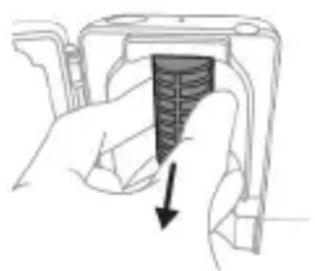
natural_image
Hand holding a device with a black arrow pointing to a textured interior (no text or symbols visible)natural_image
Illustration of a hand holding a small object with an arrow indicating motion (no text or symbols)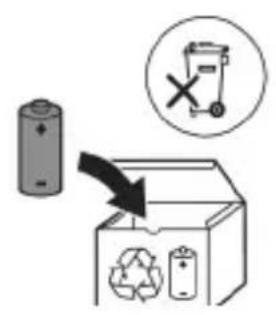
natural_image
Simple line drawing of an open book with no text or symbols visible

natural_image
Illustration of a hand holding a toothbrush with a downward arrow indicating force or pressure (no text or symbols)natural_image
Simple line drawing of a curved object with a checkmark indicating a detail (no text or symbols)natural_image
Illustration of a hand using a tool to apply a product to a textured surface, with an inset showing a magnified view of a circular object (no text or symbols present)1 Samitriniet sarus un uzklājiet mazliet zobu pastas.
natural_image
Illustration of a hand holding a curved object with directional arrows indicating movement or force (no text or symbols)natural_image
Diagram showing dental alignment with a tool interacting with teeth (no text or labels)Clean White Gum Care
natural_image
Simple diagram with three circles and two vertical lines, no text or symbols presentnatural_image
Diagram of a microphone with a circular icon showing signal waves (no text or symbols)natural_image
Simple diagram with a circular symbol containing a vehicle and a starburst shape connected to a vertical line (no text or labels)natural_image
Simple diagram showing a circular icon with a traffic symbol and a small circle connected by an arrow (no text or labels)natural_image
Three-step diagram illustrating a mechanical assembly process: tool, device, and gear (no text or symbols)natural_image
Line drawing of a hand inserting a small object into a cylindrical device (no text or symbols)natural_image
Simple line drawing of a device with a starburst symbol above it, showing a downward arrow and a small component below (no text or symbols)natural_image
Illustration of a handheld electronic device with a hand holding a cable, showing internal components and a pointer (no text or symbols)natural_image
Line drawing of a medical procedure showing a needle inserted into tissue with a pen inserted (no text or symbols)natural_image
Illustration of two hands using a tool to adjust or install a mechanical component, with no visible text or symbols.natural_image
Illustration of a hand inserting a component into an open device (no text or symbols visible)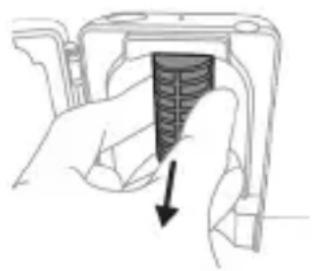
natural_image
Hand holding a device component with a downward arrow indicating a process (no text or symbols present)natural_image
Diagram of a mechanical or electrical component with a curved arrow indicating rotation (no text or symbols)
natural_image
Simple line drawing of an open book with no text or symbols visible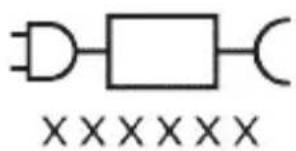
natural_image
Illustration of a hand using a tool to apply a product to a toothbrush, with an inset showing a magnified view of the product (no text or symbols present)natural_image
Simple diagram with three circles and a central oval, no text or symbols presentnatural_image
Diagram of a microphone with signal icon and connection point (no text or symbols)natural_image
Simple line drawing of a gear and a star symbol (no text or labels)natural_image
Simple line drawing of a hand pressing a button on a bottle with a power symbol (no text or labels)natural_image
Illustration of two hands using a tool to measure a mechanical component, no text or symbols present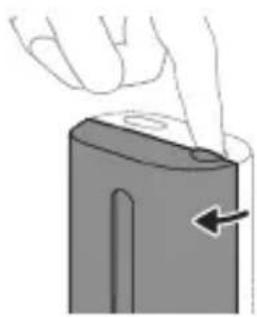
natural_image
Illustration of a hand pressing down on a mechanical component with an arrow indicating motion (no text or symbols)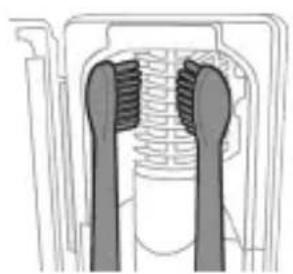
natural_image
Cross-sectional diagram of a mechanical component with two symmetrical slots and textured surfaces (no text or symbols)
natural_image
Line drawing of a hand holding a small object with a pointed tip, resembling a device or tool (no text or symbols present)natural_image
Simple line drawing of a mechanical setup with a component and cable (no text or symbols)Ikrovimas naudojant ikroviklj arba UV nukenksminimo irenginj
natural_image
Illustration of a handheld electronic device with a hand holding a cable, showing internal components and a pointer (no text or symbols)natural_image
Line drawing of a hand holding a pipette over a bundle of noodles (no text or symbols)natural_image
Illustration of two hands using a tool to connect a mechanical component, with no visible text or symbols.natural_image
Hand inserting a component into an electronic device (no text or symbols visible)natural_image
Hand holding a device with a black arrow pointing to a textured section (no text or symbols visible)natural_image
Illustration of hands performing a button press operation on a cylindrical object (no text or symbols)natural_image
Illustration of a hand holding a cylindrical tool with arrows indicating force direction, and an inset showing a magnified view of the tool tip (no text or symbols)natural_image
Mechanical assembly diagram showing a rotating component with a magnified inset view (no text or symbols)natural_image
Illustration of a hand holding a device with a circular component, showing a mechanical assembly (no text or symbols)www.philips.com/support
www.philips.com/support

natural_image
Simple line drawing of an open book and a circuit symbol (no text or labels)natural_image
Illustration showing a hand brushing a tooth with a brush, and a close-up of the tooth being adjusted (no text or symbols present)natural_image
Illustration of a hand using a pen to apply a sample on a surface, with an inset showing a magnified view of the sample (no text or symbols present)natural_image
Illustration of a hand holding a small object with directional arrows indicating movement or force (no text or symbols)natural_image
Diagram showing dental alignment with a toothbrush and tooth arrangement (no text or labels)Clean White Gum Care
flowchart
graph TD
    A["Step 5"] --> B["Step 6"]
    B --> C["Step 7"]
    C --> D["Step 8"]
    D --> E["Brush"]
Intenzitások
natural_image
Simple diagram with three circles and a central oval, no text or symbols presentnatural_image
Diagram of a microphone with signal icon and connection point (no text or symbols)natural_image
Simple line diagram showing a circular icon with a road symbol and a starburst shape connected to a vertical line (no text or labels)natural_image
Simple line drawing of a hand pressing a button on a bottle with a power symbol (no text or labels)natural_image
Four-step diagram showing a hand holding a tool, a close-up of a device with a button, and a final view of a mechanical component (no text or symbols present)natural_image
Simple line drawing of a device with a star-shaped symbol above it, showing a downward arrow and a small object inside (no text or symbols)natural_image
Diagram of a handheld electronic device with a curved cable and connector (no text or symbols)natural_image
Simple line drawing of a squid being held by a pen (no text or symbols)natural_image
Illustration of hands using a tool to connect two objects, with no visible text or symbolsnatural_image
Illustration of a hand inserting a component into an open device (no text or symbols visible)natural_image
Hand holding a device with a black arrow pointing to a textured interior (no text or symbols visible)www.philips.com/support
natural_image
Simple line drawing of an open book with no text or symbols visible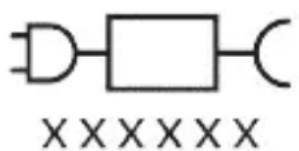
natural_image
Illustration showing a hand brushing a tooth with a brush, and a close-up of the tooth being checked (no text or symbols present)natural_image
Illustration of a hand using a pen to apply a sample on a surface, with an inset showing a magnified view of the sample (no text or symbols present)natural_image
Illustration of a hand holding a segmented object with directional arrows indicating movement or force (no text or symbols)natural_image
Diagram showing dental alignment with a toothbrush and teeth, no text or symbols presentClean White Gum Care
natural_image
Simple diagram with three circles and a central oval, no text or symbols presentnatural_image
Illustration of a toothbrush with a sensor icon and signal symbol (no text or labels)natural_image
Simple line drawing of a gear symbol with a starburst icon and a small arrow pointing to it (no text or labels)natural_image
Simple diagram showing a circular icon with a traffic signal inside and a connected circle with an arrow pointing to it (no text or symbols)natural_image
Three-step diagram illustrating a mechanical assembly process: tool insertion, device pressing, and final assembled view (no text or symbols)natural_image
Line drawing of a hand inserting a small component into a device (no text or symbols)natural_image
Simple line drawing of a mechanical setup with a component and cable (no text or symbols)Opladen op oplader of UV-reiniger
natural_image
Illustration of a handheld electronic device with a hand holding a cable, showing internal components and a pointer (no text or symbols)natural_image
Line drawing of a medical procedure showing a needle inserted into tissue with a pen inserted (no text or symbols)natural_image
Illustration of two hands using a tool to adjust or install a mechanical component, with no visible text or symbols.natural_image
Illustration of a hand inserting a component into an electronic device (no text or symbols visible)
natural_image
Hand holding a device component with a black arrow pointing to a textured section (no text or symbols visible)natural_image
Illustration of a hand holding a small electronic device with a circular button, no text or symbols present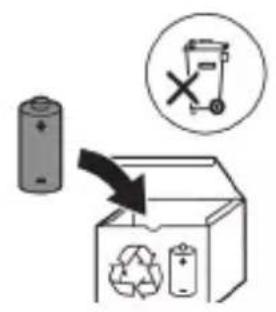
natural_image
Simple line drawing of an open book with no text or symbols visible

natural_image
Illustration of a hand holding a toothbrush with an arrow indicating force or movement (no text or symbols)natural_image
Simple line drawing of a curved object with a checkmark mark (no text or symbols)natural_image
Illustration of a hand using a tool to apply a product to a textured surface, with an inset showing a magnified view of the product (no text or symbols present)Clean White Gum Care
natural_image
Simple diagram with three circles and two vertical lines, no text or symbols presentnatural_image
Simple line drawing of a microphone with a circular icon showing signal waves (no text or symbols)natural_image
Simple line diagram showing a circular symbol with directional arrows and a starburst shape connected to a vertical line (no text or labels)natural_image
Simple diagram showing a circular icon with a traffic symbol and a small circle connected by an arrow (no text or labels)natural_image
Hand holding a button with a power symbol (no text or labels)natural_image
Pure diagram of gear and shaft components without any text or symbolsnatural_image
Three-step diagram illustrating a mechanical assembly process: tool, device, and gear (no text or symbols)natural_image
Line drawing of a hand inserting a small object into a cylindrical device (no text or symbols)natural_image
Simple line drawing of a mechanical setup with a piston and connecting rod (no text or symbols)Lading i lader eller UV-renser
1 Koble laderen eller renseren til et strømuttak.
2 Plasser håndtaket på laderen eller i renseren.
- Håndtaket avgir 2 korte pip for å bekrefte at håndtaket er riktig plassert.
- Det blinkende lyset på batteriindikatoren viser at tannbørsten lades.
- Når håndtaket er fulladet på laderen, lyser batteriindikatoren grønt i 30 sekunder og slår seg deretter av.
natural_image
Illustration of a handheld electronic device with a hand holding a connector (no text or symbols visible)natural_image
Line drawing of a hand holding a pen above a bundle of noodles (no text or symbols)1 Ta av børstehodet, og skyll metallstangen i varmt vann. Pass på at du har fjernet alle tannkremrester.
natural_image
Illustration of two hands using a tool to tie a pair of wires (no text or symbols present)natural_image
Hand inserting a component into an electronic device (no text or symbols visible)natural_image
Hand holding a device with a black arrow pointing to a textured interior (no text or symbols visible)natural_image
Illustration of a hand holding a cylindrical object with arrows indicating force direction, and an inset showing a magnified view of the object's tip (no text or symbols present)natural_image
Mechanical assembly diagram showing a lever mechanism with a magnified inset view (no text or symbols)natural_image
Illustration of a hand holding a small electronic device with a circular button, no text or symbols presentnatural_image
Simple line drawing of an open book with no text or symbols visiblenatural_image
Illustration showing a hand brushing a tooth with a brush, and a close-up of the tooth being examined with a checkmark (no text or symbols present)1 Cho'tka tuklari dastaning old qismi bilan bir xil yo'nalishda bo'lishi uchun cho'tka kallagini tekislang.
2 Cho'tka kallagini u boshqa kirmagunigacha metall valga qattiq bosing.
Izoh: Cho'tka kallagi va dasta orasida kichik tirqish ko'rinishi – normal holat.
Philips Sonicare tish pastangizdan foydalanish
Agar Sonicare tish pastasidan birinchi marta foydalanayotgan bo'lsangiz, elektr bo'Imagan tish cho'tkasidan foydalanishga qaraganda ko'proq tebranish sezish normal holat. Odatda birinchi marta foydalanayotgan foydalanuvchilar ortiqcha bosim beradi. Faqat yumshoq bosib bering va tish cho'tkasi siz uchun tozalashiga imkon bering. Eng yaxshi taassurot uchun tish tozalash ko'rsatmalariga amal qiling.
Yangi Sonicare motorli tish cho'tkasiga o'tishingizga yordam berish uchun ilk 1-2 hafta pastroq sozlamada foydalaning, keyin yuqoriroq sozlamaga o'ting.
Tish tozalash ko'rsatmalari
natural_image
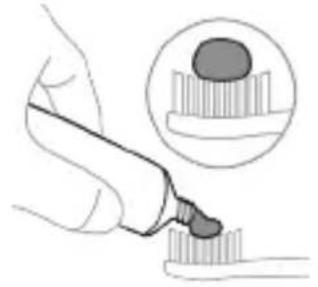
Illustration of a hand holding a pen with a magnified inset showing a droplet on a surface (no text or symbols)1 Cho'tkani namlang va unga kam miqdorda tish pastasi surting.
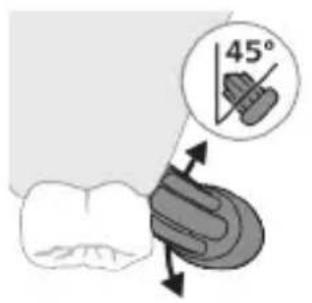
2 Tish cho'tkasini tishlar qarshisida kichik (45 daraja) burchak ostida tuting va cho'tkalar milk chizig'iga yoki milk chizig'ining tagiga yetishi uchun uni qattiq bosing.
Izoh: Cho'tka markazini tishlarga doimi to'liq tekkizib turing.
3 Philips Sonicare qurilmasini yoqish uchun yoqish/o'chirish tugmasini bosing.
natural_image
Illustration of a hand holding a small object with directional arrows indicating movement or force (no text or symbols)4 Cho'tkani tishlar va milk chizig'iga yengil tutib turing. Cho'tkalar tishlar orasiga kirishi uchun cho'tka kallagini oldinga-orqaqa kichik harakatlar bilan tishlaringizni tozalang. Bu harakatlarni tish tozalash siklingiz yakunlangunga qadar bajaring.
natural_image
Diagram of dental arching technique showing tooth arrangement and tooth penetration (no text or labels)5 Old tishlarning ichki yuzalarini tozalash uchun dastani yarim-vertikal qilib ushlang va har bir tishni bir necha vertikal harakatlar bilan birma-bir tozalab chiqing.
Clean White Gum Care
| Foydasi Maxsus kundalik tozalash uchun | Yuzadagi dog'larni ketkazadi | Milklarni ohista massaj qiladi |
| Jami tish tozalash vaqti | 2 daqiga 2 daqiga va 30 soniya | 3 daqiga |
Tozalash usuli Har bir segmentni 30 soniyadan tozalang.
flowchart
graph TD
    A["①"] --> B["②"]
    B --> C["③"]
    C --> D["④"]
    D --> E["④"]
    style A fill:#f9f,stroke:#333
    style B fill:#f9f,stroke:#333
    style C fill:#f9f,stroke:#333
    style D fill:#f9f,stroke:#333
    style E fill:#ccf,stroke:#333
flowchart
graph TD
    A["Step 5"] --> B["Step 6"]
    B --> C["Step 7"]
    C --> D["Step 8"]
    D --> E["Final Step"]
    style A fill:#f9f,stroke:#333
    style B fill:#f9f,stroke:#333
    style C fill:#f9f,stroke:#333
    style D fill:#f9f,stroke:#333
    style E fill:#ccf,stroke:#333
Intensivlik
natural_image
Simple diagram with three circles and a vertical line, no text or symbols presentMotorli tish cho'tkangiz 3 turdagi jadallik sozlamalari bilan jihozlangan:
- past jadallik (bitta chiziq)
- o'rta jadallik (ikkita chiziq)
- yuqori jadallik (uchta chiziq)
Dastaga mahkamlanganda smart cho'tka kallagi tavsiya etilgan jadallikni avtomatik ravishda tanlaydi (faqat maxsus modellar). Agar boshqa jadallikka o'tkazishni xohlasangiz, tish tozalash paytida rejim/jadallik tugmasini bosish orqali shunday qilishingiz mumkin. Dasta o'chirilgani yoki pauza qilingani uchun jadallikni o'zgartirish imkonsiz.
BrushSync texnologiyasi
natural_image
Diagram of a toothbrush with a sensor icon and a circular label (no text or symbols)BrushSync texnologiyasi cho'tka kallagining dasta bilan mikrochip orqali muloqot qilishiga yordam beradi.
Cho'tka kallagi ostidagi belgisi cho'tka kallagi ushbu texnologiya bilan jihozlanganini anglatadi.
BrushSync texnologiyasi quyidagilarni faollashtiradi:
- Cho'tka kallagini almashtirishni eslatish funksiyasi
- BrushSync rejimini juftlash
Philips Sonicare BrushSync texnologiyasiga ega keng turdagi smart cho'tka kallaklarini taklif qiladi. Tish cho'tkasining cho'tka kallaklari to'liq ko'lami bilan tanishish va sizga eng mos keladigan cho'tka kallagini topish uchun www.philips.com/toothbrush-heads veb-saytiga kiring.
Funksiyalar
- Bosim sensori bildirgisi
- Quadpacer
- SmarTimer
- EasyStart
- Cho'tka kallagini almashtirishni eslatish funksiyasi
- Cho'tka kallagini juftlash rejimi
natural_image
Simple line diagram showing a circular symbol with a fork and arrow inside, connected to a vertical line with a star-like shape at the bottom (no text or labels)natural_image
Simple diagram showing a circular icon with a traffic signal inside and a small circle connected to a vertical line (no text or symbols)natural_image
Illustration of two hands using a tool to measure a mechanical component, with no visible text or symbols.Ogohlantirish: Cho'tka kallagi sanitayzerda tozalanayotganida cho'tka kallagi qopqog'i cho'tka kallagida emasligini tekshiring.
natural_image
Illustration of a hand pressing down on a device component with an arrow indicating the process (no text or symbols present)natural_image
Diagram of a mechanical component with two textured surfaces and internal structure (no text or symbols)3 Cho'tka kallagini sanitayzerdagi 2 ta ilgakdan biriga cho'tkalarini chiroqqa qaratgan holda joylang.
Izoh: Sanitayzerda faqat Philips Sonicare biriktiriladigan cho'tka kallaklarini tozalang.
Izoh: Philips Sonicare for Kids cho'tka kallaklarini sanitayzerda tozalamang.
4 Sanitayzer mos keladigan kuchlanishdagi rozetkaga ulanganini tekshiring.
natural_image
Line drawing of a hand inserting a small black object into a rectangular device (no text or symbols)5 Eshikni yoping va ultrabinafsha nur tozalash siklini tanlash uchun yashil quvvatni yoqish/o'chirish tugmasini bir marta bosing.
natural_image
Simple line drawing of a mechanical setup with a component and a base, no text or symbols present.Quvvatlagich yoki ultrabinafsha sanitayzerda quvvatlash
1 Quvvatlagich yoki sanitayzerni elektr manbaiga ulang.
2 Dastani quvvatlagich yoki sanitayzerga joylang.
- Dasta quvvatlash moslamasiga to'g'ri o'rnatilganini tasdiqlash uchun 2 marta qisqa signal chaladi.
- Batareyaning miltillovchi indikatori tish cho'tkasi quvvatlanayotganini bildiradi.
- Quvvatlagichdagi dasta to'liq quvvatlansa, batareya indikatori 30 soniya yashil rangda yonadi va keyin o'chadi.
Sayohat g'ilofi bilan quvvatlash
natural_image
Illustration of a handheld electronic device with a hand holding a cable, showing internal components and a pointer indicating rotation (no text or symbols present)Izoh: Qadoqdagi aksessuarlar xarid qilingan modelga qarab farqlanishi mumkin.
1 USB kabelni sayohat quvvatlagich g'ilofiga kiriting.
2 Biriktirilgan USB kabelni quyidagi 5V kuchlanishli doimiy tokka ulang:
- Taqdim etiladigan USB adapter.
- UL bilan qayd etilgan yoki ANSI/UL 60950-1 bilan sertifikatlangan shaxsiy kompyuter USB konnektori.
- UL bilan qayd etilgan yoki ANSI/UL 60950-1 LPS bilan sertifikatlangan, USB chiqish portiga ega quvvat ta'minoti.
- UL bilan qayd etilgan yoki 1310 Toifa 2 bilan sertifikatlangan quvvat ta'minoti.
natural_image
Line drawing of a medical procedure showing a needle inserted into tissue with a pen inserted (no text or symbols)1 Cho'tka kallagini chiqarib oling va metall val atrofini iliq suv bilan yuving. Har qanday tish pastasi qoldig'ini tozalaganingizni tekshiring.
Ogohlantirish: Metall valdagi rezina zichlagichni o'tkir narsalar bilan bosmang, bu shikastlanishga olib kelishi mumkin.
2 Dastaning butun yuzasini nam mato bilan artib oling.
Izoh: Ortiqcha suvni yo'qotish uchun dastani rakovinaga urmang.
Cho'tka kallagi
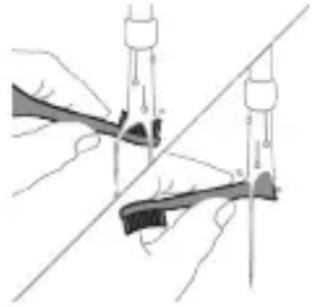
natural_image
Illustration of hands using compasses to measure a tool, no text or symbols present1 Cho'tka kallagi va cho'tkani har foydalanishdan keyin yuving.
2 Cho'tka kallagini dastadan chiqarib oling va cho'tka kallagi ulanish qismini kamida haftada bir marta iliq suv bilan yuving. Sayohat qopqog'ini zarur bo'lgancha tez-tez yuvib tashlang.
Quvvatlash moslamasi
1 Tozalashdan avval, quvvatlagichni tarmoqdan uzing.
2 Quvvatlash moslamasining butun yuzasini nam mato bilan artib oling.
Sayohat g'ilofi
Iliq suv bilan yuving va sayohat g'ilofi ichini tozalash uchun nam matodan foydalaning.
Sanitayzerni tozalash
Ogohlantirish: Sanitayzerni suvga botirmang yoki jo'mrak ostida chaymang.
Ogohlantirish: Sanitayzerning ultrabinafsha chirog'i issiqligida sanitayzerni tozalamang.
Optimal samaradorlik uchun sanitayzeringizni har hafta tozalash tavsiya etiladi.
1 Sanitayzerni tarmoqdan uzing.
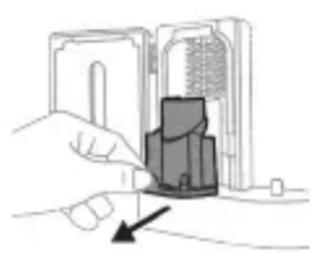
natural_image
Illustration of a hand inserting a component into an electronic device (no text or symbols visible)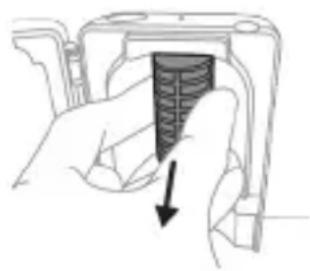
natural_image
Hand holding a mechanical component with a black arrow pointing to a textured section (no text or symbols visible)2 Tomchi tomini to'g'riga tortib chiqaring. Tomchi novini chaying va uni nam mato bilan tozalab arting.
3 Barcha ichki yuzalarini nam mato bilan tozalang.
4 Ultrabinafsha chiroqdan himoya plyonkasini chiqarib oling.
Plyonkani chiqarib olish uchun qisqichlar yonidagi chetlaridan ushlab, himoya plyonkasini tortib oling.
5 Ultrabinafsha chiroqni chiqarib oling.
natural_image
Illustration of a hand holding a device with a circular component, no text or symbols present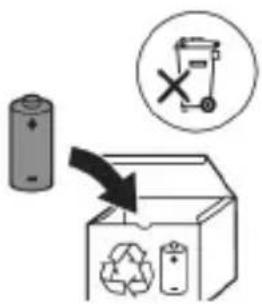
7 Batareyani yashil bosma plata bilan ulab turadigan metall tilchani sindirish uchun otvertkani batareya osti va qora korpus orasiga kiriting. Bu batareyaning ostki uchini korpusdan chiqarib oladi.
8 Ikkinchi metall tilchani sindirish uchun batareyani oling va uni ichki qismlarga teskari tarafga torting.
Ogohlantirish: Barmog'ingizni tilib olmaslik uchun batareya tilchasining o'tkir qirralaridan ehtiyot bo'ling.
www.philips.com/support
natural_image
Simple line drawing of an open book with no text or symbols visible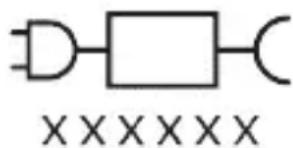
natural_image
Illustration of a hand holding a toothbrush with a downward arrow indicating force or pressure (no text or symbols)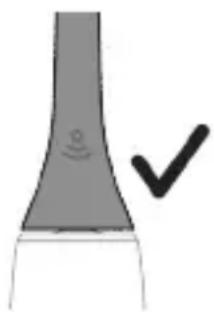
natural_image
Simple line drawing of a vertical tube with a circular mark and a checkmark (no text or symbols)natural_image
Diagram of dental arching with tooth structure and magnified detail (no text or labels)Clean White Gum Care
natural_image
Simple diagram with three circles and two curved lines, no text or symbols presentnatural_image
Diagram of a microphone with signal icon and sensor symbol (no text or labels)natural_image
Simple line diagram showing a gear icon with directional arrows and a starburst symbol, connected by a small arrow (no text or labels)natural_image
Hand holding a power button next to a bottle (no text or symbols visible)natural_image
Pure diagram of gear and shaft components without any text or symbolsnatural_image
Illustration of two hands using a tool to measure a mechanical component (no text or symbols present)natural_image
Simple line drawing of a device with a star-shaped symbol above it, showing a downward arrow and a small rectangular object below (no text or symbols)natural_image
Illustration of a hand holding a handheld electronic device with a cable and plug, showing internal components (no text or symbols)natural_image
Line drawing of a medical procedure involving a tool and a tool tip, no text or symbols presentnatural_image
Illustration of two hands using a tool to tie a pair of objects, no text or symbols presentnatural_image
Illustration of a hand inserting a component into an open device (no text or symbols visible)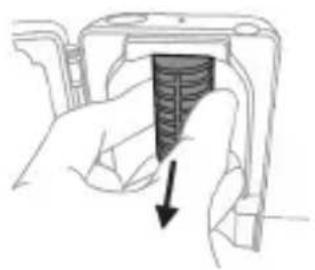
natural_image
Hand holding a device with a black arrow pointing to a textured interior (no text or symbols visible)natural_image
Simple line drawing of a mechanical component or tool with a curved arrow indicating motion (no text or symbols)
natural_image
Illustration of a hand holding a small electronic device with a circular button, no text or symbols present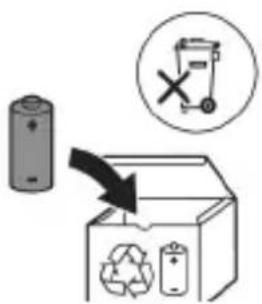
www.philips.com/support
natural_image
Simple line drawing of an open book with no text or symbols visibleLeia o manual do utilizador.
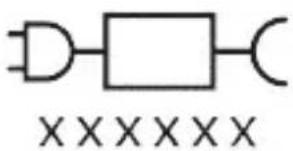
natural_image
Illustration showing a hand brushing a tooth with a brush, and a close-up of the tooth being smoothed (no text or symbols)natural_image
Illustration of a hand using a pipette to apply liquid onto a surface, with an inset showing a droplet on a surface (no text or symbols present)natural_image
Diagram of dental arching technique showing tooth arrangement and tool placement (no text or labels)Clean White Gum Care
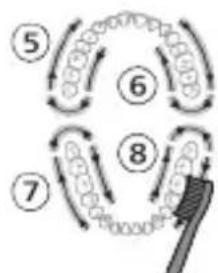
flowchart
graph TD
    A["Step 5"] --> B["Step 6"]
    B --> C["Step 7"]
    C --> D["Step 8"]
    D --> E["Feedback Loop"]
    style A fill:#f9f,stroke:#333
    style B fill:#f9f,stroke:#333
    style C fill:#f9f,stroke:#333
    style D fill:#f9f,stroke:#333
    style E fill:#ccf,stroke:#333
Intensidades
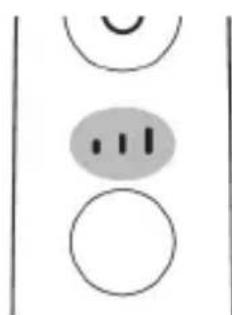
natural_image
Simple diagram with three circles and a central oval, no text or symbols presentnatural_image
Diagram of a microphone with a sensor icon and signal symbol (no text or labels)natural_image
Simple line drawing of a gear and a star symbol (no text or labels)natural_image
Simple diagram showing a circular icon with a traffic symbol and a small circle connected by a line (no text or labels)natural_image
Three-step diagram illustrating a mechanical assembly process: tool insertion, close-up of component, and final assembled view (no text or symbols)natural_image
Line drawing of a hand inserting a small object into a device (no text or symbols)natural_image
Simple line drawing of a device with a starburst icon above it, showing a plug inserted into a base (no text or symbols)natural_image
Illustration of a handheld electronic device with a hand holding a cable, showing internal components and a pointer (no text or symbols)natural_image
Line drawing of a medical procedure showing a needle inserted into tissue (no text or symbols)natural_image
Illustration of hands using a tool to adjust or install a mechanical component, with no visible text or symbols.natural_image
Illustration of a hand inserting a component into an open device (no text or symbols visible)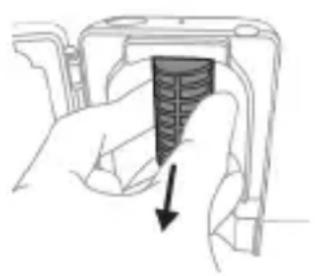
natural_image
Hand holding a device with a black arrow pointing to a textured section (no text or symbols visible)natural_image
Illustration of a hand holding a small object with an arrow indicating motion (no text or symbols)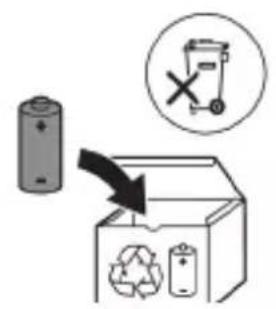
www.philips.com/support
www.philips.com/support
natural_image
Simple line drawing of an open book with no text or symbols visiblenatural_image
Illustration showing a hand brushing a tooth with a brush, and a close-up of the tooth being checked (no text or symbols present)natural_image
Illustration of a hand using a pipette to apply liquid onto a surface, with an inset showing a droplet on a surface (no text or symbols present)Clean White Gum Care
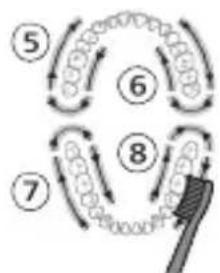
flowchart
graph TD
    A["Step 5"] --> B["Step 6"]
    B --> C["Step 7"]
    C --> D["Step 8"]
    D --> E["Feedback Loop"]
    style A fill:#f9f,stroke:#333
    style B fill:#f9f,stroke:#333
    style C fill:#f9f,stroke:#333
    style D fill:#f9f,stroke:#333
    style E fill:#ccf,stroke:#333
Intensități
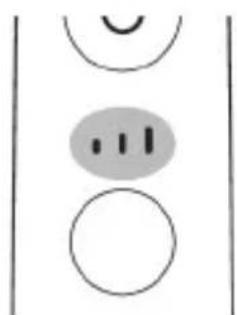
natural_image
Simple diagram with three circles and two curved lines, no text or symbols presentnatural_image
Illustration of a toothbrush with a sensor icon and signal symbol (no text or labels)natural_image
Simple line diagram showing a circular icon with a road sign and a starburst symbol connected to a vertical line (no text or labels)natural_image
Simple diagram showing a circular icon with a traffic symbol and a small circle connected by a line (no text or labels)natural_image
Hand holding a button with a power symbol (no text or labels)natural_image
Simple diagram showing gear and gear icons inside a rounded rectangle and a vertical rectangle (no text or symbols)natural_image
Simple line drawing of a gear and a rectangular object with internal gear-like patterns (no text or symbols)natural_image
Three-step diagram illustrating a mechanical assembly process: tool insertion, component disassembly, and final assembled view (no text or symbols)natural_image
Line drawing of a hand inserting a small object into a cylindrical device (no text or symbols)natural_image
Simple line drawing of a mechanical component with a starburst symbol above it, no text or labels present.natural_image
Illustration of a hand holding a handheld electronic device with a curved cable or connector (no text or symbols visible)natural_image
Line drawing of a hand holding a pen inserted into a bundle of noodles (no text or symbols)natural_image
Illustration of two hands using a tool to tie a pair of objects, no text or symbols presentnatural_image
Illustration of a hand inserting a component into an open device (no text or symbols visible)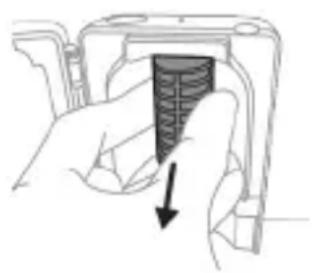
natural_image
Hand holding a device with a black arrow pointing to a textured section (no text or symbols visible)natural_image
Diagram of a mechanical or electrical component with a curved arrow indicating rotation (no text or symbols)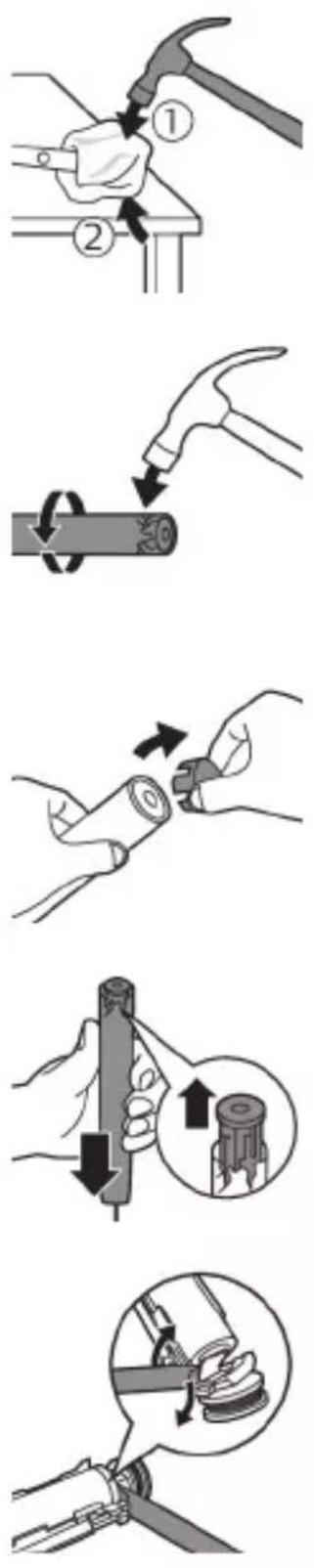
natural_image
Illustration of a hand holding a device with a black arrow indicating rotation (no text or symbols)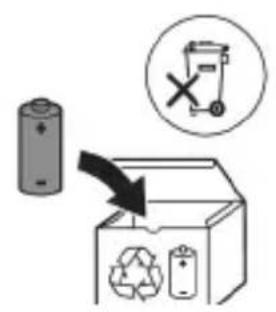
www.philips.com/support
natural_image
Simple line drawing of an open book with no text or symbols visible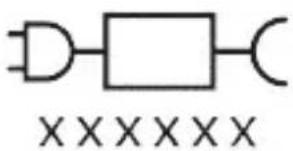
natural_image
Illustration showing a hand brushing a tooth with a brush, and a close-up of the tooth being checked (no text or symbols present)natural_image
Illustration of a hand using a pipette to apply liquid onto a surface, with an inset showing a droplet on a surface (no text or symbols present)Clean White Gum Care
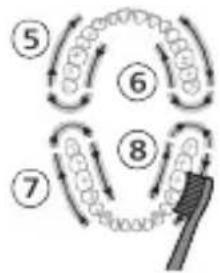
flowchart
graph TD
    A["Step 5"] --> B["Step 6"]
    B --> C["Step 7"]
    C --> D["Step 8"]
    D --> E["Brush"]
Intensitetet
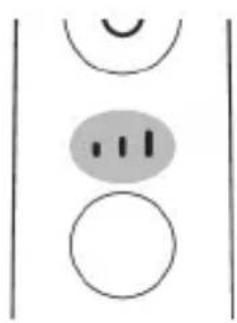
natural_image
Simple diagram with three circles and a central oval, no text or symbols presentnatural_image
Diagram of a brightness sensor mounted on a tripod, with no text or symbols present.natural_image
Simple line drawing of a gear and a star symbol (no text or labels)natural_image
Simple diagram showing a circular icon with a traffic symbol and a small circle connected by a line (no text or labels)natural_image
Hand holding a button with a power symbol (no text or labels present)natural_image
Three-step diagram illustrating a mechanical assembly process: tool insertion, component disassembly, and final assembled assembly (no text or symbols)natural_image
Line drawing of a hand inserting a small component into a device (no text or symbols)natural_image
Simple line drawing of a device with a starburst symbol above it, showing a downward arrow and a small component below (no text or symbols)natural_image
Illustration of a handheld electronic device with a hand holding a connector (no text or symbols visible)natural_image
Line drawing of a hand holding a pen inserted into a bundle of noodles (no text or symbols)natural_image
Illustration of hands using a tool to connect two objects, no text or symbols presentnatural_image
Illustration of a hand inserting a component into an open device (no text or symbols visible)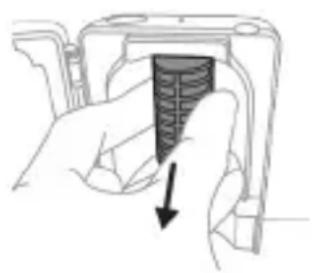
natural_image
Hand holding a device with a black arrow pointing to a textured section (no text or symbols visible)natural_image
Diagram of a mechanical or electrical component with a curved arrow indicating rotation (no text or symbols)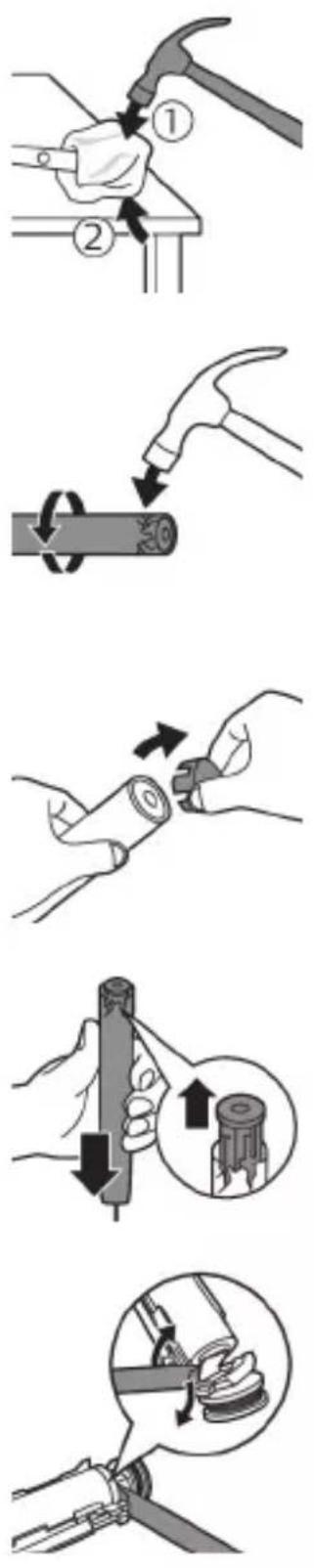
natural_image
Illustration of a hand holding a device with a circular component, no text or symbols present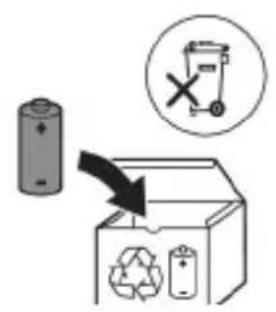
natural_image
Simple line drawing of an open book with no text or symbols visible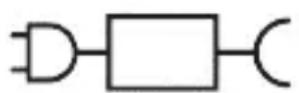

natural_image
Illustration of a hand holding a toothbrush with an arrow indicating force or movement (no text or symbols)natural_image
Simple line drawing of a vertical structure with a checkmark (no text or symbols)If you are using your Sonicare toothbrush for the first time, it is normal to feel more vibration than when using a non-electric toothbrush. It is common for first-time users to apply too much pressure. Only apply gentle pressure and let the toothbrush do the brushing for you. Please follow the brushing instructions below for the best experience.
To help you transition to your new Sonicare power toothbrush, use a lower setting for the first 1-2 weeks then transition to a higher setting.
natural_image
Illustration of a hand applying a toothbrush to a tooth, with an inset showing a magnified view of the tooth (no text or symbols present)3 Zobno ščetko Philips Sonicare vklopite tako, da pritisnete gumb za vklop/izklop.

natural_image
Illustration of a hand holding a segmented object with directional arrows indicating movement (no text or symbols)natural_image
Diagram of dental arching with tooth structure and tool (no text or labels)Your power toothbrush is equipped with up to 3 modes: Clean, White and Gum Care (specific models only). Based on the smart brush head you use, the optimal mode and intensity will be selected automatically by the BrushSync technology. To manually change the mode, press the
mode/intensity button when the toothbrush is off. All brush heads work with each mode.
Clean White Gum Care
Your power toothbrush comes with 3 different intensity settings:
- low intensity (one bar)
- medium intensity (two bars)
- high intensity (three bars)
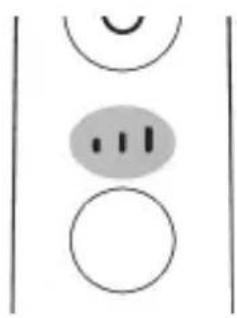
natural_image
Simple diagram with three circles and two curved lines, no text or symbols presentWhen attached to the handle, the smart brush head will automatically select the recommended intensity (specific models only). If you wish to change to a different intensity, you can do so by pressing the mode/intensity button while brushing. The intensity cannot be changed as long as the handle is powered off or paused.
Tehnologija BrushSync
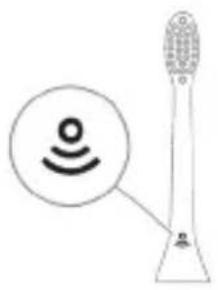
natural_image
Diagram of a microphone with a sensor icon and signal symbol, no text or labels presentnatural_image
Simple line diagram showing a circular symbol with a gear and a starburst shape connected to a vertical line (no text or labels)This Philips Sonicare model comes with the EasyStart feature deactivated. The EasyStart feature gently increases the power over the first 14 brushings to help you get used to brushing with the Philips Sonicare.
natural_image
Simple diagram showing a circular icon with a traffic symbol and a small circle connected by an arrow (no text or labels)Note: Features included may vary based on model purchased.
Brush heads with BrushSync technology are equipped with a microchip which communicates with the handle and automatically pairs it with the recommended mode and intensity. Most brush heads with BrushSync technology will auto pair to Clean Mode. Brush heads with specific benefits will pair with the corresponding mode (when available), examples include:
- G2 Optimal Gum Care or G3 Premium Gum Care: Gum Care mode
- W3 Premium White or W(c) DiamondClean (compact): White mode
Note: If you choose to change mode/intensity from the recommended setting, the brush head will remember the your chosen setting for future brushing sessions.
Step 1: Place the handle on the plugged in charger/charging travel case.
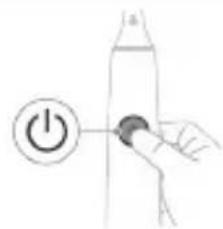
natural_image
Hand holding a power button next to a bottle (no text or symbols visible)Step 2: Press and hold power on/off button for:
EasyStart Brush Head Replacement Reminder Pressure Sensor Feedback
Up to 3 seconds Up to 5 seconds Up to 7 seconds
Step 3: Let go of the power on/off button when you hear:
1 beep 1 beep and then 2 beeps 1 beep, 2 beeps and then 3 beeps
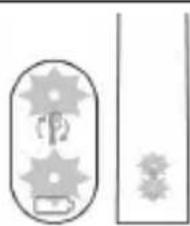
natural_image
Simple line drawing of a capsule-shaped object with gear-like elements and two separate rectangular shapes (no text or symbols)If you see the battery indicator and the brush head replacement reminder light flash green 2 times and hear 3 tones from low to high, then the feature has been activated.
OR

natural_image
Simple line drawing of a capsule-shaped object with internal gear-like patterns and a rectangular block, no text or symbols present.If you see the battery indicator and brush head replacement reminder light flash amber 1 time and hear 3 tones high to low, then the feature has been deactivated.
UV-čistilnik
natural_image
Illustration of a medical procedure showing step-by-step steps in handling a tool, including grip, device placement, and insertion (no text or symbols)natural_image
Simple line drawing of a mechanical component with a star-shaped mark and a downward arrow, no text or symbols present.natural_image
Diagram of a handheld electronic device with a hand holding a connector (no text or symbols visible)natural_image
Line drawing of a medical procedure showing a tool interacting with a surgical instrument on a tissue structure (no text or symbols)natural_image
Illustration of two hands using a tool to connect two objects, no text or symbols presentnatural_image
Illustration of a hand inserting a component into an electronic device (no text or symbols visible)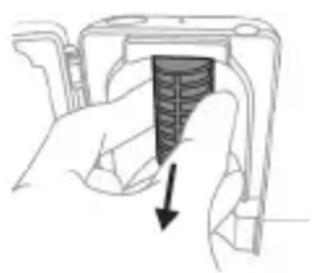
natural_image
Hand holding a camera lens with a black arrow pointing to the lens area (no text or symbols)Opozorilo: Čistilnika ne potapljate v vodo in ga ne izpirajte pod tekočo vodo.
natural_image
Illustration of a hand holding a device with a black arrow indicating rotation (no text or symbols)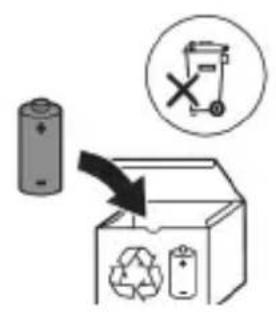
8 Baterijo primite in jo odmaknite od notranjih delov, da prelomite drugi kovinski jeziček baterije.
Opozorilo: Pazite, da si z ostrimi robovi jezičkov baterije ne poškodujete prstov.
9 Stike baterije prekrijte z lepilnim trakom, da preprečite kratek stik zaradi preostale napetosti v bateriji.
natural_image
Simple line drawing of an open book with no text or symbols visiblenatural_image
Illustration showing a hand brushing a tooth with a brush, and a close-up of the tooth being checked (no text or symbols present)natural_image
Illustration of a hand using a pipette to apply liquid onto a surface, with an inset showing a droplet on a surface (no text or symbols present)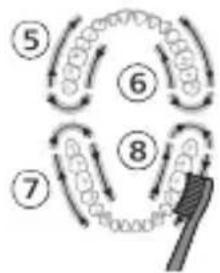
flowchart
graph TD
    A["Step 5"] --> B["Step 6"]
    B --> C["Step 7"]
    C --> D["Step 8"]
    D --> E["Arrow to brush-like element"]
    style A fill:#f9f,stroke:#333
    style B fill:#f9f,stroke:#333
    style C fill:#f9f,stroke:#333
    style D fill:#f9f,stroke:#333
    style E fill:#ccf,stroke:#333
Intenzity
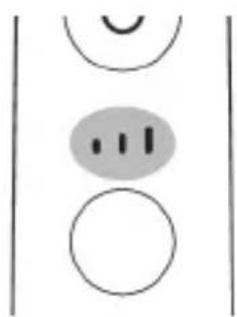
natural_image
Simple diagram with three circles and two vertical lines, no text or symbols presentnatural_image
Illustration of a toothbrush with a sensor icon and a magnified view of its tip (no text or symbols)natural_image
Simple line diagram showing a circular icon with a fork and arrow, connected to a star-shaped symbol with an arrow (no text or labels)natural_image
Simple line drawing of a hand pressing a button on a cylindrical object with an 'Power' icon (no text or symbols)natural_image
Simple line drawing of a device with a starburst symbol above it, showing a plug inserted into a base (no text or symbols)natural_image
Diagram of a handheld electronic device with a hand holding a cable, showing internal components and an arrow indicating motion (no text or symbols present)natural_image
Line drawing of a hand holding a tool interacting with a bundle of noodles (no text or symbols)natural_image
Illustration of hands using a tool to connect two objects, with no visible text or symbolsnatural_image
Hand inserting a component into a device (no text or symbols visible)1 Dezinfekčnú jednotku odpojte zo siete.
2 Vytiahnite podnos na odkvapkávanie. Opláchnite ho a utrite dočista navlhčenou handričkou.
3 Všetky vnútorné povrchy očistite navlhčenou handričkou.
4 Odstráňte ochranný štít pred UV žiarovkou.
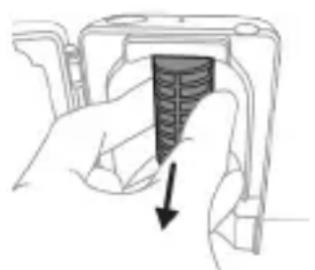
natural_image
Hand holding a device with a black arrow pointing to a textured section (no text or symbols visible)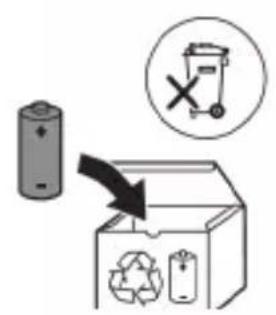
www.philips.com/support
natural_image
Simple line drawing of an open book with no text or symbols visible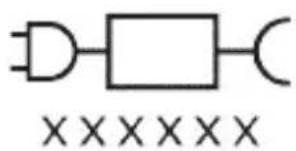
Deo napajanja koji se može skinuti: Oznaka „xxxxx“ predstavlja broj modela odobrenih punjača koji bi trebalo da se koriste.
Namena
Električne četkice za zube ProtectiveClean namenjene su za uklanjanje nakupljenog kamenca i ostataka hrane sa zuba u cilju sprečavanja karijesa i poboljšavanja oralnog zdravlja. Električne četkice za zube ProtectiveClean namenjene su za ličnu upotrebu. Deca treba da koriste proizvod uz nadzor odraslih.
Philips Sonicare četkice za zube (slika 1)
1 Drška
2 Dugme za uključivanje/isključivanje
3 Indikator intenziteta
4 Dugme za režim/intenzitet
5 Indikator režima
6 Podsetnik za zamenu glave sa četkicom
7 Indikator baterije
Dodaci:
natural_image
Illustration showing a hand brushing a tooth with a brush, and a close-up of a tooth being smoothed (no text or symbols)1 Poravnajte glavu četkice tako da su vlakna okrenuta u istom smeru kao i prednja strana drške.
2 Čvrsto pritisnite glavu četkice na metalnu osovinu do kraja.
natural_image
Illustration of a hand using a tool to apply a product to a textured surface, with an inset showing a magnified view of a textured surface (no text or symbols present)1 Pokvasite vlakna i nanesite malu količinu paste za zube.
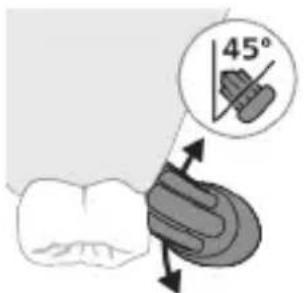
2 Postavite vlakna četkice za zube na zube pod blagim uglom (45 stepeni) i čvrsto pritisnite kako bi vlakna dosegla liniju desni ili malo ispod te linije.
natural_image
Diagram of dental arching with tooth structure and tooth removal (no text or labels)Clean White Gum Care
| Pogodnost Za izvanredno svakodnevno pranje | Uklanja mrlje sa površina | Nežno masira desni |
| Ukupno vreme pranja zuba | 2 minuta 2 minuta i 30 sekundi | 3 minuta |
Kako se pere Perite svaki segment 30 sekundi.
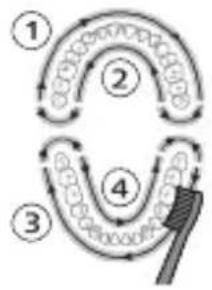
flowchart
graph TD
    A["Stage 1"] --> B["Stage 2"]
    B --> C["Stage 3"]
    C --> D["Stage 4"]
    D --> E["Shipped Point"]
perite svaki segment 30 sekundi
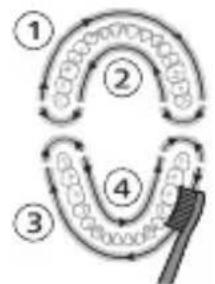
flowchart
graph TD
    A["①"] --> B["②"]
    B --> C["③"]
    C --> D["④"]
    D --> E["⑤"]
    E --> A
zatim perite segmente 5 i 6, svaki u trajanju od 15 sekundi, da biste izbeleli i ispolirali prednje zube.
perite svaki segment 30 sekundi
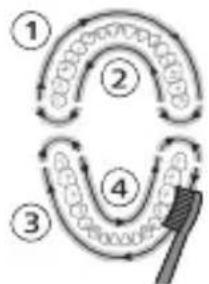
flowchart
graph TD
    A["Step 1"] --> B["Step 2"]
    B --> C["Step 3"]
    C --> D["Step 4"]
    D --> E["Step 5"]
zatim perite segmente 5, 6, 7 i 8, svaki u trajanju od 15 sekundi, za nežno stimulisanje i masiranje desni.
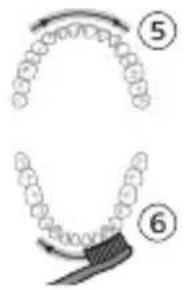
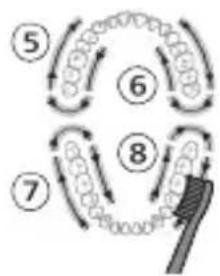
flowchart
graph TD
    A["Step 5"] --> B["Step 6"]
    B --> C["Step 7"]
    C --> D["Step 8"]
    D --> E["Arrow to brush"]
    style A fill:#f9f,stroke:#333
    style B fill:#f9f,stroke:#333
    style C fill:#f9f,stroke:#333
    style D fill:#f9f,stroke:#333
    style E fill:#ccf,stroke:#333
Intenziteti
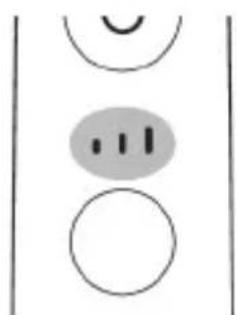
natural_image
Simple diagram with three circles and a vertical line, no text or symbols presentElektrična četkica za zube ima 3 različitih postavki za intenzitet:
- nizak intenzitet (jedna crta)
- srednji intenzitet (dve crte)
- visok intenzitet (tri crte)
Kada je montirana na dršku, pametna glava sa četkicom automatski bira preporučeni intenzitet (samo na određenim modelima). Intenzitet možete da promenite tako što ćete pritisnuti dugme za režim/intenzitet tokom pranja zuba. Intenzitet ne može da se promeni dok god je drška isključena ili je njen rad pauziran.
Tehnologija BrushSync
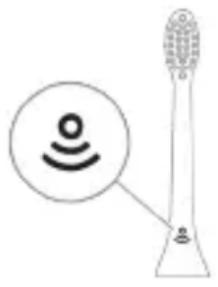
natural_image
Illustration of a toothbrush with a sensor icon and a magnified view of its tip (no text or symbols)Tehnologija BrushSync omogućava komunikaciju između glave četkice i drške koristeći mikročip. Simbol na donjoj strani glave četkice označava da glava četkice sadrži ovu tehnologiju.
Tehnologija BrushSync omogućava:
- Podsetnik za zamenu glave sa četkicom
- Uparivanje režima BrushSync
Philips Sonicare ima široku paletu pametnih glava četkica sa tehnologijom BrushSync. Za više informacija o našoj cjelokupnoj paleti glava četkica za zube posjetite
www.philips.com/toothbrush-heads i pronadite glavu četkice koja vam najviše odgovara.
Funkcije
natural_image
Simple diagram with a starburst icon containing a road symbol and a small star-like symbol connected by a line (no text or labels)Četkica za zube Sonicare mjeri pritisak koji koristite prilikom pranja zuba da bi zaštitila vaše desni i zube od oštećivanja.
3 Kada indikator podsetnika za zamenu glave sa četkicom zasvetli žutonarandžastom bojom, treba da zamenite glavu sa četkicom.
Sve pametne glave četkice imaju aktiviranu funkciju podsetnika za zamenu glave četkice. Da biste deaktivirali podsetnik za zamenu glave četkice, pogledajte odeljak „Aktiviranje ili deaktiviranje funkcija“.
Režim uparivanja glave sa četkicom
Napomena: Obuhvaćene funkcije mogu da se razlikuju u zavisnosti od kupljenog modela.
Glave sa četkicom sa BrushSync tehnologijom imaju mikročip koji komunicira sa drškom i automatski je uparuju sa preporučenim režimom i intenzitetom. Većina glava četkica sa BrushSync tehnologijom će se automatski upariti sa režimom Clean (Čišćenje). Glave sa četkicom sa određenim pogodnostima će se upariti sa odgovarajućim režimom (kada je dostupno), primeri obuhvataju:
- G2 Optimal Gum Care ili G3 Premium Gum Care: Režim Gum Care (Nega desni)
- W3 Premium White ili W(c) DiamondClean(compact): Režim White (Izbeljivanje)
Napomena: Ako odaberete da promenite režim/intenzitet u odnosu na preporučene postavke, glava sa četkicom će zapamtiti odabranu postavku za buduće sesije pranja zuba.
Aktiviranje ili deaktiviranje funkcija
natural_image
Simple line drawing of a hand pressing a button on a cylindrical object with an 'Power' icon (no text or symbols)natural_image
Simple line drawing of a device with a starburst symbol above it, showing a downward arrow and a small component below (no text or symbols)Punjenje na punjaču ili na UV aparatu za dezinfekciju
natural_image
Diagram of a handheld electronic device with a curved interface and a hand holding a plug (no text or symbols visible)Napomena: Uključeni dodaci mogu da se razlikuju u zavisnosti od kupljenog modela.
1 Umetnite USB kabl u putnu torbicu za punjenje.
2 Povežite priloženi USB kabl na ulazno napajanje jednosmernom strujom od 5 V sa:
- priloženim USB adapterom;
- standardnim USB konektorom na ličnom računaru koji je na UL listi ili je sertifikovan za ANSI/UL 60950-1;
- jedinicom za napajanje koja je na UL listi ili je sertifikovana za ANSI/UL 60950-1 LPS sa USB izlaznim priključkom;
- jedinicom za napajanje koja je na UL listi ili je sertifikovana za 1310 Class 2.
natural_image
Line drawing of a person using a tool to draw filaments from a bottle (no text or symbols)1 Uklonite glavu četkice i isperite oblast oko metalne osovine toplom vodom. Obavezno uklonite sve ostatke paste za zube.
Oprez: Nemojte da gurate gumenu zaptivku na metalnoj osovini oštrim predmetima pošto to može da dovede do oštećenja.
2 Čitavu površinu drške obrišite vlažnom krpom.
Napomena: Nemojte da udarate ručkom o sudoperu da biste uklonili višak vode.
Glava četkice
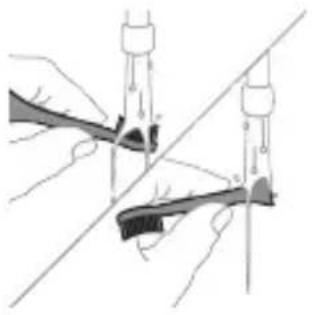
natural_image
Illustration of two hands using a tool to connect two objects, with no visible text or symbols1 Glavu četkice i vlakna isperite nakon svake upotrebe.
2 Bar jednom nedeljno skinite glavu četkice sa drške i toplom vodom isperite njen priključak. Isperite poklopac za putovanja kad god je potrebno.
Punjač
1 Isključite punjač iz električne mreže pre čišćenja.
2 Obrišite površinu punjača vlažnom krpom.
Putna futrola
Isperite toplom vodom i izbrišite unutrašnjost putne futrole vlažnom krpom.
Čišćenje aparata za dezinfekciju
natural_image
Hand inserting a component into an electronic device (no text or symbols visible)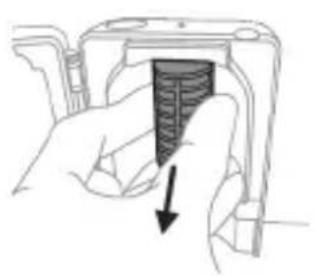
natural_image
Hand holding a device with a black arrow pointing to a textured section (no text or symbols visible)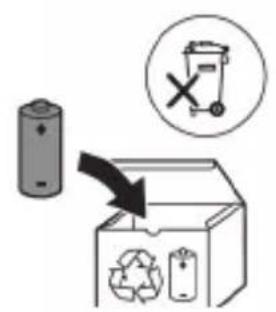
www.philips.com/support
natural_image
Simple line drawing of an open book with no text or symbols visible

natural_image
Illustration showing a hand brushing a tooth with a brush, and a close-up of the tooth being smoothed (no text or symbols)natural_image
Illustration of a hand using a pipette to apply liquid onto a surface, with an inset showing a droplet on a surface (no text or symbols present)Clean White Gum Care
natural_image
Simple diagram with three circles and a central oval, no text or symbols presentnatural_image
Diagram of a microphone with signal icon and connection point (no text or symbols)natural_image
Simple line drawing of a road intersection with a starburst symbol and a small arrow pointing to it (no text or labels)natural_image
Simple diagram showing a circular icon with a traffic signal inside and a small circle connected to a vertical line (no text or symbols)natural_image
Hand holding a button with a power symbol (no text or labels)natural_image
Three-step diagram illustrating a mechanical assembly process: tool insertion, device pressing, and final assembly with teeth (no text or symbols)natural_image
Line drawing of a hand inserting a small object into a device (no text or symbols)natural_image
Simple line drawing of a device with a star-shaped label and an arrow pointing to a small component (no text or symbols)natural_image
Illustration of a handheld electronic device with a hand holding a connector (no text or symbols visible)natural_image
Line drawing of a medical procedure showing a tool interacting with an anatomical structure (no text or symbols)natural_image
Illustration of hands using a tool to adjust or install a mechanical component, with no visible text or symbols.natural_image
Illustration of a hand inserting a component into an electronic device (no text or symbols visible)natural_image
Hand holding a mechanical component with a downward arrow indicating a force or direction (no text or symbols present)natural_image
Illustration of a mechanical component with a curved arrow indicating rotation (no text or symbols)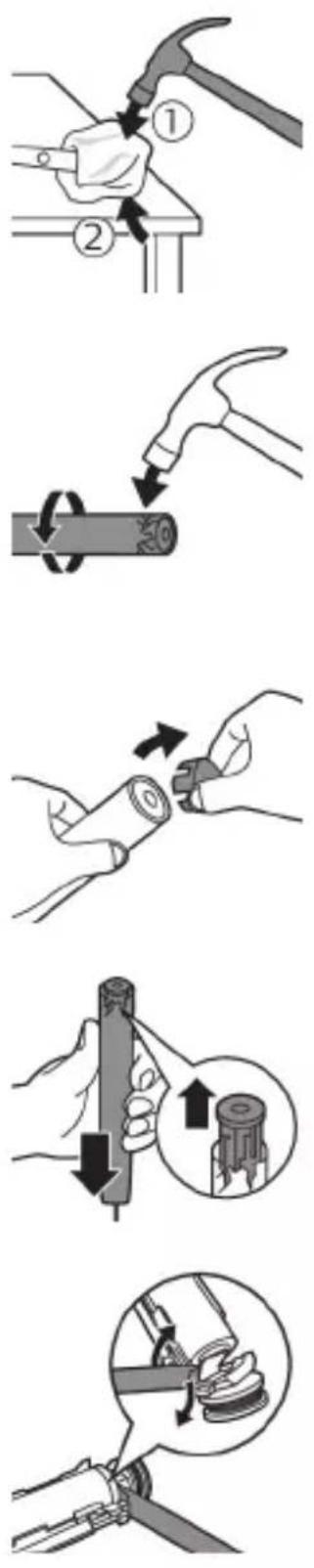
natural_image
Illustration of a hand holding a device with a circular component, no text or symbols present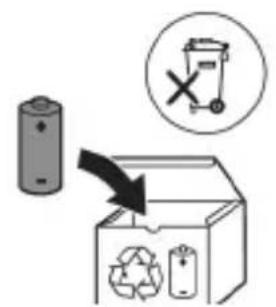
natural_image
Simple line drawing of an open book with no text or symbols visible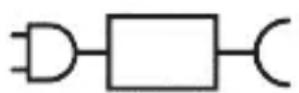

natural_image
Illustration of a hand holding a toothbrush with a downward arrow indicating force or pressure (no text or symbols)natural_image
Simple line drawing of a curved object with a checkmark mark (no text or symbols)natural_image
Illustration of a hand using a tool to apply a product to a toothbrush, with an inset showing a textured surface (no text or symbols)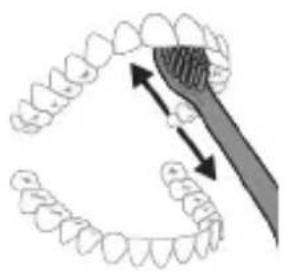
natural_image
Diagram showing dental alignment with a tool interacting with teeth (no text or labels)Clean White Gum Care
Borsta varje segment i 30 sekunder
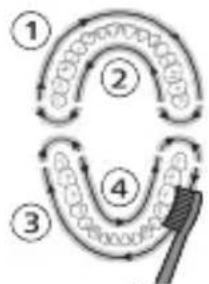
flowchart
graph TD
    A["①"] --> B["②"]
    B --> C["③"]
    C --> D["④"]
    D --> A
natural_image
Simple diagram with three circles and a central oval, no text or symbols presentnatural_image
Illustration of a toothbrush with a sensor icon and signal symbol (no text or labels)natural_image
Simple diagram with a starburst icon containing a road symbol and a small star-like symbol with an arrow pointing to it (no text or labels)natural_image
Simple line drawing of a hand pressing a button on a bottle with a power symbol (no text or labels)natural_image
Illustration of four different dental tool manipulation steps: tool insertion, device insertion, tooth removal, and final inspection (no text or symbols)natural_image
Simple line drawing of a device with a star-shaped label and an arrow pointing to a small component (no text or symbols)natural_image
Diagram of a handheld electronic device with a hand holding a cable, showing internal components and a directional arrow (no text or symbols)natural_image
Line drawing of a hand holding a pen over a bundle of noodles (no text or symbols)natural_image
Illustration of hands using a tool to connect two objects, no text or symbols presentnatural_image
Hand inserting a component into an open device (no text or symbols visible)natural_image
Hand holding a device with a black arrow pointing to a textured section (no text or symbols visible)natural_image
Illustration of a hand holding a cylindrical object with arrows indicating force direction, and an inset showing a magnified view of the object's tip (no text or symbols present)natural_image
Diagram of a mechanical assembly with a magnified inset showing a gear mechanism (no text or symbols)natural_image
Illustration of a hand holding a small object with an arrow indicating motion (no text or symbols)www.philips.com/support

natural_image
Simple line drawing of an open book and a circuit symbol (no text or labels)Bellik: Dürli modelleriň ayratynlyklary dürlüçe bolup bilýär. Käbir modeller Bluetooth ýa-da NFC bilen enjamlaşdyrylmadyk bolup biler.
natural_image
Illustration showing a hand brushing a tooth with a brush, and a close-up of the tooth being adjusted (no text or symbols present)natural_image
Illustration of a hand using a pipette to apply a product to a toothbrush, with an inset showing a textured surface (no text or symbols)1 Gyllary öllään we üstüne azajyk diş pastasyny çalyň.
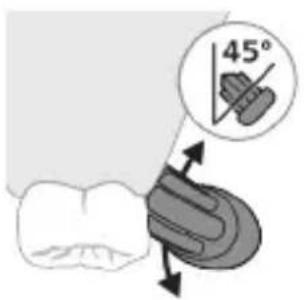
natural_image
Illustration of a hand holding a segmented object with directional arrows indicating movement or force (no text or symbols)4 Gyllary emaý bilen dişleriň üstünde we diş eti çyzygynda saklaň. Gyllar dişleriň arasyna yeter yaly edip, çalaja öne-yza hereket etdirip, dişleriňizi çotgalaň. Bu hereketi çotgalama döwrăniziň dowamynda dowam ediň.
Bellik: Gyllar çalaja hüžžerip durmalydyr. El bilen ulanylýan diş çotgasynda bolsy ýaly, gazalap çotgalamak maslahat berilmeýär.
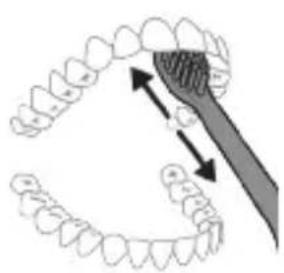
natural_image
Diagram showing dental alignment with a tool interacting with teeth (no text or labels)Bellik: Gaty köp basyş etseñiz, size duýduryş bermek üçin, tutawajyň titremesi üýtgär we nasadkany çalışyrmagy yatladyş çyrasy sary reňkde yanyp söner.
Clean White Gum Care
| Yeňillik Her gün | çendenaşa arassalamak üçin | Üst tegmiller aýyrýar | Diş etlerini emaý bilen massaž edýär |
| Jemi çotgalama wagty | 2 minut 2 minut we 30 sekunt | 3 minut | |
Çotgalaÿys usuly Her segmenti 30 sekunt çotgalaň.
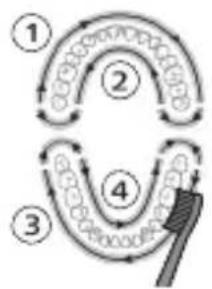
flowchart
graph TD
    A["Step 1"] --> B["Step 2"]
    B --> C["Step 3"]
    C --> D["Step 4"]
    D --> A
Her segmenti 30 sekunt çotgalaň
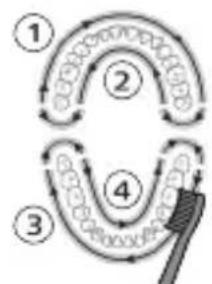
flowchart
graph TD
    A["Step 1"] --> B["Step 2"]
    B --> C["Step 3"]
    C --> D["Step 4"]
    D --> E["Arrow to final step"]
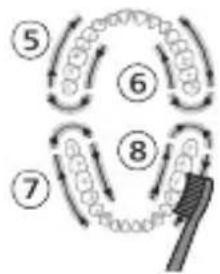
flowchart
graph TD
    A["Step 5"] --> B["Step 6"]
    B --> C["Step 7"]
    C --> D["Step 8"]
    D --> E["Final Step"]
Ýygjamlyklar
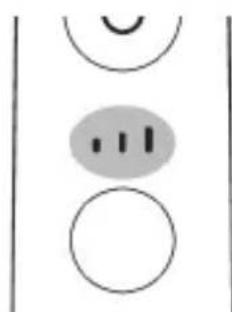
natural_image
Simple diagram with three circles and a central oval, no text or symbols presentElektrikli diş çotgaňyz 3 dürli ýygjamlyk sazlamasy bilen gelýär:
natural_image
Diagram of a toothbrush with a sensor icon and signal symbol, no text or labels presentnatural_image
Simple line drawing of a gear and gear icon with no text or symbolsnatural_image
Simple line drawing of a hand pressing a button on a bottle, with a power button icon nearby (no text or symbols)natural_image
Illustration of a dental tool manipulation step showing tool positioning, cutting into a toothbrush (no text or symbols)natural_image
Simple line drawing of a mechanical setup with a component and a pointer (no text or symbols)Zarýadnikde ýa-da ultramelewše dezinfektorda zarád bermek
natural_image
Illustration of a handheld electronic device with a curved cable and connector (no text or symbols)natural_image
Simple line drawing of a squid being held by a pen (no text or symbols)natural_image
Illustration of two hands using a tool to connect a mechanical component, with no visible text or symbols.Zarýadnik
1 Her ulanyşdan soň nasadkany we gyllary ýuwup durlaň.
2 Azyndan hepdede bir gezek nasadkany tutawaçdan aýryp, nasadkanyň birikmesini ýyly suw bilen ýuwup durlaň. Syýahat gapagyny näçe ýygylykda zerur bolsa ýuwup durlaň.
natural_image
Hand inserting a component into an electronic device (no text or symbols visible)natural_image
Hand holding a device with a textured internal component and an arrow indicating direction (no text or symbols)natural_image
Illustration of hands holding a cylindrical battery with an arrow indicating rotation (no text or symbols)4 Uçky gapajygy diş çotgasynyň tutawajyndan ayryň. Eger uçky gapajyk koprusdan ÿeñillik bilen sypmasa, tä uçky gapajyk sypýança ädim 3-i gaýtalaň.
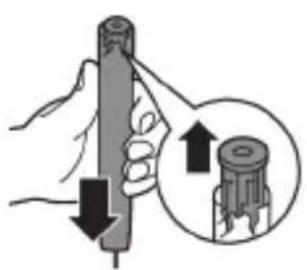
natural_image
Illustration of a hand holding a cylindrical object with arrows indicating force direction, and an inset showing a magnified view of the object (no text or symbols present)5 Tutawajy başasak saklap, waly gaty üste basyň. Eger içerki komponentler koprusdan YEňillik bilen sypmasa, tâ içerki komponentler sypýança ädim 3-i gaytalaň.
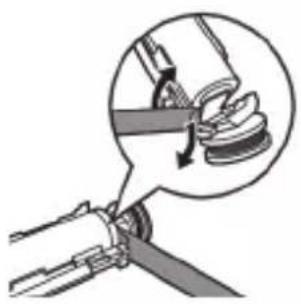
natural_image
Mechanical assembly diagram showing a rotating component with a magnified inset view (no text or symbols)6 Batareya bilen içerki komponentleriň aşagyndaky gara çarçuwanyň arasyna towlaýjyny sokuň. Soňra batareýany towlaýjy arkaly galdyryp, gara çarçuwanyň aşagyny döwüň.
natural_image
Illustration of a hand holding a device with a black arrow indicating rotation (no text or symbols)Bellik: Hyzmat ömri guataransoň, enjamy adaty hojalyk zibiline taşlamaň-da, resmi utilizasiýa ýygnaýyş nokadyna tabşyryň. Şeyle etmek bilen, daşky gurşawy gorap saklamaga kömek edýärsiňiz.
Εισαγωγή
www.philips.com/support
natural_image
Simple line drawing of an open book with no text or symbols visible
XXXXXX
natural_image
Illustration of a hand holding a toothbrush with an arrow indicating force or movement (no text or symbols)natural_image
Simple line drawing of a curved object with a checkmark indicating a detail (no text or symbols)natural_image
Illustration of a hand holding a pen with a magnified inset showing a droplet on a surface (no text or symbols)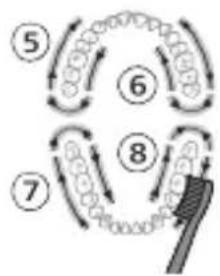
flowchart
graph TD
    A["Step 5"] --> B["Step 6"]
    B --> C["Step 7"]
    C --> D["Step 8"]
    D --> E["Arrow to brush"]
    style A fill:#f9f,stroke:#333
    style B fill:#f9f,stroke:#333
    style C fill:#f9f,stroke:#333
    style D fill:#f9f,stroke:#333
    style E fill:#ccf,stroke:#333
Εντάσεις
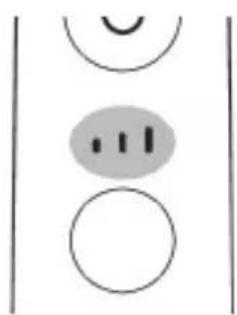
natural_image
Simple diagram with three circles and two vertical lines, no text or symbols presentnatural_image
Diagram of a toothbrush with a sensor icon and connection point, no text or symbols presentnatural_image
Simple line diagram showing a circular icon with a fork and arrow, connected to a vertical line with a star symbol (no text or labels)natural_image
Simple diagram showing a circular icon with a traffic signal inside and a vertical line with a small circle at the end (no text or symbols)natural_image
Simple line drawing of a hand pressing a button on a bottle with an 'Power' icon (no text or symbols)natural_image
Illustration of two hands using a tool to measure a rifle, with no visible text or symbolsnatural_image
Illustration of a hand pressing down on a device component with an arrow indicating left motion (no text or symbols)natural_image
Cross-sectional diagram of a mechanical component with two symmetrical slots and textured surfaces (no text or symbols)natural_image
Line drawing of a hand holding a small object with a pointed tip, resembling a device or tool (no text or symbols present)natural_image
Simple line drawing of a mechanical setup with a cylindrical component and a base, no text or symbols present.natural_image
Illustration of a handheld electronic device with a hand holding a plug, showing internal components and wiring (no text or symbols)natural_image
Line drawing of a hand holding a tool over a bundle of noodles (no text or symbols)natural_image
Illustration of two hands holding a tool with a ruler and connecting rods (no text or symbols)natural_image
Illustration of a hand inserting a component into an open device (no text or symbols visible)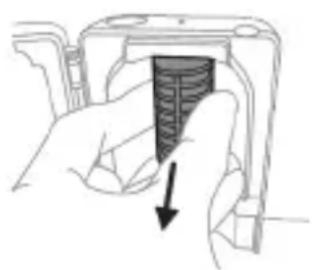
natural_image
Hand holding a device with a black arrow pointing to a textured surface (no text or symbols visible)natural_image
Illustration of a hand holding a cylindrical object with arrows indicating force direction, and an inset showing a magnified view of the object (no text or symbols present)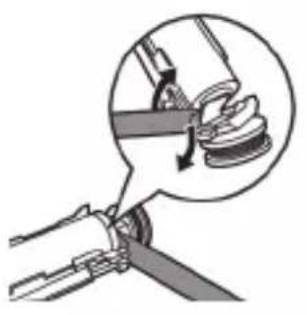
natural_image
Illustration of a mechanical device with a magnified inset showing a rotating component (no text or symbols)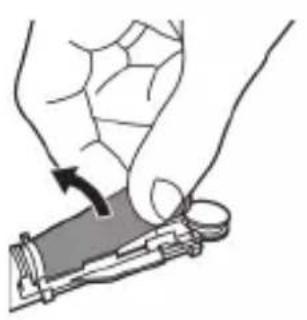
natural_image
Illustration of a hand holding a small electronic device with a circular button, no text or symbols present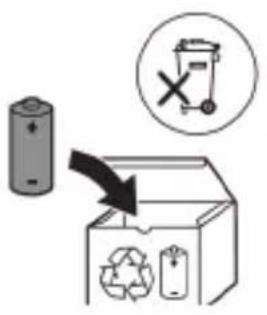
www.philips.com/support
natural_image
Simple line drawing of an open book with no text or symbols visible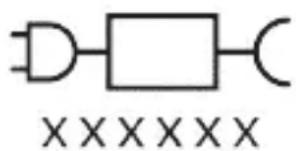
natural_image
Pure electrical circuit lines without any symbolsnatural_image
Illustration showing a hand brushing a tooth with a brush, and a close-up of the tooth being smoothed (no text or symbols)natural_image
Illustration of a hand holding a pen with a magnified inset showing a small object (no text or symbols present)natural_image
Illustration of a hand holding a small object with directional arrows indicating movement or force (no text or symbols)Clean White Gum Care
natural_image
Simple diagram with three circles and two vertical lines, no text or symbols presentnatural_image
Diagram of a microphone with a circular icon showing signal waves (no text or symbols)natural_image
Simple diagram with a starburst icon containing a road symbol and a small arrow pointing to it, connected by a line (no text or labels)natural_image
Simple diagram showing a circular icon with a traffic signal inside and a small circle connected to the right (no text or symbols)natural_image
Simple line drawing of a hand pressing a button on a bottle with an open power button (no text or symbols)natural_image
Illustration of two hands using a tool to adjust or install a mechanical component, with no visible text or symbols.natural_image
Illustration of a hand pressing down on a device component with an arrow indicating left motion (no text or symbols)natural_image
Cross-sectional diagram of a mechanical component with internal channels and textured surfaces (no text or symbols)natural_image
Line drawing of a hand holding a small object with a pointed tip, resembling a device or tool (no text or symbols present)natural_image
Simple line drawing of a mechanical setup with a component and cable (no text or symbols)natural_image
Diagram of a handheld electronic device with a hand holding a connector (no text or symbols visible)natural_image
Line drawing of a hand holding a pen inserted into a bundle of noodles (no text or symbols)natural_image
Illustration of hands using a tool to adjust or install a mechanical component, with no visible text or symbols.natural_image
Illustration of a hand inserting a component into a device (no text or symbols visible)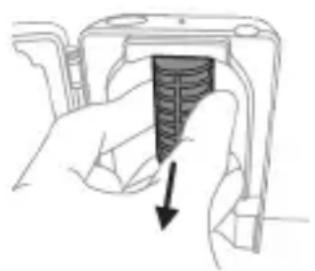
natural_image
Hand holding a device with a textured internal component and an arrow indicating direction (no text or symbols)natural_image
Illustration of a hand holding a cylindrical object with arrows indicating force direction, and an inset showing a magnified view of the same object (no text or symbols present)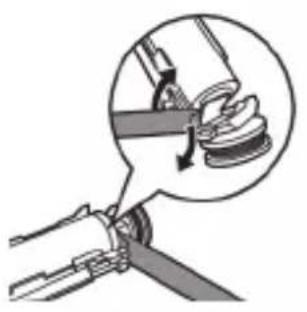
natural_image
Mechanical assembly diagram showing a lever mechanism with a magnified inset view (no text or symbols)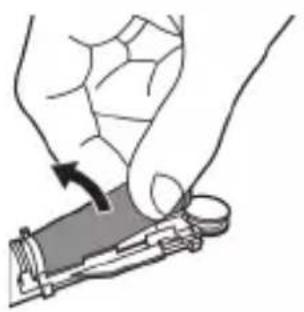
natural_image
Illustration of a hand holding a device with a circular button, showing a mechanical component (no text or symbols)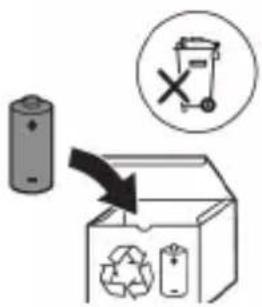
www.philips.com/support
natural_image
Simple line drawing of an open book with no text or symbols visible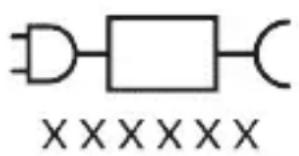
natural_image
Illustration showing a hand brushing a tooth with a brush, and a close-up of the tooth being smoothed (no text or symbols)natural_image
Illustration of a hand holding a pen applying liquid to a surface, with an inset showing a magnified view of a droplet (no text or symbols present)natural_image
Simple line drawing of a hand pressing a button on a power button (no text or symbols)natural_image
Illustration of a hand holding a segmented object with directional arrows indicating movement or force (no text or symbols)natural_image
Diagram of dental arching with tooth structure and tool (no text or labels)Clean White Gum Care
natural_image
Simple diagram with three circles and two vertical lines, no text or symbols presentnatural_image
Diagram of a microphone with signal icon and magnified view (no text or symbols)natural_image
Simple line diagram showing a gear icon with directional arrows and a starburst symbol, connected to a vertical line (no text or labels)natural_image
Simple line drawing of a hand pressing a button on a bottle with a power symbol (no text or labels)2-кадам: Күйгүзүү/өчүрүү баскычын коё бербей басып туруңуз:
natural_image
Illustration of two hands using a tool to adjust or install a mechanical component, with no visible text or symbols.natural_image
Illustration of a hand holding a device with a circular button and an arrow pointing to it (no text or symbols present)2 Манжаңызды санитайзердин эшигинин оюгуна салып, эшикти тартып ачыңыз.
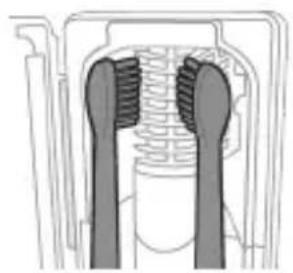
natural_image
Cross-sectional diagram of a mechanical component with two symmetrical slots and textured surfaces (no text or symbols)natural_image
Simple line drawing of a mechanical device with a star-shaped component inserted into a base (no text or symbols)natural_image
Diagram of a handheld electronic device with a scroll wheel and cable, showing no text or symbolsnatural_image
Line drawing of a medical procedure showing a tool inserted into tissue using a needle (no text or symbols)natural_image
Illustration of two hands using a tool to tie a pair of wires (no text or symbols present)natural_image
Hand inserting a component into an open device (no text or symbols visible)natural_image
Hand holding a device with a black arrow pointing to a textured interior (no text or symbols visible)www.philips.com/support
www.philips.com/support
natural_image
Simple line drawing of an open book with no text or symbols visible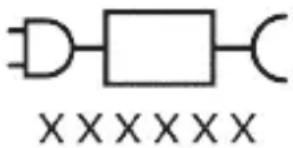
natural_image
Illustration showing a hand holding a toothbrush applying material to a tooth with a circular mark, and a checkmark indicating the process (no text or symbols present)If you are using your Sonicare toothbrush for the first time, it is normal to feel more vibration than when using a non-electric toothbrush. It is common for first-time users to apply too much pressure. Only apply gentle pressure and let the toothbrush do the brushing for you. Please follow the brushing instructions below for the best experience.
To help you transition to your new Sonicare power toothbrush, use a lower setting for the first 1-2 weeks then transition to a higher setting.
Упатства за четкање
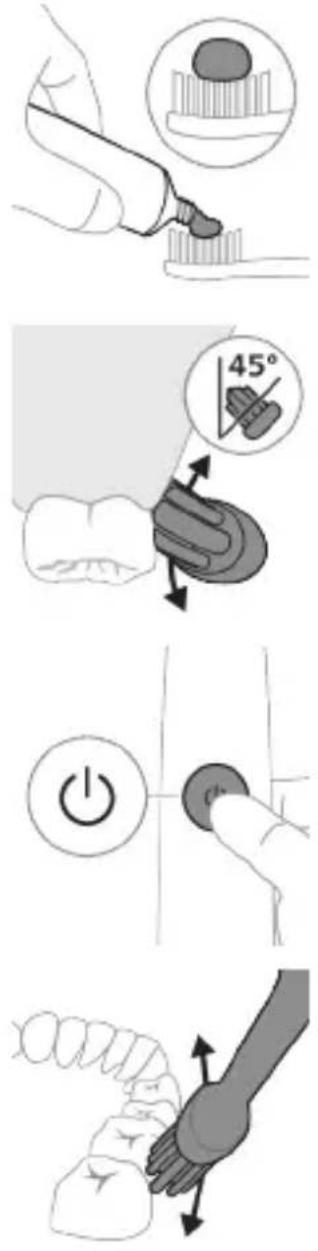
natural_image
Diagram of dental arching with tooth structure and magnified detail (no text or labels)Your power toothbrush is equipped with up to 3 modes: Clean, White and Gum Care (specific models only). Based on the smart brush head you use, the optimal mode and intensity will be selected automatically by the BrushSync technology. To manually change the mode, press the mode/intensity button when the toothbrush is off. All brush heads work with each mode.
Clean White Gum Care
Your power toothbrush comes with 3 different intensity settings:
- low intensity (one bar)
- medium intensity (two bars)
- high intensity (three bars)
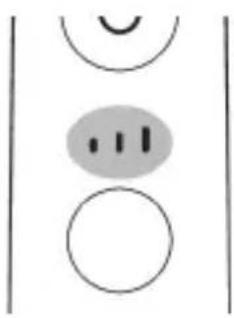
natural_image
Simple diagram with three circles and two curved lines, no text or symbols presentWhen attached to the handle, the smart brush head will automatically select the recommended intensity (specific models only). If you wish to change to a different intensity, you can do so by pressing the mode/intensity button while brushing. The intensity cannot be changed as long as the handle is powered off or paused.
natural_image
Illustration of a microphone with a circular icon showing signal waves (no text or symbols)natural_image
Simple diagram with a starburst icon containing a road symbol and a small arrow pointing to it, connected by a line (no text or labels)This Philips Sonicare model comes with the EasyStart feature deactivated. The EasyStart feature gently increases the power over the first 14 brushings to help you get used to brushing with the Philips Sonicare.
Note: Features included may vary based on model purchased.
Brush heads with BrushSync technology are equipped with a microchip which communicates with the handle and automatically pairs it with the recommended mode and intensity. Most brush heads with BrushSync technology will auto pair to Clean Mode. Brush heads with specific benefits will pair with the corresponding mode (when available), examples include:
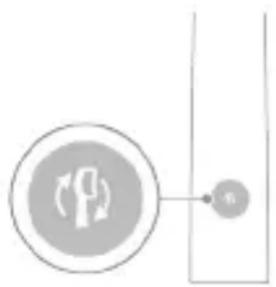
- G2 Optimal Gum Care or G3 Premium Gum Care: Gum Care mode
- W3 Premium White or W(c) DiamondClean (compact): White mode
Note: If you choose to change mode/intensity from the recommended setting, the brush head will remember the your chosen setting for future brushing sessions.
Step 1: Place the handle on the plugged in charger/charging travel case.
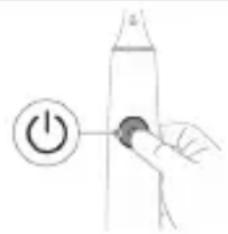
Step 2: Press and hold power on/off button for:
EasyStart Brush Head Replacement Reminder Pressure Sensor Feedback
Up to 3 seconds Up to 5 seconds Up to 7 seconds
Step 3: Let go of the power on/off button when you hear:
1 beep 1 beep and then 1 beep, 2 beeps and 2 beeps then 3 beeps
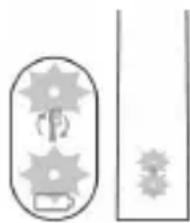
natural_image
Pure diagram of gear and shaft components without any text or symbolsIf you see the battery indicator and the brush head replacement reminder light flash green 2 times and hear 3 tones from low to high, then the feature has been activated.
OR
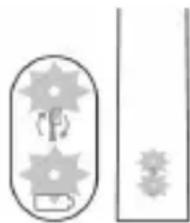
natural_image
Pure mechanical gear and shaft diagram without any text or symbolsIf you see the battery indicator and brush head replacement reminder light flash amber 1 time and hear 3 tones high to low, then the feature has been deactivated.
УВ-стерилизатор
natural_image
Illustration of two hands using a tool to measure a mechanical component, no text or symbols presentnatural_image
Illustration of a hand inserting a device into a cylindrical container with an arrow indicating the process (no text or symbols present)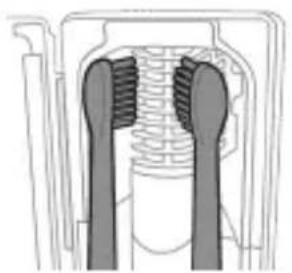
natural_image
Diagram of a mechanical component with two symmetrical slots and textured surfaces (no text or symbols)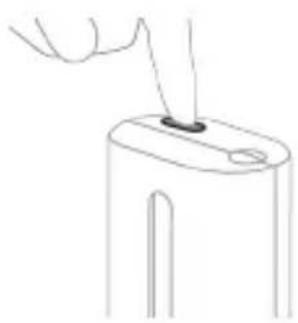
natural_image
Line drawing of a hand holding a small object on a device (no text or symbols)natural_image
Simple line drawing of a mechanical component with a star-shaped mark and arrow indicating process (no text or symbols)natural_image
Diagram of a handheld electronic device with a hand holding a cable, showing internal components and wiring (no text or symbols)natural_image
Line drawing of a hand holding a pen over a biological structure (no text or symbols)natural_image
Illustration of two hands using a tool to lift or stand, with no visible text or symbolsnatural_image
Illustration of a hand inserting a component into an open device (no text or symbols visible)natural_image
Hand holding a device with a black arrow pointing to a textured interior (no text or symbols visible)natural_image
Illustration of a hand holding a small electronic device with a circular button, no text or symbols present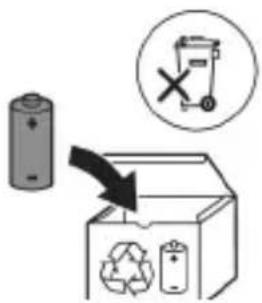
www.philips.com/support
natural_image
Simple line drawing of an open book with no text or symbols visiblenatural_image
Illustration showing a hand brushing a tooth with a brush, and a close-up of the tooth being smoothed (no text or symbols)natural_image
Illustration of a hand using a pipette to apply a sample onto a surface, with an inset showing a magnified view of the sample (no text or symbols present)natural_image
Illustration of a human hand holding a small object, with arrows indicating movement or force direction (no text or symbols)natural_image
Diagram of dental arching with tooth structure and tooth removal (no text or labels)natural_image
Simple diagram with three circles and two vertical lines, no text or symbols presentnatural_image
Diagram of a microphone with signal icon and magnified view (no text or symbols)natural_image
Simple line diagram showing a circular icon with a traffic light symbol and a star-shaped connector (no text or labels)natural_image
Simple line drawing of a hand pressing a button on a cylindrical object with an 'Power' icon (no text or symbols)natural_image
Simple line drawing of a mechanical setup with a component and cable (no text or symbols)natural_image
Illustration of a handheld electronic device with a hand holding a cable, showing internal components and a directional arrow (no text or symbols)natural_image
Line drawing of a medical procedure showing a tool interacting with an anatomical structure (no text or symbols)natural_image
Illustration of two hands using a tool to tie a pair of wires (no text or symbols visible)natural_image
Illustration of a hand inserting a component into a device (no text or symbols visible)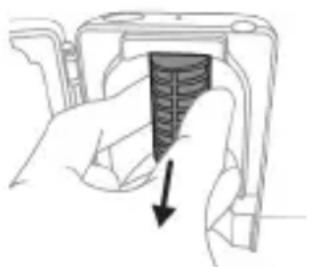
natural_image
Hand holding a device component with a black arrow pointing to it (no text or symbols visible)natural_image
Illustration of a hand holding a cylindrical object with arrows indicating force direction, and an inset showing a magnified view of the same object (no text or symbols present)natural_image
Diagram of a mechanical assembly with a magnified inset showing a rotating component (no text or symbols)natural_image
Illustration of a hand holding a device with a circular button, showing a mechanical component (no text or symbols)www.philips.com/support
www.philips.com/support
natural_image
Simple line drawing of an open book with no text or symbols visible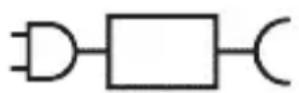

Кисми чудошавандаи таъминоти барк: «xxxxх» раками намунавии баркпуркунандахоеро, ки бояд истифода шавад, нишон медихад.
natural_image
Illustration showing a hand brushing a tooth with a brush, and a close-up of the tooth being checked (no text or symbols present)natural_image
Illustration of a hand using a tool to apply a product to a textured surface, with an inset showing a magnified view of a textured surface (no text or symbols present)3 Барои фаьол кардани «Philips Sonicare» тугмаи фаьол/хомўшро пахш кунед.
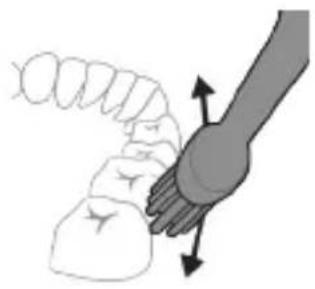
natural_image
Illustration of a hand holding a segmented object with directional arrows indicating movement (no text or symbols)4 Лифхои чўткаро болои дандонхо ва дар хати милки дандонхо ба таври дуруст чойгир кунед. Дандонхои худро бо харакатхои хурди пасу пеш тоза кунед, то ки лифхои чўтка байни дандонхо гузарад. Ин харакатро дар тамоми давраи дандоншўии худ идома дихед.
Тавзех: Мўйякхои чўтка бояд каме васеъ шаванд. Тавсия дода намешавад, ки шумо дандонхоро мисли бо чўткаи дандоншуии дасти тоза кунед.
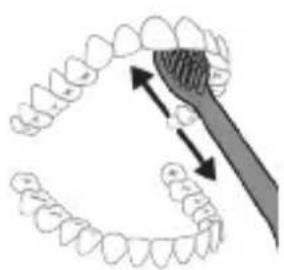
natural_image
Diagram showing dental alignment with a toothbrush and tooth arrangement (no text or labels)Clean White Gum Care
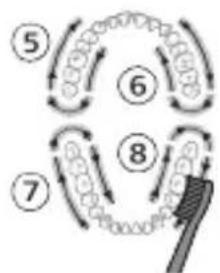
flowchart
graph TD
    A["Step 5"] --> B["Step 6"]
    B --> C["Step 7"]
    C --> D["Step 8"]
    D --> E["Brush"]
Шиддатхо
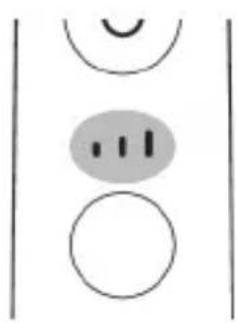
natural_image
Simple diagram with three circles and a vertical line, no text or symbols presentЧўткаи дандоншўии Шумо бо 3 танзимоти шиддати гуногун меояд:
- шиддати паст (як бар)
- шиддати миёна (ду бар)
- шиддати баланд (се бар)
natural_image
Diagram of a brightness sensor mounted on a tripod, with no text or symbols present.natural_image
Simple diagram with a circular icon containing a vehicle and directional arrows, connected to a vertical line with a star-like symbol (no text or labels)natural_image
Simple diagram showing a circular icon with a traffic symbol and a connected circle with an arrow (no text or labels)natural_image
Simple line drawing of a hand pressing a button on a cylindrical object with an 'Power' icon (no text or symbols)natural_image
Pure diagram of gear and shaft components without any text or symbolsnatural_image
Illustration of two hands using a tool to measure a mechanical component, no text or symbols presentnatural_image
Illustration of three-step dental tool manipulation process: opening, inserting teeth into jawbone, and cutting the jaw into a final component (no text or symbols)natural_image
Simple line drawing of a device with a star-shaped symbol above it, showing a downward arrow and a small rectangular object below (no text or symbols)natural_image
Illustration of a handheld electronic device with a hand holding a plug and cable (no text or symbols visible)Шарх: Лавозимотхой дохилшуда метавонанд вобаста ба модели харидшуда фарк кунанд.
natural_image
Line drawing of a medical procedure showing a tool interacting with an anatomical structure (no text or symbols)natural_image
Illustration of hands using a tool to adjust or install a mechanical component, no text or symbols presentnatural_image
Hand inserting a component into a device (no text or symbols visible)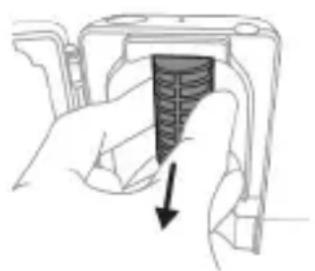
natural_image
Hand holding a device with a black arrow pointing to a textured interior (no text or symbols visible)Диккат: Хангоми гарм будани чароғи UV тамизкунандаро тоза накунед.
www.philips.com/support
natural_image
Simple line drawing of an open book with no text or symbols visible
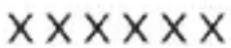
natural_image
Illustration showing a hand brushing a tooth with a brush, and a close-up of the tooth being smoothed (no text or symbols)natural_image
Illustration of a hand using a tool to apply a product to a textured surface, with an inset showing a magnified view of the product (no text or symbols present)natural_image
Illustration of a hand holding a curved object with directional arrows indicating movement or force (no text or symbols)natural_image
Diagram showing dental alignment with a tool interacting with teeth (no text or labels)natural_image
Simple diagram with three circles and two vertical lines, no text or symbols presentnatural_image
Diagram of a microphone with signal icon and connection point (no text or symbols)natural_image
Simple line diagram showing a circular icon with a road symbol and a star-shaped arrow pointing to a vertical line (no text or labels)natural_image
Simple line drawing of a hand pressing a button on a cylindrical object with an 'Power' icon (no text or symbols)natural_image
Simple diagram with gear-like shapes and a rectangular outline, no text or symbols presentnatural_image
Illustration showing two-step cleaning procedure: top shows tool positioning on diagonal line, bottom shows device with handle and arrow (no text or symbols)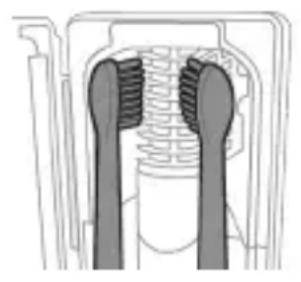
natural_image
Diagram of a mechanical component with two textured surfaces and internal channels (no text or symbols)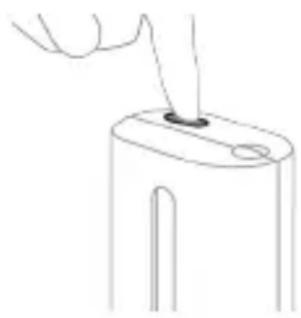
natural_image
Line drawing of a hand holding a small object with a pointed tip, next to a cylindrical object (no text or symbols)natural_image
Simple line drawing of a mechanical setup with a cylindrical component and a base, no text or symbols present.natural_image
Illustration of a handheld electronic device with a hand holding a connector (no text or symbols visible)natural_image
Line drawing of a fork being inserted into a container (no text or symbols)natural_image
Illustration of two hands holding a tool with a pointed tool, no text or symbols presentnatural_image
Hand inserting a component into a device (no text or symbols visible)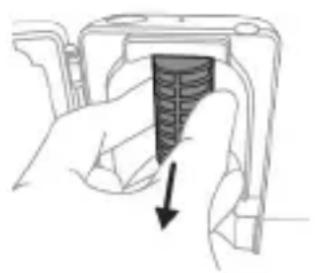
natural_image
Hand holding a device with a textured interior and arrow indicating downward motion (no text or symbols)natural_image
Illustration of a hand holding a cylindrical object with arrows indicating force direction, and an inset showing a magnified view of the same object (no text or symbols present)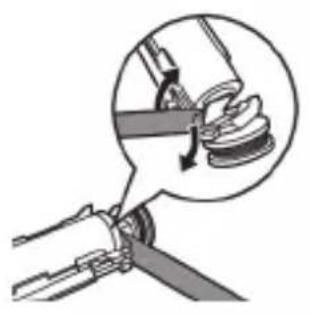
natural_image
Diagram of a mechanical assembly with a magnified inset showing a rotating component (no text or symbols)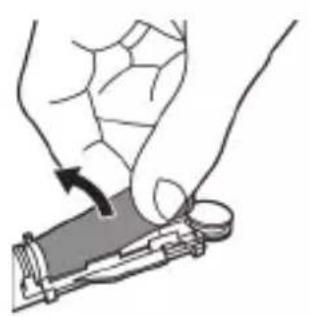
natural_image
Illustration of a hand holding a device with a circular button, showing a curved arrow indicating motion (no text or symbols present)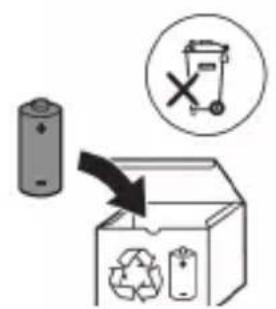
www.philips.com/support
natural_image
Simple line drawing of an open book with no text or symbols visible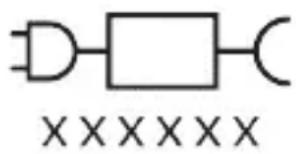
natural_image
Illustration showing a hand holding a toothbrush and a close-up of a tooth with a circular sensor or sensor icon, no text or symbols present.natural_image
Illustration of a hand using a tool to apply a product to a textured surface, with an inset showing a magnified view of a textured surface (no text or symbols present)natural_image
Illustration of a hand holding a segmented object with directional arrows indicating movement or force (no text or symbols)natural_image
Diagram showing dental alignment with a tool interacting with teeth (no text or labels)Clean White Gum Care
flowchart
graph TD
    A["Step 1: Circular arrangement of circles"] --> B["Step 2: Arrow pointing inward"]
    B --> C["Step 3: Arrow pointing inward"]
    C --> D["Step 4: Arrow pointing inward"]
    D --> E["Step 5: Arrow pointing inward"]

flowchart
graph TD
    A["①"] --> B["②"]
    B --> C["③"]
    C --> D["④"]
    D --> E["⑤"]
    E --> A
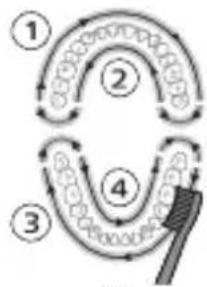
flowchart
graph TD
    A["①"] --> B["②"]
    B --> C["③"]
    C --> D["④"]
    D --> E["⑤"]
    E --> A
одан кейін
алдыңғы тістерді
ағарту және
жарқырату үшін
5 және 6
беліктерінің,
эрқайсысын 15
секунд
щеткамен
тазалаңыз.
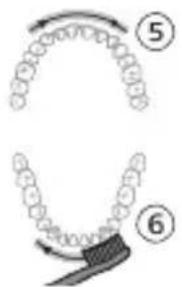
одан кейін
КЫЗЫЛ
иектеріңізді
жақсы дайындау
және массаж
жасау үшін 5, 6, 7
және 8
бөліктерінің,
эркайсысын 15
секунд
щеткамен
тазалаңыз.
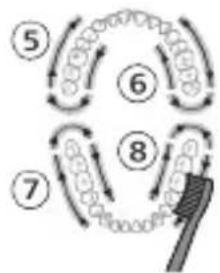
flowchart
graph TD
    A["Step 5"] --> B["Step 6"]
    B --> C["Step 7"]
    C --> D["Step 8"]
    D --> E["Arrow to brush-like element"]
    style A fill:#f9f,stroke:#333
    style B fill:#f9f,stroke:#333
    style C fill:#f9f,stroke:#333
    style D fill:#f9f,stroke:#333
    style E fill:#ccf,stroke:#333
Каркындылыктары
natural_image
Simple diagram with three circles and two curved lines, no text or symbols presentnatural_image
Illustration of a microphone with a Wi-Fi symbol and a magnified inset showing the signal icon (no text or labels)natural_image
Simple line diagram showing a gear symbol with directional arrows and a starburst icon, connected to a vertical line (no text or labels)natural_image
Simple line drawing of a hand pressing a button on a cylindrical object with an 'Power' icon (no text or symbols)natural_image
Pure diagram of gear and shaft components without any text or symbolsnatural_image
Illustration of two hands using a tool to measure a mechanical component, no text or symbols presentnatural_image
Simple line drawing of a mechanical component with a star-shaped head and a base, no text or symbols present.natural_image
Illustration of a handheld electronic device with a hand holding a plug, showing internal components and a curved arm (no text or symbols)natural_image
Line drawing of a fork being inserted into a container (no text or symbols)natural_image
Illustration of two hands using a tool to connect two objects, no text or symbols presentnatural_image
Illustration of a hand inserting a device into a device housing (no text or symbols visible)natural_image
Hand holding a camera lens with a black arrow pointing to the lens area (no text or symbols visible)natural_image
Illustration of a hand holding a cylindrical object with arrows indicating force direction, and an inset showing a magnified view of the tool tip (no text or symbols present)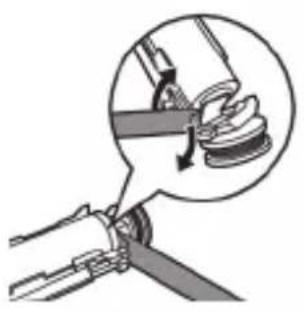
natural_image
Diagram of a mechanical assembly with a magnified inset showing a component being inserted (no text or symbols present)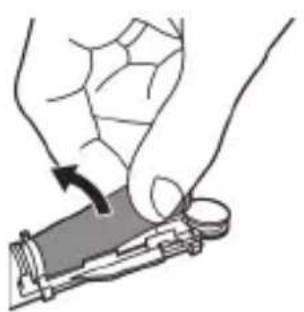
natural_image
Illustration of a hand holding a device with a circular arrow indicating rotation (no text or symbols)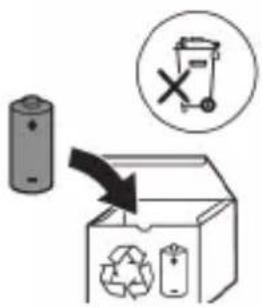
natural_image
Simple line drawing of an open book with no text or symbols visible
XXXXXX
ETLYNNWUUNIGUWU HWUNUH UWWU. «XXXXXX»-n gnjg 5 unwJhu HWUUNWUNUW0 JhgpWUJNHHsUTNH UNNTJH HWUWN, nnn WtUNP 5 oqnwnqnndUh:
Lwwinnwlywjhù oqnnwnqnδniú
ProtectiveClean ٤٠٥١٥٣٥٣٥٣٥٣٥٣٥٣٥٣٥٣٥٣٥٣٥٣٥٣٥٣٥٣٥٣٥٣٥٣٥٣٥٣٥٣٥٣٥
2tn Philips Sonicare-n (Uy. 1.)
natural_image
Illustration showing a hand brushing a tooth with a brush, and a close-up of the tooth being examined with a checkmark (no text or symbols present)1 funqwùwlyh qìhuhyn hwiúwuwntgntp wjùwytu, nn úwqhúyutnù nǐnnylwǒ jhùtù ǔnìjù nǐnnημαjωύp, hùz pīzuwlyh nhúwgh ynnúŋ:
2 Uúnín utnútp hunqwùwlyh qihuhyn útnplu utunwnwlywù lhuṭnh útg, uħūzlu wju ywùq wnùh: L2niú funqwùwlyh qihuhyh u pnùwlyh uħglu uħnpn wùgph wnlywjnupjniùn ûnnúwyl ʒ:
2tn Philips Sonicare wunwutph hunquuwlyh oqunwqndnlnp
tpt wwnghù wùqwú tṛ oqunwqnδniú àtn Sonicare wnwúh hunqwùwln, wultih 2wn jānjāng qwwln ünnwúl ́ hwiútuwinwó nε ξιληwnwlywù hunqwùwlyh htún: lnnúwl ́, tnp wnwghù wùqwú oqunwqnδnnǔtnp zwiuhg 2wn tǔ utnúniú qnδwnŋniú: Uhwjù yhnwntp üninp utnúniú u janyl nuṭr, nnwtuqh wunwúh hunqwùwln àtn yhnhuwntù úwpnh: hünŋniú tūp htinutl uinnpl útnlywjwgulwó hunqwùwlyhg oqunultní gnigniútphù ' lwwωqnijù wnŋniúpūtn uunwùwlni hwiúwn:
Uugniún ótn ñnn Sonicare ʒltyunnwlywù wunwúh hunqwùwlyhù ht2nwgùtlni hwúwn wnwghù 1-2 2wpwpaulw nùpəwgpníú oqunwqqnnòtp wultih gwòn ywnqwuŋnniú, wjùnìhtinlu wǔgtp wultih pwnàn ywnqwuŋnnúwù:
Uwpnúwù hnwhwùqùtn
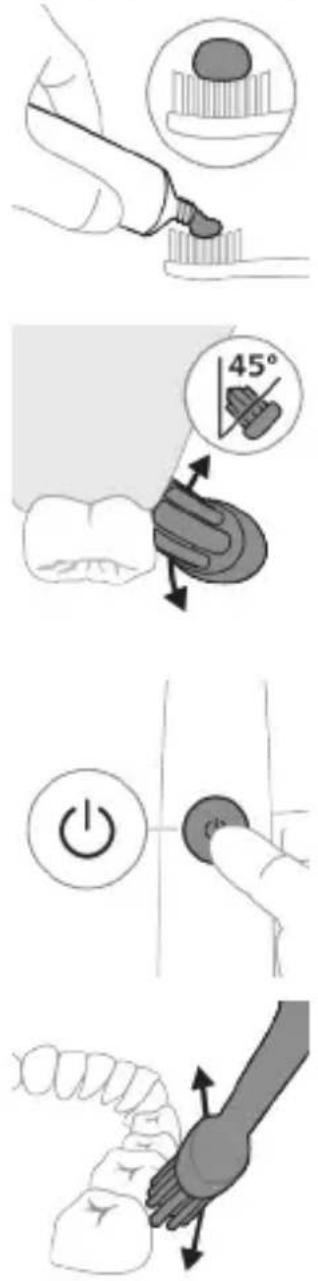
1 陰ngtp hunqwùwlyh úwqhúutnn u útngntp wunwúh úwðnilyh phz pwiùwlníjniú:
2 Stnwnntp wunwuh hunqwùwlyh úwqhlyuttn wunwúutnh ynw úh yhnpn wúlyjwiú unwly (45 wuunhǎwù) ̈ u niðtn utnútp, nnwbuqh úwqhlyuttn hwuùtǔ jùntnh tqnwqðhù ywwú jùntnh tqnwqðhg úh yhnpn útnpu:
L2niu' Uupnq dwuwuwly hunqwuwlyh ytuunnwn wwhtp wunwutph htun 2yhuwu utg:
3 Utnútp hnuwúph úhwguúwú/wúgwùnúwú lynǎwúŋ Philips Sonicare-n úhwguútní huuúwn:
4 Urpntu wuhtp hunqwùwlyh úwqtnú winwùutph ynw untwnwnnluwó u lúntnh tqnwaðniú: Uwpntp winwùutpn rətpaulwlh htün ni wnwg 2wndniuutnnu, nnwtuqh hunqwùwlyh úwqhúutpn hwuùtu winwùutphu: Čwnniùwyltp wju 2wndniún ótn úwpnuwi uhnih wúpnng núpawgpniú:
L2niù hunqwùwlyh úwqhúutpŋ wgtnp 5 úh yhnpn lwijuwùwù: hunnhninn zh unnuǐniú winnwùutpŋ úwpnti wjuwytu, hùzwtu ṁnip lúwypnthp unylnnwlywù winnwúh hunqwùwlynq:
L2niú 2wihwqwug útó áu2niú qnnðwnntíni ntwipniú yuunwùwp qqni2wgniu' yhhnhuh pnüwuh pénpængn, u hunqwüwwyh qihuhyh yhhhuúwù hh2tgúwù jnuuwjhù gnighyn yuhuh pawnpāti ntanhù qnyjūnú:
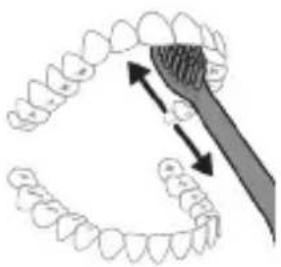
natural_image
Diagram of dental arching with tooth structure and tool (no text or labels)5 Urquh winwutph utnuh uwltnuniputnp
uwpntni hwuwn pptp hunqwuwlyh pnuwyn
yhuwninh nhnpnu l u ih pwuh ninnwhwjug
uwpnnn 2wndnutn ywinwntp jninwpwugnin
winwuh qnw:
6 Uwpntni yhniu wuwpuntinig htunn ywnn np
lnwgnighs dwuwuwly hwnlywgutl winwutinh
dwunn uwltpnunijrəutpn uwpntniu u wju
hwnulwodtphu, nnntn wnwgwuniu 5 pówulnnniu:
ywnn np uwu uwpntl ltqniu` hunqwuwyn
wwhtinu uhwguwd ywi wugwinwö, hüzwtu
uwhpunnnniu tp:
^12 niú 2tn Philips Sonicare wunwúh hunqwùwʊŋ wùlúnwùq 5 wunwútph pntytúnutph (hunqwùwʊŋ qíhuḥn 2niún 5 úw2yniú pntytúnutph ynw) u wunwútph 5tnwlywùqùnn hwnúwnwùputph (ignùniúutn, 2wwhýutn, 5túhnutn) oqunwqnòúwù ntwρniú, tṛat ħnwùp wwwn2wǎ tǔ oqunwqnòuǐniú u ztǔ huwhunuǐniú:
QuadPacer
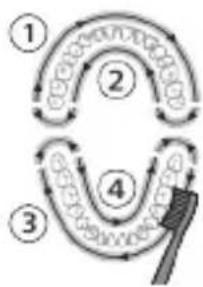
flowchart
graph TD
    A["Step 1"] --> B["Step 2"]
    B --> C["Step 3"]
    C --> D["Step 4"]
    D --> E["End"]
Clean White Gum Care
| Unwultinjniu | Fwgwnhlywutuonjwuwpnuwhuwun | Rtwnguniú túwyltnunyrahpòtn | Vüwwnnwpwnutnuniú t lùntnn |
| Unqwuiwltinpünhwūnindwuuwuh | 2 nnwt 2 nnwt, 30 | Uwynljuwù | 3 nnwt |
hùzhu hunqùwyt
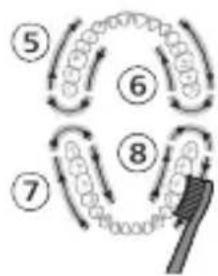
flowchart
graph TD
    A["Step 5"] --> B["Step 6"]
    B --> C["Step 7"]
    C --> D["Step 8"]
    D --> E["Feedback Loop"]
    style A fill:#f9f,stroke:#333
    style B fill:#ccf,stroke:#333
    style C fill:#cfc,stroke:#333
    style D fill:#fcc,stroke:#333
    style E fill:#ffc,stroke:#333
hùntùuhǔnīpāwù wūnhǎwùuán
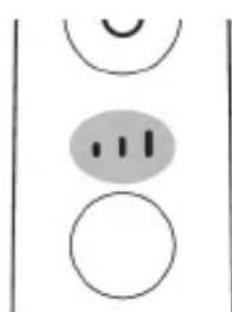
natural_image
Simple diagram with three circles and a central oval, no text or symbols presentETLYNNWLYWU HUNQWUWLYU NIUH HUNTUUHULNIPJWU 3 UNWPTN YWNQWULNNNIU. -GWON HUNTUUHULNIPJNIU (UTLY QHδ) -UHGHU HUNTUUHULNIPJNIU (TPLYNI QHδ) -PWNAN HUNTUUHULNIPJNIU (TNTAP QHδ) TNP HWQGUNIUI TP PRUWLYNPAHU, HUTLWGH HUNQWUWLYH QJHUYU WULNNUWIN YTNWNU NUNNNIUI T WNWGWNYLN HUNTUUHULNIPJNIUN (UHWJU NNN2 UNNTIUTNNIUI): TJP GWUYWUNIUI TP UHNHTI HUNTUUHULNIPJNIUN, HUNQWUWLYWU PUPAWPGNIUI YWNNN TP UTNUTI NTDHY/HUNTUUHULNIPJNIU LNADWLN: HUNTUUHULNIPJNIUN
zh lwwnn yhnhuul, tnp pnuwlju wugwinulwδ ξ lwwú nwnwntugulwδ ξ:
BrushSync unthunnqhw
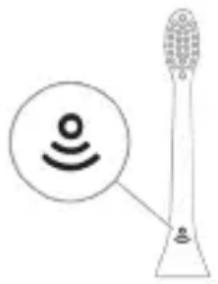
natural_image
Diagram of a toothbrush with sensor icon and connection point (no text or symbols)BrushSync unthuüninqhwù àtn hunqwùwlyh qlhuhlyhù pniyl 5 unwihu hwnnnnwulgutl prùwlyh htun úhlunnzhwh oqùnijajwúp: hunqwùwlyh qlhuhlyh uunnphù hwinluwðniú qnùulnn 2wùn gniyg 5 unwihu, nn hunqwùwlyh qlhuhlyu wwwwhnlujluwó 5 wju unthuüninqhwjnú: BrushSync unthuüninqhwù wwwwhnlujniú 5.
- lunqwùwlyh qìhuhlyh yhnhuwnhùuúwù hh2tgniu
- BrushSync nbtdhúh qniqwulnniú
Philips Sonicare-ǔ wɪnɡwɒŋlʊnɪʃ ʒ BrushSync
( lunquwuhUhupnnuwgnui) unthuunlnqhwnu hutlwgh
hunqwùwlyh qìhuhyùtǔnh lǚwù unguwlywùh:
funqwùwlyùtnh qìhuhyùtnh útn wúpnnq untuwlywùnìu
δωύπρωύωμηι υ όθq ωύτιωħωύωμωνωμυμωμ
qihuhyn qinutini u inwgnighz untntyniajniüutnh
hwifwn wjgtltp www.philips.com/toothbrush-heads:
9nnδwnnɪpəʊtn
- ดูรุณวิ ดูรุณวิ ดูรุณวิ ดูรุณวิ
- Quadpacer
- SmarTimer
- EasyStart
- lunqwùwlyh qlhuhyh yhnhuwnhùuìwù hħ2tigniú
- lunqwùwlyh qlhuhlyh ntādhúh qniqwwʊlnnniú
natural_image
Simple line drawing of a gear and gear icon with no text or symbols2tn Sonicare wunwuh hunqwuwyn zwihniú 5 uwpntlni nupwgpniú àtn lynuhg qnnδwnpnuwó àu2niún` àtn lunttnn l wunwuttnn yuuwulwdputnhg wuzinwwutlni hwúwn:
tpt swihg wultl du2niu qnndwnhtp , wwuw pnuwuh panrngn yhnhuuh , hul hunqwuwuh qlhuhuh ynhuwnhuuwù hh2tguwù wwunlytnwuh yluwruh ntnhù lnijunl úhùzì sùlwqtgutp du2niún :
natural_image
Simple diagram showing a circular icon with a traffic symbol and a small circle connected by an arrow (no text or labels)^12 nuì Uju qnnδwnnjià w2huwinniú 5 uhwjù Philips Sonicare hutlwgh hunqwùwlyh qihuhyúttn BrushSync (lunqwùwlyhUhùpnnùwgniuí) unthuünqnhwjnuí:
natural_image
Simple line drawing of a hand pressing a button on a bottle with a power symbol (no text or labels)Pwjl 2. Utnútp u utnúwð wwhtp úhwguwù/wùgwunuwù lynáwln.
| EasyStart lúnqwùwlyh | ǒu2úwù utùunngh |
| qìhuhlyh | wnàwqwùp |
| yìnhuwnhùúwù | |
| hh2tgniu |
| Uhùzìu 3 | Uhùzìu 5 V | Uhùzìu 7 ǔwǔjnlǚwù |
| ǔwǔjnlǚwù | wǔjnlǚwù | unlùnnīpājwúp |
| unlùnnīpājwúp | unlùnnīpājwúp |
Pwjl 3. Fwg pantp hnuwuph uhwguwu/wugwinuwu lynawyn, tnp lutp.
| 1 wqnwù2wù 1 wqnwù2wù,wwuw 2wqnwù2wù | 1 wqnwù2wù, 2wqnwù2wù, www 3wqnwù2wù | ||
| ↓ ↓ ↓ | |||
 |  | bpt uwnlnyngh gnighpn l u hnqwùwlyh qihuhyhnhuwnhùwù h2tgúwù gnighpn 2 wùqwú pwnpatù yhuwzlnjunl u lutp 3 àwjùwjhù wqnwù2wù` gwônhg úhùzlpwnàn, www qnnòwnnijraù wylnhulwgulwò t: | |
| 4UU | |||
 |  | bpt uwnlnyngh gnighpn l u hnqwùwlyh qihuhyhnhuwnhùwù h2tgúwù gnighpn 1 wùqwú pwnpatù ntnhùlnjunl u lutp 3 àwjùwjhù wqnwù2wù` pwònhg úhùzlgwn, www qnnòwnnijraù wylnhulwgulwò t: | |
NHU whunwhuhz
L2niu 3tunn nnwuwnnynn wputuniwnutyn lwwnn tui unwnptnulti quiuwod uinntihg lwhuulwod:
1 Uwpntinig htunn luwgtp hunqwùwlyh qihuhyn u pawwhwuntinu htinwgntp wultinnn gninn:
2qnizwgniw lunqwùwlyh qihuhyn whunwhwùhṣniś ûwpntīhu hwiúnqutp, nn ywwwnhṣn lunqwùwlyh qihuhyh ynw 35:
2 Stwnntp atn uwnn nzu uhnwnniu whunwhuhsh utnuniu u pwgtp nnin:
3 lunqwùwlyh qīnìhuī nntāp whuīnwwhùhsh 2 tāniuunùtnhg útlyh yhuìw` uówqhlùttnī nṭwgh lwwúw h lnyūn:
U2niú Uwpntúp úhwiju Philips Sonicare-h yuwzniú hunqwùwlyh qihuhyúttnq whuunwhwùhzh útúg:
U2nu' Uh uwpntap Philips Sonicare for Kids hunqwùwuh qlhuhyuttnn whunwhwùhsh utg:
4 3wúnqútp, nn whunwhwúhzn úhwgúwð l hwúwwwünwwuhuwù lwnúwù hnuwúph uwnŋwuhù:
natural_image
Simple line drawing of a mechanical setup with a component and a pointer (no text or symbols)Lhgpwwlnnniun lhgpwwnnhzh ywu NHU Uhunwhwuhzh ynw
1 Lhgpwulnnhyn ywu whunwhuwuhyn uhwqntp
tlywnwuuuniguwu wnpninhu:
2 F###wn ### ### ### ### ###
- Επιωμη 2 Υωπά ωαηωύ2ωμί τραημινί, ḥυχη
Ηωυινωινμί τ, ηη Επιωμη ωωυπ2ωμά Υθηωμη
υτηωμημινδ τ:
- Uwnunlyngh gnighzh pwnnann lnijun gnjg 5 unwihu, nn wunwuh hunqwuwyn ihgpwwlnnuniu 5:
- 6np jhgpwulnnhshu uhwgulwod pnuwlyu
wúpnngniŋejiwúp jhgpwulnnuh, uwnunlyngh gnighzn
30 lwwjlnyjuwuh nùpwgpniú lyuwruih lyuwius lnjuunu,
wwmw lyuugwunuh:
Lhgpwlnnniún āwúzhnnnwlywù wwnjwùnyl
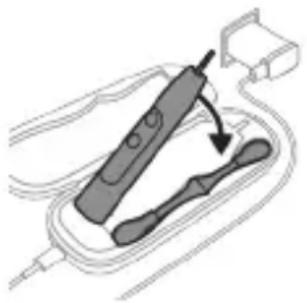
natural_image
Diagram of a handheld electronic device with a hand holding a connector (no text or symbols visible)L2niù 3tūn nnnwúwnŋnlnn wputunlwnuttn lwwnn tǔ unwnptnulti qùluwò uīnntiħg lwwhuulwò:
1 Stnwnntp USB úwlnihun lhgpwwlnnuwu áwúhnnnwlywu wwwnjwùh útg:
2 Чугцшд USB Unifiedนิทบ Unifiedนิทบ 5V 33 Unifiedนิทบ Unifiedนิทบ 5V
- 36100 unwwuwwnluyw8 USB hwnuwnhhg:
- UL uunwùnwnpùnútnhù hwiúwwuwinwuhuwùnn lquú ANSI/UL 60950-1-nú lquútnwgúwó wùàüwlywù hwiúwlywnqzh uunwùnwnpùn USB úhwúghz:
- UL uunwùnwnuìtghù hwiúwwu wunwuḥuwùnn lwwú ANSI/UL 60950-1-nú lwwútnwgúwó USB tīpwjhù úhwgpnu LPS tǐtāynnwùnigniú:
- UL uinnwnwnutnhu hwiwwwnwnuhwunn lwwu lwwltnwguwδ 1310 2-nn nwh ltynnwuunigni:
Чуылун 5. Тиwin hwnуынн 5. hyu wuулинуа звчшвчиг gwдн 5. унуын 5. hyu huууынтнтін 5. hyu uwnph 5. hyu у2цьюд 5. hyunnuуці нуаньштнін htun:
3 Stwnntp pnuwyn hgpwunnuwu ǎwúhnnnwlywu wwnjwùh útg:
natural_image
Line drawing of a medical procedure involving a tool and tubing (no text or symbols)1 3wngntp hunqwùwlyh qihuhyn u luywgtp utunwnwlywù lhutrh hwnuwrðn unwp gnnu: 3wúnqultp, nn htnwgntl tp wunwúh úwðníyh úuwgnnnútnp:
2qnizwgniu' Uh hntp ntunhut yuhpn unin wnwnywtpnu ntwih jhutzh utg, puuh nn wju ywnn h hwuqtgutl yuwuuwoph:
natural_image
Illustration of hands using a tool to connect two objects, no text or symbols present1 3nɪnwpwɪsɪŋn oqunwɑnpɒniʊhg htunn lʊwɡtəp hunqwɪwwlyh qɪhʊhʊn u ʊwqhyʊtənn:
2 3tizwgntp hunqwùwlyh qlnihn pnzuwlyhg u wnzulwqù 2wpwnp úty luygtp hunqwùwlyh qluhyn inwp qnnu: Luygtp āwuíhhnnnwlywù ywhwnhşú wjúpwù hwaówu, nnpwù wùhnwdtizn 5:
Lhgpwwlnnhz
1 Uguwuntp jhgpwwunnhyn` uwhupwu wju uwwpntin:
2 Lhgpwulnnhhsh uwlytntun uwpntp hunuwwl qnndylwópnu:
Δωυήηημηλωμι ψωυημι
natural_image
Illustration of a hand inserting a component into an electronic device (no text or symbols visible)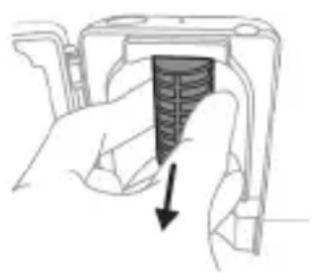
natural_image
Hand holding a camera lens with a black arrow pointing to the lens area (no text or symbols)2qn12wgn14 Uhuunwhwuhyn uh uniqtp qnh utg u uh lylwgtp dnnwlyh unwl:
2qnizwgniu' Uh uwpntp whunwhuhzn, tnp nluynnwuiuni2wlywnjù lniun unwp 5:

4 3twngntp tqn h ywwhwnhzn wunwuh hunqwutwuh pnzuwuhg: trat tqn h ywwhwnhzn ht2unnipuwup zh wqwnyniw wwnjwuhg, lynytap pwjl 3-n uhusu tqn h ywwhwnhzn nninu qw:
5 F###w#n q#h#u#wn w#wht#nu' j#ut#n #tnpl u#n#tp
yn2n u#wyt#nunj#ah ynw: b#t u#tnph#
pwnwn#nhs#tnn ht#nnipajw#p #t# wqwn#ni#
wwwnjw#hg, lynj#tp pwjl 3-n u#h#lu #tnph#
pwnwn#nhs#tnn nninu qwù:
6 Stnwnntp wunninwlywhwùn úwnunlngh l u ul 2n2wùwlyh úhglu útnphù pwnwnnhzutph útnpluniú: Ujùnhtunl qqniznntǔ htnwgntp wunninwlywhwùn úwnunlnghg' ul 2n2wùwlyh útnpluh hwnulwòn ynunntǐni hwiúwn:
7 Stnwnntp wunniuwlywhwùn úwnunlyngh útnpluh u ulu 2nqwùwlyh úhqlu’ lynuntīni útunwnwlywù útnnhnn, nnn úhwgūniú t úwnunlyngn lywùws unwwuuwlħu: Uw lywùgwinh úwnunlyngh útnpluh tqnℓ 2nqwùwlyhg:
8 Frutp uwnunlngn u htnwgntp wju utnphu pwnwnnhsutnhg, nnwtuqh lynuntp uwnunlngh tnynnnn. utunwnjw utnnhhn:
2qn12wgniu 2qn12wgtp uwnunlyngh utnnhnhutph unin tqnptnhg, npwtuqh huniwwuhtp uwnutph u'uwuuulwdputphg:
www.philips.com/support
natural_image
Simple line drawing of an open book with no text or symbols visible

ProtectiveClean grades of the 2015-2016 annual report on the 2015 annual report on the 2016 annual report on the 2017 annual report on the 2018 annual report on the 2019 annual report on the 2020 annual report on the 2021 annual report on the 2022 annual report on the 2023 annual report on the 2024 annual report on the 2025 annual report on the 2026 annual report on the 2027 annual report on the 2028 annual report on the 2029 annual report on the 2030 annual report on the 2031 annual report on the 2032 annual report on the 2033 annual report on the 2034 annual report on the 2035 annual report on the 2036 annual report on the 2037 annual report on the 2038 annual report on the 2039 annual report on the 2040 annual report on the 2041 annual report on the 2042 annual report on the 2043 annual report on the 2044 annual report on the 2045 annual report on the 2046 annual report on the 2047 annual report on the 2048 annual report on the 2049 annual report on the 2050 annual report on the 2051 annual report on the 2052 annual report on the 2053 annual report on the 2054 annual report on the 2055 annual report on the 2056 annual report on the 2057 annual report on the 2058 annual report on the 2059 annual report on the 2060 annual report on the 2061 annual report on the 2062 annual report on the 2063 annual report on the 2064 annual report on the 2065 annual report on the 2066 annual report on the 2067 annual report on the 2068 annual report on the 2069 annual report on the 2070 annual report on the 2071 annual report on the 2072 annual report on the 2073 annual report on the 2074 annual report on the 2075 annual report on the 2076 annual report on the 2077 annual report on the 2078 annual report on the 2079 annual report on the 2080 annual report on the 2081 annual report on the 2082 annual report on the 2083 annual report on the 2084 annual report on the 2085 annual report on the 2086 annual report on the 2087 annual report on the 2088 annual report on the 2089 annual report on the 2090 annual report on the 2091 annual report on the 2092 annual report on the 2093 annual report on the 2094 annual report on the 2095 annual report on the 2096 annual report on the 2097 annual report on the 2098 annual report on the 2099 annual report on the 2100 annual report on the 2101 annual report on the 2102 annual report on the 2103 annual report on the 2104 annual report on the 2105 annual report on the 2106 annual report on the 2107 annual report on the 2108 annual report on the 2109 annual report on the 2110 annual report on the 2111 annual report on the 2112 annual report on the 2113 annual report on the 2114 annual report on the 2115 annual report on the 2116 annual report on the 2117 annual report on the 2118 annual report on the 2119 annual report on the 2120 annual report on the 2121 annual report on the 2122 annual report on the 2123 annual report on the 2124 annual report on the 2125 annual report on the 2126 annual report on the 2127 annual report on the 2128 annual report on the 2129 annual report on the 2130 annual report on the 2131 annual report on the 2132 annual report on the 2133 annual report on the 2134 annual report on the 2135 annual report on the 2136 annual report on the 2137 annual report on the 2138 annual report on the 2139 annual report on the 2140 annual report on the 2141 annual report on the 2142 annual report on the 2143 annual report on the 2144 Annual Report of a Change in Annual Report of a Change in Annual Report of a Change in Annual Report of a Change in Annual Report of a Change in Annual Report of a Change in Annual Report of a Change in Annual Report of a Change in Annual Report of a Change in Annual Report of a Change in Annual Report of a Change in Annual Report of a Change in Annual Report of a Change in Annual Report of a Change in Annual Report of a Change in Annual Report of a Change in Annual Report of a Change in Annual Report of an Annual Report of an Annual Report of an Annual Report of an Annual Report of an Annual Report of an Annual Report of an Annual Report of an Annual Report of an Annual Report of an Annual Report of an Annual Report of an Annual Report of an Annual Report of an Annual Report of an Annual Report of an Annual Report of an Annual Report of an Annual Report of an Annual Report of an Annual Report of an Annual Report of an Annual Report of an Annual Report of an Annual Report of an Annual Report of another Annual Report of another Annual Report of another Annual Report of another Annual Report of another Annual Report of another Annual Report of another Annual Report of another Annual Report of another Annual Report of another Annual Report of another Annual Report of another Annual Report of another Annual Report of another Annual Report of another Annual Report of another Annual Report of another Annual Report of another Annual Report of another Annual Report of another Annual Report of another Annual Report of another Annual Report of another Annual Report of another Annual Report of another Annual Report of a Change in Annual Report of a Change in Annual Report of a Change in Annual Report of a Change in Annual Report of a Change in Annual Report of a Change in Annual Report of a Change in Annual Report of a Change in Annual Report of a Change in Annual Report of a Change in Annual Report of a Change in Annual Report of a Change in Annual Report of a Change in Annual Report of a Change in Annual Report of a Change in Annual Report of a Change in Annual Report of b
natural_image
Illustration showing a hand holding a toothbrush and a close-up of a tooth with a circular mark, no text or symbols present.natural_image
Illustration of a hand using a pipette to apply liquid onto a surface, with an inset showing a droplet on a surface (no text or symbols present)1 _ _ _ _ _ _ _ _ _ _
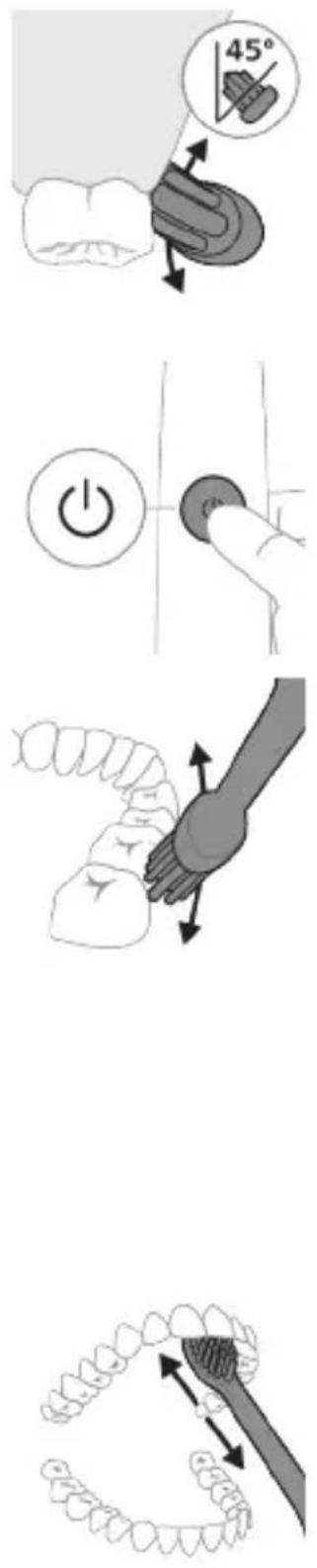
Clean White Gum Care
flowchart
graph TD
    A["Stage 1: Intrinsic DNA strand"] --> B["Stage 2: Extended DNA strand"]
    B --> C["Stage 3: Brushed DNA strand"]
    C --> D["Stage 4: Extended DNA strand"]
    D --> A
gsnbgbgn mmomgynmn lggdgbdn 30 6sdnl gsbds3mmòsdn
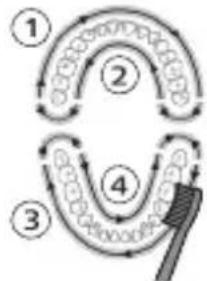
flowchart
graph TD
    A["①"] --> B["②"]
    B --> C["③"]
    C --> D["④"]
    D --> E["③"]
    E --> F["②"]
    style A fill:#f9f,stroke:#333
    style B fill:#f9f,stroke:#333
    style C fill:#f9f,stroke:#333
    style D fill:#f9f,stroke:#333
    style E fill:#f9f,stroke:#333
    style F fill:#f9f,stroke:#333
natural_image
Simple diagram with three circles and a central oval, no text or symbols presentnatural_image
Diagram of a microphone with a circular icon showing signal waves (no text or symbols)natural_image
Simple line diagram showing a gear icon with directional arrows and a small star symbol (no text or labels)natural_image
Simple line drawing of a hand pressing a button on a bottle with an 'Power' icon (no text or symbols)65070 2: 00000000000000000000000000000000000000000000000000000000
EasyStart 508mnlnb
உஉஉஉ
8g6mμnln 3g25g20n 1g6lmmn
natural_image
Illustration of two hands using a tool to measure a rifle, with no visible text or symbols1 30000000000000000000000000000000000000000000000000000000
natural_image
Illustration of a hand pressing down on a device component with an arrow indicating left motion (no text or symbols)natural_image
Cross-sectional diagram of a mechanical component with two symmetrical slots and internal channels (no text or symbols)natural_image
Line drawing of a hand holding a small object with a hole, resembling a device or tool (no text or symbols present)natural_image
Simple line drawing of a mechanical setup with a component and a star-shaped symbol (no text or labels)φυσθυβυθυθυθυθυθυθυθυθυθυθυθυθυθυθυθυθυθυθυθυθυθυθυθυθυθυθυθυθυθυθυθυθυθυθυθυθυθυθυθυθυθυθυθυθυθυθυθυθυθυθυ θδ UV ωεδημούνωνωνωνωνωνωνωνωνωνωνωνωνωνωνωνωνωνωνωνωνωνωνωνωνωνωνωνωνωνωνωνωνωνωνωνωνωνωνωνωνωνωνωνωνωνωνωνωνωνωνα
natural_image
Diagram of a handheld electronic device with a hand holding a plug, showing internal components and wiring (no text or symbols)odds funds funds funds funds funds funds funds funds funds funds funds funds funds funds funds funds funds funds funds funds funds funds funds funds funds funds funds funds funds funds funds funds funds funds funds funds funds funds funds funds funds funds funds funds funds funds funds funds funds funds funds funds funds funds funds funds funds funds funds funds funds funds funds funds funds funds funds funds funds funds funds funds funds funds funds funds funds funds funds funds funds funds funds funds funds funds funds funds funds funds funds funds funds funds funds funds funds funds funds funds Funds
odds funds funds funds funds funds funds funds funds funds funds funds funds funds funds funds funds funds funds funds funds funds funds funds funds funds funds funds funds funds funds funds funds funds funds funds funds funds funds funds funds funds funds funds funds funds funds funds funds funds funds funds funds funds funds funds funds funds funds funds funds funds funds funds funds funds funds funds funds funds funds funds funds funds funds funds funds funds funds funds funds funds funds funds funds funds funds funds funds funds funds funds funds funds funds funds funds funds funds funds funds Funds
natural_image
Line drawing of a medical procedure showing a tool interacting with an anatomical structure (no text or symbols)natural_image
Illustration of hands using a tool to adjust or install a mechanical component, no text or symbols presentnatural_image
Illustration of a hand inserting a component into an electronic device (no text or symbols visible)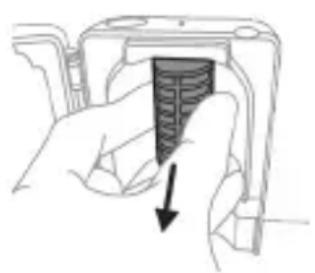
natural_image
Hand holding a device with a black arrow pointing to a textured section (no text or symbols visible)Garangangang: 593 Garangangang 126078000000000000000000000000000000000000000000000000000000000
odds funds mgmt debt and debt market, government, municipal government, financial government, and other government.
natural_image
Illustration of hands holding a cylindrical object with an arrow indicating rotation (no text or symbols)natural_image
Illustration of a hand holding a cylindrical object with arrows indicating direction, and an inset showing a magnified view of a segmented tool (no text or symbols present)natural_image
Diagram of a mechanical assembly with a magnified inset showing a rotating component (no text or symbols)natural_image
Illustration of a hand holding a small object with an arrow indicating motion (no text or symbols)8 Sunngon dusfumguos gudmghgom dncos zmad3mb6b6hncos6 dgmng dguuunlu dusfumgnl hsubszgbnl gulsuhbsqn.
zsghmmbngjds: zsdmnhbgm lngfmbnq dsfuhsgnl dslm jnqggdons6, mmd muznqssb sngznnmm oonmgdnl qssnbsgds.
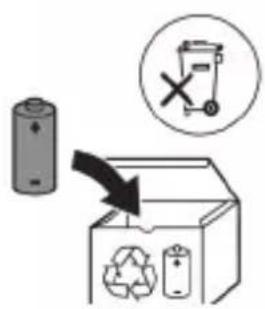
www.philips.com/support
natural_image
Simple line drawing of an open book and a circuit symbol (no text or labels)natural_image
Illustration showing a hand using a brush to apply a tool to a device component, with no visible text or symbols.natural_image
Illustration of a hand using a tool to apply a product to a toothbrush, with an inset showing a textured object (no text or symbols present)1
.ロリコ
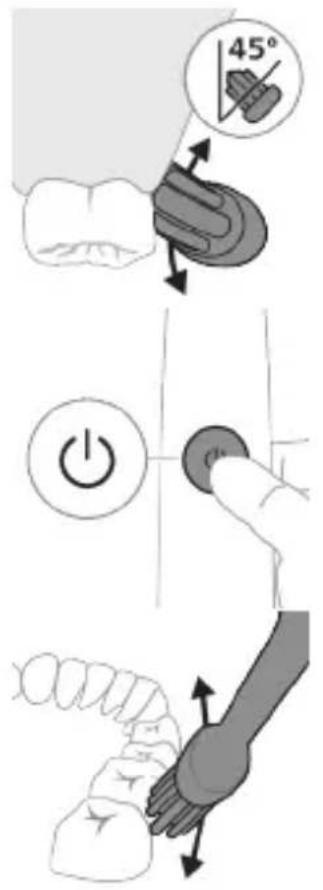
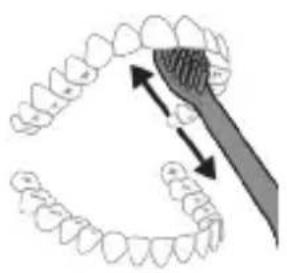
natural_image
Diagram of dental arching with tooth structure and toothbrush (no text or labels)תָרְשָׁה
natural_image
Simple diagram with three circles and two vertical lines, no text or symbols presentnatural_image
Diagram of a microphone with a sensor icon and connection point (no text or symbols)BrushSync כרִי
natural_image
Simple diagram with a starburst symbol containing a white 'P' and a circular arrow, connected to a vertical line with a small labeled point (no text or symbols present)בִרָה אַרְשׁו
natural_image
Simple line drawing of a hand pressing a button on a bottle with a power button (no text or symbols)natural_image
Simple diagram showing a gear-like structure inside an oval and a vertical rectangle with two small figures below (no text or symbols)IN
natural_image
Simple diagram showing a capsule-shaped object with internal gear-like patterns and a vertical rectangle containing two small figures (no text or symbols)UV '10'
natural_image
Illustration of hands using a tool to adjust or install a mechanical component (no text or symbols visible)natural_image
Simple line drawing of a laboratory setup with a container and a test tube, no text or symbols present.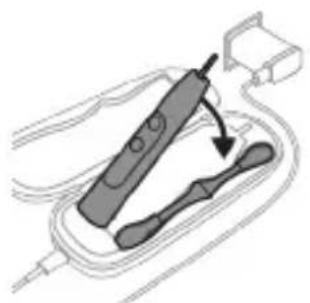
natural_image
Illustration of a handheld electronic device with a hand holding a cable (no text or symbols visible).הכלההוּרָהוּרָהוּרָהוּרָהוּרָהוּרָהוּרָהוּרָהוּרָהוּרָהוּרָהוּרָהוּרָהוּרָהוּרָה
un
.הכלההוּרָהִיַעְבָהִיַעְבָהִיַעְבָהִיַעְבָהִיַעְבָהִיַעְבָהִיַעְבָהִיַעְבָהִיַעְבָה
natural_image
Illustration of a hand inserting a component into a device (no text or symbols visible)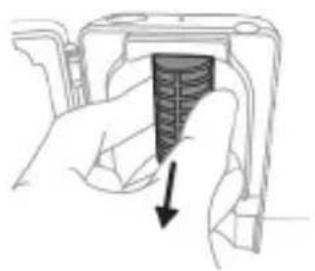
natural_image
Hand holding a device with a black arrow pointing to a textured interior (no text or symbols visible)הכלה.
ucogil isrict, ilu is to 1u.
www.philips.com/Sonicare
©2022 Koninklijke Philips N.V. (KPNV). All rights reserved. Philips and the Philips shield are trademarks of KPNV. Sonicare and the Sonicare logo are trademarks of Philips Oral Healthcare, LLC and/or KPNV.
300008528131(21/12/2022)



- Introduction
- Important safety information
- Warnings
- Battery safety instructions
- Storage and transportation conditions
- Electromagnetic fields (EMF)
- Radio Equipment Directive
- www.philips.com/support
- Intended use
- Your Philips Sonicare (Fig 1.)
- Accessories:
- Getting started
- Using your Philips Sonicare toothbrush
- Brushing instructions
- QuadPacer
- Modes
- Clean White Gum Care
- Total brushing time
- Intensities
- BrushSync technology
- Features
- Pressure Sensor Feedback
- SmarTimer
- EasyStart
- Disclaimer
- Brush Head Replacement Reminder
- Brush head mode pairing
- Activating or deactivating features
- UV sanitizer
- Charging and battery status
- Charging
- Charging on charger or UV Sanitizer
- Charging with the travel case
- Battery status
- Battery status (handle on plugged in charger/charging travel case)
- Battery status (when handle is not placed on charger/in charging travel case)
- Battery status Battery indicator Sound
- Cleaning
- Toothbrush handle
- Brush head
- Charger
- Travel case
- Cleaning the Sanitizer
- Storage
- Replacement
- Locating the model number
- Warranty and support
- Warranty exclusions
- Recycling
- Removing the rechargeable battery
- Giriş
- Úrovně intenzity
- Technologie BrushSync
- Opladning på oplader eller UV-renser
- Intensitätsstufen
- Ladegerät
- Intensidades
- Namjena
- Jačine
- Punjenje na punjaču ili u uređaju za UV dezinfekciju
- Glava četkice
- Pohrana
- Intensità
- Caratteristiche
- Ikrovimas naudojant ikroviklj arba UV nukenksminimo irenginj
- Intenzitások
- Opladen op oplader of UV-reiniger
- Lading i lader eller UV-renser
- Philips Sonicare tish pastangizdan foydalanish
- Tish tozalash ko'rsatmalari
- Intensivlik
- BrushSync texnologiyasi
- Funksiyalar
- Ogohlantirish: Cho'tka kallagi sanitayzerda tozalanayotganida cho'tka kallagi qopqog'i cho'tka kallagida emasligini tekshiring.
- Quvvatlagich yoki ultrabinafsha sanitayzerda quvvatlash
- Sayohat g'ilofi bilan quvvatlash
- Cho'tka kallagi
- Quvvatlash moslamasi
- Sayohat g'ilofi
- Sanitayzerni tozalash
- Intensități
- Intensitetet
- Tehnologija BrushSync
- OR
- UV-čistilnik
- Opozorilo: Čistilnika ne potapljate v vodo in ga ne izpirajte pod tekočo vodo.
- Intenzity
- Namena
- Philips Sonicare četkice za zube (slika 1)
- Dodaci:
- Intenziteti
- Funkcije
- Režim uparivanja glave sa četkicom
- Aktiviranje ili deaktiviranje funkcija
- Punjenje na punjaču ili na UV aparatu za dezinfekciju
- Punjač
- Putna futrola
- Čišćenje aparata za dezinfekciju
- Ýygjamlyklar
- Zarýadnikde ýa-da ultramelewše dezinfektorda zarád bermek
- Zarýadnik
- Εισαγωγή
- Εντάσεις
- Упатства за четкање
- УВ-стерилизатор
- Шиддатхо
- Диккат: Хангоми гарм будани чароғи UV тамизкунандаро тоза накунед.
- Каркындылыктары
- Lwwinnwlywjhù oqnnwnqnδniú
- 2tn Philips Sonicare-n (Uy. 1.)
- 2tn Philips Sonicare wunwutph hunquuwlyh oqunwqndnlnp
- Uwpnúwù hnwhwùqùtn
- hùzhu hunqùwyt
- hùntùuhǔnīpāwù wūnhǎwùuán
- BrushSync unthunnqhw
- 9nnδwnnɪpəʊtn
- NHU whunwhuhz
- 2qnizwgniw lunqwùwlyh qihuhyn whunwhwùhṣniś ûwpntīhu hwiúnqutp, nn ywwwnhṣn lunqwùwlyh qihuhyh ynw 35:
- Lhgpwwlnnniun lhgpwwnnhzh ywu NHU Uhunwhwuhzh ynw
- Lhgpwlnnniún āwúzhnnnwlywù wwnjwùnyl
- Lhgpwwlnnhz
- Δωυήηημηλωμι ψωυημι
- 2qn12wgn14 Uhuunwhwuhyn uh uniqtp qnh utg u uh lylwgtp dnnwlyh unwl:
- 2qnizwgniu' Uh uwpntp whunwhuhzn, tnp nluynnwuiuni2wlywnjù lniun unwp 5:
- φυσθυβυθυθυθυθυθυθυθυθυθυθυθυθυθυθυθυθυθυθυθυθυθυθυθυθυθυθυθυθυθυθυθυθυθυθυθυθυθυθυθυθυθυθυθυθυθυθυθυθυθυθυ θδ UV ωεδημούνωνωνωνωνωνωνωνωνωνωνωνωνωνωνωνωνωνωνωνωνωνωνωνωνωνωνωνωνωνωνωνωνωνωνωνωνωνωνωνωνωνωνωνωνωνωνωνωνωνωνα
- Garangangang: 593 Garangangang 126078000000000000000000000000000000000000000000000000000000000
- תָרְשָׁה
- BrushSync כרִי
- בִרָה אַרְשׁו
- UV '10'
- un
Brand : PHILIPS
Model : Sonicare Protect Clean HX6481
Category : Electric toothbrush