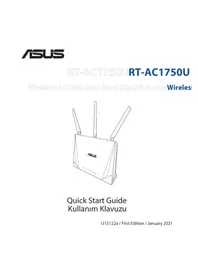
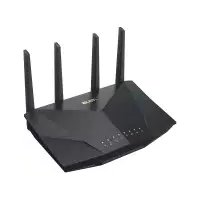
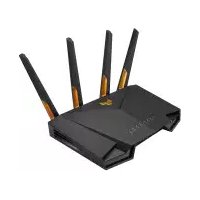
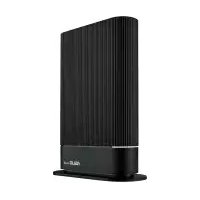
USER MANUAL RTAC1750U ASUS
Wireless-AC1750 Dual Band Gigabit RouterWireless

Quick Start Guide Kullanim Klavuzu
U15122a / First Edition / January 2021
Table of contentsTable of contents
Package contents 3
A quick look at RT-AC1750U 3
Position your wireless router. 4
Preparing your modem 5
Setting up your Router 6
A. Wired connection 6
B. Wireless connection 7
FAQ 9
Networks Global Hotline Information 195
This QSG contains these languages:
English Deutsch Romană
Блгарский Eληνικά Рсckи
Hrvatski Magyar Srpski
Čestina Italiano Slovenský
Dansk Latviski Slovensčina
Nederlandsl Lietuviu Espanol
Eesti Norsk Svenska
Suomi Polski YKpaIHcbkN
François Portugues Turkce
Package contents Package contents
RT-AC1750U Wireless Router AC adapter
Network cable (RJ-45) Quick Start Guide
A quick look at RT-AC1750UA quick look at RT-AC1750U
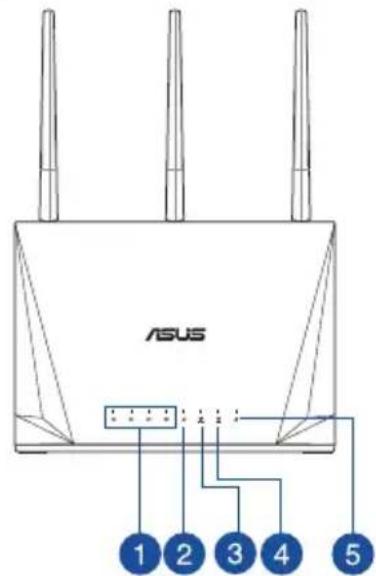
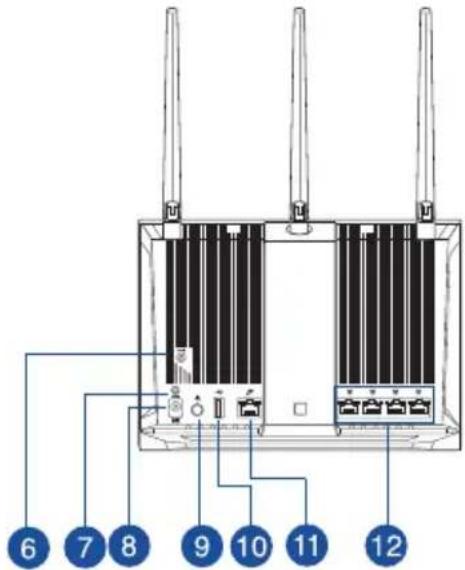
| 1 LAN 1~4 LEDs WPS button | 7 |
| 2 WAN LED Power (DC-IN) port | 8 |
| 3 2.4GHz LED Power button | 9 |
| 4 5GHz LED USB3.0 port | 10 |
| 5 Power LED WAN (Internet) port | 11 |
| 6 Reset button LAN 1 ~ 4 ports | 12 |
NOTES:
- Use only the adapter that came with your package. Using other adapters may damage the device.
- Specifications:
| DC Power adapter DC Output: +12V with 2.5A current |
| Operating Temperature | 0~40 °C Storage | age 0~70 | °C |
| Operating Humidity 50~90% Storage 20~90% |
Position your wireless routerPosition your wireless router
For optimal wireless transmission between the wireless router and connected wireless devices, ensure that you:
- Place the wireless router in a centralized area for a maximum wireless coverage for the network devices.
- Keep the wireless router away from metal obstructions and away from direct sunlight.
- Keep the wireless router away from 802.11g or 20MHz only Wi-Fi devices, 2.4GHz computer peripherals, Bluetooth devices, cordless phones, transformers, heavy-duty motors, fluorescent lights, microwave ovens, refrigerators, and other industrial equipment to prevent signal interference or loss.
- Always update to the latest firmware. Visit the ASUS website at http://www.asus.com to get the latest firmware updates.
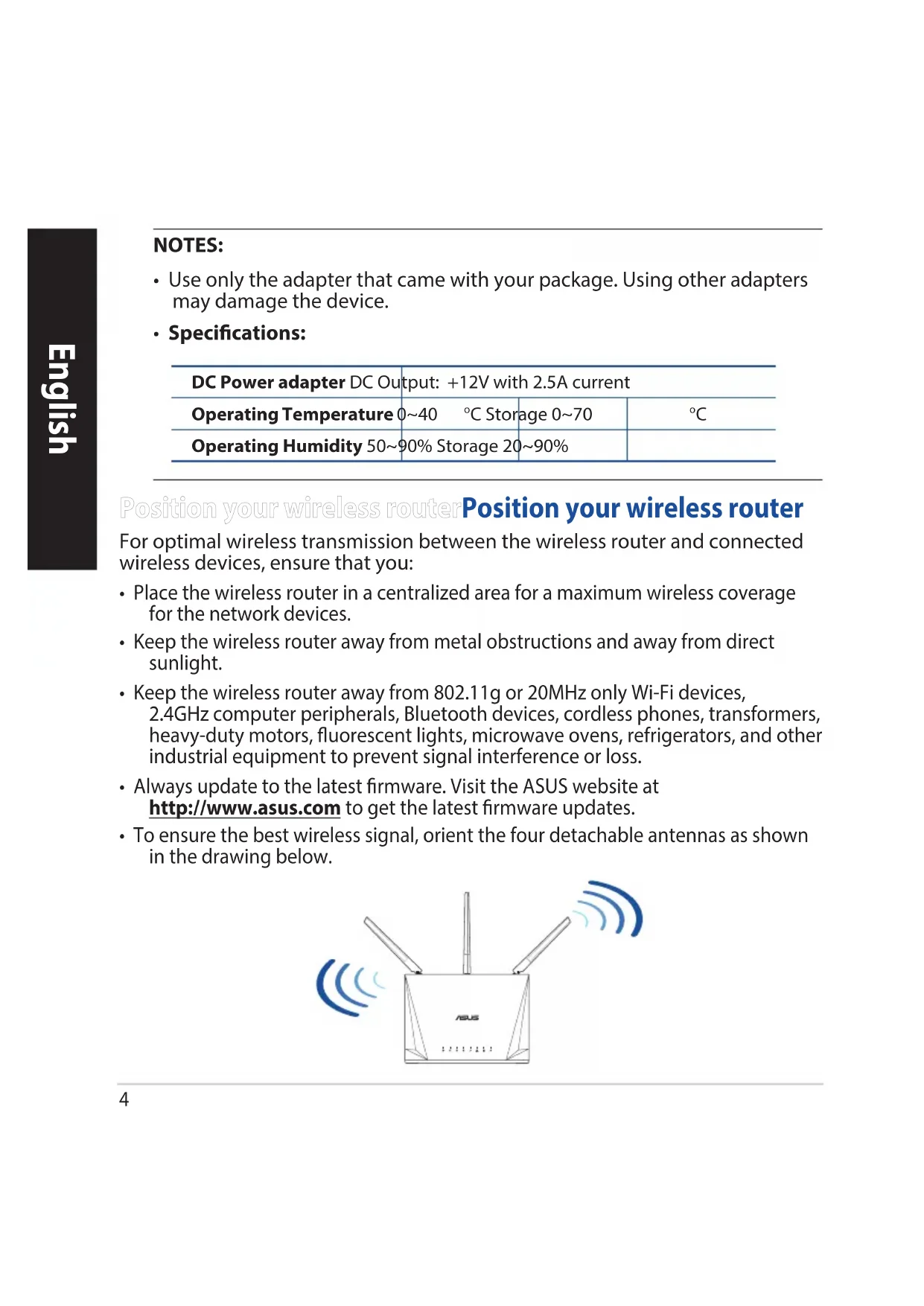
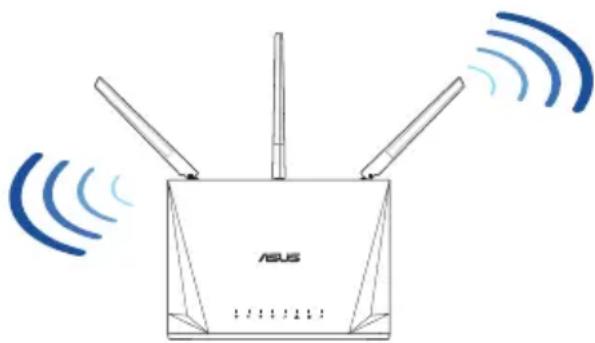
- To ensure the best wireless signal, orient the four detachable antennas as shown in the drawing below.
Preparing your modem Preparing your modem
- Unplug the power cable/DSL modem. If it has a battery backup, remove the battery.
NOTE: If you are using DSL for Internet, you will need your username/password from your Internet Service Provider (ISP) to properly configure the router.
- Connect your modem to the router with the bundled network cable.
- Power on your cable/DSL modem.
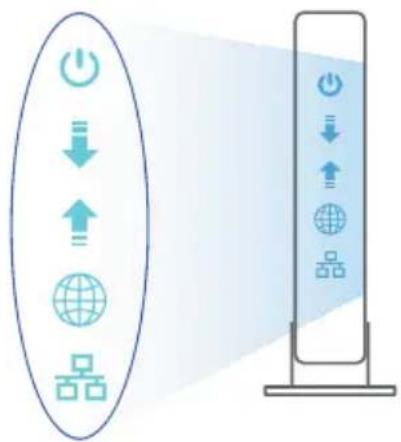
- Check your cable/DSL modem LED lights to ensure the connection is active.


Setting up your RouterSetting up your Router
You can set up your Router via wired or wireless connection.
A. Wired connection
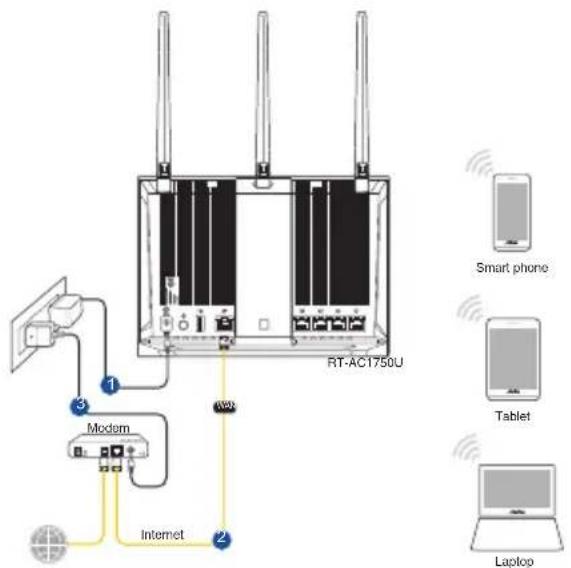
- Plug your router into a power outlet and power it on. Connect the network cable from your computer to a LAN port on your router.
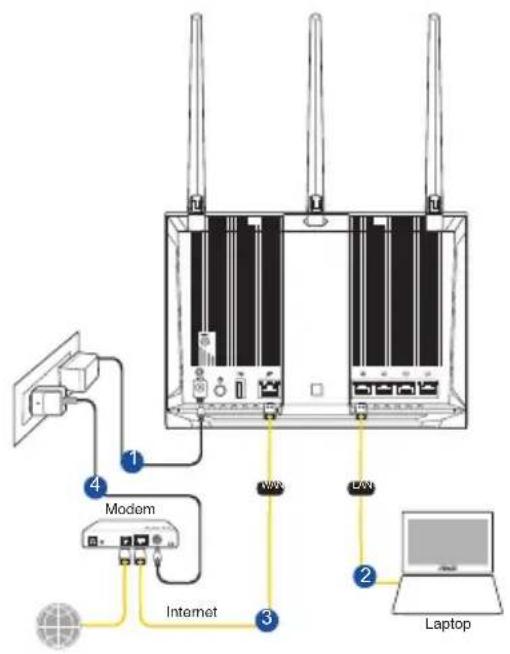
- The web GUI launches automatically when you open a web browser. If it does not auto-launch, enter http://router.asus.com.
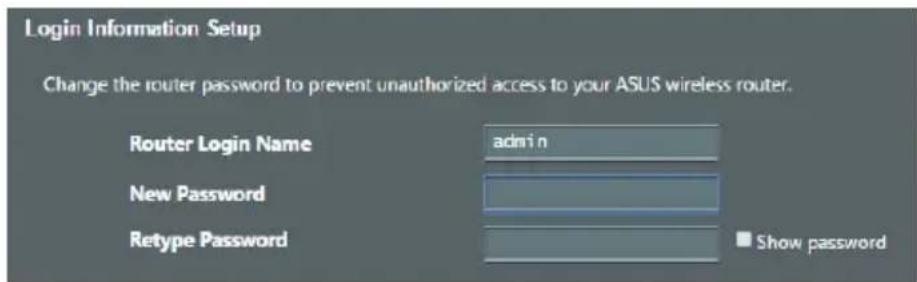
- Set up a password for your router to prevent unauthorized access.
B. Wireless connection
- Plug your router into a power outlet and power it on.
- Connect to the network with SSID shown on the product label on the back side of the router. For better network security, change to a unique SSID and assign a password.
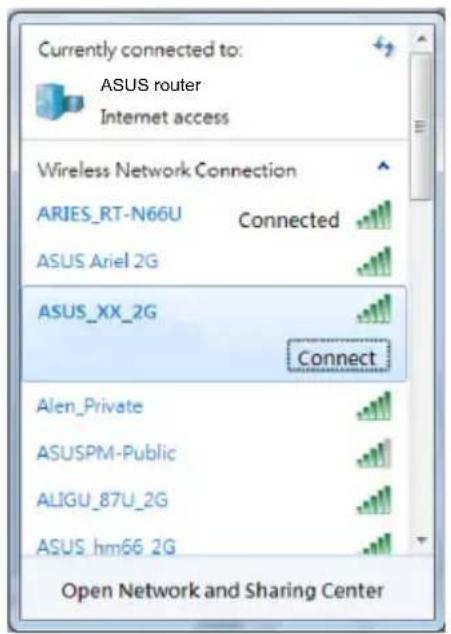
2.4G Wi-Fi Name (SSID): ASUS XX_2G
5G Wi-Fi Name (SSID): ASUS_XX_5G
* XX refers to the last two digits of 2.4GHz MAC address. You can find it on the label on the back of your router.
-
You can choose either the web GUI or ASUS Router app to set up your router. a. Web GUI Setup
-
Once connected, the web GUI launches automatically when you open a web browser. If it does not auto-launch, enter http://router.asus.com.
-
Set up a password for your router to prevent unauthorized access.

b. App Setup
Download ASUS Router App to set up your router via your mobile devices.
ASUS Router

GETION Google Play

Download on the App Store

ASUS Router
Remembering your wireless router settings
- Remember your wireless settings as you complete the router setup.
| Router Name: Password: | |
| 2.4 GHz network SSID: Password: | |
| 5GHz network SSID: Password: | |
FAQFAQ
-
Where can I find more information about the wireless router?
-
Online FAQ site: https://www.asus.com/support/faq
- Technical support site: https://www.asus.com/support
- Customer hotline: refer to the Support Hotline section in this Quick Start Guide
- You can get the user manual online at https://www.asus.com/support
Bbpy nperepeBbpy nperepe
RT-AC1750U AanTep 3a npomeHmB TOK
MpeKOB ka6eI (RJ-45) PbKOBOcO 3a 6bp3 cTapT
Change the router password to prevent unauthorized access to your ASUS wireless router.
Router Login Name
New Password
Retype Password
admin

Show password
b. Hactpoika Ha npiloxeHneTo
I3terlne npiloxeHnTo ASUS Router (ASUSpyTe), 3a da konhunypnPate pyTepa qpe3 CBOnte mo6uHn yCTpoiCTBa.
- Bключete Wi-Fi ha Baшinte moьинустpoиCTBa n CBbpxeTe c МpeхаТа ha RT-AC1750U.
CneDbaiTe HnCTpyKcHNTe 3a HaCTpoiKa Ha npInoXeHMeTO ASUS Ruter (ASUS pyTep), 3a da 3abbpWnte HaCTpOiKaTa.
ASUS
Router


13/14

QETON

12/12

1

3
Dormitory On the App Store

ASUS Router
3aIametTBAHe Ha 6e3XmHnTe HacTroPkn Ha Baun pyTep
3aHOMHeTe 6e3xuHnTe cn HAcTpoKn npn 3aBbPbBaHe Ha HAcTpoBHaHeTo Ha pyTepa.
| Иme на руtero: Параза: | |
| 2,4 GHz мөгөа SSID: Параза: | |
| 5G Hz мөгөа SSID: Параза: | |
FAQFAQ
- Kbde mora da HamepaonbHnTeHa nHopMaun 3a 6e3xuHn pyTeP?
- OhnaH, ha caIa c Bbnpocn n OTROBOpn: http://support.asus.com/faq
Ha caiTa 3a TexHnuecka noDprbJka: http://support.asus.com
Ha ropeaTa IHHa 3a o6cnyXBaHe Ha KIneHTn: BxKTe ropeaTa IHHa 3a NOdprbXka B OOnbHnHTeHNo pBKOBOCTBO.
- MojkeTe Na n3TerIInTe pbKOBOdCTBOTO Ha notpe6nteJnHaJnHOT htp://support.asus.com

Download on the App Store

ASUS Router
Pamćenje postavki bežićnog usmjerivača

Download on the App Store


Download on the App Store


Download on the App Store

ASUS Router
Traadita ruuteri sātete meeles pidamine

Download on the App Store


Download on the AppStore


Download on the App Store

ASUS Router
Pioc va OuaoTe Tc puOmuic Tou aoupumatou dpopooloyntn

Download on the App Store

ASUS Router
Bezvadu marsrutetaja iestatijumu atceresanas
Pabeidzot marsrutetaja iestatisanu, iegaumejiet bezvadu iestatijumus.
Download on the App Store


Download on the AppStore

ASUS Router
3aHOMnHaHne HacTpoEk 6ecnpoBODHoro poyTepa
3aPOMHnTe npaMeTpbl 6ecnpoBODHOcTn nOcne 3aBepseHnaCTpOKn poyTepa.
https://www.asus.com/support/faq
https://www.asus.com/support

Download on the App Store

ASUS Router

Pamcenje podesavanja bezićnog rutera
Download on the App Store

ASUS Router
https://www.asus.com/support/faq
Stranka technickej podpory: https://www.asus.com/support

Download on the App Store


https://www.asus.com/support/faq
Stran s tehnicno podporo: https://www.asus.com/support
https://www.asus.com/support
Download on the App Store

ASUS Router

IiIroTOBka MoeMaPiIroTOBka Moema
- BumkHItb 3 Mepeksi Hyp KnBneHna/MoDEM DSL. Kaio npucptpi MaekymyIaTOp, BuMItb Noro.
IPNMITKA:ЯкsoВиКориctуетecr IntepHET uepe3 DSL, Bam 3naO6ntbCra im'я КориctuBaaya/napOJIb BiD IntepHETnpoBaIepa,Io6 npaBnIbHo KOHfiIpyBaTn MapspTy3aTop.
2.Пдкючы моемdo mapшуTu3aTopa noeHaHm y napy MEPexeBm ka6eIem.


ASUS recycling and takeback programs come from our commitment to the highest standards for protecting our environment. We believe in providing solutions for you to be able to responsibly recycle our products, batteries, other components, as well as the packaging materials. Please go to http://csr.asus.com/english/Takeback.htm for the detailed recycling information in different regions.
REACH
Complying with the REACH (Registration, Evaluation, Authorisation, and Restriction of Chemicals) regulatory framework, we published the chemical substances in our products at ASUS REACH website at http://csr.asus.com/english/REACH.htm

WARNING! Any changes or modifications not expressly approved by the party responsible for compliance could void the user's authority to operate the equipment.
Precautions for the use of the device
a. Pay particular attention to the personal safety when use this device in airports, hospitals, gas stations and professional garages.
b. Medical device interference: Maintain a minimum distance of at least 15cm (6 inches) between implanted medical devices and ASUS products in order to reduce the risk of interference.
c. Kindly use ASUS products in good reception conditions in order to minimize the radiation's level.
d. Keep the device away from pregnant women and the lower abdomen of the teenager.
https://certificates.asus.asswebsite/wl/


- UK support e-mail: network_support_uk@asus.com
- For more information, visit the ASUS support site at: https://www.asus.com/support/
English
CE statement
ASUSTek Computer Inc. hereby declares that this device is in compliance with the essential requirements and other relevant provisions of Directive 2014/53/EU. Full text of EU declaration of conformity is available at https://www.asus.com/Networking/RT-AC1750U/HelpDesk Declaration/.
Testing for eco-design requirements according to (EC) No 1275/2008 and (EU) No 801/2013 has been conducted. When the device is in Networked Standby Mode, its I/O and network interface are in sleep mode and may not work properly. To wake up the device, press the Wi-Fi on/off, LED on/off, reset, or WPS button. This equipment complies with EU radiation exposure limits set forth for an uncontrolled environment. This equipment should be installed and operated with minimum distance 20cm between the radiator & your body. All operational modes:
2.4GHz: 802.11b, 802.11g, 802.11n (HT20), 802.11n (HT40), 802.11ac (VHT20), 802.11ac (VHT40)
5GHz: 802.11g, 802.11n (HT20), 802.11n (HT40), 802.11ac (VHT20), 802.11ac (VHT40), 802.11ac (VHT80)
The frequency, mode and the maximum transmitted power in EU are listed below:
2400-2483.5MHz (802.11ac VHT40 MCS0/Nss1): 19.947dBm
5150-5250MHz (802.11ac VHT80 MCS0/Nss1): 22.815 dBm
5250-5350MHz (802.11ac VHT80 MCS0/Nss1): 22.863 dBm
5470-5725MHz (802.11ac VHT40 MCS0/Nss1): 29.933 dBm
The device is restricted to indoor use only when operating in the 5150 to 5350 MHz frequency range.
The adapter shall be installed near the equipment and shall be easily accessible.
| AT BE BG CZ DK EE FR | | | |
| DE IS IE IT EL ES CY | | | |
| LV | LI | LT | LU | HU | MT | NL |
| NO PL PT RO SI SK TR | | | |
| FI SE CH UK HR UA | | | |
Safety Notices
- Use this product in environments with ambient temperatures between 0^(32^) and 40^(104^) .
Refer to the rating label on the bottom of your product and ensure your power adapter complies with this rating.
DO NOT place on uneven or unstable work surfaces. Seek servicing if the casing has been damaged.
DO NOT place or drop objects on top and do not shove any foreign objects into the product.
DO NOT expose to or use near liquids, rain, or moisture. DO NOT use the modem during electrical storms.
- DO NOT cover the vents on the product to prevent the system from getting overheated.
- DO NOT use damaged power cords, accessories, or other peripherals.
- If the Adapter is broken, do not try to fix it by yourself. Contact a qualified service technician or your retailer.
- To prevent electrical shock hazard, disconnect the power cable from the electrical outlet before relocating the system.
DO NOT mount this equipment higher than 2 meters.
Bulgarian
CE statement
OnpocTeHa deklapaun3a cboTBeTCTBne Ha EC
C hactoIto ASUSTeK Computer Inc. Ieknappa, ye ToBa yctpoictBO e B CbotBcTbne cbc
CbIecTeBeHnTE n3NCKBaHnI nDpyrIte npInIOxIMn NOCTaHOBNeHn Ha NIpEKeTbBa 2014/53/EC. IIbIHHaT
TekCT Ha IekIapauznaTa 3a CbotBcTcTBnE Ha EC e DoctbnenHa aDpec https://www.asus.com/Networking/RT-AC1750U/HelpDesk_Declaration/.
Декларачnia 3a CBOTВЕТСВЕ 3a ДуpeКТИБа 3a ekODиЗйна 2009/125/EO
IpoBeHn ca TeCTOBe 3a CbBMeCTUMOcT c N3NCKBaHnraTa 3a eKOJn3aH N cbTnaCHO (EO) No. 1275/2008 n (EC) No. 801/2013. Korato yctpOCTBOTo e B Networked Standby Mode (PexnHa rTOBHOCT Ha mpeXa), I/O n MpeKOBnAT INTEpΦeInc ca B cnau peKIM m Moxe Ja He pa6oTt KaKTo Tpr6Ba. 3a Da cb6yUInTe yCTPOIcTBOTo, HATncHe Ti on/off (Wi-Fi Bk#./n3Kn.), LED on/off (LED Bk#./n3Kn.), reset (HynipaHe) nn 6yToHa WPS. ToBa yctpOCTBO E B CbOTBeCTBnE C rpaHnUte 3a paDnOueCTOTHO o6NbUbaHe, yCTaHOBeHN OT EC 3a HeKoHTpOINpHa cpeJa. ToBa O6OpUdBaHe Tpr6Ba Da ce IHCTaIInpA u N3NoI3Ba npn pa3CTOHarHe HanMaIKo 20 cm 20 cm MeKdy N3NbUbaUto TnIo n YObEwKOTO TnIo.
BcuiKpexmHa pa6ota:
2.4GHz: 802.11b, 802.11g, 802.11n (HT20), 802.11n (HT40), 802.11ac (VHT20), 802.11ac (VHT40)
5GHz: 802.11g, 802.11n (HT20), 802.11n (HT40), 802.11ac (VHT20), 802.11ac (VHT40), 802.11ac (VHT80)
IIO-dony ca nocouehn cheCToTa,peXIMbT mAkcmMaHTo npedaBaHo 3axpaHbaHe B EC.
2400-2483.5MHz (802.11ac VHT40 MCS0/Nss1): 19.947dBm
5150-5250MHz (802.11ac VHT80 MCS0/Nss1): 22.815 dBm
5250-5350MHz (802.11ac VHT80 MCS0/Nss1): 22.863 dBm
5470-5725MHz (802.11ac VHT40 MCS0/Nss1): 29.933 dBm
YcTpoIcTBOTe o rpaHnueHo 3a n3noJ3BaHe B NOMEuEHNr eINHCTBeHO, KOraTO onepnpa B YecToTeH dnaana3OH ot 5150 do 5350 MHz.
AanTepeT Tpa Da ce Hamnpa B 6n3oCT do o6OpyBaHeTo n da 6bJe neCHO IOCTbneH.
Safety Notices
- ɪnəʊlɪsBaɪteɪtɪpɒdʌyktɪpɪnɪTæmɪpepaɪtə ha OKoɪnHaɪtcaːpɛda oɪ 0^ (32°F) do 40^ (104°F).
BnKTe etKeTa Ha doJIHaTc stpaHa Ha Baunr npOyKT n ce yBepTe, ye Baunr aanTep otroBaPra Ha 3NCKBAHnraTa.
HE noctabny Te Bbpxy hepaBn nn Hecta6nHn pa60THn NOBbpxHOCTn. O6bpHeTe ce KbM cepBn3, aKO KopnycbT ce nobpeu.
HE noctabaIte, He nyckaIte OTrope n He nbxaIte HnkaBn yJxN npedmetn B npOdyKta.
HE n3naraTe Ha n He n3no3BaTBe 6n3oCT Do TeuHocTn, DbXd nn Bnara. HE n3no3BaTe Moema no BpeMe Ha rpbMOteBnuHn 6ypn.
HE nokpmbaTe BeHTnlaOnHHnTe OTbOpHa Na npOyKa, 3a Da npEDoTbPaTne NperpraBaHe Ha CnCTeMaTa.
HE n3no3BaIte NOBpeHn 3axpaHbauN ka6eHn, akcecoapu nn npyRn nepuepHn yctpoiCTBa.
Ako aadantepbTe nOBpeDeH, He ce onuTbaIte da ro peMOHTnpaTe camN. CbpxKeTe ce c KBaunnupaH texnK nn C Baunr doctabvn.
3a da n36erhepe npck OT TOKOB yap, n3knoueTe 3axpaHbaunKa6en OT eNeKtpnueckata Mpeka npedn Da npemectute cnCTemata.
ToBaO6OpyDbaHe da HE ce MoHTnpa Ha BnCOUnHa Hn2 MeTpa.
Croatian
CE statement
Pojednostavljena EU Izjava o sukladnosti
ASUSTek Computer Inc. ovime izjavljuje da je uredj sukladan s osnovnim zahtjevima i ostalim vaznim odredbama direktive 2014/53/EU. Cijeli tekst EU izjave o sukladnosti dostupan je na https://www.asus.com/Networking/RT-AC1750U/HelpDesk Declaration/.
Izjava o sukladnosti za direktivu o ekodizajnu 2009/125/EZ
Provedeno je testiranje zahtjeva na ekodizajn u skladu s (EC) No 1275/2008 i (EU) No 801/2013. Kada je uredjau umrezenom nacinu mirovanja, njegovi ulazi/izlazi i mreznosucelje su takoder u naclinu mirovanja i mozda nece ispravno raditi. ZaPokretanje uredaja pritisnite tipku za uključivanje/isključivanje Wi-Fi uredaja, uključivanje/isključivanje LED-a, ponovno postavljanje ili gumb za WPS.
Ova oprema sukladna je EU ograničenjima o izloženosti zračenju u nekontroliranom okruženju. Ovaj urežaj se mora postaviti i koristiti na minimalnej udaljenosti od 20 cm izmedu radijatora i vašeg tijela. Svi načini rada:
2.4GHz: 802.11b, 802.11g, 802.11n (HT20), 802.11n (HT40), 802.11ac (VHT20), 802.11ac (VHT40)
5GHz: 802.11g, 802.11n (HT20), 802.11n (HT40), 802.11ac (VHT20), 802.11ac (VHT40), 802.11ac (VHT80)
U nastavku su navedeni frekvencija, način rada i maksimalna emitirana snaga u EU:
2400-2483.5MHz (802.11ac VHT40 MCS0/Nss1): 19.947dBm
5150-5250MHz (802.11ac VHT80 MCS0/Nss1): 22.815 dBm
5250-5350MHz (802.11ac VHT80 MCS0/Nss1): 22.863 dBm
5470-5725MHz (802.11ac VHT40 MCS0/Nss1): 29.933 dBm
Urejaj e ogranicen na uporabu u zatvorenim prostorima samo pri radu u frekvencijskom rasponu od 5150 do 5350 MHz.
Adapter se mora instalirati blizu uredaja i mora biti lako dostupan.
Safety Notices
- Ovaj proizvod koristite u okrużenjima s temperaturom okrużenja izmedu 0^ (32^) i 40^ (104^) .
- Pogledajte nazivnu oznaku na donjem dijelu proizvoda kako biste provjerili je li adapter sukladan.
- NE postavljaje uredaj na neravne i nestabilne radne povrsine. U slučaju ostecenja kucišta, zatražite pomoc servisera.
- NEMOJTE postavljati ili spustati predmete na gornji dio uredaja i nemojte umetati strane predmete u proizvod.
- NE izlažite i ne upotrebljavajte uredaj u blizini tekuciina, kiš ili vlage. NEMOJTE koristiti modem tijekom elektricne oluje.
- NEMOJTE prekrivati otvore na proizvodu kako ne biste uzrokovali pregrijavanje sustava.
- Nemojte koristiti oštecene kabele za napajanje, dodatnu opremu i ostale vanjske uredaje.
- Ako je adapter oštećen, nemojte ga popravljati sami. Oblatite se kvalificiranom servisnom tehnicaru ili dobavljacu.
- Kako biste spijecili opasnost od elektricnog udara, iskopcajte kabel iz elektricne uticnice prije premjestanja sustava.
- NEMOJTE montirati ovu opremu na visini vecoj od 2 metra.
Czech
CE statement
2400-2483.5MHz (802.11ac VHT40 MCS0/Nss1): 19.947dBm
5150-5250MHz (802.11ac VHT80 MCS0/Nss1): 22.815 dBm
5250-5350MHz (802.11ac VHT80 MCS0/Nss1): 22.863 dBm
5470-5725MHz (802.11ac VHT40 MCS0/Nss1): 29.933 dBm
2400-2483.5MHz (802.11ac VHT40 MCS0/Nss1): 19.947dBm
5150-5250MHz (802.11ac VHT80 MCS0/Nss1): 22.815 dBm
5250-5350MHz (802.11ac VHT80 MCS0/Nss1): 22.863 dBm
5470-5725MHz (802.11ac VHT40 MCS0/Nss1): 29.933 dBm
2400-2483.5MHz (802.11ac VHT40 MCS0/Nss1): 19.947dBm
5150-5250MHz (802.11ac VHT80 MCS0/Nss1): 22.815 dBm
5250-5350MHz (802.11ac VHT80 MCS0/Nss1): 22.863 dBm
5470-5725MHz (802.11ac VHT40 MCS0/Nss1): 29.933 dBm
2400-2483.5MHz (802.11ac VHT40 MCS0/Nss1): 19.947dBm
5150-5250MHz (802.11ac VHT80 MCS0/Nss1): 22.815 dBm
5250-5350MHz (802.11ac VHT80 MCS0/Nss1): 22.863 dBm
5470-5725MHz (802.11ac VHT40 MCS0/Nss1): 29.933 dBm
Si erice, darbojoties no 5150 MHz lidz 5350 MHz frevences diapazona, paredzeta tikai lietoisanai iekstelpas.
Adapterim ir jabut novietotam icerces tuvum un viegli pieejamam.
Safety Notices
- Lietojiet so ierici tikai vietas, kur apkartējā temperatura ir no 0^ (32°F) lidz 40°C (104°F).
- Skatiet strāvas parametru uzlimi ierices apaksā un pārliecinieties, lái strāvas adapteris atbilstu parametriem.
- NENOVIETOT uz nelidzenas un nestabilas darba virsmas. Versieties tehniskas palidzibas dienestā, ja ir bojats ārejais ietvars.
- NENOVIETOT vai nemeist prieksmetus uz virmas un neievietot ierie nepadus sveskermenus.
- NEPAKLaut skidrumu, lietus vai mitruma ietekmei vai neliot to tuvumā. NELIETOT modemu negaisa laikā.
- NEAPKLÄT ierices ventilacijas atveres, lai sistema nepárkarstu.
- NELIETOT bojatus strāvas vadus, papildierices vai CITAs ārejas ierices.
Ja adapteris ir bojats, neveiciet ta remontu pats. Sazinieties ar kvalificetu specialistu vai savu pardevju.
- Lai noverstu elektriskas strvas triecena risku, atvienojiet strvas kabeli no strvas kontaktligzdas pirms sistemas parvietoşanas.
- NEMONTÉJIET šo aprikojumu augsták par 2 metriem.
Littuanian
CE statement
Supaprastinta ES atitikties deklaracija
2400-2483.5MHz (802.11ac VHT40 MCS0/Nss1): 19.947dBm
5150-5250MHz (802.11ac VHT80 MCS0/Nss1): 22.815 dBm
5250-5350MHz (802.11ac VHT80 MCS0/Nss1): 22.863 dBm
5470-5725MHz (802.11ac VHT40 MCS0/Nss1): 29.933 dBm
Sj jrenginj galima naudoti tik patalpoje, kaijis veikia 5150-5350 MHz dažniu diapazone.
2400-2483.5MHz (802.11ac VHT40 MCS0/Nss1): 19.947dBm
5150-5250MHz (802.11ac VHT80 MCS0/Nss1): 22.815 dBm
5250-5350MHz (802.11ac VHT80 MCS0/Nss1): 22.863 dBm
5470-5725MHz (802.11ac VHT40 MCS0/Nss1): 29.933 dBm
2400-2483.5MHz (802.11ac VHT40 MCS0/Nss1): 19.947dBm
5150-5250MHz (802.11ac VHT80 MCS0/Nss1): 22.815 dBm
5250-5350MHz (802.11ac VHT80 MCS0/Nss1): 22.863 dBm
5470-5725MHz (802.11ac VHT40 MCS0/Nss1): 29.933 dBm
Dispositivul este restrictonat doar lautilizarea in interior in cazul operariin intervalul de freventa cuprins intre 5.150 sI 5.350 MHz.
2400-2483.5MHz (802.11ac VHT40 MCS0/Nss1): 19.947dBm
5150-5250MHz (802.11ac VHT80 MCS0/Nss1): 22.815 dBm
5250-5350MHz (802.11ac VHT80 MCS0/Nss1): 22.863 dBm
5470-5725MHz (802.11ac VHT40 MCS0/Nss1): 29.933 dBm
Urejaje ogranicen za korijscenje unutra samo kada radiu frekventnom opsegu od 5150 to 5350 MHz.
2400-2483.5MHz (802.11ac VHT40 MCS0/Nss1): 19.947dBm
5150-5250MHz (802.11ac VHT80 MCS0/Nss1): 22.815 dBm
5250-5350MHz (802.11ac VHT80 MCS0/Nss1): 22.863 dBm
5470-5725MHz (802.11ac VHT40 MCS0/Nss1): 29.933 dBm
2400-2483.5MHz (802.11ac VHT40 MCS0/Nss1): 19.947dBm
5150-5250MHz (802.11ac VHT80 MCS0/Nss1): 22.815 dBm
5250-5350MHz (802.11ac VHT80 MCS0/Nss1): 22.863 dBm
5470-5725MHz (802.11ac VHT40 MCS0/Nss1): 29.933 dBm
2400-2483.5MHz (802.11ac VHT40 MCS0/Nss1): 19.947dBm
5150-5250MHz (802.11ac VHT80 MCS0/Nss1): 22.815 dBm
5250-5350MHz (802.11ac VHT80 MCS0/Nss1): 22.863 dBm
5470-5725MHz (802.11ac VHT40 MCS0/Nss1): 29.933 dBm
2400-2483.5MHz (802.11ac VHT40 MCS0/Nss1): 19.947dBm
5150-5250MHz (802.11ac VHT80 MCS0/Nss1): 22.815 dBm
5250-5350MHz (802.11ac VHT80 MCS0/Nss1): 22.863 dBm
5470-5725MHz (802.11ac VHT40 MCS0/Nss1): 29.933 dBm
2400-2483.5MHz (802.11ac VHT40 MCS0/Nss1): 19.947dBm
5150-5250MHz (802.11ac VHT80 MCS0/Nss1): 22.815 dBm
5250-5350MHz (802.11ac VHT80 MCS0/Nss1): 22.863 dBm
5470-5725MHz (802.11ac VHT40 MCS0/Nss1): 29.933 dBm
2400-2483.5MHz (802.11ac VHT40 MCS0/Nss1): 19.947dBm
5150-5250MHz (802.11ac VHT80 MCS0/Nss1): 22.815 dBm
5250-5350MHz (802.11ac VHT80 MCS0/Nss1): 22.863 dBm
5470-5725MHz (802.11ac VHT40 MCS0/Nss1): 29.933 dBm
2400-2483.5MHz (802.11ac VHT40 MCS0/Nss1): 19.947dBm
5150-5250MHz (802.11ac VHT80 MCS0/Nss1): 22.815 dBm
5250-5350MHz (802.11ac VHT80 MCS0/Nss1): 22.863 dBm
5470-5725MHz (802.11ac VHT40 MCS0/Nss1): 29.933 dBm
2400-2483.5MHz (802.11ac VHT40 MCS0/Nss1): 19.947dBm
5150-5250MHz (802.11ac VHT80 MCS0/Nss1): 22.815 dBm
5250-5350MHz (802.11ac VHT80 MCS0/Nss1): 22.863 dBm
5470-5725MHz (802.11ac VHT40 MCS0/Nss1): 29.933 dBm
5470-5725MHz (802.11ac VHT40 MCS0/Nss1): 29.933 dBm
2400-2483.5MHz (802.11ac VHT40 MCS0/Nss1): 19.947dBm
5150-5250MHz (802.11ac VHT80 MCS0/Nss1): 22.815 dBm
5250-5350MHz (802.11ac VHT80 MCS0/Nss1): 22.863 dBm
5470-5725MHz (802.11ac VHT40 MCS0/Nss1): 29.933 dBm
2400-2483.5MHz (802.11ac VHT40 MCS0/Nss1): 19.947dBm
5150-5250MHz (802.11ac VHT80 MCS0/Nss1): 22.815 dBm
5250-5350MHz (802.11ac VHT80 MCS0/Nss1): 22.863 dBm
5470-5725MHz (802.11ac VHT40 MCS0/Nss1): 29.933 dBm
Enheten er begrenset til innendors bruk när den brukes i frekvensområdet 5150 til 5350 MHz.
2400-2483.5MHz (802.11ac VHT40 MCS0/Nss1): 19.947dBm
5150-5250MHz (802.11ac VHT80 MCS0/Nss1): 22.815 dBm
5250-5350MHz (802.11ac VHT80 MCS0/Nss1): 22.863 dBm
5470-5725MHz (802.11ac VHT40 MCS0/Nss1): 29.933 dBm
2400-2483.5MHz (802.11ac VHT40 MCS0/Nss1): 19.947dBm
5150-5250MHz (802.11ac VHT80 MCS0/Nss1): 22.815 dBm
5250-5350MHz (802.11ac VHT80 MCS0/Nss1): 22.863 dBm
5470-5725MHz (802.11ac VHT40 MCS0/Nss1): 29.933 dBm
2400-2483.5MHz (802.11ac VHT40 MCS0/Nss1): 19.947dBm
5150-5250MHz (802.11ac VHT80 MCS0/Nss1): 22.815 dBm
5250-5350MHz (802.11ac VHT80 MCS0/Nss1): 22.863 dBm
5470-5725MHz (802.11ac VHT40 MCS0/Nss1): 29.933 dBm