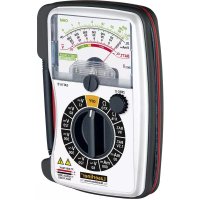
MultiMeterHome - Multimeter Laserliner - Free user manual and instructions
Find the device manual for free MultiMeterHome Laserliner in PDF.


| Product type | Analog multimeter |
| Brand | Laserliner |
| Model | MultiMeterHome |
| Dimensions (L x W x H) | 82 x 116 x 25 mm |
| Weight (with battery) | 166 g |
| Power supply | 1 x 1.5 V AAA battery |
| Display | Analog needle display |
| Maximum measurable voltage (DC/AC) | 300 V |
| Maximum DC current | 600 mA |
| DC voltage ranges | 12 V, 60 V, 120 V, 300 V |
| AC voltage ranges | 60 V, 120 V, 300 V |
| DC current ranges | 30 mA, 600 mA |
| Resistance ranges | X10Ω (0-1 kΩ), X1kΩ (0-1 kΩ) |
| Battery test | 1.5 V (round) and 9 V (block) |
| Overvoltage category | CAT III 300 V |
| Protection class | II (double insulation) |
| Protection degree | IP20 |
| Fuse | F 630 mA / 300 V (∅5 x 20 mm) |
| Operating conditions | 0°C to 40°C, max RH 80% (non-condensing) |
| Storage conditions | 0°C to 50°C, max RH 80% |
| Standards | EN61010-1, EN61010-2-030, EN61010-2-033, EN61326-1, EN61326-2-2 |
| Maintenance | Clean with a damp cloth; remove battery before prolonged storage; store in a dry, clean place. |
Frequently Asked Questions - MultiMeterHome Laserliner
User questions about MultiMeterHome Laserliner
0 question about this device. Answer the ones you know or ask your own.
Ask a new question about this device
Download the instructions for your Multimeter in PDF format for free! Find your manual MultiMeterHome - Laserliner and take your electronic device back in hand. On this page are published all the documents necessary for the use of your device. MultiMeterHome by Laserliner.
USER MANUAL MultiMeterHome Laserliner
Ablesen der Skala (C):
natural_image
Simple diagram of a U-shaped battery with two test tubes and a positive terminal, no text or symbols present.5 StrAmmessung DC
natural_image
Simple electrical circuit diagram showing two probes connected to a battery with a positive terminal (no text or symbols)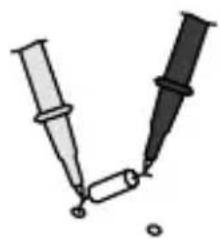
natural_image
Illustration of two syringes with droplets, no text or symbols presentCompletely read through the operating instructions, the "Warranty and Additional Information" booklet as well as the latest information under the internet link at the end of these instructions. Follow the instructions they contain. This document must be kept in a safe place and passed on together with the device.
Function / Application
Multimeter for taking measurements in the range of overvoltage category CAT III up to max. 300 V. The multimeter can be used to measure DC and AC voltages, direct current, battery charge status and resistance within the specified ranges.
Symbols
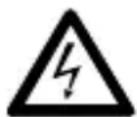
Hazardous electrical voltage warning: Unprotected live components inside the device housing may pose a risk of electric shock.

Danger area warning

Protection class II: The test device has reinforced or double insulation.
CAT III
Overvoltage category III: Equipment in fixed installations and for applications where specific requirements with regard to the reliability and availability of equipment have to be met, e.g. circuit-breakers in fixed installations and devices used in industrial applications which are permanently connected to the fixed installation.
Safety instructions
- The device must only be used in accordance with its intended purpose and within the scope of the specifications.
- The measuring tools and accessories are not toys. Keep out of reach of children.
- Modifications or changes to the device are not permitted, this will otherwise invalidate the approval and safety specifications.
- Do not expose the device to mechanical stress, extreme temperatures, moisture or significant vibration.
- Exercise extreme caution when working with voltages higher than 24 V/AC rms or 60 V/DC. Touching the electrical conductors at such voltages poses a risk of life-threatening electric shocks.
Laserliner
- If the device comes into contact with moisture or other conductive-residue, work must not be carried out under voltage. At and above voltages of 24 V/AC rms / 60 V/DC, the presence of moisture creates the risk of life-threatening electric shocks.
- Clean and dry the device before use.
- When using the device outdoors, make sure that the weather conditions are appropriate and/or that suitable protection measures are taken.
- In overvoltage category III (CAT III), the voltage between the test device and earth must not exceed 300 V.
- Before taking any measurements, make sure that both the area to be tested (e.g. a line), the test device and the accessories used (e.g. connection cable) are in proper working order. Test the device by connecting it to known voltage sources (e.g. a 230 V socket in the case of AC testing or a car battery in the case of DC testing).
- The device must no longer be used if one or more of its functions fail or the battery charge is weak.
- The device must be disconnected from all power sources and measuring circuits before opening the cover to change the battery(ies) or fuse(s). Do not switch on the device with the cover open.
- Observe the safety precautions of local and national authorities relating to the correct use of the device and any prescribed safety equipment (e.g. electrician's safety gloves).
- If you have to take hold of the measuring spikes, do so by the grip sections only. Do not touch the measuring contacts whilst the measurement is being taken.
- Make sure that you always select the correct connections and rotary switch position with the correct measuring range for the measurement to be carried out.
- Do not work alone in the vicinity of hazardous electrical installations and only under the guidance of a qualified electrician.
- Disconnect the power supply to the electrical circuit before measuring or checking the diodes, resistance or battery charge. Make sure that all high-voltage capacitors are discharged.
To check, remove the measuring leads of the device from the test piece before changing the mode.
- Check that all high-voltage capacitors are discharged.
- When connecting to a voltage, always connect the black measuring lead first before the red lead. Follow the reverse procedure when disconnecting.
Additional information on use
Observe the technical safety regulations for working on electrical systems, especially: 1. Safely isolating from power supply, 2. Securing to prevent system being switched on again, 3. Checking zero potential, two-pole, 4. Earthing and short-circuiting, 5. Securing and covering adjacent live components.
Safety instructions
Dealing with electromagnetic radiation
- The measuring device complies with electromagnetic compatibility regulations and limit values in accordance with EMC-Directive 2014/30/EU.
- Local operating restrictions – for example, in hospitals, aircraft, petrol stations or in the vicinity of people with pacemakers – may apply. Electronic devices can potentially cause hazards or interference or be subject to hazards or interference.
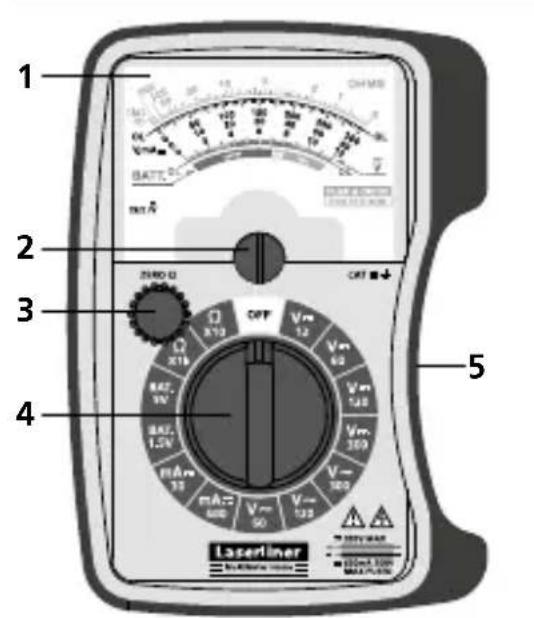
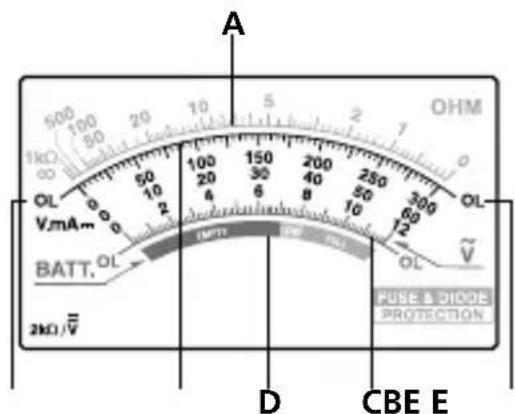
1 Analogue scale
2 Rotary knob for setting the zero point
3 Rotary knob for setting the zero point for measuring resistance
4 Rotary switch to set the measuring function
5 Holder for test prods
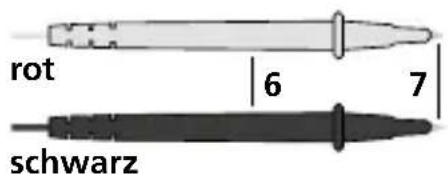
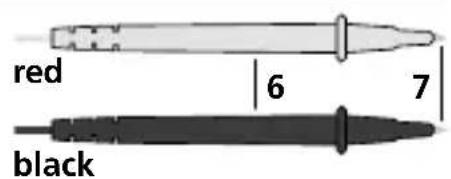
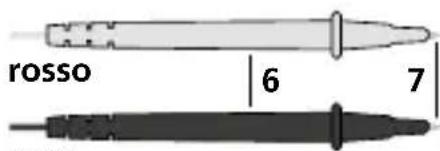
6 Test prods
7 Measuring contacts: red "+" , black "-"
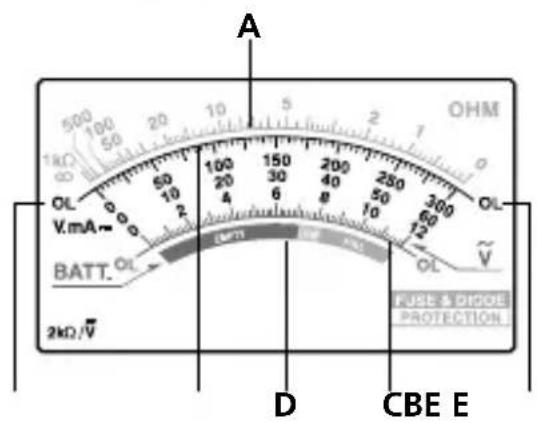
A Resistance measurement ("OHM")
B Voltage measurement DC, Current measurement DC ("V.mA==")
C Voltage measurement AC ("v")
D Battery charge status measurement ("BATT.")
E OL: Open line/overflow: measuring circuit not closed or measuring range exceeded
Laserliner
Maximum limit values
| Function Maximum limit values | |
| V DC / V AC 300 V DC, 300 V AC | |
| A DC 600 mA | |
| Batteries 9 V |
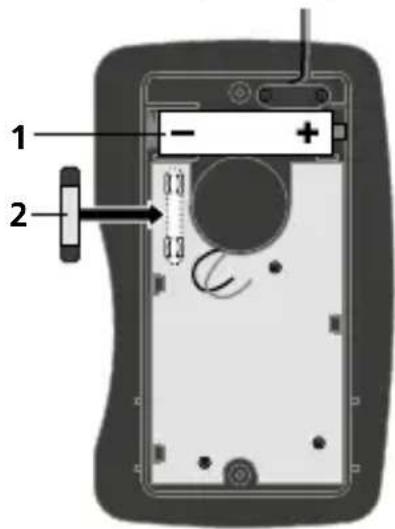
1 replacing the battery / fuse
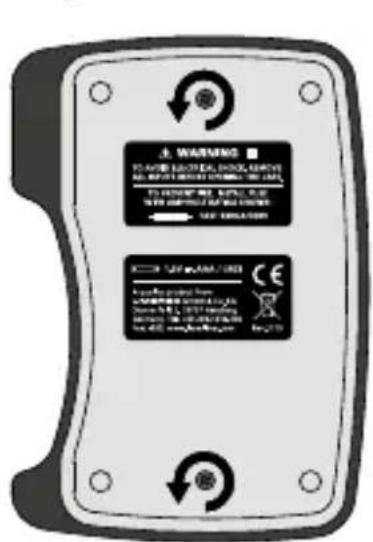
To replace the battery or fuse, first disconnect the test prods from all voltage sources. Undo all the screws at the rear of the device and replace the battery or replace the defective fuse by a fuse of the same type and rating. Do not touch the green pc-board. Also make sure it is kept clean. Close the housing and carefully screw the meter back together. Do not switch on the device with the cover open.
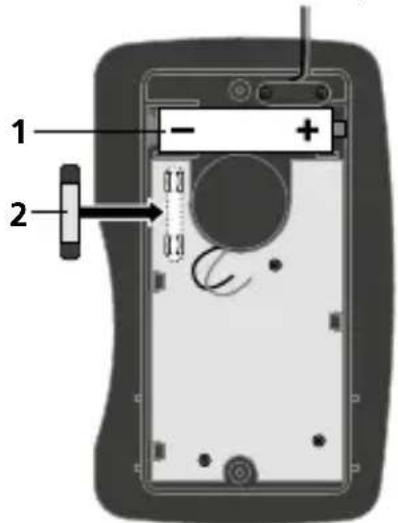
Be sure to pay attention to polarity.
1 1 x 1.5 V type AAA
2 F 630 mA / 300 V (∅ 5 mm x 20 mm)

Turn the rotary switch to position "Ω". Hold the two test prods so that they touch and with rotary knob (3) adjust the pointer exactly to "0" on the OHM-scale (A). If this is not possible, the battery needs to be replaced.
Notes on measurement
Before each measurement, check that the pointer is set exactly to „0“ on the V.mA== / -scale (B/C). If not, adjust the pointer with rotary knob (2).
If the value of the measured variable is not known in advance, set the rotary switch to the highest measuring range.
Then reduce the measuring range step by step until a satisfactory resolution is achieved.
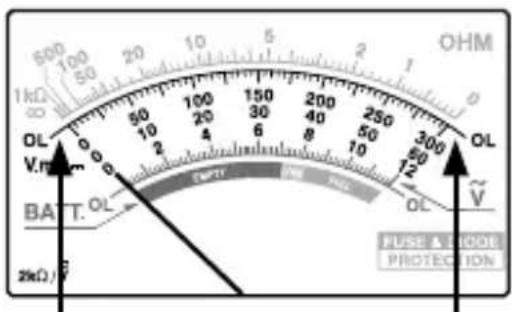
If the pointer remains to the left of the "0" during the measurement or to the right of the "0" when measuring resistance, either the test prods are mixed up or the measuring circuit is interrupted. Repeat the measurement with the test prods changed over.
The measuring range is exceeded if the pointer remains to the right of "300" ("60" / "12") or to the left of "1 kΩ" when measuring resistance. Repeat the measurement with a higher measuring range.
3 Voltage measurement DC
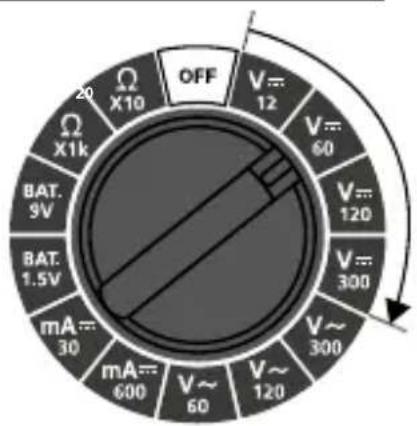
To measure voltage, set the rotary switch to the "V---" position with the corresponding measuring range (12 V - 300 V).
Then connect the measuring contacts to the object to be tested.
Reading the scale (B):
| Measuring range | ResultScale | |
| 12 V | 0 - 12 | x 1 |
| 60 V | 0 - 60 | x 1 |
| 120 V | 0 - 12 | x 10 |
| 300 V | 0 - 300 | x 1 |
Laserliner
4 Voltage measurement AC
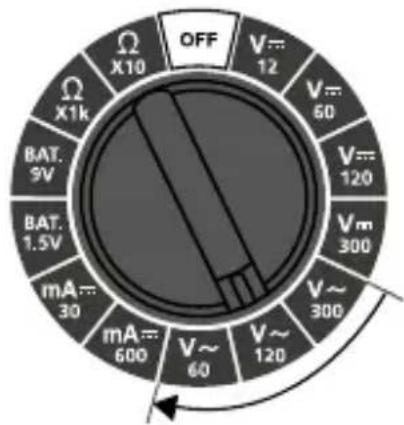
To measure voltage, set the rotary switch to the "V\~" position with the corresponding measuring range (60 V - 300 V).
Then connect the measuring contacts to the object to be tested.
Reading the scale (C):
| Measuring range | Scale Result | |
| 60 V | 0 - 60 | x 1 |
| 120 V | 0 - 12 | x 10 |
| 300 V | 0 - 300 | x 1 |
redblack
natural_image
Simple electrical circuit diagram showing two probes connected to a battery with a positive terminal (no text or symbols)5 Current measurement DC
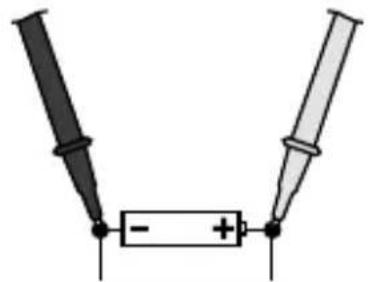
To measure current, set the rotary switch to the "mA==" position with the corresponding measuring range (30 mA / 600 mA).
Disconnect the circuit before connecting the meter. Then connect the measuring contacts to the object to be tested.
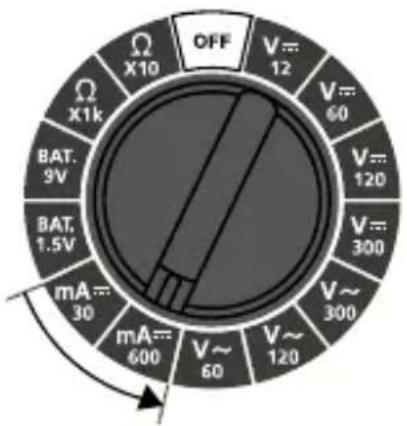
Reading the scale (B):
| Measuring range | ResultScale | |
| 30 mA | 0 - 300 | : 10 |
| 600 mA | 0 - 60 | x 10 |
Disconnect the circuit again before disconnecting the meter.
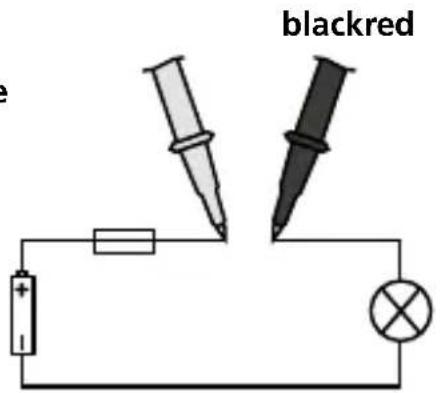

No currents above 600 mA may be measured in the mA range. Currents above this level trigger the automatic fuse in the meter (F 630 mA / 300 V, ∅ 5 mm x 20 mm).
6BAT. Battery charge status measurement
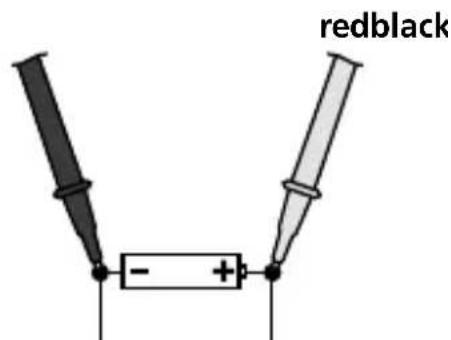
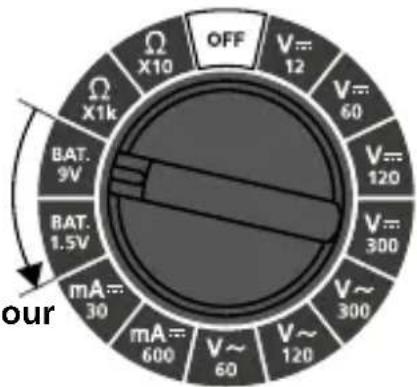
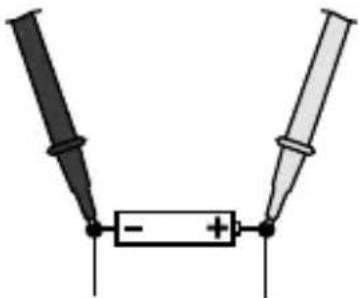
To measure the battery charge status, set the rotary switch to the "BAT." position with the corresponding measuring range.
1.5 V round cells / AA, AAA, C, D 9.0 V flat cells / E-block
Then connect the measuring contacts to the battery.
3-colour display scale (D):
| Battery charge statusCo | |
| green | Good: battery fully charged |
| orange | Weak: battery is weak and will soon need replacing |
| red | Replace: battery is flat and should be replaced |
olour
redblack
natural_image
Simple electrical circuit diagram showing two probes connected to a battery with a positive terminal (no text or symbols)7 Resistance measurement
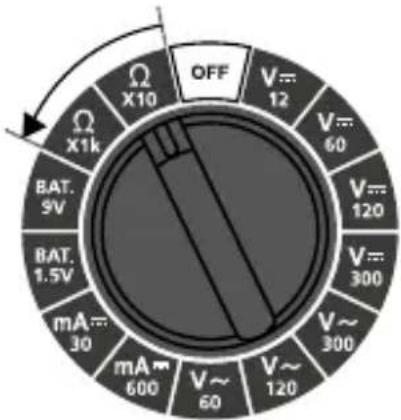
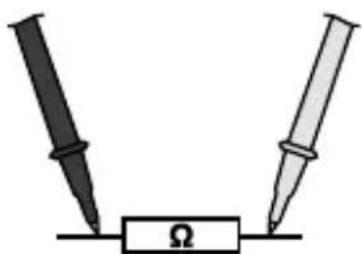
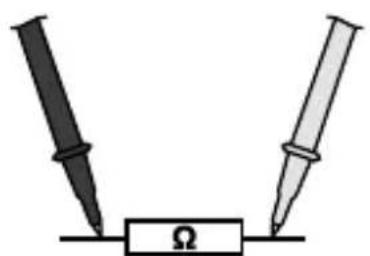
To measure resistance, set the rotary switch to the “Ω” position with the corresponding measuring range (X10Ω - X1kΩ).
Before each measurement, check that the pointer is set exactly to „0“ on the OHM-scale (A). Hold the two test prods so that they touch and, if necessary, adjust the pointer with rotary knob (3).
Then connect the measuring contacts to the object to be tested.
Reading the scale (A):
| Measuring range | ResultScale | |
| X10Ω | 0 Ω - 1 kΩ | x 10 |
| X1kΩ | 0 Ω - 1 kΩ | x 1000 |
radar
| Category | Value | |---|---| | OFF | 12 | | V~12 | 60 | | V~120 | 120 | | V~300 | 300 | | V~300 | 300 | | V~60 | 600 | | mA~30 | 30 | | mA~9V | 9V | | BAT.1.5V | 1.5V | | X1k | 1k | | X10 | 10 | The chart displays a circular dial with three segments: the outer ring represents the main segment, the middle ring represents the lower segment, and the inner ring represents the upper segment. The arrow indicates direction of rotation around the center. The label 'OFF' is positioned near the top left of the circle.Laserliner
redblack
natural_image
Simple diagram of two probes connected to a resistor labeled Ω (no text or symbols beyond basic markings)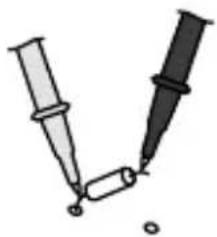
natural_image
Illustration of two syringes with a small object, no text or symbols presentResistances can only be measured correctly in isolation; therefore, the components might need to be disconnected from the remainder of the circuit.

When measuring resistance, to avoid the risk of the results of a measurement being distorted, there must be no traces of dirt, oil, solder spray or other contamination on the test prods.
Subject to technical alterations. 17W50
Technical data
| Function Range Accuracy | ||
| Max. input voltage | 300 V AC / DC | |
| DC voltage | 12 V | ± 5% / final value |
| 60 V | ||
| 120 V | ||
| 300 V | ||
| AC voltage | 60 V | ± 5% / final value |
| 120 V | ||
| 300 V | ||
| DC current | 30 mA | ± 5% / final value |
| 600 mA | ||
| Batteries | 1.5 V round cells / AA, AAA, C, D9.0 V flat cells / E-block | |
| Resistance | X10Ω | ± 5% / final value |
| X1kΩ | ||
| Test voltage max. 3.2 V | ||
| Input sensitivity | 2kΩ * final voltage value/V(e.g. 2kΩ * 300V/V = 600kΩ) | |
| Fuse F 630 mA / 300 V (∅ | 5 x 20 mm) | |
| Protection class II, double | insulation | |
| Overvoltage CAT III - 300 V | ||
| Pollution degree 2 | ||
| Degree of protection IP 20 | ||
| Operating conditions | 0°C ... 40°C, Max. humidity 80%rH,no condensation, Max. working altitude2000 m above sea level | |
| Storage conditions 0°C ... | 50°C, Max. humidity 80%rH | |
| Power supply 1 x 1.5 V type AAA | ||
| Dimensions 82 x 116 x 25 mm | ||
| Weight (incl. battery) 166 g | ||
| Test standards | EN61010-1, EN61010-2-030,EN61010-2-033, EN61326-1, EN61326-2-2 | |
Information on maintenance and care
Clean all components with a damp cloth and do not use cleaning agents, scouring agents and solvents. Remove the battery(ies) before storing for longer periods. Store the device in a clean and dry place.
EU directives and disposal
This device complies with all necessary standards for the free movement of goods within the EU.
This product is an electric device and must be collected separately for disposal according to the European Directive on waste electrical and electronic equipment.
Further safety and supplementary notices at:
http://laserliner.com/info?an=mumeho
Laserliner
!
natural_image
Simple electrical circuit diagram showing a battery connected to two test probes (no text or symbols)5StrAommeting DC
natural_image
Simple electrical circuit diagram showing two probes connected to a battery with a positive terminal (no text or symbols)5Stråmmåling DC
radar
| Category | Value | |---|---| | OFF | | | V=12 | 12 | | V=60 | 60 | | V=120 | | | V=300 | | | V~300 | | | V~600 | | | mA=30 | | | mA=600 | | | mA=1.5V | | | BAT.9V | | | X1k | | | X10 | | | Ω | | | OFF (arrow) indicates a switching or reset condition. The diagram is a circle with a black segment at the center.Laserliner
sort rød
natural_image
Simple diagram of two probes connected to a resistor labeled Ω (no text or symbols beyond basic markings)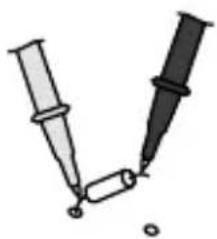
natural_image
Illustration of two syringes with a small object emerging from them (no text or symbols)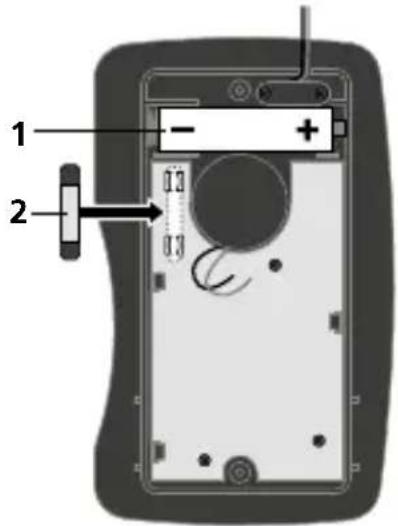
Lecture de l'échelle (C):
natural_image
Simple electrical circuit diagram showing a battery with two terminals and a switch, no text or symbols present.natural_image
Illustration of two syringes with liquid droplets, no text or symbols present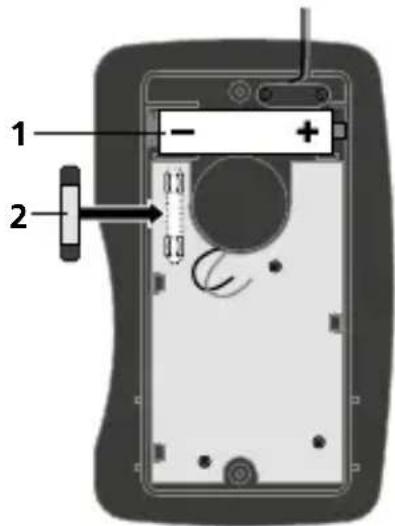
Lectura de la escala (C):
natural_image
Simple electrical circuit diagram showing two probes connected to a battery with polarity markings (no text or symbols)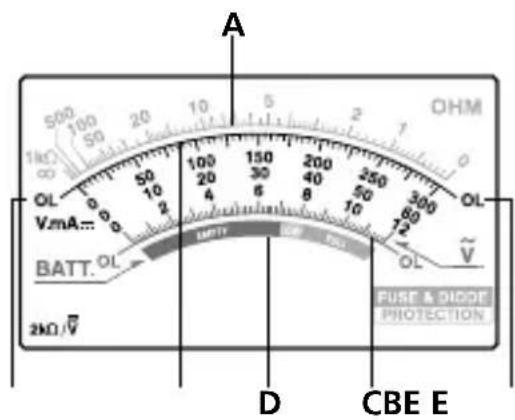
nero
natural_image
Illustration of an electrical testing setup with a multimeter, drawing tools, and a warning symbol (no readable text or labels)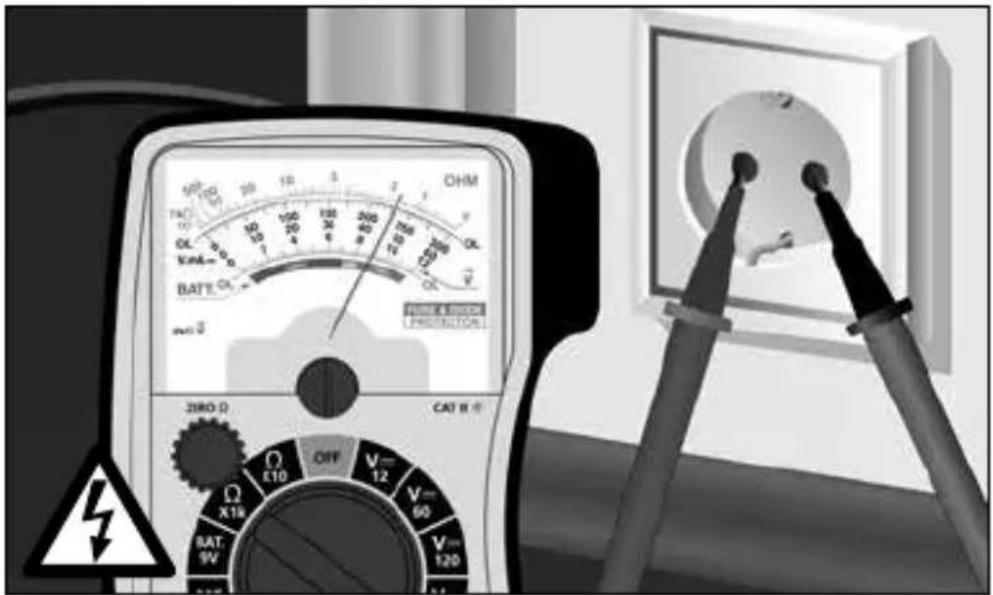
SERVICE

Umarex GmbH & Co. KG
-Laserliner-