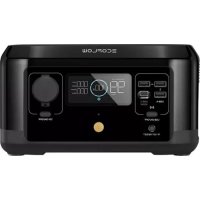
River Mini - Generator ECOFLOW - Free user manual and instructions
Find the device manual for free River Mini ECOFLOW in PDF.



| Product Type | Portable Power Generator |
| Brand | EcoFlow |
| Model | River Mini |
| Net Weight | Approximately 2.8 kg |
| Dimensions | 24.9 x 14 x 13.2 cm |
| Capacity | 210 Wh (25.2 V) |
| Battery Chemistry | Ternary NCM Lithium |
| Lifespan | Remaining capacity >80% after 500 cycles |
| AC Output Ports | 2 outlets, pure sine wave, 300 W total (surge 600 W), 230 V ~ 50 Hz |
| X-Boost | Up to 600 W for high-power devices |
| USB-A Ports | 3 ports, 5 V / 2.4 A each |
| USB-C Port | 1 port, 100 W max (5/9/12/15/20 V) |
| Wireless Output | 15 W max |
| Vehicle Charger Port | 12.6 V / 10 A, 126 W max |
| AC Charge Input | 220-240 V ~ 50/60 Hz, 2.8 A max, 300 W (X-Stream) |
| Solar Charge Input | 11-39 V = 8 A, 100 W max |
| Car Charge Input | 12 V/24 V, 8 A, 100 W max |
| AC Charge Time (80%) | Approximately 1 hour |
| Discharge Temperature | -20°C ~ 45°C |
| Charge Temperature | 0°C ~ 45°C |
| Storage Temperature | -20°C ~ 45°C (optimal 20°C ~ 30°C) |
| Emergency Power Supply (EPS) | Switching <30 ms in case of outage |
| Connectivity | Wi-Fi, EcoFlow app |
| Protections | Overload, temperature, short circuit, etc. |
Frequently Asked Questions - River Mini ECOFLOW
User questions about River Mini ECOFLOW
0 question about this device. Answer the ones you know or ask your own.
Ask a new question about this device
Download the instructions for your Generator in PDF format for free! Find your manual River Mini - ECOFLOW and take your electronic device back in hand. On this page are published all the documents necessary for the use of your device. River Mini by ECOFLOW.
USER MANUAL River Mini ECOFLOW
Read all safety tips, warning messages, terms of use, and disclaimers carefully. Refer to the terms of use and disclaimer at https://ecoflow.com/pages/terms-of-use and stickers on the product before use. Users take full responsibility for all usage and operations. Familiarize yourself with the related regulations in your area. You are solely responsible for being aware of all relevant regulations and using EcoFlow products in a way that is compliant.
Contents
- Specifications 1
2. Safety Instructions
2.1 Usage 2
2.2 Disposal Guide 2
3. Getting Started
3.1 Product Details 3
3.2 LCD Screen 4
3.3 General Product Usage 4
3.4 AC Charging 6
3.5 Solar Charging 6
3.6 Car Charging 7
3.7 App 7
3.8 X-Boost 7
3.9 Emergency Power Supply (EPS) 8
4.FAQS 8
5. Troubleshooting 9
6.What's In the Box 10
7. Storage & Maintenance 10
1. Specifications
General Info
| Net weight | Approximately 2.8Kg |
| Dimensions | 24.8 x 13.9 x 13.2 cm |
| Capacity | 210Wh, 25.2V= |
| Wi-Fi | Support |
Output Ports
| AC (X2) | Pure sine wave, 300W total (surge 600W), 230V-50/60Hz |
| Maximum power devices supported by X-Boost | 600W |
| USB-A (x3) | 5V =2.4A |
| USB-C (x1) | 5/9/12/15/20V=5A, 100W Max |
| Car Charger | 12.6V=10A, 126W Max |
| Wireless Output | 15W Max |
Input Ports
| AC input power | X-Stream Charge 300W Max |
| AC input voltage | 220-240V~50Hz/60Hz, 2.8A Max |
| Solar charging input | 11-39V=8A, 100W Max |
| Car charging input | Support 12V/24V battery, with maximum input current 8A and maximum power 100W |
Battery Info
| Cell Chemistry | NCM ternary lithium battery |
| Cycle life | The remaining capacity is still above 80% after 500 cycles |
| Protection type | High-temperature protection, low-temperature protection, over-discharge protection, over-charge protection, overload protection, short-circuit protection, and over-current protection |
Environmental Operating Temperature
| Optimal Operating Temperature | 20°C~30°C(68°F~86°F) |
| Discharge Temperature | -20°C~45°C(-4°F~113°F) |
| Charge Temperature | 0°C~45°C(32°F~113°F) |
| Storage Temperature | -20°C~45°C(-4°F~113°F) |
2. Safety Instructions
2.1 Usage
- It is strictly prohibited to place this product near heat sources, such as fire or heating furnaces.
- It is strictly prohibited for this product to come into contact with any liquid. Do not immerse this product in water or allow it to get wet. Do not use this product in the rain, damp conditions or wet environments.
- It is prohibited to use this product in strong static or strong magnetic field environments.
- It is prohibited to disassemble this product in any way or puncture this product with sharp objects.
- It is prohibited to use wires or other metal objects to cause this product to short circuit.
- Do not use unofficial components or accessories. If replacements are necessary, please visit EcoFlow's official sales channel for the relevant purchase information.
- When using this product, please strictly follow the ambient temperature for use in this user manual. Overly high temperatures may cause the battery to catch fire or even explode; while overly low temperatures will seriously degrade product performance to the point that it can no longer meet normal use requirements.
- It is prohibited to stack other heavy objects on this product.
- It is prohibited to forcibly block the fan during use, or keep the product in unventilated or dusty spaces.
- Please avoid impacts, falling, dropping or strong vibrations. In the case of severe external impact, please turn off the power immediately and stop using the product. Please keep the product properly secured during transport to avoid vibration and impact.
- If the product accidentally falls into water during use, place it in a safe open area, and keep away from the product until it has completely dried. Once dried, the product should not be re-used, and should be properly disposed of according to the method described in Section 2.2 "Disposal." If the product catches fire, please use a fire extinguisher or fire-fighting equipment in the following recommended order: water or mist, sand, fire blanket, dry powder, carbon dioxide fire extinguisher.
- If the interface of this product becomes dirty, wipe it off with a dry cloth.
- Handle this product with care to prevent it from being damaged due to overturning. In the event that the product is overturned and seriously damaged, immediately turn off the power and place the battery in an open area, being sure to keep it away from combustible materials and people; and dispose of it in accordance with the requirements of local laws and regulations.
- Keep this product out of reach of children and pets.
2.2 Disposal Guide
- When conditions permit, be sure to fully discharge the battery of this product before placing the product in a designated battery recycling box. This product contains a battery, which is a hazardous chemical and is strictly prohibited from being placed in an ordinary garbage can. For relevant details, please comply with the local laws and regulations regarding battery recycling and disposal.
- If the battery cannot be fully discharged due to the fault of the product itself, do not dispose of the battery in a battery recycling box directly. Contact a specialized battery recycling company for further disposal.
- An over-discharged battery cannot be started. Please dispose of it as waste.
3. Getting Started
3.1 Product Details
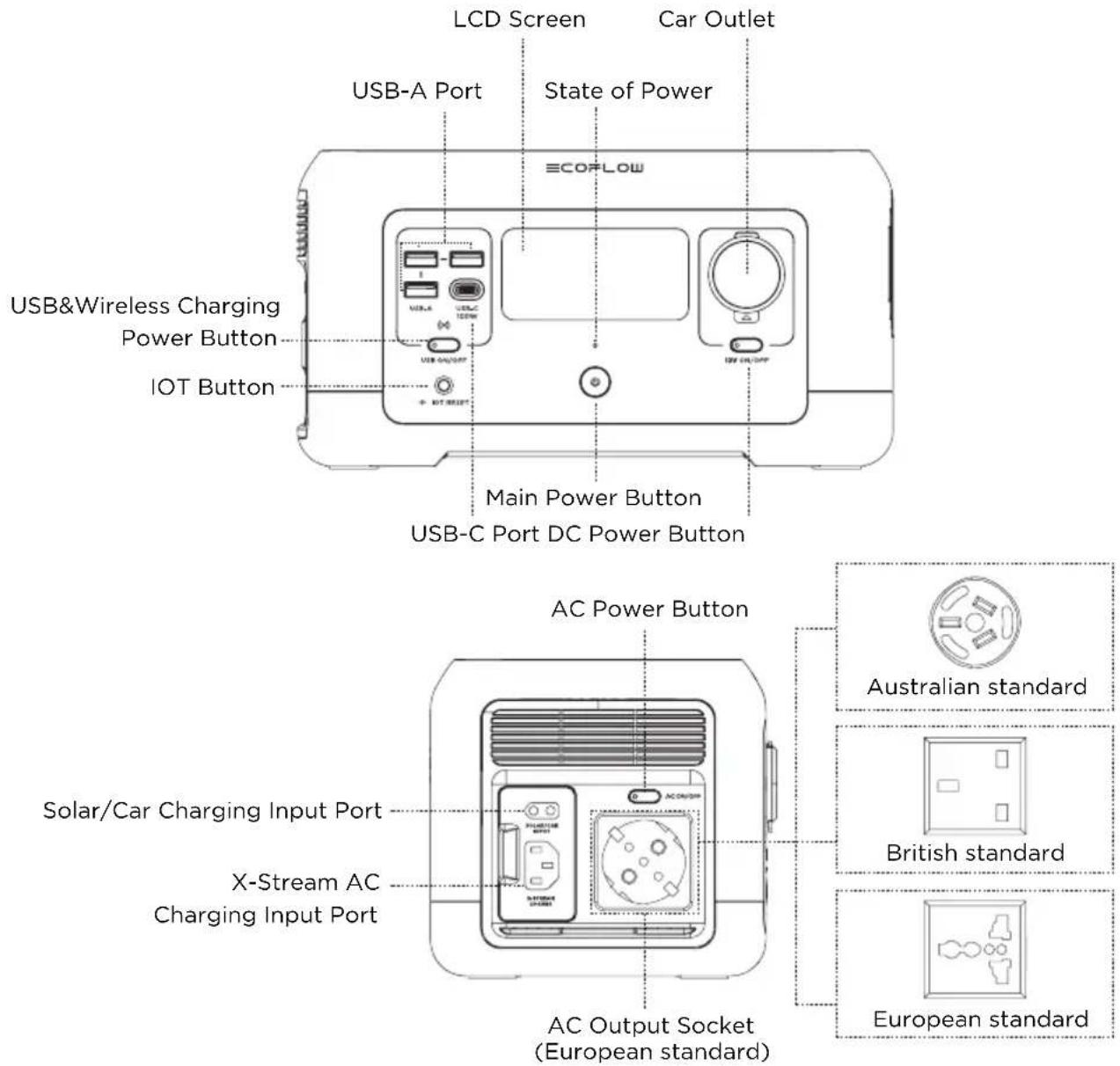
*AC socket adapts according to local standards
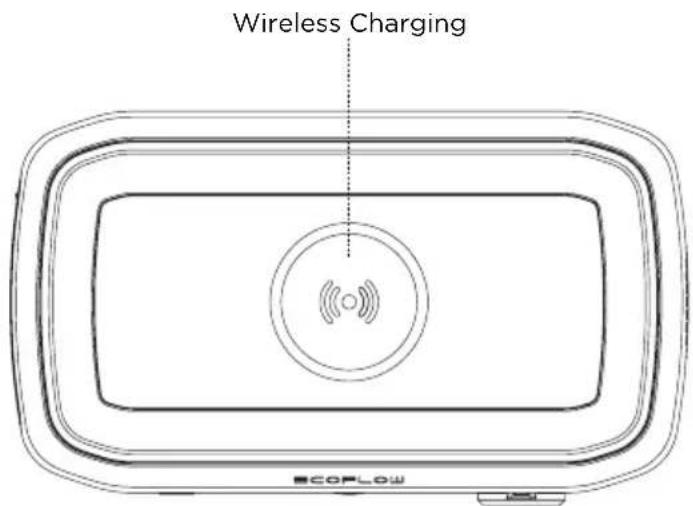
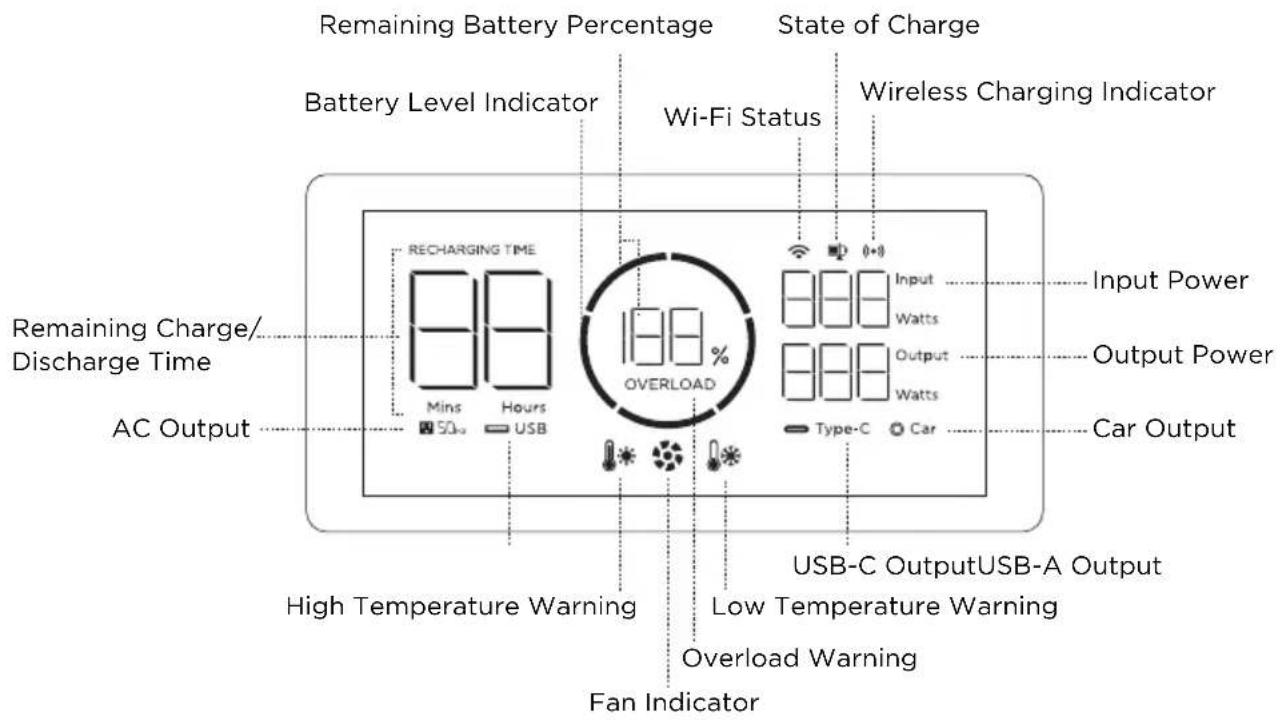
3.2 LCD Screen
3.3 General Product Usage
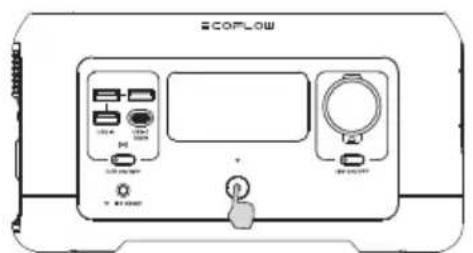
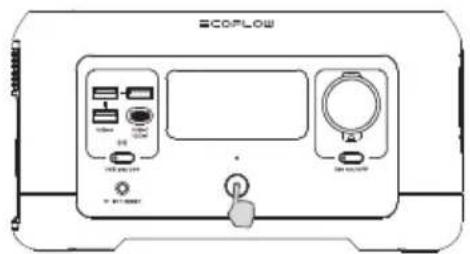
Short press to power on Long press to power off
Product On, Product Off, LCD Screen On
Short press the main power button to power on the device. After the device is started, the LCD screen will be lit and the main power indicator will enter breathing light mode.
The product will go into sleep mode if it idles for 5 minutes without any activity, and the LCD screen will automatically go off. In the case of a change in product load or operation, the LCD screen will automatically light up. To turn the LCD screen on or off, please short press the main power button.
Long press the main power button to turn the product off.
The default standby time of this product is 30 minutes. If no other output power button is turned on and the product is not connected to any load, the product will power off automatically after 30 minutes, and the standby time can be set on the app.
USB Output Port
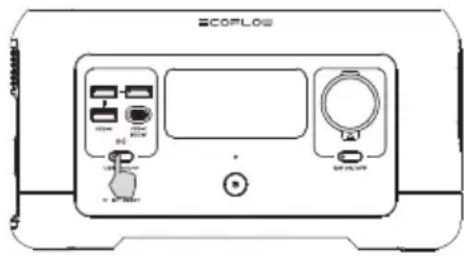
After ensuring that the main power is turned on, short press the USB power button before using the USB output port. Short press the USB power button again to turn off the power.
If the USB power button is turned on, this product will not power off automatically.
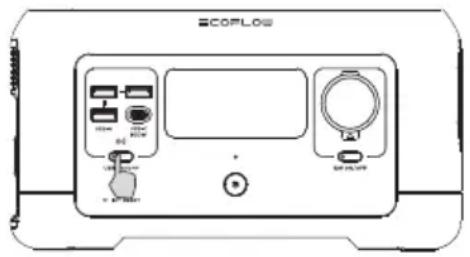
Short press the USB power button
12V DC Output Port
After the main power is turned on, short press the 12V DC output power button to enable the DC output port. Short press the 12V DC output power button again to turn off the power.
If the 12V DC output power button is turned on, this product will not power off automatically.
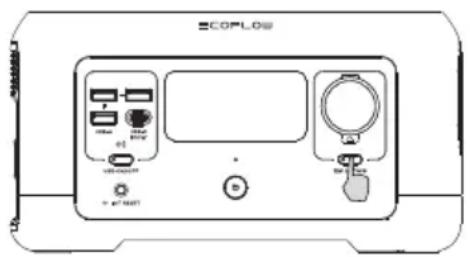
Short press the 12V DC output power button
AC Output Port
After ensuring that the main power is turned on, short press the AC output power button to enable the AC output port. Short press the AC output power button again to turn off the power.
The default standby time of the AC output port is 30 minutes. Once the product's AC output port is without any load for 30 minutes, the AC output power button will turn off automatically.
When the AC output is not used, please promptly turn it off to avoid battery power loss due to inverter power consumption.
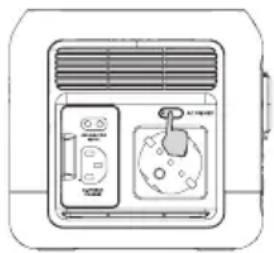
Short press the AC output power button
3.4 AC Charging
EcoFlow's X-Stream quick charging technology is specially designed for AC charging. This product has a maximum charging power of up to 300W, and can charge up to 80% capacity within 1 hour.
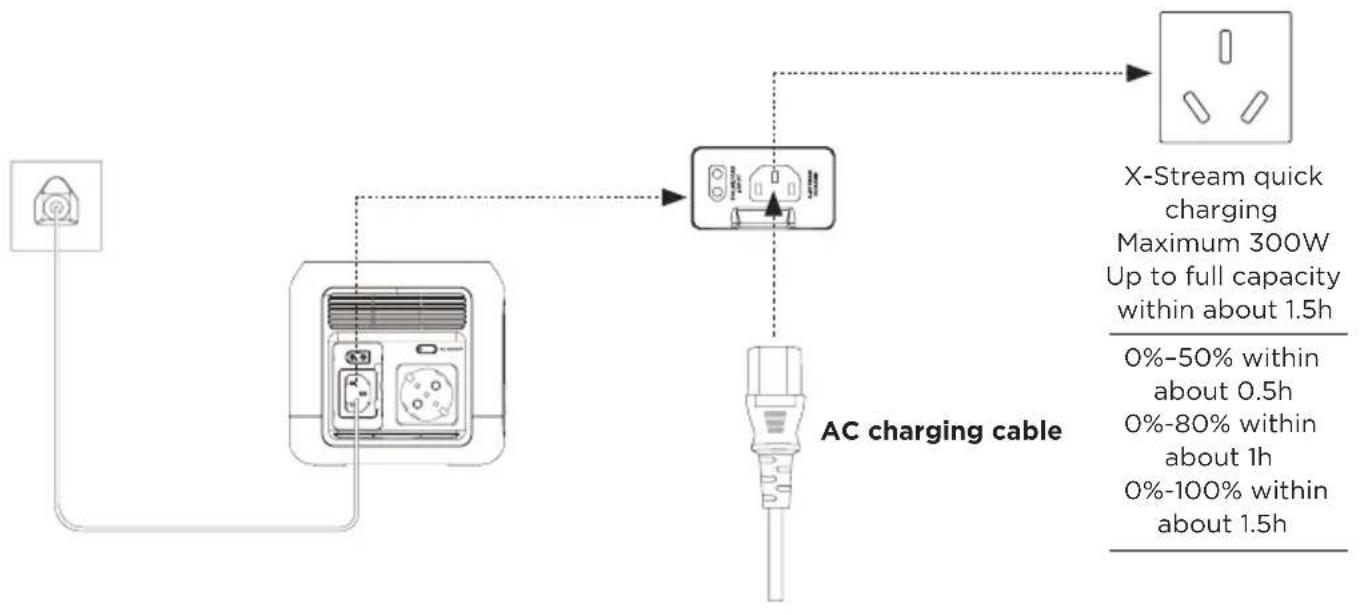
3.5 Solar Charging
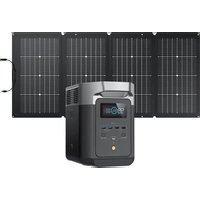
Users can charge this product by connecting it to a series of solar panels as shown in the figure.
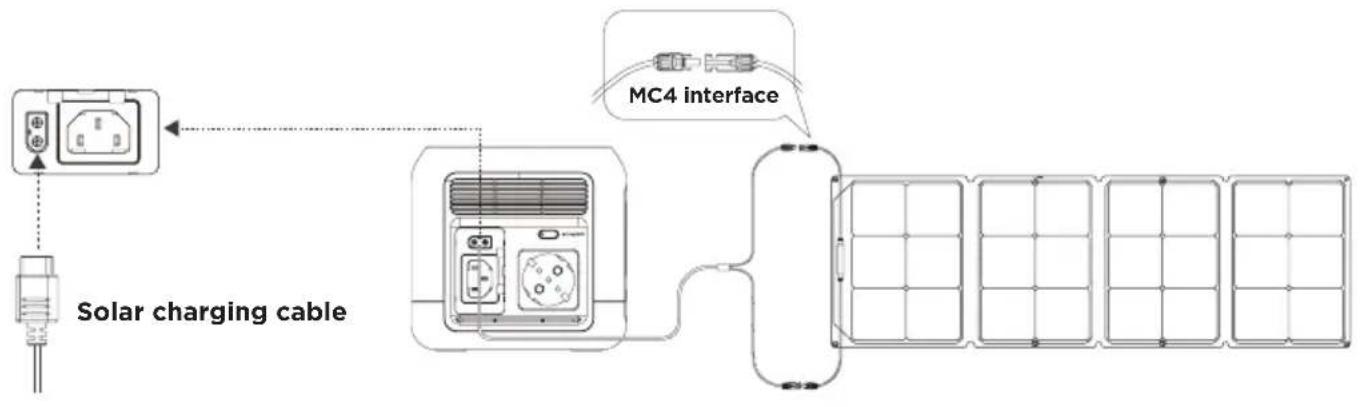
When using EcoFlow solar panels to charge this product, please connect the product according to the specifications in the user manual.
Before connecting the solar panels, please confirm whether the output voltage specifications of the solar panels are within the product specification range to avoid damage to the product.
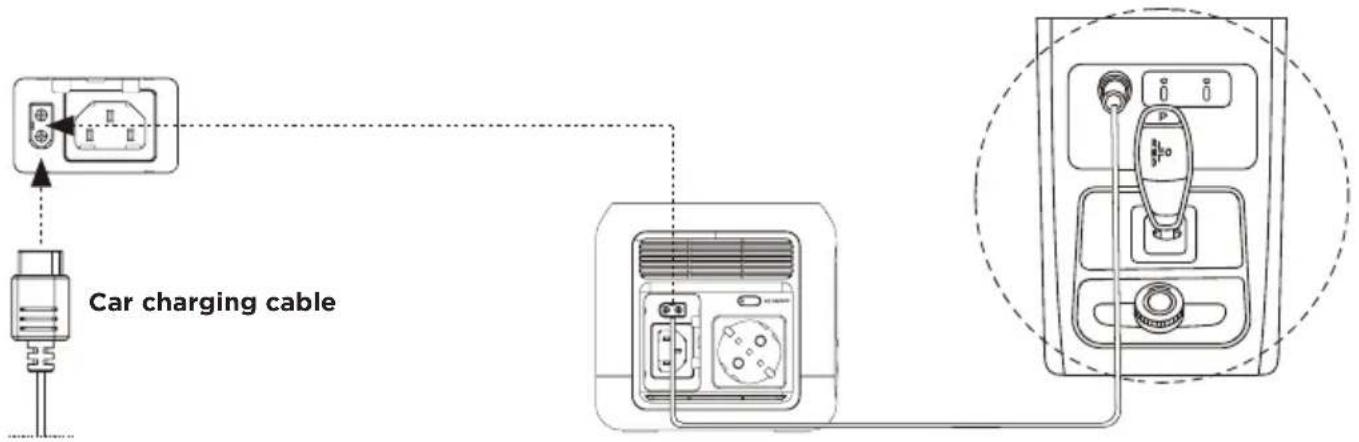
3.6 Car Charging
This product can be charged by using a car charging port, which should be used after the car's ignition is turned on to avoid start failure due to a lack of voltage in the car's battery. In addition, ensure that the car charging port and the cigarette lighter of the car charging input line are in good contact. Our company is not liable for damage due to the failure to comply with these specifications.
3.7 APP
You can control and view the information and data of the product through the EcoFlow app.
For information on how to download, connect and use the EcoFlow app, please refer to the official EcoFlow WeChat account.

3.8 X-Boost
To prevent operational failure due to discharge overload protection, when the total output power exceeds the rated output power, the X-Boost function will start automatically, so that the product can supply power to high-power devices with the rated output power.
Please note the following when using the X-Boost function:
- The X-Boost function is enabled for this product by default. This function can be enabled or disabled by using the EcoFlow app.
- The X-Boost function is unavailable under the following conditions: AC output is turned on while AC charging (bypass mode) or the X-Boost mode is turned off.
- The X-Boost function is suitable for heating and motor equipment, but not for all electrical appliances. X-Boost is not suitable for certain electrical appliances equipped with voltage protection (such as precision instruments). To verify whether the X-Boost function can be used for a device, please refer to the actual test.
3.9 Emergency Power Supply (EPS)
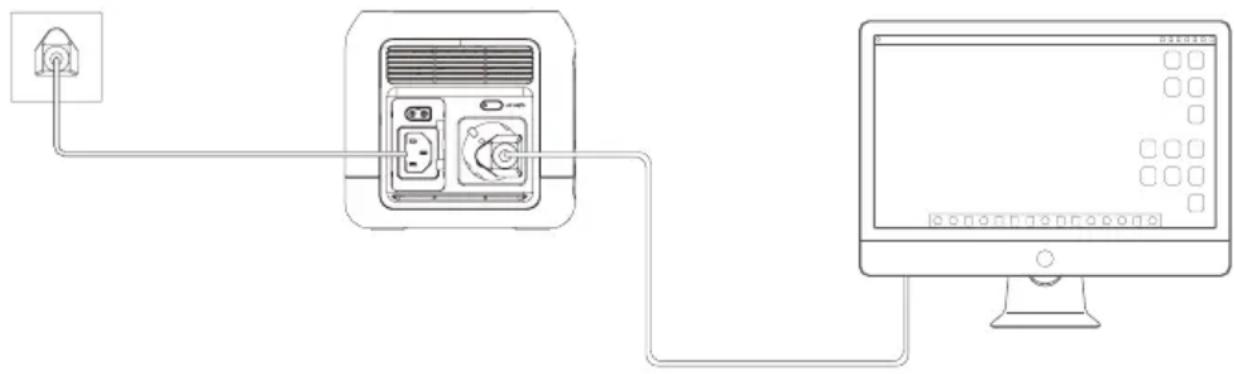
This product supports the emergency power standby (EPS) function. When you connect the power grid to the AC input port of this product via the AC charging cable, you can power electrical appliances by using the AC output port of this product (in this case, the AC power source comes from the power grid instead of the battery). When the power grid is suddenly cut off, this product can automatically switch to the battery power supply mode within 30ms. This is a non-specialized UPS function, and does not support Oms switching. Please do not connect it to a device with high requirements for UPS, such as data servers and workstations, or use it after repeated tests to confirm that it meets the requirements. It is recommended that only one device be used during the use, and that multiple devices are not used simultaneously to avoid triggering the product's overload protection. The company bears no liability for any failure of the device to operate normally or loss of data due to the failure to use the product according to instructions.
4. FAQs
- What type of battery is used in this product?
This product uses a high-quality lithium ion battery.
- What devices can be equipped at the AC output port of this product?
The AC output port of this product has a rated power of 300W and a peak power of 600W. It can power most consumer electronic products. However, it is recommended that you confirm the power of the electrical appliance in question before use, and ensure that the sum of the power of all load devices is less than the rated power.
- How do I know how long the product's power lasts?
The LCD screen of this product displays the battery life time, which can be used to estimate the charging time required for general devices with stable power usage.
- How do I know that the product is charging?
When charging, the LCD screen will show the remaining charging time, and the power indicator circle outside the percentage of the battery capacity will start to rotate cyclically and indicate the input power.
- How do I clean this product?
Wipe this product with a dry, soft and clean cloth or tissue.
- How do I store the product?
When storing this product, please turn the product off and then store it in a dry and ventilated place at room temperature. Do not store this product near water. When this product is stored for a long period of time, it is recommended that the battery be discharged to 30% and then charged to 80% every three months to extend the service life of this product.
- Can this product be brought on board a plane?
No.
5. Troubleshooting
| Details of Error Icons | Error Type | Recovery Methods | |
| OVERLOAD | icon flashes | USB-A overload protection | Remove the abnormal load and normal operation will resume automatically once the load is normal. |
| OVERLOAD | icon flashes | USB-C overload protection | Remove the abnormal load and normal operation will resume automatically once the load is normal. |
| icon flashes | USB-C high-temperature protection | Normal operation will resume automatically after the product cools down. | |
| RECHARGING TIME | icon flashes | Battery charging high-temperature protection | Normal operation will resume automatically after the battery cools down. |
| icon flashes | Battery discharge high-temperature protection | Normal operation will resume automatically after the battery cools down. | |
| RECHARGING TIME | icon flashes | Battery charging low-temperature protection | Normal operation will resume automatically after the battery temperature is restored to above 5°C (41°F). |
| RECHARGING TIME OVERLOAD | icon flashes | Charging overload protection | Normal operation will resume automatically after being restarted. |
| SOHz OVERLOAD | icon flashes | AC output overload protection | Normal operation will resume after removing the over-powered device and restarting the machine. Electrical appliances must be used within the rated power (for the power limit of electrical appliances in the X-Boost mode, please refer to the X-Boost function introduction) |
| SOHz | icon flashes | AC over-temperature protection | Please confirm that the air inlet and outlet of the product are unobstructed. Normal operation will resume automatically once the cause is eliminated and the temperature decreases. |
| SOHz | icon flashes | AC low-temperature protection | Normal operation will resume automatically after the ambient temperature is restored. |
| icon flashes | Fan blocking | Please check whether the fan is blocked by foreign objects and remove the cause of the error. | |
| Car OVERLOAD | icon flashes | Car charging overload protection | Normal operation will resume automatically once the load is normal. |
| Car | icon flashes | Car charging high-temperature protection | Normal operation will resume automatically after the product cools down. |
| SOHz | icon flashes | Failure of communication between main control board and AC | Normal operation will resume automatically after being restarted. |
If any alert occurs during the use of this product and the alert icon does not disappear after the product is restarted, please stop using the product immediately (do not attempt to charge or discharge). If the above information fails to resolve your problem, please contact customer service for further support.
6. What's In the Box
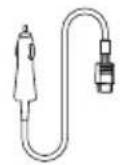
AC charging cable Car charging cable
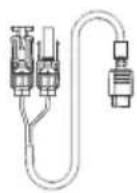
Solar charging cable Quick guide and
warranty card
7. Storage & Maintenance
- Ideally, use and store the product between 20°C(68°F) to 30°C(86°F) , and always keep it away from water, intense heat, and sharp objects. Do not store in temperatures above 45°C(113°F) or below -10°C(14°F) for an extended period.
- Storing a battery with a low charge for a long period shortens its lifespan. RIVER mini mitigates the damage by putting the battery into hibernation mode. To get the most out of the battery, make sure it is about 80% before putting RIVER mini into long-term storage, and then once every three months, discharge the battery to 30% and recharge it back to 80% .
ECOFLOW
3.9 Noodvoeding (Emergency Power Supply/EPS)
EcnKhONKa nHTaHnA USB BkIooheHa,yCTpoNCTBO He BbIKIOuNTcABTOMaTuYeCKn.
KpaTKOBpeMeHHo HaKMITE KHOKNy NHTaHNA USB
BbIXoHNo npT 12 B noct. Toka
- KaK noHЯTb, YTO yCtpoIcTB Bo BbInoJIHЯe T ZapAky?
Bo Bpem 3apKn Ha KK-dncIee oTo6paKaTcraocBaWeecBpeM 3apKn, a KpyIbI uHdNkTOp nITaHn, PdOM C OTO6paKeHnEM EMKOCTn AKyMylAToPA B npoentax, HauHaeT cIKnueckn BpaaaTbc, yka3bIBaHa BXOHyIO MOHOCtB.
- KaK npabunbHo uHCTnTb 3To yctpoIcTBo?
PpOtpnTe ycTpoIcTBo cyXo, mRkoN uNCTOu TkaHbU nnCaJIΦeTKoN.
- KaK npabInbNo xpaHntb yctpoCTBO?
Ipeed pa3meuen ha xpaehnbe BbIKIOHTe yctpoNCTBO. Iocne 3Toro xpaHNTe BCYXOM npOBETpNBaEMOM nomeeHN npKOMHaTHoTemnpaType.He xpaHNTe yctpoNCTBO pAOM C BOOJ. Ppi dInTeBHom xpaHNN ycTPOINCTBa peKoMeHdyETcra pa3PAnTb aKKyMnyTOp do 30% ,a 3aTeM 3apxKaTb do 80% kaxDble Tpr Meca, YTO6bl npOJIITb cPOK cnjK6bl yCTPOINCTBA.
- MoXHo JI npOBo3ntb 3TOT npOpyKt Ha 6OpTy caMOneta?
HeT.
5. Понск и устараенье несправност

KpaTkoe pyKOBoIDCTBOI rapaHTnHbI TaON
7. XpaheHne n o6cnyxnbHne
- B nideane, nCnoJIb3yIe I xpaHInTe yCTpoIcTBO npn TempepaType oT 20 ° C(68°F) do 30°C(86°F) n Bcerda depKHTe ero Ha 6e3Opanachom pacSTOJHnn OT nCTOuHNKOB BOdbI, TeIIa n OCTpbIX npedMeTOB. 3aIpeuaeTcXpaHInTB npn TempepaType Bblwe 45°C(113°F) nnn Hnke -10 ° C (14 ° F ) B teueHne dIITeNbHoro nepnoDa.
- XpaHeHne aKKymIaTopa c Hn3Km yPOBHeM 3apra DA B TeueHne dIITeBHOro nepnoa cokpaaaet cpoK erocny6bI. RIVER mini cnHkaet uep6, nepeBoa aKKymIaTOp B peKIM noHNKeHHoro 3heprOOnTp6JIeHn. TTo6bIMAKcImaJIbHO 3ΦeKTINBHO nCNoIb3OBaTB aKKymIaTOp, y6eINTecb, YTO yPOBeHb erO 3apra OKOLO 80%, npexKeHem IomeuATb RIVER mini Ha dIITeBHOe xpaHeHne, a 3aTeM pa3 B TpN MeCya pa3PjaKaIe aKKymIaTOp do 30% INCHOBA 3apJkaIte do 80%.
ECOFLOW
- CONTENTS
- SAFETY INSTRUCTIONS
- GETTING STARTED
- SPECIFICATIONS
- 2.1 USAGE
- 2.2 DISPOSAL GUIDE
- 3.1 PRODUCT DETAILS
- 3.2 LCD SCREEN
- 3.3 GENERAL PRODUCT USAGE
- PRODUCT ON, PRODUCT OFF, LCD SCREEN ON
- USB OUTPUT PORT
- 12V DC OUTPUT PORT
- AC OUTPUT PORT
- 3.4 AC CHARGING
- 3.5 SOLAR CHARGING
- 3.6 CAR CHARGING
- 3.7 APP
- 3.8 X-BOOST
- PLEASE NOTE THE FOLLOWING WHEN USING THE X-BOOST FUNCTION
- 3.9 EMERGENCY POWER SUPPLY (EPS)
- FAQS
- TROUBLESHOOTING
- WHAT'S IN THE BOX
- STORAGE & MAINTENANCE
- ECOFLOW
- 3.9 NOODVOEDING (EMERGENCY POWER SUPPLY/EPS)
- BBIXOHNO NPT 12 B NOCT. TOKA
- ПОНСК И УСТАРАЕНЬЕ НЕСПРАВНОСТ
- XPAHEHNE N O6CNYXNBHNE
Brand : ECOFLOW
Model : River Mini
Category : Generator