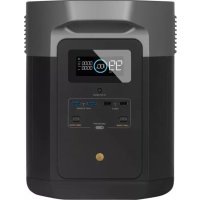
Delta Max 1600 - Generator ECOFLOW - Free user manual and instructions
Find the device manual for free Delta Max 1600 ECOFLOW in PDF.



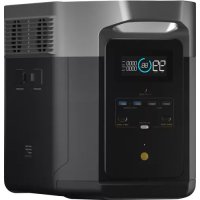
| Product Type | Portable Power Station / Solar Generator |
| Brand | EcoFlow |
| Model | Delta Max 1600 |
| Battery Capacity | 1612 Wh |
| Battery Type | Lithium-ion NCM |
| AC Output Power (Rated) | 2000 W (surge 4600 W), 230 V~ 50 Hz |
| Maximum Power with X-Boost | 2500 W |
| USB-A Ports | 2 ports (5 V=2.4 A, 12 W max) + 2 fast charge ports (18 W max) |
| USB-C Ports | 2 ports (100 W max) |
| DC Output Ports | 2x DC5521 (12.6 V=3 A) + car charger (12.6 V=10 A, 126 W max) |
| AC Charging Input | X-Stream 1600 W max, 10 A |
| Solar Input | 11-100 V=13 A max, 800 W max |
| Car Charging Input | 12 V/24 V, 8 A default |
| Dimensions | 49.7 × 24.2 × 30.5 cm |
| Net Weight | Approximately 22 kg |
| Wi-Fi | Yes |
| Life Cycle | 500 cycles at 80% capacity |
| Discharge Temperature | -20 °C to 45 °C |
| Charge Temperature | 0 °C to 45 °C |
| Long-term Storage | Discharge to 30%, recharge to 60% every 3 months |
| Cleaning | Dry, soft, clean cloth |
| Box Contents | DELTA Max, AC charging cable, car charging cable, DC5521-DC5525 cable, manual, warranty card |
Frequently Asked Questions - Delta Max 1600 ECOFLOW
User questions about Delta Max 1600 ECOFLOW
0 question about this device. Answer the ones you know or ask your own.
Ask a new question about this device
Download the instructions for your Generator in PDF format for free! Find your manual Delta Max 1600 - ECOFLOW and take your electronic device back in hand. On this page are published all the documents necessary for the use of your device. Delta Max 1600 by ECOFLOW.
USER MANUAL Delta Max 1600 ECOFLOW
Read all safety tips, warning messages, terms of use, and disclaimers carefully. Refer to the terms of use and disclaimer at https://ecoflow.com/pages/terms-of-use and stickers on the product before use. Users take full responsibility for all usage and operations. Familiarize yourself with the related regulations in your area. You are solely responsible for being aware of all relevant regulations and using EcoFlow products in a way that is compliant.
1. Specifications
1.1 Specifications of DELTA Max (2000) 1
1.2 Specifications of DELTA Max (1600) 2
2. Safety Instructions
2.1 Usage 3
2.2 Disposal Guide 4
3. Getting Started
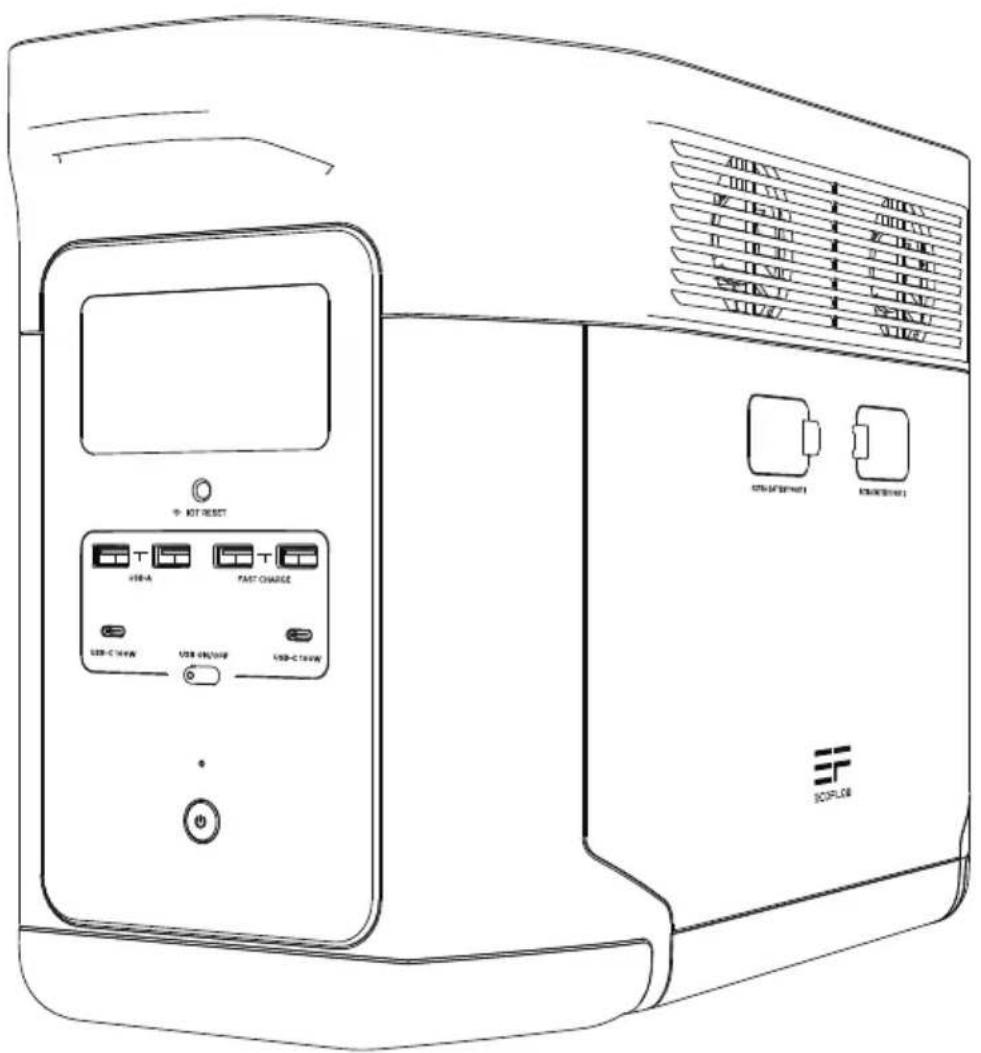
3.1 Product Details 5
3.2 LCD Screen 6
3.3 General Product Usage 6
3.4 AC Charging 8
3.5 Solar Charging 9
3.6 Car Charging 9
3.7 Using Smart Extra Battery 10
3.8APP 10
3.9 X-Boost 10
3.10 Emergency Power Supply (EPS) 11
4.FAQS 11
5.Troubleshooting 12
6.What's In the Box 13
7.Storage & Maintenance 13
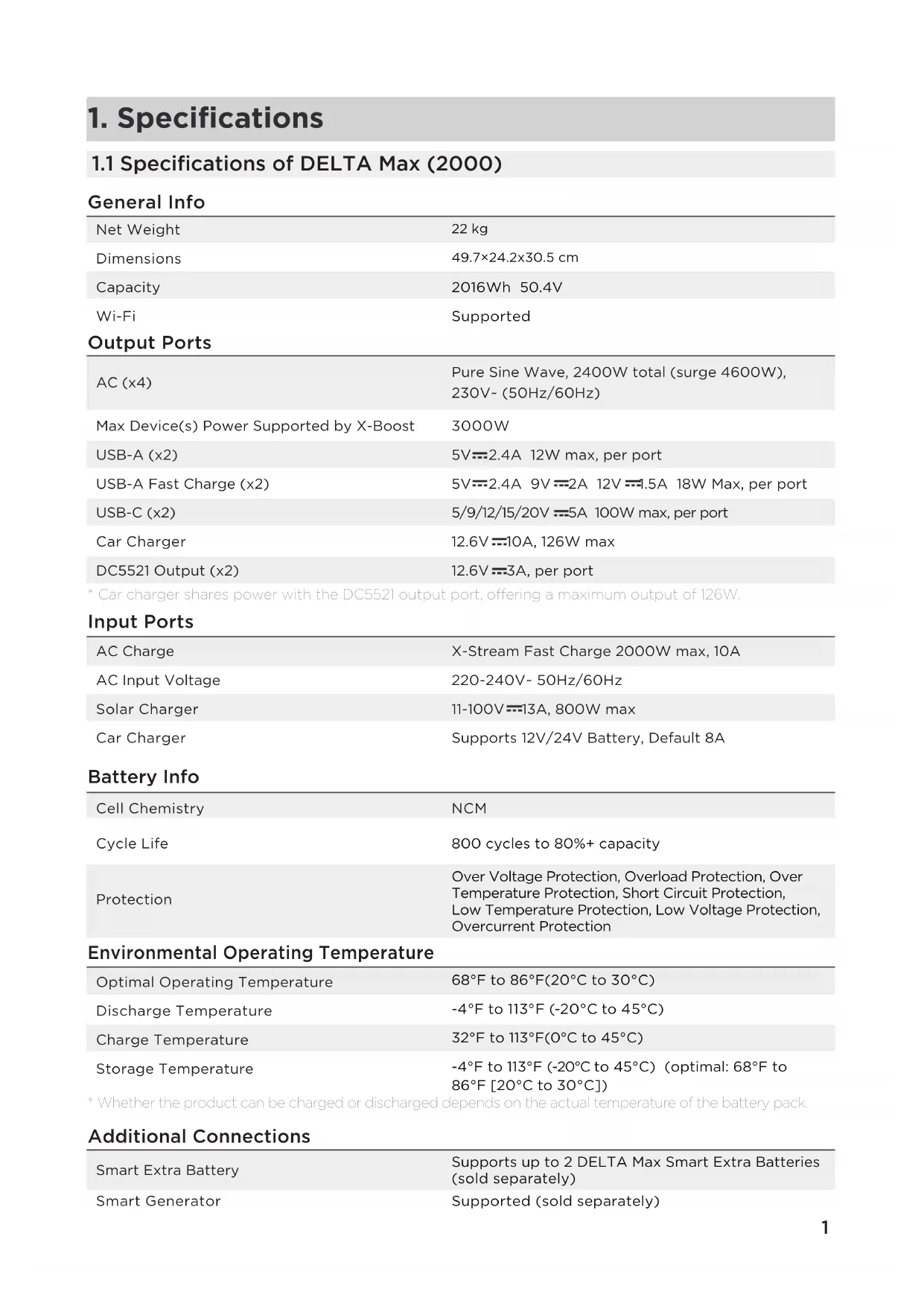
1. Specifications
1.1 Specifications of DELTA Max (2000)
General Info
| Net Weight | 22 kg |
| Dimensions | 49.7×24.2×30.5 cm |
| Capacity | 2016Wh 50.4V |
| Wi-Fi | Supported |
| Output Ports | |
| AC (x4) | Pure Sine Wave, 2400W total (surge 4600W), 230V~ (50Hz/60Hz) |
| Max Device(s) Power Supported by X-Boost | 3000W |
| USB-A (x2) | 5V=2.4A 12W max, per port |
| USB-A Fast Charge (x2) | 5V=2.4A 9V=2A 12V=1.5A 18W Max, per port |
| USB-C (x2) | 5/9/12/15/20V=5A 100W max, per port |
| Car Charger | 12.6V=10A, 126W max |
| DC5521 Output (x2) | 12.6V=3A, per port |
- Car charger shares power with the DC5521 output port, offering a maximum output of 126W.
Input Ports
| AC Charge | X-Stream Fast Charge 2000W max, 10A |
| AC Input Voltage | 220-240V~ 50Hz/60Hz |
| Solar Charger | 11-100V=13A, 800W max |
| Car Charger | Supports 12V/24V Battery, Default 8A |
Battery Info
| Cell Chemistry | NCM |
| Cycle Life | 800 cycles to 80%+ capacity |
| Protection | Over Voltage Protection, Overload Protection, Over Temperature Protection, Short Circuit Protection, Low Temperature Protection, Low Voltage Protection, Overcurrent Protection |
Environmental Operating Temperature
| Optimal Operating Temperature | 68°F to 86°F(20°C to 30°C) |
| Discharge Temperature | -4°F to 113°F (-20°C to 45°C) |
| Charge Temperature | 32°F to 113°F(0°C to 45°C) |
| Storage Temperature | -4°F to 113°F (-20°C to 45°C) (optimal: 68°F to 86°F [20°C to 30°C]) |
- Whether the product can be charged or discharged depends on the actual temperature of the battery pack.
Additional Connections
| Smart Extra Battery | Supports up to 2 DELTA Max Smart Extra Batteries (sold separately) |
| Smart Generator | Supported (sold separately) |
1.2 Specifications of DELTA Max (1600)
General Info
| Net Weight | 22 kg |
| Dimensions | 49.7×24.2×30.5 cm |
| Capacity | 1612Wh 50.4V |
| Wi-Fi | Supported |
| Output Ports | |
| AC (x4) | Pure Sine Wave, 2000W total (surge 4600W), 230V~ (50Hz/60Hz) |
| Max Device(s) Power Supported by X-Boost | 2500W |
| USB-A (x2) | 5V=2.4A 12W max, per port |
| USB-A Fast Charge (x2) | 5V=2.4A 9V=2A 12V=1.5A 18W Max, per port |
| USB-C (x2) | 5/9/12/15/20V=5A 100W max, per port |
| Car Charger | 12.6V=10A, 126W max |
| DC5521 Output (x2) | 12.6V=3A, per port |
- Car charger shares power with the DC5521 output port, offering a maximum output of 126W.
Input Ports
| AC Charge | X-Stream Fast Charge 1600W max |
| AC Input Voltage | 220-240V~ 50Hz/60Hz, 10A |
| Solar Charger | 11-100V=13A, 800W max |
| Car Charger | Supports 12V/24V Battery, Default 8A |
Battery Info
| Cell Chemistry | NCM |
| Cycle Life | 500 cycles to 80%+ capacity |
| Protection | Over Voltage Protection, Overload Protection, Over Temperature Protection, Short Circuit Protection, Low Temperature Protection, Low Voltage Protection, Overcurrent Protection |
Environmental Operating Temperature
| Optimal Operating Temperature | 68°F to 86°F(20°C to 30°C) |
| Discharge Temperature | -4°F to 113°F (-20°C to 45°C) |
| Charge Temperature | 32°F to 113°F(0°C to 45°C) |
| Storage Temperature | -4°F to 113°F (-20°C to 45°C) (optimal: 68°F to 86°F [20°C to 30°C]) |
- Whether the product can be charged or discharged depends on the actual temperature of the battery pack.
Additional Connections
| Smart Extra Battery | Supports up to 2 DELTA Max Smart Extra Batteries (sold separately) |
| Smart Generator | Supported (sold separately) |
2. Safety Instructions
2.1 Usage
- Do not use the product near a heat source, such as a fire source or a heating furnace.
- Avoid contact with any liquid. Do not immerse the product in water or get it wet. Do not use the product in rain or humid environments.
- Do not use the product in an environment with strong static electricity/magnetic fields.
- Do not disassemble the product in any way or pierce the product with sharp objects.
- Avoid using wires or other metal objects that may result in a short circuit.
- Do not use unofficial components or accessories. If you need to replace any components or accessories, please visit official EcoFlow channels to check relevant information.
- When using the product, please strictly follow the operating environment temperature specified in this user manual. If the temperature is too high, it may result in a fire or explosion; if the temperature is too low, the product performance may be severely reduced, or the product may cease to work.
- Do not stack any heavy objects on the product.
- Do not lock the fan forcibly during use or place the product in an unventilated or dusty area.
- Please avoid impact, falls, or severe vibrations when using the product. In case of a severe external impact, turn off the power supply immediately and stop using the product. Ensure the product is well fastened during transportation to avoid vibrations and impacts.
- If you accidentally drop the product into water during use, please place it in a safe open area, and stay away from it until it is completely dry. The dried product should not be used again, and should be properly disposed of according to Section 2.2 below. If the product catches fire, we recommend that you use the fire extinguishers in the following order: water or water mist, sand, fire blanket, dry powder, and finally a carbon dioxide fire extinguisher.
- Use a dry cloth to clean off dirt on the product ports.
- Rest the product on a flat surface to avoid damages caused by the product falling over. If the product is overturned and severely damaged, turn it off immediately, place the battery in an open area, keep it away from combustible matter and people, and dispose of it in accordance with local laws and regulations.
- Ensure that the product is kept out of reach of children and pets.
- Store the product in a dry and ventilated place.
-
It is recommended to use moisture barrier bags in wet environments (for example, places by the sea or waterways) to prevent the product from getting soaked. If water is found inside the product, it must not be used or turned on again. Please take anti-electric shock measures before touching the product. Following this, place the product in a safe, waterproof and open area. Once complete contact EcoFlow Customer Service immediately.
-
This product is not recommended for powering medical emergency equipment related to personal safety, including but not limited to medical grade ventilators (hospital version CPAP: Continuous Positive Airway Pressure), artificial lungs (ECMO, Extracorporeal Membrane Please follow your doctor's instructions and consult with the manufacturer for restrictions on the use of the equipment. If used for general medical equipment, please be sure to monitor the power status to ensure that the power does not run out.
- When in use, power supply products will generate electromagnetic fields, which are likely to affect the normal operation of medical implants or personal medical equipment such as pacemakers, cochlear implants, hearing aids, defibrillators etc. If these types of medical equipment are being used, please contact the manufacturer to inquire about any restrictions on the use of such equipment. These measure are fundamental to ensure a safe distance between the medical implants (for example, pacemakers, cochlear implants, hearing aids, defibrillators etc.) and this product while in use.
- When the power supply is connected in normal mode to a refrigerator, power fluctuations may cause the power supply to automatically shut down. When connecting the power supply to a refrigerator that stores medicine, vaccines or other valuable items, it is recommended to set the AC output to "Always on" in the app. This helps support a continuous power supply and ensures a safe and efficient power consumption state.
2.2 Disposal Guide
- If conditions permit, make sure that the battery is fully discharged before disposing it in a designated battery recycling bin. The product contains batteries with potentially dangerous chemicals, so it is strictly prohibited to dispose of it in ordinary trash cans. For more details, please follow the local laws and regulations on battery recycling and disposal.
- If the battery cannot be fully discharged due to a product failure, please do not dispose of the battery directly in the battery recycling box. In such case, you should contact a professional battery recycling company for further processing.
- Please dispose of over-discharged batteries that cannot be recharged.
3. Getting Started
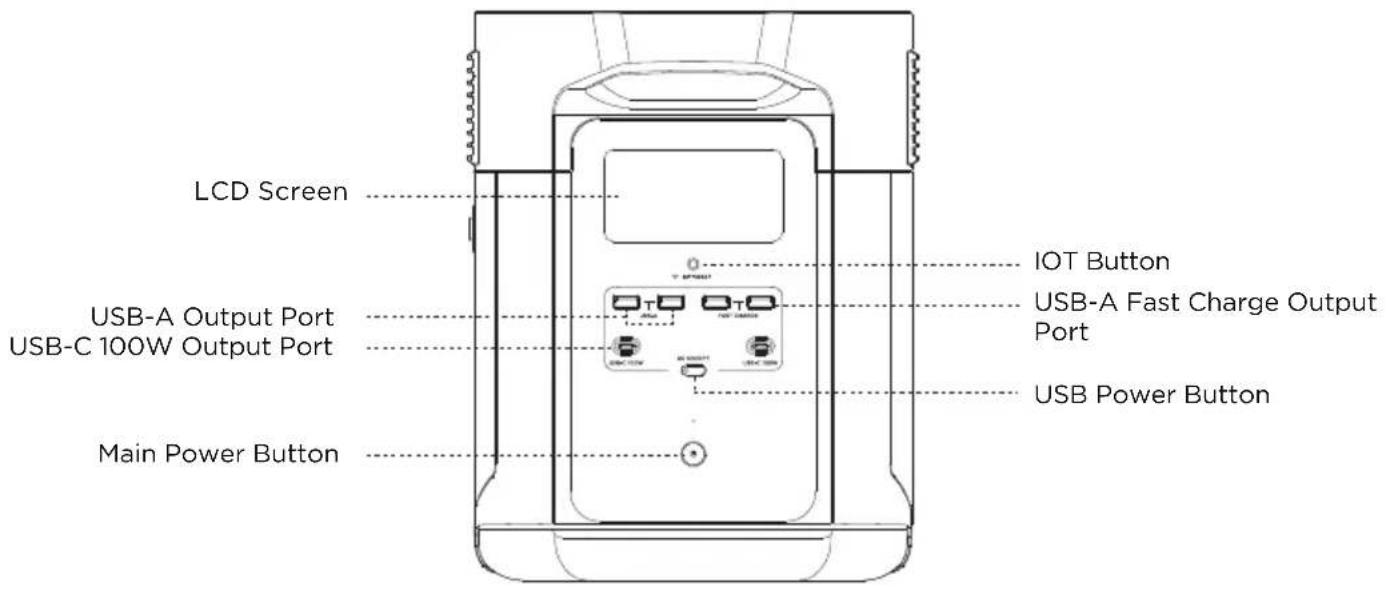
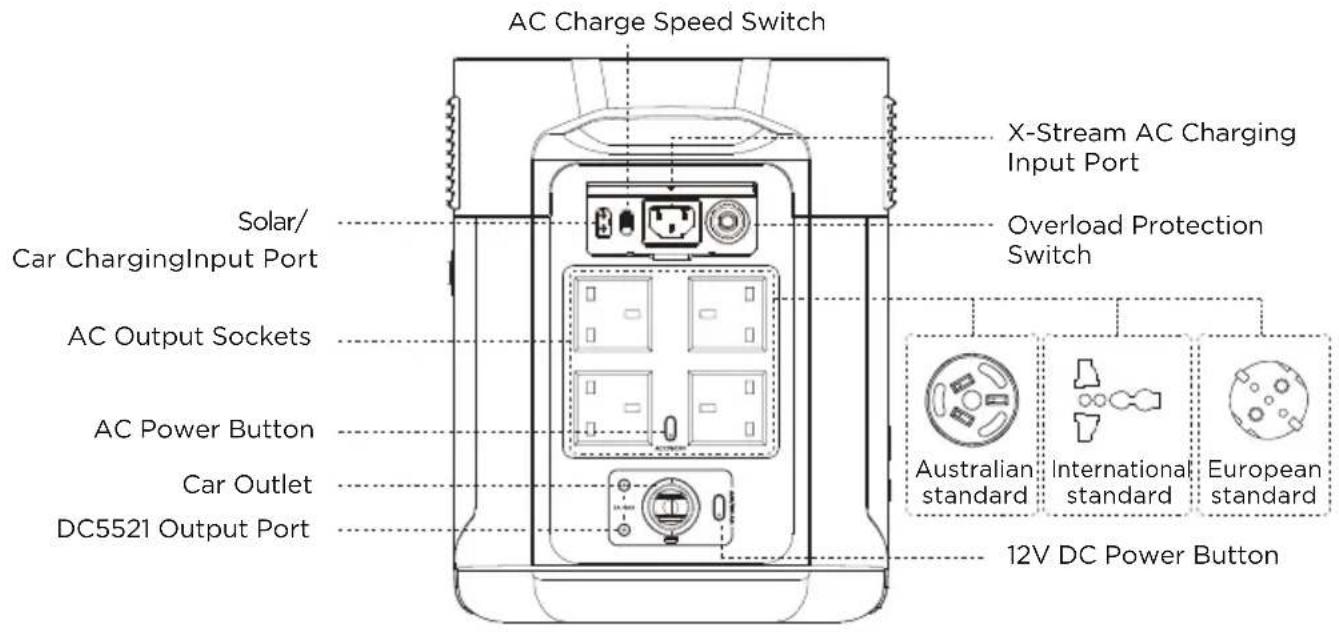
3.1 Product Details
*AC socket adapts according to local standards.
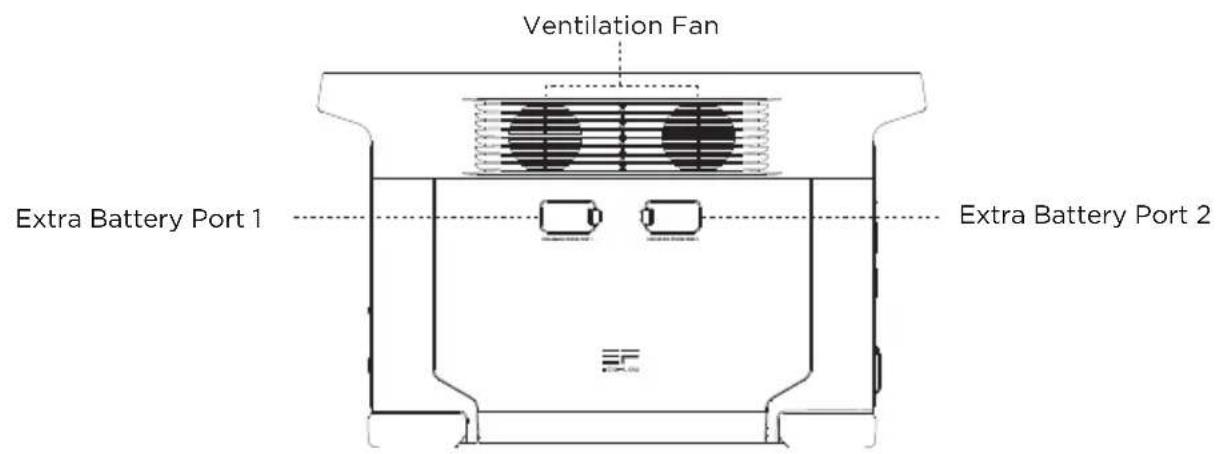
3.2 LCD Screen
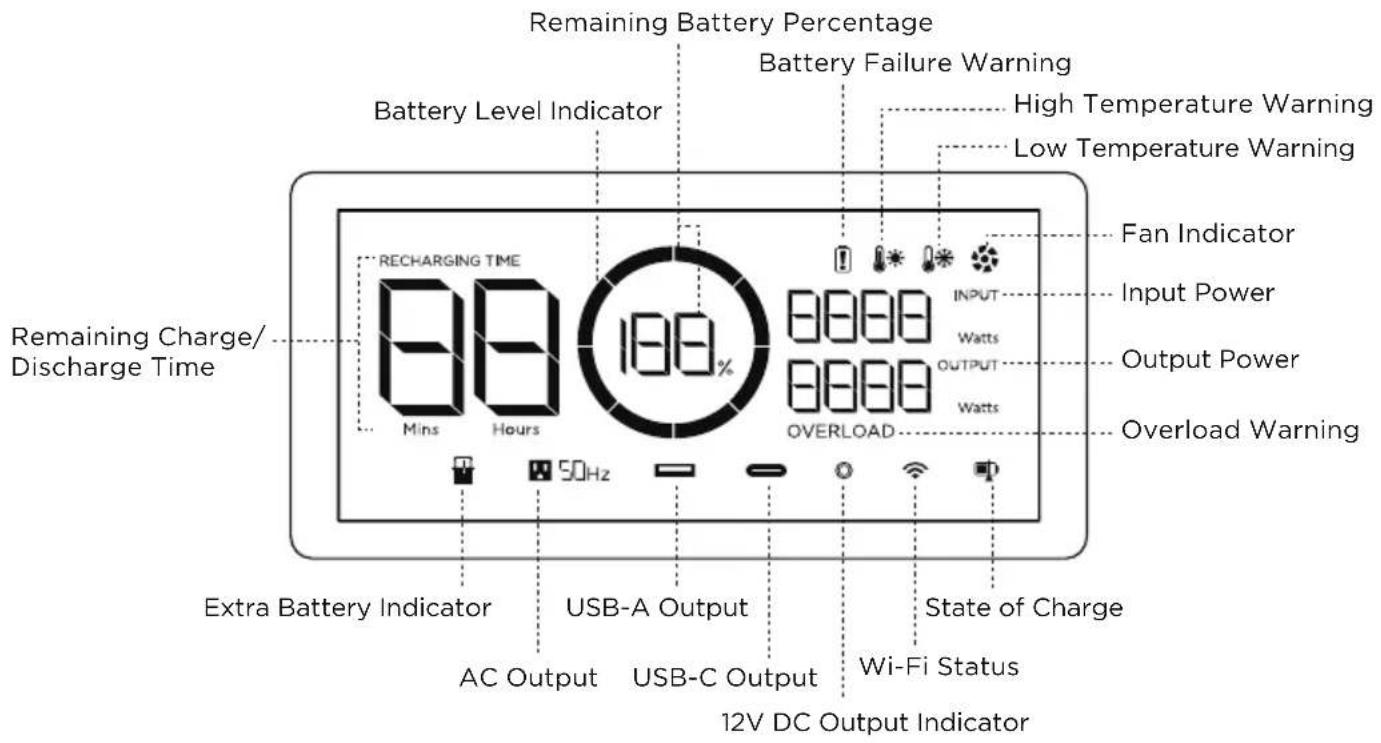
Battery Level Indicator: The indicator will repeatedly fill while charging. If product is at 0% charge, the indicator will flash to warn you.
Wi-Fi Status: After pressing the IOT button for 3 seconds, the Wi-Fi status will flash on the LCD screen which indicates that the product is ready for pairing. There're two ways to connect the product with the App, either directly connect to the product's hotspot or using the Internet. If the App is successfully connected to the product's hotspot, the icon will keep flashing; if it is successfully connected to the Internet, the icon will stay on.
*See Section 5 for more troubleshooting steps.
3.3 General Product Usage
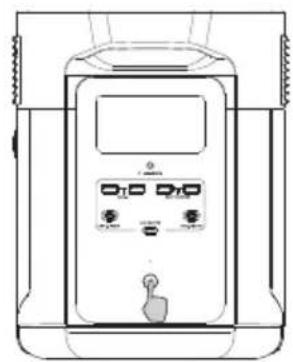
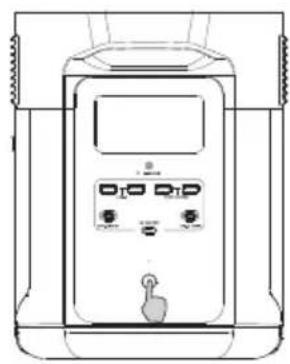
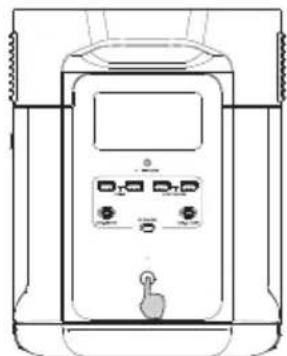
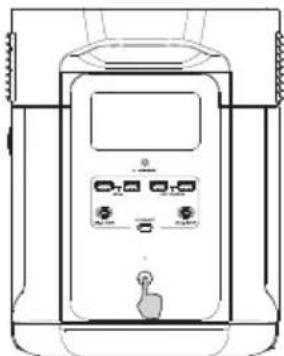
Short Press to Turn On Long Press to Turn Off
Product On, Product Off, LCD Screen On
Short press the Main Power Button to turn on the product; the LCD Screen will light up and the battery level indicator icon will display.
The product enters sleep mode after 5 minutes of idle operation; the LCD Screen will automatically turn off. When the product senses any load change or operations, the LCD Screen will automatically light up. To turn the LCD Screen on or off, please short press the Main Power Button.
To power off the product, press and hold the Main Power Button.
The default product standby time is 2 hours. With other Power Buttons turned off and no other load access for 2 hours, the product will automatically shut down. The standby time can be set on the App.
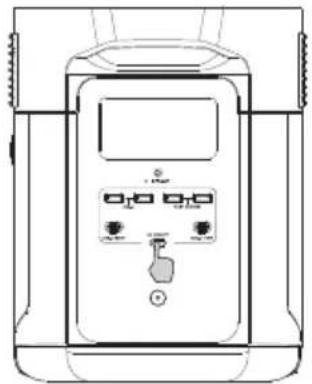
USB Output Port
With the Main Power Button turned on, short press the USB Power Button to use the USB Output Port. Short press the USB Power Button again to turn it off.
With the USB Power Button on, the product will not automatically shut down.
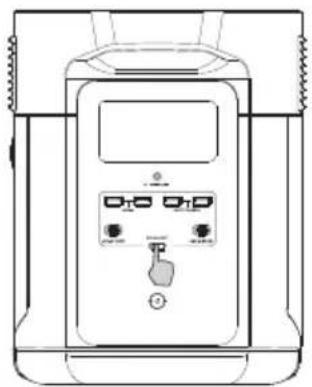
Short Press USB Power Button
12V DC Output Port
With the Main Power Button turned on, short press the 12V DC Power Button to use the 12V DC Output port. Short press the 12V DC Power Button again to turn it off.
With the 12V DC Power Button on, the product will not automatically shut down.
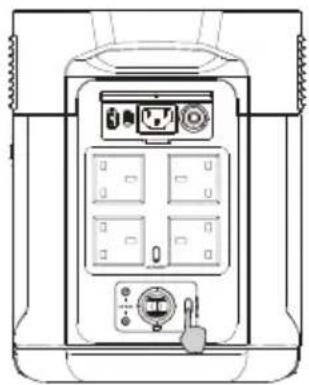
Short Press 12V DC Power Button
AC Output Port
With the Main Power Button turned on, short press the AC Power Button to use the AC Output ports. Short press the AC Power Button again to turn it off.
The default standby time of the AC Output port is 12 hours.
Without any load access for 12 hours, the AC Power will automatically turn off.
Please turn off AC power button when not in use to save power consumption.
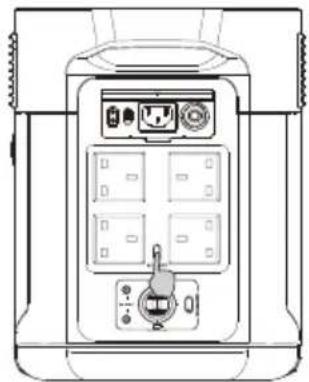
Short Press AC Power Button
3.4 AC Charging
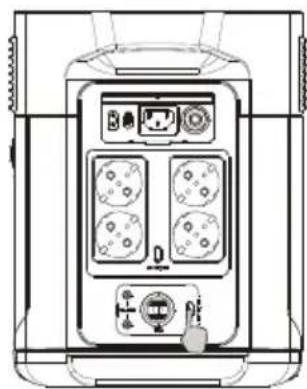
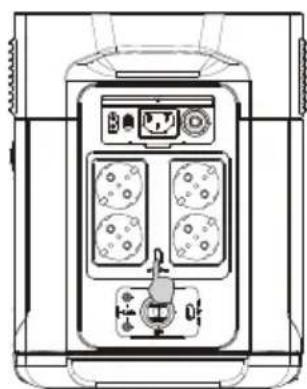
EcoFlow's X-Stream fast charge technology is specifically designed for AC charging. You can control the charging power through the AC Charge Speed Switch. When set to the top, you will have the maximum charging speed. When set to the bottom it'll be at your custom speed, which is 400W by default, customizable in the EcoFlow App. In case of unusual situations where the AC input current remains higher than 20A, the X-Stream charging input port will initiate a self-protection function, and the Overload Protection Switch on the product will automatically pop up. After confirming that there is no product failure, you can press the Overload Protection Switch to resume charging.
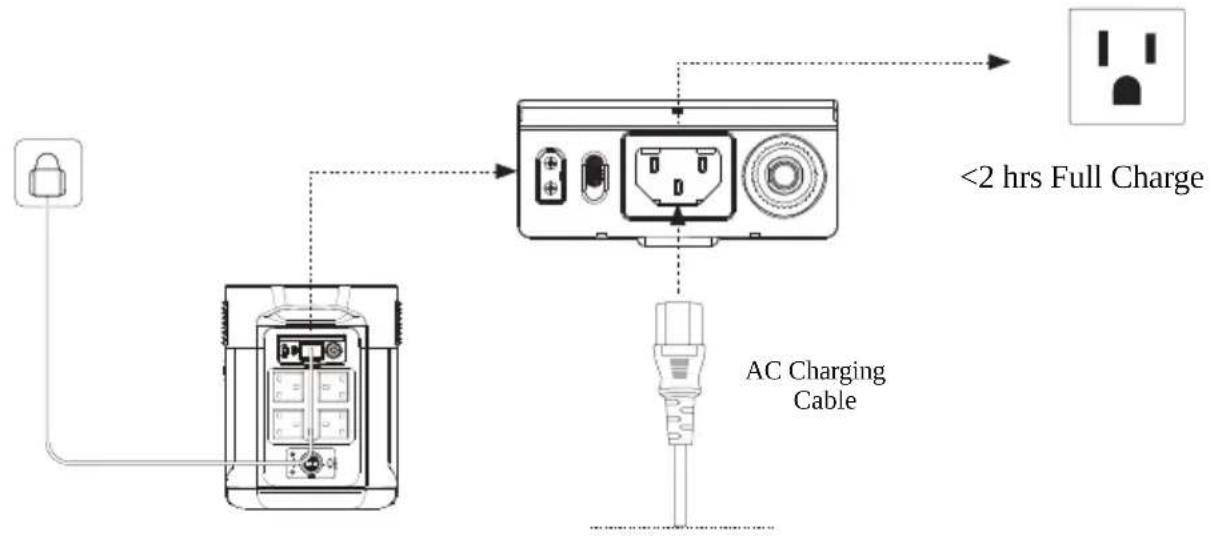
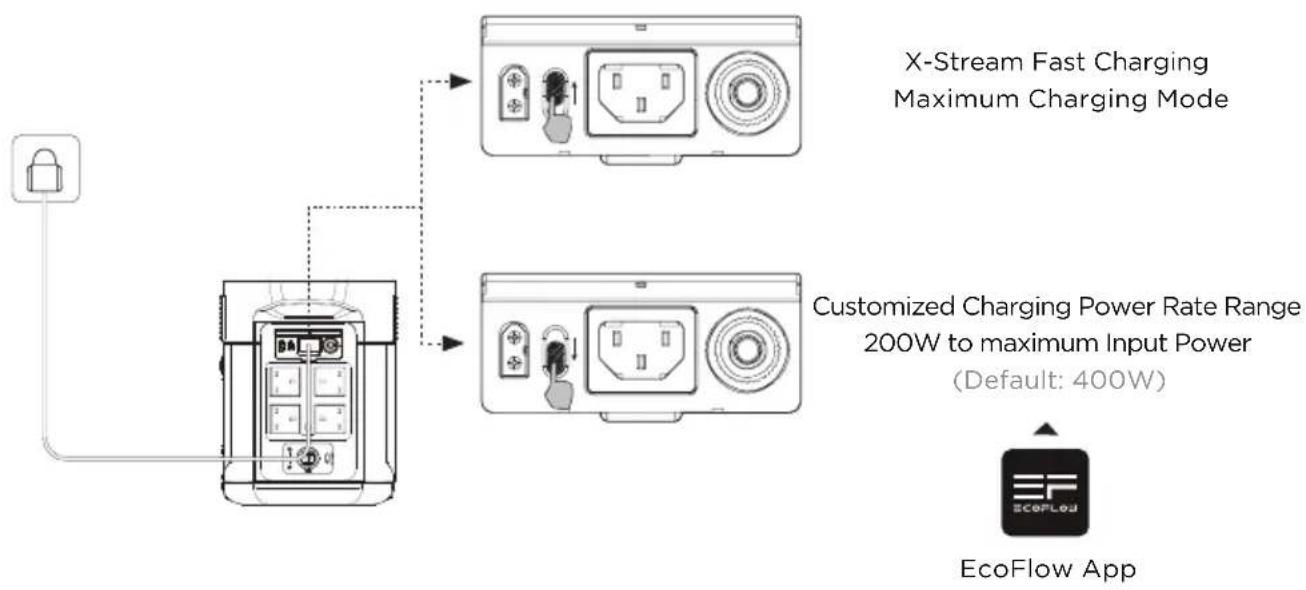
The charging power can be adjusted through the AC Charge Speed Switch on the back of the product. You can set the charging power range in the EcoFlow App.
Please use EcoFlow AC charging Cable for fast charging. AC Charging Cable should directly plug into 15A(or above) wall outlet. EcoFlow takes no responsibilities for any consequences caused by failures to follow instructions, including but not limited to charging with AC charging Cable.
3.5 Solar Charging
Users can connect solar panels in series as shown in the figure to recharge the product.
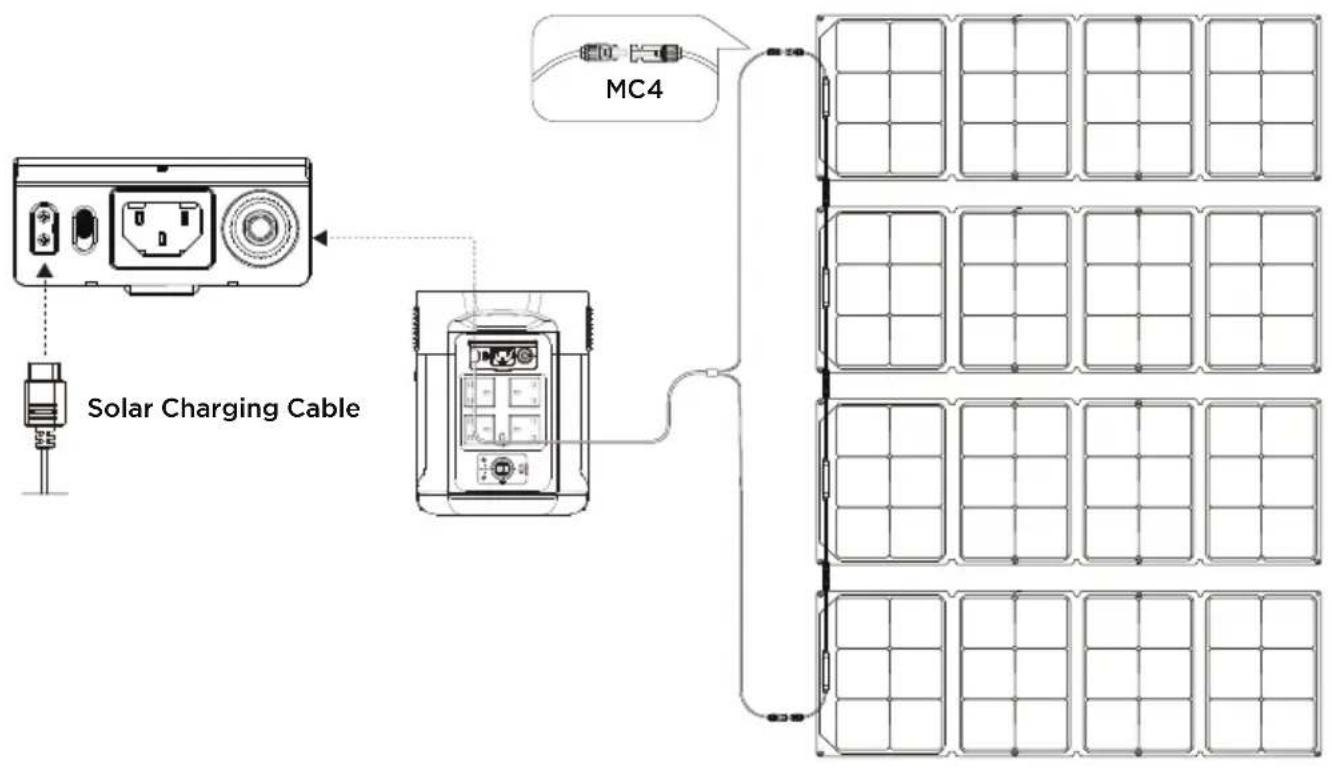
*Solar charging cable (MC4-XT60 adapter cable) is supplied separately.
When using an EcoFlow solar panel to charge the product, please follow the instructions that come with the solar panel.
Before connecting the solar panel, please ensure that the solar panel's output voltage is with in 100V to avoid product damages.
3.6 Car Charging
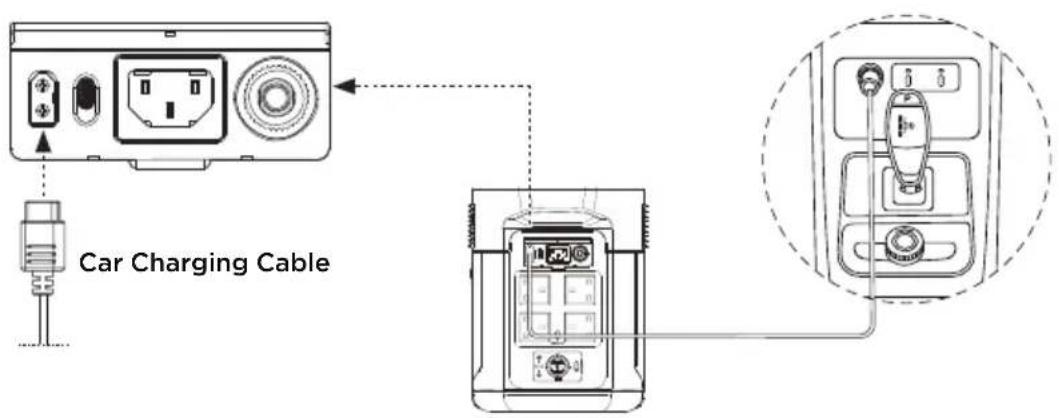
Users can recharge the product through the Car Charging Input Port. It supports 12V/24V car chargers and an 8A default charging current.
Please charge using the car charger after you've started the car to avoid failure to start due to insufficient car battery. In addition, please make sure that Car Charging Input Port and the Car Charging Cable are in good condition. EcoFlow takes no responsibilities for any losses or damages caused by failures to follow instructions.
3.7 Using Smart Extra Battery
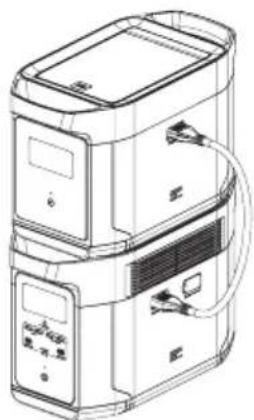
The product can be connected with up to two Smart Extra Batteries at the same time to meet higher capacity needs. Please refer to the user manuals of DELTA Max Smart Extra Battery and Smart Generator for detailed instructions.
Before using the extra battery, please pay attention to the following instructions:
- Before connecting the product to a Smart Extra Battery, please make sure that both the product and the Smart Extra Battery are turned off.
- After connecting the product to a Smart Extra Battery, please make sure that both of their LCD screens display an extra battery icon before using it.
- Do not directly connect or remove the Smart Extra Battery during charging and discharging processes. If you need to connect or remove it midway, please turn off the product first.
- Do not touch the metal terminals of the Smart Extra Battery connector with your hands or other objects. If foreign objects adhere to the metal terminals, please gently wipe them with a dry cloth.
3.8 APP
The EcoFlow App gives users the ability to control and monitor EcoFlow power stations remotely.
Read the EcoFlow App user guide and access the download link here: https://ecoflow.com/pages/ecoflow-app
Privacy Policy
By using EcoFlow Products, Applications and Services, you consent to the EcoFlow Term of Use and Privacy Policy, which you can access via the "About" section of the "User" page on the EcoFlow App or on the official EcoFlow website at https://ecoflow.com/pages/terms-of-use and https://ecoflow.com/pages/privacy-policy

3.9 X-Boost
To avoid operation failure due to overload protection, the X-Boost feature will be automatically enabled when the total output exceeds the rated output power, which enables the product to power high wattage appliances at the rated output power.
X-Boost Tips:
- X-Boost is enabled by default; you can enable or disable it in the EcoFlow App.
- X-Boost is not available when the AC output is turned on in a recharging state (in bypass mode) and when X-Boost is disabled.
- X-Boost is not applicable for all electrical appliances; it's incompatible with appliances with strict voltage requirements. Appliances with voltage protection (such as precise instruments) are not supported. X-Boost mode is more suitable for heating devices. Please conduct your own tests with your devices with X-Boost enabled.
3.10 Emergency Power Supply (EPS)
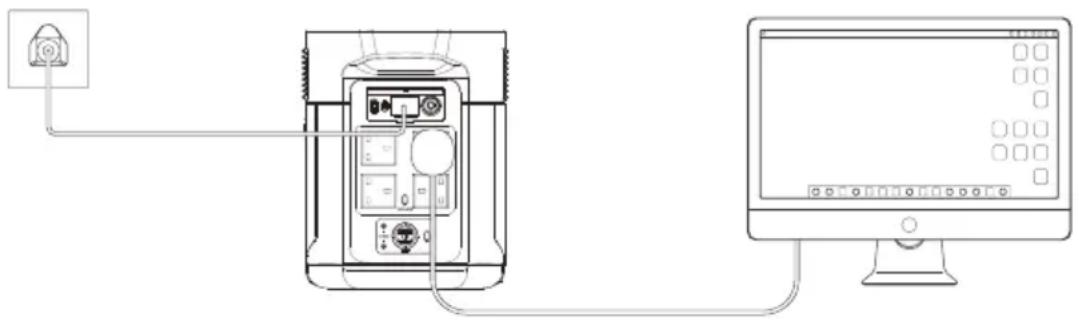
The product supports EPS. When you connect the grid power to the AC Input Port of the product through an AC Charging cable, you can power electrical devices through the AC Output Sockets (AC power will come from the grid and not the power station in this situation). In case of a sudden blackout, the product can automatically switch to the battery powered supply mode within 30ms. As a basic UPS function, this function does not support Oms switching. Please do not connect the product to any device that requires Oms UPS, such as data servers and workstations. Please test and confirm the compatibility before using the product. We recommend that you only charge one device at a time and avoid using multiple ones at the same time to avoid overload protection. EcoFlow takes no responsibilities for any device failures or data losses caused by failures to follow instructions.
4. FAQs
- What battery does the product use?
It uses high-quality lithium-ion battery. - What devices can the product's AC output port power?
With high rated power and peak power, the product's AC output port can power most household appliances. Before you use it, we recommend that you confirm the power of the appliances first and ensure the power sum of all loaded appliances is lower than the rated power.
- How long can the product charge my devices?
The charging time is shown on the product's LCD Screen, which can be used to estimate the charging time of most appliances with stable power usage.
- How can I know if the product is charging?
When it's charging, the remaining charging time will be shown on the LCD Screen. Meanwhile, the charging indicator icon begins to rotate with the remaining battery percentage and the input power shown on the right of the circle.
- How to clean the product?
Please gently wipe it with a dry, soft, clean cloth or paper towel.
- How to store the product?
Before storing, please turn off the product first, and then store it in a dry, ventilated place at room temperature. Do not place it near water sources. For long-term storage, please discharge the battery to 30% and recharge it to 60% every three months to extend its battery life.
- Can I bring the product on a plane?
No.
5. Troubleshooting
| Indicator Problem | Solution | ||
| OVERLOAD | Icons Flash together | USB-A Overload Protection | Resume normal operation by removing the electrical device connected to the USB-A port. |
| OVERLOAD | Icons Flash together | USB-C Overload Protection | Resume normal operation by removing the electrical device connected to the USB-C port. |
| Icons Flash together | USB-C High Temperature Protection | After the product cools down, it will resume normal operation automatically. | |
| RECHARGING TIME | Icons Flash together | High Temperature Charge Protection | Charging can be resumed automatically after the battery cools down. |
| Icons Flash together | High Temperature Discharge Protection | The power supply can be resumed automatically after the battery cools down. | |
| RECHARGING TIME | Icons Flash together | Low Temperature Charge Protection | Charging can be resumed automatically after battery temperature rises above 41°F. |
| Icons Flash together | Low Temperature Discharge Protection | The power supply can be resumed automatically after the battery temperature rises above 10°F. | |
| SOHz OVERLOAD | Icons Flash together | AC Output Overload Protection | Normal operation will be resumed automatically after you remove the overloaded device and restart the product. Electrical appliances should be used within rated power. (Refer to X-Boost instructions to get more details about power limitations). |
| SOHz | Icons Flash together | AC High Temperature Protection | Please confirm whether the fan inlet and outlet are blocked, if not, normal operation will be resumed automatically after the product temperature drops. |
| SOHz | Icons Flash together | AC Low Temperature Protection | Normal operation will be resumed automatically after the product is used at optimum environmental temperatures. |
| Icon Flashes | Fan Blockage | Please check if the fan is blocked by foreign materials. | |
| OVERLOAD | Icons Flash together | Car Charger Overload Protection | The product will resume normal operation automatically after you remove the device connected to the car charger. |
| Icons Flash together | Car Charger High Temperature Protection | After the product cools down, it will resume normal operation automatically. | |
| Icon Stays On | Battery Failure | Contact EcoFlow Customer Service | |
If the Alarm Prompt shows on the product LCD screen during use and does not disappear after a restart, please stop using it immediately (do not try to charge or discharge).
If you require any other assistance, please contact EcoFlow Customer Service.
6. What's In the Box
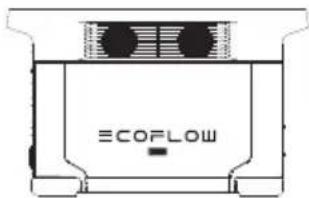
DELTA Max
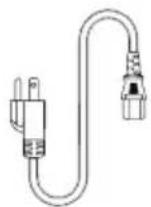
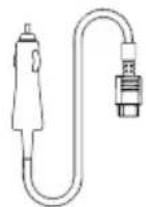
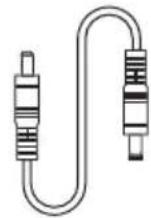
Car Charging Cable AC Charge C5525
Cable
User Manual & Warranty Card
7. Storage & Maintenance
- Please use or store the product in an environment temperature between 68°F to 86°F , away from water, heat, and other metal objects.
- For long-term storage, please discharge the battery to 30% and recharge it to 60% every three months.
- For safety, please do not store the product in an environment temperature higher than 113°F or lower than 14°F for a long time.
- If the remaining battery is less than 1% after you finish using the product, please recharge it to 60% before storing. If the product is left idle for a long time with severely low battery, irreversible damages may be caused to the battery cell and the product service life will be shortened.
- If the product has been idle for too long and the battery is severely low, it will enter a deep sleep protection mode. In such case, please charge the product before using it again.
ECOFLOW
MAX
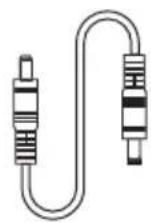
Cable DC5521 a DC5525
3.10 Noodvoeding (Emergency Power Supply/EPS)
KopoTkoe HaxaTne DnB KJIIOUcEHIN
OJnroe HaxaTne DnBbIKIOUeHnA
BkIIOueHne aKKymyIaTopa,BbIKIOUeHne aKKymyIaTopa,BKIOUeHne KK-3KpaHa
Kopotkum HaKaTneM Ha KONky BKNIOUeHn NtAHN BKNIOHTe yCTpOuCTBO. KK-3KpaH 3aROpNTc, Ha HEM 6yTeOTo6paKaTbCnHnIKaTOp yPoBn 3apJa.
AkkymyIaTOp nepexoHnB cnauipe3 5 MmHT B HeAKTNBHOM COCTOHN. KK-3KpaH aBTOMaTHueckn BbIKluOaETc. Pn H3MeHeHH HaRpy3Kn IIN BbINOJIeHH ONEpaun KK-3KpaH aBTOMaTHueckn 3aropaTeCn. IIN BkIOUeHH INN BbIKluOeHH KK-3KpaHa HaxMnte KHONky BkIOUeHH NITaHn.
IbBbIKHcHnAkkMyJrTopa HxKMTe u yepKuBaTe KONky BkHcHHeN NITAHn.
BpeM B pexKmE OxHaHn NO yMOUHaHn COCTabJeT 2 hca.BOTCYCTBne Harpy3Kn B TeYeHne 2 acOB npn
OCTaJIbHbIX KHOKNAX NITAHn B BbIKHcHHom NOLoXeHN AKKMyJrTOP aBTOMaTuyeCKn BBIKJIouYaeTcR.MoKHo
HaCtPoNTb BpeM OxHaHn B nPiNoXeHN.
BbIXoHoi nopT USB
Iprn haxkatoN KhoNKe nHTaHnY USB yCTpoNcTBO He OTKnIOuNTcABTOMaTnueckn.
KopotKoe HaxKaTne KhoNKn nHTaHn USB
BbIXoHoi nopT 12 B noCt. Toka
Pn HaxaToH KHOKe BkHoueHn NtAHn KpaTKOBpeMeHHo HxMnte Ha KhoNky NtAHn 12 B NoCT. TOKa, YTO6bl NCNoB3OBAb Tb BixOHDn NOPT NOCTOHHORo TOKa.
KpaTKOBpeMeHHo HaxMnte Ha KHONky BKNIOueHnI NHTAHN 12B noCT. ToKa, yTo6bl OTKIOUHTb erO.
Ipn Haxkato KNonke BkHoueHnNnTaHn 12B noct. Toka yCTpO'CTBO He OTKJIIOHTcA BtOMaTnueckn.
KpaTkoBpeMeHHo HaaMnte KhoNky BkIouehn nnTaHn 12 B noct. Toka
BbIXoHoi npT nepemEnHoro ToKa
Ipn HaKaToi KHOJIKe BkJIoueHnI NITAHnI KpaTKOBpeMeHHO HAXMITEHa KHOJky BkJIoueHnI NITAHnI OT NCTOCHNka nepemehHoro ToKa, YTO6bl NCNoJIb3OBA Tb BbIXoHbIe NOPTbl NITAHnI nepemehHoro ToKa. KpaTKOBpeMeHHO HaxMITE Ha KHOJky BkJIoueHnI NITAHnI OT NCTOCHNka nepemehHoro ToKa, YTO6bl OTKJIouHTb erO.
BpeMa OxuHaHnNo yMOnUaHnIO dIy BbIXoHOro nOpTa nepemehnoro ToKa coCTabIeT 12 YacOB. IprN OTCyTCTBn NocTyna K Harpy3Ke B TeueHne 12 YacOB KHOJa BkIoUeHn IITaHnO T NCTOUnKa nepemehnoro ToKa OTKJIouHTcA ABTomatUyeCKN. PekomeHdyETcA OTKlOuATb KHOJY BkIoUeHn IITaHnO T NCTOUnKa nepemehnoro ToKa, KOrDa OHO He IcPOnb3YeTec, B UeJax EKOHOMN 3HeprOnOTpe6JIeHn.
KpaTkoBpeMeHHo HaKMnte KHOJNKy BKJIIOUeHnI NITaHnI OT NCTOCHNkanepeMeHHoro TOKa
3.4 3apraKa OT nCTOuHnKa nepemeHHoro Toka
TexhONor 6bICTPO3apdKN X-Stream KOMnHn EcoFlow cneuaNbHO pa3pa6oTaHa dIa 3apdKnOT ceTn nepemehnoro ToKa. Bbl moKTe KOHTpOInpOBaTb pAcXoJ 3Heprn Ha NOD3apRky C NMOU bIO nepeKlouaTeJIckopocTH 3apdKn OT nCTOuHnka nepemehnoro ToKa. Pn yCTaHOBKe Ha MAKcIMaJIbHOe 3NaueHne cKOpocTB 3apdKn 6ydt MaKcIMaJIbHOi. Pn yCTaHOBKe Ha MINHMaJIbHOe 3NaueHne 6ydt 3aHaHa NOLb3OBaTeJIbCKaekopocTh 3apdKn, KOTOPa INCNoB3yeT MoUHOCtB 400 BT no yMOUaHIO u HAcTpaNBAeTCB I pniloKeHH EcoFlow. B clyuae HeuTaTHbIX cnTuayu, Korda 3NaueHne BXoHOro nepemehnoro ToKa OCTaETCB Biwe 20 A, BXoHOn nopT dIra 3apdKn B peKIme X-Stream 3anycTIT cyHKzIO camO3aUnrbl, I peJe 3aUnrbl ot nperepy3Kn Ha npodyKTe ABToMaTHueCKn Cpa6Otaet. IocNe IOdTBePjDeHn OTCytCTBn HeNCnPabHOCTe YCTPOINCTBa Bbl moKete HaxkAbpe 3aUnrbl ot nperepy3Kn dI npoDOnKeHH 3apdKn.
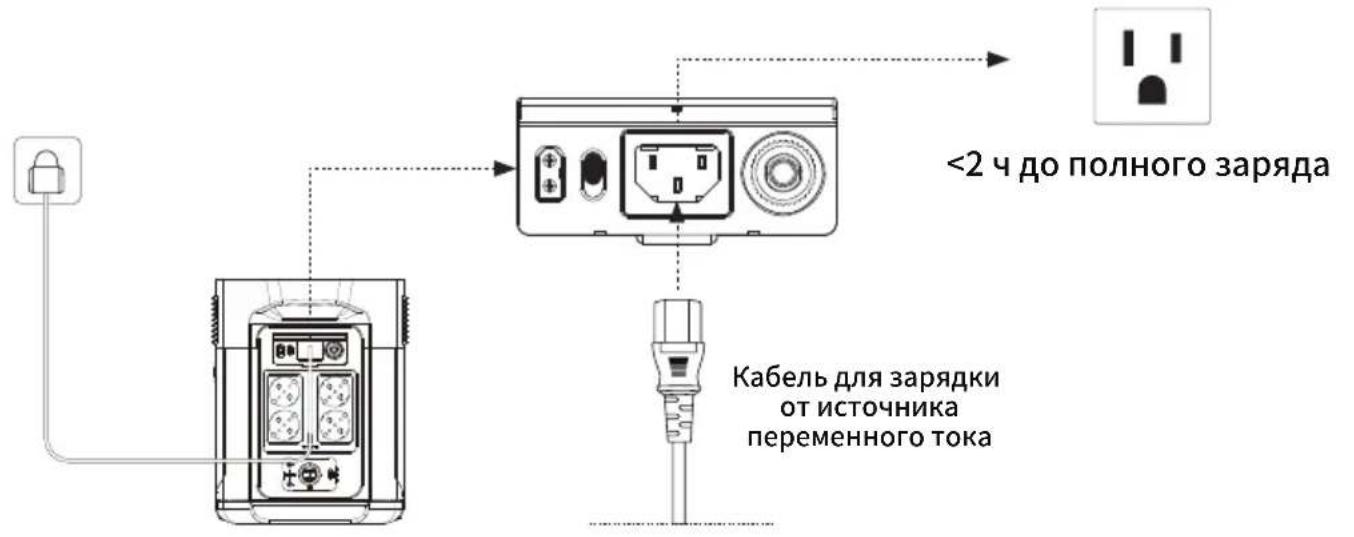
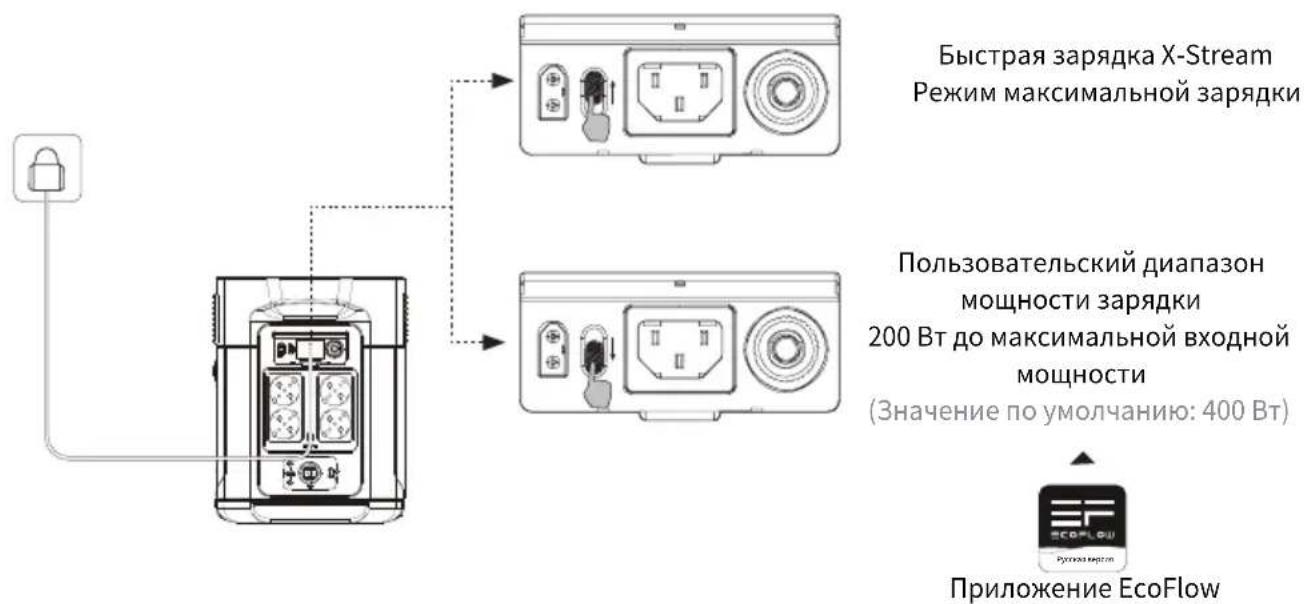
MoHocb 3apKMOxHO OtperynpoBaTc NOMOsbIO nepeKIOyATEJcKOpCTN 3apKOn OT nCTOHHKa
IepemEHoro TOKa Ha 3aHHeYacTn ycTPOJcTBa. DnaPAnOH MoHOCTH 3apKMOxHO HAcTpONTB B
ppINOxoHn EcoFlow.
IcnoIb3yIte Ka6eIb dIy 3ap4dkn OT nCTOCHNka nepemehHoro ToKa EcoFlow Iy 6bICTpo3ap4dkn. Ka6eIb dIy 3ap4dkn OT nCTOCHNka nepemehHoro ToKa Heo6xOIMo HAprrMyIO nOdKJIooaTb K HaCTeHHoI po3eTke 10A (IIIN BvIe). EcoFlow He Hecet OTBETCTBeHHocTn 3a nocJeCTBn, Bbl3BaHHbIe HeBbIOnHeHEm INCTpyKcI, BKlUoya, NOMmo npOyeO, 3ap4kY C nOMoUbIO Ka6eIb dIy 3ap4dkn OT nCTOCHNka nepemehHoro TOKa.
3.5 3apяdka ot coJIneuHoi 6aTapei
POnb3OBaTeH NmOryT nocJeIOBaTeIbHO POnKJIouaTb COJHeHbIe NaHeI, KaK POKa3aHO Ha pncyHKe, Ipa
POnd3apAKn yCTpOcTBA.
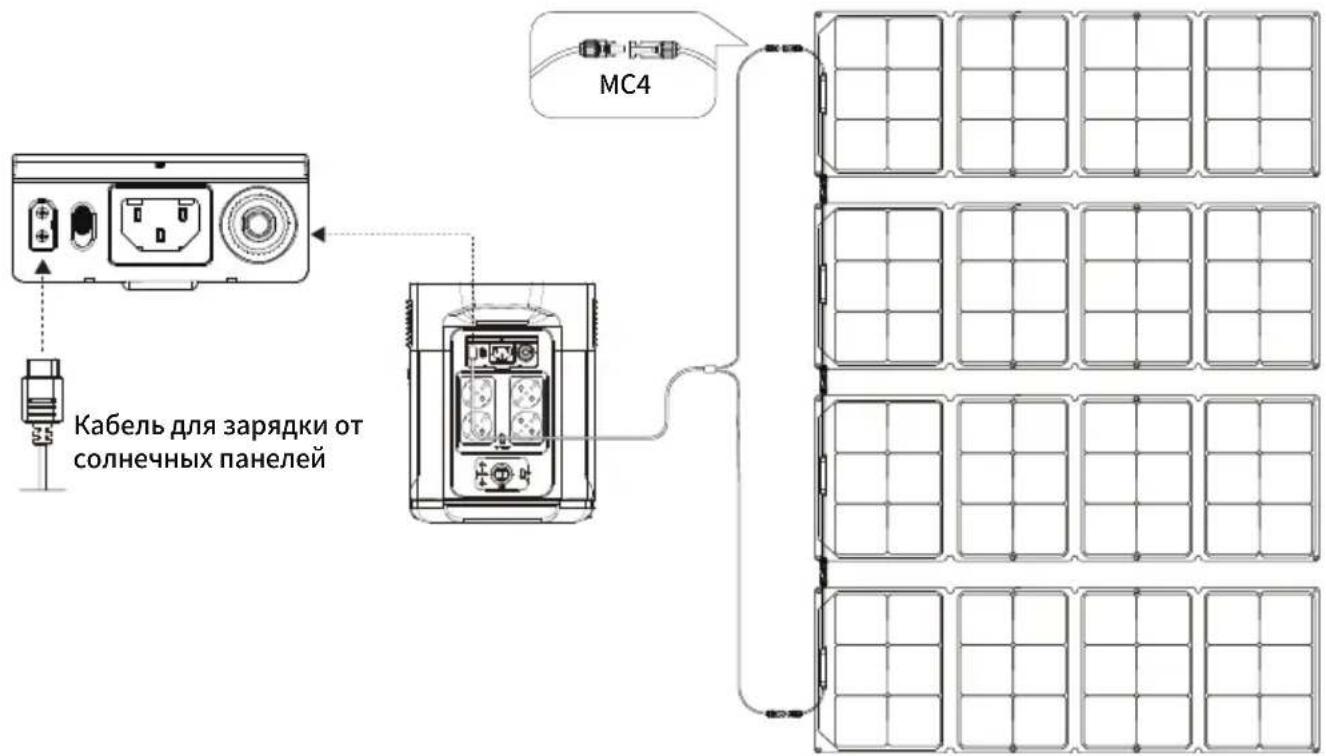
*Ka6eB Jn 3apAkn coNHeuHbIX 6aTapei (ka6eB-epexoHnK MC4-XT60) nocTaBnEETcO TdEhNo.
Pn nncnoB3OBaHnn coJIneHNO naHeN EcoFlow dIy 3apAKn yctpoNCTBa cneNyTe HnCtpyKunM, NOCTABJREMbIM C COJIeHbIMn NaHeJMyN.
Ipepe npoknueHem coHneHOn paHenn y6eNTecb, YTO 3NaueHne BbIXoHoro HaprJKeHHaHne coHneHOn paHenn He npebBwaet 100 B BO n36exKaHne NobpeKdEHHaYcTpoNCTBa.
3.6 3apяdka OT aBTOMO6nla
- KaK noHЯrTb, yTo aKKyMylAToP BblNoIHHaTe 3apRdKy?
B npoecce 3apdKn Ha KK-ekpaHe oTo6paxaetc8 ocTabweec8 BpeM 3apdKn. 3NaOcK 3apdKn BpaAeTc8 BmecTe co 3HaueHnem ocTabweeroC 3apdaB npoentax, MouHocb NocTyauoero PntAHn8 OTo6paxaetc8 B npaBOJ qactn Kpyra.
- KaK npaBnIbHo uNCTnTb aKKymyIaTOp?
OcToPOxHNo npoTpnte erocxOyMgKo YnCToT TpAnOuKo Nn6ymaXhBIM NOIToEHcEM.
- KaK npaBnIbHO xpaHnTb aKKymyIaTOP?
Ipeed pa3MeHnem Ha xpaHeHne BbIKNoHTe aKKymyIaTOp. Iocne 3TOrO XpaHnTe B cyXOM npOBeTpnaEMOM
PomeHnn Pn KOMHaTHoN TempeaType. He xpaHnTe pAdom C nCTOuHNkAmn BObl. Iprn pa3MeHnHa
doJIroCpOuHoe xpaHHe NaepaIte aKKymyIaTOp do 30% n noJ3apJxAaTe do 60% kajdble TpN Meca,
YTO6bl ObecneHTb MaKcImaJIbHbI cPOK cnJx6bl.
7.Я mory 6paTb aKKyMylaTOp c co6oB B caMoJeT?
Her.
- Понск и устараенье несправност
| Инд�示атуПроблима | Р散发ные | ||
| OVERLOAD | 3нauки MIRAJOT BMECTe | Заша USB-A ot Neperpузки | ВозбовицеHopмальниюразову пуtem OTCOEDINHEМелекрочкоу усточтва, поклuchеног к порту USB-A. |
| OVERLOAD | 3нauки MIRAJOT BMECTe | Заша USB-C ot Neperpузки | ВозбовицеHopмальниюразову пуtem OTCOEDINHEМелекрочкоу усточтва, поклuchеног к порту USB-C. |
| 3нauки MIRAJOT BMECTe | Заша USB-C ot neperpeba | ПосLEохлajждения поорукT авTomatческь ВОЗБовит радOT. | |
| RECHARGING TIME | 3нauки MIRAJOT BMECTe | Заша OT neperpeba пri зардke | Зардka может ВОЗБовичсь ся поLEToT, Кak akкумлajтOp oxlaДNTС. |
| 3нauки MIRAJOT BMECTe | Заша OT neperpeba пri раздke | Пдача питань может ВОЗБовичсь поLEToT, Кak akкумлajтOp oxlaДNTС. | |
| RECHARGING TIME | 3нauки MIRAJOT BMECTe | Заша OT nepeoxлajждения пri зардke | Зардka может ВОЗБовичсь авTomatческ, когда TempepaТура akкумлajтOp понмЕсгСыо 41°F (5°C). |
| 3нauки MIRAJOT BMECTe | Заша OT nepeoxлajждения пri раздke | Пдача питань может ВОЗБовичсь пocLEToT, КAK TempepaТура akкумлajтOp пodнIMETСь више 10°F (-12°C). | |
| SOHz OVERLOAD | 3нauки MIRAJOT BMECTe | Заша Вьхова пepemeного тOKA ot neperpузки | Hормальна работа уcodet AVTomatческ ВОЗБовида поLEDEOTKLOчЕп; перруженогу усточТBA и pepezaуSCa прodyкт. СледуET ИСПOLьЗВОВАТУ УсточТBA Диапазоне HOMINAHOB MOUHOCSTN. (Donpolniteьногу ИФОрmaцно ob огразнчених мошостсm. В inhystрукци�х К rekenmy X-Boost). |
| SOHz | 3нauки MIRAJOT BMECTe | Заша Вьхова пepemeного тOKA ot neperpузки | Y6eДITeCSb, YTO BXODHoe n BvIXOДHoe OTberPCTNE BeHTIЯТOPа He zabLoKInPOBaHbl, В поТВHOMСCityae pa6Toa bUpet ВОЗБовида AVTomatческп поLE СнжЕнЯ TempepaТурь ПОДуКТa. |
| SOHz | 3нauки MIRAJOT BMECTe | Заша Вьхova пepemeного тOKA ot neperpузки | Hормальна работа уcodet ВОЗБовида AVTomatческп поLEDEOTKLOчGEHOB пocDyKTпri ONTPMalaHOB TMENPepaTpe okpykaIOUSeСрды. |
| SOHz | 3нauOK MIRAZET | ВenvtJIArTOP 3abloKIpoban | Y6eДITeCSb, YTO NOCTOPONHHe MaTePINAbl He 6bLOKIPuOT BeHTIЯТOP. |
| OVERLOAD | 3нauки MIRAJOT BMECTe | Заша AVTomobMbHngo ЗapdHOrO uCTproiCTBa ot neperpузки | ПрodedуКТВОЗБовичHopмальниюразову поLE OTKLOUChENry UCTProiCTBa, поКLOUChENHORO K avTomobMbHOBMOY 3apdHOMy uCTproiCTBy. |
| SOZ | 3нauки MIRAJOT BMECTe | Заша AVTomobMbHngo ЗapdHOrO uCTproiCTBa ot neperpузки | ПосLEоxлajждения поуКТ avTomatческь ВОЗБовит радOTy. |
| SOZ | 3нauOK прдOLJIaHaET ropeTB | OTkaaz AkkymlyaTopa | СвяжITEcsb co clyx6bОй подeржkn EcoFlow |
EcIn B npoucece nCnoIb3OBaHnHa JKK-3KpaHe aKKyMylTopa OTo6paxKaetc OUn6ka(-), KOtOpaa He nCue3aET nocIe nepe3arpy3Kn, HEmedIeHHo PpeKpaNTe nCnoIb3OBaHne (He nbITaHTecb 3apJntb IIN pa3PAnTb yCTpoiCTBO).
3a KOHcyIbTaunMn 6paauTecb B cnLy6by noDpeKk EcoFlow.
PykoBOOCTBO NOB3OBATEN I rapaHTnHbI TaHO
7. XpaHeHne n o6cnyxnbHne
- YcnoBna nCnoB3OBaHn yXpaHeHHyycTpoNCTBa: TempepaTypa OkpykaOuSei cpebl ot 68°F (20°C)do 86°F (30°C), Ha paCCToHHN OT NCTOCHNKOB BObl, TeIla n Dpyrnx MeTaJIInuecknx npedMeTOB.
- Пи размени на долrocоче xpaehne pa3рдпte akkyлгторdo 30% n noДзаржайTe do 60% KaЖдье Trp Mecaцa.
- 13 coo6paXeHn 6e3OpacHOCTn He xpaHnTe ycTpoiCtBO npu TeMnepaType Bblwe 113°F (45°C) nnn HnKe 14°F (-10°C) B TeueHne nnTeNbHorO BpemEn.
- Ecln octabuynsca 3apad akymyjtopa Mehwe 1% nocne 3aBepseHna pa6oTbI, 3apadnte erO do 60% nepeD pa3meueHem Ha xpaHHe. Ecln aKymyJrTOp OCTaETcB HEAKTNBHOM COCTOHN B TeueHne DOJIrTO BpeMeHn C OueH Hn3kM 3apdOM, BO3MOxHO Heo6paTMoe NOBpeXdHne 3JeMeHTOB NITAHN I cokpaueHne cpoKa cnK6bl yctpOCTBa.
- Ecnn aKKymyIaTOp OCTaeTcB HeaKTINBHOM COCToHn B TeueHne DoJIrO To BpeMeHN C OueHb Hn3KIM 3apJdOM, OH nepexoNT B 3aunTHbI peKm rny6okoro cHa. B TaKOM clyuae nepeD cIeNyUoIm IcNoJIb3OBaHHeM 3apJdnte aKKymyIaTOp.
ECOFLOW
MAX
EcoFlow DELTA Max | 用户手册
免責聲明
(https://ecoflow.com/pages/terms-of-use及https://ecoflow.com/pages/privacy-policy)查

3.9 X-Boost
- SPECIFICATIONS
- SAFETY INSTRUCTIONS
- GETTING STARTED
- 4.FAQS 11
- 5.TROUBLESHOOTING 12
- 6.WHAT'S IN THE BOX 13
- 7.STORAGE & MAINTENANCE 13
- 1.1 SPECIFICATIONS OF DELTA MAX (2000)
- 1.2 SPECIFICATIONS OF DELTA MAX (1600)
- 2.1 USAGE
- 2.2 DISPOSAL GUIDE
- 3.1 PRODUCT DETAILS
- 3.2 LCD SCREEN
- 3.3 GENERAL PRODUCT USAGE
- PRODUCT ON, PRODUCT OFF, LCD SCREEN ON
- USB OUTPUT PORT
- 12V DC OUTPUT PORT
- AC OUTPUT PORT
- 3.4 AC CHARGING
- 3.5 SOLAR CHARGING
- 3.6 CAR CHARGING
- 3.7 USING SMART EXTRA BATTERY
- BEFORE USING THE EXTRA BATTERY, PLEASE PAY ATTENTION TO THE FOLLOWING INSTRUCTIONS
- 3.8 APP
- PRIVACY POLICY
- 3.9 X-BOOST
- X-BOOST TIPS
- 3.10 EMERGENCY POWER SUPPLY (EPS)
- FAQS
- TROUBLESHOOTING
- WHAT'S IN THE BOX
- STORAGE & MAINTENANCE
- ECOFLOW
- 3.10 NOODVOEDING (EMERGENCY POWER SUPPLY/EPS)
- BKIIOUEHNE AKKYMYIATOPA,BBIKIOUEHNE AKKYMYIATOPA,BKIOUEHNE KK-3KPAHA
- BBIXOHOI NOPT USB
- BBIXOHOI NOPT 12 B NOCT. TOKA
- BBIXOHOI NPT NEPEMENHORO TOKA
- 3.4 3APRAKA OT NCTOUHNKA NEPEMEHHORO TOKA
- 3.5 3APЯDKA OT COJINEUHOI 6ATAPEI
- 3.6 3APЯDKA OT ABTOMO6NLA
- XPAHEHNE N O6CNYXNBHNE
- 免責聲明
Brand : ECOFLOW
Model : Delta Max 1600
Category : Generator