Saturn MK3 - Cd player/recorder REGA - Free user manual and instructions
Find the device manual for free Saturn MK3 REGA in PDF.


| Product Type | CD player/recorder with built-in DAC |
| Brand | Rega |
| Model | Saturn MK3 |
| Dimensions (approx.) | 430 x 100 x 330 mm (W x H x D) |
| Weight (approx.) | 7 kg |
| Power supply | 100-240 V AC, 50/60 Hz (check local voltage) |
| Power consumption | 20 W (max) |
| Main functions | CD, CD-R, CD-RW playback; MP3/WMA playback; USB DAC (PCM 2 channels); 5 digital inputs (1 USB, 2 optical, 2 coaxial); 4 digital outputs (2 optical, 2 coaxial); 1 analog output DAC/CD |
| DAC filters | 5 selectable settings (linear/minimum phase, apodizing, etc.) |
| Remote control | Solaris included (CD and DAC control, programming, repeat, random) |
| Connectivity | Inputs: USB (type B), optical (Toslink) x2, coaxial (RCA) x2; Outputs: optical DAC, coaxial DAC, analog (RCA) DAC/CD, optical CD, coaxial CD |
| USB compatibility | Requires Windows driver (download from Rega), plug-and-play on Mac |
| Display | Alphanumeric display (MP3 titles, time, etc.) |
| Care and cleaning | Clean with a soft microfiber cloth slightly damp; do not open the casing |
| Safety | Avoid liquids, humidity, heat sources; minimum ventilation 10 cm around; operating temperature 5-35°C |
| Warranty | Lifetime against manufacturing defects (excluding normal wear) |
| Spare parts and repairability | No user-serviceable parts; contact a qualified technician |
Frequently Asked Questions - Saturn MK3 REGA
User questions about Saturn MK3 REGA
0 question about this device. Answer the ones you know or ask your own.
Ask a new question about this device
Download the instructions for your Cd player/recorder in PDF format for free! Find your manual Saturn MK3 - REGA and take your electronic device back in hand. On this page are published all the documents necessary for the use of your device. Saturn MK3 by REGA.
USER MANUAL Saturn MK3 REGA
natural_image
Front view line drawing of a portable electronic device with control buttons (no text or symbols)Multilingual Instructions
Please scan the QR Code to access the multilingual user manual via the SATURN MK3 web page.

text_image
QR code image containing encoded data, no visible human-readable textFor user instructions in your language, please visit www.rega.co.uk and go to the download section of your chosen product page.
Please be sure to carefully read this manual before setting up. This ensures that you are getting the most out of your product. See page 8 for safety instructions and compliance information. For user instructions in your language, please visit www.rega.co.uk and go to the download section of your chosen product page.
INTRODUCTION
Thank you for purchasing the Saturn MK3 CD-DAC player. The Saturn MK3 offers complete flexibility and integration into any audio system. Essentially two products in one, the Saturn MK3 houses a high specification CD transport and independent DAC circuit. Both sections are fully remote controllable via the supplied Solaris remote handset. The new Saturn MK3 is re-housed in our very latest case designed to match the rest of the Rega range.
You will find plenty of connectivity options, up to and including 192kHz-24 bit. The Saturn MK3 has two optical inputs, two Co-Axial inputs, a fully asynchronous USB and an added 'direct' digital output from the CD playback section. This ensures the Saturn MK3 integrates perfectly into any system and provides the perfect partner for the Rega Elicit MK5 integrated amplifier.
DESIGN TECHNOLOGY
The Saturn MK3 CD/DAC player uses our proven digital to analogue converter and analogue output amplifier technology coupled with a pair of Wolfson WM8742 digital to analogue converter ICs. The Saturn MK3 has improvements to the CD section power supply which was a result of the research & development of our reference Isis CD player along with the improved microcontroller and display drivers.
The Saturn MK3 uses a high stability master clock and high capacity power supply in the CD circuitry, high performance PLL digital interface receiver, isolated digital inputs and high performance power supply architecture in the DAC circuitry.
Signal switching between the CD and DAC functions are performed in the digital to analogue converter stage. The signal path of the CD section in CD mode is kept to a minimum.
The DAC USB input operates at sample rates of 44.1 to 192kHz with a bit rate of up to 24bits. It uses dedicated drivers in the computer enabling full ASIO operation, thus eliminating signal degradation caused by generic windows based drivers.
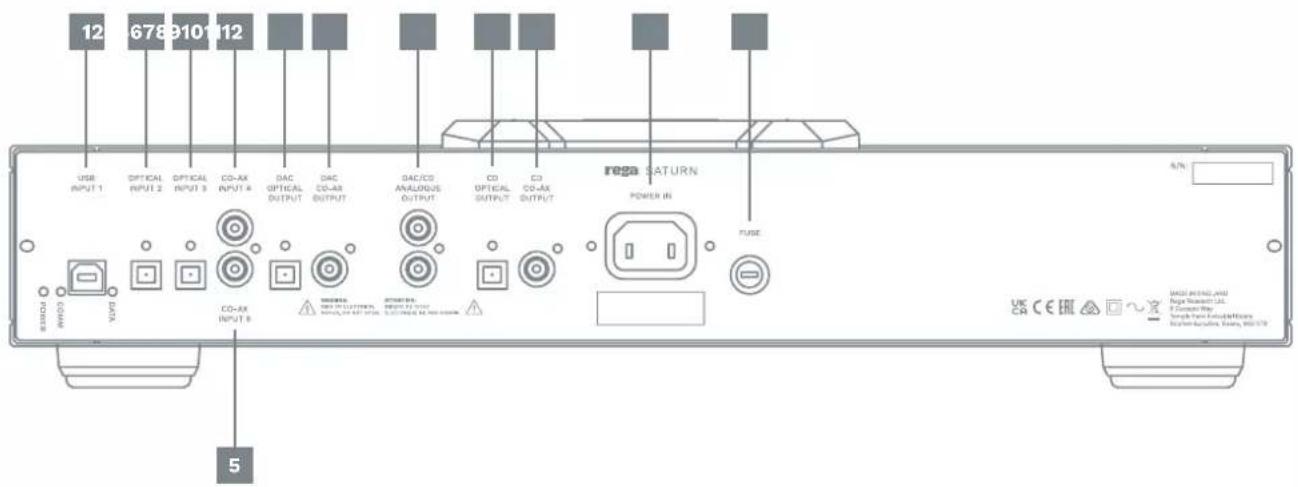
BACK PANEL CONNECTIVITY
Inputs - USB Input 1 / Optical Input 2 / Optical Input 3 / Co-ax Input 4 / Co-ax Input 5
Outputs - DAC Optical Digital Output / DAC Co-ax Digital Output / DAC CD Analogue Output / CD Optical Digital Output / CD Co-ax Digital Output
IEC Mains Power Connection - Power In / Fuse access / Fuse
Ensure the operating voltage of the Saturn (stated on the rear) is the same as your local power supply. Always place the Saturn in a position that will allow adequate access to the lid. If this is limited, you may risk damaging the disc when placing on the ball chuck system.
IMPORTANT: Always turn the player off when changing leads.
- USB Input 1 (USB driver download required see page 5)
- Optical Input 2
- Optical Input 3
- Co-ax Input 4
- Co-ax Input 5
- DAC Optical Digital Output
- DAC Co-ax Digital Output
- DAC CD Analogue Output
- CD Optical Digital Output
- CD Co-ax Digital Output
- Power In
- Fuse
text_image
12 678 910 112 USB INPUT 1 OPTICAL INPUT 2 OPTICAL INPUT 3 CO-AX INPUT 4 DAC OPTICAL OUTPUT DAC CD-AX OUTPUT DAC/CS ANALOGUS OUTPUT CD OPTICAL OUTPUT CD CD-AX OUTPUT REGA SATURN POWER IN FUSE 5 BNDU AVOC CO-AX INPUT 8 WINDIA. MAX. OF CLINICUM. MINI. OF MAX. OF CO- MAX. OF MAX. OF CO- MAX. OF MAX. OF CO- MAX. OF MAX. OF CO- MAX. OF MAX. OF CO- MAX. OF MAX. OF CO- MAX. OF MAX. OF CO- MAX. OF MAX. OF CO- MAX. OF MAX. OF CO- MAX. OF MAX. OF CO- MAX. OF MAX. OF CO- MAX. OF MAX. OF CO- MAX. OF MAX. OF CO- MAX. OF MAX 12 UK CCR CE ER MUST AND ALL AND Rega Transmittent JL. It Common Way: Trench Panama Exchange/Reverse Exchange/Reverse, Yes, No/NoFRONT PANEL INDICATORS AND CONTROLS
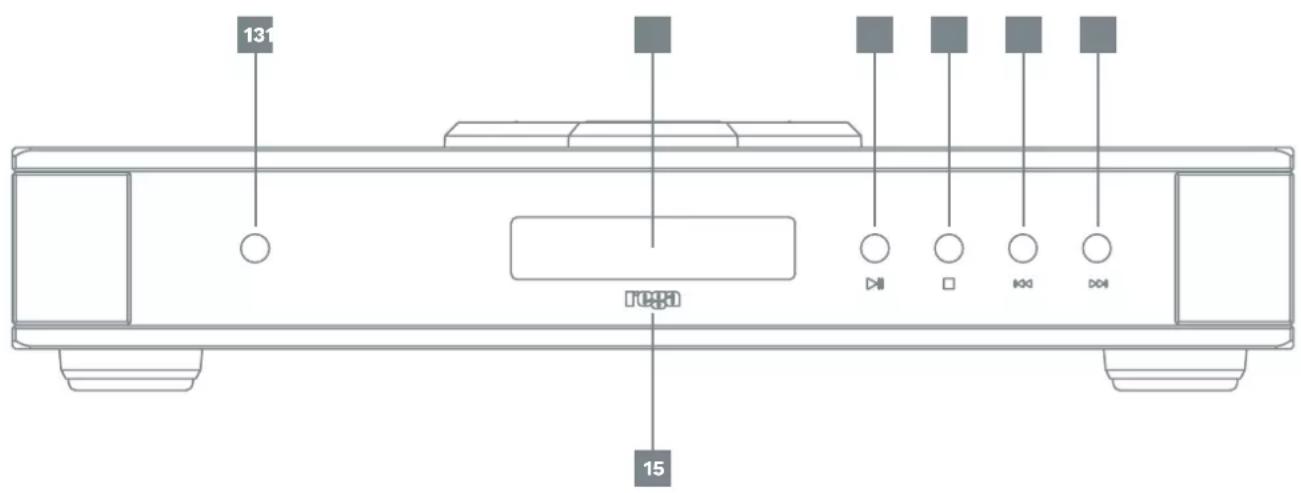
Basic control of the Saturn CD functions are possible via the buttons on the front panel. To power the unit, press the button located on the left hand side of the player directly above the REGA logo. When powered up, the Rega logo will illuminate RED. More detailed control such as MP3 functionality and switching to DAC mode is available via the supplied Solaris remote handset.

Play / Pause Button

Stop Button

Skip Track Backward

Skip Track Forward
- Power On
- Display
- Rega Logo (illuminated when powered on)
- Play / Pause Button
- Stop Button
- Skip Track Backward
- Skip Track Forward
text_image
131 1000 15REMOTE CONTROL
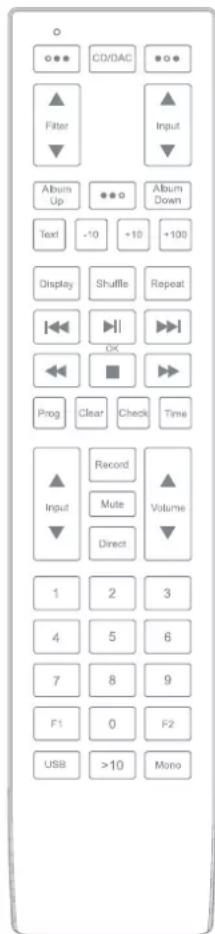
The Solaris remote control allows complete control over the Saturn CD/DAC player. The top section of the remote is dedicated to DAC functions. The button marked CD/DAC allows you to switch between the two modes available. Once in DAC mode, you can also select any of the filter options via the FILTER button and also select which input is used.
As well as all usual CD control functions, you can also control the use of MP3 or WMA CD's using the album up/down function. You can skip through multiple tracks using the -10, +10 & >100 buttons depending on how many tracks are on your disc. If an MP3 or WMA disc is loaded, it will display MP3 or WMA. CD text function operates for MP3 discs only. N.B A maximum of 999 tracks and 99 albums when playing MP3 or WMA CDs.
(Batteries included - 2 x AAA Alkaline)
RC CODE: Phillips RC5 system number 16 audio pre-amplifier.
OTHER REMOTE CD FUNCTIONS
SHUFFLE - To play tracks in a random order, press the SHUFFLE button once: RANDOM will be highlighted and the tracks will be played in a sequence generated by the player. To cancel shuffle play, press the SHUFFLE button again. Play will continue in the disc's original sequence after the current track being played has finished.
REPEAT - To repeat a disc, press REPEAT: 'REP ALL' will momentarily appear and REPEAT will be displayed. To repeat a track, press REPEAT twice: 'REP TRACK' will momentarily appear and REPEAT 1 will be displayed.
To repeat an Album (MP3 & WMA format), press REPEAT three times: 'REP ALBUM' will momentarily appear and REPEAT will be displayed. Pressing the REPEAT button will cycle between the various repeat functions.
REMAINING TRACK - You can check the remaining time of the track you are listening to by pressing the 'Time' button. Press it again to return to the normal counter.
Note: Please give the player enough time to process the information each time a new or different function is selected.
DISPLAY OFF – Pressing the 'Display' button on the remote will turn off the display. Press again to turn on.
CREATING A PROGRAM
The program function allows you to program up to 99 tracks from a disc or album in any order you specify.
- Press PROGRAM on the remote handset to create your new program list: PROGRAM will appear on the display.
- When the first program location appears you can enter the required track number. Continue this until your required playlist program is complete.
- Use the TRACK NEXT and TRACK PREVIOUS buttons to enter the track numbers. Press the OK (Green) button twice after each track is selected.
- If you enter the wrong track number it can be deleted by pressing CLEAR. This will clear the last location entered. Press PROGRAM again to finish programming.
Pressing PLAY will activate your program. The display now shows the first track that was entered into your program. If PROGRAM is pressed again you can enter further tracks from the last location in your program. This can be done either when the Saturn is playing your program or when stopped. To clear your program, make sure the Saturn has stopped, then press the clear button.
Note: The program function does not work for MP3 or WMA files.
text_image
CD/DAC Filter Album Up Text +10 +10 +100 Display Shuffle Repeat Record Mute Volume Direct 1 2 3 4 5 6 7 8 9 F1 0 F2 USB >10 MonoCONNECTIVITY EXAMPLES
(1 x USB A-B / 2 x OPTICAL / 2 x CO-AXIAL)
This page offers suggested connectivity. With so many products offering a number of options, it is important to check the manual of the product you are connecting for the optimum output connection and settings required to operate properly.
Note: This unit only accepts two-channel PCM digital audio. You cannot connect a Dolby Digital 5.1/7.1 or a DTS signal as they will not be recognised. If you wish to connect a DVD or similar device, please ensure that the sound output of your player is set to two-channel PCM.



TV; PC/Mac/Laptop/Server Internet Radio; CD/Blu-Ray/DVD Player/Streamer; Games Console; Satellite/Set-Top Box
USB SETUP & CONNECTIVITY
Connect a USB A-B type lead from the DAC USB to a USB output on your PC.
IMPORTANT: Before you can use the USB function of the Saturn you must first download the Rega USB Windows driver and install it on your PC. This driver is available for download from the Rega website, www.rega.co.uk, then go to Products, CD Players then Saturn. Follow the instruction for installation. Once installed, USB will be ready to use. The driver is not required for MacOS.
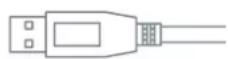
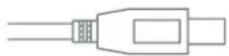
USB A - B lead (not supplied)
It is recommended to switch off any other system sounds emitted by the PC via the control panel. In some systems, the DAC will automatically become the default for your PC whilst connected. Once disconnected, the previous default should be restored. If this does not happen you can manually reset as follows:
Windows: Control Panel > Hardware and Sound > Manage Audio Devices > select 'Saturn' from list.
MacOS: System Preferences > Sound Output > Select 'Saturn'.
DAC FILTER SETTINGS
These settings are a matter of personal taste and offer subtle changes. We suggest using Filter setting 1 and trying different settings with various sources and sample rates. Each filter is selectable via the FILTER button on the Solaris remote handset. Filters will have a more prominent effect the higher the sample rate.
Filter settings 1 - 5 (@ low sample rates 32/44.1/48k)
- Linear phase half-band filter
- Minimum phase soft-knee filter
- Minimum phase half-band filter
- Linear phase apodising filter
- Minimum phase apodising filter
Filter settings 1 – 5 (@ medium & high sample rates 88.2/96 & 176.4/192k)
- Linear phase soft-knee filter
- Minimum phase soft-knee filter
- Linear phase brickwall filter
- Minimum phase apodising filter
- Linear phase apodising filter
REAR LED INDICATOR FUNCTIONS
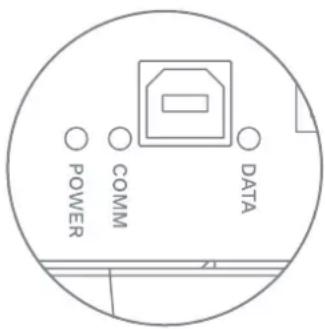
Three LEDs are located on the back panel.
POWER - The USB takes its power from the connected computer. This will stay on whilst connected even if the Saturn is off.
COMM - The USB input is active and communicating with the connected computer.
DATA - This indicates data is flowing through the USB input. For example, it will light when a track is played using a media player or when an Internet radio station is active.
text_image
POWER COMM DATACONNECTIVITÉ SUR LE PANNEAU ARRIÈRE
(Piles includes - 2 x AAA alcaline)
natural_image
Line drawings of four electronic devices: monitor, laptop, monitor with ports, and remote control (no text or symbols)
Câble USB A-B (non fourni)
text_image
12 678 910 112 USB INPUT 1 OPTICAL INPUT 2 OPTICAL INPUT 3 CO-AX INPUT 4 DAC OPTICAL OUTPUT DAC CO-AX OUTPUT DAC/CO ANALOGUS OUTPUT CD OPTICAL OUTPUT CD CO-AX OUTPUT REGA SATURN POWER IN FUSE 5/N: RINCH VAC CO-AX INPUT 5 WISHERS PWR OF CLOUTTURES, SUPPORT ON RENT OUTPUT, SUPPORT ON RE-AIR OUTPUT. MAG-IN/ENGLAND Rega Research LLC. It Common Way. Tortoise Parts & Electricals Buchman & Carline, Ears, MISTE UK CA CE ERCINDICATORI E COMANDI DEL PANNELLO FRONTALE
natural_image
Line drawings of four electronic devices: monitor, laptop, audio device, and remote control (no text or symbols)natural_image
Line drawings of five electronic devices: monitor, laptop, speaker, remote control, and wireless signal (no text or symbols)TV; pc/Mac/bærbar computer/server intemetradio; CD/Blu-Ray/DVD-afspiller/streamer; spillekonsol; satellit/set-top box
OPSÆTNING OG TILSLUTNINGSMULIGHEDER FOR USB
natural_image
Line drawings of four electronic devices: monitor, laptop, audio device, and remote control (no text or symbols)With the unit disconnected from the mains, only clean with a micro fibre cloth, (lightly damp if necessary). Do not remove any coverings; there are no user serviceable parts inside. If the unit performs erratically or emits smoke or odour, disconnect from the power supply and take it to a qualified service technician.
WARRANTY
All Rega products are covered by a lifetime warranty against manufacture defects. This warranty does not cover wear and tear. Any unauthorised modifications or failure to follow the Rega recommended guidelines may invalidate the warranty. If returning goods for inspection to your retailer, the original packaging must be used to preserve the warranty. Damage caused during transport due to incorrect packaging may invalidate your warranty. Replacement packaging is available from any Rega retailer. Your statutory rights are not affected.
SAFETY INSTRUCTIONS
Do not use this unit near liquids or expose to moisture. Do not use near sources of heat such as radiators, vents, stoves, or candles. Ensure adequate ventilation around the product, at least 10cm in all directions, and avoid placing the unit on soft surfaces such as long carpet and fabric. Do not open the product enclosure or force objects into openings in the unit. Place the unit on a fixed level surface where it will not fall or tip. The unit should only be used in moderate climates between 5°C (41°F) and 35°C (95°F). Keep packaging material and small pieces out of reach of children. Unplug the power supply if the unit is unused for extended periods of time.
FRANÇAIS
SERVICE
This symbol indicates that the electronic equipment bearing it should not be disposed of as general household waste at the end of its life. The equipment should be disposed of at a collection point for waste electrical and electronic equipment in accordance with national legislation and Directive 2012/19/EU. For more information about how to dispose of your waste electronic equipment, please contact your local authority or retailer where you purchased the product. In the UK, please return your product to the retailer.
FRANÇAIS
Temple Farm Industrial Estate
Southend-on-Sea
SS2 5TE
www.rega.co.uk
SATURN MK3 / Version 1