HIF8892D+BT - Hi-fi system ROADSTAR - Free user manual and instructions
Find the device manual for free HIF8892D+BT ROADSTAR in PDF.



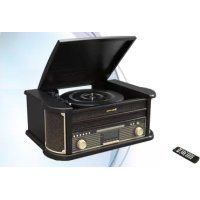
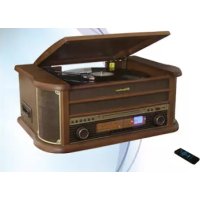
| Product Type | Hi-fi system with CD player, cassette, turntable, DAB+/FM radio, Bluetooth, USB and SD |
| Brand | Roadstar |
| Model | HIF8892D+BT |
| Power supply | 12 V DC, 1 A mains adapter (cable supplied) |
| Power | Not specified (standby consumption: 0.57 W) |
| Radio frequency bands | FM: 87.5 – 108 MHz; DAB+: 174 – 240 MHz |
| Playback media | CD, CD-R/RW, cassette, turntable 33/45/78 rpm, USB (max 32 GB), SD (max 32 GB) |
| Connectivity | Bluetooth (ID: HIF-8892D+BT), AUX input (3.5 mm jack), headphone output (3.5 mm jack) |
| Main functions | Clock, alarm, sleep timer, CD programming (20 tracks), direct USB encoding, track division |
| Dimensions (approx.) | Not specified in manual (estimated: 40 × 30 × 20 cm) |
| Weight (approx.) | Not specified (estimated: 5 kg) |
| Maintenance and cleaning | Unplug before cleaning; use a soft dry cloth; do not use solvents |
| Safety | Do not expose to water, moisture, heat; do not open the housing; repair by qualified technician |
| Spare parts and repairability | No user-serviceable parts; contact after-sales support (aftersales@roadstar.com) |
| General information | Manual available in several languages; CE compliance (directive 2014/53/EU); recycling at end of life |
Frequently Asked Questions - HIF8892D+BT ROADSTAR
User questions about HIF8892D+BT ROADSTAR
0 question about this device. Answer the ones you know or ask your own.
Ask a new question about this device
Download the instructions for your Hi-fi system in PDF format for free! Find your manual HIF8892D+BT - ROADSTAR and take your electronic device back in hand. On this page are published all the documents necessary for the use of your device. HIF8892D+BT by ROADSTAR.
USER MANUAL HIF8892D+BT ROADSTAR
- Your new unit was manufactured and assembled under strict ROADSTAR quality control. Thank you for purchasing our product for your music enjoyment. Before operating the unit, please read this instruction manual carefully. Keep it also handy for further future references.
HIF-8892D+BT
TOP
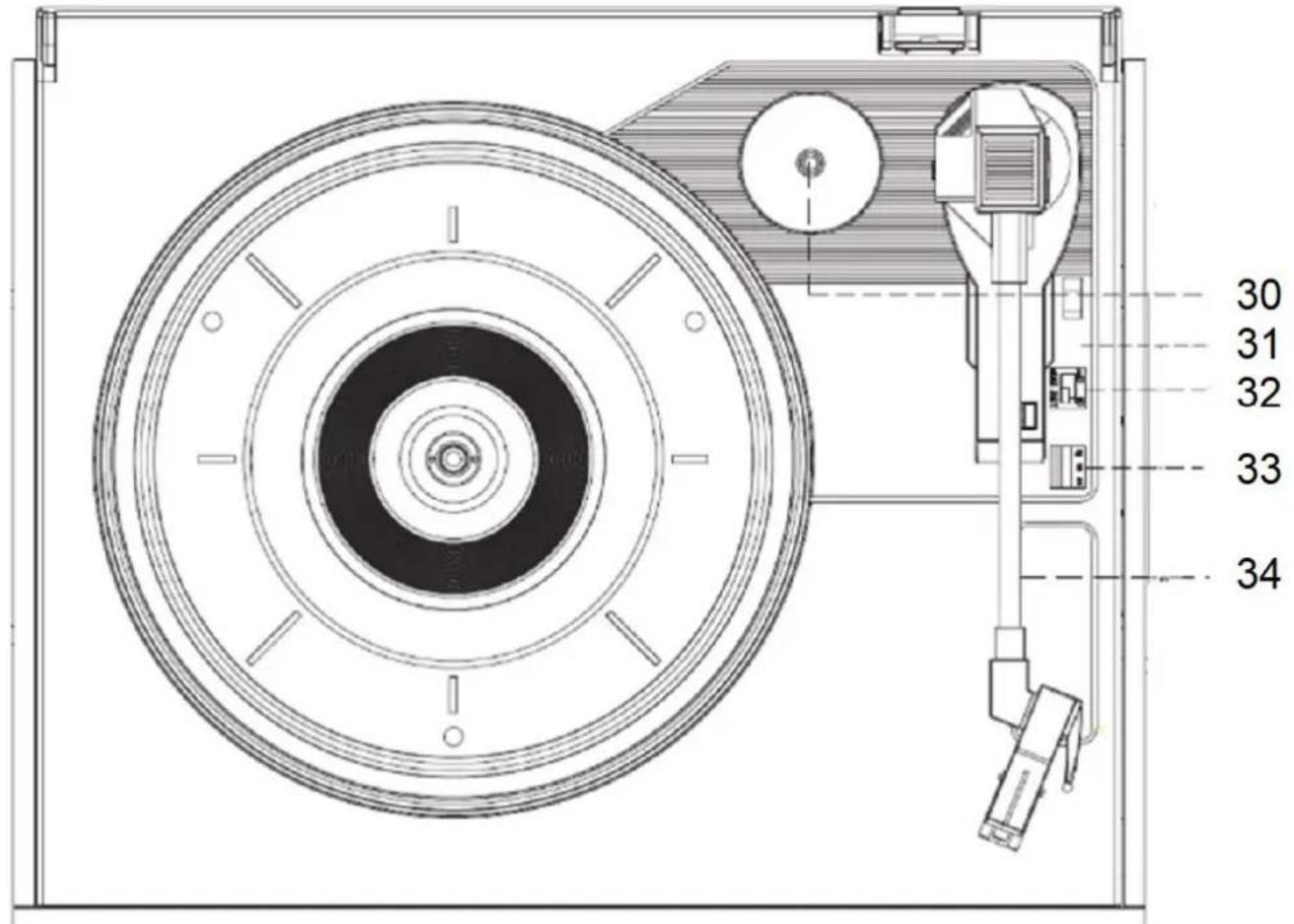
REMOTE CONTROL
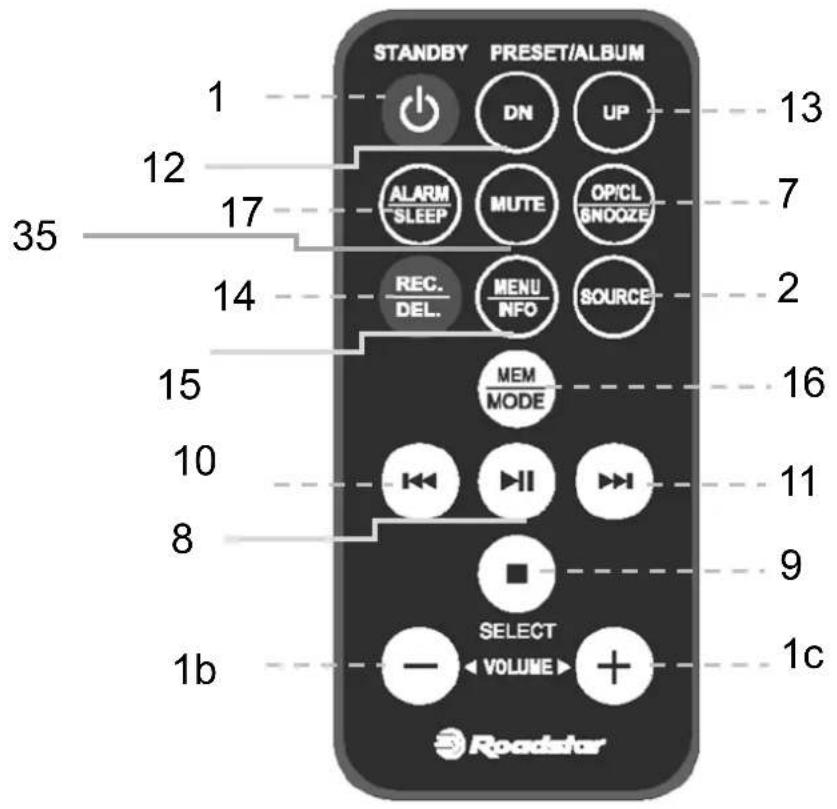
LOCATION OF CONTROLS
- POWER ON-OFF / VOLUME KNOB
- FUNCTION
- USB PORT
- SD CARD PORT
- AUX-IN
- CD DOOR
- CD OPEN-CLOSE
- PLAY / PAUSE
- STOP/SELECT
- SKIP - / REWIND
- SKIP + / FAST FORWARD
- PREVIOUS ALBUM / PRESET -
- NEXT ALBUM / PRESET +
- RECORD / DELETE
- MENU/INFO / SCAN / FM STEREO / ID3 TAG ON-OFF
- PLAY FUNCTION / PRESET SAVING / CLOCK SETTING / PROGRAM
- ALARM / SLEEP TIMER
- CASSETTE DOOR
- RECORD
- PLAY
- REWIND
- FAST FORWARD
- STOP / OPEN CASSETTE DOOR
- PAUSE
- HEADPHONES OUT
- LINE OUT
- DC CORD PLUG
- SPEAKERS OUTPUT
- ANTENNA
- 45/78 RPM DISC ADAPTOR
- LIFT LEVER
- AUTOSTOP SWITCH
- SPEED SELECTOR
- TONE ARM
- MUTE
PRECAUTION
- INSTRUCTIONS - All the safety and operating instructions should be read before the radio is operated. The manual should be retained for future reference.
- HEED WARNINGS - All warnings on the appliance and in the operating instructions should be adhered to.
- WATER AND MOISTURE - The appliance should not be used near liquids or in rooms with a high level of humidity.
- VENTILATION - The appliance should be situated so that its location or position does not interfere with its proper ventilation.
- HEAT - The appliance should be situated away from heat sources such as radiators, stoves or other appliances that produce heat.
2 English
- POWER SOURCE - The radio should be connected to power supply only of the type described in the operating instructions or as marked on the appliance.
- POWER CORD PROTECTION - Power supply cords should be routed so that they are not likely to be walked on or pinched by items placed upon/against them.
- OBJECT AND LIQUID ENTRY - Care should be taken so that objects do not fall and liquids are not spilled into the enclosure through openings.
• DAMAGE REQUIRING SERVICE
The appliance should be serviced by qualified service personnel when:
- The power supply cord or plug has been damaged;
- Objects have fallen into or liquids has been spilled into the radio;
- The appliance has been exposed to rain;
- The appliance has been dropped or the enclosure damaged;
- The appliance does not appear to operate normally.
- SERVICING - The user should not attempt to service the appliance beyond that descrive in the user operating instructions. All the servicing should be referred to qualified service personnel
Note: If the display does not function properly or no reaction to operation of any control may due to the electrostatic discharge. Switch off and disconnect the AC cord and remove all the batteries, then turn the power back on after a few seconds.
POWER SOURCES
AC POWER: To power on stereo system plug the AC/DC adaptor into the DC plug (27) at the back of the unit and into a wall AC power outlet.
Check that the rated voltage of your appliance matches your local voltage.
CLOCK SETTING
When the radio is OFF:
- Press and hold [MENU/INFO] button (15) to access to the setting;
- Press [SELECT] (9) button to enter System menu;
- Press the [SKIP -/+] buttons (10/11) to select Time menu, press [SELECT] (9) button;
- Press the [SKIP -/+] buttons (10/11) to select Time/Date, press [SELECT] (9) button;
- Press the [SKIP -/+] buttons (10/11) to select HH, press [SELECT] (9) to enter;
- Press the [SKIP -/+] buttons (10/11) to select MM, press [SELECT] (9) to enter;
- Press the [SKIP-/+] buttons (10/11) to adjust day, press [SELECT] (9) to enter;
- Press the [SKIP-/+]buttons (10/11) to adjust month, press [SELECT] (9) to enter;
- Press the [SKIP -/+] buttons (10/11) to adjust year;
You can choose Auto Update, Set 12/24 hour mode, and date format in menu clock.
SETTING TIMER
When the radio is OFF:
- Press [TIMER] button (17);
- You can choose Alarm 1 or Alarm 2, Press the [SKIP -/+] buttons (10/11) to select 1 or 2, press [SELECT] (9) to enter;
-
Press the [SKIP -/+] buttons (10/11) to select On or OFF Alarm, press [SELECT] (9) to enter;
-
Press the [SKIP -/+] buttons (10/11) to select HH, press [SELECT] (9) to enter;
- Press the [SKIP -/+] buttons (10/11) to select MM, press [SELECT] (9) to enter;
- Press the [SKIP -/+] buttons (10/11) to select Duration time, press [SELECT] (9) to enter;
- Press the [SKIP -/+] buttons (10/11) to select Source, press [SELECT] (9) to enter.
- In DAB/FM you can choose Last listened radio or PRESET radio, Press the [SKIP -/+] buttons (10/11) to select your choice and press [SELECT] (9) again;
- Press the [SKIP -/+] buttons (10/11) to select Daily, Weekly etc, press [SELECT] (9) to enter;
- Press the [SKIP -/+] buttons (10/11) to select Volume, press [SELECT] (9) to enter.Message "Alarm saved" will be display.
- To delete TIMER, Press [TIMER] button (17) choose Alarm 1 or Alarm 2, Press the [SKIP -/+] buttons (10/11) to select 1 or 2, press [SKIP -/+] buttons (10/11) and select Off, after press [SELECT] (9) to enter;
SLEEP TIMER
The sleep timer switches the radio off automatically after an adjustable time.
When the radio is ON press repeatedly the [SLEEP] (17) to choose the desired timer.
Note: To remove the sleep timer select "Sleep OFF".
TO USE THE RADIO
- Press the [POWER] button (1) to power on the unit;
- Select the desired audio source by pressing the [FUNCTION] button (2) repeatedly;
- (Please see detailed instructions for each Source in the following chapters);
- Adjust the volume with the [VOLUME KNOB] (1) to the desired level;
- Press the [POWER] button (1) to turn OFF the unit.
Note: When no sound is produced, the unit will switch OFF automatically after 10 minutes.
TURNTABLE OPERATION
- Select "PHONO" mode by pressing the [FUNCTION] button (2) repeatedly;
- Place a record on the turntable. Place the EP adapter over the central spindle when playing 45 rpm records;
- Set the [SPEED SELECTOR] (33) to 33, 45 or 78 rpm according to the record;
- Release the tonearm clamp, and remove the stylus protector;
- Lift up the [TONEARM] (34) with the [LIFT LEVER] (31);
- Move the [TONEARM] (34) to the beginning of the record;
- Lift down the [TONEARM] (34) with the [LIFT LEVER] (31);
- When the record is finished the plate will automatically stop turning. To stop manually, lift up the tonearm from the record and return it to the rest support.
Note: Do not stop or turn the plate manually.
When the unit is moved or transported:
- Lock the [TONEARM] (34) with the tonearm clamp.
- Place the protective cap on the stylus (even when not in use).
RADIO OPERATION
- Select "FM" mode by pressing the [FUNCTION] button (2) repeatedly;
- Press the [SKIP -/+] buttons (10/11) to manually select the frequency or press and hold (2 seconds) to scan the next/previous available station.
Note: For a better reception reorient the antenna (29).
STORE RADIO STATIONS AUTOMATICALLY:
Press and hold the [SCAN] button (15) and the radio will automatically scan the radio. During the scanning process, the radio will save the scanned stations sequentially into the memory.
PRESET
There are 30 presets available for FM.
- Set the desired radio station frequency as explained previously;
- Press the [PRESET] button (16);
- Choose the number of preset using the [PRESET -/+] buttons (12/13);
- Confirm with the [PRESET] button (16).
Press the [PRESET -/+] buttons (12/13) to recall a preset station.
FM RADIO SETTING
During FM radio mode, press and hold the menu button, Icd will show "Scan Setting", press [SELECT] to confirm, then press the [SKIP -/+] buttons (10/11) repeatedly to select below:
Strong stations/All stations: you can choose Strong o all stations, [SKIP -/+] buttons (10/11) to select and press [SELECT] (9) to confirm.
Manual tune: Press repeatedly [SKIP -/+] buttons (10/11) to select radio frequency manually.
STORE a radio station: Select with the [SKIP -/+] buttons (10/11) preferred station, long press [MODE/MEM] (16) button and select with [SKIP -/+] buttons (10/11) the location to memorize. press [SELECT] (9) to confirm.
Full scan: unit will automatically scan those available dab stations.
Manual tune: , then press pressing [SKIP -/+] (10/11) buttons to select dab radio frequency manually, press [SELECT] (9) button again to confirm if desired frequency is found.
Press [MENU/INFO] (15) button you can choose Audio Setting: you can select MONO or Stereo mode.
DAB RADIO SETTING
During DAB radio mode, press and hold the menu button, lcd will show "full scan", then press [SKIP -/+] (11/10) repeatedly to select below:
Full scan: press [SCAN] button (8) to confirm, unit will automatically scan those available dab stations.
Manual tune: press select button to confirm, then press pressing [SKIP -/+] button (11 / 10) to select dab radio frequency manually, press select button again to confirm if desired frequency is found.
Press and hold [MENU/MODE] (15) button, you can choose with [SKIP -/+] (10/11) buttons and confirm your selection with [SELECT] (9) button:
Full scan: unit will automatically scan those available dab stations.
Manual tune: , then press pressing [SKIP -/+] (10/11) buttons to select dab radio frequency manually, press [SELECT] (9) button again to confirm if desired frequency is found.
DRC: Press [SKIP -/+] (10/11) buttons repeatedly to select "off", "low" and "hgih", then press [SELECT] (9) button to confirm. the selected option will show "* at the right side of lcd.
PRUNE: Press [SKIP -/+] (10/11) buttons repeatedly to select "yes" and "no", press [SELECT] (9) button to confirm. this is used to cancel all invalid stations after full scan.
CD-MP3 OPERATION
- Select "CD" mode by pressing the [FUNCTION] button (2) repeatedly;
- Press [OPEN/CLOSE] (7) to open the [CD DOOR] (6) and place a CD with the label up in the CD compartment.
- Close the [CD DOOR] (6). Focus search is performed and playback will start automatically from the first track.
PROGRAMMING
Up to 99 tacks (MP3, 20 in CD) can be programmed and play in any order.
- Stop the playback by pressing [STOP] (9);
- Press [MEM/MODE] (16), the display will show the number of the track on the left side and the number of program on the right side.
- Select desired track by using [SKIP -/+] buttons (10/11);
- Press [MEM/MODE] (16) to confirm desired track into the program memory;
- Repeat step 3 and 4 to enter additional tracks into the program memory.
- When all the desired tracks have been programmed, press [PLAY] (8) to play the disc in the order you have programmed.
Note: Press [STOP] (9) twice to terminate programmed play.
TAPE OPERATION
- Select "TAPE" mode by pressing the [FUNCTION] button (2) repeatedly;
- Press [EJECT] (23) to open the [CASSETTE SLOT] (18) and insert your tape;
- Close the [CASSETTE SLOT] (18);
- Press [PLAY] (20) to start playing tape.
- Press [PAUSE] (24) when you want to stop playing tape operation temporarily, press again to resume tape operation.
- Press [STOP/EJECT] (23) when finished, press again to open the door.
- Press [F.FWD] (22) or [RWD] (21) to start rapid tape winding either forward or reverse direction.
CASSETTE RECORDING
- Insert the cassette into the [CASSETTE SLOT] (18);
- Perform normal playback of the source you want to record;
- Press the [RECORD] (19) and [PLAY] (20) buttons together to start recording;
- Once the record is finished, press the [STOP] button (23) to stop recording.
AUX IN OPERATION
- Select "AUX" mode by pressing the [FUNCTION] button (2) repeatedly;
- Use one male to male 3.5mm jack cable (not included) to connect any external audio device to the [AUX-IN SOCKET] (5).
Note: Music control (play, pause, etc) must be done from your external device.
USB OPERATION
- Select "USB" mode by pressing the [FUNCTION] button (2) repeatedly;
- Plug an USB stick into the [USB PORT] (3);
- Playback will start automatically from the first track.
Note: Some mp3 player may not be able to play via the usb socket. this is not a malfunction of the system.
Note: To avoid damage to USB memory, remove it only when the radio is OFF.
SD OPERATION
- Select "SD" mode by pressing the [FUNCTION] button (2) repeatedly;
- Plug a SD card into the [SD PORT] (4);
- Playback will start automatically from the first track.
Note: To avoid damage to the memory, remove it only when the radio is OFF.
BLUETOOTH OPERATION
- Select "BT" mode by pressing the [FUNCTION] button (2) repeatedly;
- Connect your Bluetooth portable device to the ID Bluetooth tagged as "HIF-8892D+BT";
- You can now transfer the music to the HIF-8892D+BT.
Note: Music control (play, pause, etc) must be done from your external device.
REPEAT - RANDOM MODE
During playback, press repeatedly the [MEM/MODE] (16) to select:
- REP-ONE: The current track is played repeatedly.
• REP-ALB: The current ALB is played repeatedly.
• REP-ALL: All tracks are played repeatedly. - RANDOM: Tracks are played randomly.
DIRECT USB ENCODING
Remark:
- Recording speed is 1:1.
- No song title will be recorded during encoding mode.
• To avoid damage to USB memory, remove it only when the radio is turned off.
ENCODE FROM FM, DAB, TURNTABLE, TAPE, BLUETOOTH AND AUX:
- Plug the USB stick into the [USB PORT] (3);
- Perform normal playback of the source you want to encode & record;
- Press the [RECORD] button (14) to start encoding. The display will show "REC";
- Once the record is finished, press the [STOP] button (9) to stop recording.
ENCODE FROM CD:
- Plug the USB stick into the [USB PORT] (3);
- Perform normal playback of the CD you want to encode & record;
- After focus search is completed, press the [RECORD] button (14);
- Press repeatedly the [SKIP -/+] button (10/11) to select the desired encoding option:
• REC-ONE: Select to record only the current track;
• REC-FOLDER: Select to record the whole ALB;
• REC-ALL: Select to record all the tracks of the CD.
- Press the [RECORD] button (14) to confirm;
- The playback will stop and restart automatically and on the display "REC" will flash. Encoding is performing now;
- Press the [STOP] button (9) to finish recording.
Note: After completing of encoding, unit will stop playback and encoding automatically.
SPLIT TRACK FUNCTION FOR USB/SD RECORDING FOR TURNTABLE/CASSETTE/AUX IN
Manual split procedure: during USB Recording, USB/SD icon will flash on the display. If a new track is required, press MODE button on the unit, display Shows "TS", then the uniw stop recording momentarily and resume again. A new file has been created. Auto split procedure: before USB/SD recording, press MODE button on the unit, display shows "T-ON" which means the auto split function has activated. Then start USB/SD recording, Unit detect silent part between each track and create new file To disable this function, press MODE button, display shows "T-OF".
NOTE Auto split: several seconds of the beginning of the next track may not be recorded, as the unit may take a few seconds to create a new file on the USB/SD: and it can additionally be the case that some music producers intentionally add silent sections within one track. As a result, this will very likely make the unit consider this silent part the break between tracks and create a new track on the recording.
NOTE for auto split: during USB/SD recording from Turntable/cassette, when the unithas detected any particular silent part, the Turntable/cassette player will stop momentarily. The turntable/cassette player will resume operation once the USB/SD device has begun creating a new file to be recorded.
DELETE TRACKS FROM USB
- Perform normal playback of the track you want to delete;
- During playback of the track you want to delete, press and hold [DELETE] (14).
- Press repeatedly the [SKIP -/+] button (10/11) to select the desired encoding option:
• DEL-ONE: Select to record only the current track;
• DEL-FOLDER: Select to record the whole ALB;
• DEL-ALL: Select to record all the tracks of the CD.
- Press the [DELETE] button (14) to confirm.
SYSTEM SETTINGS
Long press [MENU] (15) button, select desired menu with [SKIP -/+] button (10/11) and confirm with [SELECT] (9) button.
Alarm: setting alarm function. Time: setting time
Backlight: Set the time of full display time and the brightness level.
Language: Set a different language
Factory reset: Restore to factory settings. Software Upgrade: not in use
SW version: shows the current software version
TECNICAL SPECIFICATIONS
Power Supply: DC 12V= 1A
Power consumption in stand by mode 0,57W
Stand by time 10 min.
Radio Frequency Coverage
FM: 87.5 - 108 MHz.
DAB+ 174 - 240 MHz
BT maximum radiated Power < 4dBm (2,5 mW)
Speaker
Output Power: 2 x 4 Watt RMS.
General
Headphones Out: 3.5mm jack plug.
USB Port Version: USB 3.0, max 32GB.
SD Port Version: max. 32GB.
Specifications and design are subject to possible modifications without notice due to improvement.
WARNINGS
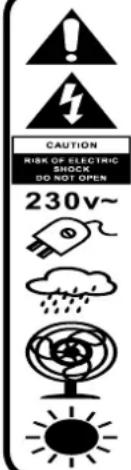
The exclamation point within the triangle is a warning sign alerting the user of important instructions accompanying the product.
The lightening flash with arrowhead symbol within the triangle is a warning sign alerting the user of “dangerous voltage” inside the unit.
To reduce the risk of electric shock, do not remove the cover. No user serviceable parts inside the unit. Refer all servicing to qualified personnel.
This unit operates on 230V \~ 50Hz. If the unit is not used for a long period of time, remove the plug from the AC mains.
Ensure all connections are properly made before operating the unit.
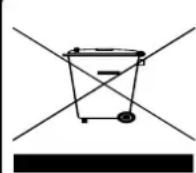
CORRECT DISPOSAL OF THIS PRODUCT
(Waste Electrical & Electronic Equipment)
This marking shown on the product or its literature, indicates that it should not be disposed with other household wastes at the end of its working life. To prevent possible harm to the environment or human health from uncontrolled waste disposal, please separate this from other types of wastes and recycle it responsibly to promote the sustainable reuse of material resources. Household users should contact the retailer where they purchased this product, or their local government office, for details of where and how they can take this item for environmentally safe recycling. Business users should contact their supplier and check the terms and conditions of the purchase contract. This product should not be mixed with other commercial wastes for disposal.
ORT DER BEDIENELEMENTE
- POWER ON-OFF/ VOLUME KNOB (POWER EIN-AUS / LAUTSTÄRKEREGLER)
- FUNCTION BUTTON (FUNCTION)
- USB PORT (USB BUCHSE)
- SD CARD PORT (SD-KARTE BUCHSE)
- AUX-IN (AUX BUCHSE)
- CD DOOR (CD LAUFWERK)
- CD OPEN-CLOSE (CD FACH ÖFFNEN / SCHLIESSEN)
- PLAY / PAUSE
- STOP/SELECT
- SKIP - / REWIND
- SKIP + / FAST FORWARD
- PREVIOUS ALBUM / PRESET - (VOREINSTELLUNG -)
- NEXT ALBUM / PRESET + (VOREINSTELLUNG +)
- RECORD / DELETE (AUFNAHME / LÖSCHEN)
- SCAN / FM STEREO / ID3 TAG ON-OFF (AUTOMATISCHE FUNKSUCHE)
- PLAY MODE / PRESET SAVING / CLOCK SETTING / PROGRAM (WIEDERGABEMODUS / VOREINSTELLUNG / UHREINSTELLUNG)
- ALARM / SLEEP TIMER
- CASSETTE DOOR (KASSETTE LAUFWERK)
- RECORD (KASSETTE AUFNAHME)
- PLAY
- REWIND
- FAST FORWARD
- STOP / OPEN CASSETTE DOOR (KASSETTE AUSWURF)
- PAUSE
- HEADPHONES OUT (KOPFHÖRER AUSGANG)
- LINE OUT AUDIO AUSGANG
- DC CORD PLUG (DC BUCHSE)
- SPEAKERS OUTPUT (LAUTSPRECHER BUCHSE)
- ANTENNA (ANTENNE)
- 45/78 RPM DISC ADAPTOR
- LIFT LEVER (LIFTHEBEL)
- AUTOSTOP SWITCH (AUTOSTOP SCHALTER)
- SPEED SELECTOR (GESCHWINDIGKEITSWAHLSCHALTER)
- TONE ARM (TON ARM)
- MUTE
SICHERHEITSHINWEISE
BT maximum radiated Power < 4dBm (2,5 mW)
Lautsprecher
natural_image
Simple line drawing of a trash bin with two crossed lines (no text or symbols)KORREKTE ENTSORGUNG DIESES PRODUKTS (Elektromüll)
FONCTIONNEMENT AUX-IN
BT maximum radiated Power < 4dBm (2,5 mW)
Haut-parleur
Puissance: 2 x 4 Watt RMS
Général
Aux-In: Prise 3.5mm jack.
Sortie audio: Prises RCA (L+R).
natural_image
Simple line drawing of a trash bin with diagonal lines crossing it, no text or symbols present.COMMENT ÉLIMINER CE PRODUIT
BT maximum radiated Power < 4dBm (2,5 mW)
Altoparlante
Potenza d'uscita: 2 x 4 Watt RMS.
Generali
Ingresso Aux-In: 3.5mm jack.
natural_image
Simple line drawing of a trash bin with diagonal lines crossing it, no text or symbols present.CORRETTO SMALTIMENTO DEL PRODOTTO
BT maximum radiated Power < 4dBm (2,5 mW)
Altavoz
natural_image
Simple line drawing of a trash bin with two crossed lines and a black rectangular base (no text or symbols)BT maximum radiated Power < 4dBm (2,5 mW)
Alto-falante
natural_image
Simple line drawing of a trash bin with two crossed lines and a black rectangular bar below (no text or symbols)ELIMINAÇÃO CORRECTA DESTE PRODUTO (Resíduo de Equipamentas Eléctricos e Electrónicos)
VAN FM, PLATENSPELER, CASSETTE, BLUETOOTH EN AUX:
BT maximum radiated Power < 4dBm (2,5 mW)
Luidspreker
natural_image
Simple line drawing of a trash bin with two crossed lines and a blank bottom bar (no text or symbols)CORRECTE AFVALVERWERKING VAN HET PRODUCT (elektrisch en elektronisch afval)
BT maximum radiated Power < 4dBm (2,5 mW)
Reproduktorů
natural_image
Simple line drawing of a trash bin with two crossed lines (no text or symbols)BT maximum radiated Power < 4dBm (2,5 mW)
Reproduktorov
natural_image
Simple line drawing of a trash bin with two crossed lines (no text or symbols)
KODOWANIE Z FM, DAB, TURNTABLE, TAPE, BLUETOOTH I AUX:
Hereby, Roadstar Management SA declares that the radio equipment type HIF-8892D+BT is in compliance with Directive 2014/53/EU. The full text of the EU declaration of conformity is available at the following internet address: http://roadstar.com/images/ce/HIF-8892D+BT.pdf or by scanning the following QR Code.
| TEST REPORT - Energy Efficiency Regulations Energy Efficiency of External Power Suppliers | |||
| Nameplate Information | Value and precision | Unit | Verdict (PASS/FAIL) |
| Manufacturer's name or trade mark, commercial registration number and address | DONGGUAN OBELIEVE ELECTRONIC CO.,LTDHuazhaoxin Industrial Park B-4/F, Golden Phoenix Industrial Zone,Fenggan Town, Dongguan, GuangDong Province, People's Republic of China. | -- -- | |
| Model identifier | 0BL-1201000E | -- -- | |
| Input voltage | AC 100-240V | V -- | |
| Input AC frequency | 50/60Hz | Hz -- | |
| Output voltage | 12 | V -- | |
| Output current | 1.0 | A -- | |
| Output power | 12 | W -- | |
| Average active efficiency | 83.64 | % -- | |
| Efficiency at load 10% | 74.34 | % -- | |
| No-load power consumption | 0.07 | W -- | |
Roadstar®
INTERNATIONAL WARRANTY - INTERNATIONALE GARANTIE GARANTIE INTERNATIONALE - GARANZIA INTERNAZIONALE GARANTIA INTERNACIONAL - GARANTIA INTERNACIONAL ΔΙΕΘΝΗΣ ΕΓΓΥΗΣΗ
Serial No. Serien Nr. No. de série No. di serie No. de serie No. de série APIOMOΣ ΣΕΙΡΑ
Type of set Geräte Type d'appareil Tipo d'apparecchio Tipo de aparato Tipo de aparelho Túpos cuokeuñs
Purchase date Kaufdatum Date d'achat Data d'acquisto Fecha de compra Data de compra Ημερομηνία ογοράς
Dealer's Stamp / Händlerstampel / Timbre du négociant / Timbro del negoziante / Sello del establecimento vendedor / Carimbo da loja de Venda / Σφραγίδα του καταστήματος

natural_image
Abstract logo design featuring stylized 'R' letters within a circular frame (no text or symbols)Roadstar
is a registered Trademark of Roadstar S.A. - Switzerland. All rights reser
FRANÇAIS
Conditions Générales de Garantie Roadstar
Roadstar Warranty Terms and Conditions
Roadstar- by means of its sales organisation, representative or distributor- guarantees its products against manufacturing defects in material and/or workmanship throughout the period of warranty. Should the product fail to work or shows manufacturing defect within the warranty period, Roadstar- by means of its sales organisation, representative or distributor- will take the necessary actions to restore the perfect functioning of the product. To rep- to replace is at discretion of Roadstar or it's representative or distributor. The warranty period is in accordance with directive 99/44/CE of the European Union. For all non EU
members, please refer to the local law of each country. This warranty does not cover normal wear and tear of the product and/or its parts, any damage, failure, or loss caused by accident, misuse, and any other failure not directly related to a defect of the product. This warranty does not void consumer's rights in accordance with EU Directive99/44/CE. For further information please visit the website www.roadstar.com, or write to aftersales@roadstar.com.
DEUTSCH
Allgemeine "Roadstar" Garantiebedingungen
Roadstar Management SA, via Passeggiata 7 CH 6883 Novazzano (Switzerland)
- HIF-8892D+BT
- LOCATION OF CONTROLS
- PRECAUTION
- English
- POWER SOURCES
- CLOCK SETTING
- When the radio is OFF:
- SETTING TIMER
- SLEEP TIMER
- TO USE THE RADIO
- TURNTABLE OPERATION
- RADIO OPERATION
- STORE RADIO STATIONS AUTOMATICALLY:
- PRESET
- FM RADIO SETTING
- DAB RADIO SETTING
- CD-MP3 OPERATION
- PROGRAMMING
- TAPE OPERATION
- CASSETTE RECORDING
- AUX IN OPERATION
- USB OPERATION
- SD OPERATION
- BLUETOOTH OPERATION
- REPEAT - RANDOM MODE
- DIRECT USB ENCODING
- Remark:
- ENCODE FROM FM, DAB, TURNTABLE, TAPE, BLUETOOTH AND AUX:
- ENCODE FROM CD:
- SPLIT TRACK FUNCTION FOR USB/SD RECORDING FOR TURNTABLE/CASSETTE/AUX IN
- DELETE TRACKS FROM USB
- SYSTEM SETTINGS
- TECNICAL SPECIFICATIONS
- WARNINGS
- ORT DER BEDIENELEMENTE
- SICHERHEITSHINWEISE
- Lautsprecher
- KORREKTE ENTSORGUNG DIESES PRODUKTS (Elektromüll)
- FONCTIONNEMENT AUX-IN
- Haut-parleur
- Général
- COMMENT ÉLIMINER CE PRODUIT
- Altoparlante
- Generali
- CORRETTO SMALTIMENTO DEL PRODOTTO
- Altavoz
- Alto-falante
- ELIMINAÇÃO CORRECTA DESTE PRODUTO (Resíduo de Equipamentas Eléctricos e Electrónicos)
- VAN FM, PLATENSPELER, CASSETTE, BLUETOOTH EN AUX:
- Luidspreker
- CORRECTE AFVALVERWERKING VAN HET PRODUCT (elektrisch en elektronisch afval)
- Reproduktorů
- Roadstar®
- INTERNATIONAL WARRANTY - INTERNATIONALE GARANTIE GARANTIE INTERNATIONALE - GARANZIA INTERNAZIONALE GARANTIA INTERNACIONAL - GARANTIA INTERNACIONAL ΔΙΕΘΝΗΣ ΕΓΓΥΗΣΗ
- Roadstar
- FRANÇAIS
- Conditions Générales de Garantie Roadstar
- Roadstar Warranty Terms and Conditions
- DEUTSCH
- Allgemeine "Roadstar" Garantiebedingungen
Brand : ROADSTAR
Model : HIF8892D+BT
Category : Hi-fi system