
Quantum Pro - Cooker FALMEC - Free user manual and instructions
Find the device manual for free Quantum Pro FALMEC in PDF.
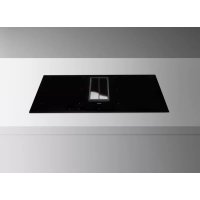



| Brand | Falmec |
| Model | Quantum Pro |
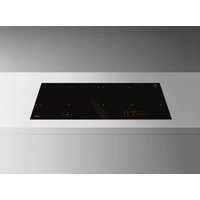
| Product type | Induction hob with integrated hood |
| Number of cooking zones | 4 |
| Heating technology | Induction |
| Usable surface per zone | 24.6 × 18.9 cm |
| Total power | 2.8 - 7.4 kW (adjustable) |
| Energy consumption (hob) | 183.9 Wh/kg |
| Supply voltage | 220-240 V~ / 380-415 V~ 50/60 Hz |
| Recommended cable cross-section | 3 x 4 mm² (220-240 V) or 4 x 1.5 mm² (380-415 V) |
| Main functions | Booster, Keep Warm, Pause, Timer, Bridge, Automatic heating, Lock, Child lock, Recall |
| Hood speeds | 9 speeds + boost (P) |
| Hood timer | Automatic shutdown after 15 min |
| Hood filters | Metal anti-grease filters (washable) + charcoal/zeolite filter (optional) |
| Hood maintenance alarm | Every 2000 hours (charcoal filter) |
| Safety | Pan detection, automatic shutdown in case of overheating, control lock, child lock, emergency stop |
| Surface material | Ceramic glass |
| Cleaning | Special ceramic glass cleaner, metal scraper, water and vinegar for limescale |
| Hood maintenance | Wash metal filters every month (30 h); clean oil tray monthly |
| Spare parts | Metal filters, charcoal filters, scraper, cleaning cloths |
| Installation | Reserved for qualified personnel; do not install above a refrigerator or washing machine |
| Electrical standards | Mandatory earth connection, compliant with current standards |
| Warranty and support | Original spare parts, approved technical assistance center |
Frequently Asked Questions - Quantum Pro FALMEC
User questions about Quantum Pro FALMEC
0 question about this device. Answer the ones you know or ask your own.
Ask a new question about this device
Download the instructions for your Cooker in PDF format for free! Find your manual Quantum Pro - FALMEC and take your electronic device back in hand. On this page are published all the documents necessary for the use of your device. Quantum Pro by FALMEC.
USER MANUAL Quantum Pro FALMEC
INSTRUCTIONS BOOKLET
INSTRUCTIONS BOOKLET
INSTRUCTIONS BOOKLET EN
EN - Motor and hob electrical connections (1).
- Copper pans
- Aluminum pans
- Ceramic pans, Terracotta pans
- Stainless steel pans
These warnings have been drawn up for your personal safety and that of others. You are therefore kindly asked to read the booklet carefully in its entirety before using or cleaning the equipment.
The Manufacturer declines all responsibility for any damage caused directly, or indirectly, to persons, things and pets as a consequence of failing to comply with the safety warnings indicated in this booklet.
It is imperative that this instructions booklet is kept together with the equipment for any future consultation.
If the equipment is sold or transferred to another person, make sure that the booklet is also supplied so that the new user can be made aware of the hood's operation and relative warnings.
Insist on original spare parts.

Intended use
- This cooker is intended to be used in domestic environments to prepare and keep dishes warm.
- Do not install the cooker outdoors and do not expose it to outdoor environment (rain, wind, etc.).
- It is forbidden to use the cooktop on moving equipment.
- Any other use is not admitted.
- Do not use the cooker before installing it.
- Never open the case of the appliance.
- Falmec assures compliance with safety standards only with original spare parts.
- The appliance is not intended for use with an external timer or remote control.
- The equipment can be used by children over the age of 8 and by persons with reduced physical, sensory or mental abilities, or with no experience or knowledge, as long as they do so under supervision or after having received relative instructions regarding safe use of the equipment and understanding of the dangers connected to it. Children are not to play with the equipment. Cleaning and maintenance by the user must not be carried out by children without supervision.
- Do not leave the cooktop unattended while it is working.
The equipment is solely intended to be used to extract fumes generated from cooking food in non-professional domestic kitchens: any other use is improper. Improper use can cause damage
to persons, things, pets and exempts the Manufacturer from any liability.

Danger of burns
- Use the control lock to avoid that unauthorized people can switch on the appliance by themselves.
- Place handles of frying pans and saucepans in a way that children cannot touch them.
- Switch off the cooking areas after use.
- Do not place any metal object on cooking areas that are on.

Technical safety
- Installation operations are to be carried out by skilled and qualified installers in accordance with the instructions in this booklet and in compliance with the regulations in force. If the power cable or other components are damaged, the cooktop shall NOT be used: disconnect the cooker from the power supply and contact the Dealer or an authorized Servicing Department for repairs.
- Do not modify the electrical, mechanical, or functional structure of the equipment.
- Do not personally try to carry out repairs or replacements. Interventions carried out by incompetent and unauthorized persons can cause serious damage to the unit or physical and personal harm, not covered by the Manufacturer's warranty.
- Before installing the cooker, check the integrity and function of each part. Should anomalies be noted, do not proceed with installation and contact the Dealer.

Electrical safety
The electrical system to which the device is to be connected must be in accordance with local standards and supplied with earthed connection in compliance with safety regulations in the country of use. It must also comply with European standards regarding radio antistatic properties.
The connection data (voltage and frequency) shown on the data plate of the cooker must match those of the electric network.
Compare these data before connection.
In case of doubts, refer to an electrician.
Before installing the hood, check that the electrical mains power supply corresponds with what is reported on the identification plate located inside the hood. The socket used to connect the installed equipment to the electrical power supply must be within reach: otherwise, install a mains switch to disconnect the hood when required.
Any changes to the electrical system must be carried out by a qualified electrician.
Do not try to solve the problem yourself in the event of equipment malfunction, but contact the Dealer or an authorized Servicing Department for repairs.
When installing the device, disconnect the equipment by removing the plug or switching off the main switch.
FUMES DISCHARGE SAFETY

Do not connect the equipment to discharge pipes of fumes produced from combustion (for example boilers, fireplaces, etc.).
Before installing the hood, ensure that all standards in force regarding discharge of air out of the room have been complied with.
USE WARNINGS

- Before powering the appliance for the first time, remove any protective films and adhesives.
While using, saucepans and kitchenware can cause noise that can depend on: - a high power level. - different materials of the bottom of saucepans. - Never use water to put out fire. Deactivate the cooking area. Choke flames with a cover, a fireproofing blanket or something similar. - Do not keep inflammable objects in the drawers below the cooker. The cutlery tray shall be made of fire-resistant material. - Do not keep metal objects directly below the cooker. - Do not heat empty saucepans or frying pans and always check that saucepans have a minimum quantity of liquids inside. - Possibly use covers always to avoid heat dispersion. Cook with little water. - After starting grilling or cooking dishes, bring the power level to a lower one. - Switch off the cooker after use. - Continuously check the cooking in case of greases and oils used, as they can easily catch fire. - Heat greases and oils at maximum for one minute and never use the Booster function. - Avoid that sugar, synthetic materials, aluminium, films are in contact with the hot areas. During cooling, those substances can cause cracks or other alterations on the pyroceram surface: switch off the device and immediately remove from the cooking area that is still hot. - Pay attention not to burn yourself during and after using the device. Make sure that no fixed or mobile power cable of the device is in contact with the glass or a hot frying pan. - Do not use the cooker to heat pots. - Do not apply any type of cover on the cooktop. - Electrical cables are not to be in contact with the cooker. - It is recommended to protect hands from heat using pot holders. Only use dry gloves or pot holders. - Only use cookware with smooth and magnetic bottom suitable for induction hobs. Always use a saucepan or frying pan on each cooking area, even with the BRIDGE function.
- Do not place hot saucepans on the sensor keys or the LEDs, as this could cause damage to the electronic components underneath.
- Keep controls and lamps always clean.
- When moving saucepans, make sure to lift them rather than slide them over the surface.
- Saucepans and cooker are to be perfectly cleaned before being in contact.
- Do not drop objects on the hob!

Only use saucepans with magnetic bottom. Other materials are not admitted.
Use saucepans of appropriate size to the desired cooking area.
SAUCEPAN SELECTION
Saucepans suitable for induction hobs:
The bottoms can be completely ferrous, non-ferrous or a blend of both materials.
Only saucepans with a fully magnetic, sufficiently wide and perfectly flat bottom are suitable for use on induction hobs.
The bottom is magnetic if a magnet sticks to every point on the bottom of the saucepan.
The minimum diameter of the bottom of the pan may vary depending on the cooking zone (see information below); the minimum diameter means the part of the pan that rests on the hob.
In pans with an all-ferrous flat bottom, the heat spreads evenly and the flat bottom prevents damage to the surface of the hob.
Suitable saucepans (examples):
- Thick-bottomed enamelled steel saucepans
- Cast iron saucepans with enamelled bottom
- Multi-ply stainless steel saucepans Ferritic stainless steel saucepans
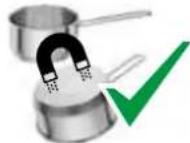
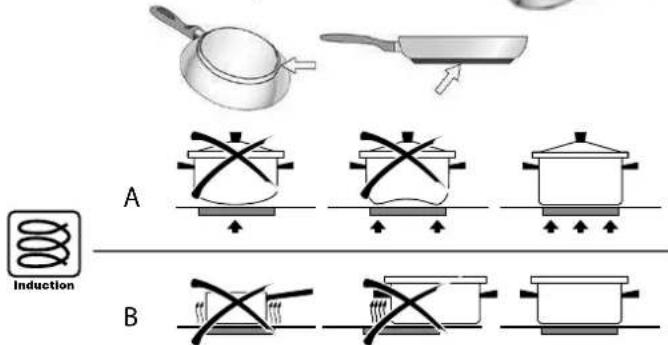
Saucepan bottom size:
| Cooking area Minimum size | |
| Single ø120mm | |
| Bridge 230mm |
Saucepans not suitable for induction hobs:
Saucepans with non-magnetic or partially magnetic bottoms, with a size smaller than the indicated minimum and not perfectly flat are not suitable for use on induction hobs, even if bearing the symbol indicating them as suitable for induction.
In any case, these types of cookware have lower efficiency and lower cooking performance.
Bottoms with non-ferrous material (aluminium, copper, ...) cannot be used with induction hobs.
Bottoms with blended material might not heat evenly or therefore reach high temperatures. If bottoms mainly consist of non-ferrous material, the hob might not recognise the pan and the cooking zone does not switch on. Furthermore some of these materials tend to release material that bonds with the screen-printing of the glass, ruining it beyond repair.
The use of pans with uneven bottoms (e.g. with moulded pellets) can hinder the detection of the pan, does not guarantee homogeneity of heating and, again, can cause release of material as a result of thermal shock.
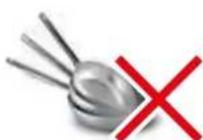
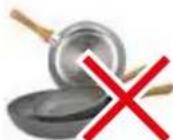
Unsuitable saucepans (examples):
Copper saucepans, Aluminium saucepans, Ceramic saucepans, Terracotta saucepans, Stainless steel saucepans
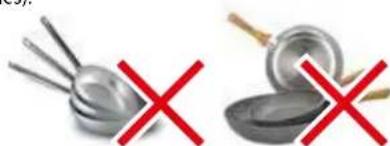
Noise during cooking
Saucepans may generate noise during cooking: this is not a malfunction and does not affect the operation of the product.
The noise depends on the type of saucepan and the type of bottom.
If it is particularly unpleasant, it is recommended to replace the saucepan. Humming, hissing, crackling sounds and vibrations are due to the transfer of energy to the bottom of the saucepan, and are generated by the various materials it is composed of. This noise is produced when cooking on a high power level and decreases as the set power level decreases.
Internal ventilation noise: the appliance is equipped with a ventilation module to adjust the internal temperature of the induction hob. Ventilation can remain on even after switching off the appliance.
SAFETY AND WARNING INDICATIONS
Warning for people wearing pacemakers:
Keep in mind that when the appliance is being used an electromagnetic field forms in the immediate proximity. There is therefore a remote possibility that the operation of the pacemaker might be affected.
If in doubt, contact the pacemaker manufacturer or your GP.
The electromagnetic field of the hob during operation can affect the operation of magnetisable objects. Credit cards, life-saving devices, pocket calculators etc. should not be in the proximity of a hob when in operation.
Metal objects stored in the drawer underneath the appliance may become hot in case of prolonged use. Do not store metal objects in a drawer immediately underneath the hob.
If the appliance is built-in over an oven or an electric cooker fitted with pyrolytic system, do not operate it while the pyrolytic procedure is under way, as the hob overheating device could trip (see relevant paragraph).
The appliance is equipped with cooling fans. If there is a drawer under a built-in appliance, a separation must be ensured between the drawer and the bottom of the appliance, for appropriate hob ventilation and to make sure the fans are not obstructed.
Never use two saucepans or pans on the same cooking zone, or a rectangular cooking zone, or a PowerFlex cooking area.

Before cleaning or carrying out maintenance operations, disconnect the equipment by removing the plug or switching off the main switch.
Do not use the hood with wet hands or bare feet.
Always check that all electrical parts (lights, extractor fan) are off when the equipment is not being used.

Do not rest objects on top of the motorised fins.
Always supervise the cooking process during the use of deep-fryers: Overheated oil can catch fire.
Never use the hood without the metal anti-grease filters: in this case, grease and dirt will deposit in the equipment and compromise its operation.
Accessible parts of the hood can be hot when used at the same time as the cooking appliances.
Do not carry out any cleaning operations when parts of the hood are still hot.
There can be a risk of fire if cleaning is not carried out according to the instructions and products indicated in this booklet.
Disconnect the main switch when the equipment is not used for long periods of time.

If other appliances that use gas or other fuels are being used at the same time (boiler, stove, fireplaces, etc.), make sure the room where the fumes are discharged is well-ventilated, in compliance with the local regulations.
PRODUCT DATA SHEET COOKTOP
Product information according to Regulation (EU) Nr. 66/2014
| Manufacturer Falmec S.p.a. | |
| Model identification Quantum Pro | |
| Type of hob Glass ceramic cooktop | |
| Number of cooking zones / cooking areas | 4 |
| Heating technology | Induction cooking zones and cooking surfaces |
| Usable surface area 4x(24,6x18,9 cm) |
SIZE OF USABLE SURFACE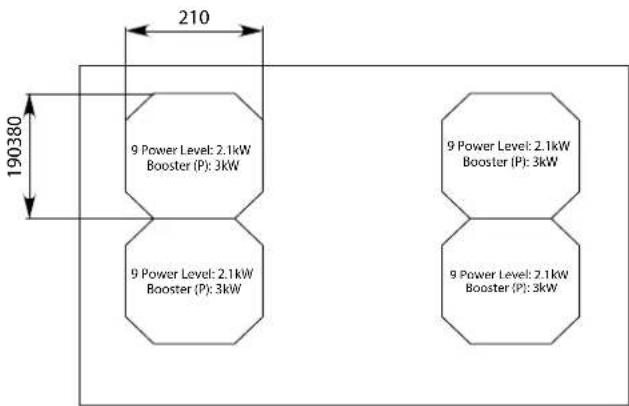
TOTAL POWER: 2.8 - 7.4 kW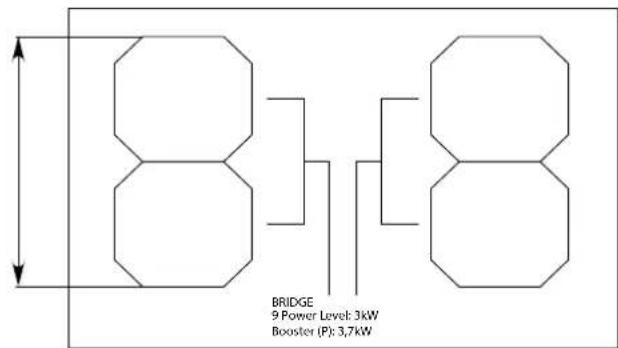
ENERGY CONSUMPTION (Wh / Kg)
Energy consumption cooking zones: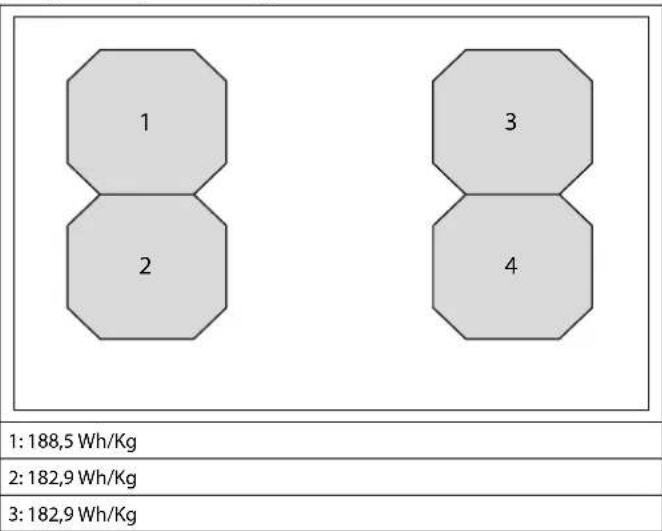
4: 181.5 Wh/Kg
Energy consumption of the hob: 183.9 Wh/Kg
INSTALLATION
Only intended for qualified personnel.

Before installing the hood, carefully read the chapter 'SAFETY INSTRUCTIONS AND WARNINGS'.
TECHNICAL FEATURES
The technical specifications are exhibited on the labels located inside the hood.
SAFETY INSTRUCTIONS FOR ASSEMBLY
Install the cooker after installing kitchen cabinets and basis. Make sure that worktops have been veneered with thermoresistant glue in order not to suffer deflections or detachments.
POSITIONING
Do not install the hood outdoors and do not expose it to outdoor environment (rain, wind, etc.).

It is forbidden to install the appliance on fridges or freezers, washing machines, dishwashers, or tumble driers.
COOKER
ELECTRICAL CONNECTION
(only intended for qualified personnel)

Disconnect the equipment from mains power network before carrying out any operation on the cooker.
Make sure that electric wires inside the cooker are not disconnected or cut: in the event of damage, contact your nearest Servicing Department. Refer to qualified personnel for electrical connections.
ed or cut: in the event of damage, contact your nearest Servicing Department. Refer to qualified personnel for electrical connections.
Connection must be carried out in compliance with the provisions of law in force.
Before connecting the cooker to the mains power network, check that:
- the electrical system is compliant and can withstand the load (see the technical specifications located inside the cooker);
- The electrical system is compliant and can withstand the load (see the technical specifications located inside the cooker).
- the power supply plug and cable do not come into contact with temperatures exceeding 70°C;
- The power supply system is effectively and properly connected to earth in compliance with regulations in force.
- the socket used to connect the cooker is within reach.
In case of:
- devices fitted with cables without a plug: the type of plug to use is a "standardised" one. The wires must be connected as follows: yellow-green for earthing, blue for neutral and brown for the phase. The plug must be connected to an adequate safety socket.
- fixed equipment not provided with a power supply cable and plug, or any other device that ensures disconnection from the electrical mains, with an opening gap of the contacts that enables total disconnection in overvoltage category III conditions.
- Said disconnection devices must be provided in the mains power supply in compliance with installation regulations.
The yellow/green earth cable must not be cut off by the switch. The Manufacturer declines all responsibility for failure to comply with the safety
regulations.
Connection of the cooker
| network Connection Cable | sec- | tion | Power cable |
| 220V - 240V~ 50/60Hz 1P | +N / 2P 3 x 4 mm² | H 05 VV - F H 05 RR - F | |
| 380V - 415V~ 50/60Hz 2P | +N 4 x 1.5 mm² | H 05 VV - F H 05 RR - F | |
| 380V - 415V~ 50/60Hz 3P | +N 5 x 1.5 mm² | H 05 VV - F H 05 RR - F |
COOKER HOOD
FUMES DISCHARGE
EXTERNAL EXHAUST HOOD (SUCTION)
In this version the fumes and vapours are discharged outside through the exhaust pipe.
To this end, the hood outlet fitting must be connected via a pipe, to an external output.
The outlet pipe must have:
- a diameter not less than that of the hood fitting. a slight slope downwards (drop) in the horizontal sections to prevent condensation from flowing back into the motor. the minimum required number of bends. the minimum required length to avoid vibrations and reduce the suction performance of the hood. You are required to insulate the pipes if it passes through cold environments.
Deviation for Germany:
when the kitchen hood is used at the same time as appliances that are powered by energy other than electricity, the negative pressure in the room must not exceed 4 Pa (4 x 10⁻⁵ bar).
HOOD WITH INTERNAL RECIRCULATION (FILTERING)

In this model, the air passes through the Carbon-Zeo (optional) filters to be purified and recycled in the environment.
Ensure that the Carbon-Zeo filters are assembled into the hood, if not, install them as indicated in the assembly instructions.
ASSEMBLY INSTRUCTIONS
only intended for qualified personnel

The hood can be installed in various configurations.
The generic assembly steps apply to all installations; for each case,
follow the specific steps provided for the required installation.
OPERATION
WHEN TO TURN ON THE HOOD?
Switch on the hood at least one minute before starting to cook to direct fumes and vapours towards the suction surface.
After cooking, leave the hood operating until complete extraction of all vapours and odours. By means of the Timer function, it is possible to set auto switch-off function which will allow the hood to turn off automatically after 15 minutes of operation.
WHICH SPEED IS TO BE SELECTED?
Speed (1-3): maintains the circulation of clean air with low electricity consumption.
Speed (4-5): normal conditions of use.
Speed (6-7): presence of strong odours and vapours.
Speed (8-P): rapid disposal of odours and vapours.
With a view to reducing environmental impact, it is suggested to always set the
minimum speed suitable for the required suction level.
WHEN SHOULD THE FILTERS BE WASHED OR REPLACED?
The metal filters must be cleaned every 30 hours of operation.
For further details see the "MAINTENANCE" chapter.
| ①A - 9 + ②A | |
| ①A | ON/OFF Short pulse: Hood switch ON/OFF Long pulse: Hood operation automatic cycle activation (A) according to plate power. |
| + | Speed increase from 1 to...9 (up to "P"). Speed "P": active only for a few minutes, then speed 9. |
| - | Speed decrease from P to 1. |
| ○▼ | With hood active (short pulse): TIMER (flashing red LED) Automatic switch-off after 15 min. The function is disabled (red LED OFF) if: - The motor is switched off (button ①A). - Press the TIMER button ②▼ again. |
| With the hood OFF (long pulse 4s): opening the fins for hood and metal filter maintenance | |
| F | CARBON.ZEO FILTER ALARM Maintenance after approximately 2000 hours of operation. The display shows F alternating with the hood speed. To reset the alarm: with the motor running, press the ⑧▼ for 5 seconds. The display shows F for 2 seconds. To activate the alarm: With the hood off, press the and keys for 5 seconds The display shows F Press the + key to activate the alarm, the display shows F with the dot in the top left-hand corner flashing. Wait 3 seconds, the configuration is saved To deactivate the alarm: With the hood off, press the and keys for 5 seconds, The display shows F Press the ⑨ key to deactivate the alarm, the display shows F with the dot in the top left-hand corner switched off. Wait 3 seconds, the configuration is saved. |
If the pushbutton panel is completely inactive, before contacting the Technical assistance service, disconnect power temporarily to the appliance (about 5 seconds), possibly by acting on the main switch, to restore normal operation. If this measure has no effect, contact the Technical
assistance service.
PUSH-BUTTON PANEL
| + | + | + | |
| 0 | 1 | 2 | 3 |
| Control description | |
| 1 | Cooker top ON/OFF. In case no other control is enabled, the cooker switches off automatically after a few seconds |
| II | Pause key. It suspends cooking. See PAUSE function |
| -0 | Control block key. Keyboard lock to prevent accidental controls |
| XXX | KEEP WARM function key. Keeps cooking at a temperature of 44°C |
| X | Timer key. Activates the setting of a generic timer |
| 0 1 2 3 4 5 6 7 8 9 | Power level selector switch Sets the power of the selected cooking area on a scale of 0 to 9 |
| P | Booster key. Sets the power of the selected cooking area to the maximum available |
| + + + B B B - - - | Timer area. Displays the set timer. The and keys increase or decrease the value shown on the corresponding display. The figures correspond from left to right: Hours, tens of minutes, minutes. |
| B B B B B | Cooking area. Displays and selects the corresponding cooking area: - Front left - Rear left - Front right - Rear right |
| Cooking area timer. Displays the activation of the timer linked to the corresponding cooking area |
| Display description | |
| Cooking area in stand-by | |
| Selected cooking area | |
| Selected power level | |
| Power boost : maximum cooking power | |
| Residual heat indicator | |
| Keep warm function enabled |
| Bridge function enabled |
| Saucepan not present on the cooker top or not detected. |
| Pause function enabled |
| Child lock function enabled |
| Automatic heating function enabled |
OPERATION AND USE OF THE COOKTOP
ONLY USE COOKWARE SUITABLE FOR INDUCTION HOBS.
When a cooking area is turned on, the bottom of the saucepan heats. The cooking area only heats thanks to the heat given by the saucepan. The cooktop automatically detects the size of the saucepan. The heating power is to be chosen based on what shall be cooked. Please find below a short table:
SETTING AREAS
| 1-2 | Melt Heat | Sauces, butter, chocolate, gelatine Precooked dishes |
| 2-3 | Whisk Defrost | Rice, pudding and cooked dishes Vegetables, fish, frozen food |
| 3-4 | Steam | Vegetables, fish, meat |
| 4-5 | Boil | Boiled potatoes, soups, pasta Fresh vegetables |
| 6-7 | Cook over a low heat | Meat, liver, eggs, sausages Goulash, rilate, tripe |
| 7-8 | Cook Fry | Potatoes, donuts, cakes |
| 9 | Fry, bring to the boil | Steaks, omelettes Boil |
| P | Fry, bring to the boil | Bring to the boil big quantities of water |
Remark: heating time of cooktops is shorter than the gas cookers.
POWER CHANGE PROCEDURE

CAUTION: reducing power results in a limitation of the power levels that can be set in individual areas. These limitations are automatically managed by the device.
| Sequence description | |
| 13 sec. | With the top switched off Press the ON/OFF key |
| Within 3 seconds, press the ON/OFF key again. The key starts flashing | |
| 14 | Press and hold the pause key |
| 15 | The cooking area displays show: Press the four areas clockwise. |
| Sequence description | |
| II | Release the pause key |
| I1 0123456789P ① | The cooking area display shows the symbol alternating with the parameter number The Timer area displays the current setting of parameter The parameter for setting the power is U0. |
| II 0123456789P ① | Press the Timer area to change the set power value. Press the power level selector: - left to decrease the value, - right to increase it |
| I1 0123456789P ① | Power Value Minimum: 1.4 2.8kW Maximum: 3.7 7.4kW Adjustment increment: 0.2kW |
| I1 0123456789P ① | Press to exit parameter setting |
| I1 0123456789P ① | To save changes and exit the menu: - press the ON/OFF key ① for 2 seconds. To exit the menu without saving changes: - press the Key |
AUTOMATIC SWITCH-ON OF THE COOKING AREA
- Turn on the cooker top 1
- Place the saucepan, not empty, on the cooking area
- The key corresponding to the area is automatically switched on
- The power level selector switch is activated by illuminating level 0
0123456789
- Press the key of the cooking area to be set. The bottom right-hand dot
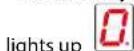
- Adjust the desired power level.
POWER LEVEL ADJUSTMENT:
- Slide your finger to the right in the power level selector switch and stop at the desired level.
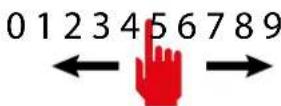
- The display of the selected cooking area shows the set power level:
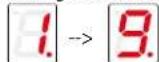
- Press the P key to activate the booster level.
The display of the selected cooking area shows
The booster level is maintained for a maximum of 5 minutes, after which the power level is raised to 9.
SWITCHING OFF THE COOKING AREA:
- Slide your finger to the left in the power level selector switch and stop at level 0.
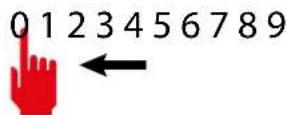

- The display of the selected cooking area shows the power level 0:
NOTE: all cooking areas can be switched off at the same time: press key for 2 seconds.
On the display of the cooking areas that are still too hot, the symbol is
displayed. Do not touch the cooking areas as long as the lamp

is on.
BRIDGE FUNCTION:
- This function allows for the simultaneous operation of the cooking areas: 1-2 and/or 3-4; for the use of fish kettles or large rectangular saucepans.
NOTES: Automatic BRIDGE detection: the appliance automatically suggests the BRIDGE function if a sufficiently large saucepan is placed over cooking areas 1-2 or 3-4.
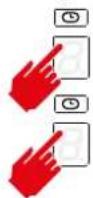
- Press the keys of the two cooking areas to be paired simultaneously.
CAUTION: only the indicated pairs can be coupled: front and back right area (1-2) or front and back left area (3-4).
- An acoustic signal warns of the activation of the function, the displays show:

- Adjust the desired power level.
To disable the BRIDGE function:
- Press the buttons of the two paired cooking zones at the same time.
KEEP WARM FUNCTION
keeps food warm at a temperature of around 44°C
- Press the key of the cooking area to be set.
The bottom right-hand dot lights up - Press the Keep Warm Key - The cooking area display indicates the activation of the function
To deactivate the KEEP WARM function:
- Press the cooking area key with the Keep Warm function active
- Press the Keep Warm Key.

PAUSE FUNCTION
suspends the operation of all cooking areas.
- Press the pause key II
- The cooking area displays indicate the activation of the pause function
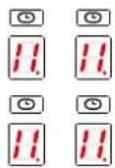
The Pause function can only be activated for 10 minutes, after which the device switches off.
To deactivate the PAUSE function:
- Press the pause key. The key starts flashing. Press any key except the Pause key.
- The function is disabled and the cooking areas will resume operation prior to activation of the Pause function.
NOTE: Interruption and restoration of the power supply deactivates the PAUSE function.
CONTROL BLOCK FUNCTION:
Disables all device keys to prevent accidental activation when cleaning the cooker top.
Press the Control block key for 1 second. All keys except the Control block and ON/OFF keys are disabled.
To deactivate the CONTROL BLOCK function:
- Press the Control block key for 1 second.
CHILD LOCK FUNCTION:
deactivates operation of all keys
-IMPORTANT: perform the entire procedure within 10 seconds
- Press a cooking area key for 3 seconds
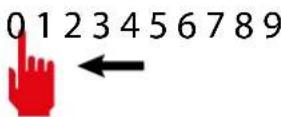
- Release the key and slide your finger to the right in the power level selector switch from 0 to 9


- The cooking area display indicates the activation of the function

To deactivate the CHILD LOCK function:
-IMPORTANT: perform the entire procedure within 10 seconds
- Press a cooking area key for 3 seconds
- Release the key and slide your finger to the left in the power level selector switch from 9 to 0
TIMER FUNCTION
allows you to set a time after which an acoustic alarm will sound.
- Press the Timer key
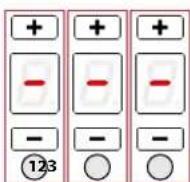
- The Timer area is activated:
- Press the and keys to set the timer.
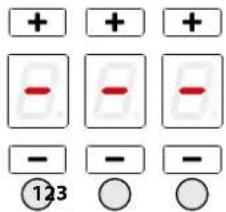
Area 1: hours
Area 2: tens of minutes
Area 3: minutes
Maximum setting time: 9 hours 59 minutes
- After 10 seconds the timer will start the countdown.
- At the end of the countdown, an acoustic signal will sound.
- Press any key to deactivate the acoustic signal.
COOKING AREA TIMER FUNCTION:
allows a cooking area to be switched off after a set time
-Press the key of the cooking area to be set. The bottom right-hand dot
- Press on the Timer area.
- The timer area is activated:
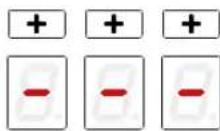
flashes.
- Press the + and - keys to set the timer.
and the symbol above the cooking area
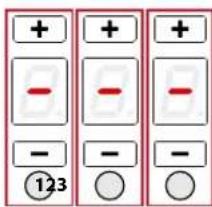
Area 1: hours
Area 2: tens of minutes
Area 3: minutes
Maximum setting time: 9 hours 59 minutes - After 5 seconds the timer will start the countdown. - At the end of the countdown, the relevant cooking area will be switched off and an acoustic signal will sound. - Press any key to deactivate the acoustic signal.
AUTOMATIC HEATING FUNCTION:
sets the maximum power for a preset time and returns to the previous power level. -Press the key of the cooking area to be set. The bottom right-hand dot
lights up

- Slide your finger to the right in the power level selector switch and stop at the desired level. The function can only be activated for levels 1 to 8.
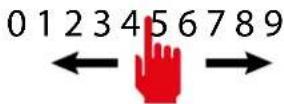
- Press and hold the selected level for 3 seconds
3 sec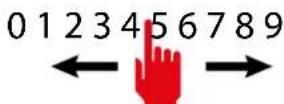
This will also be the level to which the cooking zone will be returned at the end of the preset time, during which the cooking zone will run at maximum power.

- The cooking area display indicates the activation of the function
Function duration table:
| Power level | Automatic heating function time (seconds) |
| 1 | 48 |
| 2 144 | |
| 3 230 | |
| 4 312 | |
| 5 408 | |
| 6 120 | |
| 7 168 | |
| 8 210 | |
| 9 Function not available | |
| P Function not available | |
- When the time elapses, the function ends and the cooking area is reset to the previously set power level.
To deactivate the AUTOMATIC HEATING function:
1 - Wait for the end of the function time
or

2 - Press the cooking area key for 3 seconds
- the function ends and the cooking area is reset to the previously set power level.
or 3- If a lower power level is set than before the automatic heating function, the function is deactivated.
RECALL FUNCTION:
enables the recovery of cooking settings prior to an accidental cooker top switch-off.
- Perform the following steps within 6 seconds of an accidental switch-off
- Turn on the cooker top ①
- The pause key flashes
- Press the pause key The RECALL function resets the operation of the cooking areas, timer functions and quick heating. Other functions will not be restored.
SAFETY DEVICES ON THE COOKER
Safety shutdown
If a cooking area exceeds the maximum time for operation at the same power, it is automatically switched off and the indication of the residual heat is shown.
To reset the cooking area, touch the necessary keys.
| Power level | 1 2 | 3 4 5 | 6 7 8 9 | P | ||||||
| Maximum duration of operation in hours | 6 6 5 | 5 4 1 | 5 1,5 | 1,5 1,5 | 5 min |
The cooker switches off automatically if one or more controls stay covered for more than 10 seconds.
To restore the proper operation: - remove all objects from the control panel. clean the control panel. - restart the cooker and the concerned area.
Overheating device
Before items of the cooker can overheat, the control reduces the used power by following this procedure for protection measures:
- Deactivation of booster and power booster if turned on. -Reduction of the power level set.
- Shutdown of the cooking area concerned.
On the display of the cooking area the message "E2" is displayed.
It is possible to restore the cooking area when the default message is off.
CLEANING AND MAINTENANCE
Regular maintenance guarantees proper operation and performance over time.

ATTENTION!
For cleaning, never use a steam equipment.
Before cleaning the cooker, make sure that it is at room temperature.
Always clean the hob after each use with a specific glass-ceramic cleaner, taking care to remove food residues and any encrustations immediately.
A solution of water, preferably distilled, and white vinegar can be useful to remove limescale stains and soften encrustations before removing them with the appropriate scraper.
Never use alcohol on the hob surface.
Do not use products containing:
corrosive agents (soda, acids, ammoniac).
- abrasive agents (dusts or paste).
Do not use pointed or abrasive objects.
After cleaning, dry the appliance with a soft cloth.

Never drag the pans across the hob, but lift them, so as to avoid scratches.

Do not wash the flaps in a dishwasher.
USEFUL CARE TIPS
Clean your glassceramic cooktop regularly, preferably every time you use it. Avoid using abrasive sponges or scouring agents.
Harsh chemical cleaners like oven sprays or stain removers are also unsuitable, as are bathroom or household cleaners.
Accidents happen ...
Do not allow the hot hob to come into contact with plastic, tin foil, sugar, or sugary food. If sugar or sugary food has fallen on the hot glass-ceramic cooktop, scrape it off the hot surface as quickly as possible. If these substances melt, they can damage the glass-ceramic cooktop.
Sparkling results in only three steps:
To thoroughly clean your glass-ceramic cooktop, first remove dirt and food with a suitable metal scraper.
Once the glass-ceramic cooktop has cooled, put a few drops of a suitable cleaner on it and rub it on with a paper towel or a clean cloth.
Then wipe the glass-ceramic cooktop with a damp cloth and dry it with a clean cloth.
How do I identify a suitable glass-ceramic scraper?
- Scraper made of metal (won't melt or catch fire)
- Scraper easy to lock / to unlock
- Blade is fixed precisely, it does not shift
- Blade is unbroken, clean and stainless
- Scraper certified by testing institute, if procurable (e.g. TÜV-GS seal)
- User manual and safety instructions available
CLEANING OF INTERNAL SURFACES

Do not clean electrical parts, or parts related to the motor inside the hood, with liquids or solvents.
For the internal metal parts, see the previous paragraph.
METAL ANTI-GREASE FILTERS
It is advised to frequently wash the metal filters (F) (at least once a month) leaving them to soak in boiling water and cleaning solution for 1 hour, taking care not to bend them.
Do not use corrosive, acid or alkaline detergents.
Rinse them well and wait for them to be completely dry before reassembling them.
Washing in a dishwasher is permitted, however, it may cause the filter material to darken: to reduce this, use washes at low temperatures (60°C max.) without detergent.
To extract and insert the metal anti-grease filters see the assembly instructions.
CARBON AND ZEOLITE FILTERS (OPTIONAL)
For the service life and regeneration of filters, refer to the specific instructions supplied with their packaging.
Wait until the filter cools before reassembling it.
GREASE DRIP TRAY
It is advisable to clean the tray every 1 month.
Do not use corrosive, acid or alkaline detergents.
For more thorough cleaning, remove the oil collection tray (see figure) and wash it with water and washing up liquid. Rinse it well and wait for it to be completely dry before reassembling it.

Do not wash the grease drip tray in a dishwasher.
WHAT TO DO IN CASE OF COOKERS PROBLEMS
The cooker or cooking areas do not turn on:
- The cooker is not connected to the electric network. The protection fuse is released.
- Check if the block is not active.
- Keys are covered with water or grease. An object is placed on the keys.

The symbol is displayed
- There is no saucepan on the cooking area.
- The container used is not compatible with cooktops.
- The diameter of the saucepan bottom is too small compared to the cooking area.
The symbol [E] is displayed:
- Disconnect and connect the cooker.
- Contact the after-sales centre.
One of the area or the entire cooker turns off:
The safety overheating system is active; The cooker or one cooking area remains on for too long; one or more keys are covered; - one of the saucepans is empty and the bottom overheated.
The fan keeps on working after the cooker shutdown:
- This is not a malfunction: the fan keeps on protecting the electronic power unit of the device. The fan stops automatically.
COOKERS ERROR CODES
In case of error, the device displays error codes for support purposes.
The display of the cooking area shows the error code alternating 'E' with other symbols and numbers.
| Error code | Description Possib | e causes | Solution |
| E+0+3 | Continuous acti-vation of a key | - Metal objects above the keyboard - water over the keyboard | - Move the metal objects - Dry the water |
| E+2+1 | Internal tempera-ture above 85°C | - covered or insufficient ven-tilation areas | - Allow internal heat dissipation |
| E+H+3+1 | Incorrect configu-ration | - configuration error | - Contact Technical Supportstenza tecnica |
| E+H+4+2 | Internal supply voltages too high or low | Overcharging due to atmo-spheric discharge, electrical system failure or incorrect power connection | - Contact Technical Support |
| E+H+4+7 | No communi-cation between keyboard and inductor modules | - Communication cable damaged or disconnected - Damaged in-ductor module | - Contact Technical Support |
| E+H+2+0E+H+2+2E+H+3+5E+H+3+6 | Control keyboard internal error | - Contact Technical Support | |
| E+2 | Temperature limi-nts were exceeded in the cooking area | - Empty sauce-pan - unsuitable saucepan type - saucepan or glass too hot | - fill the saucepan - use a suitable saucepan - remove the sauce- pan and allow the area to cool down |
| E+3 | Unsuitable sau-cepan | - The saucepan has little ferritic material - The saucepan caused an error in the inductor module - Inductor failure | - Use a suitable saucepan - Remove the sauce- pan, wait 8 seconds and try again - Contact Technical Support |
| E+4 | Incorrect configu-ration | - inductor configu-ration error | - Contact Technical Support |
| E+5 | No communi-cation between keyboard and generator | - Faulty or disconnected LIN cable - Incorrect electrical con- nection - Internal fault - Configuration error | - Contact Technical Support - Check terminal board electrical connection - Contact Technical Support - Contact Technical Support |
| E+6 | Incorrect power supply | - Out-of-range supply voltage - Incorrect supply voltage frequency - Inductor failure | - Check that the supply voltage is correct: voltage and frequency. - Contact Technical Support |
| E+7 | Internal inductor failure | - Contact Technical Support | |
| E+8 | Cooling fan not working | - Dirty fan - Fan Failure | - Clean the air vents - Contact Technical Support |
| E+9 | Faulty inductor temperature probe | - Faulty inductor temperature probe | - Contact Technical Support |
| E+R | Internal inductor failure | - Contact Technical Support | |
| E+H | Inductor tempe- rature probe has a fixed value | - glass too hot - faulty probe | - Cool the glass - Contact Technical Support |
Note:
Not each failure can be detected automatically by the system, e.g. in case of defect of the User interface power supply.
DISPOSAL AFTER END OF USEFUL LIFE

The crossed-out wheeled bin symbol on the appliance means that the product is WEEE, i.e. "Waste electrical and electronic equipment", accordingly it must not be disposed of with unsorted waste (i.e. with
"mixed household waste"), but it must be disposed of separately so that it can undergo specific operations for its re-use, or a specific treatment, to remove and safely dispose of any substances that may be harmful to the environment and remove the raw materials that can be recycled. Proper disposal of these products contributes to saving valuable resources and avoid potential negative effects on personal health and the environment, which may be caused by inappropriate disposal of waste.
You are kindly asked to contact your local authorities for further information regarding the designated waste collection points nearest to you. Penalties for improper disposal of such waste can be applied in compliance with national regulations.
INFORMATION ON DISPOSAL IN EUROPEAN UNION COUNTRIES
The EU WEEE Directive was implemented differently in each country, accordingly, if you wish to dispose of this appliance we suggest contacting your local authorities or dealer to find out what the correct method of disposal is.
INFORMATION ON DISPOSAL IN NON-EUROPEAN UNION COUNTRIES
The crossed-out trash or refuse bin symbol is only valid in the European Union: if you wish to dispose of this appliance in other countries, we suggest contacting your local authorities or dealer to find out what the correct method of disposal is.

WARNING!
The Manufacturer reserves the right to make changes to the equipment at any time and without prior notice. Printing, translation and reproduction, even partial, of this manual are bound by the Manufacturer's authorisation.
Technical information, graphic representations and specifications in this manual are for information purposes and cannot be divulged.
This manual is written in Italian. The Manufacturer is not responsible for any transcription or translation errors.
Anti-overheating device
CHARCOAL-ZEOLITE FILTERS (OPTIONAL)
The level of the pan must be checked.
If the pans are worn, it is recommended to replace them.
Crackling, hissing, and popping noises are caused by the transfer of energy to the pan and by the different materials of which they are made. They are noticeable at high power levels and disappear when the set power level is reduced.
Internal ventilation: the appliance is equipped with a fan to adjust the internal temperature of the induction surface. The fan may remain on even after the appliance is switched off.
SAFETY INSTRUCTIONS AND WARNINGS
Warnings for pacemaker users:
Please note that an electromagnetic field is generated in the immediate vicinity of the operating appliance. There is a possibility that the pacemaker may perceive it even at a distance.
In case of doubt, contact the pacemaker manufacturer or your doctor.
The electromagnetic field of an activated induction hob may cause interference with magnetic devices. Credit cards, data storage devices, pocket calculators, etc. should not be placed in the immediate vicinity of the activated induction hob.
Metal objects stored in a drawer located under the appliance may heat up in case of prolonged use of the appliance. Do not store metal objects in a drawer located directly under the induction hob.
If the appliance is installed in an electric oven with a pyrolytic cleaning system, do not switch it on during the cleaning cycle, as this may trigger the overheating protection device (see corresponding paragraph).
Install the appliance with a ventilation fan. If the appliance is located near a tank, it is necessary to install a separating partition between the tank and the lower part of the appliance to ensure the necessary air exchange for the appliance and to prevent the ventilation fans from clogging.
Never use two cartridges or two griddles simultaneously in one cooking zone or on a rectangular cooking zone, because in the cooking zone PowerFlex.

Before performing any cleaning or maintenance operation, disconnect the appliance from the electrical power supply by removing the plug from the socket and using the main switch.
Do not touch the appliance with wet hands and do not use it while standing on a wet floor.
When the appliance is not in use, always check that all electrical components (light, aspirator) are switched off.

It is forbidden to place any objects on the mechanical ribs.
Watch the fryers during use: hot oil may ignite.
Never use the appliance without metal grease filters; in this case, grease and dirt settle in the appliance, negatively affecting its operation.
The sharp parts of the appliance may heat up when used together with cooking appliances.
Do not clean the appliance while it is still hot.
If cleaning is carried out in accordance with the methods and use of the means specified in these instructions, there is a risk of fire.
When the appliance is not used for a long period of time, it is necessary to switch off the main switch.

In case of simultaneous use of other devices (boilers, stoves, fireplaces, etc.) operating on gas or other fuel, provide appropriate ventilation of the room in which the smoke extraction is carried out, in accordance with current standards and requirements.
Product passport. Cooking surface
Product information complies with Directive (EC) 66/2014
EXHAUST HOOD WITH EXTERNAL DISCHARGE (SUCTION)
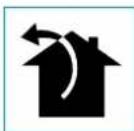
In this version, the air is discharged outside through the discharge duct.
The exhaust pipe must be connected to the discharge duct with an external outlet.
The outlet pipe must have a slope.
- The diameter must not be less than the diameter of the exhaust pipe. The horizontal sections must have a slope to prevent condensate from flowing back into the appliance. - The minimum number of required bends. The minimum possible length to avoid reduction of suction capacity.
Do not deform the pipe if it passes through cold rooms.
Terminology
When the cooker hood and other appliances that use gas or other fuels are operating simultaneously, the negative pressure in the room must not exceed 4 Pa (4x10⁻⁵ bar).
EXHAUST WITH INTERNAL RECIRCULATION (FILTERING)

In this version, the air passes through the Carbon.Zeo filters (optional) to be purified and then returned to the room.
Check that the Carbon.Zeo filters are installed in the hood; otherwise, install them as indicated in the installation instructions.
INSTALLATION INSTRUCTIONS
This section is intended only for qualified personnel.

The hood can be installed in various configurations.
General installation rules apply to all types of installation; it is also necessary to follow the specific steps indicated for each type of installation.
OPERATION OF THE EXTRACTOR HOOD
WHEN TO SWITCH ON THE EXTRACTOR HOOD?
The extractor hood should be switched on 5 minutes before starting to cook, to prepare the air flow and direct the vapors towards the upper surface.
After finishing cooking, it is recommended to leave the extractor hood on until all vapors and odors have been removed. If the timer function is available, you can set the automatic switch-off of the extractor hood after 15 minutes of operation.
WHICH SPEED TO SELECT?
Speed (1-3): for low air flow with low energy consumption.
Speed (4-5): for medium air flow.
Speed (6-7): for strong odors and large amounts of steam.
Speed (8-P): for rapid removal of odors and vapors.
To reduce the impact on the environment, it is recommended to always set the minimum speed that meets the required ventilation level.
WHEN TO CLEAN THE FILTERS?
Metal filters must be washed every 30 hours of operation.
Additional information is provided in the "MAINTENANCE" section.
SENSOR PANEL OF THE EXTRACTOR HOOD
| ①A - 9 + ⑤ | |
| ①A | ВКЛ./ВыКЛ. КорOTКИ IMПУьс: Выltочене Выltочене Выttяки Длиннь IMПУьс: Выltочenе abTomatческого уckла (A) разовы Выttяки в зависимостп OT моцhiocтNi KOnфорok. |
| + | Повышени SCkopoctи с 1 до ...9 (до "Р"). Сkopocstь "P": Выltочетс Толбko на HeCKOLБК MInHyT, 3aTeM ВыltочаETС SCkopoctь 9. |
| - | Понижени SCkopoctи с P до 1. |
| С Выltочен� Bыttякоь (КорOTКИ IMПУьс): TIMER (kpac- НьМIMТAKUПСИ IMIДКATOP) АВТOMATческoe Bыltочене спчетя 15 мInHyT. Зта Функциma OТКИЧаETС (Красьи IMДКATOP Выltочen), ecnln: - ВыltочаETС двигател (Кногka ①A). - НaxмITE Кногky TIMER ese pa3 ②F. | |
| При Выltочен�уь Bыttяжke (Длиннь IMПУьс 4s): OTKpyITNe peбердя ТхобсclуЖИВань Выttяки IM metalniuecknx ФпьтюВ | |
| F | ABAPINHbI CnIHAN UTOJIbHO-UEOIHTOBOFO ФИЛьТРА TEXNUECKOE OБСLYЖИВAHNE NOОп prIMeRHO 2000 YacOB ЖСПЛУАTUДС. НдсплгЕ NOЕРЕМEHNO OTOBPAXAETC BbTJAKH.N. ЧTo6blc6рocNTb CnIHAN TpeBOM: pri np robTaIoUeM DBrIaTeNe HajmITE KhoIKNY HIOJOKHBAJIte ee B TeuHne 5 cekyHd. Hd nCIIeB b TeuHne 2 cekyHd OTOBPAXAETC ЧTo6blakTbCnIHAN TpeBOM: При ВькIOчENHOr BbTЯKKE HAZKMITE KhoIKNI 4H уderЖИВaIte Nx B TeuHne 5 cekyHd Hd nCIIeE OTObPaxaETC HajmITE KhoIKNY, Ic6blakTb ACHINBIPoBaTB abAPINHbI CnIHAN, Hd nCIIeE OTObPazITcR C MIRAOUe TochKO B JeBOM BepXHeM yIpy. ПоJOxHdte 3 cekyHd, KOHФИrpyaUNI BydET coxpaHena ЧTo6blOTKlIOUHTb CnIHAN TpeBOM: ПriвькIOчENHOr BbTЯKKE HAZKMITE KhoIKNI 4H уderЖИВaIte Nx B TeuHne 5 cekyHd, Hd nCIIeE OTObPaxaETC HajmITE KhoIKNY IdN OTOKlIOUeHry ABAPINHOrO CnIHAN,Ha Hd nCIIeE NOABITcR HApIMCb C BbKIOUeHHO TochKO B JeBOM BepXHeM yIpy. ПоJOxHdte 3 cekyHd, KOHФИrpyaUNI BydET coxpaHena. |

If the control panel is completely inactive, contact technical support and temporarily disconnect (for about 5 minutes) the electrical power to the device, then
Turn the appliance off using the main switch to restore normal operation. If this measure is ineffective, contact technical support.
CONTROL PANEL
| + | + | + | |
| 0 | 1 | 2 | 3 |
ADJUSTING THE POWER LEVEL:
- Slide your finger to the right on the power level selector and stop at the desired level.
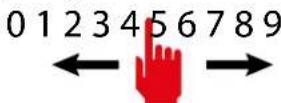
- The display shows the selected cooking zone and the set power level.
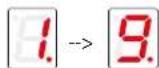
Press the button to activate the Booster level.
The display shows the selected cooking zone and the Booster level; it is underlined for no more than 5 minutes, after which the power level is set to 9.
TURNING OFF THE COOKING ZONE:
- Slide your finger to the left on the power level selector and stop at level 0.
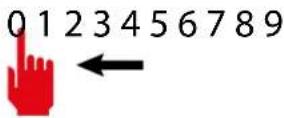
The display shows the selected cooking zone and the power level.

NOTE: To turn off all cooking zones at the same time, press the button and hold it for 2 seconds.
The display shows the remaining hot zones with a symbol. Do not touch the hot zones while the indicator is still on.
BRIDGE FUNCTION:
This function allows you to control two cooking zones together: 1-2 or 3-4; for using pans such as fish pans or larger rectangular pans.
NOTE: Automatic BRIDGE detection: the appliance automatically suggests the BRIDGE function when the zones 1-2 or 3-4 are used with a sufficiently large pan.
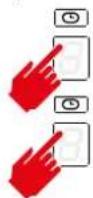
Attention! Only two adjacent cooking zones can be used simultaneously. You can only combine the specified pairs: front left and rear left zones (1-2) or front right and rear right zones (3-4).
The audible signal warns about the activation of functions, as shown:

Press on the cooking zone you want to set.

Press the Keep Warm key for the cooking zone. The indicator shows

the activated function.
Deactivating the KEEP WARM function:
- Press on the cooking zone with the active Keep Warm function.

Press the Keep Warm key.
PAUSE FUNCTION
Pauses the operation of all cooking zones.
- Press the pause key.
The displays of the cooking zones indicate the activation of the pause function.
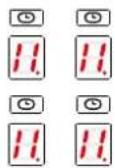
The pause function can remain active for up to 10 minutes, after which the device switches off.
Deactivating the pause function:
- Press the pause key. The key starts to blink. -Press any key, except the pause key. -The function is deactivated, and the cooking zones resume the operation that was set before the activation of the "Pause" function.
REMINDER: Interruption and restoration of the power supply activates the pause function.
COMMAND LOCK FUNCTION:
Disables all device buttons to prevent accidental activation during storage or transport.
-Press the command lock button for 1 second. All buttons, except the command lock button and ON/OFF ①, are disabled.
To disable the command lock function:
-Press the command lock button for 1 second.
LOCK FUNCTION FOR THE OVEN:
Deactivates the operation of all keys.
-IMPORTANT: Select the entire duration within 10 seconds.

-Press the oven button for 3 seconds - release the button and slide your finger to the right on the power level switch from 0 to 9.


Maximum programmable time: 9 hours 59 minutes.
-After 10 seconds, the timer will start counting down. -When the countdown ends, an audible signal will sound. -Press any button to turn off the audible signal.
OVEN TIMER FUNCTION:
Allows you to turn off the oven zone after a set time.
-Press the oven zone button that you want to set.

- Set the timer area.
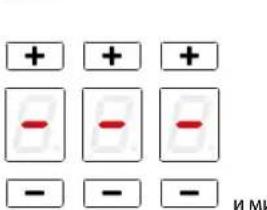
- The timer is activated: the zone's buzzer sounds.
- Press the + keys to set the timer.
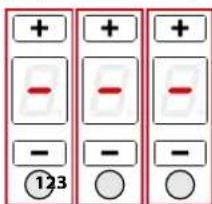
Area 1: Hours
Area 2: Tens of minutes
Area 3: Minutes
Maximum settable time: 9 hours 59 minutes
- After 5 seconds, the timer starts counting down. - At the end of the countdown, the corresponding zone will be turned off and a sound signal will sound. - Press any button to turn off the sound signal.
AUTOMATIC HEATING FUNCTION:
Sets the maximum power for a set time, then returns to the previous power level. - Press the zone button that needs to be set.
The indicator light turns on

- Slide your finger over the power level selector and stop at the desired level. The function can only be activated for levels 1 to 8.
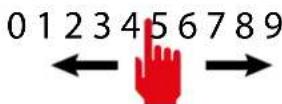
- Press and hold the selected level for 3 seconds
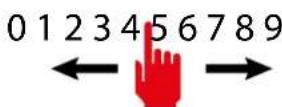
This will also be the level to which the zone returns after the set time, during which the zone
will operate at maximum power.

If the heating zone exceeds the maximum power time, it will automatically switch off and the temperature indicator will light up.
To switch the heating zone back on, touch the corresponding keys.
| Уровень Моцносту 1 2 | 345 | 678 | 9P | |||||||
| Мак. Вразма ВКлоч- ня,ч | 665 | 541 | 51,5 | 1,51 | 5min |
The hob automatically switches off if one or more keys are covered for more than 10 seconds.
To put the appliance into normal operating state:
- Remove objects from the sensor keys.
- Clean the sensor key zone.
- Switch on the hob and the desired heating zone.
Overheating protection device
The device prevents overheating of the hob elements by reducing the power used in the following order: - Deactivate the intensive heating function (booster, power booster), if it is switched on. - Reduce the set power level. - Switch off the heating zone. On the display of the heating zone, an error message "E2" appears.
The heating zone can be switched on again after the error message disappears.
CLEANING AND MAINTENANCE
Regular care and maintenance guarantee correct functioning and efficiency.

ATTENTION!
Do not use steam cleaners for cleaning the hob.
Before cleaning the hob, make sure it has cooled down to room temperature.
Never use a special agent to clean the ceramic hob, try to remove the remains of burnt-on deposits immediately.
A solution of water, preferably distilled, and a little vinegar can be used to remove limescale deposits before removing the hardened remains with a suitable scraper.
Never use a steam cleaner on the hob surface.
Do not use cleaning agents containing:
- Corrosive substances (soda, acids, ammonia). - Abrasive substances (powders, pastes).
Do not use sharp or abrasive instruments.
After cleaning, wipe the surface of the appliance with a soft cloth.

To avoid scratching the hob, do not slide it on the hob surface, but lift it.

Do not wash the lid in the dishwasher.
Useful care tips
Clean the hob regularly, preferably after each cooking. Try not to use abrasive sponges or abrasive cleaning agents for cleaning the ceramic glass surface. Avoid such strong cleaning agents as aerosols or stain removers, oven cleaners, bath cleaners, or universal cleaning agents.
If you don't succeed once...
Do not allow contact of hot pans with the hob, aluminum foil, aluminum foil, sugar or
sugar-containing products. If this happens, remove the foreign matter from the hot hob as soon as possible with a clean scraper. If these items start to melt, they can damage the ceramic glass surface. Therefore, apply a special cleaning agent to it before cooking products that contain a large amount of sugar.
The cleaning results are visible with simple methods:
Thoroughly clean the surface of the appliance with a strong detergent using a suitable scraper. Then apply a few drops of cleaning liquid to the stained surface and wipe with a paper towel or a clean cloth. Finally, wipe the stained surface with a damp cloth and dry.
Dry. Done!
How to determine the correct scraper for glass ceramic cooktops?
The scraper is made of stainless steel (not a knife). The scraper is equipped with a protective cover, which is easy to use. The blade is fixed in the housing and does not move. The blade is clean, without signs of damage. The correct scraper has a quality mark (e.g., TUV quality mark). Follow the user manual and safety instructions.
Cleaning the internal surfaces

It is forbidden to clean electrical components or parts of the motor inside the hood using liquids or solvents.
Cleaning of internal metal parts is described in the previous
paragraph.
Metal grease filters
It is recommended to wash the metal filters (F) at least once a month. Soak them in hot water with a mild detergent for about 1 hour, then rinse thoroughly, being careful not to deform the filters.
Do not use corrosive, acidic, or alkaline cleaning agents.
Dry the filters thoroughly, let them air dry completely before reinstalling them.
It is allowed to wash the filters in a dishwasher, but this may cause discoloration of the filter material. To reduce these effects, use a gentle program with a low temperature (maximum 60°C)
without using cleaning agents.
Removal and installation of the metal grease filters are described in the installation instructions.
The filter replacement procedure is described in the special instructions supplied with the kit.
Before installing the filter, make sure it is cool.
CLEANING THE FILTER
It is recommended to clean the filter every 1 month.
Do not use corrosive, acidic, or alkaline cleaning agents.
For more thorough cleaning, the filter should be washed under running water (see figure) and dried with a cloth suitable for dishes.
Carefully dry the filter completely before reinstalling it.

Do not wash the filter in the dishwasher.
PROBLEMS AND THEIR SOLUTIONS: HOB
The hob does not heat up:
The hob is not connected to the electrical supply. - The circuit breaker has tripped. - The control lock key is activated. - Water or dirt on the surface of the hob. - Foreign objects on the keys.

The hob does not turn on
- No cookware in the heating zone. The cookware material is not suitable for the induction hob. The diameter of the cookware is too small relative to the heating zone.
The hob turns off [E]:
Turn off the steam function and the steam supply.
- Contact the service center.
It is from the heating zones or the steam supply that they are switched off:
- The overheating protection system has been activated; the steam supply was switched off from the heating zone because it was in a too high switched-on state;
- Some keys are covered; empty container and overheating of the bottom.
The fan continues to operate after switching off:
-This is normal: the fan cools the electronic control unit of the device at high temperatures. - The fan stops automatically.
ERROR CODES FOR THE STEAM SUPPLY
In case of an error, the device displays error codes that help to determine the cause of the malfunction.
On the steam zone display, error codes are shown with the symbol "E" and other symbols and numbers.
CARBON AND ZEOLITE FILTERS (OPTIONAL)
PRODUCT DATA SHEET KOGEPLADE
Product information according to regulation (EU) No. 66/2014
APPLIANCE WITH INTERNAL RECIRCULATION (FILTERING)

The hood version passes the air through the Carbon.Zeo filters (optional) to be cleaned and led back into the environment.
Check that the Carbon.Zeo filters are mounted on the hood. If not, install them as shown in the installation instructions.

WHEN SHOULD THE HOOD BE TURNED ON?
SAFETY FOR THE COOKTOP
Safety shutdown
SAFETY INSTRUCTIONS AND WARNINGS

EXTRACTOR HOOD WITH (EXTRACTION) DUCT TO THE OUTSIDE
ERROR CODES OF THE COOKTOP
- INTENDED USE
- DANGER OF BURNS
- TECHNICAL SAFETY
- ELECTRICAL SAFETY
- FUMES DISCHARGE SAFETY
- USE WARNINGS
- ONLY USE SAUCEPANS WITH MAGNETIC BOTTOM. OTHER MATERIALS ARE NOT ADMITTED
- SAUCEPAN SELECTION
- SAUCEPANS SUITABLE FOR INDUCTION HOBS
- SAUCEPANS NOT SUITABLE FOR INDUCTION HOBS
- NOISE DURING COOKING
- SAFETY AND WARNING INDICATIONS
- WARNING FOR PEOPLE WEARING PACEMAKERS
- PRODUCT DATA SHEET COOKTOP
- ENERGY CONSUMPTION (WH / KG)
- INSTALLATION
- TECHNICAL FEATURES
- SAFETY INSTRUCTIONS FOR ASSEMBLY
- POSITIONING
- COOKER
- ELECTRICAL CONNECTION
- IN CASE OF
- COOKER HOOD
- FUMES DISCHARGE
- EXTERNAL EXHAUST HOOD (SUCTION)
- HOOD WITH INTERNAL RECIRCULATION (FILTERING)
- ASSEMBLY INSTRUCTIONS
- OPERATION
- WHEN TO TURN ON THE HOOD
- WHICH SPEED IS TO BE SELECTED
- WHEN SHOULD THE FILTERS BE WASHED OR REPLACED
- PUSH-BUTTON PANEL
- OPERATION AND USE OF THE COOKTOP
- ONLY USE COOKWARE SUITABLE FOR INDUCTION HOBS
- POWER CHANGE PROCEDURE
- AUTOMATIC SWITCH-ON OF THE COOKING AREA
- POWER LEVEL ADJUSTMENT
- SWITCHING OFF THE COOKING AREA
- NOTE: ALL COOKING AREAS CAN BE SWITCHED OFF AT THE SAME TIME: PRESS KEY FOR 2 SECONDS
- BRIDGE FUNCTION
- NOTES: AUTOMATIC BRIDGE DETECTION: THE APPLIANCE AUTOMATICALLY SUGGESTS THE BRIDGE FUNCTION IF A SUFFICIENTLY LARGE SAUCEPAN IS PLACED OVER COOKING AREAS 1-2 OR
- TO DISABLE THE BRIDGE FUNCTION
- KEEP WARM FUNCTION
- TO DEACTIVATE THE KEEP WARM FUNCTION
- PAUSE FUNCTION
- TO DEACTIVATE THE PAUSE FUNCTION
- NOTE: INTERRUPTION AND RESTORATION OF THE POWER SUPPLY DEACTIVATES THE PAUSE FUNCTION
- CONTROL BLOCK FUNCTION
- TO DEACTIVATE THE CONTROL BLOCK FUNCTION
- CHILD LOCK FUNCTION
- TO DEACTIVATE THE CHILD LOCK FUNCTION
- TIMER FUNCTION
- COOKING AREA TIMER FUNCTION
- ALLOWS A COOKING AREA TO BE SWITCHED OFF AFTER A SET TIME
- AUTOMATIC HEATING FUNCTION
- TO DEACTIVATE THE AUTOMATIC HEATING FUNCTION
- RECALL FUNCTION
- SAFETY DEVICES ON THE COOKER
- SAFETY SHUTDOWN
- OVERHEATING DEVICE
- CLEANING AND MAINTENANCE
- REGULAR MAINTENANCE GUARANTEES PROPER OPERATION AND PERFORMANCE OVER TIME
- ATTENTION
- FOR CLEANING, NEVER USE A STEAM EQUIPMENT
- USEFUL CARE TIPS
- ACCIDENTS HAPPEN
- SPARKLING RESULTS IN ONLY THREE STEPS
- HOW DO I IDENTIFY A SUITABLE GLASS-CERAMIC SCRAPER
- CLEANING OF INTERNAL SURFACES
- METAL ANTI-GREASE FILTERS
- CARBON AND ZEOLITE FILTERS (OPTIONAL)
- GREASE DRIP TRAY
- WHAT TO DO IN CASE OF COOKERS PROBLEMS
- THE COOKER OR COOKING AREAS DO NOT TURN ON
- THE SYMBOL IS DISPLAYED
- THE SYMBOL [E] IS DISPLAYED
- ONE OF THE AREA OR THE ENTIRE COOKER TURNS OFF
- THE FAN KEEPS ON WORKING AFTER THE COOKER SHUTDOWN
- COOKERS ERROR CODES
- DISPOSAL AFTER END OF USEFUL LIFE
- INFORMATION ON DISPOSAL IN EUROPEAN UNION COUNTRIES
- INFORMATION ON DISPOSAL IN NON-EUROPEAN UNION COUNTRIES
- WARNING
- ANTI-OVERHEATING DEVICE
- CHARCOAL-ZEOLITE FILTERS (OPTIONAL)
- SAFETY INSTRUCTIONS AND WARNINGS
- WARNINGS FOR PACEMAKER USERS
- PRODUCT PASSPORT. COOKING SURFACE
- EXHAUST HOOD WITH EXTERNAL DISCHARGE (SUCTION)
- EXHAUST WITH INTERNAL RECIRCULATION (FILTERING)
- INSTALLATION INSTRUCTIONS
- OPERATION OF THE EXTRACTOR HOOD
- WHEN TO SWITCH ON THE EXTRACTOR HOOD
- WHICH SPEED TO SELECT
- WHEN TO CLEAN THE FILTERS
- SENSOR PANEL OF THE EXTRACTOR HOOD
- CONTROL PANEL
- ADJUSTING THE POWER LEVEL
- TURNING OFF THE COOKING ZONE
- DEACTIVATING THE KEEP WARM FUNCTION
- DEACTIVATING THE PAUSE FUNCTION
- COMMAND LOCK FUNCTION
- LOCK FUNCTION FOR THE OVEN
- OVEN TIMER FUNCTION
- OVERHEATING PROTECTION DEVICE
- DO NOT USE STEAM CLEANERS FOR CLEANING THE HOB
- IF YOU DON'T SUCCEED ONCE
- THE CLEANING RESULTS ARE VISIBLE WITH SIMPLE METHODS
- HOW TO DETERMINE THE CORRECT SCRAPER FOR GLASS CERAMIC COOKTOPS
- CLEANING THE INTERNAL SURFACES
- IT IS FORBIDDEN TO CLEAN ELECTRICAL COMPONENTS OR PARTS OF THE MOTOR INSIDE THE HOOD USING LIQUIDS OR SOLVENTS
- METAL GREASE FILTERS
- WITHOUT USING CLEANING AGENTS
- CLEANING THE FILTER
- PROBLEMS AND THEIR SOLUTIONS: HOB
- THE HOB DOES NOT HEAT UP
- THE HOB DOES NOT TURN ON
- THE HOB TURNS OFF [E]
- IT IS FROM THE HEATING ZONES OR THE STEAM SUPPLY THAT THEY ARE SWITCHED OFF
- THE FAN CONTINUES TO OPERATE AFTER SWITCHING OFF
- ERROR CODES FOR THE STEAM SUPPLY
- PRODUCT DATA SHEET KOGEPLADE
- APPLIANCE WITH INTERNAL RECIRCULATION (FILTERING)
- WHEN SHOULD THE HOOD BE TURNED ON
- SAFETY FOR THE COOKTOP
- EXTRACTOR HOOD WITH (EXTRACTION) DUCT TO THE OUTSIDE
- ERROR CODES OF THE COOKTOP
Brand : FALMEC
Model : Quantum Pro
Category : Cooker