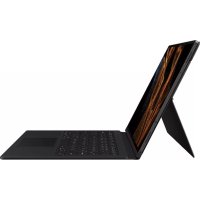
EFDX900 - Keyboard SAMSUNG - Free user manual and instructions
Find the device manual for free EFDX900 SAMSUNG in PDF.
 FR
FR
 BG
BG
 CS
CS
 DA
DA
 DE
DE
 EL
EL
 EN
EN
 ES
ES
 ET
ET
 FI
FI
 HU
HU
 ID
ID
 IT
IT
 JA
JA
 KK
KK
 KO
KO
 LT
LT
 LV
LV
 NL
NL
 NO
NO
 PL
PL
 PT
PT
 RO
RO
 RU
RU
 SK
SK
 SL
SL
 SV
SV
 TR
TR
 UK
UK
 ZH
ZH
| Product Type | Keyboard Case for Tablet |
| Brand | Samsung |
| Model | EFDX900 (also referenced EF-DX710, EF-DX810, EF-DX910, EF-DX715, EF-DX815, EF-DX915) |
| Compatibility | Samsung Galaxy Tab S9, Galaxy Tab S9+, Galaxy Tab S9 Ultra |
| Weight | Approximately 450 g (estimated) |
| Power Supply | Connected directly to the tablet via dedicated connector (no batteries required) |
| Material | Plastic and magnets |
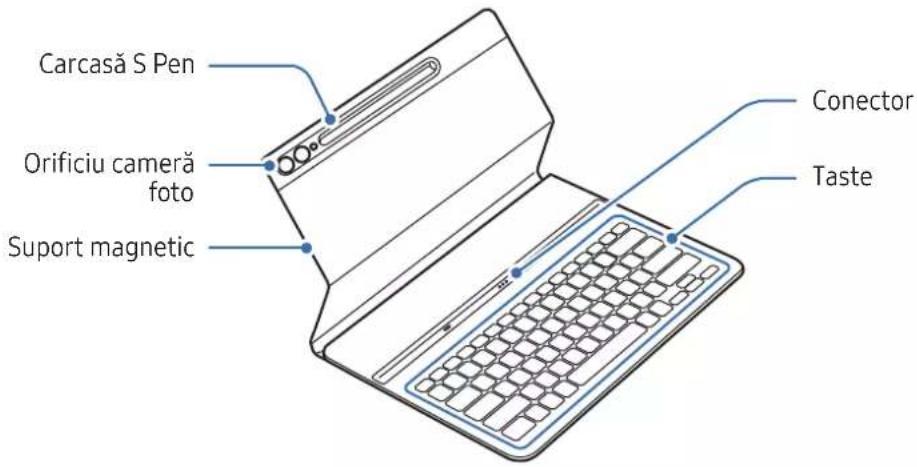
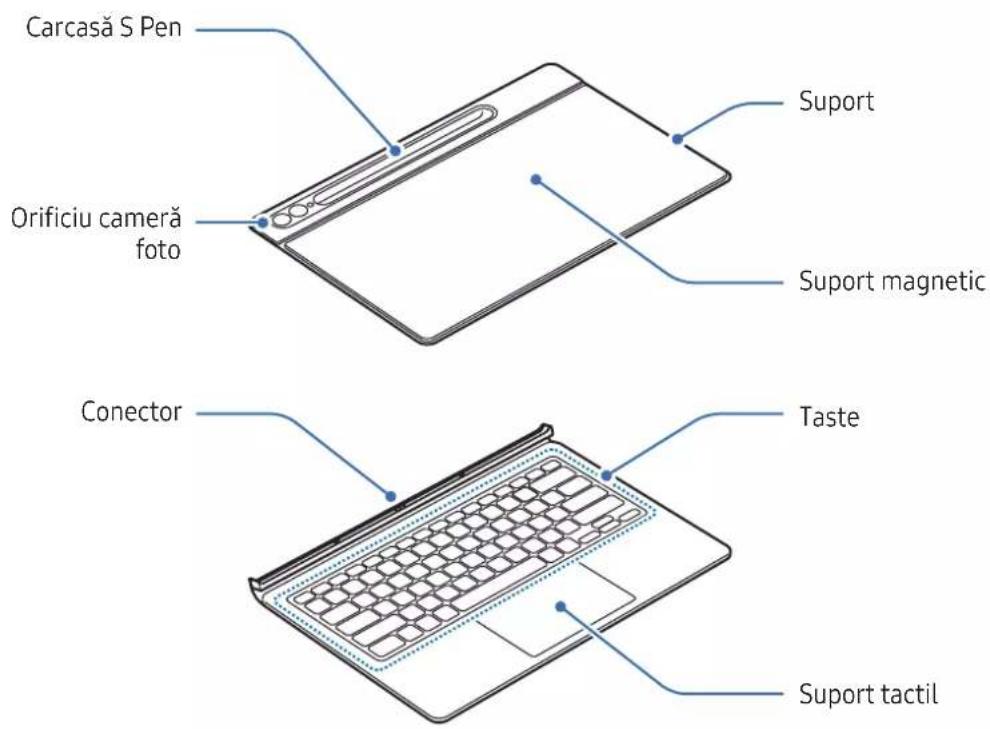
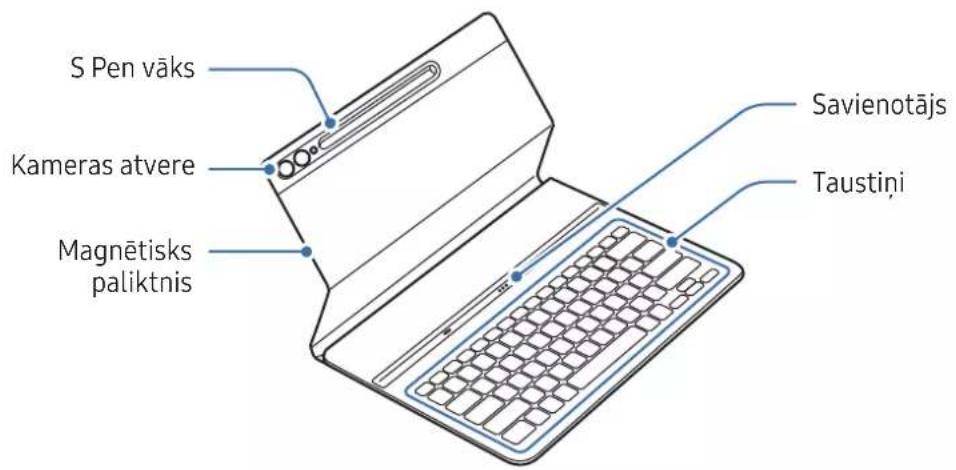
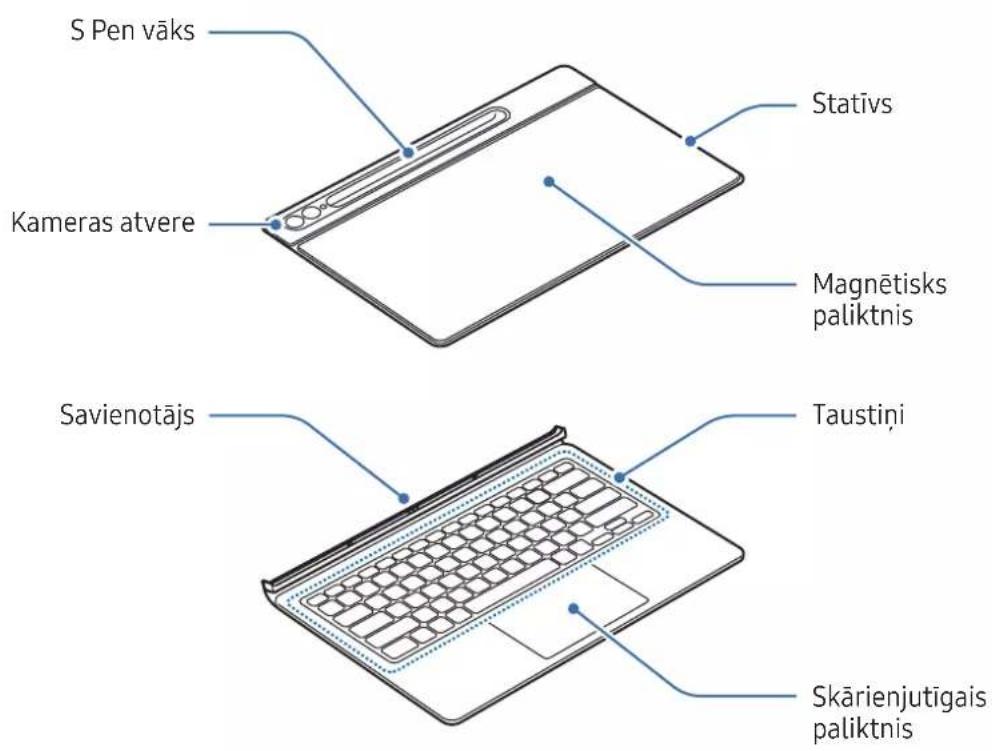
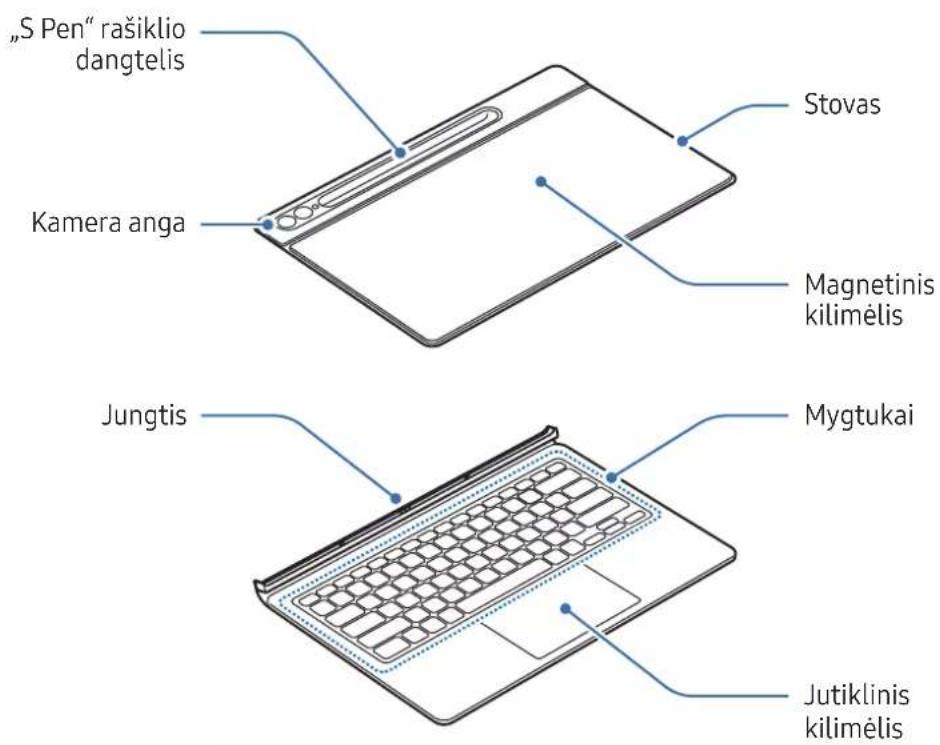
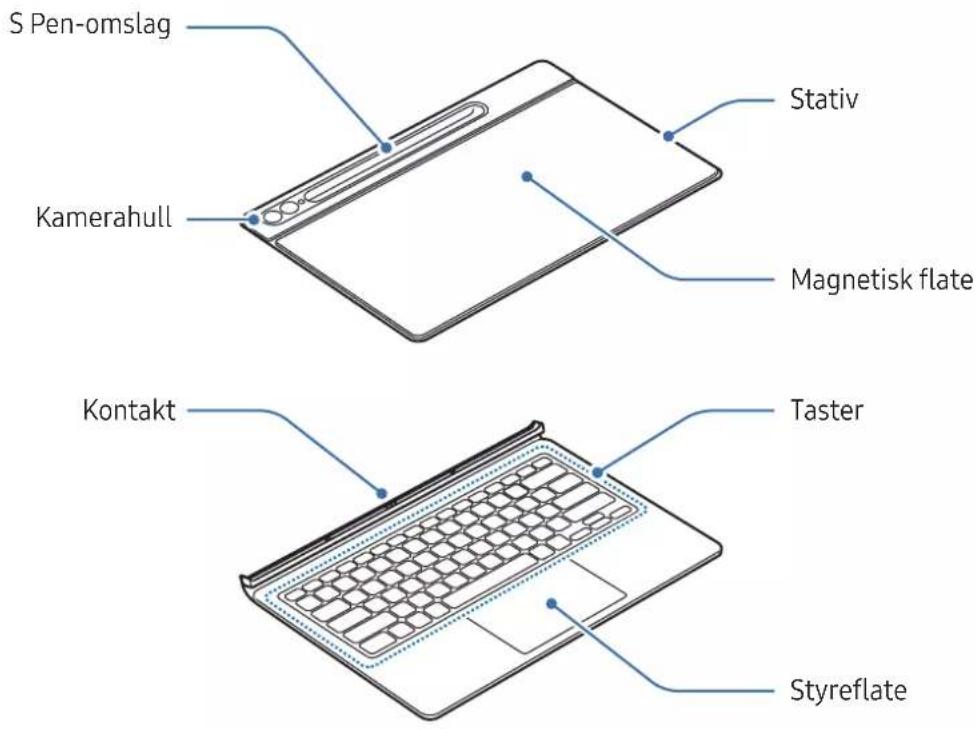
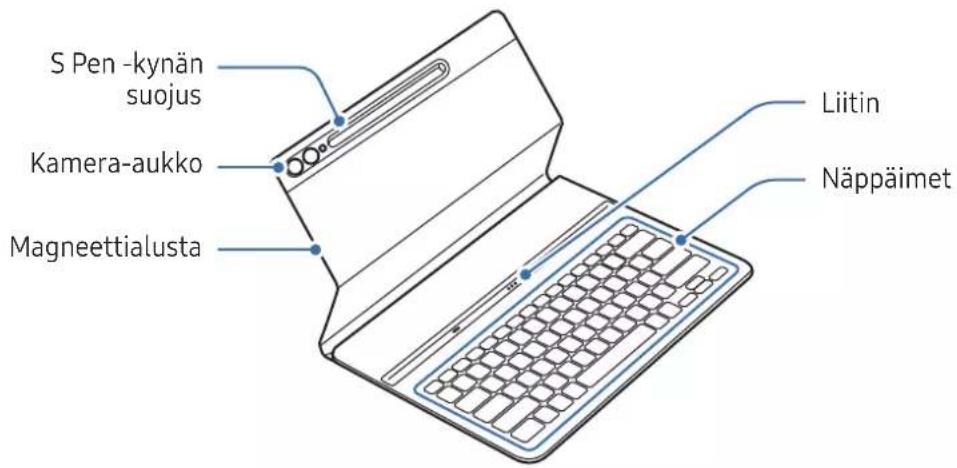
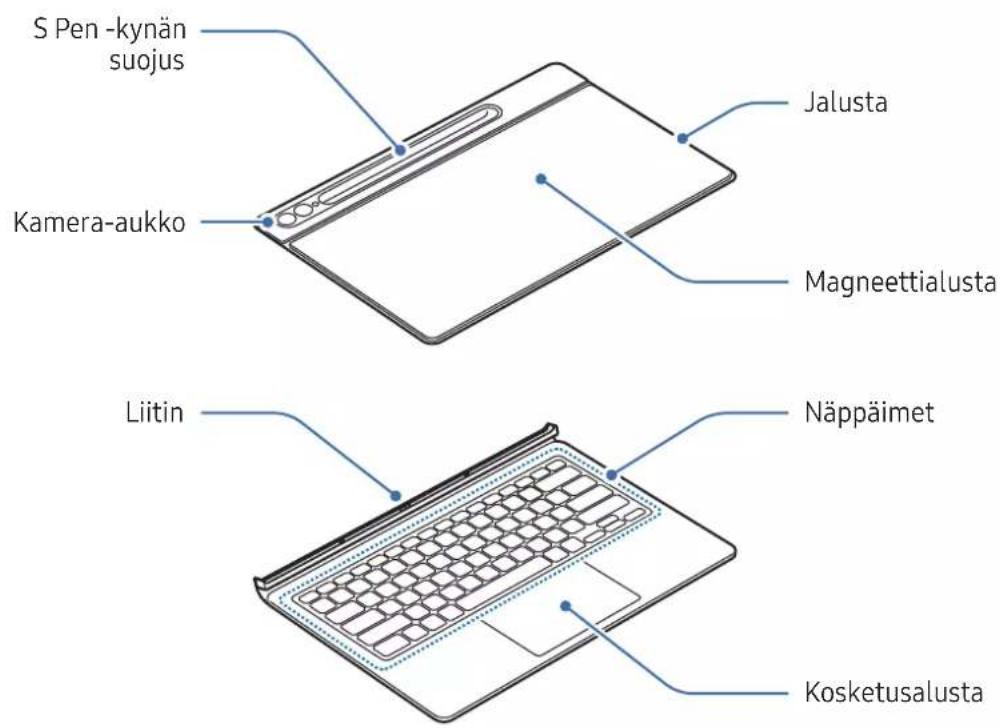
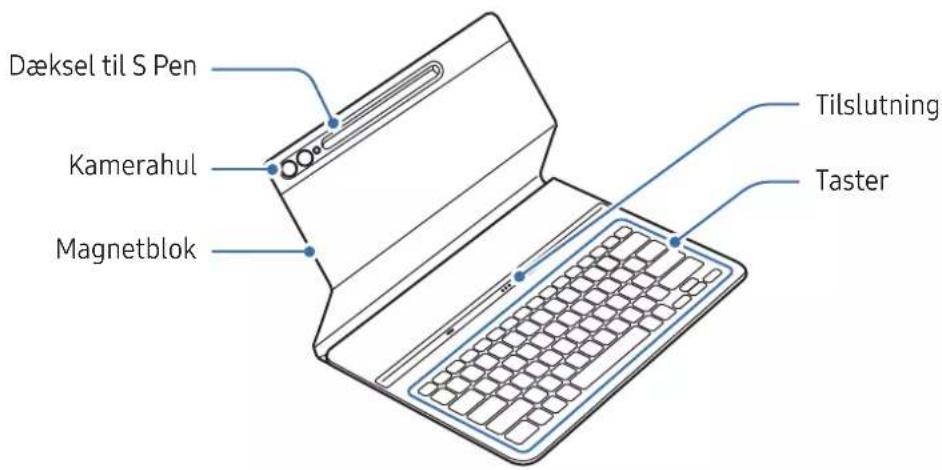
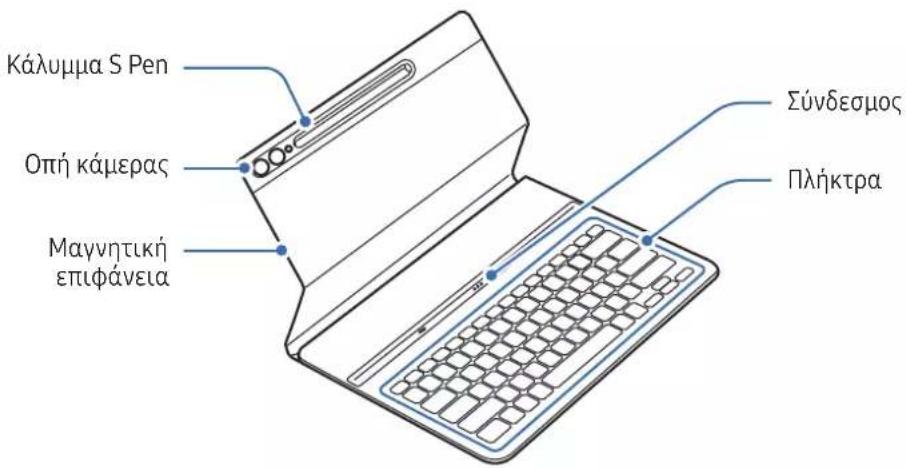
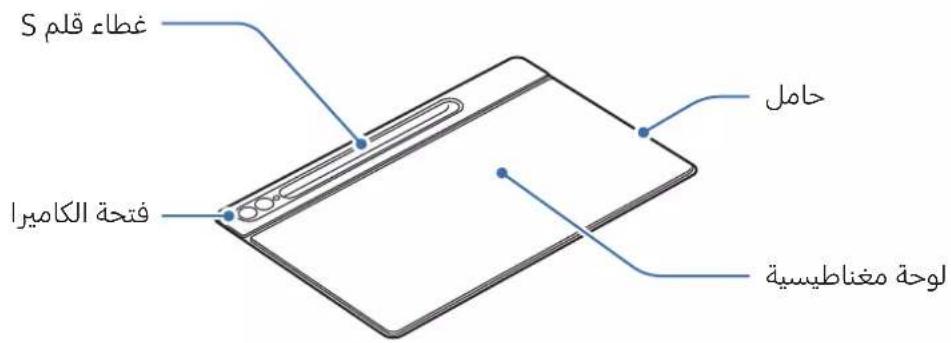
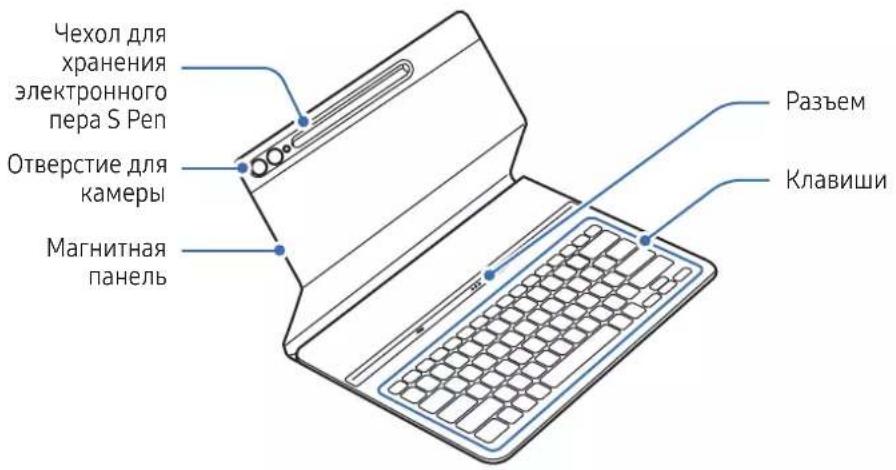
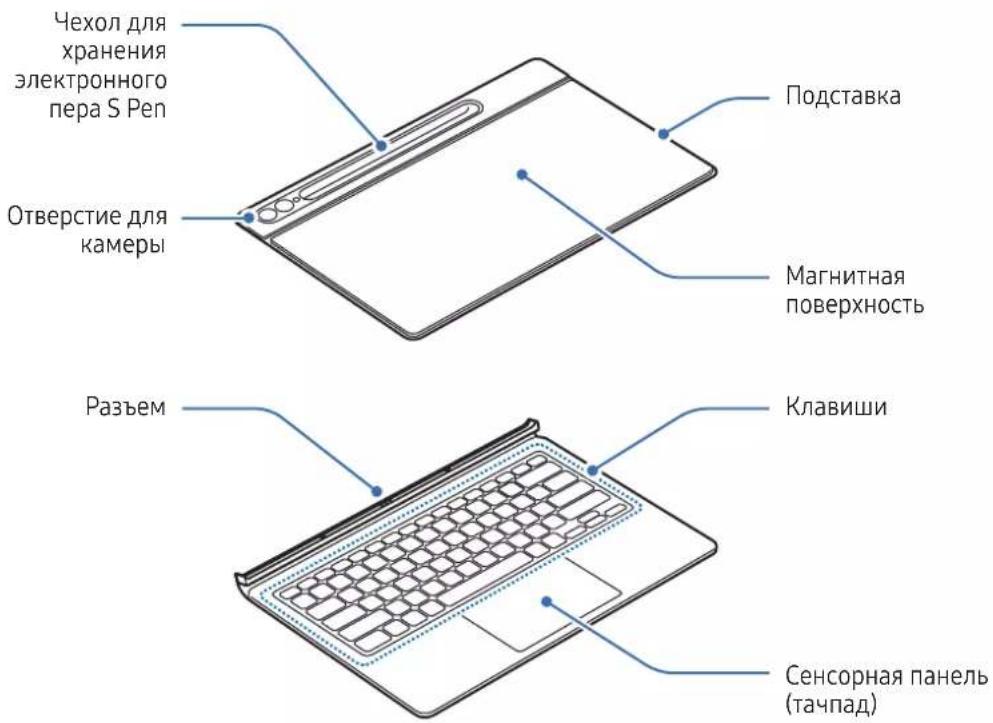
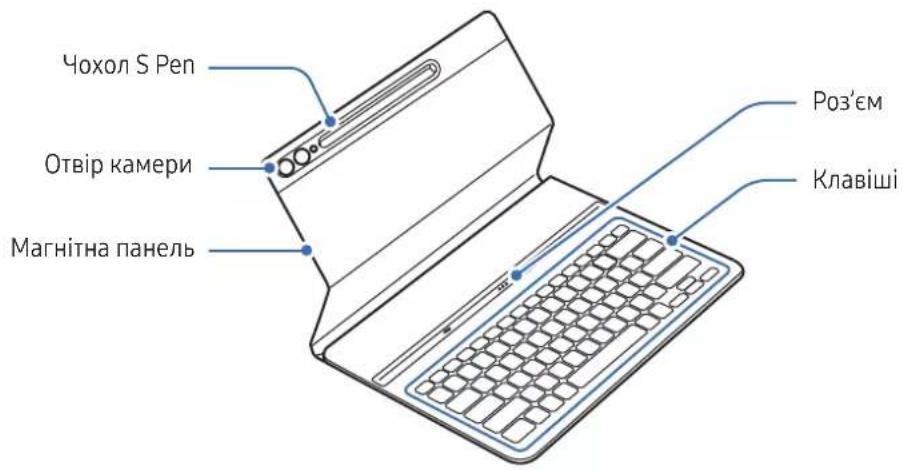
| Main Functions | Screen protection, integrated keyboard, touchpad (depending on model), adjustable stand (depending on model), S Pen storage, shortcut keys (Samsung DeX, Google Assistant, favorite apps), magnetic pad for attachment |
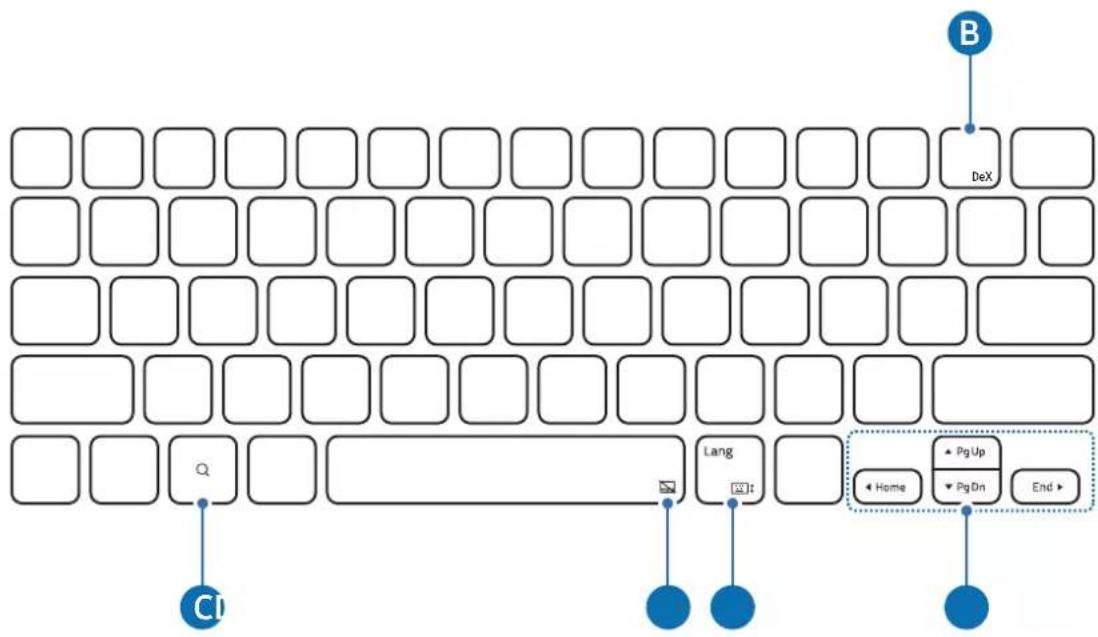
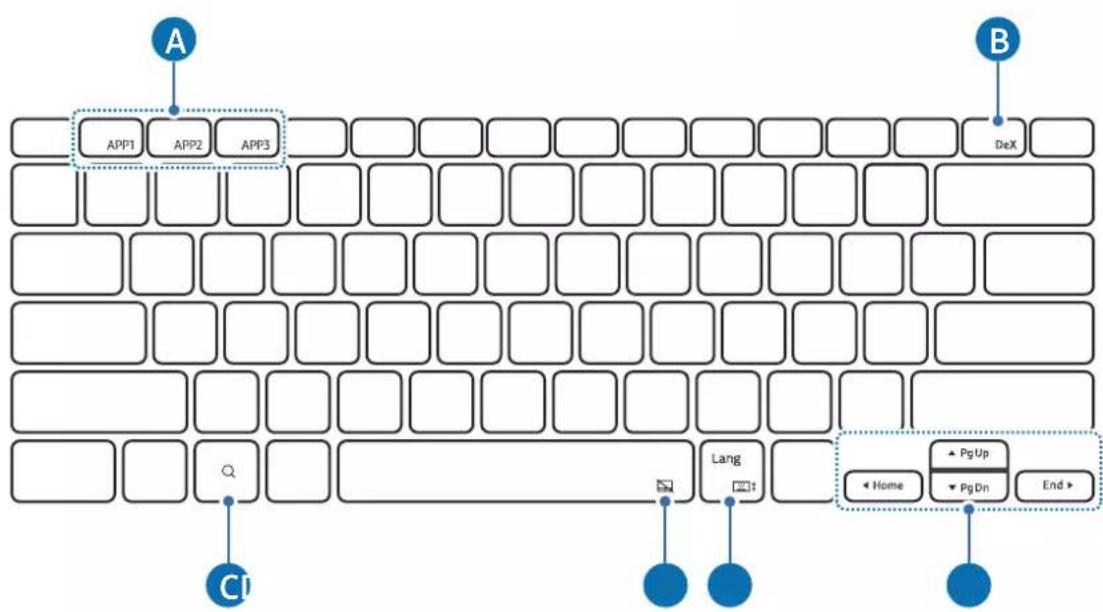
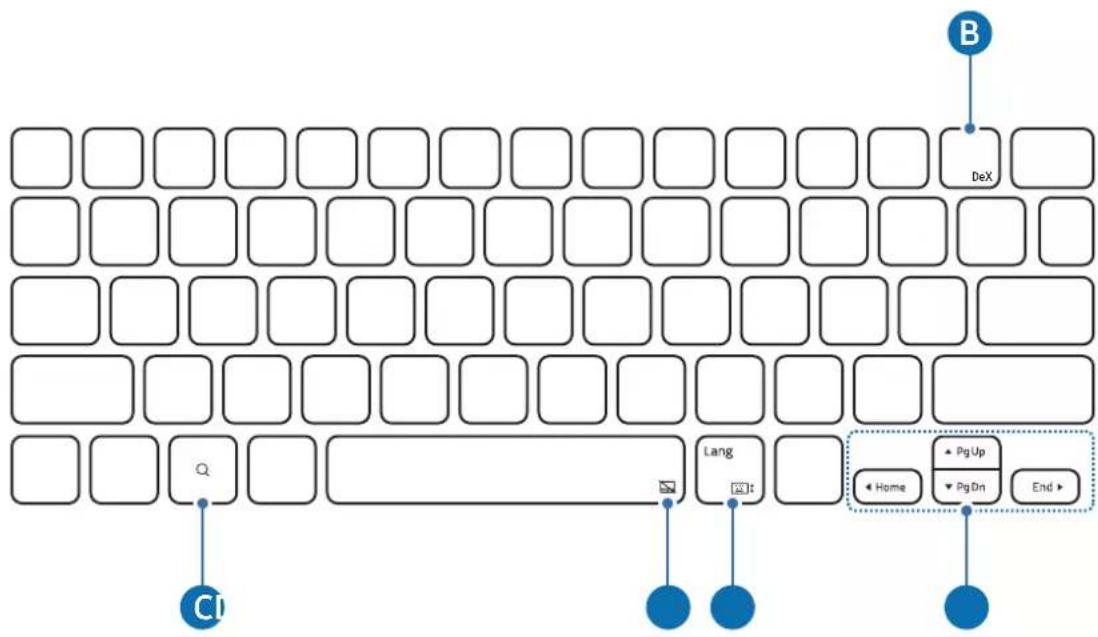
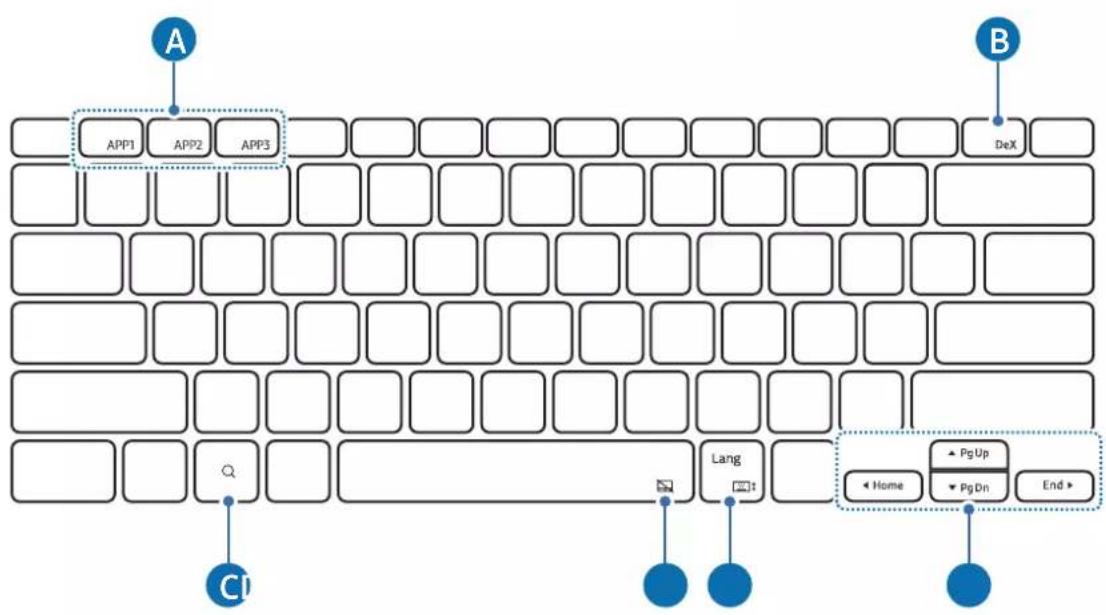
| Special Keys | Fn, Lang, DeX, APP1/2/3 keys, direction keys with combinations (Page Down, Home, End) |
| Touchpad | Available on models EF-DX715, EF-DX815, EF-DX915; gestures: click, drag, two fingers (context menu, scroll), three fingers (recent, home, app switching) |
| S Pen Storage | Integrated S Pen cover with magnetic attachment |
| Tablet Angle | Adjustable via the stand (models EF-DX715, EF-DX815, EF-DX915) |
| Care and Cleaning | Clean with a soft, dry cloth; avoid moisture, solvents, and high temperatures |
| Safety | Contains magnets: keep at least 15 cm away from implanted medical devices; avoid shocks and excessive pressure on the screen |
| Spare Parts and Repairability | The S Pen cover is replaceable; other components are not user-repairable; use only Samsung approved accessories |
| General Information | Warranty: Standard Samsung; package contents: product + quick start guide |
Frequently Asked Questions - EFDX900 SAMSUNG
User questions about EFDX900 SAMSUNG
0 question about this device. Answer the ones you know or ask your own.
Ask a new question about this device
Download the instructions for your Keyboard in PDF format for free! Find your manual EFDX900 - SAMSUNG and take your electronic device back in hand. On this page are published all the documents necessary for the use of your device. EFDX900 by SAMSUNG.
USER MANUAL EFDX900 SAMSUNG
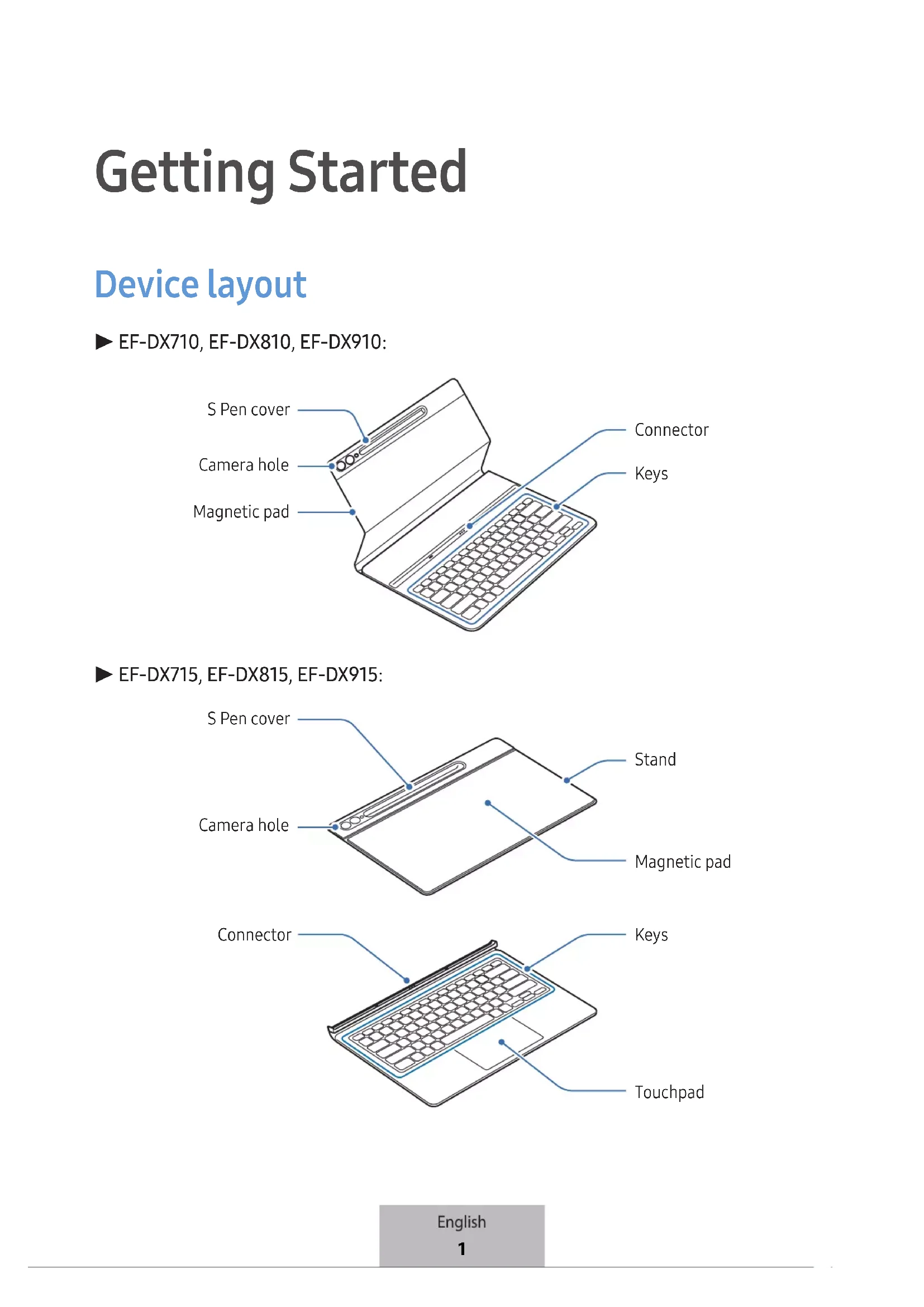
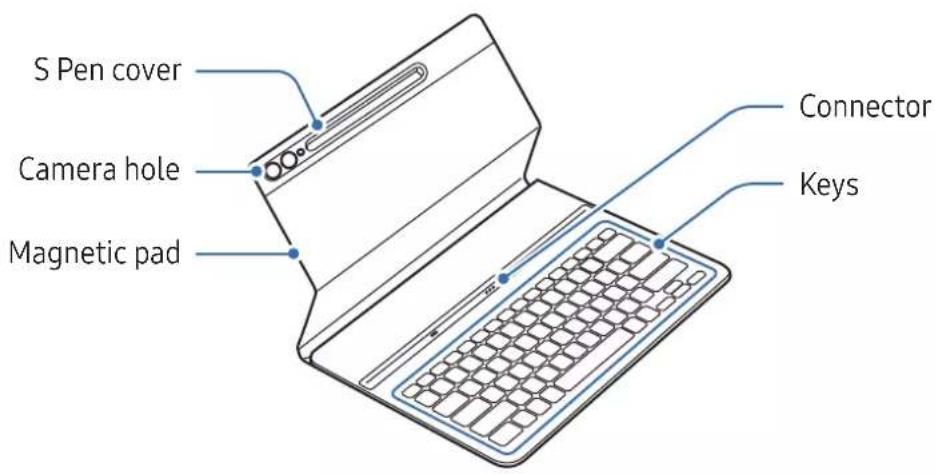
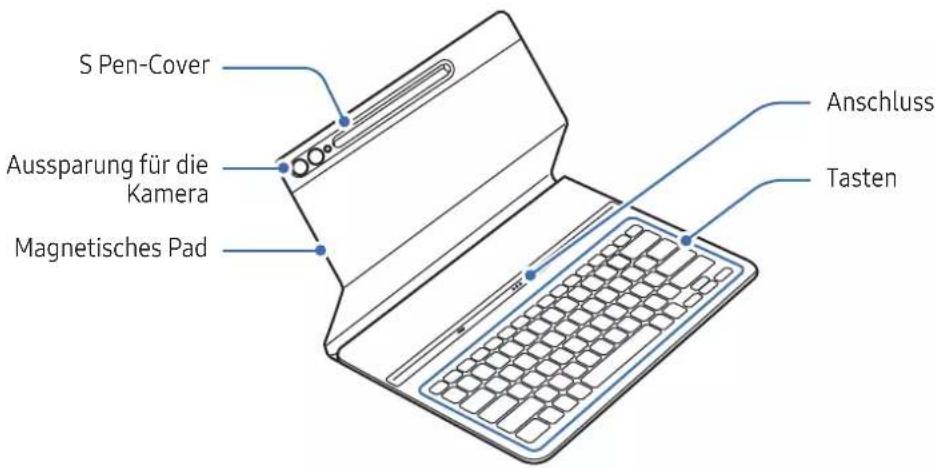
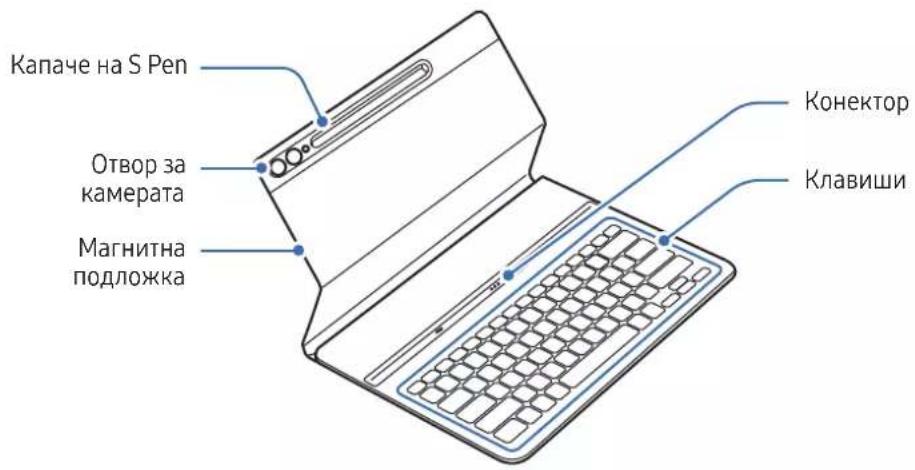
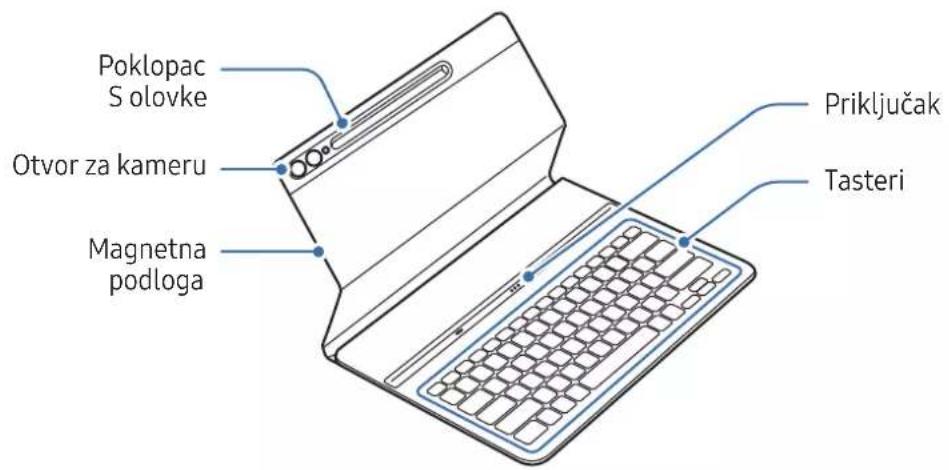
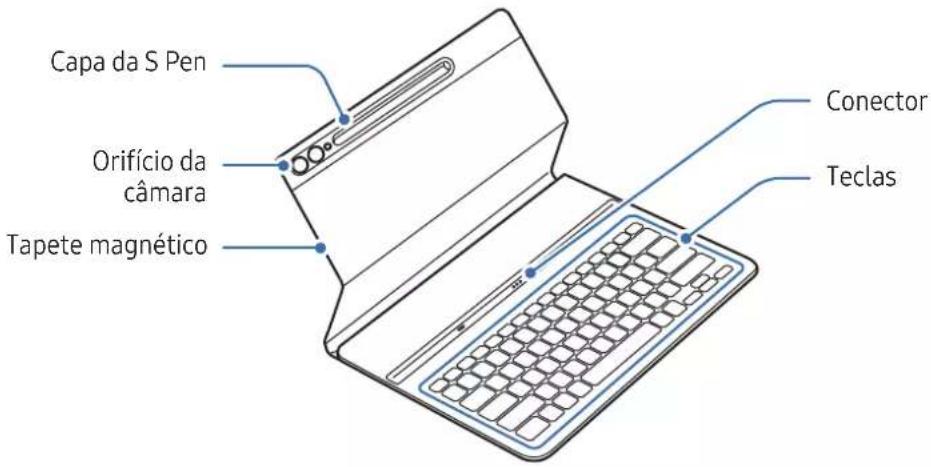
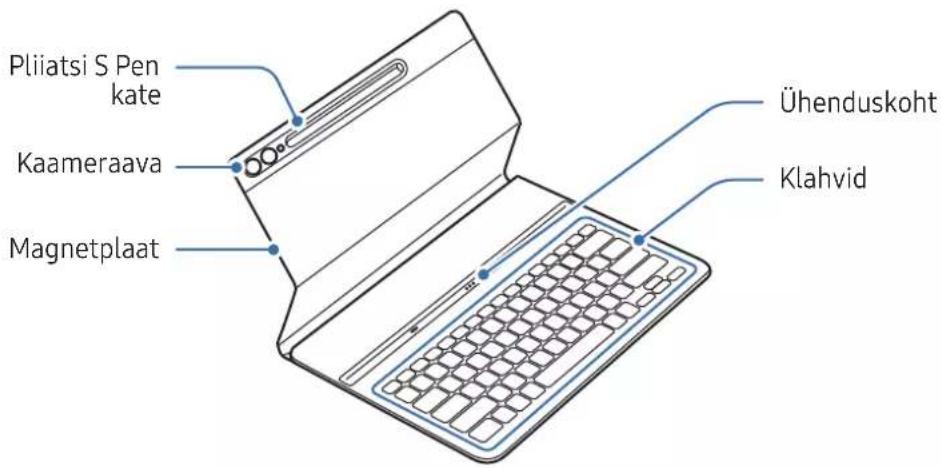
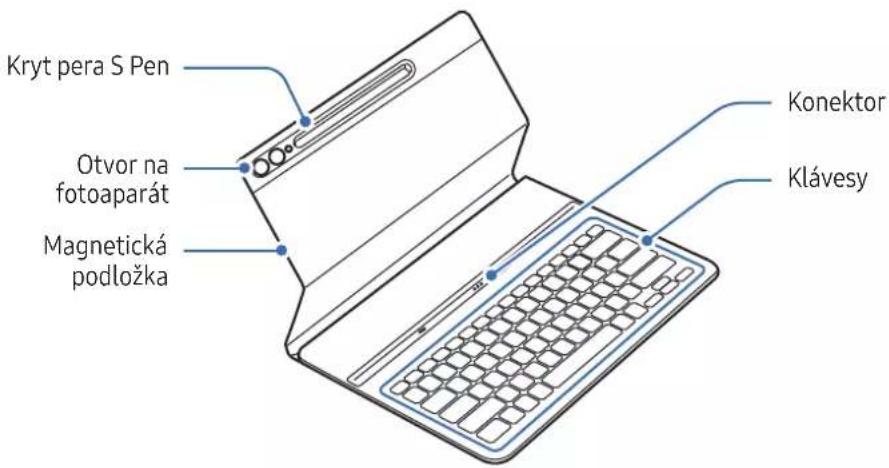
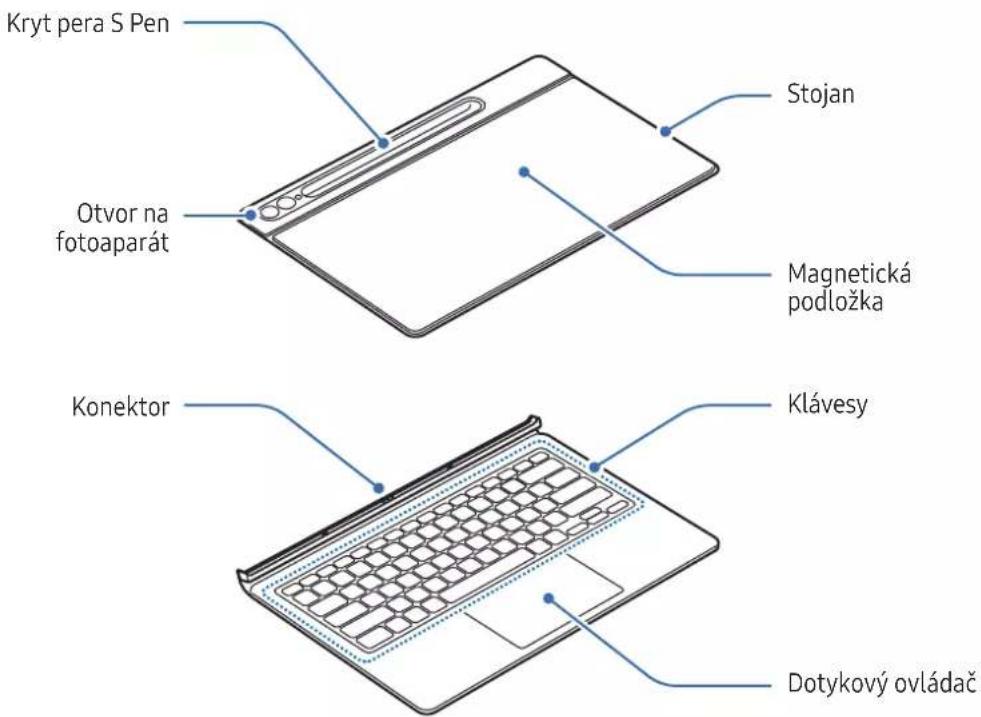
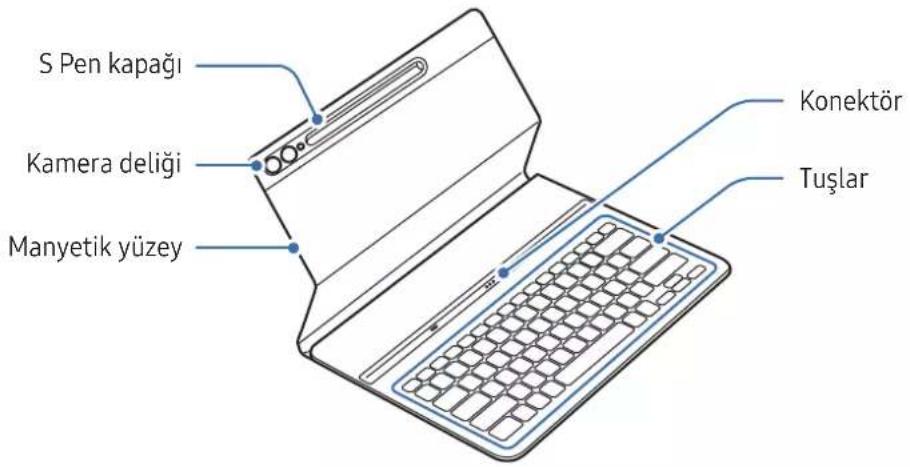
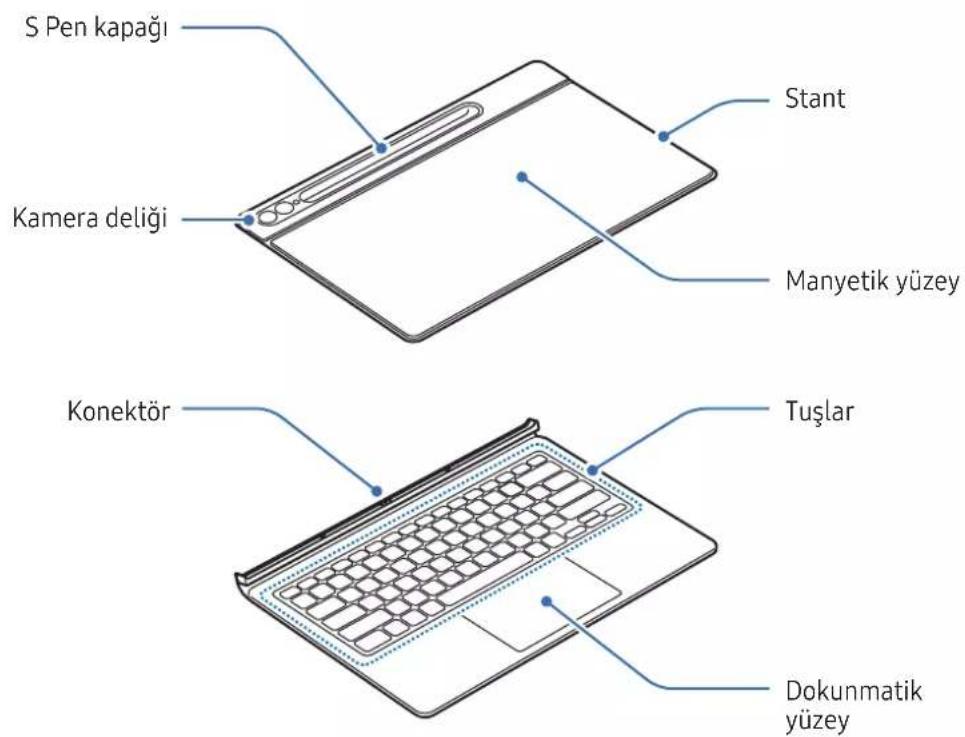
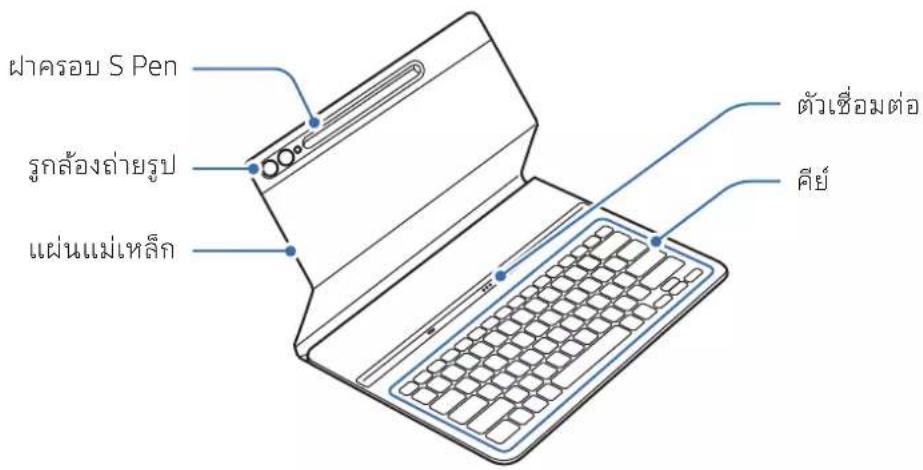
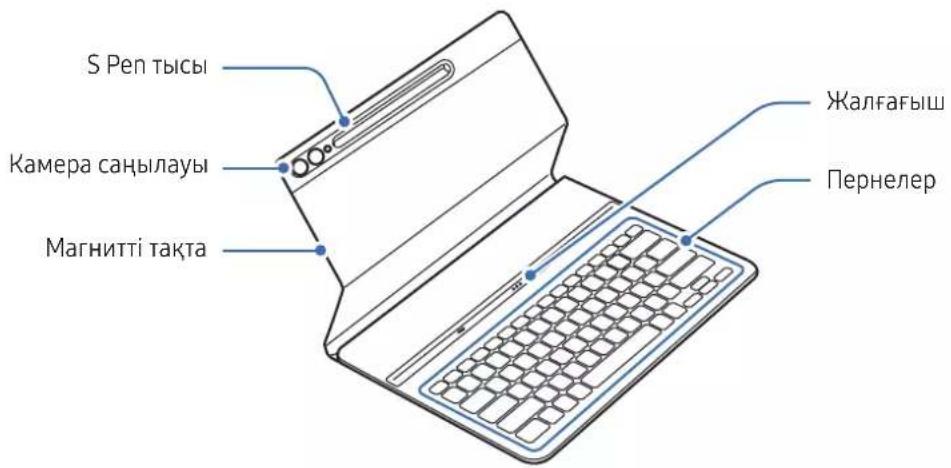
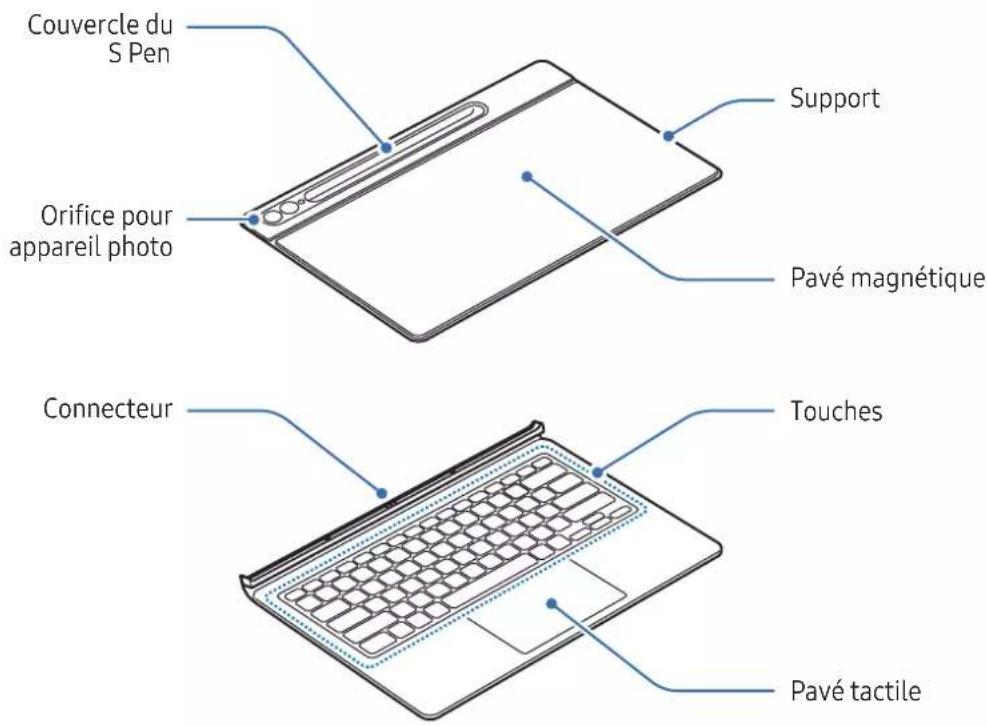
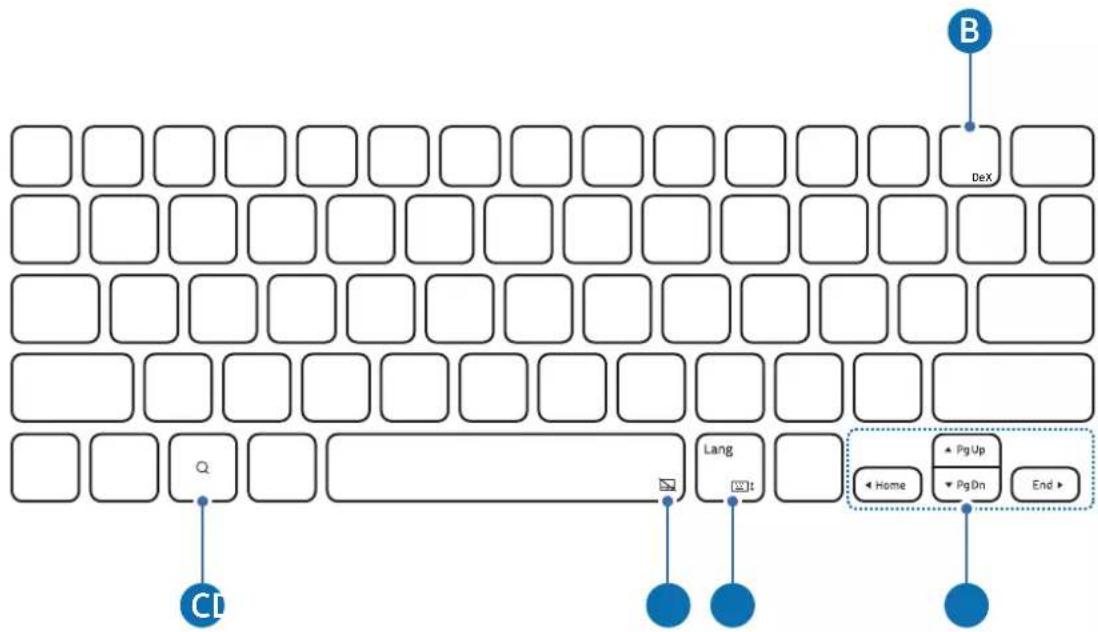
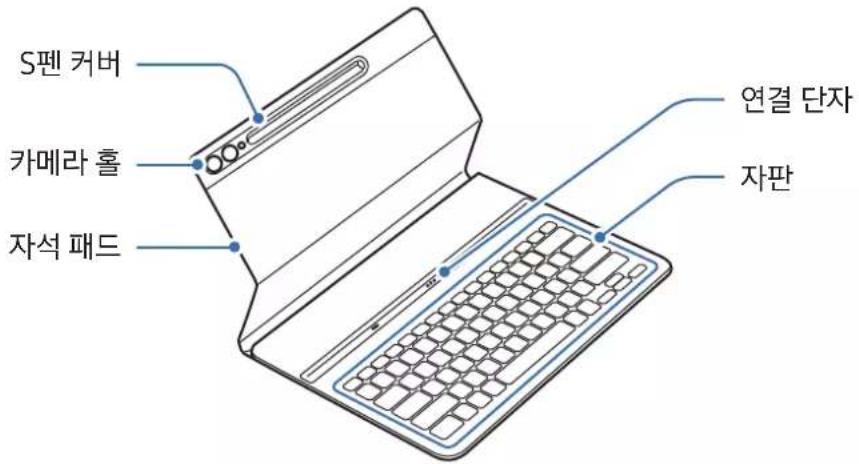
▶ EF-DX710, EF-DX810, EF-DX910:
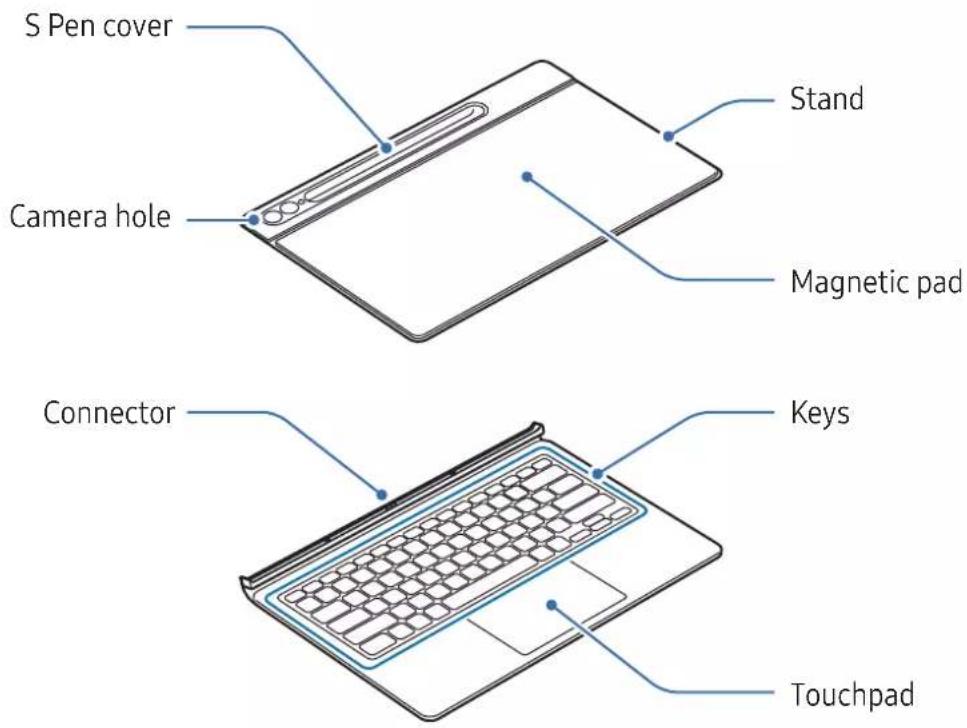
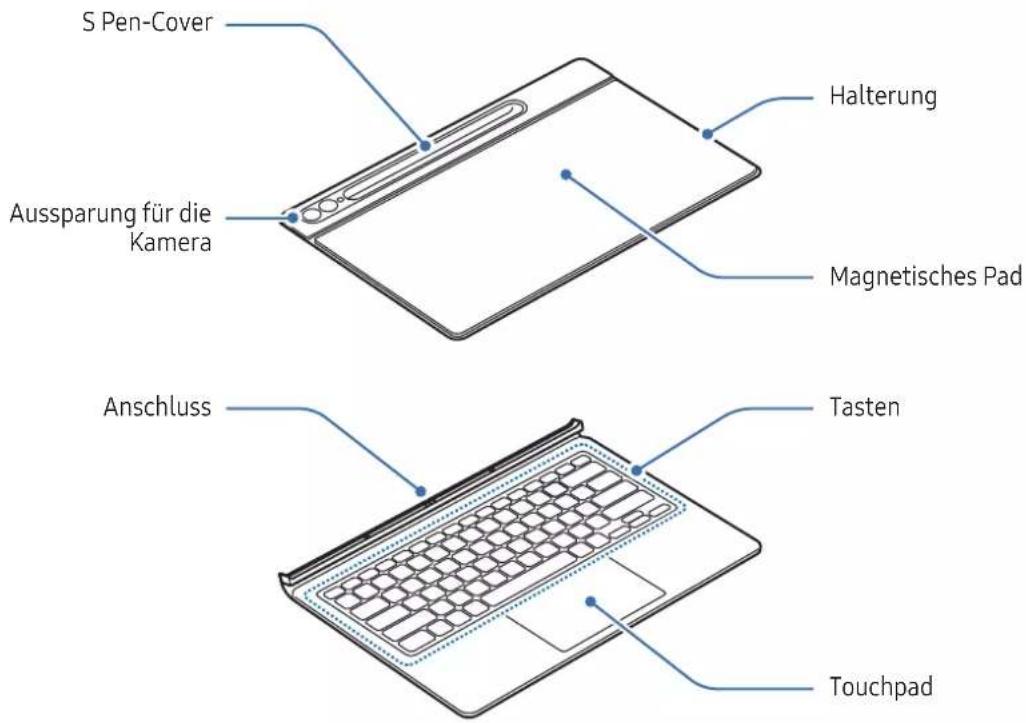
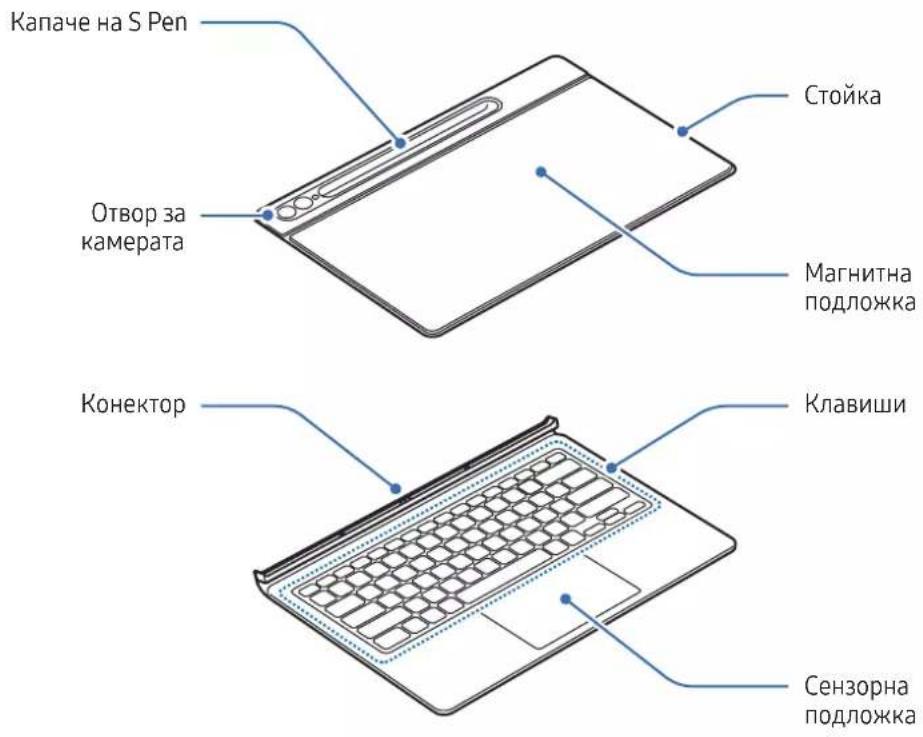
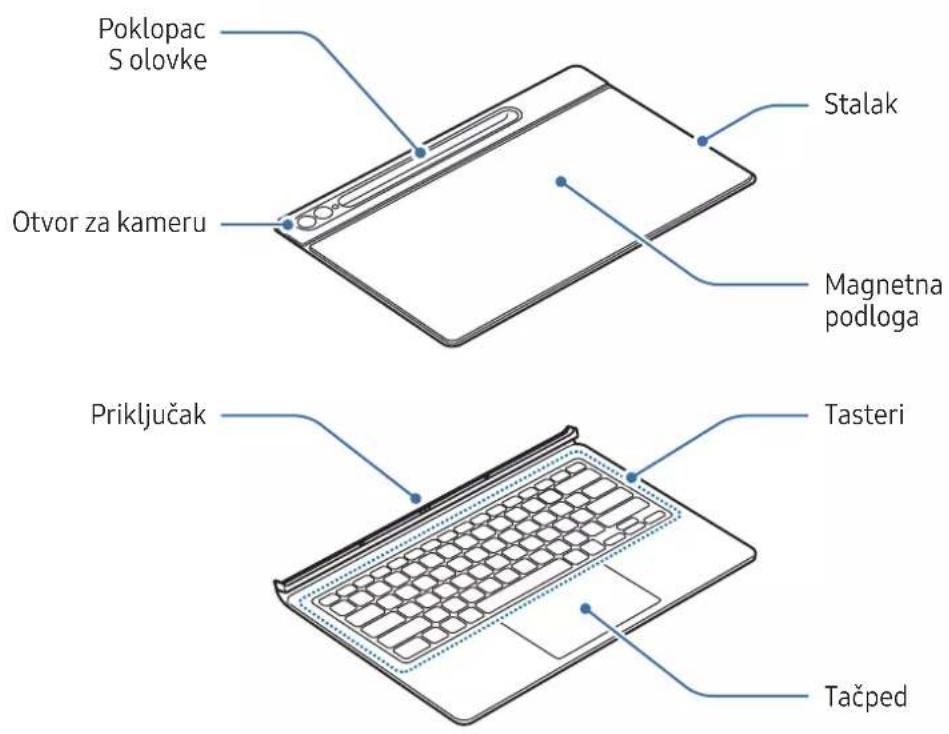
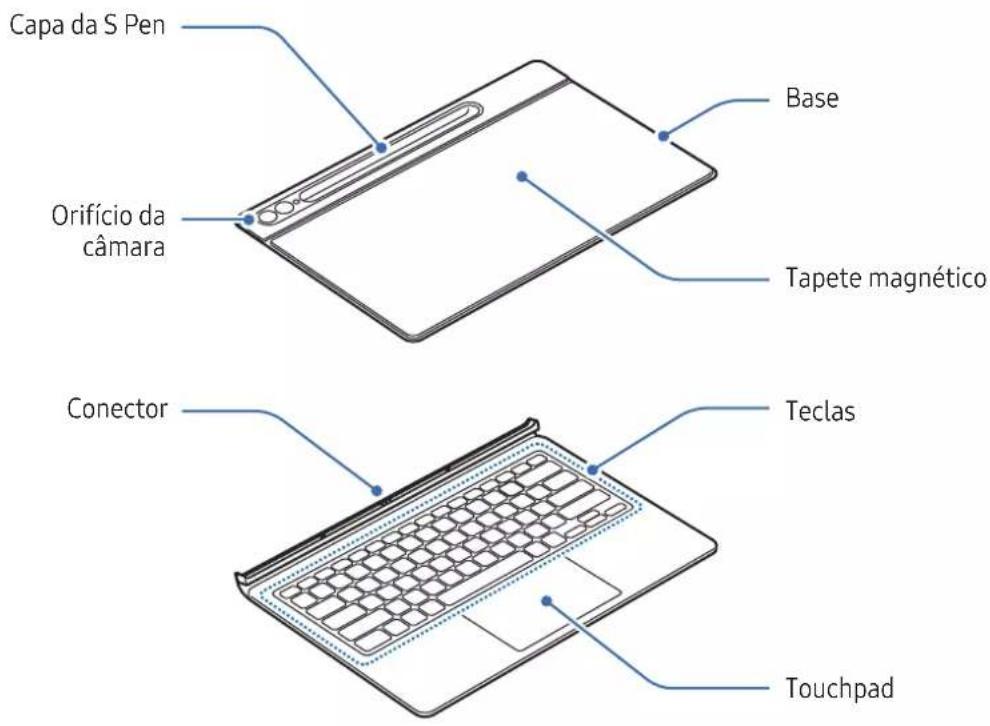
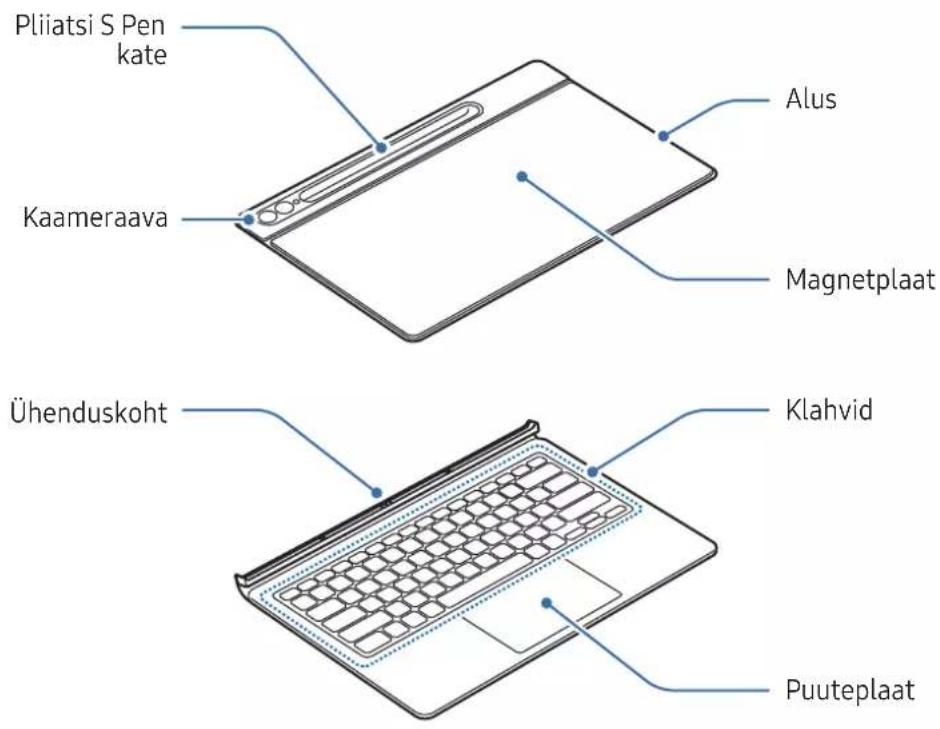
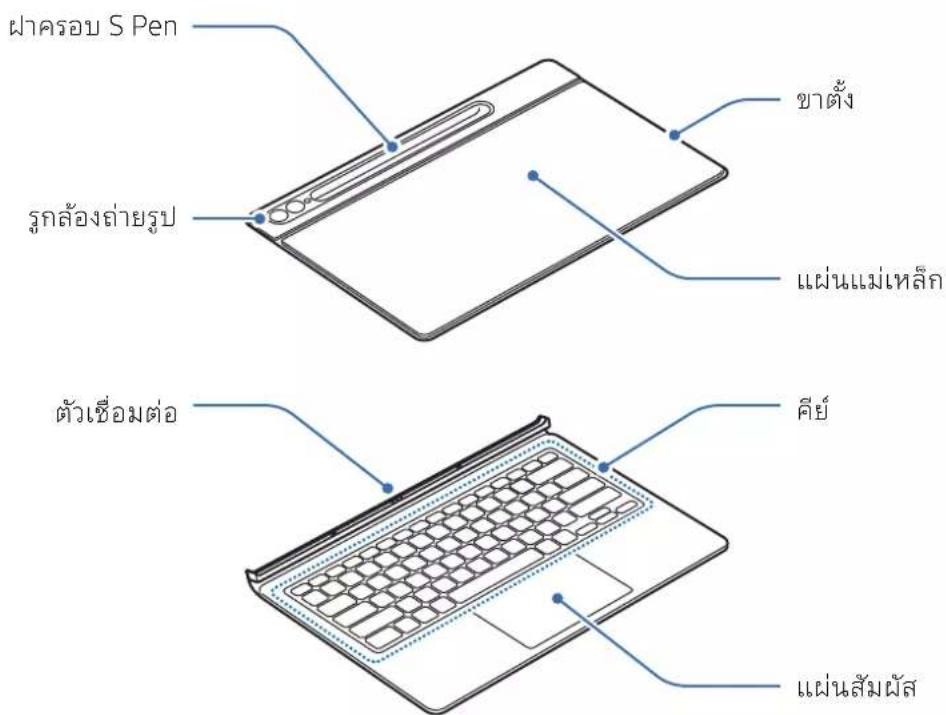
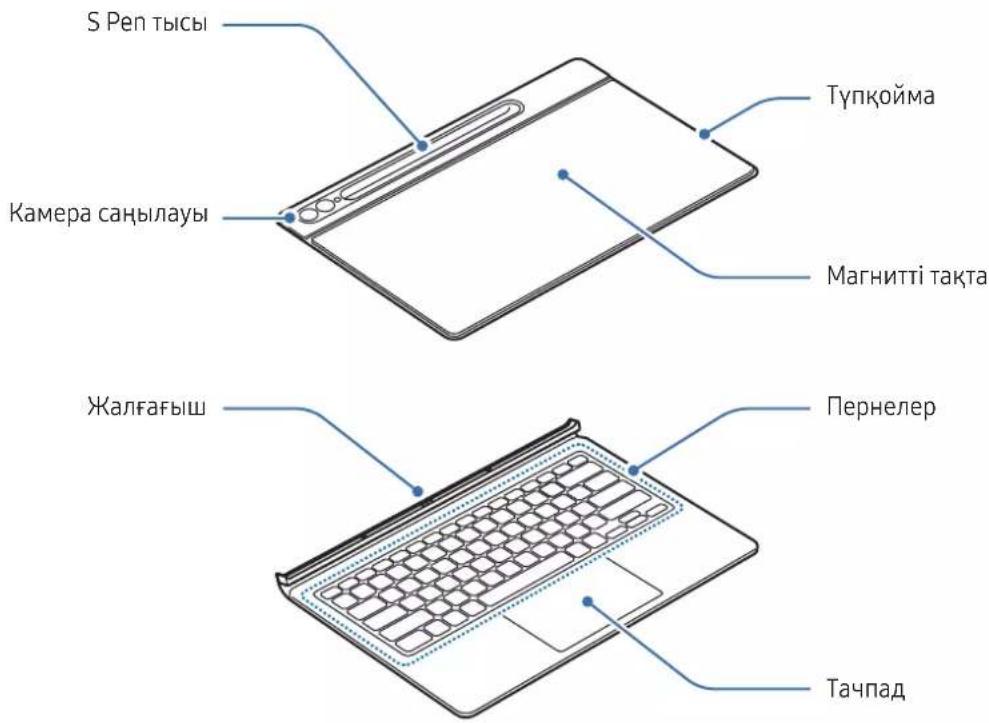
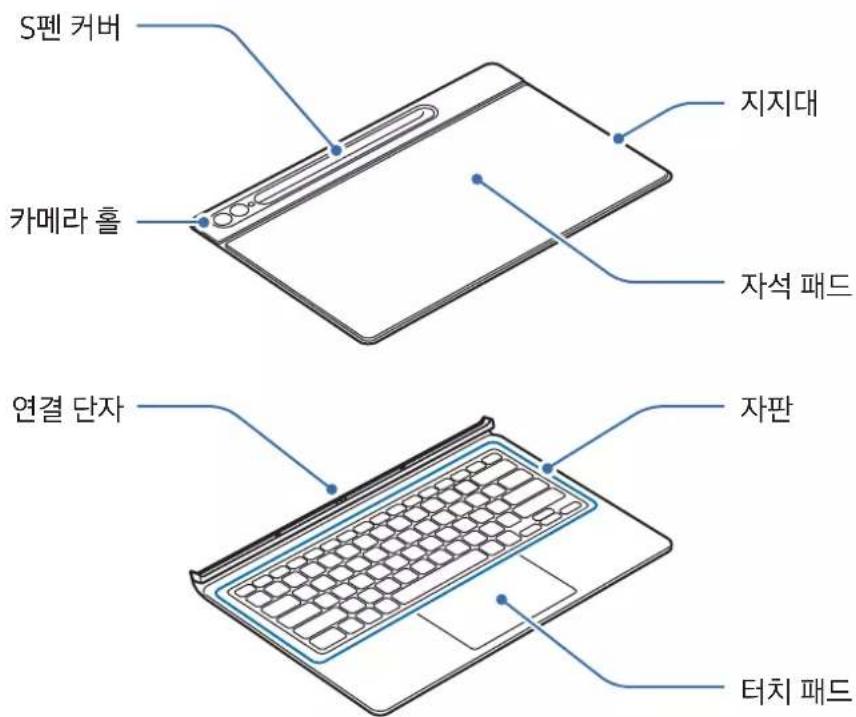
▶ EF-DX715, EF-DX815, EF-DX915:
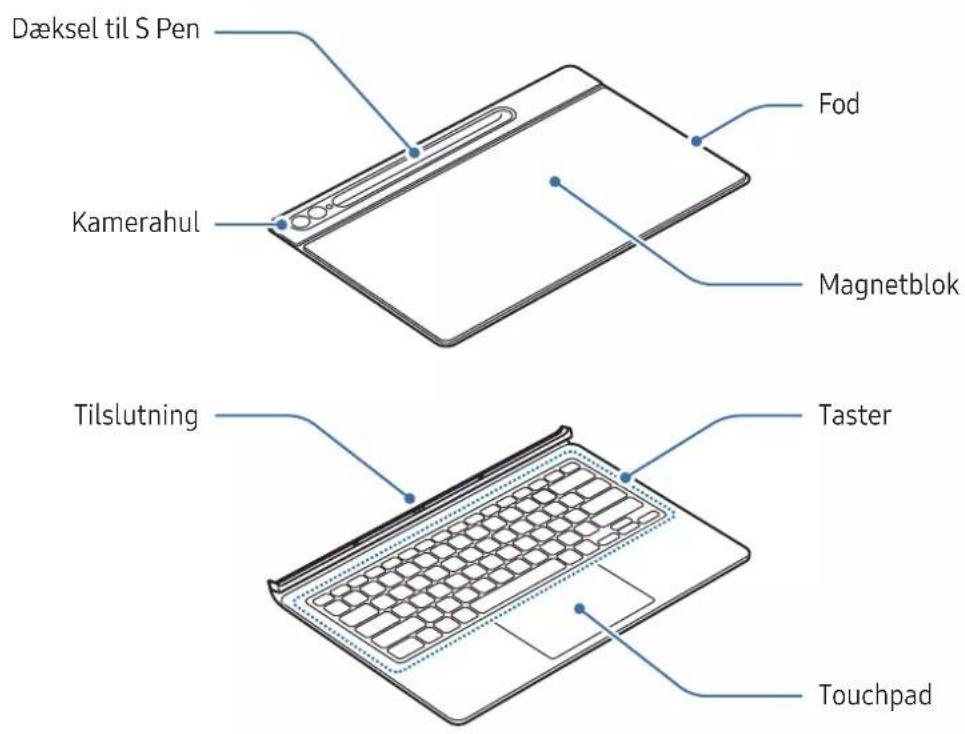
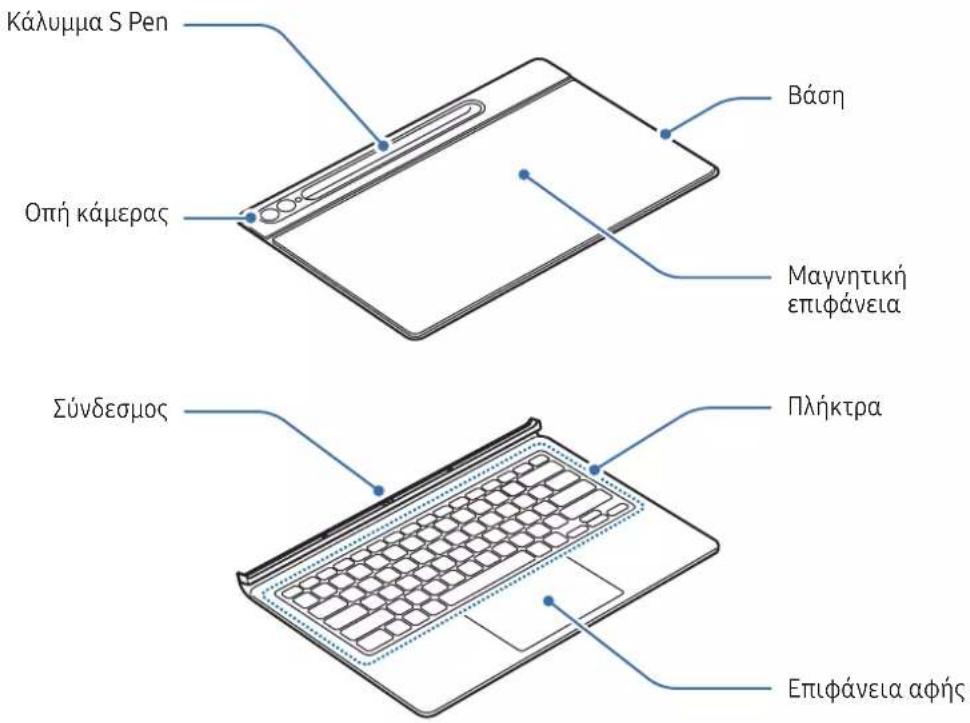
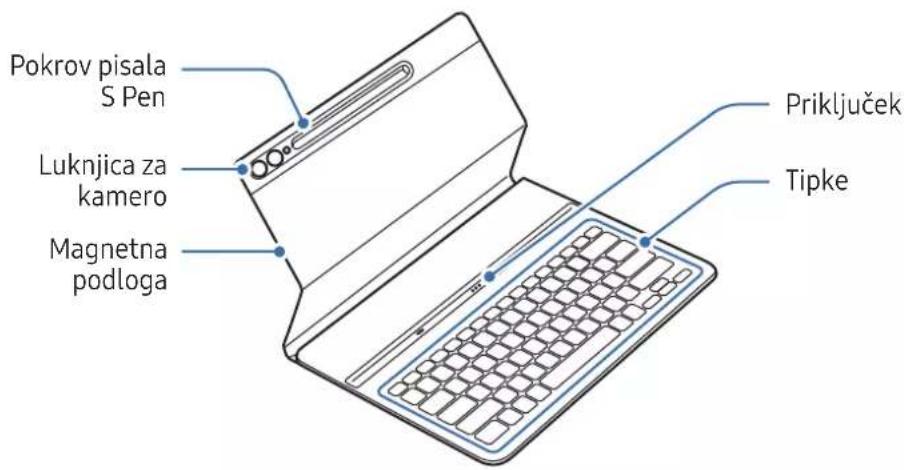
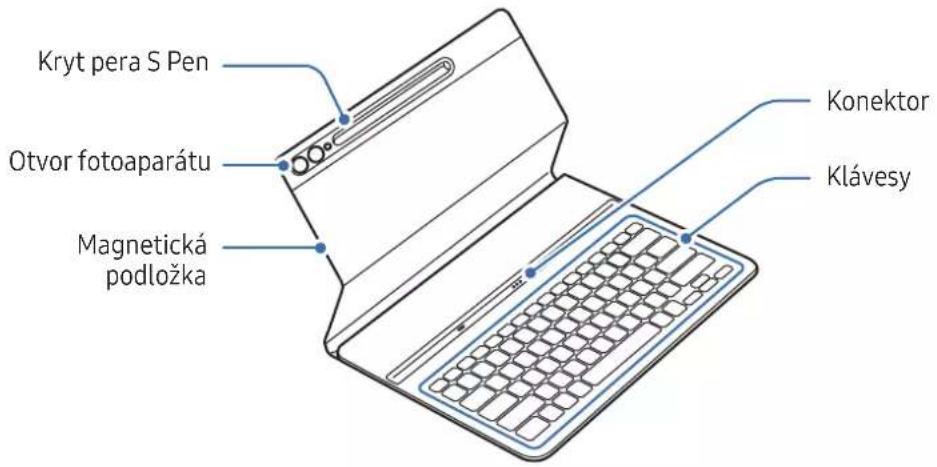
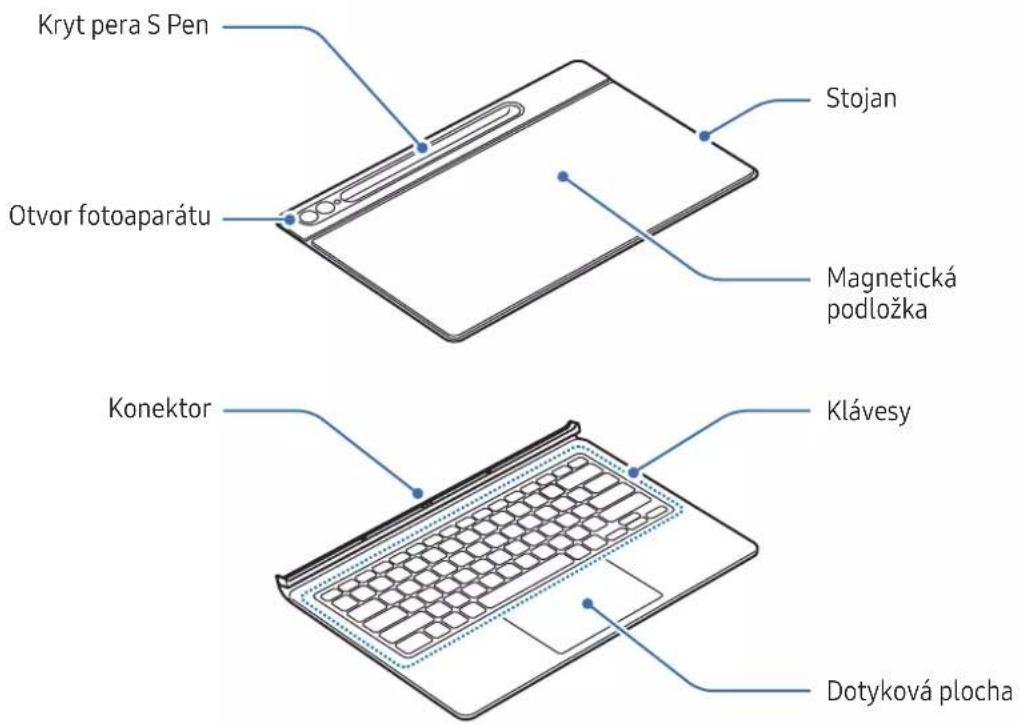
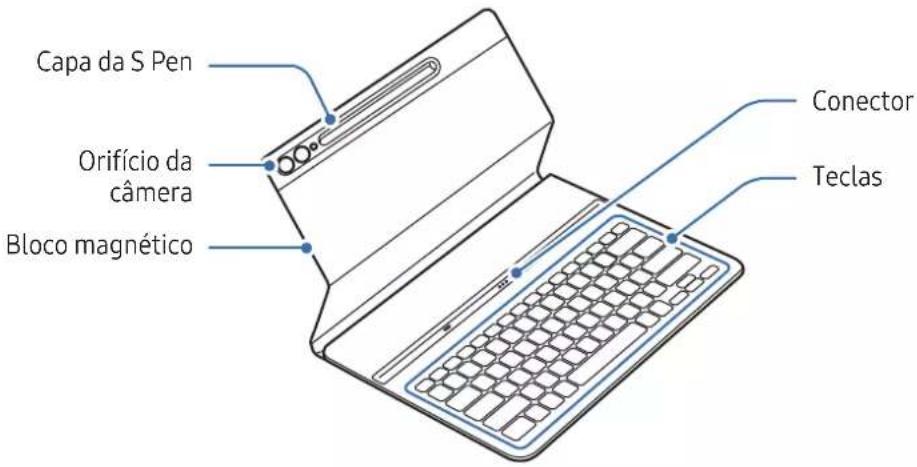
Using the keyboard
Attaching the keyboard
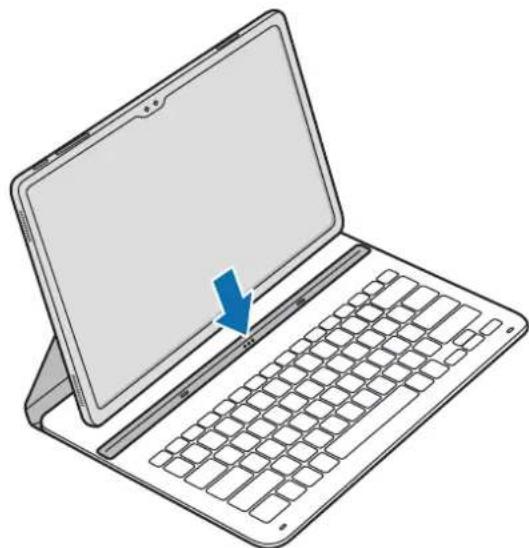
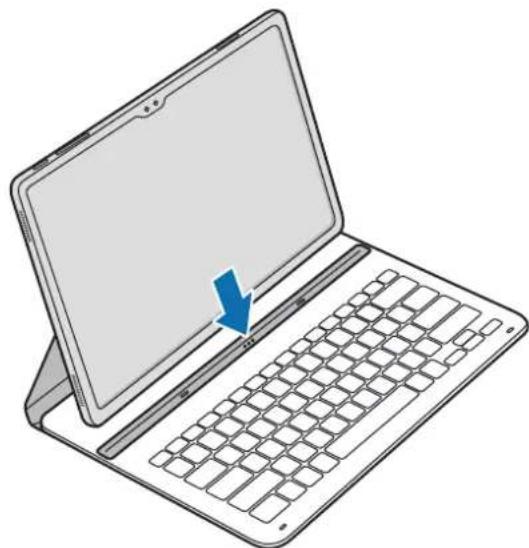
▶ EF-DX710, EF-DX810, EF-DX910:
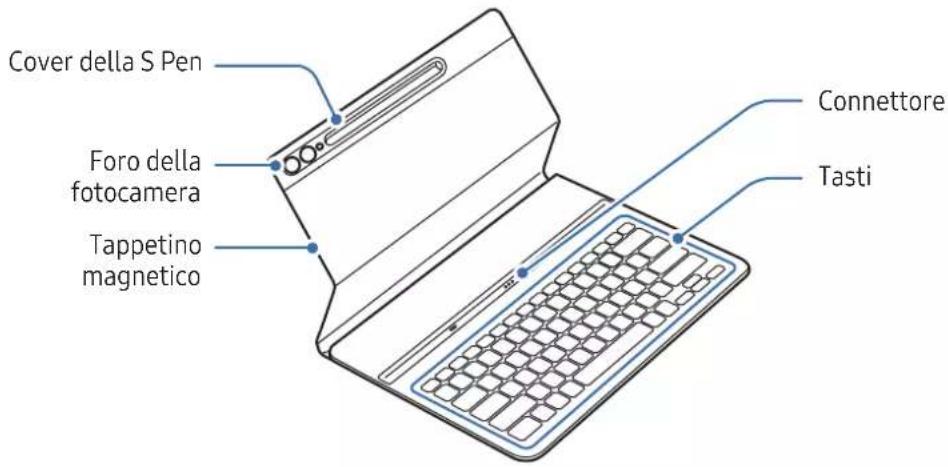
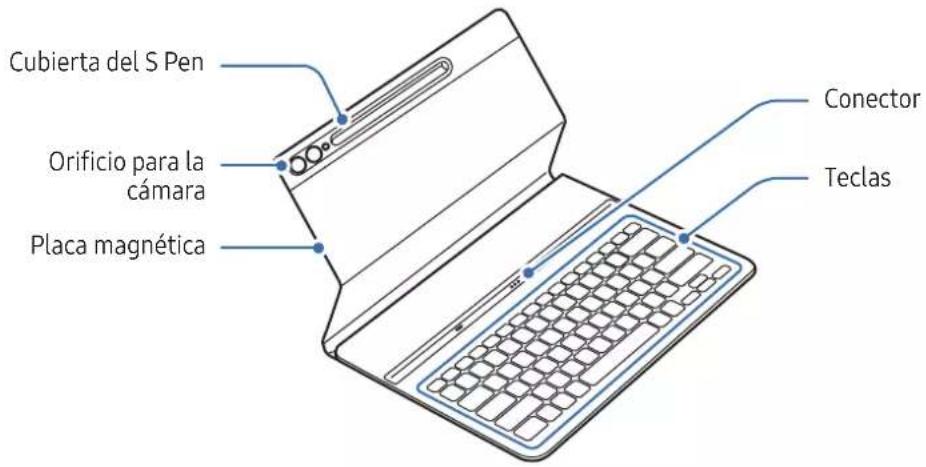
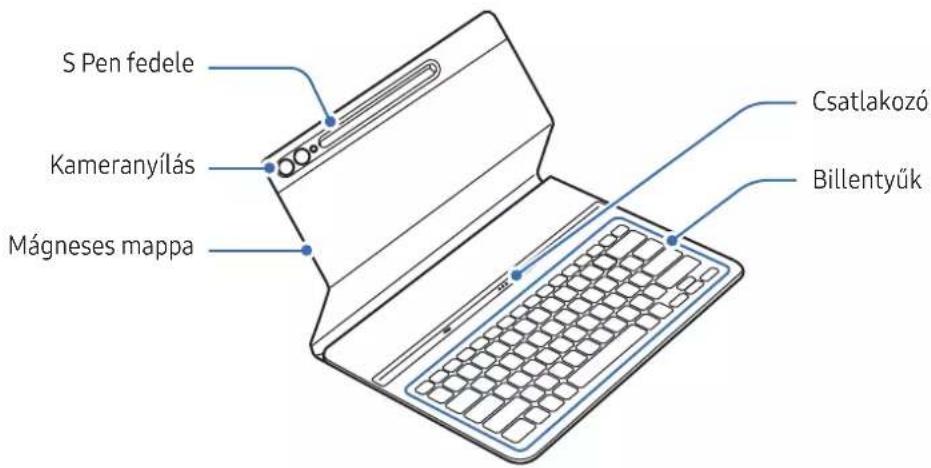
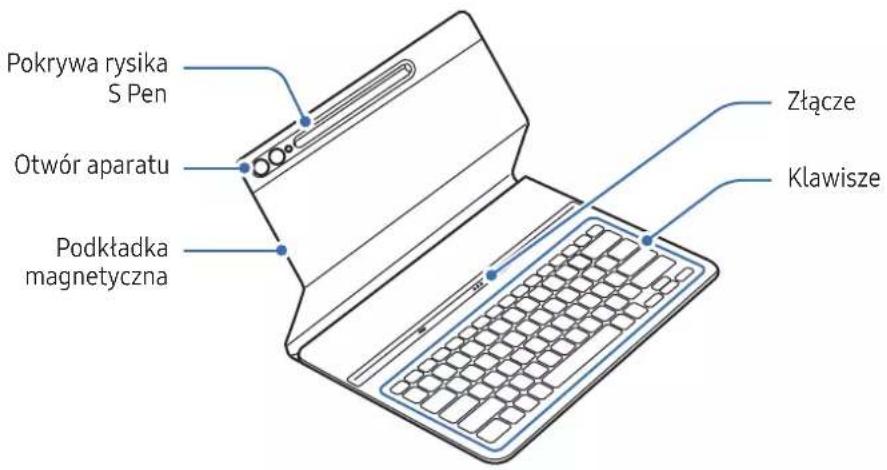
1 Align each corner of the lower part of the cover with the tablet and then attach the cover.
2 After the cover is attached, check that the camera fits the camera hole. If it is crooked, detach it and then attach it again.
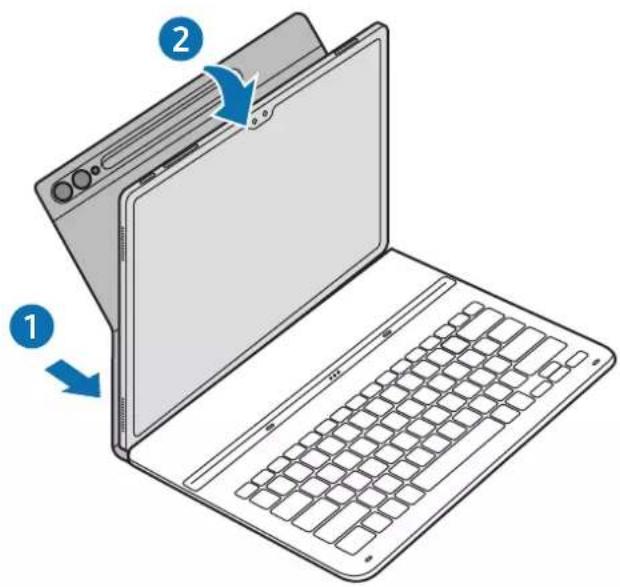
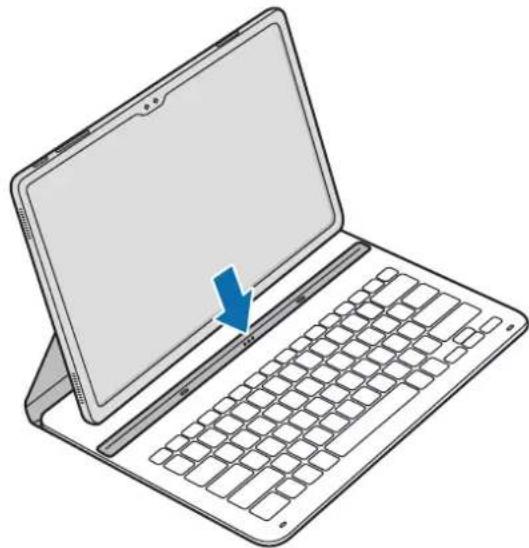
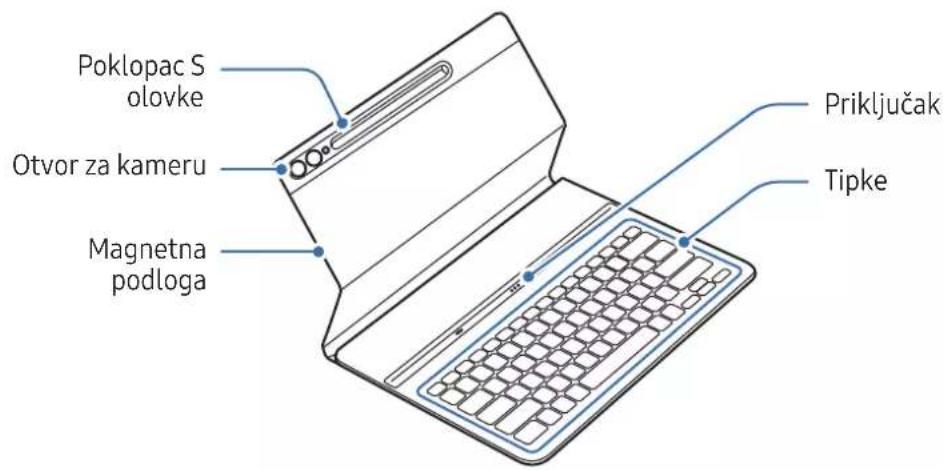
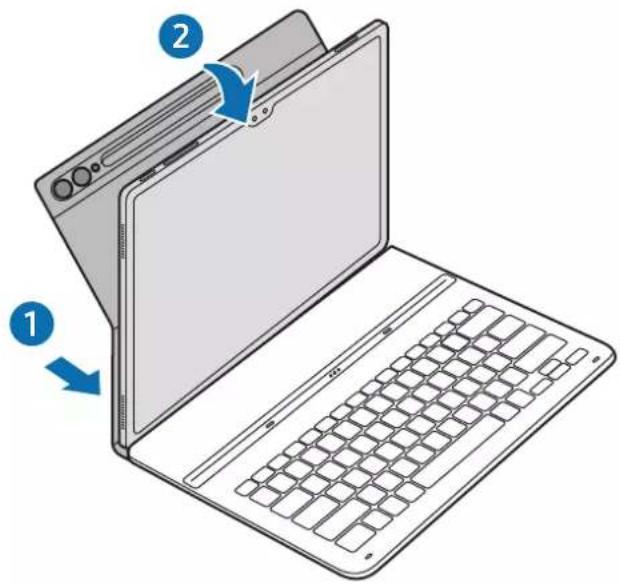
3 Line up the connectors of the tablet and the keyboard, and then attach the tablet to the keyboard.
You will immediately be able to use the keyboard.
natural_image
Illustration of a laptop with a blue arrow pointing to the screen (no text or symbols present)▶ EF-DX715, EF-DX815, EF-DX915:
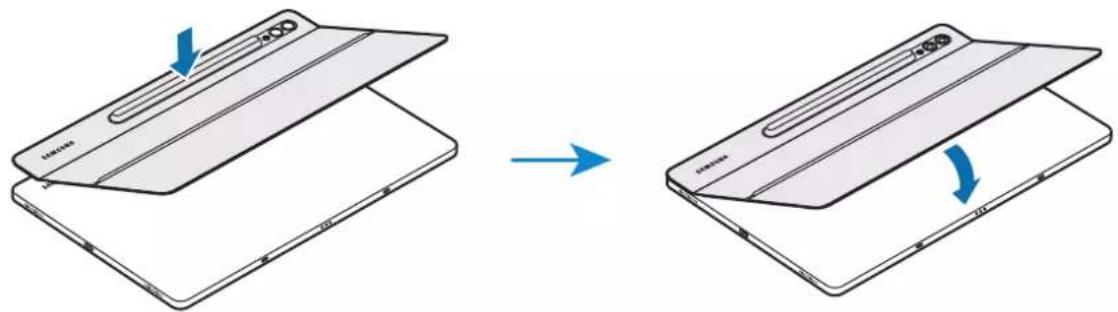
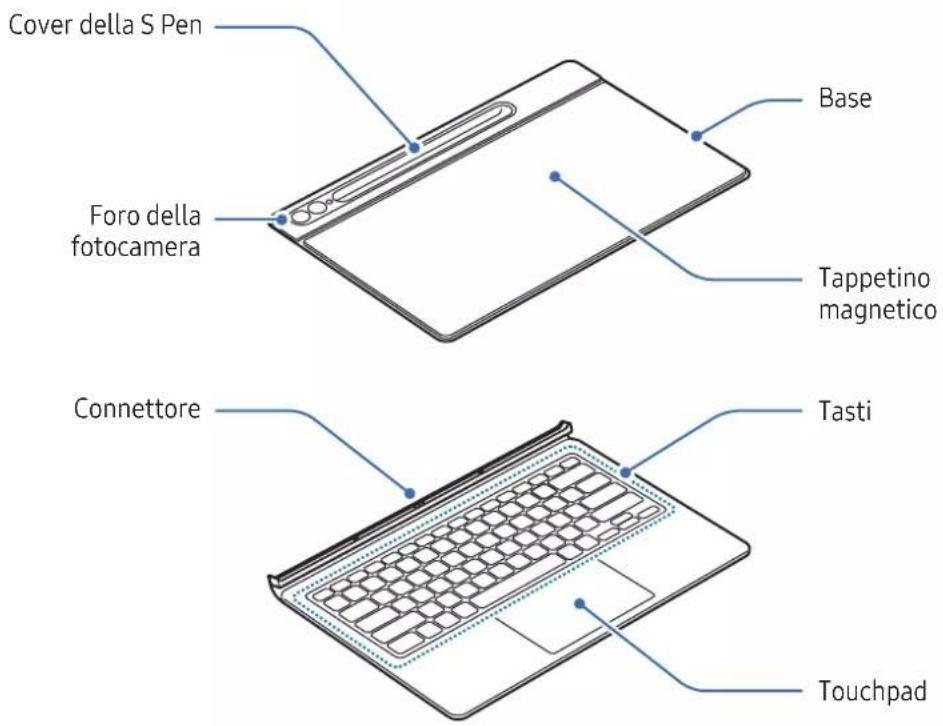
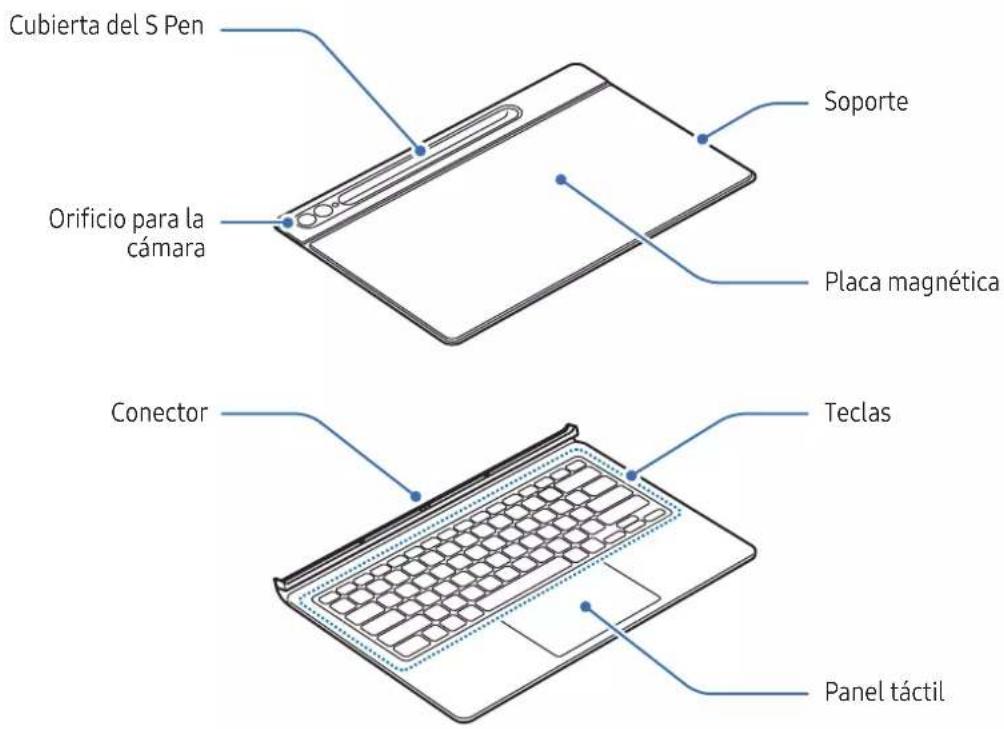
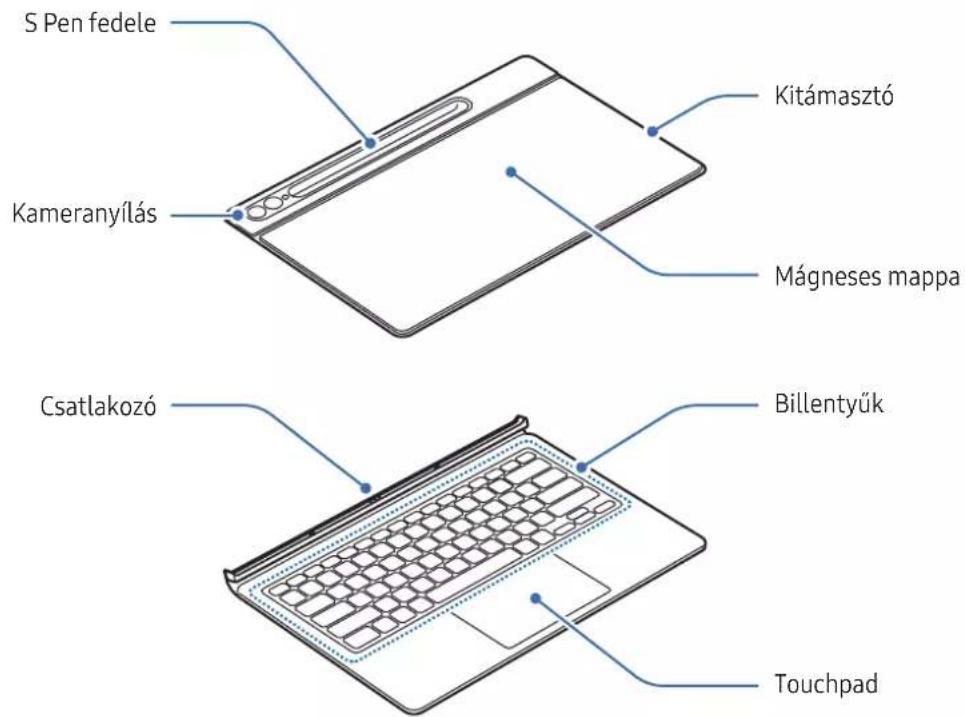
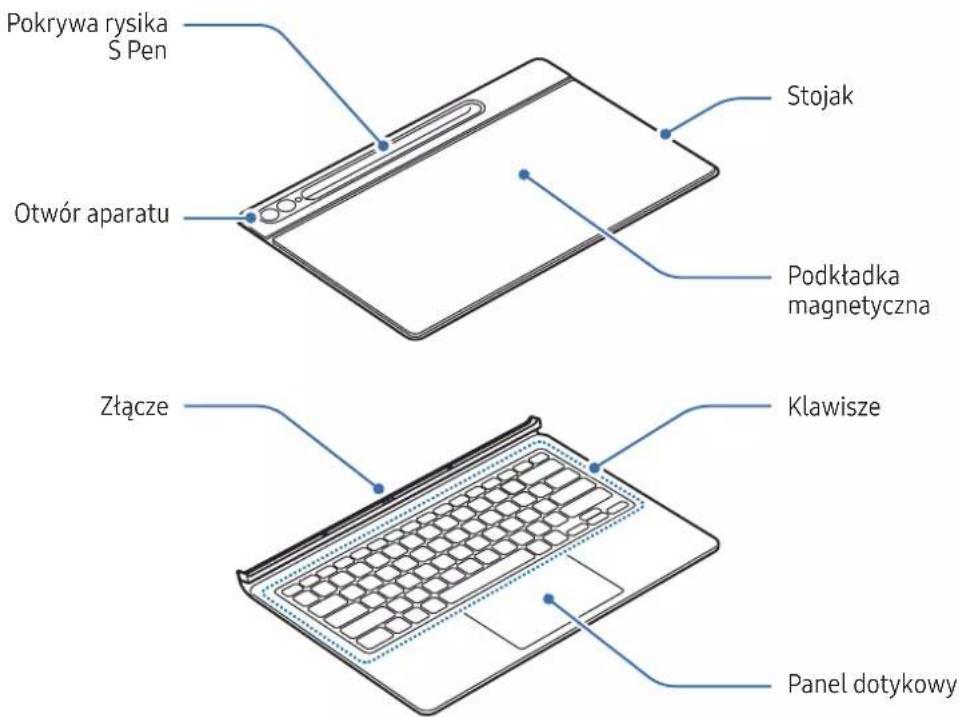
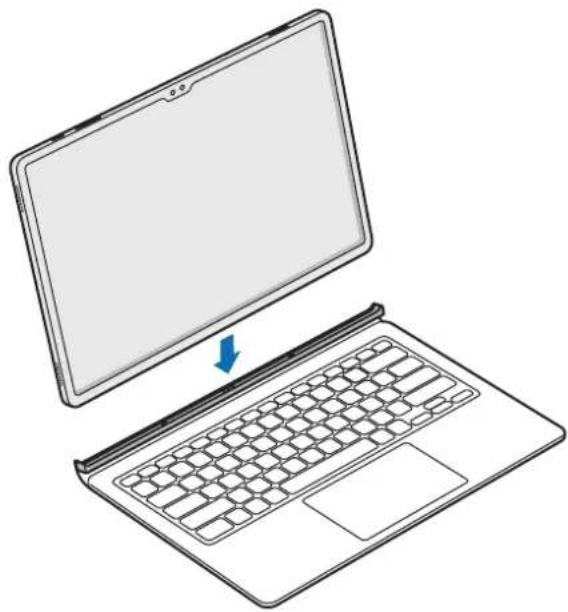
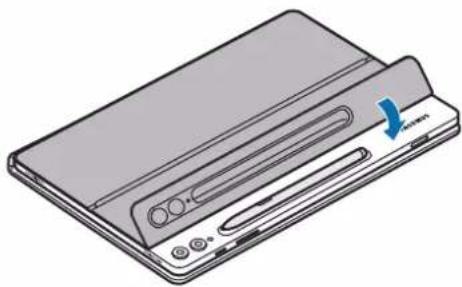
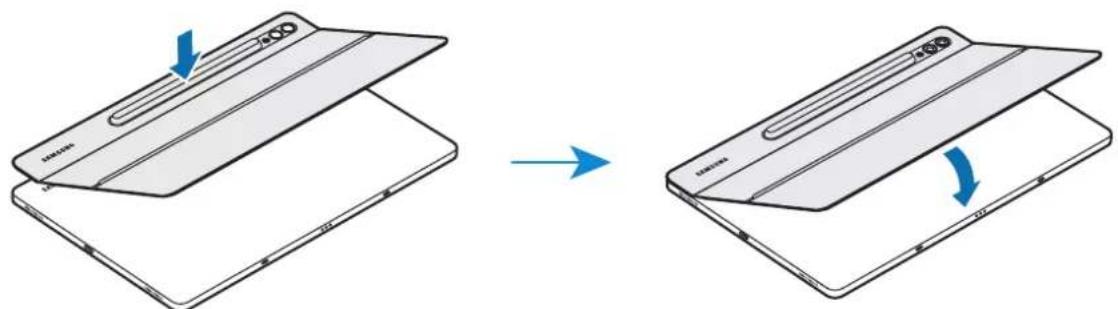
1 Check the location of the camera and the camera hole, and then align each corner of the upper part of the cover with the tablet.
2 Attach the upper part of the cover first, and then press the rest part down.
natural_image
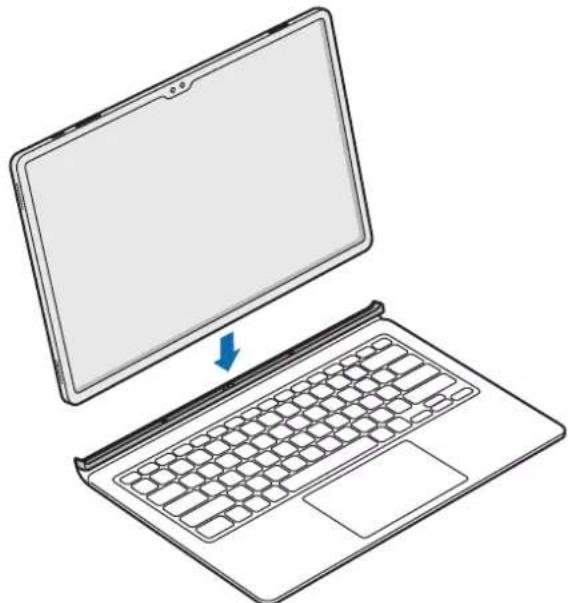
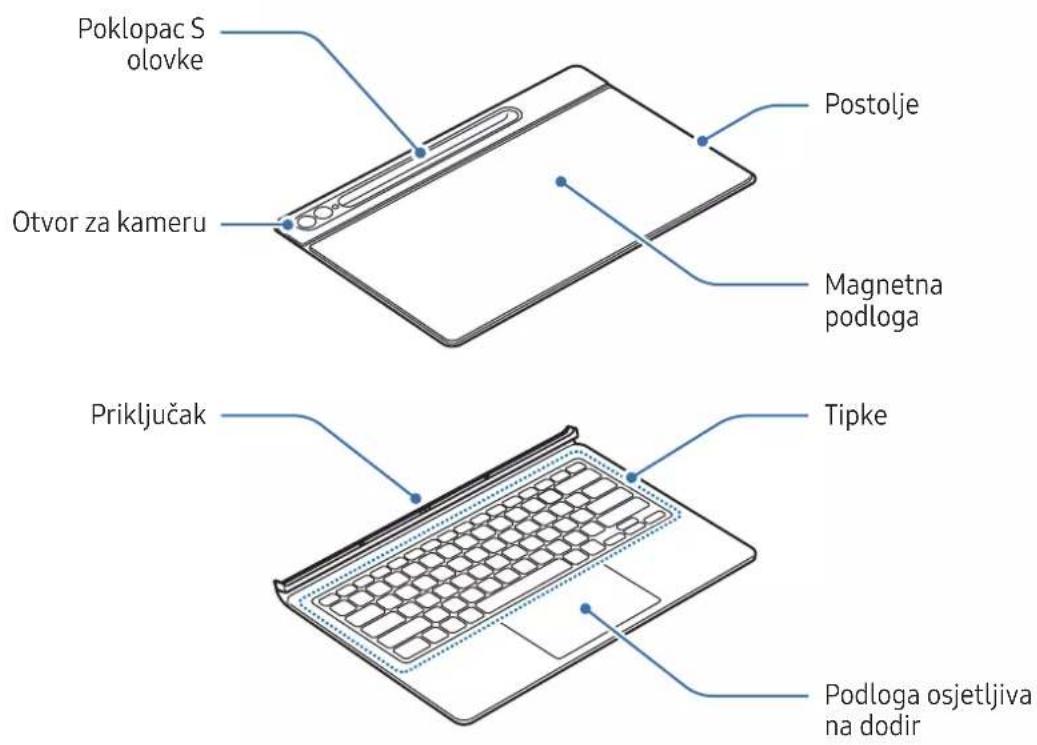
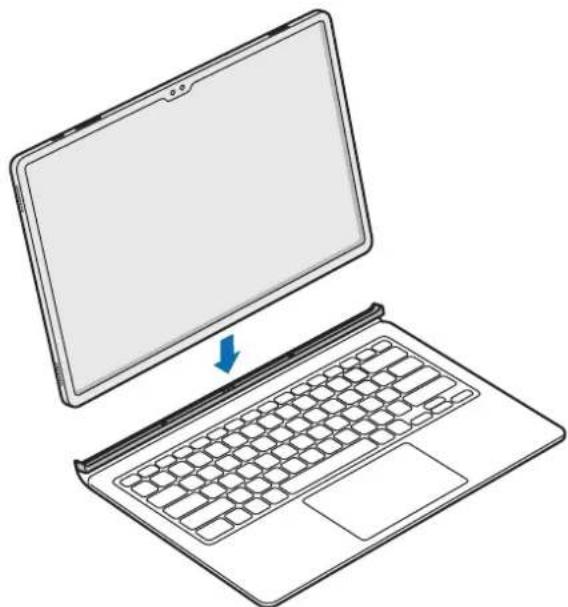
Diagram showing a device being folded into a flat sheet, with blue arrows indicating the process (no text or symbols present)3 Line up the connectors of the tablet and the keyboard, and then attach the tablet to the keyboard.
You will immediately be able to use the keyboard.
natural_image
Line drawing of a laptop with a blank screen and keyboard, showing no text or symbols
- Do not apply excessive pressure on the keyboard while covering the tablet's screen. Doing so may cause screen damage.
- If the tablet and the keyboard connectors are dirty, the keyboard may not be recognised or work properly.
- While moving to another place with the tablet, close the keyboard. If you move while the keyboard is opened, the tablet may separate and be damaged.
• Use the product on a flat surface.

You can use the keyboard as a screen cover. The screen turns off when you cover it with the keyboard, and it turns on when you open the keyboard.
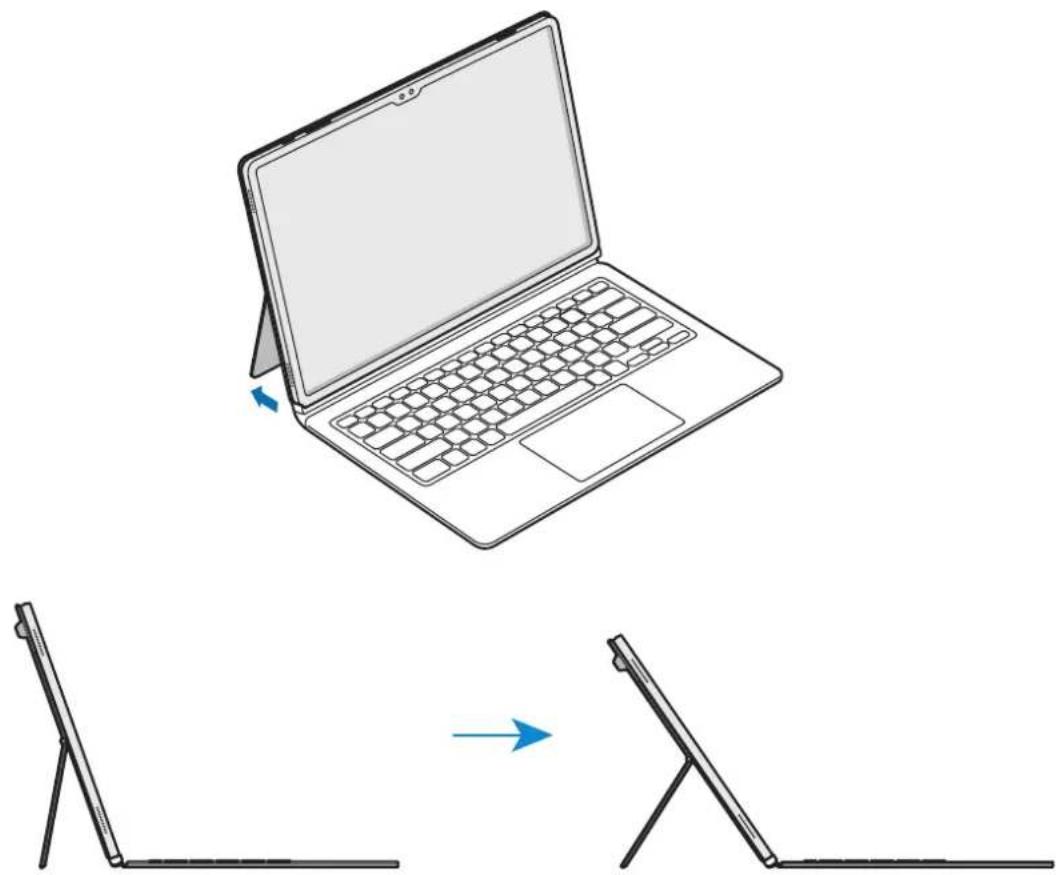
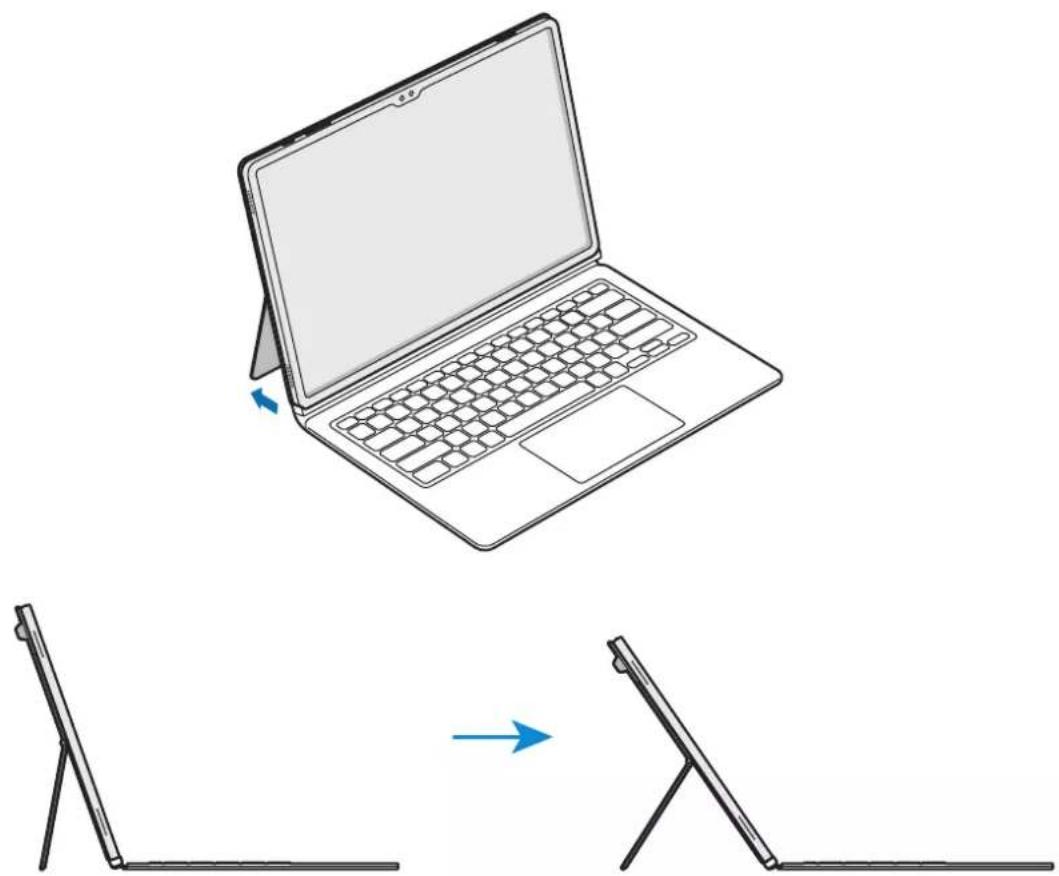
Adjusting the tablet angle (EF-DX715, EF-DX815, EF-DX915)
You can adjust the tablet angle with the product's stand. Flip out and adjust the stand until you find the desired angle.
natural_image
Line drawing of a laptop with a side panel showing the change from its open position to its extended view (no text or symbols)
- Do not excessively tilt or apply too much pressure to the stand. Doing so may cause damage or deform it.
- Do not apply pressure to the tablet's screen while the angle of the stand is adjusted low. Doing so may cause the stand to fall over.
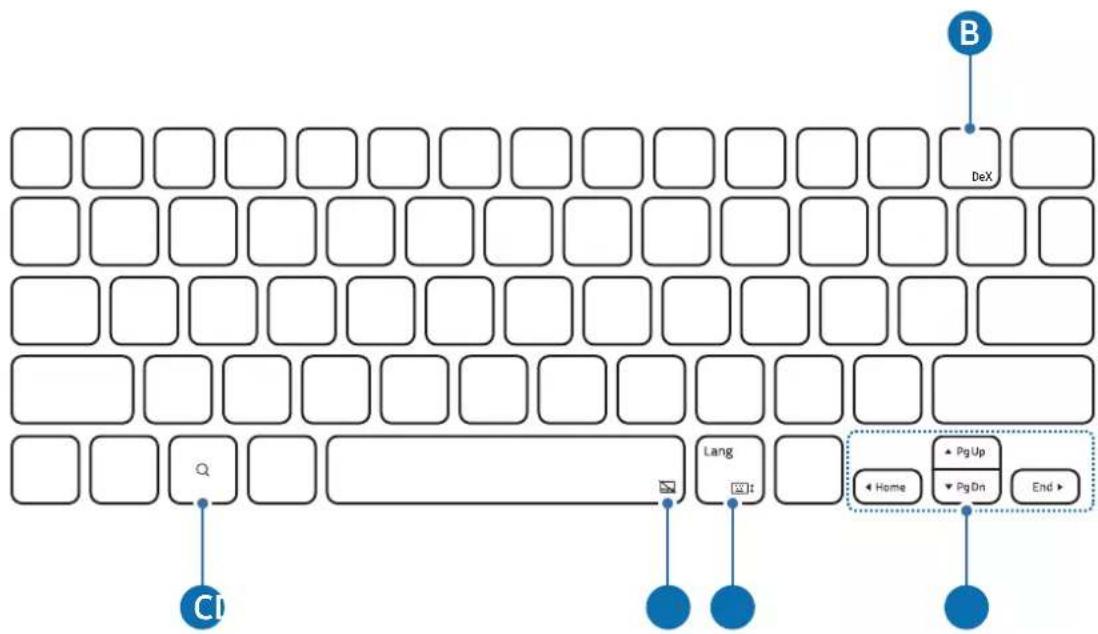
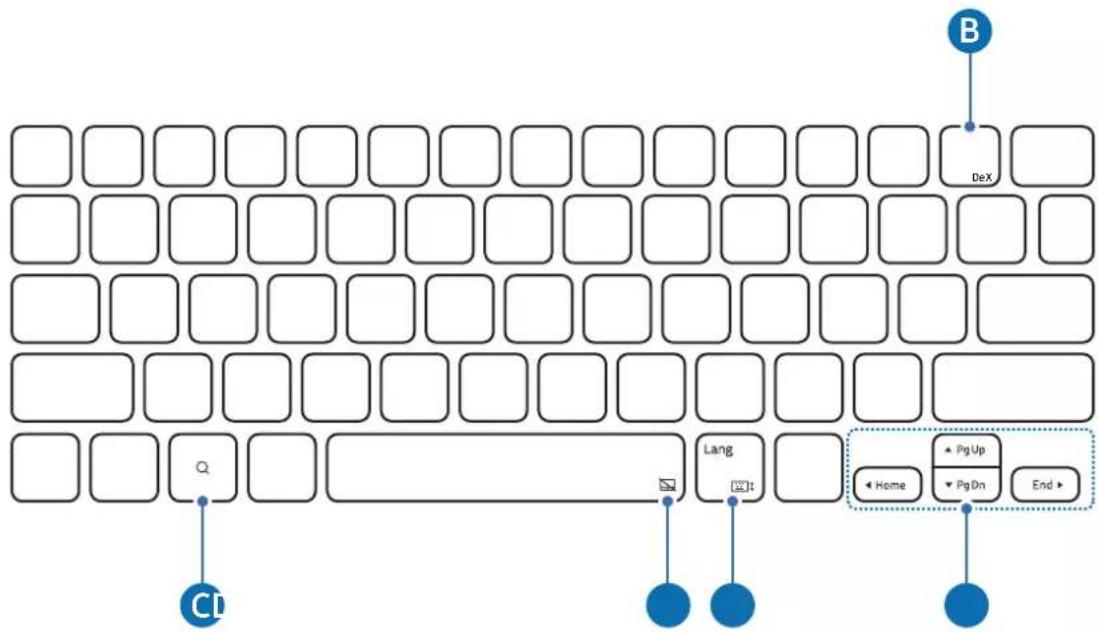
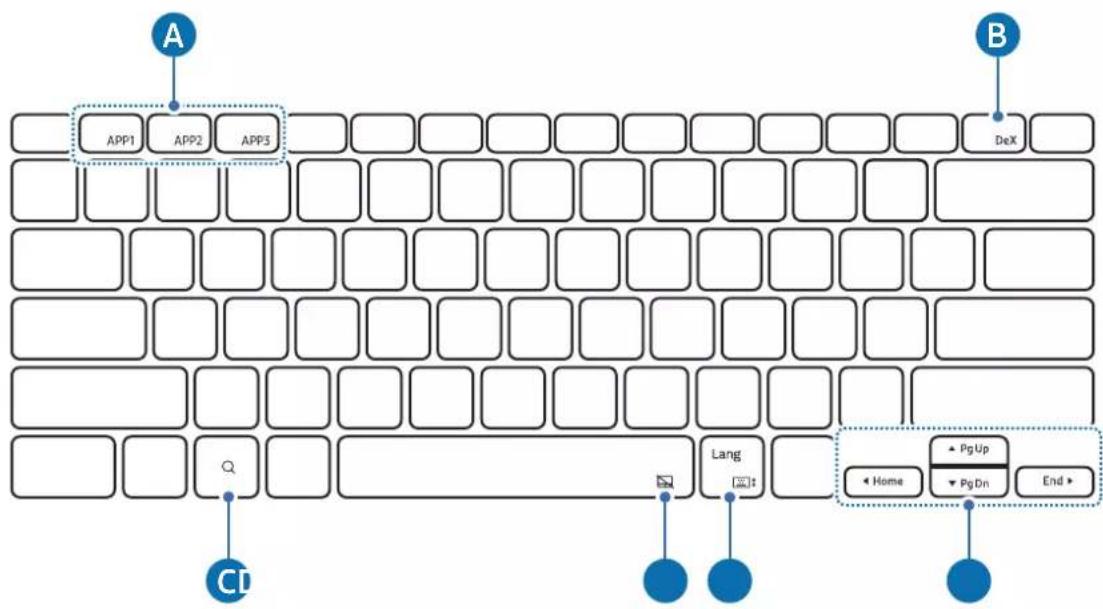
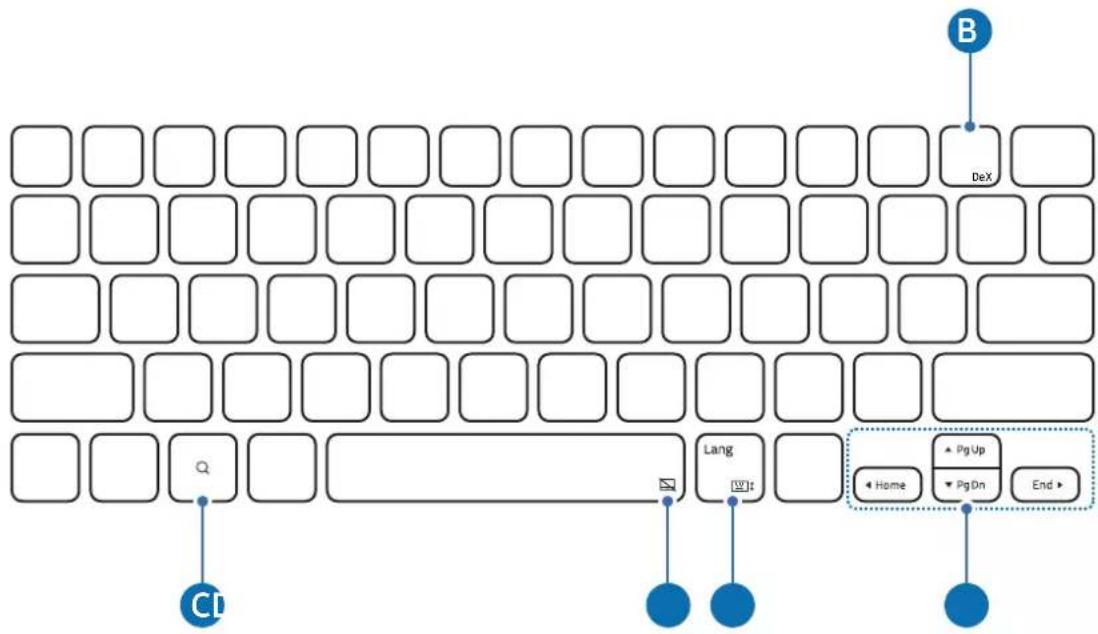
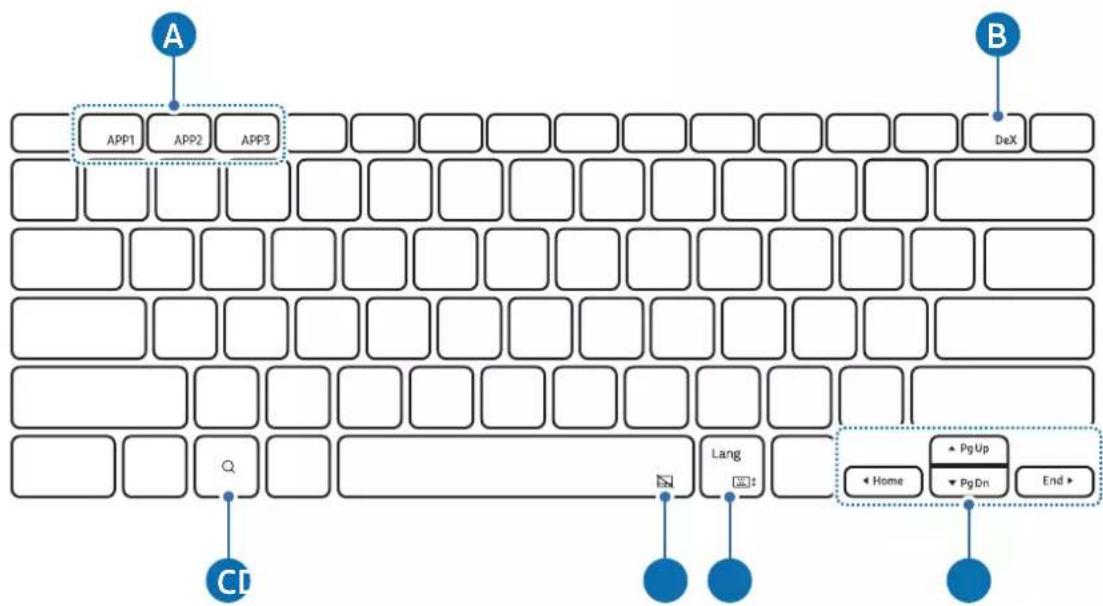
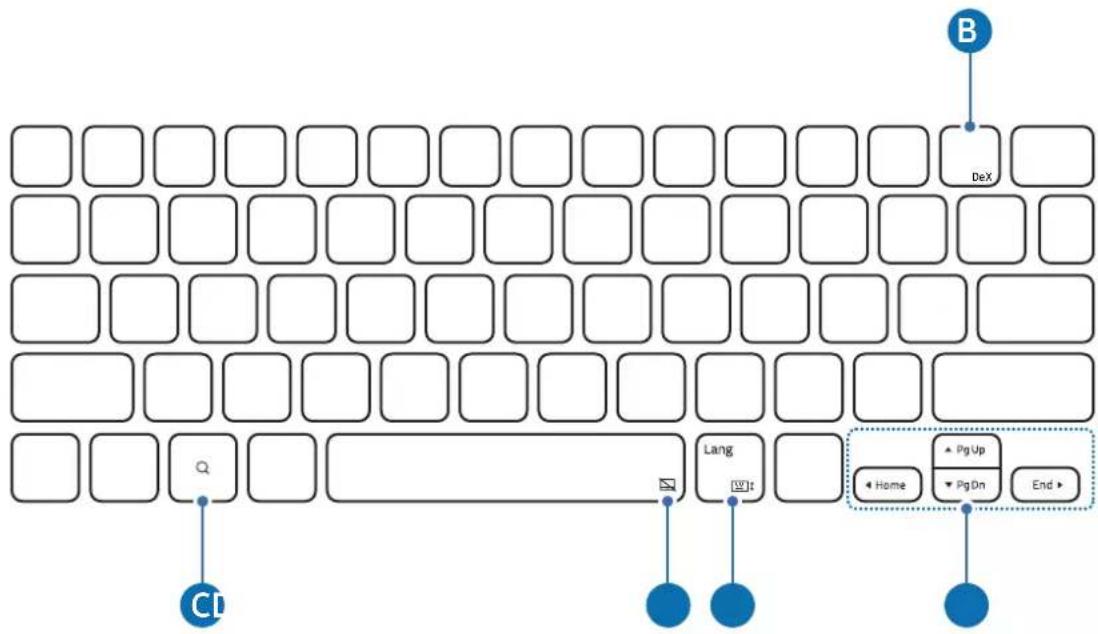
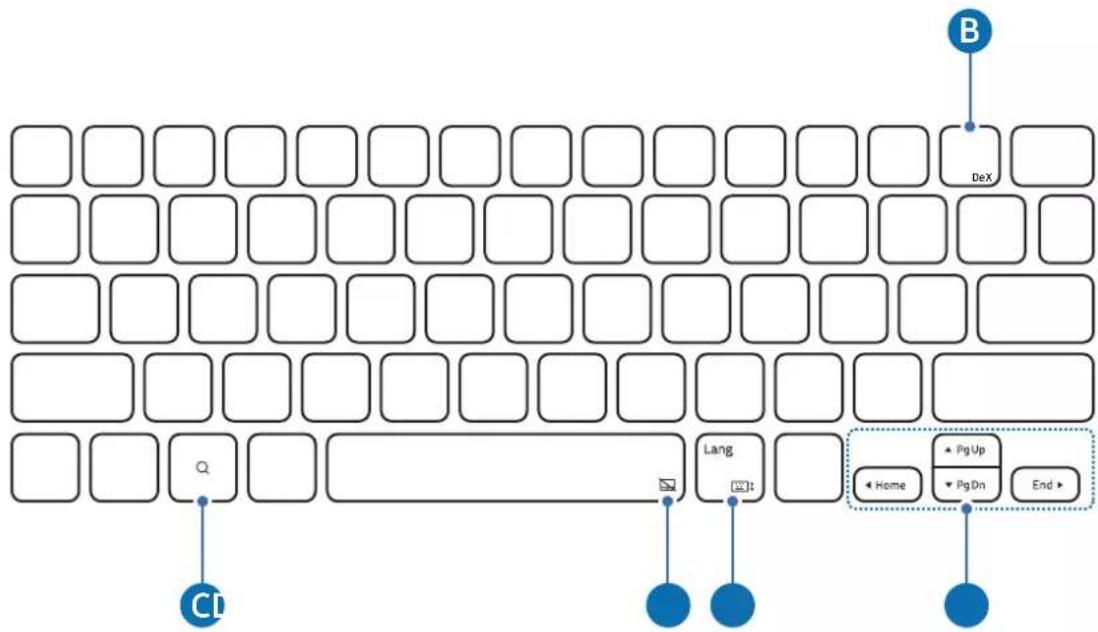
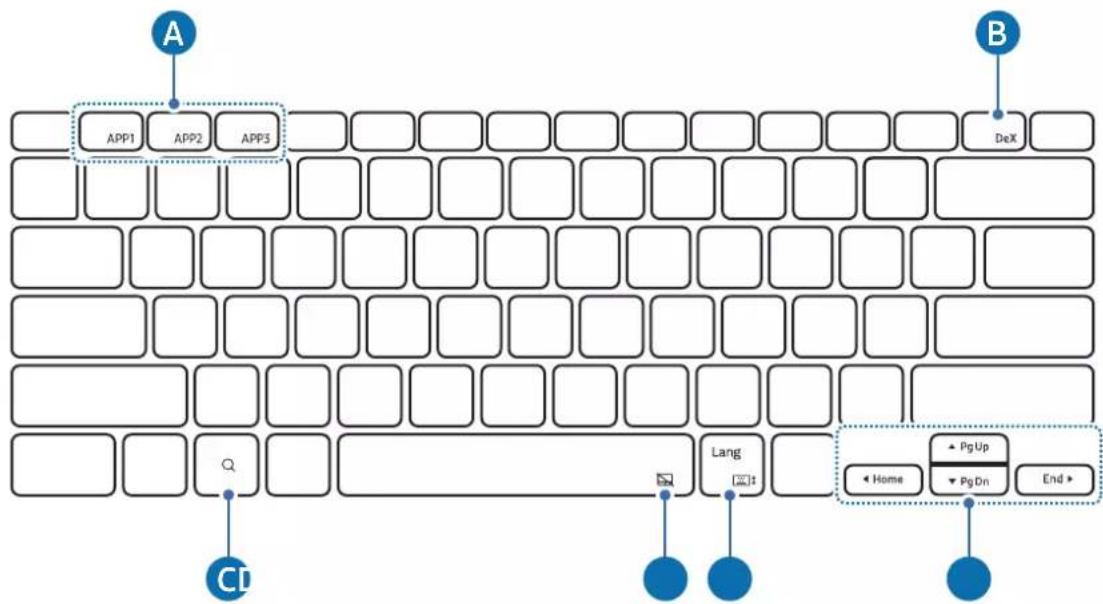
Using the keys
Set the input language on the tablet before you use the keyboard. For more information about setting the input language, refer to the tablet's user manual.
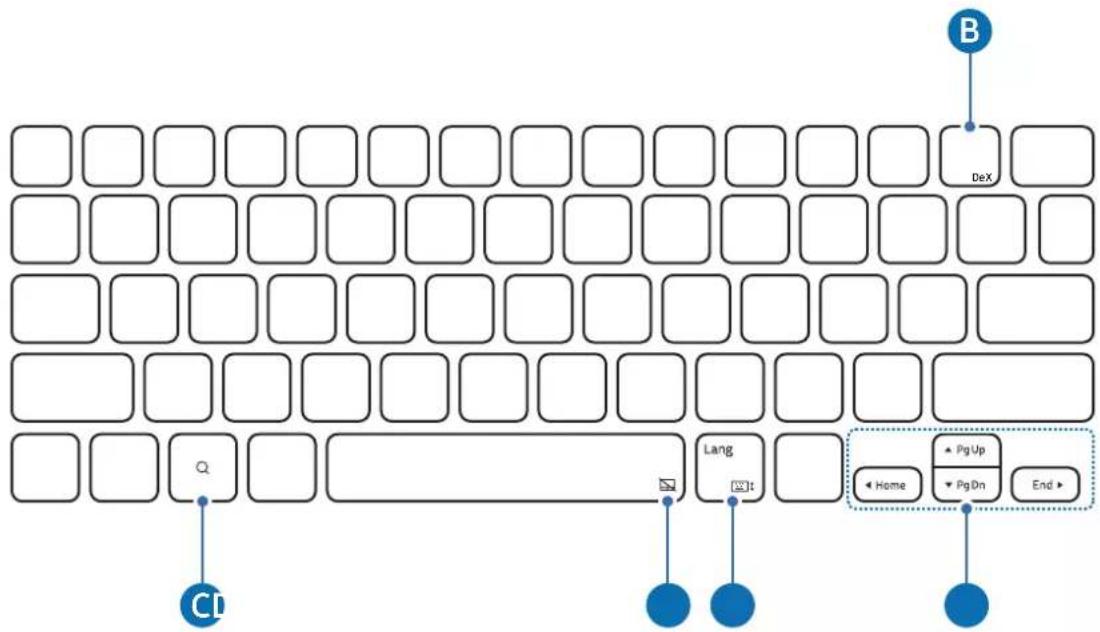
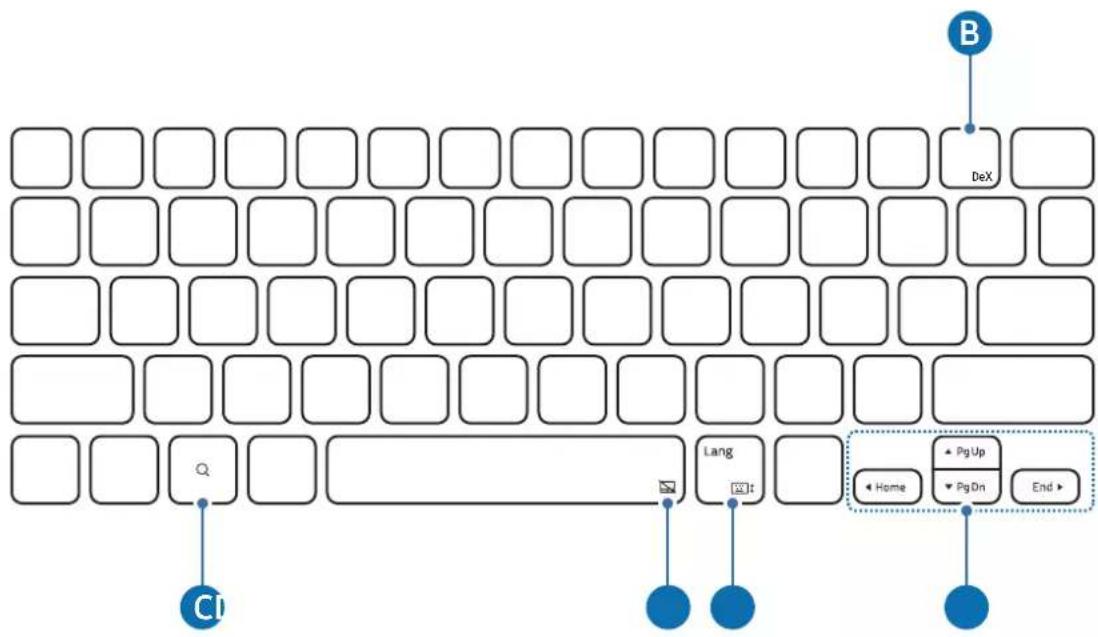
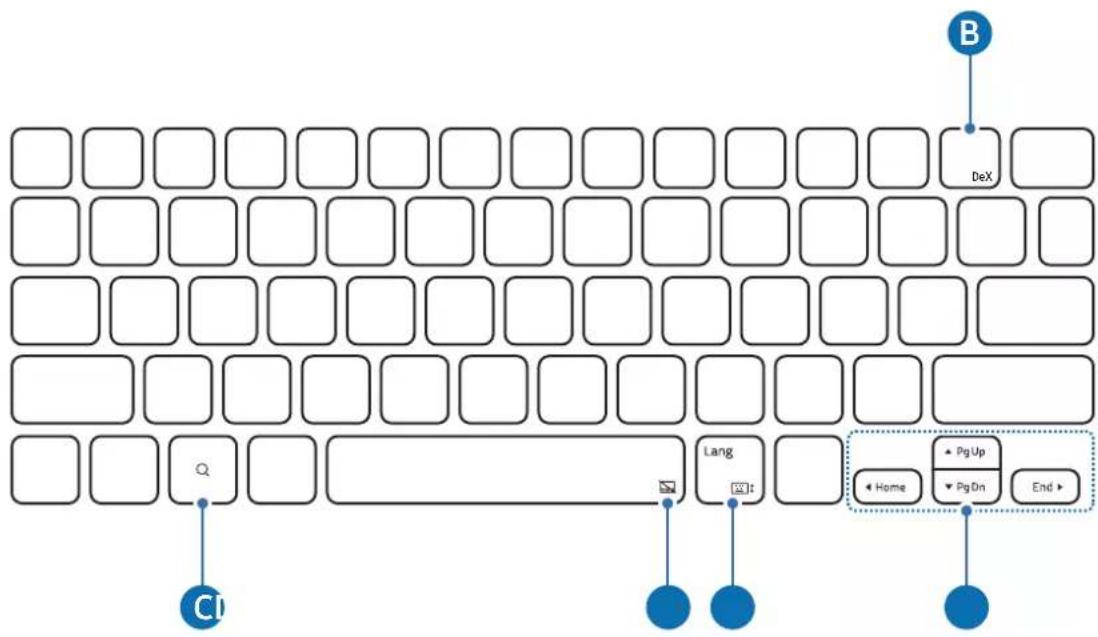
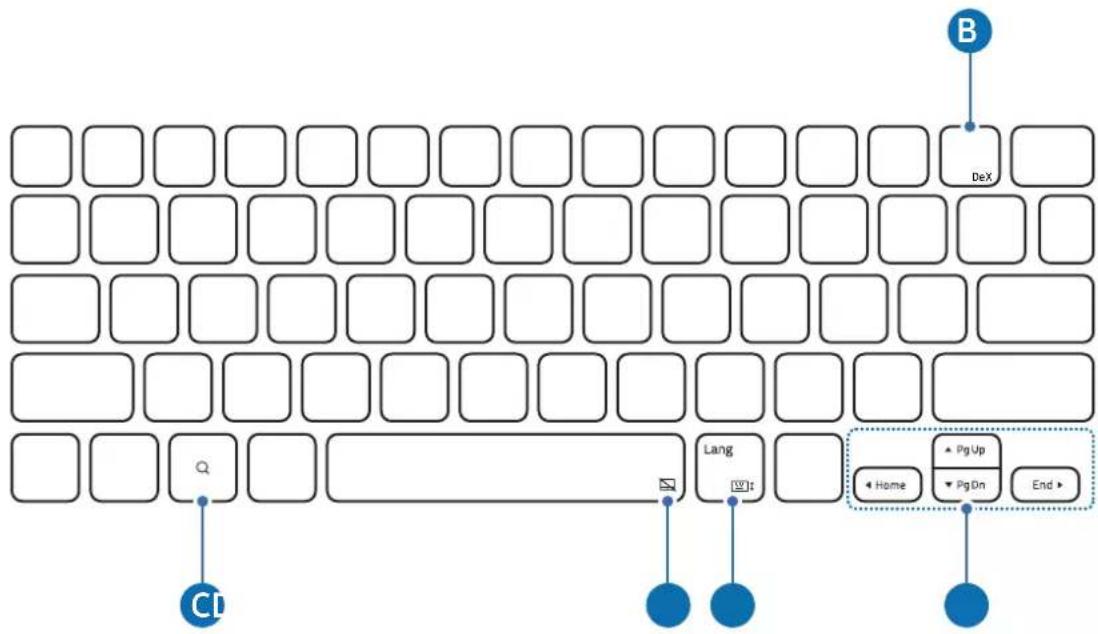
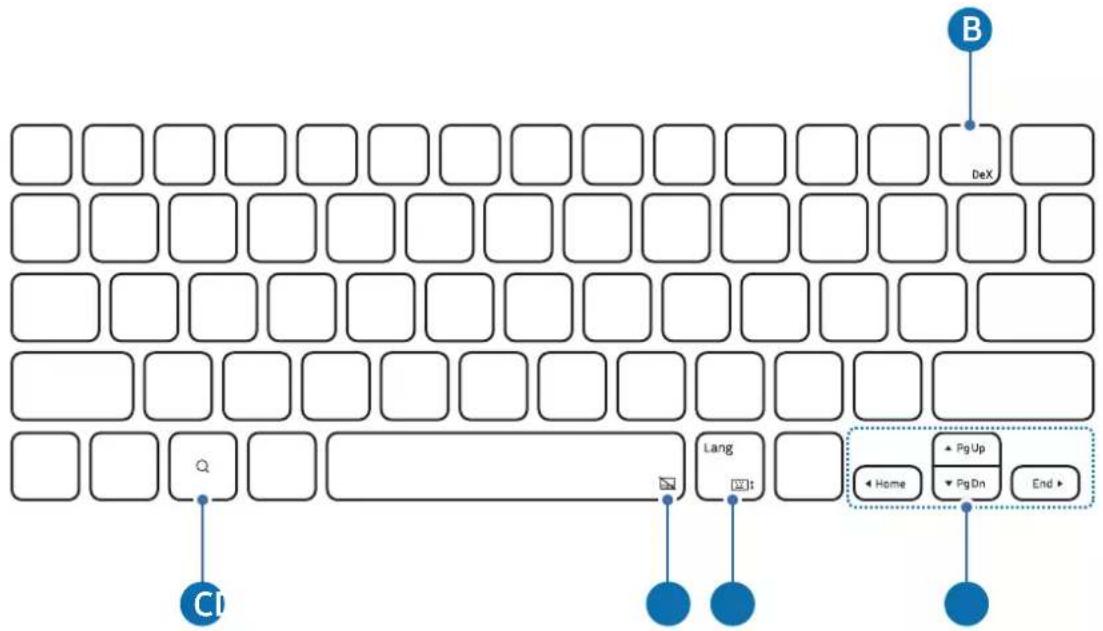
▶ EF-DX710, EF-DX715:
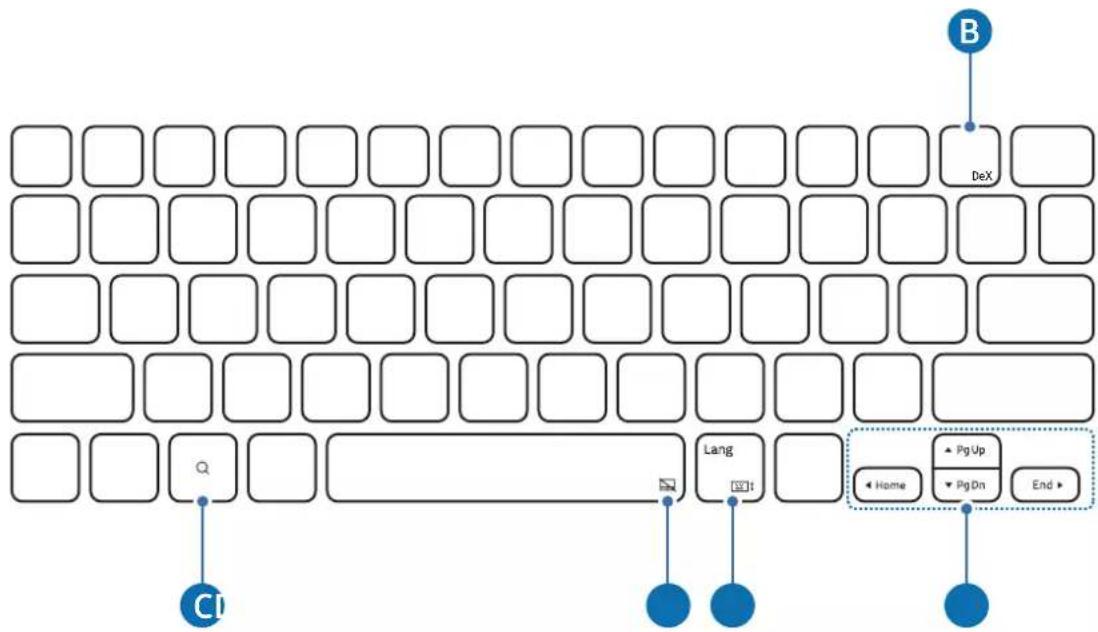
flowchart
graph TD
    A["DeX"] --> B["Lang"]
    C["Home"] --> D["Pg Up"]
    E["End"] --> F["PgDn"]
    G["CI"] --> H["End"]
    style A fill:#fff,stroke:#000
    style B fill:#fff,stroke:#000
    style C fill:#fff,stroke:#000
    style D fill:#fff,stroke:#000
    style E fill:#fff,stroke:#000
    style F fill:#fff,stroke:#000
    style G fill:#fff,stroke:#000
    style H fill:#fff,stroke:#000
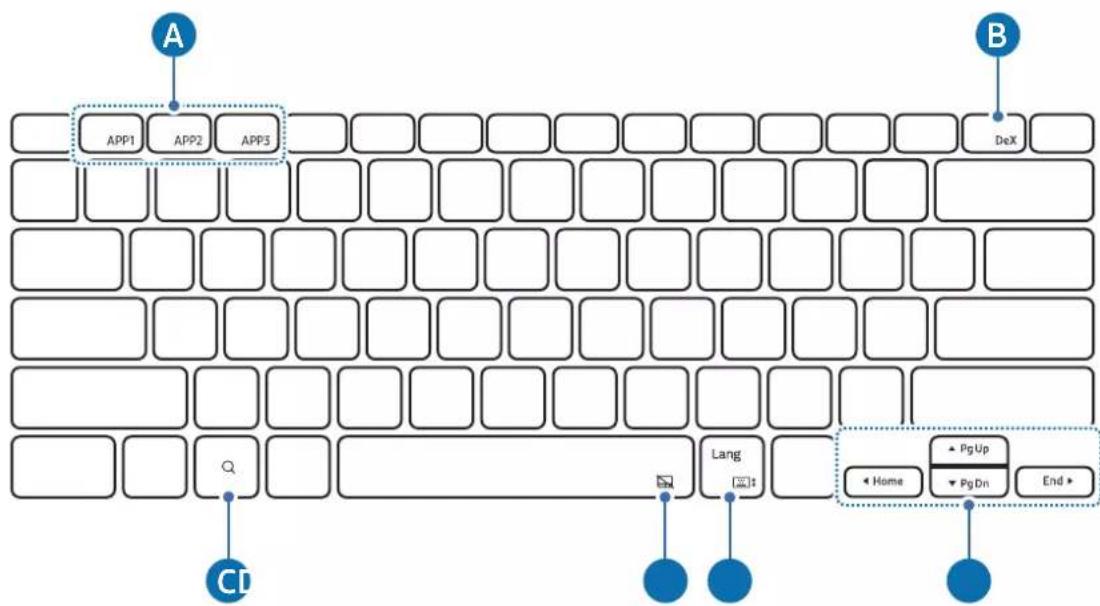
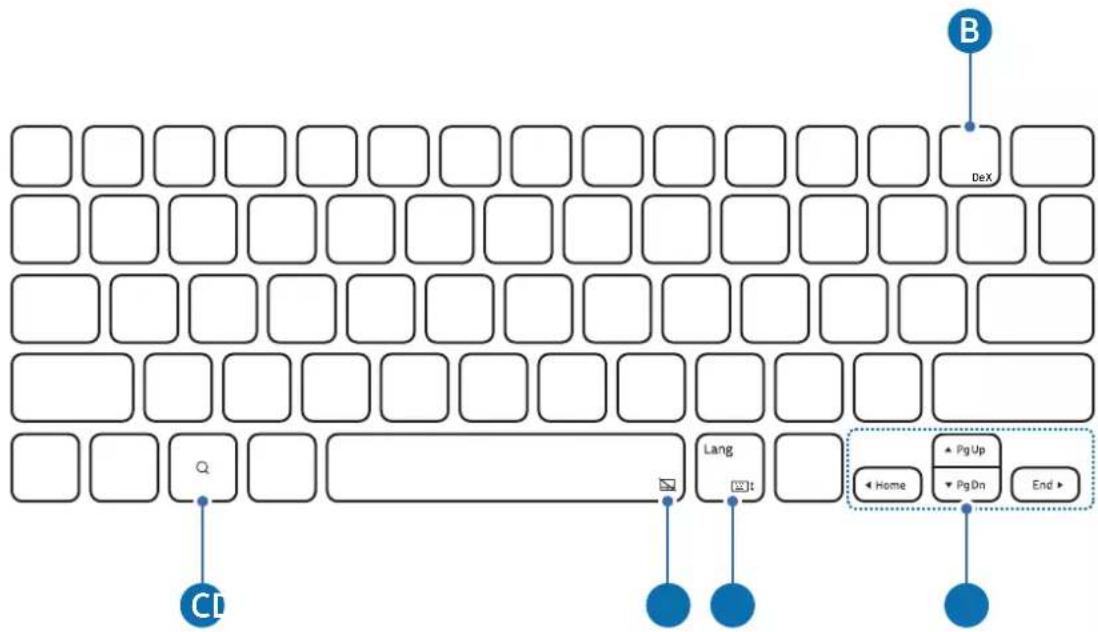
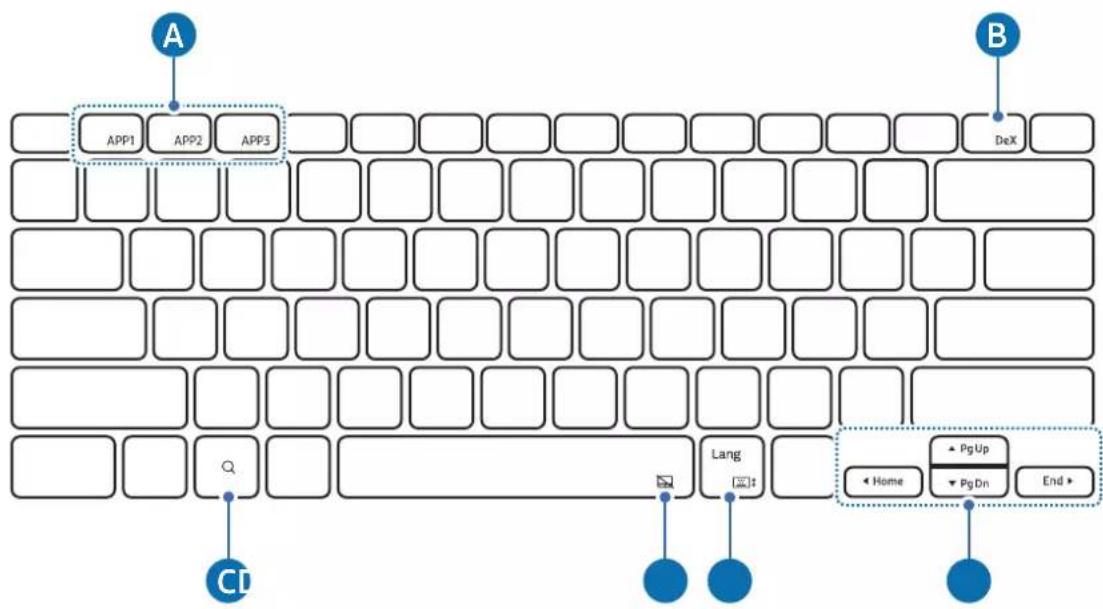
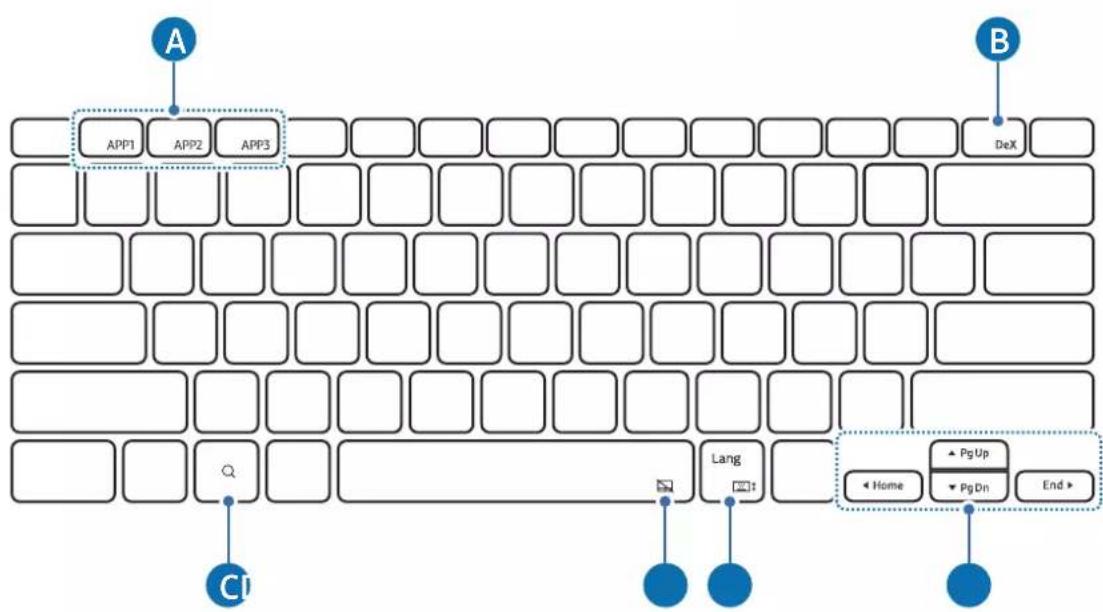
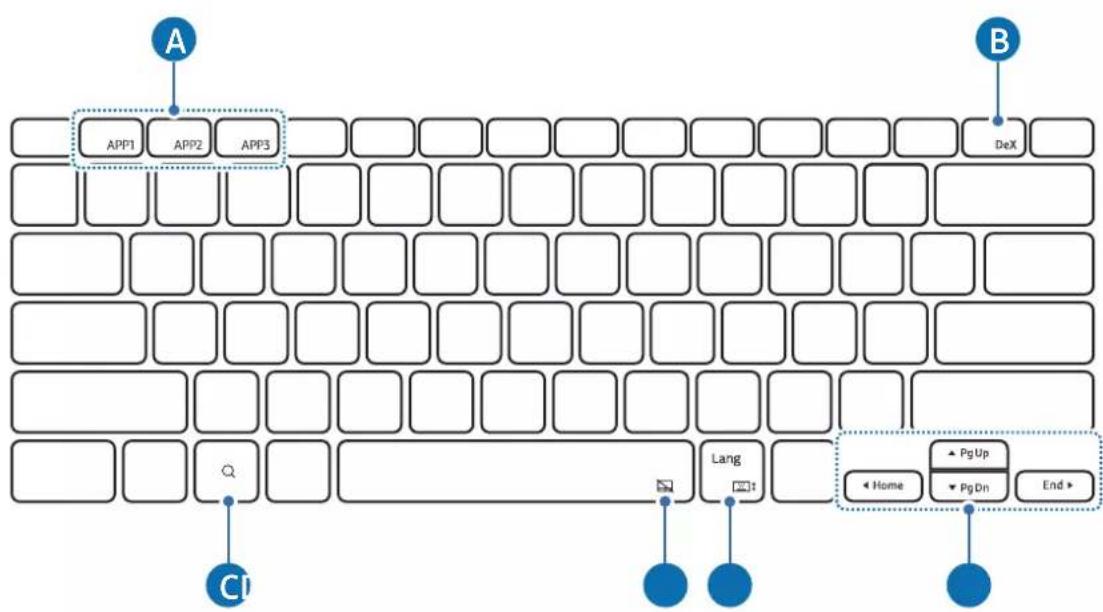
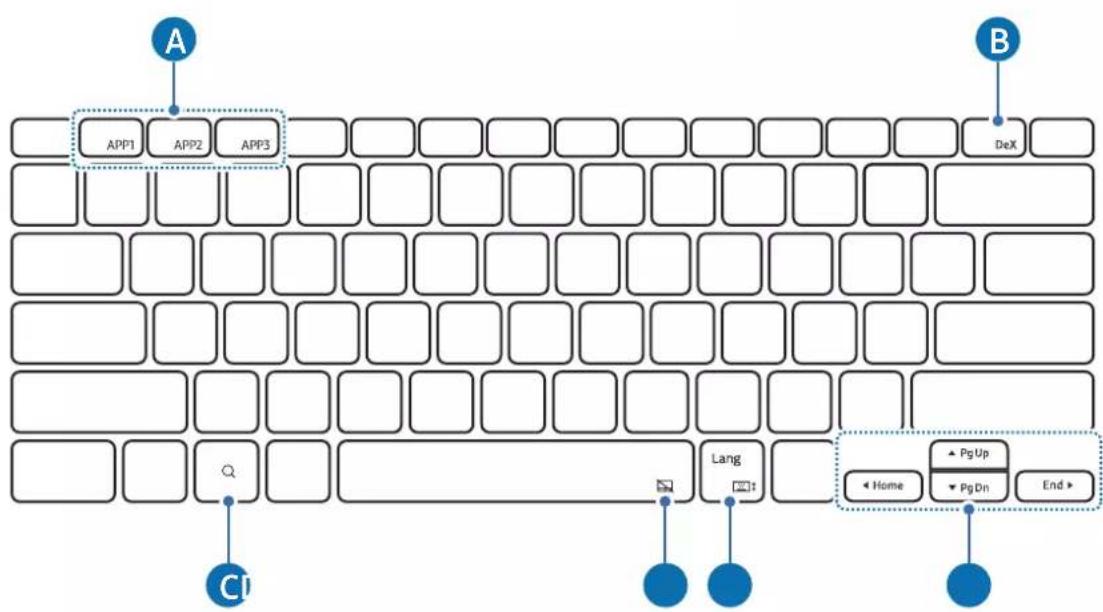
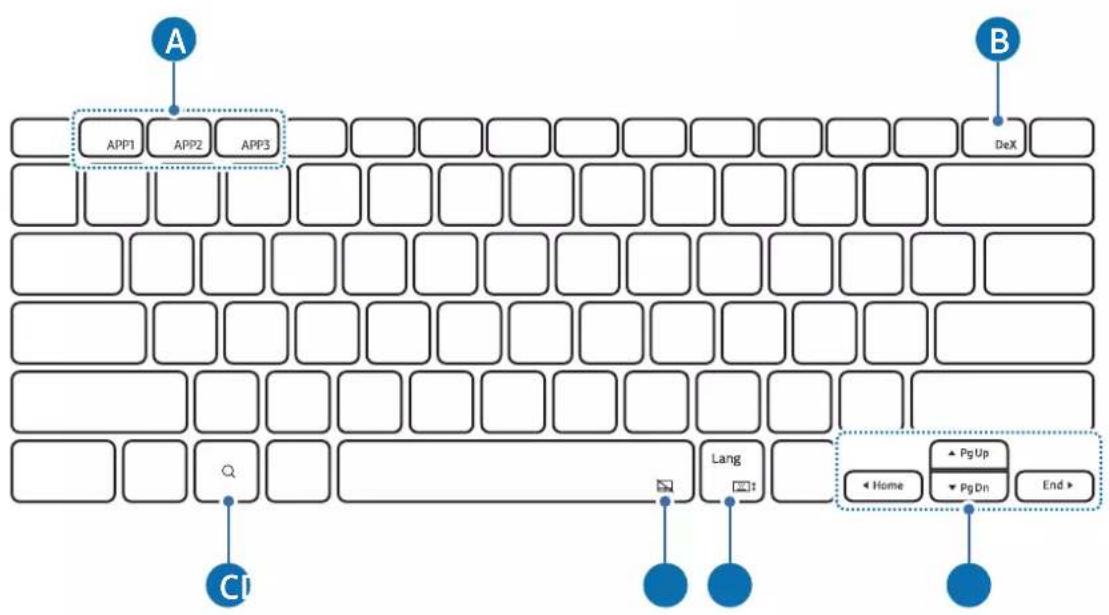
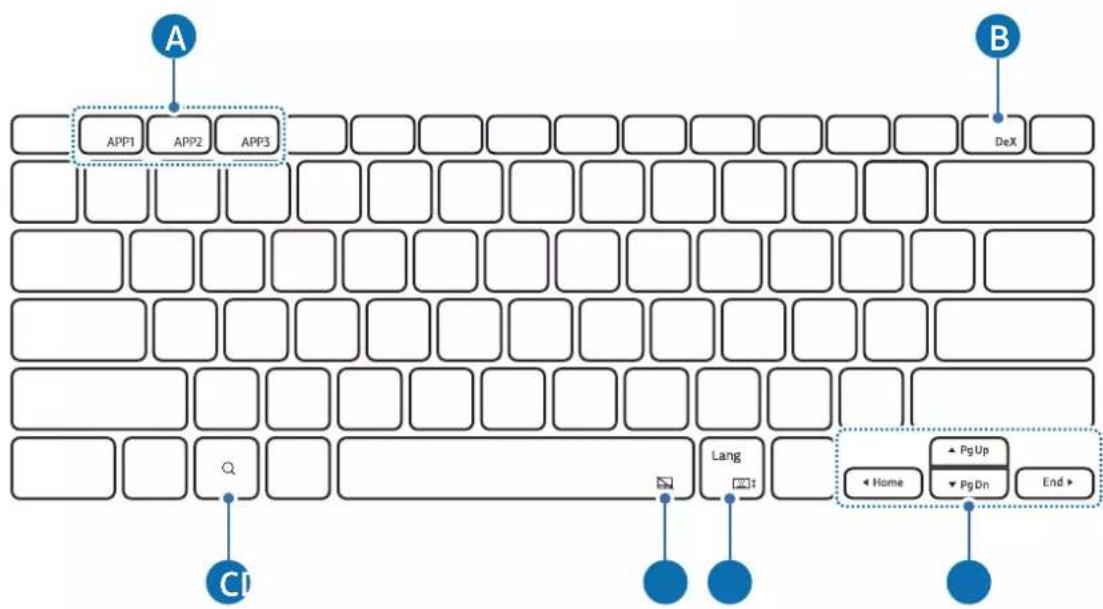
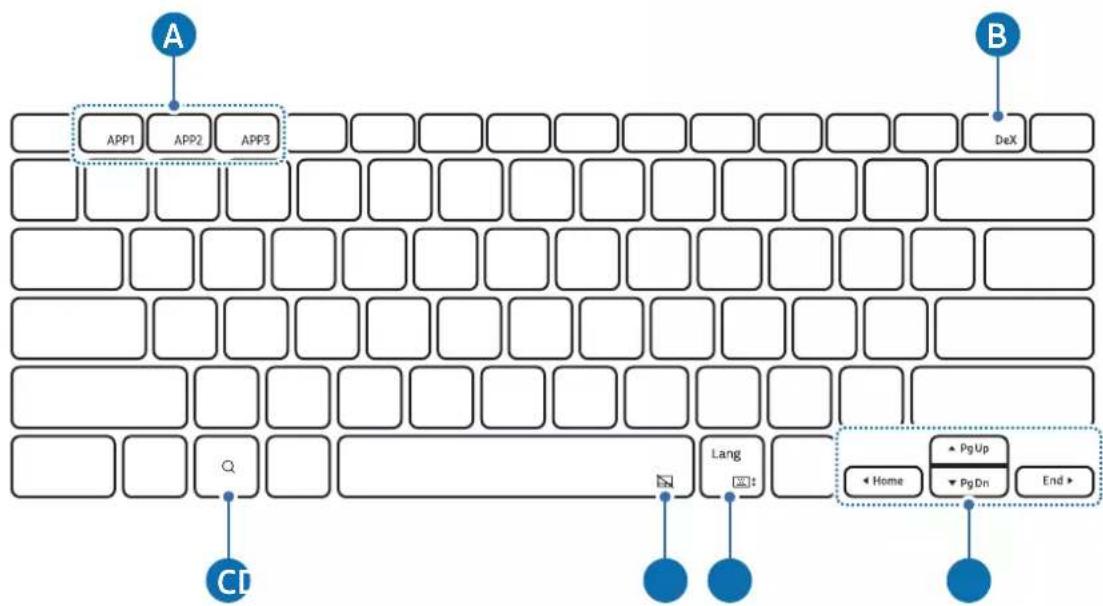
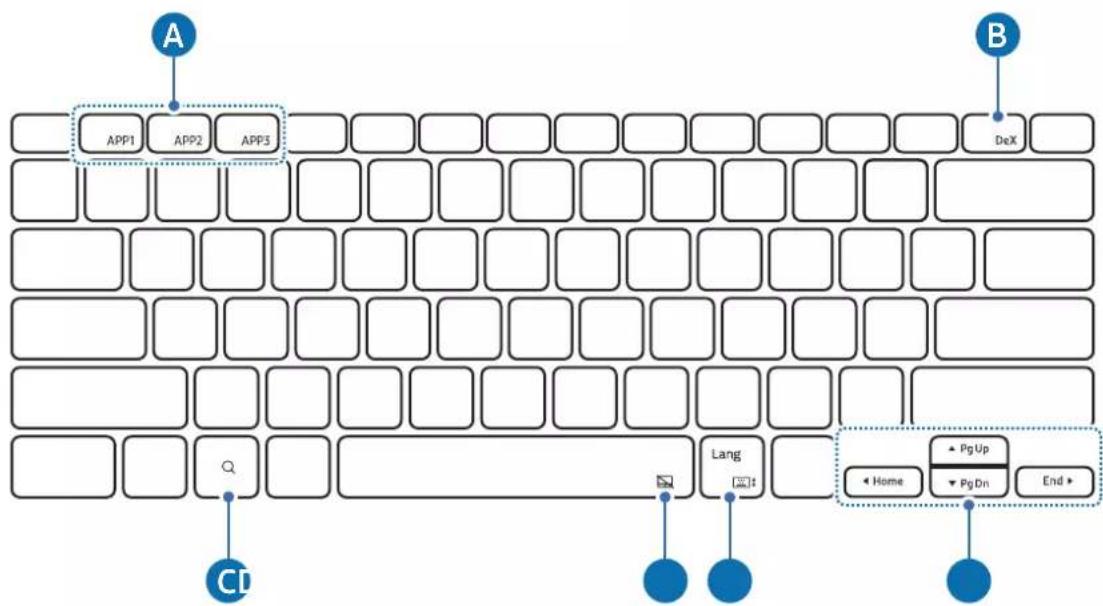
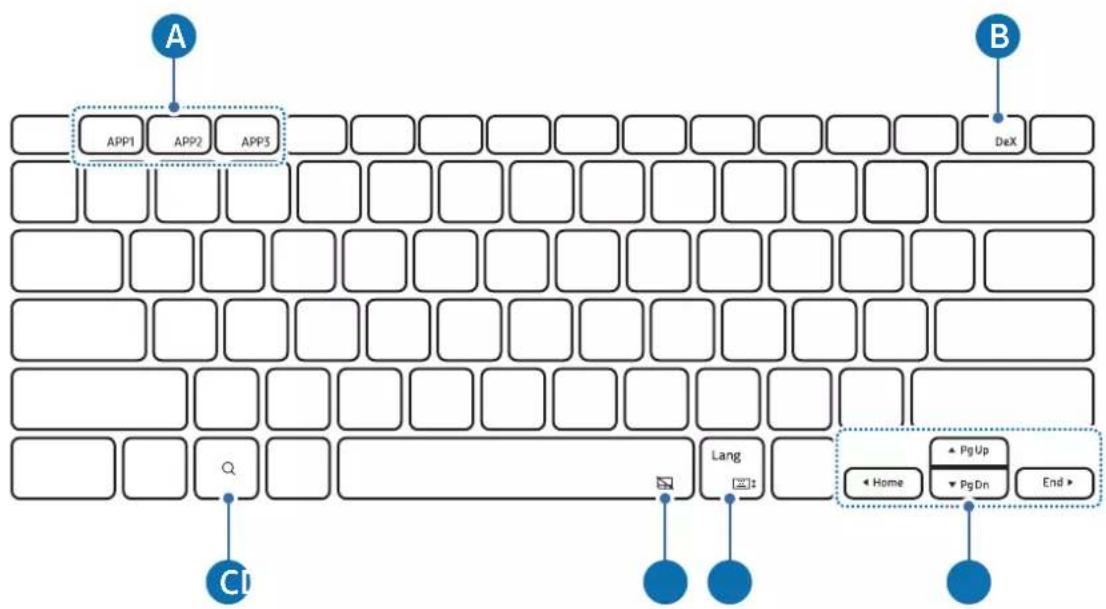
▶ EF-DX810, EF-DX815, EF-DX910, EF-DX915:
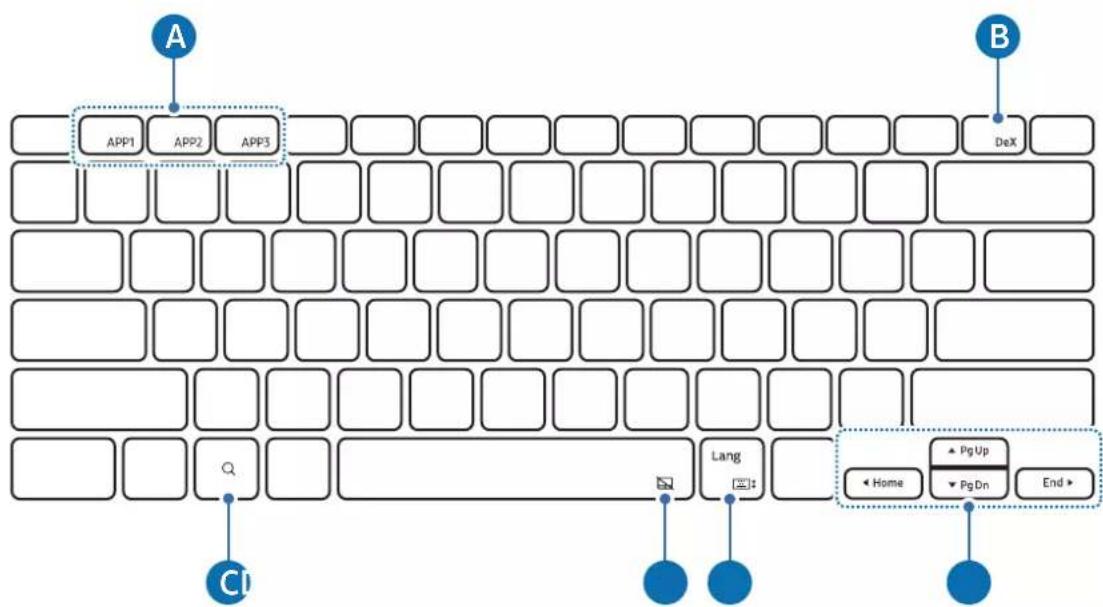
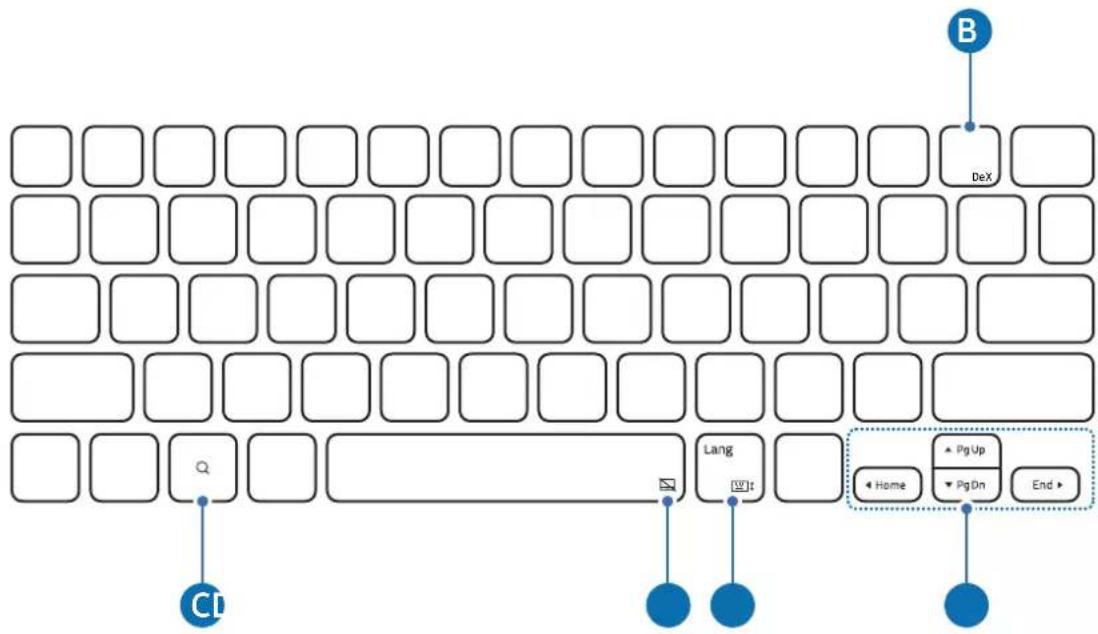
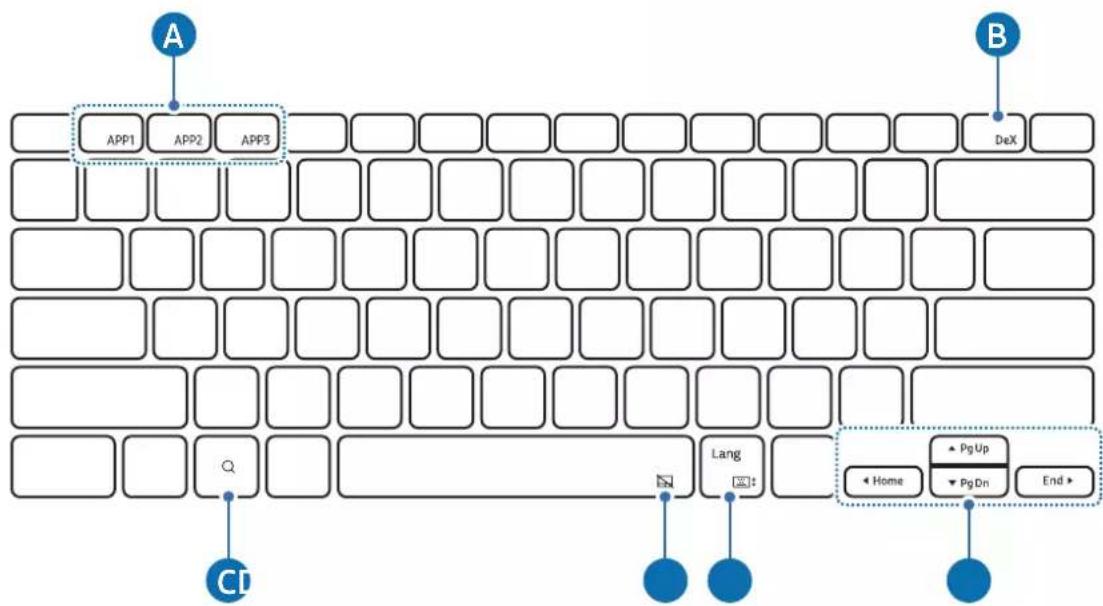
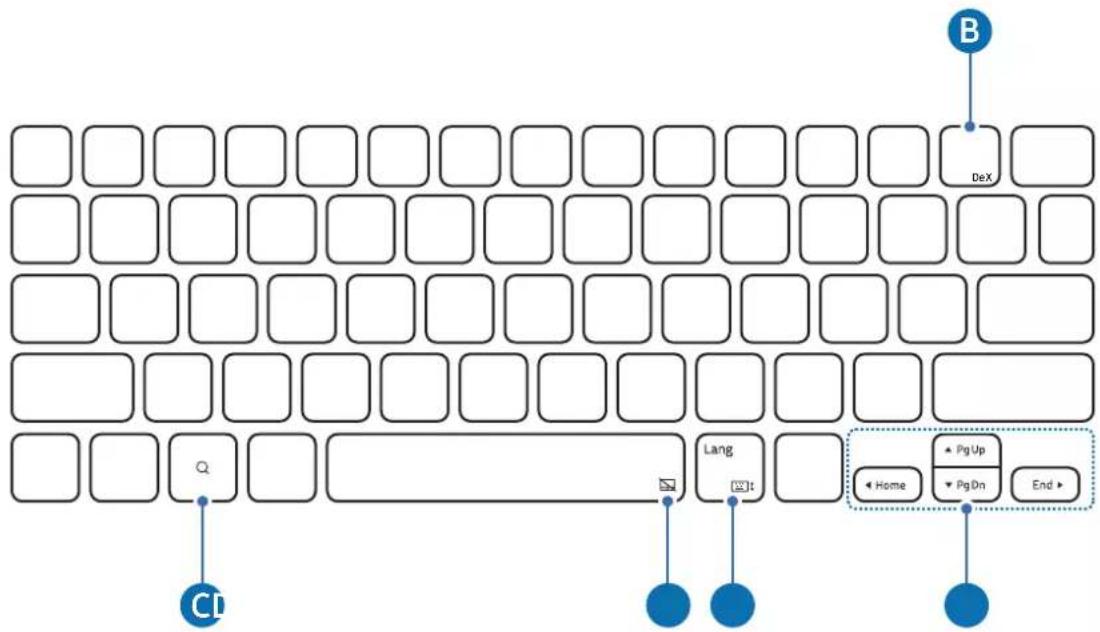
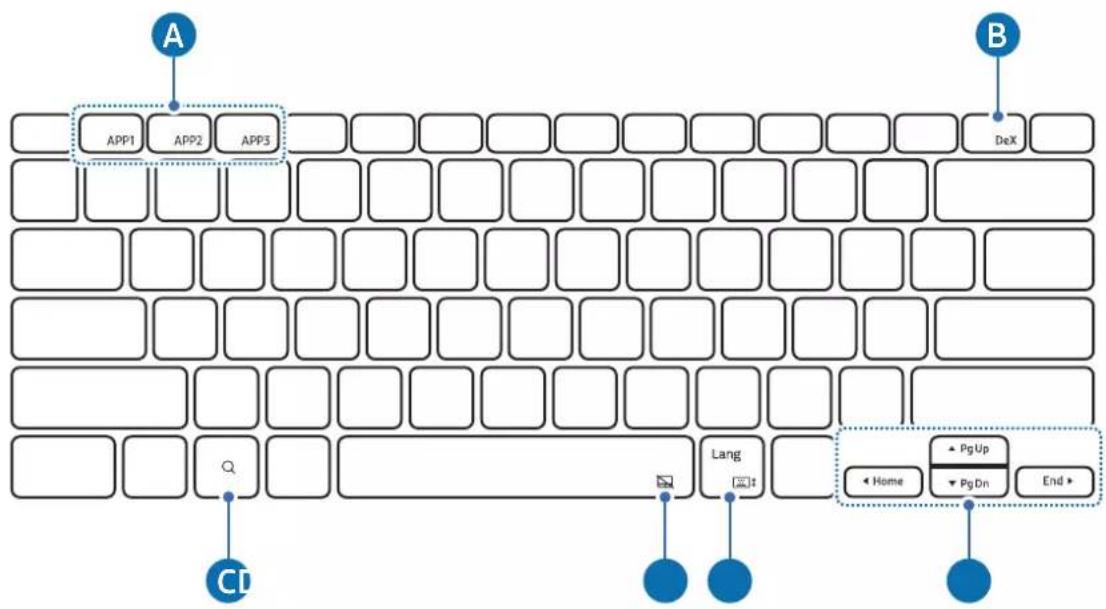
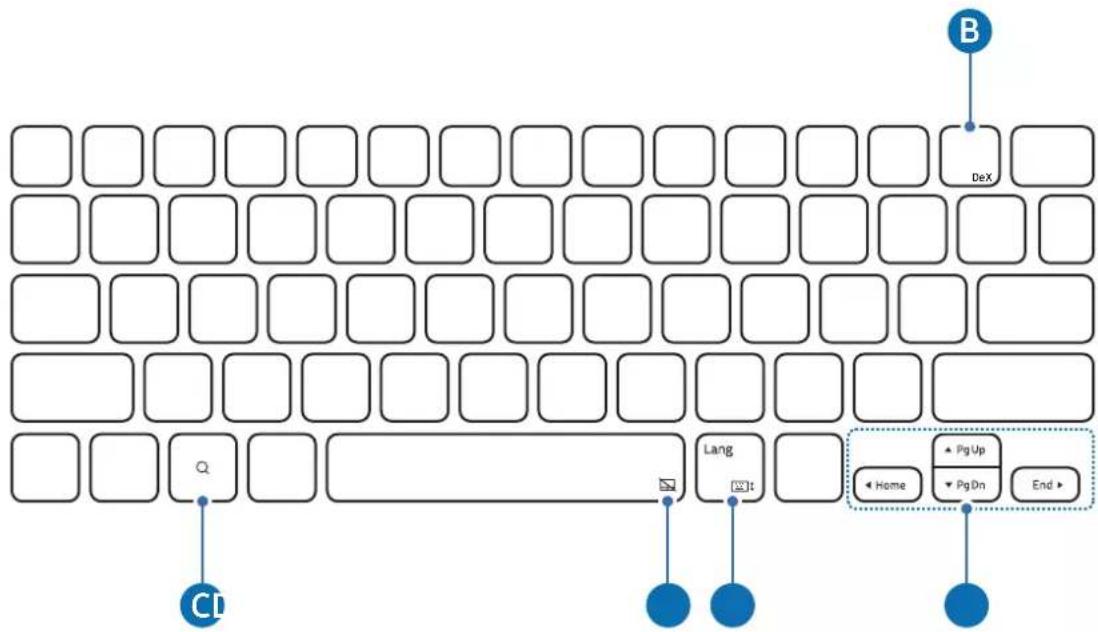
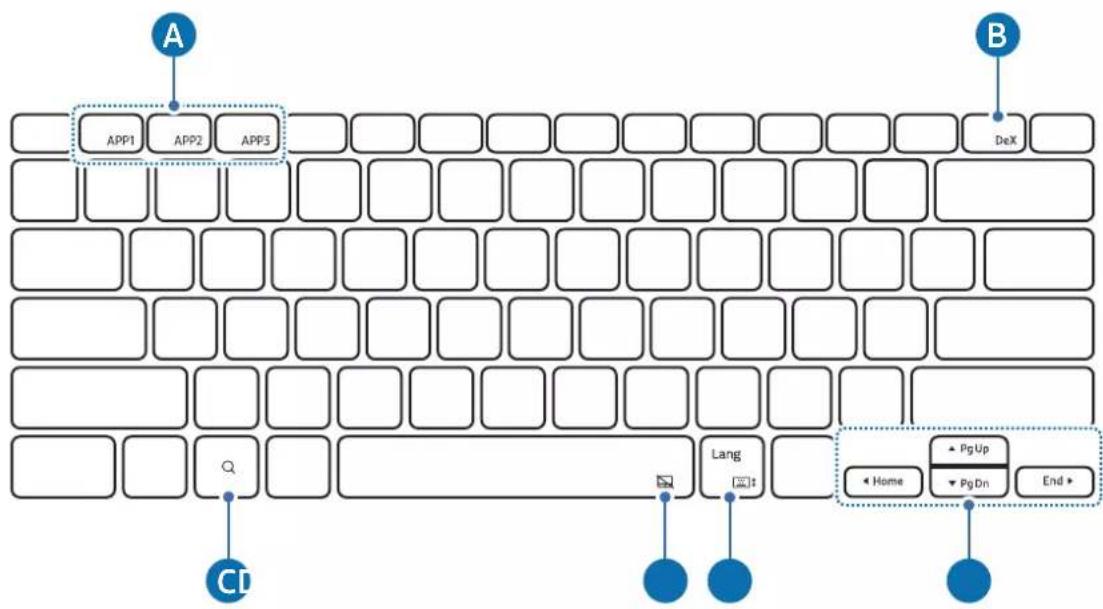
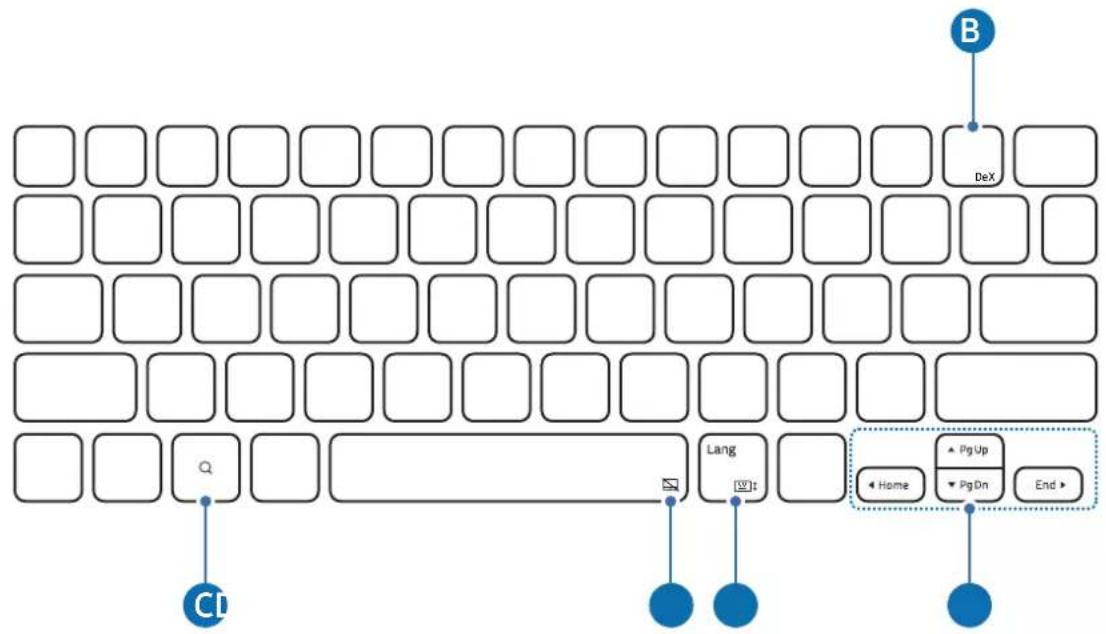
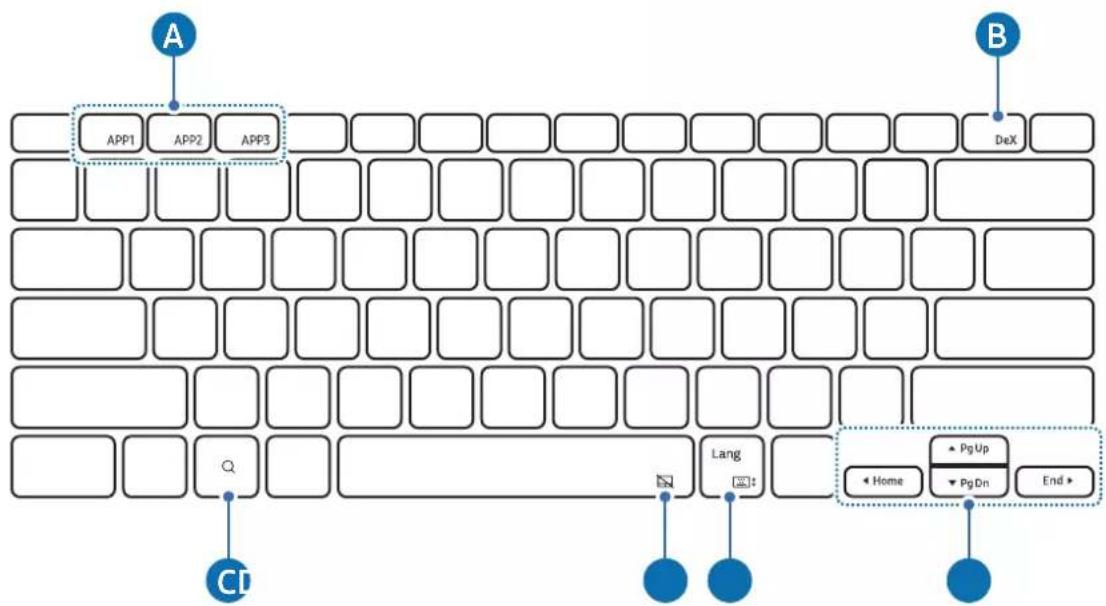
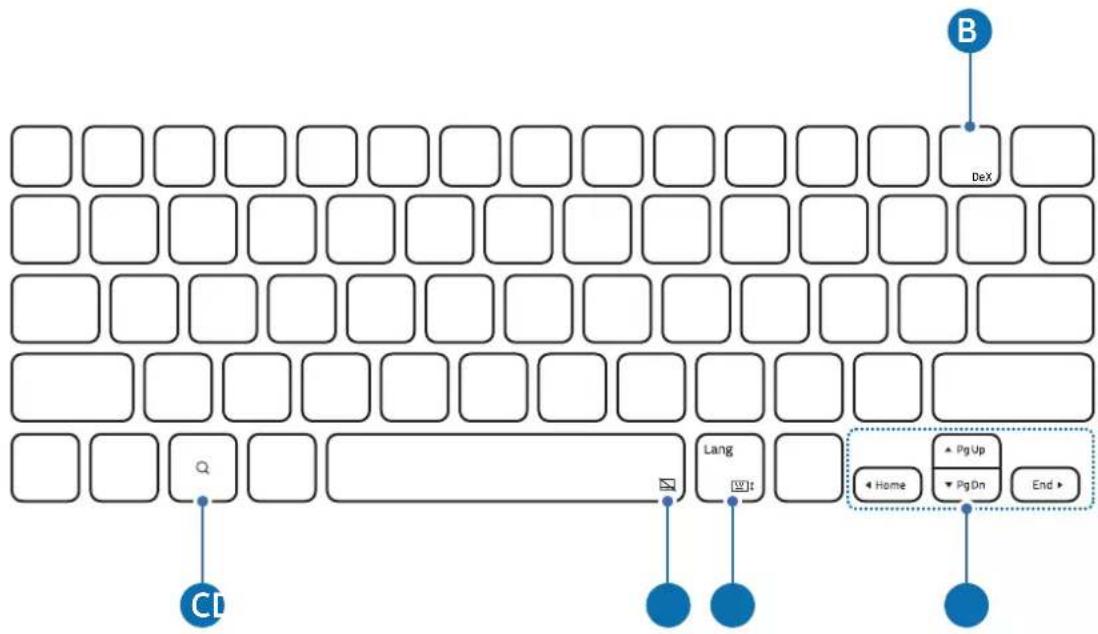
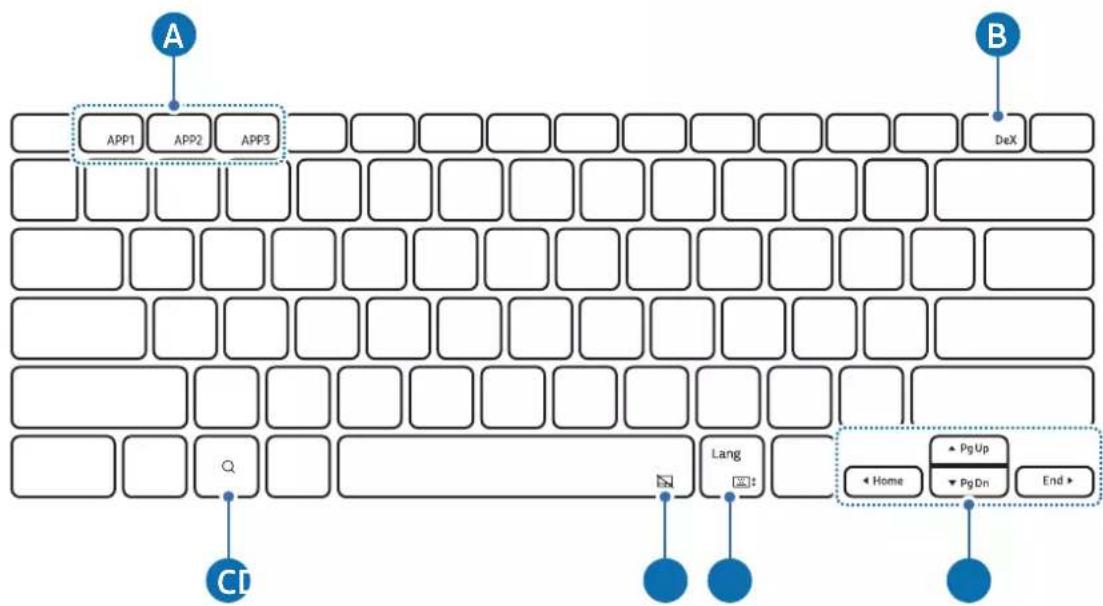
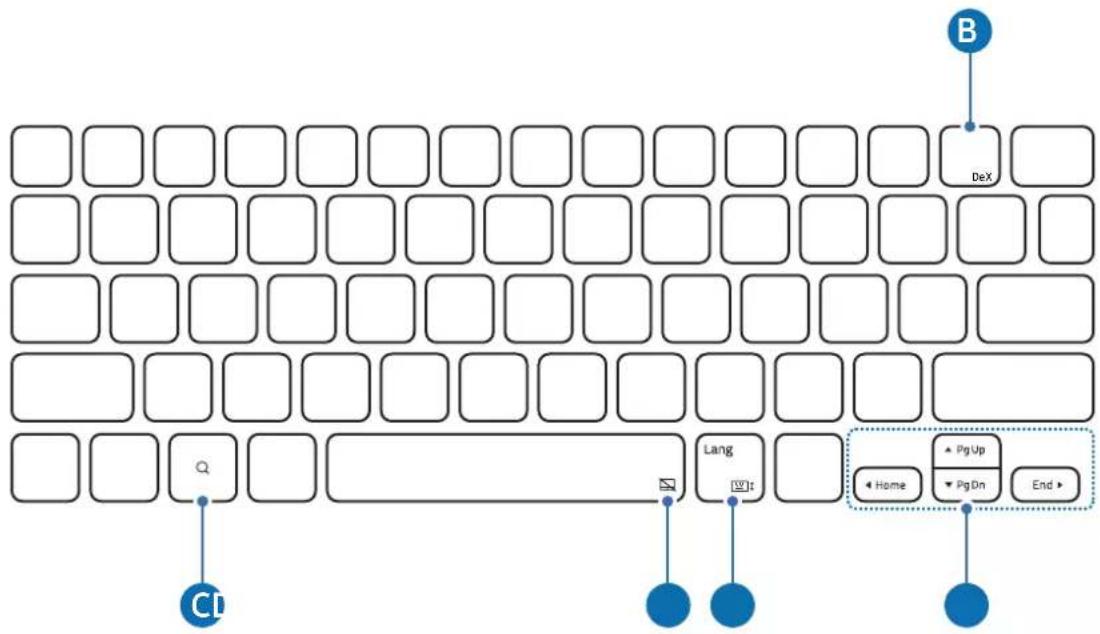
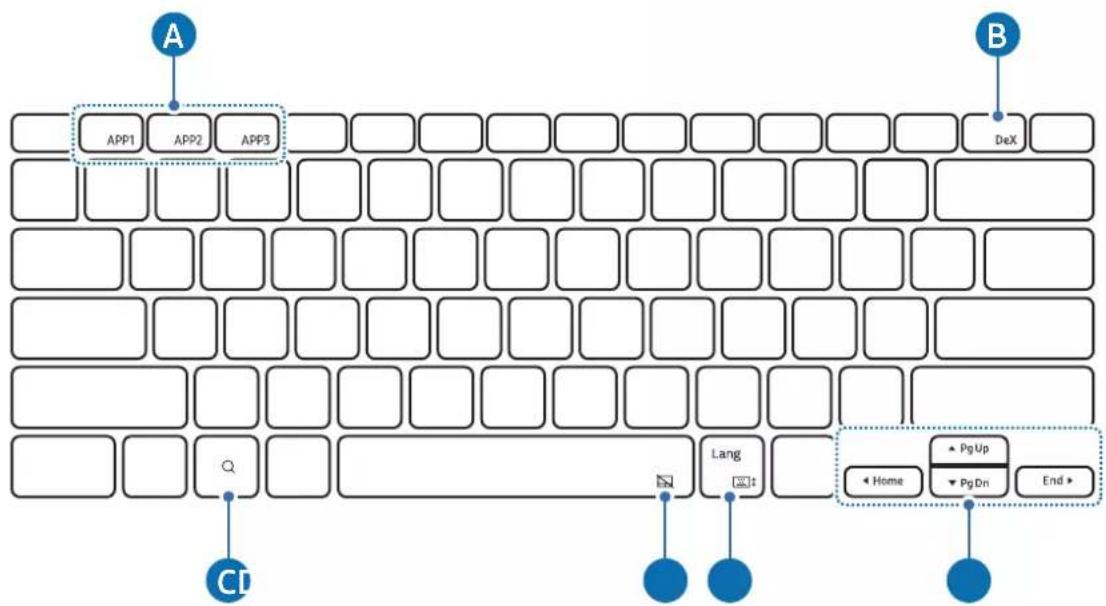
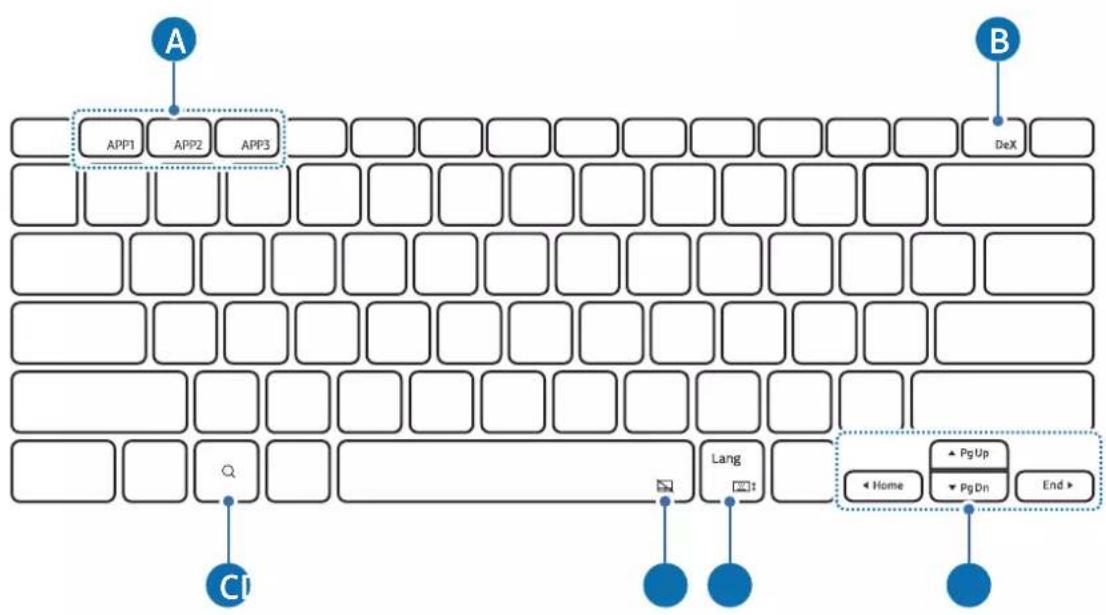
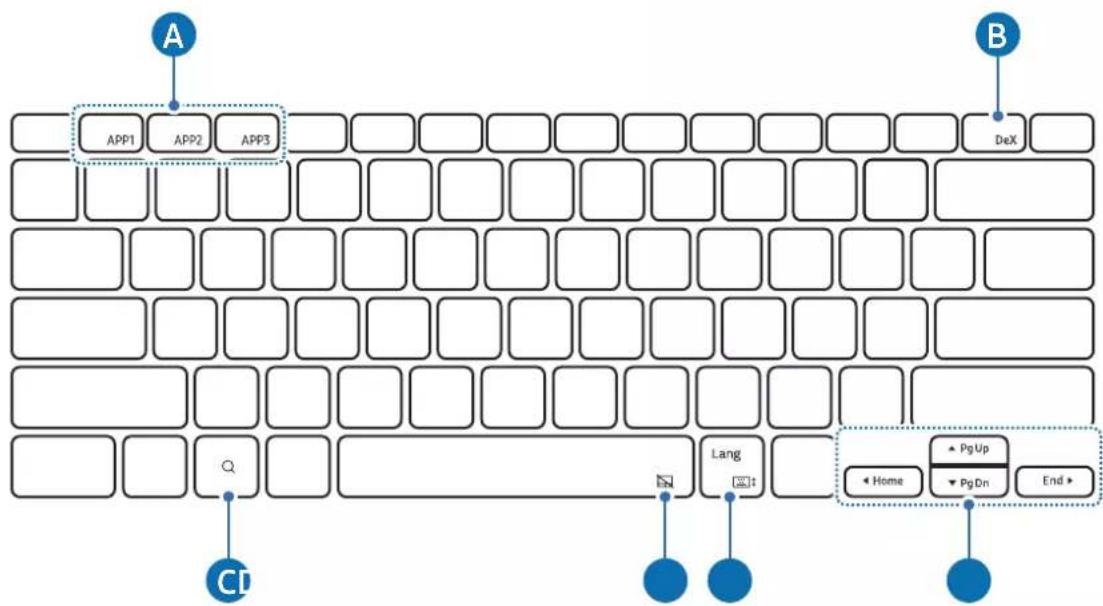
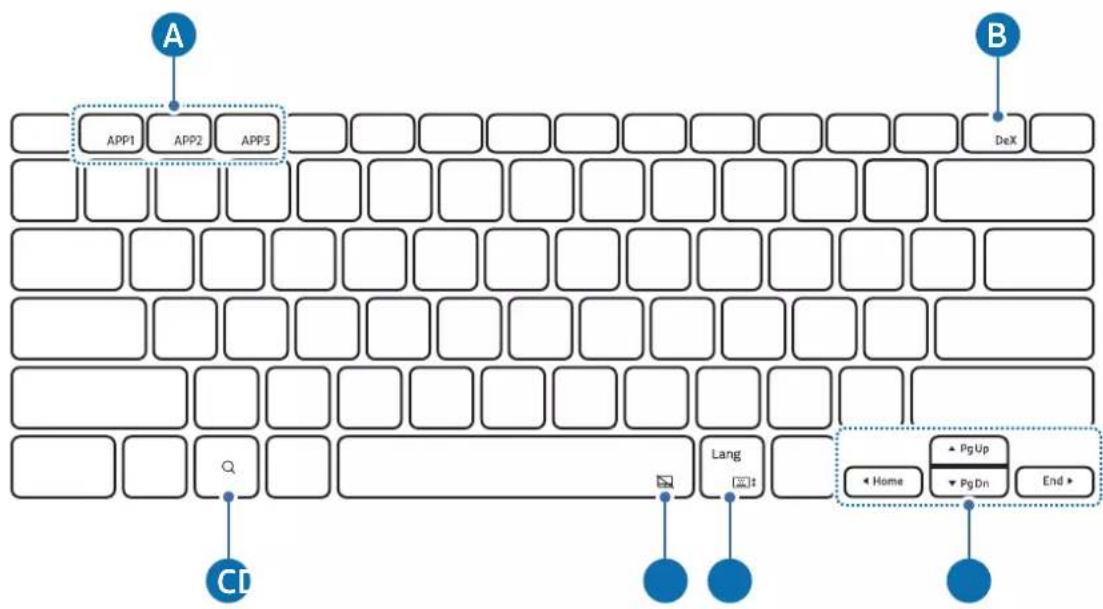
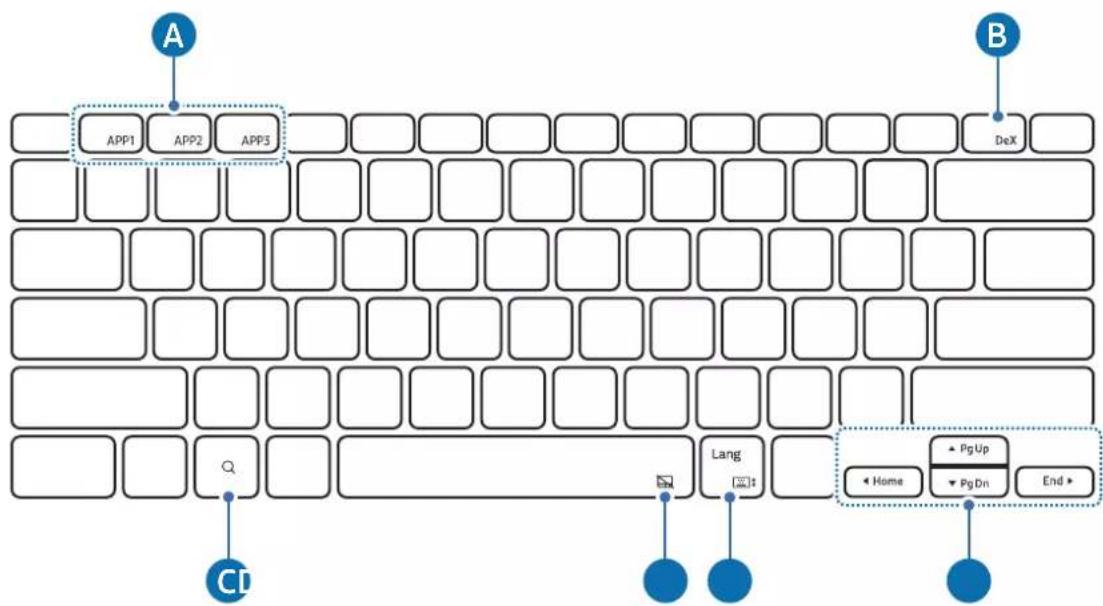
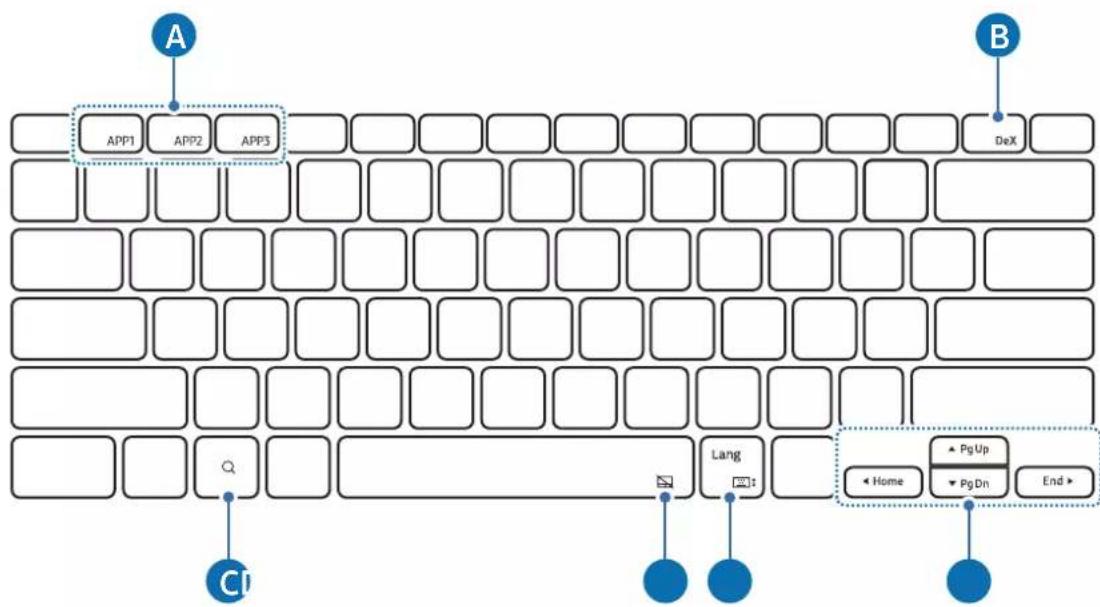
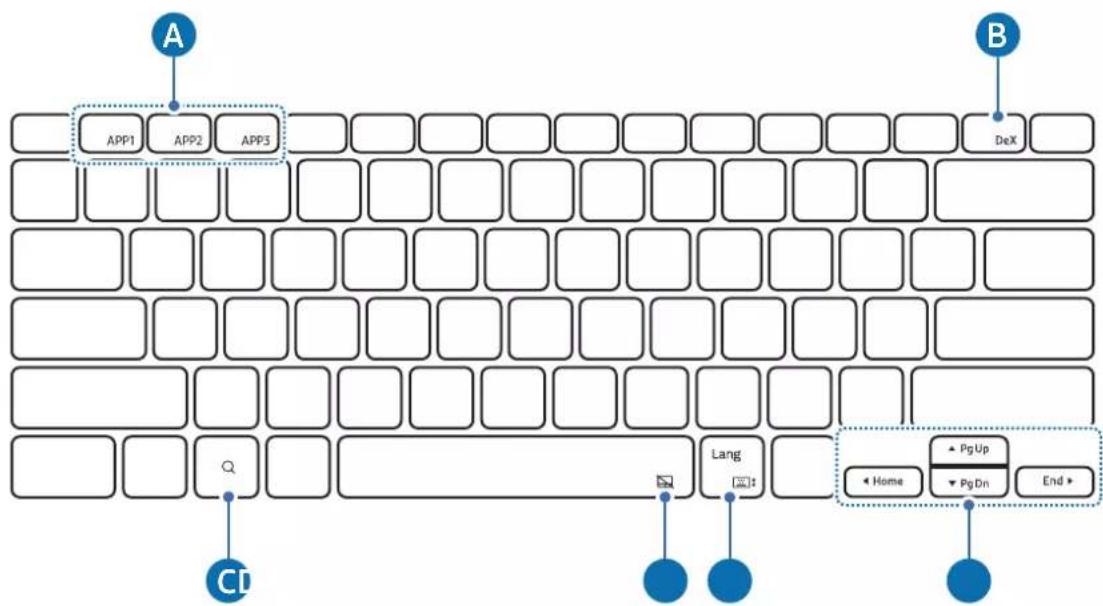
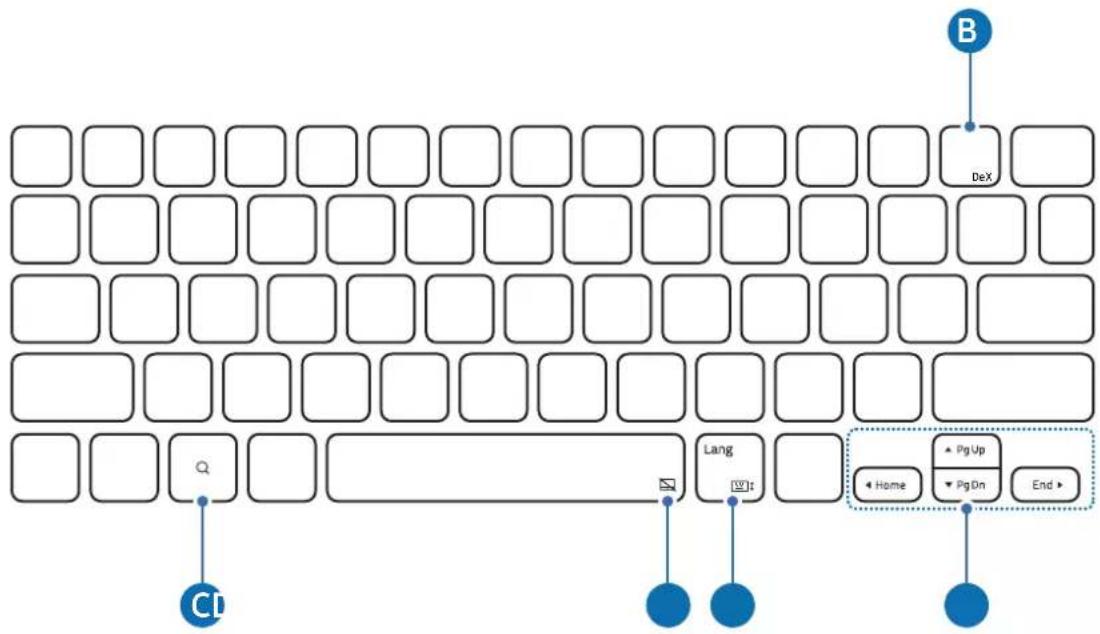
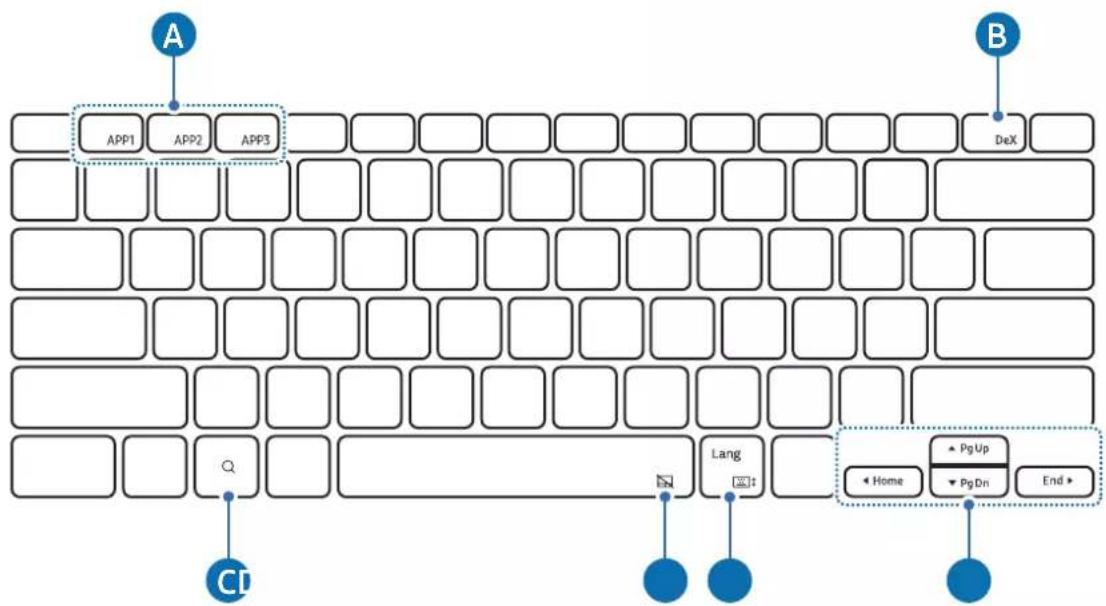
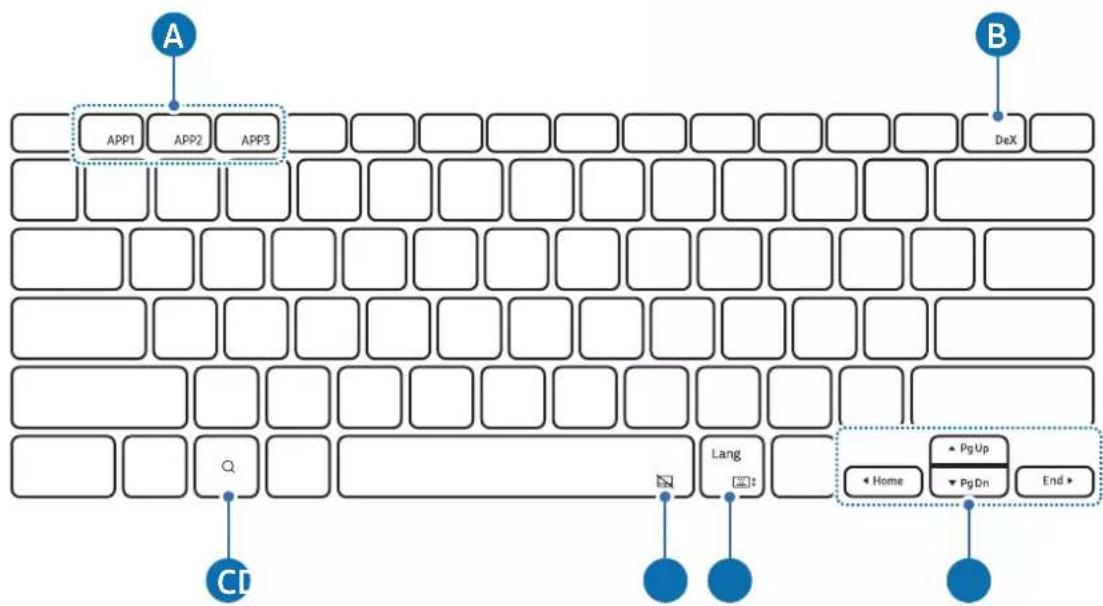
| A | ·[Fn] + [APP1]/[APP2]/[APP3]: Open the favourite apps. (EF-DX910, EF-DX915)To save an app to favourites, open the app you want to save and press and hold the Fn key and the APP1/APP2/APP3 key for 3 seconds. |
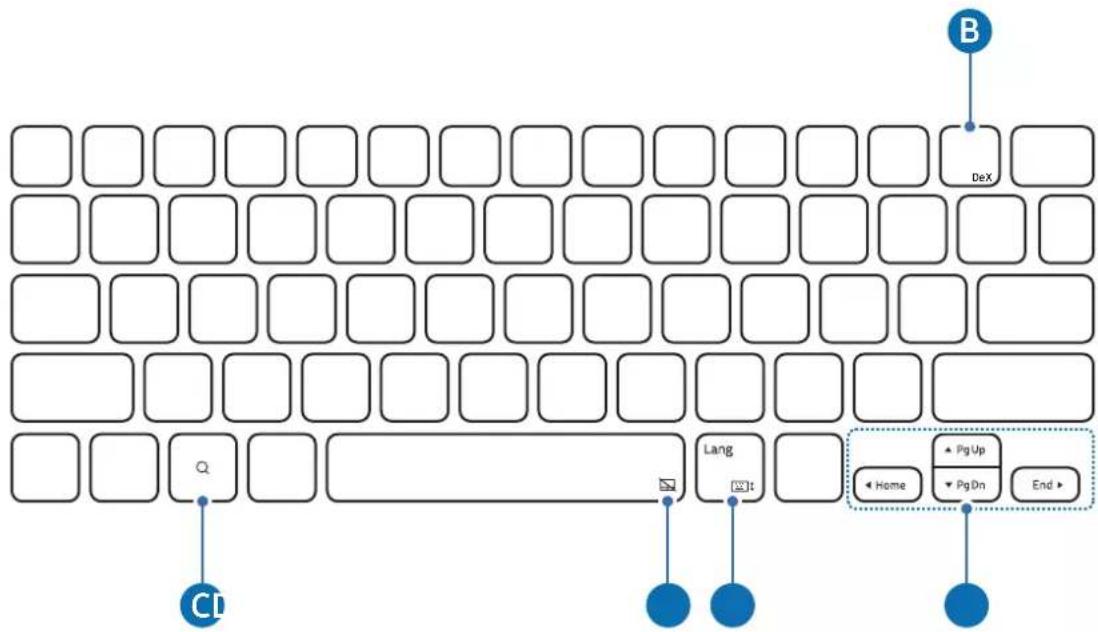
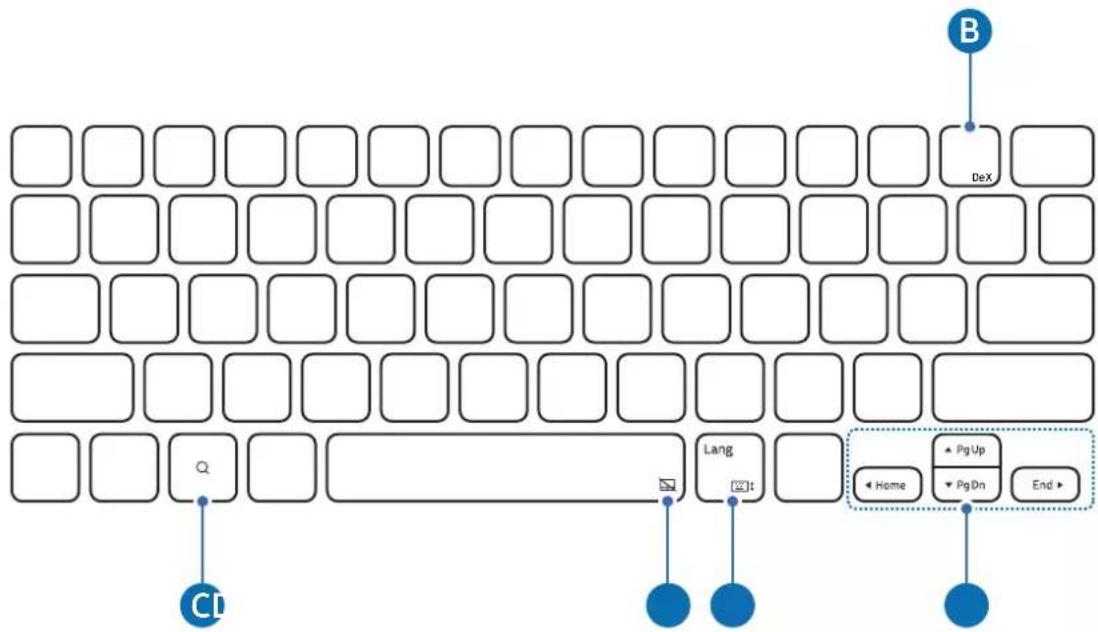
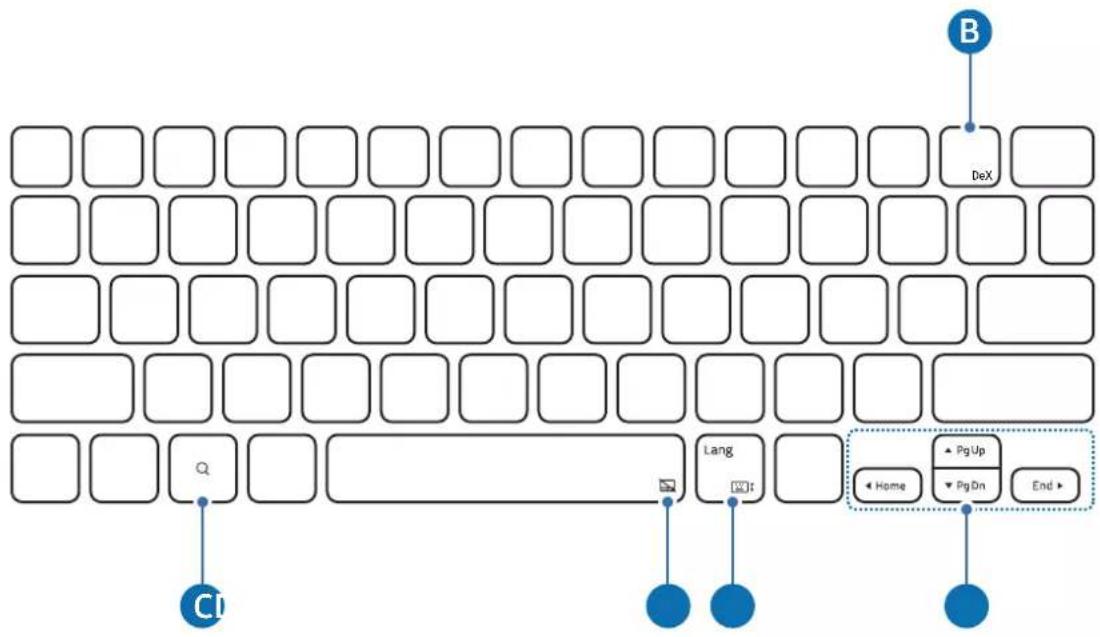
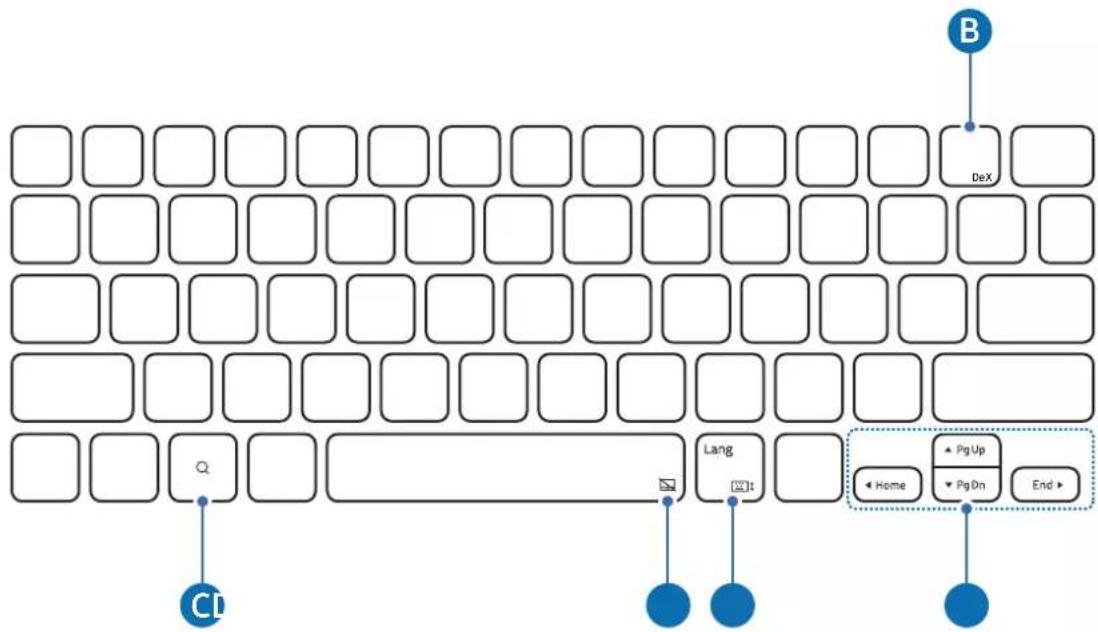
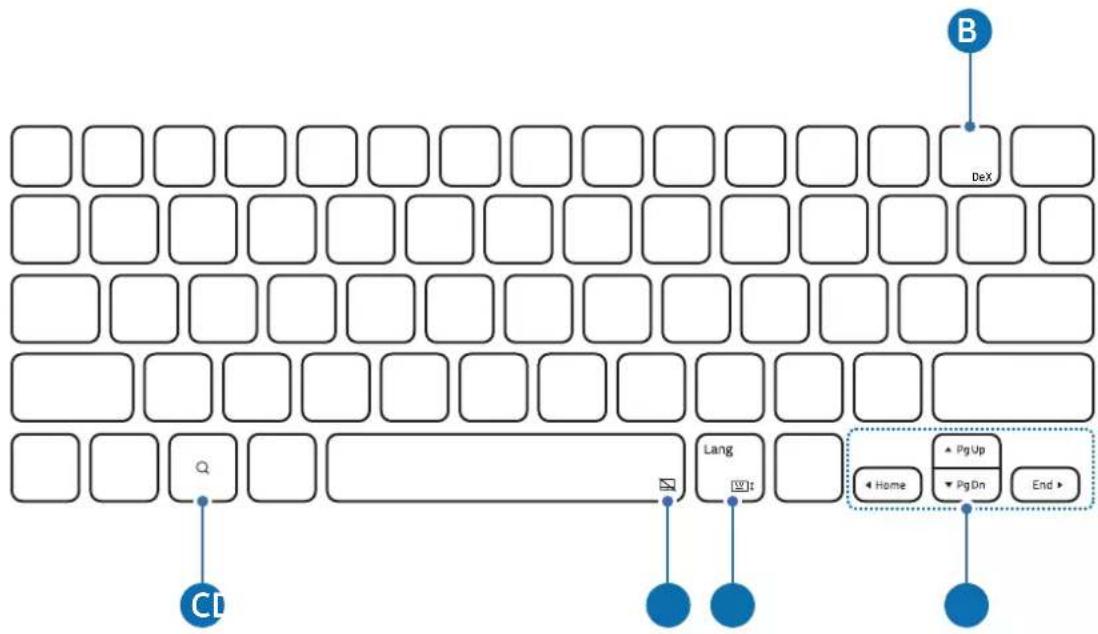
| B | ·[Fn] + [DeX]: Start or end Samsung DeX. |
| C | ·Open the Google Assistant app. |
| D | ·[Fn] + [Turn the touchpad on or off. (EF-DX715, EF-DX815, EF-DX915) |
| E | ·[Lang]: Change between input languages.·[Fn] + [Turn the on-screen keyboard on or off. |
| F | ·▲/▼/◄/►: Move the cursor.·[Fn] + [▲]: Page Up·[Fn] + [▼]: Page Down·[Fn] + [◄]: Home·[Fn] + [►]: End |

For more information about Samsung DeX, refer to the tablet's user manual.
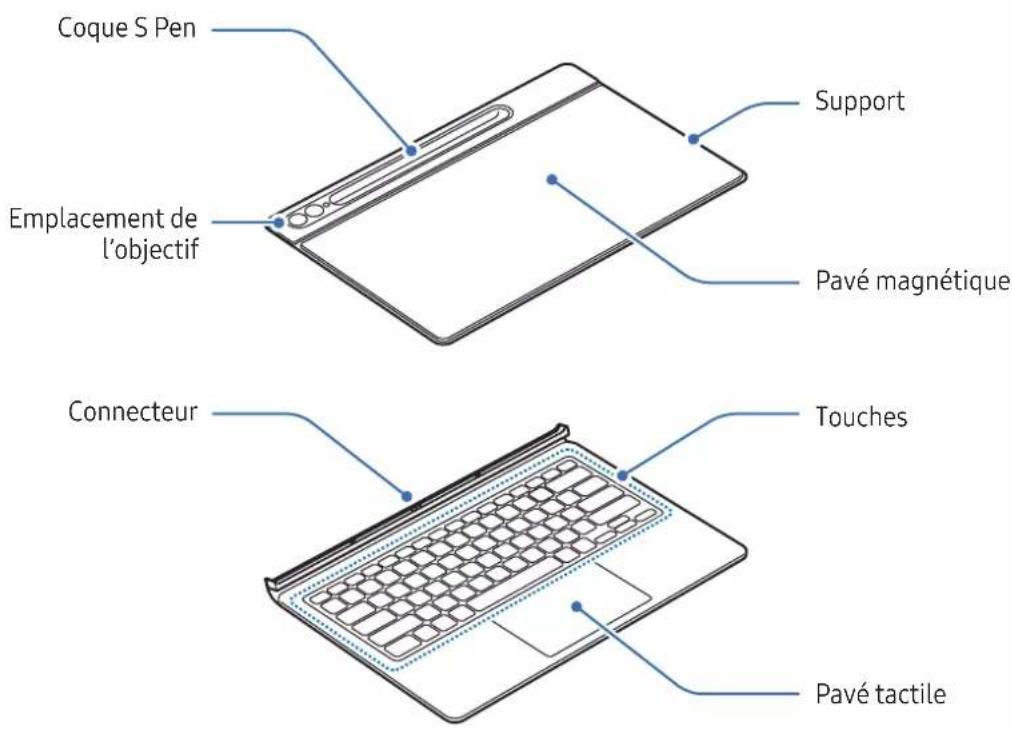
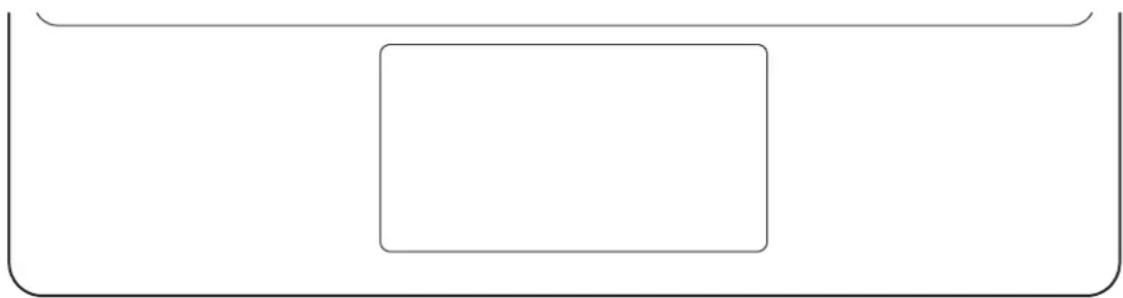
Using the touchpad (EF-DX715, EF-DX815, EF-DX915)
You can use the touchpad to control the cursor on the tablet screen or use the additional features.
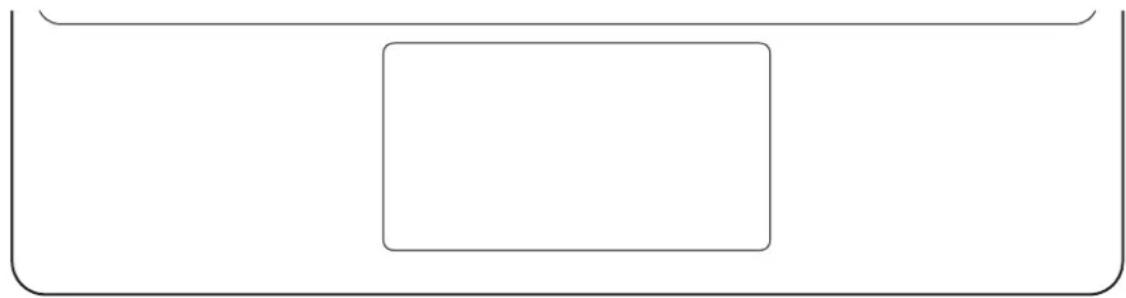
natural_image
Simple geometric diagram with a rectangle inside a rounded rectangle (no text or symbols)| Actions Functions | |
| Clicking/Tapping | Click |
| Dragging | Move the cursor. |
| Holding and dragging | Move the selected object. |
| Tapping with two fingers | Open the context menu. |
| Dragging with two fingers | Scroll the page. |
| Spreading/Pinching | Zoom in / Zoom out |
| Dragging up/down with three fingers | Recents/Home |
| Dragging left/right with three fingers | Switch between apps. |
| Tapping with three fingers | Back |
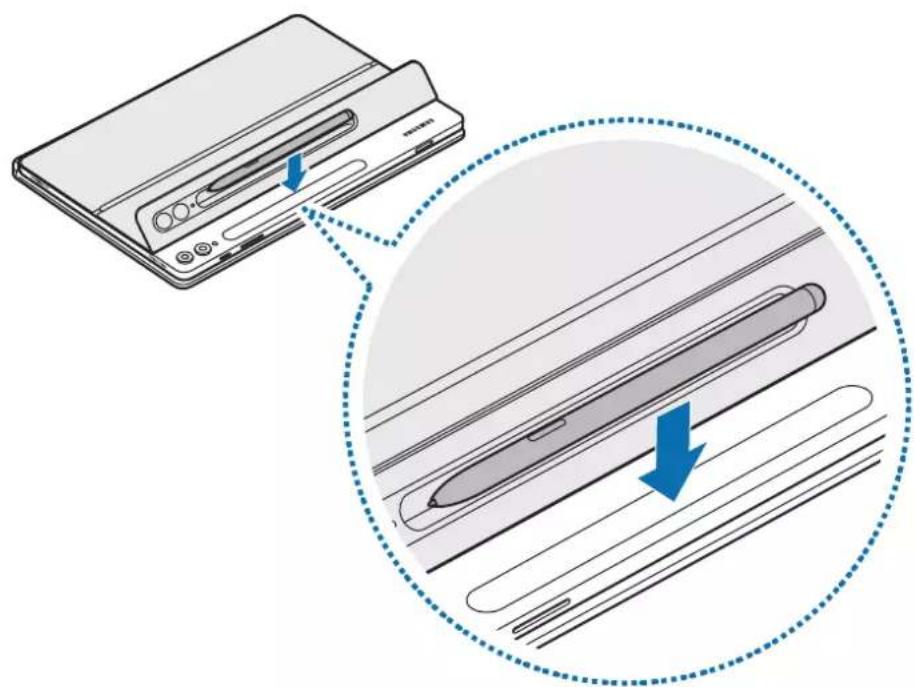
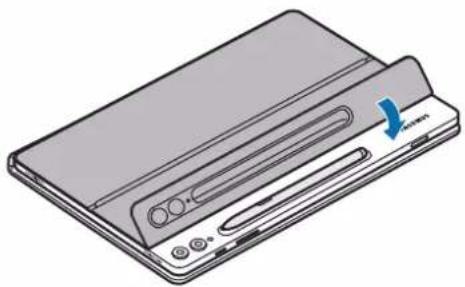
Storing the S Pen
1 Attach the S Pen to the tablet's S Pen charger as shown in the image.
natural_image
Diagram showing a device being processed with a magnified view of its internal structure (no text or symbols present)
Align the S Pen properly with the S Pen charger. If the S Pen is incorrectly attached, the S Pen cover may not be closed.
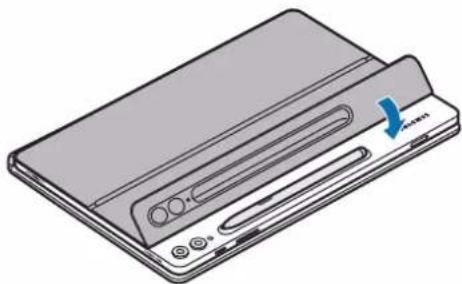
2 Cover the S Pen with the S Pen cover.
natural_image
Illustration of a flat-screen electronic device with control buttons and a blue arrow indicator (no text or symbols)Replacing the S Pen cover
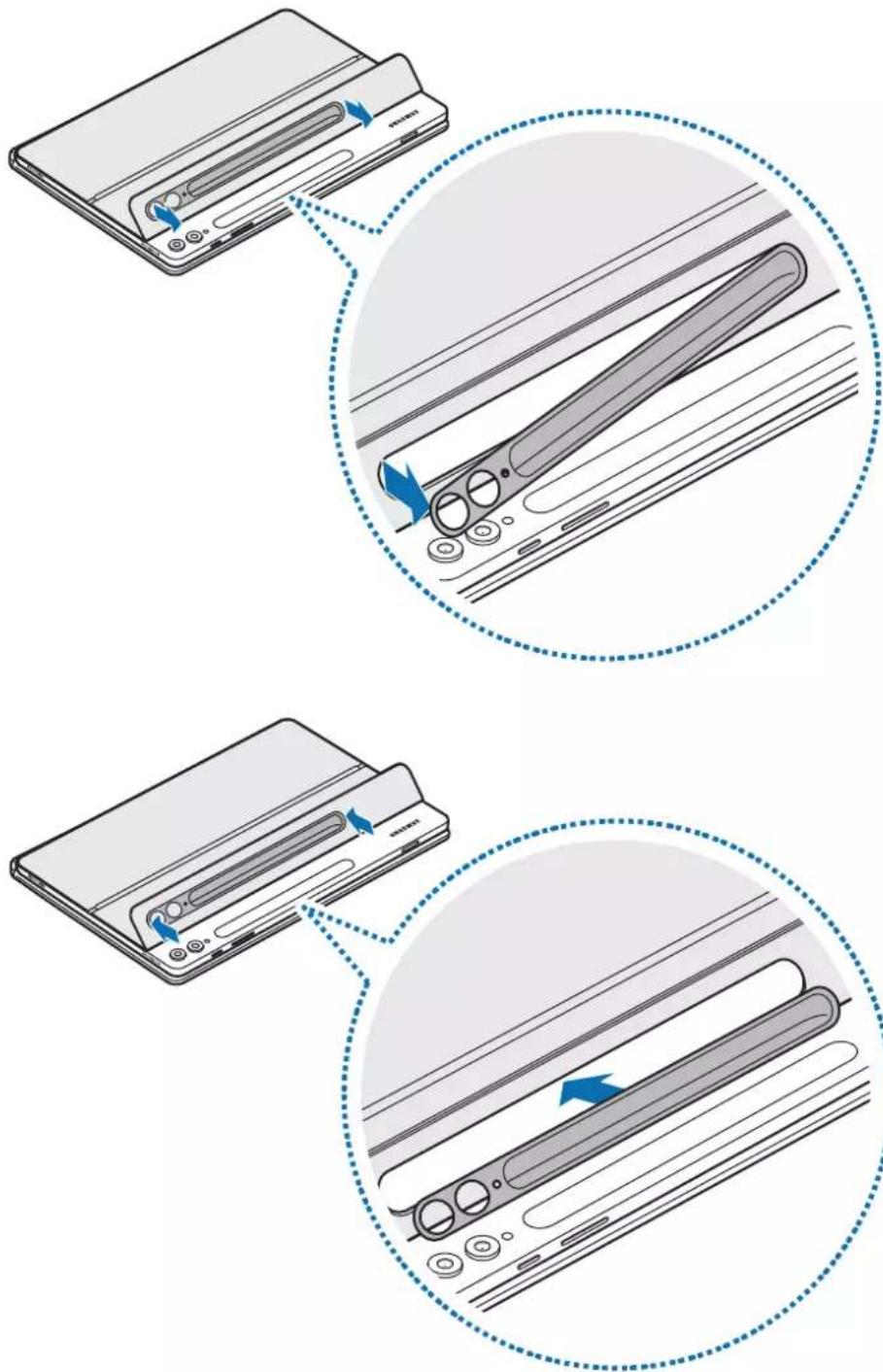
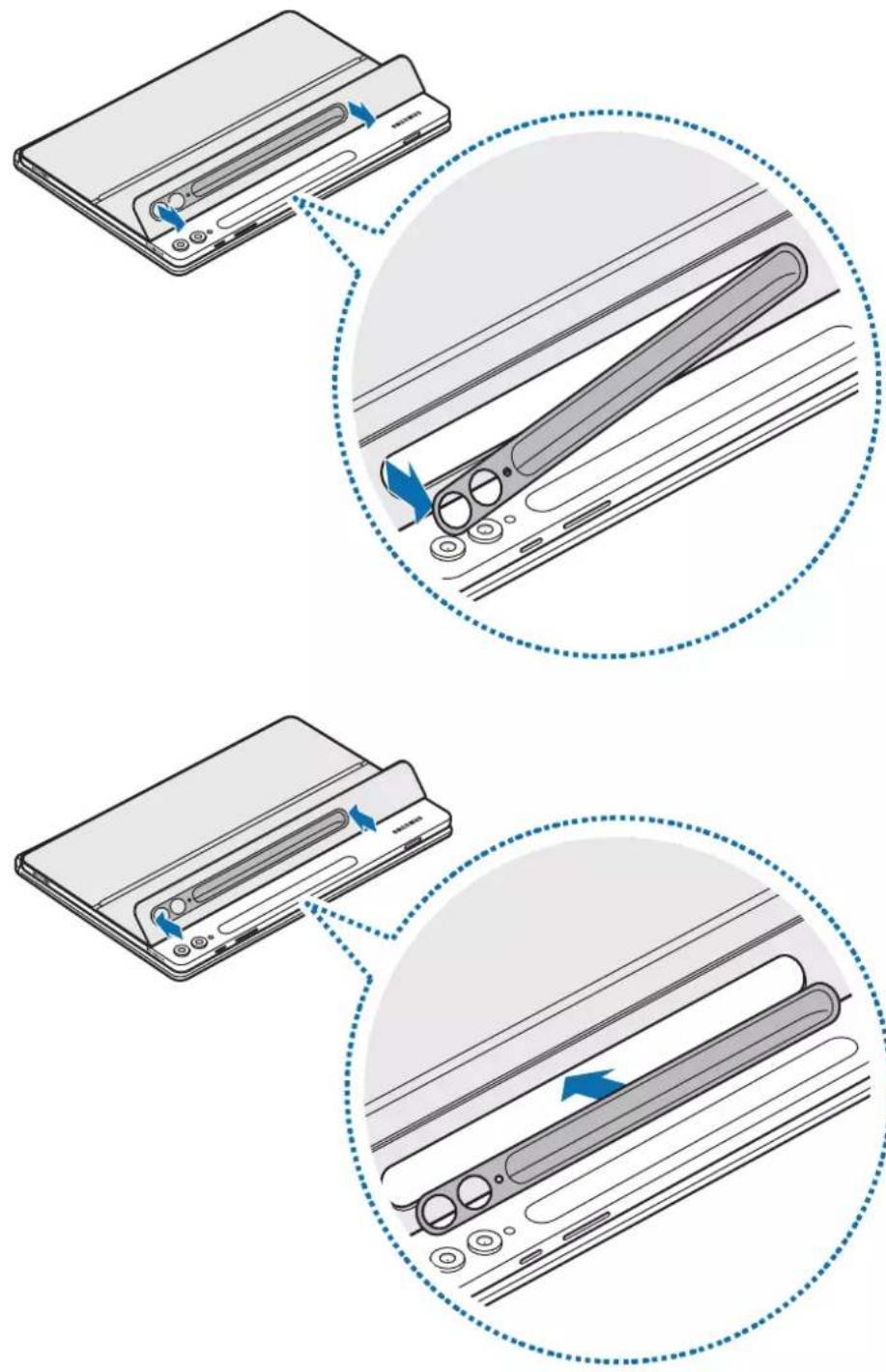
The product's S Pen cover is interchangeable. When changing the S Pen cover, press the camera hole of the S Pen cover and remove it.
To attach the S Pen cover, align the S pen cover with the product's S Pen cover groove and push the edge until it clicks into place.
Usage notices
Precautions for using the product
Please read this manual before using the product to ensure safe and proper use.
- Images may differ in appearance from the actual product. Content is subject to change without prior notice.
- The product is optimised to connect with the SAMSUNG Tab S9, Galaxy Tab S9+ and Galaxy Tab S9 Ultra.
- Do not expose the product to humidity, solvents or high temperatures. Doing so may stain, wrinkle, discolour or distort it.
- If there is debris on the product's attachment surface, wipe the surface clean before using the product.
- Avoid placing the product in hot or humid environments. If the product is exposed to direct sunlight, its colour or form may change.
- Be careful not to scratch the product with sharp objects such as nails.
- When using this product, some customers may experience allergic reactions, such as itching, eczema, or swelling. If you experience any of these symptoms, stop using the product and consult a physician.
- While using the product, be cautious to prevent scratches or damage from debris.
- Your product contains magnets. Keep it away from credit cards, implanted medical devices, and other devices that may be affected by magnets. In the case of medical devices, keep your product more than 15 cm apart. Stop using your product if you suspect any interference with your medical device and consult your physician or your medical device manufacturer.
- This product includes certain free/open source software. The licence information of the open source software used in this product can be found at opensource.samsung.com.
Instructional icons
Warning: situations that could cause injury to yourself or others
Caution: situations that could cause damage to your product or other equipment
Notice: notes, usage tips, or additional information
Notes on package contents and accessories
Check the product box for the following items:
- Product
- Quick start guide

- The items supplied with the product and any available accessories may vary depending on the region or carrier.
- Appearances and specifications are subject to change without prior notice.
- You can purchase additional accessories from Samsung website. Make sure they are compatible with the product before purchase.
- Use only Samsung-approved accessories. Using unapproved accessories may cause the performance problems and malfunctions that are not covered by the warranty.
- Availability of all accessories is subject to change depending entirely on manufacturing companies. For more information about available accessories, refer to the Samsung website.
Appendix
FCC Part 15.19
This device complies with part 15 of the FCC Rules. Operation is subject to the following two conditions: (1) This device may not cause harmful interference, and (2) this device must accept any interference received, including interference that may cause undesired operation.
FCC Part 15.105
Note: This equipment has been tested and found to comply with the limits for a Class B digital device, pursuant to part 15 of the FCC Rules.
These limits are designed to provide reasonable protection against harmful interference in a residential installation. This equipment generates, uses and can radiate radio frequency energy and, if not installed and used in accordance with the instructions, may cause harmful interference to radio communications. However, there is no guarantee that interference will not occur in a particular installation. If this equipment does cause harmful interference to radio or television reception, which can be determined by turning the equipment off and on, the user is encouraged to try to correct the interference by one or more of the following measures:
- Reorient or relocate the receiving antenna.
- Increase the separation between the equipment and receiver.
- Connect the equipment into an outlet on a circuit different from that to which the receiver is connected.
- Consult the dealer or an experienced radio/TV technician for help.
(USA Only)WARNING! Never dispose of batteries in a fire because they may explode. Do not disassemble, crush, puncture, heat, burn or reuse batteries. For more information, visit call2recycle.org or call 1-800-822-8837. Alternatively, visit: www.samsung.com/recycling or call 1-800-SAMSUNG.
Samsung Electronics America, Inc.
85 Challenger Road,
Ridgefield Park, New Jersey, 07660
Phone: 1-800-SAMSUNG (726-7864)
Copyright
Copyright © 2023 Samsung Electronics Co., Ltd.
Copyright © 2023 Samsung Electronics America, Inc.
This manual is protected under international copyright laws.
No part of this manual may be reproduced, distributed, translated, or transmitted in any form or by any means, electronic or mechanical, including photocopying, recording, or storing in any information storage and retrieval system.
Trademarks
- SAMSUNG and the SAMSUNG logo are registered trademarks of Samsung Electronics Co., Ltd.
- All other trademarks and copyrights are the property of their respective owners.
Démarrage
▶ EF-DX715, EF-DX815, EF-DX915 :
natural_image
Illustration of a laptop with a blue arrow pointing to the screen (no text or symbols present)▶ EF-DX715, EF-DX815, EF-DX915 :
natural_image
Diagram showing a device being folded into a flat sheet, with blue arrows indicating the process (no text or symbols present)natural_image
Line drawing of a laptop with a blank screen and keyboard, showing no text or symbols
natural_image
Line drawing of a laptop with a side panel showing the change from its open position to its closed position, illustrating the concept of device orientation (no text or symbols present)
▶ EF-DX710, EF-DX715 :
flowchart
graph TD
    A["DeX"] --> B["C1"]
    B --> C["Lang"]
    C --> D["Home"]
    D --> E["Pg Up"]
    D --> F["Pg On"]
    D --> G["End"]
▶ EF-DX810, EF-DX815, EF-DX910, EF-DX915 :
natural_image
Simple geometric diagram with a rectangle inside a rounded rectangle (no text or symbols)natural_image
Diagram showing a device being processed with a magnified view of its internal structure (no text or symbols present)
natural_image
Illustration of a flat-screen electronic device with control panel and scroll wheel (no text or symbols)Remplacer la coque S Pen
Copyright © 2023 Samsung Electronics Co., Ltd.
▶ EF-DX710, EF-DX810, EF-DX910:
▶ EF-DX715, EF-DX815, EF-DX915:
▶ EF-DX710, EF-DX810, EF-DX910:
natural_image
Illustration of a laptop with a blue arrow pointing to the screen (no text or symbols present)▶ EF-DX715, EF-DX815, EF-DX915:
natural_image
Diagram showing a device being folded or rotated, with blue arrows indicating the process (no text or symbols present)natural_image
Line drawing of a laptop with a blue arrow pointing to the front screen (no text or symbols)
natural_image
Illustration of a laptop and its side panel showing the change from front to back view (no text or symbols)
▶ EF-DX710, EF-DX715:
flowchart
graph TD
    A["DeX"] --> B["B"]
    C["Cl"] --> D["Lang"]
    E["End"] --> F["Home"]
    G["PgUp"] --> H["PgDn"]
    I["Next Step"] --> J["Next Step"]
▶ EF-DX810, EF-DX815, EF-DX910, EF-DX915:
natural_image
Simple geometric diagram with a rectangle inside a rounded rectangle (no text or symbols)natural_image
Diagram showing a device transitioning to a cylindrical device with blue arrows indicating the process (no text or symbols present)
natural_image
Illustration of a flat-screen electronic device with control buttons and a blue arrow indicating a scroll (no text or symbols present)Nutzungshinweise
Copyright © 2023 Samsung Electronics Co., Ltd.
▶ EF-DX710, EF-DX810, EF-DX910:
▶ EF-DX715, EF-DX815, EF-DX915:
▶ EF-DX710, EF-DX810, EF-DX910:
natural_image
Illustration of a laptop with a blue arrow pointing to the screen (no text or symbols present)▶ EF-DX715, EF-DX815, EF-DX915:
natural_image
Diagram showing a device being folded into a flat sheet, with blue arrows indicating the process (no text or symbols present)natural_image
Line drawing of a laptop with a blank screen and keyboard, showing no text or symbols
natural_image
Line drawing of a laptop with a side panel showing the change from its open position to its closed position, illustrating the device's shift (no text or symbols present)
▶ EF-DX710, EF-DX715:
flowchart
graph TD
    A["DeX"] --> B["C1"]
    B --> C["Lang"]
    C --> D["Home"]
    D --> E["Pg Up"]
    D --> F["Pg On"]
    D --> G["End"]
▶ EF-DX810, EF-DX815, EF-DX910, EF-DX915:
natural_image
Simple geometric diagram with a rectangle inside a rounded rectangle (no text or symbols)natural_image
Diagram showing a device being processed with a magnified view of internal components (no text or symbols present)
natural_image
Illustration of a flat-screen electronic device with control panel and scroll wheel (no text or symbols)Copyright © 2023 Samsung Electronics Co., Ltd.
▶ EF-DX710, EF-DX810, EF-DX910:
▶ EF-DX715, EF-DX815, EF-DX915:
▶ EF-DX710, EF-DX810, EF-DX910:
natural_image
Illustration of a laptop with a blue arrow pointing to the screen (no text or symbols present)▶ EF-DX715, EF-DX815, EF-DX915:
natural_image
Line drawing of a laptop with a blank screen and keyboard, showing no text or symbols
natural_image
Line drawing of a laptop with a side panel, showing the screen and keyboard change (no text or symbols)
▶ EF-DX710, EF-DX715:
flowchart
graph TD
    A["DeX"] --> B["Lang"]
    C["Home"] --> D["Pg Up"]
    E["End"] --> F["Pg Dn"]
    G["CI"] --> H["Next Step"]
    I["B"] --> J["Next Step"]
▶ EF-DX810, EF-DX815, EF-DX910, EF-DX915:
natural_image
Simple geometric diagram with a rectangle inside a rounded rectangle (no text or symbols)natural_image
Diagram showing a device being processed with a magnified view of its internal structure (no text or symbols present)
natural_image
Illustration of a flat-screen electronic device with control panel and scroll wheel (no text or symbols)Avisos de uso
Ridgefield Park, New Jersey, 07660
Copyright © 2023 Samsung Electronics Co., Ltd.
Copyright © 2023 Samsung Electronics America, Inc.
▶ EF-DX710, EF-DX810, EF-DX910:
▶ EF-DX715, EF-DX815, EF-DX915:
▶ EF-DX710, EF-DX810, EF-DX910:
natural_image
Illustration of a laptop with a blue arrow pointing to the screen (no text or symbols present)▶ EF-DX715, EF-DX815, EF-DX915:
natural_image
Line drawing of a laptop with a blank screen and keyboard, showing a blue arrow pointing to the screen (no text or symbols)
natural_image
Illustration of a laptop and its side panel showing the change from front to back view (no text or symbols)
▶ EF-DX710, EF-DX715:
flowchart
graph TD
    A["DeX"] --> B["Lang"]
    C["Home"] --> D["End"]
    E["CI"] --> F["End"]
    G["B"] --> H["End"]
    style A fill:#fff,stroke:#000
    style B fill:#fff,stroke:#000
    style C fill:#fff,stroke:#000
    style D fill:#fff,stroke:#000
    style E fill:#fff,stroke:#000
    style F fill:#fff,stroke:#000
    style G fill:#fff,stroke:#000
    style H fill:#fff,stroke:#000
▶ EF-DX810, EF-DX815, EF-DX910, EF-DX915:
natural_image
Simple geometric diagram with a rectangle inside a rounded rectangle (no text or symbols)natural_image
Diagram showing a device transitioning to a cylindrical device with blue arrows indicating process flow (no text or symbols present)
natural_image
Illustration of a flat-screen electronic device with control panel and buttons (no text or symbols)Copyright © 2023 Samsung Electronics Co., Ltd.
▶ EF-DX710, EF-DX810, EF-DX910:
▶ EF-DX715, EF-DX815, EF-DX915:
▶ EF-DX710, EF-DX810, EF-DX910:
natural_image
Illustration of a laptop with a blue arrow pointing to the screen (no text or symbols present)▶ EF-DX715, EF-DX815, EF-DX915:
natural_image
Diagram showing a device being folded into a flat sheet, with blue arrows indicating the process (no text or symbols present)natural_image
Line drawing of a laptop with a blank screen and keyboard, showing no text or symbols
natural_image
Illustration of a laptop and its side panel showing the change from front to back view (no text or symbols)
▶ EF-DX710, EF-DX715:
flowchart
graph TD
    A["DeX"] --> B["B"]
    C["Cl"] --> D["Lang"]
    E["End"] --> F["Home"]
    G["PgUp"] --> H["PgDn"]
    I["Next Step"] --> J["Next Step"]
▶ EF-DX810, EF-DX815, EF-DX910, EF-DX915:
natural_image
Simple geometric diagram with a rectangle inside a rounded rectangle (no text or symbols)natural_image
Diagram showing a device being processed with a magnified view of internal components (no text or symbols present)
natural_image
Illustration of a flat-screen electronic device with a scroll wheel and control buttons (no text or symbols)Copyright © 2023 Samsung Electronics Co., Ltd.
▶ EF-DX710, EF-DX810, EF-DX910:
▶ EF-DX715, EF-DX815, EF-DX915:
▶ EF-DX710, EF-DX810, EF-DX910:
natural_image
Illustration of a laptop with a blue arrow pointing to the screen (no text or symbols present)▶ EF-DX715, EF-DX815, EF-DX915:
natural_image
Diagram showing a device being folded into a flat sheet, with blue arrows indicating the process (no text or symbols present)natural_image
Line drawing of a laptop with a blank screen and keyboard, showing no text or symbols
natural_image
Illustration of a laptop with a side panel showing the next screen and its left-side orientation (no text or symbols)
▶ EF-DX710, EF-DX715:
flowchart
graph TD
    A["Input"] --> B["Query"]
    B --> C["Q"]
    C --> D["Grid"]
    D --> E["Search Box"]
    E --> F["Lang"]
    F --> G["Home"]
    G --> H["Pg Up"]
    G --> I["Pg Dn"]
    G --> J["End"]
▶ EF-DX810, EF-DX815, EF-DX910, EF-DX915:
natural_image
Simple geometric diagram with a rectangle inside a rounded rectangle (no text or symbols)natural_image
Diagram showing a device being processed with a magnified view of its internal structure (no text or symbols present)
natural_image
Illustration of a flat-screen electronic device with control panel and scroll wheel (no text or symbols)▶ EF-DX710, EF-DX810, EF-DX910:
▶ EF-DX715, EF-DX815, EF-DX915:
▶ EF-DX710, EF-DX810, EF-DX910:
natural_image
Illustration of a laptop with a keyboard and a blue arrow pointing to the screen (no text or symbols)▶ EF-DX715, EF-DX815, EF-DX915:
natural_image
Line drawing of a laptop with a keyboard and mouse, showing front and side views (no text or symbols)
natural_image
Line drawing of a laptop with a side panel, showing the screen and keyboard change (no text or symbols)
▶ EF-DX710, EF-DX715:
flowchart
graph TD
    A["DeX"] --> B["Lang"]
    C["Home"] --> D["PgUp"]
    E["End"] --> F["PgDn"]
    G["CI"] --> H["End"]
    style A fill:#fff,stroke:#000
    style B fill:#fff,stroke:#000
    style C fill:#fff,stroke:#000
    style D fill:#fff,stroke:#000
    style E fill:#fff,stroke:#000
    style F fill:#fff,stroke:#000
    style G fill:#fff,stroke:#000
    style H fill:#fff,stroke:#000
▶ EF-DX810, EF-DX815, EF-DX910, EF-DX915:
natural_image
Simple geometric diagram with a rectangle inside a rounded rectangle (no text or symbols)natural_image
Diagram showing a device transitioning to a cylindrical device with blue arrows indicating process flow (no text or symbols present)
natural_image
Illustration of a flat-screen electronic device with control buttons and a blue arrow indicating a scroll (no text or symbols present)Copyright © 2023 Samsung Electronics Co., Ltd.
▶ EF-DX710, EF-DX810, EF-DX910:
▶ EF-DX715, EF-DX815, EF-DX915:
▶ EF-DX710, EF-DX810, EF-DX910:
3 Poravnajte priključke tableta i tipkovnice, a zatim pričvrstite tablet na tipkovnicu. Odmah ćete moći koristiti tipkovnicu.
natural_image
Illustration of a laptop with a blue arrow pointing to the screen (no text or symbols present)▶ EF-DX715, EF-DX815, EF-DX915:
natural_image
Diagram showing the open and closed views of a smartphone with blue arrows indicating fold changes (no text or symbols present)3 Poravnajte priključke tableta i tipkovnice, a zatim pričvrstite tablet na tipkovnicu. Odmah ćete moći koristiti tipkovnicu.
natural_image
Line drawing of a laptop with a keyboard and mouse, showing front and side views (no text or symbols)
- Nemojte pretjerano pritiskati tipkovnicu dok pokrivate zaslon tableta. To može uzrokovati oštećenje zaslona.
- Ako su tablet i priključci tipkovnice prljavi, tipkovnica možda neće biti prepoznata ili neće raditi ispravno.
- Zatvorite tipkovnicu kada se krećete do drugog mjesta s tabletom. Ako se budete kretali dok je tipkovnica otvorena, tablet se može odvojiti i oštetiti.
• Proizvod upotrebljavajte na ravnoj površini.

natural_image
Illustration of a laptop and its side panel showing the change from front to back view (no text or symbols)
- Nemojte pretjerano naginjati ili pritiskati postolje. To može uzrokovati oštećenje ili deformaciju.
- Nemojte pritiskati ekran tableta dok je kut postolja podešen nisko. To bi moglo izazvati prevrtanje postolja.
Korištenje tipki
Prije korištenja tipkovnice postavite jezik unosa na tabletu. Više informacija o postavljanju jezika unosa pročitajte u korisničkom priručniku tableta.
▶ EF-DX710, EF-DX715:
flowchart
graph TD
    A["Input"] --> B["Query"]
    B --> C["Code"]
    C --> D["Output"]
    style A fill:#f9f,stroke:#333
    style B fill:#ccf,stroke:#333
    style C fill:#cfc,stroke:#333
    style D fill:#fcc,stroke:#333
▶ EF-DX810, EF-DX815, EF-DX910, EF-DX915:
| A | [Fn] + [APP1]/[APP2]/[APP3]: Otvorite omiljene aplikacije. (EF-DX910, EF-DX915)Kako biste spremili aplikaciju u favorite, otvorite aplikaciju koju želite spremiti te pritisnite i držite gumb Fn i gumb APP1/APP2/APP3 tijekom 3 sekunde. |
| B | [Fn] + [DeX]: Pokrenite ili zatvorite Samsung DeX. |
| C | Otvorite aplikaciju Google Assistant. |
| D | [Fn] + [][: Uključite ili isključite podlogu osjetljivu na dodir. (EF-DX715, EF-DX815, EF-DX915) |
| E | [Lang]: Mijenajte između jezika unosa. [Fn] + [][: Uključite ili isključite zaslonsku tipkovnicu. |
| F | ▲ / ▼ / ◀ / ▶: Pomaknite pokazivač.\( [Fn] + [▲]: Stranica gore [Fn] + [▼]: Stranica dolje [Fn] + [◀]: Početak [Fn] + [▶]: Završetak |

Više informacija o aplikaciji Samsung DeX pročitajte u korisničkom priručniku tableta.
Upotreba podloge osjetljive na dodir (EF-DX715,
EF-DX815, EF-DX915)
natural_image
Simple geometric diagram with a rectangle inside a rounded rectangle (no text or symbols)| Radnje Funkcije | |
| Klikanje/dodirivanje | • Klik |
| Povlačenje | • Pomaknite pokazivač. |
| Držanje i povlačenje | • Premjestite odabrani objekt. |
| Dodirivanje s dva prsta | • Otvorite kontekstni izbornik. |
| Povlačenje s dva prsta | • Pomičite stranicu. |
| Širenje/štipanje | • Uvećavanje/umanjivanje |
| Povlačenje nagore/nadolje s tri prsta | • Nedavno/Početak |
| Povlačenje ulijevo/udesno s tri prsta | • Prebacivanje između aplikacija. |
| Dodirivanje s tri prsta | • Stražnja strana |
Spremanje S olovke
natural_image
Diagram showing a device being processed with a magnified view of internal components (no text or symbols present)
Ispravno poravnajte S olovku s punjačem za S olovku. Ako je S olovka nepravilno pričvršćena, poklopac S olovke možda neće biti zatvoren.
2 Pokrijte S olovku poklopcem za S olovku.
natural_image
Illustration of a flat-screen electronic device with a scroll wheel and control buttons (no text or symbols)Copyright © 2023 Samsung Electronics Co., Ltd.
▶ EF-DX710, EF-DX810, EF-DX910:
▶ EF-DX715, EF-DX815, EF-DX915:
Korišćenje tastature
▶ EF-DX710, EF-DX810, EF-DX910:
1 Poravnajte svaki ugao donjeg dela poklopca sa tabletom, a zatim pričvrstite poklopac.
2 Kada pričvrstite poklopac, proverite da li se kamera poklapa sa otvorom za kameru. Ako nije pravilno postavljena, otkačite je i ponovo pričvrstite.
3 Poravnajte priključke tableta i tastature, a zatim pričvrstite tablet na tastaturu. Odmah ćete moći da koristite tastaturu.
natural_image
Illustration of a laptop with a blue arrow pointing to the screen (no text or symbols present)▶ EF-DX715, EF-DX815, EF-DX915:
1 Proverite lokaciju kamere i otvora za kameru, a zatim poravnajte svaki ugao gornjeg dela poklopca sa tabletom.
2 Prvo pričvrstite gornji deo poklopca, pa pritisnite preostali deo nadole.
natural_image
Diagram showing the open and closed views of a smartphone with blue arrows indicating fold changes (no text or symbols present)3 Poravnajte priključke tableta i tastature, a zatim pričvrstite tablet na tastaturu. Odmah ćete moći da koristite tastaturu.
natural_image
Line drawing of a laptop with a blank screen and keyboard, showing a blue arrow pointing to the screen (no text or symbols)
- Nemojte previše pritiskati tastaturu dok pokrivate ekran tableta. To može da dovede do oštećenja ekrana.
- Ako su tablet i priključci tastature prljavi, tastatura možda neće biti prepoznata ili neće raditi ispravno.
- Zatvorite tastaturu kada se krećete do drugog mesta sa tabletom. Ako se budete kretali dok je tastatura otvorena, tablet se može odvojiti i oštetiti.
• Proizvod koristite na ravnoj površini.

Možete da koristite tastaturu kao poklopac za ekran. Ekran se gasi kada ga pokrijete tastaturom, a uključuje se kada otvorite tastaturu.
Podešavanje ugla tableta (EF-DX715, EF-DX815, EF-DX915)
Možete da podesite ugao tableta pomoću stalka proizvoda. Izvadite i podesite stalak dok ne pronađete željeni ugao.
natural_image
Line drawing of a laptop with a side panel, showing the open screen and its blue directional arrow (no text or symbols)
- Nemojte preterano naginjati ili pritiskati stalak. To može dovesti do oštećenja ili deformacije.
- Nemojte pritiskati ekran tableta dok je ugao stalka podešen nisko. To može uzrokovati prevrtanje stalka.
Upotreba tastera
Podesite jezik unosa na tabletu pre upotrebe tastature. Za više informacija o podešavanju jezika unosa, pogledajte uputstvo za upotrebu tableta.
▶ EF-DX710, EF-DX715:
flowchart
graph TD
    A["DeX"] --> B["B"]
    C["CL"] --> D["Q"]
    E["Lang"] --> F["Pt"]
    G["Home"] --> H["Pg Up"]
    I["Pg Dn"] --> J["End"]
▶ EF-DX810, EF-DX815, EF-DX910, EF-DX915:
flowchart
graph TD
    A["App1"] --> B["App2"]
    B --> C["App3"]
    C --> D["Home"]
    D --> E["Pg Up"]
    D --> F["Pg Dn"]
    E --> G["End"]
    F --> H["End"]
    I["DiC"] --> J["Q"]
    K["DeX"] --> L["End"]
| A | [Fn] + [APP1]/[APP2]/[APP3]: Otvorite omiljene aplikacije. (EF-DX910, EF-DX915)Da biste sačuvali aplikaciju u omiljene, otvorite aplikaciju koju želite i pritisnite i držite taster Fn i taster APP1/APP2/APP3 tokom 3 sekunde. |
| B | [Fn] + [DeX]: Otvorite ili zatvorite „Samsung DeX“. |
| C | Otvorite aplikaciju Google pomoćnik. |
| D | [Fn] + [✗]: Uključivanje ili isključivanje tačpeda. (EF-DX715, EF-DX815, EF-DX915) |
| E | [Lang]: Menjajte između jezika unosa. [Fn] + [✗]: Uključivanje ili isključivanje tastature na ekranu. |
| F | ▲ / ▼ / ◀ / ▶: Pomerite kursor. [Fn] + [▲]: Strana na gore [Fn] + [▼]: Strana na dole [Fn] + [◀]: Početak [Fn] + [▶]: Kraj |

Za više informacija o aplikaciji „Samsung DeX“, pogledajte uputstvo za upotrebu tableta.
Korišćenje tačpeda (EF-DX715, EF-DX815, EF-DX915)
Možete da koristite tačped da kontrolišete kursor na ekranu tableta ili da koristite dodatne funkcije.
natural_image
Simple geometric diagram with a rectangle inside a rounded rectangle (no text or symbols)| Radnje Funkcije | |
| Kliktanje/kuckanje | • Klik |
| Prevlačenje | • Pomerite kursor. |
| Držanje i prevlačenje | • Pomerite izabrani objekat. |
| Kuckanje sa dva prsta | • Otvorite kontekstni meni. |
| Prevlačenje sa dva prsta | • Pomerajte stranicu. |
| Širenje / štipanje | • Uvećavanje /umanjivanje |
| Prevlačenje nagore / nadole sa tri prsta | • Nedavno / početak |
| Prevlačenje ulevo / udesno sa tri prsta | • Menjanje između aplikacija. |
| Kuckanje sa tri prsta | • Nazad |
Čuvanje S olovke
natural_image
Diagram showing a device being processed with a magnified view of internal components (no text or symbols present)
Poravnajte S olovku pravilno sa S olovka punjačem. Ako je S olovka nepravilno pričvršćena, poklopac S olovke ne može da se zatvori.
2 Pokrijte S olovku poklopcem za S olovku.
natural_image
Illustration of a flat-screen electronic device with a scroll wheel and control panel (no text or symbols)Napomene o upotrebi
Mere predostrožnosti za upotrebu proizvoda
Copyright © 2023 Samsung Electronics Co., Ltd.
Ovaj priručnik je zaštićen međunarodnim zakonima o autorskim pravima.
Nijedan deo ovog priručnika se ne sme reprodukovati, distribuirati, prevoditi niti prenositi ni u jednom obliku niti bilo kojim putem, elektronskim niti mehaničkim, što podrazumeva fotokopiranje, snimanje i skladištenje u okviru bilo kog skladišta informacija i sistema za preuzimanje.
Trgovačke marke
- SAMSUNG i SAMSUNG logotip predstavljaju registrovane žigove kompanije Samsung Electronics Co., Ltd.
- Sve ostale trgovačke marke i autorska prava su vlasništvo njihovih vlasnika.
Começar
▶ EF-DX710, EF-DX810, EF-DX910:
▶ EF-DX715, EF-DX815, EF-DX915:
▶ EF-DX710, EF-DX810, EF-DX910:
natural_image
Illustration of a laptop with a blue arrow pointing to the screen (no text or symbols present)▶ EF-DX715, EF-DX815, EF-DX915:
natural_image
Diagram showing a device being folded or rotated, with blue arrows indicating the process (no text or symbols present)natural_image
Line drawing of a laptop with a blank screen and keyboard, showing no text or symbols
natural_image
Illustration of a laptop with a side panel showing the change from its open position to its closed position, with no text or symbols present.
▶ EF-DX710, EF-DX715:
flowchart
graph TD
    A["Input"] --> B["Q"]
    B --> C["Lang"]
    C --> D["End"]
    style A fill:#f9f,stroke:#333
    style B fill:#ccf,stroke:#333
    style C fill:#cfc,stroke:#333
    style D fill:#fcc,stroke:#333
▶ EF-DX810, EF-DX815, EF-DX910, EF-DX915:
natural_image
Simple geometric diagram with a rectangle inside a rounded rectangle (no text or symbols)natural_image
Diagram showing a device being processed with a magnified view of its internal structure (no text or symbols present)
natural_image
Illustration of a flat-screen electronic device with control panel and scroll wheel (no text or symbols)Copyright © 2023 Samsung Electronics Co., Ltd.
Este manual está protegido pelas leis internacionais de copyright.
▶ EF-DX710, EF-DX810, EF-DX910:
▶ EF-DX715, EF-DX815, EF-DX915:
▶ EF-DX710, EF-DX810, EF-DX910:
natural_image
Illustration of a laptop with a blue arrow pointing to the screen (no text or symbols present)▶ EF-DX715, EF-DX815, EF-DX915:
natural_image
Diagram showing a device being folded into a flat sheet, with blue arrows indicating the process (no text or symbols present)natural_image
Line drawing of a laptop with a blank screen and keyboard, showing no text or symbols[NO TEXT]
natural_image
Line drawing of a laptop with a side panel, showing the open screen and its blue arrow indicating rotation (no text or symbols)![SAMSUNG EFDX900 - [NO TEXT] - 1](/content/2026/03/567341/images/00236e504fe5e5f693860efa78da6b2859d9370bd0c167d45b06b3afadd9ea03.jpg)
▶ EF-DX710, EF-DX715:
![SAMSUNG EFDX900 - [NO TEXT] - 2](/content/2026/03/567341/images/8f6929beb673be672a0b300c4813b60fc7c85a8c8415588413d694cb0612ad9a.jpg)
flowchart
graph TD
    A["DeX"] --> B["C1"]
    B --> C["Lang"]
    C --> D["End"]
    style A fill:#f9f,stroke:#333
    style B fill:#ccf,stroke:#333
    style C fill:#cfc,stroke:#333
    style D fill:#fcc,stroke:#333
▶ EF-DX810, EF-DX815, EF-DX910, EF-DX915:
| A | ·[Fn] + [APP1]/[APP2]/[APP3]: atveriet izlases programmas. (EF-DX910, EF-DX915)Lai programmu saglabātu izlasē, atveriet vēlamo programmu un turiet piespiestu taustiņu Fn un taustiņu APP1/APP2/APP3 3 sekundes. |
| B | ·[Fn] + [DeX]: Samsung DeX sākšana vai pabeigšana. |
| C | ·Atveriet Google Assistant programmu. |
| D | ·[Fn] + [☐]: ieslēdziet vai izslēdziet skārienjutīgo paliktni. (EF-DX715, EF-DX815, EF-DX915) |
| E | ·[Lang]: mainiet ievades valodu.·[Fn] + [☐]: ieslēdziet vai izslēdziet ekrāna tastatūru. |
| F | ·▲ / ▼ / ◀ / ▶: pārvietojiet kursoru.·[Fn] + [▲]: lapa uz augšu·[Fn] + [▼]: lapa uz leju·[Fn] + [◀]: sākums·[Fn] + [▶]: beigas |
![SAMSUNG EFDX900 - [NO TEXT] - 4](/content/2026/03/567341/images/8974159f75a5aa9c6e873c13c99697eb8dc4ff0a59ae9578ce16f305fb68e046.jpg)
natural_image
Simple geometric diagram with a rectangle inside a rounded rectangle (no text or symbols)natural_image
Diagram showing a device being processed with a magnified view of internal components (no text or symbols present)![SAMSUNG EFDX900 - [NO TEXT] - 5](/content/2026/03/567341/images/4913297bd8f358876593fd1275d9edec799cbeb353f3afbbe3119500b7c595e3.jpg)
natural_image
Illustration of a flat-screen electronic device with a scroll wheel and control panel (no text or symbols)▶ EF-DX710, EF-DX810, EF-DX910:
![SAMSUNG EFDX900 - [NO TEXT] - 6](/content/2026/03/567341/images/c57f2c9b634100afc72738c27148b6224533dbb0954c6bb06a18a20cc7ad866e.jpg)
▶ EF-DX715, EF-DX815, EF-DX915:
▶ EF-DX710, EF-DX810, EF-DX910:
natural_image
Illustration of a laptop with a blue arrow pointing to the screen (no text or symbols present)▶ EF-DX715, EF-DX815, EF-DX915:
natural_image
Diagram showing a device being folded into a flat sheet, with blue arrows indicating the process (no text or symbols present)natural_image
Line drawing of a laptop with a blank screen and keyboard, showing no text or symbols[NO TEXT]
natural_image
Line drawing of a laptop with a side panel, showing the open screen and its blue arrow indicating rotation (no text or symbols)![SAMSUNG EFDX900 - [NO TEXT] - 1](/content/2026/03/567341/images/81c8848f8129368d20a65dbde3563aa37636045f7cffbce0d592a74a7afd2fa7.jpg)
▶ EF-DX710, EF-DX715:
![SAMSUNG EFDX900 - [NO TEXT] - 2](/content/2026/03/567341/images/2b147921fcdf4025e8bb6fca7dc3623a7af4b5e4801dc69f4a452f853c2d893c.jpg)
flowchart
graph TD
    A["DeX"] --> B["B"]
    C["CI"] --> D["Form"]
    E["Lang"] --> F["Form"]
    G["End"] --> H["Form"]
    I["Home"] --> J["Pg Up"]
    K["Pg Dn"] --> L["End"]
▶ EF-DX810, EF-DX815, EF-DX910, EF-DX915:
natural_image
Simple geometric diagram with a rectangle inside a rounded rectangle (no text or symbols)natural_image
Diagram showing a device being processed with a magnified view of internal components (no text or symbols present)![SAMSUNG EFDX900 - [NO TEXT] - 4](/content/2026/03/567341/images/6dee8e7a39bdf195a4f2bca8b16e2bc83f43091ec1b7cdc926f9f3123241a032.jpg)
natural_image
Illustration of a foldable electronic device with a blue arrow indicating a component (no text or symbols present)Naudojimo pastabos
▶ EF-DX710, EF-DX810, EF-DX910:
▶ EF-DX715, EF-DX815, EF-DX915:
▶ EF-DX710, EF-DX810, EF-DX910:
natural_image
Illustration of a laptop with a blue arrow pointing to the screen (no text or symbols present)▶ EF-DX715, EF-DX815, EF-DX915:
natural_image
Diagram showing a device being folded into a flat sheet, with blue arrows indicating the process (no text or symbols present)natural_image
Line drawing of a laptop with a blank screen and keyboard, showing no text or symbols[NO TEXT]
natural_image
Illustration of a laptop and its side panel showing the change from front to back view (no text or symbols)![SAMSUNG EFDX900 - [NO TEXT] - 1](/content/2026/03/567341/images/207371d60933636069a34321e7c0ad3527e83e2f7b0f1b2377b75fb8f1c14656.jpg)
▶ EF-DX710, EF-DX715:
![SAMSUNG EFDX900 - [NO TEXT] - 2](/content/2026/03/567341/images/77bb8e9cad597bdb76cff6c16ca08a4bf2c28592ff8d0b4d04b1d6dc86d55550.jpg)
flowchart
graph TD
    A["DeX"] --> B["C"]
    C["CI"] --> D["Q"]
    E["Lang"] --> F["WT"]
    G["Home"] --> H["Pg Up"]
    I["PgDn"] --> J["End"]
▶ EF-DX810, EF-DX815, EF-DX910, EF-DX915:
natural_image
Simple geometric diagram with a rectangle inside a rounded rectangle (no text or symbols)natural_image
Diagram showing a device being processed with a magnified view of internal components (no text or symbols present)![SAMSUNG EFDX900 - [NO TEXT] - 4](/content/2026/03/567341/images/bfe9c2e06bc3b964508dd4116bc4532b540c76f14c94be0f893ec9d2e00637be.jpg)
Joondage pliiats S Pen korrektselt pliiatsi S Pen laaduriga. Kui pliiats S Pen on valesti kinnitatud, ei pruugi pliiatsi S Pen kate kinni minna.
2 Katke pliiats S Pen pliiatsi S Pen kattega.
![SAMSUNG EFDX900 - [NO TEXT] - 5](/content/2026/03/567341/images/9ee236949dfb46e9a3bdb3c0b9b406a78ea7c24b3fd135f5c6a3a6c5aabd109c.jpg)
natural_image
Illustration of a flat-screen electronic device with a scroll wheel and control buttons (no text or symbols)Kasutamise märkused
Copyright © 2023 Samsung Electronics Co., Ltd.
▶ EF-DX710, EF-DX810, EF-DX910:
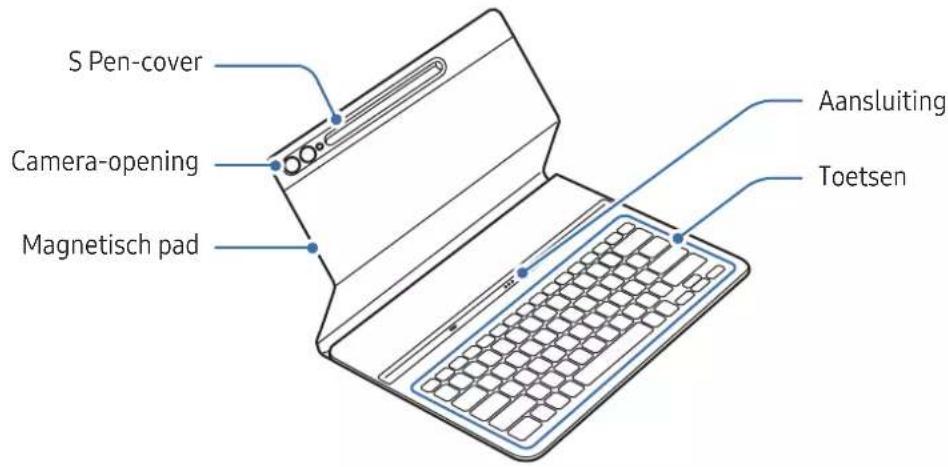
▶ EF-DX715, EF-DX815, EF-DX915:
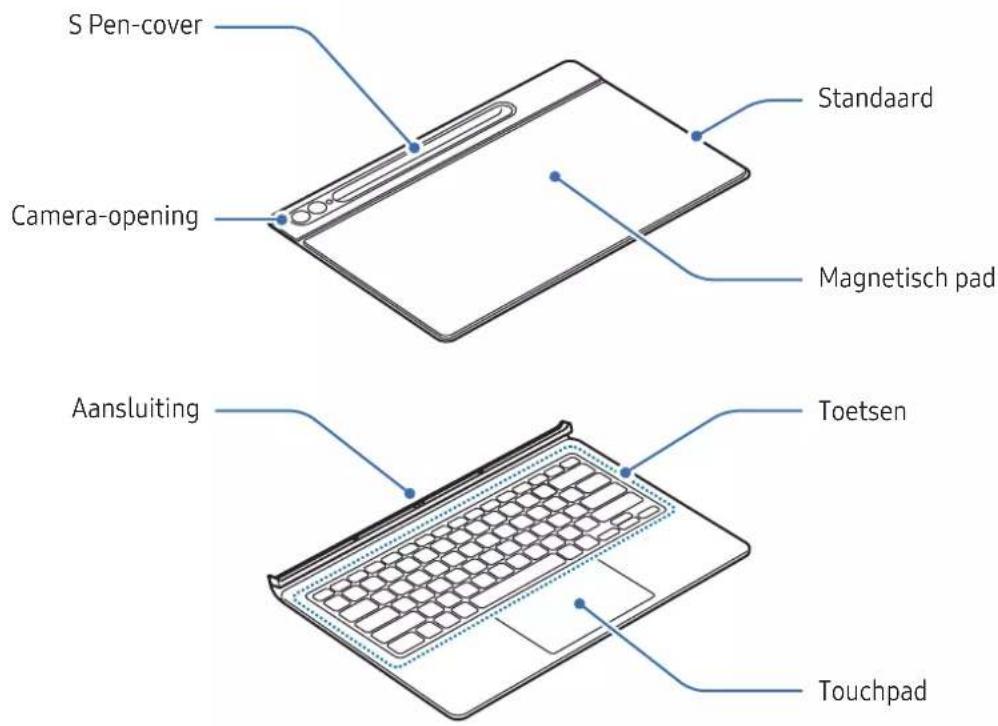
▶ EF-DX710, EF-DX810, EF-DX910:
natural_image
Illustration of a laptop with a blue arrow pointing to the screen (no text or symbols present)▶ EF-DX715, EF-DX815, EF-DX915:
natural_image
Diagram showing a device being folded or rotated, with blue arrows indicating the process (no text or symbols present)natural_image
Line drawing of a laptop with a keyboard and mouse, showing front and side views (no text or symbols)
natural_image
Line drawing of a laptop with a side panel showing the change from its open position to its closed position, illustrating the concept of device orientation (no text or symbols present)
▶ EF-DX710, EF-DX715:
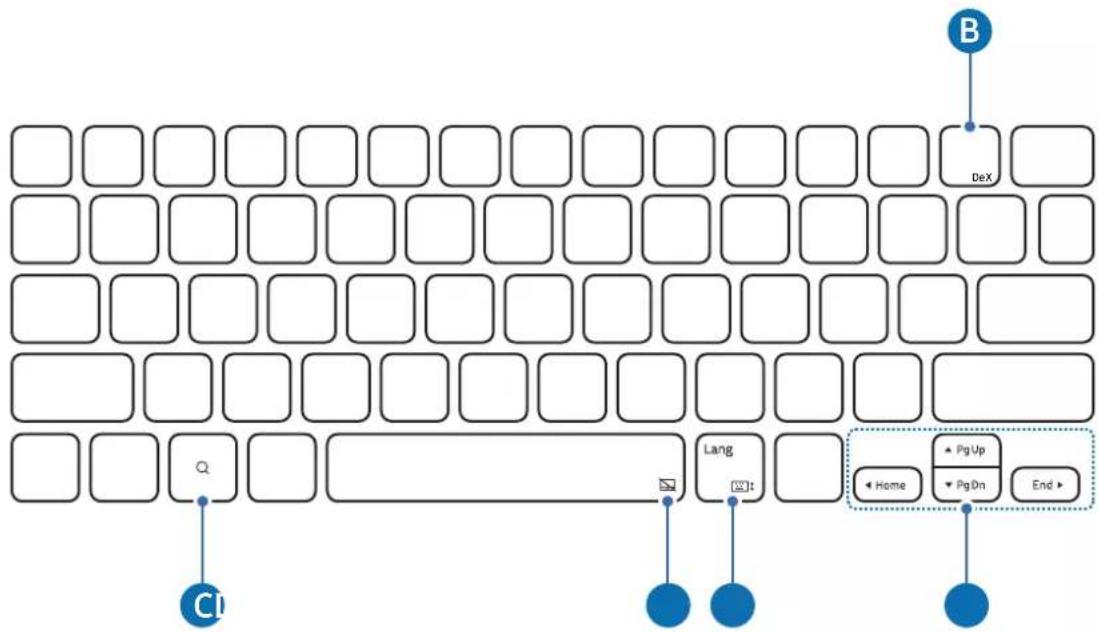
flowchart
graph TD
    A["Input"] --> B["Query"]
    B --> C["Code Box"]
    C --> D["Dialog"]
    D --> E["Home"]
    D --> F["Pg Up"]
    D --> G["Pg On"]
    D --> H["End"]
▶ EF-DX810, EF-DX815, EF-DX910, EF-DX915:
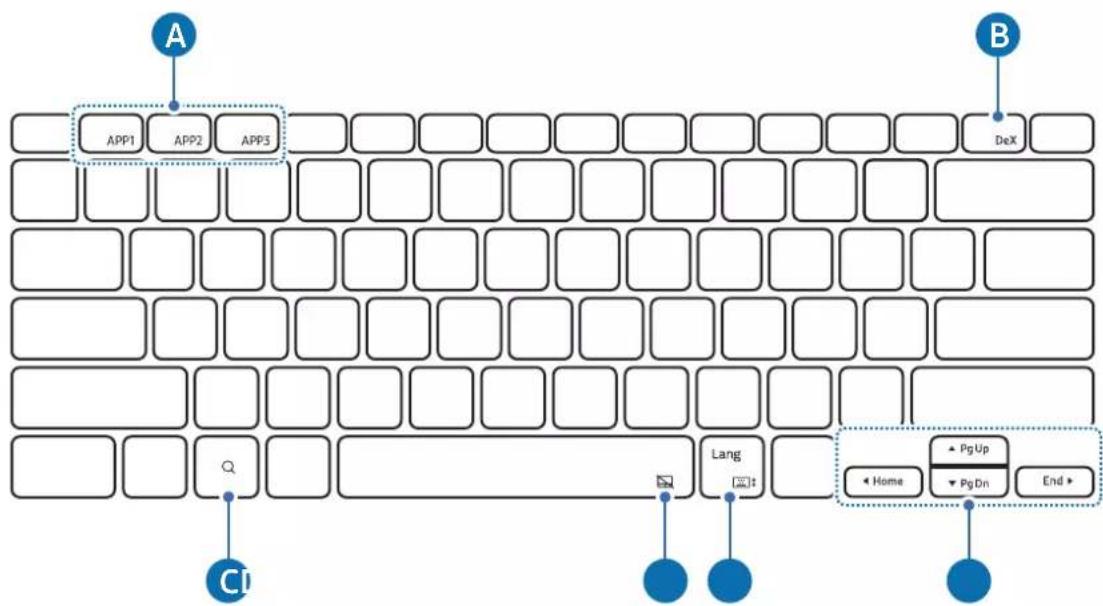
| A | [Fn] + [APP1]/[APP2]/[APP3]: uw favoriete apps openen. (EF-DX910, EF-DX915)U kunt een app aan uw favorieten toevoegen door de gewenste app te openen en de Fn-toets en de APP1/APP2/APP3-toets gedurende 3 seconden ingedrukt te houden. |
| B | [Fn] + [DeX]: Samsung DeX starten of beëindigen. |
| C | De Google Assistent-app openen. |
| D | [Fn] + [✗]: de touchpad in- of uitschakelen. (EF-DX715, EF-DX815, EF-DX915) |
| E | [Lang]: tussen invoertalen wisselen. [Fn] + [✗]: het schermtoetsenbord in- of uitschakelen. |
| F | / / / : de cursor verplaatsen. [Fn] + []: pagina omhoog [Fn] + []: pagina omlaag [Fn] + []: start [Fn] + []: einde |

natural_image
Simple geometric diagram with a rectangle inside a rounded rectangle (no text or symbols)natural_image
Illustration of a device with a blue arrow pointing to a magnified view of its internal structure (no text or symbols present)
natural_image
Illustration of a flat-screen electronic device with a blue arrow indicating a scroll or adjustment (no text or symbols present)Copyright © 2023 Samsung Electronics Co., Ltd.
▶ EF-DX710, EF-DX810, EF-DX910:
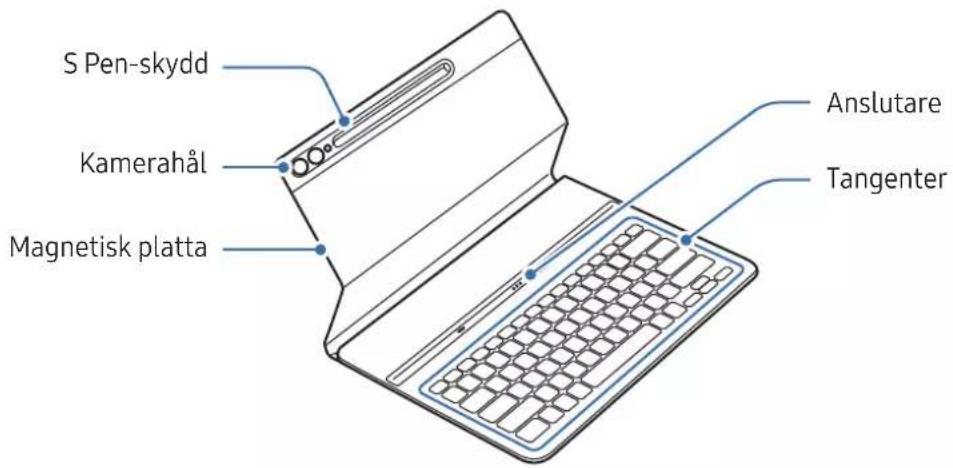
▶ EF-DX715, EF-DX815, EF-DX915:
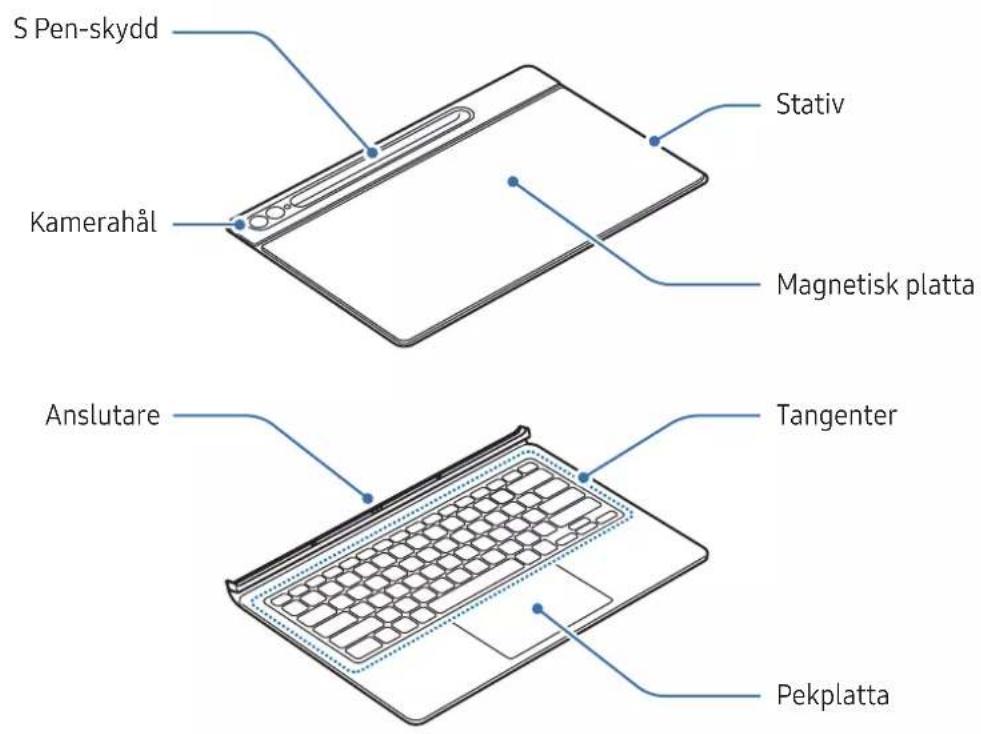
▶ EF-DX710, EF-DX810, EF-DX910:
natural_image
Illustration of a laptop with a blue arrow pointing to the screen (no text or symbols present)▶ EF-DX715, EF-DX815, EF-DX915:
natural_image
Diagram showing a device being folded into a flat sheet, with blue arrows indicating the fold change (no text or symbols present)natural_image
Line drawing of a laptop with a blue arrow pointing to the front screen (no text or symbols)[NO TEXT]
natural_image
Illustration of a laptop and its side panel showing the change from front to back view (no text or symbols)![SAMSUNG EFDX900 - [NO TEXT] - 1](/content/2026/03/567341/images/ceda0d214cf164ccbcc912d601a9e181f90b09472e29552f1b67be0128f22813.jpg)
▶ EF-DX710, EF-DX715:
![SAMSUNG EFDX900 - [NO TEXT] - 2](/content/2026/03/567341/images/eb148132e0a7d20634603e06e261d3beba45a6ce4f3ded97a4aebf077398d915.jpg)
flowchart
graph TD
    A["DeX"] --> B["C1"]
    B --> C["Lang"]
    C --> D["End"]
    style A fill:#f9f,stroke:#333
    style B fill:#ccf,stroke:#333
    style C fill:#cfc,stroke:#333
    style D fill:#fcc,stroke:#333
▶ EF-DX810, EF-DX815, EF-DX910, EF-DX915:
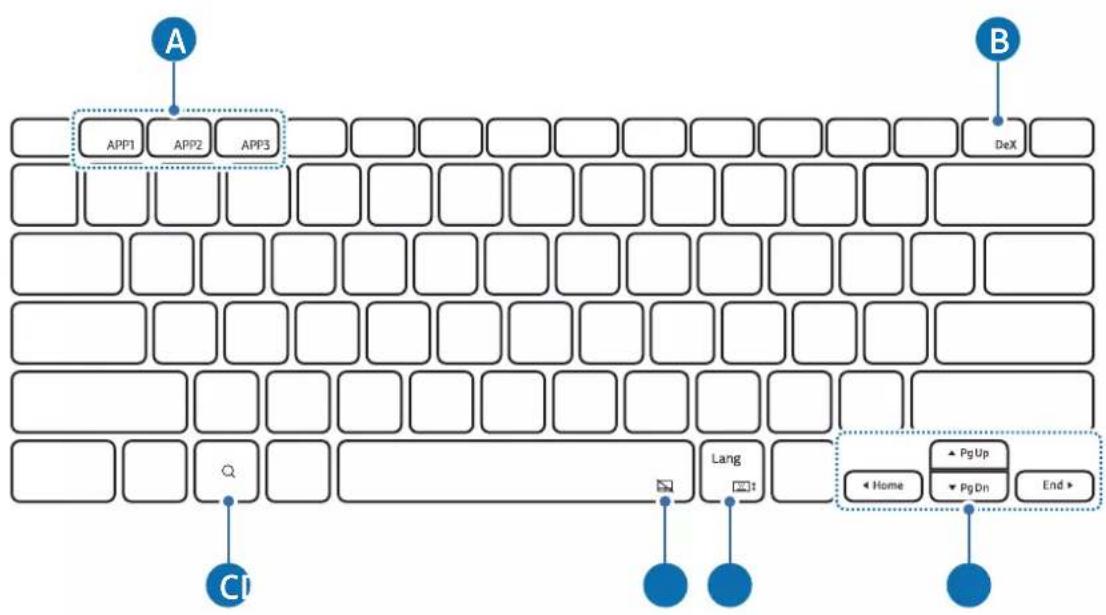
natural_image
Simple geometric diagram with a rectangle inside a rounded rectangle (no text or symbols)natural_image
Diagram showing a device being processed with a magnified view of internal components (no text or symbols present)![SAMSUNG EFDX900 - [NO TEXT] - 4](/content/2026/03/567341/images/91a6d3c859f043c233abee0abed2f0c9124dee1ae1f3e94325bf2a9b726a2dba.jpg)
natural_image
Illustration of a flat-screen electronic device with a scroll wheel and control panel (no text or symbols)Byta ut S Pen-skyddet
Copyright © 2023 Samsung Electronics Co., Ltd.
▶ EF-DX710, EF-DX810, EF-DX910:
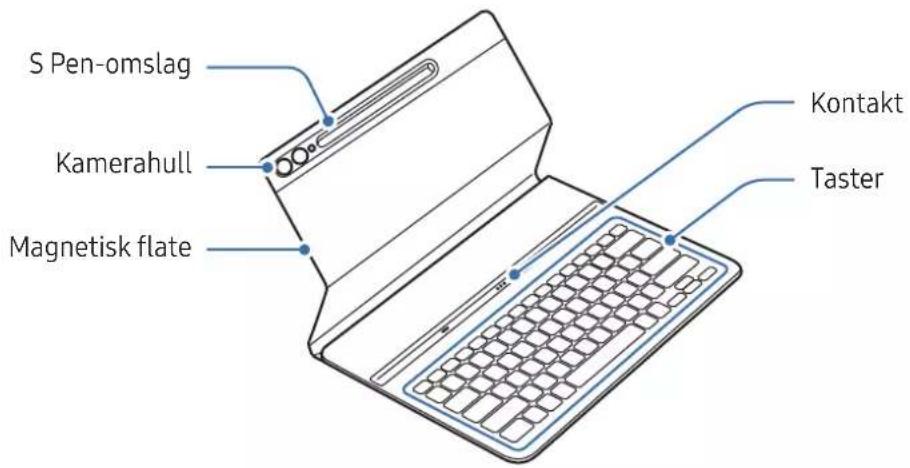
▶ EF-DX715, EF-DX815, EF-DX915:
Bruke tastaturet
Feste tastaturet
▶ EF-DX710, EF-DX810, EF-DX910:
natural_image
Illustration of a laptop with a blue arrow pointing to the screen (no text or symbols present)▶ EF-DX715, EF-DX815, EF-DX915:
natural_image
Diagram showing the open and closed views of a smartphone with blue arrows indicating fold changes (no text or symbols present)natural_image
Line drawing of a laptop with a blank screen and keyboard, showing a blue arrow pointing to the screen (no text or symbols)
natural_image
Line drawing of a laptop with a side panel, showing the open screen and its blue arrow indicating rotation (no text or symbols)
▶ EF-DX710, EF-DX715:
flowchart
graph TD
    A["DeX"] --> B["B"]
    C["CI"] --> D["Form"]
    E["Lang"] --> F["Form"]
    G["End"] --> H["Form"]
    I["Home"] --> J["Pg Up"]
    K["Pg Dn"] --> L["End"]
▶ EF-DX810, EF-DX815, EF-DX910, EF-DX915:
natural_image
Simple geometric diagram with a rectangle inside a rounded rectangle (no text or symbols)natural_image
Diagram showing a device being processed with a magnified view of internal components (no text or symbols present)
natural_image
Illustration of a foldable electronic device with a blue arrow indicating a component (no text or symbols present)Bruksmerknader
Forholdsregler ved bruk av produktet
▶ EF-DX710, EF-DX810, EF-DX910:
▶ EF-DX715, EF-DX815, EF-DX915:
▶ EF-DX710, EF-DX810, EF-DX910:
natural_image
Illustration of a laptop with a blue arrow pointing to the screen (no text or symbols present)▶ EF-DX715, EF-DX815, EF-DX915:
natural_image
Diagram showing the open and closed views of a smartphone with blue arrows indicating fold changes (no text or symbols present)natural_image
Line drawing of a laptop with a blank screen and keyboard, showing no text or symbols
natural_image
Illustration of a laptop with a side panel showing the change from its open position to its extended view, with no text or symbols present.
▶ EF-DX710, EF-DX715:
flowchart
graph TD
    A["DeX"] --> B["B"]
    C["Cl"] --> D["Lang"]
    E["End"] --> F["Home"]
    G["PgUp"] --> H["PgDn"]
    I["Next Step"] --> J["Next Step"]
▶ EF-DX810, EF-DX815, EF-DX910, EF-DX915:
flowchart
graph TD
    A["APP1"] --> B["APP2"]
    B --> C["APP3"]
    D["DeX"] --> E["B"]
    F["Home"] --> G["PgUp"]
    G --> H["PgDn"]
    H --> I["End"]
    J["C"] --> K["Link"]
    L["Link"] --> M["Link"]
    N["Link"] --> O["Link"]
    P["Link"] --> Q["Link"]
    R["Link"] --> S["Link"]
    T["Link"] --> U["Link"]
    V["Link"] --> W["Link"]
    X["Link"] --> Y["Link"]
    Z["Link"] --> AA["Link"]
natural_image
Simple geometric diagram with a rectangle inside a rounded rectangle (no text or symbols)natural_image
Diagram showing a device being processed with a magnified view of its internal structure (no text or symbols present)
natural_image
Illustration of a foldable electronic device with a blue arrow indicating a component (no text or symbols present)Copyright © 2023 Samsung Electronics Co., Ltd.
▶ EF-DX710, EF-DX810, EF-DX910:
▶ EF-DX715, EF-DX815, EF-DX915:
Brug af tastaturet
▶ EF-DX710, EF-DX810, EF-DX910:
natural_image
Illustration of a laptop with a blue arrow pointing to the screen (no text or symbols present)▶ EF-DX715, EF-DX815, EF-DX915:
natural_image
Diagram showing a device being folded into a flat sheet, with blue arrows indicating the fold change direction (no text or symbols present)natural_image
Line drawing of a laptop with a blank screen and keyboard, showing a blue arrow pointing to the screen (no text or symbols)
natural_image
Line drawing of a laptop with a side panel showing the change from front to back (no text or symbols)
▶ EF-DX710, EF-DX715:
flowchart
graph TD
    A["DeX"] --> B["B"]
    C["CI"] --> D["Q"]
    E["Lang"] --> F["Pt1"]
    G["Home"] --> H["PgUp"]
    I["PgDn"] --> J["End"]
▶ EF-DX810, EF-DX815, EF-DX910, EF-DX915:
flowchart
graph TD
    A["APP1"] --> B["APP2"]
    B --> C["APP3"]
    C --> D["DeX"]
    E["CI"] --> F["Q"]
    G["Lang"] --> H["End"]
    I["Home"] --> J["Pg Up"]
    K["Pg Dn"] --> L["End"]
| A | • [Fn] + [APP1]/[APP2]/[APP3]: Åbn de foretrukne apps (EF-DX910, EF-DX915). For at gemme en app under foretrukne skal du åbne den app, du vil gemme, og trykke og holde på tasten Fn samt tasten for APP1/APP2/APP3 i 3 sekunder. |
| B | • [Fn] + [DeX]: Start eller luk Samsung DeX. |
| C | • Åbn appen Google Assistant. |
| D | • [Fn] + [☐]: Tænd eller sluk touchpad (EF-DX715, EF-DX815, EF-DX915). |
| E | • [Lang]: Skift mellem inputsprog.• [Fn] + [☐: Tænd eller sluk skærmtastaturet. |
| F | • ▲ / ▼ / ◀ / ▶: Flyt markøren.• [Fn] + [▲]: Side op• [Fn] + [▼]: Side ned• [Fn] + [◀]: Startside• [Fn] + [▶]: Afslut |

natural_image
Simple geometric diagram with a rectangle inside a rounded rectangle (no text or symbols)natural_image
Diagram showing a device being processed with a magnified view of internal components (no text or symbols present)
natural_image
Illustration of a flat-screen electronic device with a scroll wheel and control buttons (no text or symbols)▶ EF-DX710, EF-DX810, EF-DX910:
▶ EF-DX715, EF-DX815, EF-DX915:
▶ EF-DX710, EF-DX810, EF-DX910:
natural_image
Illustration of a laptop with a blue arrow pointing to the screen (no text or symbols present)▶ EF-DX715, EF-DX815, EF-DX915:
natural_image
Diagram showing a device being folded into a flat sheet, with blue arrows indicating the process (no text or symbols present)natural_image
Line drawing of a laptop with a blue arrow pointing to the front screen (no text or symbols)
natural_image
Line drawing of a laptop with a side panel, showing the screen and keyboard change (no text or symbols)
▶ EF-DX710, EF-DX715:
flowchart
graph TD
    A["DeX"] --> B["Lang"]
    C["Home"] --> D["PgUp"]
    E["End"] --> F["PgDn"]
    G["CI"] --> H["Next Step"]
    style A fill:#f9f,stroke:#333
    style B fill:#ccf,stroke:#333
    style C fill:#cfc,stroke:#333
    style D fill:#fcc,stroke:#333
    style E fill:#cff,stroke:#333
    style F fill:#ffc,stroke:#333
    style G fill:#fff,stroke:#333
    style H fill:#fff,stroke:#333
▶ EF-DX810, EF-DX815, EF-DX910, EF-DX915:
natural_image
Simple geometric diagram with a rectangle inside a rounded rectangle (no text or symbols)natural_image
Diagram showing a device transitioning to a cylindrical device with blue arrows indicating the process (no text or symbols present)
natural_image
Illustration of a flat-screen electronic device with control buttons and a blue arrow indicating a scroll (no text or symbols present)▶ EF-DX710, EF-DX810, EF-DX910:
▶ EF-DX715, EF-DX815, EF-DX915:
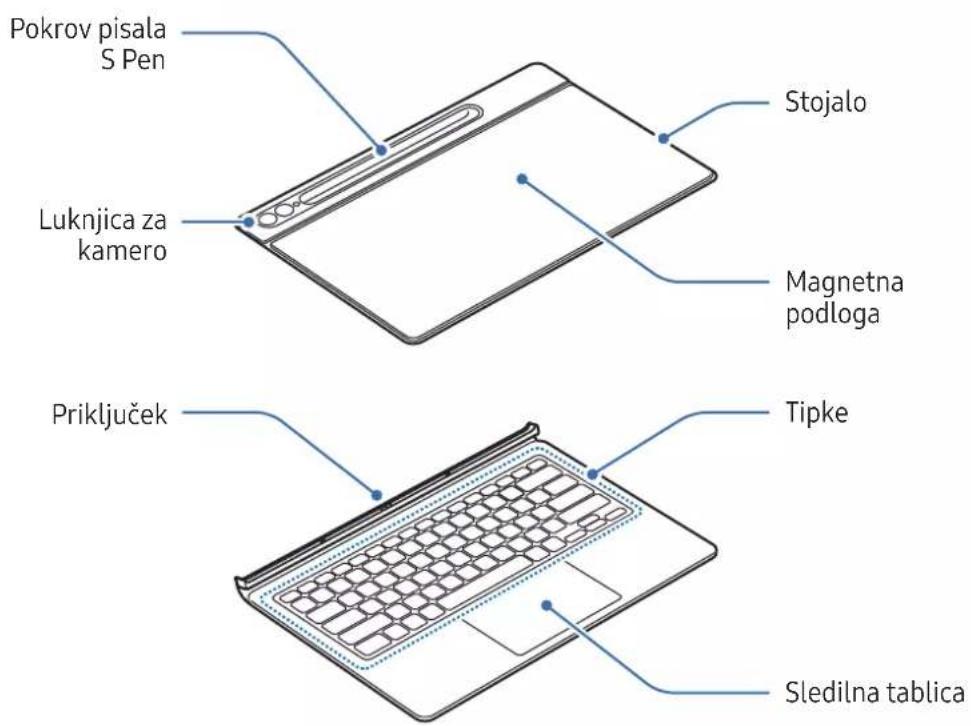
Uporaba tipkovnice
▶ EF-DX710, EF-DX810, EF-DX910:
1 Poravnajte oba vogala spodnjega dela pokrova s tabličnim računalnikom in nato pritrdite pokrov.
2 Ko je pokrov pritrjen, preverite, ali se kamera prilega luknjici za kamero. Če je kriva, jo odstranite in nato znova pritrdite.
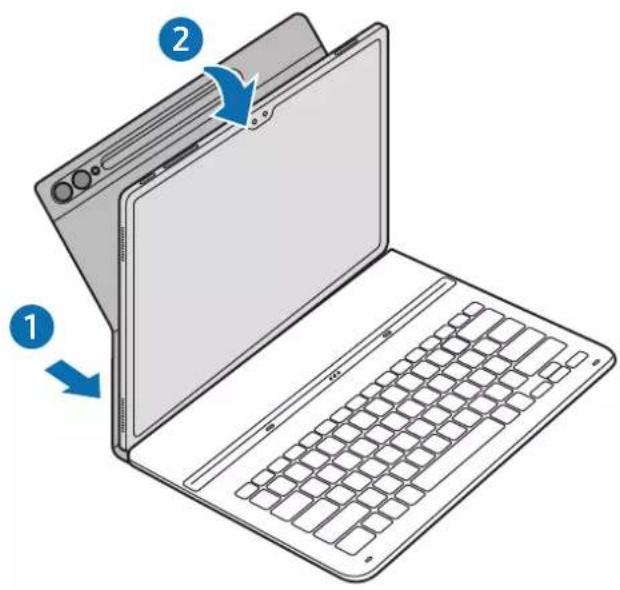
3 Poravnajte priključke tabličnega računalnika in tipkovnice ter pritrdite tablični računalnik na tipkovnico.
natural_image
Illustration of a laptop with a blue arrow pointing to the screen (no text or symbols present)▶ EF-DX715, EF-DX815, EF-DX915:
1 Preverite položaj kamere in luknjice za kamero ter poravnajte vsak vogal zgornjega dela pokrova z vogali tabličnega računalnika.
2 Najprej pritrdite zgornji del pokrova, nato pa pritisnite preostali del.
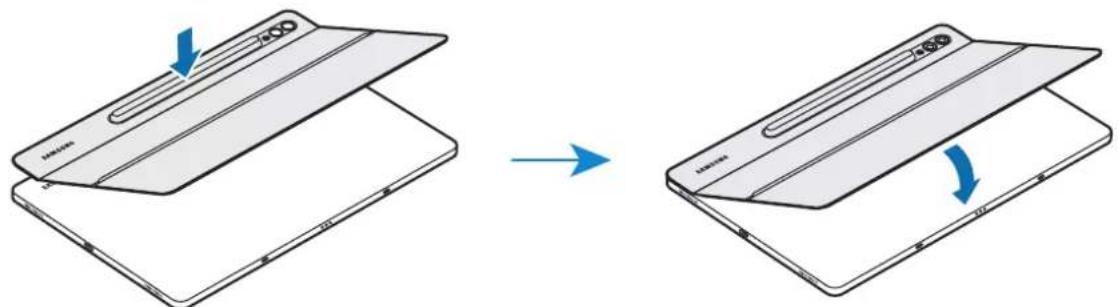
natural_image
Diagram showing a device being folded into a flat sheet, with blue arrows indicating the process (no text or symbols present)3 Poravnajte priključke tabličnega računalnika in tipkovnice ter pritrdite tablični računalnik na tipkovnico.
natural_image
Line drawing of a laptop with a blank screen and keyboard, showing no text or symbols[NO TEXT]
natural_image
Line drawing of a laptop with a side panel, showing the open screen and its blue arrow indicating rotation (no text or symbols)![SAMSUNG EFDX900 - [NO TEXT] - 1](/content/2026/03/567341/images/7f84c71c880af27efe7927a99771a629584e77ac3cfef88ec84503727651a63c.jpg)
▶ EF-DX710, EF-DX715:
![SAMSUNG EFDX900 - [NO TEXT] - 2](/content/2026/03/567341/images/2a99917701b39b0d5292fbe84ff7578250d824a3220d9f65ca0beb44e28722b4.jpg)
flowchart
graph TD
    A["DeX"] --> B["B"]
    C["CI"] --> D["Q"]
    E["Lang"] --> F["End"]
    G["Home"] --> H["PgUp"]
    G --> I["PgOn"]
    G --> J["Home"]
    style A fill:#f9f,stroke:#333
    style B fill:#bbf,stroke:#333
    style C fill:#dfd,stroke:#333
    style D fill:#dfd,stroke:#333
    style E fill:#dfd,stroke:#333
    style F fill:#dfd,stroke:#333
    style G fill:#dfd,stroke:#333
    style H fill:#dfd,stroke:#333
    style I fill:#dfd,stroke:#333
    style J fill:#dfd,stroke:#333
▶ EF-DX810, EF-DX815, EF-DX910, EF-DX915:
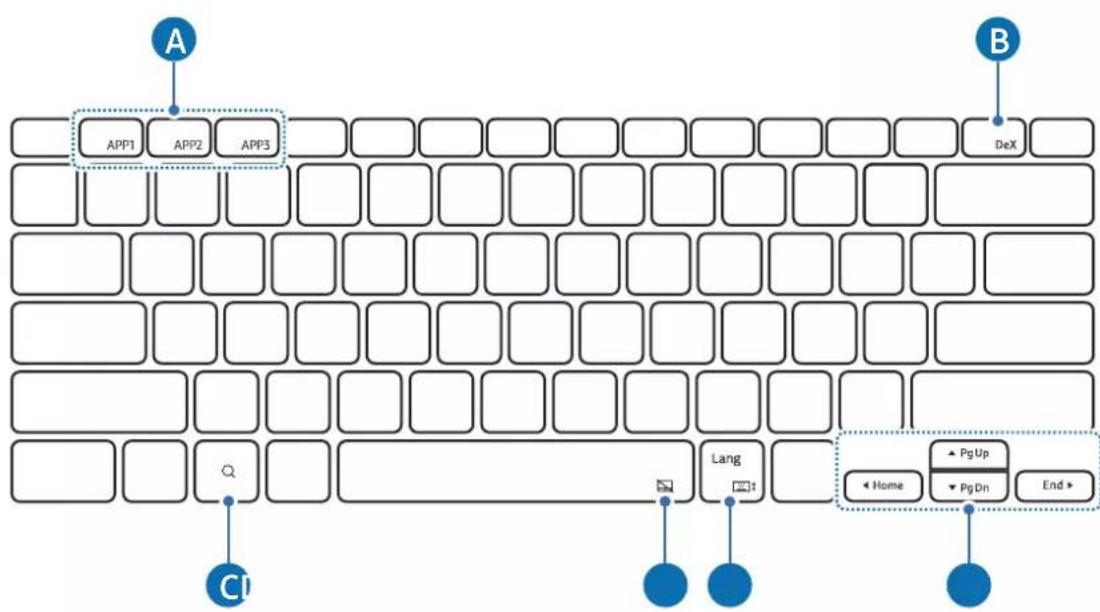
| A | [Fn] + [APP1]/[APP2]/[APP3]: zaženite priljubljene aplikacije. (EF-DX910, EF-DX915) Če želite aplikacijo shraniti med priljubljene, zaženite aplikacijo, ki jo želite shraniti, ter pritisnite tipki Fn in APP1/APP2/APP3 in ju držite 3 sekunde. |
| B | [Fn] + [DeX]: zaženite ali zaprite Samsung DeX. |
| C | Zaženite aplikacijo Pomočnik Google. |
| D | [Fn] + [][: vklopite ali izklopite sledilno tablico. (EF-DX715, EF-DX815, EF-DX915) |
| E | [Lang]: spreminjajte jezike za vnos. [Fn] + [][: vklopite ali izklopite zaslonsko tipkovnico. |
| F | ▲///: premaknite kazalec. [Fn] + [▲]: stran gor [Fn] + [▼]: stran dol [Fn] + [◀]: domov [Fn] + [▶]: konec |
![SAMSUNG EFDX900 - [NO TEXT] - 4](/content/2026/03/567341/images/da0eaac63794282b376aa811b95ebd019778b24afc2115705c9e997bec89b2b2.jpg)
natural_image
Simple geometric diagram with a rectangle inside a rounded rectangle (no text or symbols)natural_image
Diagram showing a device being processed with a magnified view of internal components (no text or symbols present)![SAMSUNG EFDX900 - [NO TEXT] - 5](/content/2026/03/567341/images/8c1b0de90e46927a0650d983112ca70e514a9864a950a8422591bb8f1ad8a944.jpg)
Pisalo S Pen ustrezno poravnajte s polnilnikom pisala S Pen. Če pisalo S Pen ni pravilno pritrjeno, se pokrov pisala S Pen morda ne bo zaprl.
2 Pisalo S Pen pokrijte s pokrovom S Pen.
![SAMSUNG EFDX900 - [NO TEXT] - 6](/content/2026/03/567341/images/58747b07dee86b0da3a2a97509e30c01e6027fd219aecbc3506a020dde177826.jpg)
natural_image
Illustration of a flat-screen electronic device with a scroll wheel and control panel (no text or symbols)Zamenjava pokrova pisala S Pen
Pokrov pisala S Pen je mogoče zamenjati. Pri zamenjavi pokrova pisala S Pen pritisnite luknjico za kamero na pokrovu pisala S Pen in ga odstranite.
Za pritrditev pokrova pisala S Pen poravnajte pokrov pisala S Pen z utorom na pokrovu pisala S Pen in potisnite rob, dokler se ne zaskoči na mestu.
Obvestila o uporabi
▶ EF-DX710, EF-DX810, EF-DX910:
▶ EF-DX715, EF-DX815, EF-DX915:
▶ EF-DX710, EF-DX810, EF-DX910:
natural_image
Illustration of a laptop with a blue arrow pointing to the screen (no text or symbols present)▶ EF-DX715, EF-DX815, EF-DX915:
natural_image
Line drawing of a laptop with a keyboard and mouse, showing front and side views (no text or symbols)
natural_image
Illustration of a laptop and its side panel showing the change from front to back view (no text or symbols)
▶ EF-DX710, EF-DX715:
flowchart
graph TD
    A["DeX"] --> B["B"]
    C["Cl"] --> D["Q"]
    E["Lang"] --> F["Pt"]
    G["Home"] --> H["PgUp"]
    I["PgDn"] --> J["End"]
▶ EF-DX810, EF-DX815, EF-DX910, EF-DX915:
natural_image
Simple geometric diagram with a rectangle inside a rounded rectangle (no text or symbols)natural_image
Diagram showing a device transitioning to a cylindrical device with blue arrows indicating the process (no text or symbols present)
natural_image
Illustration of a flat-screen electronic device with control buttons and a blue arrow indicating a scroll (no text or symbols present)Copyright © 2023 Samsung Electronics Co., Ltd.
▶ EF-DX710, EF-DX810, EF-DX910:
▶ EF-DX715, EF-DX815, EF-DX915:
▶ EF-DX710, EF-DX810, EF-DX910:
natural_image
Illustration of a laptop with a blue arrow pointing to the screen (no text or symbols present)▶ EF-DX715, EF-DX815, EF-DX915:
natural_image
Diagram showing a device being folded or rotated, with blue arrows indicating the process (no text or symbols present)natural_image
Line drawing of a laptop with a blank screen and keyboard, showing no text or symbols
natural_image
Illustration of a laptop with a side panel showing the next screen and its left-side orientation (no text or symbols)
▶ EF-DX710, EF-DX715:
flowchart
graph TD
    A["DeX"] --> B["B"]
    C["CI"] --> D["Q"]
    E["Lang"] --> F["xt"]
    G["Home"] --> H["PgUp"]
    I["PgDn"] --> J["End"]
▶ EF-DX810, EF-DX815, EF-DX910, EF-DX915:
natural_image
Simple geometric diagram with a rectangle inside a rounded rectangle (no text or symbols)natural_image
Diagram showing a device being processed with a magnified view of its internal structure (no text or symbols present)
natural_image
Illustration of a flat-screen electronic device with control panel and scroll wheel (no text or symbols)Copyright © 2023 Samsung Electronics Co., Ltd.
▶ EF-DX710, EF-DX810, EF-DX910:
▶ EF-DX715, EF-DX815, EF-DX915:
▶ EF-DX710, EF-DX810, EF-DX910:
natural_image
Illustration of a laptop with a blue arrow pointing to the screen (no text or symbols present)▶ EF-DX715, EF-DX815, EF-DX915:
natural_image
Diagram showing a device being folded into a flat sheet, with blue arrows indicating the process (no text or symbols present)natural_image
Line drawing of a laptop with a blank screen and keyboard, showing no text or symbols
natural_image
Illustration of a laptop with a side panel showing the next screen and its left-side orientation (no text or symbols)
▶ EF-DX710, EF-DX715:
flowchart
graph TD
    A["DeX"] --> B["B"]
    C["CI"] --> D["Q"]
    E["Lang"] --> F["xt"]
    G["Home"] --> H["PgUp"]
    I["PgDn"] --> J["End"]
▶ EF-DX810, EF-DX815, EF-DX910, EF-DX915:
natural_image
Simple geometric diagram with a rectangle inside a rounded rectangle (no text or symbols)natural_image
Diagram showing a device being processed with a magnified view of internal components (no text or symbols present)
natural_image
Illustration of a flat-screen electronic device with control panel and scroll wheel (no text or symbols)Telif hakkı © 2023 Samsung Electronics Co., Ltd.
▶ EF-DX710, EF-DX810, EF-DX910:
▶ EF-DX715, EF-DX815, EF-DX915:
▶ EF-DX710, EF-DX810, EF-DX910:
natural_image
Illustration of a laptop with a blue arrow pointing to the screen (no text or symbols present)▶ EF-DX715, EF-DX815, EF-DX915:
natural_image
Line drawing of a laptop with a blank screen and keyboard, showing a blue arrow pointing to the front panel (no text or symbols)
natural_image
Line drawing of a laptop with a side panel, showing the screen and keyboard change (no text or symbols)
▶ EF-DX710, EF-DX715:
flowchart
graph TD
    A["DeX"] --> B["Q"]
    C["Cl"] --> D["CL"]
    E["Lang"] --> F["NT"]
    G["Home"] --> H["PgUp"]
    I["PgDn"] --> J["End"]
▶ EF-DX810, EF-DX815, EF-DX910, EF-DX915:
natural_image
Simple geometric diagram with a rectangle inside a rounded rectangle (no text or symbols)natural_image
Diagram showing a device with a scroll and a magnified view of its internal structure, no text or symbols present.
natural_image
Illustration of a flat-screen electronic device with a scroll wheel and control buttons (no text or symbols)ประกาศการใช้งาน
Copyright © 2023 Samsung Electronics Co., Ltd.
▶ EF-DX710, EF-DX810, EF-DX910:
▶ EF-DX715, EF-DX815, EF-DX915:

▶ EF-DX710, EF-DX810, EF-DX910:
natural_image
Illustration of a laptop with a blue arrow pointing to the screen (no text or symbols present)▶ EF-DX715, EF-DX815, EF-DX915:
natural_image
Diagram showing a device being folded or rotated, with blue arrows indicating the process (no text or symbols present)natural_image
Line drawing of a laptop with a blank screen and keyboard, showing no text or symbols
natural_image
Illustration of a laptop with a side panel showing the next screen and its left-side orientation (no text or symbols)
▶ EF-DX710, EF-DX715:
flowchart
graph TD
    A["Input"] --> B["Query Box"]
    B --> C["Dialog"]
    C --> D["Home"]
    C --> E["Pg Up"]
    C --> F["Pg Dn"]
    C --> G["End"]
▶ EF-DX810, EF-DX815, EF-DX910, EF-DX915:
| A | [Fn] + [APP1]/[APP2]/[APP3]: Membuka aplikasi favorit. (EF-DX910, EF-DX915)Untuk menyimpan aplikasi ke favorit, buka aplikasi yang ingin Anda simpan, lalu tekan lama tombol Fn dan tombol APP1/APP2/APP3 selama 3 detik. |
| B | [Fn] + [DeX]: Mulai atau akhiri Samsung DeX. |
| C | Buka aplikasi Google Assistant. |
| D | [Fn] + [][+] : Mengaktifkan atau menonaktifkan pad sentuh. (EF-DX715, EF-DX815, EF-DX915) |
| E | [Lang]: Mengubah bahasa masukan. [Fn] + [][+] : Mengaktifkan atau menonaktifkan keyboard di layar. |
| F | ▲ / ▼ / ◀ / ▶: Memindahkan kursor. [Fn] + [▲]: Halaman Atas [Fn] + [▼]: Halaman Bawah [Fn] + [◀]: Home [Fn] + [▶]: End |

natural_image
Simple geometric diagram with a rectangle inside a rounded rectangle (no text or symbols)natural_image
Diagram showing a device being processed with a magnified view of internal components (no text or symbols present)
natural_image
Illustration of a flat-screen electronic device with control panel and scroll wheel (no text or symbols)Mengganti kover S Pen
:EF-DX915, EF-DX815, EF-DX715
natural_image
Illustration of a laptop with a keyboard and two blue arrows indicating left and right fold directions (no text or symbols)natural_image
Illustration of a laptop with a blue arrow pointing to the screen (no text or symbols present):EF-DX915, EF-DX815, EF-DX715
natural_image
Diagram showing a device being folded or retained, with blue arrows indicating the process (no text or symbols present)natural_image
Line drawing of a laptop with a blank screen and keyboard, showing a blue arrow pointing to the screen (no text or symbols)natural_image
Line drawing of a laptop with open screen and side-mounted stand, showing left-side orientation (no text or symbols)natural_image
Empty rectangular frame with rounded corners (no text or symbols)natural_image
Diagram showing a device with a scroll and a magnified view of its internal structure, no text or symbols present.natural_image
Illustration of a flat-screen electronic device with control panel and scroll wheel (no text or symbols)إشعارات الاستخدام
▶ EF-DX710, EF-DX810, EF-DX910:
▶ EF-DX715, EF-DX815, EF-DX915:
▶ EF-DX710, EF-DX810, EF-DX910:
natural_image
Illustration of a laptop with a blue arrow pointing to the screen (no text or symbols present)▶ EF-DX715, EF-DX815, EF-DX915:
natural_image
Diagram showing the open and closed views of a foldable smartphone with blue arrows indicating the process (no text or symbols present)natural_image
Line drawing of a laptop with a blue arrow pointing to the front screen (no text or symbols)
natural_image
Line drawing of a laptop with a side panel, showing the screen and keyboard change (no text or symbols)
▶ EF-DX710, EF-DX715:
flowchart
graph TD
    A["DeX"] --> B["B"]
    C["Cl"] --> D["Q"]
    E["Lang"] --> F["Pt t"]
    G["Home"] --> H["Pg Up"]
    G --> I["Pg On"]
    G --> J["End"]
▶ EF-DX810, EF-DX815, EF-DX910, EF-DX915:
natural_image
Simple geometric diagram with a rectangle inside a rounded rectangle (no text or symbols)natural_image
Illustration of a foldable air conditioner unit being processed with a magnified view showing internal structure (no text or symbols)
natural_image
Illustration of a flat-screen electronic device with a scroll wheel and control buttons (no text or symbols)Замена чехла S Pen
▶ EF-DX710, EF-DX810, EF-DX910:
▶ EF-DX715, EF-DX815, EF-DX915:

▶ EF-DX710, EF-DX810, EF-DX910:
natural_image
Illustration of a laptop with a blue arrow pointing to the screen (no text or symbols present)▶ EF-DX715, EF-DX815, EF-DX915:
natural_image
Diagram showing a device being folded or rotated, with blue arrows indicating the process (no text or symbols present)natural_image
Line drawing of a laptop with a keyboard and mouse, showing front and side views (no text or symbols)
natural_image
Line drawing of a laptop with a side panel, showing the screen and keyboard change (no text or symbols)
▶ EF-DX710, EF-DX715:
flowchart
graph TD
    A["DeX"] --> B["B"]
    C["Cl"] --> D["Lang"]
    E["End"] --> F["Home"]
    G["PgUp"] --> H["PgDn"]
    I["Next Step"] --> J["Next Step"]
▶ EF-DX810, EF-DX815, EF-DX910, EF-DX915:
natural_image
Simple geometric diagram with a rectangle inside a rounded rectangle (no text or symbols)natural_image
Diagram showing a device transitioning to a cylindrical device with blue arrows indicating the process (no text or symbols present)
natural_image
Illustration of a flat-screen electronic device with control buttons and a blue arrow indicating a scroll (no text or symbols present)▶ EF-DX710, EF-DX810, EF-DX910:
▶ EF-DX715, EF-DX815, EF-DX915:
▶ EF-DX710, EF-DX810, EF-DX910:
natural_image
Illustration of a laptop with a blue arrow pointing to the screen (no text or symbols present)▶ EF-DX715, EF-DX815, EF-DX915:
natural_image
Diagram showing the open and closed views of a foldable smartphone with blue arrows indicating the process (no text or symbols present)natural_image
Line drawing of a laptop with a keyboard and mouse, showing front and side views (no text or symbols)
natural_image
Line drawing of a laptop with a side panel showing the change from its open position to its extended view (no text or symbols)
▶ EF-DX710, EF-DX715:
flowchart
graph TD
    A["DeX"] --> B["Lang"]
    C["Home"] --> D["PgUp"]
    E["End"] --> F["PgDn"]
    G["CI"] --> H["Next Step"]
    style A fill:#f9f,stroke:#333
    style B fill:#ccf,stroke:#333
    style C fill:#cfc,stroke:#333
    style D fill:#fcc,stroke:#333
    style E fill:#cff,stroke:#333
    style F fill:#ffc,stroke:#333
    style G fill:#fff,stroke:#333
    style H fill:#fff,stroke:#333
▶ EF-DX810, EF-DX815, EF-DX910, EF-DX915:
natural_image
Simple geometric diagram with a rectangle inside a rounded rectangle (no text or symbols)natural_image
Diagram showing a device transitioning to a cylindrical device with blue arrows indicating process flow (no text or symbols present)
natural_image
Illustration of a flat-screen electronic device with control buttons and a blue arrow indicating a scroll (no text or symbols present)Copyright © 2023 Samsung Electronics Co., Ltd.
natural_image
Illustration of a laptop with a keyboard and a blue arrow pointing to the screen (no text or symbols)▶ EF-DX715、EF-DX815、EF-DX915:
natural_image
Diagram showing a device being folded or rotated, with blue arrows indicating the process (no text or symbols present)natural_image
Line drawing of a laptop with a blank screen and keyboard, showing a blue arrow pointing to the screen (no text or symbols)!
natural_image
Illustration of a laptop and its side panel showing the change from front view to back view (no text or symbols)
natural_image
Simple geometric diagram with a rectangle inside a rounded rectangle (no text or symbols)natural_image
Illustration of a smartphone with a scroll and cable being inserted, showing the cable being inserted into a slide (no text or symbols present)natural_image
Illustration of a flat-screen electronic device with a scroll wheel and control buttons (no text or symbols)更换 S Pen 保护盖
使用注意事项
产品使用注意事项
natural_image
Illustration of a laptop with a blue arrow pointing to the screen (no text or symbols present)▶ EF-DX715、EF-DX815、EF-DX915 :
natural_image
Diagram showing a device being folded into a flat panel, with blue arrows indicating the process (no text or symbols present)natural_image
Line drawing of a laptop with a blank screen and keyboard, showing a blue arrow pointing to the screen (no text or symbols)natural_image
Line drawing of a laptop with a side panel showing the change from its open position to its extended view (no text or symbols)natural_image
Simple geometric diagram with a rectangle inside a rounded rectangle (no text or symbols)natural_image
Diagram showing a device being processed with a magnified view of its internal structure (no text or symbols present)natural_image
Illustration of a flat-screen electronic device with a scroll wheel and control buttons (no text or symbols)重新安裝 S Pen 保護殼
使用注意事項
產品使用注意事項
| 設備名稱:書本式鍵盤皮套,型號(型式):EF-DX710,EF-DX715,EF-DX810, EF-DX815,EF-DX910.EF-DX915 Equipment name Type designation (Type) | ||||||
| 單元Unit | 限用物質及其化學符號Restricted substances and its chemical symbols | |||||
| 鉛Lead(Pb) | 汞Mercury(Hg) | 鎘Cadmium(Cd) | 六價鉻Hexavalent chromium( Cr^+6 ) | 多溴聯苯Polybrominated biphenyls (PBB) | 多溴二苯醚Polybrominated diphenyl ethers (PBDE) | |
| 電路板- | 0 0 0 0 | 0 | ||||
| 塑膠外殼 | 0 0 0 0 | 0 0 | ||||
| 矽膠00 | 0 0 0 0 | |||||
| 電線00 | 0 0 0 0 | |||||
| 備考1.“超出0.1wt%”及“超出0.01wt%”係指限用物質之百分比含量超出百分比含量基準值。Note 1:“Exceeding 0.1 wt %”and“exceeding 0.01 wt %”indicate that the percentage content of the restricted substance exceeds the reference percentage value of presence condition.備考2.“O”係指該項限用物質之百分比含量未超出百分比含量基準值。Note 2:“O”indicates that the percentage content of the restricted substance does not exceed the percentage of reference value of presence.備考3.“-”係指該項限用物質為排除項目。Note 3:The“-”indicates that the restricted substance corresponds to the exemption. | ||||||
版權
Copyright © 2023 Samsung Electronics Co., Ltd.
本手冊受國際版權法保護。
natural_image
Illustration of a laptop with a blue arrow pointing to the screen (no text or symbols present)▶ EF-DX715、EF-DX815、EF-DX915 :
natural_image
Diagram showing a device being folded or retained, with blue arrows indicating the process (no text or symbols present)natural_image
Line drawing of a laptop with a blank screen and keyboard, showing a blue arrow pointing to the screen (no text or symbols)
natural_image
Line drawing of a laptop with a side panel showing the change from its left to right (no text or symbols)
natural_image
Simple line drawing of a rectangular frame with a centered square (no text or symbols)natural_image
Diagram showing a device with a scroll and a magnified view of its internal structure, no text or symbols present.natural_image
Illustration of a flat-screen electronic device with control panel and scroll (no text or symbols)Sペンカバーを交換する
使用上の注意
本製品を使用する際の注意事項
Copyright © 2023 Samsung Electronics Co., Ltd.
▶ EF-DX715, EF-DX815, EF-DX915 :
natural_image
Illustration of a laptop with a blue arrow pointing to the screen (no text or symbols present)▶ EF-DX715, EF-DX815, EF-DX915 :
natural_image
Line drawing of a laptop with a blank screen and keyboard, showing no text or symbols
natural_image
Line drawing of a laptop with a side panel, showing the screen and keyboard change (no text or symbols)
▶ EF-DX710, EF-DX715 :
flowchart
graph TD
    A["Input"] --> B["Query"]
    B --> C["Q"]
    C --> D["Grid"]
    D --> E["Search Box"]
    E --> F["Lang"]
    F --> G["Home"]
    G --> H["Pg Up"]
    G --> I["Pg Dn"]
    G --> J["End"]
▶ EF-DX810, EF-DX815, EF-DX910, EF-DX915 :
natural_image
Simple geometric diagram with a rectangle inside a rounded rectangle (no text or symbols)natural_image
Diagram showing a device being processed with a magnified view of internal components (no text or symbols present)
natural_image
Illustration of a flat-screen electronic device with control panel and scroll wheel (no text or symbols)Copyright © 2023 Samsung Electronics Co., Ltd.
▶ EF-DX710, EF-DX810, EF-DX910:
▶ EF-DX715, EF-DX815, EF-DX915:

▶ EF-DX710, EF-DX810, EF-DX910:
natural_image
Illustration of a laptop with a blue arrow pointing to the screen (no text or symbols present)▶ EF-DX715, EF-DX815, EF-DX915:
natural_image
Diagram showing a device being folded or rotated, with blue arrows indicating the process (no text or symbols present)natural_image
Line drawing of a laptop with a blank screen and keyboard, showing no text or symbols
natural_image
Illustration of a laptop with a side panel showing the change from its open position to its closed position, with no text or symbols present.
▶ EF-DX710, EF-DX715:
flowchart
graph TD
    A["DeX"] --> B["C1"]
    B --> C["Lang"]
    C --> D["Home"]
    D --> E["PgUp"]
    E --> F["PgDn"]
    F --> G["End"]
▶ EF-DX810, EF-DX815, EF-DX910, EF-DX915:
natural_image
Simple geometric diagram with a rectangle inside a rounded rectangle (no text or symbols)natural_image
Diagram showing a device being processed with a magnified view of internal components (no text or symbols present)
natural_image
Illustration of a flat-screen electronic device with control panel and scroll wheel (no text or symbols)Avisos de uso
▶ EF-DX710, EF-DX810, EF-DX910:
▶ EF-DX715, EF-DX815, EF-DX915:
▶ EF-DX710, EF-DX810, EF-DX910:
natural_image
Illustration of a laptop with a blue arrow pointing to the screen (no text or symbols present)▶ EF-DX715, EF-DX815, EF-DX915:
natural_image
Diagram showing a device being folded into a flat sheet, with blue arrows indicating the process (no text or symbols present)natural_image
Line drawing of a laptop with a blue arrow pointing to the front screen (no text or symbols)
natural_image
Illustration of a laptop and its side panel showing the change from front view to back view (no text or symbols)
▶ EF-DX710, EF-DX715:
flowchart
graph TD
    A["DeX"] --> B["B"]
    C["CI"] --> D["Q"]
    E["Lang"] --> F["21"]
    G["Home"] --> H["PgUp"]
    G --> I["PgDn"]
    G --> J["End"]
▶ EF-DX810, EF-DX815, EF-DX910, EF-DX915:
natural_image
Simple geometric diagram with a rectangle inside a rounded rectangle (no text or symbols)natural_image
Diagram showing a device with a blue arrow pointing to a magnified view of its internal structure, enclosed in a dotted circle (no text or symbols present)
natural_image
Illustration of a flat-screen electronic device with a scroll wheel and control buttons (no text or symbols)S펜 커버 교체하기
제품 사용 시 알아두기
제품 사용 시 주의 사항

- Using the keyboard
- Attaching the keyboard
- Adjusting the tablet angle (EF-DX715, EF-DX815, EF-DX915)
- Using the keys
- Using the touchpad (EF-DX715, EF-DX815, EF-DX915)
- Storing the S Pen
- Replacing the S Pen cover
- Usage notices
- Precautions for using the product
- Instructional icons
- Notes on package contents and accessories
- Appendix
- FCC Part 15.19
- FCC Part 15.105
- Samsung Electronics America, Inc.
- Copyright
- Trademarks
- Démarrage
- Remplacer la coque S Pen
- Nutzungshinweise
- ▶ EF-DX710, EF-DX810, EF-DX910:
- Avisos de uso
- Korištenje tipki
- Upotreba podloge osjetljive na dodir (EF-DX715,
- EF-DX815, EF-DX915)
- Spremanje S olovke
- Korišćenje tastature
- Podešavanje ugla tableta (EF-DX715, EF-DX815, EF-DX915)
- Upotreba tastera
- Korišćenje tačpeda (EF-DX715, EF-DX815, EF-DX915)
- Čuvanje S olovke
- Napomene o upotrebi
- Mere predostrožnosti za upotrebu proizvoda
- Trgovačke marke
- Começar
- [NO TEXT]
- Naudojimo pastabos
- Kasutamise märkused
- Byta ut S Pen-skyddet
- Bruke tastaturet
- Feste tastaturet
- Bruksmerknader
- Forholdsregler ved bruk av produktet
- Brug af tastaturet
- Uporaba tipkovnice
- Zamenjava pokrova pisala S Pen
- Obvestila o uporabi
- ประกาศการใช้งาน
- Mengganti kover S Pen
- إشعارات الاستخدام
- Замена чехла S Pen
- 更换 S Pen 保护盖
- 使用注意事项
- 产品使用注意事项
- 重新安裝 S Pen 保護殼
- 使用注意事項
- 產品使用注意事項
- 版權
- ▶ EF-DX715、EF-DX815、EF-DX915 :
- Sペンカバーを交換する
- 使用上の注意
- 本製品を使用する際の注意事項
- S펜 커버 교체하기
- 제품 사용 시 알아두기
- 제품 사용 시 주의 사항
Brand : SAMSUNG
Model : EFDX900
Category : Keyboard