DrumFit Indoor 24000 Race Sprint - Indoor bike trainer CECOTEC - Free user manual and instructions
Find the device manual for free DrumFit Indoor 24000 Race Sprint CECOTEC in PDF.



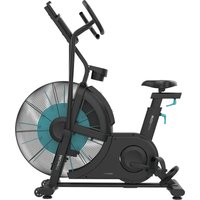
| Product Type | Indoor Bike Trainer |
| Brand | Cecotec |
| Model | DrumFit Indoor 24000 Race Sprint |
| Dimensions (L x W x H) | 109 x 55 x 124 cm |
| Net Weight | 28.7 kg |
| Maximum User Weight | 120 kg |
| Class | H (household use) |
| Monitor Power Supply | 2 AAA batteries (included) |
| Resistance System | Manual adjustment knob |
| Display Functions | Speed, RPM, Time, Distance, Calories, Heart Rate, Scan, Recovery |
| Heart Rate Sensor | Touch handlebars (non-medical) |
| Adjustments | Seat height, handlebar height, seat fore/aft position |
| Pedals | Right (R) and left (L) with toe cages |
| Included Accessories | Tablet holder, bottle cage, mounting kit, manual |
| Usage | Household only, indoors |
| Maintenance and Cleaning | Periodic lubrication, clean with damp cloth and non-abrasive detergent |
| Safety | Emergency stop by pressing knob, adjustable stabilizers, safety space of 0.6 m |
| Warranty and After-Sales Service | Contact official Cecotec service at +34 9 63 21 07 28 |
Frequently Asked Questions - DrumFit Indoor 24000 Race Sprint CECOTEC
User questions about DrumFit Indoor 24000 Race Sprint CECOTEC
0 question about this device. Answer the ones you know or ask your own.
Ask a new question about this device
Download the instructions for your Indoor bike trainer in PDF format for free! Find your manual DrumFit Indoor 24000 Race Sprint - CECOTEC and take your electronic device back in hand. On this page are published all the documents necessary for the use of your device. DrumFit Indoor 24000 Race Sprint by CECOTEC.
USER MANUAL DrumFit Indoor 24000 Race Sprint CECOTEC
natural_image
Modern outdoor exercise bike with green accents and a black body, displayed against a dark background (no visible text or symbols)DRUMFIT
Safety instructions 8
-
Parts and components
-
Before use 49
-
Assembly 49
-
Operation 51
-
Information on exercising
-
Cleaning and maintenance 53
-
Troubleshooting 54
-
Technical specifications 54
-
Disposal of old electrical
and electronic appliances 54
-
Technical support and warranty 55
-
Copyright 55
INDICE
Before using the appliance, read the following instructions carefully. Keep this instruction manual for future reference or new users.
- Read the entire manual before assembling and using the machine. The product will only be safe if it is properly assembled, cared for and used correctly. It is your responsibility to make sure every user is informed about the warnings and precautions stated in this instruction manual.
- Before starting a training session, it is recommended that you consult your doctor if you have any adverse health or physical condition that may pose a risk to your safety or make it difficult to use the appliance properly. Your doctor's advice is essential if you are taking medication that affects your heart rate, blood pressure, or cholesterol level.
- Be aware of your body signals. Incorrect or excessive exercise can deteriorate your health. Stop exercising if you experience any of the following symptoms: pain, tightness in your chest, irregular heartbeat, extreme shortness of breath, dizziness, or nausea. If you experience any of these conditions, you should consult your doctor before continuing with your training.
- This machine can be used by children aged 8 years and above and persons with reduced physical, sensory, or mental capabilities or lack of experience and knowledge if they have been given supervision or instruction concerning the use of the machine in a safe way and understand the hazards involved. Children must not play with the machine. Cleaning and user maintenance should not be carried out by unsupervised children.
-
Keep children and animals away from the assembling area, as small parts could cause risk of suffocation if swallowed.
-
Keep children and pets away from the machine. Do not allow children to use it and/or play with the machine. It is designed for adults only.
- Use the exercise bike on a solid, even surface with a protective cover for your floor or carpet.
- Make sure that the screws and nuts are securely fastened before using the machine.
- The safety level of the machine can only be ensured through regular examination for damage or signs of wear and tear.
- Use the machine as indicated in this instruction manual. If you find any defective component while assembling or checking the machine, or if you hear any unusual noise coming from the equipment during use, stop using it. Do not use the equipment until the problem has been solved.
- Make sure you have enough space to lay out the parts before starting. Leave a free space of at least 0.6 m in front of all access areas of the machine in case of emergency. You can share the access areas with other machine nearby. Always ensure there are not any objects blocking the entrance and exit of the machine.

text_image
Min 0.60 m Min 0.60 m Min 0.60 m Min 0.60 m- Wear suitable clothing while using the machine. Avoid wearing loose clothing which may get caught in the equipment.
- WARNING: this training machine is not suitable for high-precision purposes. This equipment is H class.
- WARNING: this machine operates by means of a flywheel. Be careful when in motion and ensure that it completely stops before getting down, as the inertia of the flywheel and pedals could cause injury to yourself or others.
- Maximum user weight: 120 kg.
- It is not recommended for outdoor use.
- This machine is designed for domestic use only and is not intended for bars, restaurants, farmhouses, hotels, motels, and offices.
- The air bike is not suitable for therapeutic use.
- Care must be taken when lifting or moving the equipment so as not to injure your back. Always use proper lifting techniques and/or assistance.
- WARNING: the heart rate sensors may be inaccurate, as it is not a medical device. Sensors can give you estimated heart rate information. If you feel any discomfort, stop exercising immediately. It may be dangerous for your health. If it persists, go immediately to the nearest medical centre.
- If repairs are required, please consult your supplier for further information or contact Cecotec Customer Service.
- If any parts protrude from the machine, they may interfere with the user's movement.
Instructions on batteries
- Do not burn or expose the batteries to high temperatures, as they may explode.
- Leaks from the batteries can occur under extreme conditions. Do not touch any liquid that leaks from the batteries. If the liquid gets into contact with skin, wash immediately with soap and water. If the liquid gets into the eyes, wash them
- Do not burn or expose the batteries to high temperatures, as they may explode.
- Leaks from the batteries can occur under extreme conditions. Do not touch any liquid that leaks from the batteries. If the liquid gets into contact with skin, wash immediately with soap and water. If the liquid gets into the eyes, wash them
immediately with clean water for a minimum of 10 minutes and seek medical attention. Wear gloves to handle the battery and dispose of it immediately in accordance with local regulations.
- Avoid contact between the batteries and small metal objects such as paper clips, coins, keys, nails, or screws.
- Do not tamper with the batteries in any way.
- The batteries must be removed for safe disposal of the machine.
- Keep the batteries out of the reach of children when there is a risk of ingestion.
- Battery ingestion can cause burns, soft-tissue perforation, and death. It can cause severe burns within two hours of the ingestion.
- In case of battery ingestion, please seek medical help immediately.
- The batteries' power supply terminals must not be short-circuited.
- If the machine is to be stored for a long period of time, it is advisable to remove the batteries.
- The batteries must be inserted in the correct position. When replacing batteries, check the polarity.
INSTRUCTIONS DE SÉCURITÉ
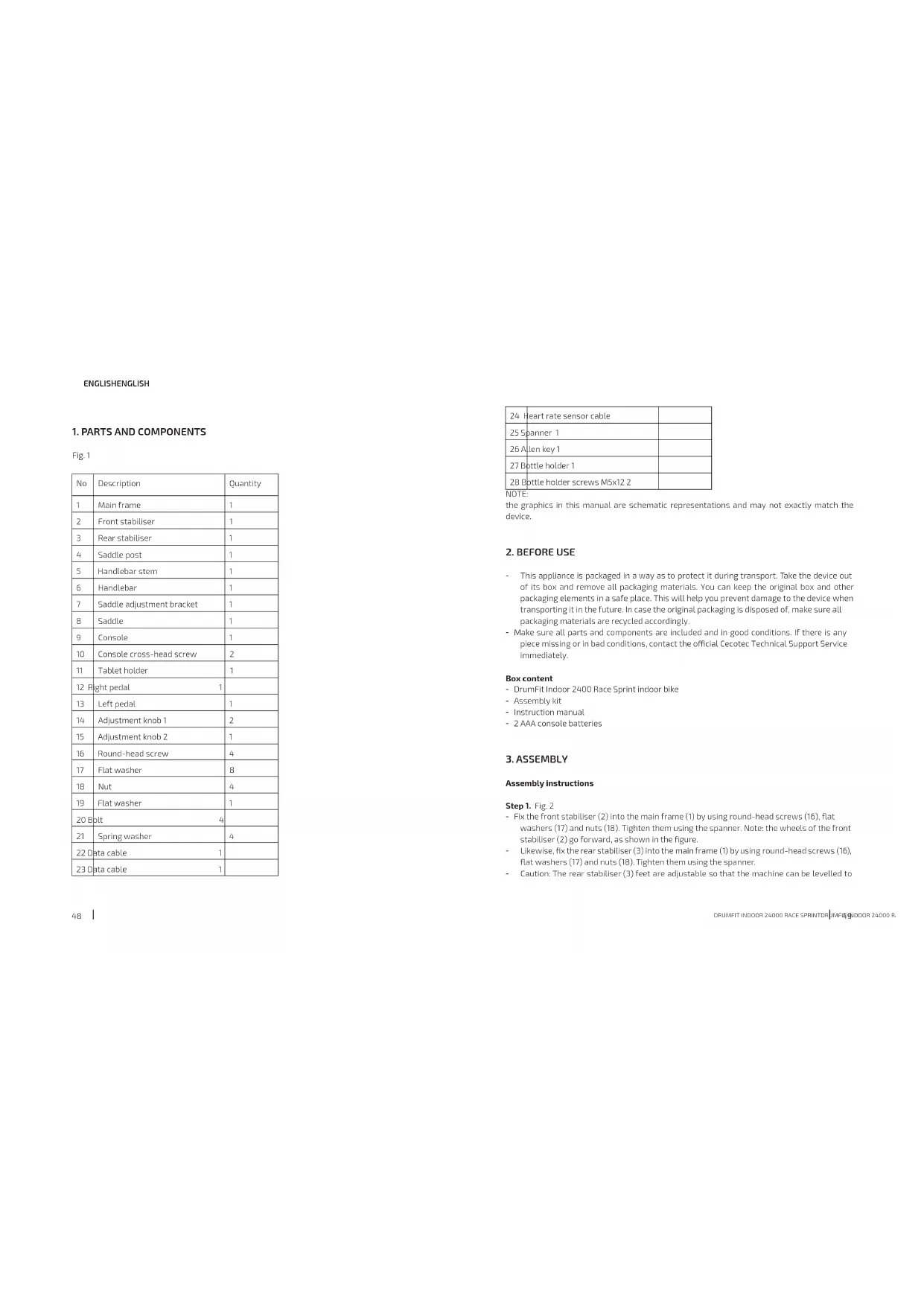
| No | Description | Quantity |
| 1 | Main frame | 1 |
| 2 | Front stabiliser | 1 |
| 3 | Rear stabiliser | 1 |
| 4 | Saddle post | 1 |
| 5 | Handlebar stem | 1 |
| 6 | Handlebar | 1 |
| 7 | Saddle adjustment bracket | 1 |
| 8 | Saddle | 1 |
| 9 | Console | 1 |
| 10 | Console cross head screw | 2 |
| 11 | Tablet holder | 1 |
| 12 | Right pedal | 1 |
| 13 | Left pedal | 1 |
| 14 | Adjustment knob 1 | 2 |
| 15 | Adjustment knob 2 | 1 |
| 16 | Round-head screw | 4 |
| 17 | Flat washer | 8 |
| 18 | Nut | 4 |
| 19 | Flat washer | 1 |
| 20 | Bolt | 4 |
| 21 | Spring washer | 4 |
| 22 | Data cable | 1 |
| 23 | Data cable | 1 |
| 24 | Heart rate sensor cable | |
| 25 | Spanner 1 | |
| 26 | Allen key 1 | |
| 27 | Bottle holder 1 | |
| 28 | Bottle holder screws M5x12 2 |
the graphics in this manual are schematic representations and may not exactly match the device.
2. BEFORE USE
- This appliance is packaged in a way as to protect it during transport. Take the device out of its box and remove all packaging materials. You can keep the original box and other packaging elements in a safe place. This will help you prevent damage to the device when transporting it in the future. In case the original packaging is disposed of, make sure all packaging materials are recycled accordingly.
- Make sure all parts and components are included and in good conditions. If there is any piece missing or in bad conditions, contact the official Cecotec Technical Support Service immediately.
Box content
- DrumFit Indoor 2400 Race Sprint Indoor bike
- Assembly kit
- Instruction manual
- 2 AAA console batteries
3. ASSEMBLY
Assembly instructions
Step 1. Fig. 2
- Fix the front stabiliser (2) into the main frame (1) by using round-head screws (16), flat washers (17) and nuts (18). Tighten them using the spanner. Note: the wheels of the front stabiliser (2) go forward, as shown in the figure.
- Likewise, fix the rear stabiliser (3) into the main frame (1) by using round-head screws (16), flat washers (17) and nuts (18). Tighten them using the spanner.
- Caution: The rear stabiliser (3) feet are adjustable so that the machine can be levelled to
ENGLISHENGLISH
the ground. The wheels on the front stabiliser (2) allow the machine to be moved over a short distance.
Step 2. Fig. 3
- Install the right pedal (12), with the R mark, on the main frame (1) and fix it using the spanner (25). Note: tighten it clockwise.
- Similarly, install the left pedal (13), with the L mark, on the main frame (1) and fix it using the spanner (25). Note: tighten it counterclockwise.
- Install the adjustment knobs 1 (14) on the front and rear parts of the main frame (1). Please note that it is not necessary to tighten in this step.
Step 3. Fig. 4
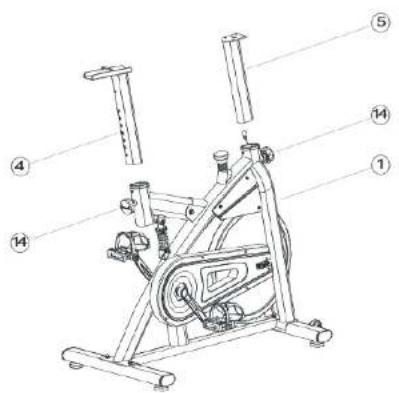
- Insert the saddle post (4) into the main frame (1). To do so, remove the adjustment knob 1 (14). After installing the saddle post (4), place the adjustment knob 1 (14) into a hole on the saddle post that suits you best.
- Similarly, insert the handlebar stem (5) into the main frame (1). To do so, remove the adjustment knob 1 (14). After inserting the handlebar stem (5), place the adjustment knob 1 (14) into a hole on the handlebar stem that suits you best.
Note: use the adjustment knob (14) to adjust the saddle post (4) or the handlebar stem (5) heights. After adjusting the saddle post (4) and the handlebar stem (5) you must tighten the knobs.
Step 4. Fig. 5
Install the saddle adjustment bracket (7) into the saddle post (4) and fix it using a flat washer (19) and adjustment knob 2 (15).
Note: loosen the adjustment knob (15) to adjust the position of the saddle adjustment bracket (7) forwards and backwards to the corresponding position. Tighten the adjustment knob (15) before using the machine.
Step 5. Fig. 6
Fix the handlebar (6) into the handlebar stem (5) using spring washers (21) and bolts (20) with the help of the Allen key.
Step 6. Fig. 7 and Fig. 8
- First, put the console on the handlebar (6).
- Connect the data cable (23) to the cable at the back of the console (22). Next, connect the heart rate sensor cable (24) into the hole provided.
- Then, place the tablet holder (11) on the handlebar.
Step 7. Fig. 9
Finally, screw the bottle holder (27) to the main frame (1) using two screws (28).
Caution: before using the bike, make sure that all parts are tightened securely and that the machine is on stable ground.
4. OPERATION
Getting on and off the bicycle
- Before getting on the bicycle, make sure the pedals are properly attached. Stand next to the bike and pass the leg that is closer to it over the frame to sit on the saddle; then, insert your feet in the pedals.
- To get off the exercise bike, do the previous step in reverse order.
Resistance adjustment
The pedalling resistance can be adjusted with the resistance knob located on the main frame. To increase resistance, turn the knob clockwise. To reduce resistance, turn the knob counterclockwise. If you need to make an emergency stop, press the knob until the pedals stop
Assembling the saddle
- To adjust the height of the saddle, remember that the correct position is the one in which your waist is not tilted to the side when the pedal is in the lower position and the foot is perfectly inserted in the toe clips.
- Adjust the saddle properly to ensure maximum efficiency and comfort during exercise. The saddle is in the correct position if the user has a slightly bent knee when one of the pedals is at a 90-degree angle relative to the ground.
- To adjust the saddle height, simply loosen the height adjustment knob, raise, or lower the saddle to the desired height, and tighten the knob.
Adjusting the handlebar
- Make sure the handlebar height is approximately at the same height as the saddle. Remember that this parameter will depend on the biomechanics and physiology of the user. If you feel uncomfortable in this position or your knees touch the handlebar, you should increase the height slightly.
- To adjust the handlebar height, simply loosen the height adjustment knob, adjust the handlebar to the desired height, and tighten the knob.
ENGLISHENGLISH
Console operation
1. Automatic on and off
a. The console automatically switches on if it detects a signal from the speed sensor or if a button is pressed.
b. The console automatically switches off when no signal is sent from the speed sensor or if a button is not pressed for 4 minutes.
2. Functions
a. SCAN: It displays the different functions one by one, stopping for 6 seconds at each one. It follows the next sequence: TIME-DIST-CAL-PULSE-RPM/SPEED
c. SPEED: 0–99.9 km/h. If no signal is received for 4 seconds, the speed becomes 0.0 km/h.
d. RPM: 0-999
e. TIME: 0-99.59 seg. If there is no set target time, the time acts as a counter. If, on the contrary, a target time is set, the counter displays the time remaining to achieve the goal.
f. DISTANCE: 0-99.9 km. If there is no target distance, the console accumulates distance. If a target value has been set, the console displays the distance remaining until the target distance is reached.
g. CALORIES: 0-999 cal. If there is a target calorie value, the display shows the remaining calories to reach the target. If no target has been set, the display counts calories.
h. PULSE: 0-230. The pulse takes 6 seconds to be shown on the display after detection. The pulse alarm will sound if the current pulse is above the target.
3. Buttons
a. SET. Press SET to increase the target value. If you press and hold the button, the value increases more quickly.
b. MODE/ENTER. Press to select a function. If you press and hold MODE for more than 2 seconds, all functions are reset.
c. RESET. While in function setting mode, press once to clear the displayed function data. If you press and hold for more than 2 seconds, the values of all functions will be deleted.
d. RECOVERY. Once a pulse signal has been detected, press the RECOVERY button to enter recovery mode and see your heart rate recovery capacity.
4. RECOVERY mode
a. Once you have pressed the RECOVERY button, stop pedalling while keeping your hands on the heart rate monitor. The counter will start counting down for 60 seconds. At the end of this countdown, the console will display a value between F1 and F6 depending on the heart rate capacity.
b.
| F1 Excellent | |
| F2 Very good | |
| F3 Good | |
| F4 Normal | |
| F5 Below average | |
| F6 Very poor |
c. Press the RECOVERY button again to go back to the home screen.
5. INFORMATION ON EXERCISING
A proper workout should consist of the following phases:
- Warm-up: consists of a session of stretching and low-intensity exercise lasting 5 to 10 minutes. A proper warm-up increases your body temperature, heart rate, and circulation in preparation for exercise. Fig. 10
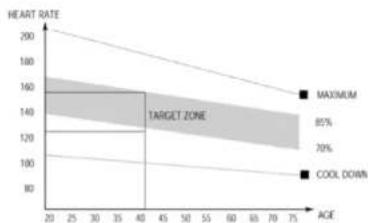
- Training: consists of 20 to 30 minutes of exercise.
(Note: during the first few weeks of exercise do not keep your heart rate high for more than 20 minutes). Fig. 11 - Cool-down: consists of 5 to 10 minutes of stretching exercises. This will increase the flexibility of your muscles and will help prevent injuries. Fig. 10
6. CLEANING AND MAINTENANCE
- Lubricate the moving parts periodically to prevent premature wear.
- Inspect and tighten all parts before using the machine. Replace any defective parts immediately, and do not use the equipment again until it is in perfect working condition.
- The machine can be cleaned using a slightly damp cloth and mild non-abrasive detergent. Do not use solvents.
- Do not try to repair the machine by yourself. Should you have any difficulty with the assembly or operation of the exercise bike, or if you think that any part is missing, contact the official Cecotec Technical Support Service.
Note:
The cleaning and maintenance frequency depends on the use frequency and intensity.
ENGLISHENGLISH
7. TROUBLESHOOTING
| Problem Cause Solution | ||
| The base is unstable | The ground is not flat or there is an object under the stabiliser. Rear stabiliser threaded brackets are not correctly adjusted | Remove the object. Tighten the threaded brackets at the ends of the rear stabiliser. |
| The handlebar is not stable | The bolts are loose. Tighten the bolts. | |
| Loud noise from moving parts | The parts are not tightened properly. Tighten them. | |
8. TECHNICAL SPECIFICATIONS
Product reference: 07245
Product: DrumFit Indoor 24000 Race Sprint
Maximum user weight: 120 kg
Class H
Dimensions: 109x55x124 cm
Weight: 28.7 kg
Technical specifications may change without prior notification to improve product quality.
Made in China | Designed in Spain
9. DISPOSAL OF OLD ELECTRICAL AND ELECTRONIC APPLIANCES

This symbol indicates that, according to the applicable regulations, the product and/or batteries must be disposed of separately from household waste. When this product reaches the end of its shelf life, you should dispose of the cells/batteries/accumulators and take them to a collection point designated by the local authorities.
Consumers must contact their local authorities or retailer for information concerning the correct disposal of old appliances and/or their batteries. Compliance with the above guidelines will help protecting the environment.
10. TECHNICAL SUPPORT AND WARRANTY
Cecotec shall be liable to the end user or consumer for any lack of conformity that exists at the time of delivery of the product under the terms, conditions, and deadlines established by the applicable regulations.
It is recommended that repairs be carried out by qualified personnel.
If at any moment you detect any problem with your product or have any doubt, do not hesitate to contact the official Cecotec Technical Support Service at -34 963 210 728.
11. COPYRIGHT
The intellectual property rights over the texts in this manual belong to CECOTEC INNOVACIONES, S.L. All rights reserved. The contents of this publication may not, in whole or in part, be reproduced, stored in a retrieval system, transmitted or distributed by any means (electronic, mechanical, photocopying, recording or similar) without the prior authorization of CECOTEC INNOVACIONES, S.L.
FRANÇAISFRANÇAIS
1. PIÈCES ET COMPOSANTS
Img.1
- Heimtrainer DrumFit Indoor 24000 Race Sprint
- Montage-Kit
7. PROBLEEMOPLOSSING
Product: DrumFit Indoor 24000 Race Sprint
text_image
Technical diagram of an exercise bike with numbered components for identificationFig./Img./Abb./Afb./Rys.1

text_image
16# 4pc 17# 4pc 18# 4pc 23# ① ② ③ ④ ⑤ ⑥ ⑦ ⑧ ⑨ ⑩Fig./Img./Abb./Afb./Rys.2

text_image
Technical diagram of an exercise bike with numbered components and a highlighted mechanical assemblyFig./Img./Abb./Afb./Rys.3
text_image
Technical diagram of a stationary exercise machine with numbered components for identificationFig./Img./Abb./Afb./Rys.4

text_image
Technical diagram of an exercise machine with numbered components for identificationFig./Img./Abb./Afb./Rys.5

text_image
20# 21# 20# 4psc 21# 4psc 26# 6 5Fig./Img./Abb./Afb./Rys.6

text_image
Technical diagram of an exercise bike with numbered components and a magnified inset showing internal components.Fig./Img./Abb./Afb./Rys.7

text_image
Technical diagram of an exercise bike with labeled components and partsFig./Img./Abb./Afb./Rys.8

text_image
Technical line drawing of a stationary exercise machine with labeled components and partsFig./Img./Abb./Afb./Rys.9

natural_image
Illustration of five sequential stretching poses with different body positions and motion arrows (no text or symbols)Fig./Img./Abb./Afb./Rys.10
line
| ACE | HEART RATE | | --- | ---------- | | 20 | 160 | | 35 | 140 | | 40 | 120 | | 50 | 100 | | 60 | 80 | | 75 | 60 |Fig./Img./Abb./Afb./Rys.11
www.cecotec.es