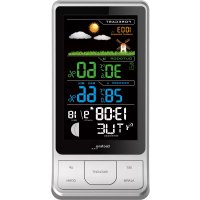
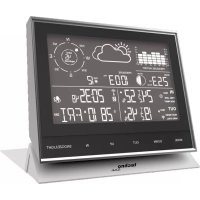
WS 6441 - Weather Station TECHNOLINE - Free user manual and instructions
Find the device manual for free WS 6441 TECHNOLINE in PDF.



| Product type | Wireless outdoor sensor weather station |
| Brand | TECHNOLINE |
| Model | WS 6441 |
| Base station power supply | Mains adapter (HX0180500150D2E) or 3 AAA batteries (not included) |
| Outdoor sensor power supply | 2 AAA batteries (not included) |
| Indoor temperature range | 0 °C to 50 °C |
| Outdoor temperature range | -40 °C to 70 °C |
| Temperature accuracy | ±1 °C (0 °C to 50 °C), ±2 °C (-20 °C to 0 °C), ±4 °C (-40 °C to -20 °C) |
| Indoor/outdoor humidity range | 20 % to 99 % RH |
| Humidity accuracy | ±5 % (35 % to 75 %), ±10 % (20 % to 35 % and 75 % to 95 %) |
| Maximum number of outdoor sensors | 3 (1 included) |
| Transmission frequency | 433 MHz |
| Maximum transmission power | 8 dBm |
| Wireless range | 30 m (99 ft) in open field |
| Radio-controlled time reception | DCF77 (77.5 kHz) |
| Functions | Weather forecast (4 icons), barometric pressure, moon phase, alarm with snooze, LED backlight, temperature trend, radio-controlled time, calendar |
| Display | LED digital, weekday in 7 languages |
| Dimensions (approx.) | 200 x 150 x 50 mm (base station) |
| Care and cleaning | Clean with a soft, dry cloth. Do not use solvents. |
| Safety instructions | Do not expose to water, fire, or extreme temperatures. Use non-rechargeable alkaline batteries. |
| Recycling | Do not dispose of with household waste. Take to a recycling center or collection point. |
Frequently Asked Questions - WS 6441 TECHNOLINE
User questions about WS 6441 TECHNOLINE
0 question about this device. Answer the ones you know or ask your own.
Ask a new question about this device
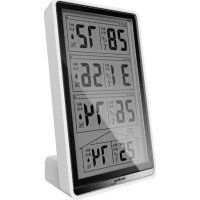
Download the instructions for your Weather Station in PDF format for free! Find your manual WS 6441 - TECHNOLINE and take your electronic device back in hand. On this page are published all the documents necessary for the use of your device. WS 6441 by TECHNOLINE.
USER MANUAL WS 6441 TECHNOLINE
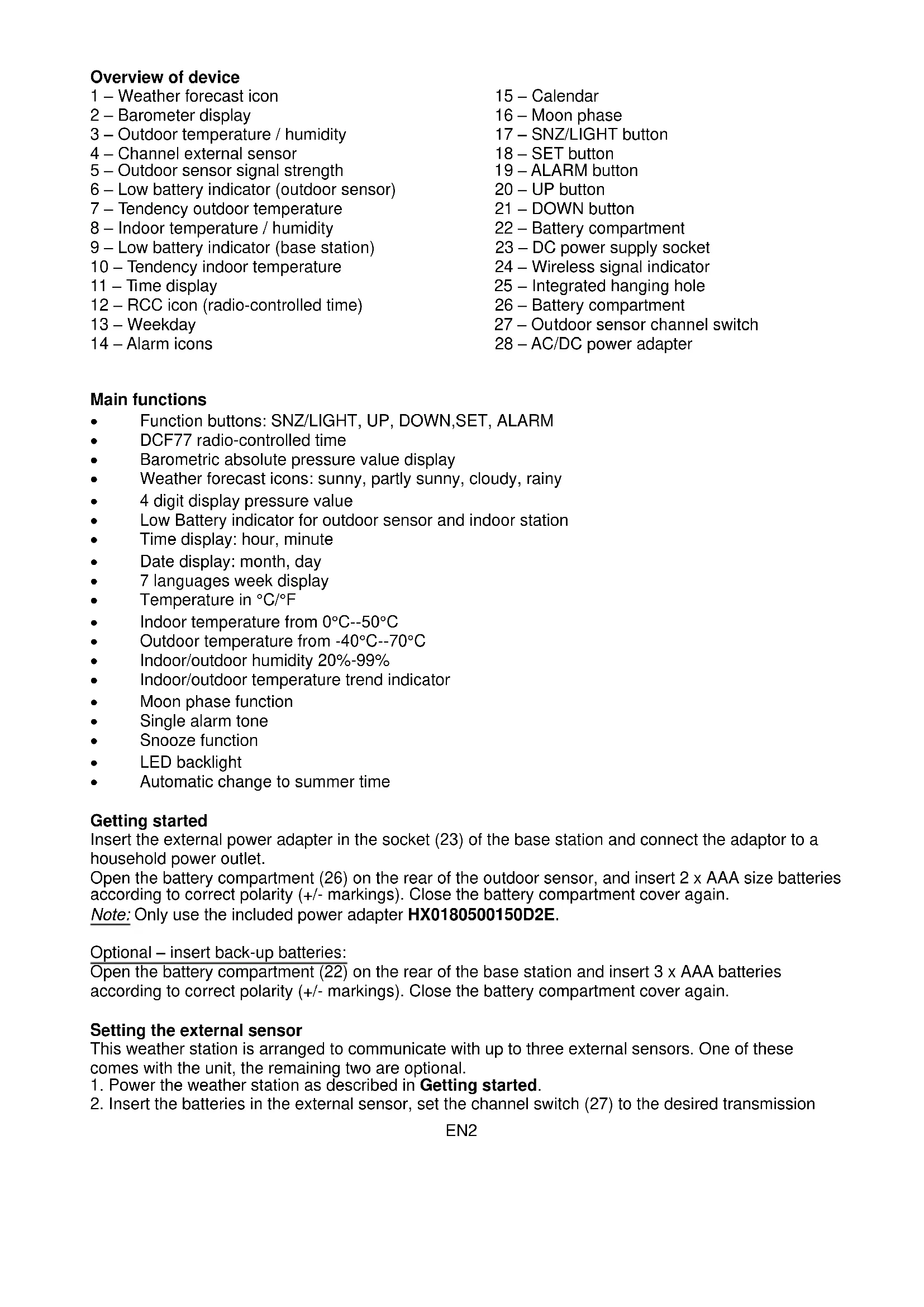
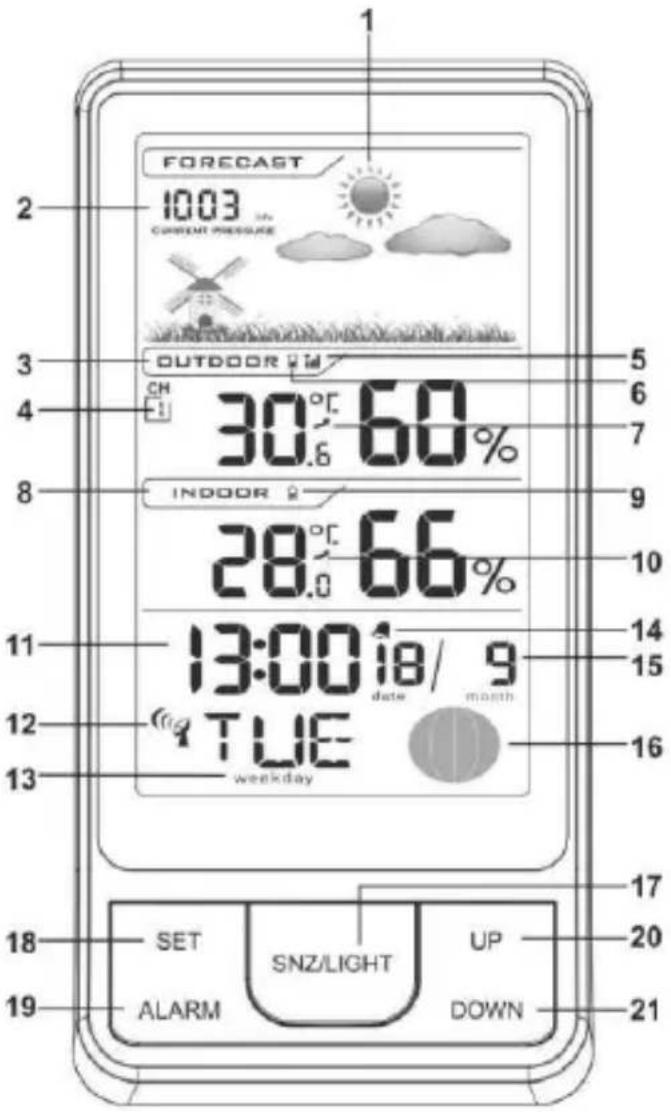
1 - Weather forecast icon
2-Barometer display
3 - Outdoor temperature / humidity
4 - Channel external sensor
5 - Outdoor sensor signal strength
6 - Low battery indicator (outdoor sensor)
7 - Tendency outdoor temperature
8 - Indoor temperature / humidity
9 - Low battery indicator (base station)
10 - Tendency indoor temperature
11 - Time display
12 - RCC icon (radio-controlled time)
13-Weekday
14 - Alarm icons
15-Calendar
16 - Moon phase
17 - SNZ/LIGHT button
18-SET button
19 - ALARM button
20 - UP button
21-DOWN button
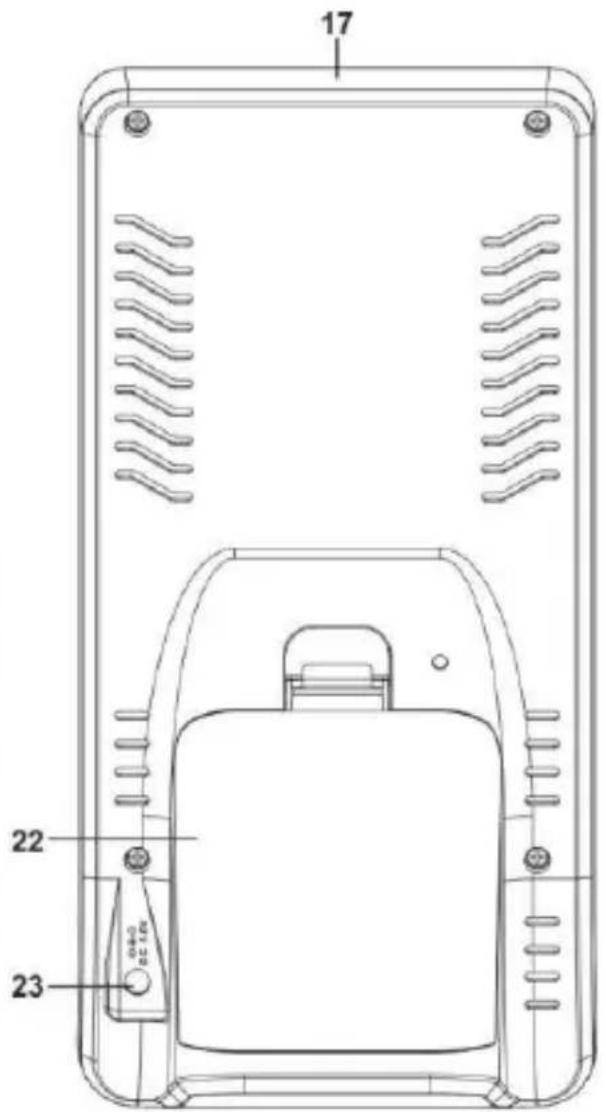
22-Battery compartment
23 - DC power supply socket
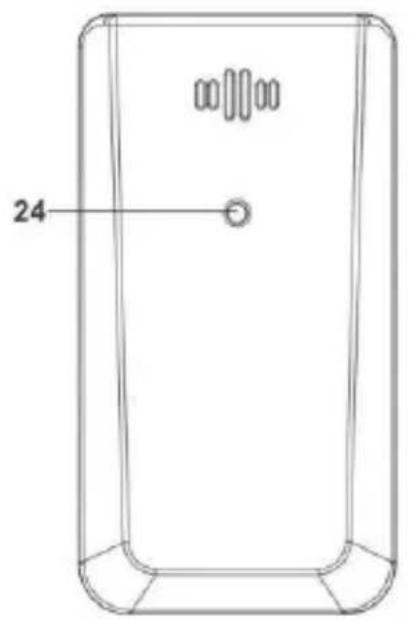
24 - Wireless signal indicator
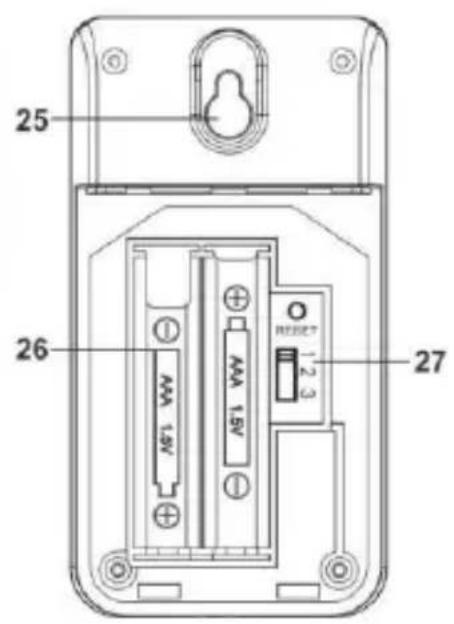
25 - Integrated hanging hole
26 - Battery compartment
27 - Outdoor sensor channel switch
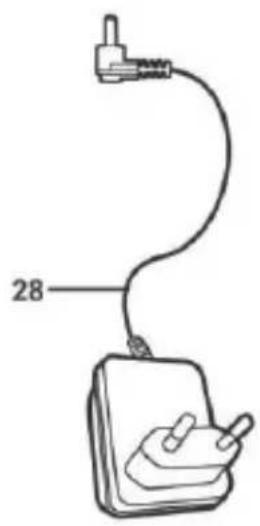
28 - AC/DC power adapter
Main functions
Function buttons: SNZ/LIGHT, UP, DOWN, SET, ALARM
DCF77 radio-controlled time
Barometric absolute pressure value display
- Weather forecast icons: sunny, partly sunny, cloudy, rainy
4 digit display pressure value
Low Battery indicator for outdoor sensor and indoor station
Time display: hour, minute
- Date display: month, day
7 languages week display
Temperature in ° C / ° F
- Indoor temperature from 0°C - 50°C
Outdoor temperature from -40°C - 70°C
Indoor/outdoor humidity 20% -99%
- Indoor/outdoor temperature trend indicator
Moon phase function
Single alarm tone
- Snooze function
LED backlight
Automatic change to summer time
Getting started
Insert the external power adapter in the socket (23) of the base station and connect the adaptor to a household power outlet.
Open the battery compartment (26) on the rear of the outdoor sensor, and insert 2 x AAA size batteries according to correct polarity (+/- markings). Close the battery compartment cover again.
Note: Only use the included power adapter HX0180500150D2E.
Optional - insert back-up batteries:
Open the battery compartment (22) on the rear of the base station and insert 3 x AAA batteries according to correct polarity (+/- markings). Close the battery compartment cover again.
Setting the external sensor
This weather station is arranged to communicate with up to three external sensors. One of these comes with the unit, the remaining two are optional.
- Power the weather station as described in Getting started.
- Insert the batteries in the external sensor, set the channel switch (27) to the desired transmission
channel (1, 2 or 3). Sensor data will automatically be transmitted to the base station.
- Press the DOWN button (21) to select the outdoor sensor channel on the base station. Sequentially selects the channel 1, channel 2, channel 3 or sequential display of 3 channels (arrow circle icon flashing). In case of no reception of the outdoor sensor signal, the display of the station shows “-”.
Press and hold the DOWN (21) button to manually receive the outdoor sensor signal.
Note: Place the weather station away from equipment that generates magnetic fields such as mobile phones, televisions etc.
Radio-controlled time function
This device is equipped with a receiver able to receive the DCF77 time signal of the Physikalisch Technische Bundesanstalt Braunschweig (central Germany) admissible in a 1500km radius.
- The station automatically enter DCF77 reception after receiving outdoor sensor data
- Press and hold the UP button (20) of the base station to manually start DCF77 reception and the radio tower (RCC icon, 12) will flash.
The automatically tries to receive the DCF77 time signal at 1:00, 2:00, 3:00, 4:00 and 5:00 o'clock to keep time correct. If no signal is received during these hours, the clock will try reception on the next day at the same time.
Notes:
- When the radio tower icon is blinking, the station is still receiving the DCF77 signal and no manual adjustments can be made.
- When the radio tower icon is steady, it means that the signal was successfully received.
- DCF77 uses German local time (UTC + 1) , which is time zone 0 in this station. If this station is used in a country with a different time zone, the time zone setting needs to be set accordingly in other European countries, need to set up the time zone, according to the local time compares the German time to corresponding add and subtract. For example: If the users in UK, then set the time zone on -1H.
- Place the weather station away from equipment that generates magnetic fields such as mobile phones, televisions etc...
Time must be set manually, if no radio-controlled time signal is available or can't be received. - When weather station is receiving DCF77 signal, the display will be dark. The display of the station will light up, if the station has successfully received the DCF77 signal or if no signal is received after 7 minutes.
Manual time setting
- In time display mode, press and hold the SET (18) button for 2 seconds enter time setting mode and the time zone is flashing.
- Setting order: time zone (-12 to +12 hours) → weekday language → 12/24HR → hour → minute → year → month → day → barometer unit → exit setting mode and return to time display
- In the setting process, press the UP (20) or the DOWN (21) button to change the setting value.
Press and hold the UP (20) or the DOWN (21) button to accelerate the setting process.
- Press the SET (18) button to accept the current setting value and continue with the next setting step.
Note:
Without pressing any button within 10 seconds, the station will automatically exit the setting mode, the set value will be saved and the station will return to time display mode
- Set time zone to 0 for UTC+1 (Germany), or for example set time zone to -1 for UTC (UK)
Language Symbol overview
| English | German | French | Spanish | Italian | Dutch | Danish | |
| Weekday | ENG | GER | FRE | SPA | ITA | DUT | DAN |
| Monday | MON | MON | LUN | LUN | LUN | MAA | MAN |
| Tuesday | TUE | DIE | MAR | MAR | MAR | DIN | TIR |
| Wednesday | WED | MIT | MER | MIE | MER | WOE | ONS |
| Thursday | THU | DON | JEL | JUE | GIO | DON | TOR |
| Friday | FRI | FRE | VEN | VIE | VEN | VRI | FRE |
| Saturday | SAT | SAM | SAM | SAB | SAB | ZAT | LOR |
| Sunday | SUN | SON | DIM | DOM | DOM | ZON | SON |
Alarm setting
In time display mode, single press ALARM (19) to switch from time display mode to alarm display mode, displays alarm time with "ALM" in the weekday position.
- In alarm display mode, press ALARM (19) button to activate or deactivate alarm. The bell icon appears on the display when the alarm is activated and disappears when the alarm is deactivated.
- In alarm display mode, hold and press the ALARM (19) button to enter the alarm setting mode and the alarm hour is flashing
- Setting order is: hour → minute → exit alarm setting
- In the setting process, press the UP (20) or the DOWN (21) button to change the setting value. Press and hold the UP (20) or the DOWN (21) button to accelerate the setting process.
- Press the ALARM (19) button to accept the current setting value and continue with the next setting step.
Note:
- Without pressing any button within 10 seconds, the station will automatically exit the setting mode, the set value will be saved and the station will return to time display mode
Alarm and snooze function
- Default alarm time is 7:00 A.M.
- Alarm tone sounds when alarm time is reached during active alarm.
- The alarm lasts 2 minutes and increases in intensity during the active alarm sound.
-
The bell symbol will be flashing during the active alarm sound.
-
Press the SNZ/LIGHT (17) button during the active alarm sound to pause the alarm and enter the snooze mode; after 10 minutes the alarm will sound and the bell icon will flash again.
- Whether in alarm mode or in snooze mode, press any key except SNZ/LIGHT (17) to exit alarm or snooze mode and return to normal time mode.
- If the SNZ/LIGHT (17) button is used during snooze mode, its original function will not change.
Backlight function
While using only batteries: press the SNZ/LIGHT (17) button to activate backlight for 10 seconds. While using power adapter: plug in the power adaptor to automatically switch to highest brightness level, press SNZ/LIGHT (17) button again to switch the backlight brightness:
HI (high) → LO (low) → OFF →
Battery end indicator
Indoor low voltage: when detect to high level, there is no low voltage; when detect to low level, there is low voltage, low level symbol appear (9)
Outdoor low voltage: according to the transmitter signal if there is low voltage the (6) icon is displayed.
Weather forecast
The station predicts weather condition for the next 12 - 24 hours based on the change of atmospheric pressure. The weather forecast is based on atmospheric pressure change and is about 70 - 75% correct.4 kinds of graphics:

sunny partly sunny cloudy rainy
Atmospheric pressure unit is HPA or INHG. When setting the time, you can choose the measuring unit.
The station automatically detects the atmospheric pressure changes accordingly to display the symbol to forecast weather (1). This forecast concerns the 12/24 hours.
For example: If the station detects high atmospheric pressure, the display will show the symbol of the sun, but externally it could rain, because the provision relates to the 12/24 hours.
Note: The weather forecast symbols may not reflect current weather conditions.
They relate only to future conditions. Predictions cannot be 100% secure due to various factors.
The manufacturer is not liable for any damages or situations caused by an incorrect forecast.
Important placement guidelines
To ensure accurate temperature measurement, place units out of direct sunlight and away from any heat sources or vents. Place the transmitter away from rainfall.
Display unit and outdoor sensor must be within 99ft (30m) of each other.
To maximize wireless range, place units away from large metallic items, thick walls, metal surfaces, or other objects that may limit wireless communication.
To prevent wireless interference, place both units at least 3ft (0.9 m) away from electronic devices (TV, computer, microwave, radio, etc.)
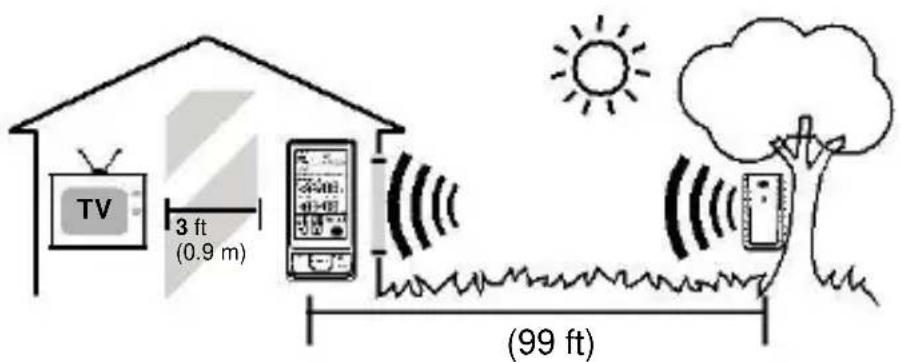
(30 m)
Temperature unit
In time display mode, press the UP (20) button to select ° C / °F as displayed temperature unit.
Trend of the indoor/outdoor temperature
The prediction of the temperature is shown through the icons (10) alongside the indoor temperature and through the icons (7) alongside the outdoor temperature:
- Arrow icon points downwards: is displayed when a change is registered lower than the temperature of -1°C .
Arrow icon points to left: is displayed when a change is registered in temperature between +/- 1° C. - Arrow icon points upwards: is displayed when a change is registered lower than the temperature of +1° C.
Hereby, Technotrade declares that this product WS6441 is in compliance with the essential requirements and other relevant provisions of Directive 2014/53/EU and ROHS 2011/65/EC. The original EU declaration of conformity may be found at: www.technoline.de/doc/4029665064413
Specifications
Indoor temperature range: from 0°C to 50°C
Indoor humidity range: from 20% to 99% RH (relative humidity)
Outdoor temperature range: from -40°C to +70°C
Temperature accuracy: -40°C ~ -20°C: ± 4°C
- 2 0 ^ ° C 0 ^ ° C: ± 2 ^ ° C
0 ^ ° C + 5 0 ^ ° C: ± 1 ^ ° C
Humidity accuracy: ±5% from 35% to 75% and ±10% from 20% to 35% & 75% to 95%.
Channel: max. 3 external sensors
Receiving radio control signal: 77.5KHZ
Transmission range: 30m RF
Transmission frequency: 433 MHz
Maximum transmission power: 8 dBm
Main unit power: 3 x AAA batteries (not included)
External sensor supply: 2 x AAA batteries (not included)
Environmental reception effects
The station obtains the accurate time with wireless technology. Same as all wireless devices, the reception is maybe affected by the following circumstances:
- long transmitting distance
- nearby mountains and valleys
- near freeway, railway, airports, high voltage cable etc.
- near construction site
among tall buildings - inside concrete buildings
near electrical appliances (computers, TV's, etc) and metallic structures - inside moving vehicles
Place the station at a location with optimal signal, i.e. close to a window and away from metal surfaces or electrical appliances.
Precautions
- This station is intended for indoor use and transmitters are intended for outdoor use.
- Do not subject the unit to excessive force or shock.
- Do not expose the unit to extreme temperatures, direct sunlight, dust or humidity.
- Do not immerse in water.
- Avoid contact with any corrosive materials.
- Do not dispose this unit in a fire as it may explode.
- Do not open the inner back case or tamper with any components of this unit.
Batteries safety warnings
- Use only alkaline batteries, not rechargeable batteries.
Install batteries correctly by matching the polarities (+ / - ) - Always replace a complete set of batteries.
- Never mix used and new batteries.
- Remove exhausted batteries immediately.
- Remove batteries when not in use.
- Do not recharge and do not dispose of batteries in fire as the batteries may explode.
- Ensure batteries are stored away from metal objects as contact may cause a short circuit.
- Avoid exposing batteries to extreme temperature or humidity or direct sunlight.
- Keep all batteries out of reach from children. They are a choking hazard.
Use the product only for its intended purpose!
Consideration of duty according to the battery law
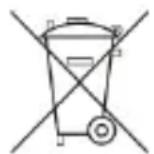
Old batteries do not belong to domestic waste because they could cause damages of health and environment. You can return used batteries free of charge to your dealer and collection points. As end-user you are committed by law to bring back needed batteries to distributors and other collecting points!
Consideration of duty according to the law of electrical devices
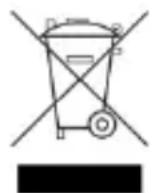
This symbol means that you must dispose of electrical devices separated from the General household waste when it reaches the end of its useful life. Take your unit to your local waste collection point or recycling centre. This applies to all countries of the European Union, and to other European countries with a separate waste collection system.
- MAIN FUNCTIONS
- GETTING STARTED
- SETTING THE EXTERNAL SENSOR
- RADIO-CONTROLLED TIME FUNCTION
- NOTES
- MANUAL TIME SETTING
- NOTE
- ALARM SETTING
- ALARM AND SNOOZE FUNCTION
- BACKLIGHT FUNCTION
- BATTERY END INDICATOR
- WEATHER FORECAST
- SUNNY PARTLY SUNNY CLOUDY RAINY
- IMPORTANT PLACEMENT GUIDELINES
- TEMPERATURE UNIT
- TREND OF THE INDOOR/OUTDOOR TEMPERATURE
- SPECIFICATIONS
- ENVIRONMENTAL RECEPTION EFFECTS
- PRECAUTIONS
- BATTERIES SAFETY WARNINGS
- CONSIDERATION OF DUTY ACCORDING TO THE BATTERY LAW
- CONSIDERATION OF DUTY ACCORDING TO THE LAW OF ELECTRICAL DEVICES
Brand : TECHNOLINE
Model : WS 6441
Category : Weather Station