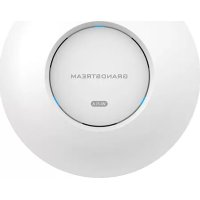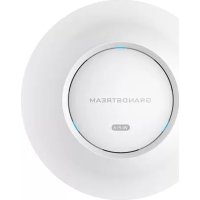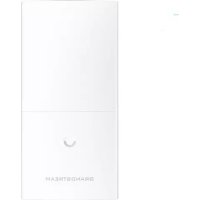
GWN7600LR - Access Point GRANDSTREAM - Free user manual and instructions
Find the device manual for free GWN7600LR GRANDSTREAM in PDF.



| Product Type | Long-range outdoor WiFi access point |
| Brand | Grandstream |
| Model | GWN7600LR |
| Radio Technology | Dual-band 2x2:2 MU-MIMO with beamforming |
| Frequency Bands | 2.4 GHz and 5 GHz |
| Network Ports | 2 Ethernet RJ45 10/100/1000 ports (1 with PoE/PoE+) |
| Power Supply | PoE/PoE+ (802.3af/at) |
| Maximum Outdoor Range | Up to 300 meters |
| Network Management | Distributed without controller, up to 30 access points |
| Default SSID | GWN + last 6 digits of MAC address |
| Default Password | Printed on the MAC label |
| Reset | RESET button (press for 7 seconds) |
| Operating Temperature | -30°C to 60°C |
| Storage Temperature | -30°C to 70°C |
| Operating Humidity | 5% to 95% non-condensing |
| Protection Rating | Weatherproof casing (weather-resistant) |
| Mounting | Vertical or horizontal on metal pole |
| Package Contents | Access point, cover mount, base mount, screws, quick guide, GPL license |
| Maintenance and Cleaning | Clean with a soft dry cloth. Avoid chemical products. |
| Safety | Do not open, expose to extreme temperatures or excessive humidity, do not power off during firmware update. |
| Spare Parts and Repairability | No user-serviceable parts. Contact support. |
Frequently Asked Questions - GWN7600LR GRANDSTREAM
User questions about GWN7600LR GRANDSTREAM
0 question about this device. Answer the ones you know or ask your own.
Ask a new question about this device
Download the instructions for your Access Point in PDF format for free! Find your manual GWN7600LR - GRANDSTREAM and take your electronic device back in hand. On this page are published all the documents necessary for the use of your device. GWN7600LR by GRANDSTREAM.
USER MANUAL GWN7600LR GRANDSTREAM
Grandstream Networks, Inc.
126 Brookline Ave, 3rd Floor
Boston, MA 02215. USA
Tel : +1 (617) 566 - 9300
In all EU member states, operation of 5150-5350 MHz is restricted to indoor use only.
natural_image
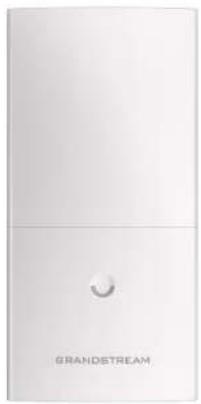
White rectangular device with a circular button and 'GRANDSTREAM' text below (no other visible signage or symbols)GWN7600LR
Outdoor Long Range 802.11ac Wave-2 WiFi Access Point
Quick Installation Guide
For Warranty and RMA information, please visit www.grandstream.com
Content
English....1
简体中文....8
Español....14
Français....21
Deutsch....28
Italiano....35
Русский....42
Português....49
Polski....56
EN
OVERVIEW
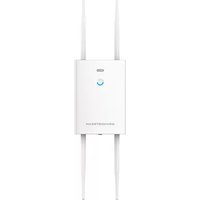
This long range WiFi access point is designed to provide extended coverage support and is ideal for outdoor WiFi solutions thanks to its waterproof casing and heat resistant technology. The GWN7600LR comes equipped with dualband 2x2:2 MU-MIMO with beam-forming technology and a sophisticated antenna design for maximum network throughput and extended WiFi coverage range of up to 300 meters. To ensure easy installation and management, the GWN7600LR uses a controller-less distributed network management design and an embedded controller within the product's web user interface. This allows each access point to manage a network of up to 30 GWN APs independently without needing separate controller hardware/software and without a single point-of-failure. Its easy installation and management features packed with extra coverage support and advanced performance features, make the GWN7600LR an ideal outdoor access point for mid-size wireless network deployments.
PRECAUTIONS
- Do not attempt to open, disassemble, or modify the device.
- Do not expose this device to temperatures out the range of -30 °C to 60 °C for operating and -30°C to 70°C for storage
- Do not expose the GWN7600LR to environments outside of the following humidity range: 5-95% RH (non-condensing).
- Do not power cycle your GWN7600LR during system boot up or firmware upgrade. You may corrupt firmware images and cause the unit to malfunction.
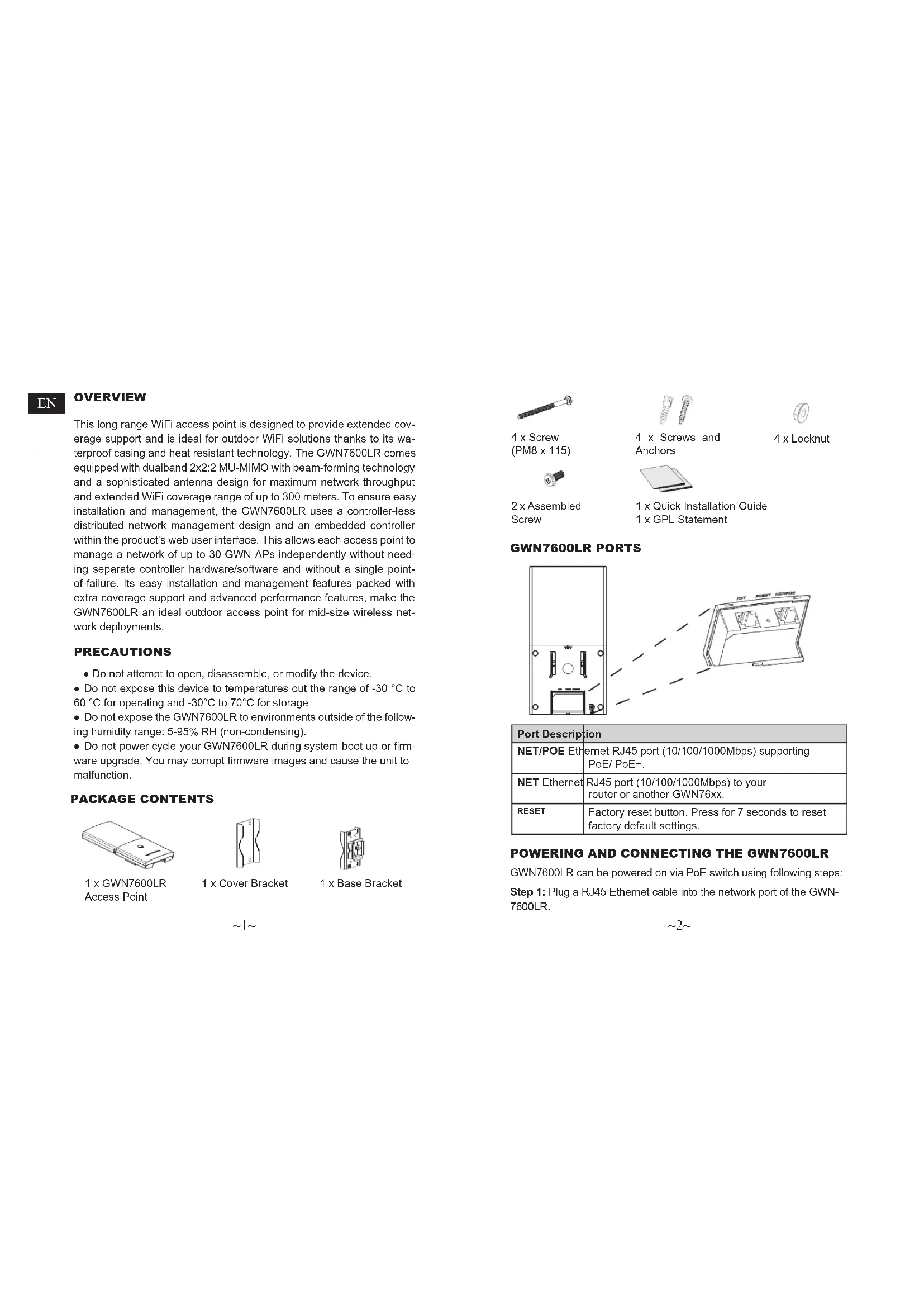
PACKAGE CONTENTS
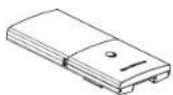
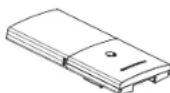
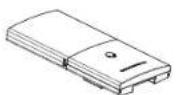
1 x GWN7600LR Access Point

1 x Cover Bracket

1 x Base Bracket
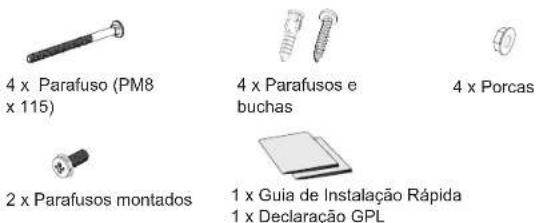
4 x Screw (PM8 x 115)

2 x Assembled Screw

4 x Screws and Anchors

4 x Locknut

1 x Quick Installation Guide
1 x GPL Statement
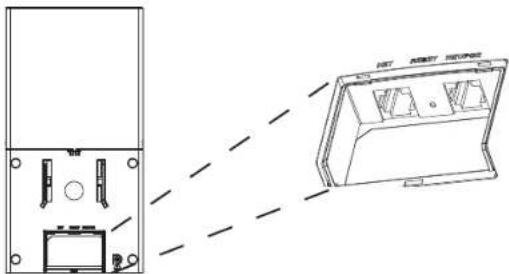
GWN7600LR PORTS
natural_image
Technical line drawing of a device rear panel and front view showing internal components (no text or symbols)| Port Description | |
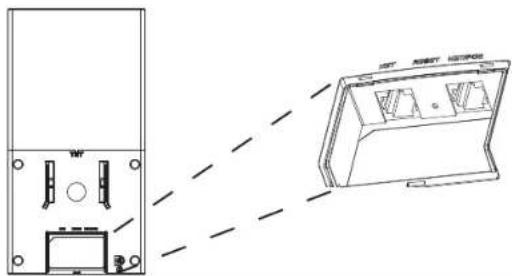
| NET/POE Ethernet RJ45 port (10/100/1000Mbps) supporting PoE/ PoE+. | |
| NET Ethernet RJ45 port (10/100/1000Mbps) to your router or another GWN76xx. | |
| RESET | Factory reset button. Press for 7 seconds to reset factory default settings. |
POWERING AND CONNECTING THE GWN7600LR
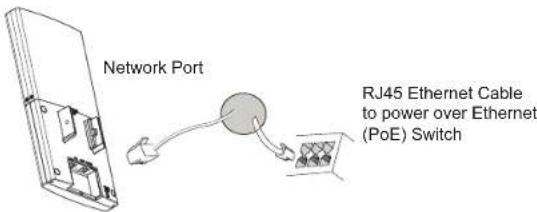
GWN7600LR can be powered on via PoE switch using following steps:
Step 1: Plug a RJ45 Ethernet cable into the network port of the GWN-7600LR.
Step 2: Plug the other end into the uplink port of the power over Ethernet (PoE) switch.
text_image
Network Port RJ45 Ethernet Cable to power over Ethernet (PoE) SwitchHARDWARE INSTALLATION
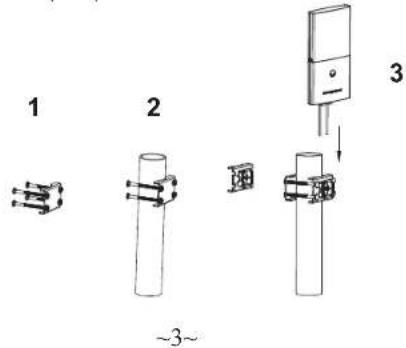
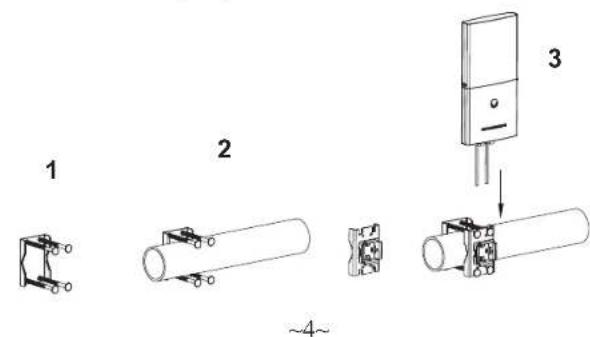
GWN7600LR can be mounted horizontally or vertically on a metal bar. Please refer to the following steps for the appropriate installation.
Vertical Mounting
- Prepare the Cover Bracket by inserting the 4 screws (PM8) into corresponding holes.
- Attach the Cover Bracket with screws on the vertical Mounting Bolt where GWN7600LR will be installed.
- Assemble the Base Bracket with the Cover Bracket using provided locknuts and screws (PM8).
text_image
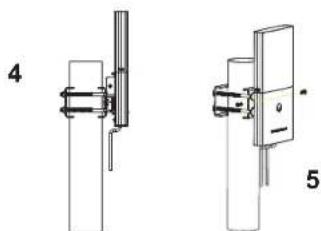
1 2 3 ~3~- Connect the Ethernet cable (RJ45) to the correct ports of your GWN-7600LR.
- Align the GWN7600LR with the Base Bracket and pull it down to the right position.
- Install the 2x Assembled screws to fix GWN7600LR on the Mounting Bolt.
natural_image
Technical line drawings of two mechanical components with no visible text or symbolsHorizontal Mounting
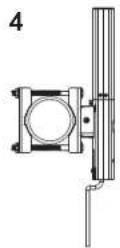
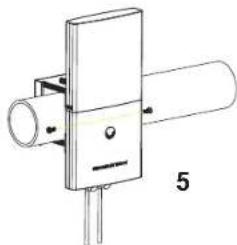
- Prepare the Cover Bracket by inserting the 4 screws (PM8) into corresponding holes.
- Attach the Cover Bracket with screws on the horizontal Mounting Bolt where GWN7600LR will be installed.
- Assemble the Base Bracket with the Cover Bracket using provided locknuts and screws (PM8).
text_image
1 2 3 ~4~-
Connect the Ethernet cable (RJ45) to the correct ports of your GWN-7600LR.
-
Align the GWN7600LR with the Base Bracket and pull it down to the right position.
-
Install the 2x Assembled screws to fix GWN7600LR on the Mounting Bolt.
natural_image
Pure electrical component diagram without any text, numbers, or symbolsCONNECT TO GWN7600LR DEFAULT WIFI NETWORK
GWN7600LR can be used as standalone access point out of box, or after factory reset with Wi-Fi enabled by default.
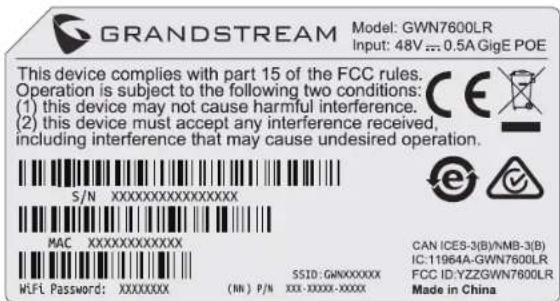
After powering the GWN7600LR and connecting it to the network, GWN7600LR will broadcast a default SSID based on its MAC address GWN[MAC's last 6 digits] and a random password.
Note: GWN7600LR's default SSID and password information are printed on the MAC tag of the unit.
text_image
GRANDSTREAM Model: GWN7600LR Input: 48V ...: 0.5A GigE POE This device complies with part 15 of the FCC rules. Operation is subject to the following two conditions: (1) this device may not cause harmful interference. (2) this device must accept any interference received, including interference that may cause undesired operation. S/N XXXXXXXXXXXXXXXXX MAC XXXXXXXXXXXX WHi Password: XXXXXXXX (IN) P/N XXX-XXXX-XXXXX S1D: GWNXXXXX CAN ICES-3(B)/NMB-3(B) IC:11964A-GWN7600LR FCC ID: YZZGWN7600LR Made in ChinaACCESSING THE CONFIGURATION INTERFACE
A computer connected to the GWN7600LR's SSID, or to the same network as the GWN7600LR can discover and access its configuration interface using one of the below methods:
Method 1: Discover GWN7600LR using its MAC Address
-
Locate the MAC address on the MAC tag of the unit, which is on the underside of the device, or on the package.
-
From a computer connected to same network as the GWN7600LR, type in following address using GWN7600LR's MAC address on your browser https://gwn_
.local
Example: If a GWN7600LR has the MAC address 00:0B:82:8C:4D:F8, this unit can be accessed by typing https://gwn_000b828c4df8.local on the browser.
Method 2: Discover GWN7600LR using GWN Discovery Tool
-
Download and install GWN Discovery Tool from the following link: http://www.grandstream.com/tools/GWNDiscoveryTool.zip
-
Open the GWN DiscoveryTool, and click on Scan.
-
The tool will discover all GWN76XX Access Points connected on the network showing their MAC and IP addresses.
-
Click on Manage Device to be redirected directly to the GWN-7600LR's configuration interface, or type in manually the displayed IP address on your browser.
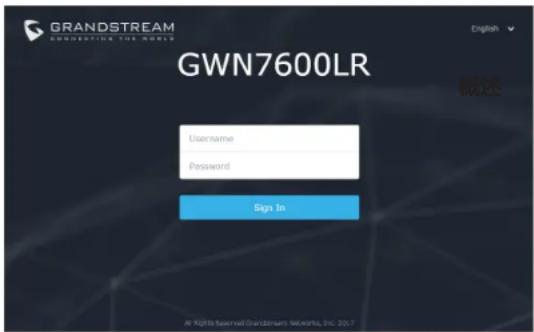
Using one of the above methods, the login screen will appear. Type in "admin" in both Username and Password fields and click on Sign In.
text_image
GRANDSTREAM GWN7600LR English 概述 Username Password Sign In @ Rights Reserved Grandstream Networks, Inc. 20.1Notes:
- Make sure hat the GWN7600LR is not already paired with another GWN76xx Access Point as slave, or GWN7000 Router Series, otherwise the configuration interface cannot be accessed
- If the GWN7600LR is already paired, make sure to unpair it first, or do a factory reset.
- It is customer's responsibility to ensure compliance with local regulations for frequency bands, transmit power and others.
Refer to online documents and FAQ for more detailed information: http://www.grandstream.com/our-products
概述
natural_image
Technical line drawing of a device housing with internal components and a close-up view of its internal structure (no text or symbols)text_image
GRANDSTREAM Model: GWN7600LR Input: 48V = 0.5A GigE POE This device complies with part 15 of the FCC rules. Operation is subject to the following two conditions: (1) this device may not cause harmful interference. (2) this device must accept any interference received, including interference that may cause undesired operation. S/N XXXXXXXXXXXXXXXXX MAC XXXXXXXXXXXX WIFI Password: XXXXXXXX (IN) P/N XXX-XXXX-XXXX SSID: GWNXXXXXX CAN ICES-3(B)/NMB-3(B) IC:11964A-GWN7600LR FCC ID:YZZGWN7600LR Made in China访问配置页面
natural_image
Technical line drawing of a device rear panel and front view, showing internal components and a 3D model (no text or symbols)natural_image
Technical line drawings of two mechanical or electrical components with no visible text or symbolsMontaje Horizontal
natural_image
Technical line drawings of two mechanical components labeled 4 and 5, showing different mounting or mounting features (no text or symbols beyond labels)CONECTAR AL GWN7600LR CON LA RED WIFI PREDETERMINADA
text_image
GRANDSTREAM Model: GWN7600LR Input: 48V mm 0.5A GigE POE This device complies with part 15 of the FCC rules. Operation is subject to the following two conditions: (1) this device may not cause harmful interference. (2) this device must accept any interference received, including interference that may cause undesired operation. S/N XXXXXXXXXXXXXXXXX MAC XXXXXXXXXXXX WLF Password: XXXXXXXX (NN) P/N XXX-XXXX-XXXX SSID:GWNXXXXXX CAN ICES-3(B)/NMB-3(B) IC:11964A-GWN7600LR FCC ID:YZZGWN7600LR Made in Chinatext_image
GRANDSTREAM CONNECTING THE WORLD GWN7600LR Username Password sign to at Rights Reserved Grandstream Networks, Inc. 105.1Nota:
http://www.grandstream.com/our-products
FR
PRESENTATION
natural_image
Technical line drawing of a device rear panel and internal components, with no visible text or symbolsnatural_image
Technical line drawings of two mechanical components with no visible text or symbolsMontage Horizontal
natural_image
Technical line drawing of a mechanical component with a cylindrical shaft and flange, labeled with number 5 (no text or symbols beyond label)CONNEXION AU RESEAU WIFI PAR DEFAULT DU GWN7600LR
text_image
GRANDSTREAM Model: GWN7600LR Input: 48V = 0.5A GigE POE This device complies with part 15 of the FCC rules. Operation is subject to the following two conditions: (1) this device may not cause harmful interference. (2) this device must accept any interference received, including interference that may cause undesired operation. S/N XXXXXXXXXXXXXXXXX MAC XXXXXXXXXXXX WiFi Password: XXXXXXXX (NN) P/N XXX-XXXX-XXXX SSE D: GWNXXXXXX CAN ICES-3(B)/NMB-3(B) IC:11964A-GWN7600LR FCC ID: YZZGWN7600LR Made in ChinaACCEDER A L'INTERFACE DE CONFIGURATION
text_image
GRANDSTREAM CONNECTING THE WORLD GWN7600LR Username Password Sign In All Rights Reserved GrandStream Network, Inc. 2017Notes :
1 x GWN7600LR Access Point

1 x Montagerahmen
natural_image
Technical line drawing of a device rear panel and front view showing internal components (no text or symbols)natural_image
Technical line drawings of two mechanical components labeled 4 and 5, showing assembly or assembly details without any text or symbols.Horizontale Montage
natural_image
Pure mechanical component diagram without any text, numbers, or symbolsVERBINDEN SIE SICH MIT DEM VOREINGESTELLTEN WIFI-NETZWERK DES GWN7600LR
text_image
GRANDSTREAM Model: GWN7600LR Input: 48V mm 0.5A GigE POE This device complies with part 15 of the FCC rules. Operation is subject to the following two conditions: (1) this device may not cause harmful interference. (2) this device must accept any interference received, including interference that may cause undesired operation. S/N XXXXXXXXXXXXXXXXX MAC XXXXXXXXXXXX W/L Password: XXXXXXXX (NN) P/N XXX-XXXX-XXXX SSD: GWNXXXXXX CAN ICES-3(B)/NMB-3(B) IC:11964A-GWN7600LR FCC ID:YZZGWN7600LR Made in Chinatext_image
GRANDSTREAM GWHN7600LR Username Password Sign In All Rights Reserved GrandStream Networks, Dsc. 2017Bemerkung :
natural_image
Technical line drawing of a device rear panel and front panel with internal components, shown with dashed lines indicating alignment (no text or symbols)| Porta Descrizione |
| NET/POE Porta Ethernet RJ45 (10/100/1000Mbps) che supporta PoE/ PoE+. |
| NET Porta Ethernet RJ45 (10/100/1000Mbps) al proprio router o altro GWN7600LR. |
| RESET Factory reset button. Press for 7 seconds to reset factory default settings. |
ACCENSIONE E COLLEGAMENTO DEL GWN7600LR
text_image
1 2 3 ~37~natural_image
Technical line drawings of two mechanical components with no visible text or symbolsnatural_image
Technical line drawings of two mechanical components labeled 4 and 5, showing different mounting or mounting features (no text or symbols beyond labels)COLLEGAMENTO DEL GWN7600LR ALLA RETE WIFI PREDEFINITA
text_image
GRANDSTREAM Model: GWN7600LR Input: 48V ≈ 0.5A GigE POE This device complies with part 15 of the FCC rules. Operation is subject to the following two conditions: (1) this device may not cause harmful interference. (2) this device must accept any interference received, including interference that may cause undesired operation. S/N XXXXXXXXXXXXXXXXX MAC XXXXXXXXXXXX WIFI Password: XXXXXXXX (NN) P/N XXX-XXXX-XXXXX SSID: GWNXXXXXX CAN ICES-3(B)/NMB-3(B) IC:11964A-GWN7600LR FCC ID:YZZGWN7600LR Made in Chinatext_image
GRANDSTREAM CONNECTING THE WORLD GWN7600LR Username Password Sign In © Rifi's Regional Desktop Network, Inc. 2017Nota :
http://www.grandstream.com/our-products
ОБЗОР ПРОДУКТА
natural_image
Technical line drawing of a device housing with internal components and a separate 3D model (no text or symbols)natural_image
Technical line drawings of two mechanical components labeled 4 and 5, showing assembly or assembly details without any text or symbols.natural_image
Technical line drawings of two mechanical components labeled 4 and 5, showing different mounting or mounting features (no text or symbols beyond labels)This device complies with part 15 of the FCC rules. Operation is subject to the following two conditions: (1) this device may not cause harmful interference. (2) this device must accept any interference received, including interference that may cause undesired operation.





WiFi Password: XXXXXXXX
SSID: GMNXXXXXX (NN) P/N XXX-XXXXX-XXXXX
CAN ICES-3(B)/NMB-3(B) IC:11964A-GWN7600LR FCC ID:YZZGWN7600LR
Made in China
text_image
GRANDSTREAM CONNECTING THE WORLD GWN7600LR User name: Password: Sign In @ Rights Reserved Grandhanna Networks, Inc. 2017Примечание :
1 x Access Point
GWN7600LR

1 x Suporte de cobertura

1 x Suporte Base
\~49\~
PORTAS DO GWN7600LR