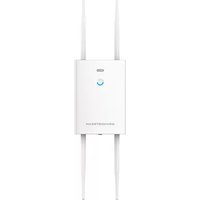
GWN7664LR - Access Point GRANDSTREAM - Free user manual and instructions
Find the device manual for free GWN7664LR GRANDSTREAM in PDF.


| Product Type | Outdoor Wi-Fi 6 Access Point |
| Brand | Grandstream |
| Model | GWN7664LR |
| Wi-Fi Standard | 802.11ax (Wi-Fi 6), 4×4:4 MU-MIMO, dual band |
| Additional Technologies | DL/UL OFDMA, QoS, mesh, captive portal |
| Maximum number of clients | 512 |
| Maximum range | 300 meters |
| Network ports | 1 RJ45 2.5G PoE/PoE+ port, 1 RJ45 1G PoE/PoE+ port |
| Power supply | PoE/PoE+ (802.3af/at) |
| Antennas | 4 external detachable antennas |
| Dimensions (approx.) | 260 x 260 x 65 mm |
| Weight (approx.) | 1.2 kg |
| Operating temperature | -30 °C to 60 °C |
| Storage temperature | -30 °C to 70 °C |
| Operating humidity | 10–90% RH (non-condensing) |
| Protection rating | Weather resistant (IP65 or similar) |
| Mounting | Wall or pole mount |
| Management | Built-in web interface, GWN.Cloud, GWN Manager |
| Default SSID | GWN[last 6 digits of MAC address] |
| Factory reset | RESET button (press and hold for 7 seconds) |
| Package contents | Access point, base bracket, mounting kit, antennas, manual |
| Maintenance and cleaning | Clean with a dry, non-abrasive cloth. Do not use chemicals. |
| Safety | Do not open, disassemble or modify the device. Default administrator password is random. |
| Spare parts and repairability | No user-serviceable parts. In case of failure, contact customer service. |
Frequently Asked Questions - GWN7664LR GRANDSTREAM
User questions about GWN7664LR GRANDSTREAM
0 question about this device. Answer the ones you know or ask your own.
Ask a new question about this device
Download the instructions for your Access Point in PDF format for free! Find your manual GWN7664LR - GRANDSTREAM and take your electronic device back in hand. On this page are published all the documents necessary for the use of your device. GWN7664LR by GRANDSTREAM.
USER MANUAL GWN7664LR GRANDSTREAM
Grandstream Networks, Inc.
126 Brookline Ave, 3rd Floor
Boston, MA 02215. USA
Tel: +1 (617) 566 - 9300
In the UK and EU member states, operation of 5150-5350 MHz is restricted to indoor use only.


For Certification, Warranty and RMA information, please visit www.grandstream.com

GRANDSTREAM
CONNECTING THE WORLD
natural_image
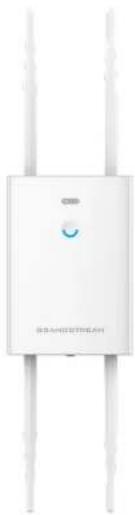
White wireless router device with two vertical antennas and a central logo (no visible text or symbols on the device body)GWN7664LR
High-Performance Outdoor Long-Range Wi-Fi 6 Access Point
Quick Installation Guide
Content
English....1
简体中文....7
Español....13
Français....19
Deutsch....25
Italiano....31
Polski....37
Português....43
Русский....49
EN
OVERVIEW
The GWN7664LR is an outdoor 802.11ax 4×4:4 Wi-Fi 6 access point for medium-to-large business and enterprises who need to provide long-range coverage in both indoor and outdoor spaces. It offers weather-proof casing and heat resistant technology, dual-band 4×4:4 MU-MIMO with DL/UL OFDMA technology and a sophisticated antenna design for maximum network through that supports 512 clients and an expanded 300-meter coverage range. To ensure easy installation and management, the GWN7664LR includes a built-in controller embedded within the product's web user interface. It is also supported by GWN.Cloud and GWN Manager, Grandstream's free cloud and on-premise Wi-Fi management platform. The GWN7664LR is the ideal Wi-Fi AP for voice-over Wi-Fi deployment and offers a seamless connection with Grandstream's Wi-Fi capable voice and video IP phones. With support for advanced QoS, low-latency real-time applications, mesh networks, captive portals and dual Gigabit networks ports with PoE/PoE+, the GWN7664LR is an ideal outdoor Wi-Fi access point for enterprises, multiple floor offices, warehouses, hospitals, schools and more.
PRECAUTIONS
- Do not attempt to open, disassemble, or modify the device.
- Do not expose this device to temperatures outside range of -30^ to 60^ for operating and -30^ to 70^ for storage.
- Do not expose the GWN7664LR to environments outside of the following humidity range: 10-90% RH (non-condensing).
- Do not power cycle your GWN7664LR access point during system boot up or firmware upgrade. You may corrupt firmware images and cause the unit to malfunction.
PACKAGE CONTENTS
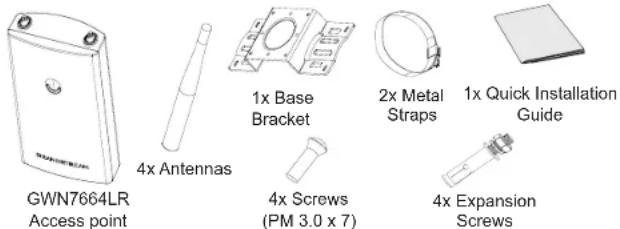
\~1\~
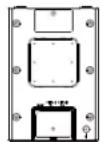
GWN7664LR PORTS

| Port Description | |
| NET/POE 2.5G | Ethernet RJ45 port (10Mbps /100Mbps /1Gbps /2.5Gbps) supporting PoE/PoE+. |
| NET/POE 1G | Ethernet RJ45 port (10/100/1Gbps) to your router or another GWN76xx, support PoE/PoE+. |
| RESET Factory reset button.Press for 7 seconds to reset factory default settings. | |
POWERING AND CONNECTING THE GWN7664LR
GWN7664LR can be powered on using PoE/PoE+ switch using following steps:
Step 1: Plug a RJ45 Ethernet cable into the network port of the GWN-7664LR.
Step 2: Plug the other end into the uplink port of the power over Ethernet (PoE/PoE+) switch.
Network Port
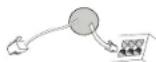
RJ45 Ethernet Cable to power over Ethernet (PoE/PoE+) Switch
HARDWARE INSTALLATION
GWN7664LR can be mounted on the wall or on a metal bar, Please refer to the following steps for the appropriate installation.
Wall Mount
- Connect the Ethernet cable (RJ45) to the correct ports of your GWN-7664LR and insert the cover bracket.
- Connect each antenna to an antenna connector by rotating it clockwise.
- Attach the Base Bracket with screws (PM 3.0 x 7) on the back of GWN7664LR access point.
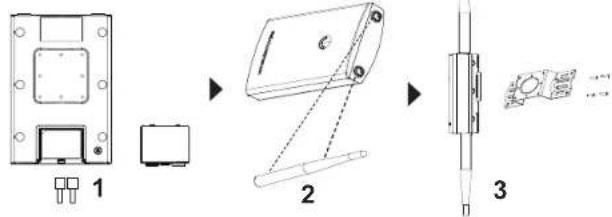
- Drill four holes on the wall referring to the positions of the ones on the Base Bracket. Then, fix an expansion screw in each hole.
- Attach the GWN7664LR access point by securing the Base Bracket with the expansion screws on the wall.
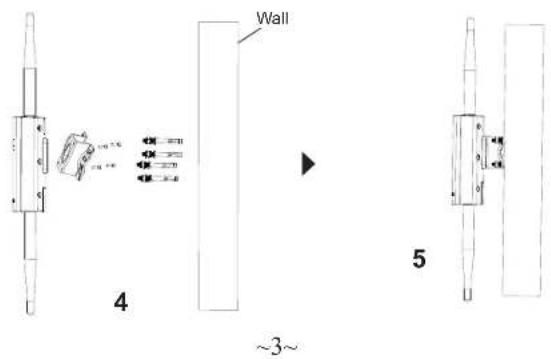
Pole Mount
- Connect the Ethernet cable (RJ45) to the correct ports of your GWN-7664LR and insert the cover bracket.
- Connect each antenna to an antenna connector by rotating it clockwise.
- Attach the Base Bracket with screws (PM 3.0 x 7) on the back of GWN7664LR access point.
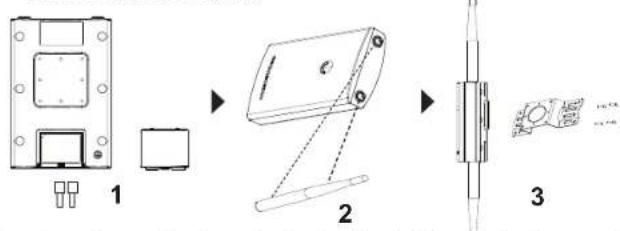
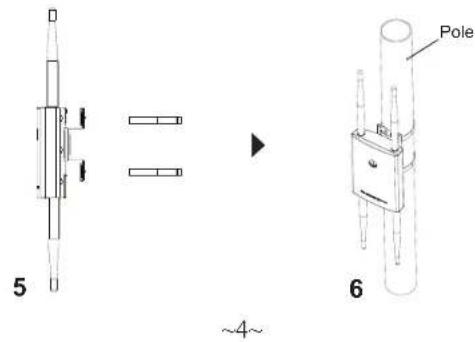
- Open the metal straps by turning the locking mechanism counter-clockwise. You can loosen it by hand or use a flathead screwdriver.
- Straighten out the end of the metal straps and slide it through the back of the base bracket.
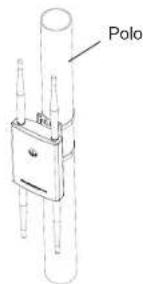
- Wrap the metal strap around the pole and use a flathead screwdriver to tighten the locking mechanism by turning it clockwise.
CONNECT TO GWN7664LR DEFAULT Wi-Fi NETWORK
GWN7664LR can be used as standalone access point out of box, or after factory reset with Wi-Fi enabled by default.
After powering the GWN7664LR and connecting it to the network, GWN-7664LR will broadcast a default SSID based on its MAC address GWN[MAC's last 6 digits] and a random password.
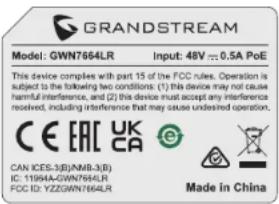
Note: GWN7664LR's default password information is printed on the sticker in the back of the unit.
ACCESSING THE CONFIGURATION INTERFACE
A computer connected to the GWN7664LR's SSID, or to the same network as the GWN7664LR can discover and access its configuration interface using one of the below methods:
Method 1: Discover GWN7664LR using its MAC Address
- Locate the MAC address on the MAC tag of the unit, which is on the underside of the device, or on the package.
- From a computer connected to same network as the GWN7664LR, type in following address using GWN7664LR's MAC address on your browser https://gwn_
.local
Example: If a GWN7664LR has the MAC address C0:74:AD:8C:4D:F8, this unit can be accessed by typing https://gwn_c074ad8c4df8.local on the browser.
Method 2: Discover GWN7664LR using GWN Discovery Tool
- Download and install GWN Discovery Tool from the following link: https://www.grandstream.com/tools/GWNDiscoveryTool.zip
- Open the GWN DiscoveryTool, and click on Scan.
-
The tool will discover all GWN76xx Access Points connected on the network showing their MAC and IP addresses.
-
Click on Manage Device to be redirected directly to the GWN-7664LR's configuration interface, or type in manually the displayed IP address on your browser.
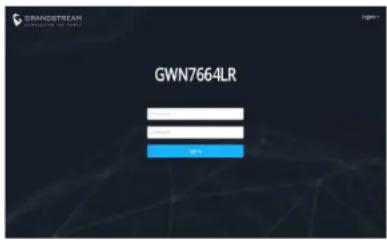
- Enter username and password to login. (The default administrator username is "admin" and the default random password can be found on the sticker on the GWN7664LR).
Notes:
- Make sure that the GWN7664LR is not already paired with another GWN76xx Access Point as slave, GWN7000 Router Series or GWN. Cloud, otherwise the configuration interface cannot be accessed
- If the GWN7664LR is already paired, make sure to unpair it first, or do a factory reset.
- It is customer's responsibility to ensure compliance with local regulations for frequency bands, transmit power and others.
- To manage GWN7664LR over cloud, please refer to https://www.gwn.cloud.
The GNU GPL license terms are incorporated into the device firmware and can be accessed via the Web user interface of the device at my_device_ip/gpl_license. It can also be accessed here:
https://www.grandstream.com/legal/open-source-software
To obtain a CD with GPL source code information please submit a written request to info@grandstream.com
Refer to online documents and FAQ for more detailed information: https://www.grandstream.com/our-products
ZH
概述
备注:
natural_image
Technical line drawing of a mechanical component with a separate schematic view (no text or symbols)natural_image
Pure mechanical assembly diagram with no text, numbers, or symbols▶
6
\~16\~
CONECTAR AL GWN7664LR CON LA RED Wi-Fi PRE- DETERMINADA
Nota :
natural_image
Technical line drawing of a mechanical component with no visible text or symbolsnatural_image
Pure mechanical component diagram without any text, numbers, or symbolsMontage sur poteau
natural_image
Pure mechanical component diagram without any text, numbers, or symbols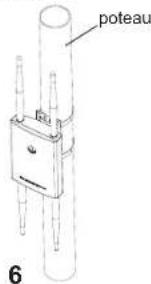
\~22\~
CONNEXION AU RESEAU WI-FI PAR DEFAULT DU GWN7664LR
Notes :
Bemerkung:
Nota :
Uwaga :
Método 2: Descobrir o GWN7664LR utilizando o GWNDiscoveryTool
Nota :
Para o manual do usuário detalhado, faça o download desde: https://www.grandstream.com/our-products
RU
ОБЗОР ПРОДУКТА
Certification Regulatory Information
Common part:
This equipment complies with radiation exposure limits set forth for an uncontrolled environment. This transmitter must not be co-located or operating in conjunction with any other antenna or transmitter. This equipment should be installed and operated with minimum distance 20cm between the radiator& your body. Après examen de ce matériel aux conformité ou aux limites d'intensité de champ RF, les utilisateurs peuvent sur l'exposition aux radiofréquences et la conformité and compliance d'acquérir les informations correspondantes. La distance minimale du corps à utiliser le dispositif est de 20cm.
U.S. FCC Part 15 Regulatory Information
This device complies with part 15 of the FCC Rules. Operation is subject to the following two conditions:(1) this device may not cause harmful interference, and(2) this device must accept any interference received, including interference that may cause undesired operation.
Any Changes or modifications not expressly approved by the party responsible for compliance could void the user's authority to operate the equipment.
Note: This equipment has been tested and found to comply with the limits for a Class B digital device, pursuant to part 15 of the FCC Rules. These limits are designed to provide reasonable protection against harmful interference in a residential installation. This equipment generates, uses and can radiate radio frequency energy and, if not installed and used in accordance with the instructions, may cause harmful interference to radio communications. However, there is no guarantee that interference will not occur in a particular installation. If this equipment does cause harmful interference to radio or television reception, which can be determined by turning the equipment off and on, the user is encouraged to try to correct the interference by one or more of the following measures:
—Reorient or relocate the receiving antenna.
—Increase the separation between the equipment and receiver.
—Connect the equipment into an outlet on a circuit different from that to which the receiver is connected.
—Consult the dealer or an experienced radio/TV technician for help.
Canada Regulatory Information
Radio equipment
Operation of 5150-5250 MHz is restricted to indoor use only.
This device contains licence-exempt transmitter(s)/receiver(s) that comply with Innovation, Science and Economic Development Canada's licence-exempt RSS(s). Operation is subject to the following two conditions:
(1) This device may not cause interference.
(2) This device must accept any interference, including interference that may
cause undesired operation of the device.
This product meets the applicable Innovation, Science and Economic Development Canada technical specifications.
EU Regulatory Information
In all EU member states, operation of 5150-5350 MHz is restricted to indoor use only.
Support Frequency Bands and Power:
WLAN 2412-2472 MHz < 20 dBm;
RLAN 5150-5250 MHz < 23 dBm;
RLAN 5250-5350 MHz < 20 dBm;
RLAN 5470-5725 MHz < 27 dBm;
The simplified EU declaration of conformity referred to in Article 10(9) shall be provided as follows:
Hereby, [Grandstream Networks, Inc.] declares that the radio equipment type [GWN7664LR] is in compliance with Directive 2014/53/EU.
The full text of the EU declaration of conformity is available at the following internet address: www.grandstream.com
UK Regulatory Information
Operation of 5150-5350 MHz is restricted to indoor use only.
Support Frequency Bands and Power:
WLAN 2412-2472 MHz < 20 dBm;
RLAN 5150-5250 MHz < 23 dBm;
RLAN 5250-5350 MHz < 20 dBm;
RLAN 5470-5725 MHz < 27 dBm;
The simplified UK declaration of conformity referred to in Regulation 8&14 shall be provided as follows:
Hereby, [Grandstream Networks, Inc.] declares that the radio equipment type [GWN7664LR] is in compliance with Directive RER2017(S.I.2017/1206).
The full text of the UK declaration of conformity is available at the following internet address: www.grandstream.com

- GWN7664LR
- Content
- EN
- OVERVIEW
- PRECAUTIONS
- POWERING AND CONNECTING THE GWN7664LR
- HARDWARE INSTALLATION
- Wall Mount
- Pole Mount
- CONNECT TO GWN7664LR DEFAULT Wi-Fi NETWORK
- ACCESSING THE CONFIGURATION INTERFACE
- Method 1: Discover GWN7664LR using its MAC Address
- Method 2: Discover GWN7664LR using GWN Discovery Tool
- Notes:
- ZH
- 概述
- CONECTAR AL GWN7664LR CON LA RED Wi-Fi PRE- DETERMINADA
- Nota :
- Montage sur poteau
- CONNEXION AU RESEAU WI-FI PAR DEFAULT DU GWN7664LR
- Notes :
- Bemerkung:
- Uwaga :
- Método 2: Descobrir o GWN7664LR utilizando o GWNDiscoveryTool
- RU
- ОБЗОР ПРОДУКТА
- Certification Regulatory Information
- Common part:
- U.S. FCC Part 15 Regulatory Information
- Canada Regulatory Information
- Radio equipment
- EU Regulatory Information
- UK Regulatory Information
Brand : GRANDSTREAM
Model : GWN7664LR
Category : Access Point