LS430 - Turntable LENCO - Free user manual and instructions
Find the device manual for free LS430 LENCO in PDF.



| Product type | Turntable with built-in speakers and Bluetooth |
| Brand | Lenco |
| Model | LS430 |
| Dimensions (W x D x H) | 440 x 370 x 192 mm (lid closed), 400 x 425 x 462 mm (lid open) |
| Weight | 6.05 kg |
| Power supply | AC adapter 100-240 V AC, output 12 V DC / 1.5 A |
| Power consumption | 35 W |
| Playback speeds | 33 1/3 and 45 rpm |
| Built-in speakers | 2 x 15 W + 2 x 10 W |
| Wireless connectivity | Bluetooth 5.0 (reception only) |
| Audio inputs | 3.5 mm auxiliary input (AUX-IN) |
| Audio outputs | Switchable RCA outputs (PHONO/LINE), 3.5 mm headphone jack |
| Stylus | Audio-Technica AT3600, moving magnet (MM) |
| Recommended tracking force | 3.5 ± 0.5 g |
| Frequency response | 20 Hz - 20 kHz |
| Automatic shut-off | After 20 minutes of inactivity |
| Main functions | Vinyl playback, Bluetooth streaming, auxiliary input, tone and speed adjustment, energy saving |
| Cleaning and maintenance | Soft dry cloth; avoid solvents; clean stylus with a brush; replace stylus after 400 hours of use and belt annually |
| Safety | Do not open the device; use only the supplied adapter; avoid moisture and heat sources; maintain 5 cm ventilation |
| Warranty | European legal warranty; contact the dealer for any repairs; opening by an unauthorized repairer voids the warranty |
| Repairability | Any repair should be entrusted to qualified personnel; spare parts available: stylus, belt |
Frequently Asked Questions - LS430 LENCO
User questions about LS430 LENCO
0 question about this device. Answer the ones you know or ask your own.
Ask a new question about this device
Download the instructions for your Turntable in PDF format for free! Find your manual LS430 - LENCO and take your electronic device back in hand. On this page are published all the documents necessary for the use of your device. LS430 by LENCO.
USER MANUAL LS430 LENCO
natural_image
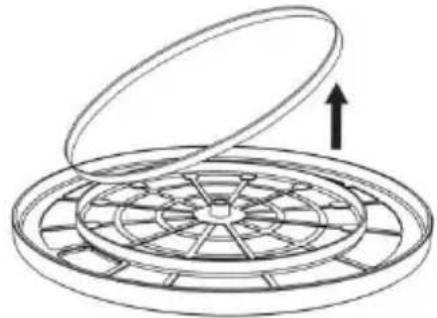
Line drawing of a vintage rotary disc with open lid and base (no text or symbols)User manual - Turntable with 4 speakers built-in and Bluetooth reception
Usage of controls or adjustments or performance of procedures other than those specified herein may result in hazardous radiation exposure.
KEEP THESE INSTRUCTIONS IN MIND:
- Do not cover or block any ventilation openings. When placing the device on a shelf, leave 5 cm (2") free space around the whole device.
- Install in accordance with the supplied user manual.
-
Keep the device away from heat sources such as radiators, heaters, stoves, candles and other heat-generating products or naked flame. The device can only be used in moderate climates. Extremely cold or warm environments should be avoided. Working temperature between 0^ and 35^ C.
-
Avoid using the device near strong magnetic fields.
-
Electrostatic discharge can disturb normal usage of this device. If so, simply reset and restart the device following the instruction manual. During file transmission, please handle with care and operate in a static-free environment.
-
Warning! Never insert an object into the product through the vents or openings. High voltage flows through the product and inserting an object can cause electric shock and/or short circuit internal parts. For the same reason, do not spill water or liquid on the product.
-
Do not use in wet or moist areas such as bathrooms, steamy kitchens or near swimming pools.
-
The device shall not be exposed to dripping or splashing and make sure that no objects filled with liquids, such as vases, are placed on or near the apparatus.
-
Do not use this device when condensation may occur. When the unit is used in a warm wet room with damp, water droplets or condensation may occur inside the unit and the unit may not function properly; let the unit stand in power OFF for 1 or 2 hours before turning on the power: the unit should be dry before getting any power.
- Although this device is manufactured with the utmost care and checked several times before leaving the factory, it is still possible that problems may occur, as with all electrical appliances. If you notice smoke, an excessive build-up of heat or any other unexpected phenomena, you should disconnect the plug from the main power socket immediately.
- This device must operate on a power source as specified on the specification label. If you are not sure of the type of power supply used in your home, consult your dealer or local power company.
- Keep away from animals. Some animals enjoy biting on power cords.
- To clean the device, use a soft dry cloth. Do not use solvents or petrol based fluids. To remove severe stains, you may use a damp cloth with dilute detergent.
- The supplier is not responsible for damage or lost data caused by malfunction, misuse, modification of the device or battery replacement.
- Do not interrupt the connection when the device is formatting or transferring files. Otherwise, data may be corrupted or lost.
- If the unit has USB playback function, the USB memory stick should be plugged into the unit directly. Don't use an USB extension cable because it can cause interference resulting in failing of data.
-
The rating label has been marked on the bottom or back panel of the device.
-
This device is not intended for use by people (including children) with physical, sensory or mental disabilities, or a lack of experience and knowledge, unless they're under supervision or have received instructions about the correct use of the device by the person who is responsible for their safety.
- This product is intended for non professional use only and not for commercial or industrial use.
- Make sure the unit is adjusted to a stable position. Damage caused by using this product in an unstable position vibrations or shocks or by failure to follow any other warning or precaution contained within this user manual will not be covered by warranty.
- Never remove the casing of this device.
- Never place this device on other electrical equipment.
- Do not allow children access to plastic bags.
- Only use attachments/accessories specified by the manufacturer.
- Refer all servicing to qualified service personnel. Servicing is required when the device has been damaged in any way, such as the power supply cord or the plug, when liquid has been spilled or objects have fallen into the device, when the device has been exposed to rain or moisture, does not operate normally, or has been dropped.
- Long exposure to loud sounds from personal music players may lead to temporary or permanent hearing loss.
- If the product is delivered with power cable or AC power adaptor:
- If any trouble occur, disconnect the AC power cord and refer servicing to qualified personnel.
- Don’t step on or pinch the power adaptor. Be very careful, particularly near the plugs and the cable’s exit point. Do not place heavy items on the power adaptor, which may damage it. Keep the entire device out of children’s reach! When playing with the power cable, they can seriously injure themselves.
● Unplug this device during lightning storms or when unused for a long period.
- The socket outlet must be installed near the equipment and must be easily accessible.
- Do not overload ac outlets or extension cords. Overloading can cause fire or electric shock.
● Devices with class 1 construction should be connected to a main socket outlet with a protective earthed connection.
● Devices with class 2 construction do not require a earthed connection.
● Always hold the plug when pulling it out of the main supply socket. Do not pull the power cord. This can cause a short circuit.
- Do not use a damaged power cord or plug or a loose outlet. Doing so may result in fire or electric shock.
- If the product contains or is delivered with a remote control containing coin/cell batteries:
Warning:
- “Do not ingest battery, Chemical Burn Hazard” or equivalent working.
● [The remote control supplied with] This product contains a coin/button cell battery. If the battery is swallowed, it can cause severe internal burns in just 2 hours and can lead to death. - Keep new and used batteries away from children.
- If the battery compartment does not close securely, stop using the product and keep it away from children.
-
If you think batteries might have been swallowed or placed inside any part of the body, seek immediate medical attention.
-
Caution about the use of Batteries:
● Danger of explosion if battery is incorrectly replaced. Replace only with the same or equivalent type.
● Battery cannot be subjected to high or low extreme temperatures, low air pressure at high altitude during use, storage or transportation.
● Replacement of a battery with an incorrect type that can result in an explosion or the leakage of flammable liquid or gas.
- Disposal of a battery into fire or a hot oven, or mechanically crushing or cutting of a battery, that can result in an explosion.
● Leaving a battery in an extremely high temperature surrounding environment that can result in an explosion or that leakage of flammable liquid or gas.
● A battery subjected to extremely low air pressure that may result in an explosion or the leakage of flammable liquid or gas.
- Attention should be drawn to the environmental aspects of battery disposal.
INSTALLATION
- Unpack all parts and remove protective material.
- Do not connect the unit to the mains before checking the mains voltage and before all other connections have been made.
* Those instruction are related only to products using power cable or AC power adaptor.
Product Description
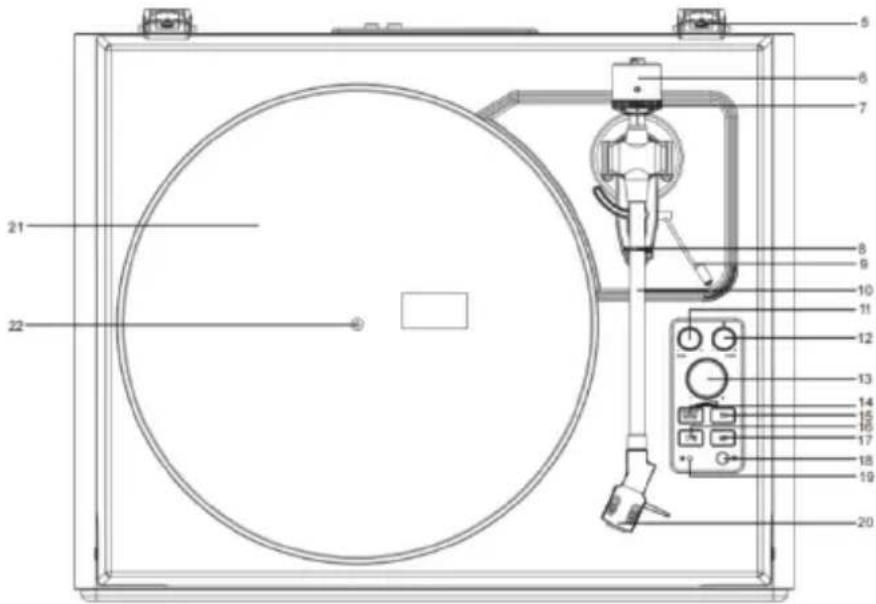
text_image
Technical diagram of a circular device with numbered components, likely a scientific instrument or measurement setup.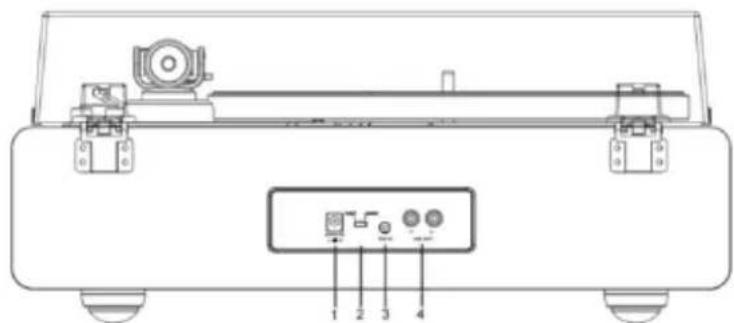
text_image
Technical diagram of a mechanical device with labeled components and ports- DC INPUT Jack
- Phono & Line Out Switch
- AUX IN Jack
- Phono & Aux Out Jacks
- Lid Hinge
- Counterweight
- Tracking Force Dial
- Tonearm Clip
- Tonearm Lift Lever
- Tonearm
-
Tone Control
-
Pitch Control
- Volume Control
- ON/OFF/Function Button
- 33 1/3 RPM Speed Button
- START/Stop Button
- 45RPM Speed Button
- Headphone Jack
- Indicator
- Stylus Cartridge
- Turntable Platter
- Turntable Spindle
Included Items
Before installing the turntable, check the package contents to ensure all parts below are included and free of visible damage. Please retain the original packaging materials for exchange or return purposes.
- Turntable Unit
- Power Adapter
- Turntable Lid
- Slip Mat
- Platter with Belt
-
Counterweight
-
Cartridge Alignment Protractor
-
45 RPM Adapter
-
Instruction Manual
Installing the turntable
. Mount the turntable on a level surface.
. To avoid the effects of vibrations and acoustic pressure, do not mount the turntable next to items such as speakers.
. The turntable may pick up radio static if placed next to a radio. Therefore, try to keep the turntable away from radios.
. If the turntable is near equipment (cell phone, etc.) that emits strong radio waves, noise may occur.
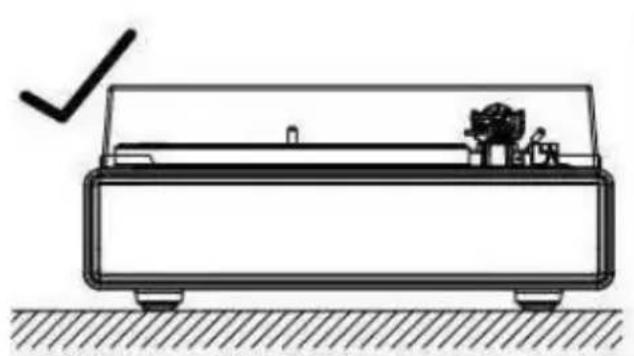
natural_image
Technical line drawing of a mechanical device with a checkmark indicating a detail (no text or symbols present)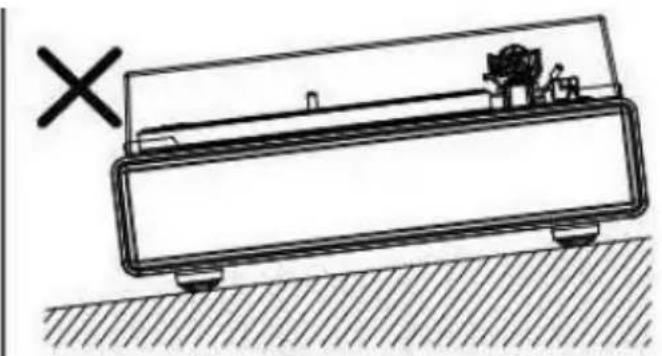
natural_image
Simple line drawing of a mechanical device with a cross mark and hatched ground surface (no text or symbols)Installing the Lid
Insert the hinge pockets of the lid onto the hinges of the turntable.
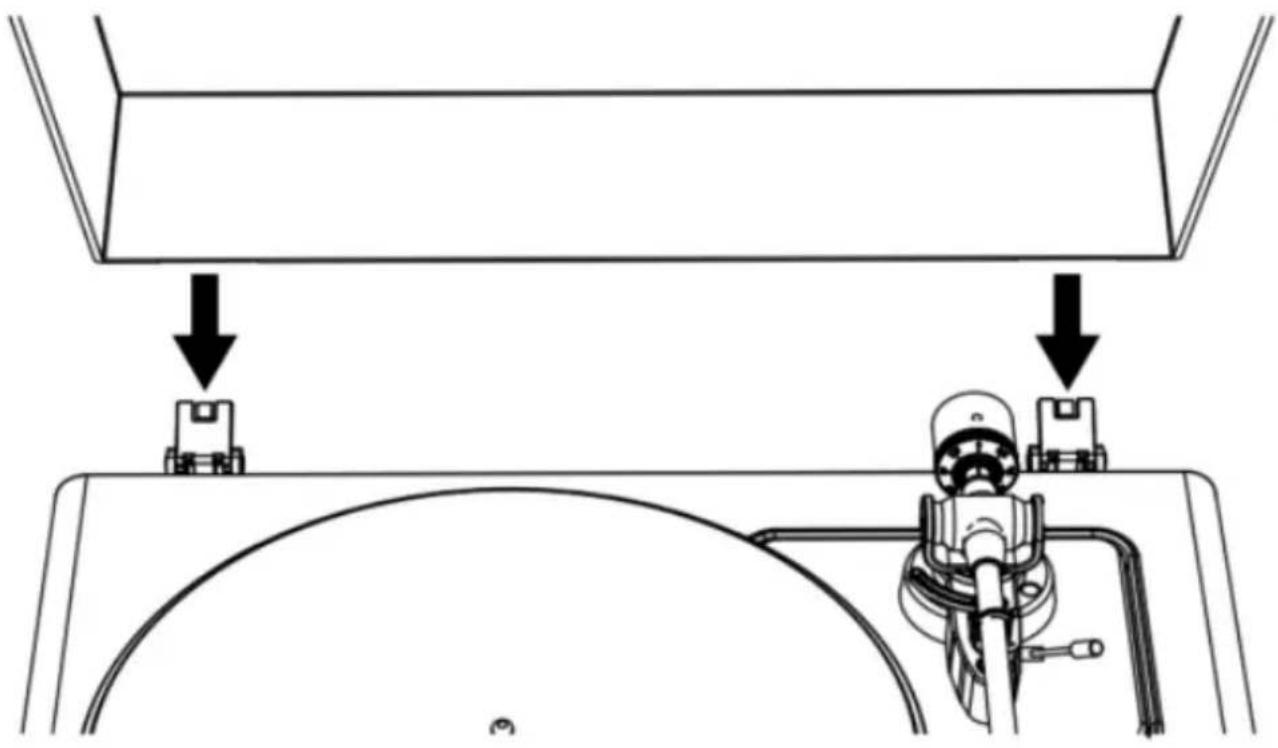
natural_image
Technical diagram showing mechanical assembly with two components and downward arrows indicating force or movement (no text or symbols)Turntable Platter and Belt Setup
- Turn the platter over and check the belt position.
Make sure that the drive belt is looped in the middle of the circle. The drive belt located too high or too low in this circle may cause the drive belt to fall off or speed to be unstable.
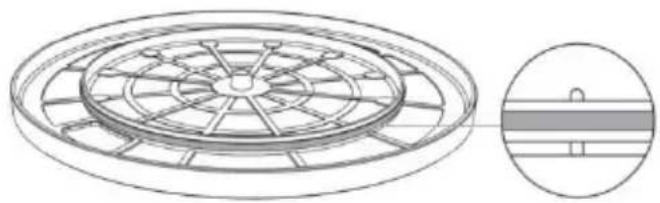
natural_image
Technical line drawing of a circular mechanical component with radial slots and a side-view inset showing internal structure (no text or symbols)- Set the platter on the spindle.
Make sure the platter is fully seated on the spindle.
- Place the belt on the motor pulley.
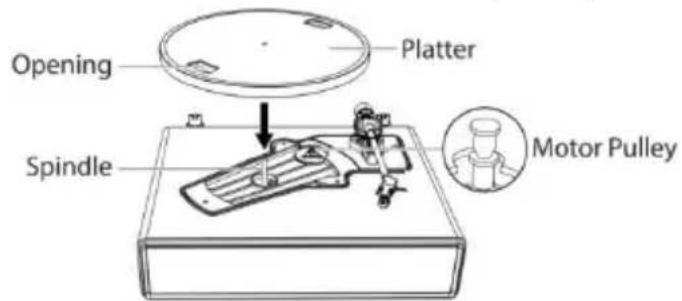
text_image
Opening Platter Spindle Motor PulleyAlign one of the platter openings with the motor pulley, and while pulling both ends of the red ribbon that comes attached to the belt, place the belt on the motor pulley, as per the diagram. When doing this, be careful not to twist the belt.
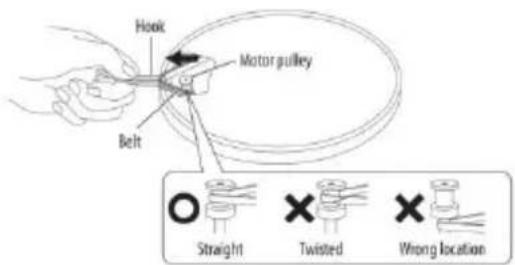
text_image
Hook Motor pulley Belt Straight Twisted Wrong location- Remove the red ribbon from the belt.
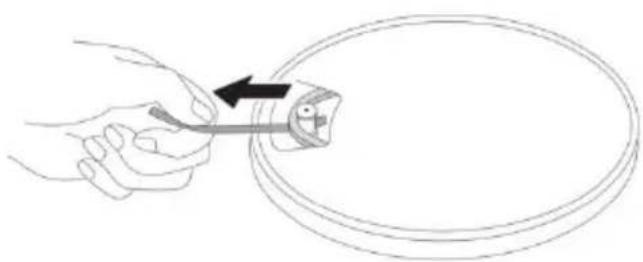
natural_image
Line drawing of a hand holding a tool over a circular object with an arrow indicating direction (no text or symbols)Rotating the Platter
-
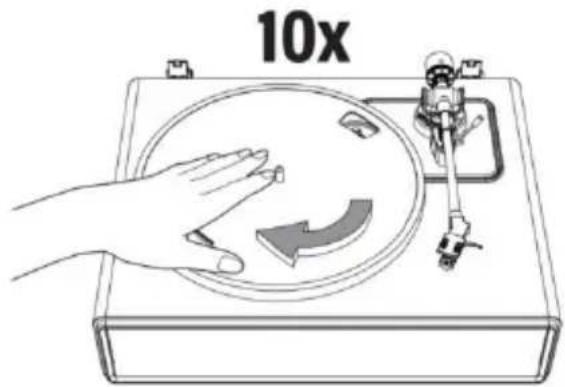
Using your hands, slowly rotate the platter ten times in a clockwise direction (Figure 1).
-
This step is for resetting the auto mechanism, getting rid of any twists in the belt and making sure the belt rides smoothly along the drive rim on the underside of the platter.
-
Place the slip mat on top of the platter. Make sure the logo on the mat is facing up (Figure 2).
Cartridge Tracking Force Adjustment
The supplied Counterweight is suitable for cartridges weighing between 3.0-6.0g.
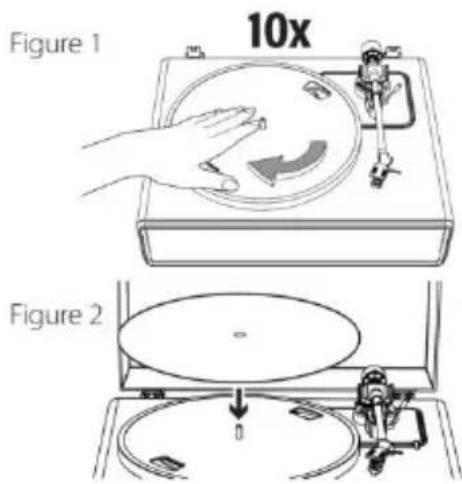
text_image
Figure 1 10x Figure 2
text_image
Counterweight Tracking Force Dial Center Line-
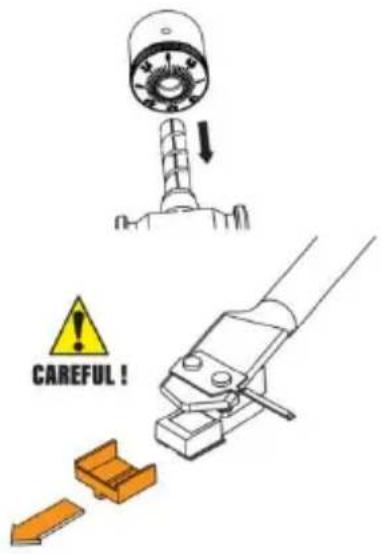
Gently push and turn the counterweight onto the rear of the tonearm (with the dial facing toward the front of the turntable).
-
Pull the protector straight forward to remove it.
NOTE: Applying a downward force may cause the stylus to come off the body. Only low volume is output if the stylus has come off, or is about to come off, so refer to "Replacing the stylus" to reattach the stylus correctly.
text_image
CAREFUL!-
Remove the tie-wrap and unlock the tonearm.
-
Lower the tonearm lift lever and position the cartridge in the space between the tonearm rest and platter.
-
Carefully rotate the counterweight until the tonearm achieves a neutral balance. The tonearm should return to this balanced position if it is moved up or down. This adjustment must be done carefully.
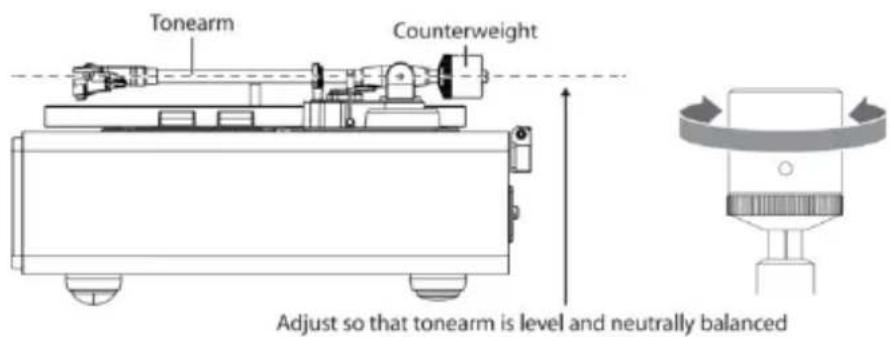
text_image
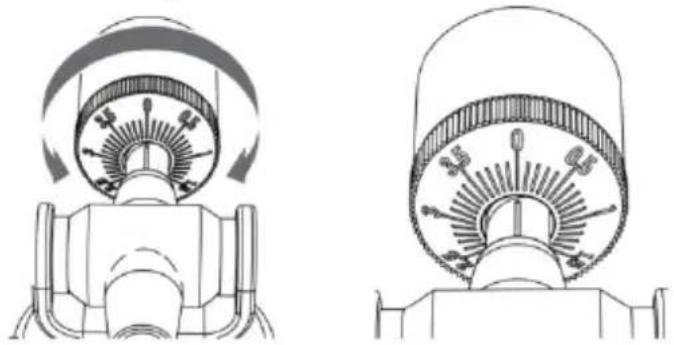
Tonearm Counterweight Adjust so that tonearm is level and neutrally balanced- Once the tonearm is correctly balanced, return the tonearm to its rest. Without moving the position of the counterweight, gently
rotate the tracking force dial until the zero is in line with black center line on the rear of the tonearm. Check to make sure the tonearm is still neutrally balanced.
natural_image
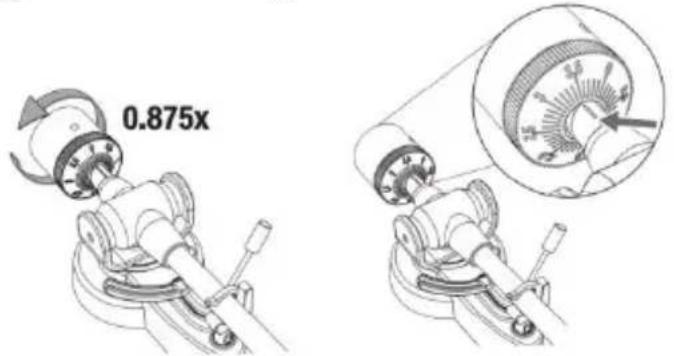
Technical line drawings of two mechanical components with rotating arms and shafts (no text or symbols)- Finally, rotate the counterweight and tracking force dial together counterclockwise (as seen from the front) to adjust the tracking force according to the cartridge manufacturer's recommendations.
text_image
0.875xNote: Each mark on the scale represents 0.1g. The recommended tracking force for the factory-installed cartridge is 3.5g ± 0.5g . Carefully rotate the tracking force dial. When "3.5" is centered over the black line on the top of the tonearm please stop.
Connection to External Speaker with RCA Audio Cable
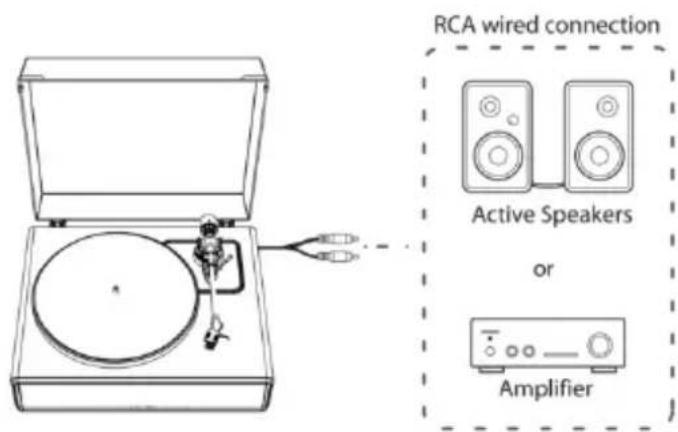
This turntable includes 4 built-in speakers and a built-in phono amplifier.
If you wish to use your own amplifier or speakers, please follow the instructions below:
text_image
RCA wired connection Active Speakers or AmplifierNOTE: In order to achieve the best sound, it is advised to set the turntable volume to a minimal level. Then the turntable's audio will be played back through your own amplifier, speakers, etc.
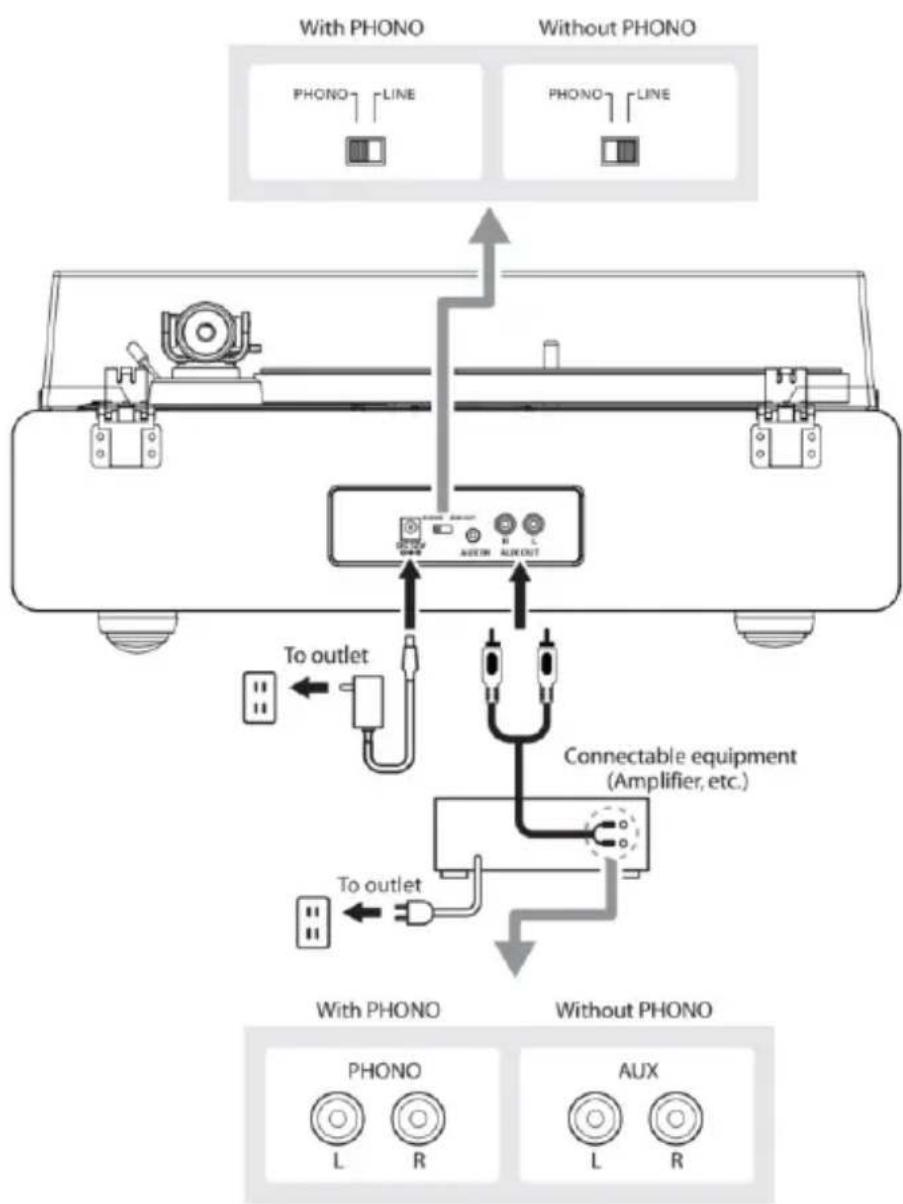
1. Setting pre-amplifier selector switch
This product has a built-in phono amplifier function. You can use the product even if you do not have a phono amplifier or connectable equipment with a built-in phono amplifier.
Use the pre-amplifier selector switch to set the output, as shown below.
| Connectable equipment being used | Position of pre-amplifier selector switch | Where to connect RCA audio cable |
| Device with phono input | PHONO | Phono input jack and ground (earth) terminal of connectable equipment |
| Device without phono input | LINE | AUX or line input jack of connectable equipment |
NOTE: The RCA Jacks are not designed to be connected directly to the passive/unpowered speakers on LINE mode. If connected to the passive speakers, there will be no sound.
2. Connecting the device
Align the settings for the pre-amplifier selector switch and connect the RCA audio cable to an input jack that is compatible with the connectable equipment you are using (amplifier, active speakers, etc.).
- The RCA audio cable's red jack is for the right (R) channel, and the white jack is for the left (L) channel.
flowchart
graph TD
    A["Device with PHONO"] --> B["Analog unit"]
    C["Without PHONO"] --> B
    B --> D["Connectable equipment (Amplifier, etc.)"]
    D --> E["With PHONO"]
    D --> F["Without PHONO"]
    G["PHONO LINE"] --> B
    H["PHONO LINE"] --> B
    I["To outlet"] --> D
    J["To outlet"] --> D
    K["L"] --> B
    L["R"] --> B
    M["L"] --> B
    N["R"] --> B
Main Power Connection
- Insert the DC plug of the AC adapter cord into the DC INPUT Jack at the back of the turntable.
- Plug the AC adapter into a normal power outlet.
NOTE: Do not plug the AC power adapter into a power outlet before all turntable assembly is completed. Before turning on turntable power, recheck all connections to make sure they are correct and secure.
Always turn off the turntable before connecting or disconnecting from power.
Power Management Function
The turntable will automatically power off after 20 minutes of inactivity.
The indicator light will turn off.
To resume operation, press the ON/OFF button again.
Playing a Record
1. Before playing a record
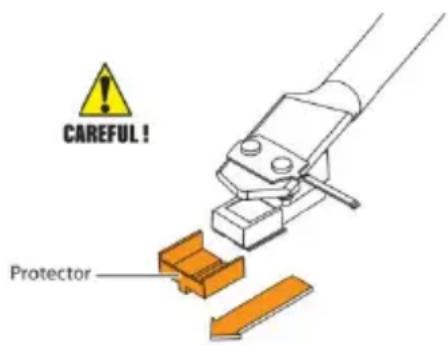
1.1. Pull the protector straight forward to remove it.
NOTE: Applying a downward force may cause the stylus to come off the body. Only low volume is output if the stylus has come off, or is about to come off, so refer to "Replacing the stylus" to reattach the stylus correctly.
text_image
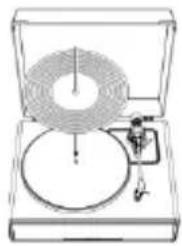
CAREFUL! Protector1.2. Place the record on the felt mat so that the center hole aligns with the spindle.
natural_image
Line drawing of a vintage typewriter with a circular dial and mechanical component (no text or symbols)2. Turntable Operation
Sufficiently lower the volume of the amplifier and speakers first.
2.1. Connect the included power adapter to the turntable, press the mode button. The turntable will turn on. The indicator will light in red.
2.2. Remove the stylus protector from the stylus.
2.3. Place the record on the slip mat.
2.4. Press the Speed Selector button to switch between 33 and 45 RPM speeds according to the type of record.
2.5. Press the START/Stop button once and the platter will play or pause.
2.6. Unlock the tonearm clip and set the tonearm lift lever to the up position.
2.7. Position the tonearm over the desired location (groove) on the record.
2.8. Carefully lower the tonearm on the record by setting the tonearm lift lever to the down position.
2.9. Turn up the volume of the turntable as needed.
2.10. When you are finished playing the record, raise the tonearm, return it to rest on the arm clip and long press the mode button to turn off the turntable.
3. Pitch Control
3.1. The turntable speed can be increased or decreased by approximately 10% by rotating the Pitch Control knob.
3.2. To increase the speed, turn the Pitch Control knob clockwise.
3.3. To decrease the speed, turn the Pitch Control knob
counter-clockwise.
4. Tone Control
4.1. The tone of this turntable could be adjusted by rotating the Tone Control knob.
4.2. To be a brighter sound, turn the Tone Control knob clockwise.
4.3. To be a deeper sound, turn the Tone Control knob counter-clockwise.
NOTE:
- If the silent pause time between each track is longer than 3 minute, the platter will stop spinning automatically to avoid damaging the record. The indicator light will be red. To resume operation, press the START button.
- If the felt mat gets dirty, it can easily scratch the record, so remove the felt mat periodically and wipe off any dust.
- To prevent the record from scratches and warping, remove it after use.
- Do not use a disk stabilizer.
AUX-IN Operation
This turntable includes an auxiliary audio signal input jack for connecting external audio devices like MP3 players, CD players, and older, non-dockable iPods so you can listen to your external source through the turntable's speakers.
- Use an audio cable (not included) with one 3.5 mm stereo connection on each end of the cable.
- Plug one end into the AUX-IN jack on the turntable and the other end to the Line Out jack of the audio device.
- Power on the turntable and audio device. The indicator light of turntable is red.
- Press the MODE button again, the indicator light of turntable
turns green. It's AUX-IN mode.
- The volume level can be controlled through the turntable. Operate all the functions on the auxiliary device as usual.
NOTE:
- Make sure the tone arm is securely locked to avoid any damage.
- When you are done, don't forget to turn off the power on the turntable and your external device.
Bluetooth Operation
- Connect the included power adapter to the turntable and press the mode button, the indicator will light in red.
- Press the mode button twice to Bluetooth mode. The indicator light turns blue and flash quickly. You will hear an activation sound from the turntable.
- Turn on the Bluetooth feature of your media device and search for and select "Lenco LS-430/Lenco LS-440" to pair the media device and turntable.
- Once your media device is successfully paired with the turntable, the turntable will play a short confirmation sound.
- Play and stream music from your media device to the turntable. The indicator light will become solid.
Note: Bluetooth version: 5.0
"This product has a bluetooth reception function, you can not transmit any bluetooth sound with it: this means that you can receive wirelessly a bluetooth sound signal from an external source like a smartphone."
Care
Turntable Body
- When the turntable body is dirty or dusty, first disconnect the AC
adapter and then wipe off the dirt and dust with a soft, dry cloth.
- Do not use benzenes, thinners, etc.
- When storing the product for a long time, disconnect the AC adapter from the outlet and wrap the product in plastic; do not allow it to become damp; the drive belt should be removed to prevent unequal stretching.
Stylus Tip
- If dirt and grime are stuck to the stylus tip, clean it with a commercially sold brush.
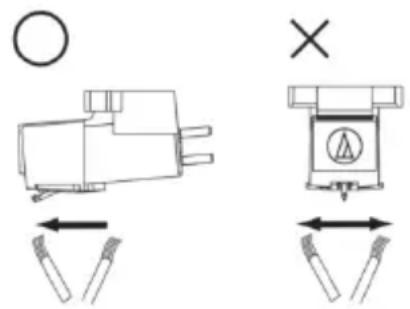
- We recommend using a stylus cleaner (not included) if the stylus tip is considerably dirty. Clean the stylus tip by moving the brush from the rear to the front of the stylus tip.
text_image
Technical diagram showing two mechanical or electrical component configurations with directional arrows and symbols, including a circle and cross mark.Replacing the Stylus
It's suggested to replace the stylus after 400 hours of use.
Removing the Stylus
- In addition to the deterioration of sound quality, records may also be damaged as the cartridge's stylus tip wears down.
- Be sure to disconnect the product's AC adapter from the outlet.
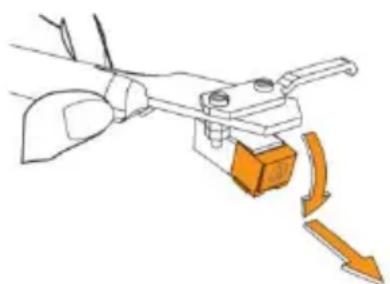
- When replacing the stylus, hold the headshell and the cartridge body tightly. Rotate the front of the stylus in a forward and down motion.
natural_image
Diagram of a mechanical clamp or lever mechanism with orange arrows indicating motion direction (no text or symbols)Installing a New Replacement Stylus
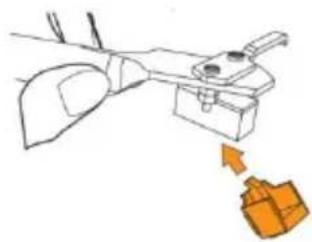
- Mount the new replacement stylus to the cartridge.
natural_image
Simple line drawing of a mechanical device with an orange arrow pointing to a box (no text or symbols)Engage in body first
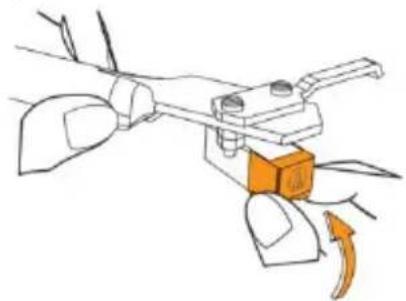
- Lift the stylus up until you hear a click.
natural_image
Diagram of a mechanical clamp or lever mechanism with an orange block and directional arrow (no text or symbols)- Make sure there is no gap between the headshell and the cartridge.
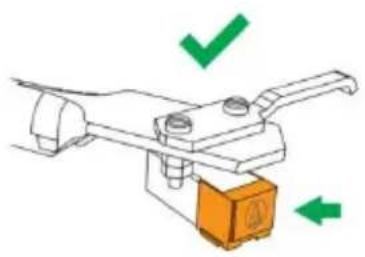
natural_image
Diagram of a mechanical lever with green checkmark and orange base (no text or symbols)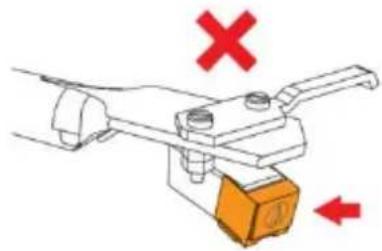
natural_image
Diagram of a mechanical lever mechanism with red X and downward arrow indicating force or movement (no text or symbols)Replacing the Belt
- The belt is a consumable part. Replace the belt if the speed of playback slows down or irregular rotation occurs. As a rule of thumb, we suggest replacing the belt once a year.
- Before replacing the belt, be sure to disconnect the product's AC adapter from the outlet.
1. Remove the slip mat.
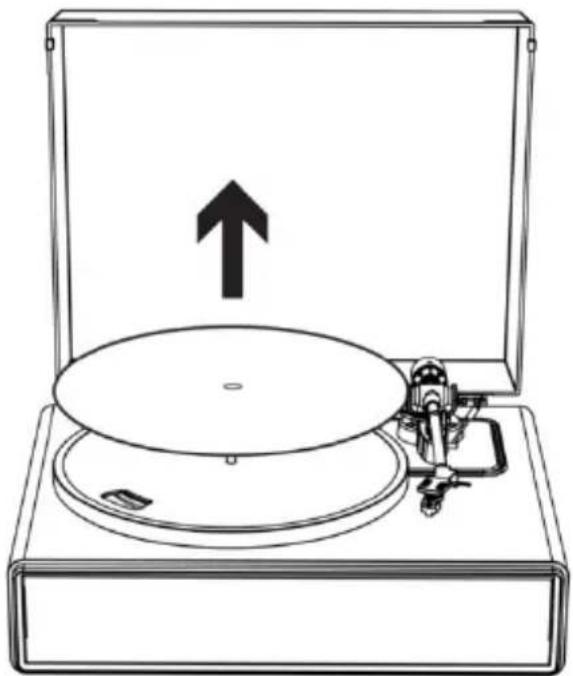
natural_image
Line drawing of a CD or DVD disc with an open box and mechanical device, no text or symbols present2. Remove the belt from the motor pulley.
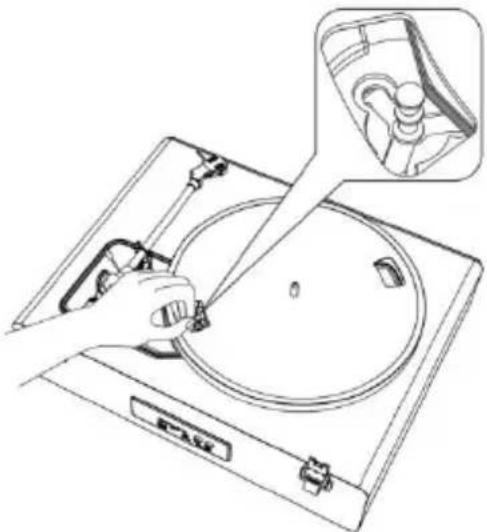
natural_image
Line drawing of a hand using a tool to clean or inspect a circular object on a CD or DVD stand, with an inset showing a close-up of the device (no text or symbols present)- Remove the main platter and then remove the old belt.
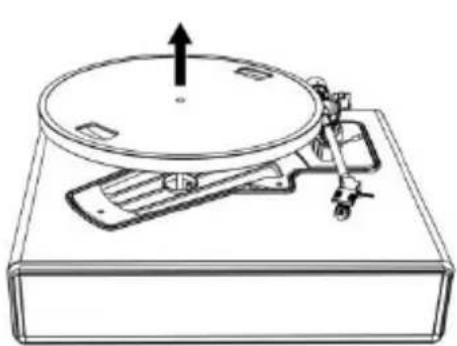
natural_image
Line drawing of a vintage rotary disc mounted on a base with an arrow indicating upward motion (no text or symbols)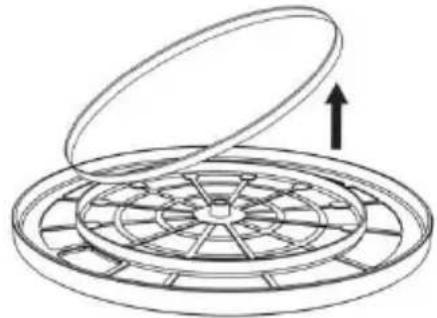
natural_image
Diagram of a circular mechanical component with an open lid and internal blades, showing an upward arrow (no text or symbols)- Turn the platter over and you will see a raised circle. Loop the new belt along the middle circle.
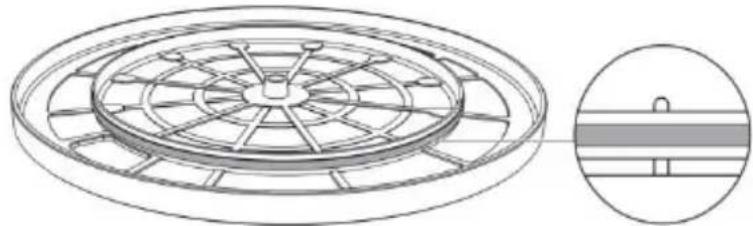
natural_image
Technical line drawing of a circular mechanical component with radial slots and a side-view inset showing internal structure (no text or symbols)- Attach the platter.
Align one of the openings with the position of the brass-colored motor pulley.
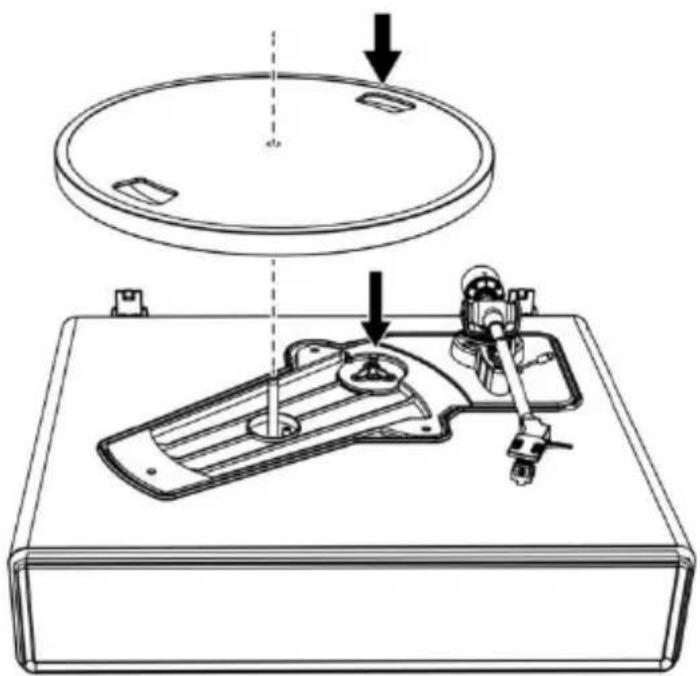
natural_image
Technical line drawing of a mechanical device with a circular top component and a base plate, showing no text or symbols.6. Place the belt on the brass-colored motor pulley
Grasp the belt that was attached in step 4 and, while pulling it, place it on the brass motor pulley.
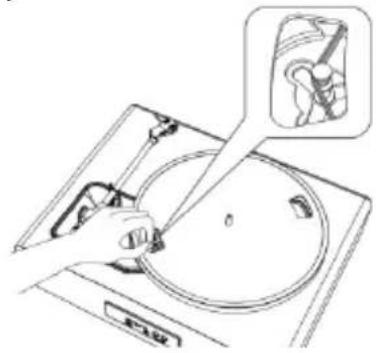
natural_image
Line drawing of a hand using a tool to clean or inspect the interior of a kitchen appliance (no text or symbols present)- Using your hands, slowly rotate the platter ten times in a clockwise direction as shown by the arrow below.
text_image
10xWhen the Turntable is Moved
Using the product's original packing materials, wrap the turntable in the reverse order from when you unwrapped it. If you do not have the packaging materials, take the following measures:
- After disconnecting the AC adapter from the outlet, remove the felt mat and platter, and then wrap them so that they do not get damaged.
- Attach the protector to the cartridge.
- Use a string or something similar to tie the tonearm to the rest so that it does not become dislodged.
- Wrap the turntable body with paper or a soft cloth so that it does not get damaged.
Troubleshooting
| Problem | Solution |
| The platter does not spin. | Is the AC adapter connected to the outlet? - Connect the AC adapter to the outlet.What's the status of the indicator light? - The indicator light is green. That means the turntable is in AUX IN mode. Please press the mode button twice to switch to Turntable mode.The indicator light is blue. That means the turntable is in Bluetooth mode. Please press the mode button once to switch to Turntable mode.The red indicator light will indicate Turntable mode.Has the belt slipped from the platter? - Correctly place the belt on the platter.Is the belt placed on the motor pulley? - Check that the belt is placed on the motor pulley (brass-colored) correctly.Has the belt been damaged? - Replace it with a new belt. |
| The platter spins, but there is no sound from the turntable? | Is the stylus damaged? - Check the stylus and replace it, if necessary. It's suggested to replace the stylus after 400 hours of use.Is the stylus placed correctly on the body of the cartridge? - Check the cartridge and adjust it, if necessary. |
| The stylus skips. | Is the record warped? - Check the record.Is the record scratched? - Check the record.Is the stylus pressure correct? - Refer to "Cartridge Tracking Force Adjustment" to readjust the tracking force. |
| The turntable is making a strange 'howling' sound. | Is the product picking up excessive vibrations from the floor, surfaces of the walls, or nearby speakers? - Decrease the vibrations or mount the product on a surface that is not subject to the effects of vibrations.Is the product mounted on an unstable surface? - Check whether the surface on which the product is mounted is suitable. |
| There is noise when the record is playing. | • Is there dust on the cartridge's stylus tip? - If dust is stuck to the stylus tip, clean it with a commercially sold brush. |
| The sound when the record is playing is either too fast or too slow. | • Are the speed settings for this product correct? - Please select the correct speed for the type of record being played. |
| Playback speed slows down or there is irregular rotation. | • Is the belt stretched out? - Replace with a new belt. • Is the belt installed correct? - Refer to "Turntable Platter and Belt Setup" to setup the belt. |
Specifications Turntable
| Power Supply | AC100-240V, DC output 12V 1500mA |
| Power Consumption | 35W |
| Turntable Speed | 33 1/3, 45 RPM |
| Output Power (RMS) | 40W on Bluetooth mode |
| Speakers Rating | 2 x 15W + 2 x 10W |
| Dimensions (LxWxH) | 17.32"x 14.57"x 7.56"(440 x 370 x 192mm)(lid closed), 15.75"x 16.73"x 18.19"(400 x 425 x 462mm) (lid open) |
| Weight | 13,3lb (6,05kg) |
Stylus
| Model | Audio-Technica AT3600 |
| Frequency Response | 20Hz-20kHz |
| Channel Balance | <2.5dB |
| Channel Separation | >18dB |
| Output Voltage | 2.5mV |
| Recommended Load Resistance | 47kΩ |
| Amplifier Connection | MM (Moving Magnet) - input |
| Recommended Tracking Force | 3.5±0.5g |
| Weight | 0.18oz (5.1 g) |
Note: Design and specifications are subject to change without notice.
Power supply adaptor
Manufacturer: BRIGHTPOWER OPTOELECTRONIC TECHNOLOGY CO., LTD
Model number: SW1201500-NM
Use only the power supply listed in the user instructions
| Information | Value and and precision |
| Manufacturers name or trade mark, commercial registration and address | BRIGHTPOWEROPTOELECTRONICTECHNOLOGY CO., LTD |
| Model Identifier | SW1201500-NM |
| Input voltage | 100-240V |
| Input AC frequency | 50-60Hz |
| Output voltage | DC 12V |
| Output current | 1500mA |
| Output Power | 18W |
| Average active efficiency | 85.00% |
| Efficiency at low load (10%) | 83.20% |
| No load Power consumption | 0.1W |
1. Guarantee
Commaxx B.V. offers service and warranty in accordance to European law, which means that in case of repairs (both during and after the warranty period) you should contact your local dealer.
Important note: It is not possible to send products that need repairs to Commaxx B.V. directly.
Important note: If this unit is opened or accessed by a non-official service center in any way, the warranty expires.
This device is not suitable for professional use. In case of professional use, all warranty obligations of the manufacturer will be voided.
2. Disclaimer
Updates to Firmware and/or hardware components are made regularly. Therefore some of the instruction, specifications and pictures in this documentation may differ slightly from your particular situation. All items described in this guide for illustration purposes only and may not apply to particular situation. No legal right or entitlements may be obtained from the description made in this manual.
3. Disposal of the Old Device
natural_image
Symbol of a trash bin crossed with a diagonal line, no text or numbers presentThis symbol indicates that the relevant electrical product or battery should not be disposed of as general household waste in Europe. To ensure the correct waste treatment of the product and battery, please dispose them in accordance to any applicable local laws of requirement for disposal of electrical equipment or batteries. In so doing, you will help to conserve natural resources and improve standards of environmental protection in treatment and disposal of electrical waste (Waste Electrical and Electronic Equipment Directive).
4. DECLARATION OF CONFORMITY
Hereby, Commaxx declares that the radio equipment type Lenco LS-430 and LS-440 is in compliance with directive 2014/53/EU. The full text of the EU declaration of conformity is available at the following internet address:
https://commaxx-certificates.com/doc/ls-430_doc.pdf
| Type RF | : | Bluetooth |
| Frequency range | : | 2402-2480 MHz |
| Power | : | < 6 dBm |
5. Service
For more information and helpdesk support, please visit
www.lenco.com
Commaxx B.V. Wiebachstraat 37, 6466 NG Kerkrade, The Netherlands.
Nederlands
OPGELET:
text_image
Technical diagram of a circular device with numbered components, likely a scientific instrument or measurement setup.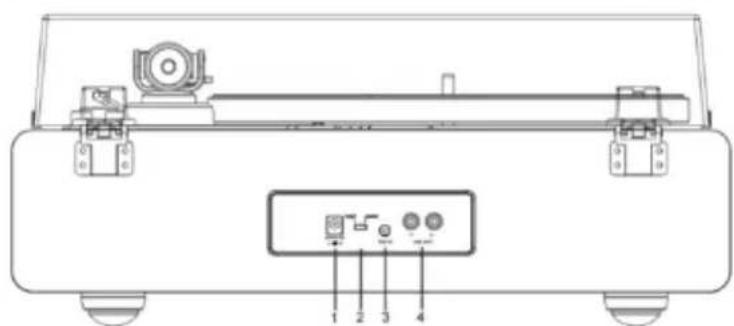
text_image
Technical diagram of a mechanical device with labeled components and portsnatural_image
Technical line drawing of a mechanical device with a checkmark indicating a detail (no text or symbols present)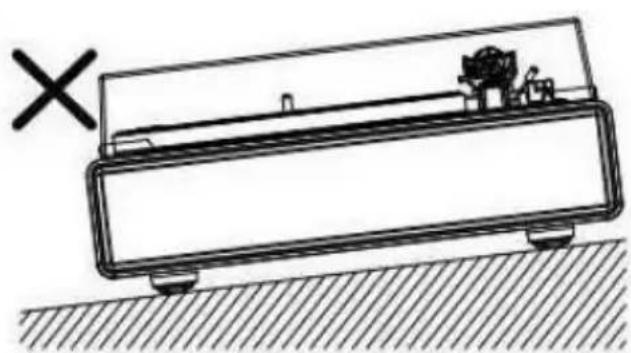
natural_image
Simple line drawing of a mechanical device with a cross mark and hatched ground surface (no text or symbols)natural_image
Technical diagram showing mechanical assembly with two components and downward arrows indicating force or movement (no text or symbols)natural_image
Technical line drawing of a circular mechanical component with radial slots and a side-view inset showing internal structure (no text or symbols)text_image
Hook Motor pulley Belt Straight Twisted Wrong locationnatural_image
Line drawing of a hand holding a tool with an arrow pointing to a circular component (no text or symbols)text_image
Figure 1 10x Figure 2Naalddrukkalibratie
text_image
Counterweight Tracking Force Dial Center Line| EN | NL |
| Counterweight | Contragewicht |
| Tracking Force Dial | Naalddrukkalibratie |
| Center Line | Middellijn |
text_image
Tonearm Counterweight Adjust so that tonearm is level and neutrally balanced| EN | NL |
| Tonearm | Toonarm |
| Counterweight | Contragewicht |
| Adjust so that tonearm is level and neutrally balanced | Stel zodanig af dat de toonarm waterpas en neutraal in balans zit |
natural_image
Technical line drawings of two mechanical components with rotating arms and shafts (no text or symbols)text_image
RCA wired connection Active Speakers or Amplifier| EN | NL |
| RCA wired connection | Bedrade RCA-aansluiting |
| Active Speakers | Actieve luidsprekers |
| or | of |
| Amplifier | Versterker |
natural_image
Line drawing of a mechanical device with a circular component and a ring, no text or symbols presenttext_image
Technical diagram showing mechanical assembly and mounting symbol with directional arrows and cross markDe naald vervangen
natural_image
Diagram of a mechanical clamp or lever mechanism with orange arrows indicating motion (no text or symbols)natural_image
Simple line drawing of a mechanical device with an orange arrow pointing to a box (no text or symbols)Engage in body first
| EN | NL |
| Engage in body first | Klik eerst in de behuizing |
natural_image
Illustration of a hand using a tool to lift a vehicle, with an orange block and curved arrow indicating motion (no text or symbols)natural_image
Diagram of a mechanical lever with green checkmark and orange base (no text or symbols)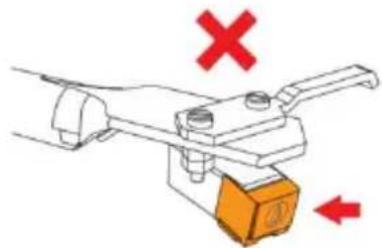
natural_image
Mechanical clamp or lever mechanism with red X and downward arrow, no text or symbols presentDe riem vervangen
natural_image
Line drawing of a CD or DVD disc with an open box and mechanical device, no text or symbols presentnatural_image
Line drawing of a hand using a tool to clean or inspect a circular object on a CD or DVD stand, with an inset showing a close-up of the device (no text or symbols present)natural_image
Line drawing of a vintage rotary disc mounted on a base with a smartphone and mechanical components (no text or symbols)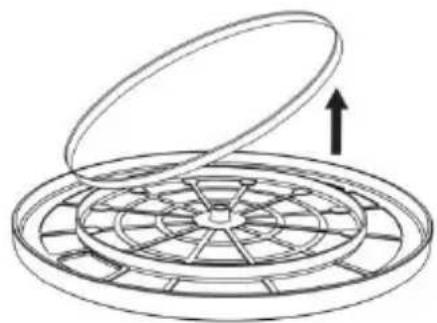
natural_image
Diagram of a circular mechanical component with an open lid and internal grid structure, no text or symbols present.natural_image
Technical line drawing of a circular mechanical component with radial slots and a cross-sectional view (no text or symbols)natural_image
Technical line drawing of a mechanical device with a circular lid and base mount, showing no text or symbols.natural_image
Line drawing of a hand using a tool to clean or adjust the interior of a stovetop (no text or symbols present)natural_image
Symbol of a trash bin crossed with no text or numbers, representing waste sorting or disposal (no text present)text_image
Technical diagram of a circular device with numbered components, likely a scientific instrument or measurement setup.
text_image
Technical diagram of a mechanical device with labeled components and portsnatural_image
Technical line drawing of a mechanical device with a checkmark indicating a detail (no text or symbols present)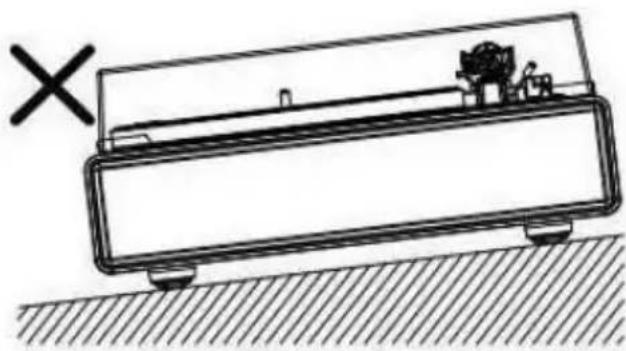
natural_image
Simple line drawing of a rectangular device with a handle and base, placed on a hatched surface (no text or symbols)Installation des Deckels
natural_image
Technical diagram showing mechanical assembly with two components and downward arrows indicating force or movement (no text or symbols)natural_image
Technical line drawing of a circular mechanical component with radial slots and a side-view inset showing internal structure (no text or symbols)text_image
Hook Motor pulley Belt Straight Twisted Wrong location| EN | DE |
| Hook | Haken |
| Motor pulley | Motorriemenscheibe |
| Belt | Riemen |
| Straight | Gerade |
| Twisted | Verdreht |
| Wrong location | Falsche Position |
natural_image
Line drawing of a hand holding a tool with an arrow indicating direction, next to a circular object (no text or symbols)text_image
Figure 1 10x Figure 2text_image
Counterweight Tracking Force Dial Center Linetext_image
Tonearm Counterweight Adjust so that tonearm is level and neutrally balancednatural_image
Technical line drawings of two mechanical components with rotating arms and stator (no text or symbols)text_image
RCA wired connection Active Speakers or Amplifiernatural_image
Line drawing of a scientific instrument with a circular component and a pointer (no text or symbols)text_image
Technical diagram showing mechanical assembly with labeled components and directional arrows, including a circle and cross symbol.natural_image
Diagram of a mechanical clamp or lever mechanism with orange arrows indicating motion (no text or symbols)natural_image
Simple line drawing of a mechanical device with an orange arrow pointing to it (no text or symbols)Engage in body first
natural_image
Diagram of a mechanical clamp or lever mechanism with orange components and directional arrows (no text or symbols)text_image
Technical diagram showing two mechanical clamping setups with check and cross icons indicating selection or failure states.natural_image
Line drawing of a vintage rotary disc with an open base and mechanical device, no text or symbols presentnatural_image
Line drawing of a hand using a tool to press a circular component on a CD or DVD stand, with an inset showing a close-up of the device (no text or symbols present)natural_image
Line drawing of a CD or DVD disc mounted on a base with an arrow indicating upward motion (no text or symbols)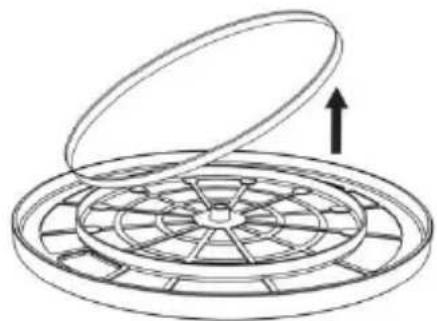
natural_image
Diagram of a circular mechanical component with an open lid and internal fan-like structure, no text or symbols present.natural_image
Technical line drawing of a circular mechanical component with radial slots and a side-view inset showing internal structure (no text or symbols)natural_image
Technical line drawing of a mechanical device with a circular component and a base plate, showing no text or symbols.natural_image
Line drawing of a hand using a tool to clean or adjust the interior of a stovetop (no text or symbols present)natural_image
Symbol of a trash bin crossed with no text or numbers, representing environmental hazard (no text present)text_image
Technical diagram of a circular device with numbered components, likely a scientific instrument or measurement setup.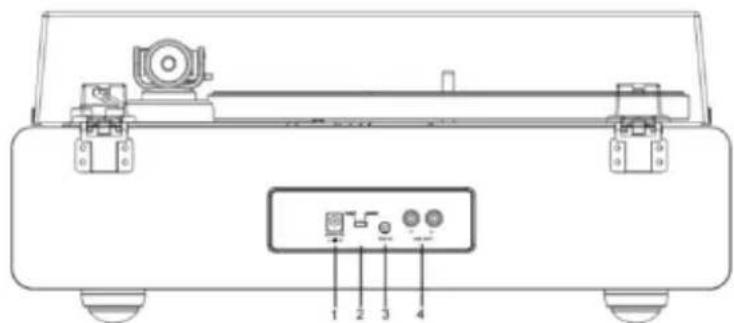
text_image
Technical diagram of a mechanical device with labeled components and portsnatural_image
Simple line drawing of a mechanical device with a checkmark and a small component, no text or symbols present.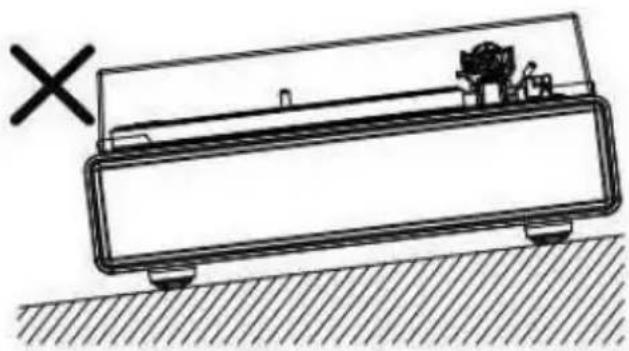
natural_image
Simple line drawing of a rectangular device with a handle and base, resting on a hatched surface (no text or symbols)natural_image
Technical diagram showing mechanical assembly with two components and downward arrows indicating force or movement (no text or symbols)natural_image
Technical line drawing of a circular mechanical component with radial slots and a cross-sectional view (no text or symbols)text_image
Hook Motor pulley Belt Straight Twisted Wrong locationnatural_image
Line drawing of a hand holding a tool with an arrow pointing to a circular component (no text or symbols)Rotation du plateau
text_image
Figure 1 10x Figure 2| EN | FR |
| Figure 1 | Figure 1 |
| Figure 2 | Figure 2 |
text_image
Counterweight Tracking Force Dial Center Line| EN | FR |
| Counterweight | Contrepoids |
| Tracking Force Dial | Cadran de force d’appui |
| Center Line | Ligne centrale |
text_image
Tonearm Counterweight Adjust so that tonearm is level and neutrally balancednatural_image
Mechanical component diagram showing rotating arm and housing (no text or symbols)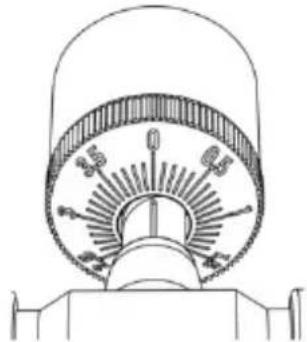
natural_image
Technical line drawing of a mechanical component with no visible text or symbolstext_image
RCA wired connection Active Speakers or Amplifier| EN | FR |
| RCA wired connection | Connexion filaire RCA |
| Active Speakers | Enceintes actives |
| or | ou |
| Amplifier | Amplificateur |
natural_image
Line drawing of a scientific instrument with a circular component and a pointer (no text or symbols)text_image
Technical diagram showing mechanical assembly with labeled components and directional arrows, including a circle and cross symbol.natural_image
Diagram of a mechanical clamp or lever mechanism with directional arrows indicating motion (no text or symbols)natural_image
Simple line drawing of a mechanical device with an orange arrow pointing to a component (no text or symbols)Engage in body first
natural_image
Diagram of a mechanical clamp or lever mechanism with orange components and directional arrows (no text or symbols)natural_image
Diagram of a mechanical lever with an orange block and green checkmark indicators (no text or symbols)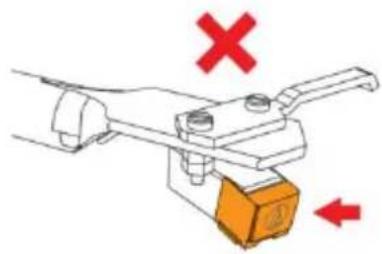
natural_image
Mechanical clamp or lever mechanism with red X and downward arrow indicating force or movement (no text or symbols)natural_image
Line drawing of a vintage rotary disc with an open base and mechanical device, no text or symbols presentnatural_image
Line drawing of a hand using a tool to press a circular component on a CD or DVD stand, with an inset showing a close-up of the component (no text or symbols present)natural_image
Line drawing of a vintage rotary disc mounted on a base with an arrow indicating upward motion (no text or symbols)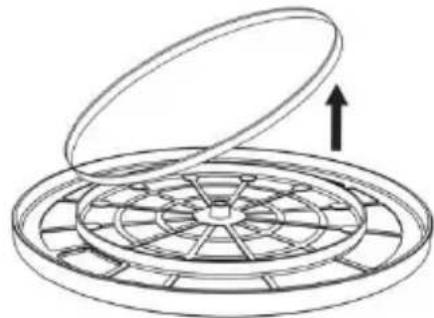
natural_image
Diagram of a circular fan or mechanical component with an open lid and internal blades, no text or symbols present.natural_image
Technical line drawing of a circular mechanical component with radial slots and a side-view inset showing internal structure (no text or symbols)natural_image
Technical line drawing of a mechanical device with a circular component and a base plate, showing no text or symbols.natural_image
Line drawing of a hand using a tool to clean or adjust a circular object on an induction cooktop (no text or symbols present)natural_image
Symbol of a trash bin crossed with a diagonal line, no text or numbers presenttext_image
Technical diagram of a circular device with numbered components, likely an optical or measurement setup.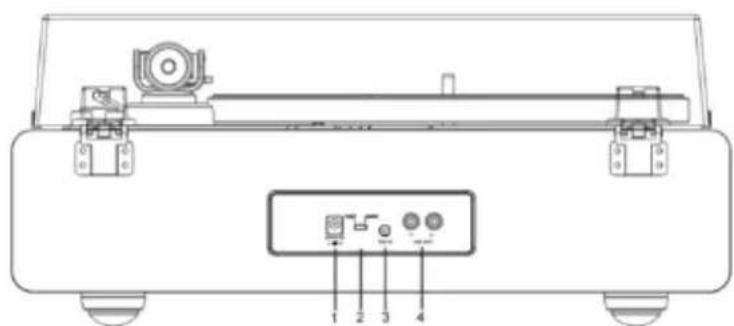
text_image
Technical diagram of a mechanical device with labeled components and portsnatural_image
Technical line drawing of a mechanical device with a checkmark indicating a detail (no text or symbols present)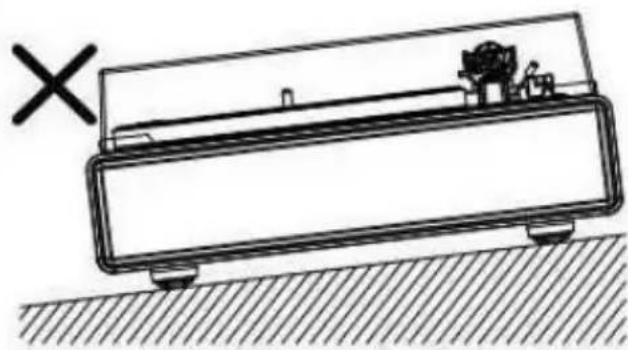
natural_image
Simple line drawing of a rectangular device with a handle and internal components, placed on a hatched ground surface (no text or symbols)natural_image
Technical diagram showing mechanical assembly with two components and downward arrows indicating force or movement (no text or symbols)natural_image
Technical line drawing of a circular mechanical component with internal blades and a side-view inset showing a segmented bar (no text or symbols)text_image
Hook Motor pulley Belt Straight Twisted Wrong location| EN | ES |
| Hook | Gancho |
| Motor pulley | Polea del motor |
| Belt | Correa |
| Straight | Recto |
| Twisted | Torcido |
| Wrong location | Posición incorrecta |
natural_image
Line drawing of a hand holding a tool with an arrow indicating direction, next to a circular ring (no text or symbols)text_image
Figure 1 10x Figure 2text_image
Counterweight Tracking Force Dial Center Linetext_image
Tonearm Counterweight Adjust so that tonearm is level and neutrally balanced| EN | ES |
| Tonearm | Brazo fonocaptor |
| Counterweight | Contrapeso |
| Adjust so that tonearm is level and neutrally balanced | Realice el ajuste de modo que el brazo quede horizontal y equilibrado |
natural_image
Mechanical component diagram showing rotational motion with no visible text or symbols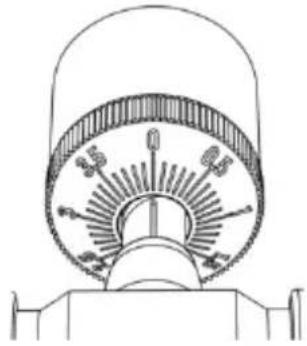
natural_image
Technical line drawing of a mechanical component with no visible text or symbolstext_image
RCA wired connection Active Speakers or Amplifiernatural_image
Line drawing of a scientific instrument with a circular component and a ring, no text or symbols presenttext_image
Technical diagram showing mechanical assembly and mounting symbol with directional arrows and cross markReemplazar la aguja
natural_image
Diagram of a mechanical lever mechanism with orange arrows indicating motion or force direction (no text or symbols)natural_image
Simple line drawing of a mechanical device with an orange arrow pointing to a component (no text or symbols)Engage in body first
| EN | ES |
| Engage in body first | Engage in body first |
natural_image
Illustration of a hand using a tool to lift a vehicle, with an orange block and curved arrow indicating motion (no text or symbols)natural_image
Diagram of a mechanical clamp or lever mechanism with green checkmarks and arrows indicating direction (no text or symbols)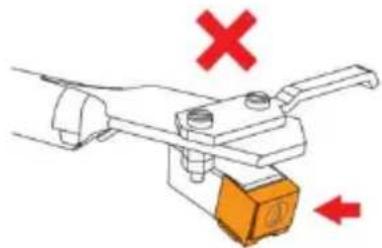
natural_image
Diagram of a mechanical clamp or lever mechanism with red X and downward arrow indicators (no text or symbols)natural_image
Line drawing of a vintage rotary disc with an open base and mechanical device, no text or symbols presentnatural_image
Line drawing of a hand using a tool to press a circular component on a CD or DVD stand, with an inset showing a close-up of the device (no text or symbols present)natural_image
Line drawing of a vintage rotary disc mounted on a base with an arrow indicating upward motion (no text or symbols)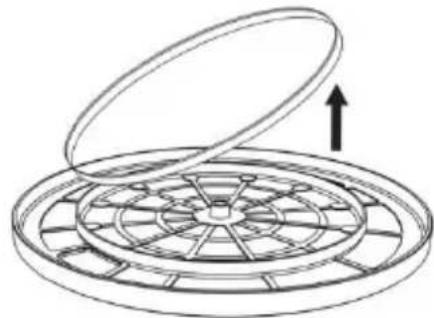
natural_image
Diagram of a circular fan or mechanical component with an open lid and internal blades, no text or symbols present.natural_image
Technical line drawing of a circular mechanical component with radial slots and a side-view inset showing internal structure (no text or symbols)natural_image
Technical line drawing of a mechanical device with a circular component and a base plate, showing no text or symbols.natural_image
Line drawing of a hand using a tool to clean or adjust a circular object on an induction cooktop (no text or symbols present)natural_image
Symbol of a trash bin crossed with no text or numbers, representing environmental hazard (no text present)text_image
Technical diagram of a circular device with numbered components, likely a scientific instrument or measurement setup.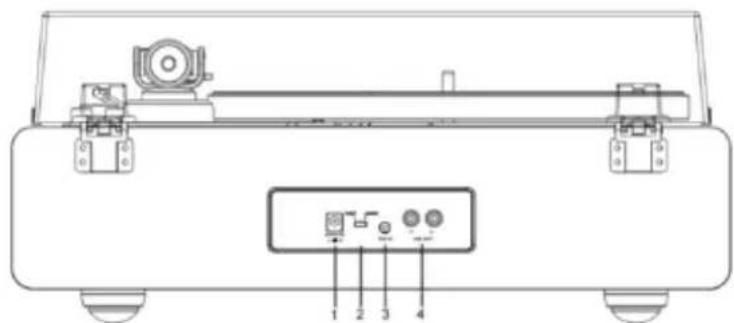
text_image
Technical diagram of a mechanical device with labeled components and portsnatural_image
Simple line drawing of a mechanical device with a checkmark and base, no text or symbols present.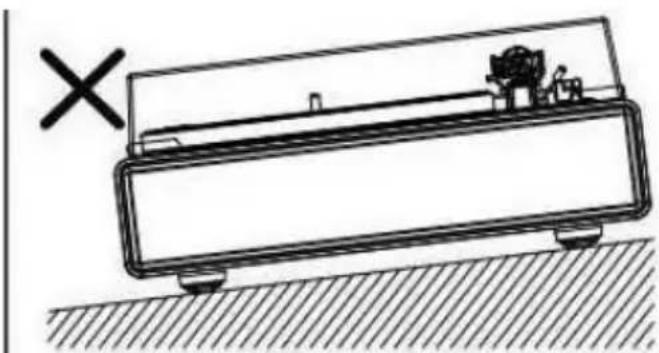
natural_image
Simple line drawing of a mechanical device with a cross mark and hatched ground surface (no text or symbols)natural_image
Technical diagram showing mechanical assembly with two components and downward arrows indicating force or movement (no text or symbols)natural_image
Technical line drawing of a circular mechanical component with radial slots and a side-view inset showing internal structure (no text or symbols)text_image
Hook Motor pulley Belt Straight Twisted Wrong locationnatural_image
Line drawing of a hand holding a tool with an arrow pointing to a circular component (no text or symbols)text_image
Figure 1 10x Figure 2text_image
Counterweight Tracking Force Dial Center Linetext_image
Tonearm Counterweight Adjust so that tonearm is level and neutrally balancednatural_image
Technical line drawings of two mechanical components with rotating arms and shafts (no text or symbols)text_image
RCA wired connection Active Speakers or Amplifierflowchart
graph TD
    A["With PHONO"] --> B["Device with antenna"]
    C["Without PHONO"] --> D["Device with antenna"]
    B --> E["Connectable equipment (Amplifier, etc.)"]
    D --> E
    E --> F["With PHONO"]
    E --> G["Without PHONO"]
    H["PHONO LINE"] --> I["Device with antenna"]
    J["PHONO LINE"] --> K["Device with antenna"]
    L["To outlet"] --> M["Device with antenna"]
    N["To outlet"] --> O["Device with antenna"]
    P["AUX L"] --> Q["Device with antenna"]
    R["AUX R"] --> S["Device with antenna"]
natural_image
Diagram of a scientific instrument with a circular component and a ring, no visible text or symbolstext_image
Technical diagram showing two mechanical or electrical component configurations with directional arrows and symbols, including a circle and cross symbol.natural_image
Diagram of a mechanical lever mechanism with directional arrows indicating motion (no text or symbols)natural_image
Simple line drawing of a mechanical device with an orange arrow pointing to a brown component (no text or symbols)Engage in body first
natural_image
Illustration of a hand using a tool to lift a block, with an orange arrow indicating rotation (no text or symbols)natural_image
Diagram of a mechanical clamp or lever mechanism with green checkmarks indicating alignment points (no text or symbols present)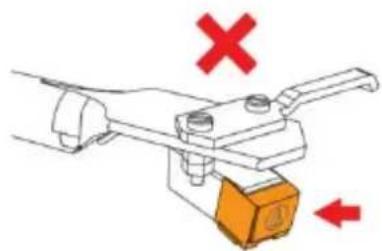
natural_image
Mechanical clamp or lever mechanism with red X and downward arrows indicating movement (no text or symbols)natural_image
Line drawing of a vintage rotary disc with an open base and mechanical device, no text or symbols presentnatural_image
Line drawing of a hand using a tool to press a circular component on a CD or DVD stand, with an inset showing a close-up of the device (no text or symbols present)natural_image
Line drawing of a vintage rotary disc mounted on a base with an arrow indicating upward motion (no text or symbols)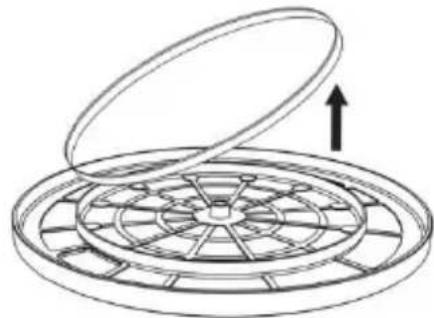
natural_image
Diagram of a circular fan or mechanical component with an open lid and internal blades, no text or symbols present.natural_image
Technical line drawing of a circular mechanical component with radial slots and a side-view inset showing internal structure (no text or symbols)natural_image
Technical line drawing of a mechanical device with a circular lid and base mount, showing assembly and mounting components (no text or symbols)natural_image
Line drawing of a hand using a tool to clean or adjust the interior of a large pot (no text or symbols present)natural_image
Symbol of a trash bin crossed with no visible text or labelstext_image
Technical diagram of a radio receiver with numbered components and labeled partsnatural_image
Technical line drawing of a mechanical device with a checkmark indicating a detail (no text or symbols present)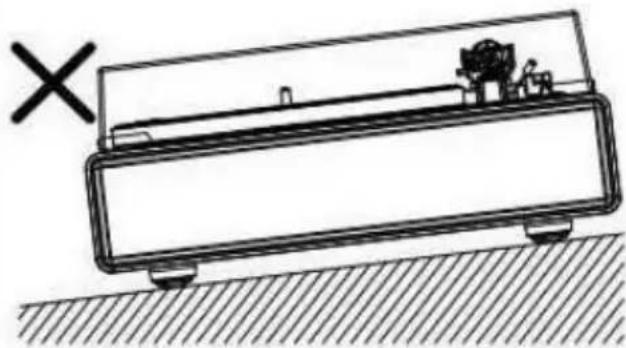
natural_image
Simple line drawing of a mechanical device with a cross mark and a small object on top, resting on a hatched ground surface (no text or symbols)Установка крышки
natural_image
Technical diagram showing mechanical assembly with two components and downward arrows indicating force or movement (no text or symbols)natural_image
Technical line drawing of a circular mechanical component with radial slots and a side-view inset showing internal structure (no text or symbols)natural_image
Line drawing of a hand holding a tool with an arrow pointing to a circular component (no text or symbols)Вращение диска
natural_image
Technical line drawing of a mechanical component with no visible text or symbols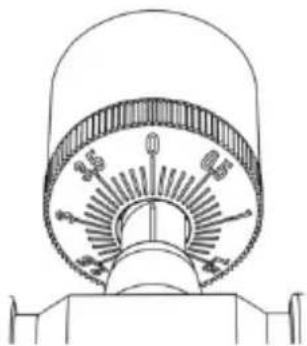
natural_image
Technical line drawing of a mechanical component with no visible text or symbolsnatural_image
Illustration of a robotic arm holding a tool, with an inset showing a dial gauge (no text or symbols present)natural_image
Line drawing of a vintage typewriter with a circular dial and external circuitry (no text or symbols)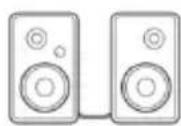
text_image
PHONO L R AUX L Rtext_image
CAREFUL! Onatural_image
Line drawing of a scientific instrument with a circular component and mechanical base (no text or symbols)text_image
Technical diagram showing two mechanical components with directional arrows and a cross symbol, likely illustrating a mechanical or electrical assembly.Замена иглы
natural_image
Diagram of a mechanical lever mechanism with orange arrows indicating motion or force direction (no text or symbols)natural_image
Diagram of a mechanical device with an orange arrow pointing to a yellow box (no text or symbols present)natural_image
Diagram of a mechanical clamp or lever mechanism with an orange block and curved arrow indicating motion (no text or symbols)natural_image
Mechanical lever mechanism with green checkmark and orange base (no text or symbols)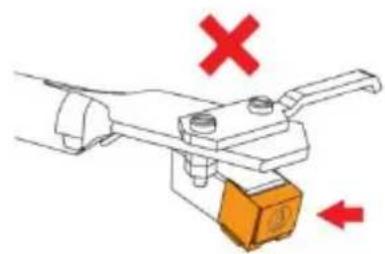
natural_image
Diagram of a mechanical lever mechanism with red X and downward arrow indicating force or movement (no text or symbols)Замена ремня
natural_image
Line drawing of a vintage rotary disc with an arrow indicating upward motion (no text or symbols)natural_image
Line drawing of a hand using a tool to press down a circular component on a CD or DVD stand, with an inset showing the internal mechanism (no text or symbols present)natural_image
Line drawing of a vintage rotary disc mounted on a base with a pointer indicating upward motion (no text or symbols)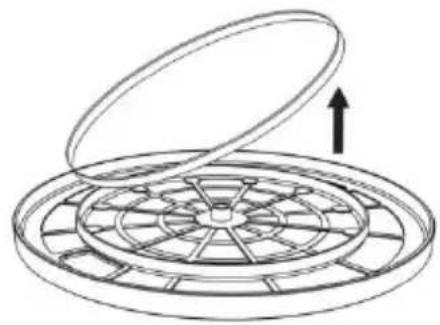
natural_image
Diagram of a circular mechanical component with an open lid and internal blades, showing an upward arrow (no text or symbols)natural_image
Technical line drawing of a circular mechanical component with radial slots and a side-view inset showing internal structure (no text or symbols)5. Прикрепите диск.
natural_image
Technical line drawing of a mechanical device with a circular top component and a base plate, showing no text or symbols.natural_image
Line drawing of a hand using a tool to clean or adjust a circular component on an induction cooktop (no text or symbols)natural_image
Symbol of a trash bin crossed with two diagonal lines, representing no waste or discharge (no text or labels)
natural_image
Empty white square with black border (no text or symbols)text_image
Technical diagram of a vintage radio receiver with numbered components and labeled partsnatural_image
Technical line drawing of a mechanical device with a checkmark indicating a detail (no text or symbols present)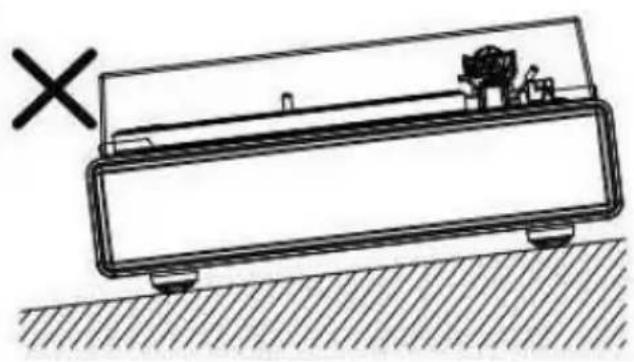
natural_image
Simple line drawing of a mechanical device with a cross mark and hatched ground, no text or symbols present.Installation af låg
natural_image
Technical diagram showing mechanical assembly with two components and downward arrows indicating force or movement (no text or symbols)natural_image
Technical line drawing of a circular mechanical component with radial slots and a side-view inset showing internal structure (no text or symbols)text_image
Hook Motor pulley Belt Straight Twisted Wrong location| EN | DA |
| Hook | Krog |
| Motor pulley | Motorremskive |
| Belt | Rem |
| Straight | Lige ud |
| Twisted | Snoet |
| Wrong location | Forkert placering |
natural_image
Line drawing of a hand holding a tool with an arrow indicating direction, next to a circular object (no text or symbols)text_image
Figure 1 10x Figure 2text_image
Counterweight Tracking Force Dial Center Line| EN | DA |
| Counterweight | Kontravæ gt |
| Tracking Force Dial | Drejeknap til nåletryk |
| Center Line | Midterlinje |
text_image
Tonearm Counterweight Adjust so that tonearm is level and neutrally balanced| EN | DA |
| Tonearm | Tonearm |
| Counterweight | Kontravæ gt |
| Adjust so that tonearm is level and neutrally balanced | Justér, indtil tonearmen er i niveau og i balance |
natural_image
Technical line drawings of two mechanical components with rotating arms and shafts (no text or symbols)text_image
RCA wired connection Active Speakers or Amplifiernatural_image
Line drawing of a scientific instrument with a circular component and a pointer, no text or symbols presenttext_image
Diagram showing electrical component symbols with arrows indicating direction and a cross symbol, likely illustrating a circuit or signal setup.Udskiftning af nål
natural_image
Diagram of a mechanical clamp or lever mechanism with orange arrows indicating motion (no text or symbols)Montering af ny nål
natural_image
Simple line drawing of a mechanical device with an orange arrow pointing to a box (no text or symbols)Engage in body first
natural_image
Illustration of a hand using a tool to lift a vehicle, with an orange block and curved arrow indicating motion (no text or symbols)natural_image
Diagram of a mechanical lever with green checkmark and orange base (no text or symbols)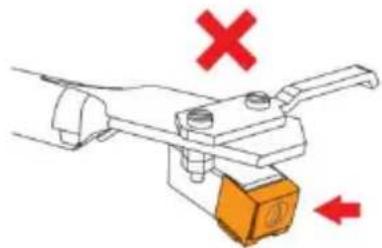
natural_image
Mechanical clamp or lever mechanism with red X and downward arrow, no text or symbols presentUdskiftning af rem
natural_image
Line drawing of a vintage rotary disc with an open base and mechanical device, no text or symbols presentnatural_image
Line drawing of a hand using a tool to clean or inspect a circular object on a flatbed machine (no text or symbols)natural_image
Diagram of a vintage rotary disc mounted on a base with a smartphone and compass (no text or symbols)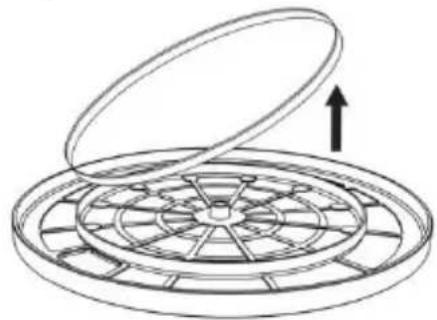
natural_image
Diagram of a circular mechanical component with an open lid and internal blades, showing an upward arrow (no text or symbols)natural_image
Technical line drawing of a circular mechanical component with radial slots and a cross-sectional view (no text or symbols)natural_image
Technical line drawing of a mechanical device with a circular component and a base plate, showing no text or symbols.natural_image
Line drawing of a hand using a tool to clean or inspect the interior of a kitchen appliance (no text or symbols visible)natural_image
Symbol of a trash bin with crossed lines indicating no waste or discharge, and a solid black rectangle below (no text or labels)text_image
Technical diagram of a circular device with numbered components, likely a scientific instrument or measurement setup.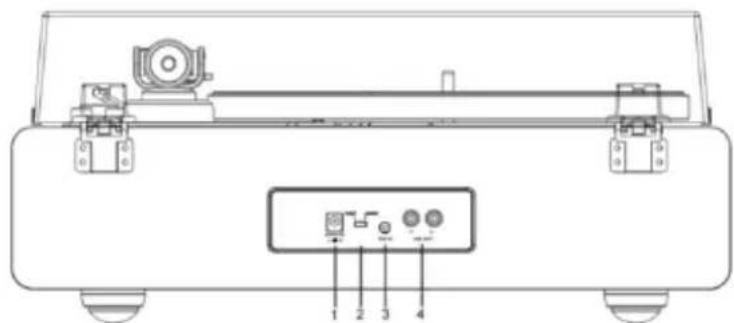
text_image
Technical diagram of a mechanical device with labeled components and portsnatural_image
Simple line drawing of a mechanical device with a checkmark and a small component, no text or symbols present.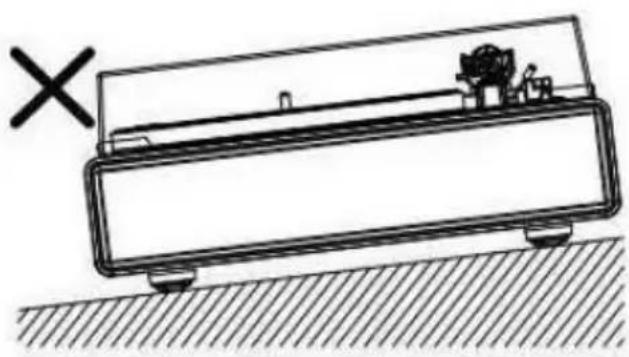
natural_image
Simple line drawing of a mechanical device with a cross mark and hatched ground, no text or symbols present.Montera locket
natural_image
Technical diagram showing mechanical assembly with two components and downward arrows indicating force or movement (no text or symbols)natural_image
Technical line drawing of a circular mechanical component with radial slots and a cross-sectional view (no text or symbols)text_image
Hook Motor pulley Belt Straight Twisted Wrong location| EN | SV |
| Hook | Hake |
| Motor pulley | Motorremskiva |
| Belt | Rem |
| Straight | Rak |
| Twisted | Vriden |
| Wrong location | Fel placering |
natural_image
Line drawing of a hand holding a tool with an arrow indicating direction, next to a circular object (no text or symbols)Rotera tallriken
text_image
Figure 1 10x Figure 2text_image
Counterweight Tracking Force Dial Center Linetext_image
Tonearm Counterweight Adjust so that tonearm is level and neutrally balancednatural_image
Technical line drawings of two mechanical components with rotating arms and shafts (no text or symbols)text_image
RCA wired connection Active Speakers or Amplifier| EN | SV |
| RCA wired connection | Anslutning med RCA-kabel |
| Active Speakers | Aktiva högtalare |
| or | eller |
| Amplifier | Förstärkare |
flowchart
graph TD
    A["With PHONO"] --> B["Device with antenna"]
    C["Without PHONO"] --> D["Device with antenna"]
    B --> E["Connectable equipment (Amplifier, etc.)"]
    D --> E
    E --> F["With PHONO"]
    E --> G["Without PHONO"]
    H["PHONO LINE"] --> I["Device with antenna"]
    J["PHONO LINE"] --> K["Device with antenna"]
    L["To outlet"] --> M["Device with antenna"]
    N["To outlet"] --> O["Device with antenna"]
    P["AUX L"] --> Q["Device with antenna"]
    R["AUX R"] --> S["Device with antenna"]
| EN | SV |
| With PHONO | Med PHONO |
| Without PHONO | Utan PHONO |
| PHONO | PHONO |
| LINE | LINE |
| TO outlet | TILL utgång |
| Connectable equipment (Amplifier, etc.) | Anslutningsbar utrustning (förstärkare osv.) |
| To outlet | TILL utgång |
| With PHONO | Med PHONO |
| Without PHONO | Utan PHONO |
| PHONO | PHONO |
| AUX | AUX |
Strömanslutning
natural_image
Line drawing of a scientific instrument with a circular dial and surrounding components (no text or symbols)text_image
Technical diagram showing mechanical components with directional arrows and symbols, including a circle and cross mark.Byta ut nälen
natural_image
Diagram of a mechanical clamp or clamp mechanism with orange arrows indicating motion (no text or symbols)natural_image
Simple line drawing of a mechanical device with an orange arrow pointing to a box (no text or symbols)Engage in body first
natural_image
Illustration of a hand using a tool to lift or lift an orange block, with no visible text or symbolsnatural_image
Mechanical lever mechanism diagram with green checkmark and orange base (no text or symbols)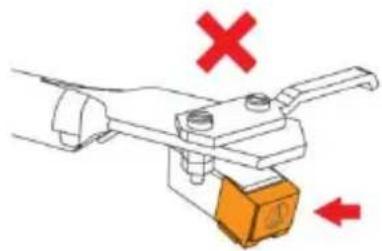
natural_image
Mechanical clamp or lever mechanism with red X and downward arrow indicators (no text or symbols)Byta ut remmen
natural_image
Line drawing of a CD or DVD disc with an open case and mechanical device, no text or symbols presentnatural_image
Line drawing of a hand using a tool to press a circular component on a CD or DVD stand, with an inset showing a close-up of the device (no text or symbols present)natural_image
Line drawing of a vintage rotary disc mounted on a base with an arrow indicating upward motion (no text or symbols)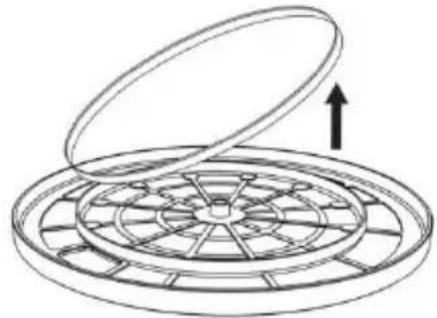
natural_image
Diagram of a circular mechanical component with an open lid and internal blades, showing an upward arrow (no text or symbols)natural_image
Technical line drawing of a circular mechanical component with radial slots and a side-view inset showing internal structure (no text or symbols)- Montera tallriken.
natural_image
Technical line drawing of a mechanical device with a circular top component and a base plate, showing no text or symbols.natural_image
Line drawing of a hand using a tool to clean or inspect the interior of a stovetop (no text or symbols present)natural_image
Symbol of a trash bin with crossed lines indicating no waste or discharge, and a solid black rectangle below (no text or labels)text_image
Technical diagram of a circular device with numbered components, likely a scientific instrument or measurement setup.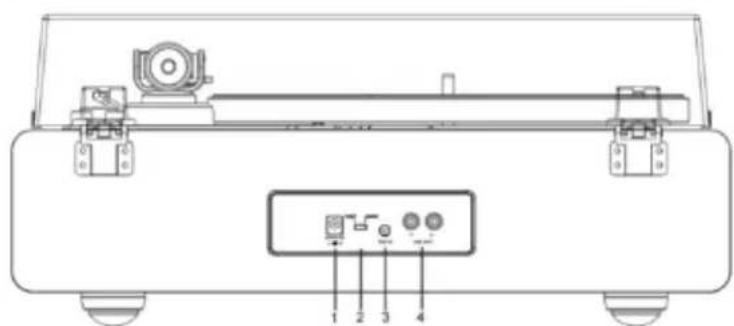
text_image
Technical diagram of a mechanical device with labeled components and portsnatural_image
Technical line drawing of a mechanical device with a checkmark indicating a detail (no text or symbols present)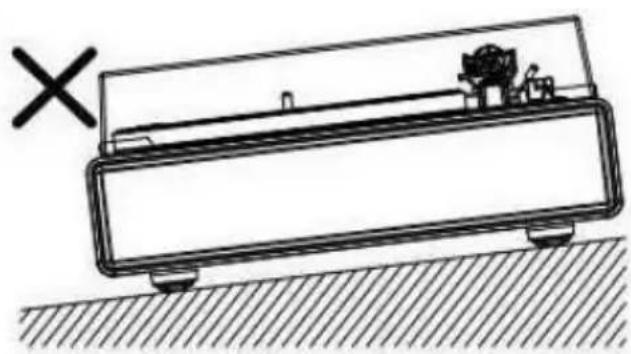
natural_image
Simple line drawing of a mechanical device with a cross mark and hatched ground, no text or symbols present.Kannen asentaminen
natural_image
Technical diagram showing mechanical assembly with two components and downward arrows indicating force or movement (no text or symbols)natural_image
Technical line drawing of a circular mechanical component with radial slots and a side-view inset showing internal structure (no text or symbols)text_image
Hook Motor pulley Belt Straight Twisted Wrong locationnatural_image
Line drawing of a hand holding a tool over a circular object with an arrow indicating direction (no text or symbols)text_image
Figure 1 10x Figure 2text_image
Counterweight Tracking Force Dial Center Linetext_image
Tonearm Counterweight Adjust so that tonearm is level and neutrally balancednatural_image
Technical line drawing of a mechanical component with no visible text or symbols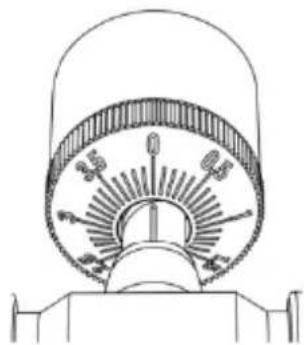
natural_image
Technical line drawing of a mechanical component with no visible text or symbolstext_image
RCA wired connection Active Speakers or Amplifierflowchart
graph TD
    A["With PHONO"] --> B["Device with antenna"]
    C["Without PHONO"] --> D["Device with antenna"]
    B --> E["Connectable equipment (Amplifier, etc.)"]
    D --> E
    E --> F["With PHONO"]
    E --> G["Without PHONO"]
    H["PHONO LINE"] --> I["Device with antenna"]
    J["PHONO LINE"] --> K["Device with antenna"]
    L["To outlet"] --> M["Device with antenna"]
    N["To outlet"] --> O["Device with antenna"]
    P["PHONO L"] --> Q["Device with antenna"]
    R["AUX L"] --> S["Device with antenna"]
natural_image
Line drawing of a vintage typewriter with a circular dial and mechanical device (no text or symbols)text_image
Technical diagram showing two mechanical or electrical component configurations with directional arrows and a cross symbol indicating a warning or failure.Neulan vaihto
natural_image
Diagram of a mechanical clamp or lever mechanism with orange arrows indicating motion (no text or symbols)natural_image
Simple line drawing of a mechanical device with an orange arrow pointing to a component (no text or symbols)Engage in body first
| EN | FI |
| Engage in body first | Kytke ensin koteloon |
natural_image
Diagram of a mechanical clamp or lever mechanism with orange components and an arrow indicating motion (no text or symbols)natural_image
Diagram of a mechanical lever with green checkmark and orange base (no text or symbols)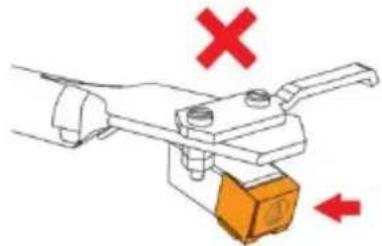
natural_image
Diagram of a mechanical clamp or lever mechanism with red X and downward arrow indicators (no text or symbols)Hihnan vaihto
natural_image
Line drawing of a CD or DVD disc with an open box and mechanical device, no text or symbols presentnatural_image
Line drawing of a hand using a tool to clean or inspect the disc, with an inset showing a close-up of the device (no text or symbols present)natural_image
Line drawing of a vintage rotary disc mounted on a base with an arrow indicating upward motion (no text or symbols)