
TY-EW3D3SE - TV Accessories PANASONIC - Free user manual and instructions
Find the device manual for free TY-EW3D3SE PANASONIC in PDF.



| Product Type | Active 3D Glasses |
| Brand | Panasonic |
| Model | TY-EW3D3SE |
| Category | TV Accessories |
| Dimensions (W x H x D) | 160.5 x 42.2 x 167.6 mm |
| Weight | Approximately 26 g |
| Power Supply | DC 5 V via USB port of Panasonic TV |
| Battery Type | Rechargeable lithium-ion polymer, 3.7 V, 40 mAh |
| Battery Life | Approximately 25 hours |
| Charging Time | Approximately 30 minutes (quick charge: 2 minutes for 3 hours of use) |
| Main Functions | 3D viewing, 3D/2D switching, infrared reception |
| Care and Cleaning | Soft, dry cloth; do not use benzene, thinner, or wax |
| Safety | Do not expose to heat, do not disassemble, do not use as sunglasses, observe viewing distances |
| Included Parts | Charging cable (K2KYYYY00164) |
| Repairability | Removable battery for disposal only; do not repair yourself |
| Compatibility | Compatible Panasonic 3D TVs |
| Operating Temperature | 0 °C to 40 °C |
| Infrared Reception Range | Up to 3.2 m from front surface, ±35° horizontal, ±20° vertical |
| Warranty | Panasonic European Warranty (see terms) |
Frequently Asked Questions - TY-EW3D3SE PANASONIC
User questions about TY-EW3D3SE PANASONIC
0 question about this device. Answer the ones you know or ask your own.
Ask a new question about this device
Download the instructions for your TV Accessories in PDF format for free! Find your manual TY-EW3D3SE - PANASONIC and take your electronic device back in hand. On this page are published all the documents necessary for the use of your device. TY-EW3D3SE by PANASONIC.
USER MANUAL TY-EW3D3SE PANASONIC
Operating Instructions
3D Eyewear
Model No.
TY-EW3D3LE TY-EW3D3ME TY-EW3D3SE
ENGLISH
DANSK
NEDERLANDS
FRANÇAIS
DEUTSCH
ITALIANO
ΚΑΖΑΚ
PORTUGUÊS
РУССКИЙ
ESPAÑOL
SVENSKA
UKRAINIAN
GUARANTEE
GUARANTEE CERTIFICATE
Thank you for purchasing a Panasonic product.
- Before using this product, be sure to read "Safety Precautions" and "Using Precautions" (pages 2 - 5).
- Before operating this product, please read the instructions carefully, and save this manual for future use.
This 3D Eyewear can be used for Panasonic HDTVs supporting 3D.
For the latest information on applicable models, visit our web site.
http://panasonic.net/
This product cannot and must not be used as sunglasses.
Safety Precautions
Danger
About Prohibition of Heating
■ Do not put 3D Eyewear in fire, heat it or leave it in places that can get hot. ■ 3D Eyewear contains a lithium-ion polymer rechargeable battery, so heating may result in combustion or rupture that may cause burns or fire.
Warning
Disassembly
■ Do not disassemble or modify the 3D Eyewear. ■ When disposing this product, refer to "Disposal" (page 8) and disassemble properly for removing the rechargeable battery.
About Charging
■ Charge by connecting the included charging cable to the USB terminal of a Panasonic TV supporting 3D. Charging with other devices may result in battery leakage, heating or rupture. ■ Do not use the included charging cable for uses other than charging 3D Eyewear.
Caution
About 3D Eyewear
■ Do not drop, exert pressure on, or step on the 3D Eyewear. ■ Be careful of the tips of the frame when putting on the 3D Eyewear. ■ Always keep the 3D Eyewear in a cool, dry place. ■ Be careful not to trap a finger in the hinge section of the 3D Eyewear. ■ Pay special attention when children are using this product.
Viewing 3D Content
■ Do not use the 3D Eyewear if you have a history of over-sensitivity to light, heart problems, or have any other existing medical conditions. ■ Stop using the 3D Eyewear immediately if you feel tired, discomfort, or any other uncomfortable sensation. ■ Take an appropriate break after viewing a 3D movie. ■ Take a break of between 30 - 60 minutes after viewing 3D content on interactive devices such as 3D games or computers. ■ Be careful not to strike the television screen or other people unintentionally. When using the 3D Eyewear the distance between the user and screen can be misjudged. ■ The 3D Eyewear must only be worn when viewing 3D content. ■ Do not tilt your head and/or the 3D Eyewear while viewing 3D image. Keep your eyes and the 3D Eyewear are on a horizontal level to the television. ■ If you suffer from any eyesight problems (short/far-sighted, astigmatism, eyesight differences in left and right), please ensure to correct your vision before using the 3D Eyewear. ■ Stop using the 3D Eyewear if you can clearly see double images when viewing 3D content.
■ Do not use the 3D Eyewear at a distance less than the recommended distance.
The recommended viewing distance is at least 3 times of image height.
■ When the top and bottom area of the screen is blackened, such as movies, view the screen at a distance at least 3 times of the height of the actual image.
(That makes the distance closer than above recommended figure.)
3D Eyewear Use
■ 3D Eyewear should not be used by children younger than 5-6 years old, as a guideline. ■ All children must be fully supervised by parents or guardians who must ensure their safety and health throughout the use of 3D Eyewear. ■ Before using the 3D Eyewear, ensure no breakable objects surround the user to avoid any accidental damage or injury. ■ Remove the 3D Eyewear before moving around to avoid falling or accidental injury. ■ Use the 3D Eyewear only for the intended purpose and nothing else. ■ Do not use if the 3D Eyewear is physically damaged. ■ Stop using the 3D Eyewear immediately if a malfunction or fault occurs. ■ Stop using the 3D Eyewear immediately if you experience any redness, pain, or skin irritation around the nose or temples. In rare cases, the materials used in the 3D Eyewear may cause an allergic reaction.
Using Precautions
■ Do not drop or bend the 3D Eyewear. ■ Do not apply pressure to or scratch the surface of the liquid crystal shutter of the 3D Eyewear. ■ Do not soil the infra-red receiver section or attach stickers etc. to it. ■ Do not use devices (such as mobile phones or personal transceivers) that emit strong electromagnetic waves near the 3D Eyewear as this may cause the 3D Eyewear to malfunction. ■ Do not use 3D Eyewear outside the specified usage temperature range (☐ page 13). ■ If the room is lit by fluorescent lights (50 Hz) and light appears to flicker when using the 3D Eyewear, switch off the fluorescent light. ■ 3D content will not be correctly visible if the 3D Eyewear is worn upside down or back-to-front. ■ Do not wear the 3D Eyewear when watching anything other than 3D images. Other kinds of displays (such as computer screens, digital clocks, or calculators etc.) may be difficult to see while wearing the 3D Eyewear.
Accessories
Charging cable ....../<1> (K2KYYYY00164)
- < > indicates the quantity.
Identifying Controls
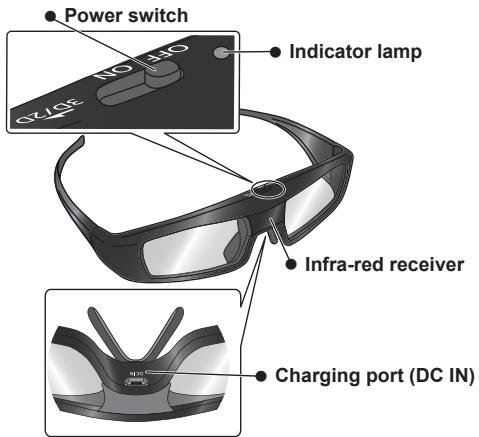
● Power switch
ON/OFF
Slide the tab to the ON/OFF position to switch the power on/off.
3D/2D
Slide the tab once to the 3D/2D position to change the mode between 3D and 2D.
• 2D: View a 3D image in 2D.
- Indicator lamp
Lights or flashes during use or charging to show the status of the rechargeable battery.
- Infra-red receiver
Receives infra-red signals from the television.
- Do not soil the infra-red receiver section or attach stickers etc. to it.
- Charging port
Connect the charging cable.
- Charge by connecting the included charging cable.
■ Indicator lamp status
| Indicator lamp | Status |
| Lights for 2 seconds when turned on | Sufficient battery level |
| Flashes 5 times when turned on | Low battery level |
| Flashes once every 2 seconds when in use | 3D mode is selected. |
| Flashes twice every 4 seconds when in use | 2D mode is selected. |
Charging
■ Charging the 3D Eyewear
Connect the 3D Eyewear with the included charging cable to the television, then switch on the television.
- When the indicator lamp turns off, charging is complete. Approximately 30 minutes required.
NOTE
- Charge the 3D Eyewear before using the first time after purchase or after long periods of disuse.
- Be sure to turn the television power on when charging. The battery will not be charged when the television power is off.
Storage and Cleaning
- Clean using a soft, dry cloth.
- Wiping the 3D Eyewear with a soft cloth that is covered in dust or dirt may scratch the eyewear. Shake off any dust from the cloth before use.
- Do not use benzene, thinner, or wax on the 3D Eyewear, as doing so may cause the paint to peel off.
- Do not dunk the 3D Eyewear in liquid such as water when cleaning.
- Avoid storing the 3D Eyewear in hot or highly humid locations.
- During the long period of disuse, full charge the 3D Eyewear once every 6 months to keep the battery performance.
- As the liquid crystal shutters (lens) are fragile and easily broken, be very careful when cleaning them.
Disposal
A lithium-ion polymer rechargeable battery is built in to the 3D Eyewear. Please discard according to local regulations.
When disposing this product, disassemble properly by following the procedure on the next page, and remove the internal rechargeable battery.

Do not disassemble this product except when disposing of it.
Danger
As the rechargeable battery is specifically for this product, do not use it for any other device.
Do not charge the removed battery.
- Do not throw the battery in a fire, or apply heat to it.
- Do not pierce the battery with a nail, subject it to an impact, or dismantle or modify it.
- Do not let the wires touch any other metal or each other.
- Do not carry or store the battery with a necklace, hair pin, or the like.
- Do not charge, use, or leave the battery in a hot location such as near a fire or under the hot sun.
Doing so may cause the battery to generate heat, ignite, or rupture.
Warning
Do not place the removed battery, screws, and other items within reach of infants.
Accidental swallowing of such an item may have an adverse effect on the body.
- In the event that you think such an item has been swallowed, consult a doctor immediately.
In the event of fluid leaking from the battery, take the following measure, and do not touch the fluid with bare hands.
Fluid entering into an eye may cause loss of eyesight.
- Wash the eye with water immediately without rubbing it, and then consult a doctor.
Fluid getting on your body or clothes may cause inflammation of the skin or injury.
- Sufficiently rinse with clean water, and then consult a doctor.
■ How to remove the battery
Disassemble this product after the battery has run out of power.
The following figures are intended to explain how to dispose of the product, not for describing how to repair.
The product cannot be repaired once it has been disassembled.
- Remove the screws of the 3D Eyewear with a precision Phillips (plus ⊕) screwdriver.
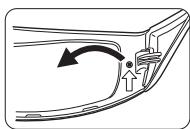
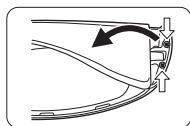
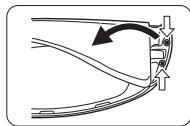
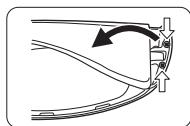
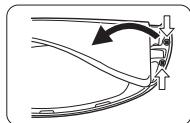
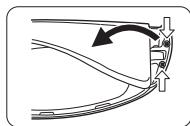
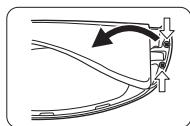
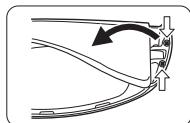
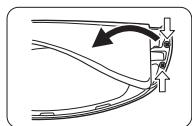
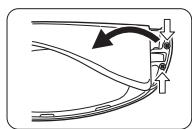
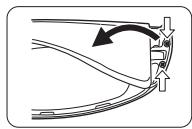
- Bend the frame inwards and pull it off from the side cover.
- If it is difficult to pull off, insert a flat-blade (minus ⏻) screwdriver and pry open it.
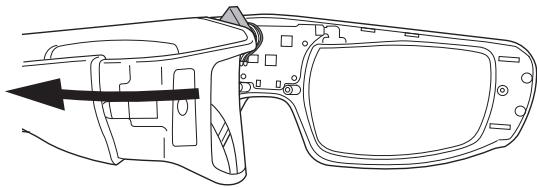
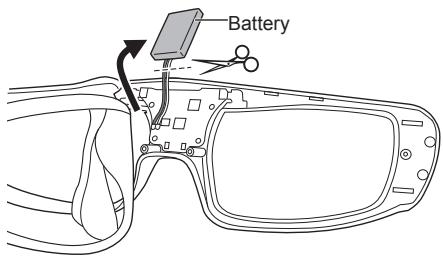
- Pull off the battery and separate it from the 3D Eyewear by cutting off the wires, one by one, with scissors.
- Insulate the wire parts of the removed battery with cellophane tape.
NOTE
• Take sufficient care when performing this work so as not to injure yourself. - Do not damage or dismantle the battery.
Troubleshooting/Q&A
Check the followings first. If they do not solve the problem, please contact the place of purchase.
Images are not 3D.
▶ Is the 3D Eyewear mode set to 3D? Slide the tab once to the 3D/2D position to change the mode between 3D and 2D. ▶ Are the image settings switched to 3D images? Refer the television operating instructions and. ▶ Is there a sticker or other such item blocking the infrared reception section on the 3D Eyewear? If the eyewear stops receiving infra-red signal from the television, the power automatically switches off after 5 minutes. ▶ Individual differences may occur in which the 3D images are difficult to see, or cannot be seen, especially in users that have a different level of eyesight between the left and right eyes. Take the necessary steps (wearing glasses etc.) to correct your eyesight before use.
The power of the 3D Eyewear turns off by itself.
Are there any objects between the eyewear and television? Is there a sticker or other such item blocking the infrared reception section on the 3D Eyewear? If the eyewear stops receiving infrared signal from the television, the power automatically switches off after 5 minutes.
The indicator lamp does not light when the power switch is set to "ON".
Is the 3D Eyewear sufficiently charged?
If the indicator lamp does not light at all, the battery is completely flat. Perform the battery charging operation.
The battery does not charge, or operation time is short when charged.
Is the charging cable connected properly?
Make sure the charging cable is properly connected.
Is the television power off?
Switch the television power on, then charging will start.
The battery has reached the end of its lifespan.
If operation time is very short even when the battery is charged, the battery has reached the end of its lifespan. Please consult with the place of purchase.
Specifications
Usage temperature range
0°C - 40°C (32°F - 104°F)
Charging power supply
DC 5 V (supplied by USB terminal of a Panasonic TV)
Battery
Lithium-ion polymer rechargeable battery
DC 3.7 V, 40 mAh
Operation time *1* : Approx. 25 hours
Charging time *1* : Approx. 30 minutes
Quick charge (2 minutes charge enables approx. 3 hours use)
Viewing range *2*
Transmitter for 3D Eyewear
Within 3.2 m from front surface
(Within ± 35° horizontal, ± 20° vertical)
Materials
Main body: Resin
Lens section: Liquid crystal glass
Dimensions (not including nose pad part)
| Models | TY-EW3D3LE | TY-EW3D3ME | TY-EW3D3SE |
| Width | 170,6 mm | 167,7 mm | 160,5 mm |
| Height | 42,2 mm | 42,2 mm | 42,2 mm |
| Overall length | 170,7 mm | 170,7 mm | 167,6 mm |
| Mass | Approx. 27 g | Approx. 26 g | Approx. 26 g |
*1 Operation time/Charging time
- The battery deteriorates after repeated use, and the operation time eventually becomes short. The figures above are at shipping from the factory, and are not a guarantee of performance.
*2 Viewing range
- The location of the 3D Eyewear transmitter differs depending on the model of television.
- There are differences in the viewing range of the 3D Eyewear among individuals.
- The 3D Eyewear may not operate correctly at the outside of the viewing range.
Information on Disposal for Users of Waste Electrical & Electronic Equipment (private households)

This symbol on the products and/or accompanying documents means that used electrical and electronic products should not be mixed with general household waste. Please dispose of this item only in designated national waste electronic collection schemes, and not in the ordinary dust bin.
For business users in the European Union
If you wish to discard electrical and electronic equipment, please contact your dealer or supplier for further information.
Information on Disposal in other Countries outside the European Union
This symbol is only valid in the European Union.
If you wish to discard this product, please contact your local authorities or dealer and ask for the correct method of disposal.
Pursuant to the directive 2004/108/EC, article 9(2)
Panasonic Testing Centre
Panasonic Service Europe, a division of Panasonic Marketing Europe GmbH
Winsbergring 15, 22525 Hamburg, F.R. Germany
Panasonic Corporation
Web Site : http://panasonic.net/
© Panasonic Corporation 2011
Do not disassemble the product except for disposal.
Danger
Panasonic Testing Centre
Panasonic Service Europe, a division of Panasonic
© Panasonic Corporation 2011
Panasonic Testing Centre
© Panasonic Corporation 2011
User Manual
3D Glasses
Model No.
TY-EW3D3LE TY-EW3D3ME TY-EW3D3SE
Panasonic Testing Centre
© Panasonic Corporation 2011
Operating Instructions
3D Eyewear
Model No.
TY-EW3D3LE TY-EW3D3ME TY-EW3D3SE
Panasonic Testing Centre
© Panasonic Corporation 2011
Operating Instructions
3D Eyewear
Model No.
TY-EW3D3LE TY-EW3D3ME TY-EW3D3SE
Pursuant to the directive 2004/108/EC, article 9(2)
Panasonic Testing Centre
Panasonic Service Europe, a division of Panasonic Marketing Europe GmbH
Winsbergring 15, 22525 Hamburg, F.R. Germany
Panasonic Corporation
Web Site : http://panasonic.net/
© Panasonic Corporation 2011

Disassemble this product after the battery has run out of power.
Transmitter for 3D Eyewear
Within 3,2 m from front surface
(Within ± 35° horizontal, ± 20° vertical)
Materials
Pursuant to the directive 2004/108/EC, article 9(2)
Panasonic Testing Centre
Panasonic Service Europe, a division of Panasonic
Winsbergring 15, 22525 Hamburg, F.R. Germany
Panasonic Corporation
Web Site: http://panasonic.net/
© Panasonic Corporation 2011
© Panasonic Corporation 2011
(Up to ±35° horizontal, ±20° vertical)
Materials
Panasonic Testing Centre
© Panasonic Corporation 2011
Panasonic Testing Centre
Panasonic Service Europe, a division of Panasonic
© Panasonic Corporation 2011
© Panasonic Corporation 2011
PANEUROPEAN
GUARANTEE
3D Eyewear
Communication Camera


Caution: Please retain your sales receipt.
The Panasonic Pan European Guarantee applies to your product. You may obtain a copy of the guarantee from:
- the dealer where you purchased your product
- Website : www.panasonic.co.uk/euguarantee
- Panasonic Customer Communications Centre: UK - 0844 844 3852 / Ireland - 01 289 8333
The Panasonic Pan European Guarantee applies to your product. You may obtain a copy of the guarantee from :
- the dealer where you purchased your product
- Website : www.digitalplanet.com.mt
- Panasonic Customer Call Center : +356 21 24 1127 or +356 27 24 1127
- Email: support@digitalplanet.com.mt
CY KYΠΡΟΣ
Panasonic Marketing Europe GmbH. - South-East Europe Branch Office –
PME-SEE Branch Office
Panasonic predstavništvo Beograd
Bulevar despota Stefana 41, 11000 Beograd/Srbija
Tel: +381 11 33 40 124
+381 11 33 44 091
e-mail: pbo@panasonic.rs
www.panasonic.rs
BIH BOSNIA AND HERZEGOVINA
The undersigned importer/distributor guarantees the correctness of this product and servicing in Panasonic authorized service centers, listed in the attached list, for a period of:
- Two (2) years for all products from the consumer electronics product portfolio (such as digital cameras, digital camcorders, LCD and plasma screens, home theaters, Hi-Fi devices, small household appliances, and personal care products).
- Two (2) years for all products from the white goods portfolio (refrigerators and washing machines), except for refrigerator compressors, for which there is an additional 3-year warranty for the part itself.
- Warranties for air conditioners are provided by authorized importers of these Panasonic products; the warranty period may vary based on the offer and agreed maintenance modalities.
The above-mentioned warranty period is in effect from the date of purchase of the device and guarantees free parts and service technician labor under the following conditions:
(1) The product must be delivered to a service center (or reception point) authorized by PSEE for performing service within the warranty period, along with this warranty card and the original receipt. At the time of purchase, it is mandatory to fill in the warranty card correctly and completely and have it confirmed. Otherwise, the warranty will not be valid. (2) The warranty does not cover the following cases: (a) Accidents or damage caused by improper handling during and at the time of delivery. (b) Malfunction or damage caused by improper handling of the product, customer negligence, use of the product for purposes other than those described in the instructions, or if the product is used for commercial, professional, industrial, or similar purposes, e.g., DVD recorders and video recorders for mass copying, microwave ovens in catering establishments, etc. (c) Malfunction or damage caused by fire, earthquake, flood, storm, and other natural phenomena, improper voltage, war, riots (revolution, rebellion, etc.), unforeseeable accidents, or other external factors. (d) If the product has been modified, repaired, or adapted by an unauthorized person.
Also, if the product has been installed, modified, or used in a manner not in accordance with the technical specifications and/or safety precautions.
PME - SEE Branch Office
Representative Office in Bosnia and Herzegovina
Zmaja od Bosne 4,
71000 Sarajevo
Bosnia and Herzegovina
Tel: +387 33 288 921
Fax: +387 33 288 921
E-mail: info@panasonic.ba
E-mail: customercare@panasonic.ba
MK MACEDONIA
© Panasonic Corporation 2010
Printed in China
S0511-2061
- OPERATING INSTRUCTIONS
- D EYEWEAR
- TY-EW3D3LE TY-EW3D3ME TY-EW3D3SE
- THANK YOU FOR PURCHASING A PANASONIC PRODUCT
- THIS PRODUCT CANNOT AND MUST NOT BE USED AS SUNGLASSES
- SAFETY PRECAUTIONS
- DANGER
- ABOUT PROHIBITION OF HEATING
- WARNING
- DISASSEMBLY
- ABOUT CHARGING
- CAUTION
- ABOUT 3D EYEWEAR
- VIEWING 3D CONTENT
- D EYEWEAR USE
- USING PRECAUTIONS
- ACCESSORIES
- IDENTIFYING CONTROLS
- ● POWER SWITCH
- ON/OFF
- D/2D
- INDICATOR LAMP
- INFRA-RED RECEIVER
- CHARGING PORT
- CHARGING
- CHARGING THE 3D EYEWEAR
- NOTE
- STORAGE AND CLEANING
- DISPOSAL
- AS THE RECHARGEABLE BATTERY IS SPECIFICALLY FOR THIS PRODUCT, DO NOT USE IT FOR ANY OTHER DEVICE
- HOW TO REMOVE THE BATTERY
- TROUBLESHOOTING/Q&A
- IMAGES ARE NOT 3D
- THE POWER OF THE 3D EYEWEAR TURNS OFF BY ITSELF
- THE INDICATOR LAMP DOES NOT LIGHT WHEN THE POWER SWITCH IS SET TO "ON
- THE BATTERY DOES NOT CHARGE, OR OPERATION TIME IS SHORT WHEN CHARGED
- SPECIFICATIONS
- USAGE TEMPERATURE RANGE
- CHARGING POWER SUPPLY
- BATTERY
- VIEWING RANGE
- MATERIALS
- INFORMATION ON DISPOSAL FOR USERS OF WASTE ELECTRICAL & ELECTRONIC EQUIPMENT (PRIVATE HOUSEHOLDS)
- FOR BUSINESS USERS IN THE EUROPEAN UNION
- INFORMATION ON DISPOSAL IN OTHER COUNTRIES OUTSIDE THE EUROPEAN UNION
- PANASONIC CORPORATION
- USER MANUAL
- D GLASSES
- MODEL NO
- PANEUROPEAN
- GUARANTEE
- COMMUNICATION CAMERA
- CY KYΠΡΟΣ
- PANASONIC MARKETING EUROPE GMBH. - SOUTH-EAST EUROPE BRANCH OFFICE
- PME-SEE BRANCH OFFICE
- BIH BOSNIA AND HERZEGOVINA
- PME - SEE BRANCH OFFICE
- MK MACEDONIA
Brand : PANASONIC
Model : TY-EW3D3SE
Category : TV Accessories