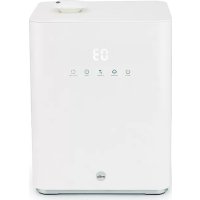
USER MANUAL Moist C HU430CW WILFA
IMPORTANT SAFETY INSTRUCTIONS
- Please follow all the safety precautions listed below for safety and to reduce the risk of injury or electrical shock.
- This humidifier can be used by children aged from 8 years and above and persons with reduced physical, sensory or mental capabilities or lack of experience and knowledge if they have been given supervision or instruction concerning use of the humidifier in a safe way and understand the hazards involved. Children shall not play with the humidifier. Cleaning and user maintenance shall not be made by children without supervision.
- Before using this humidifier ensures that the voltage of your electricity supply is the same as that indicated on the rating plate of the humidifier.
- Always place the humidifier on a hard, flat and level surface. Avoid exposure to direct sunlight and always keep it away from walls and heat sources such as stoves, radiators, etc. Warning: The humidifier may not work correctly if it is not placed on a level surface.
-
Do not insert or remove the electric plug on the humidifier with wet hands.
-
If the mains cable is damaged it must be replaced by the manufacturer, its service agent, or similarly qualified person in order to avoid a hazard.
- To reduce the risk of electric shock, do not remove screws. The humidifier does not contain any user-serviceable parts. Please leave all maintenance work to qualified personnel.
- Fill the tank with fresh, distilled or demineralized water. Do not drop any other liquid into water tank or water basin. Do not run the humidifier when there is no water in the tank or the water basin.
- Do not shake the humidifier as this might cause the water spill over into the base of humidifier.
- Never touch the water or components while the humidifier is in operation.
- If there is an unusual smell when it is being used as described in this manual, switch the humidifier off, unplug it and have it examined by your dealer.
- Do not pour hot water into the tank, i.e. at a temperature in excess of 40^ .
- Do not immerse the humidifier or the mains cable or plug in water or other liquids.
EN
- Never scrape the transducer with a hard tool. The humidifier must be cleaned regularly. To do this, refer to the cleaning instructions in this manual.
- If you spill any liquid into the humidifier, it can cause serious damage. Switch it off at the mains immediately. Withdraw the mains plug and consult your dealer.
- Disconnect the humidifier from the power supply when not in use and before cleaning.
- Ensure that the mains cable does not touch any hot surface and that it does not overhang a table edge.
- Never use this humidifier in a room where aerosol products (sprays) are used or in a room or where oxygen is being administered.
- Do not put items of clothing or towels on top of the humidifier. If the nozzle is obstructed, this may cause the humidifier to malfunction.
- When moving the humidifier, lift it by the base and not by the water tank.
-
Do not use the humidifier if the air in the room is already sufficiently humid.
-
The ideal relative humidity level for human comfort is in fact between 45% and 65% . Excess humidity shows up in the form of condensation on cold surfaces or cold walls in the room. To measure the room's humidity correctly, use a hygrometer available in most specialist shops and hypermarkets.
- This product is intended for indoor, non-industrial, non-commercial, household use only.
- Micro-organisms that may be present in the water or in the environment where the appliance is used or stored, can grow in the water reservoir and be blown in the air causing very serious health risks when the water is not renewed and the tank is not cleaned properly every 3 days.
- Keep the appliance out of reach of children. Steam and boiling water may cause burns.
- Never leave water in the reservoir when the appliance is not in use.
• Clean the water every three days.
EN
- Be aware that high humidity levels may encourage the growth of biological organisms in the environment.
- Do not permit the area around the humidifier to become damp or wet. If dampness occurs, turn the output of the humidifier down. If the humidifier output volume cannot be turned down, use the humidifier intermittently. Do not allow absorbent materials, such as carpeting, curtains, drapes, or tablecloths, to become damp.
- Unplug the appliance during filling and cleaning.
- Empty and clean the humidifier before storage. Clean the humidifier before next use.
PLACEMENT
- Place the product on firm, flat surface.
- The humidifier should be placed on flat horizontal surface and keep it steady.
- Do not place the product near or close to any heat sources.
- The humidifier should be far away from any heat sources, such as stoves or fire places. Do not expose the product to direct sunlight.
- Do not place the product near or close to furniture or electric appliances.
- The mist outlet from the humidifier should not be directed towards furniture and the electronic appliances, to avoid damage.
- Particles in water, such as calcium, can be part of the vapour and be deposited on objects in the vicinity.
- It is recommended that the unit be placed on a table or other surface at least 70~cm above the floor level, to ensure that the vapour will be optimally distributed throughout the room.
- Air draft and temperature changes can impact the distribution of the vapor. To avoid water damage it's recommended to always check for moist accumulations on the floor or other nearby surfaces.
EN
PRODUCT OVERVIEW
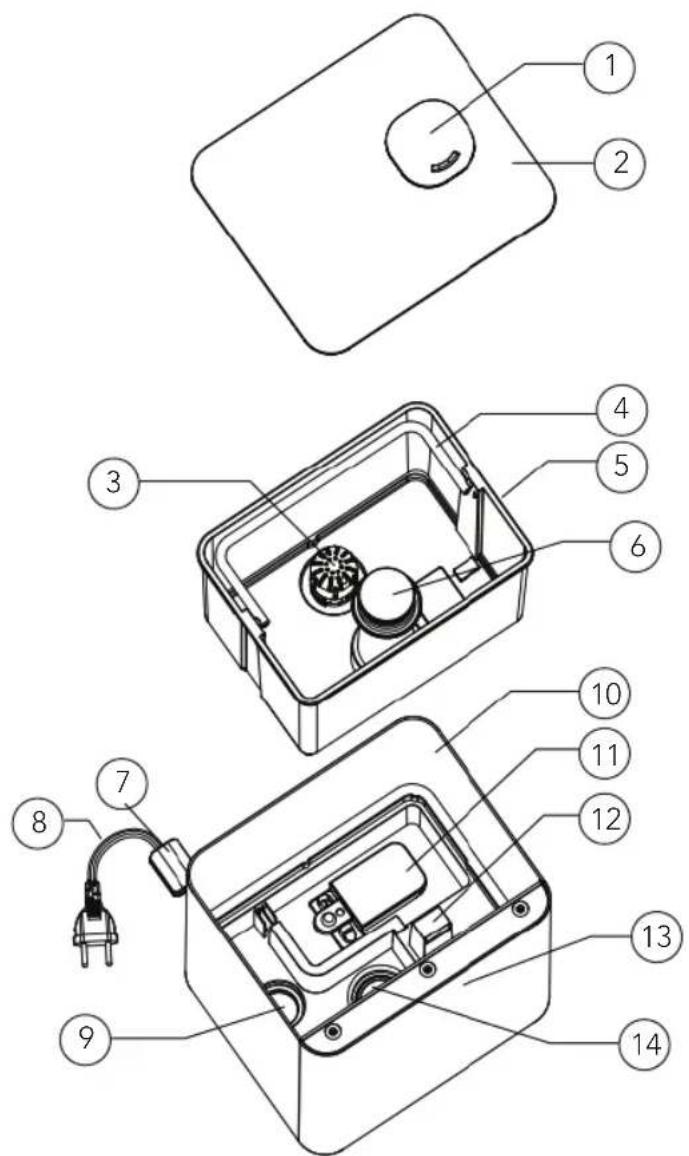
- Nozzle
- Top cover
- Filter
- Handle
- Water tank
- Mist block
-
Sensor
-
Power cord
- PTC Heating
- Outer cover
- Buoy
- Air outlet
- Control area
- Transducer
OVERVIEW - DISPLAY
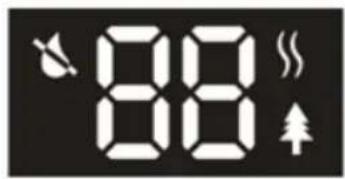
OVERVIEW - CONTROL PANEL

ON/OFF

MAX/MIN

HUMID[*]

TIMER

HEAT/IONS
BEFOREUSE
- Put the humidifier in the room 30 minutes before starting it.
- It is recommended to use the humidifier when the temperature is under 20^ , and the relative humidity is less than 80% RH .
- Use clear water not over 40^ .
- Check the water basin, make sure it is clear.
- Place the humidifier on a flat surface.
USE
- Remove the top cover, fill water into the water tank, and put the top cover back. Or take the water tank out, fill it with water, and put the water tank back into the main base.
- Check if the rated voltage meets the input voltage and plug into the socket. The display will light up and the buzzer ring for once. 1 second later, display turns off and the humidifier is in standby mode.
- Press the Power button and the humidifier starts in mist output level 2. The display shows current humidity and then changes to show mist output level 2 after 15 seconds. 1 Minute later, it turns back to show current humidity again and repeats circularly.
- Touch the MAX/MIN button, you can choose between 3 levels of mist output speeds. The corresponding digit will appear on the display. 1 - low, 2 - medium, and 3 - high. When current humidity shows on the display, touch once to check the current mist output level, and twice to select another mist output level.

EN
-
Constant humidity: Touch the Humidity button once to make the humidity increase by 5% RH for each time. When it reaches 90% RH , touch the button again and the display shows "Co". Without operation for 3 seconds, it exits humidity settings. After setting the preferred humidity, the humidifier will keep the memory and confirm by flashing in 3 seconds. Once the display switches to show current humidity, it means settings are set. 1 minute later, it turns back to show preferred humidity again by slowly flashing and repeats circularly to show current humidity and preferred humidity, and timer if set.
-
When setting humidity is 16% RH higher than current humidity, devise works in mist output level 3.
- When setting humidity is 10% RH 15% RH higher than current humidity, humidifier works in level 2.
- When setting humidity is 1% RH 9% RH higher than current humidity, humidifier works in level 1.
- When setting humidity is 1% RH lower than current humidity, humidifier will turn into sleep state. Once setting humidity is higher than current humidity, humidifier will re-work in previous working mode till water shortage.
-
Mist output speed is adjustable under constant humidity function.
-
Night mode: Long press humidity button for 2 seconds to shut the display down. Press any button to wake up the display. Touch the button again to make functional operation. If you just wake up the display without further operation, the display will shut down again after 15 seconds. Long press the humidity button again to exit night mode.
- Timer: There are 12 timer settings: 1,2,3,4,5,6,7,8,9,10,11,12 hours. Touch symbol TIMER LED display will show the desired setting timer, for example "01". Touch till "---" display on the LED, timer setting is cancelled. Without operation 3 seconds after setting desired time, timer stop flashing, means timer setting is successful. Display shows the current humidity after 1 minute. The timer shows the rest operation time every minute and decreases by 1 hour, i.e., if the timer is set at 12 hours, LED display shows 11 after 1 hour. The humidifier will automatically stop working when time is up. There is a shortcut for timer setting. Long press the Timer button for 2 seconds to cancel timer setting.
- Degerming: First touch to start heating function, display shows symbol HEATING Warm mist will come out after 10~15 minutes. Second touch to start plasma function, display shows symbol PLASMA plasma generator works as well. Third touch to shut down heating function. Fourth touch to shut down plasma function.
- Auto shut down: Once the water in the basin is not enough to keep the humidifier continue working, the humidifier will automatically stop working and will warn with 3 beeps (no sound under NIGHT mode). Display will show water shortage symbol only. Refill water tank and switch on the humidifier to let it works again.
TROUBLESHOOTING
Problem Possible reasons Solutions
| Power lamp is off when switched on. | Humidifier is not plugged in. | Plug the humidifier into a powered electrical socket. |
| Power cord is damaged. Immediately discontinue use and contact Customer Support. |
| Humidifier is defective or malfunctioning. | Press the power button to turn it on. |
| Power lamp is on when switched on, but no mist come out. | Humidifier is not turned on. | Press the power button to turn it on. |
| The target humidity is reached. | Increase the target humidity or change mode. |
| Water shortage indicator is on. | No water in the tank. Refill the water tank wait at least 1 minute. |
| Water level is low. |
| The water level required has not yet reached the vaporization compartment. | Wait at least 1 minute. |
| The water tank isn’t well positioned. | Check the positioning of tank on the base. |
| The humidifier isn’t on a flat surface | Check the positioning of the humidifier. |
| Humidifier produces an unusual smell | Humidifier is new. Take out water tank, open cover, let it stay 12 hours in cool position. |
| Dirty water or water sitting too long. | Clean water tank, fill with clear water. |
| Residual smell from diffusing aroma oil on the aroma cotton. | Remove the aroma cotton, rinse it under clean water and allow it to dry. |
EN
| Humidifier makes a loud or unusual sound. | Resonant in water tank when water is too low. | Fill water into water tank. |
| Humidifier is on an unstable surface. | Move the humidifier to a stable flat surface. |
| Water tank is positioned incorrectly. | Turn off and unplug the humidifier, then align the water tank cover with its respective opening in the inner chamber. |
| Humidifier is malfunctioning. | Immediately discontinue use and contact Customer Support. |
| The humidification capacity is too low. | There is natural or artificial air replacement in the room which interfere the increase of %RH. | Check if doors and windows are closed. |
| Check if there is no air conditioning working in the room. |
| The air inlet grids, and nozzle could be blocked. | Remove any blocking items from the grids and the nozzle. |
| Too much scale in the water basin. | Clean transducer. |
| The humidity selected rate is too low. | Increase mist output speed. |
| Increase humidity setting rate. |
| Water is too dirty, or water is kept too long in the tank. | Clean water tank, change to fresh clear water. |
| The ambient humidity is too high. | Humidifier is working in CONTINUOUS MODE. | Change the mode. |
| The humidity target is too high. | Select a lower %RH target. |
| Room is not well-ventilated. | Open a window to ensure proper air flow for your humidifier or move the humidifier to a more well-ventilated room. |
| Excess water tank has spilled while filling the water tank or replacing the water tank back onto the base. | Wipe off excess water from the top and bottom of the base before replacing the water tank. |
| There is condensation in the room. | The room temperature is too low. | Heat the room up. |
| The mist suddenly stops coming out. | Programmed timer period has run out. | Turn humidifier on. |
| The water shortage indicator is on. | Refill water tank. |
| The target humidity level is reached. | Turn the humidifier off, or select a higher humidity level. |
| Incorrect humidity level is being displayed. | Room is larger than the effective range of the humidifier. | Move the humidifier to a room which is with suitable room size. |
| Moisture has built up inside of the humidity sensor. | Turn off the humidifier and allow the humidity sensor to completely air dry before resuming use. |
| The nozzle is facing the direction of the humidity sensor. | Turn the nozzle so that it is facing away from the humidity sensor. |
| Humidity sensor is broken of defective. | Contact Customer Support. |
EN
| Control panel does not work. | Hands are too wet when operating control panel. | Keep hands dry while operating the control panel. |
| Humidifier has malfunctioned. | Contact Customer Support. |
| White dust appears around the humidifier. | Water being used has a high mineral content. | Use distilled water with the humidifier. If distilled water is not available, use purified or filtered water. |
| Humidifier was not properly cleaned after last use. | Clean humidifier. |
| Mist is coming out from the base. | Water tank is not positioned correctly. | Turn off and unplug the humidifier, then align the water tank cover with its respective opening in the inner chamber. |
| Mist fog coming out from around nozzle. | There are apertures between the nozzle and water tank. | Reposition the cover and check if the nozzle is well plugged in the cover. |
| The warm mist function does not produce warm mist. | The humidifier is in warm-up phase. | Wait a few minutes till the end of the phase. |
| The mist is too fine to feel the warmth. | Increase the speed level. |
| The room temperature is too cold, and the mist may cool down too quickly. | Increase the speed level and heat the room up. |
| Display show error code EF. | Too much water in water basin. | Remove water tank and empty water from the base. Check and clean particles in water outlet of water tank that led to leakage. If no leaks, replace into base. |
The following is not considered faulty operation:
- If your water is very hard (containing abnormally high levels of minerals) the humidifier may produce white dust. This is not a malfunction. The solution would be to clean the filter more often or use softer water.
If you stand very close to the humidifier, you will hear the gurgling sound of
water. This is normal.
- The humidifier operates very quietly but it is not completely silent. Noise levels less than 35dB(A) is considered normal.
EN
MAINTENANCE
If the water is hard, meaning that the water contains too much calcium and magnesium, it can cause a "white powder" problem and leave heavy scales on the surface of water basin, transducer, and inner surface of the water tank. Scales on the surface of transducer will let the humidifier work improperly.
Use cold boiled water or distilled water.
Empty the tank and refill every third day. Before refilling, clean it with fresh tap water or cleaning agents if required by the manufacture. Remove any scale, deposits, or film that has formed on the sides of the tank or on interior surfaces and wipe all surfaces dry.
Empty and clean the humidifier before storage. Make sure all parts are dried completely. Clean the humidifier before next use.
HOW TO CLEAN THE TRANSDUCER
- Clean with clean water of citric acid if there is scale in it.
- Brush off the scale from the surface.
- Rinse the transducer with clean water.
HOW TO CLEAN THE BASIN
- Clean the water basin with a soft cloth or use citric acid if there is scale in it.
- If the scale covers the security switch, drop some citric acid on it and let it sit for 2-5 minutes on the scale and clean it with a brush.
- Rinse the water tank with clean water.
HOW TO CLEAN THE CERAMIC FILTER
- Clean and activate the ceramic ball after using 1000L water. Depending on the water quality. If the ceramic ball is dirty it needs to be cleaned more frequently.
- It can be dipped into vinegar for 5 minutes, then rinse it with water.
- Put the filter under the sun for 4-6 hours to dry.

GUARANTEE
Wilfa issues a 5 year guarantee on this product from the day of purchase is done. The guarantee covers production failure or defects that arise during the guarantee period. Your purchase receipt works as proof towards retailer if claiming your guarantee.
The guarantee is valid only for products that are bought and used in private households. The guarantee is not valid if the product is used commercially. The guarantee is not valid if the product is misused, used by negligence, if not following instructions given by Wilfa, if modified or if unauthorized reparation is done. The guarantee is also not valid for normal wear of the product, misuse, lack of maintenance, use of wrong electrical voltage or:
- Not descaled according to instruction manual
Overloading of product
- Parts which are normally worn down
- Parts you can expect being replaced regularly (e.g. filter, battery etc.)
PRODUCT SPECIFICATIONS
220V\~240V\~50/60Hz
4,3L
110W
350ml/H
SUPPORT AND SPARE PARTS
For support please visit us at wilfa.com, and see our customer service/support page. Here you will find frequently asked questions, spare parts, tips and tricks and all our contact information.
RECYCLABILITY
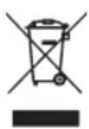
This marking indicates that this product should not be disposed with other household wastes throughout the EU. To prevent possible harm to the environment or human health from uncontrolled waste disposal, recycle it responsibly to promote the sustainable reuse of material resources. To return your used device, please use the return and
collection systems or contact the retailer where the product was purchased.
They can take this product for environmentally safe recycling free of charge.
NO
NO
INNHOld
22 VIKTIGE SIKKERHETSANVISNINGER
28 PRODUKTOVERSIKT
29 FØR BRUK
29 BRUK
31 FEILSØKING
35 VEDLIKEHOLD
36 GARANTI
37 PRODUKTSPESIFIKASJONER
37 SUPPORT OG RESERVEDELER
37 GJENVINNING
VIKTIGE SIKKERHETSANVISNINGER
CARACTERISTIQUES DU PRODUIT
220V\~240V\~50/60Hz
4,3L
110W
350ml/H
ASSISTANCE ET PIECES DETACHÉES