
Dry 12 DH1W-12 - Humidifier WILFA - Free user manual and instructions
Find the device manual for free Dry 12 DH1W-12 WILFA in PDF.


| Product Type | Portable Dehumidifier |
| Model | Dry 12 DH1W-12 |
| Brand | Wilfa |
| Dehumidification Capacity | 12 L/day (at 30°C, 80% RH) |
| Water Tank Capacity | 2.5 L |
| Continuous Drainage | Yes (hose not included) |
| Power Consumption | 150 W |
| Power Supply | 220-240 V, 50 Hz |
| Dimensions (W x D x H) | 30 x 20 x 50 cm |
| Weight | 10 kg |
| Noise Level | 40 dB(A) |
| Air Flow Rate | 100 m³/h |
| Auto Defrost | Yes (compressor protection) |
| Humidity Control | Adjustable (30% - 80% RH) |
| Timer Function | 1-24 hours |
| Air Filter | Washable fine mesh filter |
| Filter Cleaning Interval | Every 2 weeks |
| Refrigerant | R290 (propane) |
| Operating Temperature Range | 5°C - 35°C |
| Safety Features | Auto shut-off when tank full, overheat protection |
Frequently Asked Questions - Dry 12 DH1W-12 WILFA
User questions about Dry 12 DH1W-12 WILFA
0 question about this device. Answer the ones you know or ask your own.
Ask a new question about this device
Download the instructions for your Humidifier in PDF format for free! Find your manual Dry 12 DH1W-12 - WILFA and take your electronic device back in hand. On this page are published all the documents necessary for the use of your device. Dry 12 DH1W-12 by WILFA.
USER MANUAL Dry 12 DH1W-12 WILFA
natural_image
White industrial air purifier with a circular button and black wheels (no text or symbols visible)DRY 12
6 IMPORTANT SAFETY INSTRUCTIONS
10 PRODUCT OVERVIEW
11 USE
14 MAINTENANCE
15 TROUBLESHOOTING
18 GUARANTEE
19 PRODUCT SPECIFICATIONS
19 SUPPORT AND SPARE PARTS
19 RECYCLABILITY
IMPORTANT SAFETY INSTRUCTIONS
- This appliance can be used by children aged from 8 years and above and persons with reduced physical, sensory or mental capabilities or lack of experience and knowledge if they have been given supervision or instruction concerning use of the appliance in a safe way and understand the hazards involved.
• Children shall not play with the appliance. - Cleaning and user maintenance shall not be made by children without supervision.
- Before operation, please check the power cord if it complies with the requirement indicated on the nameplate.
- Before cleaning, please turn it off and unplug the dehumidifier.
- Make sure the power cord is not pressed by any hard object.
- Do not remove the power plug or move unit by pulling the power cord.
- Do not use any heating application near the dehumidifier.
- Do not remove the power plug in wet hands.
-
Please use grounded power cord and make sure it's well connected and not damaged.
-
Do not place the dehumidifier under dripping objects.
• Memory function is included in this dehumidifier. - When nobody is taking care of the unit, please turn it off and remove the power plug or disconnect power.
- Do not repair or disassemble the unit by yourself.
- If abnormal condition occurs (e.g. burned smell), please disconnect power at once and then contact local dealer.
- Do not use an extension cord.
- The appliance shall be installed in accordance with national wiring regulations.
- This product is intended for indoor, non-industrial, non-commercial household use only.
- If the supply cord is damaged, it must be replaced by the manufacturer, its service agent or similarly qualified persons in order to avoid a hazard.
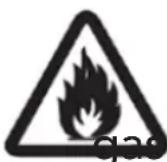
R290
This device contains the highly flammable R290.
THE REFRIGERANT
- To realize the function of the air conditioner unit, a special refrigerant circulates in the system. The used refrigerant is the fluoride R290, which is specially cleaned.
- The refrigerant is flammable and inodorous. Furthermore, it can lead to explosion under certain conditions.
- Compared to common refrigerants, R290 is a non-polluting refrigerant with no harm to the ozonosphere. The influence upon the greenhouse effect is also lower. R290 has got very good thermodynamic features which lead to a high energy efficiency. The units therefore need a less filling.
- Please refer to the nameplate for the charging quantity of R290.
WARNING
- Appliance filled with flammable gas R290.
- Appliance shall be installed, operated and stored in a room with a floor area larger than 4m2.
-
The appliance shall be stored in a room without continuously operating ignition sources. (for example: open flames, an operating gas appliance or an operating electric heater.)
-
The appliance shall be stored in a well-ventilated area where the room size corresponds to the room area as specified for operation.
- The appliance shall be stored to prevent mechanical damage from occurring.
- Ducts connected to an appliance shall not contain an ignition source.
- Keep any required ventilation openings clear of obstruction.
- Do not pierce or burn.
- Be aware that refrigerants may not contain an odour.
- Do not use means to accelerate the defrosting processorto clean, other than those recommended by the manufacturer.
- Servicings shall be performed only as recommended by the manufacturer.
- Should repair be necessary, contact your nearest authorized Service Centre.
- Any repairs carried out by unqualified personnel may be dangerous.
- Compliance with national gas regulations shall be observed.
PRODUCT OVERVIEW
EN
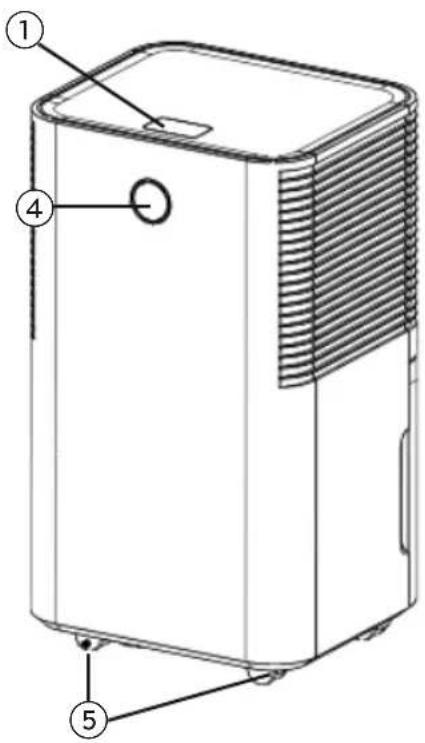
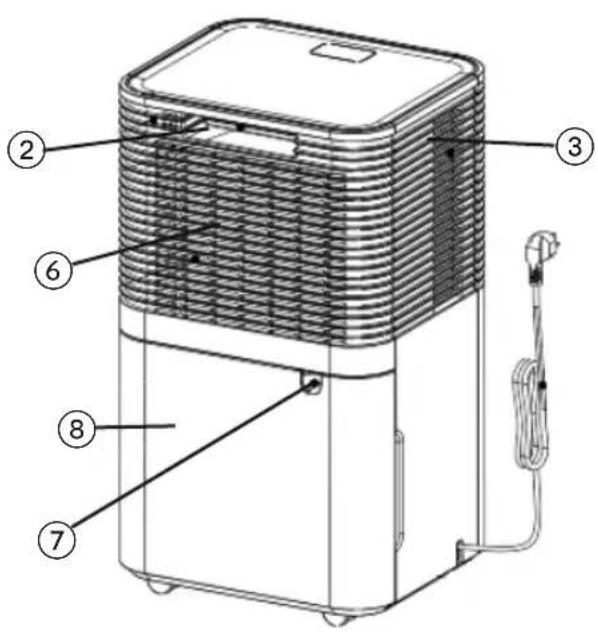
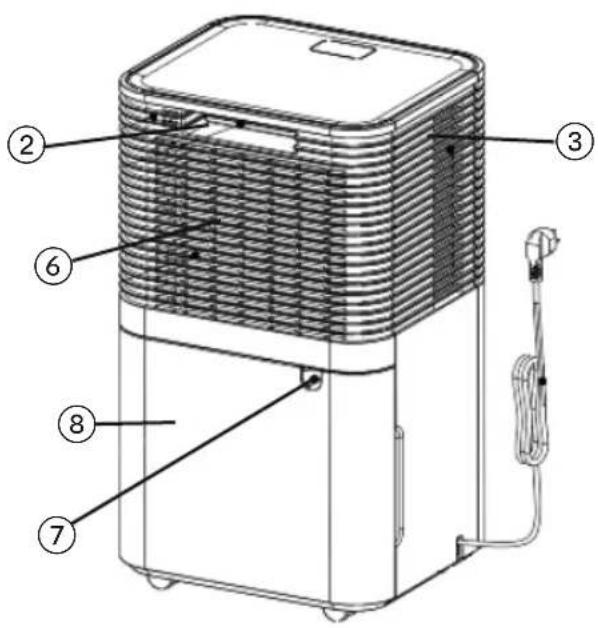
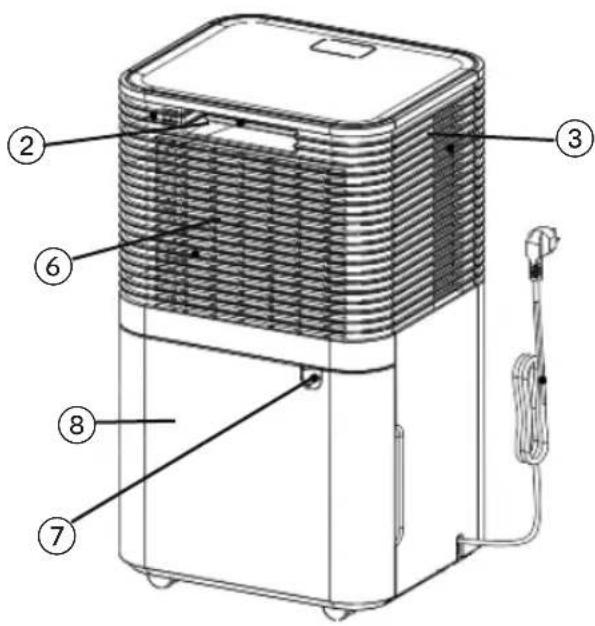
- Control panel
- Handle
- Air outlet
- Indicator lights
- Castors
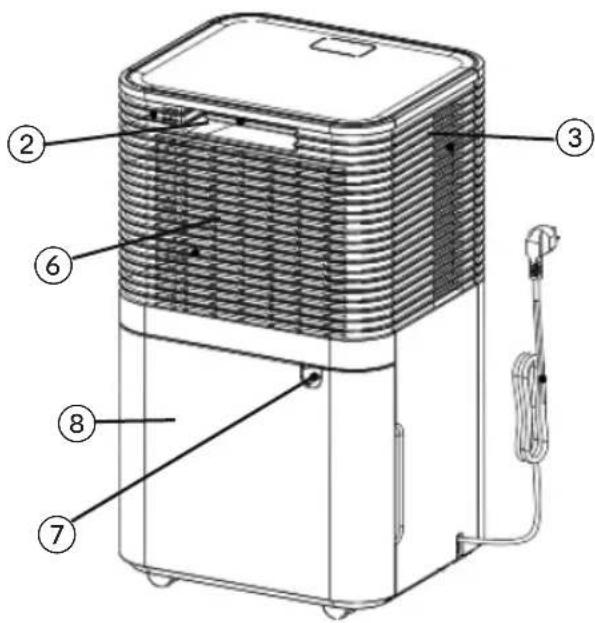
- Filter
- Continuous drainage outlet
- Water tank
CONTROL PANEL

LOCK

SPEED

TIMER

HUM SET

MODE

POWER
POWER: Press to switch the dehumidifier on or off.
MODE: Press to choose between auto, laundry drying or sleep mode.
HUM SET: Press to adjust the humidity level (30-80%) and choose timer hour (1-24h)
TIMER: Press to set a time for the unit to automatically start or stop. Press the timer button to set the 1-24h timer function.
FAN SPEED: Press to select between high or low fan speed.
LOCK: Long press to turn lock on or off.
Display screen: Displays humidity value, timer setting or temperature.
USE
LOCATION
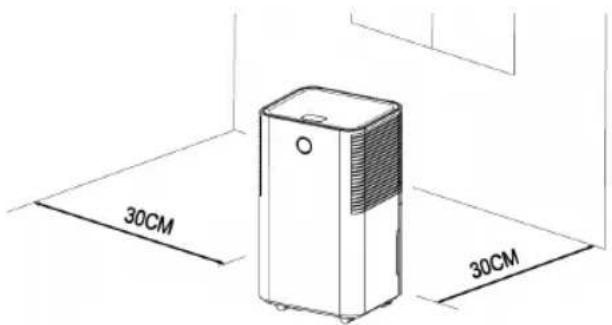
Place the unit on a firm, level surface in an area with at least 30cm of free space around to allow proper air circulation.
Never install the unit where it could be subject to:
- Heat sources such as radiators, heat registers, stoves or other products that produce heat.
- In an area where oil or water may be splashed.
- Direct sunlight.
- Mechanical vibration or shock.
- Excessive dust.
- Lack of ventilation, such as cabinet or bookcase. Install the unit in rooms larger than 4m2.
EN
Do not install the unit in places where inflammable gas may leak.
Operate the unit in temperature between 5^ C and 35^ C.
Do not use outdoors. It is intended for indoor residential applications only.
Do not operate near walls, curtains or other objects that may block inlet and outlet.
Keep the air inlet/outlet free of obstacles.
If tipped more than 45^ , allow the unit to stand in upright position at least 24 hours before starting up.
Close all doors, windows, and other outside openings of the room to improve the working effect.
Avoid direct sunlight.
It is normal for the air outlet to feel warm after continuous usage on hot days.
Empty the water tank before moving the device.
Make sure the water tank is correctly placed, otherwise it will not operate properly.
The unit starts up in the mode selected when the unit was last used.
The unit starts dehumidifying if the room humidity is 3% higher than the selected humidity.
There is a protective 3-minute delay of the compressor. Wait 3 minutes for the dehumidifier to resume dehumidification.
FUNCTIONS
POWER BUTTON
Press this button to switch the unit on. The indicator lights light up, the default fan speed is high and default humidity is 60%.
When the unit is on, press the power button to switch the unit off. The indicator lights shuts off, and the compressor stops immediately, and then the fan shut down after 30 second delay.
MODE BUTTON
Press this button to switch between auto, laundry, and sleep mode.
AUTO
When the environmental humidity is the same or over your chosen humidity +3%, the fan starts working, and the compressor starts working after 3 seconds.
When the environmental humidity is the same or lower than your chosen humidity -3%, the compressor stops, and the fan stops after 30 second delay.
Press HUM SET% button to adjust the humidity level in auto mode.
LAUNDRY DRYING MODE
The compressor keeps working without control by humidity; fan speed and target humidity can not be adjusted.
SLEEP MODE
After choosing sleep mode the buttons light up. After no operation in 10 seconds, all indicator lights turn dark gradually and the fan speed switches to low. Press any button to wake up the display and lights.
TIMER BUTTON
Press the timer button to set the 1-24h timer function.
Display flashes and will show hour. Press the HUM SET button and the value will increase 1 hour.
Set the time to 00 to cancel the timing function.
SPEED
There are two fan speeds; high and low. Press the Fan button to switch between the two speeds. Speed can only be adjusted in auto.
LOCK
Long press the lock button to turn on or off the lock function.
WATER TANK INDICATOR
When the tank is full, the alarm starts and the water tank indicator turns red.
Touch any button to stop the alarm. The compressor and fan stops, and the function pauses until the tank is emptied and back in correct position.
EN
DRAINAGE
There is two ways to remove water in the unit.
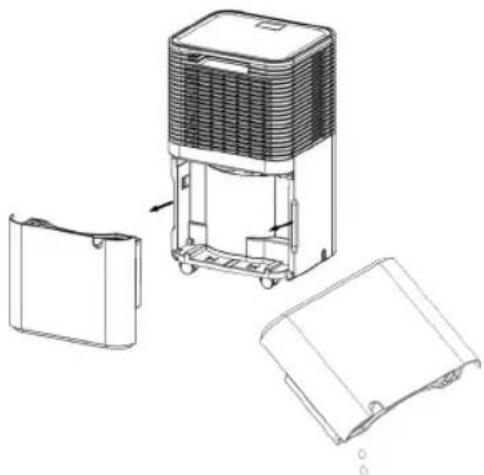
- Manual draining: Empty the water tank manually when it is full.
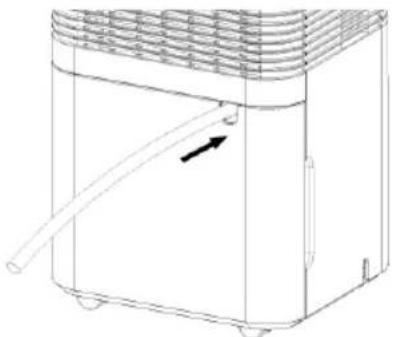
- Continuous draining: Attach a hose and use gravity to drain the water.
MANUAL DRAINING
Once the water tank is full, the unit will pause. After emptying the water tank, install the water tank correctly, and the unit will start up again.
- When the water tank is full, the unit will make a sound, and the "water tank full"-indicator will light up.
- Carefully slide the water tank out and empty it.
- Clean inside and outside of the water tank.
- Place the water tank into the unit.
- If the "water tank full"-indicator is still on, check that the foam float is correctly in place.
natural_image
Technical line drawing of a portable air purifier with open and closed compartments (no text or symbols)CONTINUOUS WATER DRAINAGE
For continuous draining, connect the drain hose to the unit.
- Place the unit on a stable and horizontal surface.
- Switch the unit off before attaching the hose.
- Securely and properly connect the hose to the unit, and make sure the hose is not bent or kinked, it may stop the water flow.
- Place the outlet of the hose over a drain or a bucket and ensure that water can freely flow out of the unit.
- Do not submerge the end of the hose into water: it can cause air lock in the hose.
natural_image
Line drawing of a portable air conditioner unit with a hose and ventilation grille (no text or symbols)MAINTENANCE
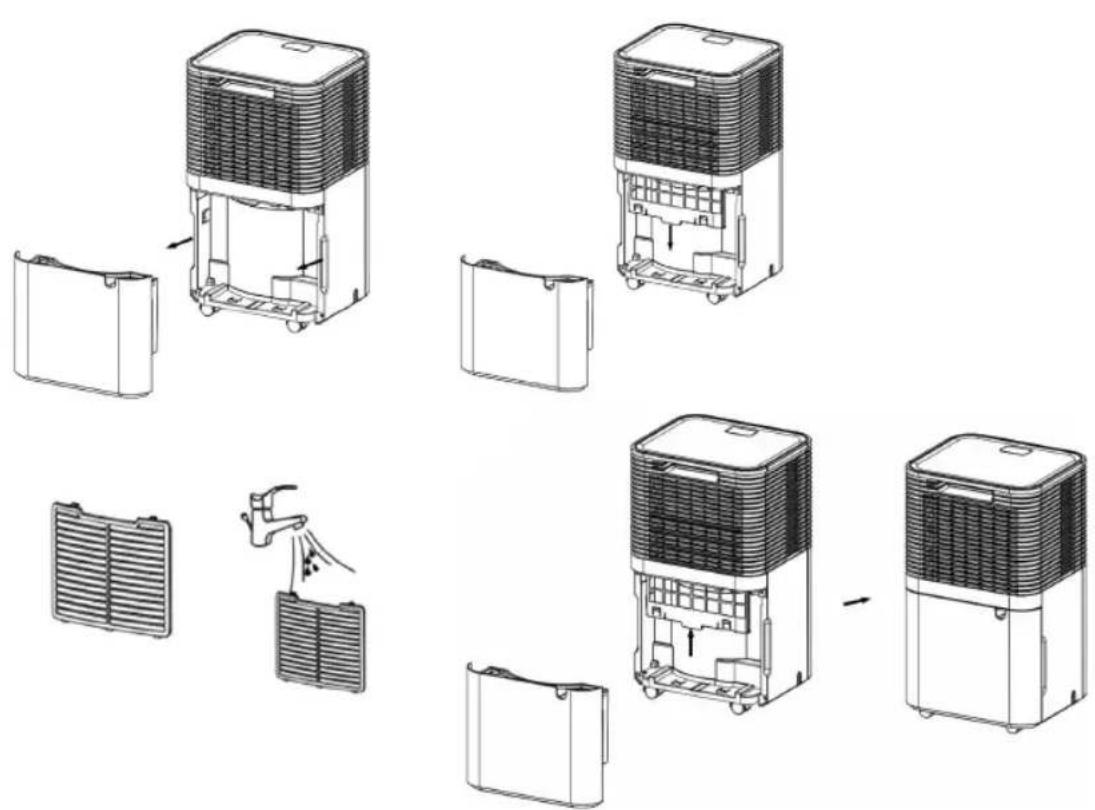
CLEANING THE FILTER
The filter collects dust which restricts the airflow. Restricted airflow reduces efficiency of the unit, and if it becomes blocked it may cause damage to the unit.
- Remove the filter.
- Rinse the filter in running warm water or use a vacuum cleaner to remove dust.
- After cleaning the filter, make sure it is dry before placing it back on the unit.
EN
STORAGE
If you are not using the unit for an extended period (more than a 3 weeks), clean and dry it completely.
- Switch off the unit and unplug it.
- Empty the water tank and let it dry. If it is connected to the drain hose, check that it is empty, disconnect it and make sure it is dry.
- Remove the filter and clean with warm water. Let it dry before reinstalling it.
- The unit must be stored in upright position.
- Store it in a ventilated and dry space indoors free of any corrosive gases.
The evaporator inside the unit must be completely dry before storing. This is to avoid component damage and moulds. Unplug the unit and place it in a dry and open area for days to dry it out. Another way to dry it is to set the humidity point more than 5% higher than the ambient humidity to force the fan to dry the evaporator for a couple of hours.
TROUBLESHOOTING
Functioning temperature 5°C -35°C.
When the temperature is lower or higher than the functioning temperature, the unit stops.
When the temperature is between 5^ C and 16^ C the compressor automatically defrosts at intervals. During defrosting the compressor stops and the fan keeps running.
Problem Possible reasons Solutions
| The unit does not work | No power supply Connect to a functioning outlet and switch the unit on | |
| Water tank full indicator is on | Empty the water tank and place it correctly back into the unit. | |
| Room temperature is lower than 5°C or higher than 35°C. | Self-protection designed to protect the unit is activated.Can not work under these temperatures. | |
| Bad function Filter clogged Clean the filter | ||
| intake duct or discharge duct obstructed | Remove the obstruction from the discharge duct or intake duct. | |
No air intake Filter clogged Clean the filter
| Loud noise from unit when on | Is the unit placed on a leveled surface? | Place the unit on a stable and horizontal surface. |
| Filter is clogged Clean the filter. | ||
| E2 Humidity sensor problem Contact customer service | ||
| LO Environmental humidity is below 20% | The dehumidifier shuts off for self-protection. | |
| HI Environmental humidity is over 90% | ||
| CL Low temperature, temperature is below 5°C | ||
| CH High temperature, the temperature is above 35°C | ||
EN
EN

GUARANTEE
Wilfa issues a 5 year guarantee on this product from the day of purchase is done. The guarantee covers production failure or defects that arise during the guarantee period. Your purchase receipt works as proof towards retailer if claiming your guarantee.
The guarantee is valid only for products that are bought and used in private households. The guarantee is not valid if the product is used commercially. The guarantee is not valid if the product is misused, used by negligence, if not following instructions given by Wilfa, if modified or if unauthorized reparation is done. The guarantee is also not valid for normal wear of the product, misuse, lack of maintenance, use of wrong electrical voltage or:
• Overloading of product
- Parts which are normally worn down
- Parts you can expect being replaced regularly (e.g. filter, battery etc.)
Instructions manual is also available at our website wilfa.com
PRODUCT SPECIFICATIONS
220V-240V\~50Hz 200W
50g R290
SUPPORT AND SPARE PARTS
For support please visit us at wilfa.com, and see our customer service/support page. Here you will find frequently asked questions, spare parts, tips and tricks and all our contact information.
EN
RECYCLABILITY
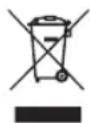
This marking indicates that this product should not be disposed with other household wastes throughout the EU. To prevent possible harm to the environment or human health from uncontrolled waste disposal, recycle it responsibly to promote the sustainable reuse of material resources. To return your used device, please use the return and collection systems or
contact the retailer where the product was purchased. They can take this product for environmentally safe recycling free of charge.
NO
NO
INNHOLD
22 ADVARSELTEKST
26 PRODUKTOVERSIKT
27 BRUK
28 FUNKSJONER
29 DRENERING
30 VEDLIKEHOLD
31 FEILS∅KING
34 GARANTI
35 SUPPORT OG RESERVEDELER
35 GJENVINNING
SIKKERHETSADVARSEL
- Betjeningspanel
- Håndtak
- Luftuttak
- Indikatorlys
-
Svingbare hjul
-
Filter
- Kontinuerlig drenering
- Vannbeholder
BETJENINGSPANEL

LOCK

SPEED

TIMER

HUM SET

MODE

POWER
natural_image
Technical line drawing of a portable air conditioner unit with open and closed compartments (no text or symbols)KONTINUERLIG DRENERING
natural_image
Line drawing of a portable air conditioner unit with a hose and ventilation grille (no text or symbols)VEDLIKEHOLD
RENGJ∅R FILTERET
OPPBEVARING
natural_image
Technical line drawing of a portable air conditioner unit with open and closed compartments (no text or symbols)KONTINUERLIG VATTENAVRINNING
natural_image
Line drawing of a portable air conditioner unit with a scroll and ventilation grille (no text or symbols)UNDERHÅLL
RENGÖRING AV FILTRET
natural_image
Exploded view diagram of a multi-tiered air purifier system with exploded and assembled views (no text or labels)FÖRVARING
natural_image
Technical line drawing of a portable air conditioner unit with open and closed compartments (no text or symbols)DK
KONTINUERLIG DRÆNING
natural_image
Line drawing of a portable air conditioner unit with ventilation duct and handle (no text or symbols)VEDLIGEHOLDELSE
RENG∅RING AF FILTER
natural_image
Exploded view diagram of a multi-tiered air purifier system with exploded and assembled views (no text or labels)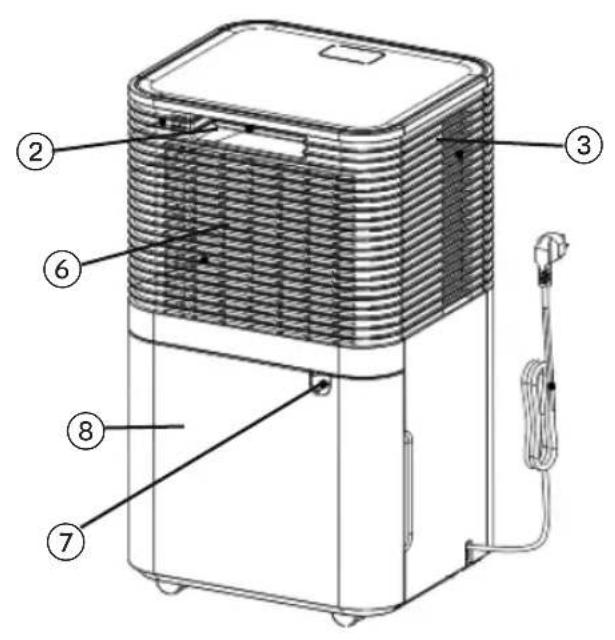
MANUAALINEN TYHJENNYS
natural_image
Technical line drawing of a portable air purifier with open and closed compartments (no text or symbols)JATKUVA VEDENPOISTO
natural_image
Line drawing of a portable air conditioner unit with a handle and ventilation grille (no text or symbols)natural_image
Exploded view diagram of a portable air purifier system, showing internal components and assembly steps (no text or labels)mista.
natural_image
Line drawing of a portable air conditioner unit with a handle and ventilation grille (no text or symbols)WARTUNG
Reinigen des Filters
DH1W-12_20_01
- DRY 12
- IMPORTANT SAFETY INSTRUCTIONS
- THE REFRIGERANT
- WARNING
- PRODUCT OVERVIEW
- CONTROL PANEL
- USE
- LOCATION
- EN
- FUNCTIONS
- POWER BUTTON
- MODE BUTTON
- AUTO
- LAUNDRY DRYING MODE
- SLEEP MODE
- TIMER BUTTON
- SPEED
- LOCK
- WATER TANK INDICATOR
- DRAINAGE
- MANUAL DRAINING
- CONTINUOUS WATER DRAINAGE
- MAINTENANCE
- CLEANING THE FILTER
- STORAGE
- TROUBLESHOOTING
- GUARANTEE
- PRODUCT SPECIFICATIONS
- SUPPORT AND SPARE PARTS
- RECYCLABILITY
- INNHOLD
- SIKKERHETSADVARSEL
- BETJENINGSPANEL
- KONTINUERLIG DRENERING
- VEDLIKEHOLD
- RENGJ∅R FILTERET
- OPPBEVARING
- KONTINUERLIG VATTENAVRINNING
- UNDERHÅLL
- RENGÖRING AV FILTRET
- FÖRVARING
- KONTINUERLIG DRÆNING
- VEDLIGEHOLDELSE
- RENG∅RING AF FILTER
- MANUAALINEN TYHJENNYS
- JATKUVA VEDENPOISTO
- WARTUNG
Brand : WILFA
Model : Dry 12 DH1W-12
Category : Humidifier