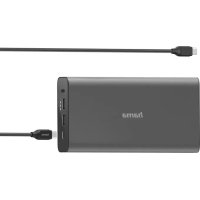
00200012 - Power bank HAMA - Free user manual and instructions
Find the device manual for free 00200012 HAMA in PDF.


| Product type | Portable battery |
| Brand | Hama |
| Model | 00200012 |
| Battery capacity | 26800 mAh |
| Total energy | 96.48 Wh (typical) |
| Battery technology | Lithium-Ion (Li-Ion) |
| USB-C input (charging) | 5V/3A, 9V/3A, 12V/2.5A, 15V/2A, 20V/1.5A (PD 30W max) |
| USB-C output (Power Delivery) | 5V/3A, 9V/3A, 12V/3A, 15V/3A, 20V/3A (PD 60W max) |
| USB-A outputs (x2) | 5V/2.4A (12W max per port) |
| Total output power | 60 W max (total output) |
| Charging technologies | Power Delivery (PD), Optimised Charging |
| Capacity indicator | 4 LEDs (25% per LED) |
| Number of ports | 1x USB-C (input/output), 2x USB-A (output) |
| Included cable | USB-C to USB-C |
| Safety | Overcharge, deep discharge, extreme temperature, and shock protection |
| Maintenance | Clean with a slightly damp, lint-free cloth, without harsh detergents |
| Recycling | Compliant with WEEE and directive 2006/66/EC, do not dispose of with household waste |
| Customer service | Hama GmbH & Co KG, phone: +49 9091 502-0 (German/English) |
Frequently Asked Questions - 00200012 HAMA
User questions about 00200012 HAMA
0 question about this device. Answer the ones you know or ask your own.
Ask a new question about this device
Download the instructions for your Power bank in PDF format for free! Find your manual 00200012 - HAMA and take your electronic device back in hand. On this page are published all the documents necessary for the use of your device. 00200012 by HAMA.
USER MANUAL 00200012 HAMA
natural_image
Vertical column of black rectangular blocks with no text or symbols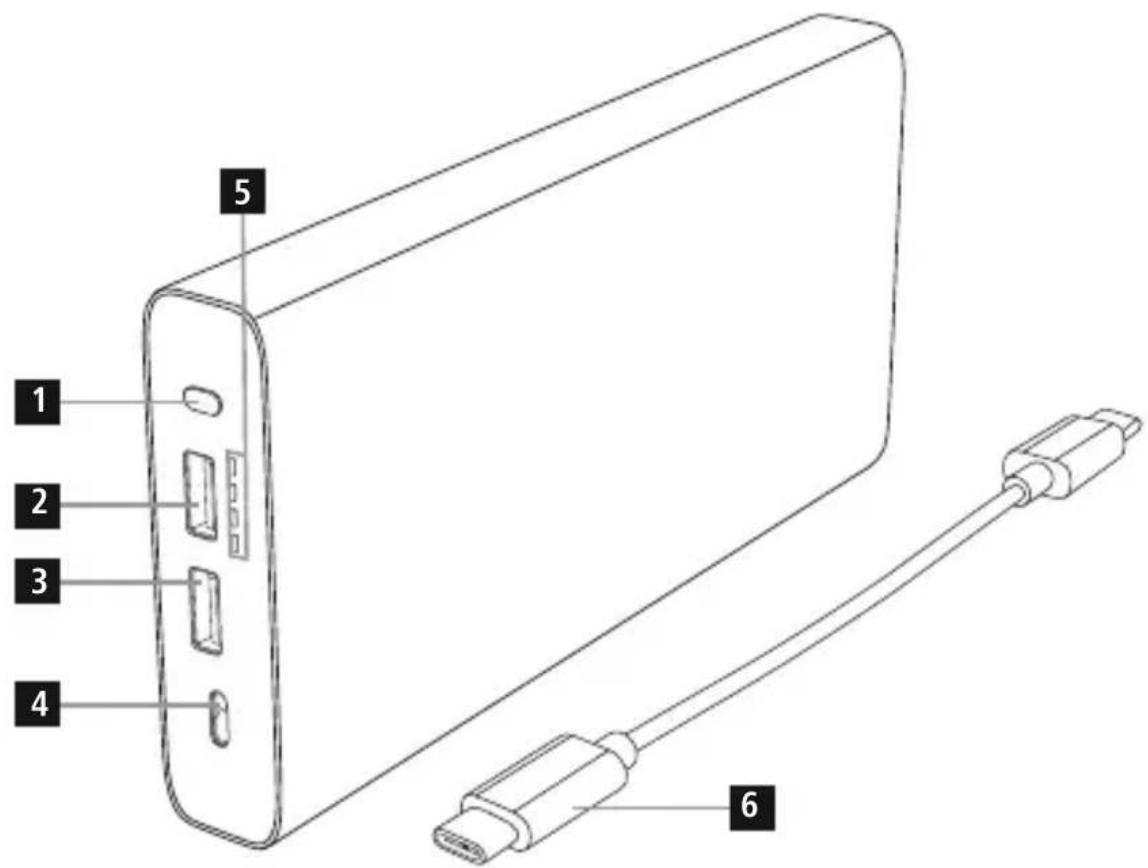
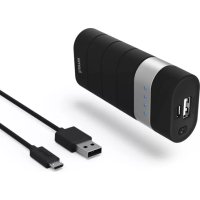
ControlsandDisplays
- On/Offbutton
2.USBport
3.USBport - USB-CportIN/OUT(PowerDelivery)
5.LEDcapacityindicator
6.USB-Cable
Thankyouforchoosinga H amaproduct.
Take your time and read the following instructions and information completely. Please keep these instructions in a safe place for future reference. If you sell the device, please pass these operating instructions onto thenewowner.
1. ExplanationofWarningSymbolsandNotes
Warning

This symbol is used to indicate safety instructions or to draw your attention to specific hazards and risks.
Note

This symbol is used to indicate additional information or important notes.
2.PackageContents
• PowerPack26800mAh*, withPowerDelivery
• U SB-CtoUSB-Cchargingcable
• Theseoperatinginstructions
3. SafetyNotes
• T heproductisintendedforprivate,non-commercialuseonly.
- Protect the product from dirt, moisture and overheating, and only use it in a dry environment.
- Keep this product, as all electrical products, out of there a chof children!
• D o n otdroptheproductanddonotexposeittoanymajorshocks.
- Do not operate the product outside the power limits given in the specifications.
- Do not open the device or continue to operate it if it becomes damaged.
- D isposeofpackagingmaterialimmediatelyaccordingtolocallyapplicableregulations.
- Since the battery is integrated and cannot be removed, you will need to dispose of the product as a w hole. Do this incompliance with the legal requirements.
- Do not modify the product in any way. Doing so voids the warranty.
- Do not throw the battery or the product into fire.
- Do not tamper with or damage/heat/disassemble the batteries/rechargeable batteries.
Note— PowerDelivery(PD)

To find out whether your terminal device supports Power Delivery (PD), please refer to the product information or operating instructions of the device manufacturer or information available on the Internet.
4.Operation
4.1 ChargingthePowerPack
- B eginchargingthepowerpackbyconnectingtheincludedUSB-Cchargingcabletothepower pack's USB-C input (IN 5V/3A; 9V/3A; 12V/2.5A; 15V/2A; 20V/1.5A) and to a suitable PD charger. Alternatively, you can charge the power pack using a USB-A to USB-C charging cable and a suitable USB charger. Please refer to the operating instructions for the USB charger used.
- C hargingbeginsandendsautomatically.
- Charge the Power Pack fully before using it for the first time.
Note- Capacity

• T hecapacityisalwaysshownwhenthePowerPackischarging.
- Each status LED corresponds to 25% of the capacity. When an LED is permanently illuminated, this indicates that this capacity level has already been reached. The Power Pack is charged to at least 75% if three LEDs are illuminated, and the fourth is flashing.
- I fallfourstatusLEDslightup,thefullcapacityisavailable.
- Press the button of the Power Pack to switch it on and to check its current capacity.
• T hepowerpackswitchesoffautomaticallyafterabout10seconds.
Warning-Battery

- O nlyusesuitablechargingdevicesorUSBconnectionsforcharging.
- As a rule, do not charge devices or USB connections that are defective and do not try to repair themyourself.
- Do not overcharge the product or allow the battery to completely discharge.
- A voidstoring, chargingorusing the device in extreme temperatures and extremely low atmospheric pressure (forexample, at high altitudes).
- When stored over a long period of time, batteries should be charged regularly (at least every three months).
4.2 Chargingterminaldevices
- Connect the included USB-C charging cable to the power pack's USB-C connection (see 8. Technical Data) and to the USB-C connection of your terminal device (smartphone, tablet, notebook, etc.) to charge your terminal device with Power Delivery. Alternatively, connect a suitablechargingcableforyourterminaldevicetooneofthettwoUSBOutputstochargeyour terminaldevice.
- Charging begins automatically. The status LEDs show the remaining capacity when the Power Pack ischarging.
- The current battery status of your terminal device will appear on this device.
- Charging ends automatically. Then disconnect the power pack from your terminal device.
- The Power Pack will automatically switch off if it is not connected to a terminal device.
Warning- C onnectingterminaldevices

- Before connecting a terminal device, check whether the power output of the charger can supply sufficientpowerforthedevice.
- Ensure that the total power consumption of the connected terminal device does not exceed the limitvalue(seepoint8 TechnicalData).
- P leaserefertotheinstructionsintheoperatingmanualofyourterminaldevice.
- It is essential that you observe these specifications and the safety instructions regarding the powersupplyofyourdevices.
• T hepowerpackmustnotbechargedanddischargedatthesametime!
Note- O ptimisedcharging

- OptimisedchargingmeansthatthePowerPackrecognisestheconnectedterminaldeviceand suppliesitwiththeoptimalcurrenttominimisechargingtime.
Warning

- N everconnectthechargingcableofthePowerPacktoboththeinputandtheoutputofthe PowerPackatthesametime.Thiscoulddamagethebattery.
- Do not connect any terminal devices while the Power Pack is charging. This could damage the PowerPackandtheconnecteddevice.
5. Care and Maintenance
Only clean this product with a slightly damp, lint-free cloth and do not use aggressive cleaning agents.
6.WarrantyDisclaimer
Hama GmbH & Co KG assumes no liability and provides no warranty for damage resulting from improper installation/mounting, improper use of the product or from failure to observe the operating instructionsand/orsafetynotes.
7. Service and Support
PleasecontactHamaProductConsultingifyuhaveanyquestionsaboutthisproduct.
Hotline:+499091502-0(German/English)
Furthersupportinformationcanbefoundhere:www.hama.com
8.TechnicalData
| USB-Cinput | 5V 3-A/9V 3-A/12V2-5A/15V2-A/20V1-5A (PD30Wmax.) |
| USB-Coutput | 5V 3-A/9V 3-A/12V3-A/15V3-A/20V3-A(PD60Wmax.) |
| USB output (1 + 2) | 5V - 2.4A / (12W max.) |
| Outputtotal3 A (60Wmax.) | |
| Batterytype3.6V/Li-Ion | |
| Includes | 8 cellstyp.3350mAh/ m in.3300mAh* |
| Totalenergytyp.96.48Wh/ m in.95.04Wh | |
9. Recycling Information
Noteonenvironmentalprotection:
Aftertheimplementationof theEuropeanDirective 2012/19/EUand2006/66/EU inthenationallegalsystem, thefollowingapplies:Electric
andelectronicdevicesaswellas batteriesmustnotbedisposedofwith householdwaste.Consumersare o b l i g e d bylawtoreturnelectricalandelectronic devicesaswellasbatteriesattheendof theirservicelivestothepubliccollecting pointssetupforthispurposeorpointof sale.Detailstothisare d e fi nedbythe nationallawoftherespectivecountry. Thissymbolontheproduct,the instructionmanualorthepackage indicatesthata p roductissubjectto theseregulations.Byrecycling,reusing thematerialsorotherformsofutilising olddevices/Batteries,youare m akingan importantcontributiontoprotectingour environment.
- ControlsandDisplays
- ExplanationofWarningSymbolsandNotes
- Warning
- Note
- 2.PackageContents
- SafetyNotes
- Note— PowerDelivery(PD)
- 4.Operation
- ChargingthePowerPack
- Note- Capacity
- Warning-Battery
- Chargingterminaldevices
- Warning- C onnectingterminaldevices
- Note- O ptimisedcharging
- Care and Maintenance
- 6.WarrantyDisclaimer
- Service and Support
- Recycling Information
- Noteonenvironmentalprotection:
Brand : HAMA
Model : 00200012
Category : Power bank