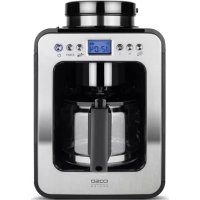
Coffee Compact 1848 - Coffee machine CASO - Free user manual and instructions
Find the device manual for free Coffee Compact 1848 CASO in PDF.

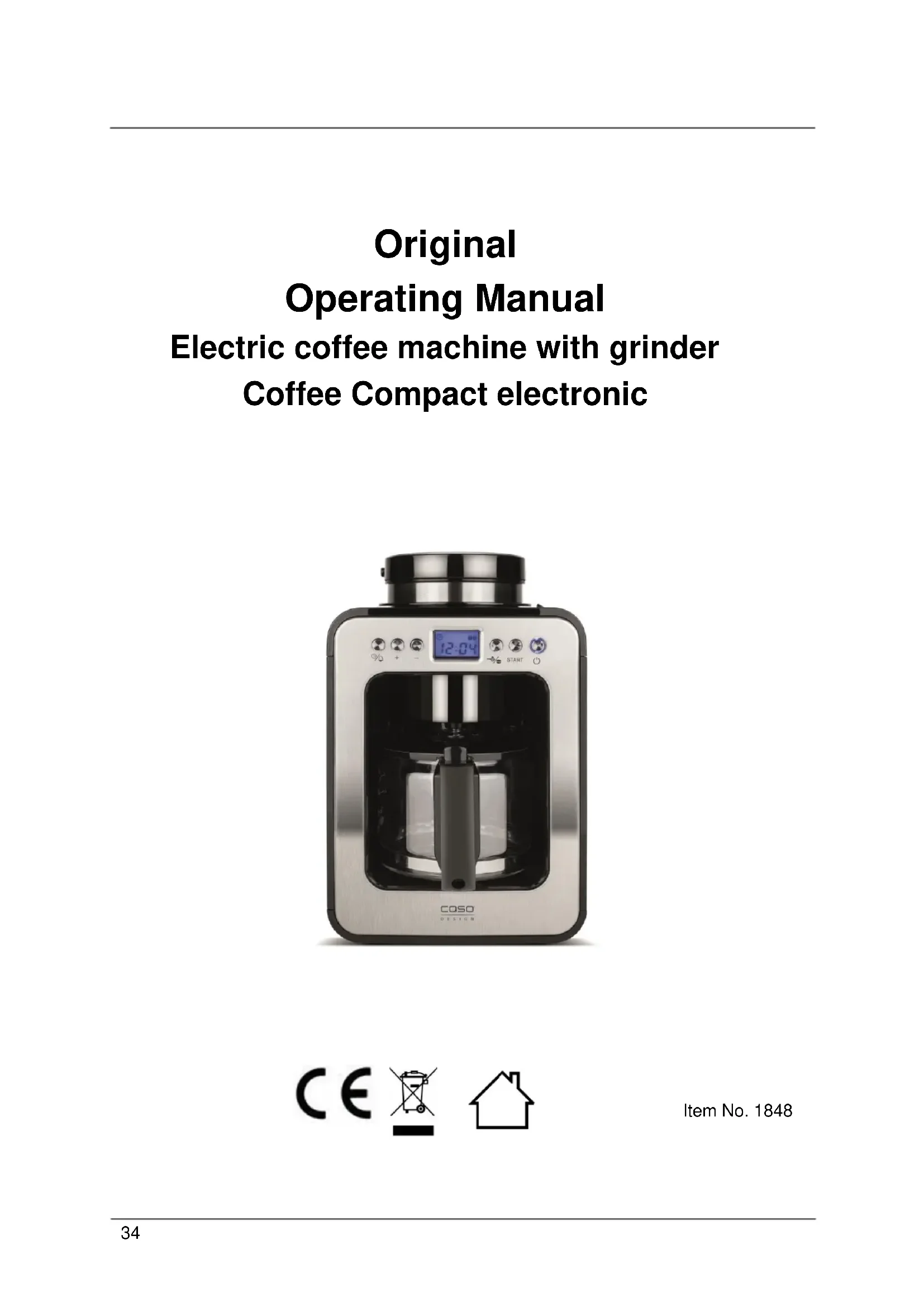


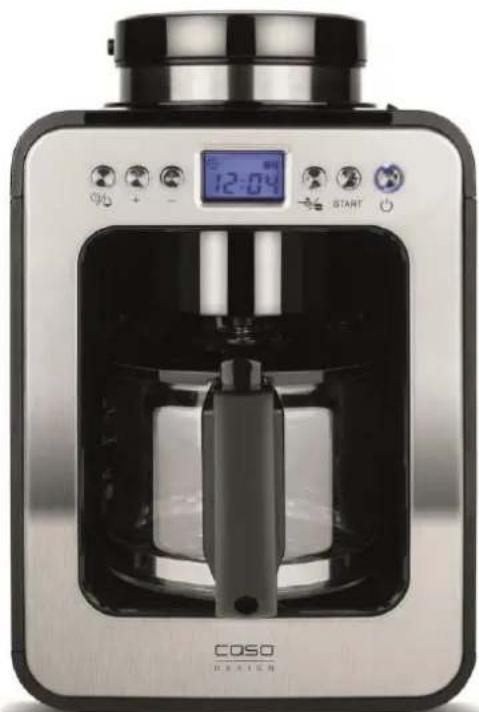
| Product type | Electric coffee machine with grinder |
| Brand | Caso |
| Model | Coffee Compact 1848 |
| Article number | 1848 |
| Dimensions (L x D x H) | 17.5 x 27.5 x 26 cm |
| Net weight | 2.22 kg |
| Power supply | 220-240 V~, 50 Hz |
| Power | 600 W |
| Water tank capacity | Approximately 600 ml |
| Bean hopper capacity | Approximately 100 g (estimate) |
| Main functions | Coffee bean grinding, brewing, timer function, keep warm (30 min), anti-drip system |
| Number of cups | 1 to 4 cups |
| Grind setting | Presets for 1-2 cups, 3-4 cups and ground coffee |
| Filter type | Permanent filter (round filter cartridge) |
| Carafe material | Glass |
| Maintenance and cleaning | Cleaning of removable parts with clean water; regular descaling mandatory (every 1 to 3 months depending on water hardness) |
| Safety | Automatic shut-off after 30 min, anti-drip protection, do not immerse the housing, children under 8 years with supervision |
| Spare parts and repairability | Grinding and brewing container, filter, lid, carafe, coffee spoon; repairs exclusively by authorized service center |
| General information | Household use only; do not use to crush ice; rating plate at the back; 24-month warranty |
Frequently Asked Questions - Coffee Compact 1848 CASO
User questions about Coffee Compact 1848 CASO
0 question about this device. Answer the ones you know or ask your own.
Ask a new question about this device
Download the instructions for your Coffee machine in PDF format for free! Find your manual Coffee Compact 1848 - CASO and take your electronic device back in hand. On this page are published all the documents necessary for the use of your device. Coffee Compact 1848 by CASO.
USER MANUAL Coffee Compact 1848 CASO
You can find the latest version of the instruction manual on our website:
10.1 General 35
10.2 Information on this manual 35
10.3 Warning notices 35
10.4 Limitation of liability 36
10.5 Copyright protection 36
11 Safety 36
11.1 Intended use 36
11.2 General Safety information 37
11.3 Sources of danger 42
11.3.1 Danger of injury 42
11.3.2 Danger of burns 42
11.3.3 Dangers due to electrical power 43
12 Commissioning 44
12.1 Safety information 44
12.2 Delivery scope and transport inspection 44
12.3 Unpacking 45
12.4 Disposal of the packaging 45
12.5 Setup location requirements: 45
12.6 Electrical connection 45
12.7 Warning notices 46
12.8 Rating plate 46
13 Operation and Handing 46
13.1 Overview 47
13.2 Control panel 48
13.3 Before using your device for the first time 49
13.3.1 Setting of clock/timer 49
13.4 Making Coffee 50
13.5 After use 53
14 Cleaning and Maintenance 53
14.1 Safety information 53
14.2 Cleaning 54
14.3 Descaling 54
Electric coffee machine with grinder
Coffee Compact electronic
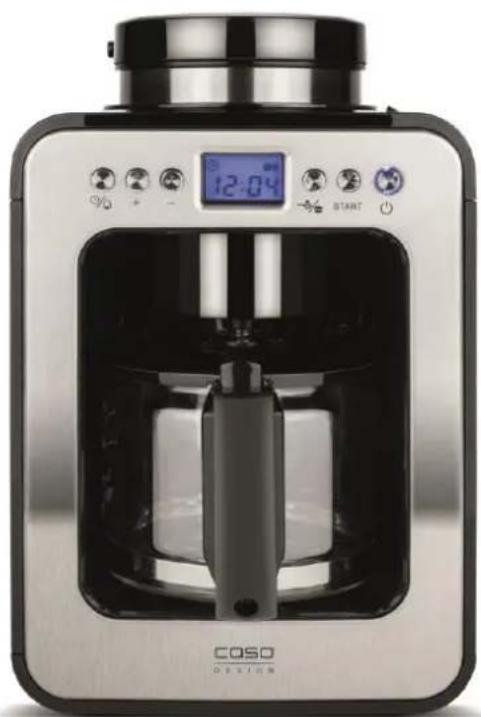

Item No. 1848
10 Operating Manual
10.1 General
Please read the information contained herein so that you can become familiar with your device quickly and take advantage of the full scope of its functions.
Your Coffee Compact electronic will serve you for many years if you handle it and care for it properly. We wish you a lot of pleasure in using it!
10.2 Information on this manual
These Operating Instructions are a component of the Coffee Compact electronic (referred to hereafter as the Device) and provide you with important information for the initial commissioning, safety, intended use and care of the device. The Operating Instructions must be available at all times at the device. This Operating Manual must be read and applied by every person who is instructed to work with the device: • Commissioning
Operation
-
Troubleshooting and/or
-
Cleaning
Keep the Operating
Manual in a safe place and pass it on to the subsequent owner along with the device.
10.3 Warning notices
The following warning notices are used in the Operating Manual concerned here.
AGEFAHR
DANGER
A warning notice of this level of danger indicates a potentially dangerous situation.
If the dangerous situation is not avoided, this can lead to death or serious injuries.
Observe the instructions in this warning notice in order to avoid the danger of death or serious personal injuries.
WARNING
WARNING
A warning notice of this level of danger indicates a possible dangerous situation.
If the dangerous situation is not avoided, this can lead to serious injuries.
Observe the instructions in this warning notice in order to avoid the personal injuries.
AVORSICHT
ATTENTION
A warning notice of this level of danger indicates a possible dangerous situation.
If the dangerous situation is not avoided, this can lead to slight or moderate injuries.
Observe the instructions in this warning notice in order to avoid the personal injuries.
HINWEIS
PLEASE NOTE
A notice of this kind indicates additional information, which will simplify the handling of the machine.
10.4 Limitation of liability
All the technical information, data and notices with regard to the installation, operation and care are completely up-to-date at the time of printing and are compiled to the best of our knowledge and belief, taking our past experience and findings into consideration.
No claims can be derived from the information provided, the illustrations or descriptions in this manual. The manufacturer does not assume any liability for damages arising as a result of the following: • Non-observation of the manual
- Uses for non-intended purposes
- Use of unauthorized spare parts
- Improper repairs
- Technical alterations, modifications of the device
Modifications of the device are not recommended and are not covered by the guarantee.
All translations are carried out to the best of our knowledge. We do not assume any liability for translation errors, not even if the translation was carried out by us or on our instructions. The original German text remains solely binding.
10.5 Copyright protection
This document is copyright protected. Braukmann GmbH reserves all the rights, including those for photomechanical reproduction, duplication and distribution using special processes (e.g. data processing, data carriers, data networks), even partially.
Subject to content and technical changes.
11 Safety
This chapter provides you with important safety notices when handling the device.
The device corresponds with the required safety regulations. Improper use can result in personal or property damages.
11.1 Intended use
This device is only intended for use in households in enclosed spaces for cooking/brewing coffee, milling of coffee beans. This device is intended for use in the household and for similar applications such as: - in kitchens for employees in shops, offices, and other commercial areas; - in B&Bs, - in agricultural estates;
- by customers in hotels, motels and other residential establishments.
Uses for a different purpose or for a purpose which exceeds this description are considered incompatible with the intended or designated use.
Do not chop very hard ingredients such as ice.
WARNING
Warning
Danger due to unintended use! Dangers can emanate from the device if it is used for an unintended use and/or a different kind of use.
- Use the device exclusively for its intended use.
Observe the procedural methods described in this Operating Manual.
Claims of all kinds due to damages resulting from unintended uses are excluded.
The User bears the sole risk.
11.2 General Safety information
HINWEIS Please note
Please observe the following general safety notices with regard to the safe handling of the device.
Read all these instructions before using the appliance.
This device may be used by children aged 8 and above, if they are supervised or have been instructed at to the safe use of the device and have understood the resulting hazards.
Children are not allowed to play with the device. The device and its connecting cable must be kept away from children who are less than 8 years old.
The device may be used by individuals with reduced physical, sensory or mental capabilities or a lack of experience and / or knowledge of their use if they are supervised or have been instructed at to the safe use of the device and have understood the resulting hazards.
- Cleaning and maintenance by the user must not be performed by children unless they are at least 8 years old and are supervised.
HINWEIS Please note
Examine the device for any visible external damages prior to using it. Never put a damaged device into operation.
If the power cable or plug are damaged, then they must be replaced by the manufacturer or its service agent in order to avoid a hazard.
- Do not leave the device unsupervised when it is in operation. Do not operate the Coffee Compact electronic if it is empty. This could damage the device.
Never fill the water tank beyond max-marking. Do ot use the device in case of overflowing.
- Use the device exclusively for cooking coffee and grinding roasted coffee beans. Do not fill any other liquids (as cold water) or foods (as roasted coffee beans) in the device.
Unplug your appliance as soon as you stop using it or before cleaning it.
All operations other than cleaning and usual maintenance must be performed by an approved service centre.
HINWEIS Please note
Do not leave the power cord hanging within children's reach.
- Do not disconnect the plug from the socket by pulling on the cord.
The power cord must never be near or in contact with the hot parts of the machine, near a source of heat or over a sharp edge.
Do not use the jug on an open flame or on electric cooker plates and not in an oven/ microwave oven.
Do not add water in the appliance if it is still hot.
Always keep the lid closed when the device is operating.
Never use the jug without the lid.
- Only qualified electricians, who have been trained by the manufacturer, may carry out any repairs that may be needed. Improperly performed repairs can cause considerable dangers for the user.
HINWEIS Please note
- Only customer service departments authorized by the manufacturer may carry out repairs on the device during the guarantee period, as otherwise the guarantee entitlements will be null and void in the event of any subsequent damages.
Defective components must always be replaced with original replacement parts. Only such parts will guarantee that the safety requirements are fulfilled.
For your own safety, only use manufacturer accessories and spare parts suited to your device.
Check the grinding/brewing container for foreign objects before using the device.
Device is not intended to be operated by means of an external timer or separate remote-control system.
The device is not intended for grinding liquid or hot ingredients.
Never place empty or almost empty glass jug on the warming plate when the device is working or on any other hot surface.
HINWEIS Please note
Do not set hot glass jug on wet or cold surface, the glass could burst.
Switch the device off before pulling the plug.
Make sure that the ambient temperature is above 0^ C , otherwise the device does not function properly.
Always descale the device regularly to ensure optimum performance and prevent malfunction.
Make sure to cool down the device before cleaning or storing it.
The device may give off some smoke and smell when you use forth he first times because of oil on some parts, this will disappear soon and is normal.
Always remove the plug from outlet in case of any malfunction, before filling and after use, or before cleaning.
- Use the grinder to grind roasted coffee beans only. Grinding other food, such as nuts, spices or unroasted beans may dull the blades and cause poor grinding or injury.
11.3 Sources of danger
11.3.1 Danger of injury
WARNUNG Warning
By careless use of the device risk of injury exist because of sharp edges. Note the following warnings to avoid injury.
Avoid contacting moving parts.
The blades of the grinder are sharp, do not touch them. Be careful when emptying the grinding/brewing container and during cleaning.
11.3.2 Danger of burns
WARNUNG Warning
The water, heated in this coffee maker, the jug, the water tank as well as the warming plate, become very hot.
Please observe the following safety notices in order not to burn or scald yourself or others.
During coffee brewing, water tank, warming plate, jug (by incoming coffee) will become hot! Never touch the hot parts of the device! Take the jug only by the handle.
- Please always try the temperature of the coffee, before drinking.
▲WARNUNG
Warning
Temperature of the coffee is high, handle the jug with care to avoid scalding.
The lid must always remain closed during coffee brewing!
Caution: The warming plate can be hot after use caused by residual heat.
Be careful not to get burnt by the steam escaping from the vent. Do not cover the steam vent.
11.3.3 Dangers due to electrical power
▲GEFAHR
Mortal danger due to electrical power!
Mortal danger exists when coming into contact with live wires or subassemblies! Observe the following safety notices to avoid dangers due to electrical power:
Do not operate this device if it has a damaged cable or plug, if it is not working properly or if it has been damaged or dropped. If the power cable or plug are damaged, then they must be replaced by the manufacturer or its service agent in order to avoid a hazard.
▲GEFAHR Danger
Do not open the housing on the device under any circumstances. There is a danger of an electrical shock if live connections are touched and the electrical or mechanical structure is altered. In addition, functional faults on the device can also occur.
- Do not put the machine, power cord or plug in water or any other liquid.
12 Commissioning
This chapter provides you with important safety notices during the initial commissioning of the device. Observe the following notices to avoid dangers and damages:
12.1 Safety information
WARNING Warning
Personal and property damages can occur during commissioning of the device!
Observe the following safety notices to avoid such dangers:
- Packaging materials may not be used for playing. There is a danger of suffocation.
Transport, unpack and use two persons to set down the device because of the heavy weight of the device.
12.2 Delivery scope and transport inspection
As a rule, the Coffee Compact electronic is delivered with the following components:
-
Coffee Compact electronic
-
jug
-
filter
-
grinding/brewing container
-
coffee spoon
-
lid of grinding/brewing container
-
operating instructions
HINWEIS Please note
Examine the shipment for its completeness and for any visible damages.
- Immediately notify the carrier, the insurance and the supplier about any incomplete shipment or damages as a result of inadequate packaging or due to transportation.
12.3 Unpacking
To unpack the device, proceed as follows:
- Remove the device out of the carton and remove the packaging material.
12.4 Disposal of the packaging

The packaging protects the device against damages during transit. The packaging materials are selected in accordance with environmentally compatible and recycling-related points of view and can therefore be recycled. Returning the packaging back to the material loop saves raw materials and reduces the quantities of accumulated waste. Take any packaging materials that are no longer required to "Green Dot" recycling collection points for disposal.
HINWEIS Please note
If possible, keep the original packaging for the device for the duration of the guarantee period of the device, in order that the device can be re-packaged properly in the event of a guarantee claim.
12.5 Setup location requirements:
In order to ensure the safe and trouble-free operation of the device, the setup location must fulfil the following prerequisites:
- Only use this device on a flat, stable, heat-resistant surface away from water splashes and any heat sources. Never use the device outdoors and always place in a dry environment.
- Do not set up the device in a hot, wet or extremely damp environment or near flammable material.
- Choose the setup location in such a way that children cannot reach any hot surfaces on the device.
- The electrical socket must be easily accessible so that the power lead can be disconnected easily, in the case of an emergency.
- The installation and assembly of this device in non-stationary setup locations must be carried out by specialist companies / electricians, provided they guarantee the prerequisites for the safe use of this device.
12.6 Electrical connection
In order to ensure the safe and trouble-free operation of the device, the following instructions must be observed for the electrical connection:
- Before connecting the device, compare the connection data (voltage and frequency) on the rating plate with those of your electrical network. This data must agree in order that no damages occur in the device. If in doubt, ask your qualified electrician.
-
The electrical outlet must be protected by a 16A safety cut-out switch.
-
The connection between the device and the electrical network may employ a 3 meter long (max.) extension cable with a cross-section of 1.5mm^2 . The use of multiple plugs or gangs is prohibited because of the danger of fire that is involved with this.
- Make sure that the power cable is undamaged and has not been installed under the device or over hot or sharp surfaces.
- The electrical safety of the device is only guaranteed if the device is connected to a properly installed protective conductor system. Operations using an electrical outlet without a protective conductor are prohibited. If in doubt, have the house installation checked over by a qualified electrician. The manufacturer cannot be made responsible for damages that are caused by a missing or damaged protective conductor.
12.7 Warning notices
VORSICHT Attention. Danger due to hot surface!

Do not touch the hot surfaces of the device. Danger of burns!
Do not set or lay any items on the device.
12.8 Rating plate
The rating plate with the connection and performance data can be founded on the bottom of the unit.
13 Operation and Handing
This chapter provides you with important notices with regard to operating the device. Observe the following notices to avoid dangers and damages:
WARNING Warning
- Do not leave the device unsupervised when it is in operation, so that you can intervene quickly in the event of dangers.
13.1 Overview
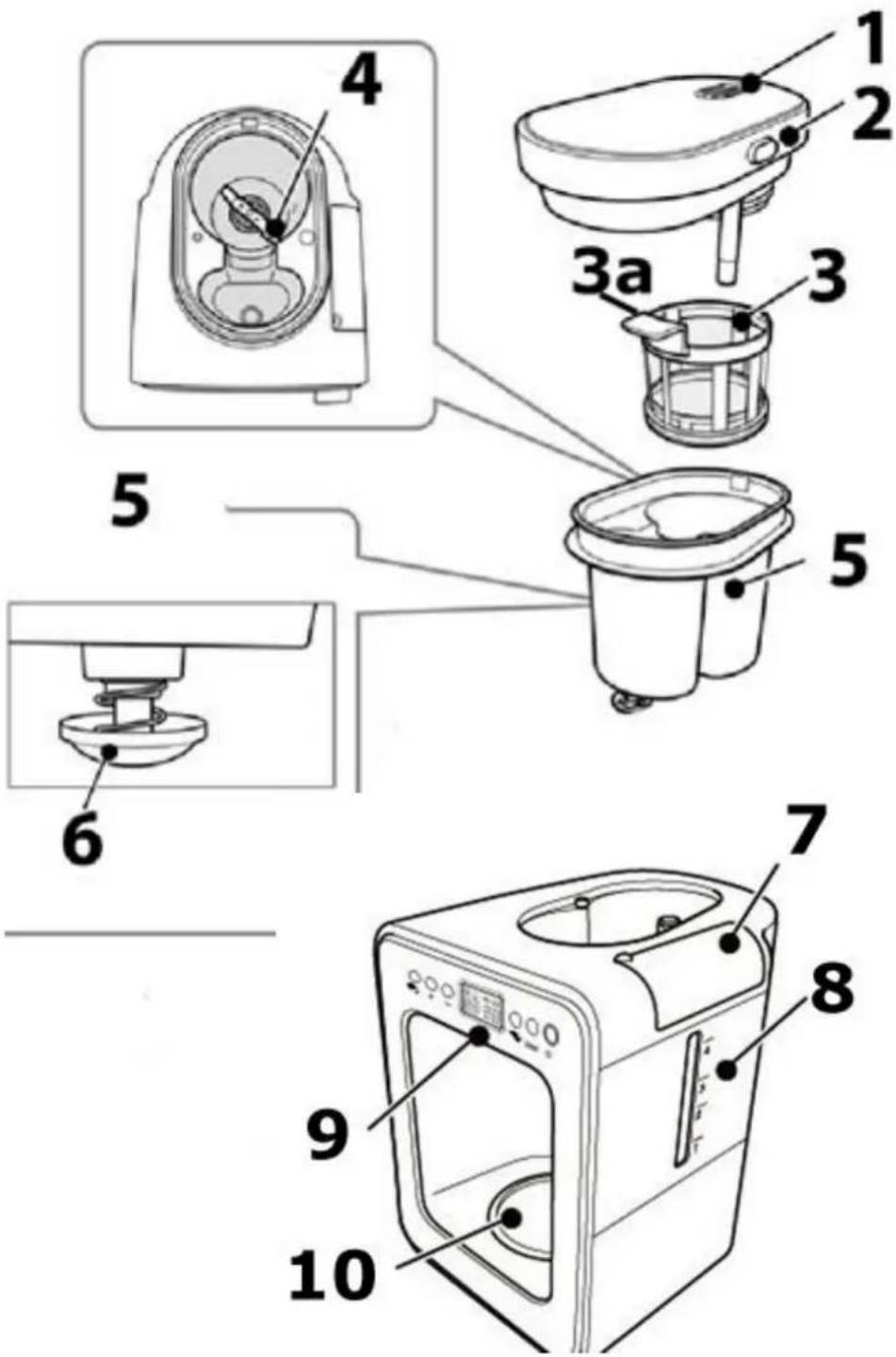
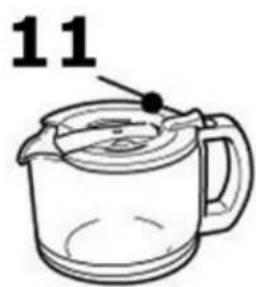
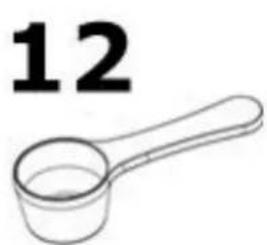
1 steam vent
2 lid of
grinding/brewing
container
3 filter 3a
handle of the filter
4 blades of grinder
5 grinding/brewing
container
6 drip stop
7 lid of water tank
8 scale of watertank
9 control panel
10 warming plate
11 jug
12coffee spon
(corresponds to
approx. 7 g)
Disassembly of grinding/brewing container with filter and lid
Press the button on the side of the lid of grinding/brewing container to lift the lid and to remove it. On the backside of the lid is a round filterinsert which can be removed. Turn the container anti-clockwise and lift it up. The filter (3) can be lifted by pulling at its handle (3a).
HINWEIS Please note
- Please remove the jug before disassembly, otherwise coffee ground may infiltrate the jug.
Assembly of grinding/brewing container with filter and lid
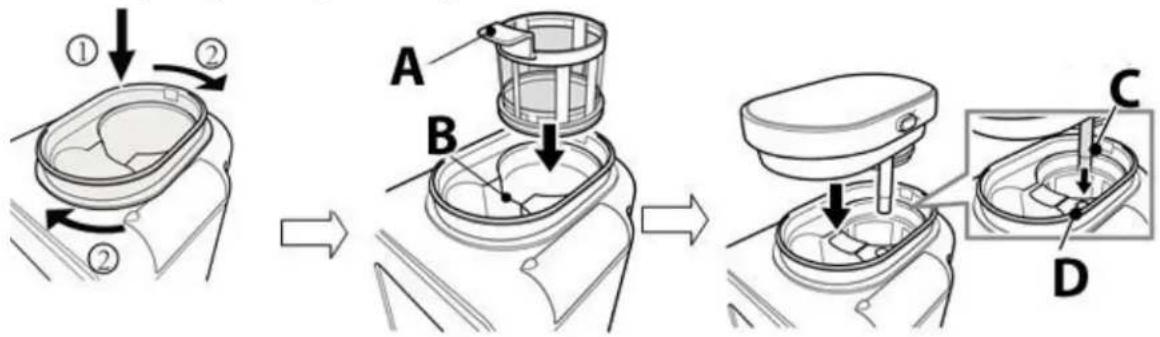
Replace the round filterinsert on back of lid of grinding/brewing basket.
Place the grinding/brewing container oblique, press down and turn it clockwise (1 2) until the container latches. Take the filter at its handle (A) and place it a position B into the grinding/brewing container.
Place the lid of grinding/brewing container with steamoutlett to the backside and press it down, observe that the water tube C is placed into the water inlet D.
13.2 Control panel
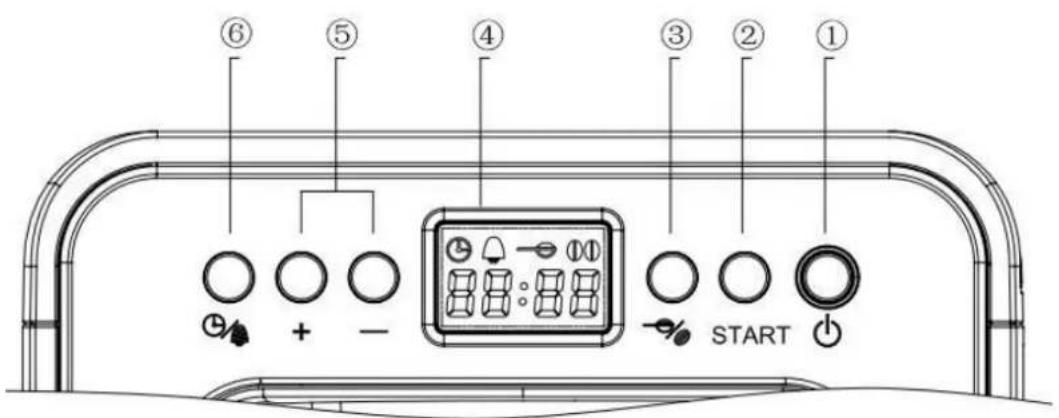
1 on/off button with indicator lamp
2 start / pause button
3 selection of amount of coffee beans / coffee powder
4 display
5 + increase setting, - reduce setting
6 clock and timer button
13.3 Before using your device for the first time
Disassemble grinding/brewing container, filter, lid of grinding/brewing container and jug, rinse under runnig water and dry them. Re-assemble the device.
Fill fresh water into the water tank.

Press button 6ice. The indicator lamp lights up and the display is illuminated.
Press button - and chose setting for ground coffee.
Press start button. The device will start working and the circuit of the device is rinsed
through. When the start button stops flashing then press switch the device off. Pour out the hot water.
▲WARNING Warning
The blades of the grinder are sharp, do not touch them. Be careful when emptying the grinding/brewing container and during cleaning.
- grinding/brewing container and during cleaning.
13.3.1 Setting of clock/timer
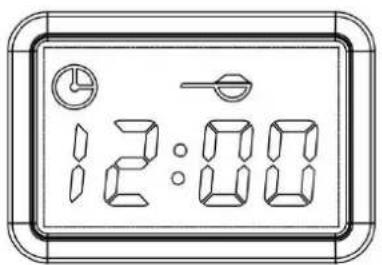
Display is illuminated, press to set clock and timer.

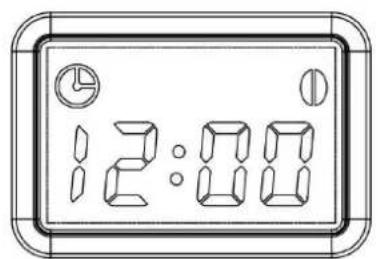
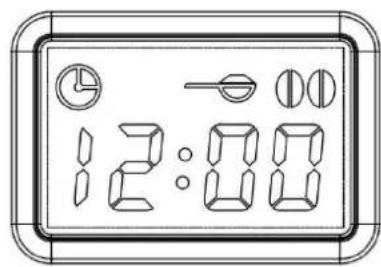
Default clock is 24-hour clock system. Press the 12:00 symbol flashes.

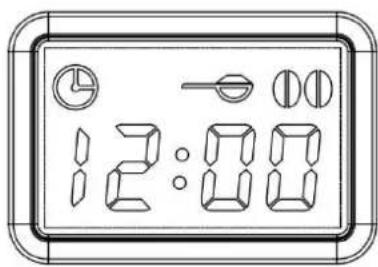
Setting of clock

Press the hour figure flashed, with + you can increase the hour, one hour for each press, the display shows: 13:00", 14:00", ...0:00"; 1:00" With - the hour will
be reduced one hour with each press. Confirm setting with

Set the minute in same way and confirm with clock setup is completed.

The clock symbol stops flashing and
Setting of timer
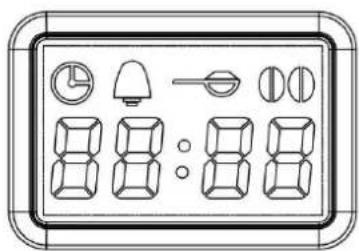
In standby-mode press for 2 seconds, the device switches to timer setting. The timer symbol flashes. Set

desired hour with +/- and confirm with . Set desired
O minute and confirm with
The device will automatically start brewing at set time.
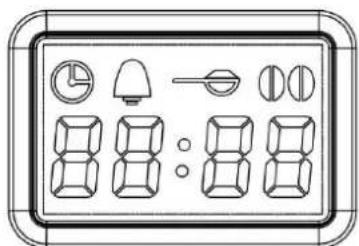
HINWEIS
Without setting of timer the device will return to previsou setting after 5 seconds.
Press after timer setting and the timer will be stopped. The timer symbol stops flashing and display shows
13.4 Making Coffee
WARNING Warning
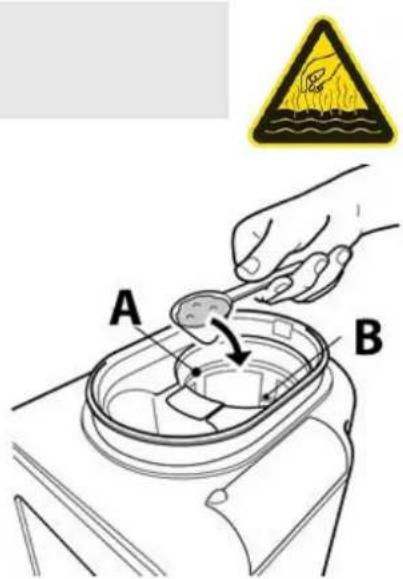
Warning symbol: hot steam.
Caution hot steam can escape at device. Risk of burns.
Open the lid of the brewing/grinding container. Fill the desired amount of coffee beans or ground coffee into the filter (A), look at amount indication (B).
Replace the lid of grinding/brewing container.
WARNING Warning
- Do not open the lid of grinding/brewing container during use. Danger of burns!
Warning
- Do not fill the grinding/brewing container above max-marking, otherwise the device cannot work properly
If device is not working correctly then pull the plug and wait at least 10 minutes before you open the lid of grinding/brewing container.
Please note
Attention! Ensure that coffee beans/ground coffee do not fall into the water inlet (C).
Open the lid of the water tank (D).
Fill desired amount of water into the water tank (according to the scale).
Close the lid of the water tank.
Place the jug on the warming plate, tilt it slightly when you place it. Plug into outlet, you can hear an acoustic signal, the device is in standby mode.
Press button - once. The indicator lamp lights up and the
display is illuminated. The device is in standby-mode. Press - button again and the device switches off.
Please note
Without any further operation within 30 seconds the display will turn off the blue
illumination automatically. Press -again and the display switches off.
Press - and chose desired setting of amount of coffee beans / ground coffee.
Default status: coffee beans for 3-4 cups
Setting of amount coffee beans / ground coffee
setting for 3-4 cups of coffee made of coffee beans
setting for 1-2 cups of coffee made of coffee beans setting for ground coffee
Proportion of coffee cups to amount of coffee beans/ ground coffee
| Cup quantity | Dosage | Setting | |
| 1 | 1 heaped spoon (approx. 7 g) | ||
| 2 | 2 heaped spoons (approx. 14 g) | ||
| 3 | 3 heaped spoons (approx. 21 g) | ||
| 4 | 4 heaped spoons (approx. 28 g) | ||

After selection of amount of coffee beans/ ground coffee press to start the brewing.
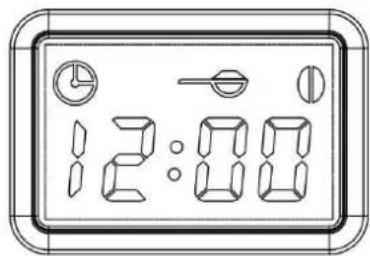
coffee bean mode for 1-2 cups of coffee
The display shows and the device grinds for 22 seconds, then the symbol stops flashing and flashes to show that the coffee is brewing.

coffee bean mode beans for 3-4 cups of coffee
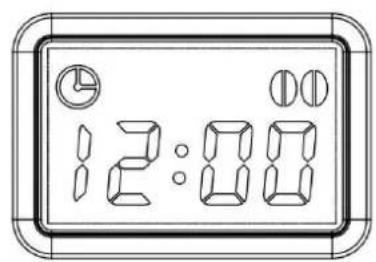
The display shows and the device grinds for 30 seconds, then the symbol stops flashing and flashes to show that the coffee is brewing.

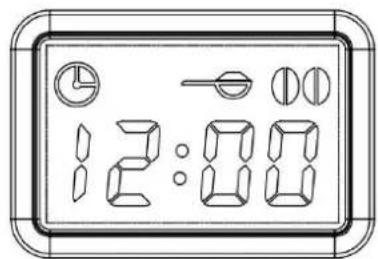
Ground coffee mode
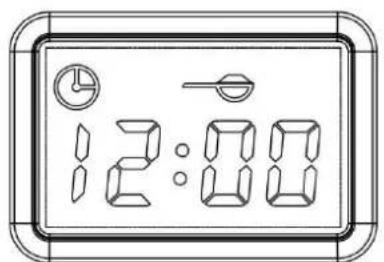
The symbol flashes to show that the coffee is brewing.
The device will brew coffee until the water tank is empty. Then you can hear one acoustic signal and the start button is illuminated without flashing. The device will automatically enter into keep-warm mode and will switch off automatically after 30 minutes. You can hear an acoustic signal.
This device is equipped with a drip stop system which enables you to serve coffee before all the water has dripped through. Quickly put the jug back in place to avoid any spillage.
HINWEIS Please note
Use only cold water.
Do not exceed the maximum amount of water indicated on the scale of water tank.
For better heat retention, rinse out the jug with hot water before use.
Wait a few minutes before brewing coffee again.
The device will keep the coffee warm 30 minutes after brewing and after this automatically switches off.
13.5 After use
Pull the plug and wait until device is cooled down. Remove the jug from the warming plate. Clean grinding/brewing container, round filterinsert, filter, lid of grinding/brewing container and the jug, please refer to "cleaning and maintenance".
14 Cleaning and Maintenance
This chapter provides you with important notices with regard to cleaning and maintaining the device. Please observe the notices to prevent damages due to cleaning the device incorrectly and to ensure trouble-free operation.
14.1 Safety information
▲VORSICHT Attention
Please observe the following safety notices, before you commence with cleaning the device:
The device must be cleaned at regular intervals and limescale should be removed.
Switch the device off prior to cleaning it and unplug the plug from the wall power outlet.
The water tank, filter, jug and grinding/brewing container are hot after their use. Wait until the device has cooled down.
Do not use any aggressive or abrasive cleaning agents or solvents.
Do not scrape off stubborn dirt with hard items.
14.2 Cleaning
Remove the coffee grounds from the grinding/brewing container.
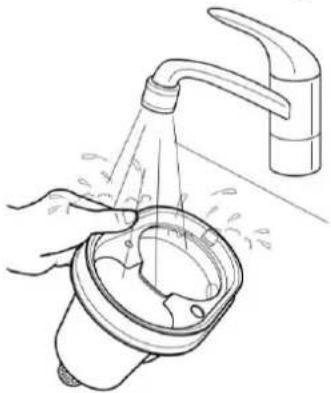
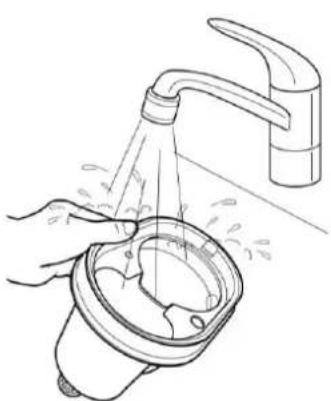
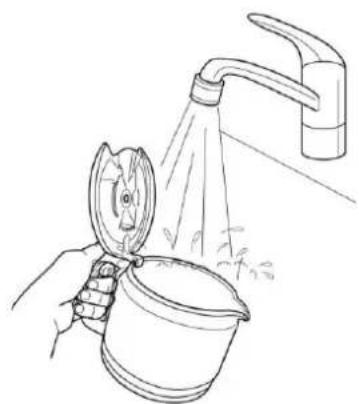
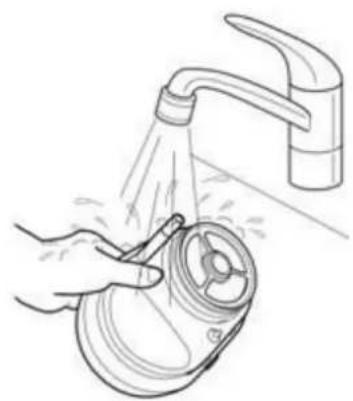
Rinse grinding/brewing container under running water and dry it after this. Clean the lid of grinding/brewing container in the same way.
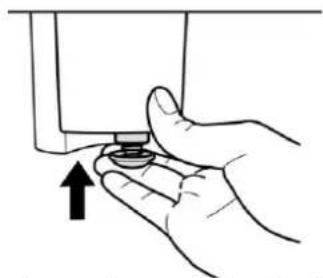
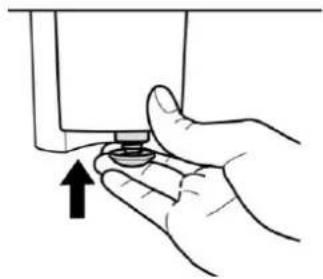
Press the drip stop and clean it with running water, then dry it.
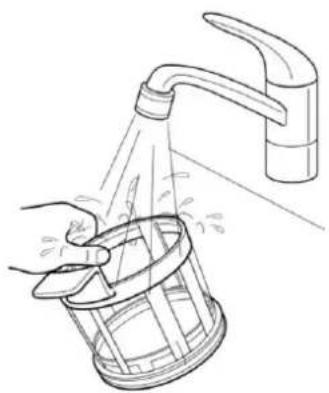
Clean the filter under running water and dry it after this.
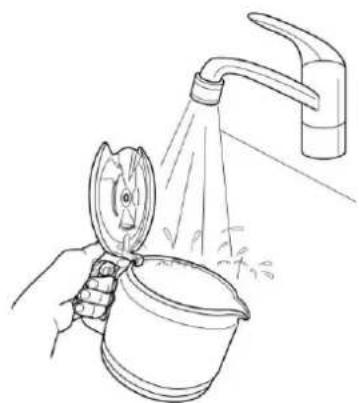
Clean the cooled jug with water and dry it.
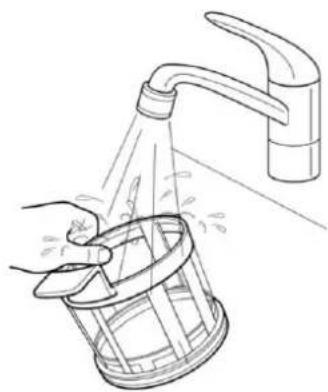
Remove the round filterinsert and clean it and the lid under running water, dry both after this. Replace the filterinsert.
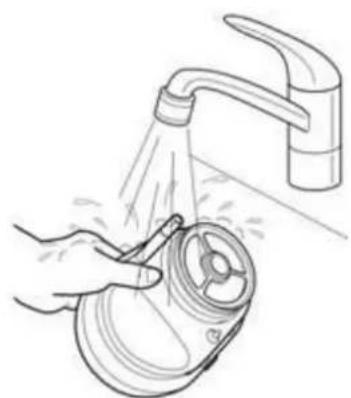
WARNING Warning
Do not clean the device when it is hot.
- Never put the device (besides above mentioned parts) into water or under running water.
- Be sure to unplug the device before cleaning. To protect against electrical shock do not immerse cord, plug or unit in water or liquid.
14.3 Dscaling
The device has to be descaled regularly, otherwise the coffee taste will be affected and the scale deposits can damage the device.
When the noise during brewing increases, or the brewing time is longer, or the device switches off before the water tank is empty, then these are indications that descending is necessary. The frequency of descending depends on the water hardness and how often the device is used.
-
With soft water, descale at least every 3 month
-
With hard water, descale every month
If you do not know your water hardness please contact your water company.
Use a liquid descaler that is suitable for coffee machines and read the instructions thoroughly before use.
- Mix the descaler in a measuring cup with cold water.
In case of using solid descaler/powder, it must dissolve completely. - Fill the water tank with the prepared solution up to max level.
- Turn the control dial to setting for ground coffee, place the jug and press start button as if you want to brew coffee.
- Repeat steps 1-3. Do not refill the used solution after brewing process into the water tank again, use a fresh solution.
- Operate 2 brewing cycles only with water (without descaler) to remove all descaler residues.
HINWEIS Please note
Never interrupt the descending process.
The guarantee excludes devices which have stopped working or do not work properly due to lack of descending.
15 Troubleshooting
This chapter provides you with important notices with regard to operating the device. Observe the following notices to avoid dangers and damages:
A VORSICHT Attention
- Only qualified electricians, who have been trained by the manufacturer, may carry out any repairs on electrical equipment.
- Improperly performed repairs can cause considerable dangers for the user and damages to the device.
15.1 Causes and rectification of faults
| Problem | Possible solution |
| Coffee brews too slowly (more than 10 minutes). The device switches off before water tank is empty. | Descale the device (see chapter descaling) Clean the grinding/brewing container and drip stop valve of coffee residue. |
| The drip stop does not work | Clean the valve under running water and press the drip stop carefully several times. |
| Water leaks out of the device. | Do not fill the water tank beyond the max level. |
| Coffee grounds enter into the jug. | Check if grinding/brewing basket is overflowed because of to much ground coffee. |
| Place the jug correctly on warming plate. Do not remove the jug during brewing for longer as 30 seconds. | |
| The coffee is not strong enough or the coffee is too strong. | Have you used correct amount of coffee beans/ ground coffee? It should be one heaped spoon of coffee for each cup. |
| The coffee does not taste good. | Check if you leave the jug on the warming plate to long, especially if it contains only a small amount of coffee. |
| The coffee is not hot enough. | Check if you brewed too small amount of coffee. The coffee is heated longer when you brew more of it. Check if jug is placed correctly on warming plate. |
| Its difficult to place the jug on the warming plate. | Check if jug and grinding/brewing container are in correct position. Tilt the jug slightly to insert it. Caution: Do not spill the hot coffee. |
| There is less coffee in the jug than expected. | Is the jug correctly placed under the drip stop? Otherwise the drip stop prevents the coffee from flowing into the jug. The device needs to be descaled. |
HINWEIS Please note
If you are unable to solve the problem with the steps shown above, please contact Customer Service.
16 Disposal of the Old Device
Old electric and electronic devices frequently still contain valuable materials. However, they also contain damaging substances, which were necessary for their functionality and safety.
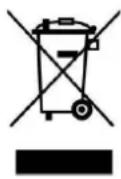
If these were put in the non-recyclable waste or were handled incorrectly, they could be detrimental to human health and the environment.
Therefore, do not put your old device into the non-recyclable waste under any circumstances.
HINWEIS Please note
- Utilise the collection point, established in your town, to return and recycle old electric and electronic devices. If necessary, contact your town hall, local refuse collection service or your dealer for information.
- Ensure that your old device is stored safely away from children until it is taken away.
17 Guarantee
We provide a 24 month guarantee for this product, commencing from the date of sale, for faults which are attributable to production or material faults.
Your legal guarantee entitlements in accordance with § 439 ff. BGB-E remain unaffected by this. The guarantee does not include damages, which were incurred as a result of improper handling or use, as well as malfunctions which only have a minor effect on the function or the value of the device. Consumables, transit damages, inasmuch as we are not responsible for these, as well as damages, which were incurred as a result of any repairs that were not performed by us, are also excluded from the guarantee entitlements.
This device is designed for use in domestic situations and has the appropriate performance levels. Any use in commercial situations is only covered under the guarantee to the extent that it would be comparable with the stresses of being used in a domestic situation. It is not intended for any additional, commercial use.
In the event of justified complaints, we will repair the faulty device at our discretion or replace it with a trouble-free device. Any pending faults must be reported within 14 days of delivery. All further claims are excluded. To enforce a guarantee claim, please contact us prior to returning the device (always provide us with proof of purchase).
18 Technical Data
| Device | Electric coffee machine with grinder |
| Name | Coffee Compact electronic |
| Item No.: | 1848 |
| Mains data | 220-240V~, 50 Hz |
| Power consumption | 600W |
| External measurements | 17,5 x 27,5 x 26 cm |
| Capacity | Ca. 600 ml |
| Net weight | 2,22 kg |
- Coffee Compact electronic
Cafetiere
Filtre
Coffee Compact electronic

N^ d'article 1848
▲WARNUNG WAARSCHUWING
WARNING WAARSCHUWING
▲WARNING WAARSCHUWING
▲WARNING WAARSCHUWING
- Coffee Compact electronic
Koffiepot
- Filter
Maal-en-zet-houder
Koffielepel
IpeDynpexKeHne, COOTBeTCTByIOoee 3TOI CTeNEHN ONaCHOCTN, 6O3Haayet BO3MOxHOCTb ONaCHO CNTyaUIN.
Ecn He npedotbpaTb onachyH cHTyaun,TO 3TO MOKeT pNBecTN K TjXeJIbIM TpaBMam.
Heo6xOIMo cIeIOBaTb HnCTpyKcIyM nOd 3TmM npEynpeJxHHeNEm, yTO6bl n36exaTb HaHeceHn TpaBM IIOyM.
AVORSICHT OCTOPOXHO
IpeynpejdeHne, COOTBeTCTByIOoee 3TOI CTeNEHN ONaCHOCTN, O6O3Haayet BO3MOxHOCtB ONaCHO CnTuaun. EcJn He IpeDOrBpaTnTb ONaCHyU CnTuaun, To 3TO MoKeT npNBecTN K TpaBMam JERKOIN CpeDHe CTeNEHN TJaXeCTN.
Heo6xOdmo CpeIOBaTb IHCTpyKcIaM NOd 3TtM ppeDynpexKeHHeM, YTO6bl N36eXaTb HaneHn TpaB M IIOJAM.
HINWEIS PIMMEUAHNE
IprimeaHne o6o3NaHaet dOonHnTeBHyu HOpMaun, obJeRyauUyO o6paueHne c np6opom.
55.4 OrpaHnueHne OTBeTCTBeHHOCTN
Bcra codepkaaajcra B daHHom PykoBoDCTBe no 3Kcnnyatau n Texnueckar HOpmaun, daHHbIe n yka3aHnno yctahOBKe, 3Kcnnyatau n yxOdy 3a npnbopom COOTBeTCTByOT akTyalbHOMy ypoBHIO HaUNX 3HaHn HA MOMENT neuaTn UyHTbIBaOT BeCb HaONbIT n 3HaHn. CBeDeHn, pncyHKn n OINCAHn, codepkauneC B daHHom PykoBoDCTBe no 3Kcnnyatau n, He MOryT YBJIaTBcA OCHOBaHnem dJa 3aayBHeHn KaKnx- IIn6 npTeH3n.
Pon3BOinteH He Hecet OTBeTCTBHeHOctn 3a yuep6, BO3HNKwB BCJeDCTBNE:
- Heco6JIIOeHnYyKa3aHnB PyKOBODCTBe No 3KcNpyTaun
- IcnoIb3OBAHnI np6opa He no Ha3HaueHnIO
- HeKBaIIINΦuIIpOBAHHOro peMOHTa
- TexHHuecknX n3MeHEni, MoDnΦnKauπ np6opa
- IcnoIb3OBAHnHa Hepa3peWeHHbIX 3anYacTei
MoNnKauu np6opa He pekomeHdyIOTc n He NOKpbBaIOTc rapaHTnei.
IpebeoD ocuieCTBJareTcraMbIM do6pocOBecTHbIM o6pa3OM. Ondako Mbl He Hecem OTBeTCTBeHHOCTn 3a Own6Kn B nepeBoDe, daKe ecn IpebeoD bbl BblONHeH Hamn nn No HaWeMy 3aka3y. Hawn 68aTeJIbCTBa OrpaHnUbaHTc TOnbKO opnHaJIbHbIM HemeKIM TEKCTOM.
55.5 OxpaHa aBTopcknx npaB
Данная дokум entaця 3aшицehа abTopckim npabom. Braukmann GmbH coxpanyet 3a co6oь BCE npaba,В TOM чспе паро Ha Фотомexahueckoe Bocnpon3BedeHne, KONIPOBAHNE n pacnpoctpaheHne nocpecdtBOM oc6bix cnoc6ob (hanpimep, obpa6otka daHHbIX,HOCHTeJI NaHHbIX,CETN nepeDAuN daHHbIX),B TOM chcne quactnHoe.
MblOCTaBnem 3a co6oB npaBO Ha BHeceHne CmBICNOBbIX N TexHnuecknx N3MeHeHNI.
56Be30nacHocTb
B 3ToI rnaBe Bbl nOnyuHtE BaxHbIe yka3aHnno 6e3oNaChocTn npn o6paueHnC npnbopom. 3ToT npnbop COOTBeTCTByET yCTaHOBJIeHHbIM HOpMaM 6e3oNaChocTn. Ho HeHaJNeJaUee IcNoJIb3OBAHHe MOKe TpNBecTn K MaTePnaJIbHOMy Usepe6y N TpaBMam.
He n3MeIbUaIte oueHb TBepDble INHrpeDneHTbl, HapnMpE peIeI.
▲WARNUNG Празупжденье
Onachoctb n3-3a Hehndexkaeero nCnoIb3ObaHnra! B cnyae Hehndexkaeero nCnoIb3ObaHnra n/IIu INHO rnpMeHeHn np6Op MOKeT 6bITb NCTOCHNKOM.
IcnoJb3ObaTb np6op TJIbKO nHa3HaueHIO.
Co6IIOaIte npHcHbI MeToDbI, ONcaHHbIe B daHHOM PykoBOdCTBe no 3KcIIyatauIN.
IcklouaOTc npTeH3n BcKOro poDa, CBraHHbIe C yuep6om BCJeDCTBne HeHaJIeKaUero npImMeHHe.
Bce pncn HeceT ncknouHTeIbHO noJIb3OBaTeJIb.
56.2 O6uIe npaBnla TeXnKn 6e3oNaChocTn
HINWEIS Primeyahne
Для 6e3oNaChNo pa6Otblc npn6Opom cJeDyIte cJeDuOuM o6Um npaBnJaM TexHnKn 6e3oNaChocTn:
Прочтente BCE эТи INHCTpyKcInперд Испльзованем пибopa.
3TOT np60p MOyT nCNoIb3OBaTb DeTn B BO3paCTe OT 8 let n CTapSe, ecIn OHN HaxoJrTcP NO pncmOTpOM nIN 6bln npOHnCTpykTnpOBaHbI PNO 6e3OpanChomY nCNoJIb3OBaHIO np60pa N IOHMaOT BO3MOxHbIe ONaCHOCTN.
HINWEIS Primeyahne
Дeям He pa3pe7aetcЯ nrgaTb c np6opom. Pn6op u ero coeHnTeIbHbI Ka6eIb CneJyET XpaHnTb B HeIOCTyHOM MeCTe ДЯ DeTeBвBO3pacte do 8 leT.
Пибор могут Исплььзовасы Людс Oгранчehны IMN Физочим, СЕнсорны IMN Или умстveонны IMN спосбостяМИС OTCYТСВЕМОБITA / Или 3нанн obnx Исплььзовahи, ecIn OHI NaхODЯТСЯ ПОД ИпсмOTpOM Или 6ылп проннструктуровны NO 6e3ОпаСHOMY Исплььзованю прбopa и ПОнимаOT BO3нКаJOше ONaСHоCTN.
ДeТи ДОЛЖны ChICTNTb I O6cIyЖиВaTbПрибор ТолькOB ВВОЗразе CTapшe 8 Лети РODПрИСМOTpOM B3рОСЛыX.
Перед Исторьагимправеръприбор. Ha наличе Веснх Вдимьх NOВржден. He IncpoьзутЕ повржденьнь ррибор.
PpI IOBpeJdeHn COeHNHTeHOrO npOBoJa aBTOpN3OBaHHbI pON3BOJNTeJIeM cNeuaJIncT DoJIKeH yCTaHOBTb HObI npOBoJ.
HINWEIS Primeyahne
Bo BpeMra6oTbI He octaBnIte np6Op 6e3 npncMoTpa. He 3anyskaIte KoFemaunHy Coffee Compact electronic, kOrda oHa nycTa. 3To moKet nobpeDnTb np6Op.
HnkOrda He HaJIbBaITe B pe3epByap BODy BblSe MaKcImaJIbHOJ OTMeTkn. He IcNoJIb3yIte npI6Op, ecII B OJa B Hem IpeJIINlacb Ype3 KpaJ.
ИспOLTьуITE npибор nCKЛючITeMbHO ДЯ
При�OTOBLEHЯ Koфe И пермалыВаня
обжаренны Кофeнных зерн. He nomeшайт
В Coffee Compact electronic Другne xndKocTn
(КрOME xOLOdHOBODbl) Или другne рpoДуКтbl
(КрOME KoфeINbIX зерн).
Kak Tobilko Bby nepectaII nCNoIb3OBaTb npnbop IIJI nipeed erO ouNcTKoB bItaunTe BnIKy n3 p03eTKI.
Bce pa6obtblc np6opom, BbIXoJxne 3a pamkn erO ouNCTkn n o6bIuHoro yXoJa, MOryT npOBODITbcra TOlbko aBTOpN3OBaHHbIMN cepBnCHbIMn ceHTpamn.
Cetebo Ka6eIb He doJxeh CBncaTb TaK, yTo6bl Do Hero MoJIIn dOTaHyTbCra DeTu.
HINWEIS Primeyahne
He BbHmMaTe BnIky n3 pO3eTKn, NotaHyB 3a shyp.
Cetebo Kaebb He doJxeh copnkaCatbcn HaxoHTbcB B6n3n OT ropyux yacte np6opa, nctouHnKa TePna nn Octpbix KpOMOK.
He cTaBbTe KoΦeHnK Ha OTKpbITbI OROHb IIN 3JIeKTPnueCKyIO PIINTKy, a TaKKe B DuxOBky/MnKpOBoJHOByIO Neyb.
He doabnayte Body B npnbop, ecn OH eune ropaun.
Bcerda depxnte KpbIshky 3akpbITOn BO BpeMa pa6oTbI np6opa.
HnkOrda He nCnoIb3yIte KoΦeHnK 6e3 KpbIuKN.
PemontdoJxHnPON3BOIDtBcTToIbKO KBaIIuOuPiPOBaHHbIMN CneUaJIncTaMNIpoWeDShmN obUyeHne y PpON3BOIDTeJI. HeKBaIIuOuPiPOBaHHbIM peMOHT MoXeT npINBeCTN K cepBe3HbIM ONaCHOCTM dJIa POJIb3OBaTeJIa.
HINWEIS Primeyahne
Pemont npnbopa B TeueHne cpoka rapaHTn MojTe BbIOJIbTbCra TOnbKO cepBnCHo Cnyx6oB, ABTOpN3OBaHHo IPOUN3BOJNTeJIeM, B IPOTNBHOM Clyuae IpeTeH3nn No rapaHTn B OTHOSeHn PocJeDyUOxN NOBpeXdEHN He pINHMaOTcra.
HeincpaBhIe DetaII MoXHO 3aMeHЯTb TOnbKO opuHaJIbHbIMN 3aPacTMy. ToIbKO npi NcNoJIb3OBAHn TaKnx 3aPacTei rapaHTnpyeTc8 co6JIoDeHne Tpe6OBaHn TexHnKn 6e3OpacHoCTn.
Для Baшей собстевно 6e3oNaChoctnиспльзуITE TOlbko NOxOJaIe Дя BaшeroПроба opuHnaHbHbie KOMPKeKTuOJIe n3aPuaCTN OT pON3BODnTeJЯ.
Перед Исторьогенем пибoga поверъпьтунке рая раимываши и заразиваши на наличесинорODньх TeI.
Пибор He пеДнa3нauЧен ДЯ ИСПОЛьЗOBаня CBHeшнМ Таймером ИПИ OTдeЛьНОСТЕМОДИСТанцINHOrO ynpabJIeHЯ.
Прибор He npeДнaЗнayeн ДЯ ИЗмeльчЕни XИДКИX ИПΙΝΟРЯЧИХ INHrpeДиЕНTOВ.
He cTaBbTe nycToHn noUTHn ycToH cTeKJIaHHbIKoΦeHnK Ha nOdOrpeBaIOuSyu O naHeIb BO BpeMpa60tbl np60pa Hn Ha dpYrHe TePbIe NOBepxHOCTn.
HINWEIS Primeyahne
He cTaBbTe ropayn KofoeHnKHa BnaXHyo IIN XOJODHyIO NOBepxHOCTb, CTeKIO MOKeT IOnHyTB. BbIKIouHTe np6Op nepei TeM, KaK BbIHyTB BNkU y n3 p03eTKN.
Y6eIntecb, yTO TemnepaTpya OkpykaIOuSei cpebl Bblse 0° C, nHaue npnbop He 6ydet pa6oTaB DoJxHbIM o6pa3OM.
PereyIapno ouHsauTe np6op ot HaKnHn, TTo6bI oBeCneuTb ONTImaJIbHyU npOn3BOJnteJIbHOCTb I npEDoTbPaTHTb HeNCnpaBHOCTN. O6aTeJbHo OxJaIte np6op nepeD uNcTKoI nIIN XpaHeHnEm.
Припэрвом ИспOLTьовани ррбор может Выделят bдим и 3арах n3-3a macna Ha HeКOTOPbIXЧастяx,эTOСКОРОИСЧЕЗнТЯВЛЯЕТСАНМаЛьНыIMЯВЛЕHNEM.
Bcerda BbyHmMaTe BnIky n3 pO3eTKN BClyuae HeNCnpaBHOCTn, nepei HaNoJIHeHneM IN PocJe IcNoJb3OBaHnY nII nepei OUInCTKOJ.
IcnoJb3yIte Kofoemolky TOnbKO IJIa N3MeJIbUeHnja XapeHbIX KofoeINbIX 3epeH. N3MeJIbUeHnne dpyrnx npOdyKTOB, TaKNX KaK opexN, cpeuN nn Heo6XapeHHbIe 606bl, MoKET npINBeCTN K NotYCKHeHNo Je3Bn IN yXuDSeHnO N3MeJIbUeHnra NN TpaBMam.
56.3 Источни Onachoctn
56.3.1 Onachoctb TpaBM
HaKMnTe, n 3Haayok 12:00 HaayHeT MuraTb
Hactpoika yacob

HaxMMTe, INHINKauNBApeMeHN 3aMnraeT, C NOMOu + BpMa yBENuHBaeTcC WaROM B 1 Yac, Ha Dncnnee oTo6pa3ntcra ,13:00" ,14:00" .... ,0:00"; ,1:00" n TaK daJe. C NOMOu -
Bpemr ymehbaetcra 1arom B 1ac. Yto6bI noTBePdntb Hactpoiky acob,
HAXMNTe


3aTeMaHaIOnuHo HAcTpoIe MInHyTbI NIOdTBePdIte KHOKnOB BpeMeHn PpeKpaTIT MNaTb, BpeM HaCTpoEHO.


HHNkaun
Hactpoika TaMepa
B pexnme oxndaHnaXMMTe HaCeKHyDbl, np60p

n ydeprkmbaute 2
peiTeBpeKIM HacpoKn TaMepa.3amraet 3Haoyok TaMepa CnOMOsbIO + / - HacpoTe Yacbl NoDTBePdnte

KHONKOH,3aTeM HAcTpoNTe MNHyTbI INoDTBepDnTe KHONKO

B HactpoeHHoe Bpem npnbop NaHET npoecc pa3MaIbIbAHn/3aBapuBaHn Kope.
HINWEIS PnpmeaHne
EcnTaeHnHcTpoeH,TO cnycty 5 cekynd npnbop nepeiedB peKIM npdeIdyueHacTPOKn.

HaxMMTe nocne HacTpoKn TaMepa, N TaMep ocTaHOBNTc. IpeKpaNT MIRatb, a Ha dncnnee noRbntc 3Haoyok
HactpoiKa KOJIInueCTBa KoFeINbIX 3epeH / MoJIoTOro KoFe
HactpoJaHa3-4aWknKoPeu3 KoPeHbIX 3epeH
Hactpoika Ha 1-2 uawkn KoPe n3 KoPeHbIX 3epeH
Hactpoika JIa MoJIoToro KoPe
COOTHOSeHne YauEe KoFe N KOJIuYeCTBa KoFeeHbIX 3epeH/MoJIoTOrO KoFe
PnroToBneHne KoFe n3 MoIOToro KoFe
3HaOK MfAeT, 3TO 3HaHT, yTO 3TO 3HaHT, yTO KoPe 3aBapnBaetc.
Ppocecc 3aBapnBaHn npoDOnxntc, noka B pe3epByape He KOHHTc Boda. 3aTeMa pa3dactc oINH 3ByKOBOI CnHaI, n KONka CtapT 6ydt HenpepbIBHO CBeNTbcra. Pnp6op aBTOMaTHueckn nepeiDeT B pexm noDorpeBa, a uepe3 30 MNHyT aBTOMaTHueckn BbIKNoUHTc. Pnp6op n3dact 3ByKOBOI CnHaI.
3Ta KoΦeMaunHa OChaSeHa CnCTeMoN KaIneynaBnBaHn. OHa N03BOJareT pa3JIbAtb KoΦe eue Do TORO, KAK BbITeue T BcR BODa. BbICTPO BepHnTe KoΦeHnK Ha MeCTO, UTO6bI He DaTb BOe NpePnTbcr.
HINWEIS Primechaine
IcnoJb3yIte TOnbKO xOJIoHyIO BOyU.
YpOBeHb BOdbI He DoJxHe IpeBbIaTb MaKcImaJIbHyIO OTMeTKy Ha pe3epByape nIBA BoDbI.
UTo6bI n36eXaTb TeNIOoTePb, nepei NcNoJIb3OBAHHeM npOMOIte KoFeiHNK rOpAeB BOIOI.
Pepd NOBTOpHbIM npnroTOBHeHem Kofo nOdoKNe HeCKoJIbKO MNHyT.
Pocne npirotoBHeHn np6op coxpaHreT Kope ropyM B TeueHne 30 MInHyT, nocne yero aBTOMaTHueCKN BBIKIOUaETcR.
Coffee Compact electronic Heo6xOIMO peryIpaH OuCTnTb u ydaIaTb HakInb.
AVORSICHT OctopoxHO
Peped oucTKoB bIKIOHTe Coffee Compact electronic n BbITaNTe BNkU np3eTkn.
Pe3epByap IJRA BOJBI, fIJIbTp, 6yHKeP IJRA pa3MaJIbBAHNr I 3aBapNBAHn r KoFeyHnK ropnye! NpOxKnTe, noka npN6Op octbHET.
He nCnoJIb3yIte arpeccnBhIe nn a6pa3NBHbIe YIcTae CpeCDTa n paCTBOpTeJIn.
He cockpe6aIte cToKne 3arpa3HeHnTBePbIMn IpeDMeTaMn.
59.2 OuNTka
3aTEM BbicylUITE.
YdaNTb KoFeHbI OcaOk n3 6yHKepa IJI pa3MaJIbIBaHnI 3aBapNBaHnI.
IpombytB 6yHkep dna pa3MaJbIBaHnra n 3aBapuBaHnra NOD npotoUHO BDOH n O6CyuHTb. TaKIM Je o6pa3OM OCHCTnTB KpbIshky 6yHkepa dna pa3MaJIbIBaHnra n 3aBapuBaHnra.
HaKmTe Ha
OrpaHnHTeIb
KaneIb N
IpomOte erO
IpOTouHO BDOJ,
Ppmbtb pnbtp noD npotoHOBoN o6cuNTb.
PpOMbITb OCTbIBuN KOpEeHnK BoDoN n 06CyuNTb.
CHIMITE Kpyrnyo BCTABky nIbTp a npomoiTe ee N KpbIshky NOd IpOTOHOn BOdoN, Iocne Yero npocuHTe o6 Yeactn. 3aMeHInTe BCTABky nIbTpra.
Cnyae He Bb6paBbAaTe Baaw OTCnyxNBm np6op BMeCTe C octaHbIMN OTXoDAMN.
HINWEIS PrimeyacheNe
Дя утлнзаци OTCлужИВших элкгчecки n элкгрньIx npиборов BOCNoIb3yIteCb c6opHbIMN pyHKtAmN, oprаниЗOBaHHbIMN B MeCTe BaшeroЖITeJIbCTBa. При Heo6xODIMocTи пolyuHTe INфOPMaцив BaшeЯ adMnHnCtpaци, служБ e BblO3a Mycopa Илу ynpodabua.
I03a6bOTbTecb O TOM, YTO6bl DO BbIBO3a BaW OTCnykBwHn np6op xpaHnncB HeIOCTyINHom dIeTeMecTe.
62「apaHTn
Mblnpedocabnem 24-MecyHyo rapaHTno Ha 3OT npOdyKT, HauHna C daTbI npodaxn, Ha depeKtbl,CBra3aHHbIe C npON3BOcCTBeHHbIMN DepeKtAmu IIN nDepeKtAmu MaTePnAJa.
rapaHTn He paccnpoctpaHreTcnaOBpeXdEHN, BO3HKnUe B pe3yJbTaTe
He npabnHoro obpaueHn IIN nCNOb3OBaHn, a TaKxhe HncnpaBHOCTn, KOToPbIe
IIuMb He3NaHTbHO BnIouT Ha pa6Otu IIN cTOmOCtB np6Opa. PacxOhbie
MaepnAbl, NobpeXdEHN Pn TpaHCnOpTnpOBKe, NCKOJIbKy Mbl He HecEM OTBETCTBeHHocTn 3a Hnx, a TaKxte NobpeXdEHN, BO3HKnUe B pe3yJbTaTe IIO6oR
peMOHTa, KOTOpBn He 6bl BbINOJHeH Ham, TaKxte NCKJIooaOTcN 3 rapaHTnHBix npaB.
3Tot np6Op npedHa3NaueH dJa NCNOb3OBaHn B Domaunx ycNoBnx n Meet COOTBeTCTByUoUsn ypOBeH npON3BODnteHocTn. IIO6oe NcNoB3OBaHne B
KOMMepecknx CNTyaunx NOKpbIBaEtCraPaHTne ToJbKO B TOI cTepeHn, B KOTopoOn OHO
6ydet CoNocTabMo C Harpy3kAMn, BO3HKnAOzMMn Pn IN CNOJb3OBaHn B Domaunx
ycNoBnx. Oh He npedHa3NaueH dJa DOnONHIneBHO KOMMepeckoro NcNoJb3OBaHn.
B cnUyae oboChOBaHHbx npTeH3nn MbI NO CBOEmy UCMOTpeHIO OTPeMOHTupyeM
HeNCnPabHbnip60bp nn 3ameHm erO nCnpabHbIM. O IIO6bIX HeypereyJnpoBaHHbx
HeNCnPabHOCTx HeobXoDImo COo6aTb B TeueHne 14 dNei C MOMeHTa DoctabKn. BCE daJIbHeunne npTeH3nn NCKIOUeHbl. YTO6bl ObecneuHT bCoJIIOJeHne rapaHTnHorO
Tpe6OBaHn, CBjXntecb C Hamn nepeD Bo3BpaTOM np6Opa (BCerDa npedeocTabnIte
NoDTBepXdeHne NOKynk).
63 TexHnueckne xapaKTepeNCTnKN
- Electric coffee machine with grinder
- Coffee Compact electronic
- Operating Manual
- General
- Information on this manual
- Warning notices
- AGEFAHR
- DANGER
- WARNING
- AVORSICHT
- ATTENTION
- HINWEIS
- PLEASE NOTE
- Limitation of liability
- Copyright protection
- Safety
- Intended use
- General Safety information
- HINWEIS Please note
- Please observe the following general safety notices with regard to the safe handling of the device.
- Sources of danger
- Danger of injury
- WARNUNG Warning
- Danger of burns
- ▲WARNUNG
- Dangers due to electrical power
- ▲GEFAHR
- ▲GEFAHR Danger
- Commissioning
- Safety information
- WARNING Warning
- Delivery scope and transport inspection
- Unpacking
- Disposal of the packaging
- Setup location requirements:
- Electrical connection
- Warning notices
- VORSICHT Attention. Danger due to hot surface!
- Rating plate
- Operation and Handing
- Overview
- Disassembly of grinding/brewing container with filter and lid
- Assembly of grinding/brewing container with filter and lid
- Control panel
- Before using your device for the first time
- ▲WARNING Warning
- Setting of clock/timer
- Setting of clock
- Setting of timer
- Making Coffee
- coffee bean mode for 1-2 cups of coffee
- coffee bean mode beans for 3-4 cups of coffee
- Ground coffee mode
- After use
- Cleaning and Maintenance
- Safety information
- ▲VORSICHT Attention
- Cleaning
- Dscaling
- Troubleshooting
- A VORSICHT Attention
- Causes and rectification of faults
- Disposal of the Old Device
- Guarantee
- Technical Data
- ▲WARNUNG WAARSCHUWING
- WARNING WAARSCHUWING
- ▲WARNING WAARSCHUWING
- AVORSICHT OCTOPOXHO
- HINWEIS PIMMEUAHNE
- OrpaHnueHne OTBeTCTBeHHOCTN
- OxpaHa aBTopcknx npaB
- 56Be30nacHocTb
- ▲WARNUNG Празупжденье
- O6uIe npaBnla TeXnKn 6e3oNaChocTn
- HINWEIS Primeyahne
- Источни Onachoctn
- Onachoctb TpaBM
- Hactpoika yacob
- Hactpoika TaMepa
- HINWEIS PnpmeaHne
- HactpoiKa KOJIInueCTBa KoFeINbIX 3epeH / MoJIoTOro KoFe
- PnroToBneHne KoFe n3 MoIOToro KoFe
- HINWEIS Primechaine
- OuNTka
- HINWEIS PrimeyacheNe
- 62「apaHTn
- TexHnueckne xapaKTepeNCTnKN
Brand : CASO
Model : Coffee Compact 1848
Category : Coffee machine