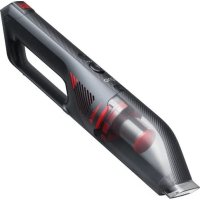
HomeVac H30 - Vacuum Cleaner eufy - Free user manual and instructions
Find the device manual for free HomeVac H30 eufy in PDF.



| Brand | Eufy |
| Model | HomeVac H30 |
| Category | Cordless stick vacuum |
| Product type | Rechargeable hand vacuum |
| Device model | T2522 |
| Power supply | Rechargeable lithium-ion battery |
| Charge input | 19 V, 0.66 A |
| Rated power | 200 W |
| Battery capacity | 2500 mAh (cell) / 7350 mAh (total battery) |
| Rated battery voltage | 14.4 V |
| Charging time | Approximately 4 hours |
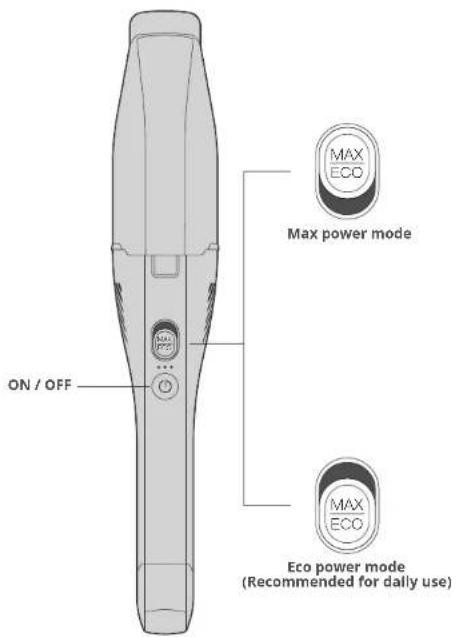
| Run time (eco mode) | 20 minutes |
| Run time (max power mode) | 10 minutes |
| Included accessories | 2-in-1 crevice tool, multi-surface tool, mini motorized pet brush, charging base, power adapter |
| Main features | Powerful suction, eco mode and max mode, motorized pet hair tool |
| Maintenance | Regular cleaning of dust cup and filter; complete washing and drying before reuse |
| Filter cleaning frequency | Every 2 weeks or every 50 cycles |
| Filter replacement | Every 5 months or every 100 cycles |
| Safety | Short-circuit protection, automatic shutdown in case of overheating, battery compliant with CE standards |
| Operating temperature | 0°C to 40°C |
| Warranty | Manufacturer's warranty (see terms on Eufy website) |
| Customer service | Technical support by email, phone or website |
| Country of origin | Made in China |
Frequently Asked Questions - HomeVac H30 eufy
User questions about HomeVac H30 eufy
0 question about this device. Answer the ones you know or ask your own.
Ask a new question about this device
Download the instructions for your Vacuum Cleaner in PDF format for free! Find your manual HomeVac H30 - eufy and take your electronic device back in hand. On this page are published all the documents necessary for the use of your device. HomeVac H30 by eufy.
USER MANUAL HomeVac H30 eufy
For FAQs and more information, please visit: www.eufylife.com

OWNER'S MANUAL HomeVac H30
Table of Contents
02 English
26 Deutsch
50 Espanol
74 François
98 Italiano
120 Türk
142 Pycckn
164 Netherlands
188 n. v
03 IMPORTANT SAFETY INSTRUCTIONS
10 WHAT'S IN THE BOX
11 OVERVIEW
12 RECHARGING
Lights during charging
Lights during vacuuming
Warning lights
Light on the charging base
15 VACUUMING
Use with additional tools
After use
19 STORAGE
Clean the dust cup and filter
Clean the mini-motorized pet brush
23 SPECIFICATIONS
23 TROUBLESHOOTING
24 CUSTOMER SERVICE
Thank you for purchasing this appliance. Carefully read all instructions before using this product, and keep this manual for future reference.
IMPORTANT SAFETY INSTRUCTIONS
READALLINSTRUCTIONSBEFOREUSINGOURVACUUMCLEANER

WARNING - TO REDUCE THE RISK OF FIRE, ELECTRIC SHOCK, OR INJURY:
Fully assemble before operating.
- Intended for household use only.
- Do not use outdoors or on wet surfaces.
- Do not leave this appliance unattended when it is plugged in. Unplug it from the outlet when you are not using it and before servicing.
Not intended to be used as a toy. Close attention is necessary when used by or near children.
- Use only as described in this manual. Use only manufacturer recommended attachments.
- For the purposes of recharging the battery, only use the detachable power supply unit provided with this device.
- Do not use with a damaged cord or plug. If the appliance is not working as it should, or has been dropped, damaged, or submerged in water, contact our customer service for advice.
- Do not handle the plug or appliance with wet hands.
- Do not unplug the adapter by pulling on the cord. To unplug, grasp the plug, not the cord.
- Do not pull the cord around sharp edges or corners. Do not run the appliance over the cord. Keep the cord away from heated surfaces.
- Do not put any objects into openings or vents. Do not use if any opening is blocked. Keep free of dust, lint, hair, and anything else
that may reduce airflow.
- Keep hair, loose clothing, fingers, and other body parts away from openings and moving parts.
- Turn off all controls before unplugging.
- Use extra care when cleaning on stairs.
- Always turn off this appliance before connecting or disconnecting the mini-motorized pet brush.
- To prevent unintentional starting, ensure the appliance is switched off before installing the battery pack, picking up or carrying the appliance. Do not carry the appliance with your finger on the power switch, doing so may cause accidental powering on.
- Do not use to pick up flammable or combustible liquids, such as gasoline, or use in areas where they may be present.
- Do not pick up anything that is burning or smoking, such as cigarettes, matches, or hot ashes.
- Do not pick up hard or sharp objects such as glass, nails, screws, coins, etc.
- Do not use without the dust collector and/or filters in place.
- Store this appliance indoors, in a cool and dry area.
Make sure that the outlet voltage corresponds to the voltage rating on the charger's label. - Recharge only with the charger (US: S013-1A190068HU; UK: S013-1A190068HK; AU: S013-1A190068HA; EU: S013-1A190068HE) specified by the manufacturer. A charger that is suitable for one type of battery pack may cause a risk of fire when used with another battery pack.
- Do not attempt to repair or disassemble this appliance. There are no user-serviceable parts inside. Maintenance and repair must be performed by a qualified repairman and only identical replacement parts can be used. This will ensure the safety of the appliance.
This appliance can be used by children aged from 8 years and above and persons with reduced physical, sensory or mental capabilities or lack of experience and knowledge if they have been
given supervision or instruction concerning use of the appliance in a safe way and understand the hazards involved. Children should not play with the appliance. Cleaning and user maintenance should not be done by children without supervision.
- This appliance includes a rechargeable lithium-ion battery pack. Do not expose the battery pack or appliance to fire or excessive temperature (above 130^ ), as it may catch fire and/or explode.
- Use this appliance only with specifically designated battery packs. Use of any damaged or modified battery packs may create a risk of injury and fire.
- Charging, using, and storing of the appliance should be within the ambient temperature range of 0 - 40^
- Follow all the charging instructions and do not charge the battery pack out of the temperature range specified in the instructions, otherwise, it may damage the battery and increase the risk of fire.
- Do not attempt to disassemble the battery pack.
The battery must be removed from the device before the device is disposed of. - This appliance must be disconnected from the mains supply when removing the battery.
The used battery should be placed in a sealed plastic bag and disposed of safely according to local environmental regulations. - Under abusive conditions, liquid may leak from the battery; avoid contact. If contact accidentally occurs, flush with water. If liquid comes in contact with the eyes, seek immediate medical help. Leaking liquid from the battery may cause irritation or burns.
- Remove the battery pack from the appliance before making any adjustments, changing accessories, or storing this appliance. Such preventive safety measures reduce the risk of starting the appliance accidentally.
SAVE THESE INSTRUCTIONS
Notice
This symbol on the device or its packaging indicates: Do not dispose of electrical appliances as unsorted municipal waste; use separate collection facilities. Contact your local authority for information regarding the collection systems available. If electrical appliances are disposed of in landfills or dumps, hazardous substances can leak into the groundwater and get into the food chain, damaging your health and well-being. When replacing old appliances with new ones, the retailer is legally obliged to take back your old appliance for disposal at least free of charge.
FCC Statement
This device complies with Part 15 of the FCC Rules. Operation is subject to the following two conditions:
(1) This device may not cause harmful interference, and (2) this device must accept any Interference received, including interference that may cause undesired operation.
Warning: Changes or modifications not expressly approved by the party responsible for compliance could void the user's authority to operate the equipment.
Note: This equipment has been tested and found to comply with the limits for a Class B digital device, pursuant to Part 15 of the FCC Rules. These limits are designed to provide reasonable protection against harmful interference in a residential installation.
This equipment generates, uses, and can radiate radio frequency energy and, if not installed and used in accordance with the instructions, may cause harmful interference to radio communications. However, there is no guarantee that interference will not occur in a particular installation, if this equipment does cause harmful interference to radio or television reception, which can be determined by turning the equipment off and on, the user is encouraged to try to correct the interference by one or more of the following measures: (1) Reorient or relocate the receiving antenna. (2) Increase the separation between the equipment and receiver. (3) Connect the equipment into an outlet on a circuit different from
that to which the receiver is connected. (4) Consult the dealer or an experienced radio / TV technician for help.
The following importer is the responsible party (for FCC matters only).
Company Name: POWER MOBILE LIFE, LLC
Address: 400 108th Ave NE Ste 400, Bellevue, WA 98004-5541
Telephone: +1 (800) 988 7973
ISED Compliance Statement
This device contains licence-exempt transmitter(s)/receiver(s) that comply with Innovation, Science and Economic Development Canada's licence-exempt RSS(s). Operation is subject to the following two conditions:
- This device may not cause interference.
- This device must accept any interference, including interference that may cause undesired operation of the device.
EU Declaration of Conformity
Hereby, Anker Innovations Limited declares that the product type T2522 is in compliance with Directives 2014/35/EU & 2014/30/EU. The full text of the EU declaration of conformity is available at the following internet address: https://www.eufylife.com/
GB Declaration of Conformity
Hereby, Anker Innovations Limited declares that the product type T2522 is in compliance with Electrical Equipment (Safety) Regulations 2016 & Electromagnetic Compatibility Regulations 2016 & The Restriction of the Use of Certain Hazardous Substances in Electrical and Electronic Equipment Regulations 2012 & The Ecodesign for Energy-Related Products Regulations 2010. The full text of the GB declaration of conformity is available at the following internet address: https://www.eufylife.com/
Anker Innovations Limited
Room 1318-19, Hollywood Plaza, 610 Nathan Road, Mongkok, Kowloon, Hong Kong
Georg.Muche-Strasse 3,80807 Munich, Germany
Anker Technology (UK) Ltd
Suite B, Fairgate House, 205 Kings Road, Tyseley, Birmingham, B11 2AA, United Kingdom
AUSTRALIA & NEW ZEALAND WARRANTY
This document details the terms and conditions of the warranty provided with this product. Please disregard any other representations contained on this product's packaging or provided with this product, which constitute or appear to constitute a warranty.
Subject to the exclusions and limitations set out below, we warrant to you that if you purchase a product directly from us, or, from any of our authorized resellers, that it will not contain defects which are a result of faulty manufacturer workmanship or materials. This warranty subsists for 15 months from the date of purchase. This warranty is provided in addition to your rights under the Australian & New Zealand Consumer Law.
Subject to any rights you have under the Australian & New Zealand Consumer Law, we will not be liable for defects which are a result of damage or loss caused by factors beyond our control, any product which has not been maintained according to any care or
maintenance instructions provided with the product, any alterations to a product which are not performed by us, or damage or defects caused to the product due to unusual or non-recommended use. We will not be liable for any special, indirect, consequential or economic loss or damage or loss of profits whatsoever suffered by you or any other person resulting from any act or omission by us. Our total liability in respect of this Warranty against Defects is limited to the replacement of the goods.
This Warranty against Defects is provided in addition to other rights and remedies that you may have at law. Our goods come with guarantees that cannot be excluded under the Australian Consumer Law. You are entitled to a replacement or refund for a major failure and for compensation for any reasonably foreseeable loss or damage. You are also entitled to have the goods repaired or replaced if the goods fail to be of acceptable quality and the failure does not amount to a major failure.
In order to claim the warranty, you must return the product to the retailer from which it was purchased or if that retailer is part of a National network, a store within that chain, along with satisfactory proof of purchase. The retailer will then return the goods to Directed Electronics Australia authorized by Anker Innovations Limited. Directed Electronics Australia will repair, replace or refurbish the product at its discretion. The retailer will contact you when the product is ready for collection. All costs involved in claiming this warranty, including the cost of the retailer sending the product to Directed Electronics Australia, will be borne by you.
This warranty is offered by Directed Electronics Australia.
Customer service support number (+61) 3 8331 4800 Mon-Fri
8:30am - 5:00pm (AEST) and customer service email address
service@myeufy.com.au
WHAT'S IN THE BOX
| H30 Venture | H30 Mate H30 Infinity | ||
| Main body | ✓ | ✓ | |
| Lithium-ion battery | ✓ | ✓ | |
| AC adapter | ✓ | ✓ | |
| Charging cable | ✓ | ✓ | |
| 2-wire device tool | ✓ | ✓ | |
| Multisurface tool | ✓ | ||
| Vini-mo-ortized pen brush * the south head's rotatable | ✓ | ✓ | |
| I and floor cleaning tool B-type tools | ✓ | ||
| Mopping module (N1) & disposable mopping cloth (N5) | ✓ | ||
| Wall pl.gs & screws (p2) | ✓ | ✓ | |

The accessories vary by model. The model (H30 Venture, H30 Male, or H30 Infinitely can be found on the package. Refer to the list above to check the accessories inside your package. You can buy additional accessories at www.eufylife.com.
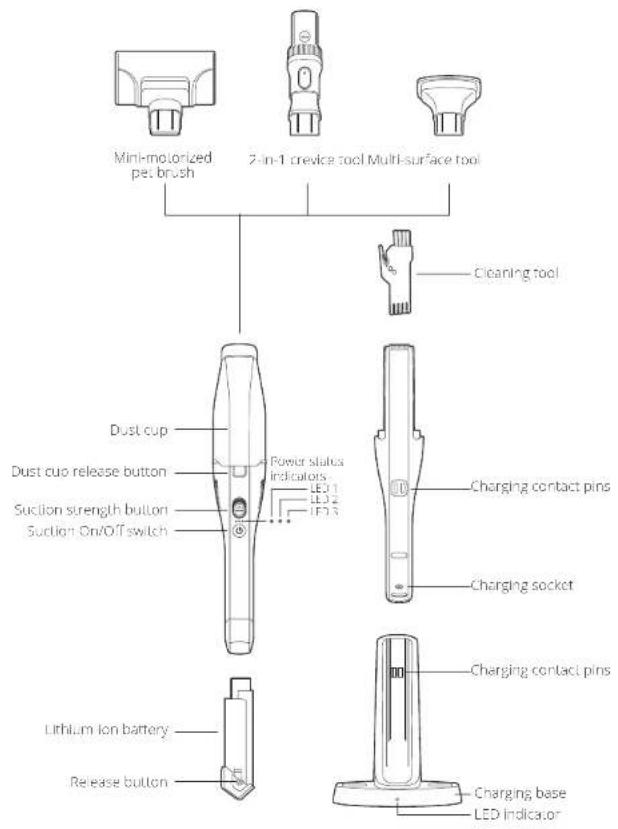
OVERVIEW
RECHARGING
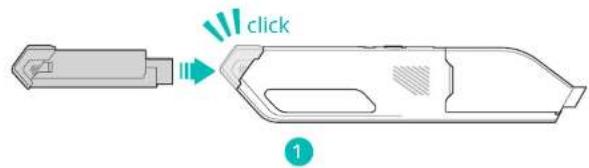
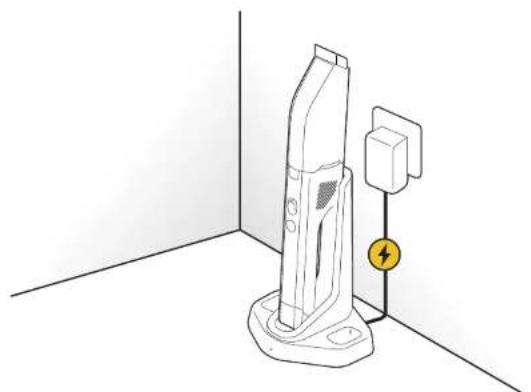
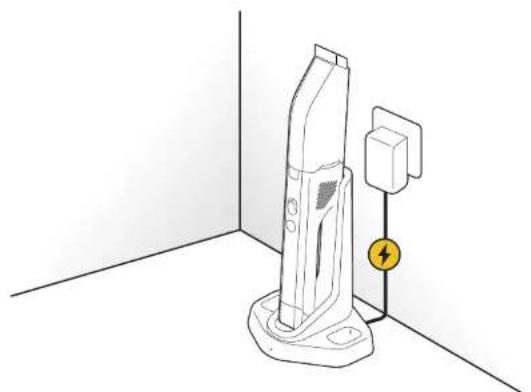
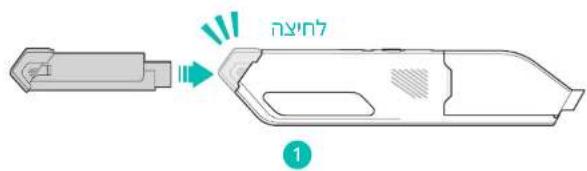
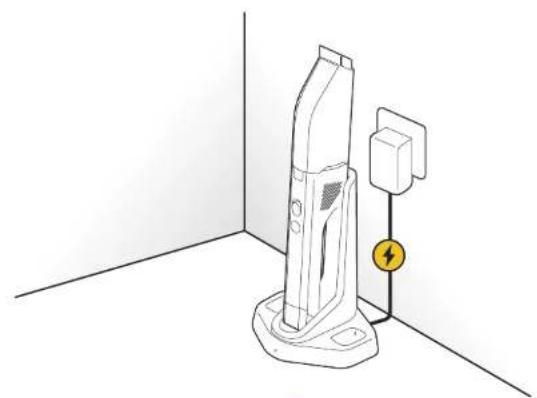
The vacuum cleaner is powered by a lithium ion battery. Before first use, charge the battery for more than 4 hours.

The vacuum cleaner cannot work while charging. The vacuum cleaner cannot be charged when the ambient temperature is above 40^
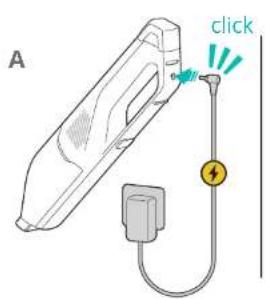
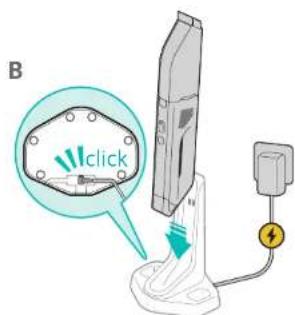
2
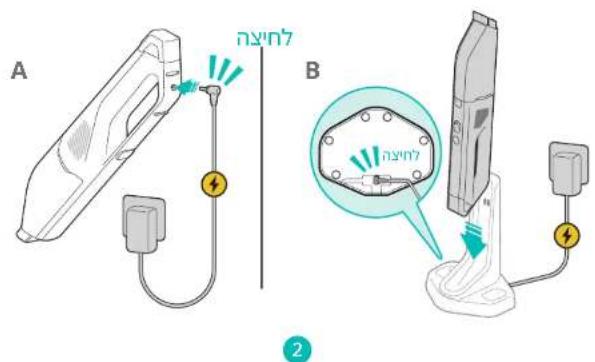
Select one charging method (Fig.2A or Fig.2B) to recharge the battery.
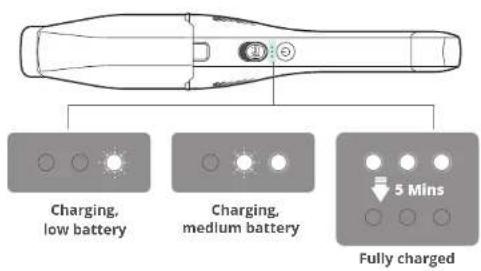
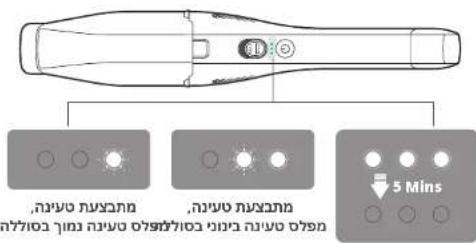
Lights during charging
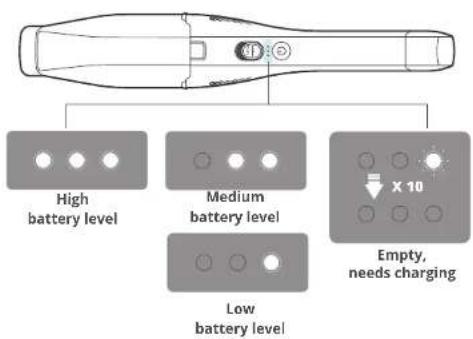
Lights during vacuuming
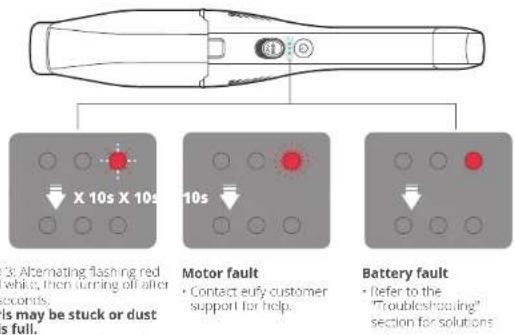
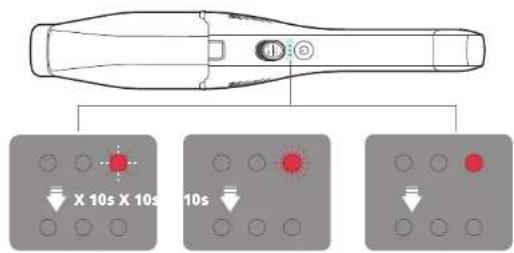
Warning lights
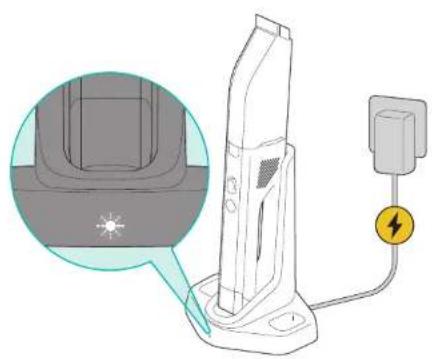
Light on the charging base
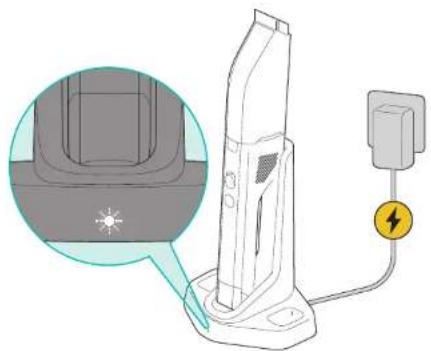
Solid white: The charging base is working normally.
VACUUMING
Before use, make sure that
The battery is fully charged.
The dust cup and filter are cleaned, completely dried, and fixed in place.

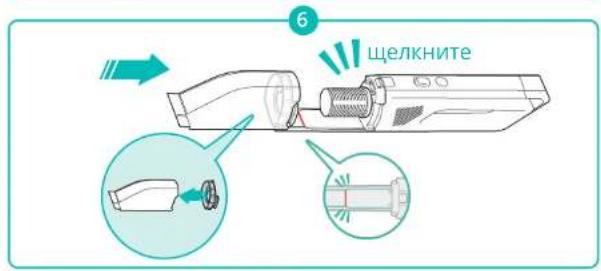
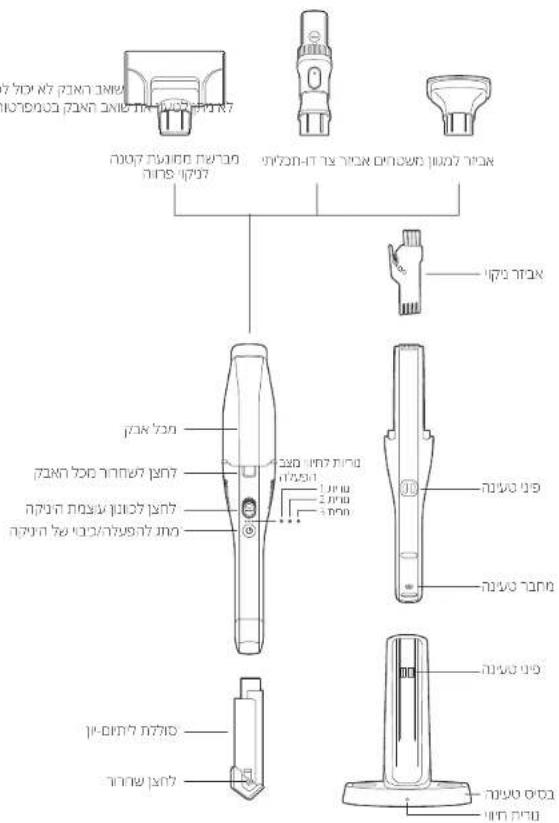
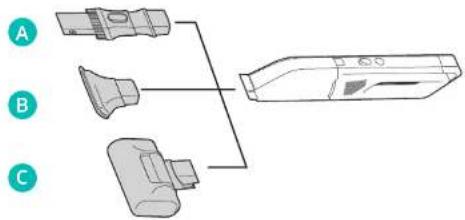
- Attach your desired cleaning accessory to the main body as illustrated.
- Do not use the vacuum cleaner to clean up any liquid.
Use with additional tools
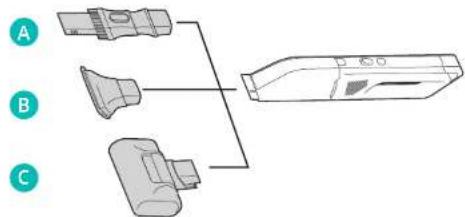
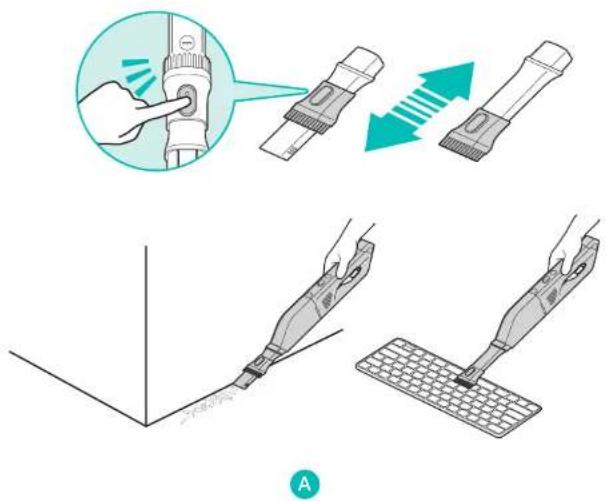
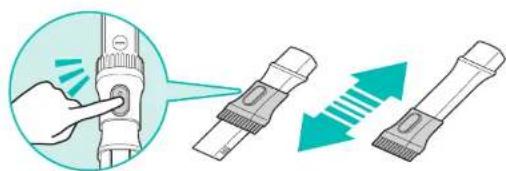
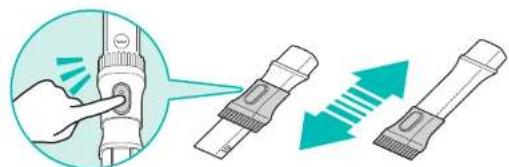
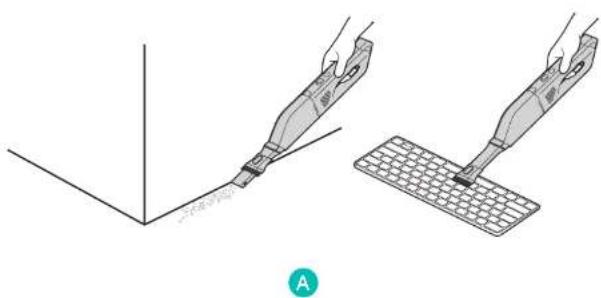
2-in-1 crevice tool:
Ideal for precise cleaning around tricky edges and in hard-to-reach narrow spaces. Quickly switch between cleaning and dusting tasks around your home or car.
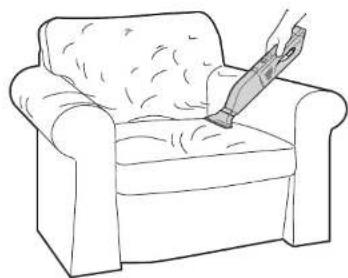
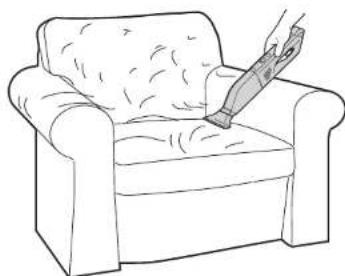
Multi-surface tool:
Ideal for removing dust and hair from sofa and carpets.
B
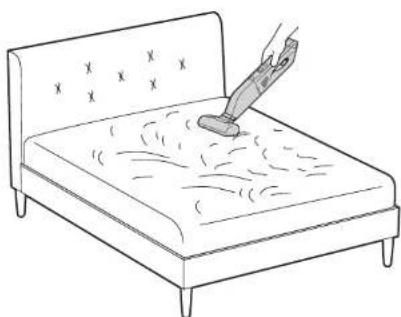
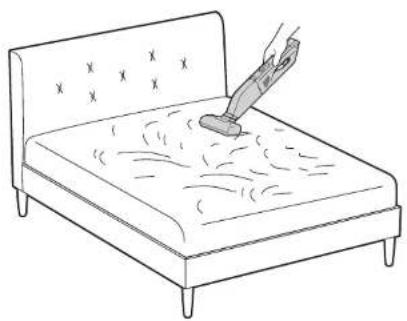
Mini-motorized pet brush:
Ideal for removing pet hair and other allergens from mattresses and upholstery.
C
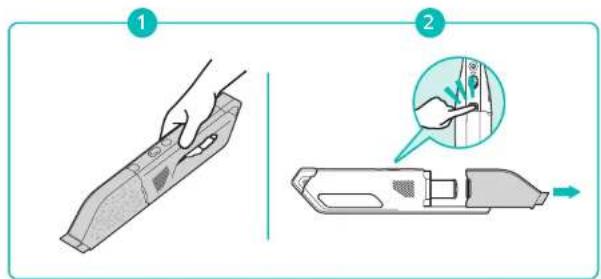
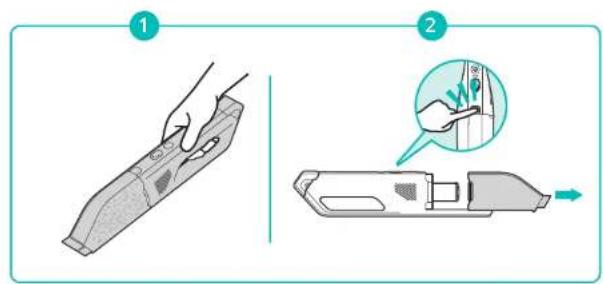
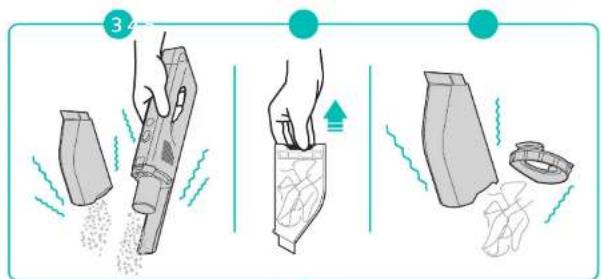
After use
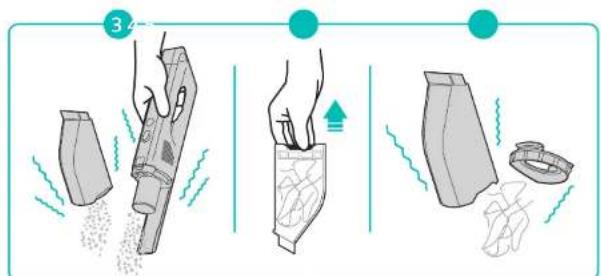
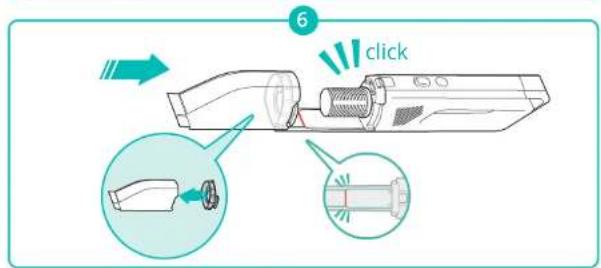
STORAGE
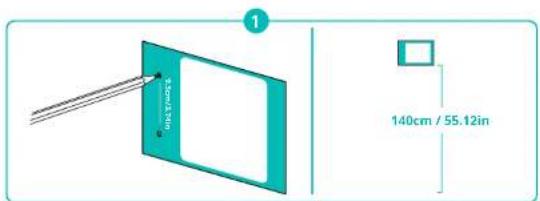
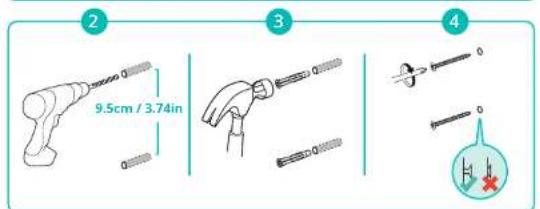
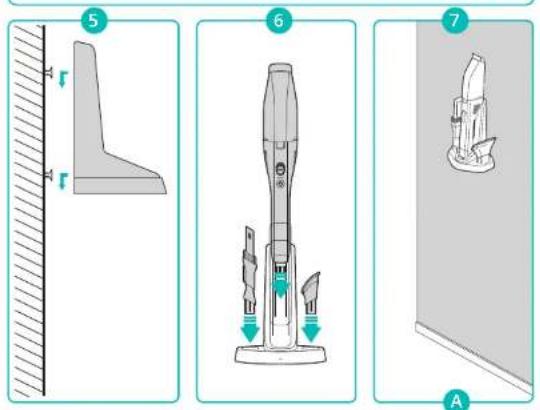
When not in use, mount the tools on a wall (Fig.A) or place the tools on a flat surface (Fig.B).
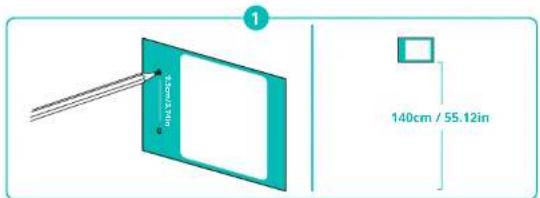
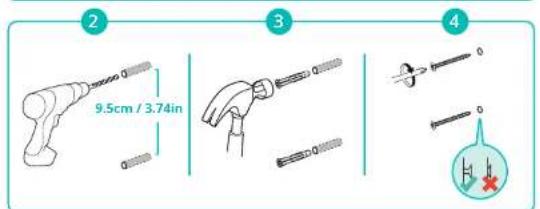
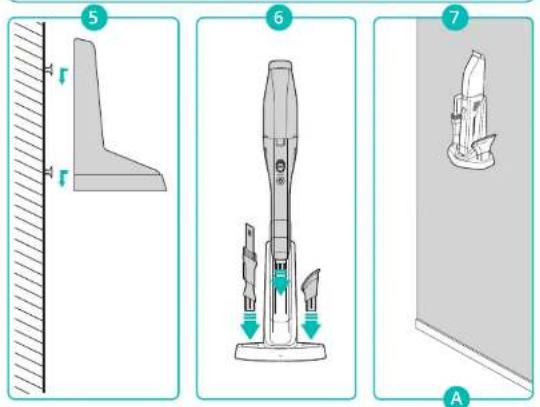
B
CLEANING & MAINTENANCE

For optimal performance, follow the instructions below to clean and maintain HomeVac regularly. The cleaning/replacement frequency will depend on your HomeVac usage habits.
| HomeVac Part Cleaning Frequency Replacement Frequency | ||
| Dust Cup After each use - | ||
| Filter | Once every week (Twice a week if it is very dirty) | Every 3 months or after every 200 rounds of cleaning. |

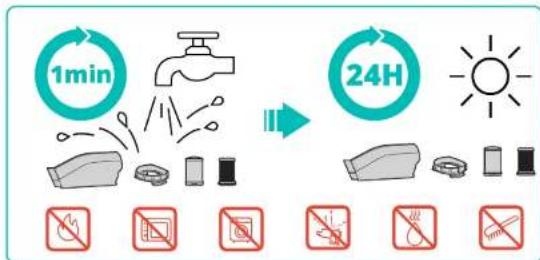
- Make sure the tools are completely dry before using.
- Do not use detergents to clean the tools.
- Do not put any part of the tools in a disinwasher.
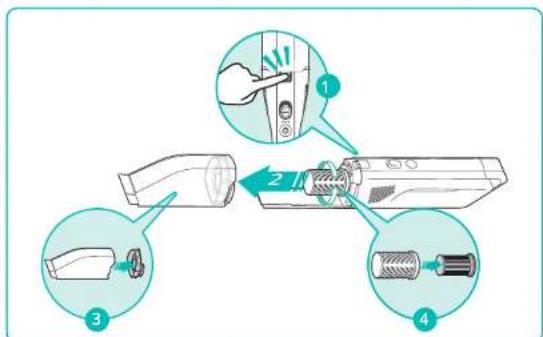
Clean the dust cup and filter
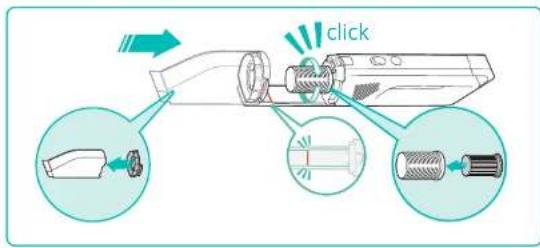
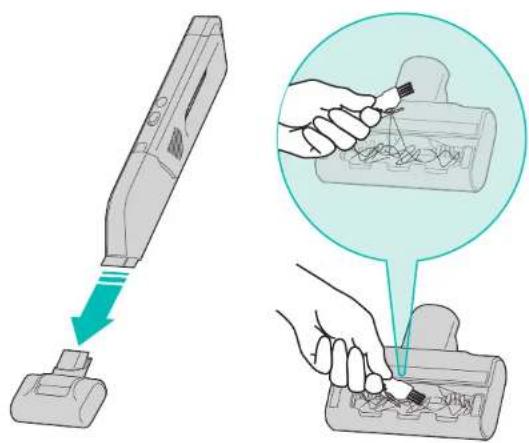
Clean the mini-motorized pet brush
SPECIFICATIONS
TROUBLESHOOTING
| Model | T2522 |
| Charging Input | 19V=68A |
| Rated Power | 200W |
| Running Time (Per Full-Charge) | Eco power mode: 20 minutes Max power mode: 10 minutes |
| Battery Cell Capacity | 2,500mAh |
| Battery Rating | DC14.4V Li-on 2,350mAh 33.8Wh |
| Charging Time | 4 hours |
| Problems Causes Solutions | |
| Cannot pick up directly? Weak suction power | · The dust cup is full. · Empty the hood cup. · Replace the battery. · Remove the dust cup and then clean the filter. · Clean the hard floor cleaning tool. |
| Jeons overflew from the dust cup | · The dust cup or filter is not installed properly. · Install the dust cup and filter. · Empty the dust cup. |
| Device not working | · The suction inlet dust cup, or the filter is stuck. · Clean the suction filter, dust cup, or the filter. · Clean the accessories and pipe tools. · Replace the battery. |
| Cannot recharge the battery | · Place the vacuum cleaner on the charging base. · Install the battery correctly. · Connect the power adapter to a power source. · Connect the battery to the computer. · Check if the charging pins are not working. |
| *If your problem persists, record the LED indication status and contact eufy customer support for help. | |
CUSTOMER SERVICE
For tutorial videos, FAQs, manuals, and more information, please visit:
https://support.eufylife.com/
Warranty
HomeVac unit: 24-month limited warranty
Lithium-ion battery: 12-month limited warranty

support@eufylife.com

www.eufylife.com

(US) + 1 (800)9887973 Mon Fri 6:15 17:00 (PT); Sat Sun 6:30 16:30 (PT)
UK4401604936200Mon-Sun 6:00-17:00Sat-Sun 6:00-14:00
(DE) +49 (0) 69 9579 7960 Mo-Fr 8:00-16:00
For more support phone numbers, please visit
https://support.eufylife.com/s/phonecontactus
Or scan the QR code below:


@Eulfoficial

@EufyOffcial

@EulyOfficial

@EufyOficial
Inhaltsverzeichnis
https://support.eufylife.com/
Garantie
support@eufylife.com

www.cujiife.com

(US)-1 (800) 988 7973 Mon-Fri 6:15-17:00 (PT), Sat-Sun 6:30-16:30 (PT)
UK+4401604936200Mon-Sun6:00-17:00Sat-Sun6:00-14:00
(12E)-49(0)6995797960Mo Fr 8:00 16:00
(日本)0344557823月-金9:00-17:00
https://support.eufylife.com/s/phonecontactus
The following importer is the responsible party (solo para temas de FCC).
https://support.eufylife.com/
Garantía
support@eufylife.com

www.eutylife.com

(US)-1 (800) 988 7973 Mon-Fri 6:15-17:00 (PT); Sat-Sun 6:30-16:30 (PT)
UK+4401604936200Mon Sun 6:00-17:00Sat Sun 6:0014:00
(DC)-49(0)6995797960Mo-Fr8:00-16:00
https://support.eufylife.com/s/phonecontactus
https://support.eufylife.com/
Garantie
ApparelHomeVac:Garantie limitee de 24 mois
Batterie aux ions lithium: Garantie limitee de 12 mois
Nous contacter

support@eufylife.com

www.euylife.com

US)18009887973MonFm6:1517:00(PT);Sat Sun 6:3016:30 (PT)
UK)4401604936200Mon-Sun 6:00-17:00Sat-Sun 6:00-14:00
(DE)-49(0)6995797960Mo-Fr8:00-16:00
https://support.eufylife.com/s/phonecontactus
https://support.eufylife.com/
Garanzia
support@eurylife.com

www.eufyllife.com

(US) + 1 (800)9887973 Mon-Fri 6:15-17:00 (PT); Sat-Sun 6:30-16:30 (PT)
UK+1401604936200MonSun6:00-17:00SatSun6:00-14:00
(DE)+49(0)6995797960MoFt8:00-16:00
(日本)034557823月金9:00-17:00
https://support.eufylife.com/s/phonecontactus
Ekaraclarla kullanin
Kullanim sonrasi
134 SAKLAMA
https://support.eufylife.com/
Garanti
HomeVac Unitesi 24 ay garanti
Lilyum-yon pil:12 ay garanti
Biziml lletisime Gecin

support@eufylife.com

www.eutylife.com

(US) +1 (800) 988 7973 Mon-Fri 6:15 - 17:00 (PT); Sat-Sun 6:30-16:30 (PT)
UK+401604936200Mon-Sun6:00-17:00Sat-Sun 6:00-14:00
(DE)+49(0)69.95797960MoFt8:0016:00
(日本)0344557823月金9:00-17:00
TR+908504601414PzCuma 09:00-18:00
Destekle igll diger Telefon numaralan icin lutfen su adresi ziyaret edin:
https://support.eufylife.com/s/phonecontactus
Veyasagicaki QR kodun taratin:


@EuulyOfficial

@Eulfofficial

@EufyOficial

@EufyOficial
Copepknne
143 BAXHbIE INHCTPYKUNI NO TEXHNIKE 6E30NACHOCTU
148 KOMJIIEKTAUIN
149 063OP
150 IOID3APRAKA
HINDAKATOpbIaPraIKn
HdkaTopbpaobTbneocca
Ppeynpeintelhbne Hndkataopb
INdkaTOp 3apAHorO yCTpoIcTBA
153 YNCTKA NblIECOCOM
PpIMeHHeHneIpynIX Hacdok
Pocne kcnnyataun
156 XPAHEHNE
OuHCTNTe NbIe6bOpHn I nnBtP
OHTTE MHNH-ETKy DJIR XNBOTHbIX
160 TEXHnueCKNE XAPAKTEPVCTUKN
161 YCTPAHEHNE HENCPABHOCTE
162 05CJNYKUBAHNE KJINEHTOB
BnAaDAMN BAC 3nPnOoCtCHy yctpOCTBa BHmAtteBHO 03-kOMTeTcB COBEMH HcTpyKmHIEEYIOIeBHaHem IpcyKaI cxpaHae TaHoey kyoKOCTBO NBOABDBH K HwY BSyUdLIM
BAXKHBIE MHCTPYKUIN NO TEXHNIKE BE3OПАСНСТИ
IPOUHTAITBE BCE INHCTPYKUNIPEDAICNOJIb3OBAHNEIM IbUECOCA

IPEUYIPKDEHME- YTO6bl MVIHMM3NPOBATb PNCKIOXAPA, IOPAXEHN 3JIeKTUeCKMIM TOKOM NINTPABMbI:
-песдхсл�атuaинnotbio cobepiteHacayk.
-OhaIpeHa3HaueHaToIbKO IJIy DOMaUHeRo IcNIOB3OBAHIN.
He noJIb3yIteCb cB HBe nOMeUeHn uN dN y6OpKn BnaXhBix NOBepxHocte.
He octabHnIte BkUoyehHoye yctpoCTBO 6e3 npncMOTpa. OToCoEHHnIte yctpoCTBO OT pO3eTK, KOrDa OHO He nCOnbByeTcN nepeedro 0cbnyBaHmE.
HacdaKa He npedHa3HaeHa dIy nCnOJIb3OBaHnB KaueCTBe UpyuKoKorla yctpoIcTBO nCnOJIb3ayeTcJeTbMn IIN pRdOM C DeTbMn Heo6xmoPiNCTaJIbHOE BHMaHHe.
IcnoB3yTe ee TbKO TaK KaONCAHO B daHHOM pykoBOCTBe. IcnoB3yTe ToBko npHAdnHexHoCTN, peKoMeHDoBaHHbIe npOnBDOHTeJIEM.
ДлгпдзардakумлготансрьтToTbKcBemHbI 6LOK nITAHn, npIaRaEMb K TOMy yCTpoYCTBy.
He noB3yItebHMM,ecnnoBpeKdEHNHypnnBnka.Ecnn yCtpoJCTBO He pa6oTaetHaNExKaUMM 06pa3om,6blno ypoHeHO, NOBpeXdeHO HNI NorpyKeHO B Body,CBAKHTeCB COTdenOM
06cnyKBAHNA KnEHTOB 4NRA KOHCyIbTaUIM.
- He sepeitecb 3a BnIKy mN yCTpoiCtBO MOKpbIM pyKaMn.
He TAHHTe aanTep 3a WHyp, YTO6bI BByHyTb BNky n3 po3eTK. YTO6bI N3BLeHb erO n3 po3eTK dePexNTecb 3a BNky, a He 3a npoBOd.
He TAHNTe 1Hyp,3aDeBaHOuOy 3a OCTbE Kpa HnN yTb. He npeBnTaTe YcIpoCTBO NO pOBOy.DepXHTe PPOBOd BdAnOT HaPcBaemix NoBcePHOCTe.
He BCTABJIte KaKne-JIbO npEmTeB nPpoemblnnBeHTNIOHbIE OTEBPCTnHE mnoBnyeYCTPOCTBO,ecn KaKoe-JIbO OTBepCTNE 3abLOknpoBaHO.HeOnyckaTeBO3dEChTBnBnBOPca,BOcN cKaKnx-NIbO dpYrNXnpDMeTOB,KOTOpBE MOYr CHMNTB BO3dyHbN NOTOK.
He np6nkae B0ncb,CB6oDHyOcExy,naBcBn Dpytna HCTN TELKOTBepCmN DNNKUIMCMDETAAM.
IpeTe TEM, KaB BHyTb BnIKy n3 po3ETK, BbIKIOHTe BCE opraHbI ynpabneHn.
·BydteocobehnooctopoxhblnpybOpkeHaieCTHnE.
Bcerda BbKIOHaeYcTpoiCTBOpeepnOKnHOeHEmnnOTKIOHoeHNEMMHN-ETKNJXNBOTHBX.
Bo 366kHHe clyuHoro 3anycka nepeyctahOBkoI akyMnTota, noHHTHE Mnn PepeHOCKO yCTPOYCTBa y6eNTecb, HTO OHO BkiHNOHe. He nepeHOcHTe YCTPOICTBO, depxHaNaLeu He BkIOHate He NITAHN. ETO MOKET PnBcTe K CUYHOMy BKIOHcHIO NITAHN.
He noB3yTecb yctpoCTBOM npy bOpKe TAKNX IeKOBOCMIAMEHNOXCHMTOPOUHX KJDKOCTE,KA6beHN, Hn EekpyAtpnyTe erO TaM, FDe OHMOrT PnCytCTBOBaTb.
He ybpaaiTe To, 1To ropnt nn DbIMTcHnnpmep,curapeTb, cnHKn nI ropn nn neen.
He y6paTe TBepeBle NIO OCTpIe PpeMTo, TaKne KaK CTekNo, TBO3D, WpyTb, MOHETbN.
He 3KcnpaTpyTe yCtpoNCTBO, He yCtahOBnB nIbnec6OpHnK n/nnn FVnbTpbl.
XpaHnTe ero B nOmeUeHN, B npoxnaHOM u cyxom MeTe.
y6eHntecb,HTo HApXeHne cTei COOTBeTCTByET HaipXeHHIO, yka3aHHOMyHa 3NKeTke 3apHOrO yCTpoHCTBa.
BbnoHnre no3apky toIkoC nmoUho 3apHoro yctpoactBa (CUSA: S013-1A190068HU; BENIKO6PHTAHN: S013 A190058HK; ABCTPAINR: S013-1A190068HA; EBPOENCKN COHO3: S013-1A190068HE, ykaahHoro npo3BDOHTeEM. 3apHnoe yctpoiCTBO, noXoJpuee dIn opepeHORO Tnna akkymyTAPOpHoi 6batepu, cnoCo6Ho Bb3BaTb Bo3ropHne npa BBbope dpyroB 6batepu.
He bTaTecB pEmOHnPoBaTB nIpa36npaTB 3To yCpOaCTBO BycPcOCTBE HET DeTae,peOMHT KOTOpbIX MoKet OcUeCTBnTBC TIOB3OBaTeIe,TeXnueckoe ObcJyXnBAHne U pEmOH ToJXhBI BYItoNHTBC KBAHmUIpOBAHHBM peMOHTNkOM I C PmPmeHEHm TOJIbKO NdeHTNHbIX 3AnHaCTe, 3TO oBeceHt6beONacHOCTbY cTPOaCTBa.
-3TMM yCTpoiCTBOM MOry T OJb3oBaTbcra DeTn HauHaa C 8 Jet, a TaKKe IuIc a COrpaHHeHHbIMn OIN3HecXMm, ceHCOPbIMM NIMyMCTBEHHbIMN CNO6HOCTMa NIO HOEOCTaKOM ONbTa n 3AHNI. PpN 3OTM OIN DOnJIb bItb NpO HABIoHEHem NIM oBuYeHbBe3OJaCHO EKnPlyaTaUIN yCTpoiCTBa u OC03HaBaTb npCByUne em pckN He paapeWaiTe DeTAM wPaTB CYCTPOICTBOM DEmr He cNeDeY IpBOBAnTb OHCTKy IN TexHNHeCKCeOe ObCyXBAHHe 6e3 npNCMOIpa.
TOyCTPOIcTBO CHa6KeHO nepe3apXaembIM NITNINHOHbIM AkymnytTopOM.He noDBePrAte AkymytnotU INY cTPOIcTBO BO3EChTBIO ONH NIN BbCOKNX TEmepatyp(BbIue 130°C),T.K. OHO MOKET aHOpetCBN WNNB3OpBaTbCn
IcnoB3yte 10 yctpoCTBO TOLKo C npedHaHaueHHbIM
JHr HrO AKKMyIITOpAMN,OKCNyTAuTnIOBpeXeHbIX Nm
MOaONLPOBaAHBX AKKMyIITOpOB CNOC6HO pINBecn K
TPABME MNN BO3GpAHHo.
3apka,ncnoB3oBAHme HxpaHHe yctpoiCTBaDOnKbI npoBDnTbcraPnpTeMnepaType Okpykaioue Cpebl0-40°C.
CnDynte BcEM INHCTpyKUHM NO 3apRKe H He 3apRJaTe akkymyIaTOphyIO 6aTapeIO npBbIXOde 3a npedeNb yka3aHHoro
B INCHpyKUAX TEMNepaTyPOHO Dmana3OHa. Hnave 3TO MOxET BbIBaTb NOBpExDeHne 6atapen n NOBbICHT pNK B03ropAHNA.
- He nbTaiTeCb pa3cbpaTb akkMynTOp.
- Pnepd ytnn3aueyycptpoctBa Hxho n3BneHb aKMyrIop n3 yctpoicBa.
- Npeed nBneHemnakmyTopa 30 yctpoCTBO Tpebyetc OTKIOHTIOTJEIKIPOCETN.
NcnoB3oBAHHbAkyMylTOp Heo6xOIMIO NOMECTNb B 3aKpItbPiactNkoBnPaKETn yTNiI3nPOBaTb6e30NaChbIM 6pa3OM B COOTBETCTBN CMECTbIMN EKOJIoTHueCKMN HOPMaMn
- Pn HnpeBnBbX yCIOBnX 3KcIpyatauN B aKKymIaTope 6bIbaETyeUkX JIKKOCTN. N36eRtE KOHTAKTa C HeN. Pn cyuHOM KOtAKTE npoMOte Koxy BOOJ.ECN XIKKOCTb NONaTeB rna3, cpa3y o6pATNECB 3a MeDnIHCKON NOMOJIbO. XIKKOCTb n3 AKKMyIaTopa MoXeT BblBaTb pa3dpaxKeHne INI OKOR.
BbHbTe aKkymyTOp IN yCtpoCTBa nepeBbIOnHeHnEM KAKXmU6 peRyIpOBok,3aMeOH AnKcEccyApO IN XpaHEHnEMycTpoCTBa.Io6HbInePpeBeHTNbHbIe MePeB 6e30NaChOCTnCHXaOT PNCCK CNYHAI ITO BKNHOHeHnY cTPOCTBa.
COXPAHNTE 3TN INHCTPYKUIN
Птумейанne.

3TOT CnMBOJ Ha yCTpoICTBe NIN erO yNaKOBKe O3HaAaET:
He Bb6paBbAaTe 3nEeKtpnHeckne np6bpb
HecopnpoBaHHBe KOMMyHaBbHe OToOdb.
NcNoIb3yIte OTeBHe IyHKbI c6ba.O6paNTecb
MeCtHbE OpTaBbI Bnactn DnnoLyehn
HfOpMaMnIO DOctTyHbIX CntEmax c6ba.Pn
ytmnaaNN 3nEeKpnpn6bpOB Ha CBankax
OnachBle BeuecTBA MoryT NoaDaT BpyHTObBe
BoDbN BnueeByIO eNb, npnnHra Bpe Daewmy
3do0obHo N bLaononyuHIO Pn 3aMeHe cTapbx
Pnp6pOB HOBBIMN, npdaBeue no 3aKohy 6o3aH
3abpTa cTapoe yctpoCTBO dYtIN3aun
6ecnilaTHo.
DeklapaunOcooTBeTCTBnE C
HactoAAM Anker Innovations Limited 3aBnIeT, 9TO TIN npOyKTA T2522 coOTBeCTbET DApckTNBaM 2014/35/EU n 2014/30/EU. POnhB TeKT DeKlnapaUN O COOTBEcTBn dNr EC MoKHO Hau Na CNeDyHoE Mbe6-caTe: https://www.eufylife.com.
KOMПЛЕKTALДА
| H30 Venture | H30 Mate H30 Infinity | |
| Корус | ✓ | ✓ |
| Логинeticity | ✓ | ✓ |
| Адаму vermaatman | ✓ | ✓ |
| Варanteусторίя | ✓ | ✓ |
| Плесьг - р.d. - p.d. - p.d. - p.d. - p.d. - p.d. - p.d. - p.d. - p.d. - p.d. - p.d. - p.d. - p.d. - p.d. - p.d. - p.d. - p.d. - p.d. - p.d. - p.d. - p.d. - p.d. - p.d. - p.d. - p.d. - p.d. - - - - - - - - - - - - - - - - - - - - - - - - - - - - - - - - - - - - - - - - - - - - - - - - - - - - - - - - - - - - - - - - - - - - - - - - - - - - - - - - - - - - - - - - - - - - - - - - - - - - | ||
| Да́дόν – Дэ́дόν – Дэ́дόν – Дэ́дόν – Дэ́дόν – Дэ́дόν – Дэ́дόν – Дэ́дόν – Дэ́дόν – Дэ́дόν – Дэ́дόν – Дэ́дόν – Дэ́дόν – Дэ́дόν – Дэ́дόν – Дэ́dόν – Дэ́dόν – Дэ́dόν – Дэ́dόν – Дэ́dόν – Дэ́dόν – Дэ́dόν – Дэ́dόν – Дэ́dόν – Дэ́dόν – Дэ́dόν – Дэ́dόν – Дэ́dόν – Дэ́dόν – Дэ́dόв – Дэ́dόв – Дэ́dόв – Дэ́dόв – Дэ́dόв – Дэ́dόв – Дэ́dόв – Дэ́dόв – Дэ́dόв – Дэ́dόв – Дэ́dόв – Дэ́dόв – Дэ́dόв – Дэ́dόв – Дэ́dόв – DÉTDA – DÉTDA – DÉTDA – DÉTDA – DÉTDA – DÉTDA – DÉTDA – DÉTDA – DÉTDA – DÉTDA – DÉTDA – DÉTDA – DÉTDA – DÉTDA – DÉTDA – DÉTDA – DÉTDA – DÉTDA – DÉTDA – DÉTDA – DÉTMA – DÉTMA – DÉTMA – DÉTMA – DÉTMA – DÉTMA – DÉTMA – DÉTMA – DÉTMA – DÉTMA – DÉTMA – DÉTMA – DÉTMA – DÉTMA – DÉTMA – DÉTMA – DÉTMA – DÉTMA – DÉTMA – DÉTMA – DÉTDA – DÉTDA – DÉTDA – DÉTDA – DÉTDA – DÉTDA – DÉTDA – DÉTDA – DÉTDA – DÉTDA – DÉTDA – DÉTDA – DÉTDA – DÉTDA – DÉTDA – DÉTDA – DÉTDA – DÉTDA – DÉTDA – DÉTCA – DÉTCA – DÉTCA – DÉTCA – DÉTCA – DÉTCA – DÉTCA – DÉTCA – DÉTCA – DÉTCA – DÉTCA – DÉTCA – DÉTCA – DÉTCA – DÉTCA – DÉTCA – DÉTCA – DÉTCA – DÉTCA – DÉTCA – DÉTDA – DÉTDA – DÉTDA – DÉTDA – DÉTDA – DÉTDA – DÉTDA – DÉTDA – DÉTDA – DÉTDA – DÉTDA – DÉTDA – DÉTDA – DÉTDA – DÉTDA – DÉTDA – DÉTDA – DÉTDA – DÉTDA – DÉTBA – DÉTBA – DÉTBA – DÉTBA – DÉTBA – DÉTBA – DÉTBA – DÉTBA – DÉTBA – DÉTBA – DÉTBA – DÉTBA – DÉTBA – DÉTBA – DÉTBA – DÉTBA – DÉTBA – DÉTBA – DÉTBA – DÉTBA – DÉTDA – DÉTDA – DÉTDA – DÉTDA – DÉTDA – DÉTDA – DÉTDA – DÉTDA – DÉTDA – DÉTDA – DÉTDA – DÉTDA – DÉTDA – DÉTDA – DÉTDA – DÉTDA – DÉTDA – DÉTDA – DÉTDA – DÉTFA – DÉTFA – DÉTFA – DÉTFA – DÉTFA – DÉTFA – DÉTFA – DÉTFA – DÉTFA – DÉTFA – DÉTFA – DÉTFA – DÉTFA – DÉTFA – DÉTFA – DÉTFA – DÉTFA – DÉTFA – DÉTFA – DÉTFA – DÉTDA – DÉTDA – DÉTDA – DÉTDA – DÉTDA – DÉTDA – DÉTDA – DÉTDA – DÉTDA – DÉTDA – DÉTDA – DÉTDA – DÉTDA – DÉTDA – DÉTDA – DÉTDA – DÉTDA – DÉTDA – DÉTDA – DÉTDM – DÉTDA – DÉTDA – DÉTDA – DÉTDA – DÉTDA – DÉTDA – DÉTDA – DÉTDA – DÉTDA – DÉTDA – DÉTDA – DÉTDA – DÉTDA – DÉTDA – DÉTDA – DÉTDA – DÉTDA – DÉTDA – DÉTDA – DÉTDB – DÉTDB – DÉTDB – DÉTDB – DÉTDB – DÉTDB – DÉTDB – DÉTDB – DÉTDB – DÉTDB – DÉTDB – DÉTDB – DÉTDB – DÉTDB – DÉTDB – DÉTDB – DÉTDB – DÉTDB – DÉTDB – DÉTDB – DÉTDA – DÉTDA – DÉTDA – DÉTDA – DÉTDA – DÉTDA – DÉTDA – DÉTDA – DÉTDA – DÉTDA – DÉTDA – DÉTDA – DÉTDA – DÉTDA – DÉTDA – DÉTDA – DÉTDA – DÉTDA – DÉTDA – DÉTNA – DÉTNA – DÉTNA – DÉTNA – DÉTNA – DÉTNA – DÉTNA – DÉTNA – DÉTNA – DÉTNA – DÉTNA – DÉTNA – DÉTNA – DÉTNA – DÉTNA – DÉTNA – DÉTNA – DÉTNA – DÉTNA – DÉTNA – DÉTDA – DÉTDA – DÉTDA – DÉTDA – DÉTDA – DÉTDA – DÉTDA – DÉTDA – DÉTDA – DÉTDA – DÉTDA – DÉTDA – DÉTDA – DÉTDA – DÉTDA – DÉTDA – DÉTDA – DÉTDA – DÉTDA – DÉTDX – DÉTDX – DÉTDX – DÉTDX – DÉTDX – DÉTDX – DÉTDX – DÉTDX – DÉTDX – DÉTDX – DÉTDX – DÉTDX – DÉTDX – DÉTDX – DÉTDX – DÉTDX – DÉTDX – DÉTDX – DÉTDX – DÉTDX – DÉT DX – DÉTDX – DÉTDX – DÉTDX – DÉTDX – DÉTDX – DÉTDX – DÉTDX – DÉTDX – DÉTDX – DÉTDX – DÉTDX – DÉTDX – DÉTDX – DÉTDX – DÉTDX – DÉTDX – DÉTDX – DÉTDX – DÉTDX – DÉTZX – DÉTZX – DÉTZX – DÉTZX – DÉTZX – DÉTZX – DÉTZX – DÉTZX – DÉTZX – DÉTZX – DÉTZX – DÉTZX – DÉTZX – DÉTZX – DÉTZX – DÉTZX – DÉTZX – DÉTZX – DÉTZX – DÉTZX – DÉTDX – DÉTDX – DÉTDX – DÉTDX – DÉTDX – DÉTDX – DÉTDX – DÉTDX – DÉTDX – DÉTDX – DÉTDX – DÉTDX – DÉTDX – DÉTDX – DÉTDX – DÉTDX – DÉTDX – DÉTDX – DÉTDX – DÉTAX – DÉTAX – DÉTAX – DÉTAX – DÉTAX – DÉTAX – DÉTAX – DÉTAX – DÉTAX – DÉTAX – DÉTAX – DÉTAX – DÉTAX – DÉTAX – DÉTAX – DÉTAX – DÉTAX – DÉTAX – DÉTAX – DÉTAX – DÉTZX – DÉTZX – DÉTZX – DÉTZX – DÉTZX – DÉTZX – DÉTZX – DÉTZX – DÉTZX – DÉTZX – DÉTZX – DÉTZX – DÉTZX – DÉTZX – DÉTZX – DÉTZX – DÉTZX – DÉTZX – DÉTZX – DÉT ZX – DÉTZX – DÉTZX – DÉTZX – DÉTZX – DÉTZX – DÉTZX – DÉTZX – DÉTZX – DÉTZX – DÉTZX – DÉTZX – DÉTZX – DÉTZX – DÉTZX – DÉTZX – DÉTZX – DÉTZX – DÉTZX – DÉTZX – DÉTFOX – DÉTFOX – DÉTFOX – DÉTFOX – DÉTFOX – DÉTFOX – DÉTFOX – DÉTFOX – DÉTFOX – DÉTFOX – DÉTFOX – DÉTFOX – DÉTFOX – DÉTFOX – DÉTFOX – DÉTFOX – DÉTFOX – DÉTFOX – DÉTFOX – DÉTFOX – DÉTFX – DÉTFOX – DÉTFOX – DÉTFOX – DÉTFOX – DÉTFOX – DÉTFOX – DÉTFOX – DÉTFOX – DÉTFOX – DÉTFOX – DÉTFOX – DÉTFOX – DÉTFOX – DÉTFOX – DÉTFOX – DÉTFOX – DÉTFOX – DÉTFOX – DÉTFOX – DÉT FOX – DÉTFOX – DÉTFOX – DÉTFOX – DÉTFOX – DÉTFOX – DÉTFOX – DÉTFOX – DÉTFOX – DÉTFOX – DÉTFOX – DÉTFOX – DÉTFOX – DÉTFOX – DÉTFOX – DÉTFOX – DÉTFOX – DÉTFOX – DÉTFOX – DÉTFOX – DÉTZX – DÉTZX – DÉTZX – DÉTZX – DÉTZX – DÉTZX – DÉTZX – DÉTZX – DÉTZX – DÉTZX – DÉTZX – DÉTZX – DÉTZX – DÉTZX – DÉTZX – DÉTZX – DÉTZX – DÉTZX – DÉTZX – DÉTSEX – DÉTSEX – DÉTSEX – DÉTSEX – DÉTSEX – DÉTSEX – DÉTSEX – DÉTSEX – DÉTSEX – DÉTSEX – DÉTSEX – DÉTSEX – DÉTSEX – DÉTSEX – DÉTSEX – DÉTSEX – DÉTSEX – DÉTSEX – DÉTSEX – DÉTSEX – DÉTBOX – DÉTBOX – DÉTBOX – DÉTBOX – DÉTBOX – DÉTBOX – DÉTBOX – DÉTBOX – DÉTBOX – DÉTBOX – DÉTBOX – DÉTBOX – DÉTBOX – DÉTBOX – DÉTBOX – DÉTBOX – DÉTBOX – DÉTBOX – DÉTBOX – DÉTBOX – DÉTFOX – DÉTFOX – DÉTFOX – DÉTFOX – DÉTFOX – DÉTFOX – DÉTFOX – DÉTFOX – DÉTFOX – DÉTFOX – DÉTFOX – DÉTFOX – DÉTFOX – DÉTFOX – DÉTFOX – DÉTFOX – DÉTFOX – DÉTFOX – DÉTFOX – DÉTBOX – DÉTBOX – DÉTBOX – DÉTBOX – DÉTBOX – DÉTBOX – DÉTBOX – DÉTBOX – DÉTBOX – DÉTBOX – DÉTBOX – DÉTBOX – DÉTBOX – DÉTBOX – DÉTBOX – DÉTBOX – DÉTBOX – DÉTBOX – DÉTBOX – DÉT BOX – DÉTBOX – DÉTBOX – DÉTBOX – DÉTBOX – DÉTBOX – DÉTBOX – DÉTBOX – DÉTBOX – DÉTBOX – DÉTBOX – DÉTBOX – DÉTBOX – DÉTBOX – DÉTBOX – DÉTBOX – DÉTBOX – DÉTBOX – DÉTBOX – DÉTBOX – DÉTZX – DÉTZX – DÉTZX – DÉTZX – DÉTZX – DÉTZX – DÉTZX – DÉTZX – DÉTZX – DÉTZX – DÉTZX – DÉTZX – DÉTZX – DÉTZX – DÉTZX – DÉTZX – DÉTZX – DÉTZX – DÉTZX – DÉTBOX – DÉTBOX – DÉTBOX – DÉTBOX – DÉTBOX – DÉTBOX – DÉTBOX – DÉTBOX – DÉTBOX – DÉTBOX – DÉTBOX – DÉTBOX – DÉTBOX – DÉTBOX – DÉTBOX – DÉTBOX – DÉTBOX – DÉTBOX – DÉTBOX – DÉTBX – DÉTBOX – DÉTBOX – DÉTBOX – DÉTBOX – DÉTBOX – DÉTBOX – DÉTBOX – DÉTBOX – DÉTBOX – DÉTBOX – DÉTBOX – DÉTBOX – DÉTBOX – DÉTBOX – DÉTBOX – DÉTBOX – DÉTBOX – DÉTBOX – DÉTBOX – DÉTSEX – DÉTSEX – DÉTSEX – DÉTSEX – DÉTSEX – DÉTSEX – DÉTSEX – DÉTSEX – DÉTSEX – DÉTSEX – DÉTSEX – DÉTSEX – DÉTSEX – DÉTSEX – DÉTSEX – DÉTSEX – DÉTSEX – DÉTSEX – DÉTSEX – DÉTFOX – DÉTFOX – DÉTFOX – DÉTFOX – DÉTFOX – DÉTFOX – DÉTFOX – DÉTFOX – DÉTFOX – DÉTFOX – DÉTFOX – DÉTFOX – DÉTFOX – DÉTFOX – DÉTFOX – DÉTFOX – DÉTFOX – DÉTFOX – DÉTFOX – DÉTSEX – DÉTSEX – DÉTSEX – DÉTSEX – DÉTSEX – DÉTSEX – DÉTSEX – DÉTSEX – DÉTSEX – DÉTSEX – DÉTSEX – DÉTSEX – DÉTSEX – DÉTSEX – DÉTSEX – DÉTSEX – DÉTSEX – DÉTSEX – DÉTSEX – DÉTZX – DÉTZX – DÉTZX – DÉTZX – DÉTZX – DÉTZX – DÉTZX – DÉTZX – DÉTZX – DÉTZX – DÉTZX – DÉTZX – DÉTZX – DÉTZX – DÉTZX – DÉTZX – DÉTZX – DÉTZX – DÉTZX – DÉTZONE - - - - - - - - - - - - - - - - - - - - - - - - - - - - - - - - - - - - - - - - - - - - - - - - - - - - - - - - - - - - - - - - - - - - - - - - - - - - - - - - - - - - - - - - - - - - - - - - - - - - - - - - - - - - - - - - - - - - - - - - - - - - - - - - - - - - - - - - - - - - - - - - - - - - - - - - - - - - - - - - - - - - - - - - - - - - - - - - - - - - - - - - - - - - - - - - - - - - - - - - - - - - - - - - - - - - - - - - - - - - - - - - - - - - - - - - - - - - - - - - - - - - - - - - - - - - - - - - - - - - - - - - - - - - - - - - - - - - - - - - - - - - - - - - - - - - - - - - - - * * * * * * * * * * * * * * * * * * * * * * * * * * * * * * * * * * * * * * * * * * * * * * * * * * * * * * * * * * * * * * * * * * * * * * * * * * * * * * * * * * * * * * * * * * * * * * * * * * * * * * * * * * * * * * * * * * * * * * * * * * * * * * * * * * * * * * * * * * * * * * * * * * * * * * * * * * * * * * * * * * * * * * * * * * * * * * * * * * * * * * * * * * * * * * * * * * * * * * * / |

Akkcccypa aalhHaoTb 3aHauoccto on OonnHa HaaanMoDy (H30Venlure, H30MaJeHm H30(Infity) yasyao Ha yauokke PnpoeBep He HarnHe Akkccypoaay aynkokce c nmoLio npnaedero Hboe Cncka. AnorHuaHcHbue Akkccpoy, MoxoJyKnnHa b6eCaiwe eufylife.com
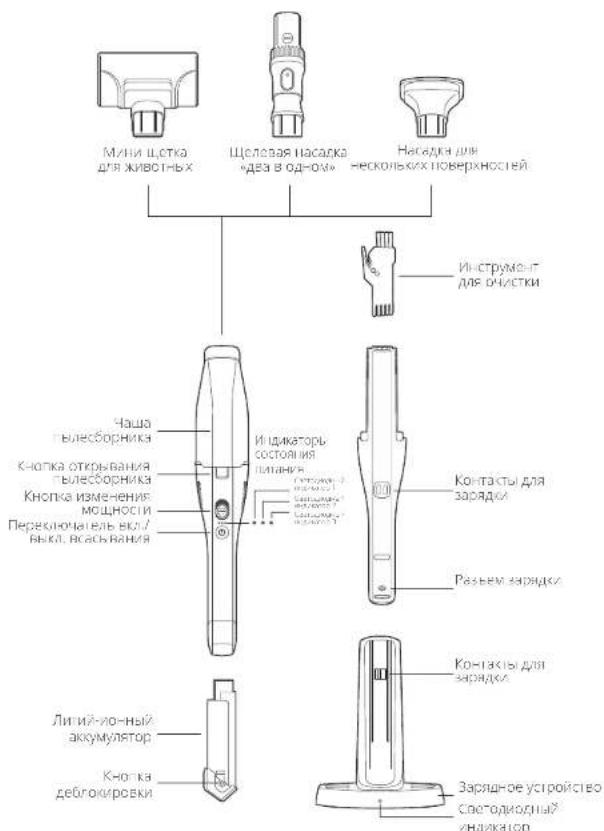
063OP
ПОДЗAPЯДKA
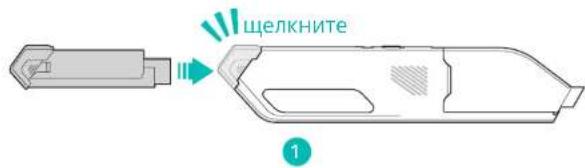
PbIeoc nIaetcT CT NITN-NoHOro AkyMnyrTopa.ipepepeBIM BkUoyHeVem 3apxJaTe AkyMnyrTop He MeHee 4acob.

Tnncocc hccncoxho HcnoonmnoHb GbDPMN BDOX.
Tnncocc hcehbaeapn pnn ncmpeyoc oekkayokol cpea d 40oC
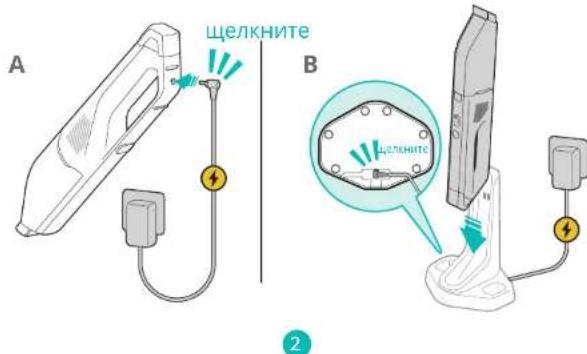
Yro6bI no3aapnBt akkyMnyTOp, bbl6pnte oynH mToDob 3apdKn (Pnc,2Annn Pnc,2B).
HdkaTopb3aprKn
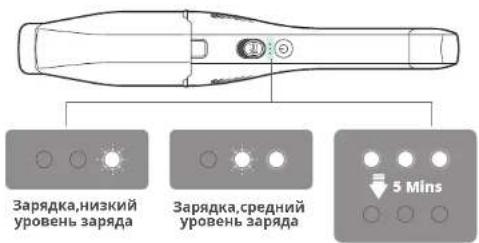
NonHocTbIO 3apXKeHbI
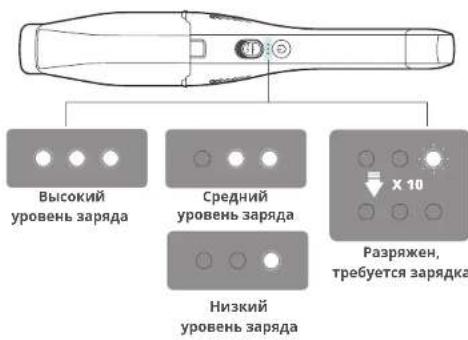
INHdNKaTopbpa6oTbI nbIneocca
PpeynpeHntBHBie INHnKaTopbI
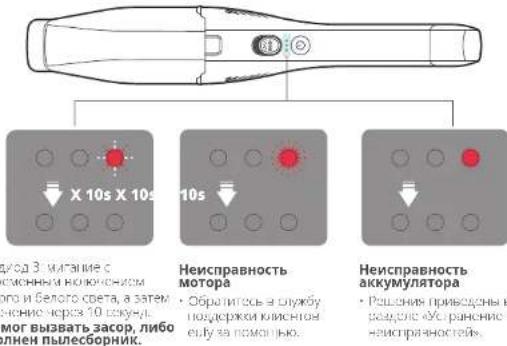
A CoTcOyD3 100CPOPCHMHNHIOKHOHNO
KPCHHO H6oNOr OePA, a 5aTeH
HnKHOHKOHOHOP8 100kOHJ
MycOp MnBBAIb3acop, nIoo
pehonenHnNe6OphIK.
TPOHPBPC,HCABRGTRKDDKARHNOBSCNQOTBPCTBEKCKRNEK
-001A1CnHbOepBnH
HdKaTOp 3apAHorO yCTpoIcTBA
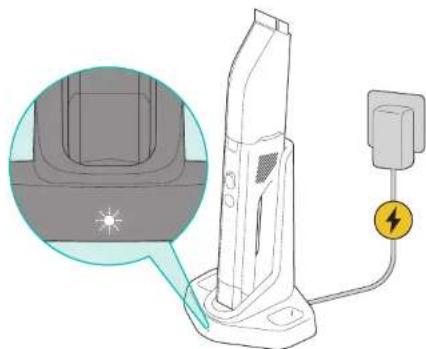
PoBnB 6enB CenBaDnHOy yCooBC Bo paOaTeHOPMaHc.
ЧИСТКА ПыЛЕCOM
Pepa nCnoB3ObaHm y6eDntecb,HTO
AkkmyrTop nonHOCTbO 3a09KeH.
■bilec60pHHKnΦnBtO OuHuaOTc,NOHocTbO BbCyUmbaOTcN yCTaHaBnBaHOTcHa MeCtO.

TPOCHUHTYH-YYKHHNCHNTI KAKCCyAPX KOTNyC,CKTOKHO HAD KYCKE.
eHcnoBb3yIte nbcoc cnn yboopkn XaKocn.
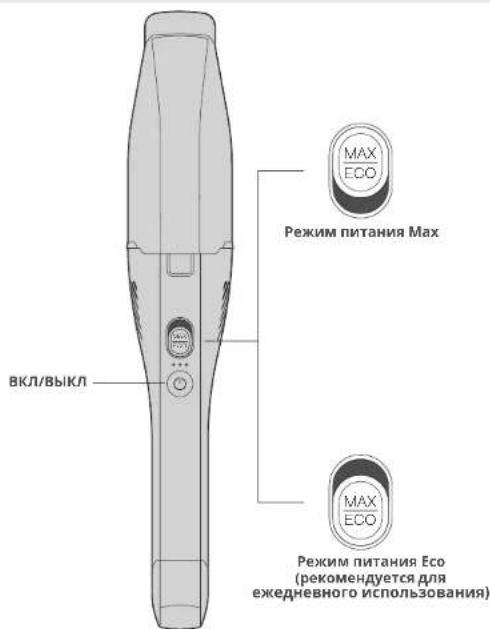
PpIMeHHe npyux Hacaok

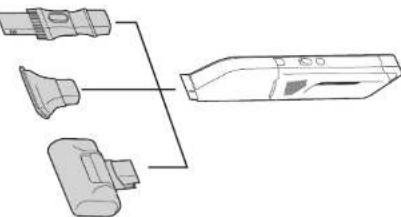


UeIeBaHacaAka «DBA B OdHOM»
IeAbaHnIy8bOpKnMycopa,HeCMOTraHa HAnuNKe KpaaeI TpyHOocOCTyINbXbYXcKMeT. BbCTPO HepeXoDte Oc6pa Nk BlaKCHBbOPKcDMaMnMaUHbNl.
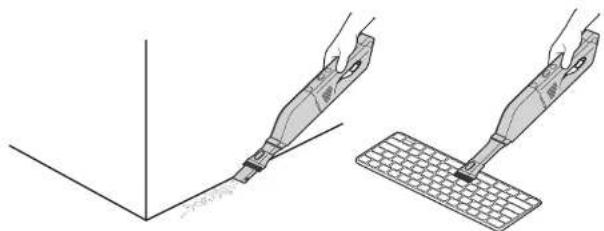
A
HacaKa dIa HeckoJIbKnx IOBepxHOcTe:
-ⅠealbHa DnA ydaIeHIN N BOnC DnBaIIOB N KOBpOB.
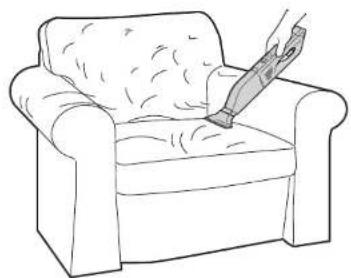
B
MHHH-ueTka DnJg XMBOTHbIX:
IealbHaJpynCTKnMtpacOBVobNBKOTWepctDOMaHINX
KIBOTHBIX npynx annepeHOB.
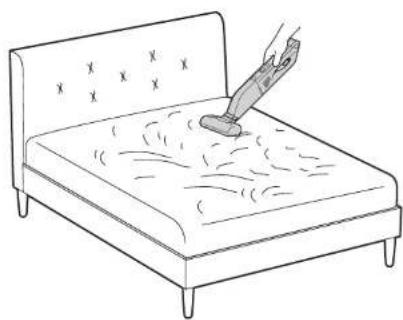
C
155
Pocne 3Kcnnyatau
156
XPAHEHVE
KordaHacnKe He nonb3yHotc, ykpneTe Hs Ha cTHe (Pnc.A)nnn omeCTe Ha nOckyo nobepxHocB (Pnc.B)
157
B
OuNTKA N OBCJyKINBAHNE

Hrobycypocbc HmoeVac onmabha pabotano, perynepno paoedhe erO OHCTky TNOEXOBXNBAHINC oTACHO PpBDEH-IM HIXE HHTpyuHMAHCTOTA OHCKI KOMNIOHEOPaBHePbCKDHBMaTePbAIOB Byet 3BBceEo XIAPKTEPAHNOATAaHnHomeVac.
TEXHUNCHECKHEXAPAKTEPNUCTNIKIN
| Модаль | T2522 |
| ВхODиоч.TOK заради | 19V -Ф.65A |
| HOMNHAJIbHЯ мошюCTь | 200 BT |
| Врема работы (nocle полес заради) | Рек imm ПИТа-МУ.FEC. 70 MmHy Рек imm ПИТа-МУ.Max. 10 MmHy |
| Емкость akkyvyлгетора | 2500 Mau |
| Харазстени akkyMулгетора | ЛNTAN HON LII, 14.4 B, 2350 Wd, 33.8 St-4 |
| Врема заради | 4 hoca |
YCTPAHEHNE HENCINPABHOCTEIN
https://support.eufylife.com/
TapaNTN
- YCTPOVCTBOHomeVac21MeCAHARorpaHCHHARapAHTHA
-ⅡHnHOHHbAkkymyIHTOp72-MecuHsArpaHHHeHHaIpaHHV8
CBXKNTecb c HAMN

support@eufylife.com

www.eufylife.com

(US) + 1 (800)9887973 Mon-Fri 6:15-17:00 (PT); Sat-Sun 6:30-16:30 (PT)
UK1604936200Mon-Sun600-17:00SatSun600-14:00
(DE)+49(0)6995797960MoFr8:00-18:00
(日本)034557823月金9:00-17:00
DpyTHe HOMePc CnyK6 TOnepkKn CM. Ha caTa
https://support.eufylife.com/s/phonecontactus
HIMOTKAHHPyTe 3TQTQR KpO


@EufyOficial

@EuftyOfficial

@EulfyOfficial

@EufyOfficial
Inhoudsopgave
165 BELANGRIJKE VEILIGHEID SINSTRUCTIES
171 WAT ZIT ER IN DE DOOS
172 OVERZICH
173 OPLADEN
Warning: Changes or modifications not expressly approved by the party responsible for compliance could void the user's authority to operate the equipment.
and on, the user is encouraged to try to correct the interference by one or more of the following measures: (1) Reorient or relocate the receiving antenna.(2) Increase the separation between the equipment and receiver.(3) Connect the equipment into an outlet on a circuit different from that to which the receiver is connected. (4) Raadpleeg de leverancier of een ervaren radio-/tv-technicus voor hulp.
https://support.eufylife.com/
Garantie
support@eufylife.com

www.eufylife.com

(VS) +1 (800) 988 7973 ma vr 6:15 17:00 (PT); za zo 6:30 16:30 (PT)
VK+4401604936200ma- zo 5:00-17:00;za- zo 6:00-14:00
(DE)49(0)6995797960 ma-yr 8:00-16:00
https://support.eufylife.com/s/phonecontactus
Of scan oderstaande QR-code:


@EufyOfficial

@Eulfoficial

@EufyOfficial

@EufyOficial
yyn
ninn nnn 189
nnn nn 194
195
ynnn 196
ywn nn n
n
门
yon
199
1900
100 203
1000000000000000
n 7777777777777777
207
207
nniip 208
Wnwn 57 ninn nn nn nnnn nn nn nn nn
Tn777777777
ywnnnaaannnnnnnnnnnnnnnnnnnnnnnnnnnnnnnnnnnnnnnnnnnnnnnnnnnnnnnnnnnnnnnnnnnnnnnnnnnnnnnnnnnnnnnnnnnnnnnnnnnnnnnnnnnnnnnn
yannnnn nn nnnn 07 10n nn noe
nannnnnnnnnnnnnnnnnnnnnnnnnnnnnnnnnnnnnnnnnnnnnnnnnnnnnnnnnnnnnnnnnnnnnnnnnnnnnnnnnnnnnnnnnnnnnnnnnnnnnnnnnnnnnnnnnnnnnnnnnnnnnnnn
n7nn 97 n7nn nn 7n nn n7nn n7nn n7nn n7nn n7nn n7nn n7nn n7nn n7nn n7nn n7nn n7nn n7nn n7nn n7nn n7nn n7nn n7nn n7nn n7nn n7nn n7nn n7nn n7nn n7nn n7nn n7nn n7nn n7nn n7nn n7nn n7nn n7nn n7nn
IN 100 IN D50 IN D77D70 N07 W002 E0017 IN 100 IN D70 IN D77D70 E0017
IN,IN INONOWNOW7WONN7IN
ninn nnnn nnnn nn nnnn nnnn nnnn nnnn nnnn nnnn nnnn nnnn nnnn nnnn nnnn nnnn nnnn nnnn nnnn nnnn nnnn nnnn nnnn nnnn nnnn nnnn nnnn nnnn nnnn nnnn nnnn nnnn nnnn nnnn nnnn nnnn nnnn nnnn nn
NININ
PANNNNINININININININ
nssinnnnnn,ningnnnnpnnn- nnn
n nnnn nn nnnn nn nnnn nn nnnn nnnn nnnn nn nnnn nn nnnn nn nnnn nn nnnn nn nnnn nn nnnn nn nnnn nn nnnn nn nnnn nn nnnn nn nnnn nn nnnn nn nnnn nn nnnn nn nnnn nn nnnn nn nnnn nn nnnn nn nnnn nn nnnn nn nnnn nn nnnn nn nnnn nn nnnn nn nnnn
177
Xnwnen7ynnn nn nnnn nn nn nn nnnn nn
700nnn nwnn 71111111111111111111111111111
777777777777777777777777
n
nnn nn nnnn nn nnnn nn nnnn nn nnnn nn
wnn nn nnnnnnnnnnnnnnnnnnnnnnnnnnnnnnnnnnnnnnnnnnnnnnnnnnnnnnnnnnnnnnnnnnnnnnnnnnnnnnnnnnnnnnnnnnnnnnnnnnn
17 17 17 17 17 17 17 17 17 17 17 17 17 17
777777
□
□□n7n0
□
□
□
□
□
□
□
39

#
11111111111111111111111111111
nun n 77777777777777777777777777777777777777777777777
FCCnnn
7777777777FCC-n 157777777
:
PI,PIIINNINNINNINNNINNINNINNINNINNIN
77777777777777777777777
y
7777777777777777777777
TINNN7N7NNEHNN7N7N7
197 Class B 7007007007007007007007007007007007007007007007007007007007007
nnn nnnn nn 7907 nnnn nn FCC 777 15 y
100000000000000
N1111111111111111111111111111111111111111111111111111111111 77777777777777777777777777777777777777777777777777777
.
WNNN TIN NIN NIN
(FCC-011111111)
POWER MOBILE LIFE, LLC: mann w
400 108th Ave NE Ste 400, Bellevue, WA 98004-5541
IN 710N N qnn7 nnnn nn nnnn
130°C 7n nnnnnnne 7n
.
1770n 1770n77n77n77n77n77n77n77n77n77n77n77n77n77n77n77n77n77n77n77n77n77n77n77n77n77n77n77n77n77n77n
ninnnnn nn nnnnnnnnnn nn
yniinian jn nn nnnn 7innnnn
0-40°C
yinnnnn nn nnnnnnnnnnnnnnnnnnnnnnnnnnn
17707777777777777777
ninnnnnnnnnnnnnnnnnnnnnnnnnnnn
1770177171017
ywnn 97 ynnn nyn nn
n nn nnnnnnnnnnnnnnnnnnnnnnnnnnnnnnnnnnnnnnnnnnnnnnnnnnnnnnnnnnnnnnnnnnnnnnnnnnnnnnnnnnnnnnnnnnnnnnnnnnnnnnnnn
n7071nnn 70075 n77 nnnnn nn nn nn
.
0
700000000000000000000000000000
701TIN 19NIN71077n957,00000000
n
,
nno ninnnnnnnnnnnnnnnnnnnn
ynnn nndnN7 nyssn7 DOn nn onnn
T
n nn nn
| H30 Venture | H30 Mate H30 | Infinity | |
| √ √ | √ | ||
| √ √ | √ | ||
| √ √ | √ | ||
| √ √ | √ | ||
| √ √ | √ | ||
| √ √ | √ | ||
| √ | |||
| √ | √ | √ | |
| √ | √ | √ | |
| √ | √ | √ | |
| √ | √ | √ | |
| √ | √ | √ |
1
T2522 Anker Innovations Limited
2014/35/EU & 2014/30/EU NINN DNN
nainin ninn nn 7nnnnnnnnn 7x7n07n
https://www.eufylife.com

W910 (H30 Infinity IN H30 Mate, H30 Venture) DNN DNN DNN DNN DNN
P111770177TENDPENNTN7778A9107B
www.euylife.com.cn/IN30D19500077
194193
vTTN
11111111111111111111111111111111111

n7n n 2BnN 2A nN nonnnn
#
1
Pnnnnnnnnnnnnnnnnnnnnnnnnnnnnnnnnnnnnnnnnnnnnnnnnnnnnnnnnnnnnnnnnnnnnnnnnnnnnnnnnnnnnnnnnnnnnnnnnnnnnnnnnnnn
y
101000000000000000000000000000000000000
PNNNINNIN7
n710277n
177402000000000000000000000000000000000000000000000000
nwn nn nnn
NN77770
yuyu 002
17
nwnnnnnnn
0901070
1777
7000000000000000000000000000000000000000000000000000
#
00000000000000000000000000000
1

□
W7D1F31435 DSDT27P27 P27
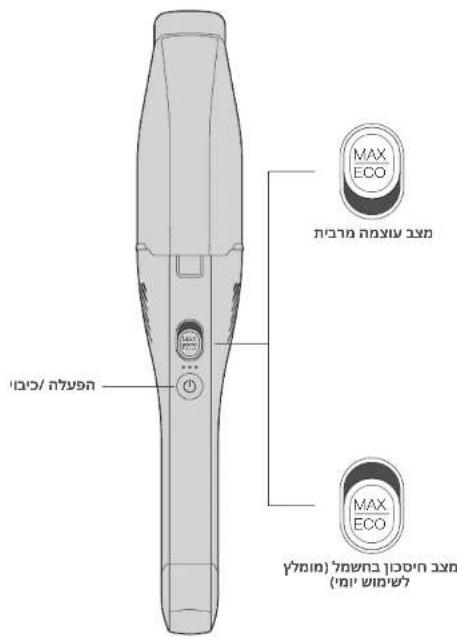
yinnnn
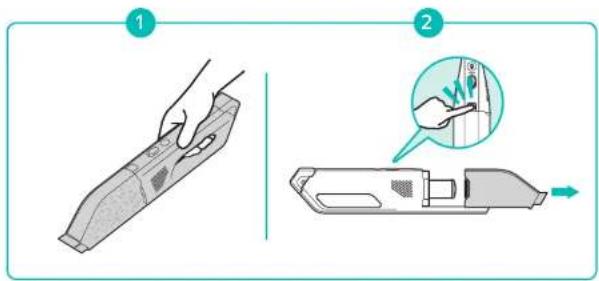
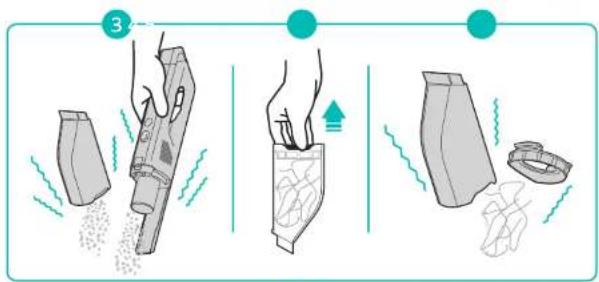
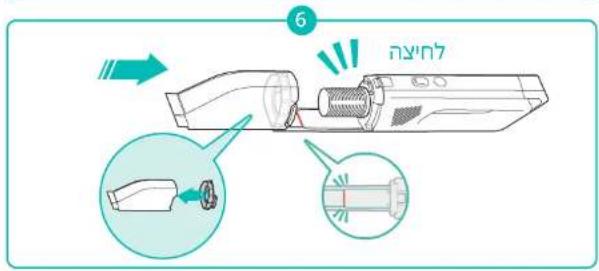
DINON
.1101111111111111111111111
B
nni n7 ninn nn:
1901000000000000000000000000000
C
B
n7nnn1

PnHmocn nnnn nn nnnn nnnn nnnn
HomeVac-10000000000000000000000000000000000000000000
| HomeVac-2000 (1) | HomeVac-2000 (2) | HomeVac-2000 (3) |
| TIN NO. 10007584 | - | |
| Filter | UNION (1) UNION (2) UNION (3) UNION | UNION (1) UNION (2) UNION (3) UNION |

□
1012019057017017017017017017
https://support.eufylife.com/
NNN
Dunin 247ninnHomeVacnn
127ninnnnn nnnn 770

support@eufylife.com

www.euylife.com

(US) +1 (800) 988 7973 Mon-Fri 6:15 - 17:00 (PT); Sat-Sun 6:30-16:30 (PT)
06:00-14:00N·y·n·17:00-06:00123+44(0)1604936200(m
08:00-16:001-49(0)6995797960(nnnn)
https://support.eufylife.com/s/phonecontactus
QINQRnnpnnpnnnep


@EufyOfficial

@EufyOfficial

@EufyOfficial

@EufyOfficeal
