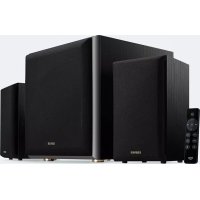
EDIFIER M601DB - Speaker

M601DB - Speaker EDIFIER - Free user manual and instructions

Find the device manual for free M601DB EDIFIER in PDF.

English EN Download 💬 AI Question 10 questions ⚙️ Specs
📄

Document temporarily unavailable

The manual is currently being transferred to our new server. It will be accessible again in a few hours. Thank you for your patience.

Pick your language and provide your email: we'll send you a specifically translated version.
Product Type 2.1 active speaker system (active speaker + subwoofer + passive speaker)
Brand Edifier
Model M601DB
Frequency response R/L channels: 140 Hz - 20 kHz, Subwoofer: 50 Hz - 170 Hz
Audio inputs AUX (3.5mm), line input (RCA), optical (TOSLINK), coaxial (RCA), Bluetooth
Bluetooth connectivity Bluetooth 5.0 (estimated) with A2DP and AVRCP profiles, range up to 10 m
RF output power (Bluetooth) ≤ 20 dBm (EIRP)
Power supply Mains via power cable (voltage compatible according to label)
Power consumption Not specified, power adapter gets warm under normal use
Dimensions (approx.) Active speaker: 153 x 228 x 196 mm, Subwoofer: 267 x 295 x 312 mm (estimated)
Weight (approx.) Approx 8 kg (total) – estimated based on size
Main features Bluetooth playback, multiple wired inputs, remote control, bass adjustment, wireless subwoofer pairing
Care and cleaning Turn off and unplug before cleaning; use a dry cloth, no chemicals
Safety Do not expose to water or heat; do not open; use indoors; maintain ventilation distances (5 cm)
Spare parts and repairability Repairs only by authorized personnel; no user-replaceable components
General information Indoor use only; ambient temperature 0–35 °C; Class II (double insulation)

Frequently Asked Questions - M601DB EDIFIER

How to pair the subwoofer to the active speaker after a loss of connection?
Turn on the subwoofer (red indicator blinks slowly). Press the Pair button on the back of the subwoofer (fast blinking). Then press the Pair button on the back of the active speaker. Wait until the indicator stays solid.
What to do if there is no sound?
Check that the speaker is turned on, volume is high enough, cables are properly connected, the audio source is outputting a signal, and the input mode is correct (Bluetooth, AUX, etc.).
Why won't Bluetooth connect?
Make sure the speaker is in Bluetooth mode (blue indicator blinking). Disconnect any previously paired Bluetooth device by pressing and holding the button for 3 seconds. Check that the source device is within 10 meters and compatible with A2DP/AVRCP.
How to switch between different audio inputs?
Press the button on the active speaker to change mode (Bluetooth, AUX, line input, optical, coaxial). You can also use the AUX, Line In, OPT, COAX or (Bluetooth) keys on the remote control.
How to use the optical input?
Press or the OPT key on the remote until the red indicator blinks once then stays on. Connect the source (DVD, TV) to the OPT port using the provided optical cable. Start playback.
How to replace the remote control battery?
Turn the battery cover in the direction of the arrow to open it. Install a CR2032 battery respecting polarity, then close. Do not ingest, keep out of reach of children.
The speaker emits background noise. Is this normal?
Edifier speakers have a low self-noise. Disconnect the audio cables and turn up the volume: if no noise is audible at 1 meter, the issue comes from the audio source. Otherwise, contact customer service.
What is the Bluetooth range?
The effective range is about 10 meters in open space. Obstacles (walls, furniture) may reduce the range.
Can I use the speaker outdoors?
No, the device is designed for indoor use only. Do not expose it to rain, moisture or extreme temperatures.
How to clean the speaker?
Turn off the speaker and unplug it. Use a dry, soft cloth. Never use chemical products (alcohol, solvents, etc.) as they may damage the surface.

User questions about M601DB EDIFIER

0 question about this device. Answer the ones you know or ask your own.

Ask a new question about this device

The email remains private: it is only used to notify you if someone responds to your question.

No questions yet. Be the first to ask one.

Download the instructions for your Speaker in PDF format for free! Find your manual M601DB - EDIFIER and take your electronic device back in hand. On this page are published all the documents necessary for the use of your device. M601DB by EDIFIER.

USER MANUAL M601DB EDIFIER

Manual assistant
Powered by Anthropic
Waiting for your message
Product information

Brand : EDIFIER

Model : M601DB

Category : Speaker