
Luna Eclipse e25 - Loudspeaker EDIFIER - Free user manual and instructions
Find the device manual for free Luna Eclipse e25 EDIFIER in PDF.


| Product Type | Active 2.0 Speaker System |
| Brand | Edifier |
| Model | Luna Eclipse e25 |
| Total Output Power | 2 x 15W (RMS) |
| Frequency Response | 55Hz - 20kHz |
| Signal-to-Noise Ratio | ≥85 dB |
| Input Sensitivity | 700 mV |
| Input Impedance | 10,000 Ω |
| Connectivity | Bluetooth 4.0, Optical, AUX (3.5mm) |
| Bluetooth Version | 4.0 |
| Audio Codecs | SBC, aptX |
| Driver Units | Full-range 2.75” (70mm) per channel |
| Control Method | Remote control, touch controls on top |
| Power Supply | AC 100-240V, 50/60Hz |
| Dimensions (Diameter x Height) | 147mm x 204mm (each speaker) |
| Weight | 2.5 kg (per speaker) |
| Housing Material | MDF with vinyl finish |
| Color | Black |
| Remote Control | Included (RF wireless) |
| Standby Power Consumption | <0.5 W |
Frequently Asked Questions - Luna Eclipse e25 EDIFIER
User questions about Luna Eclipse e25 EDIFIER
0 question about this device. Answer the ones you know or ask your own.
Ask a new question about this device
Download the instructions for your Loudspeaker in PDF format for free! Find your manual Luna Eclipse e25 - EDIFIER and take your electronic device back in hand. On this page are published all the documents necessary for the use of your device. Luna Eclipse e25 by EDIFIER.
USER MANUAL Luna Eclipse e25 EDIFIER
16th Floor, Tower 22,
Lppo Centre,
89 Queensway
Hong Kong
Tel: +852 2522 6569
Fax: +852 2522 1989
www.edifier-international.com
© 2013 Edifier International Limited. All rights reserved.
Printed in China
NOTICE:
For the need of technical improvement and system upgrade, information contained herein may be subject to change from time to time without prior notice.
Products of EDIFIER will be customized for different applications. Pictures and illustrations shown on this manual may be slightly different from actual product. If any difference is found, the actual product prevails.
Luna Eclipse
e25-Multimedia Speaker
User manual | Manuel d'utilisateur | Manual de usuario | Manual do utilizador
Important safety instructions
WARNING: To reduce the risk of fire or electric shock, do not expose this apparatus to rain or moisture.
Thank you for purchasing this EDIER product. For general ions, EDIER tries to provide powered speaker products to satisfy the need of our end customers, even the most demanding ones. This product can add to your home entertainment, personal computer, and mini home theater great sound performance. Please read this manual carefully to obtain the best of this system.

The lightning flash with arrowhead inside the trellang e, is intended to a net the user to the presence of un insulated dangerous voltage within the product's enclosure. That may be of a sufficient magnitude to consolidate a risk of electric shock to persons

To prevent the risk of electric shock, do not remove cover (or back). No user-serviceable Parts inside. Refer servicing to qualified Service personnel only.

The exclamation point inside the triangle is intended to alert the user to the presence of important operating and maintenance (servicing) instructions in the literature accompanying the product.
-
Read these instructions.
-
Used all warnings
-
Do not use this apparatus near meter.
-
Do not lock any ventilation openings, install in accordance with the manufacturer's instructions.
d. Do not install near any heat sources such as racators, heat registers, stoves, or other apparatus (including amplifier).
that produce heat.
-
Do not defeat the safety purpose of the po-armed or grounding-type plug. A po-armed plug has two blades with one wider than the other. A grounding type plug has two blades and a third grounding proing. The wide blade or the third proing arc provided for your safety. If the provided plug does not fit into your outlet, consult an electrician for replacement of the obsolec outlet.
-
Protect the power cord from being walked on or pinched particularly at plugs, convenience receptacles, and the point where they exit from the apparatus.
-
Or v use attachments/accessories specified by the manufacturer.
-
Unp. to this apparatus during lightning storms or when unused for long periods of time.
-
Re or all servicing to qualified service personnel. Servicing is required when the apparatus has been damaged in any way, such as power-supply cord or plug is damaged, liquid has been spilled or objects have fallen into the apparatus, the apparatus has been exposed to rain or moisture, does not operate normally, or has been dropped.
-
The MAINS plug or an appliance coupler is used as the disconnect device, the disconnect device shall remain readily
FCC Caution:
"Changes or modifications not expressly approved by the part responsible for compliance could void the user's authority to operate the equipment."
FCC statement:
'This device complies with Part. 15 of the FCC Rules. Operation is subject to the following two conditions:
(1) this device may no cause harmful interference, and
(2) this device must accept any interference received, including interference that may cause undesired operation.
1
English
Important safety instructions
* This equipment has been tested and found to comply with the limits for a Class B digital device, pursuant to part 15 of the FCC Rules. These limits are designed to provide reasonable protection against harmful interference in a residential installation. This equipment generates, uses and can radiate radio frequency energy and, if not installed and used, in accordance with the instructions, may cause harmful interference or radio communications. However, there is no guarantee that interference will not occur in a particular installation. If this equipment does cause harmful interference or radio or television reception, which can be determined by turning, the equipment off and on, the user is encouraged to try to correct the interference by one or more of the following measures:
—Recurrent or relocate the receiving antenna.
—increase the separation between the equipment and receiver.
—Connect the equipment into an outlet on a circuit different from that to which the receiver is connected.
Consult the dealer or an experienced radio/TV technician for help.
IC statement:
The design compares with Industry Canada, consensus, preprint ESS standards(2). Operation is subject to the following two conditions:
(1) this device may not cause interference and
(2) his device must accept any interference, excluding interference that may cause accepted omission of the desire
The Class 【B】 digital apparatus complices with Canadian ICES 002.
Use only with the car, stand, tripod, bracket, or table specified by the manufacturer, or sold with the apparatus. When a car is used, use caution when moving the car/apoaratus combination to avoid injury from tip over.
Correct Disposal of this product. This marking indicates that this product should not be disposed with other household wastes throughout the EU. To prevent possible harm to the environment or human health from uncontrolled waste disposal, recycle its responsibility to promote the sustainable reuse of material resources. To return your use device, please use the return and collect on systems or contact the retailers where the product was purchased. They can take this product for environmental safe recycling.
This equipment is a Claw II or double insulated electrical appliance. It has been designed in such a way that it does not require a safety connection to electrical earth.
Unpack the box Illustrations
Box contents
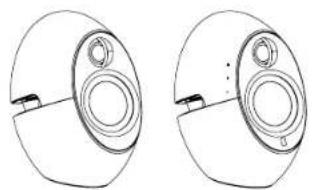

Remote control Passive speaker Active speaker

User manual

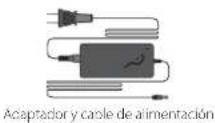
Power adapter & power cord
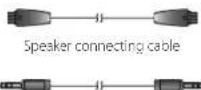
3.5mm-3.5mm audio connecting cable

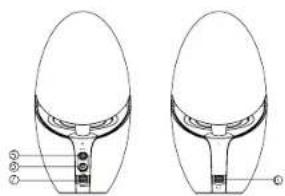
Front view Rear view
- Standby/ON
- Volume up
- volume down
- Input indicator (blue: Bluetooth; red: AUX)


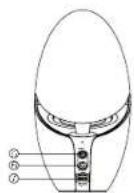
- Connect to audio connecting cable
- Connect to power adapter
- Connect to passive speaker
- Connect to active speaker
Play/Pause: Touch "⊕,+,-" at the same time briefly.
To put the system into Standby/On: Touch and hold ⏻ for approximately 2 seconds.
Operational guide Illus
Remote control
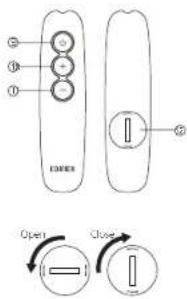
- Standby/ON
- Volume up
- Volume down
- Battery compartment
Battery loading:
Insert a coin into the slot and rotate and clockwise to open the battery compartment, install the new CR 2025 battery and rotate the cover clockwise to close the compartment.
Note:
- Do not place the remote control in places that are hot and humid.
- Do not charge the batteries.
- Remove the batteries when unused for long period of time.
- The battery should not be exposed to excessive heat such as
direct sun, fire or similar.
Connectivity

5 English

Bluetooth
![graph LR A["Smartphone with Wi-Fi"] --> B["Blue Audio"] B --> C["Blue Note"] C --> D["Blue Note"]](/content/2026/06/1260498/images/ec417c5635c7e9fc4f7877c7618f4beada8b90645e332bb0ac569793eaab74be.jpg)
→ Set you device (mobile phone, tablet device, MP3/MP4 player etc.) to search and select "EDIFIR Luna Eclipse".
→ Pair your device with "EDIFIER Luna Eclipse".
When the connection is made, the input indicator will change to blue.
Play the audio on your paired device and adjust the volume to a desired level.
In Bluetooth Mode
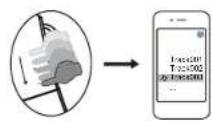
To skip to the next track:
Slide from ⏻ to —

To revert to the previous track:
Slide from—to

To disconnect Bluetooth:
Touch and hold Ⓞ, +, - at the same time for approximately 2 seconds.
Note: When the Bluetooth is disconnected, the system will automatically switch to AUX mode.
Note:
- To enjoy the full Bluetooth functions of this product, please ensure your mobile device has A2DP & AVRCP profile.
- PIN code for connection is "0000" if needed.
6 English
SpecificationsTroubleshooting
Power output: RMS 15W × 2 (treble) + 22W × 2 (bass) (CRC ON)
Signal to noise ratio: ≥85dBA
Frequency response: 50Hz \~ 20KHz (+/-6dB)
Input type: Bluetooth/AUX
Input sensitivity: 600mV ± 50mV
Adjustment Touch keys, remote control
Bass & mic range unit: 3 inch (82mm), 60
Treple unit: φ 19mm silk dome, magnetically shielded, 60
Dimension: 122(W) × 212(H) × 222(D) mm
Weight (net/gross): Approx. 3.96kg/5.33kg
- Switch the EDIFIER Luna Eclipse off then on and reconnect to the audio source.
- Ensure Bluetooth function is enabled compatible on your Bluetooth devices.
- Move the devices closer and retry the connection.
- Try another Bluetooth device for connection.
- Please check if power is connected, and if the wall outlet is switched on.
- Please switch the system off their on and reconned to the audio source.
- Please check if the system is in S1BY.
- Please check if the master volume is turned to minimum.
- Please check if the audio input cable is connected correctly
- Please check if there is signal from audio source.
- Keep a 0.2 -1m distance between the speaker system and monitor or TV set to avoid magnetic interference
If you have any further questions or concerns regarding EDIFIER Products...
Asia, Europe, Oceania:
Please visit our website at www.edifier-international.com or email EDIFIER Support for further assistance at enquiry@edifier.com, → Dear Customer, thank you for purchasing this EDIFIER product. For the EDIFIER warranty applicable for this product, we refer you to the EDIFIER website www.edifier-international.com/warranty.cms.
Canada/USA/Mexico: www.cdficer.ca. Email: service@edifer.ca
If you prefer, you may contact us by phone, Toll Free: 1-877-EDIFIER (334-343/7) in Canada, 1-500-588-7406 in US.
South America: Please visit www.edifier.com (English) or www.edifierla.com (Spanish/Portuguese) for detailed local contact information.
The following table provides the information in English:
polar-SGF-Fluor-Etde-Coll-Ettr,3-HaOEt-2-White-Fur (at product Our) Sur Picture-Et Charge-2-protein, 30% mixture, 10%
- 2016年1月1日
Face avant
Face arrière

Control remotoAltavoz pasivo Altavoz active
Manual de usuario

Cable de conexión de audio 3.5mm-3.9mm
17
Español

Vista frontal
Vista trasera
- Do not place the remote control in places that are hot and humid.
- No cargue las pilas
- Remove the batteries when unused for long period of time.
- The battery (battery or batteries or battery pack) should not be
exposed to excessive heat such as direct sun, fire or similar
Conectividad

19
Español

Bluetooth
![graph LR A["Phone with antenna"] --> B["Audio input"] B --> C["Adder to audio device"] C --> D["Audio playback"] D --> E["Output stage"]](/content/2026/06/1260498/images/8fb491d1aa9d2a6bb908848fabb37d4f89d7bdc177be5ea541ac6da7dff2cc4d.jpg)
Vista Posterior
Vista Anterior
26
Português


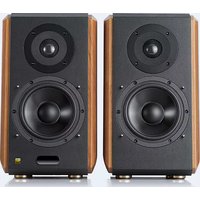
Brand : EDIFIER
Model : Luna Eclipse e25
Category : Loudspeaker