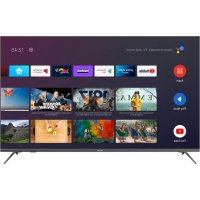
TX65JXW704 - TV PANASONIC - Free user manual and instructions
Find the device manual for free TX65JXW704 PANASONIC in PDF.

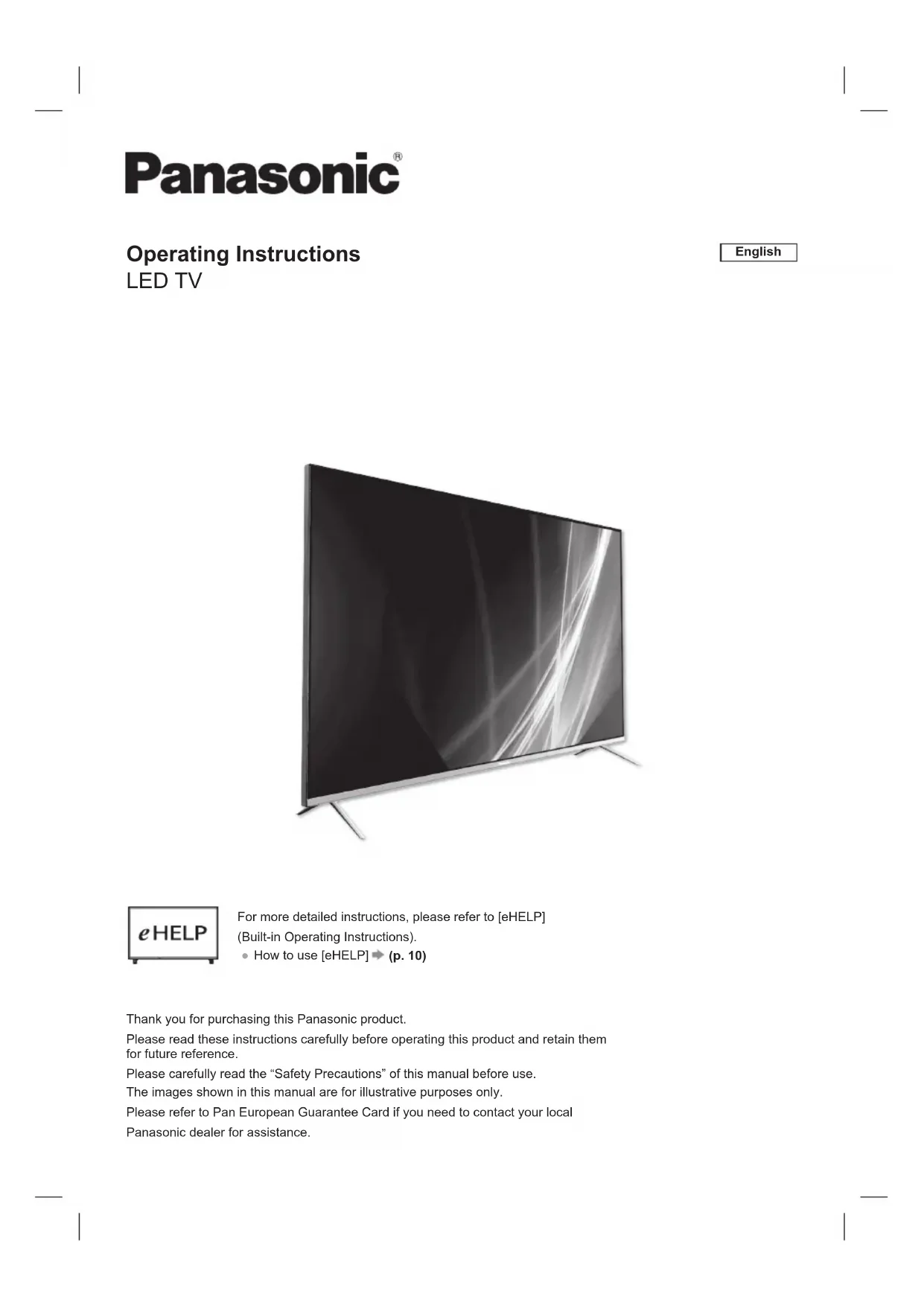


| Product Type | LED Television |
| Brand | Panasonic |
| Model | TX65JXW704 |
| Screen Size | 65 inches (164 cm) |
| Dimensions with stand (W × H × D) | 1,446 mm × 893 mm × 291 mm |
| Dimensions without stand (W × H × D) | 1,446 mm × 844 mm × 79 mm |
| Weight with stand | 18.20 kg |
| Weight without stand | 17.96 kg |
| Power Supply | AC 220-240 V, 50/60 Hz |
| Screen Type | LED LCD |
| Resolution | Ultra HD (4K) |
| Audio | 2 speakers of 10 W each (20 W total) |
| Connectivity | 4 HDMI inputs, 1 USB 2.0 port, Ethernet RJ45, optical digital audio output, built-in Wi-Fi (IEEE 802.11a/b/g/n), Bluetooth 5.1 |
| TV Reception | DVB-T/T2, DVB-C, DVB-S/S2, PAL, SECAM |
| Smart Functions | Google Assistant, Netflix, Prime Video, YouTube, app access |
| Audio Technologies | Dolby Vision, Dolby Atmos |
| Remote Control | With microphone, Bluetooth pairing |
| Built-in User Guide | eHELP |
| Screen Care | Soft cloth, clean water or diluted neutral detergent |
| Safety | Minimum ventilation 10 cm, do not expose to moisture, stabilization |
| Operating Temperature | 0°C to 35°C |
| Operating Humidity | Not specified |
Frequently Asked Questions - TX65JXW704 PANASONIC
User questions about TX65JXW704 PANASONIC
0 question about this device. Answer the ones you know or ask your own.
Ask a new question about this device
Download the instructions for your TV in PDF format for free! Find your manual TX65JXW704 - PANASONIC and take your electronic device back in hand. On this page are published all the documents necessary for the use of your device. TX65JXW704 by PANASONIC.
USER MANUAL TX65JXW704 PANASONIC
Questions/Reponses. 11
Spécificités 12
Licence
Advance® Covered by patients at patientist.accessadvancemc
Avertissement important
APHRC 30.4E78.0255.0G
Panasonic ATV RCU01
Cousage

APHRC 30,AE.78.02-39.0C
PanasonicATVRCU01 Connection:

APHRC 30A/E73.02:35:00
Dimensions (I / H / P)
HR 20% -80% (sans condensation)
Covered by patents at patentist.accessadvancemc
Wichtiger Hinweis
Panasonic ATV RCU01 Koppling built...

APHRC 30.AE:70.C235.OC
DIGITAL AUDIO-Output
PCM/Dolby Digital, Glasfaser
WFA WPA/WPA2 Personal, WPS2.0, WAPI
Covered by parents at parentlist.accessadvancemc
Avviso importante
Parsonic ATV RCUD1 Association in core...

APHRC 30:45:70:02:35:0C
Panasonic ATV RCU01 Connection in core...

APHRC 30AE75.02:05:00
TERMINA
TX-75JX700E/TX-75JX710E
Dimensioni (L x A x P)
WFA WPA/WPA2 PERSONAL, WPS2.0, WAPI
Covered by parents at parentlist.accessadvancemc
Önemli Bildirim
Uzun sure kullanilmadiginda
Dikkat
50inc model 55inc model
65inc model 75inc model
20 W (10 W + 10 W)
Kulaklik
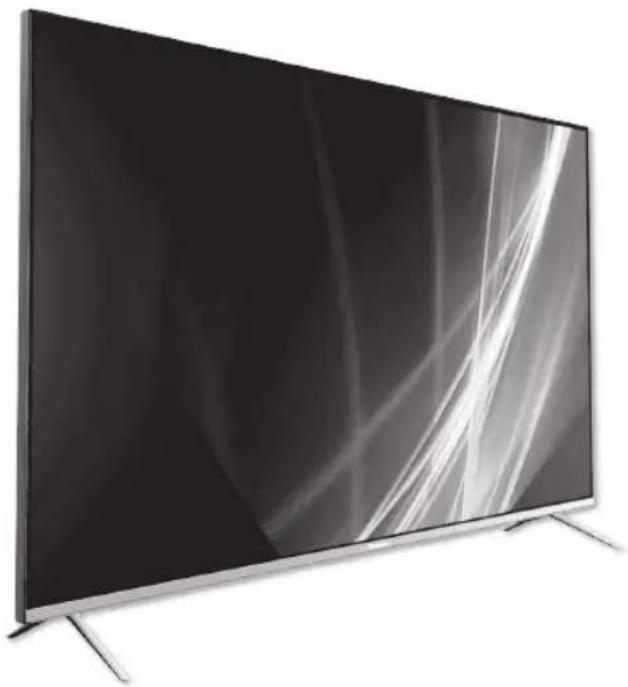
Operating Instructions LED TV
English

For more detailed instructions, please refer to [eHELP]
(Built-in Operating Instructions).
How to use [eHELP] (p. 10)
Thank you for purchasing this Panasonic product.
Please read these instructions carefully before operating this product and retain them for future reference.
Please carefully read the "Safety Precautions" of this manual before use.
The images shown in this manual are for illustrative purposes only.
Please refer to Pan European Guarantee Card if you need to contact your local
Panasonic dealer for assistance.
Table of Contents
Licence 2
Important Notice. 3
Safety Precautions. 4
Identifying Controls. 8
Bluetooth. 9
How to Use eHELP 10
Maintenance. 10
FAQs 11
Specifications 12
Licence
Even if no special notation has been made of company or product trademarks, these trademarks have been fully respected.
DVB and the DVB logos are trademarks of the DVB Project.
DiSEqCTM is a trademark of EUTELSAT.
The terms HDMI, HDMI High-Definition Multimedia Interface, and the HDMI Logo are trademarks or registered trademarks of HDMI Licensing Administrator, Inc.
HOMI
HIGH-DEFINITION MULTIMEDIA INTERFAGE
Dolby, Dolby Vision, Dolby Atmos, Dolby Audio, and the double-D symbol are registered trademarks of Dolby Laboratories Licensing Corporation.
Manufactured under license from Dolby Laboratories. Confidential unpublished works. Copyright © 2012-2021 Dolby Laboratories. All rights reserved.
Dolby Vision·Atmos
For DTS patents, see http://patents.dts.com. Manufactured under license from DTS Licensing Limited. DTS, the Symbol, DTS and the Symbol together, DTS-HD, and the DTS-HD logo are registered trademarks or trademarks of DTS, Inc. in the United States and/or other countries. © DTS, Inc. ALL RIGHTS RESERVED.
dtshD.

Advance
Covered by patents at patentist.accessadvancemc
Important Notice
Notice for DVB / Data broadcasting
This TV is designed to meet the standards (as of August, 2020) of DVB-T / T2 (MPEG2, MPEG4-AVC(H.264), HEVC(H.265)) digital terrestrial services, DVB-C (MPEG2, MPEG4-AVC(H.264), HEVC(H.265)) digital cable services and DVB-S (MPEG2, MPEG4-AVC(H.264), HEVC(H.265)) digital satellite services.
Consult your local dealer for availability of DVB-T / T2 or DVB-S services in your area.
Consult your cable service provider for availability of DVB-C services with this TV.
- This TV may not work correctly with the signal which does not meet the standards of DVB-T / T2, DVB-C or DVB-S.
- Not all the features are available depending on the country, area, broadcaster, service provider and satellite environment.
- Not all CI modules work properly with this TV. Consult your service provider about the available CI module.
- This TV may not work correctly with CI module that is not approved by the service provider.
Additional fees may be charged depending on the service provider. - Compatibility with future services is not guaranteed
Internet apps are provided by their respective service providers, and may be changed, interrupted, or discontinued at any time.
Panasonic assumes no responsibility and makes no warranty for the availability or the continuity of the services.
Panasonic does not guarantee operation and performance of peripheral devices made by other manufacturers; and we disclaim any liability or damage arising from operation and/or performance from usage of such other maker's peripheral devices.
Handling of customer information
When using Internet connecting function of this TV, after agreeing to Panasonic's terms of service / privacy policy (hereinafter referred to as terms and conditions etc.), Customer Information on the use of this unit may be collected and used according to terms and conditions etc.
Customer's personal information may be recorded on this TV by broadcasting organization or application provider. Before repairing, transferring or discarding this TV, erase all the information recorded on this TV according to the following procedure.
[eHELP] (Search by Settings > Factory Reset)
Customer Information may be collected by provider via application provided by third parties on this TV or website. Please confirm the terms and conditions etc. of provider in advance.
- Panasonic will not be held responsible for collecting or using customer Information via application provided by third party on this TV or website.
- When entering your credit card number, name, etc., pay special attention to the trustworthiness of the provider.
- Registered information may be registered in the server etc. of provider. Before repairing, transferring or discarding this TV, be sure to erase the information according to the terms and conditions etc. of provider.
This product is licensed under the AVC patent portfolio license for the personal and non-commercial use of a consumer to (i) encode video in compliance with the AVC Standard ("AVC Video") and/or (ii) decode AVC Video that was encoded by a consumer engaged in a personal and non-commercial activity and/or was obtained from a video provider licensed to provide AVC Video. No license is granted or shall be implied for any other use.
Additional information may be obtained from MPEG LA, LLC.
See http://www.mpegla.com.

This mark indicates the product operates on AC voltage.

This mark indicates a Class II or double insulated electrical appliance wherein the product does not require a safety connection to electrical earth (ground).
Transport only in upright position.
Safety Precautions
To help avoid risk of electrical shock, fire, damage or injury, please follow the warnings and cautions below:
Mains plug and lead
Warning
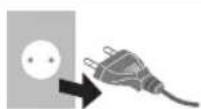
If you detect anything unusual, immediately remove the mains plug.
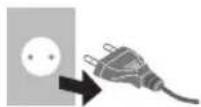
This TV is designed to operate on AC 220-240 V, 50 /60 Hz.
- Insert the mains plug fully into the mains socket.
To turn Off the apparatus completely, you must pull the mains plug out of the mains socket.
Consequently, the mains plug should be easily accessible at all times.
- Disconnect the mains plug when cleaning the TV.
- Do not touch the mains plug with wet hands.

-
Do not damage the mains lead.
-
Do not place a heavy object on the lead.

- Do not place the lead near a high temperature object.

- Do not pull on the lead. Hold onto the mains plug body when disconnecting the plug.

- Do not move the TV with the lead plugged into a mains socket.
- Do not twist the lead, bend it excessively or stretch it.
- Do not use a damaged mains plug or mains socket.
-
Ensure the TV does not crush the mains lead.
-
Do not use any mains lead other than that provided with this TV.
Take care
Warning
- Do not remove covers and never modify the TV yourself as live parts are accessible and risk of electric shock when they are removed. There are no user serviceable parts inside.


- Do not expose the TV to rain or excessive moisture. This TV must not be exposed to dripping or splashing water and objects filled with liquid, such as vases, must not be placed on top of or above the TV.

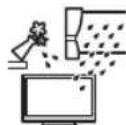
- Do not insert foreign objects into the TV through the air vents.
If the TV is used in an area where insects may easily enter the TV.
It is possible for insects to enter the TV, such as small flies, spiders, ants, etc. which may cause damage to the TV or become trapped in an area visible on the TV, e.g. within the screen.
If the TV is used in an environment where there is dust or smoke.
It is possible for dust/smoke particles to enter the TV through the air vents during normal operation which can become trapped inside the unit. This may cause overheating, malfunction, deterioration in picture quality, etc.
- Do not use an unapproved pedestal / mounting equipment. Be sure to ask your local Panasonic dealer to perform the setup or installation of approved wall-hanging brackets.
- Do not apply any strong force or impact to the display panel.
- Ensure that children do not climb on the TV.
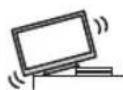
- Do not place the TV on sloping or unstable surfaces, and ensure that the TV does not hang over the edge of the base.
Warning-Stability Hazard
A television set may fall, causing serious personal injury or death. Many injuries, particularly to children, can be avoided by taking simple precautions such as:
- ALWAYS use cabinets or stands or mounting methods recommended by the manufacturer of the television set.
- ALWAYS use furniture that can safely support the television set.
- ALWAYS ensure the television set is not overhanging the edge of the supporting furniture.
- ALWAYS educate children about the dangers of climbing on furniture to reach the television set or its controls.
- ALWAYS route cords and cables connected to your television so they cannot be tripped over, pulled or grabbed.
- NEVER place a television set in an unstable location.
- NEVER place the television set on tall furniture (for example, cupboards or bookcases) without anchoring both the furniture and the television set to a suitable support.
- NEVER place the television set on cloth or other materials that may be located between the television set and supporting furniture.
- NEVER place items that might tempt children to climb, such as toys and remote controls, on the top of the television or furniture on which the television is placed.
If the existing television set is going to be retained and relocated, the same considerations as above should be applied.
This TV is designed for table-top use.
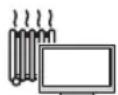
- Do not expose the TV to direct sunlight and other sources of heat.

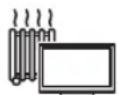
To prevent the spread of fire, keep candles or other open flames away from this product at all times.

Suffocation / Choking Hazard
Warning
- The packaging of this product may cause suffocation, and some of the parts are small and may present a choking hazard to young children. Keep these parts out of reach of young children.
Pedestal
Warning
- Do not disassemble or modify the pedestal.
Caution
- Do not use any pedestal other than the one provided with this TV.
- Do not use the pedestal if it becomes warped or physically damaged. If this occurs, contact your nearest Panasonic dealer immediately.
- During setup, make sure that all screws are securely tightened.
- Ensure that the TV does not suffer any impact during installation of the pedestal.
- Ensure that children do not climb onto the pedestal.
- Install or remove the TV from the pedestal with at least two people.
- Install or remove the TV according to the specified procedure.
Radio waves
Warning
- Do not use the TV in any medical institutions or locations with medical equipment. Radio waves may interfere with the medical equipment and may cause accidents due to malfunction.
- Do not use the TV near any automatic control equipment such as automatic doors or fire alarms. Radio waves may interfere with the automatic control equipment and may cause accidents due to malfunction.
- Keep at least 15cm away from the TV if you have a cardiac pacemaker. Radio waves may interfere with the operation of the pacemaker.
- Do not disassemble or alter the TV in any way.
Built-in wireless LAN
Caution
-
Do not use the built-in wireless LAN to connect to any wireless network (SSID*) for which you do not have usage rights. Such networks may be listed as a result of searches. However, using them may be regarded as illegal access.
-
SSD is a name for identifying a particular wireless network for transmission.
- Do not subject the built-in wireless LAN to high temperatures, direct sunlight or moisture.
Data transmitted and received over radio waves may be intercepted and monitored. - The built-in wireless LAN uses 2.4 GHz and 5 GHz frequency bands. To avoid malfunctions or slow response caused by radio wave interference when using the built-in wireless LAN, keep the TV away from other devices that use 2.4 GHz and 5 GHz signals such as other wireless LAN devices, microwave ovens, and mobile phones.
- When problems occur due to static electricity, etc., the TV might stop operating to protect itself. In this case, turn the TV off at the Mains power On / Off switch, then turn it back on.
Bluetooth® wireless technology
Caution
- The TV and the remote control use the 2.4 GHz radio frequency ISM band (Bluetooth®). To avoid malfunctions or slow response caused by radio wave interference, keep the TV and the remote control away from the devices such as other wireless LAN devices, other Bluetooth® devices, microwaves, mobile phones and the devices that use 2.4 GHz signal.
Ventilation
Caution
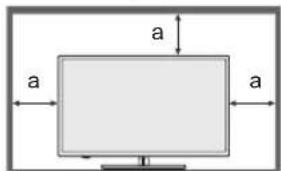
Allow sufficient space (at least 10cm around the TV in order to help prevent excessive heat, which could lead to early failure of some electronic components.
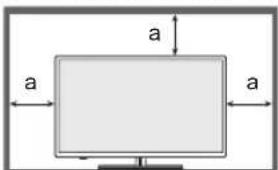
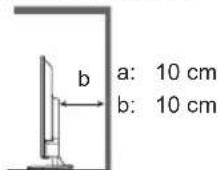
- Ventilation should not be impeded by covering the ventilation openings with items such as newspapers, tablecloths and curtains.

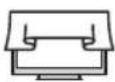
- Whether you are using a pedestal or not, always ensure the vents at the bottom of the TV are not blocked and there is sufficient space to enable adequate ventilation.
■ Moving the TV
Caution
Before moving the TV, disconnect all cables.
- At least two people are required to move the TV.
When not in use for a long time
Caution
This TV will still consume some power even in the Off mode, as long as the mains plug is still connected to a live mains socket.
- Remove the mains plug from the wall socket when the TV is not in use for a prolonged period of time.
Excessive volume
Caution
- Do not expose your ears to excessive volume from the headphones. Irreversible damage can be caused.

- If you hear a drumming noise in your ears, turn down the volume or temporarily stop using the headphones.
Battery for the Remote Control
Caution
Incorrect installation may cause battery leakage, corrosion and explosion.
- Replace only with the same or equivalent type.
- Do not mix old and new batteries.
- Do not mix different battery types (such as alkaline and manganese batteries).
- Do not use rechargeable batteries (Ni-Cd, etc.).
- Do not burn or break up batteries.
- Do not expose batteries to excessive heat such as sunshine, fire or the like.
Make sure you dispose of batteries correctly.
- Remove the battery from the unit when not using for a prolonged period of time to prevent battery leakage, corrosion and explosion.
LED TV Declaration of Conformity (DoC)
"Hereby, Panasonic Marketing Europe GmbH declares that this TV is in compliance with the essential requirements and other relevant provisions of the Directive 2014/53/EU and Radio Equipment Regulations 2017."
If you want to get a copy of the original DoC of this TV, please visit the following website:
http://www.ptc.panasonic.eu/compliance-documents
Authorized Representative:
Panasonic Marketing Europe GmbH
Hagenauer Strasse 43, D-65203 Wiesbaden, Germany
Web site: http://www.panasonic.com

5.15 - 5.35 GHz band of wireless LAN is restricted to indoor operation only in the following countries.
Austria, Belgium, Bulgaria, Czech Republic, Denmark, Estonia, France, Germany, Iceland, Italy, Greece, Spain, Cyprus, Latvia, Liechtenstein, Lithuania, Luxembourg, Hungary, Malta, Netherlands, Norway, Poland, Portugal, Romania, Slovenia, Slovakia, Turkey, Finland, Sweden, Switzerland, Croatia, United Kingdom, Northern Ireland.
Radiation Exposure Statement:
This equipment complies with CE radiation exposure limits set forth for an uncontrolled environment.
This equipment should be installed and operated with minimum distance 20cm between the radiator & body.
Maximum radio-frequency power transmitted in the frequency bands
| Type of wireless | Frequency band Max | Maximum EIRP |
| Wireless LAN | 2 400-2 483.5 MHz | 20 dBm |
| 5 150-5 250 MHz | 23 dBm | |
| 5 250-5 350 MHz | 23 dBm | |
| 5 470-5 725 MHz | 30 dBm | |
| 5 725-5 875 MHz | 3.98 dBm | |
| Bluetooth® | 2 402-2 480 MHz | 20 dBm |
Identifying Controls
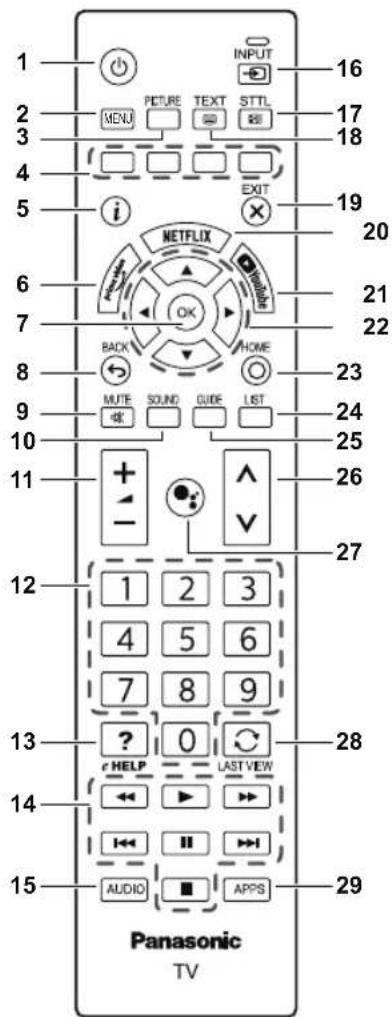
Remote Control
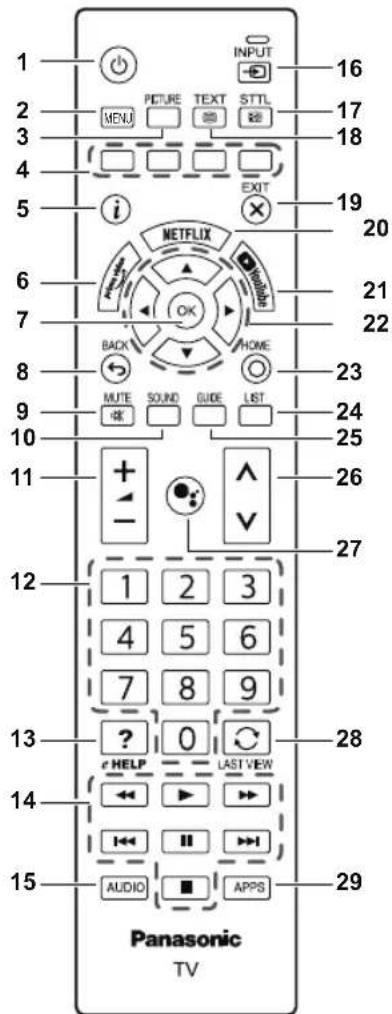
10
- Switches TV on or standby.
2 MENU
- Opens the TV Menu with typical TV functions.
3 PICTURE
- Selects the picture mode.
4 Coloured buttons
(red-green-yellow-blue)
Used for the selection, navigation and operation of various functions.
5 Information
- Displays channel and programme information.
6 prime video
To launch the Amazon Prime Video App.
7 OK
- Confirms selections and choices.
8 BACK/Return
- Returns to the previous menu or previous App.
9 Sound Mute On/Off
Press to mute the sound or to restore it.
10 SOUND
- Selects the sound mode
11 Volume + / Volume -
- Press to adjust the volume level.
12 Numeric buttons
Changes channel and teletext pages.
- Sets digital number.
13 [eHELP]
- Displays [eHELP] (Built-in Operating Instructions).
14 Multimedia operations button
15 AUDIO
MTS/Audio language.
16 INPUT
- Select an input source.
17 STTL (Subtitles)
- Displays subtitles.
18 TEXT (Teletext)
- Press to open or close Text / Teletext.
19 EXIT
- Returns to the normal viewing screen.
20 NETFLIX
To launch the Netflix App with the TV switched on or from standby.
21 YouTubeTM
- To launch the YouTube App.
22 Cursor buttons
- Makes selections and adjustments.
23 HOME
- Opens the Home menu.
24 LIST
- Opens the channel list while watching TV.
25 TV Guide
- Displays Electronic Programme Guide.
26 Channel Up / Down
- Switches to the next or previous channel.
27 Microphone
To launch the Google AssistantTM.
28 Last view
- Switches to previously viewed channel.
29 APPS
- Displays [Apps] (applications list).
Bluetooth
Pair Your Remote Control
1
Bluetooth
Pairing your remote control.
Ea
Skip
- Pairing your remote control.
2

Searching for accessories...
Before pairing your Bluetooth devices, make sure they're in pairing mode.
Before pairing your Bluetooth devices, make sure they're in pairing mode.
To start pairing the remote control with TV, long press the [Volume -] key and [Microphone] key for 3 seconds.
3

Searching for accessories...
Before pairing your Bluetooth devices, make sure they're in pairing mode.

PanasonicATVRCU01
E8OF.C8D2FDA3

APHRC
36 AE=7B+23G0
- Select [Panasonic] and press OK.
4

Searching for accessories...
Before pairing your Bluetooth devices, make sure they're in pairing mode.

PanasonicATVRCU01
Paiing...

APHRC
30AE7B02360C
- [Pairing] screen is displayed.
If [Couldn't pair] is displayed, press OK key again to re-pair.
5
Searching for accessories...

Before pairing your Bluetooth devices, make sure they're in pairing mode.

Parasonic ATV RCU01
Connecting...

APHRC
30AE75302350C
- [Connecting] screen is displayed.
6
Setup is completed. Enjoy!
Cnglualalns!
Initial Setup is completed.
In order to take advantage of Google Assistant in case of a remote
control without microphone, please use the Android TV Remote
Control app available in Google Play Store for Android and Apple
App store for iOS devices. Please press [OK] to exit the wizard.
FINISH
- When the remote control is paired, the setup completed screen displayed. Select [FINISH] and press OK.
7
Remotes & Accessories

Add accessory

Panasonic ATV RCU01
Connected
Remote control is paired.
Un-Pair Your Remote Control
- Long press the [Cursor down] and [Volume down] key at the same time for 3 seconds to un-pair your remote control.
How to Use eHELP
[eHELP] is the detailed operating instructions built into the TV, and gives a more detailed explanation for a better understanding of the operation of each feature.
1 Display [eHELP]
![PANASONIC TX65JXW704 - Display [eHELP] - 1](/content/2026/03/539469/images/fc9c5bc8018b13a6763e4e896d22a1b72b5473ac75e6c71b0b994315d3c5437a.jpg)
![PANASONIC TX65JXW704 - Display [eHELP] - 2](/content/2026/03/539469/images/fe709b1c16d105411dd473c9d4b608a9d21435de29f46f1bbfa6f4c30e5a0217.jpg)
[eHELP]
2 Select the item

select
access
Maintenance
First, remove the mains plug from the mains socket.
Display panel, Cabinet, Pedestal
Regular care:
Gently wipe the surface of the display panel, cabinet, or pedestal by using a soft cloth to remove dirt or fingerprints.
For stubborn dirt:
(1) First clean the dust from the surface.
(2) Dampen a soft cloth with clean water or diluted neutral detergent (1 part detergent to 100 parts water).
(3) Wring out the cloth firmly. (Please note, do not let liquid enter the TV inside as it may lead to product failure.)
(4) Carefully wipe moisten and wipe away the stubborn dirt.
(5) Finally, wipe away all the moisture.
Caution
- Do not use a hard cloth or rub the surface too hard, otherwise this may cause scratches on the surface.
Take care not to subject the surfaces to insect repellent, solvent, thinner or other volatile substances. This may degrade surface quality or cause peeling of the paint. - The surface of the display panel is specially treated and may be easily damaged. Take care not to tap or scratch the surface with your fingernail or other hard objects.
- Do not allow the cabinet and pedestal to make contact with a rubber or PVC substance for a long time. This may degrade surface quality.
Mains plug
Wipe the mains plug with a dry cloth at regular intervals. Moisture and dust may cause fire or electrical shock.
FAQs
Before requesting service or assistance, please follow these simple guides to solve the problem.
For details, refer to [eHELP].
The TV does not switch on
- Check the mains lead is plugged into the TV and the mains socket.
The TV goes into Standby mode
- Auto power standby function is activated.
The remote control does not work or is intermittent
- Are the batteries installed correctly?
- Has the TV been switched on?
- The batteries may be running low. Replace them with new ones.
- Point the remote control directly at the TV's remote control signal receiver (within about 7 m and a 30 degree angle of the signal receiver).
- Situate the TV away from sunshine or other sources of bright light so they do not shine on the TV's remote control signal receiver.
No image is displayed
- Check the TV is turned on.
- Check the mains lead is plugged into the TV and the mains socket.
- Check the correct input mode is selected.
- Check the setting in [Input Selection] to match the signal being output by the external equipment.
Is [Contrast], [Brightness] or [Colour] in the Picture Menu set to the minimum? - Check all required cables and connections are firmly in place.
An unusual image is displayed
- Turn the TV off with Mains power On / Off switch, then turn it on again.
- If the problem persists, initialise all settings.
[Factory Reset] in [Settings] > [Device Preferences] > [About]
Parts of the TV become hot
- Parts of the TV may become hot. These temperature rises do not pose any problems in terms of performance or quality.
When pushed with a finger, the display panel moves slightly and makes a noise
There is a little gap around the panel to prevent damage to the panel. This is not a malfunction.
About the inquiry
- Please contact your local Panasonic dealer for assistance.
If you make an inquiry from a place where this TV is not present, we cannot answer about contents that require visual confirmation for connection, phenomenon, etc. of this TV itself.
Specifications
TV
Model No.
43-inch model TX-43JXW704 / TX-43JXW714
TX-43JX700E / TX-43JX710E
50-inch model TX-50JXW704 / TX-50JXW714
TX-50JX700E / TX-50JX710E
55-inch model TX-55JXW704 / TX-55JXW714
TX-55JX700E / TX-55JX710E
65-inch model TX-65JXW704 / TX-65JXW714
TX-65JX700E / TX-65JX710E
75-inch model TX-75JXW704 / TX-75JXW714
TX-75JX700E / TX-75JX710E
Dimensions (W× H× D)
43-inch model
963 mm x 614 mm x 243 mm (With Pedestal)
963 mm x 567 mm x 78 mm (TV only)
50-inch model
1116 mm x 700 mm x 256 mm (With Pedestal)
1116 mm x 654 mm x 82 mm (TV only)
55-inch model
1231 mm x 766 mm x 256 mm (With Pedestal)
1231 mm x 718 mm x 82 mm (TV only)
65-inch model
1446 mm x 893 mm x 291 mm (With Pedestal)
1446 mm x 844 mm x 79 mm (TV only)
75-inch model
1670 mm x 1016 mm x 313 mm (With Pedestal)
1670 mm x 969 mm x 92 mm (TV only)
Mass
43-inch model
8.55 kg Net (With Pedestal)
8.35 kg Net (TV only)
50-inch model
12.19 kg Net (With Pedestal)
11.97 kg Net (TV only)
55-inch model
14.40 kg Net (With Pedestal)
14.18 kg Net (TV only)
65-inch model
18.20 kg Net (With Pedestal)
17.96 kg Net (TV only)
75-inch model
26.56 kg Net (With Pedestal)
26.23 kg Net (TV only)
Power source
AC 220-240 V, 50 / 60 Hz
Panel
LED LCD panel
Sound
Speaker output
43-inch model
16W (8W + 8W)
50-inch model 55-inch model 65-inch model
75-inch model
20W (10W + 10W)
Headphones
Connection terminals
HDMI 1/2/3/4 input
TYPE A Connectors
HDMI 1:
Content Type, Audio Return Channel,
Deep Colour
HDMI 2/3/4:
Content Type, Deep Colour
Card slot
Common Interface slot (complies with CI Plus) × 1
ETHERNET
RJ45, IEEE802.3 10BASE-T / 100BASE-TX
USB
DC 5 V, Max. 500 mA [Hi-Speed USB (USB 2.0)]
DIGITAL AUDIO output
PCM / Dolby Digital, Fibre optic
Receiving systems / Band name
Satellite
DVB-S/S2
Receiver IF frequency range -
950 MHz to 2150 MHz
DVB-C
Digital cable services (MPEG2,
MPEG4-AVC(H.264) and MPEG HEVC(H.265))
DVB-T/T2
Digital terrestrial services (MPEG2,
MPEG4-AVC(H.264) and MPEG HEVC(H.265))
PAL B, G, D, K
SECAM B, G, D, K
Satellite dish input
Female F-type 75Ω
Aerial input
VHF/UHF
Operating conditions
Temperature
0^ - 35^
Humidity
20% - 80% RH (non-condensing)
Built-in wireless LAN
Standard compliance and Frequency range*
IEEE802.11a/n
5.15 GHz - 5.25 GHz, 5.25 GHz - 5.35 GHz,
5.47 GHz - 5.725 GHz, 5.725 GHz - 5.825 GHz
IEEE802.11b/g/n
2.4 GHz - 2.483 GHz
Security
WFA WPA / WPA2 personal, WPS2.0, WAPI
*: The frequency and channel differ depending on the country.
Bluetooth® wireless technology*
Standard compliance and Frequency band
Bluetooth® 5.1:2.4 GHz band
*: Not all the Bluetooth® compatible devices are available with this TV. Up to 5 devices can be used simultaneously.
Note
- Design and Specifications are subject to change without notice. Mass and Dimensions shown are approximate.
- For information about the open source software, refer to (Home > Settings > Device Preferences > About > Legal Information)
For more product information, please visit EPREL: https://eprel.ec.europa.eu. EPREL registration number is available on https://eprel.panasonic.eu/product.
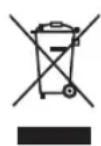
Disposal of Old Equipment and Batteries
Only for European Union and countries with recycling systems

These symbols on the products, packaging, and/or accompanying documents mean that used electrical and electronic products and batteries must not be mixed with general household waste.
For proper treatment, recovery and recycling of old products and used batteries, please take them to applicable collection points in accordance with your national legislation.
By disposing of them correctly, you will help to save valuable resources and prevent any potential negative effects on human health and the environment.
For more information about collection and recycling, please contact your local municipality.
Penalties may be applicable for incorrect disposal of this waste, in accordance with national legislation.

Note for the battery symbol (bottom symbol):
This symbol might be used in combination with a chemical symbol. In this case it complies with the requirement set by the Directive for the chemical involved.
Customer's Record
The model number and serial number of this product may be found on its rear panel. You should note this serial number in the space provided below and retain this book, plus your purchase receipt, as a permanent record of your purchase to aid in identification in the event of theft or loss, and for Warranty Service purposes.
Model Number Serial Number
Panasonic®
Covered by patents at patent list.accessadvancemc.com
50-inch model 55-inch model
65-inch model 73-inch model
20W (10W + 10W)
Hoofdtelefoon
3,5 mm stereomini-aansluiting × 1
Aansluitingen
HDMI 1/2/3/4 invoer
WFA WPA/WPA2 personal, WPS2.0, WAPI
KaK nonb3oBaTbca [eHELP] (c.10)
Blaorapm 3a npo6peHne TeleBn0pa Panasonic.
IpeiHaJIOM 3KcNpyataun npOdykTA BHNMaTeNbHO O3HaKOMbTeCb C daHHbIMn HCTpyKzmaMn COxpaHNTe IN dAaBHeJwero NcNoIb3ObaHn.
Ipeep nCnoJIb3OBAHnEM BHIMaTeJIbHO O3HaKombTecb c pa3dEnOM "MepblnpoctopoxhoCTn" DaHHoro pyKOBOcTBa.
I3o6paKeHnB DaHHOM pyKOBOcTBe npedCTaBHeHb IckJIQUHTeNbHO B cIeJAX nJIIOCTpnpOBAHn.
EcnBAM Heo6xOIMO 6paTntbcK MeCTHOMy npoabuy Panasonic 3a nomoubHO, nnonb3yTe rapaHTnHbI TaON Han European.
CopepxaHne
JIuehen3n 2
BaxHoe yBeDoMJeHne 3
Mepbl npedoctopoxknoctn 4
Cnncok 3JemeHToB ynpaBHeHn8
Bluetooth. 9
Kak nonb30BaTbcra eHELP. 10
06cnyxmbaHne 10
OTBeTbHa yacto 3aDaBaemble Bonpocbl...11
XapakTepeNCTKU 12
Пиценя
Daxe B Cnyuee ecnB OTHOweHn TOBaPbIX 3HaKOB npOyKTa nn KOMNaHm He 6bINo cJeNaHO CNEuMaNbHbX 3aABHeHm, Mbl NIOHOCbYBaXaem 3TN TOpROBBe 3HaKn.
DVB N IOROTnbl DVB RAIBNHO TOpROBIMN 3HaKaMn DVB Project.
DiSEqCTM RnreTcTTOPROBIM 3HaKOM EUTELSAT.
TepmnbH HDMI n HDMI High-Definition Multimedia Interface, a TaKke JloroTn HDMI yBnroTc TOBAPbIMn 3HaKaMn nn 3apeNCTpnpOaHHbIMn TOBapHbIMn 3HaKaMn HDMI Licensing Administrator, Inc.

Dolby, Dolby Vision, Dolby Atmos, Dolby Audio in DBOHOH CUMBOJ D RABJIOTC TOBAPHBIM 3HaKaAMn Dolby Laboratories Licensing Corporation.
ПожибODИТСОлпценДOLby Laboratories.
Конфicientsальные Heonyблкobаньibles pa60ы.
Copyright © 2012-2021 Dolby Laboratories. Bce npaba 3aшишны.
Dolby Vision·Atmos
PateHTbDTScm.Ha caTe http://patents.dts.com. Ppon3BODNTcno NnueH3N DTS Licensing Limited. DTS,Symbol,DTS u Symbol coBmecTHO, DTS-HD nOROTn DTS-HDraJIOCTcApernctpnpoBAHHbIMTOBapHBIM3HaKaAMn nnTOBapHBIMn 3HaKaAMn KOMNaHn DTS,Inc.B CUSA n/nn dpyrnx cTpaHax. DTS,Inc.BCE PPABA3AUINUEHbl.


Advance
Covered by patents at patentlist.accessadvancemc
BaxHoe
ybeomJeHne
YBeDMHeHne O TpaHcIaUN DVB/daHHbIX
Даньий Телевизор COOTBeTCTByeT CTaHdapTaM (no cocToHHNo Ha aBryct 2020 roda) uΦpOBOrO Na3eMHOro BeuAnnY VB-T / T2 (MPEG2, MPEG4-AVC(H.264), HEVC(H.265)), uΦpOBOrO Ka6eJIbHOrO BeuAnnY DVB-C (MPEG2, MPEG4-AVC(H.264), HEVC(H.265)) uΦpOBOrO cnTyTHNKOBoro BeuAnnY DVB-S (MPEG2, MPEG4-AVC(H.264), HEVC(H.265)).
HOpMaIO O DoCTynHOCTN DVB-T/T2IIN DVB-S B BaIeM perIOHe MOXHO NOJYuHTb y MeCTHO IpoIaBua.
06paTntecb K nocTabuNky ycny kabeIbHoro TeBnDHeHry, yTObbl y3HaTb, noDepKnBaet IIN 3TOT TeBn3Op BeaHne DVB-C.
-Дань TebeB3Op MoKet pa60TaTb HeKoppeKTHO CnHAnOM, KOToB He COOTBeTcTByeT cHaDapTaM DVB-T/T2, DVB-C nnn DVB-S.
He BCE cyHKuTN TeNeBn3Opa MOrY 6bITb IOCTynHb; 3TO 3aBNCNT OT CTpaHb, peMoHa, BeUaTeNbHOJ KOMNaHn, NOCTaBUnka ycnyI n CpeDbI cNYTHIKOBOI CB3N.
He BCE CAM-moyn pa6oTaOT dONKhBIM o6pa3OM C 3TtM TeNeBn3Opom. O6paTtEcB K NocTabuKy ycIyr, yTObbl yHaTb, KaKne CAM-moyn COBMecTMbl C Hm.
- DaaHbI TeBn3Op MoKet pa6oTaTb HeKoppeKTHOc CAM-Moynem, KOToPbI He 6bl Odo6peH noCTaBnKOM ycnyr.
MoketBzImaTbCnOIOHHTeNbHa nPaTa (3aBncntOT NoCTaUka ycnyr).
CObMeCTHMOCTb C 6yDyUIMM cepBVCAMn He rapaHTnpyETc
HHTepHET-npUIOXeHnIpeOCTaBJIOTcOOTBETCTBYUOMNIOCTABUKNKAMN yCnyr;nxfHKNUHOHaNbHOCTb MOxET 6bITb N3MeHeHa NINBbIKIOUeHa, a npUIOXeHnMOry CTaTb HeIOCTyNHbIB NIO6oMOMeHT BpeMeHn.
Panasonic He Hecete OTBETCTBEHHOCTN He npedocTabnreT rapaHTN B OTHOWeHIN DOCTYHOCTN n fHKUHOHaJIbHOCTN daHHbIX cepBNCOB.
KomnaHn Panasonic He rapaHTnpyET pa60Tu n npOn3BOJNTeJIbHOCtB nepuΦepmHHbIX yCTPOIcTB CTOPOHNX npOn3BOJNTeNe; Mbl He Hecem KaKoI NIOO TBETCTBeHHOCtN 3a yuepe6 pa6ote N/ INI pOn3BOJNTeJIbHOCtN, KOToPbI 6bl Bb3BaH NCONb3OBaHHe NDo6HbIX nepuΦepmHHbIX yCTPOIcTB.
06pa6oTKa KIneHTcknx daHHbIX
PnnoNIOKIOUeHn DAnHOro TeNEBn3Opa K INHTepHeTy nocIe cornacn C yCNOBnMn PpeOCTaBHeHn ycnyr / nonITNKoKOHΦuEHNaNbHoctn Panasonic (3decb n daane - "YcNoBnN I NOJoxHeHn")MbI
IIMEEM npaBO Co6npaTb IN pImMeHrTb HΦopMaIIO 06 NcNoJIb3OBAHmN DaHHORO yCTPOIcTBa COrNaCHO HAcTOIzIM YCJIOBnM N NOJIOKeHNM.
PepcoHaJIbHbIe daHHbIe KIneHTOB MOrY XpaHnTbcra Ha 3OM TeBeBn3Op BeaTaTeBHOKOMMaHnei HIN NoCTaBUnKOM npuIOKeHNI. Pepe peMOHTom, TpaHCnOPTnpOBKO INyUTIN3aUneE 3TORo TEeBn3Opa ydaJInte BcIO INHΦOpMaUIO, XpaHnaUyOcR Ha HEM, B COOTBeTCTBmN CO CNeDyUOUMM INHCTpyKlUmaM.
[eHELP](Ponck B Hactpoikax>C6pocdo 3aBoDcKnx HactpoeK)
HOpMaunO KIneHTa MoKeT CoBpaTbcnIOCTABUKNAMN NocpeDCTBOM PnINNOXeHN CTOPOHNX pa3pa6oTuNKOB, DcTyNHbIX Ha daHHOM TeNEBn3opeuN Be6-caIte. 3a6NaorOBpemHeo NOITBepdnte CBOE coTlacne C YcNoBnMn IN NoONKeHnMn NOCTaBUNKa.
Panasonic He Hecet OTBETBeHHOCTb 3a c6op INCIOJIb3OBAHHe INHOpMaUN O KJIneHTe, KOTOpbie OCyUeCTBnIaTcNOCpeDCTBOM PpNJIOKeHn CTOpOHHeRo pa3paBOTuHa, DOCTyNHOro Ha daHHom TeNeBn3ope nIN Be6-cainTe.
-Пи ВБОе ДаHHbIX 6aHKOВСКо KapТь,ИМЕнИдр.обрацайte ocOбoe BHNMaHne Ha DoBepEHbI CTaTyc NOCTaBUnka.
BBeHnHa HOpMaunMoKet CoXpaHbTaBaHa cepBepe NoCTaBnka. NpePe moHTOM, TpaHCnOpTnPoBko nn yTNn3aune 3TOTe TEeBnOpa ydaNtte BcIO HOpMaunBO COOTBeTCTBnC yCJOBnMn INoIOKeHNm, npeOCTaBneHHbIMNoCTaBnKOM.
3TOT npOyKT NnueH3npoBaHn Ha OCHOBaHn
NIIeH3Nn Ha naket NaTeHTOB AVC nIyNHO n
HEKOMMepCheCKo IcNOJb3OBAHnI NOtpe6BnteMe nIy: (i) KOINPOBaHn BIneo B COOTBeTCTBn CO CTaNapToM
AVC ("BIneoAVC") n/INn (ii) DeKOINPOBaHnBnDeoAVC, KOTOpBle 6blIO 3aKoINPOBaHo NoTpe6BnteMe, BOBHeeHHbIM B InuHyIO INn HEKOMMepCheKyO
DeTeNbHocTB n/Nin 6blIO NoNyHeO OT NoCTaBzNkA
BIneo, IMeIoUero NIneH3NIO Ha npeOcTaBneHne
BIneoAVC. NIneH3Nn He 6blIa npeOcTaBneHa n He
MOKeT nCOnb3OBAtbcraB Dpyrnx ceJIx.
IOnonHnTeJIbHyIO INΦopMaζIO MOxHO NOnyUHTb B MPEG LA, LLC.
CM. http://www.mpegla.com.

3Ta Metka yka3bIbaeT Ha To, yTo yCTpoiCTBO pa6oTaet OT HanpJxKeHnI nepemHeHoro TOKa.

3Ta Metka yka3bIbAeHT Ha To, YoTo DaHHbI
3JIeKTpOpnp6Op IMeET Knacc II (DboHyIO n3OJIaCIO)
H He Tpe6yET 6eOnacHO IOKnIOueHnK
3a3EmNIAIOUcEMy ycTPOJCTBy (3a3EmNEHnI).
TpaHcnpOpBbTOJbKO B BepTKaJIbHOM NOJXeHN.
Мерсы пре dioctopoxkHOCTN
Bo n36ekhaHne npaKeHHn 3JKeKtpuueckm TOKOM, noXapa, NOBpeXdeHn Hn TpaBMb CO6NoDaIte npBBeHeHhie HNKe MEPbI ppeOCTOpOXHOCTn.
Cetebo shyp u Bnka
PpeDynpexkdeHne
Ecnn Bbl 6hApuyKnH HeHTO cTpaHHoe (3ByK, 3anax n T. d.) cpa3y xe n3BnKeNTe BNJKy CTeBOrO UHypa n3 po3ETKn.
TeIeBn3Op npEHa3HaueH dIpa6oTbI OT cETn nepemehHoro ToKa co CJIeDyUOuMMn NapaMeTpamN: 220-240 B,50/60 T.
- POnHocTbIO BCTaBBTe BNkY CeTeBOrO uHypa B p03ETK.
ДлгпОПнНOrO OTKЛЮЧЕнЯ yCТpoIcTBA Heo6xOДМо BbIHyTb BnIky CeTeBOrO wHypa n3 po3eTkI 3NeKTPocEtN.
3TO O3HaayeT, 4TO y BAC BCerda DOJIKeH 6bITb DOCTyn K BNJIke CeTeBOrO Whypa.
OTKIOUaIteTeBn3OpOT3NEKTpocTe, KOrDa OuHaeTeero.
He npikacaiTecb K BUNKe 3JIeKTPoCeTN MOKpbIMnyakuMn.

He noBpeKdaiTe ceTeBOi uHyp.
He cTaBbTe TReKeIbIe npEaMeTbHa ceTeBOHyp.

He pacnonaraTe ceteBOW uHyp BO3ne npEdMeTOB C BbICOKO TemnepaTpyoN.

He TaHnTe 3a shyp. Pn OToCoEInHeHHN OT 3NeKtpocetn DeepKHTecb 3a BnKy ceTeBOrO shhya.

-ПеремаиTe TelenB3Op TOnbko nocne OTKIQUeHnO T3JIeKTPocETn.
He nepekpyuBaIte, He nepeRnBaIte n HepactraNbaTe ceTeBoIshyp.
He nnoB3yIte noBpeXeHHyU Bnky npo3eTKy 3neKtpocetN.
- Y6eDNTecB B TOM, YTO TeNEBn3Op He NOBpeKdaet CeTeBOI SHyp.
- IcnoJb3yIte ToJIbKO ceTeBOU SHyp, KOtOpbI BxOJNTB KOMJIeKTOCTaBKN 3TOrO TeJIeBN3Opa.
yxo
PpeynpexdHne
He CHIMaIe KpbIuKn HNKoIgDa camocToTeJIbHO He MoINΦNlPuyTe
TeNeBn3Op, NOCKoJIbky
3TO MOxET PnVBecTNI K
NOnyueHIO DoCTyNa K
pa6OuM NcOMNoHEHTAM NoI
HaNPraJHeHEm, KOToPbIE
MOrYT Bbl3BaTb NopaxHeHne
3JeKTPnueckm TOKOM.
BHyTpN TeNeBn3Opa
OTcyTCTByIOT DeTANI,
06CnyjNbAeMbIe
NOJIb3OBaTeIeM.
He octabnIte
TeNEBn3Op NOI DoKdEm
H He NoIDBePraIe erO
BO3DeIcTBnIO BnAri. Ha
TeNEBn3Op He DOnXHbI
NONaDaTb KAnJIN XNkOcTNI
NIn 6pbI3r. 3Anpeaetc
CTaBtB Ha Hero NHaD
HIM EMKOCTN C XNkOcTbIO (HaNPmep, Ba3bl).



He nomeuainTe HOpOaHbIe OBeKbI B TeNeBn3Op Upe3 BeHTnAaONHbIe OTBepCTN.
Ecni TeNeBn3Op nCnoNb3yeTcR B MecTe, rDe HaceKombIe MOrTy IerKO npOHKnHyTb B Hero: HaceKombIe, HApPmEp MaJeHbKne MyxN, NayKn, MypaBbN uDp. MOrTy NonAcTb B TeNeBn3Op, yTO MoKeT npNBecTn K erO NobpeXdeHIno, INN 3actPraTb B BuIMOn OBnactn, HApPmep BByTpN 3kpaHa.
EcnTeneBn3Op NcNoB3yETcB MecTe, Ie npCytCTByET nbIb nnDblm:
YactnblnbimMbmaMoryt nonactbTeJebn3op
pee3 BeHTINRAUHOHbIe OTBepCTNIOcTaTbCBA
BHTPNyCTPOCTBa.3TO MOKET PpNBecTN K
neperpeBy,HeNCnpaBHOCTN,yxuHEHIO KaheCTBa
1306paKeHHNnDp.
He nCnoB3yIe NoCTaBKN/KepeHEnHnKoTOpbIe He 6blnn OoOpeHbI npOn3BOJNTenEM. NOnpocntMeCTHO rpoDabua Panasonic BblNOJHnTB yCTaHOBky OoOpeHHbIX KPOHHTeHOB dIHaCTeHHORO KpenneHn.
He noBepraTe DnCnneupe3MePbIM MExaHueckm Harpy3kam.
CneIeTe 3a Tem, YTo6bI DeTn He 3a6npaNcB Ha TeNEBu3Op.
HeCTaBbTe TeLEBn3Op Ha HAKIOHbIe N HeYcTOuHBbIe NOBepxHOCTN;Y6eJeNTecb, YTO TELEBn3Op He CBnCaET C KpaI IOCTaBKn.

BHHMaHHe! Yrpo3a naDeHn
TeIeBn3Op MOKeT yNactb N npNBecTN K cepBe3HbIM TpaBMam nnn Cmeptn.Bo n36exaHne noJyueHna TpaBM,OCo6eHHO JeTbMn,CobJIouaTe CNeDyUoHne MepbI ppeIOCTOPOXHOCTN.
-
BCErДA nCnoJb3yIe Te Tym6bl, noCTaBkn I KpeIeHnI, OoOpeHHbIe npOn3BoUnteIeM TeIeBu3opa.
-
BCEΓДА ИСПОЛБУМЕРДМETБI MEБЕИ, KOTOPБЕ obecneuAT HAneJxHyU yCTaHOBKY TENEBU3Opa.
BCEΓДA npOBepaIte,чTo TeNEBn3Op He yctaHOBHeH Na KpaIO npEdMeTa Me6eJI.
- BCEΓДA INHCTpyKTHpyuTe DeTeI O NOTEHuaJIbHbIX ONaCHOCTx H He pa3peWaaTe NM B3bnpaTbcra Ha Me6eJIb, YTO6bl DToTAYHbCra Do TeJIeBn30pa I ΘJIeMeHTOB ynpaBJIeHnI.
-BCERDA npoknaabBaIte uHpyi Kabeenn, NOdknueHHbE K TeNeBUN3OpY, TAKIM o6pa3OM, YTO6bl HEnb3a 6blno 3aueNtbc nIN CXBAITb IX.
- HNKOΓA He pa3meaJTe TeJIeBUN3Op Ha HeyCTOuINBBIX NOBepxHOCTX.
HIKOITDA He yctahabnBaIte TebeN3Op Ha BbICOKHe npEmTeB Me6eNn (HaNPIMep, Ha 1kkaΦ HIN CTeJIaK), 3a NCKIOUeHNEM CnyaEB, KOrda npEMeT Me6eNn TeteBn3Op HAdExKHO 3aΦHKCIPOBaHbI NOxOJrM CNOCoBOM.
HIKOITA He nomeaaiTe TeJeBn3Op Ha cKaTeptb I npyIe N3dEINrN 13TKaHN.
HIKOITDA He nomeaaiTe BSei, KOToPbIe MOrTy npBnEkaT BnHaMaHne DeTei, HanpImep IrpUwKn NnytBtI DnCTaHcUNHOY npaBHeHna, HBePx TeNeBn3Op AnPi PpeMeTO Me6eN, Ha KOTopbIX CTONT TEJEBn3Op; 3TO MOKeT Bbl3BaTb y DeTei JeJIaHHe 3aJe3Tb Ha HIX.
Ecln mHeuunnc TaIeBn3Op nHaHpyetc npemecntb, K HeMy npMeHIOTC 3TN Ke Mepbl npedoctopoXHOCTN.
3TOTTeNEBn3OpPpeHa3NaueHДЯHAcToNbHOrO NcNoJIb3OBaHnI.
He noBepraIte ero BO3eNCTBIO npMbIX COJHeuHbIX Jyuei N DpyNX. ITOUHNKOB TENJa.

Bo n36eXaHne
noXapa HNKoRda He
yCTaHaBJIbBaIte
peYOM C npN6Opom
CBeU NJIu DpyrHe
NCTOCHNI
OTKpbITOrO
PJaMeHN.

Onachoctb ydyuweHn
PpeynpckdneHn
- YnakOBka DaHHoro npOyKTA MoKeT Bbl3BaTb ydyWeHne; HeKOToBle KOMNoHEtbl DoCTaTOHOM MaIbI, T06bl PpeCTabJIbcoBoi yrpo3y ydyWeHnA DnMaNeHbKnx DeTei. XpaHnte 3TN KOMNoHEtbl B HeDOCTyNHom DnMaNeHbKnx DeTei MecTe.
OnopHcToKa
PpeynpexdneHn
He pa36bpaTe Hn Me moHnFmUpyTe nOCTaBky.
(BHMaHHe!
- IcnoJb3yIte TOnbKO NOpCTaBky, KOTopar BxOuT B KOMPJIeKT NocTaBKN 3TOrO TeJIeBuN3opa.
He nCnoNb3yIe noDcTaBky, ecn OHa DeΦopMnObaHa HnNoBpeKdHa. B 3ToM cLyuae o6paTntecb K 6JInxKaIWeMy npOdaBuY Panasonicic.
BoBpemy yctahOBKn y6eHntecb, YTO BCE BnHTbl HaexKHO 3aTAYtbl. - Y6eDntecb, yTO TeNeBn3Op He NoDBepraetcMexaHnueckomy BO3DeiCTBnIO npu yCTaHOBKe NOCTabKn.
CneIte 3a TEM, YTo6bI Detn He 3a6npaIINCb Ha noCDtABky.
He yctahabnbaTe / He cHMaTe TeJeBu3Op C NOCTaBKn B OINHOky. - YCTAHABNBAIte / CHIMaTe TEJIeBUN3Op C NOCDTaBKN B COOTBETCTBUN C IHCTPYKUNM.
PaNoBONHbI
PpeynpexdeneHne
He nCnoB3yIe TeNeBn3Op B MeDunHcknx ypeKdEnHX nn MeCTax, rpe npCytCTByET MeDunHckoe o6OpYDoBaHne. PaDnOBoHb MOrTy Co3DaBaTb NOMExn B pa6oTe MeDunHckoro o6OpYDoBaHna, YTO MoKeT pInBecTn K erO HeNCnpaBHOCTN HecCACTbIM CnyaM.
He nCnoIb3yIte TeIeBn3Op OKoIO obOpdyobHnna c aBTOMaTHueCKM ynpabNeHnEm, HapnpMeP aBTOMaTHueCKx DBepe Nn IIOXapHoI CNrHaN3aUIM. PaINOBONHb MOrYt CO3DaBaTb NOMExn B pa6Ote obOpdyobAHnca bTOMaTHueCKM ynpabNeHnEm, YTO MOKeT npIBecTN K eTo HeNCppaBHOCTN HecCaCTHBIM Cnyaam.
JIIOJAMC KAPINOCHTMUYIANTOPAMN CNeIyET HAXOINTbca Ha pacCToRHN 60nee 15 cm OT TeJeBn3opa.PaINOBOHbMoYr CO3DaBaTb nomexu B pa6oTe KAPINOCHTMUYIANTopa.
He pa3bpaaiTe n He moiPhiuPyuTe KOHCTpyKuMoTeJeBn3opa.
BcTpoeHnHa 6ecnpoBOHaJIBC
BHHMaHHe!
He nCnOJb3yIte BCTpoEHnyo 6ecnpOBOnHyo JBC DnI NOKJIIOUeHnK 6ecnpOBOnHBIM CetrM (SSID*), Ha nCnOJb3OBaHne KOTOpbIX y Bac Het npab. TaKe cETN MOrY TNOBNTCB R CINCKE B pe3yIbTaTe NONcKa. Ondako INCnOJb3OBaHne MOXET CHITaTbCRe HeCaHKUHOHPOBaHHBM DOCTYnom N 6bItb He3aKOHHbIM.
*SSID —эTO Ha3BaHne 6ecnpoBOdHoi ceTnДпяпepedaHи ДHHbIX.
He noDBepraTe BCTpoEHbMyDyB 6ecnpoBOHOJIBC BO3DeIcTBIO BbICOKNX TempeaTyp, npMbxCOJIHeuHbIX JyueN BLaTn.
Pnpepaue nnoyueHn DaHHbIXpee3 paNoocACToTHbIe KaHaJIbI OHN MOrYT OTCNeXNBaTbCra N6bITnbpeBXBaYeHbI.
BCTpoeHHa 6ecnpoBOHnA JBC nCnoJIb3yET
Dnana3OHBI yactOT 2,4 TtU n 5 TtU. YTObI n36ExKaTb
HeNoJaODK mEJNeHHoro OTKnIka, KOTOpBI npi
NCIOJIb3OBAHN BCTpoeHHo 6ecnpoBOHOJ JBC
MOrY BbIBaTB paDNONOMEXn, He CTaBbTe TEeBN3Op
BO3JIpe DpyTHx ycTPOINCTB, NcNOJIb3yIOUX CmHAnBI
2,4 TTu n 5 TtU, HApNIMep dpyTHx ycTPOINCTB CO
BCTpoeHHo 6ecnpoBOHn JBC, MmKpOBJHOBBIX
Neey I MObINbHbIX TeJeFOHOB.
Пи ВОЗнКНOBЕHM Побпсм CO CTaTчecKM 3ЛЕКТРИСЧВOM И ДР. TeLEБИЗМОМЕТ OTKЛЮЧТбСВД BцELX 3aUNTbI. OTKЛЮЧТeTeLEБИЗМССССССССССССССССССССССССССССССССССССССССССССССССССССССССССССССССССCSS C NOMOUCBIO NEPEKIIQUaTeЯ NITaHnA a 3aTEM CHOBA BKJIQUHHTe ERO.
BecnpoBodna TeXhONorn Bluteoth
BHHMaHHe!
TeNeBn3Op n nybT Dy nCnoB3yOu paAnoacToHbI dnaana30n ISM 2,4 TgU (Bluetho).Yto6bI n36ExaTb HenoJaOK mMeDneHnHO OTKnka, KOtOpbMoRyT BbI3BaTb paDnONOMEXn, He CTaBbTe TeNeBn3Op n npbT Dy Bo3ne Dpynx yCTpoiCTB, NcNoJb3yOuX cHrHaNbI 2,4 TgU, HanpImep dpyrnx ycPoIcTB CO BcTpoEHHO BeCnpBOADHOJIBC, MKNPOBnHObIX neeH n MOBnHBix TepehoHOB.
Bentnlaa
BHHMaHHe!
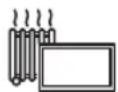
06ecnehe Te DoCTaTOHcMo cTa (xOra 5b1 10 cm) BOKpy TeneBn3opa, YTO6bI N36eKaTb NpePpeBa, KOtOpBIM MOKET PnNBecTN K PpexKeDbEmHO My BIXOy I3 CTPOA HEKOToBix 3NeKTPoHHbIX KOMIOHeHTOB.
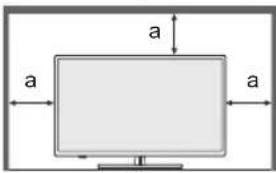
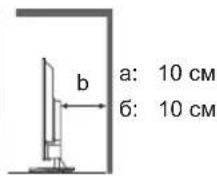
He hakpbBaHTe BEHTNJRAUHOHHbIe OTBepCTNnnpdmTaMn,TaKIMN KaTaeTbI,CKaTePtn 3aHaBeCKN-3TO MOKeT HApYNTb pa60Ty CnCTembl BEHTNJARu yCTpoCTBa.

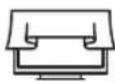
BHe 3aBnCmOCTOn OT NcIOJIb3OBAHn IONCTaBKn y6eIInTeCb, YTO BEHTNIAUHOHHbE OTBepCTnB HxKHe Yactn TeJeBn3Opa He 3a6IoKIpOBAHbI, a dIy ObecneueHn DOxKHO yPOBnBEHTNIAuIMMeETcdoCTaTOHo MeCTa.
Ipepeeene TeJeBn3opa
BHHMaHHe!
Ipepe nepemeeHnem TeeneBn3opa OTCoeHNHTe Bce ka6en.
-Дяпегмшени TepeBn3opa Tpe6yeTcH MeHee DByx YeJOBek.
Ecn He nCnoNb3yETcB TeueHne dnteHoro Bpemehn
BhMaHHe!
TeBn3Op 6yIeT NoTpe6bIb HeKOTopoE KOINueCTBO 3NEKTPo3HeprN DaXe B BbIKIOUeHHOM COCTOHN, ecn CeTeBOi SHyp 6yIeT NOKNIIOHeH K PO3eTke 3NEKTPocETn.
BbHbTe Bnky ceTeBO rO uHa pA n3 po3eTK, ecnn TeJeBn3Op He nAnHpyETcN cNoJb3OBaTb B TeueHne DnITeBHoro nepoDa BpeMeHN.
CnHsKOMrPOMKn3ByK
BHHMaHHe!
He yctahabnBaIte cnHKOM 60nbwoypoBeH rpoMKoCTn npnNCIOJIb3OBAHN HAYUHKNOB.3TO MOKET HaheCTN HeONpaBmbl yuepe6 BaMeMy cnyx.

Ecnn Bb Cbl Wnte ryeHne B ywax,ymeHbWnterpomKocTb Nn Ha Bpem npekpatnte nCnonb30BaTb HayuHNKn.
3nement nntanna nnynbTa D
BHHMaHHe!
HeBepHae yCTaHObKa MoXeT npuBecTn K npoTeKaHIO, KoppO3M N B3pbIBy 3JIeMeHTA IITAHNA.
YCTaHaBJIbAaIe aHaJIOTNHyHbIe 3JIeMeHTbI NITaHn.
He nCnoNb3yIte OndHOBpeMeHHO CTapbIe HOBblE anemHTbI NITAHJ.
He nCnoNb3yIte 3JEMeHtbl NTaHnpa3HbIX TINOB (HaNPmep, uEJoUHbIe I MapraHueBBe).
He nCOnb3yIne aKkyMnyTOpHbIe 3JemeHTBnNTaHn(HMKeNb-KaMDmEBBieNdP.)
He noxirnate He nomaTe 3neMeHbI nTaHna.
He IIOBepraTe 3IeMeHTbI NITaHnB O3dEICTBIO nCTOuHNKOB TENNa, HAnpMep COJIHeuHOMy CBeTy, ORHIO IND.
O6raTeJIbHO yTuIN3npyTe 3JeMeHTbl NtAHN DOnXHbIM O6pa3OM.
- N3BNeKaIe 3nEMeHT nITaHn I3 yCTpoCTBa, eCIN BbI He nCIOJIb3yTe ero Ha npOTJKeHN dNITeJIbHO BpEmHn, YTO6bl npEDOTbPaTb ero npOTeKaHne, KOPPO3HIO H B3PbIB.
■ДeКлараци O COOTBETCTBnI LEDTeJIeBn3opa
"Hactoam Panasonic Marketing Europe GmbH 3aBnEET,TO DaHHbI TeJeBn3Op COOTBeTCTByeT OCHOBHbIM Tpe6oBaHnM INhBM COOTBeTCTBYOuHM NIOXKeHnM DnpEeKTHBbI 2014/53/EU n PerIaMeHTOB B OTHOWeHn paNoo6OpyDoBaHn (BENKo6pTuHaHn, 2017 r.)"
EcnBbXOTNE NONYHTb KONHOpnHaJIbHOJ DeKnapaunO COOTBeTCTBUN Dn3TOTeNebu3opa, nocETNTe CneDyUoUsn Be6-caIT:
http://www.ptc.panasonic.eu/compliance-documents
YNONHOMOeHHbI INpeCTaBtTeJIb:
Panasonic Marketing Europe GmbH
Hagenauer Strasse 43, D-65203 Wiesbaden, Германь Be6-cainT: http://www.panasonic.com
Duaanaoh 6ecnpoBODHJBC5,15-5,35TMOKETNCN0b3OBaTBc8TOJBKO B NOMeueHnBX CNeDyUOxCTpaHAX:
Abctpna,BeIbIgna,BolrnapnB,BeIuKobpntAHnB, BeHrpna,TeMaHnA,PeuN,DaHnA,NCaHnA, NcnaHnA,ITaJINa,Knnp,LatBnA,LTbA, JInxTeHwTeH,IIoKcEm6ypr,MaIbTa,HdepPaHdbI, HopBerna,IOnbSha,IopTyraHnA,PymbHnA, CeBepHa IpIaNDA,CNoBaKnA,CNoBeHnA, Typua,PhiHnAHyDnA,ΦpaHnA,XOpBaTnA,YeUckaR Pecny6nka,UbEeuapnA,UbEuunA,3ctOHnA.
3aBHeHne o paHaunOHHom Bo3eCTBn:
3To 6OpdyoBaHne COOTBeTCTBye TcAHTpy CE B OTHOweHn 6e3ONaChbIX 3HaueHn paDnaUHOHHoro BO3DeIcTBnB H EKOHTPonUPyEmoI cpeIe.
3To 6OpOyIOBaHHe HeoXoDnMo yCTaHaBnBaTb HcNoIb3OBaTb TaKIM Opa3OM, YTO6bl pacCToHne MEkdy N3JyHaTeNEM I TeNOM COCTABnHO He Mehee 20 cm.
MaKc. MoUHocTb P, nepeDaBaemB Dnana3oHaX 华ACTOT
HaxmTe,OTo6bI OTo6pa3NTb/CKpbITb TEKCT/ TeNETeKT.
19 EXIT
B03BpaT K 6bHOMy 3KpaHy npocMToPa.
20 NETFLIX
3aynck npnnoxehnna Netflix c BkIoucheHnem TeJeBn3opa nIe erO BbIXoDM n3 peKIma OXnDaHn.
21 YouTubeTM
3anyck npinoxeHnry YouTube.
22 Khonkn Habnraun
BbI6Op 3JIeMeHToB HAcTpOJa.
23 HOME
IOCTynKrnaBHOMy MeHIO.
24 LIST
- OTKpbTne CnNcKa KaHaNoB BO BpEmr IpocMoTpa TeJeBu3Opa.
25 TeIerri
- OTo6paXeHHe 3neKtpoHHo nporpaMMbI TeIenepeda.
26 CneyuOnn/npebdyuyn KaHaN
- PpeeknoueHne Ha cneDyUoUsn nn npeDbNyUsn KaHaJ.
27 Minkpopon
3anyck Google AccnntHaTM
28 NocJeHn KaHaJ
- PapeKJIIOueHHe Ha paHee npocMaTpnuBaembI KaHaI.
29 APPS
- OTo6paKaAe[TpInnoKeHn] (Cnncok npInnoKeHn).
Bluetooth
ConpJxHHe c npIbTOMy
1
Bluetooth
CompokeHue c nynbrom dY
Tapa
Ppynycnttb
CopraKeHHe c npbTom y.
2

Ponck akceccyapob...
Pepa cnpkHHm yocctvctbLoo0thy6dntc, TTO OHN HxHADOTB Pekimai cnpkHHK
-Пелед сороженем устpoctВBluetooth y6eintecb,чTO OHH HaxoJrTcB PexKIMe coprajkeHn.
-Дянayana conpякеняпьтА Ду стЕвзорМанKMNTe ИудрЖиВаTe KHONKn [PpOMKocTb -]N [MmKpofoH ]В TeueHne 3 cekyHd.
3

Ponck akceccyapob...
PepcnpcknHBMyctpOeBtBluEoohy 6yDyEmCb,TOOHHXADQTRB E PkneKmpecknHBMH
Panasonic ATV RCU01 E895FGRD2+O3
APHRC 30AE-7812-35:GQ
BbIbepeTe [Panasonic] n HaxMnTe OK.
4

Ponck akceccyapob...
Pepa cnpkRnHm yctOoBt Bluetooth 8eDyncb, tO OH HAcqHrT B pKpMn cnpkRnHm
Panasonic ATV RCU01
Com8944945
APHRC 3GAE70:62:55:0C
- OTo6paKaaeTcA kpan [COnp8KeHne].
Ecni OTo6paKaaeTcra [CoPraKeHne HeBO3MOxHO] eue pa3 HaxMnte OK nIy noBtOpHoro coPraKeHna.
5
Ponck akceccyapob...
PepopcpanxHnHm yctpOcnr Blueoth 1ybeae,0to CHn HbOaTcB a pckme opponkhenia.

Panasonic AVC RCU101
JQKXHHH

APHRC30AE75.02.35.0C
- OTo6paJaaeTc8KpaH [IOnkNIOUeHne].
6
Hacpoika 3aBepseHa. HacnaKaIaTeCb!
Ppapannm
Pepnpannnnnae Haeepnoa aepnepnnae.
000000000000000000000000000000000000000000000000000000000000000000000000000000000000000000000000
SABEPUINb
- Pocne ycneHoro conpJxHeHn nyIbTa DY OTO6pa3NTcKpAH 3aBepWeHn HAcTpOKn. Bb6epnte [3ABEPuNTb] n HaxMnte OK.
7
IyNbTbI Dy nAkecccyapbi

DobnBakccyap

Panasonic ATV RCU01 Падкlioецno
ConpKaHe nynbTa Yy BInOnJIHeHO.
OTMeHa cOnpJxHnC nYnBtOMy
OIOHOBpeMeHHo HaxMITE uYepXnBaHTe B TeueHHe 3 cekyHKn KhoN [KypCop Bn3] n [rpoMkoCTb -] dIra OTMeHbI cnpxKeHn nybTa y.
Kak noIb3OBaTbcra eHELP
[eHELP] 3to noDpo6Hoe BCTPOeHHoe pyKoBOdCTBO nIO nCnObl30BaHnIO TeNEBn3OpA, KOtOpoe npEplnaerT Ondpo6HbIe o6bAcHeHnI dJI IOHmAHn IpnHcUnpa6OtbkKaKnDo fYHKuN.
1 OtkpoTe [eHELP]
![PANASONIC TX65JXW704 - OtkpoTe [eHELP] - 1](/content/2026/03/539469/images/e8cac08d9569c17a6a2352c28c991b165c29b31f90ceb50dc0a1c8c15638a45d.jpg)
![PANASONIC TX65JXW704 - OtkpoTe [eHELP] - 2](/content/2026/03/539469/images/e2e6634a1f4af6edc66bd1a1a9dd6c707b0d62beca547a8df68995423f63346f.jpg)
[eHELP]
2 Bb6epnte 3JemeHT


BbI6Op

nepexo
06cnyxnbHne
B nepByo oupepb otcoeHnHTe yctpOCTBO OT 3neKtpocetN.
Ducnnei, Kopnyc, noctabka
PerynpHbI yxoD:
AkkypaTHO npToPAnte NOBepxHOCTb DnCnIeR, KOpNycu IIOCTaBKN MFRKoT KAnhBo, YTObI OChNTNb INOT Tp3N IOTNeYaTKOB NaJIbCeB.
TnCTOUKX3aarp3HeHH:
(1)OuHCTnTe NOBepxHOCTbOTnblnn
(2)CMOHTeMRAKYIOTKAHBBOIDONIN1%pACTBOPOM HeITpaIbHOROMOUeroCpeDCTBa.
(3)TuaTeNbHO BbIXMnTE TkaHb.(O6paTnTE BHMaHne, YTO IOnaDaHHe XNkOcTn BHYTpB TeJIeBn3Opa MoKet npuBeCTn K ero NIOJOMKe.)
(4) AkkypaTHO ydaJIInTe cToKne 3arpy3HeHnBlaXHOI TkaHbIO.
(5) BbITpuTe BCIO Bnary.
BhMaHHe!
He nCnoB3yTe a6pa3nBbIe TKAHn HrTpTe NOBepxHOCTc CNIuKOM CNbHO; 3TO MOKeT PnBecTN K NoBJeHIO Ha Heu capaNH.
y6eNTecb,yTO NOBepxHOCHTn He NoDBepraKOTcBO3deICTBnIO CpeCTB DnA De3nHΦekuINpactBopnteNe,pa3kNkaUoXn BeueCTB nINnHbIX JETyHX COeINHeH.N.3To MoKeT yXuDnITbKaueCTBO NOBepxHOCHTn INn PnPBeCTN KOTCNOEHnKpackn.
3a NOBepxHOCTBIO DnCnIe HxH0 yXaXnBaTb C OcOsbIM BHMaHHe, NocKoJIbKy ee JERKO NOBpeDHTb He TporaiTe n He IapanaiTe 3Ty NOBepxHOCTB HOITM INI DpymIM TBepdbIM npEdMetam.
I36eraTe DnITeBHO KOHTaKOpNyCa n NOCTaBKn yCTPOcTBA C ppeDMeTaMn 13 pe3NHBi N PBX.3To MoKeT yXyDUnTB KaueCTBO NOBepxHocTN.
BnIka 3JneKtpocetN
PeynphO OuHaaTe Bnky 3neKtpocTe MmKoI TkaHbIO. Bnara n bInb Ha Hei MoYr npueCTn K noXapy IIN nopaxeHHIO 3neKtpueCkIM TOKOM.
OTBETbI Ha yacTo 3aDaBaembIe BOpocbl
Ipeed o6paueHnEM B cnyk6y noDaeppKn nonpo6ynte peuTb npo6nemy C nOmoLbIO 3THX npocTbIX pekomHeaui.
TeJIeBn3Op He BkIIOuayetc
- Y6eDNTecb, YTO cTeBOH UHyp NOKKnOChEN K TeBn3Opy n po3EKe 3JIeKtpocEtN.
TeIeBn3Op nepexoAnT B peXm OxuJaHn
- AktiBupoBaHaФyHKnA aBTOMaTUnCeCKOrO nepexOda B peKIM OxUdAnH.
IyblT yHe pa6oTaet nn pa6oTaet Hecta6nIbHo
- PpaBnBHO N B Hero yCTaHOBJIeHbI 3JIeMeHTbI nTahN?
BknIOUeHnTneBUN3Op?
Pecypc 3nemHTOB nHTaHm MOKeT NOxOHTb K KOHy. 3ameHnte Hx Ha HOBbie. - HanpaBbTe NybT dY HenocpeDCTBeHHo Ha npneMHNK cnHaTa Nytba Td HA TeNeBnOpe (c paCtOHNHe 60nee 7 M n oD yrIOM He 60nee 30 rpaDycOB).
- Y6eIITecb, yTO Ha TeNEB3Op He IOnaJaIO TnpMbIe COINHeHbIe NyH INN CBET OT dpyTnx JpKNX nCTOuHHKO; OHN MOrTy NOnaDaTb Ha erO npHEmHK CnTHana NybTa DY.
1306paXeHne He oTo6paXaetc
- Y6eIITecb, yTo TeIeBn3Op BKIIIOueH.
- Y6eDnTecb, YTO CeTeBOI UHyp NOkKnOueH K TeJeBn3OpY n PO3eTKe 3JIeKTPoCeTN.
- Y6eIntecb, YTO BblpaH npaBnIbHbI INCTOCHNK CnIHana.
Y6eNTecb, yTO 3HaueHne napameTpBa MeHO [BbIbOp nCTouHnka BxoJa] COOTBeTcByeT Tnny CnHnA, KOtOpBn IOnaetc C BHeUHero o6OpyObaHn.
Y6eHNTecb, yTO nIra napaMeTPOB [KoHTpact], [RpkocTB] nIN [LBeT] B MeHIO "N3o6paKeHne" He ycTaHOBHeHO MUNHMaJIbHoe 3HaueHne. - U6eHNTecb, yTO Bce HHypbl NHTeppeCbl NOKIIUOHeHn HaDeXHO 3aKpenIeHbI.
OTo6paKaTaC TpaHHe 3o6paKeHne
OTKIOHTeTeJIeBn3OpcNOMOuIbIOnepeKIOUaTeJI NITAHNA,a3aTEMCHOBABKIOHTeERO.
- Ecnn npo6nema He yctpaHeHa, BbINOHNtB INHcuaIN3aCIO BCex NapaMeTPOB.
[ \text{[C6poc Do 3aBOdcknx HacTpoek] B MeHIO} ]
[ \text{[HacTpoiKn] > [NapametpbI yCTpoiCTBa] > [O6yCTpoiCTBe]} ]
YactbTeJIeBn3opa CNJbHO HarpeBaetc
- HekoTOpBie qacn TeJeBn3Opa Moryt CnIbHO HArpeBaTbcra. BbICOKaTeMnePataype He RJIaReTc NCToOHNkOM IpO6nEM B OTHoWeHn NpOn3BOOnTeJbHoCTn UNKaueCTBa.
Pn HadaBnBaHnn nabIeM dncnneHemHoro CMeuaeTcN u3daeT 3ByK
- DnCnne ycTaHOBNeH C He6oJIbIIM 3a3OpOM, KOtOpb HEO6xOdM IIN PpeIOBpaUeHn er O NOBpeXDeHn. 3TO He RAJIeTc HnCnpaBHOCTbIO.
O 3anpocax
- 06paTntecb K MeCTHMy npOaBuy Panasonic iIyNONyueHn NOMouN.
Ecnn Bbl OTnpabnare Te 3anpc n3 MeCTa, rde daHbIe TELBUN3Op OTCYTCTByET, MBI He CMOXEM DaTb OTBeTbHa BONPOCBt, Tpe6yIOUne BN3yAalbHOJ DNarHOCTNKn NOKIIIOUeHn, HENOJAOK N Dp. HA 3OM TELEBUN3ope.
XapakTepncTnkn
TB
Modenb N
Moelb 43dnoMa TX-43JXW704/TX-43JXW714
TX-43JX700E / TX-43JX710E
Moenb 50 DnHmOB TX-50JXW704/TX-50JXW714
TX-50JX700E / TX-50JX710E
Moenb55HnMoB TX-55JXW704/TX-55JXW714
TX-55JX700E / TX-55JX710E
Moelb65HIOMOB TX-65JXW704/TX-65JXW714
TX-65JX700E / TX-65JX710E
MoJeB75DIOHMOB TX-75JXW704/TX-75JXW714
TX-75JX700E / TX-75JX710E
Pa3MepbI (UxBxΓ)
MoDEnb 43 duimma
963 x 614 x 243 MM (c noctabkoi)
963x567x78MM(TOJIbKO TB)
MoDeIb 50 dIOuMOB
MoJeB 50 JIOHMOB MoJeB 55 JIOHMOB
Modenb65DIOHMoB MoEnb75DIOHMoB
20BT (10 B+ 10 Bt)
Hayushnki
1 cTepeopa3bem 3,5 MM
HTepcncbnoKnOueHn
BxoHDMI1/2/3/4
CoeHINHTI TYPE A
HDMI 1:
TnKoHTeHTa, KaHaJ Bo3BpataaynOcnHana,
Deep C
HDMI 2/3/4:
TIN KOHTeHTa, Deep Colour
Pa3bEm dnn KapTbI naMrtu
1 pa3bem "O6uH INHTeppeC" (COBmecTmo C
CI Plus)
ETHERNET
RJ45, IEEE802.3 10BASE-T / 100BASE-TX
USB-HocnteJe,
5B Noct. Toka, MaKc. 500 mA [Hi-Speed USB (USB
2.0)]
UΦPOBOI AynOBbIXOa
PCM/Dolby Digital,ontobonokho
CnCTembl npHema/Ha3BaHne dHaana3OHa
CnyTHnK
DVB-S/S2
WFA WPA/WPA2 Personal, WPS2.0, WAPI
*: Yactota n KaHJI 3aBnCrt OT CTpaHbI.
BecnpoBnHa TExHoNOrn Bluteoth®
CoTBeCTBnE cTaHdApTAM nDnAna3OH qAcTOT
Bluetooth® 5.1:ДиANA30H 2,4ГU
*: He Bce COBmctnMbIe yCTpoNCTBa Bluetooth® DCOTyHbI DnIg 3TOI TReEBN3Opa. ODNHO MOXHO HcONb3OBA Tb Do 5 yCTpoNCTB.
Ppimmeyane
BHeuHn Bn H xapaKTePcTnK MOrTy 6bItb N3MeHeHb 6e3 npEaBapntbHoro yBeOMneHn. Ya3aHHbIe Macca n pa3MepbЯBJIOTc np6JIn3NTbHbIMN.
VHΦopMaIIO O IO C oKpblTbIM IxOHNbIM KOOM cm.B MeHIO(IOM>HaCtpoN>PiapameTpbl yctpoiCTBa>06yctpoiCTBe>IOpiDnueckaIHHΦopMaIIN)
Бовше Информачи O npodykTe
cM. Na nopTaNe EPREL: https://eprel.ec.europa.eu.
PerictraOnHHbHmOmeP EPREL moXHo nOlyuHTb
Ha caIte
https://eprel.panasonic.eu/product.
YtJn3aunCTapbIX yCtpoNCTB n 3JeMeHToB NITAHIN
ToIbko IJIg EC n cTpaH c cnCTeMaMn nepepa6OTKn
3TN CIMBOJb Ha npOdykTax, ynaKOBKe H/INn CONyTCBvUOxN DOKyMeHTax O3HaayoT, YTO NCIOB3OBAHHe 3NEKTPuYeCKNe H3NEKTPoHHBe IPOdyKtBi, a TAOke 3NEmeHTb IITaHn He06xOIMO yTNIN3npoBaTb OTdEJIbHOOTobIbHOrO DomuHero Mycopa.
TakIM 6pa3OM,INI NOBTOPHORIO NcNoB3OBaHnN INepepa6OTKN CTapbIX yCTpOInCTB INCNOB3OBaHHbIX 3JIEMENTOB INITAHN CdaTe INX B COOTBeTCTBYUQNE IyHKtBI C6opa B COOTBETCTBIM CMeTHbIM 3aKOHODaTEJIbCTBOM.
PpabHbHnay yTnHn3aun 3TNX OTXoOB NO3BOJAE C3KOHmTb CEHHBpeCypcbI n PpeDToBpaTntb IN DaJIbHeiWee HeratNBHOe BO3DeNCTBne Ha 3dOpOBBe IIOJe N OKpyKaHOuO cpey.
YTo6bI nonuHTb noDpo6HyIO INΦopMaUIO O c6ope n nepepaOKe Mycopa, o6paTnTeCb B MeCTHyO aDMNHCTpauio.
3a HnpaBnIbHyIO yTINN3aUIO 3TNX OTXOOB BAM MOKET 6bITb ONpeJeHa Mepa HaKa3aHnB COOTBETCTBN C HAUNOHJIbHbIM 3aKOHOJaTeJIbCTBOM.

06paTHe BHMaHHe Ha cMBOJ aKKMyJrTopa (HHXn HcMbON):
3TOT CIMBOJ MOKeT NcNoJIb3OBAbCBA CoUeTaHnC O6o3HaueHHeM XmMueeCKOrO 3JeMeHTa. B 3Tom Clyyae erO yTNIN3aunr DOJnxHb BbINOJIHrTbcR B COOTBeTCTBnC Tpe6oBaHNrM INpeKTHBbI DnY kA3aHHORO XmMueeCKOrO 3JeMeHTa.
3aMeTka NOIb3OBaTeJra
Homep moeI n cepuHbH Homep daHHoro npOyKta moxHo haHTn Ha ero 3aHne naHeI. PeKomeHnyem 3anncatb cepuHbH Homep B NOle HIXe N COxpaHNTb 3Ty KNHy BMeCTe C TOBapHbIM YeKOM IJIPOdTBePXDHeN POKynB Ccnuae KpaXn, yTePN INI NOTpe6HocTN B rapAHTNIHOM O6cnykBaHN.
Homep moeN CepnHbH omeP
Panasonic®
Návod k obssluze
Televator LED
Cestina

PodrobnéjíPokyny najdete v navodu [eHELP]
Covered by patents at patentist.accessadvancemc
Duležité upozorněni
Upozorneni vysilani DVB / Data
Tento televizor je navrzen tak, aby splnoval standardy (k srpnu 2020) sluzeb digitaliho pozemniho vysilani DVB-T / T2 (MPEG2, MPEG4-AVC(H.264), HEVC(H.265)), sluzeb digitali n kabelove televize DVB-C DVB-C (MPEG2, MPEG4-AVC(H.264), HEVC(H.265)) a sluzeb satelitni kabelove televize DVB-S (MPEG2, MPEG4-AVC(H.264), HEVC(H.265)).
WFA WPA/WPA2 osobni, WPS2.0, WAPI
*: Frekvence a kanal se liši podle zeme.
Bezdrátová technologie* Bluetooth®
Standardni shoda a frekvencni paso
Bluetooth® 5.1: Pásmo 2,4 GHz
Covered by patents at patentlist.accessadvancemc
Wañna uwaga
APHRC 3C-AE.TG:02:55:00
APHRC 3GAE:70:62:55:0C
Covered by patents at patentlist.accessadvancemc
Baxha 6eIeKka
BeJexka 3a DVB/ɪnʒIbYBaHe Ha daHHN
To3n TeJIeBn3Op e npoeKtnpaH da oTRObAp Ha cTaHapTtHe (kbM aBrYcT 2020 r.) Ha zIqpoBu Na3eMHn ycnyr DVB-T/T2 (MPEG2, MPEG4-AVC (H.264), HEVC(H.265), zIqpoBu Ka6eHHy ycnyr DVB-C (MPEG2, MPEG4-AVC(H.264), HEVC(H.265) n zIqpoBu caTeJIHTH ycnyr DVB-S (MPEG2, MPEG4-AVC(H.264), HEVC(H.265).
Kohcyntpaite ce c Baunm MecTeH nIb3a HaunuHocTtHa ycnyr DVB-T/T2 nn DVB-S BBAoun paOH.
KoHcyItpaIte Ce c DoCTabUka cn Ha Ka6enHn ycnyr 3a HAnuHocTtHa ycnyr DVB-C c To3n TeJeBn3Op.
To3n TeNeBn3Op MoKe Da He pa60Tu npabuHNo CbC cnHa, KoTo He OTROBaPa Ha cTaHApTnte Ha DVB-T/T2, DVB-C nnDVB-S.
He BCnKnФyHKnnaHaJIuHnB3aBNCIMoCTOTNbPjKaBaTa,ObNaCTTa,onepaTopa,IocTaBnuKaHaycJyRnncatEnNTHaTa cpea.
He BCnKl Cl moyn pa60T npabnHc T03n TeBn3Op. KoHcyItnpaIte ce C Baunna DoCTaBnKa Ha ycnyr 3a HAnuHnA CI moyn.
To3n TeIeBUN3Op MOKe Da He pa6Ou npaBUNHO cbc CI MoDyJ, KOITo He e OIO6peH OT DOCTaBUnKa Ha ycIyn.
Bb3MOxHO e da ce TaKCyBaT DonbHnTeHN TaKcN B 3aBnCmOcT OT DocTaBnKa Ha ycnyu.
CbBmecTnMoCTTa c6bDeuynycnynHe e rapaHTnpaHa
HHTepHET npINIOXeHNrTa ce ppeOCTaBrt OT CbOTBeTHnTE IM DOCTaBcNt Ha ycIyN MOrat Da 6bDaT IpomeHn, PpeKbcBaHn Nm PpeKpaTBAHn NO BcKO BpeMe.
Panasonic He noema HnkaKba OTROBOPHOCT N He daBa rapaHcna 3a HnauHocTTa nn HnpeKbchaTOcTTa Ha ycnyrte.
Panasonic He rapaTnpa pa6oTa n npedctabheTo Ha nepnphnte yctpoiCTBa, npon3BedeHn OT dpyrn npon3BODHTeN; n OTBbPjMaE BcKaKBA OTROBOPHO tN BpeDa, npon3TuHa aOT EKCnnoataueta Tn/ nI npedctabHeTo OT n3No3BaHeTo Ha nepnphn yctpoiCTBa Ha dpyrn npon3BODHTeN.
06pa6oTKa Ha HhΦopMaun 3a KIneHTnTe
Korato n3non3BaTe cyHKuMaTa 3a CbBp3BaHe KbM INHTepHET Ha To3n TeLeBn3Op, cNe KaTO Ce cbfJACITE C yCNOBnraT a 3a NoI3BaHe Ha ycLyrata/NoNTnKATA 3a NOBePteJIHOCT Ha Panasonic (HapuHaH No-DoNy ,IPaBnna u YcNOBn u T.H. " HOpmaunraTa 3a KIneHTn OTHOCHO n3noN3BaHeTo Ha To3n UpeD MoKe da 6bJe cb6paHa u N3noN3BaHa CbflacHO npabnata u YcNOBnraT u T.H.
IInuHaTaNHOpMaunHa KIneHTa MoKe Da 6bde 3anicaHa Ha To3n TeNeBn3Op O n3nbYBaata OpraHn3aunn nn DoCTabNka H npNoXKeHH. PpeDn da pemOHnpate, npExbPnTe nn n3XBpJIte To3n TeJeBn3Op, n3TpniTe cJrNaTa NHOpMaun, 3anicaHa Ha TeNeBn3Opa, KaTo cneBBeTc neJaHaTnpoecdypa.
[eHELP] (Tbpcene c Hactpoyn > Φa6pnuHo hynpahe)
HOpMaunra3aKIneHTaMOKeJa6bdeCb6paHa OT DoCTaBnKa Upe3 npnIOKeHne, npedocTaBeHO OT TpTeN CTpaHn Ha To3n TeJIeBn3Op INn Ye6caT. MoIa, nOtBbPdTe npabnIata N ycNoBnA Ta N.T.H. Na DoCTaBnKa PpeDbapntelHo.
Panasonic Hama Da Hocn OTROBOPHOCT 3a Cb6upaHETo NIN N3NON3BaHeTO Ha INΦopMaJna 3a KIneHTa Ype3 PnpIOXKeHne, PpeOCTaBeHO OT TpeTa CTpaHa HA TO3N TeJIeBUNOp NIN ye6caNT.
Korato BbBexkdaTe HOMepa, IMeTo N.T.H. Ha BaUaTa KpeiHTHa KapTa, OobpHete CneuaHOB BHIMaHHe Ha HAdekdHOCCTTHa DoCTaBvNka.
-PernctpnpaHaTa HhOpMaunMyoKe Da 6bDe 3aHcAnaHa CbpBbpaN T.H. Ha DocTaBUnKa. IpeDn Da NopPabNTe, PpexBbPnTe NIN N3XBpNtTo3N TeJeBn3Op, He 3a6paBnTe Da n3TpneTe HhOpMaunTa B CbOTBeTCTBne C npBaUNaTa UycNoBnTa N.T.H. Ha DocTaBUnKa.
To3 npOyKt e IuIeH3npaH cbIpaHO IuIeH3a 3a NaTeHTHO nopTfONHO Ha AVC 3a IuNHa N HeKOMepcnaHa ynotpe6a Ha notpe6nteJra, 3a da (i) KOnpa BnDeo B cBoTBcTCTBne cbc cTaHdapTa AVC (AVC BnDeo") u/nn (ii) DeKoIpa AVC BnDeo, KoEto e KOnpaHO OT NOTpe6nteJ, yAcTBaU B IuNHa N HeKOMepcnaHa DeHocT, u/nn e IOnyHeO O T DoCTaBvNK Ha BnDeo, IuIeH3npaH da npEoCTabr AVC BnDeo. IuIeH3bT He ce npEoctabr N He ce npInara 3a HnKaBa Dpyra ynotpe6a.
He n3noI3BaIte HeoIo6peHo 06OpUBaHe 3a NoCTABHe/MOHTnpAHe. He 3a6paBnTe Da nonckate OT MecTHnCn DnIbP Ha Panasonic Da I3BbPun HAcTPOkATA INN HcTaInpaHETo Ha Oo6peHn CKo6n 3a OKaYBaHe Ha CTeHn.
He npinaraTe npekomepHa cnna n yapn Bbpxy naHela Ha dnncnner.
- YBepTe ce, Ye Deuata He ce KaTepT no TeJeBu3Opa.
He noctabraye TeIeBn30pa Ha HAKLOHEH NIN HeCTaBnHN NOBbpxHOCTN I ce yBepete,Ye TEIeBn3OpbT He BNC OT p6a Ha OCHOBATA.
PpeynpexdHne -Onachoc3a cTa6nHocTta
Moke da nahe TeNeBn3Op n da npuHn cepno3n HaneCHn HapaHbAHn INm Cmbpt. Mhoro HapaHbAHn, Oc6eHo Ha deca, Morat da 6bDat n36erHaTn, KaTo Ce B3eMaT npocn PpePna3Hm MepKn, KaTo HanpImEp:
-BINHAFN n3non3BaIte ⅢkafoBe nIN CTOnKn INm MeToOn 3a MOHTnpaHe, PpeOpbuaHn OT npOn3BOdntela Ha TeleBn3opa.
BINHAFNn3non3BaIte Me6eHN, KOITOMoRat daNoDlbpxkat TeNeBu3Opa No 6e3Opacen Haun.
BUNHAFIce yBepaTe,Ye TeTeneBn3OpbT He HauBnCBA Ha p6bHa HoNOPHaTa Me6en.
BHNHn 6oRcHraBnTe Ha deaTa 3a CbIeCTByBaUaTa ONaHOCr OT KaTepeHe No MeBn 3a DoCTnHa He Ta TeJIeBn3Opa Nn HerOBn KOHTPOJEN NaHEn.
BINHAFI pa3nonarate Hypobete n KaebinTe, CBbp3aHn KbM BaWnTeNeBn3Op TaKa, Ye Da HrMa ONaCHOCTOT CnBbHe, NDbpNBaHe INXBAuHaHe.
- HNKOΓA He noCTaBryTe TeJIeBu3Op Ha HeCTa6NJHO MRCTO.
- HNKOFA He nocTabrIte TeIeBn3opa Ha BnCoka Me6eI (HanPmep Bbpxy WkaΦObe nn paΦTOBe 3a KnR), 6e3 Da 3akpenTe KaKTo CbOTBeTHaTa Me6eI, Taka I TeIeBn3opa KbM NODXoJa a Onopa.
- HNKOHa He nocTaBnTe TeneBu3Opa BbpynIaT IIN dpyrMaTePnaH, KOITo MoKe Da ca MeJdy TeNeBu3Opa NOnOpHaT Me6en.
HIKOHa He NoCTaBnTe eJeMeHTN, KOITOMoTAT Da n3KyuWt Deca Da ce KaTePrt, KATO HanpImep UrrpaKn IINCTaHcUHOHHy npabHeHn, Bbpxy TeNeBn30pa Hn DaHeHATA Me6en, Bbpxy KoTTo e NOCTaBeH TeNeBn3OpbT.
Ako cbuieCTbByBaunrTeJeBn3Op ige bDe 3ana3eH nIpeMeCTBaH, Tp6Ba Da ce npuiarat cbnte cb6paKeHna KaTo no-rope.
To3n TeBn3Op e npedHa3HaueH 3a n3noJ3BaHe Bbpxy Maca.
He n3laarTe TeneBn3opa Ha npka CbHueBa CBETJINHa IdpYn N3TOUHNi Ha TOJIINHa.

3a da n36eHete Bb3HNKBAHeTo Ha NOXap, BNHaN
ДръжTe CBeин ДругИ N3TOUHин Ha OTКрNT ПлamьК ДаJIeч OT TO3N ИрODYКТ.

OnachocT OT 3aDywaBaHe/3aDaBAre
PpeDynpeKdEHe
ONaKOBkata Ha To3n IpOdyKT MoKe Ja npEiN3BnKa 3aDyUbaBaHe, a HAKON OT YacTnte Ca MaIKNu MORa Tda NpeDCtABJRAbAT OaCHOCT OT 3aDaBRe He 3a MaIKn Deca. PAsTe Te3n YacTn DaNeue OTOcTBna Ha MaIKn Deua.
CTONKa
PpeynpeKdHne
- He pa3rIIO6BaIte IJN MoINΦnIpaIte cTOnKaTa.
BHIMAHne
He n3noI3BaIte cToIka, pa3nUHa oT TaI, npedocTaBeHa c TeNeBn3opa.
He n3noJ3BaIte cToKkaTa, aKo e n3KpNBeHa nnn 4n3nueckn NOpeHa. Ako ToBa ce cnYuH, He3a6abHOce CbpxKeTe c Hai-6JIn3Kn DaItp Ha Panasonic.
- IIO Bpeme Ha HacTpoiKaTa ce yBepeTe, Ye BCnUKN BInHTOBe ca 3IpaBO 3aTeHnat.
- YBepete ce, Ye TeJIeBn3OpbT He NoHAcH NmKaKbU yapn no Bpeme Ha nHCTaInpaHeTo Ha cToiKaTa.
- YBepete ce, Ye Deuata He ce KaBbAT Bbpxy CToiKaTAt.
- INHCTaIIpaIte IIN CBaJIyTe TELeBn3Opa OTOKkATA C NOHe DbAmA Duyn.
- INHCTaJInpaIte NINCBaJIne TEJIeBUN3opa B CbOTBeTcTBnE C NOCOeHaTa NPOUeDypa.
PaNo BbJIHn
PpeynpexdneHne
He n3no3BaIte TeNeBn3Opa B MeiunHCKn IHCTNtUmnn MeTcA MeiunHCKo OobpyDbaHe. PaIOOBJIHITe MORa Da nonpeuHa MeiunHCKoTo OobpyDbaHe N da npuHrT 3nOJLyka nopadn Heu3npabHOCT.
He n3noI3BaIte TeIeBnI3opa 6IIN3o Do o6OpyDbaHc 3a aBTOMaTHUHO ynpaBJIeHne, KaTO aBTOMaTHUHN BpaTN IINIOKApHn aIapMn.
PánnOBbJIHnTe MoRAT da pa3BaIaT obOpyDbaHeTo 3a aBtOMaTHUHO ynpabJeHne I Da npuHrT 3noNOLyka nopadn Heu3npaBHOCT.
OcnrypeTe cn nohe 15 cm pa3ctoHnne ot TeleBn3opa, ako mATE cbpdeuH neiCmEKNbP. PaIIOBbHNITE MORaT da nonpeuHa pa6oTaHa neiCmEKNbPa.
He pa3rIIO6BaIe N He npomeHnTe TeIeBn3Op nHnKaKbB HauH.
BrpaedeHa 6e3KmHa LAN
BHHMaHne
He n3non3BaIte BrpaedHaTa 6e3KmHa LAN 3a Bp3ka C KOrTo I Da e 6e3KmHa MpeKa (SSID*), 3a KOrTo HMaTe npaba 3a n3non3BaHe. TaKnBa MpeKm Morat Da 6bDat N36poEHn B pe3yntaT Ha TbpcEHn. N3non3BaHeto NM o6ahe Moke da ce pa3rrnEkd KaTo He3aKOHe DocTbN.
*SSIDe nme 3a ndeHTnФицpaHe Ha onpeJeIeHa 6e3xuHa MpeKa 3a npeDaBaHe.
He nojlarateBrgapdHaTa 6e3KuHa LAN Ha BncoKTeMtnepaTpyn, npraKa CbHueBa CBetJInHa NJI INBlaera.
DAHHNTE, npedaenH n noJyehn no paanOBbJIH, MORAT da 6bDat npxBaauHn Ha6IoudaHn.
BrpadeHaTa 63KnHb LAN n3nO3Ba yeCToTHn JeHTn 2,4 GHz n 5 GHz. 3a da n36eHrTe Heu3npaBHOCTn nn 6abeH oTTOBOP, npmHHeHn OT CmUeHn Ha paNIOBbHNITE npn n3nON3Ba Hc BpAraHata 63KnHb LAN MPeka, DpbXte TeneBu3opa daney ot dpyrn yctpoiCTBA, KOnto n3nON3BaT 2,4 GHz n 5 GHz cInHann, KaTo npyTrn 63KnHb LAN yctPOJCTBA, MKNPOBbHOBn FpyHn Mo6nHn TepeOHn.
Korato Bb3HnKnat npo6IeMn npopaCtataHcno eKeTpIncECTBO n dp.. TeneBn3OpBT MOKe Da cnpa pa60Tu, 3a ca ce npednau. B TaKb CnyaunKKnIOUte TeNeBn3Opa C npebKNIOVAteN 3a BKnIOBaHe/NkIOUvaHe Ha 3axpaHbAHeTo N CneT TOBA To BKIOUte OTHOBO.
Be3KnHa texHONorn Bluteoth
BHHMaHHe
TeNEBn3OpBTI nIcTaHnOHHoTo ynpaBneHne n3nON3BaT2,4 GHz paIIOueCToTHa ISM JeHTa (Bluetooth®). 3a Da n36eHHeTe HeN3nPaBHOCTn INn 6abeH OTOBOP, pPunHEHOT CMUeHnHa paINOBbHNITE, DpBXTe TEeBn3Opa I nCTaHnOHHoTO ynpaBneHne daJeY oYCTpoiCTBa, KaTo dpyrN 6e3KuHn LAN yCTpoiCTBa, dpyRn Bluetooth® yCTpoiCTBa, MmKPOBbIHOBN fypHn, MObNHn TepeOHn YCTPOICTBa, KOnTO n3NON3BaT 2,4 GHz cnHnA.
Bentlaun
BHHMaHHe
OctabeTe DoctaTbUHO npoctpaHCTBO (nohe 10 cm) OKoNo TeNeBnOpa,3a Da npdeoTbpaTne npekomepeHa TOnnHa,KoTo MoKe Da DOBeDe Do paHHI NOpeDN B HAKON eNEKTOPOHHN KOMNOHEHTN.
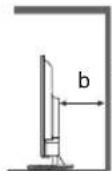
a:10cm b:10cm
BENTINaIaIaTeHa TpIbBa Da 6bIe Bb3npenTCTBaHa Ype3 NOKPnBaHe Ha BEHTINaIOHnTE OTBOpN C EInemEHn, KATO BECTHNU, NOKPNBkN 3aBeCn.


He3aBnMo dAnu n3NoN3BaTe CToIka,nnn He, BnHaN npOBepraBaTe dAnu BeHTnlaqnoHHnte OTbOpN BdoHata YacT Ha TeNeBu3opa He ca 6nOKnpaHn dAnu mMa DoCTaTbHuO IpocTpaHCTBO, 3a Da ce Ocunpyn DoCTaTbUHa BeHTnlaucn.
PnpeMeCTBaHe Ha TeJeBu3Opa
BHHMaHHe
Ipei Da npemecnte TeleBn3opa, n3KnHouTe BCNUK Ka6eni.
Heo6xOuMn ca haM-maKo DbMa dyuN, 3a da npemecTt TeneBu30pa.
Korato He ce n3no13Ba dIbIro BpeMe
BHHMaHHe
TeIeBn3OpbT Bce Oue ige KOHCympa MaNko eHepnna DOpu N B IN3KNIOHeh pexmM,DOkato ue nceJIbT Ha 3axpaHBaunKa6eB BCE Oue e CBbp3aH KbMeJekTpUnecknKOHTAKT.
V3BaJaTe ⅢaXpaHbAunKa6en ot eJekTpueckn KOtAKT, KOraTo TeJIeBn3OpBT He ce N3NoJ3Ba 3a npOdbJnxTeNeH nepNoD OT BpeMe.
YnblHOMOeH npedTaBnteI:
Panasonic Marketing Europe GmbH
Hagenauer Strasse 43, D-65203 Wiesbaden, Германь Ye6 caɪt: http://www.panasonic.com

5,15-5,35 GHz JeHTa Ha 6e3KuHa LAN e orpaHueHa do paOta Ha 3akpnto cAmo B CneHNTE bPkaBn.
Abctpna,BeIrrnBbIrpna,Yexna,IaHnEctOnnA,
FpaHnra,TePmaHnIcnaHnIITaHnI,ItbpnA,
IcnaHnKInbp,JIATBnI,JnxTeHuaH,NITBa,
JIokcembypr,Yhrapna,MantA,XonahnI,Hopberna,
PiHa,NoptyraHnPymbnCnoBHeN,CnoBaKnA
TypnA,PhHHaHnI,UBeuNa,UBeuCaApnXbPaTtno
ObeHHeHO KpaJICTBO,CeBepHa UpHaHnI.
Deklapaun3a n3nahe Ha pauna:
O60pyBaHeTo e B cBc0TBeTcBne C rpaHnHInTe CTOnHOCTn Ha n3NaIaHepaPdnaCnHa CE, HanoKeHN 3a HeKoHTpOIpnpaHa cpea.
ToBaObOpyDBeAte Tp86Ba Da ce MoHTnpa UynpaBnBa npu MInHmAnHo pa3cTOrHne oT 20 cm MeXdy paAnTopa N TAnOTO.
MaKcMmHa MoUHoc Ha paAnOueCToTa, npdaBaHa B YeCTOTHTe JeHTI
| Тип бeзкуна Врьзka чecтона Лени | Мakсимална EIRP |
| Бeзкуна LAN | 2400 - 2483,5 MHz 20 dBm |
| 5150 - 5250 MHz 23 dBm | |
| 5250 - 5350 MHz 23 dBm | |
| 5470 - 5725 MHz 30 dBm | |
| 5725 - 5875 MHz 13,98 dBm | |
| Bluetooth® | 2402 - 2480 MHz 20 dBm |
IdentechnicnpaHeHa6byToHn3aYnpabJeHne
DnctaHcnoHNo ynpabHeHne
10
BknHouBa TeEnBu3Opa HnI rnoCTabBpeKIM Ha roTOBHOCT.
2 MENU
O TBapra MeHIOTo Ha TeJeBn3Opa C TINNCHN TB
3 PICTURE
- N36bupa pejKMa KapTnHa.
4 LbETH6yToH
(越pBeH-3eEn-H-KbNT-CnH)
-ⅢπoN3BaT ce 3a n36op, HABnraun ynpabneHne Ha pa3nUHN FyHKUN.
5 INHopmaun
- Toka3Ba HOpmaun 3a KaHaJa I nporpaMaTa.
6 Prime Video
3a CTapTupaHe Ha npIIOxKeHneTo Amazon Prime Video.
7 OK
NotBbpxkdaBa n36opnte.
8 BACK/Ha3a
Bpbsa Bn KbM npeduHTo MeHIO nnn npJIOKeHne.
9 BkHIOUbaHe/H3KIOUbaHe Ha 3Byka
HaTnCHeTe,3a Da n3KnHouYte 3ByKa nn da ro Bb3ctaHOBInTe.
10 SOUND
- N36upa pexkma Ha 3Byka
11 Cnla Ha 3Byka +/Cnla Ha 3Byka -
- HatncheTe, 3a da perynipate cunata Ha 3Byka.
12 BytoHn c uΦprn
- PpomeHcTpaHnUte Ha KaHana N TeNeTeKCTa.
3aabaunpOBHomep.
13 [eHELP]
- POKa3Ba [eHELP] (BrpaedHn nHcTpkyuun 3a ekcnnoataua).
14 Byton 3a pa6oTa c MyntmEi
15 AUDIO
MTS/aydno e3NK.
16 INPUT
- N36npa BxOJaU N3TOHNIK.
17 STTL (Cy6TnTpN)
- POKa3Ba cy6TnTpN.
18 TEXT (TejetekeCT)
- HatncheTe, 3a da OTbOpTe nn 3aTbOpTe TeKCT/ TeNEtEkCT.
19 EXIT
Bpbua ce kblm HopMaHnE ekpan.
20 NETFLIX
3a Da CTaptnpate npnnoKeHneTo NetfliX, KOraToTeJIeBn3OpbTe BkIIOueH nIn E B pexHM HaFOTOBHOCT.
21 YouTubeTM
3a cTApTnpaHe Ha npInOxKeHneTo YouTube.
22 BytoHn 3a Kypcopa
Ppabu n36op nperynnpahe.
23 HOME
OTbapr MeHToHaHano.
24 LIST
OTBapra cnncbKa c KaHaJIu, DOKaTO rneJaTe TEJEBu3nJ.
25 TeIeBn3NoHn nporpaMa
- Poka3Ba eJekTpoHHn npoPamHe cnpaBOHnK.
26 KaHaJI Harope/HaDoJy
PpeBknHouBa KbM CneBbuaa NnnpdunHna KaHaJ.
27 Minkpooh
- Poka3Ba [PpInIOxKeHn] (CnncbK c npInIOxKeHn).
Bluetooth
CdBoBaHe Ha dNCTaHcNoHHOTo Bn ynpaBneHne
1
Bluetooth
CboBaHa Ha DaCTAHmOHHO BynypaBHeHn.
B0HO
Ppeckou
CZB0BAHe Ha DCtHaUNHOHHTO BN ynpaBHeHIE.
2

Tbpche Ha akcecoapn...
PnDg da cangote bawitre Bleucoih yctprcttba, ybepee ca, he caB pokhnn Hc daaikaiy.
-Ппетда сбвоite BaшиTe Bluetooth yctpoCTBa, ybepeTe ce, che ca B pexIM Ha cdboBaHe.
3a da cTAptnpate CDBOBAHHeTo Ha dNCTaHcNoHHoTo ynpabJIeHne C TeNEBn3Opa,HaTNCHeTe npDbJIKNTenHo 6yToHa [Cnla Ha 3Byka-] n 6yToHa [MnKpOph] 3a 3cekyHn.
3

TbpcHe Ha akcecoapn..
PnDn da cnoHnB 8aunre BluocohytcpnoHa, ypepe Ce, 4e ca n pekmH3 qDc0Bae.

Panasonic ATV RCU01 E0F.CE2.D.F.A.S

APHRC 20A-78-02-35-0C
TeJIeBn3OpbT He ce BkIIOyBa
TeNeBn3OpbT npemHaBa B pexm Ha roTOBHOCT
- AKTNBupaHa eФyHKUraTa 3a aBTOMaTNUHO 3axpaHbAHe BpeKIM Ha FOTOBHOCT.
IinctaunohtoynpaBHeHnehe pa60tnnnnnpekcbnaepnoDnHO
-ПoctabeHn JI ca 6aTepeHnte npabuHno?
TeIeBn3OpbT BkIIOueHJIe?
Bb3MOxHO e 6aTeepnTe da ca n3ToueHn. 3ameHeTe H C HOBn.
Hacoute DaTahuOnHOTo UnpaBHe Hne DnpeKTHo KbM npMeHHKa Ha CnHaHa Ha DnCTaHcNoHHOT O npabHe Hne Ha TeJeBn3Opa (B pAMKtHe Ha OKJIO 7 MePa n 30-tpaDycob bIHa npMeHHKa Ha CnHaHa).
Pa3noJoxKeTe TeJeBn3Opa DaJeu OT CbHYeBa CBETINHa INI DpyrN 13TOUHNi Ha JpKa CBETInHa, Taka Ye Da He 6NeCTT Ra npneMnka Ha CnHaHa Ha DCtTaHnOHHOTo ynpabHeHHe TaTeNEBn3Opa.
He ce noka3Ba n3o6paXeHne
- PpOBepeTe dAnI TeNeBn3OpbT e BKnHoueH.
- Побере Te Ддп 3храньшуг Кбел e BKлючeH B TeNeBu3Opa n B KOHTaKTA.
- Поберете далп сизран пашиен ржим на BXODa.
-Пюовере Дади Настpoикata В [Избор На BXOD] cBoTBeTCTBa Ha синда, КОТо ce ИЗБжда OT BьншOTO obopудва.
3aadaeneHJn ca [KoHTpact], [ApKocT] nnn [LbBt] B MeHIOTo ,KaPTNaHa MaMHMaJIHO HBO? - PpOBepeTe DaHn BCnKn Heo6XoDmN Ka6eNn Bpb3Kn Ca Ha MCTOTOn Cn.
Toka3Ba ce Heo6nuaHn H3o6paXeHne
- N3KJIIOUOte TeIeBUN3Opa C npeBkIIOUBaTeJRA 3a BKJIIOUOBAHe/U3KNIIOUBAHe Ha 3aXpaHBAHeTo I cNei TOBa r O BKLIOUOte OTHOB.
Ako npo6nembT npoDbIkaBa, HnHuaN3npaTe BCNUKn HAcToPouK.
[Φa6pnuHo HynipaHe] B [HactpoKn] > [PpeNoHTaHn 3a yctpoicTBo] > [OTHOcHo]
YactnHaTeIeBn3opaCTaBaT ropeun
- Cactn Ha TeJeBn3opa Morat da ce HaropeuqT. TeN NOBUNHnHa TEmnpaTypaTa He cb3daBat npo6JIemn no OTHouHeHn ApOn3BOUInTeHOCCTTa nn KaueCTBOTO.
Korato ce haTnche c npbct, naHeIbT ha dncnner ce DnKJneKO nN3daBA Wym
- IMa MaJIko pa3cTOrHne OKOIO NaHeJa, 3a da ce npdeIoTBpaTN NobpeHa Ha naHena. Toba He e HEn3npaBHOCT.
OTHOCHO 3aNTBaHeTo
Mon, cBbpxKeTce C MeCTHnC n DnIpb H. Panasonic 3a cbdeNCTBne.
Ako HanpaBnte 3aNTBaHe OT MRCTo, KbDeTo TO3n TeLEBn3Op He e HauHcH, He MOxKem Da OTTOBapRMe 3a CbDbPkaHHe, KOEt O3NCKBa BN3yAnHO NOTBbPxJdeHne 3a Bpb3Ka, RaJIeHne N T.H. Ha To3n TeLEBn3Op.
Cpeunokauin
TeNeBn3op
Moden No
43-IMHOBMOIDEN TX-43JXW704/TX-43JXW714
TX-43JX700E/TX-43JX710E
50-IMHOBMOde TX-50JXW704/TX-50JXW714
TX-50JX700E/TX-50JX710E
55-IMHOBMOden TX-55JXW704/TX-55JXW714
TX-55JX700E/TX-55JX710E
65-IMHOBMOdeT TX-65JXW704/TX-65JXW714
TX-65JX700E/TX-65JX710E
75-IMHOBMOden TX-75JXW704/TX-75JXW714
TX-75JX700E/TX-75JX710E
Pa3Mepn (U×B×D)
43-IMHOBMOIDEN
963 mm x 614 mm x 243 mm (cbc cToiKa)
963 mm x 567 mm x 78 mm (camoto nebu3op)
50-IMHOBMOden
1116 mm x 700 mm x 256 mm (cbc cToiKa)
1116 mm x 654 mm x 82 mm (camo TeJebu3op)
55-IMUOBMOden
1231 mm x 766 mm x 256 mm (cbc cToika)
1231 mm x 718 mm x 82 mm (camo TeJebu3op)
65-IMHOBMOJEN
1446 mm x 893 mm x 291 mm (cbc cToiKa)
1446 mm x 844 mm x 79 mm (camo TeJebu3op)
75-IMHOBMOJEN
1670 mm x 1016 mm x 313 mm (cbc cToiKa)
1670 mm x 969 mm x 92 mm (camo TeJebu3op)
Terno
43-IMHOBMOJEN
8,55 kg HeTo (cbc cToiKa)
8,35 kg HeTo (cMo TeNeBn3Op)
50-IMHOBMOdeI
12.19 kg HeTo (cbc cToiKa)
11,97 kg HeTo (cAmo TeIeBn3Op)
55-IMHOBMOJEN
14,40 kg HeTo (cbc cToiKa)
14,18 kg HeTo (cAmo TeJIeBn3Op)
65-IMHOBOMoEIN
18,20 kg HeTo (cBc cToiKa)
17,96 kg HeTo (cAmO TeJIeBn3Op)
75-HHOBoMoDen
26,56 kg HeTo (cbc cToiKa)
26,23 kg HeTo (cAmo TeJIeBn3Op)
N3TOUHmHa 3axpaHbAe
AC 220-240 V, 50/60 Hz
PanaheI
LED LCD nahan
3ByK
H3XoI Ha BnCOKOrOBOpntI
43-инчOB MoДeЛ
16W(8W+8W)
50-IMHOBMOeIN6-MHOBMOeIN
65-UNHOBMOJEN76-NHQUOBMOJEN
20 W (10 W + 10 W)
Cnywaikn
1×CTepeo MmHnJkaK 3,5mm
Kjemn 3a Bpb3ka
HDMI 1/2/3/4 BxOa
TIN A KOHEKTOPN
HDMI 1:
Tncbdpbxahne,kaHan 3a Bpbuane Ha aydno, Db16ok uBRT
HDMI 2/3/4:
TnCbDpbKanHe,DbJI6OKZBRT
Cnot 3a KapTu
1×cnoT3a06uHnTEpeic(OTROBAPHaCIPlus)
ETHERNET
RJ45, IEEE802.3 10BASE-T/100BASE-TX
USB
DC 5 V, MaKc. 500 mA [BnCOKocOpocTeH USB (USB 2.0)]
I3xoD DIGITAL AUDIO
PCM/Dolby Digital, Fibre optic
CnCTeMn 3a npneMaHe/UmHe Ha NeHTa
CateJNT
DVB-S/S2
Iuaan3oHa MeKdHHa YecToTa Ha npneMHka-950 MHz do 2150 MHz
DVB-C
Lünpobu Kaebnn ycny (MPEG2, MPEG4-AVC(H.264) u MPEG HEVC(H.265)
DVB-T/T2
LHpOBn Haemn ycnyn (MPEG2, MPEG4-AVC(H.264) n MPEG HEVC(H.265)
PAL B, G, D, K
SECAM B, G, D, K
BxoД 3a caTeJIInTHa YHHNIA
KHeHcN TnF 75Ω
Bxod 3a aHTeHa
VHF/UHF
EcknnoataaonHHyCIOBna
Temnepatypa
0^ - 35^
BnaXhoCT
20% - 80% RH (6e3 KOHdH3aun)
BrpadeHa 6e3xuHa LAN
CbOTBETBnE CbC cTAndapt N YecToTeH dnaa3OH*
IEEE802.11a/n
5,15 GHz - 5,25 GHz, 5,25 GHz - 5,35 GHz
5,47 GHz - 5,725 GHz, 5,725 GHz - 5,825 GHz
IEEE802.11b/g/n
2,4 GHz - 2,483 GHz
3aunra
WFA WPA/WPA2 personal, WPS2.0, WAPI
*:YecToTata N KaHaJIbT Ce pa3NnUaBaT B 3aBnCmOCT OT DpbXkAbTa.
БeЗMuHa TexHONor Bluetooth®*
CbOTBeTCTBnE CbC CTaHApT N YecToTeH dnaana3OH
Bluetooth® 5.1:2,4 GHz JeHtA
*: He BCnKn yCTpoNCTBa, cBMEcTMMc Bluetooth®, ce NOДьрkaT OT TO3n TEJIeBn3Op. Morat Ja ce n3NON3BaT eHOBpemHo Do 5 yCTpoNCTBa.
3a6eJekka
ДизайнБТи СспсфкадитЕ ПОджКAT Ha npOMЯHa 6e3npdIaN3BcTeN.Пoka3aHITe TERNo n pa3Mepn ca npn6JIn3nteJIHn.
3a INHΦopMaζησ OTHOCHO COΦTyερa C OTBopeH KOI BnKTe (Haayano > HaCTpoKN > PpeiNoHTAHN 3a yCTPOIcTB0 > OTHOCHO > PpaBHa INHΦopMaζη)
3a noBee uHOpMaun 3a npOyKta, MoJra, nocTeTe EPREL: https://eprel.ec.europa.eu. EPREL pernctpaUHOHHrT Homep e DocTbneH Ha https://eprel.panasonic.eu/product.
N3XbPnIe Ha cTapo o6OpyDbaHe n 6aTepeH
Cama 3a Ebponeckn Cb03 n DbpxkABNTe c peunKlnpaun cnCTemn

Te3n CmB0JIbBpX npOdykTnTe, ONAKOBKnTe W/IIIN pNpDpyKaBaUnte Tn DOkymEnTn O3NaHaBaT, Ye nIIOJI3BaHnTe eNEkTpnuEckn ENEkTPOHHn PpOdykTN 6aTeepn H TePraBb Da ce cmecBaT c O6NIKHOBeHnTe bITOBn OTnAbu.
3a npabnHa 6pb6oTka, onoN30TBOpBaHe n peuKlnpaHe Ha cTapn ynoTpe6BaHb
6aTePm, MoJ, 3aHeceTe rB cbOTBeTHHTe MeCTa 3a cb6paHe cNopeD BaWeTo HauHOHaHHO
3aKOHOdaTeJICTBO.
Upe3 npaBnHTo mN 3XbPnIe He Ie NOMorHeTe 3a CnecTBAhe Ha cEHn pecypcn n 3a
IpeoTbpaTBAHe Ha eBENTaJIHN HeRaTbHN eEeKTN Bbpx YOBeIKOTO 3dpBe IN OKOIHaTa cpea.
3a noBue HnOpMaun OTHOCHO CbupaHTo N peuKlnpaHTo, MoJ, CBpXeTe Ce C MeCTO6uHa.
3a HnpaBnHIO n3xBpIHe Ha Te3n OTNaIbI MoIa Tda Ce npIraT caHKIIN B CbOTBeTCTBNE C HAIOHAnHTo 3aKOHoTaTeNCTBO.
3a6eJexKa 3a cMbOJa Ha 6aTePnTa (DJIHnCMBOJI):
To3n CmBOJ MOKeJa Ce n3NoTBA B KOM6nHaUcNc XmMueckn CmBOJ. B To3n CnyaJ ToI OTROBAPa Ha n3nCKBaHETO, ONpeJeNeHO O T NapeKTHBaTa 3a CbOTBeTHNxMnKaJ.
KlneHTck 3aHc
HomebHa MoeJa H cepHHT Homep Ha To3n IpOdyKT Morat Da 6bDaT HamepeHn Ha 3aDnMy NaHeJ. TpaBb Da OTBeNExKIne To3n CepEn H Omep Ha MxCToTo, DaDeHO No-Dony, N Da 3aNa3nte Ta3n DOKyMeHTaUra, KaKTO n BaWata Pa3nNcka 3a NOKynKa KATO NOCTOReHn 3aNtC 3a NOKynKaTa, 3a DA Bn NOMorHe npu INeTHnΦnIupaHTo B CnyaHn KaPax6a nn 3ary6a, KaKTO n 3a CeJIneHr Ha rapaHOnHHTo ObcnykBaHe.
Homep Ha MoTeI CepHeN HoomeP
Panasonic®
Covered by patents at parentList.accessadvancemc
APHRC 30AE.TG.02.SS.05
APHRC30AE753.02.35.9C
TX-75JX700E/TX-75JX710E
Covered by patents at patentlist.accessadvancemc
Aviso importante
APHRC 30AR-TR-25500C
TX-75JX700E/TX-75JX710E
Dimensiones (anch. × alt. × prof.)
Modelo de 43ulgadas
963 mm × 614 mm × 243 mm (con pedestal)
963mm× 567mm× 78mm (solo el tevisor)
WFA WPA/WPA2 Personal, WPS2.0, WAPI
TV Remote Control dispensibility in Magazinui Google Play
Covered by patents at patentist.accessadvancemc
Aviso importante
TX-75JX700E/TX-75JX710E
WFA WPA/WPA2 personal, WPS2.0, WAPI
Covered by patents at parentlist.accessadvancemc
Σημαντικήσημείωση
Enieiwn ytn metadoo DVB /doeuvw
Autn n tnaepaon exi oxdeltae etoi wote va
Tnpoia Tpota (otwocxuav tov AuyouoTo tou
2020)Twv ypiakw vntiyew utnpeoiwy DVB-T/T2
(MPEG2,MPEG4-AVC(H.264),HEVC(H.265)),Twv
ypiakw kaawikw uwnpeoiwy DVB-C (MPEG2,
MPEG4-AVC(H.264),HEVC(H.265))kaiTwv
ypiakw dopupopikw utnpeoiwy DVB-S (MPEG2,
MPEG4-AVC(H.264),HEVC(H.265)).
ΣμβouαeuteiteTovTOTikóσacavitipooωtnyiaTn δiaθεομóntaTvwutnpεoiwvDVB-T/T2nDVB-S Σηνπeioxσac.
Uouaeute TOV TAPOXO KAOWIaIKW UTTNpeoiy VyaTdiAeoiotnta Tuv UTNPeoiDVB-C uAutn Tyn Tnaepaon.
Autn n TnAeopaan Evexetai va uny aeitoupyei owaTa
me anma Toun ev TAnpoi ta Tpota DVB-T / T2,
DVB-C n DVB-S.
Avaloya TnXwpa,TNV TEPiOxN TOV TNAOTITIKo OtaO,TOV NApoxo UTnpoeiwv KAI TO bOpupopiko TepiAlov,EvExeai va mnv Eivai diaTeoiue Os csi duvatotntec.
ev aeitoupyoovsowotc0eocoiovadecC1e auyntynlaoaon.2uoualeuteite tonpoxo unnpoeiwvocxetikacEtndithetaiunovadCl.
Autn n thaeopaan evexetai va uny aeitoupyei owa ta movaba CI Tou dev ivai ykekpiiev n aTov Tapoxo utnpoeiwv.
Evexetai va 1oxuov TPo0eTeC xpewoei, avaoya Tov npoxo utnpoeiWv.
HouβaTótna με ελλovtikéς utnpoeicδεν εivai εyyunμevn
Oi eapayoeC Internet npexovtaTouc avtioxouc TAPOXU C UTNpeaiw Touc kai evexetai va aalaoiv,va diakotouv n va katapynbouv ava Taa otiym.
H Panasonic 6ev avalaabévi kaiia eunv n Kai 6ev Tapexei kaiia evyunon yia tn diaeoiotnta n TOnuveixion twv utnpoeiwv.
H Panasonic Eyyuatai Tn LEIToupyia kai TnV aTIOOON TEPIPEPEIAKwv OaKEUw vAALW V KATAaKEUAOTW. AITOTIOUmaTe KaThe EUoUVn n Znua TPOKUeI aTIO Tn LEITOUpyia n/Kai Tnv aTIOOOn loyw XpnoTc TEOIW TEPIPEEIAKwv OaKEUw aAALou KATAaKEUAOTn.
Xeipiooic TnnpoopoiwV TLaTuW
Kata tn xphon tnc aeitoupyiaosuvdeanstto Internet autn ts ntneopaans, apou oumuowvnoet me touc opous npoxns utnpneiwvtny toaittk anoppntou TNS Panasonic (ta otioa oto eegs avaepovtai oTo napov wOpoai kai pouttoeoeic K.ATI.). evexetai va oulambdaoyovtai IAnpopopie GteAatWv oxetikak Etn xpnoantuHs novabac kai vXpnoiotiooivtai oupwva me Touc opous kai Tpouttoeoeic K.ATI.
OI pooomegakei npopopie tsou tleatn evexetai vyaeypapovtai e autyn tv nlaepaon ato tov nlaeotniok opayiov o n tv apoxo ts epapoyns. Piv aTnv etiokeun, netaopa n tv atoppwn autnc ts nlaepaons, diaypaye oes tic nlaopopies Tou elav yeyepaueves e autyn tv nlaepaon, oumuwva e Tny akolouon diaikkaia.
Pnnpnn Kauoouuon ououkouuou uocu Blueoth, 000000000000000000000000000000000000000000000000

Panasonic ATV RCU01
I2Kx8

APHRC 30AE7B0235CC
EupaviZeiTn oOvN [ΣUεuεη].
Av eepavioe i n evoEi [Ev ivai duvatn ouceu] n tntote to nnktpo OK yia va etavaaabeTe tn diadikaaia ouceu
5
Avañtnon yia αεούρ...

Pioa kveo oocuun wouckueo 0n Bieoth, paoiBtu. tioo bokovai e Aotropuyoo

Panasonic ATV RCU01 2009/05/1

APHRC30AE73.02.35.9C
Eupavicietai n othovn [Σuvδεοη].
6
Hpuθμiαoλnpωηκε KaH δiaokδaon!
SuyyohThioia! Hooosoeofoeoeoroeonoo
Pnpoeepovv yxpnpopnroT ov BonO Google oon st Oevo TcAeepooipu xupk uokpoo, npnpopnoTnv Tpv npoywn Android Tv Remote Control tv eva sboanr o Tc Google Play Store vaoouksev Android koi 0r Apple App store vaoocueios IOS.
Pnont [OK] vfo 6000 am 0r 06y0.
TEAOE
Otav n ouceun Tou nExepiotnpiou npayatointhetai, eupavietai n oovn ookpwn tspuoians. EIIeTE [TEAOs] kai patne OK.
7
TnAExeiPiotnpia KAI aEouap

Piooθnqαεσouap

Panasonic ATV RCU01
H ouzueug ton Tou nAexepiotnpiou ooknnpwKe.
Katapynon ouzueunc tou tnaexepiotnpiou
- PiatnoTe TnapaTeTaeva To TAnKtpo [Katw BExoc] KAI To TAnKtpo [Evtaon -] taToxPoVa yia 3DeuTePoaEeTTa Yia va KaatpyNoTe Tn OucEuaN Tou TnaExeiptnpiou aC.
DC 5 V, Méy. 500 mA [Hi-Speed USB (USB 2.0)]
Esoos DIGITAL AUDIO
PCM/Dolby Digital,OTTKIiv
Euotnata Ayns / Ovopa Zwns
Δορυφόρος
DVB-S/S2
Eupos ouxvoTHTWV IF Ektn-950 MHz
2150 MHz
DVB-C
i kaawdiakc uTnpoeiEc (MPEG2,
MPEG4-AVC(H.264) KαI MPEG HEVC(H.265))
DVB-T/T2
etriieies utnpoeioes (MPEG2,
MPEG4-AVC(H.264) KαI MPEG HEVC(H.265))
PAL B, G, D, K
SECAM B, G, D, K
EiooosdopupopikoTiaTou
Onukn tuou F 75Ω
Eiooos Kepaias
VHF/UHF
EuvKeCg Aetoupyias
OεμoKpaia
0^ - 35^
Yypaa
WFA WPA/WPA2 TpOoWTIko, WPS2.0, WAPI
*: H ouxyoTnTa kai To kavalai diaqepouv avaloya e Tn xwpa.
HE Advance Covered by patents at patentlist.accessadvancemc
Viktigt meddelande
Meddelande for DVB/datasandning
17 STTL (undertexter)
- Visar textremsor.
18 TEXT (Teletext)
Panasonic ATV RCU01 1thappening...

APHRC 30AE7B02500C
Parsonic ATV RCU01 Antelet

APHRC30AE7520350C
- Skärmen [Ansluter] visas.
6
TX-75JX700E/TX-75JX710E
Matt (B× H× D)
43-tumsmodell
PAL B, G, D, K
SECAM B, G, D
Parabolinngang
F-type, hunn 75 Ω
Antenneinngang
VHF/UHF
Driftsforhold
Temperatur
0-35°C
Fuktighet
20-80% relativ luftfuktigkeit (ikke-kondenserende)
Innebygd tradlost LAN
WFA WPA/WPA2-personlig, WPS2.0, WAPI
Covered by patents at patentist.accessadvancemc.com
Tärkeä huomautus
APHRC 30 AB/7826/35.0G
Panasonic ATV RCU01 Yudetexil

APHRC30AE75302350C
Content Type, Audio Return Channel, Deep Colour
HDMI 2/3/4:
Content Type, Deep Colour
Korttipaikka
PAL B, G, D, K
SECAM B, G, D
Satellitiantennitulo
WFA WPA / WPA2-Personal, WPS2.0, WAPI
Covered by patents at patentist.accessadvancemc
Vigtig meddeelse
Meddeelse on DVB/dataudsendelse
Dette TV er designet til at opfylde standarderne (pr. august 2020) for DVB-T / T2 (MPEG2, MPEG4-AVC(H.264), HEVC(H.265)) digitale antennebaserede tjenester, DVB-C (MPEG2, MPEG4-AVC(H.264), HEVC(H.265)) digitale kabeltjenester og DVB-S (MPEG2, MPEG4-AVC(H.264), HEVC(H.265)) digitale satellittjenester.
Identification of betjeningsegmenter
Fjernbetjening
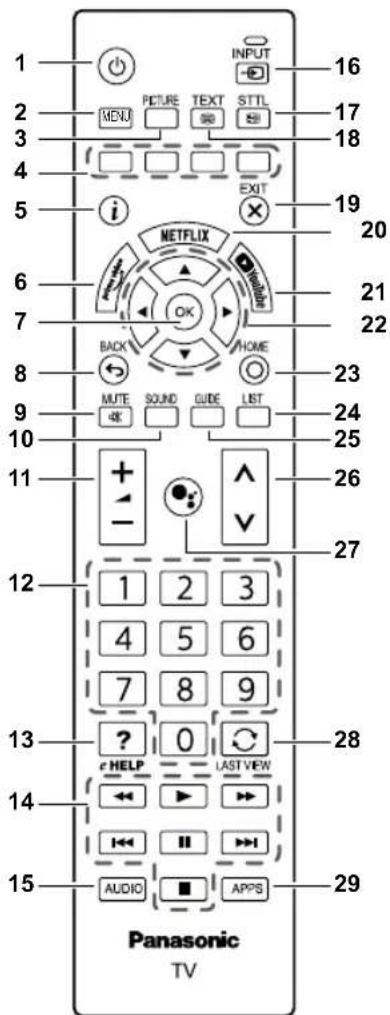
10
- Taender for TV'et aller saetter det pa standby.
2 MENU
Parring at fienbeijseningen.
Par
Spring over
APHRC 30.AE.7B.C2.35.OC
- Skaarmbilledet [Parring] vises.
Hvis [Kunne seks parre] vises, skal du trykke pa OKigen for at parre igen.
5
APHRC 30AE.7B.02.35.0C
- Skaermbilledet [Tilslutter] vises.
6
43" model 16 W (8 W + 8 W)
50" model 55" model 65" model 75" model 20 W (10 W + 10 W)
Hovedtelefoner 3,5 mm stereo-ministik × 1
Tilslutningsterminaler
HDMI 1/2/3/4-indgange
Type A-stik
HDMI 1: Indholdstype, Audio Return Channel, Deep Colour
HDMI 2/3/4: Indholdstype, Deep Colour
Kortstik Faelles interface-stik (i overensstemmelse med CI Plus) × 1
ETHERNET RJ45, IEEE802.3 10BASE-T / 100BASE-TX
USB DC 5V, maks. 500mA [Hi-Speed USB (USB 2.0)]
DIGITAL AUDIO-udgang PCM/Dolby Digital, fiberoptik
PALB,G,D,K SECAMB,G,D,K
Parabolantenneindgang:
Hun F-type 75 Ω
Antenneindgang
VHF/UHF
Driftsforhold
Temperatur 0^ - 35^
Fugtighed
WFA WPA/WPA2 personal, WPS2.0, WAPI
Covered by patents at patentList.accessadvancemc
Dôležité upozornenie
APHRC 30AC:782635.0G
Zobrazí sa obrazovka [Pairing] (Párovanie).
- Ak sa zobrazi sprava [Couldn't pair] (Párovanie sa nepodarilo), znova stlačte tlacidlo OK.
5
Hladá sa prislušenstvo...
Pred pirovanin zariadoni BlueTooth sa uusitie 2e so y rezime pirovania.

Panasonic ATV RCU01 Products...

APHRC 30.AE.73.02.05:0C
Zobrazi sa obrazovka [Connecting] (Pripája sa).
6
Nastavenie je hotové. Ve'za bavy!
DOKONG
Gratulijenl
Pocatioane nastavene je holote.
Ax ochoete yuvzlat vhyco funklu Google Aaisant v priade dialkevoi ovadaca bez mikrofnu, poultie apikluac Android TV Remote Control dostupru v ochode Google Play pre zariadenia so systemen Android a v ochode Apple App Store pre zariadenia so systemen iOS.
Sirevoduc opusite staeniin tisdica [OK].
Ked je dialkove ovladanie sparované, zobrazi sa obrazovka dokoncenia nastavenia. Vyberte polozku [DOKONCI] a stlačte tlacidlo OK.
7
50-palcovy model 55-palcovy model
65-palcovy model 75-palcovy model
20 W (10 W + 10 W)
Sluchadla
1 x stereofonny minikonektor velkosti 3,5 mm
Pripojovacie konektory
Vstup HDMI 1/2/3/4
Konektory TYPU A
HDMI 1:
Content Type, Audio Return Channel, Deep Colour
HDMI 2/3/4:
Content Type, Deep Colour
Zásuvka na kartu
1 x zásuvka rozhrania Common Interface (v súlades CI Plus)
ETHERNET
RJ45, IEEE802.3 10BASE-T/100BASE-TX
USB
5 V Jednosmerny prud, max. 500 mA [Hi-Speed USB (USB 2.0)]
DIGITALNY ZVUKOVY vystup
PCM/Dolby Digital, Fibre optic
WFA WPA/WPA2 personal, WPS2.0, WAPI
*: Frekvencia a kaná sa v závislosti od krajiny liśia.
Bezdrotová technología Bluetooth®*
Sulad's normami a frekvencny rozsah
Bluetooth® 5.1:2,4 GHz pásmo
*: Nie vsetky zariadenia kompatbilne s Bluetooth® sa mozu pouzivat's tymto tevizorom. Sucasne je mozné pouzit' až 5 zariadení.