HK 72 - Heated blanket BEURER - Free user manual and instructions
Find the device manual for free HK 72 BEURER in PDF.



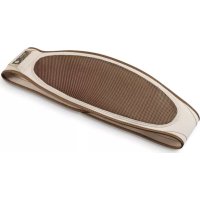
| Product type | Wireless heating blanket (heating belt) |
| Brand | Beurer |
| Model | HK 72 |
| Power supply | Rechargeable battery with mains charger (Type JOD-S-084120GSN) |
| Temperature levels | 4 levels (1: minimum heat, 2-3: medium heat, 4: maximum heat) |
| Automatic shut-off | After approx. 90 minutes of use |
| Charging time | 2 to 3 hours |
| Operating temperature | 0°C to +45°C |
| Storage temperature | -10°C to +45°C (recommended -10°C to +25°C) |
| Cleaning | Machine washable at 30°C, wool cycle, in a pillowcase. Do not tumble dry, do not iron, do not dry clean. |
| Safety | Double insulation, automatic safety shut-off in case of overheating, fold protection |
| Spare parts available | Battery (ref. 108.303), charger (ref. 546.007), belt extension (ref. 162.685) |
| Warranty | See provided warranty card |
| Usage | Domestic/private, do not use in hospital environment |
| Target audience | Adults and children from 8 years under supervision. Do not use by children aged 0-3 years. |
| Package contents | 1 heating cushion, 1 battery, 1 charger, 1 instruction manual |
Frequently Asked Questions - HK 72 BEURER
User questions about HK 72 BEURER
0 question about this device. Answer the ones you know or ask your own.
Ask a new question about this device
Download the instructions for your Heated blanket in PDF format for free! Find your manual HK 72 - BEURER and take your electronic device back in hand. On this page are published all the documents necessary for the use of your device. HK 72 by BEURER.
USER MANUAL HK 72 BEURER
natural_image
Beaker with mesh back panel and digital display unit (no text or symbols on device)
EN Wireless heated belt Instructions for use......11
natural_image
Technical line drawing of a mechanical device with two views: top shows a circular component, bottom shows a curved internal structure with arrows indicating motion (no text or symbols)
ACHTUNG
Thank you for choosing a product from our range. Our name stands for high-quality, thoroughly tested products for applications in the areas of heat, weight, blood pressure, body temperature, pulse, gentle therapy, massage, beauty, air and baby.
With kind regards
Your Beurer team
Contents
- Included in delivery....12
1.1 Device description 12 - Important instructions
Retain for future use....13 - Intended use....14
- Initial use 14
-
Operating the heating pad.....15
-
Cleaning and maintenance....16
- Storage 17
- Accessories and replacement parts......17
- What if there are problems? ....18
- Disposal....18
- Technical specifications .....18
- Guarantee / Service....18
Signs and symbols
The following symbols are used on the device, in these instructions for use, on the packaging and on the type plate for the device:
 | Read the instructions! | Washat | a maximum tem-perature of 30 °C, Very gentle wash |
 | Do not insert pins! Do not bleach | ||
| Do not dry in a tumble dryer | |||
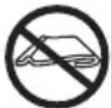 | Do not use folded or rucked! | Do not iron | |
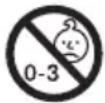 | Not to be used by very young children (0 - 3 years). | Do not dry-clean | |
 PAP PAP | Dispose of packaging in an environmentally friendly manner | Manufacturer | |
  | This product satisfies the requirements of the applicable European and national directives.The device has double protective insulation and therefore complies with protection class 2. | EAC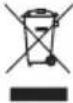 | The products demonstra-bly meet the requirements of the technical Regula-tions of the EAEU.Please dispose of the device in accordance with EC Directive – WEEE (Waste Electrical and Electronic Equipment). |
 | WARNING: Warning of risks of injury or health hazards | ||
 | CAUTION: Safety information about possible damage to appliance/accessories. | ||
 | NOTE: Important information. | ||
1. Included in delivery
Check that the exterior of the cardboard delivery packaging is intact and make sure that all contents are present. Before use, ensure that there is no visible damage to the device or accessories and that all packaging material has been removed. If you have any doubts, do not use the device and contact your retailer or the specified Customer Service address.
1 x Heating pad
1 x Battery
1 x Charger
1 x Instructions for use
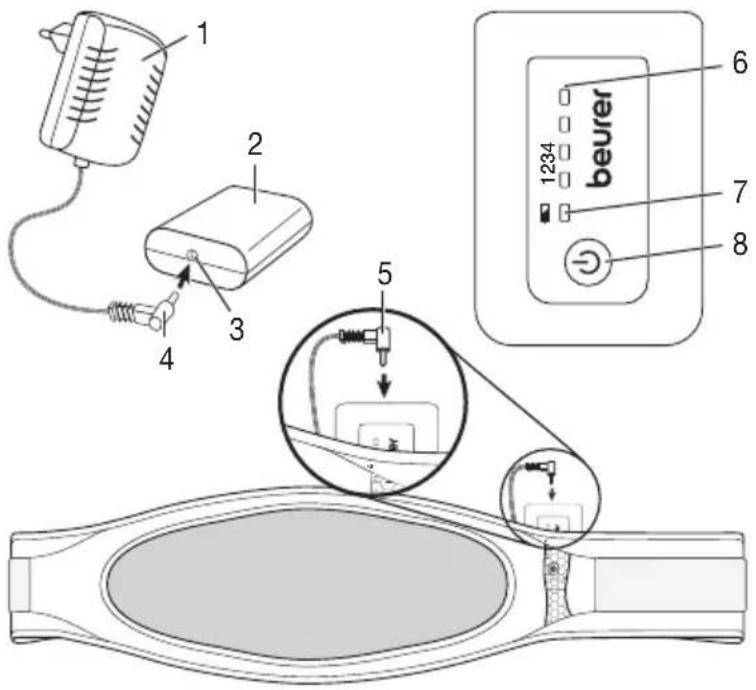
1.1 Device description
- Charger
- Battery pack
- Connection socket for the battery pack
- Connector plug for the charger
- Connector plug for the connection cable
- LED display for the temperature settings (blue)
- LED display for the state of charge (green)
- Button for controlling ON/OFF and temperature settings
2. Importantinstructions Retain for future use

WARNING
- Non-observance of the following notes may result in personal injury or material damage (electric shock, skin burns, fire). The following safety and hazard information is not only intended to protect your health and the health of others, it should also protect the product. For this reason, pay attention to these safety notes and include these instructions when handing over the product to others.
- This heating pad must not be used by people who are not sensitive to heat or by vulnerable people who may not be able to react to overheating (e.g. diabetics, persons with skin changes related to illness or persons with scarred skin in the area where the pad is to be applied, after taking any pain-relieving medication or alcohol).
- This heating pad may not be used by very young children (0 – 3 years old) as they are unable to respond to overheating.
- The heat pad can be used by children older than 3 and younger than 8 years of age provided they are supervised. For this, the control must always be set to the minimum temperature.
- This heating pad may be used by children over the age of 8 and by people with reduced physical, sensory or mental skills or a lack of experience or knowledge, provided that they are supervised and have been instructed on how to use the heating pad safely, and are fully aware of the consequent risks of use.
• Children must not play with the heating pad. - Cleaning and user maintenance must not be performed by children unless supervised.
- This heating pad is not designed for use in hospitals.
- The device is only intended for domestic/private use, not for commercial use.
- Do not insert needles.
- Do not use when folded or bunched up.
- Do not use if wet.
- This heating pad may only be used in conjunction with the battery pack specified on the label.
-
To charge the battery pack, you must use only the provided charger type JOD-S-084120BSN or JOD-S-084120GSN.
-
The electrical and magnetic fields emitted by this heating pad may interfere with the function of a pacemaker. However, they are still well below the limits: electrical field strength: max. 5000 V/m, magnetic field strength: max. 80 A/m, magnetic flux density: max. 0.1 millitesla. Please consult your doctor and the manufacturer of your pacemaker before using this heating pad.
- Do not pull, twist or make sharp bends in the cables.
- Please check this heating pad frequently for signs of wear and tear or damage. If you detect signs of improper use of the heating pad, then this must be inspected by the manufacturer before switching on again.
- Under no circumstances should you open or repair the device yourself, as faultless functionality can no longer be guaranteed thereafter. Failure to adhere to this instruction will void the guarantee.
- If the cables of the heating pad or the charger are damaged, they must be replaced by the manufacturer, its customer service department or a similarly qualified person to avoid any risk.
-
When this heating pad is switched on:
-
Do not place any objects on it (e.g. suitcase or washing basket).
-
Heat sources, such as hot water bottles, heating pads or similar, must not be placed on the pad.
-
While charging, do not cover the battery pack with covers, cushions or similar items.
- Always observe the notes on usage, cleaning and maintenance and storage.
- If you should have any questions about using our devices, please contact Customer Services.
3. Intended use

IMPORTANT
This heating pad is only designed to warm up the human body.
4. Initial use
Safety

IMPORTANT
The heating pad is fitted with a SAFETY SWITCH-OFF. A sensor prevents the heating pad from overheating by means of automatic switch-off in the event of an error. Once the SAFETY SWITCH-OFF has taken place, the blue LED display for the temperature settings (6) that is shown when switched on is no longer lit up. After cooling down to room temperature, the heating pad can be switched on again.
Charging the battery pack

IMPORTANT
The battery pack (2) must be charged prior to initial use or if the device has not been used for a long period.
- To do this, insert the charger (1) into a socket with the mains voltage corresponding to the specifications on the charger.
- Connect the connector plug of the charger (4) to the connection socket on the battery pack (3). When charging, the green LED display for the state of charge (7) flashes on the battery pack.
- The battery pack is fully charged when the green display for the state of charge is permanently lit (it takes approx. 2 – 3 hours to fully charge an empty battery pack).
- The green LED display for the state of charge of the battery pack goes out once the battery pack has been disconnected from the charger.
- The battery pack should be charged at least 1x per year to maintain its capacity.
- While charging, do not cover the battery pack with covers, cushions or similar items.
- Only charge the battery pack in a dry environment at normal room temperature.
Checking the state of charge of the battery pack
The heating pad must not be connected to the battery pack.
Press the button for controlling ON/OFF and temperature settings (8)
- If the green LED display for the state of charge (7) lights up for 3 sec.: the battery pack has more than 25% charging capacity.
- If the green LED display for the state of charge (7) flashes 3x 1 sec.: the battery pack has less than 25% charging capacity.
5. Operating the heating pad
- Insert the charged battery pack (2) into the integrated pouch in the heating pad with the rounded side facing forward. Then insert the connector plug for the connection cable (5) of the heating pad into the connection socket on the battery pack (3). The heating pad is now ready for use.
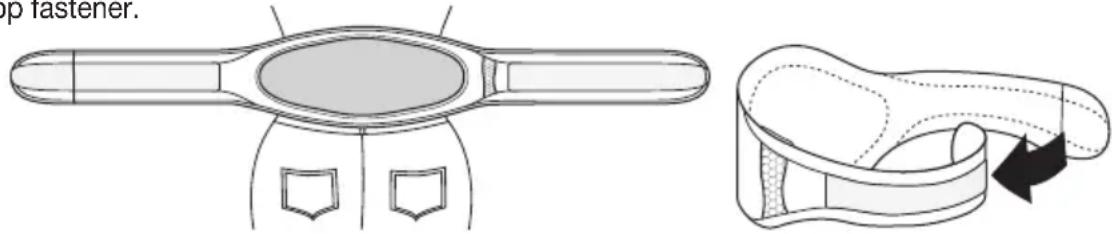
- Place the heating pad on your stomach or on your back with the light oval facing towards your body. Subsequently guide the right strap of the heating pad around the body and secure the heating pad by closing the hook-and-loop fastener.

IMPORTANT
Ensure that the heating pad will not bunch up or become folded during use.
Switching on
Switch on the heating pad by pressing the button for controlling ON/OFF and temperature settings (8).
The blue LED display for temperature setting 1 lights up. Press the button repeatedly to increase the temperature setting.
The corresponding blue LED displays for the temperature settings (6) light up. Press the button again to switch off the heating pad.
Switching sequence: 1, 2, 3, 4, OFF, 1, .....
When switched on, the blue LED display for the temperature settings is lit up.

NOTE
The fastest way to warm up the heating pad is to initially set the highest temperature setting.

NOTE
This heating pad has a fast heating function, which allows the heating pad to warm up quickly in the first 10 minutes.

WARNING
If the heating pad is being used over several hours, we recommend that you set the lowest temperature setting on the battery pack (2) to avoid overheating the heated body part, which may lead to burns to the skin.

NOTE
When the battery pack (2) has been almost completely run down, the heating pad is switched off automatically to protect the battery pack. The battery pack must then be charged.
Setting the temperature
Setting 1: minimum heat
Setting 2 – 3: medium heat
Setting 4: maximum heat
Switching off
Press the button for controlling ON/OFF and temperature settings (8) to switch off the heating pad. The switching sequence is 1 - 2 - 3 - 4 - OFF ... The blue LED display for the temperature settings (6) goes out when the heating pad is switched off.

NOTE
Please note that the battery pack must be protected against extreme cold (such as being placed under clothing) to maintain its performance.
Automatic switch-off time
This heating pad is equipped with an automatic switch-off function. This turns off the heat supply approx. 90 minutes after the initial use. The blue LED display for the temperature settings (6) is no longer lit up after this. You can switch the heating pad on again immediately by pressing the button for controlling ON/OFF and temperature settings (8). If the heating pad can no longer be switched on, then the battery pack (2) has been run down.
6. Cleaning and maintenance

IMPORTANT
- Prior to cleaning, you must always disconnect the battery pack (2) from the heating pad and remove it from the heating pad pouch, otherwise there is a risk of damage.

IMPORTANT
- The battery pack (2) must never come into contact with water or other liquids, as this may cause damage.
To clean the battery pack, use a dry, lint-free cloth. Do not use any chemical or abrasive cleaning agents.

IMPORTANT
- Please note that the heating pad may not be dry cleaned, wrung out, tumble dried, put through a mangle or ironed. Otherwise the heating pad may be damaged.
This heating pad is machine-washable. For this purpose, close the hook-and-loop fastener of the heating pad and place it in a pillow case. Set the washing machine to a particularly gentle wash cycle at 30^ (wool cycle). For ecological reasons, always wash the heating pad together with other textiles. Use a delicate laundry detergent and measure it out according to the manufacturer's instructions.

IMPORTANT
- Please note that frequent washing of the heating pad has a negative effect on the product.
The heating pad should therefore be washed in a washing machine a maximum of 10 times during its life. Let the heating pad dry flat on a clothes horse.

IMPORTANT
- Do not use pegs or similar items to attach the heating pad to the clothes horse, otherwise the heating pad may be damaged.
- Only reconnect the heating pad to the battery pack (2) once the heating pad and the connector plug of the connection cable (5) are completely dry, otherwise this could damage them.
7. Storage
If you do not plan to use the heating pad for a long period of time, we recommend that you store it in the original packaging.

IMPORTANT
- Please allow the heating pad to cool down before storing. Otherwise the heating pad may be damaged.
- To avoid making sharp bends in the heating pad, do not place any objects on top of it whilst storing.

IMPORTANT
The battery pack should be charged 1x per year to maintain its capacity.
8. Accessories and replacement parts
For replacement parts and additional items visit www.beurer.com or contact the corresponding service address in your country (according to the service address list).
Replacement parts and additional items are also available from retailers.
- Battery pack (item des. 108.303)
- Charger EU (item des. 546.007)
Charger UK (item des. 546.009) - Extension strap (item des. 162.685)
9. What if there are problems?
| Problem Cause Solution | ||
| The blue LED display for the temperature settings (6) does not light up when:– the battery pack is connected to the heating pad and– the button for controlling ON/OFF and temperature settings has been pressed. | The battery pack has been fully run down. | Charge the battery pack. |
| There was a SAFETY SWITCH-OFF due to an error. | Allow the heating pad to cool down to room temperature and switch on again. | |
| The blue LED display for the temperature settings (6) does not light up when:–thefully charged battery pack is connected to the heating pad and– the button for controlling ON/OFF and temperature settings has been pressed. | The heating pad or the battery pack is faulty. | Send the heating pad and the battery pack to Service. |
| The green LED display for the state of charge lights up or flashes when the battery pack is not connected to the heating pad. | Display for the state of charge of the battery pack:LED lights up for approx. 3 seconds: state of charge >25%LED flashes 3x: state of charge <25% |
10. Disposal
For environmental reasons, do not dispose of the device in the household waste at the end of its useful life. Dispose of the unit at a suitable local collection or recycling point. Dispose of the device in accordance with EC Directive – WEEE (Waste Electrical and Electronic Equipment). If you have any questions, please contact the local authorities responsible for waste disposal.
11. Technical specifications
See the type plate label on the heating pad, on the battery pack and on the charger.
Operating temperature: 0 to +45°C
Storage temperature: -10^ to +45^
Recommended storage temperature: -10^ to +25^
Subject to technical changes
12. Guarantee / Service
Further information on the warranty and warranty conditions can be found in the warranty leaflet supplied.
FRANÇAIS
Chère cliente, cher client,
2. Consignesimportantes
natural_image
Technical line drawing of a hand-operated device with internal components and a close-up view showing internal structure (no text or symbols)
ATTENZIONE
2. Önemlibilgiler
natural_image
Technical line drawing of a hand-operated device with a circular handle and internal components, shown in two views (no text or symbols)
DIKKAT
2. Важныеуказания
natural_image
Technical line drawing of a hand-operated device with a circular handle and internal components, shown in two views (no text or symbols)
ВНИМАНИЕ
2. Ważnewskazówki
natural_image
Technical line drawing of a mechanical device with a handle and internal components, showing a close-up view of the handle (no text or symbols present)
UWAGA
natural_image
Technical line drawing of a mechanical device with two views: top shows a circular component, bottom shows a curved arm with arrows indicating motion (no text or symbols)
VIGTIGT
2. Viktiginformation
natural_image
Technical line drawing of a mechanical device with two views: top shows a circular component, bottom shows a curved internal structure with arrows indicating motion (no text or symbols)
OBS!
natural_image
Technical line drawing of a hand-operated device with a circular handle and internal components, shown in two views (no text or symbols)
OBS
2. Tärkeitäohjeita
natural_image
Technical line drawing of a hand-operated device with internal components and a close-up view showing internal structure (no text or symbols)