Auto+ 500X - Shredder Acco - Free user manual and instructions
Find the device manual for free Auto+ 500X Acco in PDF.



| Product type | Document shredder |
| Brand | Acco |
| Model | Auto+ 500X |
| Auto-feed capacity | 500 sheets (80 g/m²) |
| Manual feed capacity | 10 sheets (80 g/m²) |
| Duty cycle | Continuous |
| Power supply | 230 V / 50 Hz, 1.2 A |
| Motor power | 270 W |
| Anti-jam technology | Thickness sensors with green/red indicator |
| Automatic oiling | Yes, after 15 minutes of shredding |
| PIN code lock | Yes, 4-digit code |
| CD/DVD destruction | Yes, via dedicated slot, one at a time |
| Credit card destruction | Yes, one at a time, via manual slot |
| Self-cleaning blades | Yes, reverse/forward after emptying |
| Automatic safety stop | Yes, if bin or cover open |
| Visual indicators | Jam, cover/bin open, oil level |
| Standard warranty | 2 years (24 months) |
| Blade warranty | 20 years (conditions apply) |
| Included accessories | Oil (60 ml), CD/DVD waste bin, comb removal hooks |
| Maintenance | Clean rollers and sensors with a dry cloth or cotton swab |
Frequently Asked Questions - Auto+ 500X Acco
User questions about Auto+ 500X Acco
0 question about this device. Answer the ones you know or ask your own.
Ask a new question about this device
Download the instructions for your Shredder in PDF format for free! Find your manual Auto+ 500X - Acco and take your electronic device back in hand. On this page are published all the documents necessary for the use of your device. Auto+ 500X by Acco.
USER MANUAL Auto+ 500X Acco
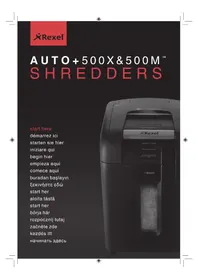
AUTO+500X&500M™ SHREDDERS
start here
démarrez ici
starten sie hier
iniziare qui
begin hier
empieza aquí
comece aqui
buradan başlayın
ξεκινήστε εδώ
start her
aloita tästä
start her
börja här
rozpocznij tutaj
začněte zde
kezdés itt
начинать здесь
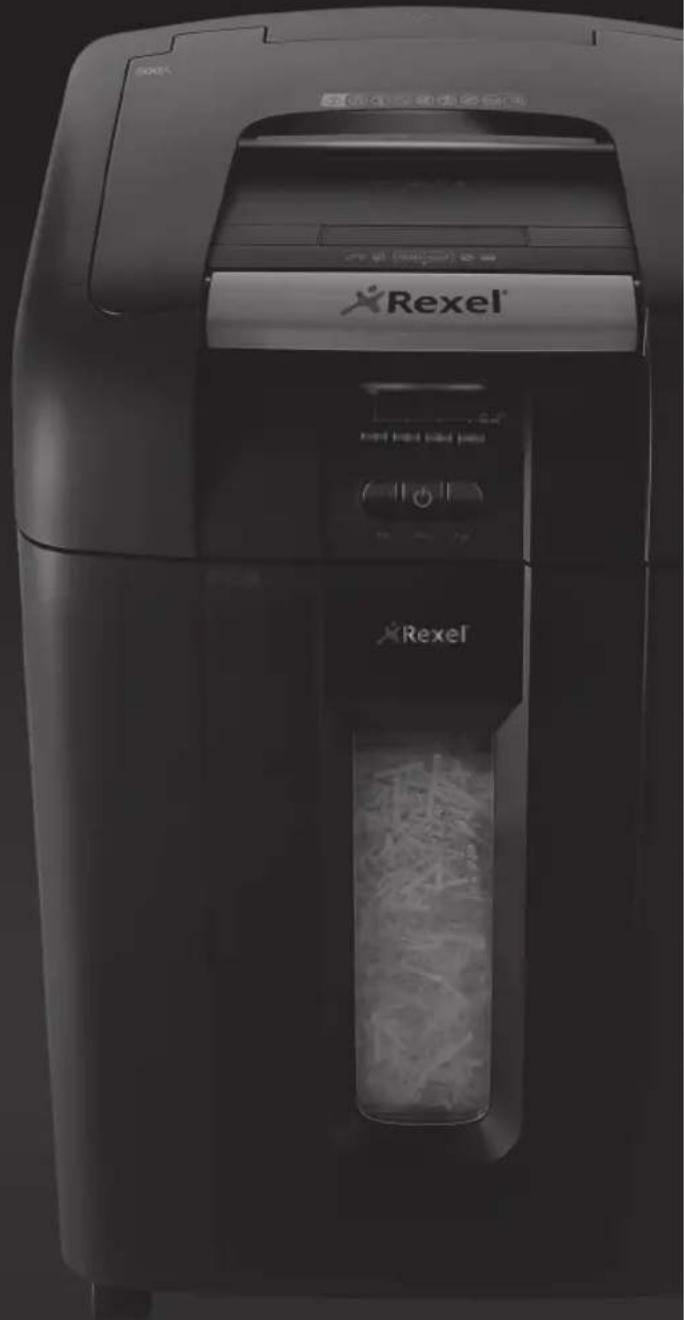
natural_image
Exterior view of a Rexel brand printer with visible control panel and battery (no text or symbols on device body)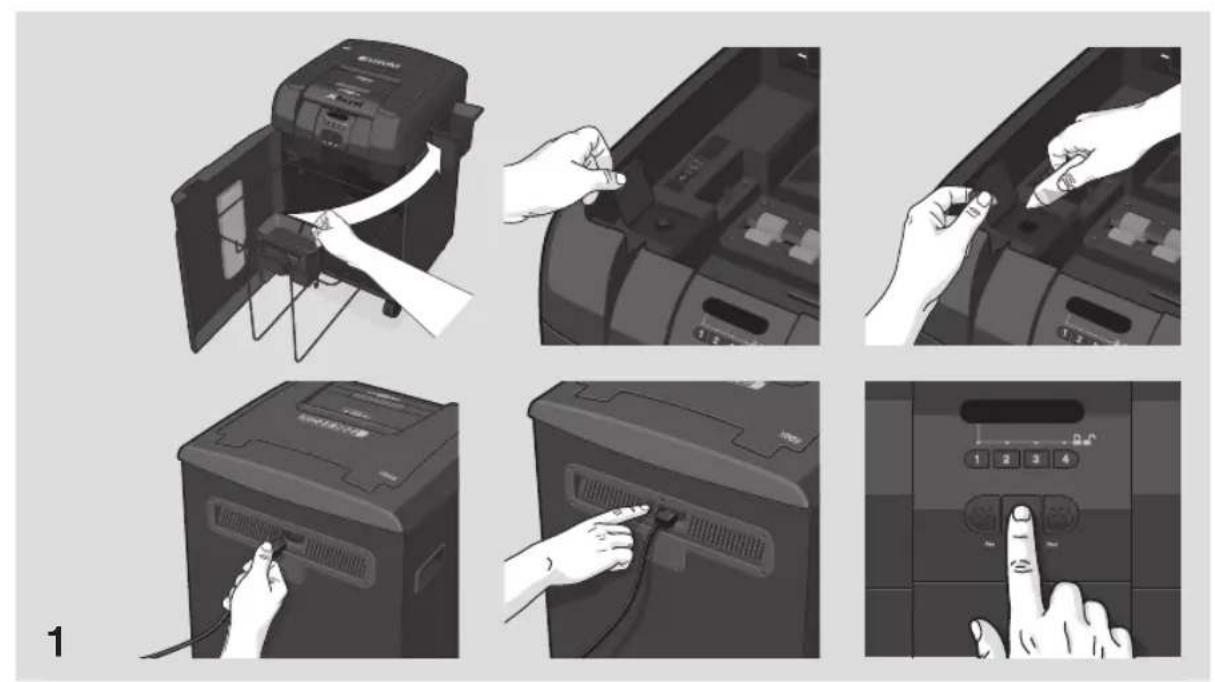
text_image
Illustration showing a printer application process with labeled steps and control buttons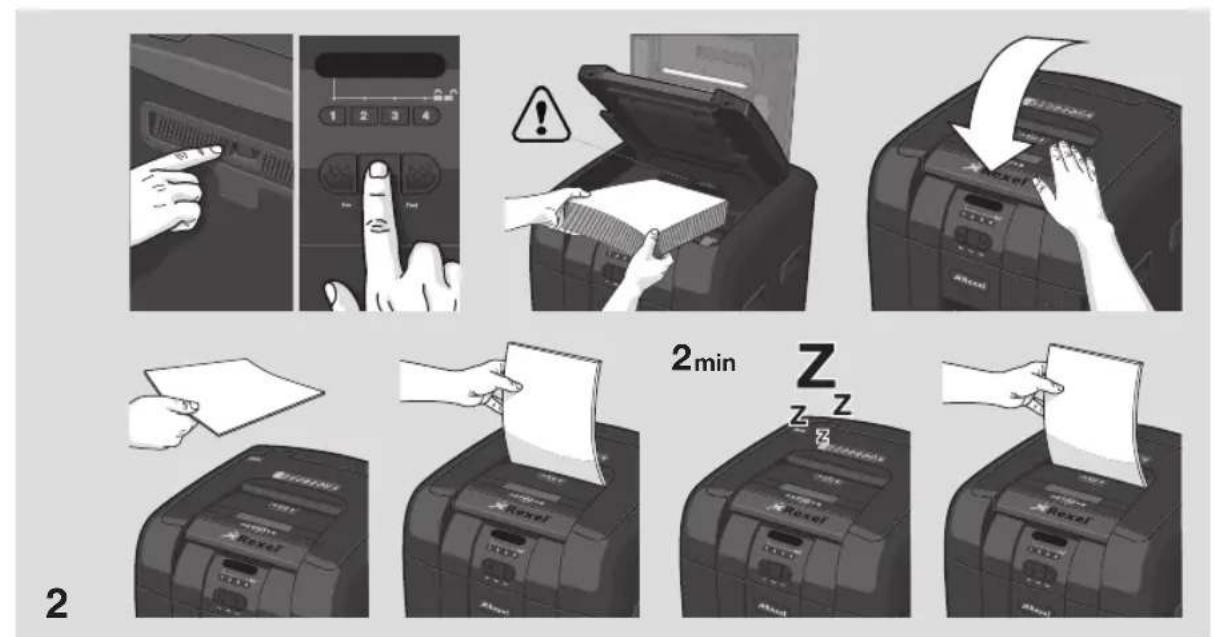
text_image
2min Z Z Z Z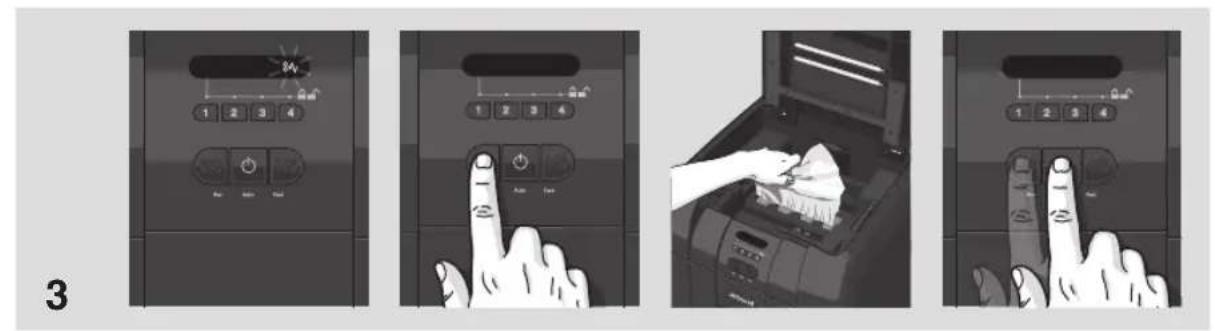
text_image
3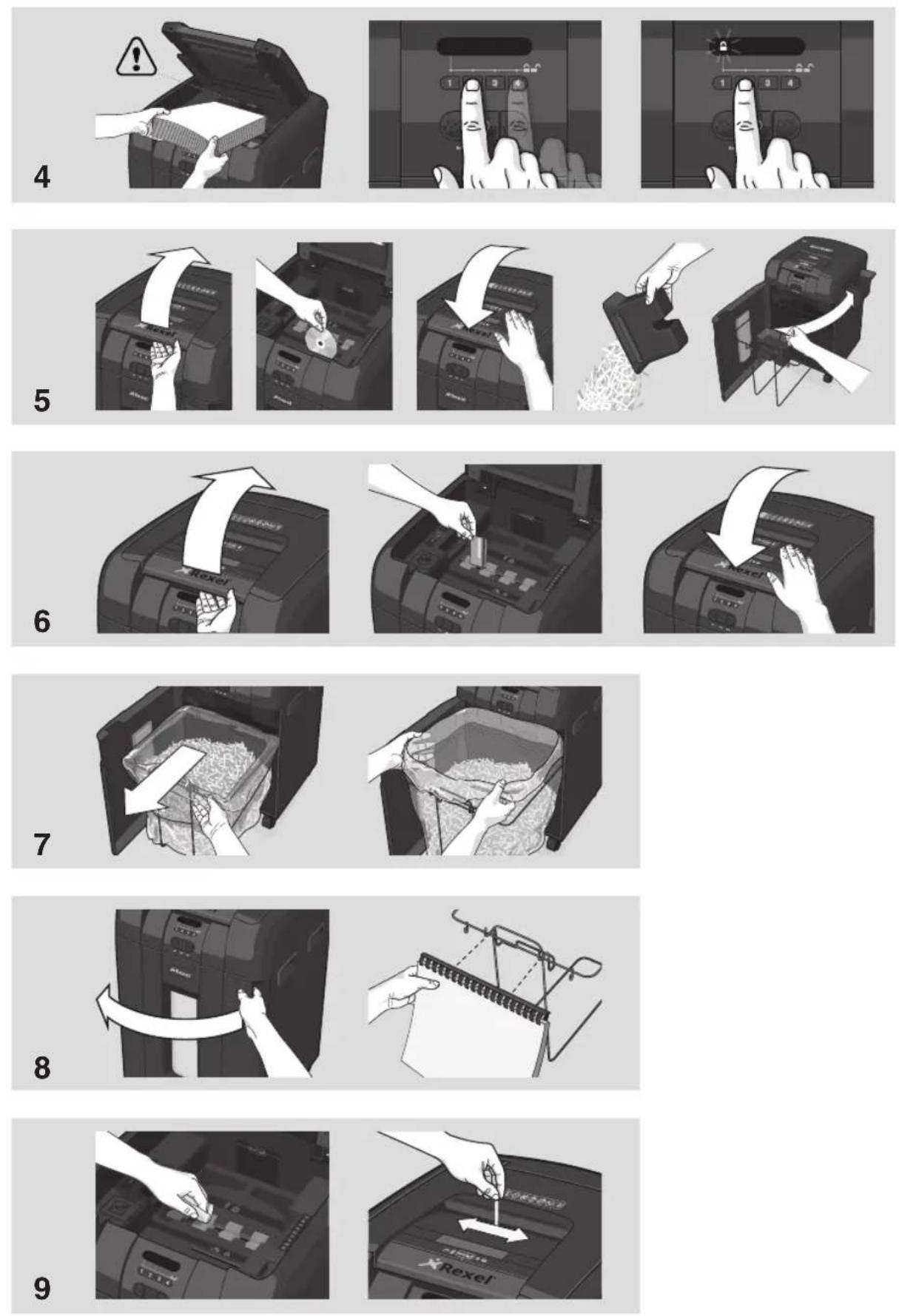
AUTO+ SHREDDERS
| FEATURE COMPARISON | LIGHT USE | EVERYDAY USE | HEAVY USE | ||||||||
| Model | 60X | 80X | 100X | 100M | 200X | 300X | 300M | 500X | 500M | 750X | 750M |
| Security level | P3 | P3 | P5 | P3 | P3 | P5 | P4 | P5 | P4 | P5 | |
| Bin Capacity (sheets) | 100 | 150 | 150 | 280 | 325 | 450 | 670 | 850 | 1100 | 1250 | 1400 |
| Users | 1 | 1-2 | 1-5 | 5-10 | 10-20 | 20+ | |||||
| HANDS FREE SHREDDING | |||||||||||
| Sheet Capacity | 60 | 80 | 100 | 100 | 200 | 250 | 250 | 500 | 500 | 750 | 750 |
| Staples and Paper Clips | √ | √ | √ | √ | √ | √ | √ | √ | √ | √ | √ |
| Intelligent Jam Clearance | √ | √ | √ | √ | √ | √ | √ | √ | √ | √ | |
| Lockable Chamber | Optional | √ | √ | √ | √ | √ | √ | ||||
| MANUAL FEED SHREDDING | |||||||||||
| Manual feed sheet capacity | 5 | 6 | 6 | 6 | 7 | 8 | 8 | 10 | 9 | 12 | 10 |
| Jam Free Technology | √ | √ | √ | √ | √ | √ | |||||
| Bin Capacity (Litres) | 15L | 20L | 26L | 26L | 32L | 40L | 40L | 80L | 80L | 115L | 115L |
| Shreds Credit Cards | √ | √ | √ | √ | √ | √ | √ | √ | √ | √ | √ |
| IntelligentTM Power Save | √ | √ | √ | √ | √ | √ | √ | √ | √ | √ | |
| Bin Full Indicator | √ | √ | √ | √ | √ | √ | √ | √ | √ | √ | |
| Illuminated Status Symbols | √ | √ | √ | √ | √ | √ | √ | √ | √ | ||
| Shreds CDs | √ | √ | √ | √ | √ | √ | √ | ||||
| Castors for Mobility | √ | √ | √ | √ | √ | √ | √ | ||||
| IntelligentTM SelfOilTM | √ | √ | √ | √ | |||||||
| Continuous operation | √ | √ | √ | √ | |||||||
natural_image
Black industrial paper feeding machine with open lid and internal pie chart (no visible text or symbols)AUTO+500X&500M™ SHREDDERS
GB instruction manual 6
F manuel d'utilisation 14
D bedienungsanleitung 22
I manuale d'istruzioni 30
NL gebruiksaanwijzing 38
E manual de instrucciones 46
P manual de instruções 54
TR kullanım kılavuzu 62
GR οδηγίες 70
DK brugsvejledning 78
FI käyttöopas 86
NO bruksanvisning 94
s bruksanvisning 102
PL instrukcja obsługi 110
cz návod k obsluze 118
H használati útmutató 126
RUS руководство по эксплуатации 134
GB
autofeed technology
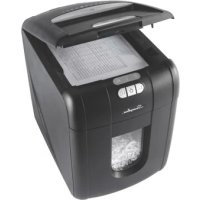
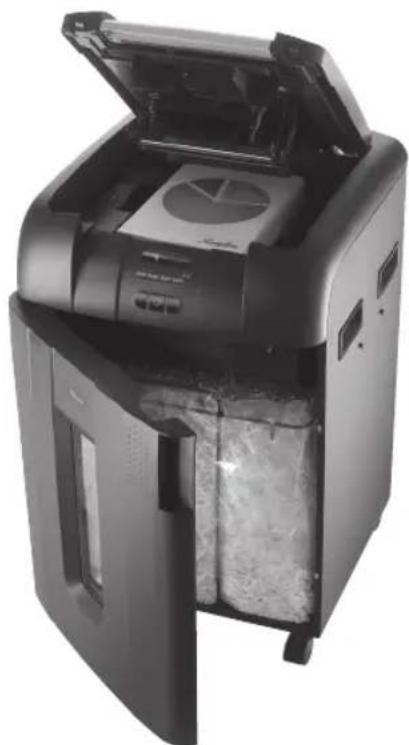
The Auto+ 500X and 500M has been designed to automatically shred up to 500 sheets from the auto-feed chamber and up to 9/10 sheets through the manual feed slot. The auto-feed mechanism has been designed to handle paper fastened with staples and paper clips and to only pull a few sheets of paper into the cutting mechanism to minimise the risk of paper jams.

To guard against injury, the following basic safety precautions must be observed in the set-up of this product.
- Ensure the machine is plugged into an easily accessible power outlet, and ensure the cable is not likely to trip up a passer by.
- Any attempt to repair this unit by unqualified personnel will invalidate the warranty. Please return to supplier.
- Unplug your shredder before moving it or when it is not in use for an extended period of time.
- Do NOT operate with a damaged power supply cord or plug, after it malfunctions, or after it has been damaged in any manner.
- Do NOT overload electrical outlets beyond capacity as this can result in fire or electrical shock.
- The socket-outlet should be near the equipment and should be easily accessible.
- Do NOT alter the attachment plug. The plug is configured for the appropriate electrical supply.
- Do NOT use near water.
- Do NOT use aerosol dusters or cleaners.
- Do NOT spray anything into the shredder.
- Do NOT load the auto-feed chamber with unopened junk mail, magazines, bound documents etc.
Although this shredder has been designed to comply with UL 60950-1 EN 60950-1 safety standards including the “probe accessibility tests”, do not operate the shredder near children or pets.
warning symbols

Safety First


This means you should be careful because long hair can become entangled in the cutting head.

This means be careful of ties and other loose clothing which could become entangled in the cutting head.

This means be careful of loose jewellery which could become entangeld in the cutting head.

This means don't reach into the feed opening of the cutting head.

This means keep children away from shredder.

This means no aerosols.

Sheet capacity of manual feed entry slot.

This means the shredder can accept small staples.

This means the shredder can accept small paperclips.

This means no oil lubrication, use Rexel oil sheets only.
control panel and indicators

Reverse

Auto

Continuous Jam Boost

Jam Free indicator – This alerts the user when too much paper is fed into the manual feed slot (see section on Jam Free Technology).

Paper Loading Door/Bin Door Open or Bin Full indicator – This means either:
- Loading door is open
- Bin is open
- Bin is full

Lock indicator – This means the paper loading door is locked (during shredding).

Oil level indicator

Paper jam indicator – This means there is a paper jam in the auto feed chamber.
If this symbol is flashing the shredder is attempting to clear a paper jam automatically. If this symbol is permanently illuminated red please follow the instructions under 'Rare Occasion of Jamming'.

Oiling in Operation indicator

Loading Door Locking Mechanism – PIN Password Buttons – Enter a four digit code to lock the loading door during shredding.
GB
Auto+ 500X/500M shredding capability
Auto+ 500X/500M CAN shred the following:

- 500 sheets
• Stapled paper, 25mm within the corner
• 26/6 and 24/6 or smaller staples - Small sized paper loaded centrally

- 500 sheets
• Paper clip paper, 25mm within the corner (500X through manual feed slot ONLY) - Capable of shredding small/medium paper clips (max. wire thickness = 0.9 mm)
-
80/100gsm paper (through manual feed slot ONLY)
• A3 folded in half max. 2 sheets
- 500 sheets
- 80 gsm paper
- A4 - 210mm x 297mm
- A5 - 148mm x 210mm
- A3 single sheet folded in half to make A4
Auto+ 500X/500M CAN shred (through the manual feed slot):

Thick paper or card.
Multiple folded sheets (e.g. A3 sheets folded in half).

Unopened mail (e.g. junk mail).

Glossy paper or a sheet covered with print on both sides.
Auto+ 500X/500M CANNOT shred the following:

Heavy duty staples. Check the staple leg length is not greater than 6mm.

Large clips. Check the length of the paperclip is not longer than 32mm.

Plastic sheets, laminated documents, plastic folders.

Bulldog clips

Bound documents

Adhesive labels.

Magazines or other documents bound by multiple staples or clips.
1. initial setup
The shredder is designed to automatically lubricate the cutting mechanism as required to ensure the product continues to work to its maximum performance and to extend the product life. Please follow the operation instruction before turning on the shredder for the first time. The 60ml bottle of oil* is sufficient to allow the shredder to start for the first time and to operate continuously for about one hours shredding before the reservoir will need refilling. When the 'Oil Refill' indicator is illuminated ( ), flip up the oil reservoir cap and refill the oil reservoir using a bottle of standard Rexel oil (1760049)*. The automatic oiling operation ( ) last approximately two seconds and you will hear the distribution pump during this time. Auto-oiling operates after 15 minutes of shredding time.
bin or loading door open safety function
As a safety precaution, if the bin or loading door is opened during shredding, the shredder will stop and the bin full indicator will illuminate ( ) .
jam free technology in manual feed slot
Sensors in the paper feed area measure the thickness of paper about to be shredded. The ability to shred or not is communicated through red and green lighting. Green means that the stack of paper is within the shredders sheet capacity and OK to shred. Red means that you have too much paper, remove some sheets in order to shred.
Given that you are unable to shred more sheets of paper than the shredder is capable of shredding, paper jams are prevented.
This prevents wasting time reversing paper and unblocking jams not to mention the mess it can create.
intelligent help
1 In the unlikely event of the shredder jamming, the Auto+ 500X and 500M will stop shredding, and the jam icon will blink in orange.
2 The shredder will illuminate the FWD (▶▶) and REV (◀◀) buttons in the sequence necessary to clear the jam.
3 If the jam cannot be intelligently cleared, the jam icon (8V) will illuminate in red. At this point open the auto feed chamber to clear any jammed material.
automatic jam clearance
Intelligent Jam Clearance: In the unlikely event of the shredder jamming, the Auto+ 500X and 500M will automatically reverse and forward the engine three times to clear a jam. During this operation the Paper Jam indicator will flash (8V).
GB
2. operation
1 After unpacking the product pull out the shredder bag frame and remove the CD shard tray, which sits on top of the bag frame. Store this tray on the product as shown and use when you shred CDs.
2 Lift up the loading door and open oil flap.
3 Remove oil cap and fill up the reservoir using the 60ml bottle of oil provided. Replace the cap.
4 Connect the shredder to mains supply.
5 Check that the on/off switch at the back of the machine is switched to the 'ON' position.
6 Press and hold down the Auto button ( ⏻ ) for 5 seconds to start the pump and prime the system. Only required when the product is used for the first time.
7 To load the shredder, simply lift the loading door handle to open the loading door and insert documents. You can open the door further to 90 degrees for easier access if required Load up to 500 sheets at a time into the feed chamber.
Do not fill above the MAX level, this could damage the shredder.
8 The shredder will start the shredding cycle automatically ONLY after closing the loading door.
If there is paper in the Autofeed chamber after first attempt, open and re-close the paper loading door a second time.
Attention: If required you can now lock the loading door by entering a 4 digit code (see Locking the Paper Loading Door section).
9 If you only have up to 9/10 sheets to shred, you can use the manual feed slot, provided the auto feed chamber is empty.
10 Insert paper to be shredded into the feed area. The shredder will detect the paper and start automatically.
11 If the shredder is left in auto mode for more than 2 minutes without being used, the shredder will automatically turn back to sleep mode in order to save power.
12 The shredder will automatically 'wake up' from sleep mode when paper is inserted into the shred mouth or you open the loading door. There is no need to press the Auto button (💡).
3. reverse function
1 Should you wish to reverse paper out whilst shredding, a reverse button (◀◀) has been fitted for your convenience.
2 Reverse the paper out then turn the machine off using the ON/OFF switch at the rear of the shredder. Remove the paper from the manual feed slot (if being used) or open the loading door, remove the remaining stack of paper, then pull the jammed paper free of the cutting mechanism.
3 To resume shredding, turn the shredder on using the ON/OFF switch at the rear of the shredder. Return the switch to the auto position (☐).
4. locking the paper loading door
For additional security the paper loading door can be locked during the shredding of confidential material.
To lock shredder:
1 Place documents in tray. Close paper loading door.
2 Press any 4 digits. REMEMBER YOUR CODE!
Shredder unlocks automatically when:
• 4 digit code is re-entered.
- Shredding is complete.
- Shredder is inactive for 30 minutes (but documents remain in tray)
5. CD/DVD shredding

A separate CD/DVD tray is provided to collect the shredded CD/DVD shards. Ensure that this is correctly mounted onto the standard shredder bag frame before shredding.
1 Lift up the paper loading door.
2 Always insert CDs/DVDs in the CD/DVD slot. Only shred one CD/DVD at a time.
3 Close the paper loading door.
4 Empty the CD/DVD bin after 8 CDs/DVDs to avoid waste spilling over into the paper waste bin.
5 Remove the CDs/DVDs tray before recommencing to shred paper and store on the side of the shredder.
6. credit card shredding

The Auto+ 500X and 500M can shred credit cards. Switch the shredder to auto mode, then;
1 Lift up the paper loading door.
2 Insert the credit card into the roller as shown. Only shred one credit card at a time.
3 Close the paper loading door.
Rexel encourages customers to recycle shredded paper.
Please note that shredded paper cannot be recycled if mixed with credit card shards. If recycling, please separate shredded paper and credit cards.
7. bin full
The shredder will not function when the bin is full and the bin full symbol ( ) is illuminated. You should empty the bin.
- Open the door and slide out the waste sack support frame.
- Carefully remove the waste sack from the frame.
GB
self-cleaning cutters
After emptying and replacing a full bin, the shredder will run in forward for 4 seconds, stop for 2 seconds and then reverse for 4 seconds to clear away any remaining paper from the cutter mechanism. This unique ‘self-cleaning’ mechanism is additional jam prevention technology from Rexel.
8. comb bind removal hooks
Note – Use only on standard comb bind strips.
1 Open bin door.
2 Place document onto the comb bind hooks.
3 Pull down on the document to remove comb strip.
9. maintenance
The rollers on the auto-feed mechanism may become dirty over time, please wipe clean with a dry cloth to maintain maximum product performance.
The auto-start infra-red sensor, located in the paper feed entry-slot, can occasionally become covered in paper-dust causing the shredder to run despite no paper being fed into the machine. Switch the shredder off at the rear of the machine and carefully clean the sensor using a cotton-swab.
service
We recommend these machines are serviced every 6 to 12 months by a Rexel service engineer – see back of this booklet for the contact details of your local service centre and for enquiries about maintenance contracts.
shredder accessories
We recommend that a paper waste sack for recycling shredded paper is used on all models.
| Accessory Part Number Box Quantity | ||
| Recycling Waste Sack | 1765030EU | 50 |
| Plastic Waste Sack | 40060 | 100 |
| Oil* Refill Bottle | 1760049 | 8 |
technical specifications
Rexel Auto+ 500X Rexel Auto+ 500M
| Sheet capacity:Manual feed slot | 10 sheets (80gsm) |
| Sheet capacity:Autofeed chamber | 500 sheets (80gsm) |
| Duty Cycle Continuous | |
| Run time from cold Continuous | |
| Volts / Hz 230V / 50Hz | |
| Amperage 1.2 Amps | |
| Motor Watts 270 Watts |
| Sheet capacity:Manual feed slot | 9 sheets (80gsm) |
| Sheet capacity:Autofeed chamber | 500 sheets (80gsm) |
| Duty Cycle Continuous | |
| Run time from cold Continuous | |
| Volts / Hz 230V / 50Hz | |
| Amperage 1.7 Amps | |
| Motor Watts 390 Watts |
guarantee
ACCO Brands Europe (ACCO) warrants its products and their parts against defects in materials and workmanship under normal use for a period of 24 months from the original date of purchase.
During this period we will repair or replace a defective product or part subject to the following warranty conditions:
The warranty applies only to defects in materials and workmanship under normal use and does not extend to damage to the Product or parts which result from:-
- alteration, repair, modification or service carried out by anyone other than an authorised ACCO service centre.
- accident, neglect, abuse or misuse owing to failure to comply with the normal operating procedures for a product of this type.
Depending on the diagnostics and the model type, we will either arrange a service call by an engineer or arrange with you return of the product to ACCO. ACCO will, at its discretion, in accordance with law, either
- repair the shredder using either new or refurbished parts, or
- replace the shredder with a new or refurbished shredder that is equivalent to the shredder being replaced.
Nothing in this Warranty shall have the effect of excluding the liability of ACCO in respect of death and personal injury caused by the negligence of ACCO. This Warranty is offered (subject to these terms and conditions) in addition to, and does not affect, your statutory rights.
If you experience a technical fault, please contact the ACCO customer helpdesk (see back cover)
Additional Guarantee
ACCO Brands Europe guarantees the cutting blades of the shredder to be free from defects in material and workmanship for 20 years from the date of purchase by the original consumer.
*Please note that the cutter blades will be progressively worn down by shredding fastened sheets (staples and paperclips) - this is not covered in the warranty. The Auto+ 500X has been design to shred up to 50 credit cards and 50 CD/DVDs in the standard 2 year warranty period. Any excessive credit card or CD/DVD shredding will invalidate the extended cutter warranty.
These conditions shall in all respects be governed and construed in accordance with English Law and subject to the exclusive jurisdiction of the English Courts.
Australian Customers
This guarantee does not apply to Australian customers.
See warranty on page 144.
F
- laaddeur is open
- afvalbakdeur is open
- afvalbak is vol

Bezig met smeren...


Kontinuerlig foroverRevers

AUS Pelikan Artline Pty Ltd, 2 Coronation Avenue, Kings Park, NSW, Australia 2148 Tel: +61 2 9674 9000 Fax: +61 2 9674 0910 custsupport@pelikanartline.com.au
B ACCO Brands Benelux B.V., Peppelkade 64, 3992AK Houten, Nederland/Les Pays-Bas Tel: 0800-73362 Fax: 02-4140784 info@accobenelux.be www.accobenelux.be
BD ACCO Brands Asia Pte Ltd, 47 Ayer Rajah Crescent, #05-08/17, Singapore 139947 Tel: +65 6776 0195 Fax: +65 6779 1041 webmaster@accobrandsasia.com
CH ACCO Brands Schweiz GmbH, Gewerbestrasse 8, CH-8212 Neuhausen a. Rheinfall Tel: +41 (0)52 674 01 74 Fax: +41 (0)52 674 01 75 info.ch@acco.com
CZ XERTEC a.s., Kloknerova 2278/24 (vchod z ulice Koštířova, budova CeWe Color - Fotolab), 148 00 Praha 4 - Chodov Tel: 225 004 411 Fax: 225 004 162 servis@xertec.cz http://www.xertec.cz
D ACCO Deutschland GmbH & Co. KG, Arnoldstrasse 5, 73614 Schorndorf, Germany Tel: +49 7181 887 120 Fax:+49 7181 887 198 info.de@acco.com
DK ACCO Brands Nordic AB, Makadamgatan 5, 254 64 Helsingborg, Sweden Tel: +46 42 38 36 00 Fax: +46 42 38 36 10 service.nordic@acco.com
E ACCO Brands Iberia SL, P Isaac Peral 19, 28820 Coslada (Madrid) Tel: 902 500 182 ext. 2 Fax: 91 309 6412 servicio.tecnico@acco.com
EST ACCO Brands Nordic AB, Makadamgatan 5, 254 64 Helsingborg, Sweden Tel: +46 42 38 36 00 Fax: +46 42 38 36 10 service.nordic@acco.com
F Acco Brands France SAS, Service après-vente, ZAC Excellence 2000, 6 rue Robert Schuman, 21800 Chevigny Saint Sauveur Tel: +33 3 80 68 60 30 Fax: +33 3 80 68 60 49 contact@vmbs.fr
GB ACCO Service Division, Hereward Rise, Halesowen, West Midlands, B62 8AN Tel: 0845 658 6600 Fax: 0870 421 5576 www.acco.co.uk/service
H OPI Customer Service Tel.: +359 2 80 99 166 Exportee@accoeu.local
ACCO Brands Italia Srl, Servizio post-vendita, Via Oberdan, 33, 28070 Tornaco (NO) Tel: 800-87-86-16 Fax: 0321-88-01-27 servizio.clienti@acco.com
IND ACCO Brands Asia Pte Ltd, 47 Ayer Rajah Crescent, #05-08/17, Singapore 139947 Tel: +65 6776 0195 Fax: +65 6779 1041 webmaster@accobrandsasia.com
IRL ACCO-Rexel Ltd, Clonshaugh Business & Technology Park, Clonshaugh, Dublin 17, Ireland Tel: 01 816 4346 Fax: 01 816 4302 admin@accoservice.eu www.accorexel.ie
IS ACCO Brands Nordic AB,
Makadamgatan 5, 254 64 Helsingborg, Sweden
Tel: +46 42 38 36 00 Fax: +46 42 38 36 10 service.nordic@acco.com
JPN GBC-Japan K.K.,
14F Harmony Tower, 1-32-2 Honcho, Nakano-ku, Tokyo 164-8721
Tel: (81)-03-5351-1801 Fax: (81)-03-5351-1831 serv@gbc-japan.co.jp www.gbc-japan.co.jp
LT ACCO Brands Nordic AB,
Makadamgatan 5, 254 64 Helsingborg, Sweden
Tel: +46 42 38 36 00 Fax: +46 42 38 36 10 service.nordic@acco.com
LUX ACCO Brands Benelux B.V.,
Peppelkade 64, 3992AK Houten, Nederland/Les Pays-Bas
Tel: 0800-21132 Fax: 02-4140784 info@accobenelux.be www.accobenelux.be
LV ACCO Brands Nordic AB,
Makadamgatan 5, 254 64 Helsingborg, Sweden
Tel: +46 42 38 36 00 Fax: +46 42 38 36 10 service.nordic@acco.com
N ACCO Brands Nordic AB,
Makadamgatan 5, 254 64 Helsingborg, Sweden
Tel: +46 42 38 36 00 Fax: +46 42 38 36 10 service.nordic@acco.com
NL ACCO Brands Benelux B.V.,
Peppelkade 64, 3992AK Houten, Nederland/Les Pays-Bas
Tel: 030-6346060 Fax: 030-6346070 info@accobenelux.nl www.accobenelux.nl
P ACCO Brands Iberia SL,
P Isaac Peral 19, 28820 Coslada (Madrid)
Tel: 902 500 182 ext. 2 Fax: 91 309 6412 servicio.tecnico@acco.com
PAK ACCO Brands Asia Pte Ltd,
47 Ayer Rajah Crescent, #05-08/17, Singapore 139947
Tel: +65 6776 0195 Fax: +65 6779 1041 webmaster@accobrandsasia.com
PL ACCO Polska Sp. z o.o,
Al. Jerozolimskie 184, 02-486 Warszawa
Tel.+48 22 570-18-29 fax +48 22 570-18-33 www.acco.pl
S ACCO Brands Nordic AB,
Makadamgatan 5, 254 64 Helsingborg, Sweden
Tel: +46 42 38 36 00 Fax: +46 42 38 36 10 service.nordic@acco.com
SK XERTEC a.s.,
Kloknerova 2278/24 (vchod z ulice Koštiřova, budova CeWe Color - Fotolab), 148 00 Praha 4 - Chodov
Tel: 225 004 411 Fax: 225 004 162 servis@xertec.cz http://www.xertec.cz
UA DataLux Distribution Company,
ZA Rexel Office Products (PTY) Ltd,
Crusher Road, Crown Ext.3, PO Box 102, Crown Mines, Johannesburg 2025, South Africa
Tel: +27 (0)11 226 3300 service@rexelsa.co.za
warranty (in Australia)
ACCO Australia warrants its products and their parts against defects in materials and workmanship under normal use for a period of 24 months from the original date of purchase (please retain proof of purchase). During this period we will repair or replace a defective product or part subject to the following warranty conditions:
The warranty applies only to defects in materials and workmanship under normal use and does not extend to damage to the Product or parts which result from:-
- Alteration, repair, modification or service carried out by anyone other than an authorised ACCO service centre.
- Accident, neglect, abuse or misuse owing to failure to comply with the normal operating procedures for a product of this type.
Nothing in this warranty shall have the effect of excluding the liability of ACCO in respect of death and personal injury caused by the negligence of ACCO. This Warranty is offered (subject to these terms and conditions) in addition to, and does not affect your rights and remedies under the Australian Consumer Law and other laws.
Our goods come with guarantees that cannot be excluded under the Australian Consumer Law. You are entitled to a replacement or refund for a major failure and for compensation for any other reasonably foreseeable loss or damage. You are also entitled to have the goods repaired or replaced if the goods fail to be of acceptable quality and the failure does not amount to a major failure.
For any questions relating to your warranty, please contact your local service agent.
Additional Guarantee
ACCO Australia guarantees the cutting blades of the shredder to be free from defects in material and workmanship for an extended warranty period from the date of purchase by the original consumer. Please refer to the table below for the cutter warranty period applicable to your shredder model.
| Shredder Models Extended Cutter | Warranty Period |
| Style, Style+, V35WS, V30WS, Alpha 3 | |
| Auto+50, Auto+60 5 | |
| Promax V65WS, Promax V60WS, Prostyle, Prostyle+, RES1223, REX1023, REM723, SC170, CC175, Auto+80 | 7 |
| V120, V125, P180CD, P185, RSS2030, RSX1630, RSS2232, RSX1632, RSM1130, Auto+100, Auto+175, Auto+200 | 10 |
| RDS2250, RDX1850, RDSM750, RDM1150, RDS2270, RDX2070, RDSM770, RDM1170, Auto+250, Auto+300, Auto+500, Auto+750, RLS32, RLX20, RLM11, RLSM9, RLWX19, RLWX30, RLWSFM9, RLWM26, RLWX39, RLWS47, RLWX25, RLWS35 | 20 |
*Please note that the cutter blades will be progressively worn down by shredding fastened sheets (staples and paperclips)- this is not covered by this warranty. Excessive credit card and CD shredding will also invalidate the extended cutter warranty. Some shredder models are NOT designed to shred CDs. Any attempt to do so will invalidate the warranty.
How to Make a Claim
To make a claim under this warranty, contact the ACCO Australia Customer Service Team with your proof of original purchase handy:
ACCO Australia
Level 2, 8 Lord St
Botany NSW 2019
Ph: 1300 366 376
E: sales.au@acco.com
F: 1300 360 944
The customer service team member will advise whether your product should be repaired, replaced or returned and advise the next step for you to take. If the product is validated as still under warranty and deemed faulty, ACCO will bear costs involved with the warranty process. To claim expenses incurred in making a claim under this warranty, contact our Customer Service Team on the details above.








natural_image
Simple line drawing of a printer or printer with no text or symbolsnatural_image
Simple line drawing of a closed box with red straps, set against a solid red background (no text or symbols)Rexel Shredding / Destructeurs / Aktenvernichter
natural_image
Illustration of a vintage typewriter with no visible text or symbols on its bodyGBC Binding / Perforelieuses / Bindegeräte