Classima 10330 - Watch BAUME & MERCIER - Free user manual and instructions
Find the device manual for free Classima 10330 BAUME & MERCIER in PDF.



User questions about Classima 10330 BAUME & MERCIER
0 question about this device. Answer the ones you know or ask your own.
Ask a new question about this device
Download the instructions for your Watch in PDF format for free! Find your manual Classima 10330 - BAUME & MERCIER and take your electronic device back in hand. On this page are published all the documents necessary for the use of your device. Classima 10330 by BAUME & MERCIER.
USER MANUAL Classima 10330 BAUME & MERCIER
The image is too blurry to recognize any text content.
15
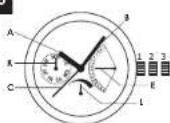
16
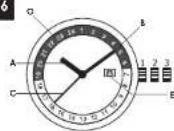
17
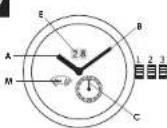
18
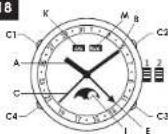
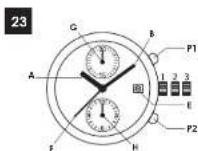
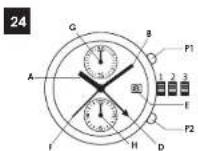

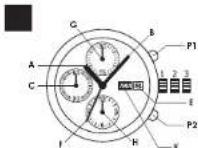
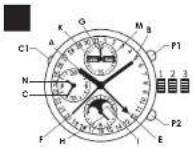
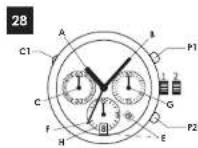
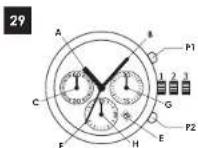
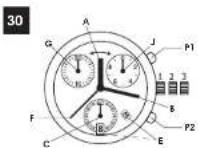
| Clifton | Clifton | Clifton BAUMATIC* | Classima | Classima | Promesso | Hampton | |||||||
| ret. n° | ret. n° | ret. n° | ret. n° | ret. n° | ret. n° | ret. n° | |||||||
| 65717 | 7 | 65831 | 22 | 65834 | 5 | 65320 | 5 | 65772 | 5 | 65752 | 1 | 65564 | 1 |
| 65718 | 10 | 65833 | 5 | 65840 | 5 | 65492 | 4 | 65773 | 5 | 65753 | 1 | 65640 | 4 |
| 65719 | 5 | 65836 | 26 | 65493 | 4 | 65774 | 6 | 65754 | 1 | 65646 | 30 | ||
| 65720 | 4 | 65837 | 24 | 65494 | 9 | 65775 | 13 | 65756 | 3 | 65647 | 3 | ||
| 65730 | 9 | 65941 | 5 | 65533 | 25 | 65779 | 5 | 65757 | 3 | 65648 | 17 | ||
| 65731 | 24 | 65843 | 25 | 65524 | 5 | 65780 | 3 | 65759 | 1 | 65649 | 11 | ||
| 65743 | 15 | 65846 | 4 | 65554 | 5 | 65781 | 6 | 65760 | 1 | 65650 | 5 | ||
| 65745 | 7 | 65847 | 14 | 65558 | 3 | 65782 | 5 | 65762 | 1 | 65651 | 5 | ||
| 65747 | 5 | 65848 | 5 | 65560 | 23 | 65786 | 4 | 65763 | 3 | 65652 | 4 | ||
| 65749 | 5 | 65849 | 5 | 65591 | 23 | 65787 | 4 | 65764 | 3 | 65665 | 5 | ||
| 67761 | 4 | 65855 | 10 | 65593 | 5 | 65790 | 6 | 65765 | 3 | 65693 | 4 | ||
| 65770 | 5 | 65857 | 5 | 65615 | 5 | 65795 | 5 | 65766 | 1 | 65694 | 4 | ||
| 65774 | 11 | 65620 | 1 | 65796 | 5 | 65763 | 1 | 65695 | 4 | ||||
| 65793 | 27 | 65627 | 5 | 65800 | 5 | 65788 | 1 | 65696 | 4 | ||||
| 65794 | 27 | 65636 | 5 | 658101 | 9 | 65789 | 1 | 65697 | 7 | ||||
| 65799 | 19 | 65646 | 1 | 65802 | 3 | 65791 | 1 | 65696 | 21 | ||||
| 65813 | 14 | 65675 | 24 | 65803 | 5 | 65792 | 1 | 65699 | 20 | ||||
| 65819 | 5 | 65679 | 5 | 65804 | 5 | 65811 | 2 | 65700 | 6 | ||||
| 65820 | 5 | 65681 | 10 | 65808 | 4 | 65812 | 2 | 65721 | 4 | ||||
| 65821 | 22 | 65684 | 11 | 65809 | 4 | 65816 | 8 | 65722 | 1 | ||||
| 65822 | 24 | 65685 | 14 | 65814 | 5 | 65725 | 4 | ||||||
| 65823 | 5 | 65686 | 12 | 65815 | 25 | 65732 | 4 | ||||||
| 65825 | 5 | 65700 | 17 | 65816 | 8 | 65750 | 4 | ||||||
| 65826 | 26 | 65707 | 5 | 65817 | 4 | 65751 | 5 | ||||||
| 65827 | 5 | 65708 | 14 | 65832 | 5 | ||||||||
| 65828 | 17 | 65714 | 5 | 65835 | 4 | ||||||||
| 65829 | 8 | 65715 | 5 | 65838 | 4 | ||||||||
| 65830 | 5 | 65735 | 4 | ||||||||||
To find the diagram corresponding to your watch, please locate its technical reference (5 digits engraved on the case back) in the list above and note the corresponding diagram number.
| Linea | Capoland | ||
| ref. n° | ref. n° | ||
| 65690 | 5 | 65687 | 28 |
| 65691 | 5 | 65688 | 22 |
| 65692 | 5 | 65689 | 22 |
| 65701 | 30 | 65716 | 29 |
| 65702 | 30 | 65726 | 28 |
| 65703 | 30 | 65733 | 16 |
| 65704 | 5 | 65734 | 16 |
| 65709 | 5 | 65797 | 28 |
| 65710 | 5 | 65798 | 28 |
| 65711 | 5 | 65856 | 21 |
| 65712 | 1 | ||
| 65713 | 1 | ||
| 65723 | 5 | ||
| 65724 | 5 | ||
| 65727 | 5 | ||
| 65728 | 5 | ||
| 65736 | 1 | ||
| 65739 | 5 | ||
| 65740 | 5 | ||
| 65744 | 3 | ||
To find the diagram corresponding to your watch, please locate its technical reference (5 digits engraved on the case back) in the list above and note the corresponding diagram number.
INSTRUCTION MANUAL
ENGLISH 1
FRANÇAIS 25
DEUTSCH 49
ITALIANO 73
ESPAÑOL 97
PORTUGUÊS 121
ΕΛΛΗΝΙΚΑ 145
РУССКИЙ 169
日本語 193
中文 215
CONTENT
I. PRINCIPAL WATCH FUNCTIONS AND COMPLICATIONS 3
II. MECHANICAL WATCHES 5 A. GENERAL INFORMATION 5 B. USER GUIDE 5
III. QUARTZ WATCHES 13 A. GENERAL INFORMATION 13 B. USER GUIDE 14
IV. RECOMMENDATIONS AND CARE 17
V. INTERNATIONAL WARRANTY 20
VI. CONTACT 23
Dear Client.
Maison Blouse & Mercier thanks you for having chosen a watch from care collection. You have acquired a timespiece, which combines aesthetic design with technical performance. This watch of timeless beauty will forever be a witness of this touching, precious moment that you have wished to celebrate.
Bumse e Mercier tree canes which cook an exceptionally long-hand walking bridge and an expertise, tested within the most perfect tradition of the greatest Swiss Matrione d'Hortogenic. Since 1930, from generation to generation, the family dream continues to be fulfilled and Bumse e Mercier matches continue to embody the ideal of perfection singlet after by the company's founders. The House's motile is one of no comparative. "Accept only perfection, only manufacture was done of the highest quality." We kindly suggest that you carefully send this manual. You will find all the information needed to fully enjoy your match: precise adjustment instructions for your model, maintenance recommendations and the conditions of the Bumse e Mercier International Warranty. You may also consult our website for further information, in the Customer Service section. http://house.bumse-et-mercier.co.uk/autocustonservice.html.
Our international reputation has been built on values of authenticity, emotion and proximity. They are dear to see as for the pleasure we wish for you while wearing this watch for many years to come.
I. PRINCIPAL WATCH FUNCTIONS AND COMPLICATIONS
POWER RESERVE
A hand indicates how much of the watch's power supply remains (for both self-winding and hand-wound watches).
DUAL TIME
A watch equipped with a dual time complication is able to indicate a "2-1 time zone". This second time can be read on a central head or a hand located in a dual graduated from 1 to 24.
In practice, the main hour head is typically set to the local time of where one is during one's travels, and the time of the second time zone can specify the time where one lives, for example.
CHRONOGRAPH
A chronograph is a watch which can measure a period of elapsed time. A chronograph model generally also contains a central seconds hand for counting seconds, a counter for totaling minutes and another for totaling hours.
FLYBACK
The flyback function means exactly what it says, to "fly backward"; it allows the wearer to move from one chronograph reading to another in a single button push instead of three.
TACHYMETER
Scale used to measure average speed in km/h based on the time needed up traverse 1000 m.
For example, to measure your average speed while driving, start the chronograph at a roadside mile marker, then stop it exactly 1 km farther on [next mile marker]. The seconds hand uses the tachymeter scale to indicate your average speed in km/h for the kilometer you just traveled.
TELEMETER
Scale used to measure the distance separating an observer from a picocomron which is first visible and then audible. Its graduation is based on the speed of sound (343 m/s).
For example, to determine a storm's distance from the weather, start the chronograph at the first appearance of lightning; then stop it when the thunder can be heard.
Look at the dial of your watch, the seconds hand uses the "telemetric scale" to indicate the distance separating you from the place where the lightning occurred.
MOON PHASE
Watches with a moon phase complication display the cycles of the moon on their dial (first quarter, full moon...). Moon phases are generally displayed using a moving disk which makes one rotation every lunar month (29 and one half day).
ANNUAL CALENDAR
Annual calendar is a movement function which handles the difference between 30 and 31 day months automatically, without a manual date adjustment. Only one adjustment per year is needed, at the end of February.
COMPLETE CALENDAR
The full calendar is the term used to describe a watch that indicates:
The date tenamal date adjustment for each month of less than 31 days;
The day of the week
al he month of the year
PERPETUAL CALENDAR
A perpetual calendar is a homological complication that takes account of 349 years and ensures automatic date correction whatever the number of days in a month (28, 29, 30 or 31).
Kindly note that it requires one correction per century, since century years are not leap years. This means that a current, perpetual calendar model will need no adjustment until 2110.
This complication is generally combined with "Complete calendar" and "Moon-phase complications".
WORLDTIMER
Worldrimer watches, also called "world time" or "universal time", indicate, in addition to local time, the time of the 24 times zones around the world via a 24-hour disc to index to the 24 zones indicated on the dial. This makes it possible to identify the 24 zones in which cities are found.
At any time, you can find out the time in 24 major cities (representing each time zone) while viewing the time of the city where you live or are traveling.
RETROGRADE DISPLAY
A display is considered retrograde when one of the hands (the retrograde hand) moves backward after having reached its final mark.
II. MECHANICAL WATCHES
A. GENERAL INFORMATION
WATCH PRECISION
A mechanical movement, whether manual or automatic self-winding, is a complex assembly of gears, gear trains and other components often nor much bigger than a single strand of hair. A ward's precision is determined by the spiral balance wheel, the heart of the watch, which regulates the rate of time through its oscillators. Oscillation frequency varies depending on the model and can be anywhere between 3 and 4 Hz, it is therefore important to hear in mind that, despite the great care taken in assembling your watch and its movement, it is nevertheless nor as precise as a quartz watch, with an oscillation of 32,000 Hz. Further, rare variations may still occur, caused by a variety of factors, including impact, the aging of the oils, significant temperature fluctuations, magnetic fields and wearer activity.
In general and depending on the model, your watch time may vary by 1 to 2 minutes per week.
B. USER GUIDE
This guide explains all the functions available for different Baume & Mercier watch models.
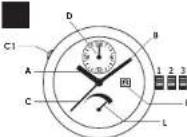
To adjust your watch, please identify its icon ☐ and refer to the diagram located on the inside cover of this guide, then follow the directions corresponding to your model.
Note on screw-down crowns: Your Barne & Mecler watch may come with a screw-down crown. If so, you must first unlock the screw-down crown by turning it counter-clockwise before adjusting the date or the time or winding the watch.
Once you have finished adjusting your watch, press lightly on the crown while turning gently clockwise, tightening it down again until you feel some resistance. If the crown is not correctly screwed-down, your watch may no longer be completely water-resistant.
WINDING
Hand-wound mechanical watch
Warning: Do not run beyond its pre-determined blocking point, otherwise you may damage the movement.
Crown in Position 1: turn crown clockwise. The watch is fully wound when the crown can no longer be turned.
The power reserve of a mechanical watch varies, depending on the model, between approximately 40 and 50 hours. We recommend you wind it once a day if it has a power reserve less than 48 hours.
Self-winding mechanical watch
A watch equipped with an automatic winding mechanism automatically winds itself throughout the day as you move your wrist.
Because of this, the watchband must be correctly fitted to the weaver's wrist. If the watchband is too loose, the watch may not wind itself correctly. For optimal winding, wear your watch daily. If you have not worn your watch for more than 40 hours, you must wind it naturally by turning the crown in Position 1, clockwise, between 20 and 30 turns.
After wearing your watch for several hours, depending on your activity level, the watch will be perfectly wound.
Once completely wound, your watch has a power reserve of:
Approx. 40 hours 3 5 7 9 10 11 12 14 15 16 17 18 19 22 29
Approx. 48 hours 21 23 24 25 26 27 28
Approx. 65 hours
Approx. 120 hours BAUMATIC
POWER RESERVE 10 31 14 15
For models with a power reserve indicator, the band (L) indicates, on a scale which may vary per model, the amount of time remaining until the watch must be wound again. When the watch is nicely wound, the indicator sits at its maximum position.
SETTING THE TIME WITHOUT A CALENDAR FUNCTION 3 S 10
-
Pull the crown in Position 2.
-
Turn it either clockwise or counter clockwise until the watch hands (A, B) are positioned at the desired time.
-
Reset the crown Position 1.
SETTING THE TIME WITH A CALENDAR FUNCTION 6 7 9 11 12 14 20 21 22 23 24 26 28 29
-
Pull the crown to the maximum position (Position 2 or 3 depending on the model). If your watch comes with a seconds hand (C) it will stop moving.
-
Turn the crown either clockwise or counter-clockwise, depending on the model, until the hands are positioned at the desired time.
Note: When the hands pass the numeral 12, if the date changes, it means it is midnight and if the date does not change it means it is noon.
- When the start of the set time is announced (reference clock, radio, etc.), reset the crown to Position 1.
RAPID DATE CHANGE
Warning: In order to prevent damage to the movement, it is extremely important that you do not use the rapid date change function between 8 p.m. and 2 a.m.; this is when the movement pinions are working to automatically change the date.
Date change using the crown 5 7 9 11 12 14 20 21 22 23 24 25 26 29
-
Pull the crown in Position 2.
-
Turn the crown either clockwise or counterclockwise, depending on the model, until the desired date (E) appears.
-
Reser the crown Position 1.
For months with less than 31 days, the date must be changed manually at the end of the month.
Rapid date change with corrector 28
If your watch comes equipped with a corrector (C1) for setting the date, press the corrector button (C1) several times in succession, so as to advance the date (E) to the desired date. To do this, use the small tool provided in the watch packaging.
For months with less than 31 days, the date must be changed manually at the end of the month.
RAPID DAY CHANGE 20
Warning: In order to prevent damage to the movement, it is extremely important that you do not use the rapid day change function between 8 pm and 2 am; this is when the movement pinions are working to automatically change the day.
-
Pull the crown to Position 2.
-
Turn the crown clockwise until the desired day (K) appears.
-
Reset the crown Position 1.
DUAL TIME
Adjustment by crown 924
-
Pull the crown in Posiri
-
Turn the crown clockwise to set the second time zone hand (D) at the desired time.
Warning: For adjustment by corrective, do not adjust immediately after re-setting the time on your watch in a counter-clockwise direction. This may damage the movement. In this specific situation, wait approximately 30 minutes before setting the second time zone.
Adjustment by corrector 10
If your watch has a corrector, press the corrector button (C1) several times to move the second time zone hand (D) forward and position it to the time of the desired zone. To do this, use the small tool provided in the watch packaging.
RETROGRADE DATE 19
To set your watch, please perform these steps in the following order:
Setting the day of the week
-
Pull the crown to Position 3
-
Turn the crown in either direction until the day hand (K) indicates the day immediately preceding the desired day.
-
Position the hands (A, B) at 2 a.m.
Setting the date
-
Push the crown to Position 2.
-
Turn the crown so as to move the date (E) chronologically forward to one day before the desired date.
Setting the time
-
Pull the crown to Position 3,
-
Turn the crown clockwise to advance the hands (A, B)
-
Continue turning the crown until the desired day (K), date (E) and time (A, B) are displayed.
-
Reset the crown Position 1
For months with less than 31 days, the date must be changed manually at the end of the month.
WORLDTIMER 10
To adjust your watch, please ensure it is fully wound and then respect the following steps in this specific order:
Setting the 24 time-zone disc, local time and date
-
Full the crown to Position 3, the seconds hand (C) will step moving.
-
Turn the crown either in one direction or the other so as to rotate the hands (A, B), and the 24 time zone disc (O). Index the time indicated on this disc to the local reference city telephone if it is 2 p.m. in London, so the 2 p.m. in London
-
Position the minutes hand (B) on the desired minute.
-
When the start of the set time is announced (reference clock, radio, etc.), reset the crown Position 1: the seconds head starts again.
-
Pull the crown to Position 2.
-
Turn the crown in order to advance or reverse the hour hand (At) by jumping an hour until the required date is indicated (E). Note: When the hour hand (A) passes 12, if the date charges, it is midnight, and if the date does not charge, it is noon.
-
Position the hour hand (A) to the current time in the city where you are (local time).
-
Reset the crown in again Position 1.
Changing the date
For months with fewer than 31 days, it is necessary to change the date manually at the end of the month.
-
Pull the crown to Position 2.
-
Turn the crown in either one direction or the other to advance or reverse the hour hand (A) by jumping an hour until the required date is indicated (E).
Note: When the hour hand (A) passes 12, if the date charges, it is midnight, and if the date does not change, it is noon.
-
Position the hour hand (A) to the local time.
-
Reset the crown Position 1.
Setting the time depending on where one is (local time)
If traveling to a different time zone, the hour hand must be set.
-
Pull the crown to Position 2.
-
Turn the crown to advance or reverse the hour band (A) by jumping an hour and position to the desired time.
-
Reser the crown Position 1.
ANNUAL CALENDAR 17
Warning: To prevent damage to the movement, it is extremely important that you do not adjust your rapid date setting between 8 p.m. and 2 a.m.; this is when the movement persons are working to automatically change the date.
To adjust your watch, please ensure it is fully wound and then respect the following steps in this specific order:
Setting the time
-
Pull the crown to Position 3, which will stop the seconds hand C_i .
-
Turn the crown clockwise to advance the hands [A, B] until they are positioned at the desired time.
Note: When the hands pass the numeral 12, if the date charges, it means it is midnight, and if the date does not change, it means it is noon.
- When the start of the set time is announced (reference clock, radio, etc.), reset the crown to Position 1.
Rapid date and month correction
-
Pull the crown in Position 2.
-
Turn it to advance the date (1) and month (M); chronologically, until the desired month is displayed, then the desired date.
-
Rover the crown Position 1.
Note: The annual calendar on your watch is able to keep track of 30 day months; the month of February is treated as a 30 day month. At the end of February, you must adjust the date setting manually using the rapid date change function.
COMPLETE CALENDAR WITH MOON PHASE
Warning: To avoid the risk of jamming the corrector buttons or damaging the movement, it is essential you not make any adjustment (day, date, month and moon phase) between 3 p.m. and 1 a.m.
To manipulate the corrector barrows, use the small tool provided in the watch packaging.
To adjust your watch, please ensure it is fully wound and then respect the following steps in this specific order:
Initial pre-setting stage
-
Pull the crown to Position 2, the seconds band (C) will stop moving.
-
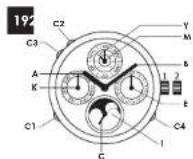
Turn the crown to advance the hands (A, B) clockwise until the date (F) and day (K) change (when the watch indicates midnight).
-
Continue to turn the crown to set the hands to 3 a.m.
Setting the moon
-
Press the corrector button (C4), until the full moon appears in the center of the moon phase aperture (I).
-
Then press the corrector button (C4) as many times as there are days passed since the last full moon (consult a calendar).
To know the dates of the full moon and set your watch, please visit our website www.baume-et-mercier.com and consult the page corresponding to your model.
Date change
- Press the corrector button (C3), until the date hand [E] is positioned on the 1.
Setting the month
- Press the corrector button (C2) to advance the month (M); until the desired month.
Setting the date
- Press the corrector button (C3) to advance the date (E) to the desired date.
Setting the day of the week
- Press the corrector button (C1), to advance the day (K) to the desired day.
Setting the time
-
Turn the crown to advance the hands (A, B) clockwise and position them at the desired time.
-
When the start of the set time is announced (reference clock, radio, etc.), reset the crown to Position 1.
For months with fewer than 31 days, it is necessary to change the date manually at the end of the month.
PERPETUAL CALENDAR 19
Warning: In order to avoid jamming the corrector buttons or damaging the movement, it is extremely important that you do not make any adjustments (day, date, month and moon phase) between 8 p.m. and 1 a.m.
To manipulate the corrector buttons, use the small tool provided in the watch packaging. To adjust your watch, please ensure it is fully wound and then respect the following steps in this specific order.
Initial pre-setting stage
- Pull the crown to Position 2, the seconds hand (C) will stop moving.
- Turn the crown to advance the hands (A, B) clockwise until the date (E) and day (K) change (when the watch indicates midnight).
- Continue to turn the crown to set the hands to 3 a.m.
Setting the moon
- Press the corrector button (C4), until the full moon appears in the center of the moon phase aperture (I).
- Then press the corrector button (C4) as many times as there are days passed since the last full moon (consult a calendar).
To know the dates of the full moon and set your watch, please visit our website www.baume-et-mercier.com and consult the page corresponding to your model.
Date change
- Press the corrector button (C3) until the date hand (E1 is positioned on the 1.
Setting the month and the year in the leap-year cycle
- Press the corrector (mutter) (C2) until the desired month (M) and position of the year (Y) in the leap-year cycle are indicated.
Note: the position 4 corresponds to the leap years that occur every 4 years. Thus, at 2016 was a leap year, the Y hand must be positioned on 1 if you see your watch in 2017, on 2 in 2018, on 3 in 2019 then on 4 in 2020 which is the next leap year.
Setting the date
- Press the corrector button (C3) to advance the date (I') to the desired date.
Setting the day of the week
- Press the corrector button (C1) to advance the day (K) to the desired day.
Setting the time
- Turn the crown to advance the hands (A, B) clockwise and position them at the desired time.
- On the hourly time signal (reference clock, radio, etc.), rear the crown back in to Position 1.
SIMPLE CHRONOGRAPH 20 21 23 25 26 28 29
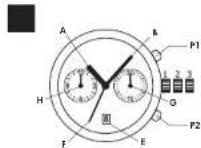
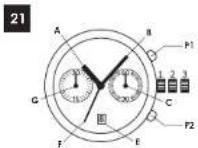
PI: Start/Stop push-button. Press once to start the chronograph (F=seconds, G=minutes, H=hours). Press a second time to stop and a third time to start the chronograph again.
P2: Reset push-button. Once the chronograph has been stopped by pressing the P1 push-button, press the P2 to reset all counters to zero.
To measure several successive times, without counting intervals, press the P1 push-button several times consecutively, as follows:
- Start,
- Stop and read.
- Start
- Stop and read.
This operation may be repeated as often as desired to measure successive times.
5. Press the P2 push-button to reset the chronograph to zero
FLYBACK CHRONOGRAPH 22
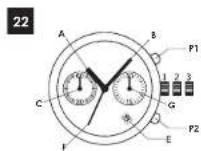
- Start the chronograph by pressing the push-button P1.
- To move directly to the next sequence, press the P2 push button which will never the chronograph and start it immediately for a new measurement.
Note: It is also possible to use the standard Chronograph function. To do this, refer to the preceding paragraph Simple Chronograph.
DUAL TIME WITH CHRONOGRAPH 24
To use the Chronograph function, refer to the preceding paragraph Simple Chronograph.
Setting the second time zone
- Pull the crown in Position 2.
- Turn the crown clockwise to advance the second time zone hand (1) and set it at the desired time.
CHRONOGRAPH WITH COMPLETE CALENDAR AND MOON PHASE 27
To use the Chronograph function, refer to the preceding paragraph Simple Chronograph.
Warning: To prevent damage to the movement, it is extremely important that you do not make any adjustments (day, date, month and month phase) between 9.30 p.m. and 4 a.m. To adjust your watch, he careful to ensure it is fully wound and then respect the following steps in this specific order:
Initial pre-setting stage
- Pull the crown out to Position 3, which will stop the seconds hand (C).
- Turn the crown to advance the hands (A,B) clockwise until the date hand (E) and the day (K) change (when the watch indicates midnight).
- Continue turning the crown to position the hands at 6 a.m.
- Push the crown back to Position 2.
Setting the date and month
- Turn the crown counter-clockwise to advance the date (E) until the month (M) and the date (E) are positioned as desired.
Setting the moon
- Turn the crown (still in Position 2) clockwise to turn the moon-phase disc until the full moon appears in the center of the aperture.
- Continue to turn the crown so as to make as many jumps as the number of days that have elapsed since the last full moon (consult a calendar).
To know the dates of the full noon and set your watch, please visit our www.baume-et-mercier.com website and consult the page corresponding to your model.
Setting the day of the week
- Press the corrector button (C1) to advance the day (K) to the desired day. To do this, use the small tool provided in the packaging.
Setting the time
- Pull the crown to Position 3
- Turn the crown to advance the hands (A,B) clockwise and positron them at the desired time.
- At the hourly time signal (reference clock, radio, etc.), reset the crown in to Position 1.
Note: the hand (N) provides 24 hour time reading, serving for example to tell the difference between 8 a.m. and 8 p.m.
III. QUARTZ WATCHES
A. GENERAL INFORMATION
A quartz watch is powered by a battery which generally lasts between 2 to 6 years depending on the model.
The majority of our quartz watches, having a central seconds hand, come equipped with a system to indicate a low battery (EOL - End of EOL). Approximately two weeks before the battery will stop, the central seconds hand will happen to jump every four seconds as a signal to the water that the battery must be changed. Batteries must be changed by an authorized Banone & Mercler retailer or After Sales Service Center to ensure that the battery and any other maintenance meet Banone & Mercler's standards. Respecting this requirement is imperative in connection with the International Warranty.
COLLECTION AND TREATMENT OF END OF LIFE QUARTZ WATCHES\*
Quartz watches contain a battery as well as other electronic components. When your watch is serviced, your authorized Baume & Mercer retailer or Afur-Sales Service Center will take care of storing and disposing of these components in compliance with current laws.
CE This symbol indicates that this product should not be disposed with household waste. It has to be returned to a local authorized collection system. By following this procedure you will contribute to the protection of the environment and human health. The recycling of the materials will help to conserve natural resources.
*Valid in EU member states and in any countries with corresponding legislation.
Note: Since 2011, all batteries used in Barame & Mercier watches are mercury-free.
PRECISION OF A QUARTZ WATCH
Quartz watches are extremely precise. This is due to the high frequency of their vibrations (32 kHz). Their precision [fast or slow] deviates by approximately 1 minute per year.
B. USER GUIDE
This guide explains all the functions available for different equations & Merck watch models.
To adjust your watch, please identify its icon 201, and refer to the diagram located on the inside cover of this guide, then follow the directions corresponding to your model.
SETTING THE TIME WITHOUT A CALENDAR
Adjustment by crown
- Pull the crown to Position 2. If your watch has a seconds hand (C), it will stop moving.
- I turn the crown either clockwise or counter clockwise until the watch hands 'A, B' are positioned at the desired time.
- Reset the crown Position 1.
Adjustment by rear corrector button 2
To manipulate the corrector button, use the small tool provided in the watch packaging.
- Press the corrector button (O) continuously to advance the hands (A,B).
- Stop pressing a few minutes before the desired time.
- Press the corrector button several consecutive times to advance the minutes hand step by step to the desired time.
SETTING THE TIME WITH A CALENDAR 458
18 30
- Pull the crown to Position 3. If your watch has a seconds hand (C), it will stop moving.
- Turn the crown either clockwise or counterclockwise, depending on the model, until the hands (A, B) are positioned at the desired time.
Note: When the hands (A) pass the 12, if the date changes, it means it is midnight, and if the date does not change, it means it is noon.
- When the start of the set time is announced (reference clock, radio, etc.), reset the crown Position 1.
RAPID DATE CHANGE 45813
Warning: To avoid damaging the movement, it is vital not make any rapid date changes during the following time window, since this is when the movement pinons are gearing up for the automatic date change.
Between 11 p.m. and midnight. 45
Between 9.30 p.m. and midnight
- Pull the crown in Positive 2
- Turn the crown to advance the date (E) chronologically, until the desired date appears.
- Reset the crown Position 1.
For months with less than 31 days, the date must be changed manually at the end of the month.
SETTING THE DATE USING RAPID HOUR
CORRECTION 30
- Pull the crown in Position 2.
- Turn at either clockwise or counter-clockwise to move the hour band (A), forward or backward, until the desired date is displayed (E).
- Reser the crown Position 1.
For months with less than 31 days, the date must be changed manually at the end of the month.
Note: When the hands (A) pass the 12, if the date changes, it means it is midnight, and if the date does not change, it means it is noon.
DUAL-TIME FUNCTION ADJUSTMENT USING THE CORRECTOR 18
NB: You must always:
use the small tool provided in the case to manipulate the corrector button. Press sufficiently finally until the "click",
- activate the adjustment made before adjusting the time zone.
1. Activate the dual-time adjustment mode by pressing the corrector button (CS) for at least two seconds until the minutes-hand of the second time zone (D) moves one minute forwards.
2. Set the hours and minutes hands of the second time zone (D) to the required time by proceeding as follows:
- a brief (less than one-second) press on the corrector (C5) moves the time forwards in one minute increments.
- a medium (from one to two-second) press on the corrector (C5) move the time forwards in one-hour increments.
- a prolonged time more than two-second press on the corrector (C5) moves the time zone forwards continuously until the corrector is released.
Note: The adjustment mode is deactivated if the corrector is not touched for a full 10 seconds.
SETTING THE MOON PHASE 8
The setting of the moon phases on this watch does not have rapid correction, and thus is accomplished using the time setting.
- Pull the crown to Position 3.
- Turn the crown to advance the hands (A, B) clockwise. This also has the effect of rotating the more-plane disc (D) by jumps (one jump per day).
- Continue to turn the crown to rotate the moon-phase disc of (I) by jumps until the full moon appears in the center of the aperture.
- Continue turning the crown in order to bring about as many jumps as there are days passed since the last full moon (consult a calendar).
- Reset the crown Position 1.
I to know the dates of the full moon and set your watch, please visit our website www.haume-et-mercier.com and consult the page corresponding to your model.
CHRONOGRAPH: SIMPLE FUNCTION
P1: Start/stop push-button. Press once to start the chronograph (F=seconds, G=minutes, J=1/10 second). Press a second time to stop.
P2: Reset push-button.
To measure several successive times, without counting intervals, press the P1 push-button several times consecatively, as follows:
1. Start
2. Stop and read.
3. Start
4. Stop and read.
This operation may be repeated as often as desired to measure successive times.
5. Press the P2 push-button to reset the chronograph to zero.
CHRONOGRAPH: ADDITIONAL FUNCTION "SPLIT-SECONDS"
To measure intermediate time periods with a split seconds hard.
1. Press the PI push-button to start the chronograph.
2. Press the P2 push-button to read the intermediate time.
- Press the P2 push-button to reset and read the time elapsed. Operations 2 and 3 may be repeated as often as desired to measure any number of intermediate times.
- Press the P1 push-button to stop the chronograph and read the final time.
- Press the P2 push-burton to reset the chronograph to zero.
CHRONOGRAPH: INITIALIZING THE COUNTERS 30
If the counters are not correctly reset to zero, kindly proceed in the following order:
- Pull the crown out to Position 2.
- Press push-button P2 to reset the minutes counter (G) to zero.
- Pull the crown out to Position 3.
- Press push-button P1 to reset the chronograph seconds counter (F) to zero.
- Press push-button P2 to reset the tenth of a second counter (J) to zero.
- Reset the crown back into Position 1.
IV. RECOMMENDATIONS AND CARE
Your Baume & Mercier watch was both designed and manufactured with great care. It contains a great number of very delicate components, which is why we encourage you to be careful, avoid any impact to the watch, avoid any erroneous adjustments, and protect it from impact and extreme temperature variations.
Furthermore, a watch is something rare in that it works continuously, 24 hours a day. For optimal reliability and for the longevity of your watch, we recommend having your watch serviced every 3 to 5 years.
BAUME & MERCIER AUTHORIZED AFTER-SALES SERVICE CENTERS
Baume & Mercier watches are maintained by an international network of After-Sales Service Centers which meet the highest quality requirements of Swiss watchmaking.
Approved through a demanding selection process, only a Baurne & Mercier authorized retailer or After-Sales Service Center is authorized to perform service on your watch.
These centers undergo regular training provided by the brand, thus guaranteeing an irreproachable service quality by using specially designed tools meant for repairing Botune & Mercier watches and by replacing worn parts with original components. Furthermore, tests are conducted using up to date and reliable quality controls.
Any repair work not carried out by a Baume & Mercier authorized
retailer or After Sales Service Center will not be covered by the Baume & Mercier warranty. Also excluded from warranty coverage are watches not containing original Baume & Mercier parts.
Furthermore, to safeguard your watch, please read the following recommendations for use and care:
MECHANICAL WATCH MAINTENANCE
In the event that your watch will not be worn for several months, we recommend you wind your mechanical watch regularly so that the oils do not seize, thus disrupting proper functioning of the movement.
WATER-RESISTANCE
Baume & Mercier watches are water-resistant up to at least 30 meters. If a model's water-resistance goes beyond 30 meters, the depth is indicated on the back of the case.
When a watch is water resistant its movement is protected from dust, humidity and any risk of damage caused by immersions. As such, your watch is water-resistant in all usual circumstances of daily life, be it in the rain, in the shower or while swimming. However, you should avoid subjecting your watch to high pressure water jets (such as those produced by car or garden cleaning appliances, for example) and also protect it from knocks that may occur during the practice of intense water sports (jet ski, ...).
The water-resistance of a watch comes from its joints. Because these joints are exposed to different types of external stress (anesthetics, perspiration, temperature changes), your watch may become less water-resistant with time. As a consequence, we recommend you have your watch checked every 12 to 24 months to guarantee it remains fully water resistant.
Warning: When your watch is submerged in water, do not pull on the crown or press any of the pushbuttons to adjust the date, the hour or any other function because water may enter the case.
If you notice any condensation inside your watch, you must take it immediately to an authorized Raime & Merzier retailer or After Sales Service Center.
MAGNETIC FIELDS
Our environment experiences increasing levels of disturbances caused by magnetic sources. These disturbances may affect the proper functioning of your watch, which quartz or mechanical. A quartz watch may be affected by a strong magnetic field. However, once the watch is no longer in the magnetic field, it will quickly resume proper functioning. The disturbance will only last as long as the watch is within the magnetic field. A mechanical watch is also sensitive to strong magnetic fields. In certain cases, a disturbance may magnetize the steel components inside the movement, especially the spiral spring. Certain components could become attracted to one another causing the watch to suddenly jump forward and then stop. If this happens, the watch needs to be demunerated by an authorized Baum & Mercker retailer or After-Sales Service Center.
DAY-TO-DAY CARE
Metal case and bracelet
To preserve the brilliance of both your watch and its metal bracket, if necessary, we recommend you brush it gently using a soft brush (a soft mouthbrush, for example) and warm soapy water. When you have finished, rinse it carefully with fresh water and dry it with a soft cloth. The same cleaning is recommended after swimming with your watch in the ocean or a swimming pool.
Before clearing your watch, make certain that the crown is tightly closed (pressed or screwed-down, depending on the model).
Leather strap
The life span of a leather strap depends on how often it is worn and under what conditions.
To protect your leather strap for as long as possible, we recommend you keep it away from water, humidity, oils and cosmetics, and avoid prolonged exposure to sunlight.
Rubber strap
The life span of a rubber strap depends on how often it is worn and under what conditions. To conserve your rubber strap for as long as possible, we recommend you keep it away from oils and cosmetics and avoid prolonged exposure to sunlight. Furthermore, you may clean your rubber strap with space water.
Note: We recommend you have your metal, leather, or rubber strap changed by an authorized Baune & Mercier retails. The retailer will be able to offer you an array of straps perfectly suited to your watch.
Mother-of-pearl
Barrne & Mercier recommends cleaning it gently with either a soft dry cloth or clear water. Let the watch dry completely before storing. It is best not to combine mother of pearl with perfume or body lotion, which can be detrimental to its indescent reflections. Therefore, always wait approximately 10 minutes between applying perfume/bedy lotion and putting your watch on. Your mother of pearl adtered watch will be safer when stored in a soft cotton bag.
Chemicals
Avoid direct contact with any solvents, detergents, perfumes or cosmetic products which may damage the bracelet, the case or the joints.
V. INTERNATIONAL WARRANTY
The following Baurne & Mercier (International) Warranty applies to Baurne & Mercier watches sold or presented for warranty service in any country.
What the Baume & Mercier (International) Warranty covers and for how long
Your watch has been made according to the strict quality standards of Baume & Mercier and with all the care of highly qualified watchers. Nevertheless, the watch is covered by this Baume & Mercier (Internationally Warranty against defects in manufacturing and materials. Please contact one of the authorized Baume & Mercier boutiques, Baume & Mercier retailers or Baume & Mercier After Sales Service Centers located around the world (we service contacts below), and they will be able to provide warranty service as defined herein.
Raumé & Mercier warrants its product against defects in materials and manufacturing for a period of two (2) years from the date of purchase (the "Warranty period"). If the product is returned during the Warranty period, Raumé & Mercier will repair or replace any detective watch part here of charge within a reasonable time after the product is returned, subject to the right to charge for shipping costs. Upon expiration of the Warranty period, any repairs will be subject to a service charge.
How to obtain service
You may obtain service by bringing or scading the watch to your authorized Baumie & Mercier boutique, Baumie & Mercier retailer or to any Baumie & Mercier After Sales Service Center as further indicated below. You are responsible for transportation costs, including but not limited to postage, insurance and packing materials. We recommend that any shipments to us include certified delivery and insurance.
In order to obtain service through this Raume & Mercier International Warranty the watch must be accompanied by the original warranty card that was included with the watch at the time of purchase.
To be valid, the original warranty card should be:
either duly completed, dated, stamped and signed by an authorized Baune & Mercier boutique or Baune & Mercier retailer, at the time of purchase;
or duly activated electronically by an authorized Baume & Mercier boutique or Baume & Mercier retailer, at the time of purchase.
Such card may only be completed or activated electronically by an authorized Baumc & Mercier boutique or Baumc & Mercier retailer.
What is not covered under the Baume & Mercier (International) Warranty
The Haume & Mercier (International) Warranty does not cover.
a. Defects and damage due to loss, theft or fire or other causes beyond our control;
b. Defects and damage resulting from misuse or negligence or accident;
c. Defects and damage caused by improper use (knacks, deres, crushing to the case or crystal, etc.), alterations, tampering, dismantling or services and repairs completed by anyone else than an authorized Barne & Mercier boutique, Barne & Mercier retailer or Barne & Mercier After-Sales Service Center, or by the use of components other than these recommended by Barne & Mercier;
d. Defects and damage due to fair wear and tear;
e. Fair wear and tear of non metallic straps or bracelets (leather, rubber synthetic polymer, etc.).
1. Watches where the serial number originally imprinted on the watch case is removed or not clearly legible, or where any part of the original watch back or any original number has been removed, changed, altered, replaced, crused or defaced;
g. Routine maintenance and cleaning,
Baume & Mercier Service Contacts
Only authorized Baune & Mercier boutiques, Baune & Mercier retailers and Baune & Mercier After Sales Service Centers are catitiled to provide warranty service as defined herein. For more information and a complete list of authorized Baune & Mercier boutiques, Baune & Mercier retailers and Baune & Mercier After-Sales Service Centers, please consult the Baune & Mercier website www.baune-et-mercier.com or ask the authorized Baune & Mercier boutique or Baune & Mercier retailer indicated on the warranty card or in your sales documentation.
Additional warranty conditions applicable in the United States of America and Canada only:
Baume & Mercier Limited Warranty
EXCEPT TO THE EXTENT PROHIBITED BY APPLICABLE LAW. THE BAUME & MERCIER INTERNATIONAL WARRANTY SET FORTH ABOVE IS A LIMITED WARRANTY AND SHALL BE THE EXCLUSIVE MANUFACTURER'S WARRANTY IN LIDU OF ANY OTHER EXPRESS WARRANTIES, NOT FOR THE LIMITED WARRANTY NOR ANY OTHER WARRANTIES, WHETHER EXPRESS OR IMPLIED INCLUDING, BUT NOT LIMITED TO, ANY IMPLIED WARRANTY OF
MERCHANTIABILITY OR IMPLIED WARRANTY OF HINSEE FOR A PARTICULAR PURPOSE. SHALL EXTEND BEYOND THE PERIOD OF TWO (2) YEARS FROM THE DATE OF PURCHASE. FOR A PERIOD OF TWO (2) YEARS FROM THE DATE OF PURCHASE, BAIME & MERCER WILL, IN ITS SOLE DISCRETION, REPAIR OR REPLACE ANY DEFECTIVE WATCH OR PART UNDER THE LIMITED WARRANTY FREE OF CHARGE SUBJECT TO THE RIGHT TO CHARGE FOR SHIPPING COSTS AND SUBJECT TO THE FOLLOWING CONDITIONS.
THE WATCH MUST BE ACCOMPANED BY THE WARRANTY CARD (ENCLOSED WITH THE WATCH, DULY COMPLETED, DATED, STAMPH) AND SIGNED BY AN AUTHORIZED BAUME & MERCIER BOUTIQUE OR RETAILER. SUCH CARD MAY ONLY BE COMPLETED BY AN AUTHORIZED BAUME & MERCIER BOUTIQUE OR BAUME & MERCIER RETAILER.
THE SERIAL NUMBER ORICNALLY MPRINTED ON THE WATCH CASE IS C.I FARILY LIFEBILE AND NO PART OF THE ORIGINAL WATCH BACK OR ORIGINAL SERIAL NUMBER HAS BEEN REMOVED, CHANGED, ALTERED, REPLACED, EASED OR DEFACED.
IN ADDITION TO THE FOREGOING, ALL OTHER CONDITIONS SET FORTH IN THE BAUME & MERCIER (INTERNATIONAL) WARRANTY ARE APPLICABLE TO THE BAUME & MERCIER LIMITED WARRANTY IN THE UNITED STATES OF AMERICA AND CANADA FAILURE OF ANY OF THESE CONDITIONS VOIDS ALL WARRANTY RIGHTS. THIS WARRANTY IS THE SOLE AND EXCLUSIVE REMEDY. BAUME & MERCIER SHALL NOT BE LIABLE FOR ANY INCIDENTAL OR CONSEQUENTIAL DAMAGES.
Braume & Mercier does not authorize any distributor or seller of its products to make any warranties beyond this limited warranty or to otherwise assume for Braume & Mercier any obligations or liability in connection with the sale or distribution of its products. Some States, provinces or territories do not allow limitations on how long an implied warranty lasts or the exclusion or limitation of incidental or consequential damages, so the above limitations or exclusions may not apply to you.
A warranty claim may be sent to the Baume & Mercier Service Center or Richmond Canada, Inc. at the following addresses, or as specified above in 'Baume & Mercier service contracts', in each case using the procedure outlined in 'How to Obtain Service':
Baume & Mercier Service Center (BMSC)
15100 Trinity Blvd, Suite 300
Fort Worth TX 78155
United States
(Please send watch via insured carrier only, no drop off available at this location)
Tel: 11 800 MERCIER
Email: baume-and-mercier.us@baume-el-mercier.com Richemont Canada, Inc.
4610 Eastgate Parkway, Unit 1
Mississauga Ontario L4W 3W6
Canada
Tel: +1 800 661 6109
Email: baume-and-mercier.us@baume-et-mercier.com
[EMPTY]
Specific warranty applicable in Australia only- Mandatory Statutory Rights
Our goods come with warranty that cannot be excluded under
the Australian Consumer Law. You are entered to a replacement or refund for a major failure and compensation for any other
reasonably foreseeable loss or damage. You are also entitled to have the goods repaired or replaced if the goods fail to be of acceptable quality and the failure does not amount to a major failure,
The Mandatory Service Rights apply only to watches sold in Australia and presented for warranty intervention in Australia. The Business & Mercre International Warranty gives you further benefits, which are in addition to your rights under the Australian Consumer Law. If you seek to rely on your Mandatory Service Rights under the Australian Consumer Law in relation to a defect in goods supplied, you may be enrolled to recover any reasonably foreseeable loss or damage that results from the defect. This may include the costs associated with transporting the watch to Richemont Australia Pty Ltd, an authorized Baume & Mercer Boursque, Haume & Mercer retailers or Haume St. Mercer After-Sales Service Center.
In Australia, a claim under the Baume & Mercier (International) Warranty may be sent to Richemont Australia Pty Ltd, provider of the warranty service, at the address below, or as specified above in 'Baume & Mercier Service Contacts', in each case using the procedure outlined in 'How to Obtain Service'.
Richemont Australia Pty Ltd
Level 9.74 Castlecagh Street
Sydney, NSW 2000
Tel: -61 28051 4661
Email: oustrala@baumo-et-mercier.com
How State and other laws apply
The Boune & Merck International; Warranty gives you specific legal rights, and you may also have other rights which vary in the United States of America from State to State and may in addition vary from one country, province or territory to another.
VI. CONTACT
If you have any questions, please contact one of our authorized retailers in your country (list available on our website www.baume-et-mercier.com) or contact us directly through our website using the contact form, at the following web address: www.baume-et-mercier.com/contact
SOMMAIRE
I. PRINCIPALES FONCTIONS ET COMPLICATIONS 27
II. MONTRES MÉCANIQUES 29
A. INFORMATIONS GÉNÉRALES 29
B. MODE D'EMPLOI 29
Baume & Mercier Service Center (BMSC)
15100 Trinity Blvd, Suite 320
Earl Worth TX 76155
United States
4610 Eastgate Parkway, Unit 1
Mississauga Ontario 14W 3W6
Canada
Tel: +1 800 661 4109
Email: baume-and-mercier.us@baume-et-mercier.com
B. MANUAL DE INSTRUÇÕES
Regular com o conctor
B. MANUAL DE INSTRUÇÕES
Entre as 21h30 o a meia-noire
Monday 23:01 to 00:00 4 6
Monday 21:30 e 00:00
pride in our responsible business practices, rooted in social
OUR RESPONSIBILITY
As a luxury brand whose fundamental identity revolves around values of authenticity and accessibility, Baume & Mercier's core emotional qualities are based on cherishing life's most important moments and memories. The practice of high ethical standards is an essential aspect of Baume & Mercier's corporate identity. We take
responsibility and the ethical use of natural resources. To this end, Baume & Mercier is a member of the Responsible Jewellery Council (RJC).
The RJC is an international not-for-profit organization, which through a mandatory system of certification based on third party auditing, promotes ethical and socially responsible practices in the supply chain for gold, platinum and diamonds. Raume & Mercier is a member of the RJC since 2008, originally certified in 2011 and overvitized during summer 2014, against the new Code of Practices. For Raume & Mercier, sustainable and ethical business practices, intellectual leadership and the core principles of law watchmaking, articulated by our founders, all go hand in hand.