Classima 10485 - Watch BAUME & MERCIER - Free user manual and instructions
Find the device manual for free Classima 10485 BAUME & MERCIER in PDF.



User questions about Classima 10485 BAUME & MERCIER
0 question about this device. Answer the ones you know or ask your own.
Ask a new question about this device
Download the instructions for your Watch in PDF format for free! Find your manual Classima 10485 - BAUME & MERCIER and take your electronic device back in hand. On this page are published all the documents necessary for the use of your device. Classima 10485 by BAUME & MERCIER.
USER MANUAL Classima 10485 BAUME & MERCIER
AUTOMATIC - HOUR, MINUTE, SMALL SECONDS, COMPLETE CALENDAR, MOON PHASE, CHRONOGRAPH
SETTING PROCEDURE
FRANÇAIS 2
ENGLISH 5
DEUTsCH 8
ITALIANO 11
ESPANOL 14
PORTUGUES 17
EAAHNIKA 20
PYCCKN 23
日本語 26
中文29
AUTOMATIQUE - HEURE, MINUTE, PETITE SECONDE, CALENDRIER COMPLET, PHASES DE LUNE, CHRONOGRAPHE
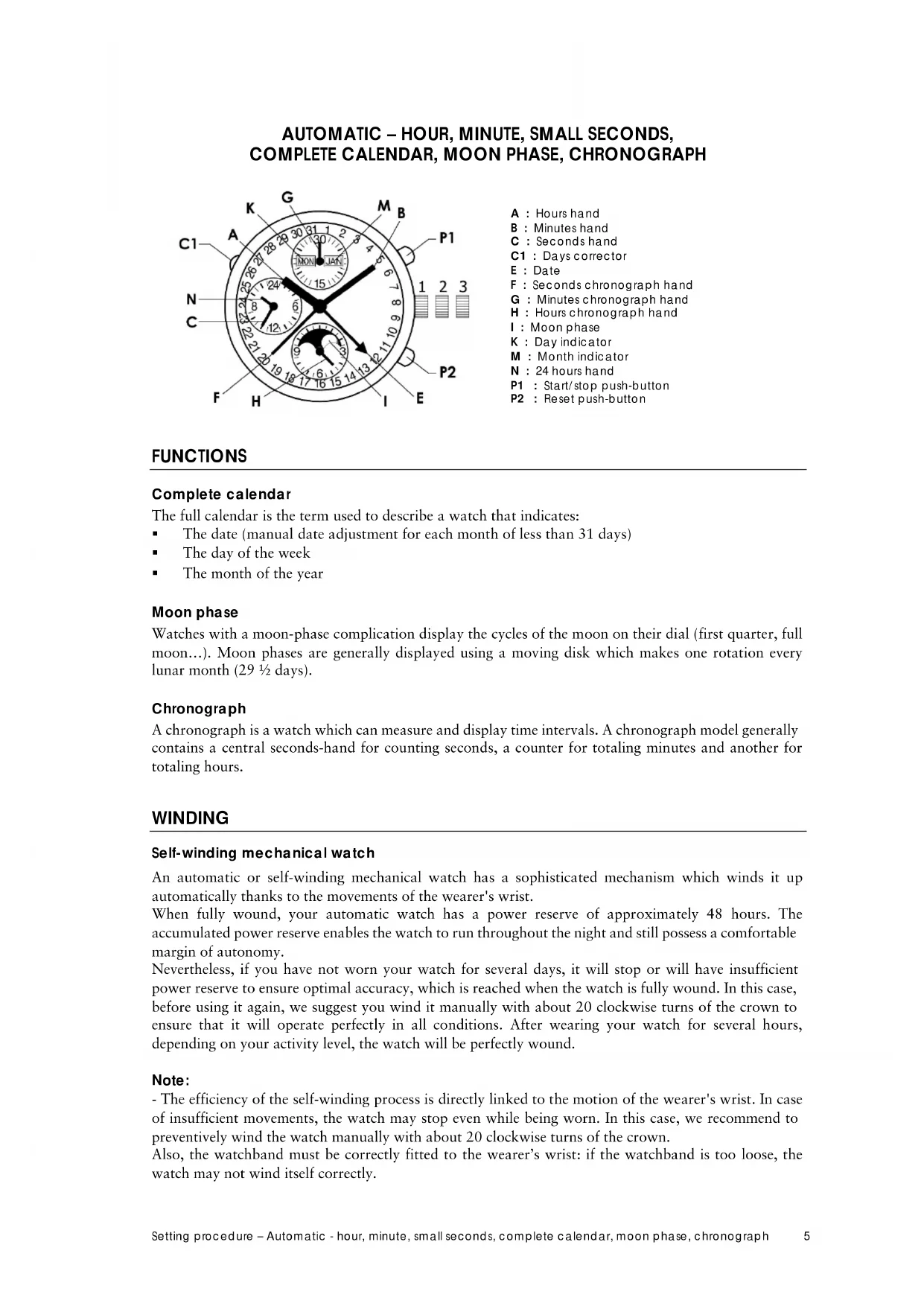
The full calendar is the term used to describe a watch that indicates:
The date (manual date adjustment for each month of less than 31 days)
The day of the week
The month of the year
Moon phase
Watches with a moon-phase complication display the cycles of the moon on their dial (first quarter, full moon...). Moon phases are generally displayed using a moving disk which makes one rotation every lunar month (29 1/2 days).
Chronograph
A chronograph is a watch which can measure and display time intervals. A chronograph model generally contains a central seconds-hand for counting seconds, a counter for totaling minutes and another for totaling hours.
WINDING
Self-winding mechanical watch
An automatic or self-winding mechanical watch has a sophisticated mechanism which winds it up automatically thanks to the movements of the wearer's wrist.
When fully wound, your automatic watch has a power reserve of approximately 48 hours. The accumulated power reserve enables the watch to run throughout the night and still possess a comfortable margin of autonomy.
Nevertheless, if you have not worn your watch for several days, it will stop or will have insufficient power reserve to ensure optimal accuracy, which is reached when the watch is fully wound. In this case, before using it again, we suggest you wind it manually with about 20 clockwise turns of the crown to ensure that it will operate perfectly in all conditions. After wearing your watch for several hours, depending on your activity level, the watch will be perfectly wound.
Note:
- The efficiency of the self-winding process is directly linked to the motion of the wearer's wrist. In case of insufficient movements, the watch may stop even while being worn. In this case, we recommend to preventively wind the watch manually with about 20 clockwise turns of the crown.
Also, the watchband must be correctly fitted to the wearer's wrist: if the watchband is too loose, the watch may not wind itself correctly.
- The watch should be removed from your wrist before winding it. This ensures the crown stem remains completely straight during winding and avoids the risk of damaging the crown or the movement.
- Do not deliberately shake a self-winding watch in order to wind it. This is ineffective and could damage the movement.
- Even if your watch is not worn for several months we advise you to regularly wind it manually. This will prevent the oils from either congealing or flowing over the shafts of the movement.
SETTING PROCEDURE
Warning: To prevent damage to the movement, it is extremely important that you do not make any adjustments (day, date, month and moon phase) between 10 p.m. and 2 a.m.
To adjust your watch, be careful to ensure it is fully wound and then respect the following steps in this specific order:
Initial pre-setting stage
- Pull the crown out to Position 3.
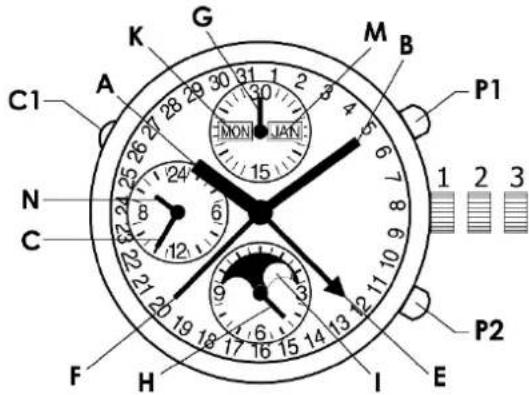
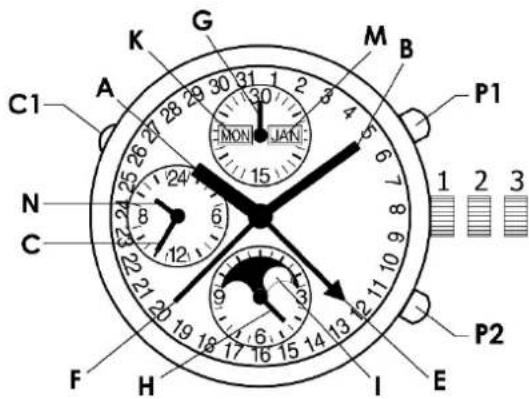
- Turn the crown to advance the hands (A, B) clockwise until the date hand (E) and the day (K) change (the watch indicates midnight).
- Continue turning the crown to position the hands at 5 a.m.
- Push the crown back to Position 2.
Setting the day and month
- Turn the crown counter-clockwise to advance the date (E) until the month (M) and the date (E) are positioned as desired.
Setting the moon
- Turn the crown (still in Position 2) clockwise to turn the moon-phase disc until the full moon appears in the center of the aperture.
- Continue turning the crown so as to make as many jumps as days have passed since the last full moon (consult a calendar).
Setting the day of the week
- Press the corrector button (C1) to advance the day (K) to the desired day. To do this, use the small tool provided in the packaging.
Setting the time
- Pull the crown out to Position 3.
- Turn the crown to advance the hands (A, B) clockwise and position them at the desired time.
- At the hourly time signal (reference clock, radio, etc.), push the crown in to Position 1.
Note: the hand (N) provides 24-hour time reading, serving for example to tell the difference between 8 a.m. and 8 p.m.
CHRONOGRAPH FUNCTION
Simple chronograph
P1: Start/stop push-button. Press once to start the chronograph (F=seconds, G=minutes, H=hours). Press a second time to stop and a third time to start the chronograph again.
P2: Reset push-button. Once the chronograph has been stopped by pressing the P1 push-button, press the P2 to reset all counters to zero.
Care recommendations
Your Baume & Mercier watch was both designed and manufactured with great care. Please read our recommendations for use and care on www.baume-et-mercier.com.
International warranty
Your Baume & Mercier watch is covered by the Baume & Mercier International Warranty.
The conditions of the Baume & Mercier International Warranty are available on www.baume-et-mercier.com/customer-service/warranty.html.
Other information
If you have any questions, please visit our website www.baume-et-mercier.com.
You can also contact our authorised retailers in your country (list available on our website www.baume-et-mercier.com) or contact us directly via our website using the contact form or by calling one of our Client Relations Centers (www.baume-et-mercier.com/customer-service/contact-us.html).
AUTOMATIK-STUNDE,MINUTE,KLEINE SEKUNDE, VOLLKAENDER,MONDPHASE,CHRONOGRAPH
IaTy (pyHnHa KOpKeTnPoBKa IaTbI IIaBcEx MeCaeB, B KOTOpbIX MeHbIIe 31 nH),
HeHb HeJeM,
MEcHIOJa.
Φa3bIyHbI
YacbI c f3AMN IyHb OT6paXaIOT Ha IIuΦep6Iate fa3b LyHHoro IIKla (IepBa aYeTBepTb, NIOHOyHHe n T. ).O6bUHO f3bl IyHb IOKa3bBAe IINCK, COBepuaOIIIM o6OpOT 3a OINH IyHHb MeCn (29 c IIOOBHNOI He).
XpoHorpaΦ
XpoHorpaΦ - YacbI, IIO3BOJIAIOJIne H3MePABT b OTO6paKaTB IpOMeKyTK BpeMeHN. O6bIyHO xpoHorpaΦ OCHaIIeH IeHTpaJIbHO CTpeIKOIN II INIOICYETA CEkyHn I OTJeJIbHbIMN CyeTNUKAMN II INC yMMNPOBAHH MInHYT N YaCOB.
3ABOJ
MexaHnueckne YacbI cABToMaTHueckHM IOJ3aBOJOM
MexaHnueckne Yacb c aBTOMaTHueckm IIO3aBOOM HMeIOT CIOKHB MExaHN3M, o6ecneuBaIOHn ABTOMATueckn 3aBOJ 6naOanap ECTeCTBEHHbIM JBNKeHHM 3aIIACTb.
3aIac xOJa IONHOCTbIO 3aBeIeHHbIX YAcOB COCTABJIET OKOIO 48 YAcOB. HaKoIIeHHaH 3HeprN 06ecneHBAET cyHKINOHnPOBaHne YAcOB B TeueHne HOu, COxpaHra KOMΦoPTbH yPoBEh 3aBOJa.
TeM He MeHee, ecn Bb He Hocnn YacB TeueHne HecKOBKnX dHe, OHN OCTaHOBTcA, IIN6o 3aIac Xx Oda 6yET HeIOCTaTOUHbIM Dn IOITMaJIbHOr TOuHOCTX Oda, KOtOpA IOCTHraETC Pn IOJHOM 3aBOJe YACOB. B OTOM CInyae Npeep DaJIbHeim NCIOB3OBAHHem peKOMeHnyetc BpyHyIO COBepHTb OKOIO 20 BpaIeHH 3aBOIHou TOnOBKn IO YACOB CTpeJIke, YTO6bIO6ecIIeHTb 6e3yIpeeHoe FyHKINHOHPoBaHne YACOB Pn IIO6bIX YCIOBHX NCIOB3OBAHHa. Upe3 HeCKOJIbKO YAcOB HOIIeHHa, B 3aBNCIMOCTH OT yPOBHn AKTNBHOCTN, 6yET JOCTNIHYT ONITMaJIbHbYpOBeH 3aBOJa.
IIpImeaHHe:
- ΘΦΦeKTHBHOCTb Ipocecca aTOMaTHueCKOTo IOD3aBOda HAnpMyIO 3ABNCIT OT eCTeCTBeHHbIX IINKeHIN 3aIIcTbI. B Cnyae HeIOCTaTOUHO rPOBHa AKTNBHOCTn HaCBI MOYr OCTaHOHTbcN DaJKe BO BpeM HOHeHIN. B ATOM cNYae peKOMEHyETc IpeBapNTelbHO BpyHuO COBepHHTb OKOIO 20 BpaIeHNI 3aBOHOI ROIOBKn IO YacOBOI CTpeJIke.
Kpome TOrO,peMeIIOK YacOB IOnKeH COOTBeTCTBOBaTb pa3Mepy 3aIacTbB bIaIeJIbHa:ecn peMeIIOK 3aTHyT CInIIKOM cIa6o, aBTOMaTHueckn IIOJ3aBOJ MOKeT COBepIaTbCHeKOppeKTHO.
- IpeIIOJ3aBOJOM Heo6XoJIMO CHrTb Yacblc pyKn. 3TO OecneuBaet IpapBnHoe IOLOKeHne 3aBOJHO TOJOBKN BO BpEMr IOJ3aBOJa H NCKJIPOHae T pNCK IOBpeJdeHn 3aBOJHO TOLOBKn Hm YacOBORo MEXAHN3Ma.
-He Tpncte yacbI, Yo6b IooNTbcra ABtOMaTHueCKoro IO3aBOda. 3TO JeNCTBnE He3ΦΦeKTHBHO MOKET IOBpeINbT yAcBOoMEXaHn3M.
-JaKe ecnn HcAeTcB TteueHne HeckoJIbKnx MeCnEe, peKOMeHdyetcpeTyIpaHO 3aBOuNTb IN BpyHyIO.3To IpeIoTbPaIIaET 3aryCteHHe Macna IIIN erO BbICTyIIaHHe NaI IIIITnTAMN YacOBOrO MExAHN3Ma.
YCTAHOBKA BPEMEH
BHHMaHHe: YTO6bI He IIOBpeIHTb MExaHN3M, 3aIIpeIaETC8 BbIIOJIHrTB KaKyIO-JIb6o peRyIINPOBky (JHn HneJIH, JAtbI, MecaIIa, fo3bI JyHbI) MeKJy 22:00 n 2:00.
IyTaHOBKn BpeMeHn y6eHTecb, YTO HaCb IIOHOCtBu 3aBeJeHbI, N BblIOHNTe CJIeIyIOIIne IIIaRn BVka3AHOM IopJiKe:
IpeBapTeIbHbI 3Tan IepeYcTaHOBkoI
- BbITaHTb TOnOBky B NIOJOKeHne 3.
- Bpaaatb TIOOBky, IpeEdbra CtePEN (A, B) BIIepeI, Ioka He N3MeHrTc IIOJOKeHne cTePEN DaTb (E) nJeHb HeJe (K) (aCb npn 3OM IOKaKyT IIOHOy).
- IpoioJKNbBpaIaTb 3aBOHHyO rOIOBky, YTO6bI yCTaHOBNb CTpeIKn Ha 5 YaacOByTpa.
- HaKaTHeM BepHyTb TIOJOBky B IIOJOxKeHne 2.
YcTaHOBKaJaTbI N MeCya
- BpaIaTb roIOBky npOTnB yacOBoi cTePkn, npeDnraia NOKa3aHne daTb (E) Bnpei, noka He 6yuyr OTPaKeHb HxKnbe NOKa3aHnMaecua (M) n daTb (E).
YcTaHOBKaΦa3bI NyHbI
- BpaIaTb TOLOBky (ocTaIOHUYOCB H NIOJoxeHHN 2) IIO YacOBoi cTpeJIke, IOBOPaUHBAJ INCK JyHbI (I) cKaUKAMn, IOKa B IeHTpe OKoIIka He 6yET H3O6paKeHo NIOHOnyHne.
- IpoIOnJNtB BpaIaTb rOIOBky, YTO6bI INCK COBepHII eIe CToJIbKO DnIXKeHH, cKoJIbKO dHe IIPOIIIIO C IIOCEIeHrO IIOHOHyHr (y3HaTb IIO KAJIeHApI).
YcTaHOBkaIHHHeJIIN
- HaKIMaTb HkHONKy (C1), IpeBnraI NOKa3aHne IHa HeJeIIN (K) BInpeI, IOKa He 6yIeYcTaHOBHeHyKHoe 3HaueHne.IIJI 3TOIIOJIb3yIITecb KoppeKTOpOM (IIyIepOM), BIOJKeHHbM BΦyTIpIaCOB.
YcTaHOBKa BpeMeHH
- BbITaHTb TOnOBky B NIOJKeHne 3.
- BpaataB roIOBky, IpeEIBnraCtpeIKN (A, B) BIIepeI IO yCTaHOBKn HxKHO BpEmHn.
- IIO cHHaJIy BpeMeHH (OT 3aIIOHHbIX YacOB, II paIIO IN T.I.) BEpHyTB rOIOBky HaKaTHeM B IIIOJOKeHne 1.
K BaIIeMy cBeIeHIO: cTpeIka (N) yKa3bIbAet BpeM Ha 24-YacOBn IIkaIe. ΘTO IIO3BOJIaET pa3IIuHaTb, HApIIMep, 8 YacOB n 20 YacOB.
ФУHKIIIN XPOHOPTAΦA
IIpocToIxpoHorpaΦ
P1: KhoIIKa «Iyck/CTOnI. IIepbIM HaKATmE XPOHOrpaΦ 3aIyckaetc (ceKHyIbI F, MHyTbI G, Yacbl H). BToPbIM HaKATmE XPOHOrpaΦ octaHaBImBaETcA, a TpeTbIM - BHOBb 3aIyckaetc.
P2: KhoIIKa c6pOca IIOKa3aHn Ha HOJIb. OCTaHOBUB xPOHOrpaΦ HauKaTHeM KhoIIKn P1, HauKaTb KhoIky P2, TTO6bI c6pOCHIT IIOKa3aHn CHTHKNOB Ha HOJIb.
PekomehdaaHnnyxOJ
BaIIu YacBla Baume & Mercier 6bIIN cnpoeKTHPOBaHb I N3rTOBJIeHb C Oco6o TuaTeNbHOctbIO.
IopKaJyIcTa, 03HaKoMbTeCb c HaIIIMM peKOMeHdaIImM IIO IIOJIb3OBAHnIO n yXoIy Ha Be6-caITe www.baumc-ct-mercicir.com.
MekHyapOHaHra rapaHTna
Baunu Taacb Baume & Mercier Abliaotc o6beKtOM MeKdyHapOHOI rapaHTn Baume & Mercier.
CycIOBIMM MeKdyHApOHOI rapaHTnBaume & Mercier MOxHO O3HaKOMtbcH a Be6-caiTe www.baumect-mercier.com/customer-service/warranty.html.
Ipyra nHΦopmaun
Ecn y Bac BO3HKnBONpOcbI, pnpraaem Bac nocetnb Hn Be6-caT www.baumc-ct-mercier.com.
Co BcEMN BOIIPOCAmN Bb MoKTe o6paHTbcra K HaIIMM OfHIIHaJIbHbIM IINCTpN6bHOTopaM B CBOe cTpaHe (CINCOK HMeetca Ha HAIeM Be6-caTe WWW.baume-et-mercier.com) INI HeIOcpeIcTBeHHO K HAm Yepe3 Be6-caiT, NcIOJIb3yJ opMy IJIa O6paIeHN, INI IO3BOHb B HaIII IeHTp IIO O6cIyKbAHnIO KInHeTob (www.baume-et-mercier.com/customer-service/contact-us.html).