ManualGo.com
 IAN 277907 - Lighting Livarno Lux - Free user manual and instructions
Find the device manual for free IAN 277907 Livarno Lux in PDF.



Download the instructions for your Lighting in PDF format for free! Find your manual IAN 277907 - Livarno Lux and take your electronic device back in hand. On this page are published all the documents necessary for the use of your device. IAN 277907 by Livarno Lux.
USER MANUAL IAN 277907 Livarno Lux
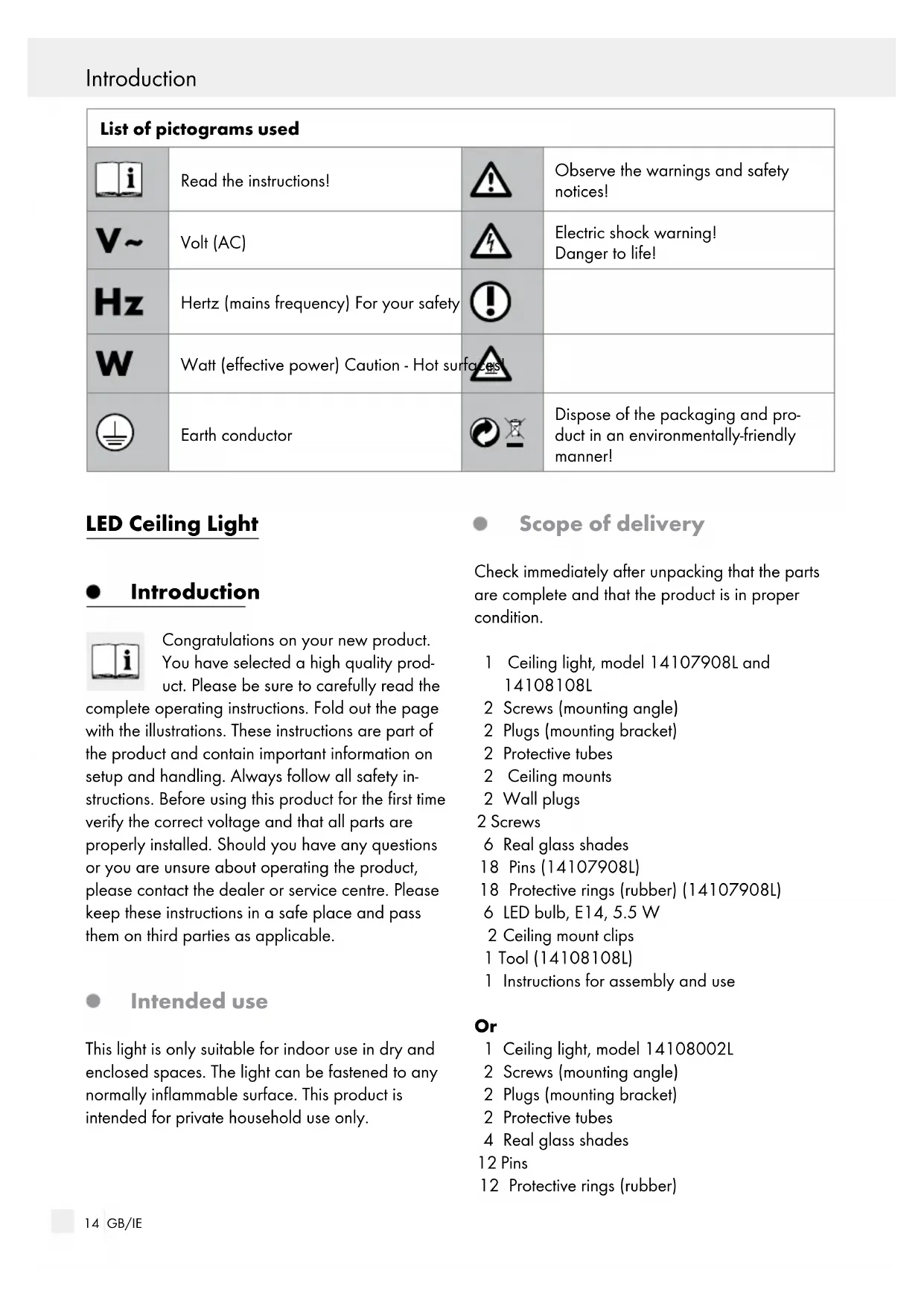
Ceiling mount clips 1 Tool (14108108L) 1 Instructions for assembly and use
1 Ceiling light, model 14108002L 2 Screws (mounting angle) 2 Plugs (mounting bracket) 2 Protective tubes 4 Real glass shades 12 Pins 12 Protective rings (rubber) List of pictograms used Read the instructions! Observe the warnings and safety notices! Volt (AC) Electric shock warning! Danger to life! Hertz (mains frequency) For your safety Watt (effective power) Caution - Hot surfaces! Earth conductor Dispose of the packaging and pro- duct in an environmentally-friendly manner!15 GB/IE Introduction / Safety 1 Glass plate 2 Chrome decorative rings for GU10 light bulbs 4 LED light bulbs, E14, 5.5 W 2 LED light bulbs, GU10, 5 W 2 Spacers 4 Washers 2 Locating screws 1 Instructions for assembly and use Parts description
Screws (mounting bracket)
Ceiling mount (14107908L and 14108108L)
Locating screws (connection housing)
Mains connection cable (external)
Locating screw (14108002L)
Chrome decorative ring (14108002L)
Threaded ring (14108108L)
50 Hz Rated output max.: 6 x 5,5 W (14107908L / 14108108L) 2 x 5 W GU10 + 4 x 5,5 W E14 (14108002L) Protection category: I Safety Safety notices Damage due to failure to comply with these operat- ing instructions will invalidate the guarantee! We assume no liability for consequential damage! We assume no liability for material damage or person- al injury due to improper handling or failure to comply with the safety instructions! Avoid the risk of fatal injury from electric shock Ensure that a qualified electrician, or a person trained to carry out electrical installations, performs the electrical installation. Always check the light, power supply, and mains cable for damage before plugging it in. Never use the light if it shows any signs of damage. A damaged mains cable indi- cates a life-threatening danger due to electric shock. In the event of damage, repairs or other problems with the light please contact the service centre or a qualified electrician. Prior to installation, remove the fuse or switch off the circuit breaker (0 setting) in the fuse box. Prior to installation verify the mains voltage on site corresponds with the operating voltage required for the light (see chapter „Technical Data“). Ensure that the light does not come into contact with water or other liquids under any circum- stances. Never open any of the components of the elec-16 GB/IE Safety / Preparation / Prior to installation / Start-up trical equipment or insert any objects into the same components. This will pose a risk of fatal injury from electric shock. Do not install the light on a wet or conductive substrate! Prevent fire and injury hazards RISK OF INJURY! Check each lamp and lamp glass for damage immediately after un- packing. Do not mount the light with defective lamps and/or lamp lenses. In this case contact the service centre for a replacement.
CAUTION! RISK OF BURNS -
HOT SURFACES! Ensure that the luminaire has been switched off and has cooled before touching it, to avoid burn in- juries. Lamps develop a lot of heat in the area of the lamp head. Allow the lamp to cool off completely. Replace defective bulbs with new ones immedi- ately. Before changing bulbs, always first re- move the fuse or switch off the circuit breaker. Do not leave the light or packaging material lying unattended. Plastic film or bags, plastic parts, etc. can be dangerous for children to play with. Safe working Only use lamps as specified in chapter „Technical Data“. Mount the light so that it is protected from moisture and dirt. Carefully prepare for assembly and allow your- self adequate time. Organise all parts and any necessary additional tools or materials before starting so they are easy to reach. Always be attentive! Always pay attention to what you are doing and use common sense. Never install the light if you are having difficul- ty concentrating or do not feel well. Preparation Required tools and material The tools and materials specified are not included. This information and these values are non-binding and are only provided as a reference. The nature of the material is determined by the individual local conditions. - Pencil / making tool - Voltage tester - Screwdriver - Electric drill - Bit (ø approx. 0.6 cm) - Side cutting pliers - Ladder Prior to installation Important: The electrical connection must be established by a qualified electrician or a person trained to perform electrical installations. This per- son must be familiar with the properties of the light and the connection regulations. Familiarise yourself with all the instructions and diagrams in this manual, as well as with the light itself, before you install it. Before installation ensure that the circuit, to which the light will be connected, is not energised. To do so, remove the fuse or switch off the circuit breaker in the fuse box (0 position). Use the voltage tester to verify the de-energised status. Start-up Mounting the light Model 14108002L Remove the screws
visible at the side of the connection housing
from the back.17 GB/IE Start-up Secure the spacer
to the light using the designated screws
Now place the glass plate
onto the bracket and secure with the plain washer
and loca- ting screw
Install the chrome decorative rings
by push- ing them into the designated openings in the glass plate
(see Fig. D). Be sure they are positioned correctly. Model 14107908L and 14108108L and 14108002L Remove the screws
visible at the side of the connection housing
and remove the mounting angle
from the back. Use the slotted holes in the mounting bracket
intended for the screws to mark the bores. Now drill the fixing holes (approx. 6 mm, depth approx. 40 mm). Be careful not to damage the supply line. Insert the dowels
into the bores. Fasten the mounting bracket
with the provided screws
Feed the power cord (external)
through the cable guides
Now connect the external lead of the light to the mains cable (external)
Note: Be sure to correctly connect each of the individual wires of the mains connection cable (external): live wire, black or brown = symbol L, neutral wire, blue = symbol N, earth wire, green-yellow = symbol
to screw the light to the mounting bracket
in the desired direction (14107908L and 14108108L). Mark the mounting holes for the ceiling mount
. Be sure the bores are always locat- ed between two spotlights
. This ensures a more secure hold. Make the mounting holes (approx. 6 mm, approx 40 mm deep) for the ceiling mount
into the bores. Secure the ceiling mount
using the included screws (small screw head). Screw the ceiling mount clips
into the ceiling mount
into the ceiling mount clips
into the opening in each light glass
Secure the lamp glass
Screw the light bulb
clockwise into the socket. Check for correct seating. Use a clean, lint-free cloth to insert the light bulbs. Insert the light bulb by screwing in the GU10 light bulb with a ¼ turn clockwise (model 14108002L) or by carefully screwing in the E14 light bulb in a clockwise direction. Ensure that it is positioned correctly. Model 14108108L Loosen the threaded ring
from the socket. Place the bulb
carefully over the fitting and fasten it in place by tightening the threaded ring
. Be sure it is correctly positioned. Use a clean, lint-free cloth to insert the light bulbs. Insert the E14 light bulb by carefully screwing it in a clockwise direction. Check it is correctly positioned. Your light is now ready to use. Reinsert the fuse or switch the circuit breaker back on. Directing the spotlight Only change the direction of the spotlights
when the light is switched off. Allow the lamp to cool off completely. Position the individual spotlights
by their base. The spots can be turned by approx. 320°.18 GB/IE Warranty and ServiceStart-up / Maintenance and Cleaning / Disposal / Warranty and Service Changing the bulb RISK OF ELECTRIC SHOCK! First disconnect the light from the mains when replac- ing the lamp. To do so, remove the fuse or switch off the circuit breaker in the fuse box (position 0). Only use lamps as specified in chapter „Technical Data“. Allow the light bulb to cool off completely. Use a clean, lint-free cloth to replace a bulb. Remove the defective light bulb by unscrewing the GU10 light bulb with a ¼ turn anticlock- wise or by carefully unscrewing the E14 light bulb anticlockwise. Insert the new light bulb by screwing in the GU10 light bulb with a ¼ turn clockwise (mod- el 14108002L) or by carefully screwing in the E14 light bulb in a clockwise direction. Check it is correctly positioned. Reinsert the fuse or switch the circuit breaker back on. Maintenance and Cleaning RISK OF ELECTRIC SHOCK! Disconnect the light from the mains circuit before cleaning. To do so, remove the fuse or switch off the circuit breaker in the fuse box (0 position). RISK OF ELECTRIC SHOCK! For electrical safety, never clean the light with water or other liquids, or immerse it in water. CAUTION! RISK OF BURNS - HOT SUR- FACES! Allow the light to cool completely. Do not use solvents, benzene or similar substances. They could damage the light. Only use a dry, lint-free cloth for cleaning. Disposal The package and packaging materials consist entirely of environmentally friend- ly materials. They can be disposed of at your local recycling facility. The symbol of the wheelie bin with the line through it indicates within the Euro- pean Union, this product must be dis- posed of through separate refuse collection. This applies to the product and to all components bear- ing this symbol. Do not dispose of products bear- ing this symbol in your normal household waste, but instead they must be taken for recycling to a collec- tion site for electrical and electronic appliances. Recycling helps to reduce the consumption of raw materials and protects the environment. Warranty and Service Warranty Declaration You receive a 36 month warranty on this product, valid from the date of purchase. The appliance has been carefully produced under strict quality control. Within the warranty period we shall rectify without charge all material and manufacturing defects. In the event of a defect during the warranty period, please send the appliance to the listed Service Cen- tre address, referencing the following item number: 14107908L / 14108002L / 14108108L. Wear parts (such as bulbs) and damage caused by improper handling, non-observance of the oper- ating instructions or unauthorised interference are excluded from the warranty. The performance of services under the warranty does not extend or renew the warranty period.19 GB/IE Warranty and Service Service address Briloner Leuchten GmbH Im Kissen 2, DE-59929 Brilon, GERMANY Tel.: +49 (0) 29 61 / 97 12–800 Fax: +49 (0) 29 61 / 97 12–199 E-mail: kundenservice@briloner.com www.briloner.com IAN 277907 Please have your receipt and the article number (e.g. IAN 12345) ready as your proof of purchase when enquiring about your product. Declaration of conformity This product fulfils the requirements of the applicable European and national directives. Conformity has been demonstrated. The relevant declarations and documents are held by the manufacturer. Manufacturer Briloner Leuchten GmbH Im Kissen 2 DE-59929 Brilon