ManualGo.com
 IAN 279099 - Lighting Livarno Lux - Free user manual and instructions
Find the device manual for free IAN 279099 Livarno Lux in PDF.



Download the instructions for your Lighting in PDF format for free! Find your manual IAN 279099 - Livarno Lux and take your electronic device back in hand. On this page are published all the documents necessary for the use of your device. IAN 279099 by Livarno Lux.
USER MANUAL IAN 279099 Livarno Lux
Locating screws (connection housing)
Screws (mounting bracket)
Mains connection cable (external)
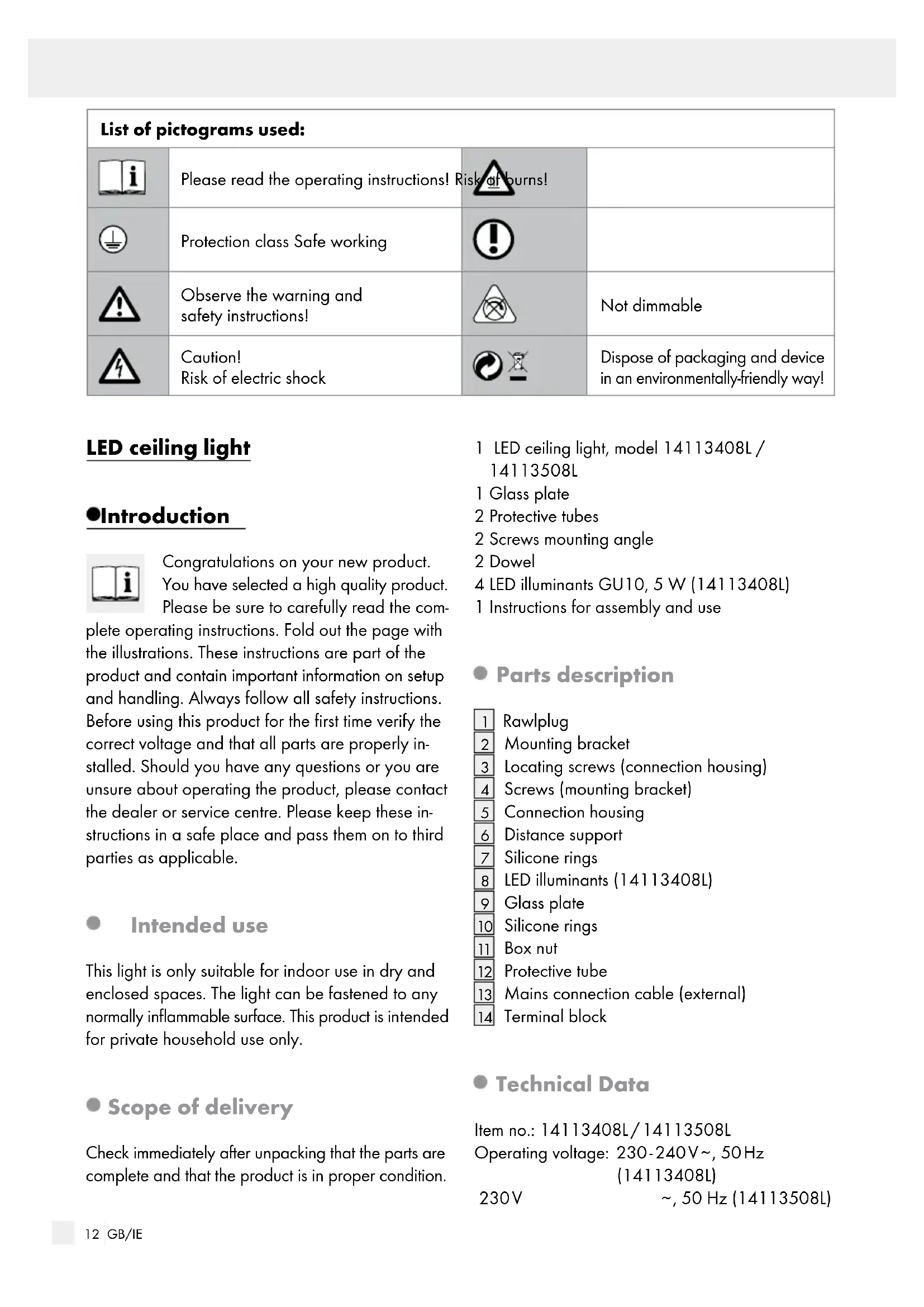
, 50 Hz (14113508L) List of pictograms used: Please read the operating instructions! Risk of burns! Protection class Safe working Observe the warning and safety instructions! Not dimmable Caution! Risk of electric shock Dispose of packaging and device in an environmentally-friendly way!13 GB/IE Introduction / Safety Introduction Nominal power: 4 x 5 W (14113408L) 1 x 10.5W (14113508L) Lamp: 4 x LED GU10, 5 W (14113408L) 1 x LED-Modul, 10.5 W (LED not exchangeable 14113508L) Power factor/ Rated current per LED module: 0.54 / 80 mA (14113508L) Protection class: I / Protection type: IP20 Safety Safety notices Damage due to failure to comply with these operat- ing instructions will invalidate the warranty! We ass ume no liability for consequential damage! We assume no liability for material damage or personal injury due to improper handling or failure to comply with the safety instructions! Do not leave the light or packaging material ly- ing unattended. Plastic film or bags, plastic parts, etc. can be dangerous for children to play with. Caution! Risk of electric shock Ensure that a qualified electrician, or a person trained to carry out electrical installations, per- forms the electrical installation. Always check the light, power supply, and mains cable for damage before plugging it in. Never use the light if it shows any signs of damage. CAUTION! A damaged mains cable indicates a life-threatening danger due to electric shock. In the event of damage, repairs or other prob- lems with the light please contact the service centre or a qualified electrician. Prior to installation, remove the fuse or switch off the circuit breaker (0 setting) in the fuse box. Prior to installation, verify the available mains voltage corresponds with the operating voltage required for the light (230 - 240 V
14113508L). Ensure that the light does not come into contact with water or other liquids under any circum- stances. Never open any of the components of the elec- trical equipment or insert any objects into the same components. This will pose a risk of fatal injury from electric shock. Do not install the light on a wet or conductive substrate! The connecting leads must be covered with the included rounding wires. Prevent fire and injury hazards RISK OF INJURY! Check each lamp and lamp glass for damage immediately after unpacking. Do not mount the light with defective lamps and / or lamp lenses. Should this be the case, contact the service centre for a replacement. Do not look directly into the light source (lamp, LED etc.). RISK OF BURNS! Ensure the light
as been switched off and has cooled before touching it to avoid burns. Light
develop a lot of heat around the lamp head. Allow the light to cool off completely. Only for (14113508L): The illuminant in this light cannot be replaced. If the illuminant has reached the end of its life, the entire light must be replaced. Only for (14113408L): Only use LED lamps with a maximum output of 5 Watt. Safe working Mount the light so that it is protected from mois- ture and dirt. Carefully prepare for assembly and allow your- self adequate time. Organise all parts and any necessary additional tools or materials before starting so they are easy to reach. Always be attentive! Always pay attention to what you are doing and use common sense.14 GB/IE Start-up / Maintenance and Cleaning / Disposal / Warranty and ServiceSafety / Preparation / Prior to installation / Start-up Never install the light if you are having difficulty concentrating or do not feel well. Preparation Required tools and material The tools and materials specified are not included. This information and these values are non-binding and are only provided as a reference. The nature of the material is determined by the individual local conditions. - Pencil / marking tool - Voltage tester - Screwdriver - Electric drill - Drill (approx. ø 6 mm) - Side cutting pliers - Ladder Prior to installation Important: The electrical connection must be performed by a qualified electrician or a person trained in electrical installations. This person must be familiar with the properties of the light and the connection regulations. Familiarise yourself with all the instructions and diagrams in this manual, as well as with the light itself, before you install it. Before installation ensure that the circuit, to which the light will be connected, is not energised. To do so, remove the fuse or switch off the circuit breaker in the fuse box 0 position. Use the voltage tester to verify the de-energised status. Start-up Mounting the light Remove the locating screws
visible at the side of the connection housing
and remove the mounting bracket
at the back. Only for 14113408L: Use a clean, lint-free cloth to insert the light bulbs
into the sockets and secure with a careful ¼ turn to the right. Remove the cap nuts
from the distance carriers
Remove the silicone disk from the distance car- riers
on the distance carriers
Be sure that the decoration is facing outward. Place the silicone disk on the distance carriers
again and secure it with a cap nut
from the distance carriers
Remove the silicone disk from the distance car- riers
on the distance carriers
Ensure that the rough side is facing down. Place the silicone disk on the distance carriers
again and secure it with a cap nut
Be sure it is correctly positioned. Use the slotted holes on the mounting bracket
to mark the bores. Now drill the fixing holes (approx. 6 mm, depth approx. 30 mm). Be careful not to damage the supply line. Feed the power cord (external)
through the cable guides
into the bores. Fasten the mounting bracket
with the pro- vided screws
.15 GB/IE Start-up / Maintenance and Cleaning / Disposal / Warranty and ServiceSafety / Preparation / Prior to installation / Start-up Now connect the connection cable of the light with the connection cable (external)
Note: be sure to correctly connect the individ- ual leads on the mains cable (external)
: live wire, black or brown = symbol L, neutral wire, blue = symbol N, earth wire, green-yellow = symbol
to connect the light to the mounting bracket
Replace the fuse or switch on the circuit breaker in the fuse box (position I). Your light is now ready to use. Replacing the bulb (14113408L) CAUTION! RISK OF ELECTRIC SHOCK! When replacing the illuminant, first disconnect the light from the mains. To do so, remove the fuse or switch off the circuit breaker in the fuse box (0 position).
CAUTION! DANGER OF BURNS DUE
TO HOT SURFACES! Allow the light to cool down completely. Remove the cap nuts
from the distance car- riers
Remove the silicone disk from the distance car- riers
from the distance carriers
Caution: Be careful of the remaining silicone disks under the glass pane. These can fall when removing the glass pane. Remove the defective GU10 lightbulb from the socket. Use a clean, lint-free cloth to insert the lamp- bulb. Insert the new GU10 lightbulb into the socket and secure with a careful ¼ turn to the right. Check that a silicone disk is applied to each distance carrier. Lay the glass pane on the distance carriers. Be sure that the decoration is facing outward. Place the silicone disk on the distance carriers
again and secure it with a cap nut