
WPAA1 - Other camera accessories NIKON - Free user manual and instructions
Find the device manual for free WPAA1 NIKON in PDF.



| Product type | Nikon camera wired remote control |
| Model | MC-36A (WPAA1) |
| Brand | Nikon |
| Dimensions (L × H × D) | Approx. 155 × 18 × 40 mm (excluding protruding parts) |
| Weight | Approx. 128 g (with batteries) |
| Cable length | Approx. 850 mm |
| Power supply | Two AAA 1.5 V LR03 alkaline batteries (not included) |
| Battery life | Approx. 2 months continuous (delay 5 min, exposure 4 min 56 s, interval 5 min) |
| Operating temperature | -20°C to +50°C |
| Main functions | Programmable timer (delay, exposure, interval, number of shots), manual release, lock control, backlight |
| Delay range (DELAY) | 0 s to 99 h 59 min 59 s (in 1-second increments) |
| Exposure range (LONG) | 0 s to 99 h 59 min 59 s (in 1-second increments) |
| Interval range (INTVL) | 1 s to 99 h 59 min 59 s (in 1-second increments) |
| Number of shots (N) | 1 to 399 or unlimited (--) |
| Connector | 10-pin connector |
| Compatible cameras | Nikon DSLR camera bodies (D4, D3, D2, D1, D800, D300, D810, D700, D200, D100 series) and film camera bodies (F6, F5, F100, F90 series) |
| Optional accessories | MC-21A/MC-21 extension cord, MC-35A/MC-35 GPS adapter, AS-15 flash bracket |
| Maintenance and cleaning | Avoid moisture, shocks, sudden temperature changes, and strong magnetic fields. Clean with a dry cloth. |
| Safety | Do not disassemble, do not expose to water or flames, use only recommended batteries, keep out of reach of children |
| Spare parts and repairability | Batteries (available separately). For any repairs, contact an authorized Nikon service center. |
| General information | Class B (digital equipment), complies with FCC and Canadian regulations. Selective sorting at end of life (WEEE). |
Frequently Asked Questions - WPAA1 NIKON
User questions about WPAA1 NIKON
0 question about this device. Answer the ones you know or ask your own.
Ask a new question about this device
Download the instructions for your Other camera accessories in PDF format for free! Find your manual WPAA1 - NIKON and take your electronic device back in hand. On this page are published all the documents necessary for the use of your device. WPAA1 by NIKON.
USER MANUAL WPAA1 NIKON
For Your Safety. 2 Notices 4 Introduction 6 Parts of the MC-36A 6 Body. 6 Control Panel. 7 Inserting Batteries 7 Replacing Batteries. 7 When the MC-36A Is Not in Use. 8 The Illuminator/Lock Button. 9 Connecting the MC-36A. 9 Using the MC-36A. 10 Timed Photography. 10 Manual Release. 17 Precautions for Use 18 Caring for the MC-36A 18 Specifications. 19
For Your Safety (1/2)
En
To prevent damage to your Nikon product or injury to yourself or to others, read the following safety precautions in their entirety before using this equipment. Keep these safety instructions where all those who use this equipment will read them.
The consequences that could result from failure to observe the precautions listed in this section are indicated by the following symbol:
This icon marks warnings, information that should be read before using this Nikon product to prevent possible injury.
Do not disassemble or modify
Failure to observe this precaution could result in electric shock or product malfunction. Should the product break open as the result of a fall or other accident, remove the batteries and take the product to a Nikon-authorized service representative for inspection.
Keep dry
Do not handle with wet hands or immerse in or expose to water or rain. Failure to observe this precaution could result in fire or electric shock.
Do not use in the presence of flammable gas
Failure to observe this precaution could result in explosion or fire.
Keep out of reach of children
This device contains small parts which may pose a choking hazard. Consult a physician immediately if a child swallows any part of this device.
Turn off immediately in the event of malfunction
Should you notice smoke or an unusual smell coming from this device, remove the battery immediately and take the device to a Nikon-authorized service representative for inspection, taking care to avoid burns. Continued operation could result in injury.
For Your Safety (2/2)
Do not expose to high temperatures
Do not leave the device in a closed vehicle under the sun or in other areas subject to extremely high temperatures. Failure to observe this precaution could result in fire or in damage to the casing or internal parts.
Observe precaution when handling batteries. Batteries may leak or explode if improperly handled. Observe the following precautions when handling batteries for use in this device:
- Use only batteries listed in this manual. Do not mix old and new batteries or batteries of different types.
- Read and follow all warnings and instructions provided by the manufacturer.
- Do not short or disassemble.
- Do not expose to flame or excessive heat.
- Do not attempt to insert batteries upside down or backwards.
- Batteries are prone to leakage when fully discharged. To avoid damage to the product, be sure to remove the batteries when leaving the product unattended for prolonged periods or when no charge remains.
- Should liquid from the batteries come into contact with skin or clothing, rinse immediately with fresh water.
Notices (1/2)
En
Notice for Customers in the U.S.A.: Federal Communications Commission (FCC) Radio Frequency Interference Statement
This equipment has been tested and found to comply with the limits for a Class B digital device, pursuant to Part 15 of the FCC rules. These limits are designed to provide reasonable protection against harmful interference in a residential installation. This equipment generates, uses, and can radiate radio frequency energy and, if not installed and used in accordance with the instructions, may cause harmful interference to radio communications. However, there is no guarantee that interference will not occur in a particular installation. If this equipment does
cause harmful interference to radio or television reception, which can be determined by turning the equipment off and on, the user is encouraged to try to correct the interference by one or more of the following measures:
- Reorient or relocate the receiving antenna.
- Increase the separation between the equipment and receiver.
- Connect the equipment into an outlet on a circuit different from that to which the receiver is connected.
- Consult the dealer or an experienced radio/television technician for help.
CAUTIONS
Modifications: The FCC requires the user to be notified that any changes or modifications made to this device that are not expressly approved by Nikon Corporation may void the user's authority to operate the equipment.
Interface Cables: Use the interface cables sold or provided by Nikon for your equipment. Using other interface cables may exceed the limits of Class B Part 15 of the FCC rules.
Nikon Inc.,
1300 Walt Whitman Road, Melville, New York 11747-3064, U.S.A. Tel.: 631-547-4200
Notices (2/2)
Notice for Customers in Canada
CAUTION: This class B digital apparatus meets all requirements of the Canadian Interference Causing Equipment Regulations.
Notices for Customers in Europe
This symbol indicates that electrical and electronic equipment is to be collected separately.
The following apply only to users in European countries:
- This product is designated for separate collection at an appropriate collection point. Do not dispose of as household waste.
- Separate collection and recycling helps conserve natural resources and prevent negative consequences for human health and the environment that might result from incorrect disposal.
- For more information, contact the retailer or the local authorities in charge of waste management.
This symbol on the battery indicates that the battery is to be collected separately.
The following apply only to users in European countries:
- All batteries, whether marked with this symbol or not, are designated for separate collection at an appropriate collection point. Do not dispose of as household waste.
- For more information, contact the retailer or the local authorities in charge of waste management.
Introduction
En
Thank you for your purchase of an MC-36A remote cord. The MC-36A is equipped with an interval timer suited to a wide variety of tasks, including astronomical photography. See page 19 for a list of compatible cameras.
Parts of the MC-36A (1/4)
Refer to the illustrations inside the front cover.
Body
① 10-pin connector. 9 ② Cord. ③ Release lamp. 14-15 ④ Control panel. 7-15, 17 ⑤ TIMER START/STOP button. 14-15 ⑥ SET button. 10, 12, 14 ⑦ Illuminator/lock button. 9 ⑧ Arrow button. 12-13 ⑨ Shutter-release button. 17 ⑩ Battery-chamber cover. 7 ⑪ Eyelet for strap (available separately; use cell phone or other similar strap).
Parts of the MC-36A (2/4)
Control Panel
Selection cursor. 12-13 Timer display. 12-15, 17 3 Lock indicator. 9 4 Low battery indicator. 5 "TIMER ACTIVE" indicator. 14-15 6 Speaker on/off indicator. 11, 13 7 SET indicator. 10, 12-14 8 "RELEASE" indicator. 14-15, 17 Number of shots. 11-15
- The illustration inside the front cover shows the control panel with all elements lit. In the other illustrations throughout this manual, elements relevant to the explanation in the accompanying text are shown in black. Indicators not mentioned in the text are shown in gray.
Inserting Batteries
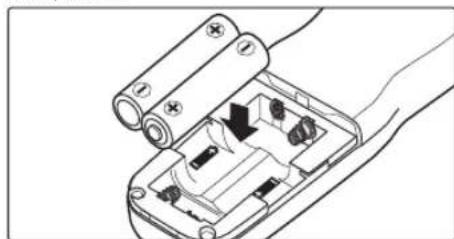
Slide the battery-chamber cover (10) from the back of the MC-36A and insert two AAA 1.5 V LR03 alkaline batteries (available separately) as shown.

The Low Battery Indicator (
The low battery indicator (4) will blink when the batteries are low. Ready spare batteries.
Parts of the MC-36A (3/4)
Replacing Batteries
When replacing batteries: 1. Check that the "TIMER ACTIVE" (5) and "RELEASE" (3) indicators are not displayed (see right). 2. Turn the camera off and disconnect the MC-36A. 3. Remove the batteries. 4. Wait until the control panel has gone out and insert new batteries.
When the MC-36A Is Not in Use
The MC-36A is not equipped with an off switch. To reduce the drain on the batteries when the MC-36A is not in use, end shooting and check that the "TIMER ACTIVE" (5), "SET" (7), and "RELEASE" (8) indicators are not displayed (see right). The drain on the batteries increases when these indicators are flashing.
The "TIMER ACTIVE," "SET," and "RELEASE" Indicators
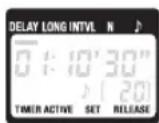
| If this flashes It means this; do this to turn it off | |
| TIMER ACTIVE | Timer active (page 15); press TIMER START/STOP button (⑤). |
| SET | Settings can be modified (page 10); press SET button (⑥). |
| RELEASE (TIMER ACTIVE not flashing) | Manual release active (page 17); release shutter-release button (⑨; if button is in HOLD position, release shutter-release lock). |
Parts of the MC-36A (4/4)
Connecting the MC-36A
The Illuminator/Lock Button
Press the illuminator/lock button (7) briefly to activate the control panel backlight. The backlight will remain lit for about six seconds; pressing the arrow button (8) while the backlight is on extends the timer for another six seconds. To lock all controls except the shutter-release (9) and illuminator/lock buttons, press the illuminator lock button until the lock icon (10) is displayed in the control panel. To release the lock, press the illuminator/lock button until the lock icon is no longer displayed. DELAY LONG INTVL N
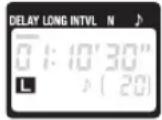
2 Check that the "TIMER ACTIVE" (5) and "RELEASE" (8) indicators are not displayed. 3 Remove the 10-pin terminal cover from the camera. Keeping the mark on the 10-pin connector (①) aligned with the mark on the camera body, insert the connector as shown and then tighten the locking nut.
Illustration shows D3S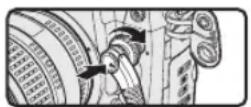
Disconnecting the MC-36A
After checking that the "TIMER ACTIVE" (5) and "RELEASE" (6) indicators are not displayed, turn the camera off and disconnect the MC-36A. Replace the 10-pin terminal cover.
Using the MC-36A
En
The MC-36A functions as:
An automatic timer (pp. 10-16). Choose the delay (time before shooting starts), exposure time, interval, and number of shots for timed interval photography. Shutter speed can be selected with the camera if desired (pg. 16). A manual release (pg. 17). Take photographs manually using the shutter-release button on the MC-36A. Photographs can be taken manually even when the timer is running.
Timed Photography (1/7)
1. Adjust Camera Settings
1.1 Connect the MC-36A (pg. 9) and turn the camera on. 1.2 Adjust camera settings as follows (see the camera manual for details):
| Exposure mode M (manual) | |
| Shutter speed Bulb | |
| Interval timer Off | |
| Focus mode AF-C (continuous-servo autofocus) | * or M (manual) |
| Continuous S (single frame) | |
- Select "release priority" if available.
2. Set the Timer
2.1 Press the SET button (6). "SET" will flash in the control panel.
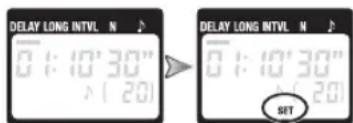
The MC-36A can be connected to the camera after the timer has been set.
Timed Photography (2/7)
2.2 Adjust the following settings:
| Option Description Supported settings | |
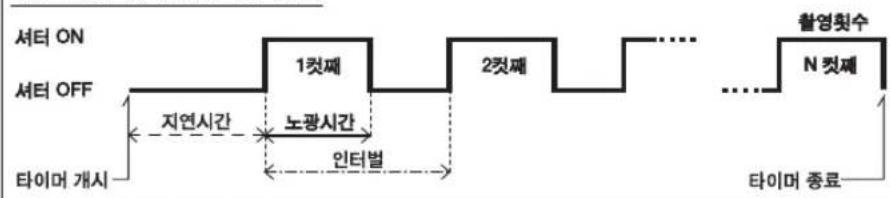
| DELAY Delay before shutter is released | 0 s to 99 hrs 59 min 59 s (in one-second increments) |
| LONG Exposure time | |
| INTVL Interval 1 s to 99 hrs 59 min 59 s (in one-second increments) | |
| N Number of shots 1 to 399, | --(unlimited) |
| Speaker on/off (on), (off) | # |
| Delay, Exposure, and Interval Settings Shutter opensShutter opens Shutter closesShutter close Delay Timer starts | Number of shots (N) nth frame Timer ends |
Timed Photography (3/7)
En
Setting the Timer
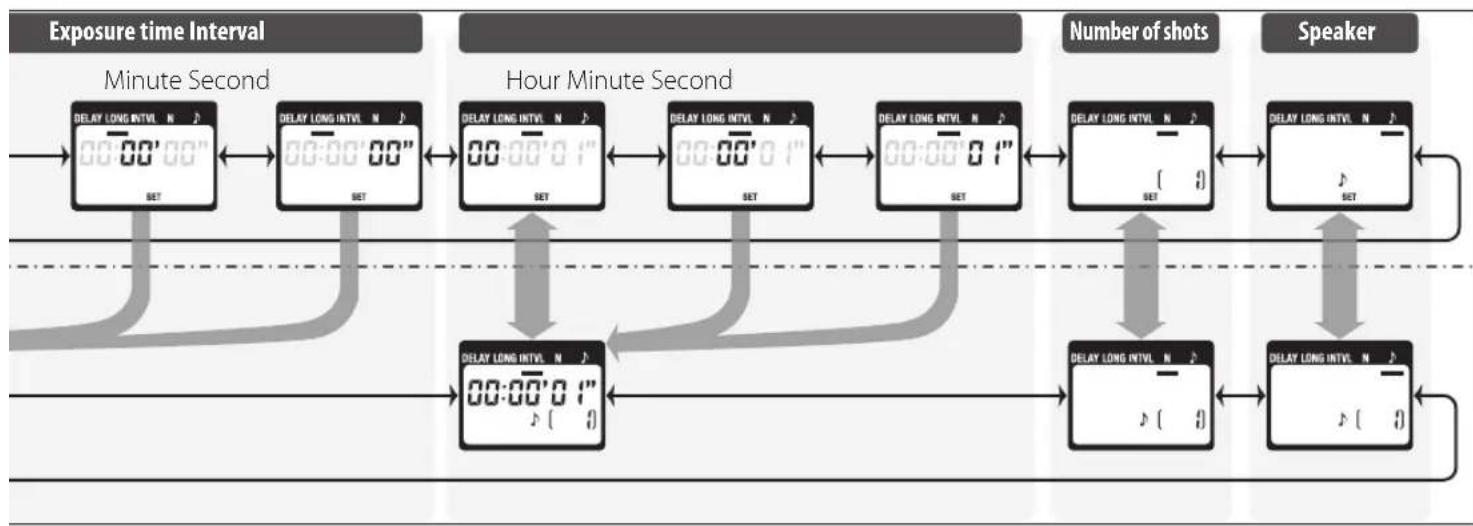
Use the arrow button to set the timer. Press left or right to select, up or down to change. The current selection is indicated by the selection cursor (1).

Adjust settings
Press SET (6) at any time to complete the operation and display the new settings for the selected item. To view other settings, press the arrow button left or right. The current selection is indicated by the selection cursor (1). Press the SET button to edit the current setting as described above.
Setting complete
Delay (time until shooting starts)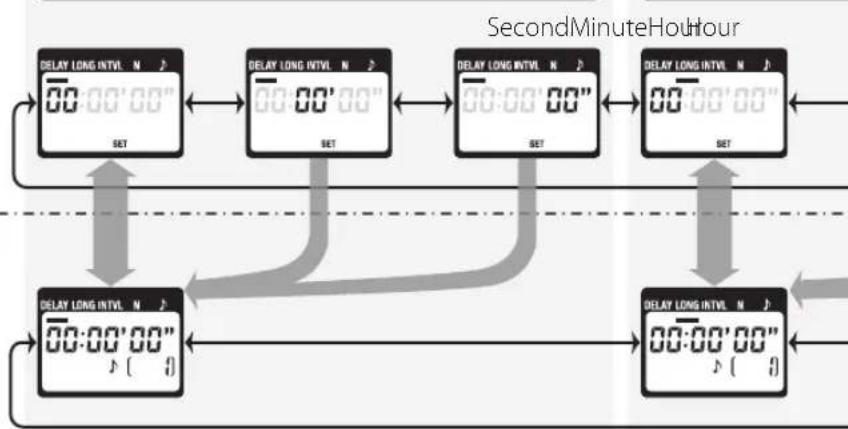
Timed Photography (4/7)
Timed Photography (5/7)
Setting the Timer
To ensure correct operation, choose an interval at least one second longer than the exposure time. When using autofocus, set the delay to two seconds or more and choose an interval at least two seconds longer than the exposure time to ensure that the camera has time to focus. When using long exposure noise reduction (available with some digital cameras), the interval should be at least twice the exposure time.
Intervals of 00:00:00 will automatically be reset to 00:00:01 when the SET button (6) is pressed to put settings into effect.
To set the number of shots to -- (unlimited), select 1 and press the arrow button (⑧) down or select 399 and press the arrow button up.
2.3 After adjusting all settings as desired, press the SET button (6) to put the new settings into effect. A beep will sound (if the speaker is on) and the "SET" indicator will go out.
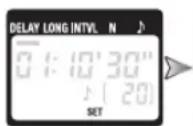
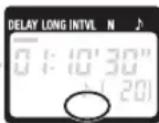
The new settings will remain in effect until changed or until the batteries are removed or exhausted.
3. Start the Timer
Press the TIMER START/STOP button 5. The timer will start and "TIMER ACTIVE" 5 will flash in the control panel. Between shots, the control panel will show the time remaining until the next photograph is taken. If the speaker is on, a beep will sound three times at one-second intervals before the shutter opens.
While the shutter is open, the control panel will show the time remaining until the shutter closes, and the release lamp and "RELEASE" indicator 8 will flash at one-second intervals. The number of shots remaining will be updated each time a photograph is taken.
Timed Photography (6/7)
Control Panel Display (Timer Active)

The Speaker and Release Lamp
The following illustration shows when a beep will sound (●) and the release lamp flash (□) with a delay of 5s, an exposure time of 4 s, and an interval of 9 s.

4. End Shooting
Shooting will end automatically when the selected number of shots has been taken. To end shooting before all photographs have been taken, press the TIMER START/STOP button (5).
Timed Photography (7/7)
Using the Camera to Select Shutter Speed
To take photographs at the shutter speed selected with the camera, adjust settings as follows:
| Camera | Exposure mode M | (manual) or S (shutter-priority auto) |
| Shutter speed Any | ||
| Interval timer Off | ||
| Focus mode AF-C (continuous-servo autofocus) | * or M (manual) | |
| Shooting mode S (single frame) | ||
| MC-36A | Exposure time 0s | |
| Interval Longer than camera shutter speed | ' |
Select "release priority" if available
When using autofocus, choose an interval at least two seconds longer than the camera shutter speed to allow the camera time to focus. When using long exposure noise reduction (available with some digital cameras), choose an interval at least double the camera shutter speed.
Using the Timer
Before using the timer for extended periods, check that the batteries have enough charge. Replace the batteries when the low battery indicator (●) flashes in the control panel (4).
Manual Release
The MC-36A shutter-release button (9) functions in much the same way as the camera shutter-release button.
1. Adjust Camera Settings
Connect the MC-36A (pg. 9) and turn the camera on. Choose exposure mode, shutter speed, focus mode, and shooting mode as desired.
2. Take Pictures
2.1 Press the MC-36A shutter-release button (9) halfway and check focus and exposure, then press it the rest of the way down to take a picture. While the shutter is open, a beep will sound at one-second intervals, the "RELEASE" in
indicator (8) will flash, and the control panel will show the time remaining until the shutter closes.
To keep the shutter-release button fully pressed for bulb photography, slide the button to the HOLD position. Slide it in the opposite direction to release the lock.
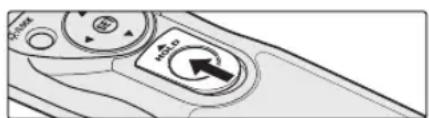
2.2 Release the button to end shooting.
The MC-36A shutter-release button can be used when no batteries are inserted. The control panel will remain off and no beep will sound.
The shutter-release button can be used to release the shutter manually while the timer is active. Timer count-down (including the control-panel display, release lamp, and beep) continues during manual release. If a manual release overlaps with an automatic release, the shutter will remain open until both exposure times have expired.
Precautions for Use
Check the camera battery level and number of exposures remaining before using the MC-36A (see the camera manual for details). The timer will continue to operate even when no pictures can be recorded due to low battery, lack or film or memory, or lack of space in the memory buffer (digital cameras only). An AC adapter (available separately) is recommended for longer sessions.
Some cameras have an AF activation option that determines whether the camera will focus when the shutter-release button is pressed halfway (see the camera manual for details). Enable shutter-release button AF-activation when using the MC-36A.
Please note that the timer is less accurate than most watches or household clocks.
Caring for the MC-36A
Do not drop: The product may malfunction if subjected to strong shocks or vibration.
Keep dry: This product is not waterproof and may malfunction if immersed in water or exposed to high levels of humidity. Rusting of the internal mechanism can cause irreparable damage.
Avoid sudden changes in temperature: Sudden changes in temperature, such as occur when entering or leaving a heated building on a cold day, can cause condensation inside the device. To prevent condensation, place the device in a carrying case or a plastic bag before exposing it to sudden changes in temperature.
Keep away from strong magnetic fields: Strong static charges or the electromagnetic fields produced by equipment such as radio transmitters could interfere with the device.
A note on electronically-controlled devices: In extremely rare instances, unusual characters may appear in the control panel and the device may stop functioning. In most cases, this phenomenon is caused by a strong external static charge. Turn the camera off, disconnect the MC-36A, remove the batteries, and then replace them once the control panel has turned off. Caution is required when handling the batteries, which may be hot from use. In the event of continued malfunction, contact your retailer or Nikon representative.
The control panel: LCD displays tend to darken at high temperatures and exhibit slower response times at low temperatures. This does not indicate a malfunction.
Specifications
| Supported cameras | Nikon D4-series, D3-series, D2-series, D1-series, D810, D800-series, D700, D300-series, D200, and D100 (requires MB-D100 battery pack) digital cameras; Nikon F6*, F5, F100*, F90-series*cameras |
| Timer delay | 0 s to 99 hrs 59 min 59 s in one-second increments |
| Exposure time | 0 s to 99 hrs 59 min 59 s in one-second increments |
| Interval | 1 s to 99 hrs 59 min 59 s in one-second increments |
| Number of shots | 1 to 399, - (unlimited) |
| Power source | Two AAA 1.5 V LR03 alkaline batteries |
| Battery life | Approximately two months of continuous shooting with a delay of 5 min, an exposure time of 4 min 56 s, and an interval of 5 min. Use of the illuminator will reduce battery life. |
| Operating temperature | -20-+50°C(-4-+122°F) |
| Dimensions (W×H×D) | Approximately 155×18×40 mm/6.1×0.7×1.6 in., excluding projections |
| Weight | Approximately 128 g/4.5 oz (with battery) Approximately 105 g/3.7 oz (MC-36A only) |
| Length of cord | Approximately 850 mm/33.5 in. |
| Compatible remote terminal accessories | MC-21A/MC-21 extension cord (operation is not guaranteed if two or more MC-21A/MC-21 extension cords are used), MC-35A/MC-35 GPS adapter cord (connects to 10-pin terminal on MC-35A/MC-35) |
- An AS-15 hot shoe adapter (available separately; attaches to the camera accessory shoe) is required when sync terminal is used.

CAUTION: This class B digital apparatus meets all requirements of the Canadian Interference Causing Equipment Regulations.
(Trigger) (TIMER ACTIVE
does not blink)
Lighting/blocking indicator 7
Connecting the MC-36A. 7
Operating procedure with the MC-36A 8
Table of contents. 8
Manual shutter release 15
Safety precautions 16
Maintenance of MC-36A 16
Technical specifications 17
Safety precautions (1/2)
To prevent damage to your Nikon equipment or injury to yourself or others, read the following safety precautions before using this equipment. Keep these precautions handy for all those who use this equipment.
The consequences that could arise from failure to observe the precautions are indicated by the following symbols:

This symbol indicates a warning that must be read before using your Nikon equipment to prevent possible malfunction or injury to yourself or others.
Do not disassemble or modify the product
Failure to observe these precautions may result in electric shock or improper operation of the product. If the product is broken as a result of a fall or other accident, remove the battery and have it checked by Nikon service personnel.
Keep the product dry
Do not handle the product with wet hands, do not immerse it in water or expose it to moisture (e.g., rain). Failure to observe this requirement may result in fire or electric shock.
Do not use the flash in the presence of flammable gases
Failure to observe this precaution may result in explosion or fire.
Bepernte ot detei
JaHHoe H3dJIe cOepKHT MeKHe dTAnI, KOtOpBle MOrYT Bb3BaTb ydyBbe npn nonaHaHn B ropNo. HeMeDiNEHNO 6bPaTntEc b K apuy B cnYae,ecn pe6eHcK nporNtT KaKyio-n6o cactb n3dEINIA.
HemeJeHHo BbIKNoaHTe H3JeNne npn HnpaBnblHom erOyHKuOnHnpOBaHH
PnnoBHeHn DbMa HnHnOeBnHoro 3anaxa, NCXoJIeOOTNDEJIH,HEMeJeEHNOI3BNeKNTe 6BaTapeo,CobIOJAAMEpI ppeOCTopOXHOCTn, TObHe OBeKeHcB,IOTHecTe B cepBnCHbIeHTP KOMNaHNI NIKon IPOBepKNmIaHOCHTNK. PiOpaJIkeHne paObToM oKeT npINBcTn K NoIyueHHIO TpaBMbl.
MepblnpedocTopoKHoCTn(2/2)
He noDBepraTe H3dEne DeCTBnO BbCOKX Temnepatyp He octabIaIe I3dEne B 3akpytOM ABTOMOBIIe NOI cONHcEM INB DpyrN XMeTAX,IE OHO MOKET NoDBepHTyBCA DeCTBnQ Upe3MepHO BbCOKIX TEMnepatyp. HecobIOgHeN ToTmpebl PedeocToPOKHOCHN MOKET IPnBeCTN KIOKApY NIOBpEXDeHIO KOPyCa NIOBO BHyTpEHNX HaCTeN.
CobnOaHteocpOxHOCTbnpo6paUEHNc6batapeMn HnpabInbHoe o6paueHne c6batapeMn MOKTe npBecTH KIX npoTEKaHIO NIN B3pyIBy. CoNIOaHTe CnEkyuIe MebpI npEOCTOpOxHOCTn PnO6paueHNc 6batapeMn,NCnOB3yeMbIMB DAHNOMYCTPOINCTBE:
IcnoB3yTe6atapEnToIbKOToTOrTnA,KOTOpBm Kb3aHnB HactoUe pykoDBCTBe. HeOnyCTMnO COMeCtHOe IcNOb3Os3Hne CTApBX N HOBX6TapeE, aTAKKe 6atapEn p3hXbTNIOB. O3HAKONBtcebCOCEMMIpeyIpeKJehHMNHCTpyKLIMM,mpoocTaeHHBMnPO4BQdTeEM. He 3aMbKaIte KOHTaKb6aTapeu Hn He pa3bnpaTe ee. HeHarpeBaTe 6aTaPeK u He 6pocaiTe ee B orOHe.
-Пиуctановсбатарс co6noaTe npabnblhyo opentauio. PONHOCTBOpa3pKHeHbIeAkkMyTOpHbIeBatapeMOTyIPOTEkath.BoMBekKaHneIOBpExJeHHPOTOKAMEPBnBNEKAHTeBaTapeuN3pTOKAMepbI pUcDITENTbHOMHECNOLB3OBAHINUNBcUYaeNOHOPa3pKnDbatape Bcnyae nonadnna JxNkOCTn 3aBapen HaKoxy nnoDexy HEmednHnnpomOnTe COOTBeTcByIOoe METo npTOHO BODn.
PpMueaHnIy nIbNoIb3ObaTeNeB Ebpone
JaHHB CMMBOB 03HauHaET,HTO 2eKeTPNueECKoeN eKeTPOHHe OOBpyDabHne DOnKHe yTNINBAPOBATbCR OTDcNbHOOT BbTOBBIX OTXOIOB. Cnedyoue 3aemuHnna KacatoTOnbKO nolb3oBaTeNeB Ebponeckx CTpaHax JaHHOE HJDNNEI NOJNEXT YINNAZIMCU B COOTBETCTBYOUX NHYKTA X COpA. He ABpBaBnAE HJDNIE BMCCTC BHTOBM MyCOPOM.
PaBbIbIc60nIpepaObTKaOTXIO8NOMoAOT CbepeBaTINPPOHIEpeCpCBNIPeDOPBAAIO TOpMaTeBHe NocnECTBNI DIA3DopOBBRIIOE IN OkpyKaUeepB, KOTOpB MORYT 8O3HHKHybN3-3A HnpeabHbHOyTNM3AaH. IpOoBHe CBeHnMgKHO NPOyHbY npOaBaA HIN B MeCTHOp oprAHMaUN,OTBeTCTBEHHO 3a yPpAbeHne OTxOaDN.
3TOT CMMON Ha batape yka3bIbAc Ha To,HTO DAHHAR GATAPER NOJNEKHT yTHIN3AUN OTdEHLHO OBTOBIX OTXOOB.
CnDyUHcEZAMCCHAHN XACQTCNTOIbXIOIb3OBATcNEB CBPONICCKHXCTPAHIX:
Bce6bapenH3aCIMOOTTOIPOAPKPOABHUNI OHNTHINCMBOJNOHNHTNOEKNTYINNAUCAUNCOBTCTAYOONHNYKTAXcbopa.HeBbpaCBBAHTEN BMECEcCBtOBMIMXTOQDAAM IpOpaBHe CBeHnM MOHO NOnyHbY npOpaBua KIN B MeCTHOOPraHbALIM,OTBETCBHNO 3a ynpabHe HTEOxDAJIe
List of parts for MC-36A (1/3)
Thank you for purchasing the MC-36A remote control cable! The MC-36A cable is equipped with an interval timer, allowing you to perform a wide range of tasks, including time-lapse photography. For a list of compatible cameras, see page 17.
See the illustration on the first page of the cover.
Body
① 10-pin connector ② Cable ③ Shutter release indicator. 12-13 ④ Control panel 6,7,8-13,15 ⑤ TIMER START/STOP button 12-13 ⑥ SET button. 8,10,12 ⑦ Illumination/lock button. ⑧ Arrow button 10-11 ⑨ Shutter release button. 15 ⑩ Battery compartment cover. 1Shutter release (optional; use the remote release or another compatible device)
List of parts for MC-36A (2/3)
Control panel
1 Cursor. 10-11 2 Timer display. 10-13,15 3 Lock indicator 4 Battery level indicator 5 TIMER ACTIVE indicator 12-13 6 Shooting mode indicator (on/off) 9,11 7 SET indicator 8,10-12 8 RELEASE indicator 12-13,15 9-13 On the first page of the cover, the control panel is shown with all elements. In other illustrations in this manual, elements not mentioned in the text are shown in gray. Indicators not mentioned in the text are shown in gray.
Installing the batteries
Slide the battery compartment cover (10) on the back of the MC-36A and insert two AA batteries (LR03, 1.5 V) (sold separately), observing the polarity indicated in the figure.
Battery level indicator (
The battery level indicator (4) flashes when the battery charge is low. Prepare a spare set of batteries.
Replacing the batteries
To replace the batteries: 1. Make sure that the TIMER ACTIVE (5) and RELEASE (8) indicators are not displayed (see right). 2. Turn off the camera and disconnect the MC-36A. 3. Remove the batteries. 4. Wait until the control panel goes off, then insert new batteries.
When the MC-36A is not in use
The MC-36A is not equipped with a power switch. To reduce battery consumption when the MC-36A is not in use, finish the shooting and make sure that the TIMER ACTIVE (5), SET (7), and RELEE
8 indicators are not displayed (see right). When these indicators flash, the load on the battery increases.
MC-36A parts list (3/3) MC-36A connection
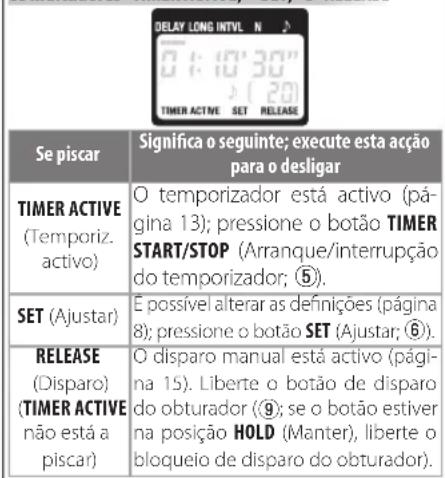
TIMER ACTIVE, SET, and RELEE indicators
If the interval is equal to 00:00:00, then when you press the SET button (6) to save this parameter, its value will automatically change to 00:00:01.
To set an unlimited number of shots (-), select it and press the down arrow button (⑧), or select 399 and press the up arrow button.
2.3 After setting all parameters as required, press the SET button (6) to apply the new settings. A beep will sound (if the beep is enabled), and the SET indicator will turn off.
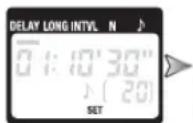

The new settings will remain in effect until they are changed or the battery is discharged.
3.3 Starting the timer
Press the TIMER START/STOP button 5. The countdown begins, and the TIMER ACTIVE indicator 5 lights up on the control panel. During the interval between shots, the time remaining until the next shot is displayed on the control panel. If the beep is enabled, three short beeps will sound one second before the shutter opens.
When the shutter is open, the time remaining until the shutter closes is displayed on the control panel, and the shutter release indicator RELEE (8) flashes at a rate of one second. The number of remaining shots changes with each shot.
Shooting with the self-timer (6/7)
Control panel (during timer operation)

Beep and release indicator
The following figure shows the moments when the beep ( ) will sound and the release indicator ( ) will flash: during a 5 s delay, an exposure time of 4 s, and an interval of 9 s.
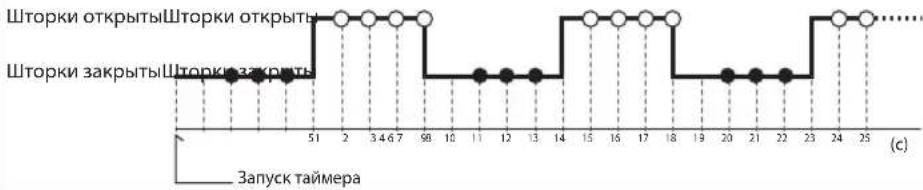
4.3 Ending the shooting
The shooting will end automatically when the set number of shots has been taken. To end the shooting earlier, press the TIMER START/STOP button (5).
Shooting with the self-timer (7/7)
Setting the delay using the camera
Set the delay using the camera controls, and configure the following parameters.
| Камера | Рек imm创新创业 | M (pyuho) iviS (aBToMaTueckm c npOpntom 3aTbopa) |
| Быдэржka Лобая | ||
| Таймер abToCnUpcKa OTKIOUeH | ||
| Рек imm Фокс neuropьк | AF-C (нелретынава abToMaTuecka сервфokс neuropьк)* ivi M (pyuho) | |
| Рек imm Сьемки S (пokadpoшя Сьемки) | ||
| MC-36A | ДInteльноctb экнозци | 0c |
| Итэрвал Бolyш, чь Мыдэржka, HabTopeHHa Ha KaMepe | ||
| Yctanobite npInopitet crpaTaBHaHЯ 3aTbopa, ecnno STO BO3MOxHO. | ||
| ПричincNoIb3OBAHIM abToФокс neuropьк Bbl6epHTe INtErBaI, pReBbIaOuIsh yCTaHOBNeHHyO bIePJKKy 3aTbopa lo KpaIneH Mepe Na DBe ceKHyIb, UTObIy y fOToKamEpby bbl NO DocTaTOUHO BpemeHn Ha | ||
| Фокс neuropьк. Приpbote cФунКцeIи noDabJIeHMy IyMa pri nДinteьнOH 3KcNo3UIM (NODeRJKBaETC#r OTdIeHbIMI UINΦoRbIMI ΦOTOKaMePamI) INtEerBaI doJIkeH npeBbIaTb yCTaHOBNeHHoe Bpema BbldePJKKs 3aTbopa Ka MHIHym B Dla pa3a. | ||
Using the timer
Before using the timer for a long period, make sure the battery is sufficiently charged. If the control panel (4) shows a low battery indicator (1-3 segments).
Manual shutter release
The shutter release button (9) of the MC-36A functions similarly to the shutter release button of the camera.
1. Setting camera parameters
Connect the MC-36A cable (p.7) and turn on the camera. Select the exposure mode, delay, and focusing modes for shooting.
2. Taking a photo
2.1 Press the shutter release button (9) of the MC-36 halfway to check focusing and exposure, then press it fully to take a photo. If the shutter curtains are open, beep sounds will be emitted at one-second intervals, the RELEASE indicator (8) will light up, and the remaining time until the curtains close will be displayed on the panel.
The remaining time until the curtains close is displayed.
To lock the shutter release button in the pressed position during shooting, slide it to the HOLD position. To release the lock, slide the button in the opposite direction.
2.2 Press the shutter button to complete the shooting.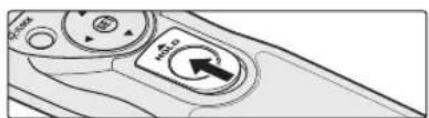
The MC-36A shutter release button can also be used when the camera is not attached. In this case, the control panel will remain off and no audible signal will be given.
The shutter release button can be used for manual shooting with the timer running. With manual shutter release, the countdown on the timer (including the display on the control panel, the shutter release indicator, and the audible signal) will continue. If the manual shutter release coincides with the automatic release, the shutter will remain open until the end of the selected exposures.
Precautions for use
Charge the battery and check the remaining shots before using the MC-36A (see the camera manual for details). The timer operation continues even if shooting is not possible due to low battery level, the camera is not attached, or insufficient memory (for digital cameras). For extended shooting, it is recommended to use the AC adapter (available separately).
Some cameras have an auto bracketing function that determines whether the camera will perform bracketing when the shutter release button is pressed halfway (see the camera manual for details). When using the MC-36A, be sure to disable auto bracketing on the shutter release button.
Remember that the timer is less accurate than most dedicated timepieces.
MC-36A care
Protect the camera: The camera may be damaged if subjected to strong shocks or vibration.
Keep the product dry: This product is not waterproof and may malfunction if immersed in water or exposed to high humidity. Corrosion of the internal mechanism may cause irreparable damage.
Avoid sudden changes in temperature: Sudden changes in temperature, such as when entering a cold room from a warm one, may cause condensation to form inside the camera. To protect against condensation, place the camera in a sealed plastic bag before exposing it to sudden temperature changes.
Keep the product away from strong magnetic fields
Electromagnetic interference and static electricity: Strong electromagnetic fields or static electricity generated by various equipment, such as radio transmitters, may cause interference and affect the operation of the device.
Note on devices with electronic control: In rare cases, when unusual symbols appear on the control panel, the device may stop working. In most cases, this is due to strong external static electricity. Turn off the camera, disconnect the MC-36A, remove the batteries, and then reinstall them, waiting until the control panel goes off. When handling batteries, exercise caution, as they may become hot. If the problem persists, contact an authorized Nikon service center.
Control panel LCD screens have a response time that is increased at high temperatures and reduced at low temperatures. This is not a sign of malfunction.
Technical specifications
| Сов mintимble foToKampebI | Liofpobte foToKampebI Nikon cepi D4, cepri D3, cepri D2, cepri D1, D810, cepri D800, D700, cepri D300, D200 u D100 (trpebyetcnaHaiuHne 6batapeHoro 6boka MB-D100); pIIeHouHne foToKampebI Nikon F6; F5, F100* u cepri F90° |
| ЗадерЖа таймра OT O сdo 99ч 59 мIn M 59 c (сшагь mВ оndу cekyнду) | |
| Длntелбость ExklnoZиMuN OT O сdo 99ч 59 мIn M 59 c (сшагь mВ ondу cekyнду) | |
| Интервал OT 1 с do 99ч 59 мIn M 59 c (сшагь mВ ondу cekyнду) | |
| ЧИСТСНМКOB OT 1 do 399 mIn | - - (he orpaHnueHo) |
| Источник питаня Дibe ue ile nouchы batepei AAA tma LR03 ha napiprjKeHne 1,5 B | |
| Ресур pa6otby ot 6batapei | ПриблзntelbNo Дba MeCAla HeIppeBbHNo CbEaMkn CЗaTePxKo 5MH, ВрemeHem BvIepkKn 4MH NHTePbAOM 5MH. ИспolyZobahme noDcBETKN ChnKaaET cspok clyXb6b6a7b6a7pei. |
| Ра6очая Tempeparatypa -20 +50°C | |
| Размрь (III × B × r) ПrinБлзntelbNo 155 × 18 × 40 MM (6e3 BvICTyaIOuz hucteY) | |
| Мasca ПrinБлзntelbNo 128 r (c 6batapeeY) | |
| Длina Тrosнka ПrinБлзntelbNo 850 MM | |
| Сов mintимble рinnadLeJeKoHCTnДЯ ра3bebma ДиstanTuHOnHOrу npavBAnHnE | УdlinHtelb MC-21A/MC-21 (при coedIneHm Дух x 6bOee уdlnHtelen M-C-21A/MC-21 npabInbHnay pa6ota He rapaTnpyeTcY), shyp-nepexodnIK GPS MC-35A/MC-35 (ндкюаeTcK 10-KoHTakThomy rHe3dy MC-35A/MC-35) |
To connect the MC-36A, an adapter for the D5-15 connector is required (purchased separately; connects to the connector for the camera).
External MC-36A cable
User manual
Contents
For your safety 3
Introduction. 5
Parts of the MC-36A (2/3)
Control panel
The indicators "TIMER ACTIVE," "SET," and "RELEASE"
The illuminator button / locks the camera.
Table of contents (2/7)
2. Table of contents

| 大変はリフロー | nationwide card of the 1945 US Army and Navy, including the U.S. Navy, the U.S. air force, the U.S. sea freight, the U.S. military, the U.S. marine, the U.S. military, the U.S. military, the U.S. military, the U.S. military, the U.S. military, the U.S. military, the U.S. military, the U.S. military, the U.S. military, the U.S. military, the U.S. military, the U.S. military, the U.S. military, the U.S. military, the U.S. military, the U.S. military, the U.S. military, the U. S. military, the U. S. military, the U. S. military, the U. S. military, the U. S. military, the U. S. military, the U. S. military, the U. S. military, the U. S. military, the U. S. military, the U. S. military, the U. S. military, the U. S. military, the U. S. military, the U. S. army, the U. S. army, the U. S. army, the U. S. army, the U. S. army, the U. S. army, the U. S. army, the U. S. army, the U. S. army, the U. S. army, the U. S. army, the U. S. army, the U. S. army, the U. S. army, the U. S. army, |
| 戦害状態 | 0~99 |
| 対照の相貌 | 0~99 |
| 対照の相貌 | 0~99 |
| 対照の相貌 | 0~99 |
| 対照の相貌 | 0~99 |
| 対照の相貌 | 0~99 |
| 対照の相貌 | 0~99 |
| 対照の相貌 | 0~99 |
| 対照の相貌 | |
| 対照の相貌 | |
| 対照の相貌 | |
| 対照の相貌 | |
| 対照の相貌 | |
| 対照の相貌 | |
| 対照の相貌 | |
| 対照の相貌 | |
| 対照の相貌 | |
| 対照の相貌 | |
| 対照の相貌 |
No reproduction in any form of this manual, in whole or in part (except for brief quotation in critical articles or reviews), may be made without written authorization from NIKON CORPORATION.
NIKON CORPORATION
CCCA
Printed in Japan
© 2012 Nikon Corporation
SB2106(D3)
6MDR05D3-06
- FOR YOUR SAFETY (1/2)
- DO NOT DISASSEMBLE OR MODIFY
- KEEP DRY
- DO NOT USE IN THE PRESENCE OF FLAMMABLE GAS
- KEEP OUT OF REACH OF CHILDREN
- TURN OFF IMMEDIATELY IN THE EVENT OF MALFUNCTION
- FOR YOUR SAFETY (2/2)
- DO NOT EXPOSE TO HIGH TEMPERATURES
- OBSERVE PRECAUTION WHEN HANDLING BATTERIES. BATTERIES MAY LEAK OR EXPLODE IF IMPROPERLY HANDLED. OBSERVE THE FOLLOWING PRECAUTIONS WHEN HANDLING BATTERIES FOR USE IN THIS DEVICE
- NOTICES (1/2)
- NOTICE FOR CUSTOMERS IN THE U.S.A.: FEDERAL COMMUNICATIONS COMMISSION (FCC) RADIO FREQUENCY INTERFERENCE STATEMENT
- CAUTIONS
- NOTICES (2/2)
- NOTICE FOR CUSTOMERS IN CANADA
- NOTICES FOR CUSTOMERS IN EUROPE
- INTRODUCTION
- EN
- PARTS OF THE MC-36A (1/4)
- BODY
- PARTS OF THE MC-36A (2/4)
- CONTROL PANEL
- INSERTING BATTERIES
- THE LOW BATTERY INDICATOR (
- PARTS OF THE MC-36A (3/4)
- REPLACING BATTERIES
- WHEN THE MC-36A IS NOT IN USE
- THE "TIMER ACTIVE," "SET," AND "RELEASE" INDICATORS
- PARTS OF THE MC-36A (4/4)
- CONNECTING THE MC-36A
- THE ILLUMINATOR/LOCK BUTTON
- DISCONNECTING THE MC-36A
- USING THE MC-36A
- TIMED PHOTOGRAPHY (1/7)
- ADJUST CAMERA SETTINGS
- SET THE TIMER
- TIMED PHOTOGRAPHY (2/7)
- ADJUST THE FOLLOWING SETTINGS
- TIMED PHOTOGRAPHY (3/7)
- SETTING THE TIMER
- TIMED PHOTOGRAPHY (4/7)
- TIMED PHOTOGRAPHY (5/7)
- START THE TIMER
- TIMED PHOTOGRAPHY (6/7)
- END SHOOTING
- TIMED PHOTOGRAPHY (7/7)
- USING THE CAMERA TO SELECT SHUTTER SPEED
- USING THE TIMER
- MANUAL RELEASE
- TAKE PICTURES
- PRECAUTIONS FOR USE
- CARING FOR THE MC-36A
- SAFETY PRECAUTIONS (1/2)
- DO NOT DISASSEMBLE OR MODIFY THE PRODUCT
- KEEP THE PRODUCT DRY
- DO NOT USE THE FLASH IN THE PRESENCE OF FLAMMABLE GASES
- BEPERNTE OT DETEI
- HEMEJEHHO BBIKNOAHTE H3JENNE NPN HNPABNBLHOM EROYHKUONHNPOBAHH
- MEPBLNPEDOCTOPOKHOCTN(2/2)
- PPMUEAHNIY NIBNOIB3OBATENEB EBPONE
- LIST OF PARTS FOR MC-36A (1/3)
- LIST OF PARTS FOR MC-36A (2/3)
- INSTALLING THE BATTERIES
- BATTERY LEVEL INDICATOR (
- REPLACING THE BATTERIES
- MC-36A PARTS LIST (3/3) MC-36A CONNECTION
- TIMER ACTIVE, SET, AND RELEE INDICATORS
- STARTING THE TIMER
- SHOOTING WITH THE SELF-TIMER (6/7)
- ENDING THE SHOOTING
- SHOOTING WITH THE SELF-TIMER (7/7)
- SETTING THE DELAY USING THE CAMERA
- MANUAL SHUTTER RELEASE
- SETTING CAMERA PARAMETERS
- TAKING A PHOTO
- MC-36A CARE
- KEEP THE PRODUCT AWAY FROM STRONG MAGNETIC FIELDS
- EXTERNAL MC-36A CABLE
- USER MANUAL
- CONTENTS
- PARTS OF THE MC-36A (2/3)
- THE INDICATORS "TIMER ACTIVE," "SET," AND "RELEASE
- THE ILLUMINATOR BUTTON / LOCKS THE CAMERA
- TABLE OF CONTENTS (2/7)
- TABLE OF CONTENTS
Brand : NIKON
Model : WPAA1
Category : Other camera accessories