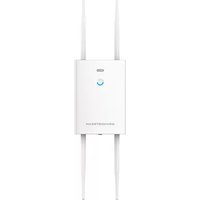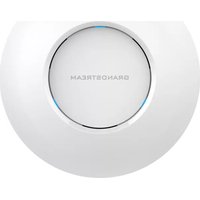
GWN7630 - Access Point GRANDSTREAM - Free user manual and instructions
Find the device manual for free GWN7630 GRANDSTREAM in PDF.



| Product Type | Wireless Access Point |
| Wi-Fi Standard | 802.11ac (Wave 2) dual-band |
| Frequency Bands | 2.4 GHz and 5 GHz |
| MIMO Technology | 4×4:4 MU-MIMO |
| Network Ports | 2 RJ45 Ethernet ports 10/100/1000 Mbps (1 with PoE/PoE+) |
| Power Supply | PoE/PoE+ (802.3af/at) |
| Operating Temperature | 0 °C to 40 °C |
| Storage Temperature | -10 °C to 60 °C |
| Operating Humidity | 10 % to 90 % RH (non-condensing) |
| Client Capacity | Up to 200+ simultaneous clients |
| Fast Roaming | Yes (802.11r/k/v) |
| Advanced QoS | Yes |
| Management | Embedded web interface, GWN Cloud, GWNDiscoveryTool |
| Mounting | Wall and ceiling (kit included) |
| Package Contents | Access point, mounting bracket, screw kit, quick installation guide, GPL license |
| Reset Button | Yes (7-second press) |
| Minimum Exposure Distance | 20 cm (body) |
| Certifications | ICES-3(B)/NMB-3(B), CNR |
Frequently Asked Questions - GWN7630 GRANDSTREAM
User questions about GWN7630 GRANDSTREAM
0 question about this device. Answer the ones you know or ask your own.
Ask a new question about this device
Download the instructions for your Access Point in PDF format for free! Find your manual GWN7630 - GRANDSTREAM and take your electronic device back in hand. On this page are published all the documents necessary for the use of your device. GWN7630 by GRANDSTREAM.
USER MANUAL GWN7630 GRANDSTREAM
Grandstream Networks, Inc.
126 Brookline Ave, 3rd Floor
Boston, MA 02215. USA
Tel: +1 (617) 566-9300
www.grandsstream.com

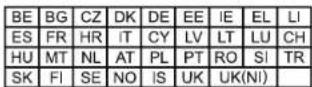
In the UK and EU member states, operation of 5150-5350 MHz is restricted to indoor use only.


For Certification, Warranty and RMA information, please visit www.grandstream.com
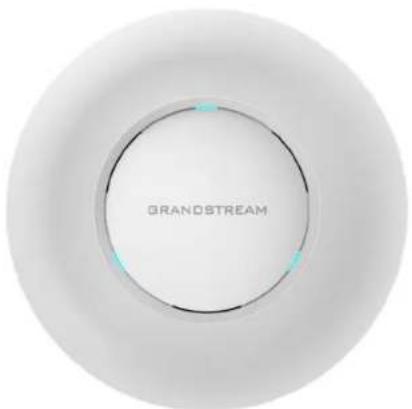
GWN7630
Enterprise 802.11ac Wave-2 4x4 Wi-Fi Access Point
Quick Installation Guide
Content
English. 1
简体中文. 7
Espanol. 13
Francais. 19
Deutsch. 25
Italiano. 31
Polski. 37
Portugues. 43
Pycck. 49
EN
OVERVIEW
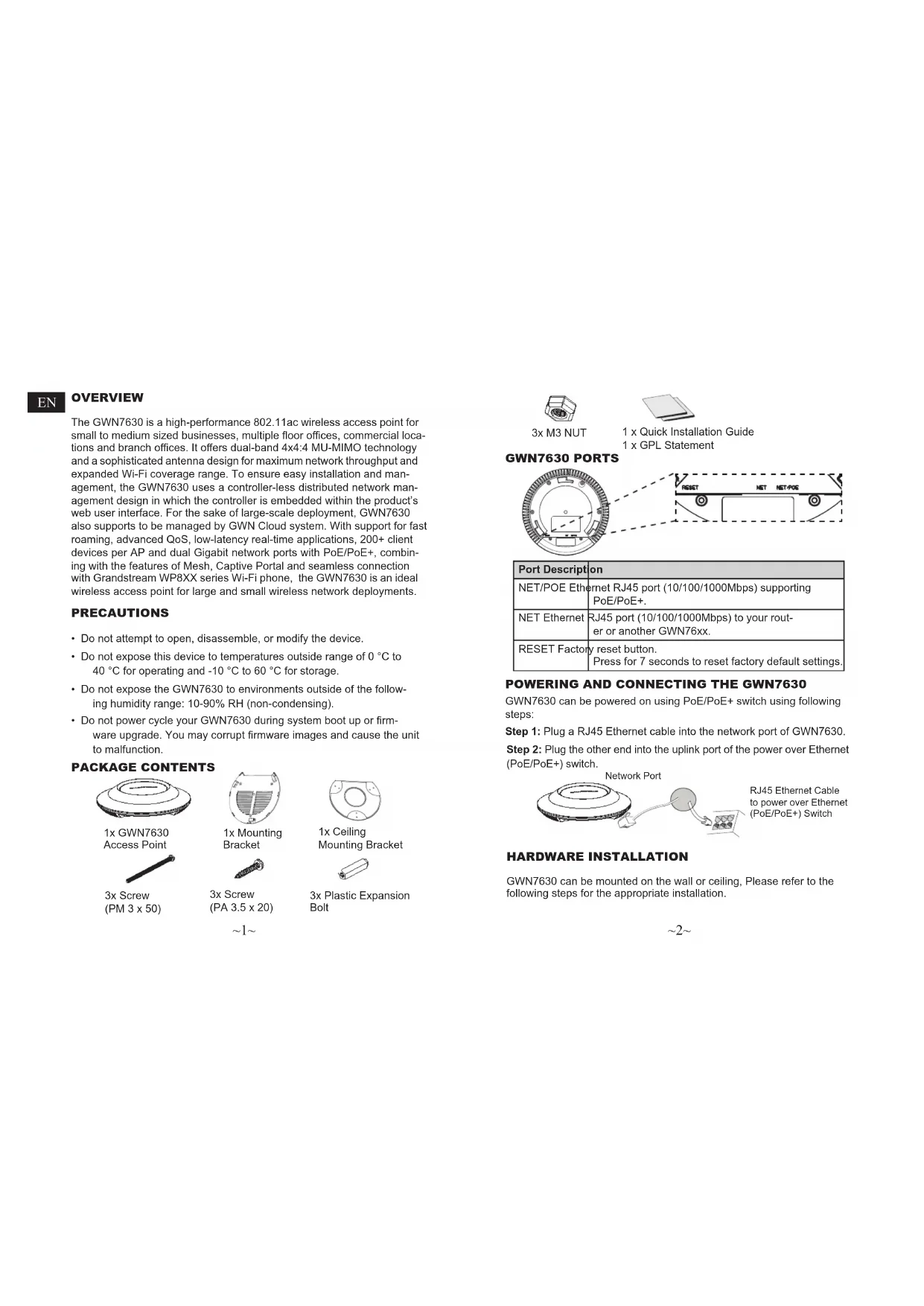
The GWN7630 is a high-performance 802.11ac wireless access point for small to medium sized businesses, multiple floor offices, commercial locations and branch offices. It offers dual-band 4x4:4 MU-MIMO technology and a sophisticated antenna design for maximum network throughput and expanded Wi-Fi coverage range. To ensure easy installation and management, the GWN7630 uses a controller-less distributed network management design in which the controller is embedded within the product's web user interface. For the sake of large-scale deployment, GWN7630 also supports to be managed by GWN Cloud system. With support for fast roaming, advanced QoS, low-latency real-time applications, 200+ client devices per AP and dual Gigabit network ports with PoE/PoE+, combining with the features of Mesh, Captive Portal and seamless connection with Grandstream WP8XX series Wi-Fi phone, the GWN7630 is an ideal wireless access point for large and small wireless network deployments.
PRECAUTIONS
- Do not attempt to open, disassemble, or modify the device.
- Do not expose this device to temperatures outside range of 0^ to 40^ for operating and -10^ to 60^ for storage.
- Do not expose the GWN7630 to environments outside of the following humidity range: 10 - 90% RH (non-condensing).
- Do not power cycle your GWN7630 during system boot up or firmware upgrade. You may corrupt firmware images and cause the unit to malfunction.
PACKAGE CONTENTS

1x GWN7630 Access Point
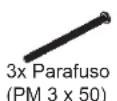
3x Screw (PM 3 x 50)

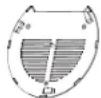
1x Mounting Bracket
3x Screw (PA 3.5 x 20)

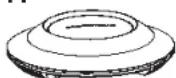
1x Ceiling Mounting Bracket
3x Plastic Expansion Bolt


3x M3 NUT

1 x Quick Installation Guide 1 x GPL Statement
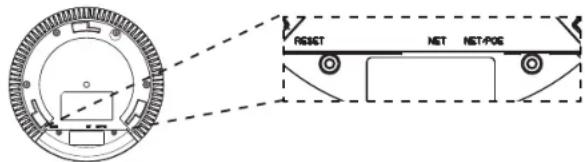
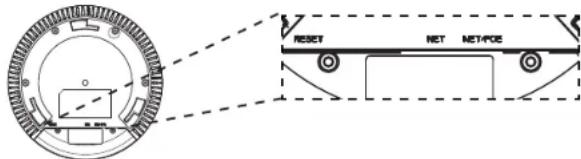
GWN7630 PORTS
| Port Description | |
| NET/POE Ethernet | Ethernet RJ45 port (10/100/1000Mbps) supporting PoE/PoE+. |
| NET Ethernet | RJ45 port (10/100/1000Mbps) to your rout-er or another GWN76xx. |
| RESET Factory reset button.Press for 7 seconds to reset factory default settings. | |
POWERING AND CONNECTING THE GWN7630
GWN7630 can be powered on using PoE/PoE+ switch using following steps:
Step 1: Plug a RJ45 Ethernet cable into the network port of GWN7630.
Step 2: Plug the other end into the uplink port of the power over Ethernet (PoE/PoE+) switch.

Network Port
HARDWARE INSTALLATION
GWN7630 can be mounted on the wall or ceiling, Please refer to the following steps for the appropriate installation.
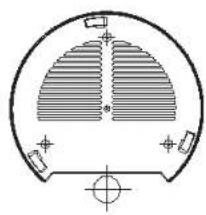
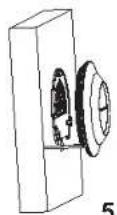
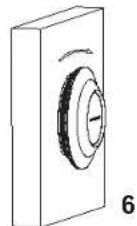
Wall Mount
- Connect the Ethernet cable (RJ45) to the correct ports of your GWN7630.
- Align the arrow on the GWN7630AP with the arrow on the locking tab of the mounting bracket and ensure that your GWN is firmly seated on the mounting bracket.
- Turn the GWN clockwise until it locks into place and fits the locking tab.
1
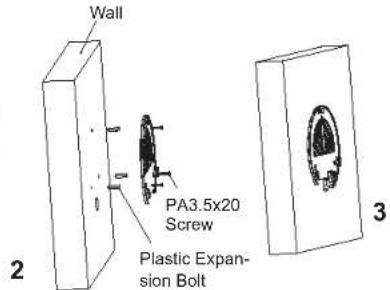
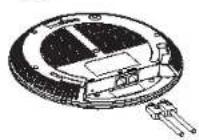
- Connect the power cable and the ethernet cable (RJ45) to the correct ports of your GWN7630.
- Align the arrow on the GWN7630AP with the arrow on the locking tab of the mounting bracket and ensure that your GWN is firmly seated on the mounting bracket.
- Turn the GWN clockwise until it locks into place and fits the locking tab.
4
5
\~3\~
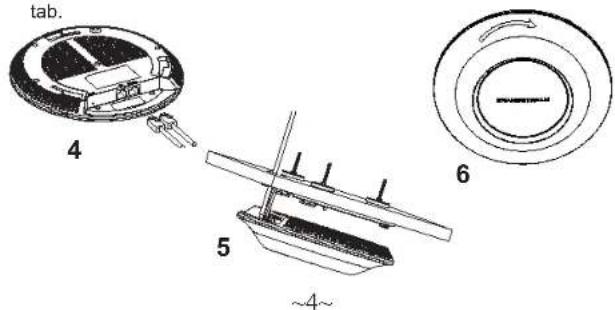
Ceiling Mount
Note: Ceiling mounting is recommended for optimal coverage performance.
- Remove the ceiling tile.
- Place the ceiling backing plate in the center of the ceiling tile and mark the mounting screw holes (screw holes DIA 5.5mm, reticle hole DIA 25mm).
- Insert the screws through the mounting bracket.

- Connect the Ethernet cable (RJ45) to the correct ports of your GWN7630.
- Align the arrow on the GWN7630AP with the arrow on the locking tab of the mounting bracket and ensure that your GWN is firmly seated on the mounting bracket and connect the network and power cables.
- Turn the GWN clockwise until it locks into place and fits the locking
CONNECT TO GWN7630 DEFAULT Wi-Fi NETWORK
GWN7630 can be used as standalone access point out of box, or after factory reset with Wi-Fi enabled by default.
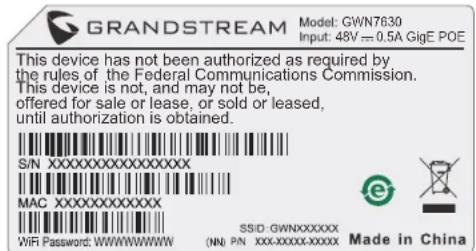
After powering the GWN7630 and connecting it to the network, GWN7630 will broadcast a default SSID based on its MAC address GWN[MAC's last 6 digits] and a random password.
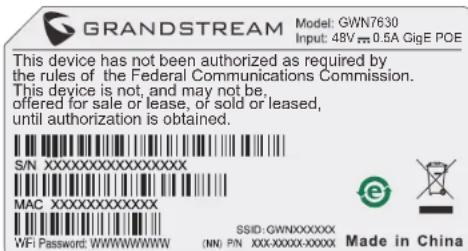
Note: GWN7630's default SSID and password information are printed on the MAC tag of the unit.
ACCESSING THE CONFIGURATION INTERFACE
A computer connected to the GWN7630's SSID, or to the same network as the GWN7630 can discover and access its configuration interface using one of the below methods:
Method 1: Discover GWN7630 using its MAC Address
- Locate the MAC address on the MAC tag of the unit, which is on the underside of the device, or on the package.
- From a computer connected to same network as the GWN7630, type in following address using GWN7630's MAC address on your browser https://gwn_
.local
Example: If a GWN7630 has the MAC address 00:0B:82:8C:4D:F8, this unit can be accessed by typing https://gwn_000b828c4df8.local on the browser.
Method 2: Discover GWN7630 using GWN Discovery Tool
- Download and install GWN Discovery Tool from the following link: http://www.grandsstream.com/tools/GWNDiscoveryTool.zip
- Open the GWN DiscoveryTool, and click on Scan.
- The tool will discover all GWN76XX Access Points connected on the network showing their MAC and IP addresses.
- Click on Manage Device to be redirected directly to the GWN7630's configuration interface, or type in manually the displayed IP address on your browser.
Enter username and password to login. (The default administrator username is "admin" and the default random password can be found at the sticker on the GWN7630).
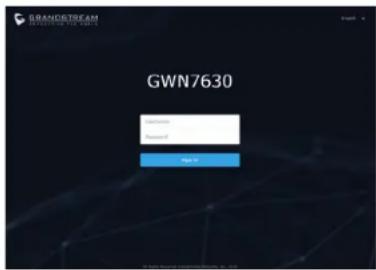
Notes:
- Make sure that the GWN7630 is not already paired with another GWN76xx Access Point as slave, GWN7000 Router Series or GWN. Cloud, otherwise the configuration interface cannot be accessed
- If the GWN7630 is already paired, make sure to unpair it first, or do a factory reset.
It is customer's responsibility to ensure compliance with local regulations for frequency bands, transmit power and others.
To manage GWN7630 over cloud, please refer to https://www.gwn. cloud.
Refer to online documents and FAQ for more detailed information: http://www.grandstream.com/our-products
概述
CONECTAR AL GWN7630 CON LA RED WI-FI PREDETERMINADA
CONNEXION AU RESEAU WI-FI PAR DEFAULT DU GWN7630
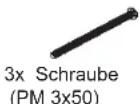
GWN7630 Access Point

POLACZYC Z DOMYSLNA SIECIA Wi-Fi GWN7630
This device has not been authorized as required by the rules of the Federal Communications Commission. This device is not, and may not be, offered for sale or lease, or sold or leased, until authorization is obtained.

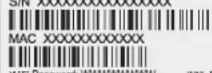
$ sedID: GWNXXXXXO IN: 100000000000000


Made in China
DOSTEP DO INTERFEJSU KONFIGURACJI
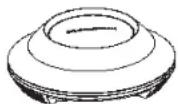
Access Point GWN7630
MEPbI INPEDOCTOPOXHOCTN
He nbItaTecb OTkpbItb,pa3o6paTb HIN N3MeHHTb ycTPOIcTBO.
He noDBepraTe BO3eNCTBnIO TemnepaTybI BHe dnaana30Ha ot 0 ^ C do 40^ npn 3KnnyatauHn nO-10°Cdo 60°C npxpaheHH.
HeNCONb3ayIe DaHHOE yCtpoiCTBO CpeIe, rIe 3HaueHHe BnaxKHOCTN BxIOdHTa DnAna3OH:OTHOCT.NBnKHOCTb 10% -90% (6E3 KOHeDcAciun)
He BKNHouaTb-BbKIOHauTaYcTpoIcTB GWN7630B npocece HaahlbHoro 3anyCKa CnCTeMbIM Bnpocece 06HOBNeHHN npoiuBKn. Bbl MoKeTe TEM cAmBIM NOBpeiHTb 3aBODcKyo npoWbKY cYcTpoCTBa H bVBeCTn Ero h3 CTpOy.
CODEPKHMOE YNAKOBKN
Tooka doctyna
GWN7630

3x BnHt
(PM 3 x 50)

MoTaKbI
KpoHHTeH

3x BnHTa
(PM 3,5 x 20)

IOTONOCHMOMTAXHBH
KPOHHTeIN

3xПл actKOBbie
DIO6eJRA
\~49\~

3xM3raikn

1xPykoBoDCTBO no
1x GPL 3aBJIeHne
NOPTbl GWN7630
BKJIIOUeyHn HAcTPOIKA YCTPOIcTBa GWN7630
YcTpoCTBO GWN7630 MoKet 6bItb noKnIouHeO, nCnoJIb3yR PoE/PoE+ nepeKIOUaTeNb B HECKONbKO IaROB:
War 1: BCTaBtB Ethernet ka6eB RJ45 B cTeB0n nopT yCtpoNCTBa GWN7630.
War 2:Поdkлочпдугюй Конец В пор PoE/PoE+ nepekniochaTeЯ.
Ceteboi npot

YCTAHOBKA YCTPOINCTBA
GWN7630 MOKET 6bITb yCTaHOBJIeH h CTeHy nIIN NOTOJOK.
PoxaNycta, cneynte nHCTpykun no yctahOBke.
50
YctaHOBKa Ha CTeHy
- PacnoJIOXnTe MOHTaXHbI KPOHIteH Ha HyXHoe MeCTO Ha CTHe, CTpeJIKO BBepX.
- INONBJyTe KapaHdAaJ Pa3MeTKN OTBepCTn (OTBepCTHe NOBHT DNAM.5,5 MM,OTBepCTHe DNAmETPOM 25MM).
3.BCTaBbTe aHKePa BOTBepCTnI dIaMaTePOM 5,5 MM.PpIKpeNITeMOHTaxHbI KPOHJTEH KCTHe,BCTaBb BNHTb BIO6eJI
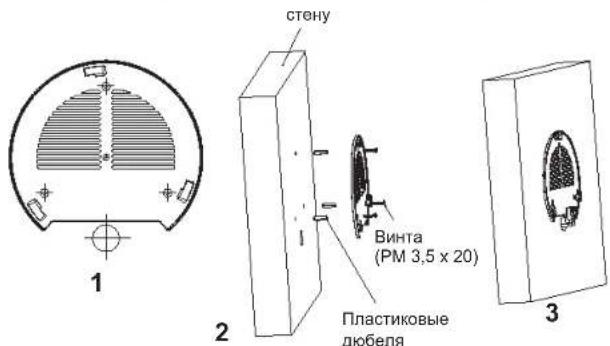
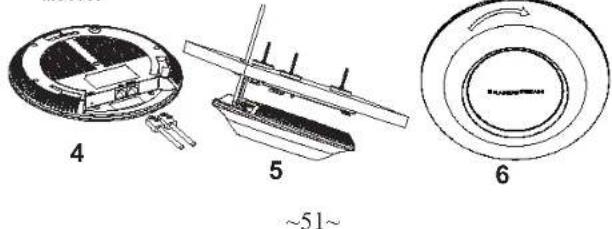
- BCTaBbTe Ka6enb Ethernet (RJ45) B npaBnBHy nopt Bauei GWN7630.
- CoBmecnTe CTpeKy Ha ycTpoNCTBe GWN7630AP co CTpeKoHa KPOHHTeHn y6eDnTEcb, YTO BaW GWN nnoTHO cnDnB KpenneHn.
- Повернite GWN no Yacoboi CTpeIke ДЯ ФИКcaUN erHa MecTe.
KpenneHne ha notoJok
PnmeaHne: nna HauyUero noKpbTna peKOMeHyETc yCTAHOBKa Ha notoNOK.
- CHIMMTE NOTONOHyIO NNTKy.
- Pa3MeCTIe NOTOJIOUHy MOHTaXHy IOIaCTHy NO CEHTpy PJIITKN I O603HaBte MeCTo NOI BnHTbI (OTBepCTNIOID BNHTbI DnAm. 5,5MM, OTBepCTne DNAM. 25MM).
3.BCTaBtBe BnHTb B MOHTaXHyIO pNactHy.
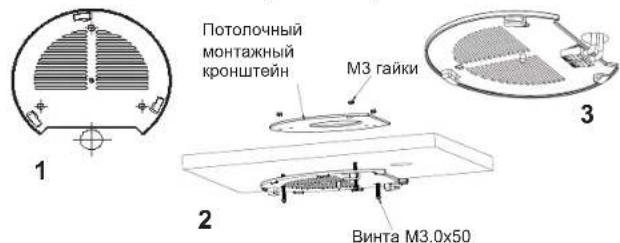
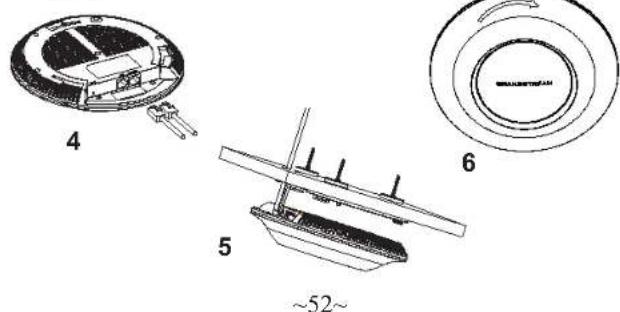
- BCTaBbTe Ka6eIb Ethernet (RJ45) B npabunbHb nopt Bauei GWN7630.
- CoBmecnte CTpeKny Ha yctpoIcTbe GWN7630AP co CTpeKIOH HA KPOHHTeHHe, yBeIeNTbC, 1o BAu GWN IIOHO CnHIT B KpENHnN, INOCoEOJIHtEteBOEa KaBb N KaBb N TnAHHa
- Повернite GWN no Yacoboi CTpeKe Дя phikcauH erHa MeCTe.
NIOKJIIOUHTb K Wi-Fi CETn GWN7630 N0 YMOLJAHNI
GWN7630 MoKHO HcNoBbOaTb KaK OTeJIbHyI rTOBvI TOU Ky DocTyNa, INI Nocle C6pOca K 3aBOcknM HAcTpOoiKaM C BKNIOeHHbIM no ymOnuHaHIO Wi-Fi.
Iocne 3aHbAHG WGN7630 n noKnIOeHn eK cTeN, GWN7630 nepeaT SSID no ymOnuaHnO, Ha oChOBe MAC-aPeca GWN[6nocnEHNx uΦp MAC] n pOn3BONbHbI napOlb.
PpmeaHne: GWN7630 SSID n npoNb no ymoJuaHIO yka3aHbHa npbke MAC ha yctpoiCTbe.
BXOD B HHTEPFOHc HACTPOKNI
Metod 1: O6hApxKeHne GWN7630 no eMac-apecy.
- HauDnTe MAC aDpE yKa3aHHbI Ha hAKeHKe Ha 6paTHoI CTOpOHe yCTpoCTBa, N60 Ha Kopo6Ke.
- IcnoIb3ya KOMblOTeP, NQdKnIOeHbN K Toi Jx eCtN, UTo n GWN7630, B 6paayEze BBeJeT Mac-aDPEC GWN7630 B cnDeyuOnem BvHe: https://gwn_
local
Плпмер:Есиу GWN7630 MAC-aIpec 00:0B:82:8B:4E:28,TODoctyn K yCTpoiCTBy MOKHO NOJyUHTb BBeJa https://gwn_000b828b4e28.local B6pay3epe.
Metod 2:06hApyKeHne GWN7630 npn nomou nporpamMbI GWNDiscoveryTool
For certification information, please refer to User Manuals: http://www.grandsstream.com
Common part:
This equipment complies with radiation exposure limits set forth for an uncontrolled environment. This transmitter must not be co-located or operating in conjunction with any other antenna or transmitter. This equipment should be installed and operated with minimum distance 20cm between the radiator& your body.
U.S. FCC Part 15 Regulatory Information
This device complies with part 15 of the FCC Rules. Operation is subject to the following two conditions: (1) this device may not cause harmful interference, and (2) this device must accept any interference received, including interference that may cause undesired operation.
Any Changes or modifications not expressly approved by the party responsible for compliance could void the user's authority to operate the equipment.
Note: This equipment has been tested and found to comply with the limits for a Class B digital device, pursuant to part 15 of the FCC Rules. These limits are designed to provide reasonable protection against harmful interference in a residential installation. This equipment generates, uses and can radiate radio frequency energy and, if not installed and used in accordance with the instructions, may cause harmful interference to radio communications. However, there is no guarantee that interference will not occur in a particular installation. If this equipment does cause harmful interference to radio or television reception, which can be determined by turning the equipment off and on, the user is encouraged to try to correct the interference by one or more of the following measures:
Reorient or relocate the receiving antenna.
—Increase the separation between the equipment and receiver.
-Connect the equipment into an outlet on a circuit different from that to which the receiver is connected.
—Consult the dealer or an experienced radio/TV technician for help.
Canada Regulatory Information
Radio equipment
Operation of 5150-5250 MHz is restricted to indoor use only. This device contains licence-exempt transmitter(s)/receiver(s) that comply with Innovation, Science and Economic Development Canada's licence-exempt RSS(s). Operation is subject to the following two conditions: (1) This device may not cause interference.
55
(2) This device must accept any interference, including interference that may cause undesired operation of the device.
This product meets the applicable Innovation, Science and Economic Development Canada technical specifications.
EU Regulatory Information
Operation of 5150-5350 MHz is restricted to indoor use only.
Support Frequency Bands and Power:
WLAN 2412-2472 MHz < 20 dBm;
WLAN5150-5250MHz<23dBm;
WLAN 5250-5350 MHz < 20 dBm;
WLAN 5470-5725 MHz < 27 dBm;
The simplified EU declaration of conformity referred to in Article 10(9) shall be provided as follows:
Hereby, [Grandstream Networks, Inc.] declares that the radio equipment type [GWN7630] is in compliance with Directive 2014/53/EU.
The full text of the EU declaration of conformity is available at the following internet address: www.grandstream.com
UK Regulatory Information
Operation of 5150-5350 MHz is restricted to indoor use only. Support Frequency Bands and Power:
WLAN 2412-2472 MHz < 20 dBm;
WLAN 5150-5250 MHz < 23 dBm;
WLAN5250-5350MHz<20dBm;
WLAN 5470-5725 MHz < 27 dBm;
The simplified UK declaration of conformity referred to in Regulation 8& 14 shall be provided as follows:
Hereby, [Grandstream Networks, Inc.] declares that the radio equipment type [GWN7630] is in compliance with Directive RER 2017 (S.I.2017/1206)..
The full text of the UK declaration of conformity is available at the following internet address: www.grandstream.com
56