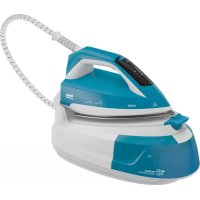
SGA6124D - Iron BEKO - Free user manual and instructions
Find the device manual for free SGA6124D BEKO in PDF.



| Product type | Steam iron with boiler |
| Brand | Beko |
| Model | SGA6124D |
| Power supply | 220-240 V~, 50-60 Hz |
| Power | 2040-2400 W |
| Steam pressure | 5.8 bar |
| Continuous steam output | Up to 100 g/min |
| Water tank | Removable |
| Anti-scale cartridge | Yes, replaceable |
| Auto shut-off | Yes, after 10 minutes of inactivity |
| Vertical steam function | Yes |
| Cleaning | Self-cleaning (descaling) |
| Transport lock | Yes |
| Smart-ECO mode | Yes |
| Soleplate type | Not specified |
| Weight | Not specified |
| Dimensions | Not specified |
Frequently Asked Questions - SGA6124D BEKO
User questions about SGA6124D BEKO
0 question about this device. Answer the ones you know or ask your own.
Ask a new question about this device
Download the instructions for your Iron in PDF format for free! Find your manual SGA6124D - BEKO and take your electronic device back in hand. On this page are published all the documents necessary for the use of your device. SGA6124D by BEKO.
USER MANUAL SGA6124D BEKO
natural_image
Simple line icon of a shirt collar with collared shirt and tie (no text or symbols)SGA 6126 R - SGA 6124 D
EN - DE - FR - TR - ES - PL - HR - RO - IT - NL - RU - SR
CONTENTS
| ENGLISH | 5-16 |
| DEUTSCH | 17-27 |
| FRANÇAIS | 28-37 |
| TÜRKÇE | 38-51 |
| ESPAÑOL | 52-62 |
| POLSKI | 63-73 |
| HRVATSKI | 74-82 |
| ROMÂNĂ | 83-96 |
| ITALIANO | 97-107 |
| NEDERLANDS | 108-117 |
| РУССКИЙ | 118-133 |
| СРПСКИ | 134-142 |
text_image
10 11 9 8 7 6 5 4 3 2 1 |  |  | |
| EN | FIRST USE OPERATION AUTOMATIC SHUTDOWN | ||
| DE | VORBEREITUNG BETRIEB AUTOMATISCHE ABSCHALTUNG | ||
| FR | PREMIÈRE UTILISATION FONCT | ONNEMENT ARRÊT AUTOMATIQUE | |
| TR | ÍLK KULLANIM KULLANIM OTOMATIK KAPANMA | ||
| ES | PRIMER USO FUNCIONAMIENTO | APAGADO AUTOMÁTICO | |
| PL | PIERWSZE UŽYCIE OBSŁUGA AUTOMATYCZNE WYŁĄCZANIE | ||
| HR | PRVA UPOTREBA RAD AUTOMATSKO ISKLJUČIVANJE | ||
| RO | PRIMA UTILIZARE UTILIZARE OPRIRE AUTOMATĂ | ||
| IT | USO INIZIALE | UTILIZZO SPEGNIMENTO AUTOMATICO | |
| NL | EERSTE GEBRUIK | WERKING | AUTOMATISCHEUITSCHAKELING |
| RU | ПЕРВОЕ ВКЛЮЧЕНИЕ | ЭКСПЛУАТАЦИЯ | АВТОМАТИЧЕСКОЕОТКЛЮЧЕНИЕ |
| SR | ПРВА УПОТРЕБА | ЭКСПЛУАТАЦИЯ | АВТОМАТИЧЕСКОЕОТКЛЮЧЕНИЕ |
 |  |  | |
| EN | CLEANING AND CARE | CARTRIDGE CHANGE | SELF-CLEAN |
| DE | REINIGUNG UND PFLEGE KARTU | SCHENWECHSEL SELBSTREINIGUNG | |
| FR | NETTOYAGE ET ENTRETIEN | CHANGEMENT DE LA CARTOUCHE | AUTO-NETTOYAGE |
| TR | TEMIZLIK VE BAKIM | KARTUŞ DEĞİŞTİRME | KİREÇ TEMİZLEME |
| ES | LIMPIEZA Y CUIDADOS | CAMBIO DE CARTUCHO | AUTOLIMPIEZA |
| PL | CZYSZCZENIE I KONSERWACJA | ZMIANA WKŁADU | SAMOCZYSZCZENIE |
| HR | ČIŠĆENJE I ODRŽAVANJE | ZAMJENA ULOŠKA | SAMOČIŠĆENJE |
| RO | CURĂ AREA ȘI ÎNGRIJIREA | ÎNLOCUIREA CARTUŞULUI | AUTOCURĂȚARE |
| IT | PULIZIA E CURA CAMBIO CARTU | UCCIA AUTOPULIZIA | |
| NL | REINIGING EN ONDERHOUD | WISSELEN VAN HET PATROON | ZELFREINIGEND |
| RU | ОЧИСТКА И УХОД | ЗАМЕНА КАРТРИДЖА | САМОЧИСТКА |
| SR | ČIŠĆENJE I ODRŽAVANJE | ОПЕРАЦИЈА | SAMOČIŠĆENJE |
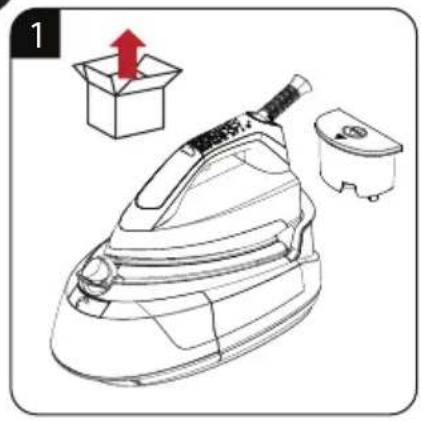
natural_image
Line drawing of a steam iron with a red upward arrow and a box, next to a small container (no text or symbols)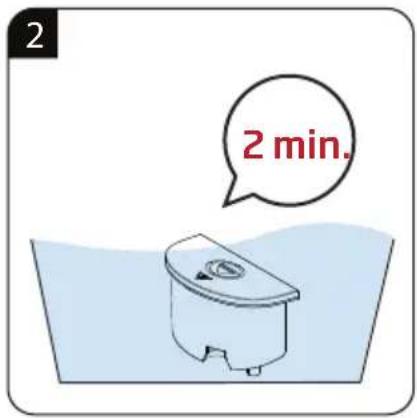
text_image
2 2 min.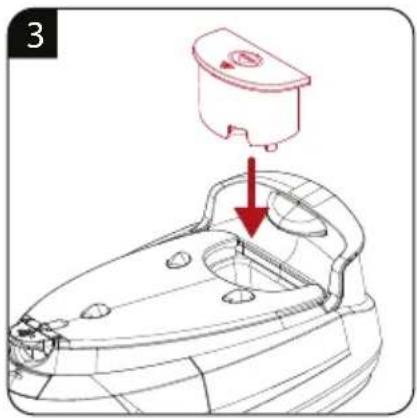
text_image
3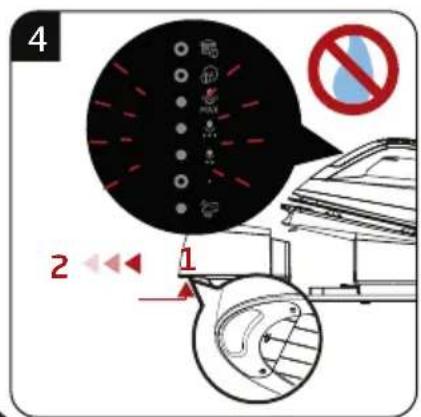
text_image
4 2 1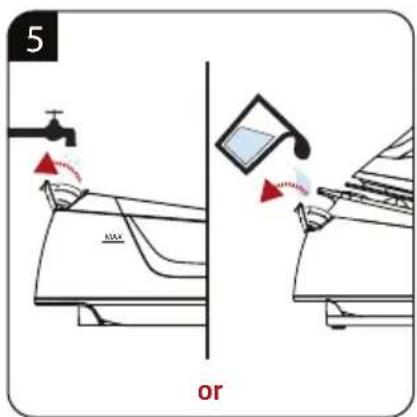
text_image
5 or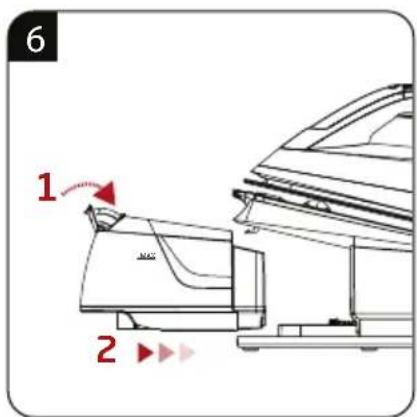
text_image
6 1 2
text_image
7 beep!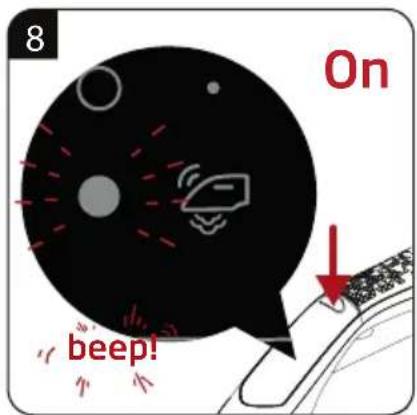
text_image
8 On beep!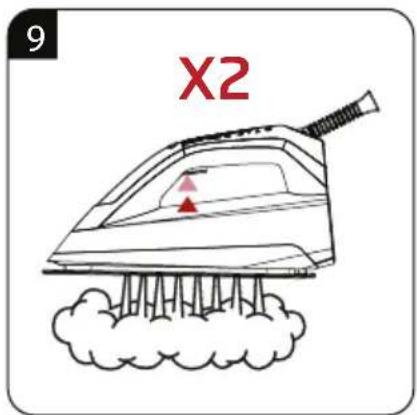
text_image
9 X2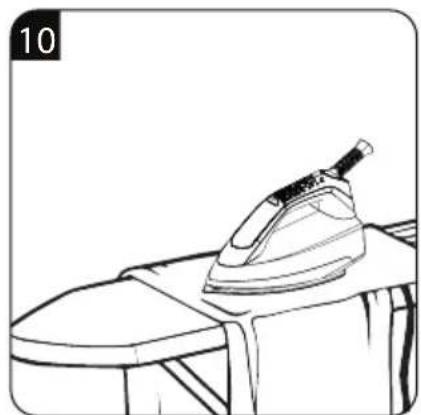
natural_image
Line drawing of an iron on a table, no text or symbols present
text_image
11 MAX beep!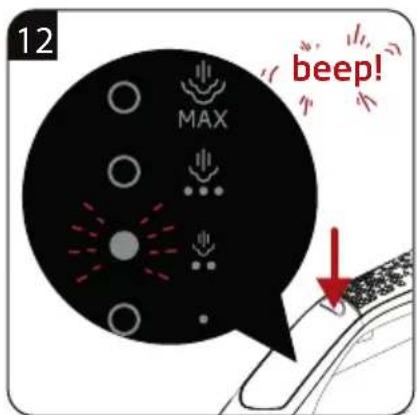
text_image
12 MAX beep!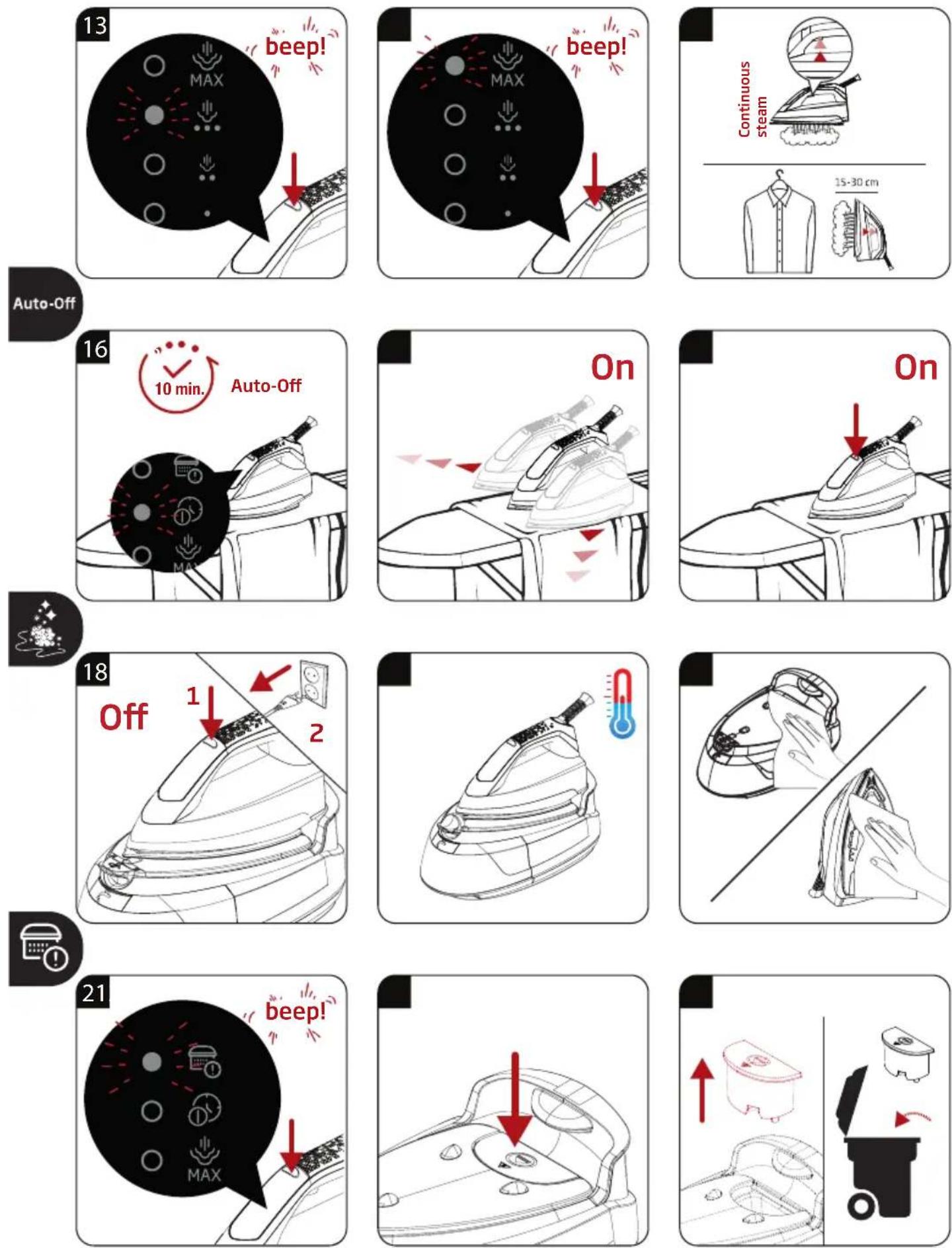

text_image
24 2 min.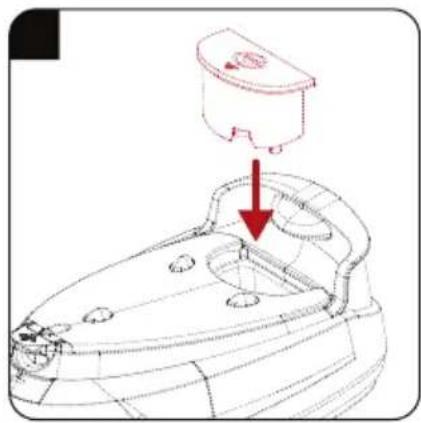
natural_image
Technical line drawing of a mechanical component with a red arrow indicating a downward motion (no text or symbols present)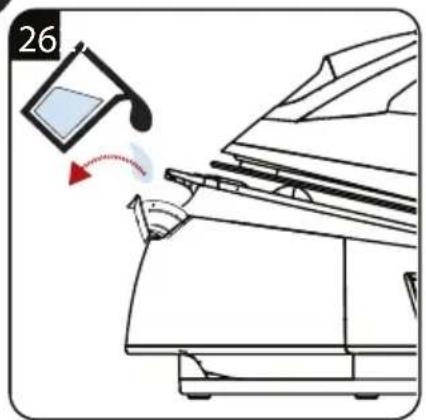
natural_image
Diagram showing a device with a curved arrow indicating motion, no text or symbols present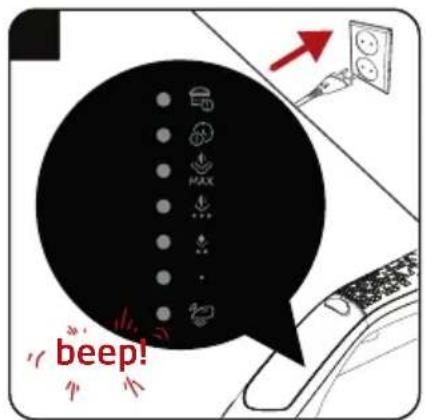
text_image
beep!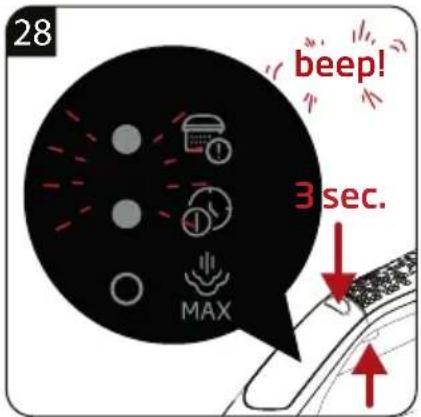
text_image
28 beep! 3 sec. MAX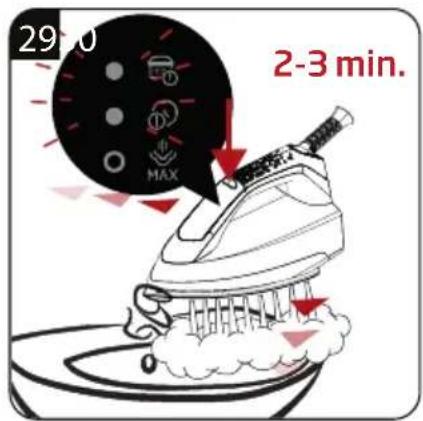
text_image
29:00 MAX 2-3 min.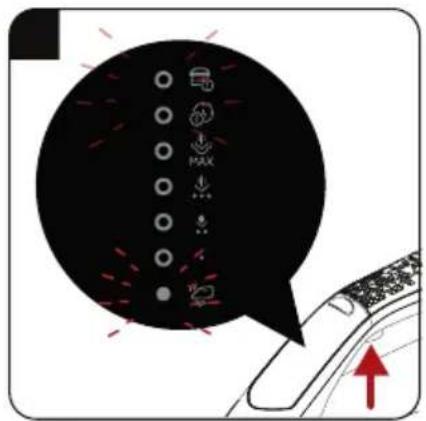
text_image
Diagram showing a car interior with icons and a speech bubble, indicating navigation or system states.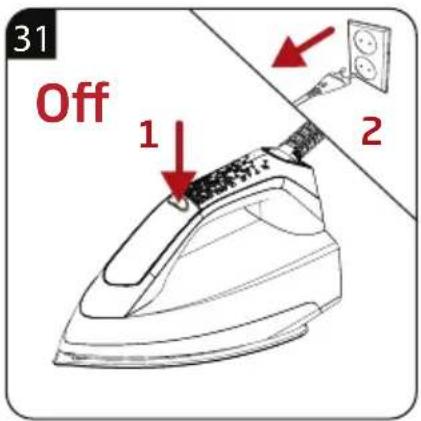
text_image
31 Off 1 2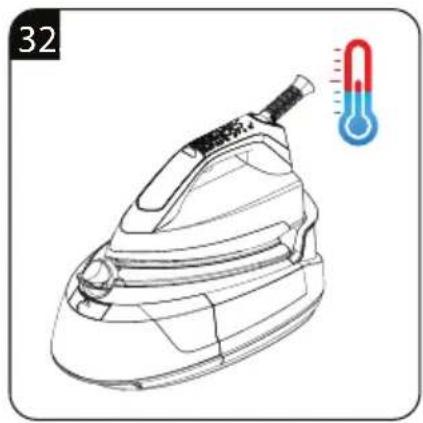
natural_image
Line drawing of a steam iron with a thermometer indicator (no text or symbols on the diagram itself)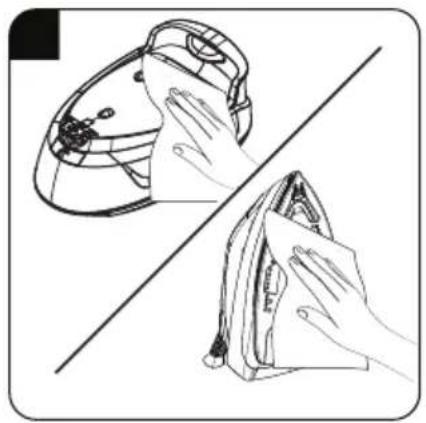
natural_image
Illustration showing two hand-drawn scenarios: one with a cloth covering the top of a helmet, and another with a cloth covering the front view of a box (no text or symbols)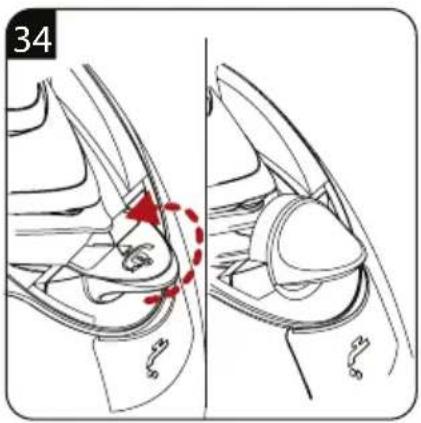
text_image
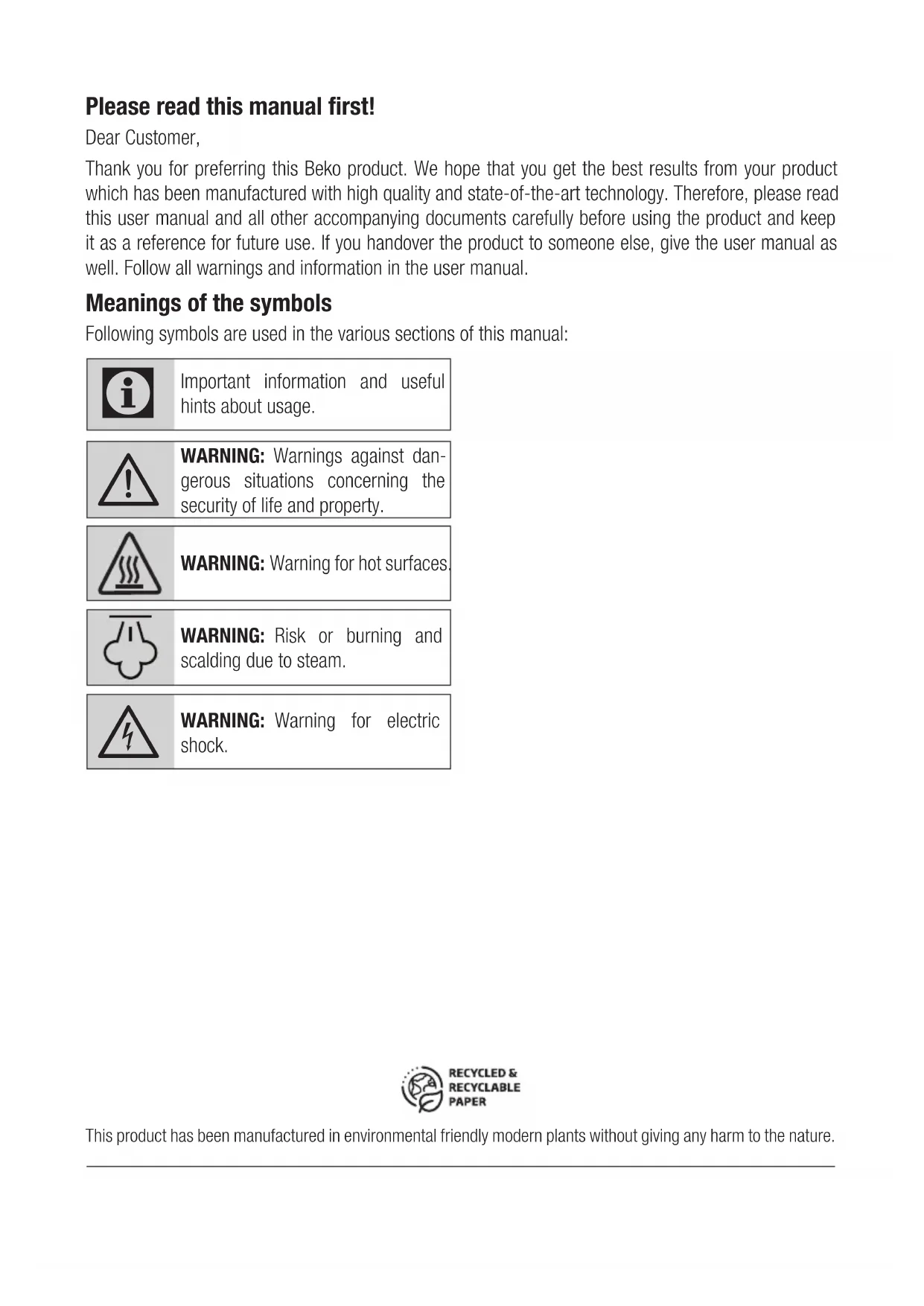
34Please read this manual first!
Dear Customer,
Thank you for preferring this Beko product. We hope that you get the best results from your product which has been manufactured with high quality and state-of-the-art technology. Therefore, please read this user manual and all other accompanying documents carefully before using the product and keep it as a reference for future use. If you handover the product to someone else, give the user manual as well. Follow all warnings and information in the user manual.
Meanings of the symbols
Following symbols are used in the various sections of this manual:

Important information and useful hints about usage.

WARNING: Warnings against dangerous situations concerning the security of life and property.

WARNING: Warning for hot surfaces
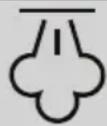
WARNING: Risk or burning and scalding due to steam.
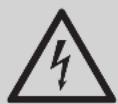
WARNING: Warning for electric shock.
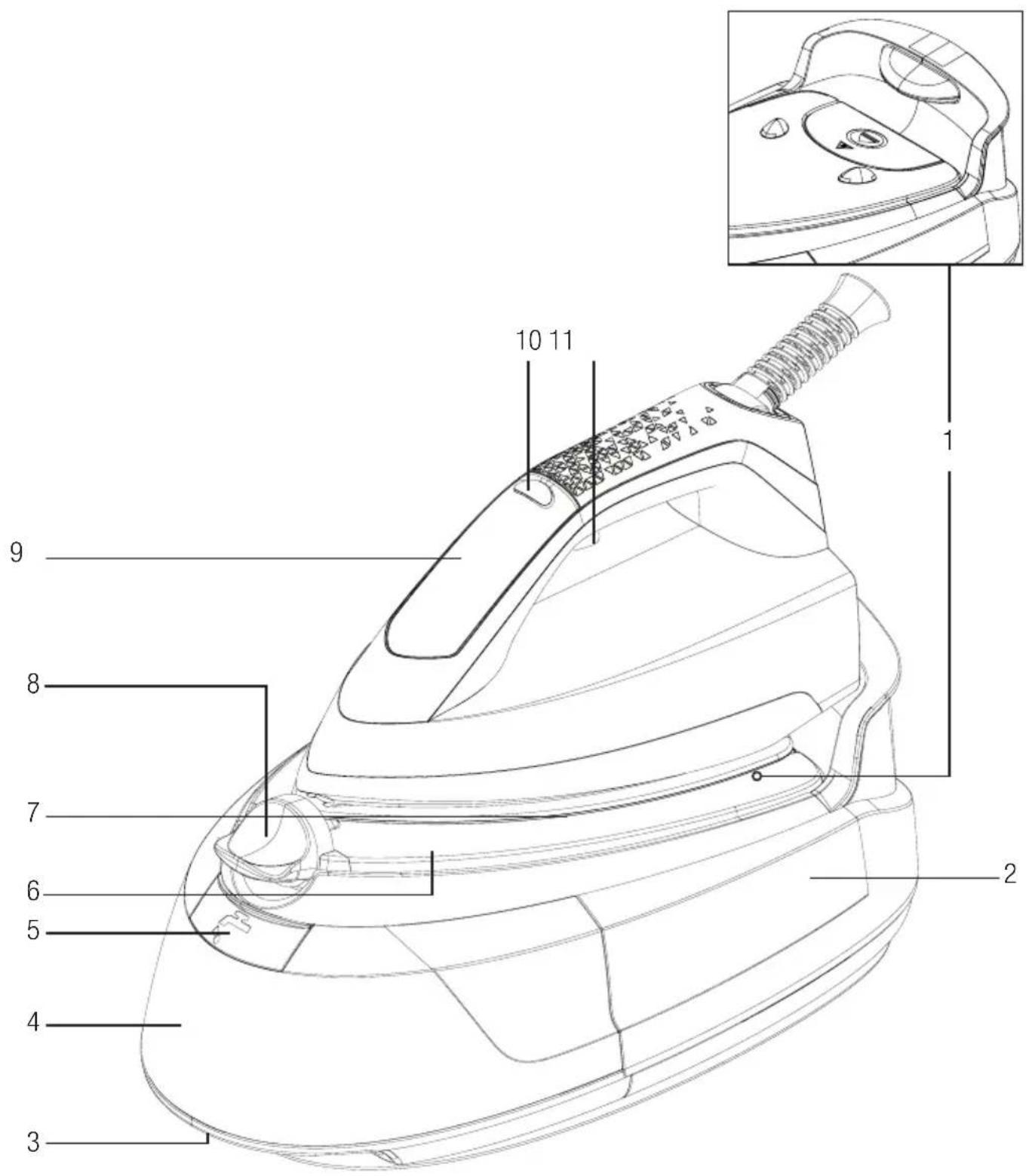
- Lime collecting cartridge
- Steam station
- Water reservoir removal latch
- Removable water reservoir
- Water refill lid
- Steam station surface
- Soleplate
- Transport lock
- Control panel
- On/off and control button
- Steam trigger
Technical data
| Model | SGA 6126 R SGA | 6124 D |
| Power supply | 220-240V~, 50-60 Hz | |
| Power consumption | 2190-2600W | 2040-2400W |
| Pump pressure | 6 bar | 5.8 bar |
| Continuous steam amount | Up to 110 g/min. Up to 100 g/min. | |
| Color Red Blue | ||
Technical and design modification rights are reserved.
| Control panel Symbols | Descriptions | |
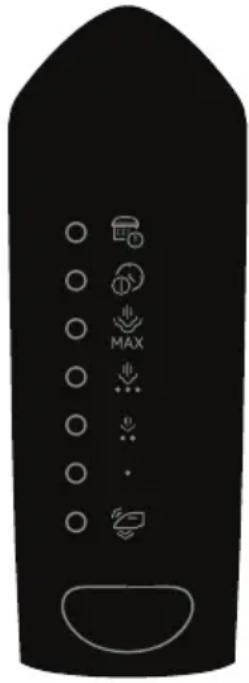 |  | Change cartridge / Self clean |
 | Auto shut off / Self clean | |
 | Max level of temperature and max level of steam | |
 | Level 3 of temperature and level 2 of steam | |
| [WTOH] | Level 2 of temperature and level 1 of steam | |
| • | Level 1 of temperature and no steam | |
 | Smart-ECO mode |
The values which are declared in the markings affixed on your product or the other printed documents supplied with it represent the values which have been obtained in the laboratories pursuant to the pertinent standards. These values may vary according to the usage of the appliance and ambient conditions.
1 Important safety and environmental instructions
This section contains safety instructions that will help protect from risk of personal injury or material damage.
Failure to follow these instructions invalidates the granted warranty.
1.1 General safety
- This appliance complies with the international safety standards.
- This appliance is intended to be used in household and similar applications such as:
- Staff kitchen areas in shops, offices and other working environments;
- Farm houses
— By clients in hotels, and other residential type environments; - Bed and Breakfast type environments.
It is not fit for industrial use.
- This appliance can be used the children who are at the age of 8 and above and by people who have limited physical, sensory or mental capacity or who do not have knowledge and experience, provided that they are supervised or they understand the instructions with regard to safe use of the product and potential dangers. Children should not play with the appliance. Cleaning and user maintenance procedures should not be performed by children unless they are supervised by an older person.
- Do not leave the appliance un-attended while it is plugged in.
- Unplug the appliance before filling the water reservoir with water.
- Do not open the water refill hole during usage.
- Operate and store the appliance on a stable surface.
- When the appliance is placed on its base plate, ensure that the surface beneath the plate is level.
1 Important safety and environmental instructions
• Always rest your iron on the base.
- If the appliance is dropped or leaks water or has other failures, contact the authorised service. Do not use the appliance until it is repaired.
- When the appliance is in use or left to cool down, keep the appliance and power cable out of reach of children under 8 years old.
- The appliance is not suitable for outdoor use.
- Only use the original parts or parts recommended by the manufacturer.
- Use the appliance only when it is connected to the steam iron station.
- Do not dismantle the appliance.
- Your mains power supply should comply with the information supplied on the rating plate of the appliance.
- The mains supply of the appliance should be secured with a 16 A fuse minimum.
- Use the appliance with a grounded outlet.
- Do not use the appliance with an extension cable.
- Do not pull the power cable when unplugging the appliance.
- If the power cable is damaged, it should be repaired or replaced by the dealer, service center, or a specialised and authorised service with similar qualifications.
- Unplug the appliance before cleaning.
- Do not wrap the cable around the appliance.
- Do not touch the appliance or its plug with damp or wet hands when the appliance is plugged in.
- The soleplate and the steam station surface may get over-heated. Contact with hot surfaces may cause burns.
- Do not use the appliance in or near the areas where combustible or inflammable places and materials exist.
1 Important safety and environmental instructions
- If you keep the packaging materials, store them out of the reach of children.
- For detailed information on cleaning the appliance, please refer to the section Cleaning and maintenance.
1.2 Compliance with WEEE Directive and Disposing of the Waste Product
This product complies with EU WEEE Directive (2012/19/EU). This product bears a classification symbol for waste electrical and electronic equipment (WEEE).
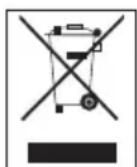
This symbol indicates that this product shall not be disposed with other household wastes at the end of its service life. Used device must be returned to official collection point for recycling of electrical and electronic devices. To find these collection systems please contact to your local authorities or retailer where the product was purchased. Each household performs important role in recovering and recycling of old appliance. Appropriate disposal of used appliance helps prevent potential negative consequences for the environment and human health.
1.3 Compliance with RoHS Directive
The product you have purchased complies with EU RoHS Directive (2011/65/EU). It does not contain harmful and prohibited materials specified in the Directive.
1.4 Package information

Packaging materials of the product are manufactured from recyclable materials in accordance with our National Environment Regulations. Do not dispose of the packaging materials together with the domestic or other wastes. Take them to the packaging material collection points designated by the local authorities.
2 Operation
2.1 Intended use
This appliance is intended only for household use and ironing; it is not suitable for professional use.
2.2 Initial use

- Prior to initial use, fill the water reservoir (4) with water and evaporate the water twice in order to remove the manufacturing residues.
- A light odour may arise during the initial use. This condition will return to normal after several uses.
2.3 Ironing tips
- The appliance gets heated in a short time; iron fabrics such as synthetic, silk etc. using low temperature settings.
- Iron fabrics that may luster (silk etc.) by turning them inside out or using the appliance in Smart-ECO mode.
- Use very little pressure when ironing fabrics such as velvet and iron them towards one single direction.
- Steam usage may cause stains on coloured silk fabrics. Do not use steam.
- 100% pure woolen clothes can be ironed by using steam.
- Ironing woolen clothes may cause luster. Iron by turning them inside out.

WARNING: Do not allow the iron to contact with metal parts such as zippers and rivets. This may damage the soleplate of the iron.
2.4 Temperature setting
| Fabric Type | Temperature Setting | Steam Setting |
| Silk • Without | steam | |
| Wool •• | With Steam ⏻ | |
| Cotton •••• | With Steam ⏻ | |
| Linen - Jean Max | With Steam ⏻ | |

Smart-ECO mode of your appliance is suitable for all types of fabrics that can be ironed. You can iron securely. You can do steam ironing by using the steam trigger (11) in this mode.

WARNING
- You can do steam ironing at all temperature levels except for “●” Press the steam trigger (11) for steam ironing.
- Take the ironing instructions specified on the label of the fabric into consideration for ironing.
2.5 Dry ironing
Your appliance will not raise steam as long as you do not press the steam trigger (11).
In order to use dry ironing, do not press the steam trigger (11).
2.6 Filling the water reservoir

WARNING: When filling the water reservoir with water without removing it iron from the steam station, ensure that the appliance is unplugged.
2 Operation

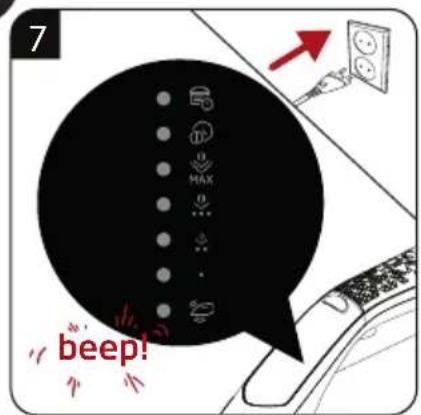
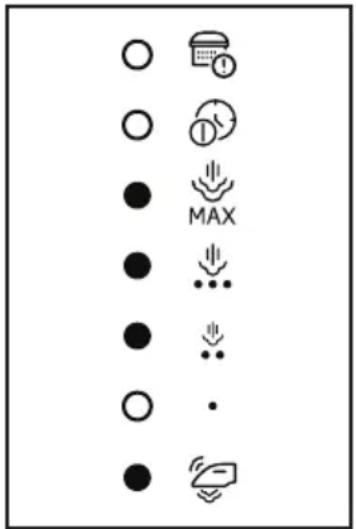
- If you press the steam button (11) while the water reservoir is empty, three steam level symbols other than the first level and the smart mode symbol light flash as shown in the figure.
text_image
Diagram showing various symbols and icons including circles, arrows, and a speech bubble with 'MAX' label- When user presses function button after installing the tank with water, the light will return to previous mode.
- Your appliance is suitable for using with tap water. If your tap water is excessively hard, we recommend you to use a mixture of tap water and potable water.
2.7 Steam ironing

- Operation of the pump may make some noise during the water drawing process; this is normal.
- The appliance starts in Smart-ECO mode in the initial use. This level offers safe temperature and steam amount for all the fabrics that can be ironed.
- When the icon light of the selected setting flashes consistently on the display, your appliance is ready to iron.
WARNING

- Your selection should be suited for the fabric to be ironed.
- If the icon light on the display blinks, this means that the sole-plate temperature setting is not at the desired level.

- You can do steam ironing by using the steam trigger (11) at all temperature levels except for “●”.
- Your iron will raise steam from its soleplate (7) as long as you hold the steam trigger pressed.
2.8 Vertical steam

You can iron your curtains and hanged garments thanks to the vertical steam feature. Keep the appliance 15-30 cm away from the garment and curtains.
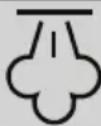
WARNING: Never direct the steam to people or pets.
2.9 Automatic Shutdown (Auto-Off)

- If you do not move the appliance or press any of its buttons for 10 minutes, it will be shut down automatically.
- If you move the appliance horizontally or press any of its buttons, it will start to operate.
- It may take 60 seconds for the soleplate (7) to reach the previous temperature level.
3.1 Cleaning

WARNING
- Do not soak the steam station (2) in water or other liquids. Never put vinegar, descaling agent, laundry starch, perfume or other auxiliary products that help ironing into the appliance.
- Do not use gasoline, solvent and abrasive cleaning agents or hard brush to clean the appliance.
- Do not use abrasive cleaning agents to clean the soleplate (7).
WARNING: Do not wash your appliance under running water or do not soak it in water or other liquids.
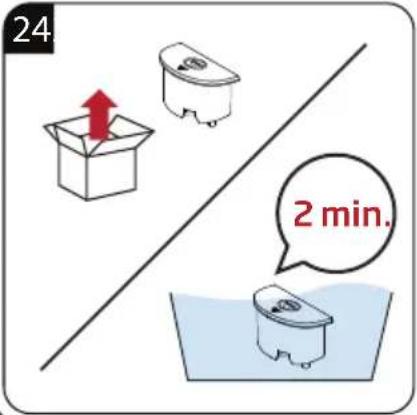
3.2 Replacing the lime collecting cartridge

WARNING
- Do not use any descaling agents! They may damage the appliance.
- Do not purchase cartridge from places other than the dealers and service centers. If you do this, the cartridge will not fit into the cartridge slot and will not operate. This causes a breakdown in your appliance. Faults arising from using wrong cartridge are not covered under warranty.
- If the scale collection cartridge is not installed or if it is installed incorrectly, the cartridge replacement symbol light flashes to warn the user that the cartridge is installed incorrectly.

The cartridge must be replaced after consuming about 30 liters of water.
3.3 Lime removing feature (Self-Clean)
- To start descaling operation, press control (10) and steam (11) buttons simultaneously for 3 seconds.
- The appliance returns to the last used mode when descaling (self-scaling) operation is ended.
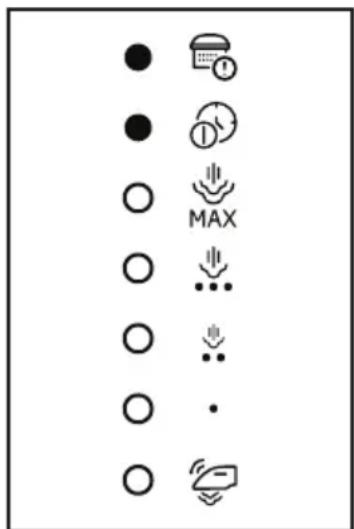
- After consuming about 30 liters of water, “Self-clean” icon lights lit continuously on as shown in the picture indicating the need for self-cleaning process.

text_image
Diagram showing various symbols and icons including clock, refresh, MAX, download, download arrow, download dot, and Wi-Fi icon- The relevant symbols are illuminated continuously during the descaling operation, and the user is not allowed to turn off this mode until descaling operation is ended.
- During self-cleaning process, user cannot exit until the self-clean is completed.
- If user skips self-cleaning process or plugs the iron off, the appliance will remind this need of self-cleaning operation with related icon lights and buzzer sounds simultaneously for three times at the beginning of every ironing session.

- When the lime removing (self-clean) is over, the appliance automatically returns to the previous mode.
3.4 Storage
- If you do not intend to use the appliance for a long time, store it carefully.
- Unplug the appliance and wait for it to cool completely before storing it.
- Discharge the water in the water reservoir (5).
- Store the appliance in a cool and dry place.
- Keep the appliance out of the reach of children.
3.5 Moving and transportation
- Carry the appliance in its original packaging during moving and transportation. The packaging of the appliance protects it against physical damages.
- Do not place heavy loads on the appliance or the packaging. The appliance may be damaged.
- Dropping the appliance may render it non-operational or cause permanent damage.

For commissioning, general use and cleaning, please observe the instructions on pages 5 - 6 and 7 of this operating manual.
text_image
Diagram showing various symbols and icons including circles, arrows, and a 'MAX' label, likely representing a system or control symbol.text_image
Diagram showing various symbols and icons including circles, arrows, and a machine with a timer and 'MAX' labeltext_image
Diagram showing various symbols and icons including circles, arrows, and a 'MAX' label, likely representing a system or control symbol.text_image
Diagram showing various symbols and icons including circles, arrows, and a timer with 'MAX' labeltext_image
Diagram showing various symbols and icons including circles, clock, plus signs, and arrows, arranged vertically with some containing text like 'MAX' or '·'text_image
Diagram showing various symbols and icons including circles, arrows, and a MAX symbol with plus/minus signs.- https://www.instagram.com/bekoturkiye/
- https://twitter.com/beko_tr
- https://www.facebook.com/bekoturkiye/
- https://www.youtube.com/user/BekoChannel
* Posta Adresimiz:
text_image
Diagram showing various symbols and icons including circles, arrows, and a machine icon with 'MAX' labeltext_image
Diagram showing various symbols and icons including circles, arrows, and a calendar with 'MAX' labeltext_image
Diagram showing various symbols and icons including circles, clock, plus signs, and arrows, arranged vertically with labels like 'MAX' and '·'text_image
Diagram showing various symbols and icons including circles, arrows, and a machine with a timer and 'MAX' labeltext_image
Diagram showing various symbols and icons including circles, arrows, and a 'MAX' label, likely representing a system or control symbol.text_image
Diagram showing various icons representing basic computer status indicators such as clock, refresh, MAX, and Wi-Fi.text_image
Diagram showing various symbols and icons including circles, clock, plus signs, and arrows with labels like MAX and Wi-Fi.text_image
Diagram showing various symbols and icons including circles, arrows, and a clock with 'MAX' label
□ Radiator electric □ □ Convector electric
Model / Serie:
VÂNZĂTOR
Nr. factură:......Data:......
text_image
Diagram showing various symbols and icons including circles, arrows, and a 'MAX' label, likely representing a system or control symbol.natural_image
Simple line icon of a shirt collar with dotted pattern (no text or symbols)SGA 6126 R - SGA 6124 D
RU
text_image
Collection of icons representing various symbols and concepts, including circles, clocks, arrows, and a machine.
text_image
Diagram showing various symbols and icons including circles, arrows, and a clock with 'MAX' labeltext_image
Diagram showing various symbols and icons including circles, arrows, and a speech bubble with 'MAX' label- Kada korisnik pritisne taster za funkciju nakon postavljanja rezervoara sa vodom, lampica će se vratiti u prethodni režim.
- Vaš uređaj je pogodan za upotrebu vode iz slavine. Ako vam je voda iz slavine prekomerno tvrda, savetujemo vam upotrebu mešavine vode iz slavine i vode za piće.
2.7 Peglanje na paru
