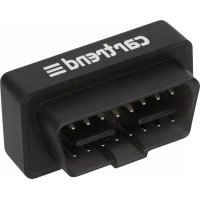
10559 - To scan Cartrend - Free user manual and instructions
Find the device manual for free 10559 Cartrend in PDF.


| Product type | OBD Scanner |
| Brand | Cartrend |
| Model | 10559 |
| Dimensions | 490 x 230 x 260 mm |
| Power supply | 8V - 16V DC via OBD interface (DLC) |
| Supported protocols | CAN, VPW, PWM, ISO9141, KWP2000 |
| Operating temperature | 0°C - 50°C |
| Relative humidity | 10% - 95% |
| Smartphone connection | Wi-Fi (WiFi_OBDII network) |
| Main functions | Reading and clearing fault codes, diagnosis of exhaust systems and engine components |
| Package contents | Mini OnBoard Diagnostics device, user manual |
| Maintenance and cleaning | Soft dry cloth, maintenance-free, do not use liquids |
| Safety | Do not use while driving, turn off ignition before connecting, wear protective glasses |
| Materials | Not specified |
| Country of manufacture | Not specified |
| Warranty | Warranty voided if unauthorized opening or improper use |
| Intended use | Monitoring and diagnosis of exhaust gas control systems and engine components |
| After-sales service | Contact a specialized retailer |
| Disposal | Comply with WEEE directive (2012/19/EC), do not dispose of with household waste |
Frequently Asked Questions - 10559 Cartrend
User questions about 10559 Cartrend
0 question about this device. Answer the ones you know or ask your own.
Ask a new question about this device
Download the instructions for your To scan in PDF format for free! Find your manual 10559 - Cartrend and take your electronic device back in hand. On this page are published all the documents necessary for the use of your device. 10559 by Cartrend.
USER MANUAL 10559 Cartrend
Mini OnBoard Diagnostics
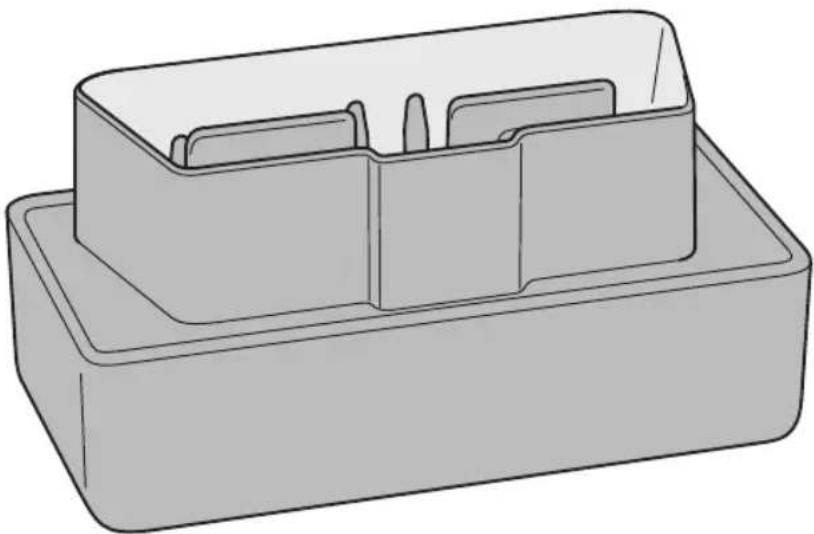
EN Operating Instructions 11
Cleaning, care and maintenance 18
INTRODUCTION
Explanation of symbols and signal words used in these operating instructions and/or the device:
Symbol Explanation

Follow instructions when using the machine.

Risk of bodily or fatal injury to children!

Follow warnings and safety instructions!

Warning! Dangerous voltage! Danger to life!

Consider the environment when disposing of the packaging!

This device complies with EU directives
Symbol/signal word Possible consequences of non-observance
Danger!
Immediate danger to life or severe injuries
Warning!
Serious injuries, potentially life-threatening
Caution!
Light to moderate injuries
Attention! Risk of property damage.
Note:
These operating instructions also refer to the Mini OnBoard Diagnostics as device.
CONTENTS
Check the package contents immediately after unpacking. Check the device and all parts for damage. Do not use a defective device or parts.
- Mini OnBoard Diagnostics
operating instruction
Please include all relevant documentation to other users!
NORMALUSE
The Mini OnBoard Diagnostics device was developed to emission control system and engine components. It tests specific vehicle components and vehicle conditions for this purpose. The diagnostics tool connects to the diagnostics connection inside the vehicle to read out trouble codes. This enables determining the problem to then possibly resolve it.
This device is not intended for use by children or persons with limited mental capacity or lacking experience and/or lacking expertise. Children should be supervised to ensure they do not play with the device.
This device is not intended for commercial use.
Any other use or modification of the device is considered improper and involves significant risks. The manufacturer assumes no liability for damages due to improper use.
The manufacture is not responsible for damages caused by:
- Improper connection and/or operation.
- External forces, damage to the device and/or damage to parts of the device due to mechanical impacts or overload.
Any type of modifications to the device. - Using the device for purposes not described in this operating manual.
- Subsequent damages from improper and/or incorrect use and/or defective batteries.
- Moisture and/or inadequate ventilation.
- Unauthorised opening of the device.
This will void the warranty.
TECHNICAL DATA
| Model Mini OnBoardDiagnostics | |
| Item number 10559 | |
| Operating temperature 0°C – 50 °C | |
| Relative humidity 10% – 95% | |
| Power supply | 8 V - 16 V DC provided via OBD interface inside the vehicle (DLC) |
| Protocols CAN, VPW, PWM, ISO9141, KWP2000 | |
| Dimensions 490 x 230 x 260 mm | |
SAFETY
Read all safety notes and instructions. Failure to observe the safety notes and instructions may result in electric shock, fire and/or serious injuries. Please keep all safety notes and instructions for future reference.
Include all documentation when passing this product on to other users or subsequent owners!

Risk of bodily or fatal injury to children!
- Danger to life and risk of accidents for infants and children. Never leave children unattended with the packaging materials. Suffocation hazard.
- Keep the product out of the reach of children. Children do not recognise the hazards this product creates!
- Do not allow children to play with cables – strangulation hazard! Do not allow children to play with the components or fasteners, as they could be swallowed and result in suffocation.

Warning!
- Danger to life! Do not work on the ignition coil, ignition cable or spark plugs. These parts conduct electricity and can cause electric shock.
- Improper use of the diagnostic tool can result in serious injuries and damage.
- Do not modify (alter) the diagnostic tool.
- Be sure the voltage matches the input voltage specified on the device (8 - 16 V) to prevent damage to the device.
- Do not expose the product to rain or moist conditions. Avoid spilling or dripping water or other liquids on it. Water entering electrical devices will increase the risk of electric shock.
- Please read and observe the instructions for use and all safety notes for the battery being monitored and the vehicle before using this device.
Always test your vehicle in a safe environment.
Always secure the vehicle against rolling way (engage parking brake, put in gear, chock wheels). - Run the vehicle in a well ventilated work area. Exhaust fumes are poisonous and can result in death by asphyxiation.
- When connection the diagnostic tool, always be sure the safety and functionality of other systems and devices inside the vehicle will not be affected! Please note the information in the vehicle owner's manual.
- Wear safety goggles.
- Ensure the ignition and all consumers in the vehicle are off before connecting or disconnecting the diagnostic tool!
- Keep clothing, hair, hands, tools, testing equipment, etc. away from all moving or hot engine parts.
- Connecting the diagnostic tool incorrectly can damage electronics in the vehicle. This could result in an accident or fire. Attention! Risk of personal injury and property damage!
- Have a fire extinguisher suitable for petrol/chemical/electrical fire ready.
- Never leave the vehicle unattended whilst using the diagnostic tool.
- Repairs must be performed by a qualified technician.
- Using a mobile device whilst driving may distract from traffic. Maintain your focus on driving and traffic.
CONNECTION
Connecting the diagnostic tool
Warning!
If you are not familiar with electrical installations and the connections or are unsure during one of these steps, please consult professionals for installation advice! Risk of personal injury and property damage!
The diagnostic tool connects to the vehicle via DLC (Data Link Connector; standardised 16-pin connector).
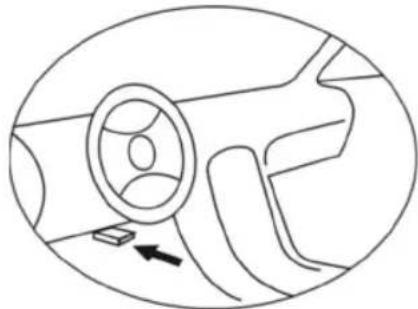
Location of the data link connector:
The DLC is typically located on the driver's side, approx.
30 cm from the middle of the instrument panel.
For some Asian and European vehicles, the DLC is located behind the ashtray, which must be removed to access the connector Refer to the vehicle's service manual for the exact location if the DLC.
- Turn the ignition off.
- Locate the 16-pin data link connector (DLC).
- Connect the diagnostic tool to the vehicle's data link connector.
- Turn the ignition on. The engine can be running or off.
Disconnecting the diagnostic tool
Disconnect the diagnostic tool from the vehicle's data link connector when not in use to avoid draining the battery.
- Turn the ignition off.
- Disconnect the diagnostic tool from the vehicle's data link connector.
OPERATION
Warning!
Do not operate the diagnostic tool whilst driving, as this will distract you from traffic. Maintain your focus on driving and traffic.
Installing the app
The diagnostic tool can be used with popular diagnostic apps. Please observe the privacy policy of the respective app manufacturer.
- Scan the QR code. You will automatically be redirected to a list of popular apps.


Google Play App Store
- Download the desired app from Google Play/App Store.
- Install the app on your smartphone.
Connecting the smartphone to the diagnostic tool
- Connect the diagnostic tool (see chapter "Connecting").
- If necessary, activate the WiFi function on your smartphone.
- Scan the available networks for "WiFi_OBDII".
- Connect your smartphone to the network.
The network will now appear when the diagnostic tool is connected to the vehicle's data link connector. The network only allows connecting to the diagnostic tool and does not connect to the internet.
When connecting to the diagnostic tool for the first time, it may take 1 - 2 minutes to readout the error code. Wait for the process to complete.
Using the app
- Tap the app icon and open the app.
- Follow the app instructions.
TROUBLESHOOTING
This section describes errors which may occur when using the diagnostic tool.
| Problem Solution | |
| Not connected to the diag-nostic tool | Connect the diagnostic tool (see chapter “Connecting”). Turn the ignition on. If the problem continues, test the diagnostic tool in a differ-ent vehicle. Have your vehicle's data link connector (DLC) checked. |
| Network disconnects | The network only allows connecting to the diagnostic tool and does not connect to the internet. Some smartphones auto-matically switch to networks with internet connection. This will disconnect the mobile from the diagnostic tool. Disable other networks on your smartphone. Use the diagnostic tool in locations without networks. |
| Unable to erase errors Turn the ignition on. Repeat the process. | |
CLEANING, CARE AND MAINTENANCE
The device is maintenance-free.
Clean the product with a soft, dry cloth.
- Store the machine in a clean, dry place.
- Do not use liquids or harsh cleaning agents, as these can cause discolouration and damage the surface, and may damage the device! Do not allow liquid to enter the device! Do not immerse the device in liquids! Only use the device if it is dry.
Service
Should you have any questions regarding commissioning or operating in spite of studying these operating instructions, or if a problem should occur against all expectations, please get in contact with your specialist supplier.
Disposal
The packaging consists of non-contaminating materials that you can dispose of at your local recycling point.

Do not throw electrical appliances in with domestic waste!
In accordance with European Directive 2012/19/EC for waste electrical and electronic equipment (WEEE) and conversion to national law, used electrical appliances must be collected separately and taken to a recycling point. For ways to dispose of old electrical appliances please contact your community or city administration.
Illustrations may vary slightly from the product itself. We reserve the right to modify the product in accordance with technical advances. Decoration not included.
TABLE DES MATIÈRES
Introduction 20
76761 Rülzheim - Germany
www.mts-gruppe.com
Intertec Polska Sp. z o.o.
05-830 Nadarzyn - Poland
www.intertec-polska.pl
Tegro AG
Ringstr. 3
8603 Schwerzenbach - Switzerland
www. tegro.ch
EAN:4038373063960

PAP

Stand: 06/2019