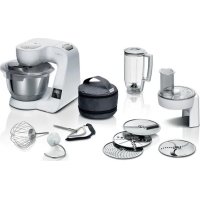
MUM5X220 - Other kitchen appliances BOSCH - Free user manual and instructions
Find the device manual for free MUM5X220 BOSCH in PDF.



| Product type | Multifunction food processor |
| Brand | Bosch |
| Model | MUM5X220 |
| Bowl material | Stainless steel |
| Speeds | 7 speeds + pulse (M) |
| Integrated scale | Yes, up to 5000 g (precision 5 g) |
| Timer | Yes, up to 59 min 59 s |
| Number of drives | 3 (main, drive 2, drive 3) |
| Included accessories | Pro Flexi whisk, pro beater, dough hook, protective cover |
| Main functions | Knead, mix, beat, weigh |
| Control type | Rotary switch + touch buttons |
| Display | LCD screen |
| Safety | Anti-start, anti-restart, overload protection |
| Cleaning | Stainless steel bowl dishwasher safe; other parts hand wash |
| Swivel arm | With EasyArm Lift function |
| Optional accessories | Meat grinder, pasta machine, ice cream maker, grater, citrus press, blender bowl, multi-grinder kit |
| Usage | Private household, enclosed rooms, max altitude 2000 m |
| Spare parts | Available for at least 7 years after market launch |
| Warranty | According to country conditions (see after-sales service) |
Frequently Asked Questions - MUM5X220 BOSCH
User questions about MUM5X220 BOSCH
0 question about this device. Answer the ones you know or ask your own.
Ask a new question about this device
Download the instructions for your Other kitchen appliances in PDF format for free! Find your manual MUM5X220 - BOSCH and take your electronic device back in hand. On this page are published all the documents necessary for the use of your device. MUM5X220 by BOSCH.
USER MANUAL MUM5X220 BOSCH
m = 311
20
22
24
26
27
Further information and explanations are available online:
Table of contents
1 Safety 29
1.1 General information 29
1.2 Intended use 29
1.3 Restriction on user group..... 30
1.4 Safety instructions 30
2 Avoiding material damage. 33
3 Environmental protection and saving energy 33
3.1 Disposing of packaging 33
4 Unpacking and checking. 33
4.1 Unpacking the appliance and parts 33
4.2 Contents of package 33
4.3 Setting up appliance 34
5 Familiarising yourself with your appliance. 34
5.1 Appliance 34
5.2 Rotary switch 34
5.3 Illuminated ring.. 34
5.4 Control panel 35
5.5 Function buttons 35
5.6 Display 35
5.7 Swivel arm 35
5.8 Drives 36
5.9 Tools 36
5.10 Symbols 37
5.11 Parked position 37
5.12 Safety systems 37
6 Before using for the first time ... 38
6.1 Preparing the appliance 38
7 Basic operation 38
7.1 Cable length 38
7.2 Moving the swivel arm 38
7.3 Inserting bowl 39
7.4 Removing bowl 39
7.5 Inserting tools.. 39
7.6 Removing tools 39
7.7 Attaching bowl lid.. 39
7.8 Removing bowl lid.. 39
7.9 Processing 39
7.10 Drive cover 41
8 Scales 41
8.1 Display values of scales. 41
8.2 Weighing ingredients 41
8.3 Changing the display units of the scales 42
9 Timer 42
9.1 Display values of timer 42
9.2 Reading off and resetting the processing time 42
10 Cleaning and servicing. 42
10.1 Cleaning products 42
10.2 Overview of cleaning 43
11 Special accessories. 43
12 Application examples 43
12.1 Sample recipe 43
13 Troubleshooting 44
14 Disposal 47
14.1 Disposing of old appliance .... 47
15 Customer Service 47
15.1 Product number (E-Nr.) and production number (FD) 47

1 Safety
Observe the following safety instructions.
1.1 General information
- Read this instruction manual carefully.
- Please note the additional instructions when using supplied or optionally available accessories.
- Keep the instruction manual and the product information safe for future reference or for the next owner.
- Do not connect the appliance if it has been damaged in transit.
1.2 Intended use
Only use this appliance:
- With genuine parts and accessories.
- For additional applications described in the instructions for accessories that are optional or come with the appliance.
For mixing, kneading and beating food.
Under supervision. - In private households and in enclosed spaces in a domestic environment at room temperature.
- for normal processing quantities and for normal processing times for domestic use.
- Up to an altitude of max. 2000m above sea level.
Disconnect the appliance from the power supply when:
are not using the appliance.
the appliance is unattended.
- assembling the appliance.
taking the appliance apart.
- cleaning the appliance.
approaching rotating parts.
- Change tools.
- confronted with a fault.
1.3 Restriction on user group
This appliance can be used by persons with reduced physical, sensory or mental capabilities or a lack of experience and/or knowledge if they have been given supervision or instruction concerning use of the appliance in a safe way and if they understand the hazards involved.
Do not let children play with the appliance.
Cleaning and user maintenance must not be performed by children.
The appliance must not be used by children. Keep children away from the appliance and power cable.
1.4 Safety instructions
Observe the safety instructions.
WARNING - Risk of electric shock!
If the appliance or the power cord is damaged, this is dangerous.
- Never operate a damaged appliance.
- Never operate an appliance with a cracked or fractured surface.
- Never pull on the power cord to unplug the appliance. Always unplug the appliance at the mains.
- If the appliance or the power cord is damaged, immediately unplug the power cord or switch off the fuse in the fuse box.
- Call customer services. Page 47
Incorrect installation is dangerous.
- Connect and operate the appliance only in accordance with the specifications on the rating plate.
Incorrect repairs are dangerous.
- Repairs to the appliance should only be carried out by trained specialist staff.
- Only use genuine spare parts when repairing the appliance.
If the power cord of this appliance is damaged, it must be replaced by the manufacturer, the manufacturer's Customer Service or a similarly qualified person in order to prevent any risk.
An ingress of moisture can cause an electric shock.
- Never immerse the appliance or the power cord in water or clean in the dishwasher.
- Only use the appliance in enclosed spaces.
- Never expose the appliance to intense heat or humidity.
- Do not use steam- or high-pressure cleaners to clean the appliance.
If the insulation of the power cord is damaged, this is dangerous.
- Never let the power cord come into contact with hot appliance parts or heat sources.
- Never let the power cord come into contact with sharp points or edges.
- Never kink, crush or modify the power cord.
WARNING - Risk of fire!
Intense heat may cause the appliance and other parts to catch fire.
- Never place the appliance on or near hot surfaces.
WARNING - Risk of injury!
Rotating drives, tools or accessory parts may cause injury.
- Keep hands, hair, clothing and utensils away from rotating parts.
- Only attach and remove tools and accessories once the drive has stopped and you have unplugged the appliance.
- Before changing tools or cleaning the appliance, switch off and disconnect it from the mains.
- Only use the tools when the bowl is inserted, the lid is fitted and the drive covers are in place.
- Never open the swivel arm during processing.
Operating the appliance with damaged parts may result in injury.
- Parts which show cracks or other damage or do not fit correctly must be replaced with genuine spare parts.
WARNING - Risk of crushing!
Your hands and fingers could get caught.
- Do not reach into the bowl when lowering the swivel arm.
en Safety
WARNING - Risk of suffocation!
Children may put packaging material over their heads or wrap themselves up in it and suffocate.
- Keep packaging material away from children.
- Do not let children play with packaging material.
Children may breathe in or swallow small parts, causing them to suffocate.
- Keep small parts away from children.
- Do not let children play with small parts.
WARNING - Risk of harm to health!
Soiling on surfaces may be harmful to health.
- Follow the cleaning instructions.
- Clean surfaces which come in contact with food before each use.
2 Avoiding material damage
ATTENTION!
Improper use may cause material damage.
- Never use different drives at the same time.
- Never operate the appliance longer than necessary.
- Do not operate the appliance at no-load.
- Never use genuine parts and accessories for other appliances.
- Observe the maximum processing quantities.
- Do not use the bowl to store objects which do not belong to it.
During operation warm exhaust air escapes from the vent grille at the rear. If this is blocked, it may cause the appliance to overheat.
- Set up the appliance at a sufficient distance from walls, easily damaged surfaces and other appliances.
Vibrations may impair functioning of the appliance.
- Do not place the appliance on moving or vibrating surfaces.
3 Environmental protection and saving energy
3.1 Disposing of packaging
The packaging materials are environmentally compatible and can be recycled.
- Sort the individual components by type and dispose of them separately.
4 Unpacking and checking
Find out here what you need to note when unpacking the appliance.
4.1 Unpacking the appliance and parts
- Take the appliance out of the packaging.
- Take all other parts and the accompanying documents out of the packaging and place them to hand.
- Remove any packaging material.
- Remove any stickers or film.
4.2 Contents of package
After unpacking all parts, check for any damage in transit and completeness of the delivery.
Note: The appliance comes with additional accessories depending on its features. See the instructions for the accessories to discover the further contents of the package.
Fig. 1
| A | Main unit with mixing bowl |
| B | Lid with integrated filling shaft |
| C | Professional flexible stirrer |
| D | Professional beating whisk |
| E | Kneading hook |
| F | Storage pouch |
| G | Accompanying documents |
4.3 Setting up appliance

WARNING
Risk of fire!
Intense heat may cause the appliance and other parts to catch fire.
- Never place the appliance on or near hot surfaces.
ATTENTION!
During operation warm exhaust air escapes from the vent grille at the rear. If this is blocked, it may cause the appliance to overheat.
- Set up the appliance at a sufficient distance from walls, easily damaged surfaces and other appliances.
Vibrations may impair functioning of the appliance.
-
Do not place the appliance on moving or vibrating surfaces.
-
Place the appliance on a stable, level, clean and flat work surface.
- Pull the power cable out to the required length.
"Cable length", Page 38
Do not insert the mains plug.
5 Familiarising yourself with your appliance
5.1 Appliance
You can find an overview of the parts of your appliance here.
Fig. 2
| 1 | Stainless steel mixing bowl |
| 2 | Control panel |
| 3 | Lid with integrated filling shaft |
| 4 | Release button for swivel arm |
| 5 | Swivel arm |
| 6 | Rotary switch |
| 7 | Illuminated ring |
| 8 | Protective cover for drive 2 |
| 9 | Drive 2 |
| 10 | Protective cover for drive 3 |
| 11 | Drive 3 |
| 12 | Vent grille |
| 13 | Main drive |
| 14 | Cord store |
5.2 Rotary switch
The rotary switch is used to start and stop processing and select the speed.
| Symbol Function |
| O/off Stop processing. |
| 1 Process ingredients at low speed. |
| 7 Process ingredients at maximum speed. |
| M Process ingredients briefly at maximum speed. → "Using instantaneous switching", Page 40 |
5.3 Illuminated ring
The illuminated ring on the rotary switch informs you about the operating status of your appliance.
| Display Status | |
| The illuminated ring lights up and processing is un-derway. | The appliance is functioning per-ffectly. |
| The illuminated ring does not light up and processing cannot start. | ■ The appliance has no power supply. ■ There is a fault with the appliance. |
| The illuminated ring flashes and processing cannot start or continue. | ■ A safety system has been activated. ■ There is a fault with the appliance. |
Tip: You can find further information here:
"Safety systems", Page 37
"Troubleshooting", Page 44
5.4 Control panel
You can find an overview of the control panel here.
Fig. 3
| 1 | Reset button |
| 2 | Scales button |
| 3 | Display |
| 4 | Symbol Weight in pounds |
| 5 | Symbol Weight in grams |
| 6 | Symbol Time in minutes and seconds |
5.5 Function buttons
You can use the function buttons to select additional functions or configure settings. To make a selection, touch the relevant symbols with your finger.
| Symbol Function | |
| Switch scales on and off. | |
| Reset scales. |
| Symbol | Function |
| Reset timer. |
Note: Press the buttons with your fingers without wearing rubber/oven gloves. Do not operate buttons with objects, e.g. a wooden spoon.
5.6 Display
The display shows values and messages about the operating status.
Note: The display will switch off automatically if the appliance is not operated for a given period of time. To reactivate the display, press a button or start processing.
5.7 Swivel arm
The swivel arm can be adjusted and fixed in different positions. If the release button is pressed, the swivel arm can be moved to the required position. "Moving the swivel arm", Page 38
Note: The swivel arm features the EasyArm Lift function. This function supports upwards movement of the swivel arm.
Swivel arm positions
You can find an overview of the positions of the swivel arm here.
| Posi- tion | Use |
| Posi- tion 1 | Swivel arm is closed. Process ingredients with tools. Use accessory on main drive, e.g. Ice maker. Use accessory on drive 2, e.g. Continuous feed shredder |
| Posi- tion 2 | Swivel arm is open. • Insert or remove bowl. • Insert or remove tool. • Add the ingredients to the bowl. |
| Posi- tion 3 | • Use accessory on main drive, e.g. Meat mincer. • Use accessory on drive 3, e.g. Blender attach- ment. |
5.8 Drives
Your appliance is equipped with different drives, which are specially designed for its tools and accessories.
Note: Drives 2 and 3 come with protective covers.
"Drive cover", Page 41
Overview of drives
You can find an overview of the drives and their purposes here.
| Drive Use | |
| Main drive | For the tools and accessories, e.g. |
| ■ Meat mincer | |
| ■ Pasta press | |
| ■ Ice maker | |
| Drive 2 For accessories, e.g. | |
| ■ Continuous feed shredder | |
| ■ Citrus press | |
Drive 3 For accessories, e.g.
Glass blender attachment
Plastic blender attachment
| Drive Use | |
| ↓ | Multi-chopper set |
5.9 Tools
You can find out everything you need to know about the different tools here.
The kneading hook is equipped with a removable protective cap to protect the drive from soiling.
Overview of tools
Use the appropriate tool depending on use.
| Tool Use | |
| Kneading hook ■ Khead dough, e.g. yeast dough, bread dough, pizza dough, pasta dough, pastry dough. ■ Fold ingredients into the dough, e.g. seeds. | |
| Professional flexible stirrer ■ Mix dough, e.g. cake mixture, fruit flan. ■ Fold ingredients into the dough, e.g. raisins, chocolate chips. | |
| Professional beating whisk ■ Beat whipped egg whites and cream (at least 30% fat). ■ Mix light dough, e.g. sponge mixture. | |
Fine adjustment of the professional whisk
Use the fine adjustment system to correct the distance between the bowl and the professional beating whisk.
Note: The professional beating whisk is factory-set so that ingredients are mixed together perfectly.
Correcting tool adjustment
ATTENTION!
The appliance and tools can be damaged if a wrong tool setting is used.
- Never operate a tool that touches the bowl.
Requirements
The mains plug is not inserted.
The swivel arm is open.
The professional beating whisk is inserted.
The bowl has been inserted.
- Hold the beating whisk at the bottom with one hand and release the lock nut clockwise using a spanner wrench.
$$ \rightarrow F i g. \quad 4 $$
- To change the distance, turn the tool.
$$ \rightarrow F i g. \boxed {5} $$
Observe the values in the table:
Setting Distance
| Optimum setting | 3 mm |
| One turn clock-wise | 1 mm more |
| One turn anticlockwise | 1 mm less |
- Press the release button and push the swivel arm down until it engages.
- Check the setting.
- Press the release button and raise the swivel arm until it engages.
- Hold the beating whisk at the bottom with one hand and tighten the lock nut anticlockwise using a spanner wrench.
5.10 Symbols
You can find an overview of the symbols used on your appliance here.
| Symbol | Description |
| = | Marking on the protective cover for drive 2. |
| ▲ | Attachment marking on the protective cover for drive 3. |
| ▲ | Position marking on drive 3. |
5.11 Parked position
Your appliance is equipped with an automatic parked position.
After the appliance has switched off, the drives will continue moving for a few seconds until the correct parked position is reached.
Note: The swivel arm will only open or close with the inserted tool when the drive is located in the correct parked position.
The following causes result in an incorrect parked position:
The power supply was interrupted during processing.
A safety system terminated processing.
During processing the swivel arm disengaged or the release button for the swivel arm was pressed.
Tip: You can easily adjust an incorrect parking position yourself.
"Troubleshooting", Page 44
5.12 Safety systems
You can find an overview of your appliance's safety systems here.
en first time
Start lock-out
Start lock-out prevents your appliance from being switched on accidentally.
The appliance can only be switched on and operated if
- the swivel arm is engaged in position 1 and the bowl or an accessory is inserted, e.g. Ice maker.
- the swivel arm is engaged in position 3 and the protective cover or an accessory is fitted on drive 3.
Restart lock-out
Restart lock-out prevents your appliance from automatically restarting processing after a power failure. The appliance is switched on again after a power failure. Processing cannot start again until the rotary switch has been set to O/off.
Overload protection
The overload protection system prevents the motor and other components from being damaged through being overloaded.
The motor will switch off if
too large a quantity is processed.
- a tool or accessory is blocked.
6 Before using for the first time
Prepare the appliance for use.
6.1 Preparing the appliance
- Press the release button and raise the swivel arm until it engages.
"Moving the swivel arm", Page 38 -
Turn the bowl clockwise and remove.
"Removing bowl", Page 39 -
Clean all parts that come into contact with food before using for the first time.
"Cleaning and servicing", Page 42 - Put the cleaned and dried parts out ready for use.
7 Basic operation
7.1 Cable length
Adjust the length of the power cable to your needs.
Adjusting cable length via cable rewinder
- Pull the power cable out to the required length and slowly let go.
-
To shorten the cable,
-
pull the cable,
- allow the cable to wind up,
- pull the cable out again.
Note: Do not push the cable in by hand. If the cable jams, pull right out and let it wind up again.
7.2 Moving the swivel arm
- Press the release button and raise the swivel arm until it engages.
Fig. 6 - The swivel arm is fixed in position 2.
- Press the release button and move the swivel arm down until it engages in the vertical position.
Fig. 7
The swivel arm is fixed in position 3.
7.3 Inserting bowl
- Place the bowl in the main unit.
Fig. 8
Use the recesses on the main unit.
- Turn the bowl anticlockwise until it engages.
Fig. 9
7.4 Removing bowl
- Turn the bowl clockwise and remove.
Fig. 10
7.5 Inserting tools
- Select the tool required.
"Overview of tools", Page 36
- Press the tool into the main drive until it engages.
Fig. 11
-
To insert the kneading hook:
-
Insert the kneading hook with the protective cap fitted in the main drive.
- Turn the protective cap until the kneading hook engages fully.
Fig. 12
The protective cap a must cover the main drive completely.
7.6 Removing tools
- Pull the tool completely out of the drive.
Fig. 13
7.7 Attaching bowl lid
Requirements
The required tool is used here.
The bowl has been inserted.
The swivel arm is closed.
- Press the release button, raise the swivel arm slightly and hold in place.
Fig. 14 - Lift the lid slightly at the front, slide fully onto the bowl and set down.
Fig. 15
The filling shaft must face towards the front.
- Push the swivel arm down until it engages.
Fig. 16
7.8 Removing bowl lid
- Press the release button, raise the swivel arm slightly and hold in place.
- Lift the lid slightly at the front and pull it out towards the front.
- Push the swivel arm up until it engages.
7.9 Processing
You can find out everything you need to know about processing food here.
Recommended speeds
Observe the recommended speeds for optimum results.
| Tool or access-ory | Setting |
| ∅ | 1-7 |
| 1-5 | |
| 1-3 | |
| 1 | |
| 3-5 | |
| 3-7 | |
| 3-7 | |
| 3-5 | |
| 7 | |
| 5-7 | |
| 3-7 | |
| M | |
| M | |
| 5-7 |
Processing ingredients with tools

WARNING
Risk of injury!
Rotating drives, tools or accessory parts may cause injury.
- Keep hands, hair, clothing and utensils away from rotating parts.
- Only attach and remove tools and accessories once the drive has stopped and you have unplugged the appliance.
Before changing tools or cleaning the appliance, switch off and disconnect it from the mains. - Only use the tools when the bowl is inserted, the lid is fitted and the drive covers are in place.
- Never open the swivel arm during processing.
Requirements
The bowl has been inserted.
The required tool is inserted.
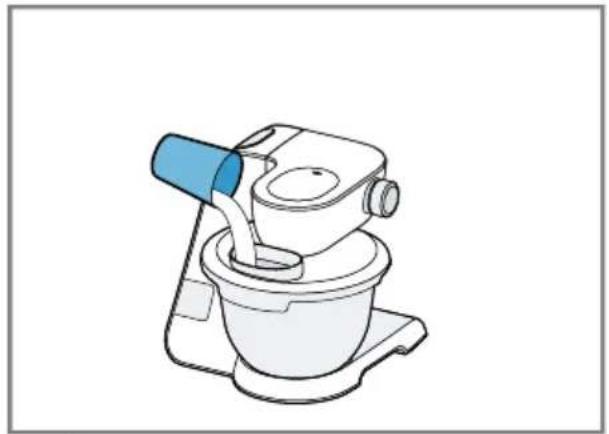
- Add the ingredients to the bowl.
- Press the release button and push the swivel arm down until it engages.
-
Attach the bowl lid. "Attaching bowl lid", Page 39
-
Insert mains plug.
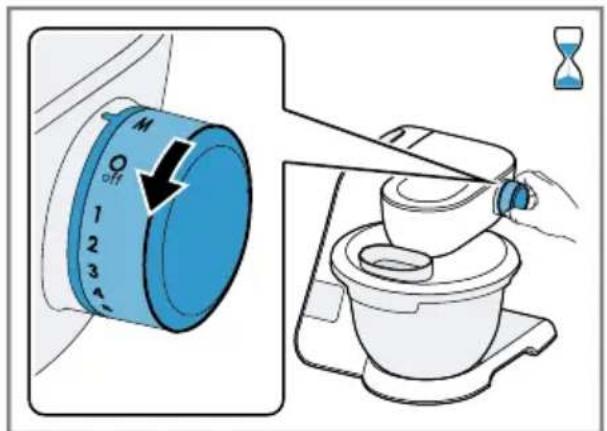
- Set the rotary switch to the required speed. Fig. 17
- Process the ingredients until you achieve the required result.
- Set the rotary switch to O/off Fig. 18 Wait until the appliance stops.
- Unplug the mains plug.
Tips
- You can change the speed at any time during processing or interrupt processing.
Clean all parts immediately after use so that residues do not dry on.
Adding more ingredients
$$ \rightarrow \text {F i g .} \quad 1 9 $$
- To add ingredients during processing, use the filling shaft in the lid.
- To add large quantities, set the rotary switch to Q/off Wait until the appliance stops.
- Remove the bowl lid. "Removing bowl lid", Page 39
- Add the ingredients to the bowl.
- Attach the bowl lid. "Attaching bowl lid", Page 39
- Process the ingredients until you achieve the required result.
Using instantaneous switching
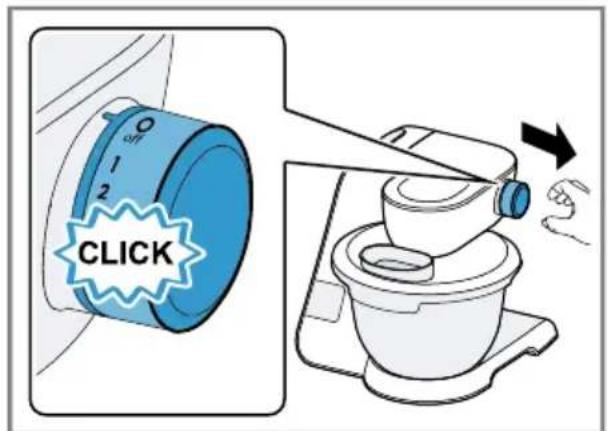
- Set the rotary switch to M and hold.
$$ \rightarrow \text {F i g .} \quad 2 0 $$
The ingredients are processed at maximum speed.
- Release the rotary switch. Fig. 21
The rotary switch springs to/off
- Processing stops and the drives move to the parked position.
Tip
Instantaneous switching is especially suitable when using the following accessories:
Glass blender attachment
Multi-chopper set
Multi-blender attachment
7.10 Drive cover
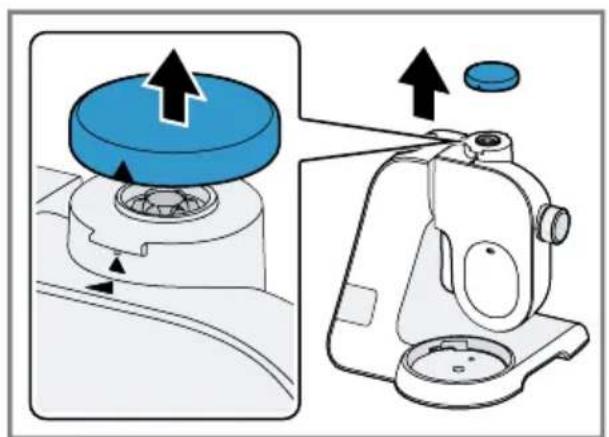
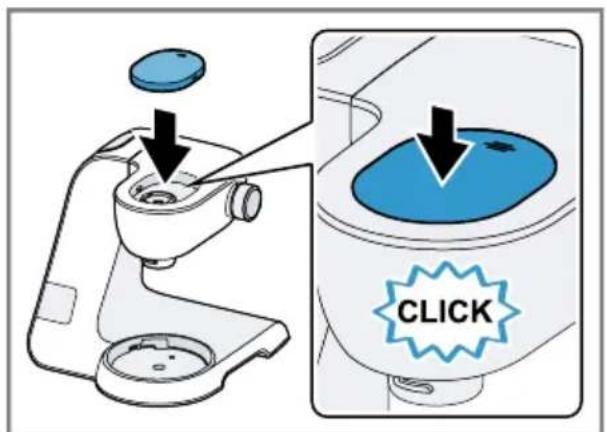
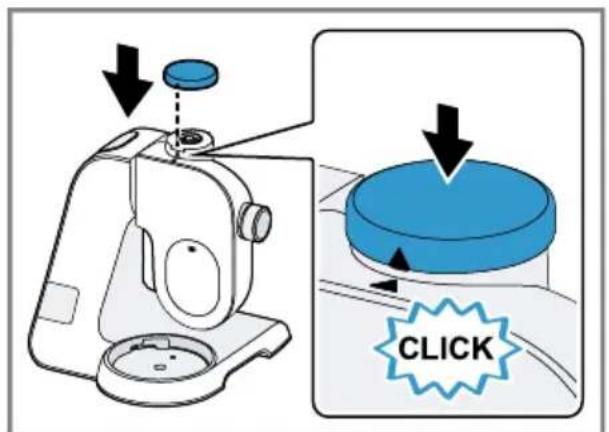
Remove the protective cover to use accessories on drive 2 or 3.
Removing drive cover
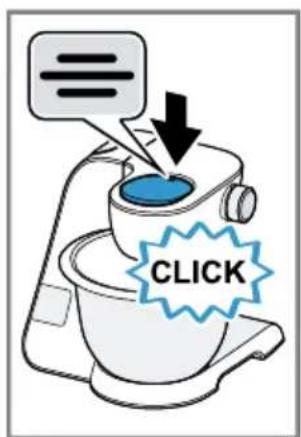
- Press down the protective cover for drive 2 at the marking and remove. Fig. 22
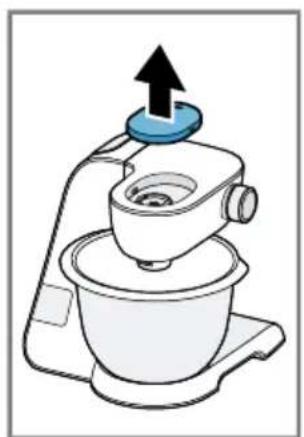
2.Pull up the protective cover for drive 3 and remove. Fig.23
Fitting drive cover
- Align the protective cover for the drive 2 with the marking towards the back, position and press in place firmly. Fig. 24
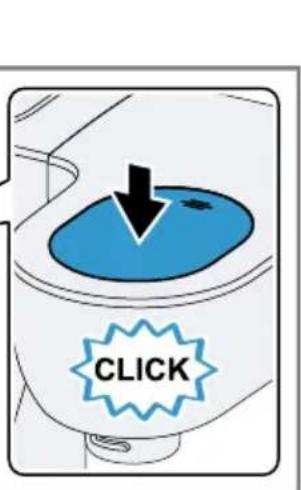
- Position the protective cover for the drive 3 and press in place firmly. Fig. 25 Markings and must match up.
Note: Always close unused drives with the protective covers.
8 Scales
Your appliance is equipped with a set of scales. You can weigh ingredients individually.
The main unit has 4 weight sensors in its feet.
The following factors can falsify the measuring result:
- Feet not standing on the work surface properly
Work surface vibrating - Objects underneath the main unit
- Ingredient quantities less than 5 g or 0.01 lb
Main unit slipped
Main unit touched - Objects on the main unit
8.1 Display values of scales
Observe the following values when using the scales.
Display unit in grams
| Display range -990 g to 5000 g |
| Display steps 5 g |
Display unit in pounds
| Display range -2.20 lb to 11.00 lb |
| Display steps 0.01 lb |
Tip: You can change the display units of the scales at any time.
"Changing the display units of the scales", Page 42
8.2 Weighing ingredients
Requirements
-
The bowl is inserted or an accessory is fitted.
The rotary switch is set to O/off. -
Press 日 and do not touch the appliance again.
The scales will be calibrated.
The display shows"--".
-
Wait for calibration to finish.
The display shows "0 g" or "0.00 lb". -
Add the required ingredient.
The display shows the weight.
en Timer
-
To weigh further ingredients, select one of the following options:
-
Add further ingredients and read off the total weight.
-
Press and wait until the display shows "0 g" or "0.00 lb".
-
To switch off the scales, press or start processing.
Tip: Also use the scales together with the accessory. Weigh the ingredients directly when adding them, e.g. to the blender attachment or the ice maker.
Note: The scales switch off automatically after approx. 3 minutes of inactivity.
8.3 Changing the display units of the scales
Requirements
The rotary switch is set to O/off.
The scales are switched on.
- Press and hold and
The display unit for the scales changes.
| Symbol Unit | |
| g | Display in grammes |
| lb | Display in pounds |
- Release both buttons.
The scales will calibrate themselves and restart with the changed setting.
The setting is saved.
9 Timer
You can read off the processing time that has elapsed or reset it.
9.1 Display values of timer
Observe the following values when using the timer.
Display range 0 seconds to
59 minutes and
59 seconds
Display steps 1 second
9.2 Reading off and resetting the processing time
- Set the rotary switch to the required speed.
The display shows the processing time. - To reset the display to "00:00" press
Notes
If you interrupt processing for less than 30 seconds, the last values displayed are saved and will resume if processing starts again.
If you interrupt processing for more than 30 seconds, the appliance will switch on the scales and perform calibration.
10 Cleaning and servicing
To keep your appliance working efficiently for a long time, it is important to clean and maintain it carefully.
10.1 Cleaning products
Find out here which cleaning products are suitable for your appliance.
ATTENTION!
Using unsuitable cleaning agents or incorrect cleaning may damage the appliance.
Do not use cleaning agents containing alcohol or spirits.
- Do not use sharp, pointed or metal objects.
- Do not use abrasive cloths or cleaning agents.
- Only clean the control panel and the display using a damp microfibre cloth.
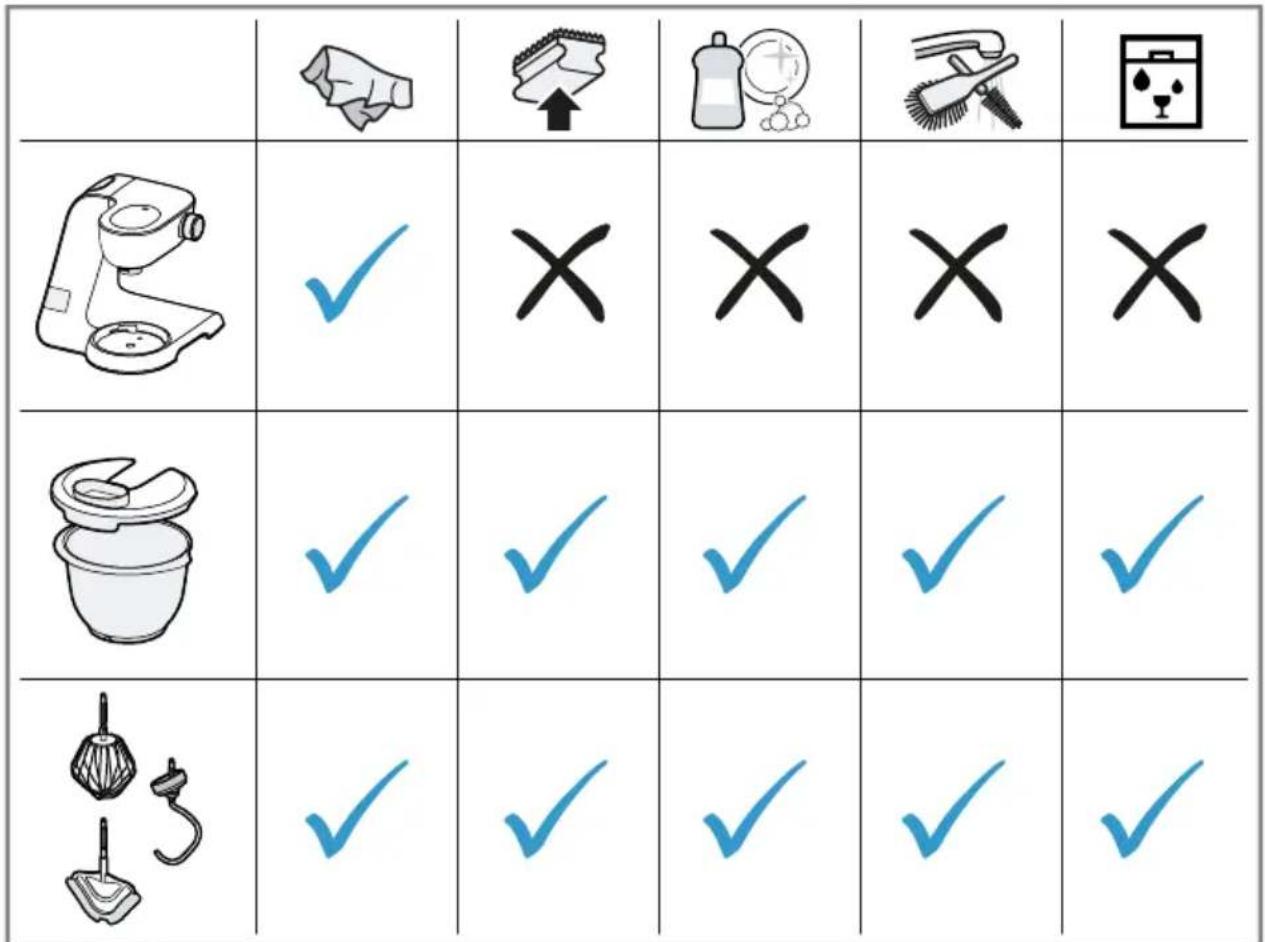
10.2 Overview of cleaning
You can find an overview of how to best clean the appliance and the other parts here.
Fig. 26
Tip: When processing food such as carrots, plastic parts may become discoloured. Remove discolouration with a soft cloth and a few drops of cooking oil.
11 Special accessories
You can buy accessories from the after-sales service, from specialist retailers or online. Only use genuine accessories as these have been specifically designed for your appliance. Accessories vary from one appliance to another. When purchasing accessories, always quote the exact product number (E no.) of your appliance. Page 47
You can find out which accessories are available for your appliance in our catalogue, in the online shop or from our after-sales service.
www.bosch-home.com
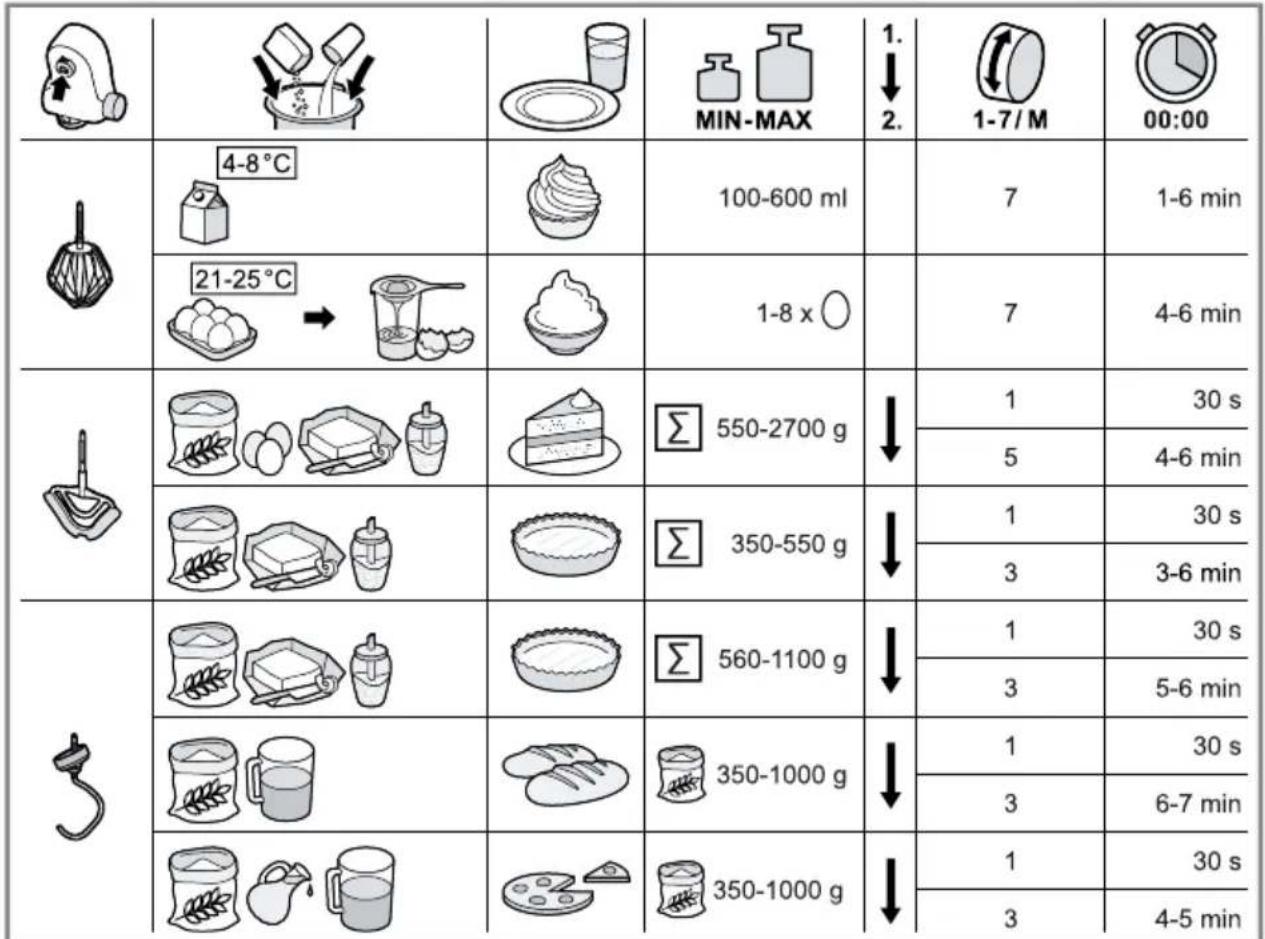
12 Application examples
Observe the comments and figures in the table.
Fig. 27
12.1 Sample recipe
You can find a sample recipe that has been specially developed for your appliance here.
Recipe Ingredients Processing
Heavy fruit cake 3 eggs
135 g sugar
135 g margarine
255 g flour
- 10 g baking powder
150 g currants
150 g mixed dried fruit
Note: Process max. 2 times the quantity at the same time.
Insert stirring whisk.
- Add all ingredients except the dried fruit.
Process for 30 seconds at setting 1.
- Then process for 3-5 minutes at setting 5.
- Select setting 2.
- Add the dried fruit within the next 30-60 seconds.
13 Troubleshooting
You can rectify minor faults on your appliance yourself. Read the troubleshooting information before contacting after-sales service. This will avoid unnecessary costs.

WARNING
Risk of electric shock!
Incorrect repairs are dangerous.
- Repairs to the appliance should only be carried out by trained specialist staff.
- Only use genuine spare parts when repairing the appliance.
- If the power cord of this appliance is damaged, it must be replaced by the manufacturer, the manufacturer's Customer Service or a similarly qualified person in order to prevent any risk.
Fault Cause and troubleshooting
| The appliance is not working. | The mains plug of the power cord is not plugged in. • Connect the appliance to the power supply. |
| The circuit breaker in the fuse box has tripped. • Check the circuit breaker in the fuse box. | |
| There has been a power cut. • Check whether the lighting in your kitchen or other appliances are working. | |
| Appliance does not start processing. | Rotary switch is set incorrectly. • Set the rotary switch to Off/Offre processing. |
| Appliance does not start processing or switches off during processing. | Processing quantity is too great or processing time was too long. • Set the rotary switch to O/off • Reduce the quantity of ingredients. • Allow the appliance to cool down to room temperature. |
| Appliance or accessory is blocked. • Set the rotary switch to O/off • Remove the blockage. | |
| Scales show no change in weight despite ingredients being added. | Quantity of ingredients outside measuring range of scales. • Add at least 5 g or 0.01 lb so the scales show correct values. |
| Fault Cause and troubleshooting | |
| The swivel arm cannot be opened or closed because the tool is jammed in the bowl. | Drive is not in the parked position after a safety system has stopped processing or the power supply has been interrupted. 1. Set the rotary switch to O/off 2. Eliminate the problem that caused the appliance to stop. → "Safety systems", Page 37 3. When the swivel arm is open, remove the tool and close the swivel arm. 4. Set the rotary switch briefly to 1 and then back to O/off. ◆ The drive remains on for a short time until the parked position is reached. |
| "5000 g" or "11.00 lb" is flashing on the display. | Display values of the scales have been exceeded. ◆ Observe the display values of the scales. → "Display values of scales", Page 41 |
| "-990 g" or "-2.20 lb" is flashing on the display. | Display values of scales have not been attained. ◆ Observe the display values of the scales. → "Display values of scales", Page 41 |
| "59:59 m:s" is flashing on the display. | Display range of the timer has been exceeded. ◆ Process food for not longer than 59 minutes and 59 seconds or reset the processing time within this time. → "Reading off and resetting the processing time", Page 42 |
| The display shows "ERROR" | Scales are exposed to excessive vibrations. ◆ Do not use the appliance on worktops exposed to vibrations, e.g. with a dishwasher running underneath. |
| Base is uneven. 1. Set up the appliance on a stable, level, clean and flat work surface. 2. Check whether all 4 feet are in contact with the work surface. | |
| The feet are soiled. ◆ Wipe the feet down with a damp cloth. | |
| The scales have to be restarted. 1. To restart the scales: - Press Ⓞ. - Wait 30-60 seconds. - Press Ⓞ again and wait for calibration. | |
| The display shows "ERROR" | 2. If the fault is still displayed, disconnect the appli- ance from the power supply for a while and then try to switch the scales back on. |
| Note: Please perform the troubleshooting procedure several times before contacting customer service. | |
14 Disposal
14.1 Disposing of old appliance
Valuable raw materials can be reused by recycling.
- Unplug the appliance from the mains.
- Cut through the power cord.
- Dispose of the appliance in an environmentally friendly manner. Information about current disposal methods are available from your specialist dealer or local authority.
This appliance is labelled in accordance with European Directive 2012/19/EU concerning used electrical and electronic appliances (waste electrical and electronic equipment - WEEE). The guideline determines the framework for the return and recycling of used appliances as applicable throughout the EU.
15 Customer Service
Function-relevant genuine spare parts according to the corresponding Ecodesign Order can be obtained from Customer Service for a period of at least 7 years from the date on which your appliance was placed on the market within the European Economic Area.
Note: Under the terms of the manufacturer's warranty the use of Customer Service is free of charge.
Detailed information on the warranty period and terms of warranty in your country is available from our after-sales service, your retailer or on our website.
If you contact Customer Service, you will require the product number (E-Nr.) and the production number (FD) of your appliance.
The contact details for Customer Service can be found in the enclosed Customer Service directory or on our website.
15.1 Product number (E-Nr.) and production number (FD)
You can find the product number (ENr.) and the production number (FD) on the appliance's rating plate.
Make a note of your appliance's details and the Customer Service telephone number to find them again quickly.
fr
Sécurité anti-surcharge
WAARSCHUWING Kans op brand!
ADVARSEL - Brandfare!
ADVARSEL-Fare for klemning!
3.1 Bortskaffelse at emballage
- Further information and explanations are available online:
- Table of contents
- Safety
- General information
- Intended use
- Restriction on user group
- Safety instructions
- WARNING - Risk of electric shock!
- WARNING - Risk of fire!
- WARNING - Risk of injury!
- WARNING - Risk of crushing!
- en Safety
- WARNING - Risk of suffocation!
- WARNING - Risk of harm to health!
- Avoiding material damage
- ATTENTION!
- Environmental protection and saving energy
- Disposing of packaging
- Unpacking and checking
- Unpacking the appliance and parts
- Contents of package
- Setting up appliance
- WARNING
- Risk of fire!
- Familiarising yourself with your appliance
- Appliance
- Rotary switch
- Illuminated ring
- Control panel
- Function buttons
- Display
- Swivel arm
- Swivel arm positions
- Drives
- Overview of drives
- Tools
- Overview of tools
- Fine adjustment of the professional whisk
- Correcting tool adjustment
- Requirements
- Symbols
- Parked position
- Safety systems
- en first time
- Start lock-out
- Restart lock-out
- Overload protection
- Before using for the first time
- Preparing the appliance
- Basic operation
- Cable length
- Adjusting cable length via cable rewinder
- Moving the swivel arm
- Inserting bowl
- Removing bowl
- Inserting tools
- Removing tools
- Attaching bowl lid
- Removing bowl lid
- Processing
- Recommended speeds
- Processing ingredients with tools
- Risk of injury!
- Tips
- Adding more ingredients
- Using instantaneous switching
- Tip
- Drive cover
- Removing drive cover
- Fitting drive cover
- Scales
- Display values of scales
- Display unit in grams
- Display unit in pounds
- Weighing ingredients
- en Timer
- Changing the display units of the scales
- Timer
- Display values of timer
- Reading off and resetting the processing time
- Notes
- Cleaning and servicing
- Cleaning products
- Overview of cleaning
- Special accessories
- Application examples
- Sample recipe
- Recipe Ingredients Processing
- Troubleshooting
- Risk of electric shock!
- Disposal
- Disposing of old appliance
- Customer Service
- Product number (E-Nr.) and production number (FD)
- Sécurité anti-surcharge
- WAARSCHUWING Kans op brand!
- ADVARSEL - Brandfare!
- ADVARSEL-Fare for klemning!
- Bortskaffelse at emballage
Brand : BOSCH
Model : MUM5X220
Category : Other kitchen appliances