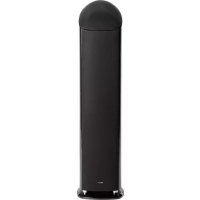
OMD15 - Speaker Mirage - Free user manual and instructions
Find the device manual for free OMD15 Mirage in PDF.


| Product type | Passive speaker |
| Brand | Mirage |
| Model | OMD-15 |
| Technology | Omnipolar (70% reflected sound, 30% direct) |
| Recommended configuration | Front channel (left/right) |
| Included accessories | 4 aluminum feet, shorting bars |
| Break-in required | Approximately 100 hours at moderate volume |
| Speaker warranty | 5 years |
| Amplifier warranty (if applicable) | 1 year |
| Cleaning | Soft cloth dampened with soapy water, avoid strong pressure |
| Safety precautions | Turn off amplifier before any connection |
| After-sales service | Contact an authorized Mirage service center |
| Spare parts | Available from Mirage customer service |
| Repairability | Repair by authorized center under warranty |
| Finish | Lacquered |
Frequently Asked Questions - OMD15 Mirage
User questions about OMD15 Mirage
0 question about this device. Answer the ones you know or ask your own.
Ask a new question about this device
Download the instructions for your Speaker in PDF format for free! Find your manual OMD15 - Mirage and take your electronic device back in hand. On this page are published all the documents necessary for the use of your device. OMD15 by Mirage.
USER MANUAL OMD15 Mirage
natural_image
Black wooden speaker tower and two smaller speakers with visible sound waves (no text or symbols)1.0 GENERAL INFORMATION
MIRAGE OM DESIGN SERIES
Please take the time to read all of the instructions contained in this manual to make certain your system is properly connected and functioning correctly. Please retain the carton and packing materials for this Mirage product to protect it in the event it ever has to be shipped to a service center for repairs. Product received damaged by a service center that has been shipped by an end user in anything other than the original packaging will be repaired, refurbished, and properly packaged for return shipment at the end user's expense.
INTRODUCTION
We are proud to welcome you as a new owner of a Mirage speaker system. The finest components and materials are manufactured to exacting standards and tested with sophisticated manufacturing and quality control techniques to ensure exceptional performance that is superior to speakers costing several times their price. This approach to the development of the Mirage OM Design has resulted in a significant improvement over other system designs in terms of performance and aesthetics.
COMPANY BACKGROUND
Mirage loudspeakers and subwoofers are designed and manufactured by Audio Products International Corp., known throughout the industry as "API". A Canadian company founded in 1973, API is one of the world's largest speaker manufacturers, supplying products worldwide.
The renowned Mirage research team advances its speaker development through the use of computer-based design techniques combined with multiple listening rooms and anechoic chambers. A dedicated team of engineering, marketing, and manufacturing people creates the finest speakers in the world for your ultimate music or home theater listening pleasure. Now it's time to set up your system and experience the miracle of Mirage Omnipolar sound.
WHAT EXACTLY IS OMNIPOLAR?
Omnipolar technology uses natural room reflections to create a greater sense of realism. This is accomplished by recreating the same ratio of direct to reflected sound - 70% reflected and 30% direct, that is typically found in performance spaces. A conventional speaker only produces 30% reflected sound. It is the additional reflected sound provided by a Mirage Omnipolar speaker that creates a miraculous three-dimensional sound experience in your home.
2.0 INITIAL SPEAKER PLACEMENT
For best stereo imaging, the left and right speakers should be the same distance from their respective sidewalls. If the distance from one speaker to the listener is very different from the other it can affect the soundstage or stereo imaging. Therefore, the ideal position is having the speakers equidistant to the listener.
When choosing the position for your new speakers, try to avoid walls with predominately glass surfaces, as they might not be the best choice for placement. If it is unavoidable to position the OMD-15 close to a glass wall or a large window, it may result in a hard sound with too much reflected information.
NOTE: Do not install the feet to the OMD-15 until you have completed the break-in and fine-tuning procedures. Repositioning the speakers with the feet installed can be very difficult and could potentially cause damage to your floors.
A general guideline for speaker placement is to set up the space between speaker and listener at approximately 1.2 to 1.5 times the distance between the speakers. For example, if the speakers are ideally placed a minimum of 6-feet (1.8m) apart, the best seating position would be 7.2 to 9-feet (2.16 to 2.4m) away.
Start with the speakers slightly toed in towards the listening area, ideally 2-4 feet from the rear wall and 3-4 feet from the sidewalls, depending on the width of the listening room.
Do not attempt to fine-tune your audio system yet. This should only be done once the break-in procedure is finalized.
CENTER CHANNEL (OMD-C1)
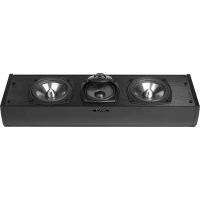
The OMD-CI's Omnipolar technology is uniform in dispersion, providing a perfectly spherical, full spectrum sound radiation pattern that greatly expands the prime listening area.
The center channel should be positioned at or slightly below ear level. If possible, try to leave a little bit of space behind the OMD-CI. This will aid in producing an open soundstage. It is not recommended to place the OMD-CI on top of a large rear-projection style television set, as this could negatively impact the sound quality.
The OMD-CI is magnetically shielded, and it can be placed close to a CRT based television without causing any interference. In the case where there is some minor discoloration, simply move the speaker forward or backwards or away from the television a few inches, this generally resolves the issue.
NOTE: LCD, DLP and Plasma displays do not suffer from magnetic interference.
When the OMD-CI is installed on top of a television, in a cabinet or on a shelf, please use the included table top mount. Diagram 1.
The OMD-CI can be wall mounted by using the included wall bracket. Please refer to the "mounting your speakers" section for detailed mounting instructions. Alternatively Mirage's flexible Macromount bracket (sold separately) could be used. Please visit www.miragespeakers.com for more information.
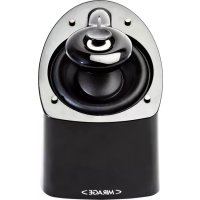
NOTE: The versatile OMD-5 can also be used as a front speaker. The section about placement for front speaker applies to the OMD-5 when used in such an application.
The rear speakers can vary greatly in position depending on the room layout, and the furniture placement. The ideal position is either on the sidewalls, or rear walls.
Side Wall: This position utilizes the rear walls of the room to reflect sound and create the "surround" effect.
Rear Wall: This is generally used when the sidewall position is not available to you, due to furniture placement or room dimensions. It is also used in a 6.1 or 7.1 surround configuration. Both mounting positions have their advantages and disadvantages, the position offering the best coverage of the entire room should be chosen. The goal of the surround speakers during movie reproduction is to create an "atmosphere" around you. The rear channel speakers are ideally placed an equal distance from you as compared to the front speakers. But this is not always possible in a home environment. The OMD-5 will emit sound from both sides of the speaker, and is best placed where it can use the walls to reflect the sound around the listeners. The best mounting position for a 5.1 system is the Side Wall position, as it makes use of the rooms' rear walls, and sidewalls. It will create a lifelike surround effect and make the room sound larger than it is. In this position, try to mount the speaker so that it is beside you or slightly behind you. The height should be above ear level, at approximately 2/3 of the height of the wall. These general guidelines should aid in positioning choices.
NOTE: When mounting the speakers at a height of under six feet, orient the OMD-5 speakers in an upright position. When mounting the speaker at a height of over six feet, orient the OMD-5 speakers in an upside down position so the grille is facing the floor. This guarantees even tonal balance no matter which mounting configuration is most suitable for your room. Diagram 2.
You can also achieve excellent results in the rear position. Try not to place the speakers directly into a corner. Leave 2 or more feet between the edge of the cabinet and the sidewall, so the sound can reflect into the room environment. The rear position is usually chosen when your room will not accommodate the sidewall position due to unequal walls, a doorway, or a large opening, etc. It is recommended that the rear center (6.1 system) or dual rear surrounds (7.1) be placed at the same height as the other two rear surround speakers wherever possible.
3.0 MOUNTING YOUR SPEAKERS
NOTE: The Mounting hardware for the OMD-5 and OMD-CI can be found inside the shipping carton.
- Select the mounting position best suited for your room.
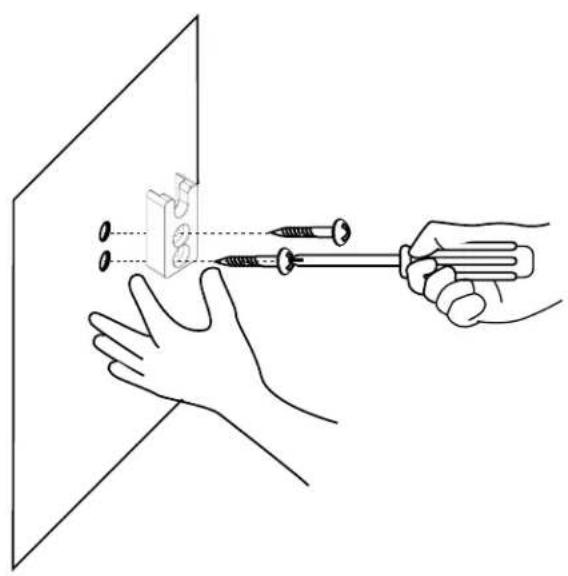
- Place the wall-mounting bracket against the wall in the desired mounting location and mark the center of the two holes with a pencil. This is where you need to insert the appropriate mounting hardware to securely fasten a load of the speaker. Hardware is not included with the speaker, as building materials vary greatly in different countries, but the recommended screw head size is a #8. Screw length is to be determined by the wall material.
- If you are mounting directly to drywall, please ensure that you use the appropriate anchors, as screws into drywall itself will not provide a secure mount. Insert the anchors, and then hold the mounting bracket up to the wall. Insert the screws until tight. Try to locate into wall studs wherever possible. Diagram 3
- Screw the included bolt into the insert in the back of the OMD-5 or OMD-C1 speaker, located above the terminal cup. Hand tighten the bolt all the way, and then loosen a few turns counter clockwise. Place the two included rubber bumpers on the back of the speaker, on either side of the speaker terminals. Diagram 4.
- Hold the speaker upright, and insert the bolt head into the large hole. Let the speaker slide down into place. Diagram 5.
4.0 CONNECTING YOUR SPEAKERS
CABLES AND AMPLIFICATION
Use the best quality speaker cables you have available. The length and type of speaker cable used in your system can have an audible effect and allow you to maximize the transmission of power from your amplifier to the speakers. We recommend, if possible, that short runs of speaker cable connect the power amplifier(s) and speakers and that high-quality long interconnect cables be used to connect the preamplifier and power amplifier. This results in the power amplifiers being close to the speakers, which may be practically or cosmetically difficult. However, if the length of the speaker cables can be reduced to a few meters, sonic advantages may be obtained.
WARNING! Turn your amplifier off before making or breaking any signal connections!
All of the models in the OM Design Series feature high quality gold plated binding post connectors. The OM Design series will accept a variety of connector types including spade lugs, banana plugs, or pin type connectors. The best connector in our opinion is the "Spade lug" as it provides more contact area with the terminal and allows the binding post to be tightened for a secure connection. Audiophiles and novices alike have preferences as to which connector type they favor, speak with your Authorized Mirage retailer as to which is the best for your Audio Video System. Rest assured, plain speaker wire is more than acceptable, you can always upgrade your wires and/or connectors later on. Remove the plastic red or black insert. The plastic insert is a mandatory security measure, as dictated by many local and federal government associations.
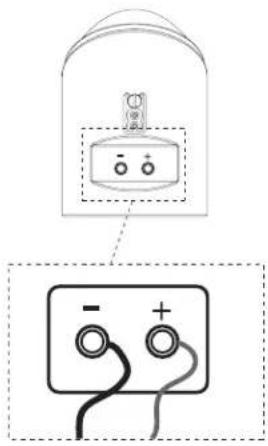
To Connect your speaker system: Start at one speaker, and connect one channel at a time, starting with the front speakers. Always ensure that the entire A/V system is powered OFF before performing any connections. The positive and negative (red and black) sides of the speaker terminals MUST match the positive and negative (red and black) terminals of the receiver or amplifier. If they do not match, abnormal sound and a lack of bass response will result. After connecting the front speakers, connect the rest of the speakers to their appropriate channels of the receiver or amplifier. The three connection methods and their explanations include:
TRADITIONAL CONNECTION METHOD (OMD-15, OMD-5 OR OMD-C1)
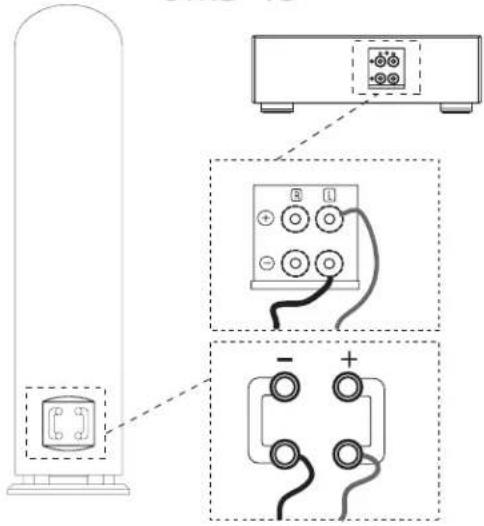
- Using your choice of speaker wire and termination method, connect the speaker cable (minding the positive and negative polarities), to the lower set of connectors. Ensure the terminals are tight. The gold "shorting straps" that connect the lower and upper connections must remain in place (OMD-15 only). Diagram 6.
- Repeat the procedure for the second speaker.
BI-WIRE METHOD (OMD-15 ONLY)
This method involves using multiple cables and connectors, to access two sets of terminals on the OM Design loudspeakers simultaneously. The benefit of bi-wiring is to reduce noise, as you will have twice the thickness of cable between the amp and speakers as the traditional method would provide. For more details on the benefits of bi-wiring, please discuss this with your authorized MIRAGE ^® retailer.
Before starting, remove the gold "shorting straps", which connect the top and bottom set of input terminals of the OMD-15. To remove the straps, loosen all of the connectors and pull the straps away from the binding posts. Make sure you put them in a safe place for future use.
Then simply connect two separate set of wires to the four binding posts. Diagram 7
BI-AMPLIFICATION (OMD-15 ONLY)
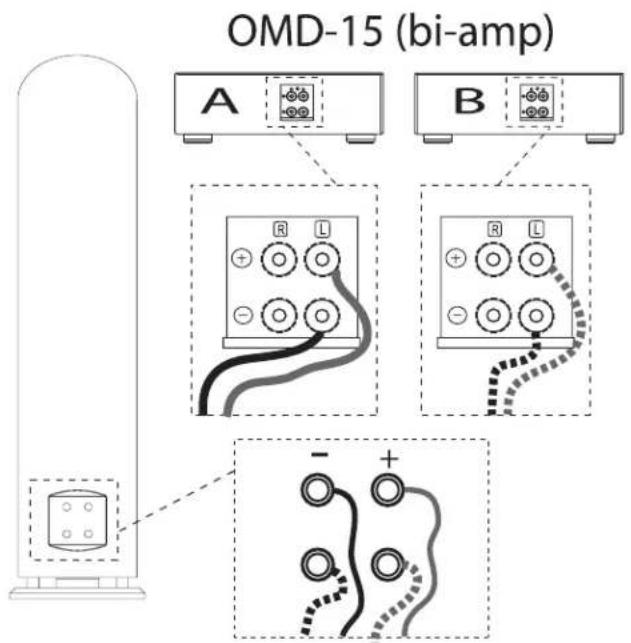
The OM Design series can also be connected to multiple amplifiers. Two amplifiers in the case of the OMD-15 can further enhance the performance of the OM Design series. However, choosing quality electronics is a crucial part in achieving the full benefit of bi-amping. Please consult your authorized Mirage dealer for recommendations on adequate electronics. Please follow the same steps as described in the section above. Instead of connecting two sets of wires to one amplifier, simply connect one set of speaker wires to each amplifier. Diagram 8.
MULTI-CHANNEL AUDIO SET-UPS
The OM Design series offers the ultimate in flexibility; it excels at traditional 2-channel stereo set-ups or can provide illustrious multi channel audio/home theater performances. Depending on your particular room layout and your personal requirements the OM Design series can be used for any imaginable multi-channel set-up. Please consult your authorized Mirage dealer for specific recommendations based on your requirements and your room layout.
NOTE: In order to achieve perfect timber matching between your multi channel audio system, it is highly recommended to use only models from the OM Design Series.
BREAK-IN PROCEDURES
It is VITAL that your new OM Design speakers be allowed to break-in properly before you perform any precise set up procedures, system adjustments, and before you play them at higher volume levels. The best method of performing the break-in is to play a full range musical passage at a moderate level as long as possible. Utilizing the repeat function on your CD or DVD player can assist greatly. Optimum sound will not be achieved until approximately 100 hours of playing time. After break-in, the volume level can be increased. Do not play the speakers at high levels until the break-in process has been completed. The transducers need to "loosen up", and until this occurs, damage can result to the transducers.
5.0 FINE TUNING YOUR AUDIO SYSTEM
Before beginning any fine-tuning, please ensure all connections are properly made and your speakers have had the chance to break-in for a minimum of 100 hours. Also, it is assumed that you have already performed the initial placement of each speaker in your system and are now trying to fine tune the performance of your new speakers in your room. This will ensure the proper results are achieved.
GENERAL RECOMMENDATIONS
Your listening room is the final component of your audio system and will be the difference between mediocre sound and high quality sound. Reflections, which are a part of every recording and music playback, will have a major effect on your system's performance. If your room is too "live", meaning there are many bare surfaces like glass windows, hard floors and thin furnishings, you might find the sound overly bright. If your room is "dead", meaning there is thick pile carpeting, heavy furniture and a lot of wall coverings, you might find the sound lacks dynamic energy. To remedy these issues, small changes to your room should be considered as they generally lead to large improvements in sound quality. Most listening rooms must balance aesthetics and sound, but patience and small adjustments in positioning and settings can pay huge acoustic dividends. The lower bass frequencies are typically the most influenced by your listening room. If you find the bass in your room to be uneven or exaggerated in certain frequencies, experimenting with placement of the front speakers or their orientation towards the listening position can alleviate some of these issues. The proximity of the speakers to room boundaries, like walls, will also affect the bass frequencies.
HOW TO FINE-TUNE THE LOW FREQUENCY PERFORMANCE
If you find your system lacks bass, first check your connections to make sure your system is in phase, then experiment with placement. The further from the wall, the less overall bass output your system will have, but the bass will generally be better defined. If bass is too prominent, try moving the OMD-15 speakers further from the wall, or spacing them a little further apart from one another.
NOTE: The bass performance will tighten up significantly, once the isolation feet are installed to the OMD-15 front speakers.
HOW TO FINE-TUNE THE IMAGING
If you are experiencing issues with imaging, first ensure your speakers are in phase with each other. If this is the case and imaging is still an issue, moving the speakers closer together or toeing them in slightly (angling them towards the listening position) can aid in this respect.
HOW TO FINE-TUNE THE SOUNDSTAGE DEPTH
The soundstage depth can be adjusted by changing the distance from the speakers to the back and/or the side walls. If your system is lacking soundstage depth, try to move the speakers further away from the back wall. If your soundstage is lacking width, moving the speakers further away from the side wall is a good measure to increase the soundstage width. In the opposite cases, when the soundstage is overly large in either width or depth, try to move the speakers closer to the respective wall.
HOW TO INCORPORATE ACOUSTIC ROOM TREATMENTS
If the sound has poor focus and seems to be too "splashy" or indistinct sounding, more damping may be required in the listening area. Experiment by adding an area rug between the listener and the front speakers if there is a bare wood floor. Some damping treatment to treat the ROOM, not the speaker reflection points, can work well to reduce this problem. A number of different options are available on the market, damping pads for the corners of the room at the ceiling, pads for the corners of the room, etc. A room can be tested simply by clapping while walking around the room. The sound of the clap should die off smoothly, but not instantaneously. If the clap results in a long standing echo, the room may require some acoustic treatment.
NOTE: Do not attempt to add dampening materials to the first reflection points of the speakers! Omnipolar Speakers are designed to embrace such reflections and they are a crucial part in the performance of the speakers.
ADDITIONAL REQUIREMENTS FOR SURROUND SOUND SET-UPS
When installing a surround sound system, all the above holds true. Calibration of your speaker distances, adjusting delays and balancing your levels with an SPL meter is recommended to extract the most out of your system.
6.0 INSTALLATION OF ISOLATION FEET - SPIKES (OMD-15 ONLY)
Once you have completed the fine-tuning process and have found the ideal position for the speakers in your room, you are ready to install the feet of the OMD-15. In order to install the feet, please follow these two easy steps:
NOTE: Two persons are required in order to safely install the feet of the OMD-15.
- With one person securely holding the OMD-15 cabinet in place, slightly tip the cabinet towards that person so that the bottom of the base is partially exposed
- The other person can now screw the feet into one of the four the threaded inserts found at the bottom of the base Repeat these steps until all four feet are securely installed.
7.0 CLEANING AND CABINET CARE
The cabinets of your new OM Design speakers are constructed of the finest quality veneers and hardwoods available and are protected with hand rubbed superior quality urethane finishes. Great care should be taken when cleaning the cabinet. Properly maintaining the fine finish will enhance your home's decor and preserve the value of your new speakers for many years to come.
AVOIDING FINISH DAMAGE
Your OM Design speaker cabinets, like all woodwork, are subject to expansion and contraction with humidity changes. Excessive wood movement can eventually cause the finish to develop tiny cracks and even separate the finish from the wood. Moderating the temperature and humidity swings around the speakers will help to preserve their finish as well as their overall structure. Try to maintain a fairly even temperature in your listening room. Place the speakers away from drafts, dampness, and heat sources.
ALWAYS AVOID DIRECT SUNLIGHT - as sunlight will age the finish prematurely and cause color fading.
Dust is very abrasive, and can scratch the finish if wiped off with a dry cloth. To avoid scratching, dust the speakers lightly with a feather duster. Alternatively, wipe lightly with a soft damp cloth to pick up the dust, followed immediately with a dry cloth. The cloths should be made of soft cotton such as flannel. Coarse or synthetic fabrics can scratch some finishes. A cleaning cloth is supplied in your speaker package.
NOTE: Do not touch, or attempt to clean the metal dome tweeter. Irreparable damage will occur!
CLEANING THE FINISH
To remove smudges and fingerprints, first dust as described above. Then use the supplied cleaning cloth to gently clean the speakers. If heavier cleaning is necessary, dampen your cloth with a small amount of mild soap solution.
NOTE: When cleaning or polishing the lacquer finish of the OM Design cabinet, avoid hard pressure to avoid scratches to the finish.
TO POLISH OR NOT?
Before using polish on your speakers, be sure it is actually necessary and beneficial. In general, Mirage Speakers recommends against using polishes because of the potential for damage to the finish. Common household products such as "lemon oil" or inexpensive "furniture polish" should be avoided. Despite the labels' claims that they "protect" the finish or "feed" the wood, they offer no protection from scratching and can actually soften the finish if over-used. Aerosol products should be avoided altogether.
Always test a new polish in a inconspicuous area of your speaker - one good location for example would be the area slightly above the binding posts.
NOTE: Please ensure that polishing or cleaning substances so not come in contact with the drivers of the OM Design Series, as this could permanently damage your speakers.
If you are uncertain about the care of your speaker's finish, please consult your authorized Mirage dealer.
ENCEINTES MIRAGE DE LA SÉRIE OM DESIGN
TRADITIONEL TILSLUTNING
natural_image
Technical line drawing of a cylindrical mechanical component with internal components and two downward arrows indicating assembly or disassembly (no text or symbols present)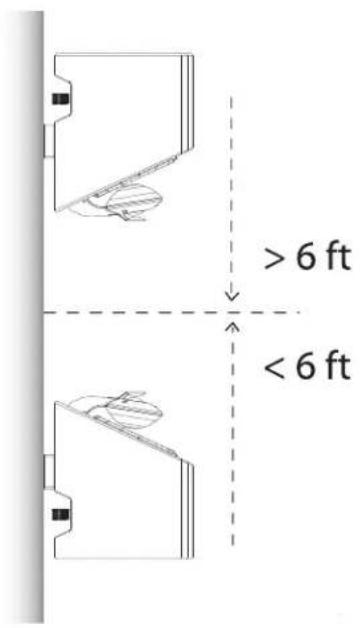
Diagram 2b
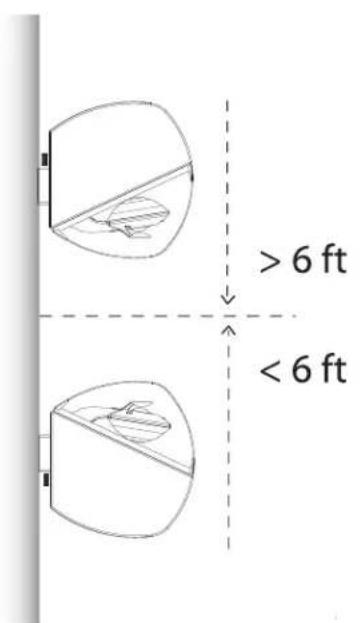
Diagram 3
natural_image
Illustration of hands using a screwdriver to adjust a component on a flat surface (no text or symbols)natural_image
Technical line drawing of a cylindrical mechanical component with internal components and mounting holes (no text or symbols)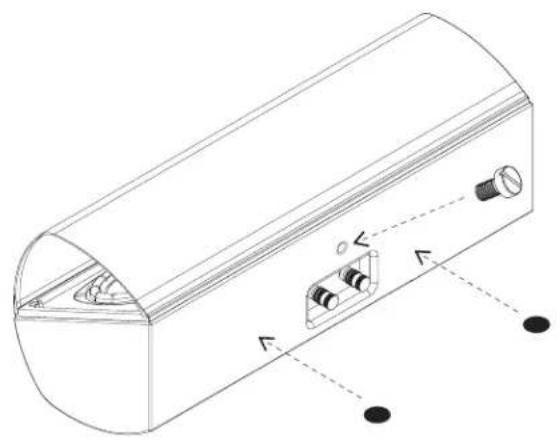
natural_image
Technical line drawing of a cylindrical device with internal components and mounting holes (no text or symbols)Diagram 5a Diagram 5b
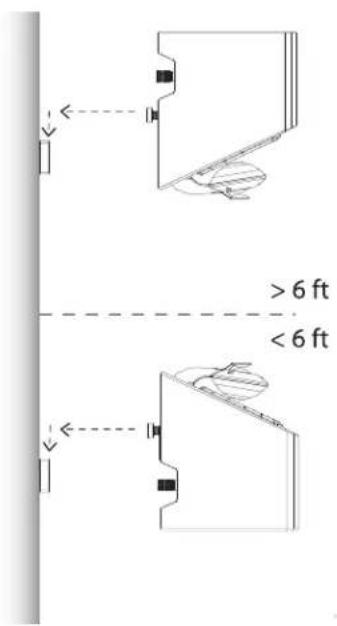
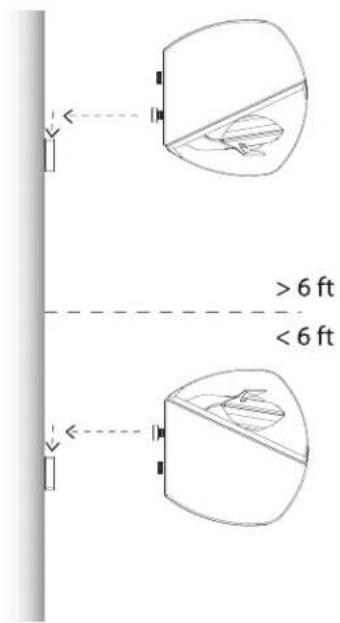
Diagram 6a
Diagram 6b
OMD-15
natural_image
Diagram showing a device with two terminals and a separate electrical terminal block (no text or symbols)OMD-5
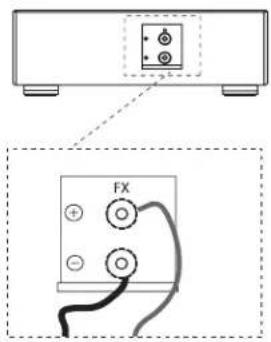
Diagram 6c
OMD-C1
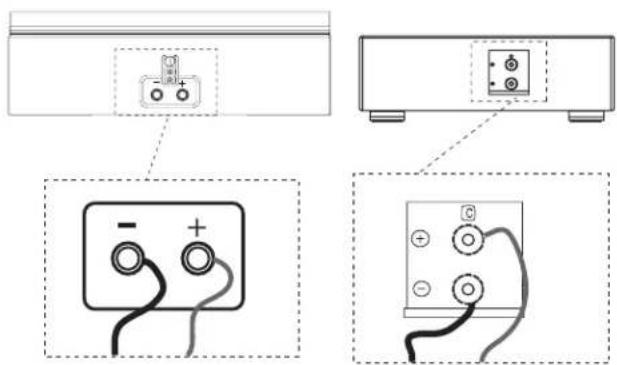
Diagram 7
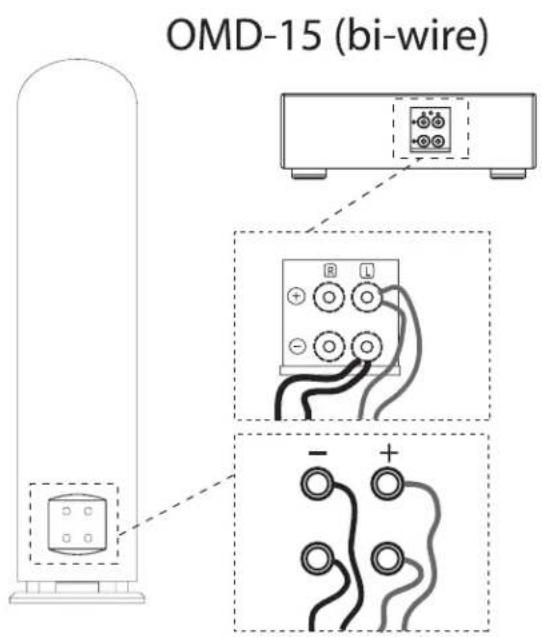
Diagram 8
Limited Warranty Policy in the United States and Canada
MIRAGE ^® warrants this product to the retail purchaser against any failure resulting from original manufacturing defects in work-manship or materials.
The warranty is in effect for a period of:
I) for the Speaker Section, five (5) years, and
2) for the Amplifier Section, one (1) year,
from date of purchase by the original owner from an authorized MIRAGE ^® dealer, and is valid only if the original dated bill of sale is presented when service is required.
The warranty does not cover damage caused during shipment, by accident, misuse, abuse, neglect, unauthorized product modification, failure to follow the instructions outlined in the owner's manual, failure to perform routine maintenance, damage resulting from unauthorized repairs or claims based upon misrepresentations of the warranty by the seller.
Warranty Service
If you require service for your MIRAGE ^® speaker(s) at any time during the warranty period, please contact:
I) the dealer from whom you purchased the product(s),
2) MIRAGE® NATIONAL SERVICE, 203 Eggert Road, Buffalo, N.Y. 14215 Tel: 716-896-9801 or
3) MIRAGE ^® , a division of Audio Products International Corp., 3641 McNicoll Avenue, Toronto, Ontario, Canada, MIX IG5, Tel: 416-321-1800.
4) Additional service centers can be found by checking the MIRAGE website: www.miragespeakers.com or, by calling either of the above numbers.
You will be responsible for transporting the speakers in adequate packaging to protect them from damage in transit and for the shipping costs to an authorized MIRAGE® service center or to MIRAGE®. If the product is returned for repair to
MIRAGE ^® in Toronto or Buffalo, the costs of the return shipment to you will be paid by MIRAGE ^® , provided the repairs concerned fall within the Limited Warranty. The MIRAGE ^® Warranty is limited to repair or replacement of MIRAGE ^® products. It does not cover any incidental or consequential damage of any kind. If the provisions in any advertisement, packing cartons or literature differ from those specified in this warranty, the terms of the Limited Warranty prevail.