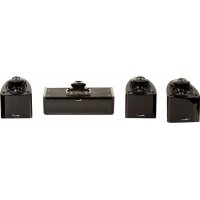
Nanosat Prestige 5 - Speaker Mirage - Free user manual and instructions
Find the device manual for free Nanosat Prestige 5 Mirage in PDF.


| Product type | Satellite speaker |
| Brand | Mirage |
| Model | Nanosat Prestige 5 |
| Technology | Omnipolar (70% reflected sound, 30% direct) |
| Number of channels | 5 identical satellite speakers (front L/R, center, rear L/R) |
| Main function | Home theater: Dolby Digital, DTS, Dolby Pro Logic II |
| Mounting | On stand (MS-STB-1), wall, shelf |
| Connection terminals | Spade lugs, banana plugs, bare wire |
| Impedance | Not specified (typically 8 ohms) |
| Power handling | Not specified (compatible with home theater amplifiers) |
| Dimensions (approx.) | Approximately 15 x 15 x 20 cm (estimated) |
| Weight (approx.) | Approximately 2 kg per speaker (estimated) |
| Power supply | Passive (powered by external amplifier) |
| Cleaning | Damp cloth, disconnect before |
| Safety instructions | Do not expose to water, do not open, avoid overloading |
| Recommended accessories | Stand MS-STB-1, Mirage subwoofer |
| Warranty (speakers) | 5 years (USA/Canada) |
| Warranty (amplifier) | 1 year (USA/Canada) |
| Country of origin | Canada (designed and manufactured by API) |
Frequently Asked Questions - Nanosat Prestige 5 Mirage
User questions about Nanosat Prestige 5 Mirage
0 question about this device. Answer the ones you know or ask your own.
Ask a new question about this device
Download the instructions for your Speaker in PDF format for free! Find your manual Nanosat Prestige 5 - Mirage and take your electronic device back in hand. On this page are published all the documents necessary for the use of your device. Nanosat Prestige 5 by Mirage.
USER MANUAL Nanosat Prestige 5 Mirage
Omnipolar Speaker System
PRINTED IN CHINA
7AI//NANOPR
IMPORTANT SAFETY INSTRUCTIONS - READ CAREFULLY!
Caution: To prevent the risk of electrical shock, match wide blades of plug to wide slot, fully insert.
Read Instructions: All safety and operating instructions should be read before the product is operated.
Retain instructions: Safety and operating instructions should be retained for future reference.
Heed Warnings: All warnings on the product & operation instructions should be adhered to.
Follow Instructions: All operating and use instructions should be followed.
Cleaning: Unplug the product from the wall before cleaning. Do not use aerosol or liquid cleaners, just a damp cloth.
Attachments: Do not use attachments not recommended by the product manufacturer as they may cause hazards.
Water and moisture: Do not use this product near water.
Ventilation: Openings in the cabinet are provided for ventilation and to ensure reliable operation and protect it from overheating so they must not be blocked or covered by placing the product on a bed, sofa or other similar surface. This product should not be placed in a built-in installation such as a bookcase or rack unless proper ventilation is provided or the manufacturer's instructions have been adhered to.
Power Sources: This product should be operated only from the type of power source indicated on the marking label. If you are not sure of the type of power supply in your home, call your local power company.
Grounding or Polarization: This product may be equipped with a polarized alternating current line plug. This plug will fit the power outlet in only one way as a safety feature. If you are unable to insert the plug, try reversing it. If the plug should still fail to fit, contact your electrician to replace your outlet. Do not defeat the safety purpose of the plug.
Power Cord Protection: Power supply cords should be routed so that they are not likely to be walked on or pinched by items placed upon or against them, paying particular attention to cords at plugs, convenience receptacles and the point where they exit from the product.
Overloading: Do not overload wall outlets or extension cords, as this can result in a risk of electrical shock.
Object and Liquid Entry: Never push objects of any kind into this product through openings as they may touch dangerous voltage points or short out parts that can result in a fire or electrical shock. Never spill liquid of any kind on the product.
Servicing: Do not attempt to service this product yourself as openings or removing covers may expose you to dangerous voltage or other hazards. Refer all servicing to qualified personnel.
Heat: This product should be situated away from heat sources such as radiators, heat registers, stoves, or other appliances (including amplifiers) that produce heat.
Non-Use Periods: The power cord of the product should be unplugged from the outlet when left unused for a long period of time.
Damage Requiring Service: The product should be serviced by qualified personnel when:
A. The power supply cord or the plug has been damaged; or
B. Objects have fallen, or liquid has been spilled into the appliance; or
C. The product has been exposed to rain; or
D. The appliance does not appear to operate normally or exhibits a marked change in performance; or
E. Product has been dropped, or the enclosure damaged.
F. If the product does not operate normally by following the operating instructions.

The lightning flash with arrowhead symbol. Within an equilateral triangle is intended to alert the user to the presence of uninsulated “dangerous voltage” within the products enclosure that may be of sufficient magnitude to constitute a risk of electric shock to persons

The exclamation point within an equilateral triangle is intended to alert the user to the presence of important operating and maintenance (servicing) instructions in the literature accompanying the appliance.
MIRAGE NANOSAT PRESTIGE SERIES
Please take the time to read all of the instructions contained in this manual to make certain your system is properly installed and functioning correctly.
Please retain the carton and packing materials for this MIRAGE® product to protect it in the event it ever has to be shipped to a service center for repairs. Product received damaged by a service center that has been shipped by an end user in anything other than the original packaging will be repaired, refurbished, and properly packaged for return shipment at the end user's expense.
INTRODUCTION
We are proud to welcome you as a new owner of a MIRAGE speaker. The finest components and materials are manufactured to exacting standards and tested with sophisticated manufacturing and quality control techniques to ensure exceptional performance that is superior to systems costing several times their price. This approach to the development of the MIRAGE system has resulted in a significant improvement over other system designs in terms of performance and aesthetics.
THE NANOSAT PRESTIGE SERIES
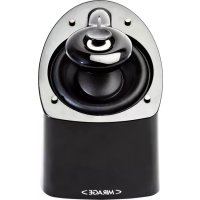
The main goal of this series was to provide a product with the most natural, accurate performance and seamless, home theater blending. This was accomplished by using MIRAGE'S proprietary OMNIPOLAR™ technology. OMNIPOLAR™ technology produces the same amount of direct and reflected sound as live events for the most realistic experience of either music or home theater. Five identical satellites (or four satellites and the optional NANO CC center channel) for the front, center and surround channels guarantee the same tonal and timbre characteristics to further enhance the life-like, OMNIPOLAR™ experience.
WHAT EXACTLY IS OMNIPOLAR™?
OMNIPOLAR ^™ technology uses natural room reflections to create a greater sense of realism. This realism is accomplished by recreating the same ratio of direct to reflected sound found in nature, 70% reflected and 30% direct. A traditional speaker can only produce 30% reflected sound. It is the required additional reflected sound provided by an OMNIPOLAR ^™ speaker that creates the OMNIPOLAR ^™ three-dimensional sound experience.
COMPANY BACKGROUND
MIRAGE loudspeakers and subwoofers are designed and manufactured by Audio Products International Corp., known throughout the industry as "API". A Canadian company founded in 1973, API is one of the largest speaker manufacturers in North America, supplying products to over fifty-five countries worldwide.
The API factory is a modern 165,000 square foot research, development and manufacturing facility located in Scarborough, a suburb of Toronto, Canada. More than 280 people are employed in this state of the art facility, designing, manufacturing, and marketing MIRAGE transducers, cabinets, amplifiers and crossovers. A talented research and development team utilizes advanced computer-based design techniques and three anechoic chambers in an ongoing development program.
QUICK SET-UP GUIDE
Recommended Connection for Dolby Digital/DTS/Dolby Prologic II Systems
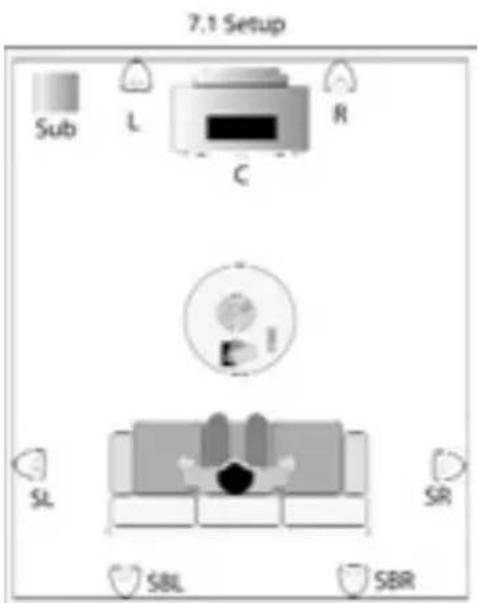
- Arrange the 5 NANOSAT Prestige Satellites and a MIRAGE Subwoofer in a Home Theater configuration: Use one NANOSAT for the left, center, right, rear left and rear right channels and one MIRAGE Subwoofer. See Diagram 4 and 5. Alternatively a NANO CC could be used as center channel.
- Connect all five satellites with speaker wire to their respective speaker outputs in back of the amplifier/receiver. Be sure to respect the polarity of the wire. Connect the speaker wire from the positive (RED +) terminal on the receiver/amplifier to the positive (RED+) terminal on the satellite. Connect the negative (BLACK-) terminal on the receiver/amplifier to the negative (BLACK-) terminal on the satellite. See Diagram.
- Connect the subwoofer from the Subwoofer Output on the back of the A/V Receiver or processor to the input on the subwoofer. See Diagram 6. Note: if you're A/V Receiver is not equipped with a Subwoofer Output, run an additional set of speaker wires from your A/V receiver's Left and Right Front speaker outputs to the High Level Inputs on the back of the subwoofer. See Diagram 6.
- MIRAGE suggests using the Small setting in the bass management set-up of your Dolby Digital system for all speakers.
- MIRAGE suggests setting the bass management crossover of your A/V Receiver or processor to 120Hz. (Or as close to 120Hz as possible). If your A/V Receiver or processor does not have a variable crossover, please proceed to the next step.
- Balance the sound output of the speakers by using the pink noise test pattern generated by your A/V Receiver or processor, adjusting the system so all speakers produce the same output level.
owners manual
- When setting your subwoofer level, be sure that the setting on your A/V Receiver or processor remains as close to flat as possible. Boosting or cutting the subwoofer output on your A/V Receiver or processor may produce poor sound quality. Instead, use volume control on the back of the MIRAGE Subwoofer for fine tuning.
You are now ready to enjoy your MIRAGE NANOSAT Prestige System.
NANOSAT PRESTIGE IN-DEPTH INSTRUCTIONS
Stand Mount Options
This series provides a large choice of installation options to integrate into any decor.
The bottom of the NANOSAT Prestige is designed to clip onto the optional MS-STB-1 stand. Please refer to the MS-STB-1 owners' manual for more detailed instructions.
Wall Mount Options
For wall mount installations, the NANOSAT Prestige is equipped with a mounting bracket that can be used to mount the speaker securely to a vertical surface. The bracket is shipped already attached to the speaker.
Carefully drive a #8 screw into a stud in the wall, leaving approximately 1/4 inch of the screw exposed, then mount the NANOSAT Prestige like you would a picture.
Note: Failure to attach the screw safely to a secure spot on the wall can result in damage or injury. See Diagram 2
When mounting the speaker at a height of under six feet, orient the NANOSAT Prestige in an upright position. Slide the head of the screw into the wide portion of the channel opening and slide the NANOSAT Prestige downward until it sits in position. See Diagrams 2 and 3.
When mounting the speaker at a height of over six feet, orient the NANOSAT Prestige in an upside down position so the grill is facing the floor and use the bottom key-way channel. Slide the head of the screw into the wide portion of the channel opening and slide the NANOSAT Prestige downward until it sits in position. See Diagrams 2 and 3.
The speaker can also be angled by slightly loosening the screw on the bottom of the NANOSAT Prestige and swiveling the speaker into the desired position.
NANO CC CENTER CHANNEL
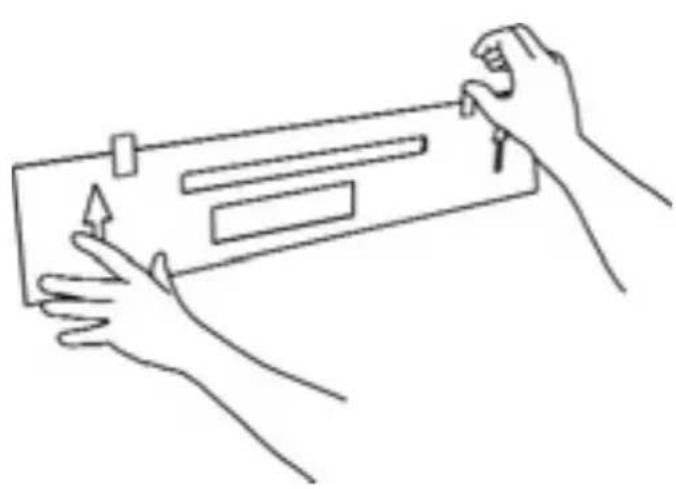
- Choose the desired mounting position. If possible, find a position on the wall that allows the NANO CC to be mounted directly to a wall stud. Attach the mounting template (included in the box) to the desired position by using tape or small nails. See Diagram 6.
IMPORTANT: The arrows on the template should point in the same direction as the grill. If the NANO CC is mounted below 6 feet, the grille should face upwards and therefore the arrows on the template should also point upwards. If the NANO CC is mounted above 6 feet, the grille should face downwards, and similarly the arrows on the template should also point downwards. - Using a level, ensure the template is attached level to the wall. It is critical that the template is level as a mistake at this stage will result in uneven mounting of the NANO CC. See Diagram 7.
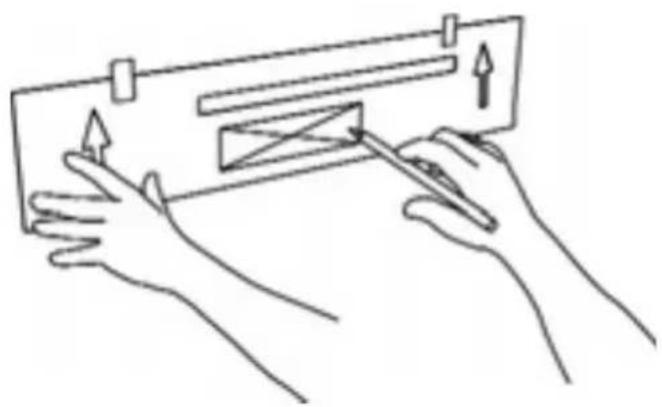
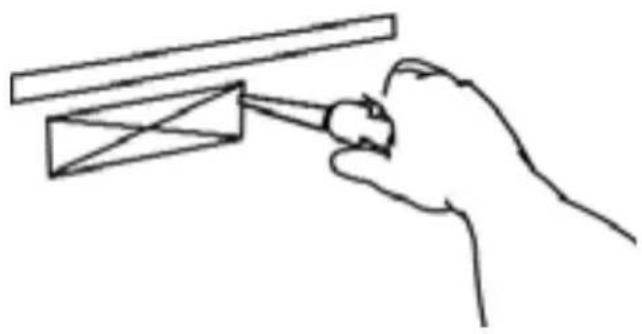
- Outline the two rectangular boxes. Mark the smaller box with an X. The smaller box is needed for the wire management outlining the recommended wall cut-out. See Diagram 8.
- After the template has been removed, use a drywall saw to cut out the smaller rectangular box marked with an X. Please note that this step is only required if the wires will be fed through the wall. If a different wire management system is being used, please ignore this step. See Diagram 9.
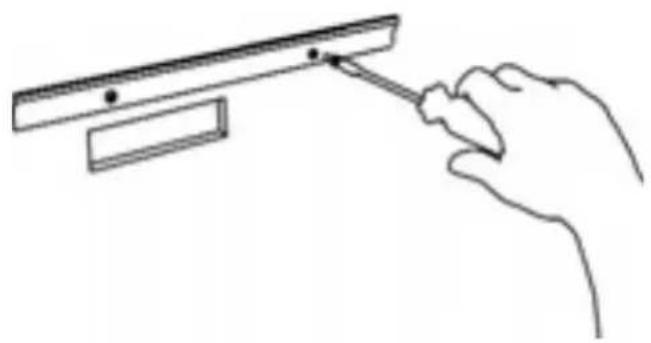
- Mount the wall bracket into position. The use of proper anchors for all screws is required to ensure a secure installation. Please note that screws and anchors are not included in the NANO CC package. See Diagram 10.
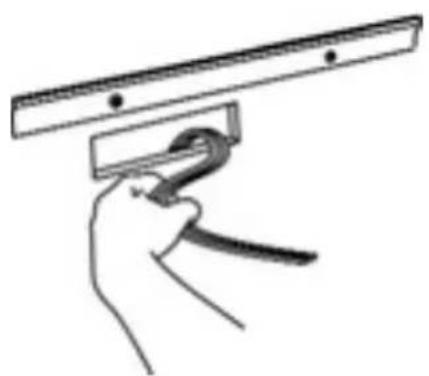
- Feed the wires through the hole cut out. See Diagram 11.
- Connect the wires to the appropriate binding posts at the back of the NANO CC.
IMPORTANT: Connect the speaker wire from the positive (RED +) terminal on the amplifier to the positive (RED+) terminal on the speaker. Connect the negative (BLACK-) terminal on the amplifier to the negative (BLACK-) terminal on the speaker.
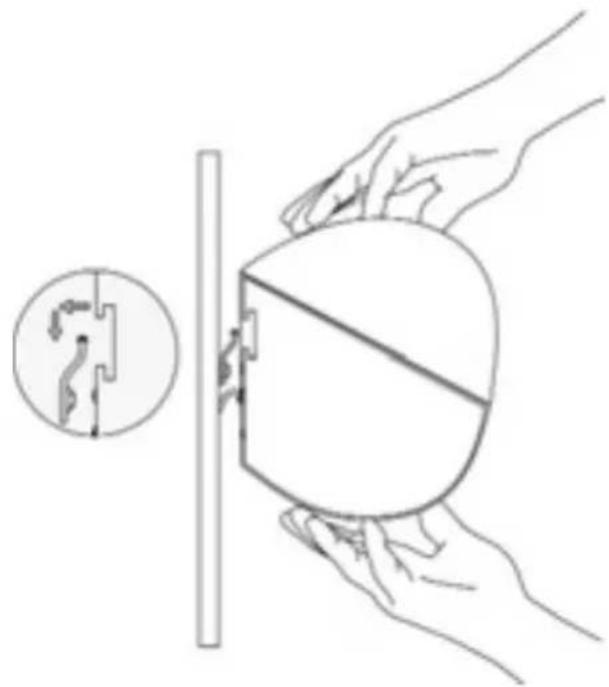
- After the wires are connected, hang the NANO CC on the wall bracket. Center the NANO CC and push down lightly on the speaker to achieve a tight fit between the speaker and the bracket. If the speaker is not centered, repeat this step. See Diagram 12.
SPEAKER PLACEMENT
The MIRAGE NANOSAT Prestige System has been designed for high performance in a wide variety of settings, but here are a few helpful hints that will help to maximize performance and your enjoyment.
Left and Right Channels
A general guideline for speaker placement is to set up the space between speaker and listener at approximately 1.5 times the distance between the speakers. For example, if the speakers were ideally placed a minimum of 6 feet apart, the best seating position would be 9 feet away.
Ideal height would position the speaker at approximately ear level when the listener is in a seated position. This can be accomplished by using the recommended optional MS-STB-1 stand.
Center Channel
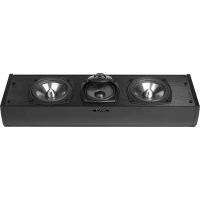
A center channel can be expected to reproduce as much as 60% of a movie's soundtrack, most of which is dialogue. In order to maintain the effect of voices emanating from the actor's mouth, the NANOSAT Prestige or the optional NANO CC being used as the center channel should be centrally located between the left and right NANOSAT Prestige and be placed above or below the television.
Surround Channel
When using the NANOSAT Prestige as a surround speaker it should be positioned adjacent to and slightly in front or behind the primary listening area. A general guideline for the recommended height would be approximately 6 feet.
Bookshelf/Entertainment Unit Placement
The small size and OMNIPOLAR ^™ dispersion of the versatile NANOSAT Prestige permits them to be easily placed, among other places, in a bookshelf. To maximize the OMNIPOLAR ^™ dispersion potential, bring the speaker as close to the front of the cabinet as possible.
CONNECTIONS
The MIRAGE NANOSAT Prestige Series is equipped with high quality binding posts that permit the use of banana plugs, spades, or a bare wire connection.
Connect the speaker wire from the positive (RED +) terminal on the amp to the positive (RED+) terminal on the speaker. Connect the negative (BLACK-) terminal on the amplifier to the negative (BLACK-) terminal on the speaker. See Diagram 1.
SUBWOOFER PLACEMENT
Placement
Start off by placing the subwoofer near a corner in the front of the room. This will produce maximum bass output. By moving the subwoofer away from the corner you will eventually find the position that yields maximum bass output without "boominess". Note: it is important to leave approximately 4 inches (10cm) of clearance between the subwoofer and walls or room furnishings.
Connections
- If you are using a digital receiver, connect the subwoofer from the receiver subwoofer pre-amplifier output to the subwoofer RCA input, with a male to male RCA cable.
- If your receiver does not have an RCA output, connect the speaker wire from the front left and right outputs to the corresponding left and right inputs on the subwoofer, paying particular attention to make sure that the polarities are maintained. Ensure Red (+) to Red and Black (-) to Black connections are maintained.
WARRANTY OUTSIDE OF THE UNITED STATES
Outside of North America, the warranty may be changed to comply with local regulations. Ask your local MIRAGE dealer for details of the LIMITED WARRANTY applicable in your country.
WARRANTY FOR THE UNITED STATES AND CANADA
Please see the warranty document on the back cover
"MIRAGE", the "MIRAGE" logo, are trademarks of Audio Products International Corp.
IMPORTANTES CONSIGNES DE SÉCURITÉ - LIRE ATTENTIVEMENT!
HVAD ER OMNIPOLAR HELT N∅JAGTIGT?
SNELLE SET-UP HANDLEIDING
natural_image
Simple line drawing of a capacitor with two leads and a battery symbol below (no text or labels)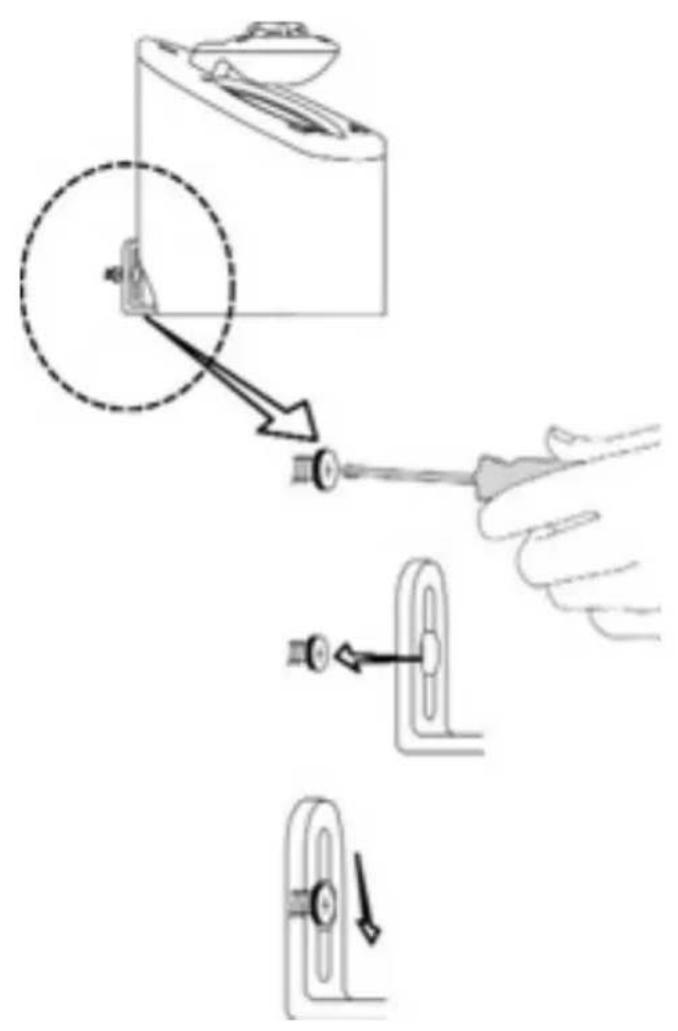
diagrams
Diagram 3
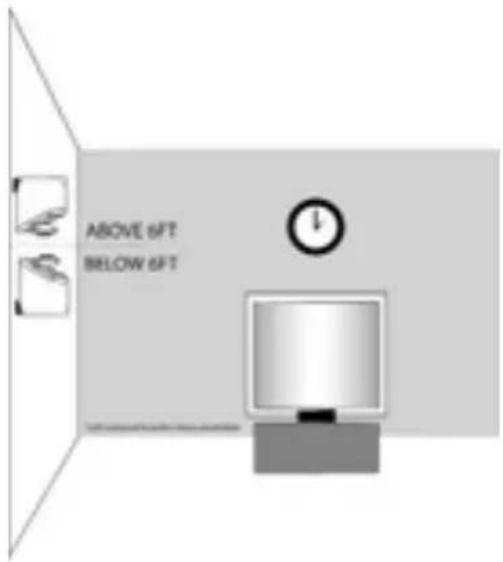
Diagram 4
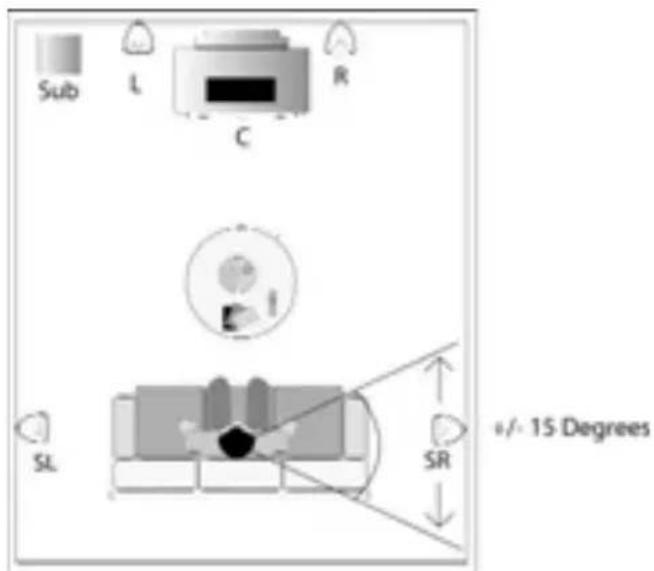
Diagram 5
diagrams
Diagram 6
Diagram 7
natural_image
Line drawing of two hands holding a rectangular object with arrows indicating motion (no text or symbols)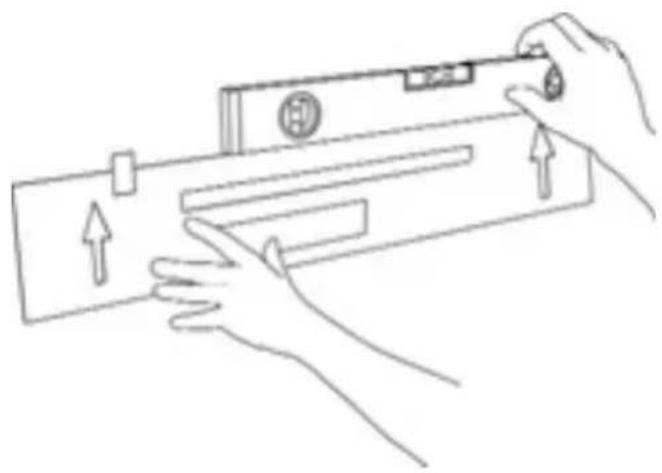
natural_image
Line drawing of hands holding a device with directional arrows indicating movement (no text or symbols)Diagram 8
natural_image
Line drawing of two hands using a tool to cut a rectangular object with arrows indicating motion (no text or symbols)diagrams
Diagram 9
natural_image
Line drawing of a hand holding a tool interacting with a mechanical component (no text or symbols)Diagram 10
natural_image
Line drawing of a hand using a tool to lift a rectangular object (no text or symbols)Diagram 11
natural_image
Hand holding a tool with a clip, no text or symbols visibleDiagram 12
natural_image
Illustration of hands holding a circular object with a cross-sectional view, no text or symbols presentdiagrams
Diagram 13
Diagram 14
natural_image
Abstract grayscale gradient shape with curved and angular edges (no text or symbols)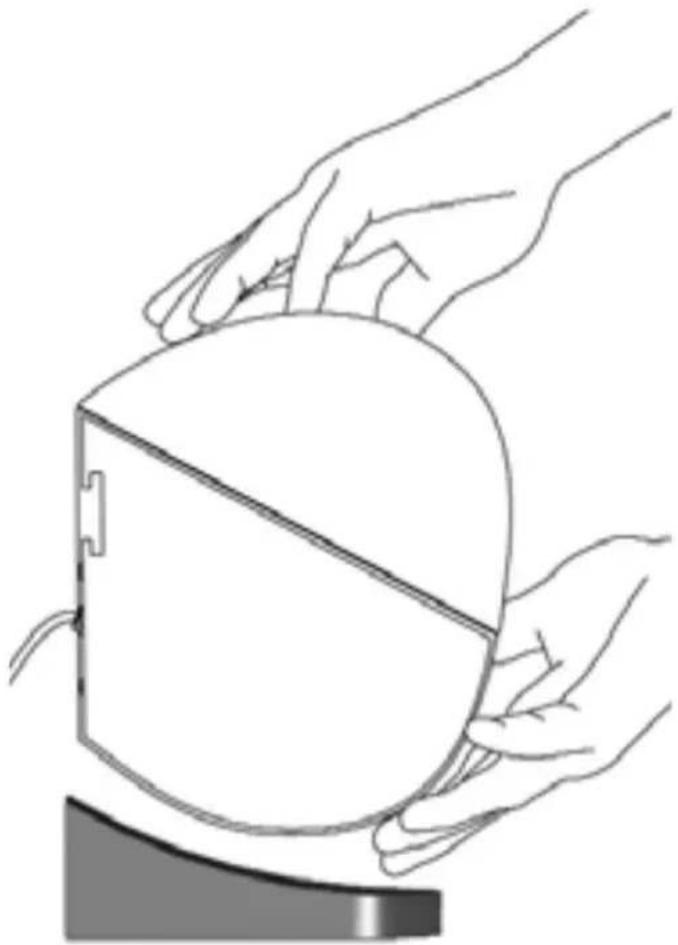
natural_image
Line drawing of two hands holding a computer monitor (no text or symbols)Diagram 15
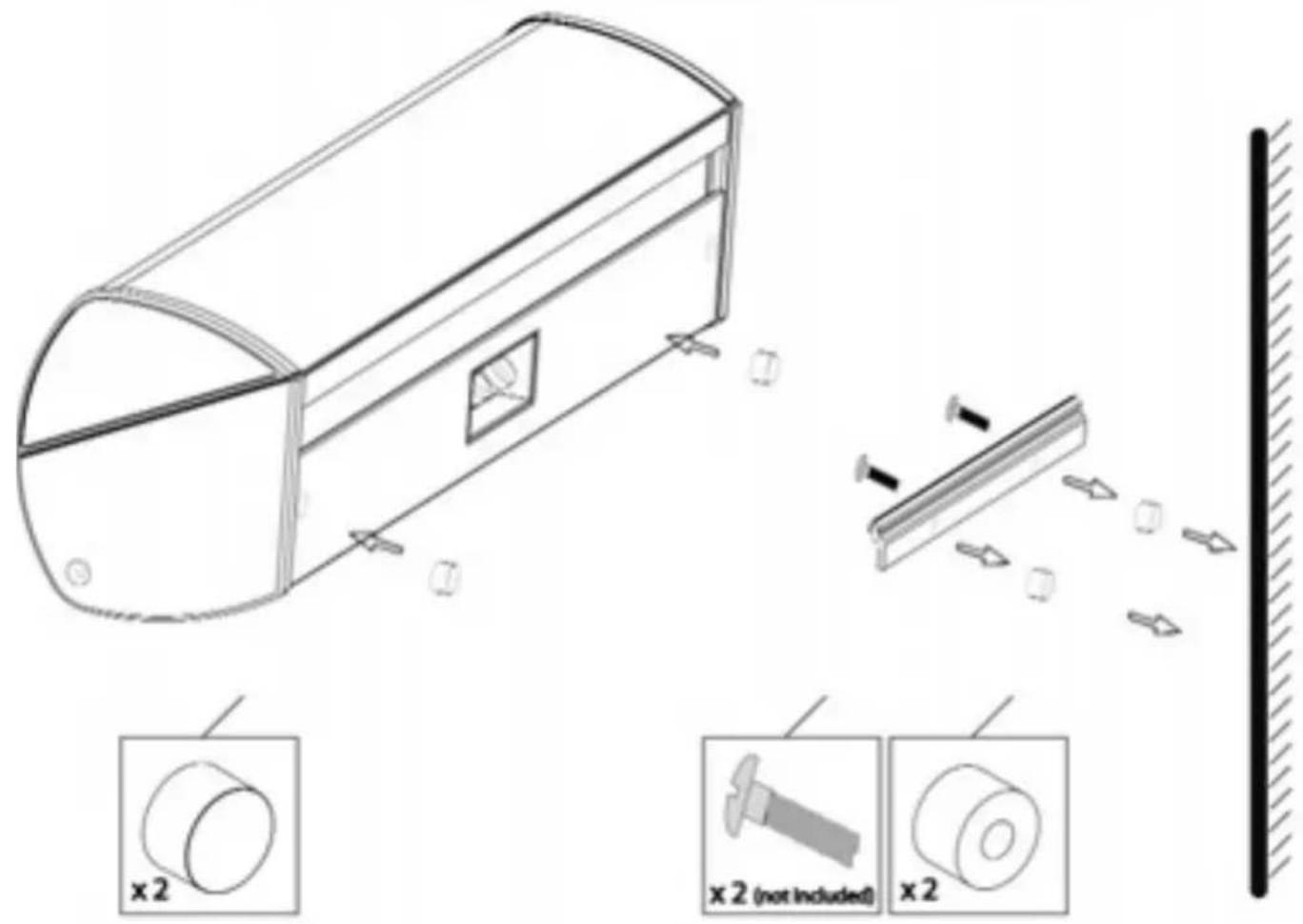
NANO CC Wall Spacer Kit Instructions: (optional)
WARRANTY GARANTIE
Limited Warranty Policy in the United States and Canada
MIRAGE® warrants this product to the retail purchaser against any failure resulting from original manufacturing defects in work-manship or materials.
The warranty is in effect for a period of:
1) for the Speaker Section, five (5) years, and
2) for the Amplifier Section, one (1) year,
from date of purchase by the original owner from an authorized MIRAGE ^® dealer, and is valid only if the original dated bill of sale is presented when service is required.
The warranty does not cover damage caused during shipment, by accident, misuse, abuse, neglect, unauthorized product modification, failure to follow the instructions outlined in the owner's manual, failure to perform routine maintenance, damage resulting from unauthorized repairs or claims based upon misrepresentations of the warranty by the seller.
Warranty Service
If you require service for your MIRAGE® speaker(s) at any time during the warranty period, please contact:
1) the dealer from whom you purchased the product(s),
2) MIRAGE® NATIONAL SERVICE, 203 Eggert Road, Buffalo, N.Y. 14215 Tel: 716-896-9801 or
3) MIRAGE ^® , a division of Audio Products International Corp., 3641 McNicoll Avenue, Toronto, Ontario, Canada, M1X 1G5, Tel: 416-321-1800.
4) Additional service centers can be found by checking the MIRAGE® website: www.miragespeakers.com or, by calling either of the above numbers.
You will be responsible for transporting the speakers in adequate packaging to protect them from damage in transit and for the shipping costs to an authorized MIRAGE® service center or to MIRAGE®. If the product is returned for repair to MIRAGE® in Toronto or Buffalo, the costs of the return shipment to you will be paid by MIRAGE®, provided the repairs concerned fall within the Limited Warranty. The MIRAGE® Warranty is limited to repair or replacement of MIRAGE® products. It does not cover any incidental or consequential damage of any kind. If the provisions in any advertisement, packing cartons or literature differ from those specified in this warranty, the terms of the Limited Warranty prevail.