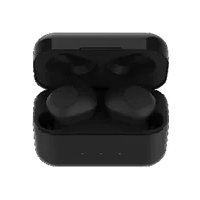
LIFE S62010 - Headphones MEDION - Free user manual and instructions
Find the device manual for free LIFE S62010 MEDION in PDF.


| Product type | Wireless in-ear headphones |
| Brand | Medion |
| Model | LIFE S62010 (MD 43811) |
| Total weight | Approx. 45 g |
| Headphone battery | 2 x 3.7 V / 50 mAh Lithium polymer (integrated) |
| Charging case battery | 3.7 V / 500 mAh Lithium polymer (integrated) |
| Case power supply | 5 V = 500 mA via micro USB |
| Bluetooth | Version 5.0, profiles A2DP and AVRCP, range up to 10 m |
| Water splash protection | IPX4 (headphones only) |
| Main functions | Playback control, volume adjustment, call management, voice assistant command |
| Battery life | Up to 3 full charges of the headphones via the case |
| Operating frequency | 2402 - 2480 MHz |
| Transmission power | 6.5 dBm max |
| Operating temperature | 0 °C to +45 °C |
| Package contents | 1 pair of headphones, charging case, 3 pairs of ear tips, micro USB cable, user manual |
| Care and cleaning | Soft dry cloth; do not immerse in water |
| Safety | Do not open the case; risk of battery explosion; use in accordance with instructions |
| Spare parts and repairability | Integrated batteries not replaceable by user; contact customer service |
Frequently Asked Questions - LIFE S62010 MEDION
User questions about LIFE S62010 MEDION
0 question about this device. Answer the ones you know or ask your own.
Ask a new question about this device
Download the instructions for your Headphones in PDF format for free! Find your manual LIFE S62010 - MEDION and take your electronic device back in hand. On this page are published all the documents necessary for the use of your device. LIFE S62010 by MEDION.
USER MANUAL LIFE S62010 MEDION
- Information about these operating instructions 67
1.1.Key to symbols 68
2. Proper use 70
3. Safety information 73
3.1. Unauthorised persons......73
3.2.Health 74
3.3. Handling the rechargeable batteries. 74
3.4. Water spray protection 77
3.5. Using the device safely ....78
3.6. Never carry out repairs yourself 80
- Package contents 81
- Device overview 82
5.1.Earphones 82
5.2.Charging cradle 83
- Before using the device for the first time 84
6.1. Attaching the ear cushions ... 84
6.2. Charging the earphones 85
6.3. Charging the charging cradle 87
6.4. Switching the earphones on/off 89
6.5. Pairing the earphones via Bluetooth® 90
6.6. Removing the last connected device 95
7. Operation.... 96
7.1. Controlling playback 96
7.2. Setting the volume 97
7.3.Managing calls 97
7.4. Controlling voice assistant …100
8. Troubleshooting 101
8.1.Cleaning 104
9. Disposal 105
10.EU Declaration of Conformity ...107
10.1. Trademark information.....108
11. Technical specifications 108
12. Service information 111
13./legalNotice............114
14. Privacy statement 115
1. Information about these operating instructions

Thank you for choosing our product. We hope you enjoy using this device.
Read the safety instructions and all other instructions carefully before using the device for the first time. Note the warnings on the device and in the operating instructions.
Always keep the operating instructions close to hand. If you sell the device or give it away, please ensure that you also pass on these operating instructions. They are an essential component of the product.
1.1. Key to symbols
If a block of text is marked with one of the warning symbols listed below, the hazard described in that text must be avoided to prevent the potential consequences described there from occurring.

DANGER!
Warning: risk of fatal injury!
WARNING!

Warning: risk of possible fatal injury and/or serious irreversible injuries!

NOTICE!
Follow these instructions to prevent damage to the device!

Additional information on using the device.

Comply with the notes in the operating instructions.
WARNING!
Warning: risk of electric shock!
WARNING!
Warning: danger due to loud volume!
Bullet point/information on steps during operation
Instruction to be carried out
2. Proper use
The wireless earphones are designed for personal audio playback.
The devices are intended for private use only and not for industrial/commercial use.
The devices are designed for daily use.
Once they are fully charged, remove the earphones from the charging cradle if they are not going to be used
for an extended period of time. This will prevent the rechargeable batteries from becoming fully discharged. If the batteries become fully discharged, they may be damaged irreparably. Note that no liability will be accepted if the device is not used for its intended purpose:
Do not modify the devices without our prior consent.
Only use replacement parts or accessories that we have supplied or approved.
Comply with all the information in these operating instructions, especially the safety
information. Any other use is considered improper and can cause personal injury or property damage.
Do not use the devices in potentially explosive atmospheres. This includes petrol stations, fuel storage areas and areas where solvents are processed. These devices must also not be used in areas with particle-laden air (for example flour or wood dust).
Do not expose the devices to extreme conditions. Avoid:
-
Extremely high or low temperatures
-
Open flames
3. Safety information
3.1. Unauthorised persons
The devices are not suitable for use by people (including children) with reduced physical, sensory or mental capabilities or with insufficient client experience or knowledge unless properly supervised by a person responsible for their safety or these people have been instructed in how to use the devices safely and have fully understood the possible dangers. Children should be supervised to ensure they do not play with the devices.
3.2. Health
WARNING! Damage to hearing!
Your hearing can be damaged if exposed to high volumes suddenly or for a sustained period of time.
Set the volume to the minimum level before using the earphones.
3.3. Handling the rechargeable batteries
The earphones and the charging cradle are each operated with an in-built rechargeable battery.
Please note the following:

WARNING!
Risk of explosion!
There is a risk
of explosion if
rechargeable batteries
are handled incorrectly.
Risk of explosion,
- if batteries other than those supplied are used,
- if inserted incorrectly,
- if the rechargeable batteries catch fire.
Do not throw the rechargeable batteries onto fi res.
Do not expose the rechargeable batteries to direct sunlight or excessive heat (over 40^ C ).
- Never short circuit or break open the rechargeable batteries.
Do not leave the devices sitting behind the windscreen.
Only use the supplied charging cable to charge the rechargeable battery.
The earphones should not be left unattended while they are being charged.

NOTICE!
Risk of damage!
Risk of damage to the device due to improper use of the devices.
The rechargeable battery in each earphone and in the charging cradle is an integral component of the device and cannot be replaced by the user themselves.
Remove the earphones from IT the charging cradle if you do not intend to use them for NL an extended period of time.
Fully charge the earphones every two months to maintain the battery capacity.
3.4. Water spray protection
The earphones are protected against damage from dust and water spray according to IPX4.

The charging cradle is not protected against damage from water spray.
3.5. Using the device safely
If the device has been moved from a cold room to a warm room, wait before charging the earphones.
The resulting condensation may damage the devices. The earphones can be operated safely as soon as they have reached room temperature.
Do not expose the earphones to direct heat sources (e.g. radiators).
Never expose the earphones to excessive heat, such as direct sunlight, fire or similar.
Do not operate the earphones below 0^ C or above +45^ C , and do not store them below -10^ C or above +60^ C .
The charging cradle is not suitable for use in rooms with high humidity levels (e.g. bathrooms).
3.6. Never carry out repairs yourself
DANGER! Risk of electric shock!
To avoid risks, never open the earphone housing! It does not contain any parts for maintenance by the user.
In the event of a fault, please contact the MEDION Service Centre or another suitable repair workshop.
4. Package contents

DANGER!
Risk of suffocation
Risk of choking and suffocation through swallowing or inhaling small parts or plastic wrap.
- Keep the plastic packaging out of the reach of children.
Do not allow children to play with the packaging material. The packaging material is not a toy!
Please check your purchase to ensure that all items are included. If anything is missing, please contact us within 14 days of purchase. Included in the package:
1 pair of wireless earphones
Storage/charging cradle
3 pairs of ear cushions
- Charging cable USB (type A) to Micro USB (type B)
- Operating instructions and warranty documents
5. Device overview
5.1. Earphones
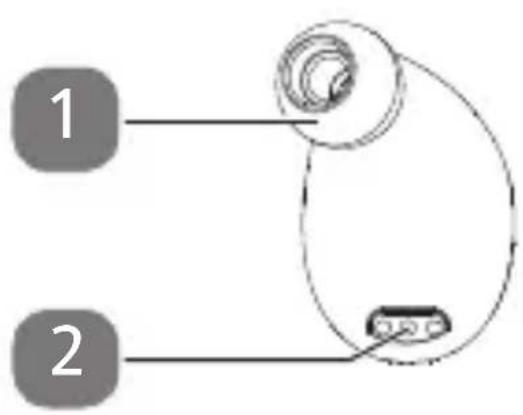
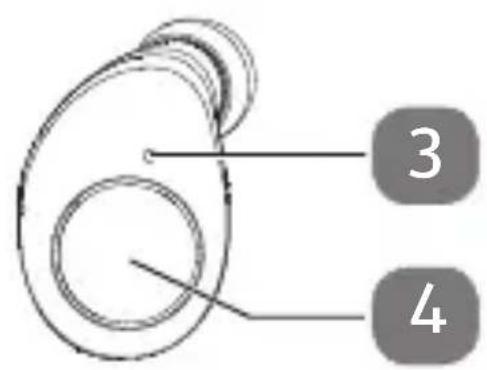
1) Ear cushion
2) Charging contacts
3) Operating LED
4) Multifunction button
5.2. Charging cradle
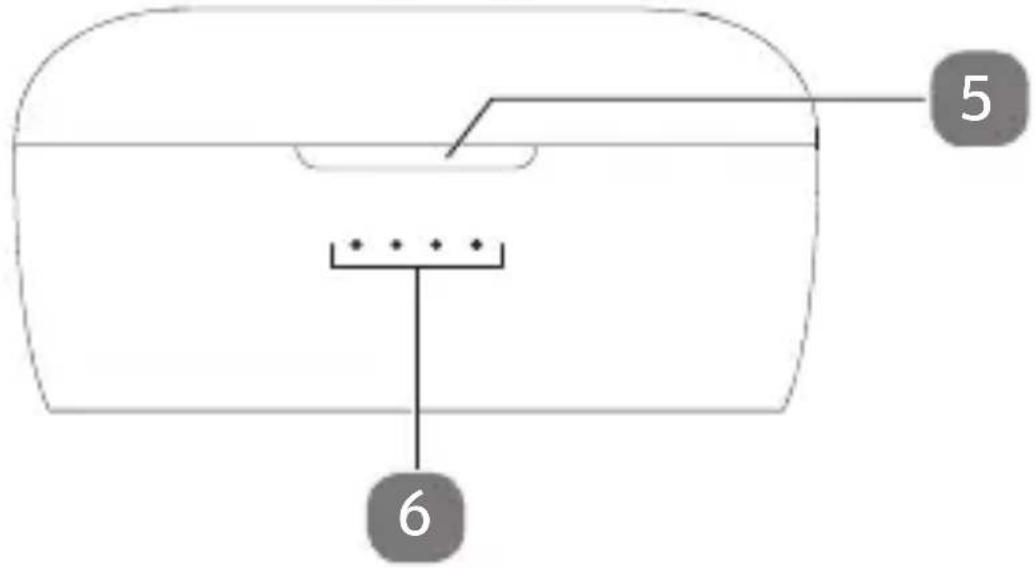
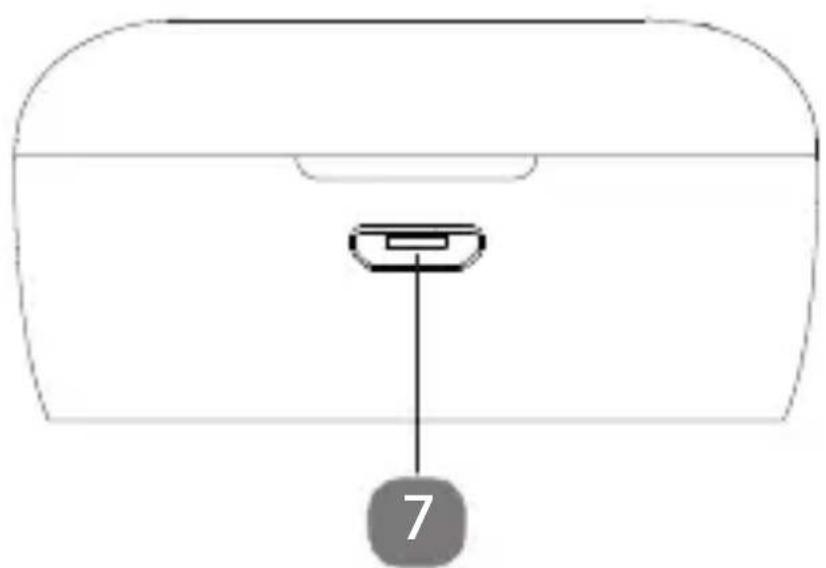
5) Charging cradle opener
6) Charge level indicator
7) Charging connection (Micro USB)
6. Before using the device for the first time
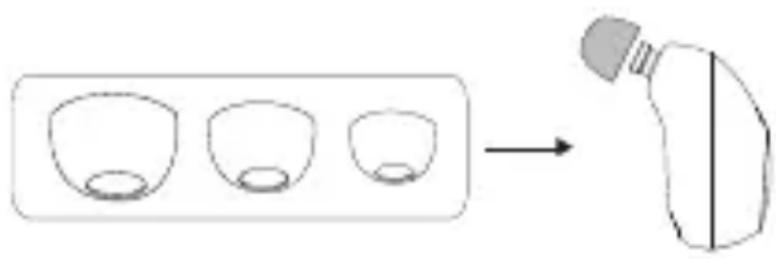
6.1. Attaching the ear cushions
- Remove the earphones from the packaging.
- Ensure that all packaging materials have been removed.
Attach the ear cushions that are the most comfortable for you to the earphones as shown.
6.2. Charging the earphones
Place the earphones in the charging cradle.
Connect the charging cradle with the earphones inserted to the USB port on a PC or laptop.
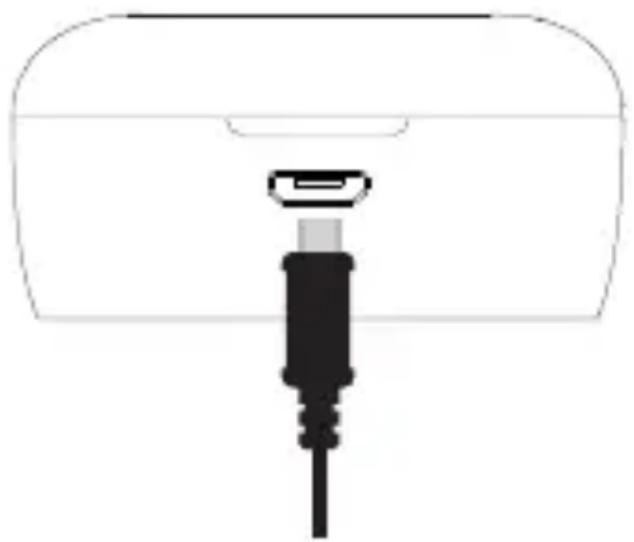
As soon as the charging cradle, including the inserted earphones, is connected to a power source via the charging port, the internal rechargeable batteries in both earphones and in the charging cradle begin charging automatically.

The earphones can be charged simultaneously or individually in the charging cradle.
6.2.1. Earphone battery charge level
The operating LEDs on the earphones indicate the charge level of the earphones as follows:
| Battery charge level low | The operating LED flashes red. |
| During charging in the charging cradle | The operating LED lights up constantly red. |
| Battery fully charged | The operating LED is off. |

When the battery charge level is very low, the earphones switch off automatically.
6.3. Charging the charging cradle
The charging cradle has a built-in rechargeable battery so that the earphones can be charged in the charging cradle without a connected USB cable.
The charging LEDs on the front indicate the current charge level of the battery in the following gradations:
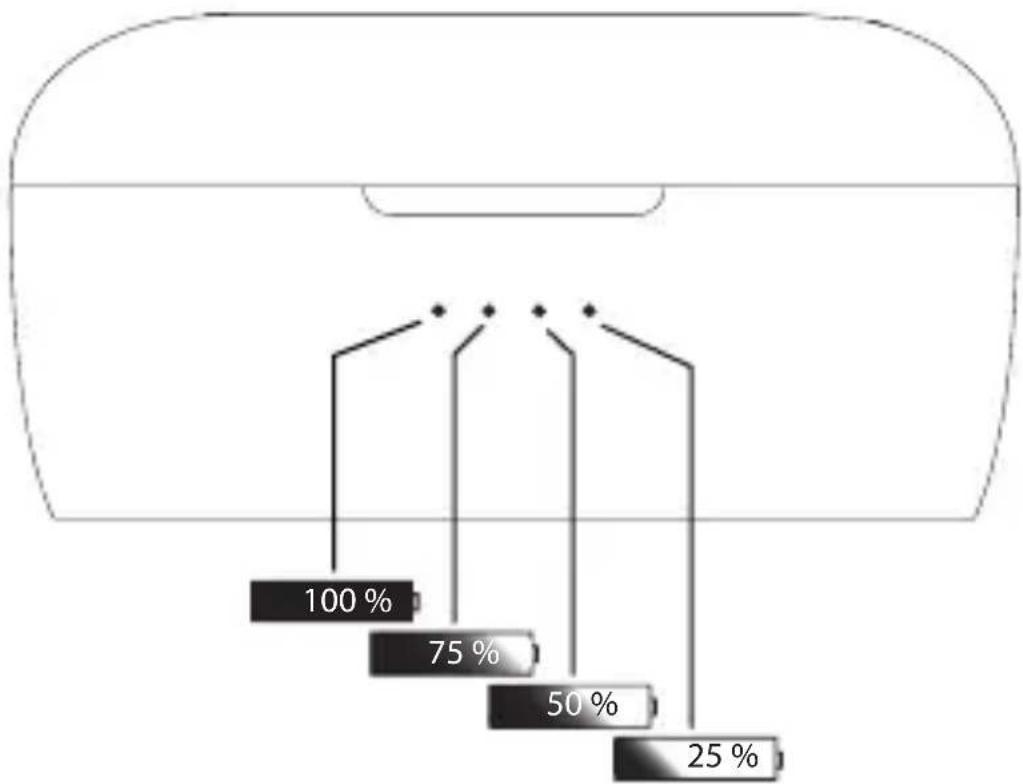
During charging, the respective charging LED flashes according to the current state of charge.
When the battery in the charging cradle is fully charged, all four charging LEDs light up constantly in blue.

The batteries of the earphones can be charged up to three times by charging the charging cradle.
To recharge the battery in the cradle, connect the cradle, with or without earphones inserted, to a laptop/PC USB port using the supplied USB cable.
6.4. Switching the earphones on/off
When the earphones are removed from the charging cradle, the earphones switch on automatically and are in Bluetooth® pairing mode.
When the earphones are inserted into the charging cradle, they switch off automatically.
To switch the earphones on or off outside the charging cradle, press and hold the multifunction button on each microphone (L/R) for approx. 5 seconds.
The operating LED flashes red 3 times.

If the earphones are not connected to an audio output device within 5 minutes of being removed from the charging cradle, they automatically switch off.
6.5. Pairing the earphones via Bluetooth®
Enable Bluetooth on your audio output device.
Remove both earphones from the charging cradle.
The earphones are switched on automatically, the operating LEDs light up red 3 times.
The operating LED on the right.
earphone will then flash alternately red
and blue, and the operating LED on the
left earphone will flash blue.
The earphones are now ready for Bluetooth pairing.
The device name of the earphones "MD 43811" will be displayed in the device list on your audio output device as soon as the signal is found.
Pair both devices with your audio output device.
After successful pairing, a confirm rmination beep sounds in the right earphone. The operating LED flashes blue 4 times.

You will find more information about the Bluetooth function of your audio output device in its operating instructions.
The earphones are now automatically connected and ready for stereo audio playback.
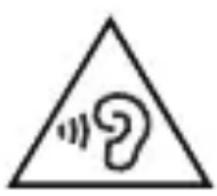
WARNING!
Risk of injury!
Excessive sound
pressure when using
earphones and
headphones can result
in damage to and/or
loss of hearing.
Using headphones/
earphones to listen to a
device at high volumes for an extended period can damage your hearing.
Before pressing play, set the volume to the lowest setting.
Start playback and increase the volume to a comfortable level.
6.5.1. Pairing the earphones outside the charging cradle via Bluetooth
To put the earphones in Bluetooth pairing mode from the off position, outside the charging cradle, proceed as follows:
Press and hold the multifunction button on both earphones (R/L) until the operating LED on the right earphone (R) alternately flashes red and blue.
The operating LED on the left earphone (L) flashes blue at long intervals.
The earphones are now ready for Bluetooth pairing.
Pair the earphones with your audio output device as described in "6.5. Pairing the earphones via Bluetooth®" on page 90.
6.5.2. Operating a single earphone
It is possible to use only one of the two earphones (R/L) for audio playback. To do so, proceed as follows:
Switch off both earphones.
Press and hold the multifunction button on the desired earphone (R/L) until the operating LED flashes red and blue alternately.
The earphone is now ready for Bluetooth pairing.
Pair the earphone with your audio output device as described in "6.5. Pairing the earphones via Bluetooth®" on page 90.

When using a single.
earphone, please note that
the control options available
through the earphone are
limited.
6.6. Removing the last connected device
After switching on, the earphones automatically attempt to connect to the last audio output device paired via Bluetooth.
To prevent this automatic pairing, you can remove the last connected audio output device from the earphone memory. To do so, proceed as follows:
Switch off the earphones.
Press and hold the multifunction buttons on both earphones (R/L) for at least 14 seconds.
The operating LEDs light up red and blue simultaneously. Subsequently they flash red and blue 2 times rapidly. The earphone memory is now reset.
7. Operation
Using the multifunction (R/L) buttons on the earphones, you can control audio playback, adjust the volume and manage incoming calls.
7.1. Controlling playback
Press the multifunction button on one of the earphones (R/L) once to start audio playback.
During audio playback, the earphones will flash blue every 4 seconds.
During audio playback, press the multifunction button on one of the earphones (R/L) to pause playback.
Press one of the multifunction buttons (R/L) again to resume playback.
During audio playback, quickly press the multifunction button on the right earphone (R) 3 times to play the next track.
During audio playback, quickly press the multifunction button on the left earphone (L) 3 times to play the previous track.
7.2. Setting the volume
During audio playback or a call, press the multifunction button on the right earphone (R) twice in quick succession to increase the volume.
During audio playback or a call, press the multifunction button on the left earphone (L) twice in quick succession to decrease the volume.

When the minimum or maximum volume setting is reached, a beep will sound.
7.3. Managing calls
When the earphones are connected to a smartphone via Bluetooth® you can take incoming calls and use the earphones as a hands-free system.

Incoming calls and messages (e.g. SMS, Whatsapp etc.) are acoustically signalled on the earphones if the sound playback on your smartphone is activated.
7.3.1. Accept/reject call
- Briefly press one of the multifunction keys (R/L) once to answer an incoming call.
The operating LED flashes blue every second.
Press and hold one of the multifunction keys (R/L) for about 2 seconds to reject an incoming call.
7.3.2. End call
During the call, briefly press one of the multifunction keys (R/L) once to end the call.
7.3.3. Mute call
During the call, press and hold one of the multifunction keys (R/L) for about 2 seconds to mute the microphone on the earphones.
A beeping sound in the right earphone indicates active muting.
Press and hold one of the multifunction buttons (R/L) again for about 2 seconds to turn the microphone on the earphones back on.
7.4. Controlling voice assistant
If the earphones are connected to a smartphone via Bluetooth®, you can use the earphones to control the respective voice assistant of the operating system used on the smartphone, e.g. Apple® Siri or Google Assistant™.
Press the multifunction button on one of the earphones (R/L) 4 times in quick succession to activate the voice assistant.
Now say the desired voice command loudly and clearly. The voice assistant's answer is played back through the earphones.
8. Troubleshooting
If the earphones stop working properly, please refer to the troubleshooting table shown below to see if you can resolve the problem yourself.
Never attempt to repair the device yourself. If a repair is necessary, please contact our Service Centre.
| Fault Possible cause/ Action | |
| All problems | ► Check that the batteries are charged. ► Check that the earphones are within range of the audio output device. |
| No sound | Check that the earphones are switched on. ► Check that the audio playback device is switched on. ► Check the volume settings on your audio output device. |
| Sound interference | Check the volume setting on the earphones. The range of the transmitter has been exceeded. Move the microphone closer to the audio output device. The audio signal is too weak. Increase the volume on the audio output device. |
8.1. Cleaning
Use a dry, soft cloth to clean the earphones.

NOTICE! Risk of damage!
Risk of damage to the device if handled incorrectly.
Do not immerse the earphones in water. Do not allow water to enter the earphones.
Avoid contact with hot water.
Avoid the use of chemical solutions and cleaning products because these may damage the device surface and/or markings.
Avoid the use of sharp objects when cleaning the devices.
9. Disposal

PACKAGING
Your device has been packaged to protect it from damage in transit. The packaging is made of materials that can be recycled in an environmentally friendly manner.
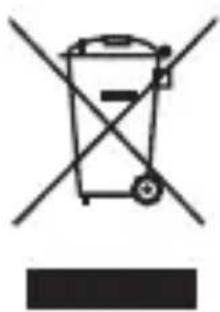
DEVICE
The device is equipped with integrated rechargeable batteries. At the end of its service life, do not dispose of the device in the normal household rubbish. Instead, contact your local authority to find out how to dispose of it
in an environmentally friendly manner at collection points for electrical and electronic scrap.
The rechargeable batteries are integral components and must not be replaced by the user themselves.
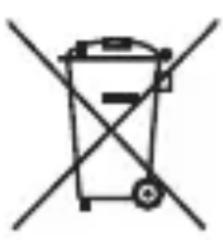
RECHARGEABLE BATTERIES
Do not dispose of used
rechargeable batteries
with household waste.
Rechargeable batteries must
be disposed of correctly.
Retailers that sell batteries
and local collection point
provide containers in which
you can dispose of them.
Contact your local waste
disposal company or your
local authority for more
information on this subject.
10. EU Declaration of Conformity
MEDION AG hereby declares that this device complies with the fundamental requirements and the other relevant provisions of:
RE Directive 2014/53/EU
RoHS Directive 2011/65/EU.
You can download the complete EU Declaration of Conformity at www.medion.com/conformity.
CE
10.1. Trademark information
The Bluetooth® word mark and logos are registered trademarks of Bluetooth SIG, Inc. and are used by MEDION under licence.
The USB™ word mark and the logos are registered trademarks of the USB Implementers Forum, Inc. and are used by MEDION under licence. Other trademarks are the property of their respective owners.
11. Technical specifications
General information
Total weight: Approx. 45 g
Technology: True Wireless
Stereo
Earphone
IPX4
protection class:
Frequency
20 Hz-20 kHz
response:
Power supply
Charging cradle power supply:
5 V = 500 mA (via USB interface)
Charging cradle rechargeable battery
Battery (built-in): 3.7 V / 500 mAh lithium polymer 1.85 Wh
Model number:JD 802035
Earphone rechargeable batteries
Batteries (2x, built-in):
3.7 V / 50 mAh lithium polymer 0.185 Wh
Model number: JD501012-3.7V-50mAh
Manufacturing date:
07/2019
Ambient conditions
In operation:
0^ C to +45^ C
40% to 95%
relative humidity
Ambient conditions
Not in operation:
-10°C to +60°C
40% to 95%
relative humidity
Bluetooth®
Version: 5.0
Profi le: A2DP, AVRCP
Frequency range: 2402-2480 MHz
Max.
transmission
6.5 dBm
power:
Range: Up to 10 metres
12. Service information
Please contact our Customer Service team if your device ever stops working the way you want or expect it to. There are several ways for you to contact us:
- In our Service Community, you can meet other users, as well as our staff, and you can exchange your experiences and pass on your knowledge there. You will find our Service Community at http://community.medion.com.
- Alternatively, use our contact form at www.medion.com/contact.
- You can also contact our Service team via our hotline or by post.
| Opening times | Hotline number UK |
| Mon – Fri: 08.00 – 20.00 Sat – Sun: 10.00 – 16.00 | ◎ 0333 3213106 |
| Hotline number Ireland | |
| ◎ 1 800 992508 | |
| Service address | |
| MEDION Electronics Ltd. 120 Faraday Park, Faraday Road, Dorcan Swindon SN3 5JF, Wiltshire United Kingdom | |

You can download this and many other sets of operating instructions from our service portal at www.medion.com/gb/service/start/. You will also find drivers and other software for a wide range of devices there.
You can also scan the QR code on the side of the screen, to download the operating instructions onto your mobile device from the service portal.
13. Legal Notice
Copyright © 2019
Date: 19.08.2019
All rights reserved.
These operating instructions are protected by copyright.
Mechanical, electronic and any other forms of reproduction are prohibited without the written permission of the manufacturer.
Copyright is owned by the company:
MEDION AG
Am Zehnhof 77
45307 Essen
Germany
Please note that you cannot use the address above for returns. Please always contact our Customer Service team first.
14. Privacy statement
Dear customer,
We wish to inform you that we, MEDION AG, Am Zehnhof 77, 45307 Essen, Germany process your personal data as a data controller.
For matters regarding data protection, we are supported by our company data protection offi cer who can be contacted at MEDION AG, Datenschutz, Am Zehnhof 77, D - 45307 Essen; datenschutz@medion.com. We process your data for the purpose of warranty processing and associated processes (e.g. repairs) and therefore rely on processing your data for the sales contract concluded with us.
Your data will be provided to repairers contracted to us for the purpose of warranty processing and associated processes. We generally store your personal data for a period of three years in order to fulfil I your legal
warranty rights.
You have the right to be informed of the personal data concerned as well as the right to rectification, deletion, restriction of processing, the right to object to processing, as well as the right to data portability.
In case of access and cancellation rights, restrictions apply according to S 34 and S 35 of BDSG (Federal Data Protection Act) (Art. 23 GDPR).
In addition, there is a right of appeal to a competent data protection supervisory authority (Article 77 GDPR in conjunction with S 19 BDSG). The state official for data protection and freedom of information for MEDION AG is Nordrhein Westfalen, P box 200444, 40212 Düsseldorf, Germany.
www.ldsirw.de. The processing of your data is necessary for warranty processing: it is not possible to process the warranty without the provision of the required data.
1. Sommaire
True Wireless Stereo
Classede
protection
IPX4
écouteurs :
Réponse en
fréquence :
20 Hz - 20 kHz
Chere cliente, cher client,
Si un aparato funciona durante mucho tiempo a un volumen elevado a工程技术 de auriculares,SEO,SEO,SEO,SEO,SEO,SEO,SEO,SEO,SEO,SEO,SEO,SEO,SEO,SEO,SEO,SEO,SEO,SEO,SEO,SEO,SEO,SEO,SEO,SEO,SEO,SEO,SEO,SEO,SEO,SEO,SEO,SEO,SEO,SEO,SEO,SEO,SEO,SEO,SEO,SEO,SEO,SEO,SEO,SEO,SEO,SEO,SEO,SEO,SEO,SEO, SEO, SEO, SEO, SEO, SEO, SEO, SEO, SEO, SEO, SEO, SEO, SEO, SEO, SEO, SEO, SEO, SEO, SEO, SEO, SEO, SEO, SEO, SEO, SEO, SEO, SEO, SEO, SEO, SEO, SEO, SEO, SEO, SEO, SEO, SEO, SEO, SEO, SEO, SEO, SEO, SEO, SEO, SEO, SEO, SEO, SEO, SEO, SEO, SEO, SEO,
WAARSCHUWING! Gehoorbeschadiging
WAARSCHUWING! Explosiegevaar!
5 V = 500 mA (via USB-interface)