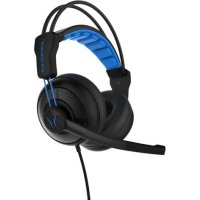
ERAZER X83024 (MD 87640) - Headphones MEDION - Free user manual and instructions
Find the device manual for free ERAZER X83024 (MD 87640) MEDION in PDF.


| Brand | Medion |
| Model | ERAZER X83024 (MD 87640) |
| Product type | Wired gaming headset |
| Connectivity | Wired (3.5 mm jack) |
| Microphone | Integrated, foldable, with on/off button |
| Frequency response (headset) | 20 Hz - 20 kHz |
| Frequency response (microphone) | 30 Hz - 16 kHz |
| Impedance | 32 ohms |
| Sensitivity | 75 mV (bandwidth identification voltage) |
| Cable length | Approximately 2.4 m |
| Connectors | 3.5 mm jack for headset and microphone separately |
| Included accessories | CTIA adapter, user manual, warranty card |
| Intended use | Gaming, communication, private use |
| Cleaning | With a soft, dry cloth, avoid solvents |
| Safety instructions | Moderate volume to protect hearing; avoid moisture, heat, sunlight |
| Spare parts / repairability | CTIA adapter provided; in case of issues, contact Medion support |
| General information | Compliant with EMC, Low Voltage and RoHS directives (2014/30/EU, 2014/35/EU, 2011/65/EU) |
Frequently Asked Questions - ERAZER X83024 (MD 87640) MEDION
User questions about ERAZER X83024 (MD 87640) MEDION
0 question about this device. Answer the ones you know or ask your own.
Ask a new question about this device
Download the instructions for your Headphones in PDF format for free! Find your manual ERAZER X83024 (MD 87640) - MEDION and take your electronic device back in hand. On this page are published all the documents necessary for the use of your device. ERAZER X83024 (MD 87640) by MEDION.
USER MANUAL ERAZER X83024 (MD 87640) MEDION
natural_image
Line drawing of a headset with a curved arrow indicating rotational motion (no text or symbols)- About these Instructions .... 11
1.1. Warning symbols and keywords used in these instructions....11 - Proper use 12
- Safety instructions 13
- Package contents 14
- Using the headphones....14
- Cleaning 15
- Disposal....16
- Technical data....16
- Declaration of conformity....16
1. About these Instructions

Please be sure to read these operating instructions carefully and follow all instructions given. The instructions will help you to operate the device reliably and help increase its service life. Always store these instructions near the device. Keep these operating instructions so that you can pass them on with the device if you sell it.
1.1. Warning symbols and keywords used in these instructions
 | DANGER!Warning of immediate risk of fatal injury! |
 | WARNING!Warning: possible mortal danger and/or serious irreversible injuries! |
 | CAUTION!Warning: possible light or moderate injuries! |
 | CAUTION!Please follow the guidelines to avoid property damage. |
 | PLEASE NOTE!Additional information on using the device! |
 | PLEASE NOTE!Please follow the guidelines in the operating instructions. |
 | WARNING!Warning: danger due to excessive volume! |
| • Bullet point/information on operating steps and results | |
| ► Tasks to be performed | |
2. Proper use
- The device is intended for private use only and not for industrial/commercial use.
Please note that we shall not be liable in cases of improper use:
- Do not modify the device without our consent and do not use any auxiliary equipment that we have not approved or supplied.
- Use only spare parts and accessories that we have supplied or approved.
- Heed all the information in these operating instructions, especially the safety information. Any other use is deemed improper and can cause personal injury or property damage.
- Do not expose the device to any extreme conditions. The following should be avoided:
–High levels of humidity or moisture
-Extremely high or low temperatures
-Direct sunlight
-Naked flames
3. Safety instructions
Keep the appliance and its accessories out of the reach of children.
- This device is not intended for use by people (including children) with reduced physical, sensory or mental abilities or by those without experience and/or knowledge, unless they are supervised by a person responsible for their safety or they have been instructed in its use by that person. Children should be supervised to ensure they do not play with this device.

WARNING!
Risk of suffocation!
There is a risk of suffocation due to swallowing or inhalation of small parts or wrapping.
▶ Keep plastic packaging out of the reach of children.
WARNING!
Risk of injury!
Excessive volume when using earphones and headphones can result in damage to hearing and/or loss of hearing.
Using headphones/earphones to listen to a device at high volumes for an extended period can damage your hearing.
Before pressing play, set the volume to the lowest setting.
▶ Start playback and increase the volume to one which is comfortable for you.
- Do not expose the headset to direct heat sources (e.g. heaters) that could affect it.
- Do not expose the device to direct sunlight.
- Contact with moisture, water and splashes must be avoided.
- Do not pull on the cable to disconnect the headset from your PC or mobile phone.
- In the event of a fault, please contact the Medion Service Centre or an approved repair specialist.
4. Package contents
Please check your purchase to ensure that all items are included. If anything is missing, please contact us within 14 days of purchase. Included in the package:
- Headset
- CTIA Adapter
- Operating instructions
- Warranty card
5. Using the headphones
Connect the audio and microphone cable as indicated to the appropriate port of your PC or laptop.
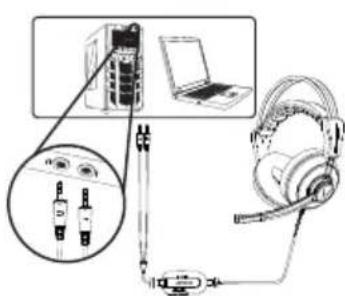
▶ Set the volume to minimum level.
Put the headphones on. Pay attention to the L and R labels on the inside of the headband.
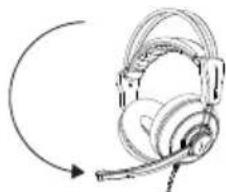
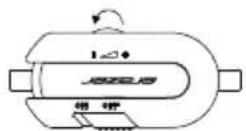
▶ Flip the microphone down when necessary.
natural_image
Line drawing of a headset with a curved arrow indicating rotational motion (no text or symbols)▶ Set the desired volume.
▶ Press the microphone closer to your mouth if the other party cannot hear you well.
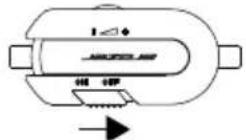
▶ Slide the microphone switch to the ON position to activate the microphone.
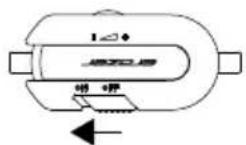
▶ Slide the microphone switch to the OFF position to deactivate the microphone.
▶ Turn the volume control towards the + to increase the volume.
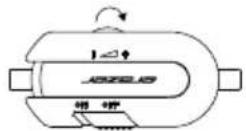
▶ Turn the volume control towards the — to decrease the volume.

NOTICE!
Use the microphone gain of the sound card or voice conferencing software to increase the recording level of the microphone.

NOTICE!
Use the supplied CTIA adapter if you want to connect the gaming headset to a smartphone or tablet PC.
6. Cleaning
▶ Use a dry, soft cloth for cleaning.
Avoid the use of chemical solutions and cleaning products because these may damage the surface and/or markings of the devices.
7. Disposal

Packaging
The product has been packaged to protect it from damage in transit. The packaging is made of materials that can be recycled in an environmentally friendly manner.
Device
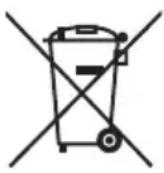
Old devices should not be disposed of with the normal household rubbish. In accordance with Directive 2012/19/EU, the device must be properly disposed of at the end of its service life.
This involves separating the materials in the device for the purpose of recycling and preventing any impact on the environment.
Take old appliances to a collection point for electrical scrap or a recycling centre. Contact your local waste disposal company or your local authority for more information on this subject.
8. Technical data
Frequency range 20 Hz–20 kHz
Impedance 32 ohms
Wideband characteristic voltage 75 mV
Microphone frequency range 30 Hz–16 kHz
Microphone connector 3.5 mm jack
Headphone connector 3.5 mm jack
Cable length approx. 2.4 m
9. Declaration of conformity
Medion AG hereby declares that product 87640 conforms to the following European requirements:
• EMC Directive 2014/30/EU
• Low Voltage Directive 2014/35/EU
• RoHS Directive 2011/65/EU.
Full declarations of conformity are available at www.medion.com/conformity.
Inhaltsverzeichnis
natural_image
Line drawing of a headboard with a curved arrow indicating rotational motion (no text or symbols)natural_image
Line drawing of a headboard with a curved arrow indicating rotation (no text or symbols)


Brand : MEDION
Model : ERAZER X83024 (MD 87640)
Category : Headphones