
LIFE E69019 (MD 82441) - Headphones MEDION - Free user manual and instructions
Find the device manual for free LIFE E69019 (MD 82441) MEDION in PDF.


| Product Type | Wireless RF Headphones |
| Brand | Medion |
| Model | LIFE E69019 (MD 82441) |
| Carrier Frequency | 863 MHz |
| Range | Up to 100 meters (open area) |
| Transmitter Power Supply | DC 6V, 300mA via AC/DC adaptor (Model: AK000G-0600030BW) |
| Headphone Power Supply | 2 x 1.2V rechargeable NiMH AAA batteries (HR03) |
| Charging Method | Place headphones on transmitter dock; blue LED indicates charging |
| Initial Charging Time | 24 hours before first use |
| Audio Input | RCA (red/white) with 3.5mm adaptor; includes 6.3mm adaptor |
| Auto Scan | Button on headphones to find best reception channel |
| Auto Off (Transmitter) | After approx. 4 minutes if no audio signal |
| Volume Control | Rotary knob on headphones |
| Warranty | 3 years parts and labour |
| Safety Features | Do not expose to water; keep away from children; use only supplied adaptor |
| Maintenance | Clean with soft, lint-free cloth; unplug before cleaning |
| Recycling | Dispose of device and batteries at designated recycling points; do not mix with household waste |
| Included Accessories | RF headphones, RF transmitter, AC/DC adaptor, RCA cable, 2 NiMH AAA batteries, 3.5mm to 6.3mm adaptor, documentation |
| Intended Use | Indoor, dry rooms; personal use only |
Frequently Asked Questions - LIFE E69019 (MD 82441) MEDION
User questions about LIFE E69019 (MD 82441) MEDION
0 question about this device. Answer the ones you know or ask your own.
Ask a new question about this device
Download the instructions for your Headphones in PDF format for free! Find your manual LIFE E69019 (MD 82441) - MEDION and take your electronic device back in hand. On this page are published all the documents necessary for the use of your device. LIFE E69019 (MD 82441) by MEDION.
USER MANUAL LIFE E69019 (MD 82441) MEDION
natural_image
Black and white electronic headboard with a black and blue base, labeled 'TEVION' (no other text or symbols visible)After Sales Support
Now you have purchased a Tevion® product you can rest assured in the knowledge that as well as your 3 years parts and labour warranty you have the added peace of mind of dedicated helplines and web support:
AFTER SALES SUPPORT
UK/NIRELANDHELPLINE NO
0871 37 61 020
costs 7p/min from a BT landline,
mobile costs may be higher
REP IRELAND HELPLINE NO
1-800-992-508
WEB SUPPORT
free phone
www.medion.co.uk
MODEL NUMBER: MD 82441
WARRANTY CARD
Congratulations! You have made an excellent choice with the purchase of this quality product. Our commitment to quality also includes our service. Should you, contrary to expectations, experience defects due to manufacturing faults during private use within 36 months of the date of purchase we shall be liable for warranty in accordance with statutory warranty regulations provided that:
- The device was not put to use other than the intended
- was not overloaded
- was not used with the wrong accessories
- repairs were not carried out by any other than the intended workshop
The warranty certificate is only valid in connection with an acceptable proof of purchase.
Please keep both in a safe place. This warranty does not affect your statutory rights.
This purchase is guaranteed for a period of three years beginning on the day of purchase. Keep your purchase receipt safe as proof of date of purchase. The guarantee can only be extended for the duration of any repair required.
During the warranty period defective devices can be returned to the service address stated on the back cover of this document by first calling the service hotline number provided to arrange collection by an approved freight agent at no cost to you. We will at our discretion, either repair or exchange the device in accordance with warranty legislation.
Please enclose the following when sending your product in for repair:
- Proof of purchase (receipt).
- This warranty certificate with the fault report from overleaf complete with your name, contact details and fault description.
If an acceptable proof of purchase is not enclosed the repair will be charged in all cases. After the warranty has expired defective devices can still be sent to the address stated below. Any repairs outside of the warranty period will be charged and can only be undertaken once payment has been received.
Ensure that the product is sent well packed as no responsibility can be accepted for items lost or damaged in transit.
This warranty does not affect your statutory right.

Introduction
You have made an excellent choice with the purchase of this quality Tevion® brand product.
By doing so you now have the assurance and peace of mind which comes from purchasing a product that has been manufactured to the highest standards of performance and safety, supported by the high quality standards of Aldi.
We want you to be completely satisfied with your purchase so this Tevion® product is backed by a comprehensive manufacturer's 3 year warranty and an outstanding after sales service through our dedicated Helpline.
We hope you will enjoy using your purchase for many years to come.
If you require technical support or in the unlikely event that your purchase is faulty please telephone our Helpline for immediate assistance. Faulty product claims made within the 3 year warranty period will be repaired or replaced free of charge provided that you have satisfactory proof of purchase (keep your till receipt safe!). This does not affect your statutory rights. However, be aware that the warranty will become null and void if the product is found to have been deliberately damaged, misused or disassembled
General Information
Read these instructions carefully under all circumstance and follow all the instructions listed. You will guarantee the reliable operation and a long life expectancy of your wireless headphones in this way. Always keep these instructions at hand, close to your wireless headphones. In the event that you transfer ownership of this wireless headphone, please provide these instructions to the new owner.
Purpose of use
- This 863MHz stereo wireless headphone system offers you advances in wireless transmission technology so that you can listen to ultra stereo sound from your audio components up to 100 meters away. The transmitter is compatible with any audio sources, such as DVD players, CD players, i-pods, MP3 players, TV sets, VCRs, Hi-Fi systems or radios.
- This device is only suitable for using in dry, internal rooms.
- The device is not subjected to dripping or sprayed water and that no objects filled with liquids are placed on the device, e.g. vases.
- This device is intended for personal use only. It not intended for commercial use in a heavy industry environment. Use under extreme environmental conditions can result in damage to your device.
Included in the box
Check that nothing is missing from the packaging and inform us of any missing parts within 14 days of purchase. The delivery of the wireless headphone system you have purchased includes:
• RF receiver headphones
RF transmitter
• AC/DC adaptor output DC 6 V, 300 mA
• RCA audio cable (3,5 mm)
• 2 rechargeable NiMH batteries type HR03/AAA
• Adaptor plug (from 3.5 mm to 6.3 mm)
- Documentation
Overview
Transmitter and charging dock
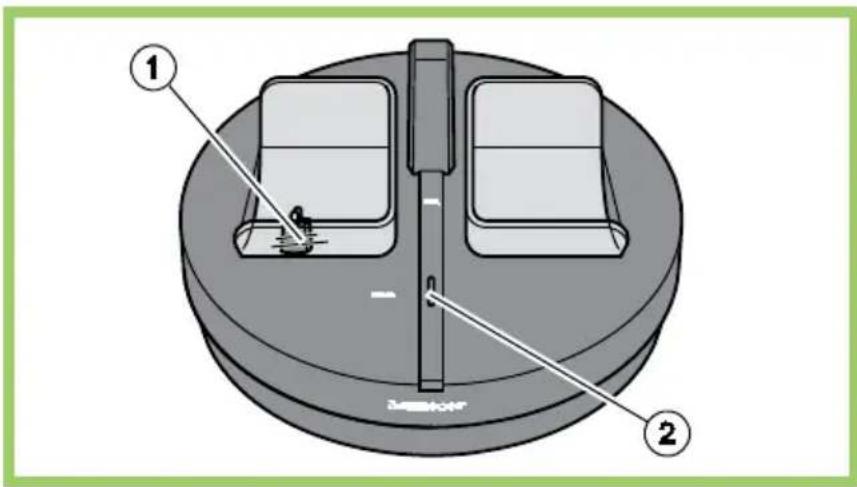
1 Charging tray/indicator for headphones, lights blue when charging
2 RED led: signal indicator
Controls at the transmitter
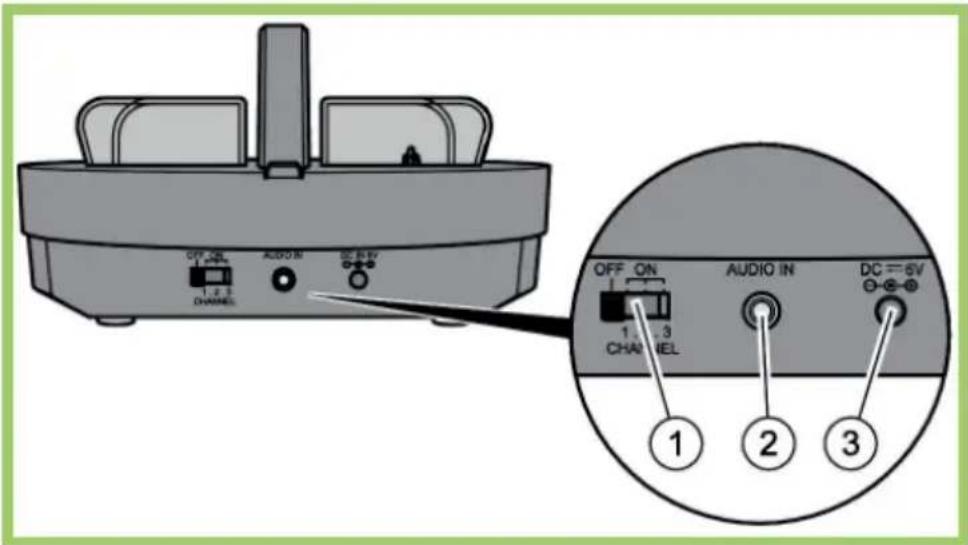
1 On/Off switch and channel selector
2 Connect the audio cable to the audio input of any audio source (TV, HiFi system, VCR, radio cassette player etc.)
3 DC IN 6V input: Connect the adaptor cable to the power-supply
Headphones
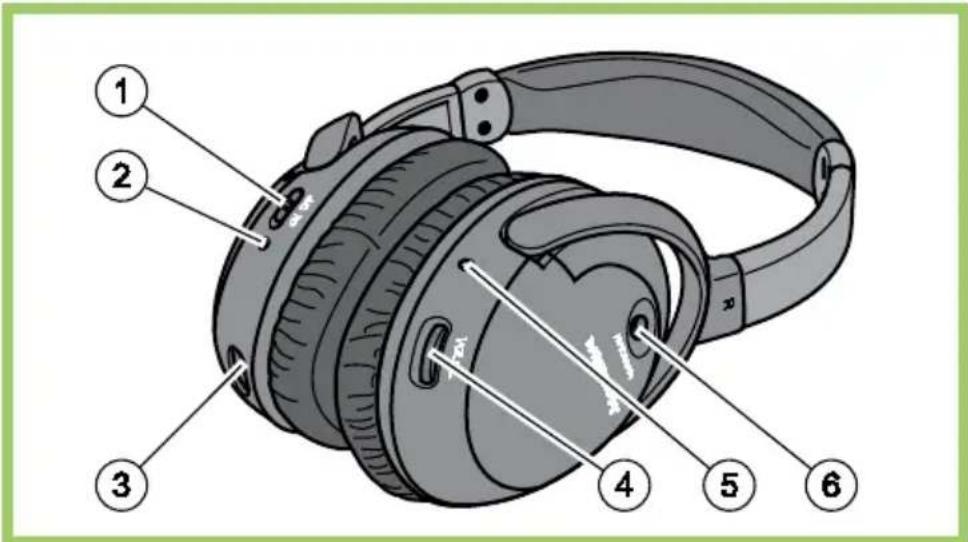
1 ON/OFF: switch the power on or off
2 Power indicator: lights if the headphones are switched on
3 Charging socket
4 Volume knob: you can regulate the volume of your headphones
5 Auto Scan indicator: lights if the signal is strong enough
6 Auto Scan button: press this button to get the fi ne scanned channel
Safety
- Do not allow children to play unattended on electrical equipment. Children may not always correctly recognize danger.
- Keep the packing materials, such as foil away from children. The danger of suffocation could arise in the case of misuse.
- Do not insert any objects through the slots and openings into the inside of the device (electrical shock, short-circuit and the danger of fire)!
- Please proceed as outlined in the service centre section:
– if the AC cable overheats or is damaged - if liquid has gotten into the device
- if the device does not work properly
– if the device is dropped or the housing damaged
Point of use
- In the first hours of operation, new devices may emit a typical, unavoidable but completely harmless smell, which will decline increasingly in the course of time.
- We recommend you to ventilate the room regularly, in order to counteract the formation of the smell.
- Keep your headphones and all units connected to it away from moisture and avoid dust, heat and direct sunlight. Failure to observe these instructions can lead to malfunctions or damage to the device.
- Do not operate your device in the open air, because external influences, such as rain, snow, etc. could damage the device.
- Do not subject the device to drops or splashes of water and do not place any vessels filled with water, such as vases, on the device. Water penetrating the device can impair its electrical safety.
- Do not place any open sources of fire (candles or similar objects) on the device.
Repair
- Leave all repairs of your device to authorized and qualified personnel only.
- Should a repair be necessary, please contact one of our authorized service centre.
Intended Environment
- Provide an interval of at least one meter from high-frequency and magnetic sources of interference (television sets, loudspeakers, mobile telephones, etc.) in order to avoid malfunctions.
- Disconnect the power plug from the power socket during storms or if the device is not being used for a long time.
Power Supply

Please pay attention: Parts of the device are still live, even if the mains switch is switched off. Pull the mains plug out of the socket, to interrupt the power supply to your device completely.
- Operate your RF transmitter mains (AC/DC adaptor) only on sockets with 230 V \~ 50 Hz. If you have doubts about the power supply in the location where the device is installed, consult your energy supplier.
- Only use the power adaptor supplied with the device (Model: AK000G-0600030BW). Never attempt to connect other power supplies with the device, this may result in damage or fire.
- The power socket must be in the vicinity of your device and within reach of the power cables.
- If you use an extension cable, please ensure that it complies with the safety requirements. If necessary consult your electrical equipment supplier.
- You should lay the cables in a manner that no one can trip or step on them.
• To avoid damage of cable do not place any objects or furniture on the cable.
Batteries and Proper Treatment
Batteries may contain combustible materials. By misuse, this may cause battery leakage, heat, explosion or ignition, bringing about injury or damage to the device.
Please observe strictly the following:
- Keep children away from batteries. If by any chance, the batteries are swallowed, consult a doctor immediately.
- Never use another type of battery or non-rechargeable batteries to replace the supplied rechargeable (HR03/AAA) batteries.
- Make sure that the battery touching the charging contact has the coating removed.
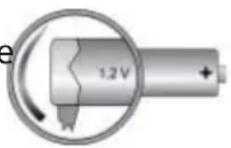
- Do not charge batteries (except rechargeable batteries).
- Do not forcibly discharge batteries.
- Do not short-circuit batteries.
- Do not heat or dispose off in fire.
- Do not disassemble or deform batteries. Your hands and fingers may be injured, or the liquid of the battery may get into your eyes or adhere to your skin. If this happens, rinse with a large quantity of water immediately and consult a doctor.
- Do not expose batteries to strong impact by dropping or throwing them.
- Do not reverse the positive (+) and negative (-) terminals to avoid short-circuit.
- Do not mix used and new or different types of batteries together.
- Remove promptly the used batteries from the device.
- Remove the batteries from your device if it is not to be used for a longer period. The device could be damaged by leaking batteries.
- When the headphones are not in use, switch OFF the headphones to avoid damaging the batteries.
- Clean the battery and device contacts, if necessary, before inserting batteries.
- Replace all batteries with new batteries of the same type at the same time.
Information about the Regulatory Compliance according to R&TTE
The company declares that this device is in compliance with the essential requirements and other relevant provisions of Directive 1999/5/EC. Complete declarations of conformity are available under www.medion.com/conformity.

Please pay attention: Read the Safety Information Chapter under all circumstances before bringing the device into operation.
Unpacking
Open the box very carefully to prevent the equipment from being damaged. Damage can occur if a knife with a long blade is used to open the box.
There are various small parts in the packaging (batteries, screws, etc.). Keep these out of the reach of children. There is a risk of swallowing the parts.
Please keep the packaging material well and use it exclusively to transport the headphones.
Connecting the transmitter
Insert the plug on the supplied AC/DC adaptor into the connecting jack on the device and insert the other end into an easily accessible 230 V \~ 50 Hz power socket.
Connect the red and white plug of the RCA audio cable to the red and white jack of the transmitter.
Connect the black plug (3.5 mm) with the audio output of the source. Use the adaptor plug if the audio output needs a 6.3 mm plug.
The red Auto On indicator led will light up as soon as you have connected both the AC/DC adaptor to the mains outlet and the audio cable to a signal source.
If the signal indicator led remains off, switch on the audio source and increase its output level until the red indicator light comes on.

The batteries must be fully charged before first use. An initial 24 hour charge is required to guarantee an acceptable service life for the rechargeable batteries. Always ensure that the headphones are switched to the position OFF while the batteries are charging.
Remove the small cover on the battery compartment on left side of the receiver headphone.
Install two AAA sized, rechargeable NiMH batteries (type HR03, 1.2V, 550mA) according to the correct polarity (marked in the battery compartment).
Close the battery compartment.
Switch off the receiver headphones and place it into the transmitter to charge the batteries for 24 hours before the initial use.

Using this appliance at full volume for extended periods of time may cause damage to the hearing capacity of the listener. In the first instance set the volume of the audio device to a value at the lowest end of the scale before you put on the headphones. Then comfortable volume. Excessive volume can damage your hearing.
Switch on
▶ Turn on the audio source (TV set or any audio devices) which the transmitter has connected.
Switch on the headphones.
Place the headphones on your head and adjust the volume to obtain the desired sound level.
If you cannot find the best reception frequency, press the „Auto Scan“ button on the headphones to get the fine scanned channel.
You should then be able to move around freely from one room to another without any interference. If interference does occur (interruptions in the signal), press the „Auto Scan“ button once to find a better reception channel.
A For better stereo reception, stay approximately seven meters away from the transmitter when you press the "Auto Scan" button.
B If it is impossible to find a satisfactory frequency, change the channel setting on your transmitter, then press the "Auto Scan" button on the headphones to find the corresponding channel.
To protect the transmitter and to save power, the transmitter will automatically switch off after approximately four minutes if there is no audio signal, or the signal that it receives from the audio source is too weak for proper reception. If the signal returns to an acceptable level, then the transmitter will automatically switch back on.
Charging the batteries
Switch the receiver headphone.
To recharge the headphone batteries, place the headphones on the transmitter, taking care to ensure that the charge contacts touch the transmitter's charge pins and the blue charging indicator is ON.
The charge process starts automatically and the blue indicator light comes ON. Be sure to charge new batteries for 24 hours before using them for the first time in the headphones. The blue indicator light will be on continuously during battery charging.
Troubleshooting
Many times, problems have simple causes. We would like to give you some tips to solve some common problems. Should these tips not help, please call us!
The head- phones has no function
- Ensure that the AC/DC adaptor is pushed fully into the power outlet and that its cable is properly connected to the DC IN 6V connector on the transmitter.
The head- phones out- put level is set too low.
- Adjust the volume to a suitable level.
- Use the headphones volume control to increase the sound level.
- The headphones battery charge level may be too low. Recharge the batteries or replace them with fully charged batteries.
No sound.
- Ensure that your TV set, Hi-Fi system or audio component is switched on and set to a channel that broadcasts an audio signal or is in playback mode.
The reception is bad or distorted.
- The headphones may be too far away from the transmitter. Move closer to it.
- The audio signal input level is too low. Increase the volume from the audio source of Hi-Fi, CD, or TV, etc.
- If distortion appears, press the "Auto Scan" button again. Use the channel selector to change the transmitter's transmission frequency. Then you will need to adjust the tuning control by press the "Auto Scan" button on the headphones.
Do you require additional Support?
If the suggestions in the above section have not solved your problem, please contact the helpline. We will try and help you over the telephone. However, before you contact your helpline, please have the following information at hand:
• What external devices have been connected?
• What messages appear on your display?
• During which operating step has the problem arisen?
- When a PC has been connected to the device:
– What is the system configuration?
- Which software were you using when the problem arose?
• What steps have you already undertaken to solve the problem?
- If you have already been given a customer number, please keep this available.
Maintenance
- The lifespan of the device can be extended by the following means:
- Before cleaning, always remove the power adaptor plug and all connecting cables.
- Do not use any solvents, corrosive or gaseous cleaning agents. Clean the device with a soft, lint-free cloth. Ensure that no water droplets remain on the screen. Water can cause permanent discoloration.
- Please keep the packaging material well and use it exclusively to transport the device.
There are no user-serviceable or user-cleanable parts inside the device.
Recycling
Packaging

Your device is packaged to protect it against damage during transportation. The packaging is manufactured from materials that can be sent to a specialist recycling facility and disposed of in an environmentally-friendly way.
Appliance
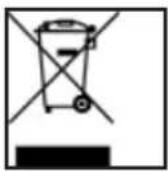
At the end of its life, the appliance must not be disposed of in household rubbish. Enquire about the options for environmentally-friendly disposal.
Batteries
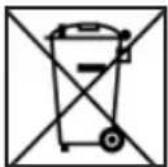
Do not dispose of used batteries in the household rubbish! They must be deposited at a collection point for used batteries.
FAULT REPORT CARD
Name
Address
Email ____ Daytime Tel No ____
Model Number
Fail Description
In order to deal with your enquiry as quickly and efficiently as possible, we ask you to contact our service hotline on the number detailed below.
UK / NORTHERN IRELAND HELPLINE NO 0871 37 61 020
costs 7p/min from a BT landline, mobile costs may be higher
REPUBLIC OF IRELAND HELPLINE NO 1-800-992 508
free phone
Alternatively you can contact us via email by completing the Email product support form which can be found on www.medion.co.uk
Medion Electronics Ltd.
120 Faraday Park
Faraday Road
Dorcan
Swindon SN3 5JF
Wiltshire, UK
03 Introduction
03 General Information
04 Overview
06 Safety instruction
09 Setting Up
11 Using the headphones
12 Troubleshooting
13 Maintenance
14 Recycling
Specifications
Carrier frequency 863 MHz
Operating voltage Transmitter: DC 6 V
= 300mA
Receiver: DC 2.4 V
(2 X 1.2 V rechargeable batteries, HR03/AAA size)
Power supply Model No: AK000G-0600030BW
Input: 100-240V \~ 50/60Hz 0.2A
Output: 6V 0.3A

Range 100 meters (open area)
C€ 0700
Subject to technical and optical changes as well as printing errors.
Copyright © 2011
All rights reserved.
This manual is protected by copyright. All rights reserved. Copying mechanically, electronically and any other way is prohibited unless written permission from the manufacturer is obtained.
The company MEDION ® owns the copyright.


- After Sales Support
- WARRANTY CARD
- Introduction
- General Information
- Purpose of use
- Included in the box
- Overview
- Transmitter and charging dock
- Controls at the transmitter
- Headphones
- Safety
- Point of use
- Repair
- Intended Environment
- Power Supply
- Batteries and Proper Treatment
- Information about the Regulatory Compliance according to R&TTE
- Unpacking
- Connecting the transmitter
- Switch on
- Charging the batteries
- Troubleshooting
- Do you require additional Support?
- Maintenance
- Recycling
- Packaging
- Appliance
- Batteries
- FAULT REPORT CARD
- Specifications
Brand : MEDION
Model : LIFE E69019 (MD 82441)
Category : Headphones