
LIFEBEAT E69378 (MD 84861) - Headphones MEDION - Free user manual and instructions
Find the device manual for free LIFEBEAT E69378 (MD 84861) MEDION in PDF.


| Product Type | Wired headset with microphone |
| Brand | Medion |
| Model | LIFEBEAT E69378 (MD 84861) |
| Frequency Range (Headphones) | 20 Hz – 20 kHz |
| Impedance | 32 ohms |
| Wideband Characteristic Voltage | 420 mV |
| Microphone Frequency Range | 100 Hz – 10 kHz |
| Connection Type | 3.5 mm jack |
| Cable Length | Approx. 1.2 m |
| Intended Use | Portable devices (mobile phones, MP3 players) |
| Controls | In-line microphone with call/music control button |
| Safety Precautions | Keep away from children, avoid high volumes to prevent hearing damage, do not expose to heat or moisture |
| Cleaning | Use a dry, soft cloth; avoid chemical solutions |
| Package Contents | Headset, operating instructions, warranty card |
| Disposal | Recycle packaging; dispose of device at electrical scrap collection point per Directive 2012/19/EU |
Frequently Asked Questions - LIFEBEAT E69378 (MD 84861) MEDION
User questions about LIFEBEAT E69378 (MD 84861) MEDION
0 question about this device. Answer the ones you know or ask your own.
Ask a new question about this device
Download the instructions for your Headphones in PDF format for free! Find your manual LIFEBEAT E69378 (MD 84861) - MEDION and take your electronic device back in hand. On this page are published all the documents necessary for the use of your device. LIFEBEAT E69378 (MD 84861) by MEDION.
USER MANUAL LIFEBEAT E69378 (MD 84861) MEDION
natural_image
Line drawing of a medical or laboratory device with two curved connectors and a connector (no text or symbols)1. Notes on how to use these instructions

Before using the device for the first time, read these operating instructions thoroughly and follow the safety advice! This device may only be used as described in the operating instructions. Always keep these operating instructions to hand but store them safely so that you can pass them on to a new owner should you sell the device. We assume that the users of this device have at least a basic knowledge of how to operate consumer electronics devices.
2. Warning symbols and signal words used in these instructions
 | DANGER!Warning: immediate mortal danger!WARNING!Warning of possible risk of fatal injury and/or serious irreversible injuries!CAUTION!Danger of possible minor or moderate injuries! |
 | ATTENTION!Please follow the instructions to avoid property damage! |
 | NOTICE!Additional information on using the device! |
 | NOTICE!Please follow the instructions in the operating instructions! |
 | WARNING!Warning of risk of electric shock! |
 | WARNING!Warning: danger due to loud volume! |
| • Bullet point/information on operating steps and results |
| ▶ Tasks to be performed |
3. Proper use
The MD 84861 headset is used for sound reproduction and recording voice signals when used together with mobile phones. The device is intended only for use with portable devices such as mobile phones or MP3 players.
The device is intended for private use only and not for industrial/commercial use.
Please note that we shall not be liable for damage caused by improper use.
4. Information on conformity
Medion AG hereby declares that this device conforms to the fundamental requirements and the remaining relevant regulations of the Directives 1999/5/EC and 2011/65/EU. You can find the complete conformity declaration on: www.medion.com/conformity.
5. Safety instructions
Keep the device and its accessories out of the reach of children.
- This device is not intended for use by people (including children) with reduced physical, sensory or mental abilities or by those without experience and/or knowledge, unless they are supervised by a person responsible for their safety or they have been instructed in its use by that person. Children should be supervised to ensure they do not play with this device.

DANGER!
Keep plastic packaging out of the reach of children.
There is a risk of suffocation!

WARNING!
High volume when using the headset can lead to hearing loss. Before using the headset, reduce the volume to minimum. Your hearing can be damaged if you listen at high volumes over a long period or if the volume is increased too suddenly.
- Do not expose the headset to direct heat sources (e.g. heaters) that could affect it.
- Do not expose the device to direct sunlight.
- Contact with moisture, water and splashes must be avoided.
- Do not pull on the cable to disconnect the headset from the mobile phone.
- In the event of a fault, please contact the Medion Service Centre or an approved repair specialist.
6. Package contents
Please check your purchase to ensure all items are included and contact us within 14 days of purchase if any components are missing. Included in the package:
- Headset
- Operating instructions
- Warranty card
7. Using the headphones
Connect the audio cable to the headset and the 3.5 mm jack on the phone as shown.
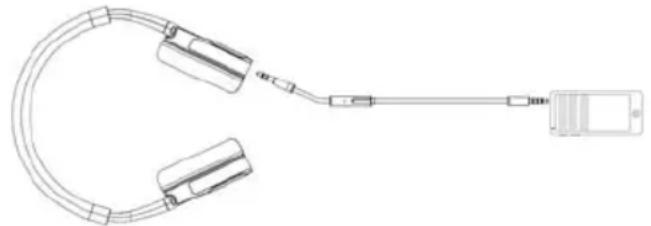
natural_image
Technical line drawing of a U-shaped connector with attached cable and connector (no text or symbols)▶ Set the volume to minimum level.
Put the headphones on. Pay attention to the L and R labels on the inside of the headband.
▶ Set the desired volume on the mobile phone.
- Hold the microphone closer to your mouth if the other party cannot hear you well.
▶ Press on the microphone to accept or reject calls, and start or stop music.
8. Cleaning and disposal
Before cleaning the device, disconnect the audio cable from the mobile phone. Use a dry, soft cloth for cleaning.
- Avoid the use of chemical solutions and cleaning products because these may damage the surface and/or markings of the devices.

Packaging
All packaging and packaging materials that are no longer required can and should be recycled.

Device
Old devices should not be disposed of with the normal household rubbish.
In accordance with Directive 2012/19/EU, the device must be properly disposed of at the end of its service life.
This involves separating the materials in the device for the purpose of recycling and avoiding any impact on the environment.
Take old devices to a collection point for electrical scrap or a recycling centre.
Contact your local waste disposal company or your local authority for more information on this subject.
9. Technical details
Frequency range 20 Hz–20 kHz
Impedance
32
ohms
Wideband characteristic voltage: 420 mV
Microphone frequency range: 100 Hz–10 kHz
Headphone socket 3.5 mm jack
Cable length approx. 1.2 m
Copyright © 2015
All rights reserved.
These operating instructions are protected by copyright.
Mechanical, electronic and any other form of reproduction is prohibited without the written permission of the manufacturer.
These operating instructions can be reordered via the Service Hotline and are available for download on the Service web page www.medionservice.de.
natural_image
Line drawing of a medical or laboratory device with two connectors and a connector (no text or symbols)natural_image
Line drawing of a medical or laboratory device with two connectors and a connector (no text or symbols)natural_image
Technical line drawing of a medical or laboratory device with coiled tubing and connector (no text or symbols)

Brand : MEDION
Model : LIFEBEAT E69378 (MD 84861)
Category : Headphones