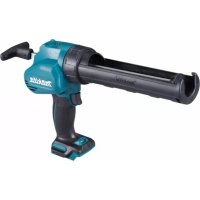
CG100DZA - Caulking gun MAKITA - Free user manual and instructions
Find the device manual for free CG100DZA MAKITA in PDF.



| Product Type | Cordless Caulking Gun |
| Brand | Makita |
| Model | CG100DZA |
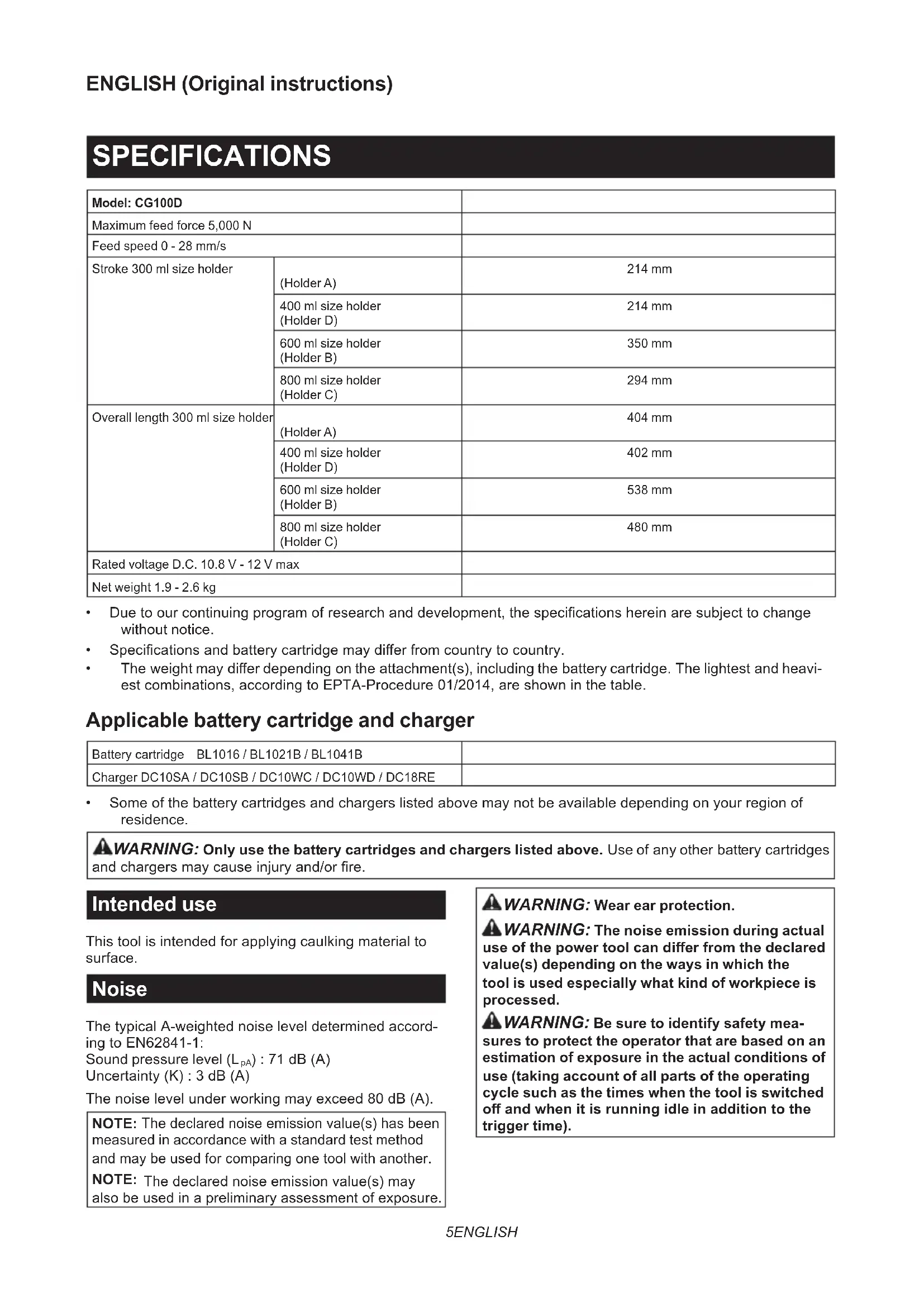
| Maximum Forward Force | 5 000 N |
| Forward Speed | 0 to 28 mm/s |
| Support Stroke (depending on container) | 214 mm (300/400 ml), 350 mm (600 ml), 294 mm (800 ml) |
| Total Length (depending on support) | 402 to 538 mm |
| Rated Voltage | 10.8 V - 12 V DC max. |
| Net Weight | 1.9 to 2.6 kg (depending on battery and accessories) |
| Compatible Batteries | BL1016, BL1021B, BL1041B |
| Compatible Chargers | DC10SA, DC10SB, DC10WC, DC10WD, DC18RE |
| Sound Pressure Level | 71 dB(A) (uncertainty 3 dB(A)) |
| Vibration (no-load operation) | 2.5 m/s² or less (uncertainty 1.5 m/s²) |
| Speed Adjustment | 5-position rotary dial (1 to 5) |
| Special Functions | Front LED light, automatic stop, drip-free function, overload indicator |
| Protection System | Overload, high temperature, deep discharge |
| Container Capacity | Cartridges 300/400/600/800 ml, plastic film tubes, direct pumping |
| Maintenance | Regular cleaning with dry cloth; avoid solvents; repairs by Makita authorized center |
| Safety | Trigger lock, battery protection, use in ventilated area |
| Included Accessories | Set of supports, pistons, rods, nozzles depending on version |
| Warranty | Manufacturer's warranty (see conditions) |
Frequently Asked Questions - CG100DZA MAKITA
User questions about CG100DZA MAKITA
0 question about this device. Answer the ones you know or ask your own.
Ask a new question about this device
Download the instructions for your Caulking gun in PDF format for free! Find your manual CG100DZA - MAKITA and take your electronic device back in hand. On this page are published all the documents necessary for the use of your device. CG100DZA by MAKITA.
USER MANUAL CG100DZA MAKITA
- Due to our continuing program of research and development, the specifications herein are subject to change without notice.
- Specifications and battery cartridge may differ from country to country.
The weight may differ depending on the attachment(s), including the battery cartridge. The lightest and heaviest combinations, according to EPTA-Procedure 01/2014, are shown in the table.
Applicable battery cartridge and charger
| Battery cartridge BL1016 / BL1021B / BL1041B | |
| Charger DC10SA / DC10SB / DC10WC / DC10WD / DC18RE |
Some of the battery cartridges and chargers listed above may not be available depending on your region of residence.
WARNING: Only use the battery cartridges and chargers listed above. Use of any other battery cartridges and chargers may cause injury and/or fire.
Intended use
This tool is intended for applying caulking material to surface.
Noise
The typical A-weighted noise level determined according to EN62841-1:
Sound pressure level (L_pA):71 dB (A)
Uncertainty (K) : 3 dB (A)
The noise level under working may exceed 80 dB (A).
NOTE: The declared noise emission value(s) has been measured in accordance with a standard test method and may be used for comparing one tool with another.
NOTE: The declared noise emission value(s) may also be used in a preliminary assessment of exposure.

WARNING: Wear ear protection.
WARNING: The noise emission during actual use of the power tool can differ from the declared value(s) depending on the ways in which the tool is used especially what kind of workpiece is processed.
WARNING: Be sure to identify safety measures to protect the operator that are based on an estimation of exposure in the actual conditions of use (taking account of all parts of the operating cycle such as the times when the tool is switched off and when it is running idle in addition to the trigger time).
Vibration
The vibration total value (tri-axial vector sum) determined according to EN62841-1:
Work mode: operation without load
Vibration emission (a_h):2.5m / s^2 or less
Uncertainty (K): 1.5m / s^2
NOTE: The declared vibration total value(s) has been measured in accordance with a standard test method and may be used for comparing one tool with another.
NOTE: The declared vibration total value(s) may also be used in a preliminary assessment of exposure.
WARNING: The vibration emission during actual use of the power tool can differ from the declared value(s) depending on the ways in which the tool is used especially what kind of workpiece is processed.
WARNING: Be sure to identify safety measures to protect the operator that are based on an estimation of exposure in the actual conditions of use (taking account of all parts of the operating cycle such as the times when the tool is switched off and when it is running idle in addition to the trigger time).
Declarations of Conformity
For European countries only
The Declarations of conformity are included in Annex A to this instruction manual.
SAFETYWARNINGS
General power tool safety warnings
WARNING: Read all safety warnings, instructions, illustrations and specifications provided with this power tool. Failure to follow all instructions listed below may result in electric shock, fire and/or serious injury.
Save all warnings and instructions for future reference.
The term "power tool" in the warnings refers to your mains-operated (corded) power tool or battery-operated (cordless) power tool.
Cordless caulking gun safety warnings
- Keep hands and clothes away from the rod and the plunger area. Otherwise your finger or clothes may be pinched.
- Hold the tool firmly.
- Always work in well ventilated area and wear proper protections in accordance with the operation.
- Be sure no one is below when using the tool in high locations.
-
Read and follow the manufacture's instructions on caulking material or adhesive material before usage.
-
Do not cover vents, or it may cause overheating and damage to the tool.
SAVE THESE INSTRUCTIONS.
WARNING: DO NOT let comfort or familiarity with product (gained from repeated use) replace strict adherence to safety rules for the subject product. MISUSE or failure to follow the safety rules stated in this instruction manual may cause serious personal injury.
Important safety instructions for battery cartridge
- Before using battery cartridge, read all instructions and cautionary markings on (1) battery charger, (2) battery, and (3) product using battery.
- Do not disassemble or tamper with the battery cartridge. It may result in a fire, excessive heat, or explosion.
- If operating time has become excessively shorter, stop operating immediately. It may result in a risk of overheating, possible burns and even an explosion.
-
If electrolyte gets into your eyes, rinse them out with clear water and seek medical attention right away. It may result in loss of your eyesight.
-
Do not short the battery cartridge:
(1) Do not touch the terminals with any conductive material.
(2) Avoid storing battery cartridge in a container with other metal objects such as nails, coins, etc.
(3) Do not expose battery cartridge to water or rain. A battery short can cause a large current flow, overheating, possible burns and even a breakdown.
- Do not store and use the tool and battery cartridge in locations where the temperature may reach or exceed 50^ (122^) .
- Do not incinerate the battery cartridge even if it is severely damaged or is completely worn out. The battery cartridge can explode in a fire.
- Do not nail, cut, crush, throw, drop the battery cartridge, or hit against a hard object to the battery cartridge. Such conduct may result in a fire, excessive heat, or explosion.
- Do not use a damaged battery.
- The contained lithium-ion batteries are subject to the Dangerous Goods Legislation requirements.
For commercial transports e.g. by third parties, forwarding agents, special requirement on packaging and labeling must be observed.
For preparation of the item being shipped, consulting an expert for hazardous material is required. Please also observe possibly more detailed national regulations.
Tape or mask off open contacts and pack up the battery in such a manner that it cannot move around in the packaging.
- When disposing the battery cartridge, remove it from the tool and dispose of it in a safe place. Follow your local regulations relating to disposal of battery.
- Use the batteries only with the products specified by Makita. Installing the batteries to non-compliant products may result in a fire, excessive heat, explosion, or leak of electrolyte.
- If the tool is not used for a long period of time, the battery must be removed from the tool.
- During and after use, the battery cartridge may take on heat which can cause burns or low temperature burns. Pay attention to the handling of hot battery cartridges.
- Do not touch the terminal of the tool immediately after use as it may get hot enough to cause burns.
- Do not allow chips, dust, or soil stuck into the terminals, holes, and grooves of the battery cartridge. It may cause heating, catching fire, burst and malfunction of the tool or battery cartridge, resulting in burns or personal injury.
- Unless the tool supports the use near high-voltage electrical power lines, do not use the battery cartridge near high-voltage electrical power lines. It may result in a malfunction or breakdown of the tool or battery cartridge.
- Keep the battery away from children. SAVE THESE INSTRUCTIONS.
CAUTION: Only use genuine Makita batteries. Use of non-genuine Makita batteries, or batteries that have been altered, may result in the battery bursting causing fires, personal injury and damage. It will also void the Makita warranty for the Makita tool and charger.
Tips for maintaining maximum battery life
- Charge the battery cartridge before completely discharged. Always stop tool operation and charge the battery cartridge when you notice less tool power.
- Never recharge a fully charged battery cartridge. Overcharging shortens the battery service life.
- Charge the battery cartridge with room temperature at 10^ - 40^ (50°F - 104°F). Let a hot battery cartridge cool down before charging it.
- When not using the battery cartridge, remove it from the tool or the charger.
FUNCTIONAL DESCRIPTION
CAUTION: Always be sure that the tool is switched off and the battery cartridge is removed before adjusting or checking function on the tool.
Installing or removing battery cartridge
CAUTION: Always switch off the tool before installing or removing of the battery cartridge.
CAUTION: Hold the tool and the battery cartridge firmly when installing or removing battery cartridge. Failure to hold the tool and the battery cartridge firmly may cause them to slip off your hands and result in damage to the tool and battery cartridge and a personal injury.
Fig.1: 1. Red indicator 2. Button 3. Battery cartridge
To remove the battery cartridge, slide it from the tool while sliding the button on the front of the cartridge.
To install the battery cartridge, align the tongue on the battery cartridge with the groove in the housing and slip it into place. Insert it all the way until it locks in place with a little click. If you can see the red indicator as shown in the figure, it is not locked completely.
CAUTION: Always install the battery cartridge fully until the red indicator cannot be seen. If not, it may accidentally fall out of the tool, causing injury to you or someone around you.
CAUTION: Do not install the battery cartridge forcibly. If the cartridge does not slide in easily, it is not being inserted correctly.
Battery protection system
The tool is equipped with a battery protection system. This system automatically cuts off power to the motor to extend battery life.
The tool will automatically stop during operation if the tool and/or battery are placed under one of the following conditions:
Overloaded:
The tool is operated in a manner that causes it to draw an abnormally high current.
In this situation, turn the tool off and stop the application that caused the tool to become overloaded. Then turn the tool on to restart.
If the tool does not start, the battery is overheated. In this situation, let the battery cool before turning the tool on again.
Low battery voltage:
The remaining battery capacity is too low and the tool will not operate. If you turn the tool on, the motor runs again but stops soon. In this situation, remove and recharge the battery.
Indicating the remaining battery capacity
Only for battery cartridges with the indicator
Fig.2: 1. Indicator lamps 2. Check button
Press the check button on the battery cartridge to indicate the remaining battery capacity. The indicator lamps light up for a few seconds.
| Indicator lamps Remaining | capacity | |
| Lighted Off | □ | |
| 75% to 100% | ||
| 50% to 75% | ||
| 25% to 50% | ||
| 0% to 25% | ||
NOTE: Depending on the conditions of use and the ambient temperature, the indication may differ slightly from the actual capacity.
Switch action
CAUTION: Before installing the battery cartridge into the tool, always check to see that the switch trigger actuates properly and returns to the "OFF" position when released.
CAUTION: When not operating the tool, push the trigger-lock button from A side to lock the switch trigger in the OFF position.
Fig.3: 1. Switch trigger 2. Trigger-lock button
To prevent the switch trigger from accidentally pulled, the trigger-lock button is provided.
To start the tool, depress the trigger-lock button from A side and pull the switch trigger. Tool speed is increased by increasing pressure on the switch trigger. Release the switch trigger to stop.
After use, press in the trigger-lock button from B side.
Speed adjusting dial
Fig.4: 1. Speed adjusting dial
The tool speed can be adjusted by turning the speed adjusting dial. You can get the highest speed at 5 and the lowest speed at 1.
NOTICE: Do not turn the dial quickly when the tool is working.
NOTICE: Depending on the type and conditions of caulking material, it may not be fed at low speed. In this case, set the speed adjusting dial higher.
NOTICE: When changing the speed dial from "5" to "1", turn the dial counterclockwise. Do not turn the dial clockwise forcibly.
Lighting up the front lamp
CAUTION: Do not look in the light or see the source of light directly.
Fig.5: 1. Lamp
To turn on the lamp, slightly pull the switch trigger, and then release it. The lamp goes out approximately 10 seconds after releasing the switch trigger.
NOTICE: When the tool is overheated, the lamp blinks. Cool down the tool fully before operating the tool again.
NOTE: Use a dry cloth to wipe the dirt off the lens of the lamp. Be careful not to scratch the lens of lamp, or it may lower the illumination.
Overload warning lamp
Fig.6: 1. Warning lamp
The warning lamp blinks when the tool is highly loaded. If the load increases and the tool becomes overloaded, the tool stops automatically and the warning lamp keeps on lighting. In this case, release the switch trigger, and remove the cause of overload, and then restart the tool.
NOTE: When the warning lamp blinks, check the following points:
- The caulking material is clogged.
The speed adjusting dial is set to high speed. - The cutting area of the tip of the cartridge nozzle or film type package is too small.
Drip preventive function
The motor keeps running for a short time even after the trigger is released. It releases the pressure of the caulking material and prevents dripping.
ASSEMBLY
CAUTION: Always be sure that the tool is switched off and the battery cartridge is removed before carrying out any work on the tool.
CAUTION: Always place the tool on the ground or workbench when carrying out any assembling work. The tool without being held tight may lose balance and cause injury.
Parts preparation
Optional accessory
The tool is composed of the following attachment parts as shown in the illustration.
▶ Fig.7: 1. Holder joint 2. Plate 3. Piston 4. Holder 5. Rubber ring 6. Nozzle 7. Holder joint (as a cap) 8. Rod
NOTE: Some attachment parts or optional accessories are not available in your country.
Prepare the proper type of attachment parts depending on the caulking material container by referring to the following table.
| Cartridge | ||||
| - 300 | ml 400 ml 60 | ml 800 ml | ||
| Holder joint | Holder joint A | Holder joint B | Holder joint C complete (Holder joint C + Plate) | |
| Plate | Plate | |||
| Rod | Short rod | Long rod | Black rod | |
| Piston | Piston A | Piston D | ||
| Holder | Holder A | Holder D | Holder B | Holder C |
| Rubber ring | Not required | |||
| Nozzle | Not required (Use the nozzle which is attached to the cartridge) | |||
| Holder joint (as a cap) | Not required | Holder joint B | Holder joint C | |
| Film package | ||||
| -300 | ml (Not available) | 400 ml 600 | ml 800 ml | |
| Holder joint | - | Holder joint B | Holder joint C complete (Holder joint C + Plate) | |
| Plate | - | Plate | ||
| Rod - | Short rod | Long rod | Black rod | |
| Piston | - | Piston B or Piston F * | Piston E | |
| Holder | - | Holder D | Holder B | Holder C |
| Rubber ring | - | Rubber ring for holder joint B | Rubber ring for holder joint C |
| Nozzle - | Nozzle for holder joint B | Nozzle for holder joint C | |
| Holder joint (as a cap) | - | Holder joint B | Holder joint C |
- The piston F pushes out the caulking material leaner.
- When using the piston F, always use Makita nozzle. Using the nozzle any other than makita, may cause an interference.
| Direct filling | ||||
| -300 | ml (Not available) | 400 ml 600 | ml 800 ml | (Not available) |
| Holder joint | - | Holder joint B | - | |
| Plate | - | Plate | - | |
| Rod - | Short rod | Long rod | - | |
| Piston | - | Piston C | - | |
| Holder - | Holder D | Holder B | - | |
| Rubber ring | - | Rubber ring for holder joint B | - | |
| Nozzle - | Nozzle for holder joint B | - | ||
| Holder joint (as a cap) | - | Holder joint B | - | |
Installing or removing the holder joint
Attach the holder joint and plate by securing the screws firmly. To remove the holder joint, follow the installation procedure in reverse.
▶ Fig.8: 1. Screw 2. Plate 3. Holder joint
Installing or removing the rod and piston
- Insert the rod from the rear side of the tool with its teeth facing down.
Fig.9: 1.Rod - Attach piston to the screw.
Fig.10: 1. Screw 2. Piston 3. Rod
To remove the rod and piston, follow the installation procedure in reverse.
Installing or removing the holder
CAUTION: Secure the holder to the holder joint firmly. Otherwise the holder may come off during operation and may cause an injury.
To install the holder, turn it clockwise firmly until it stops while holding the holder joint. To remove the holder, follow the installation procedure in reverse.
▶ Fig.11: 1. Holder 2. Holder joint
OPERATION
CAUTION: Do not use solid caulking material. Be sure to remove the solid caulking material before the installation. Solid caulking material may cause malfunction or personal injury.
NOTICE: Make sure the attachment parts are correct by referring the section for the parts preparation. Using improper parts may cause leakage or tool breakage.
NOTICE: Always keep the rod and piston clean. Adhered caulk may damage the tool.
Using cartridge
Preparing cartridge for use
- Cut the tip of the cartridge nozzle so that the suitable amount of caulking material which you want to feed.
Fig.12: 1. Nozzle -
Make a hole on the protective film with the tip of the nozzle.
Fig.13: 1. Nozzle -
Attach the nozzle to the cartridge.
NOTICE: Be sure to check the cartridge for damage before installation. Using the damaged cartridge may cause malfunction.
Installing cartridge to holder A
-
Pull the rod handle backward slowly until it stops.
Fig.14: 1. Rod handle -
Insert the cartridge into the holder as shown in the figure.
Fig.15 - Push the rod gently until the piston touches the bottom of cartridge.
To remove the cartridge, pull the rod backwards until it stops, then lift out the cartridge.
Installing cartridge to other than holder A
- Pull the rod handle backward slowly until it stops.
Fig.16: 1. Rod handle - Insert the cartridge into the holder.
- Attach the holder joint (as a cap) by turning it firmly while holding the holder.
Fig.17: 1.Holder 2.Cartridge 3.Holder joint (as a cap)
4. Push the rod gently until the piston touches the bottom of cartridge.
To remove the cartridge, follow the installation procedure in reverse.
Using film type package
Preparing package for use
Cut off the tip of the package.
Fig.18
NOTICE: Be sure to check the package for damage before installation. Using the damaged package may cause malfunction.
Installing film type package to holder
- Pull the rod handle backward slowly until it stops.
Fig.19: 1. Rod handle - Insert the package into the holder.
- Attach the rubber ring, nozzle, and holder joint (as a cap). Fasten the holder joint (as a cap) firmly.
Fig.20: 1. Holder 2. Film package 3. Rubber ring
-
Nozzle 5. Holder joint (as a cap)
-
Push the rod gently until the piston touches the package.
To remove the package, remove the holder joint (as a cap), nozzle, rubber ring, and then push the rod handle forward until it stops.
Direct filling
- Push the rod handle all the way until it stops.
Fig.21: 1. Rod handle - Insert the tip of the holder into the caulking material, and then pull the rod handle slowly to fill the holder with the caulking material.
▶ Fig.22: 1. Holder - Attach the rubber ring, nozzle, and holder joint (as a cap). Fasten the holder joint (as a cap) firmly.
▶ Fig.23: 1. Holder 2. Rubber ring 3. Nozzle 4. Holder joint (as a cap)
Caulking operation
Pull the trigger to feed the caulking material. Put one hand under the holder to support the tool while operating it.
NOTE: You can rotate the holder in accordance with required situations to facilitate the operation.
NOTE: At the beginning of operation, set the speed adjusting dial to "1" and pull the switch trigger slowly to check how much amount of caulking material is fed.
NOTE: Depending on the type and conditions of caulking material, it may not be fed at low speed. In this case, set the speed adjusting dial higher.
NOTE: If the caulking material is not fed, check the following points:
The tip of cartridge nozzle is not cut adequately.
- The caulking material is solid and clogged in the nozzle.
- The cartridge or package is damaged.
- The caulking material is stiff. Warm the material until it becomes soft.
- The attached piston is not appropriate for the type of caulking material.
After the operation, wipe off the caulking material from the tool. Be sure to remove the caulking material before it becomes solid.
NOTE: When the rod reaches front end, the motor starts idling. Replace the caulking material when it happens.
NOTE: If you cannot pull out the rod, turn the speed adjusting dial to 1, and pull the switch trigger for a moment, and try to pull the rod out after the motor stopped. If the rod is still clogged, perform the same action until the rod is able to move.
MAINTENANCE
CAUTION: Always be sure that the tool is switched off and the battery cartridge is removed before attempting to perform inspection or maintenance.
NOTICE: Never use gasoline, benzine, thinner, alcohol or the like. Discoloration, deformation or cracks may result.
To maintain product SAFETY and RELIABILITY, repairs, any other maintenance or adjustment should be performed by Makita Authorized or Factory Service Centers, always using Makita replacement parts.
OPTIONAL ACCESSORIES
CAUTION: These accessories or attachments are recommended for use with your Makita tool specified in this manual. The use of any other accessories or attachments might present a risk of injury to persons. Only use accessory or attachment for its stated purpose.
If you need any assistance for more details regarding these accessories, ask your local Makita Service Center.
Piston
- Holder set
Nozzle
- Makita genuine battery and charger
NOTE: Some items in the list may be included in the tool package as standard accessories. They may differ from country to country.
SPECIFICATIONS
Fig.11: 1. Support 2. Joint du support
UTILISATION
ACCESSIONS EN OPTION
NOTA: Whenever I've been to the museum, I'm sure that you will be very happy to see it.
VEILIGHEIDSWAARSCHUWINGEN
OPTIONELE ACCESSOIRES
Sikkerhedsadvarsler for akku fugepistol
Móvo yia xwpe5 ts Eupwnns
Oi Anwosicuupoppwan Tepiaaavovtai oTo Iapaptnma A oTo npov EYxepidio odnyiwv.
IPOEIAOIOIHSEIEA ΣΦΑΛΕΙΑΣ
EvikeC PPOEIDOTOIINoEAaIaYiaTo nAekTpiKo EpyaIeio
A NPOEIOONIH: AiaBaoTe 6AEc TIC TPOEI-0toiOeic aopaleias, oyniecs, EIKOVoypnoei KAI TPODIAYPaeC Tou TApexovtaI e auto To nEktpiko epyaleio. H mtnpnon oawv twv oyniw Toun avayapovtai katwepw mtopei va kataaNge i e Nktpotnngia, TupKayia n/kai oobapo tpaumatio.
ΦuαTe oεc TIG PPOEIOIOn- Oεi KAI TIG OByIeC YIA μελIoVTIKn TApapouπn.
Tic TPOeIDOTOnIaEs, O oPoC «nAekTpiKo EpyaAeo avapeptai eNktpko EpyaAio Tou TpoOoTeiata aTo Tnv Kupia Tapoxn NkEeTPIKOU PeuatoC (eNkTpiKO Kaawio) n OE nAekTpiKO EpyaAio Tou TpoOoTeiata aTo μTATApia (xwpiNkEeTPIKO Kaawio).
PpOeIodOtIoInoEic aOΦaλEiaC YIA To φopntó TlOToλI OToKApioμaToC
- KpatnoTe ta xepia kai ta pouxa aoc paekpi aTTO NTV TEPIOx npaBou kai euBoLo. dApoetik, To dxTuO n ta pouxa oac mTOpEi va TIAOTOUv 0e auTa.
- Kpatate To epyaIeio oTaepa.
- Na εργαζεστε πάντα σε καλα εαριζόμενη περioxη καιν φορατε ωωτα προστateutikα μέσα αναλογα με τήν εργασία.
- BeBaiwtheite oTI dev utapxieI atojo akpiibw c anio kATW, otav xpnoiottoieTe to epyaaleio e uynna onmuia.
- i KAI TnpnoTE TIG Odyies TOU kataokeua- CTn OxETiKa ME TO UAIKO OTOKapiaTOC n To KOAAntiKO UAIKO TPIV aTIO XpOAn.
- Mny kaIUTTE TIG OTIE Eaepwns, MTopei va TpokAnEi UTepepuavon Kai ZnmuoTo EpyAio.
ΦYΛΑΞΕTE AYTEΣ TΙΣ ΕΟΗΓΙΕΣ.
A PPOEI OIOIH: MHN EITIpeEe TnV aveon n OTNV Eoikeiwn oac me To Tpoiov (Tou aTOKtNtke aTo EtnaveiAnmuEvn XpOOn) va AVIKATAOTNEI Tnv auotnpn TnpOn Tuv Kavovwv aopaleiac Tou npovtoc epyaleiou. H ANOA2MENH XPHSH n aMeia v aKoalouh- oTE touc kavovec aopaleiac Tou diatunwovta tO Tou pov Evxepio oBnyiw mTopei va Tpoka- aeoei oBapop TPOOWTIKO tpaumaio.