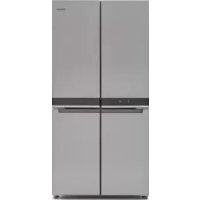
WQ9 B2L CH - Fridge WHIRLPOOL - Free user manual and instructions
Find the device manual for free WQ9 B2L CH WHIRLPOOL in PDF.



| Product type | Freestanding multi-door refrigerator freezer |
| Total capacity | 595 L (refrigerator 387 L, freezer 208 L) |
| Dimensions (H × W × D) | Approx. 178 × 91 × 76 cm |
| Net weight | Approx. 110 kg |
| Power supply | 220-240 V, 10 A, 50/60 Hz, grounded |
| Refrigerant | R600a (isobutane) |
| Climate class | SN, N, ST, T (10 to 43 °C) |
| Noise level | Not specified in the manual |
| Door material | Stainless steel or painted (depending on version) |
| Interior lighting | LED (non-user-replaceable) |
| Sensors | 6th Sense Fresh Lock and 6th Sense Freeze |
| Special functions | Fast cooling, fast freezing, holiday mode, key lock, open door alarm |
| Display | Touch screen on left door |
| Water/ice dispenser | Not mentioned (manual ice maker) |
| Maintenance and cleaning | Automatic defrost, monthly cleaning with warm soapy water, avoid abrasive products |
| Safety | Child lock, flammable materials, grounding instructions |
| Certifications | CE, WEEE, Gulf Conformity Marking |
Frequently Asked Questions - WQ9 B2L CH WHIRLPOOL
User questions about WQ9 B2L CH WHIRLPOOL
0 question about this device. Answer the ones you know or ask your own.
Ask a new question about this device
Download the instructions for your Fridge in PDF format for free! Find your manual WQ9 B2L CH - WHIRLPOOL and take your electronic device back in hand. On this page are published all the documents necessary for the use of your device. WQ9 B2L CH by WHIRLPOOL.
USER MANUAL WQ9 B2L CH WHIRLPOOL
natural_image
Technical line drawing of a four-panel refrigerator with mounting feet (no text or symbols)Whirlpool
FRENCH DOOR BOTTOM MOUNT REFRIGERATOR USE AND CARE GUIDE
English REFRIGERATOR USER INSTRUCTIONS....3
Italiano ISTRUZIONI PER L'USO DEL FRIGORIFERO....25
Français canadien INSTRUCTIONS D'UTILISATION DU RÉFRIGÉRATEUR ...... 49
Location Requirements......6
Electrical Requirements....7
INSTALLATION INSTRUCTIONS....9
Getting Started....9
Unpack the Refrigerator 9
Remove and Replace Refrigerator Doors 10
Remove and Replace Freezer/Flexi Freeze Door....12
Refrigerator Levelling....12
Using the Controls 14
Additional Features....15
Lighting the Refrigerator 15
REFRIGERATOR USE 16
Opening and Closing Doors 16
Food Storage 16
SHELVES, BINS AND DRAWERS....17
Freezer Storage Compartments....18
Audio Reference 18
Accessories....18
Assistance or Service 18
REFRIGERATOR CARE ....19
Cleaning 19
Lights....20
Holiday and Moving Care 20
TROUBLESHOOTING....21
AFTER-SALES SERVICE 24
SAFETY INSTRUCTIONS
Before using the appliance, read these safety instructions. Keep them nearby for future reference. These instructions and the appliance itself provide important safety warnings, to be observed at all times. The manufacturer declines any liability for failure to observe these safety instructions, for inappropriate use of the appliance or incorrect setting of controls.
⚠️Very young children (0-3 years) should be kept away from the appliance. Young children (3-8 years) should be kept away from the appliance unless continuously supervised. Children from 8 years old and above and persons with reduced physical, sensory or mental capabilities or lack of experience and knowledge can use this appliance only if they are supervised or have been given instructions on safe use and understand the hazards involved. Children must not play with the appliance. Cleaning and user maintenance must not be carried out by children without supervision.
PERMITTED USE
⚠️ CAUTION: The appliance is not intended to be operated by means of an external switching device, such as a timer, or separate remote controlled system.
This appliance is intended to be used in household and similar applications such as: staff kitchen areas in shops, offices and other working environments; farm houses; by clients in hotels, motels, bed & breakfast and other residential environments.
This appliance is not for professional use. Do not use the appliance outdoors.
The appliance is designed for operation in places where the ambient temperature comes within the following ranges, according to the climatic class given on the rating plate. The appliance may not work properly if it is left for a long time at a temperature outside the specified range.
Climatic Class Amb. T. (°C)
SN: From 10 to 32 °C; N: From 16 to 32 °C
ST: From 16 to 38 °C; T: From 16 to 43 °C

This appliances does not contain CFCs. The refrigerant circuit contains R600(HC). Appliances with Isobutane (R600a): isobutane is a natural gas without environmental impact, but is flammable.
⚠ WARNING: Do not damage the appliance refrigerant circuit pipes.
⚠ WARNING: Keep ventilation openings, in the appliance enclosure or in the built-in structure, clear of obstruction.
IMPORTANT TO BE READ AND OBSERVED
⚠ WARNING: Do not use or place electrical devices inside the appliance compartments if they are not of the type expressly authorised by the Manufacturer. ⚠ WARNING: Ice makers and/or water dispensers not directly connected to the water supply must be filled with potable water only.
⚠ WARNING: Automatic ice-makers and/or water dispensers must be connected to a water supply that delivers potable water only, with mains water pressure between 0.17 and 0.81 MPa (1.7 and 8.1 bar). ⚠ Do not store explosive substances such as aerosol cans with a flammable propellant in this appliance. ⚠ Do not swallow the contents (non-toxic) of the ice packs (provided with some models). Do not eat ice cubes or ice lollies immediately after taking them out of the freezer since they may cause cold burns. ⚠ For products designed to use an air filter inside an accessible fan cover, the filter must always be in position when the refrigerator is in function.
⚠ Do not store glass containers with liquids in the freezer compartment since they may break. Do not obstruct the fan (if included) with food items. After placing the food check that the door of the compartments closes properly, especially the freezer door.
⚠ Damaged gaskets must be replaced as soon as possible.
⚠ Use the fresh food compartment only for storing fresh food and the freezer compartment only for storing frozen food, freezing fresh food and making ice cubes.
Avoid storing unwrapped food in direct contact with internal surfaces of the fresh food or freezer compartments. Appliances could have special compartments (Fresh Food Compartment, Zero Degree Box, etc.). Unless specified in the specific booklet of product, they can be removed, maintaining equivalent performances.

C-Pentane is used as blowing agent in the insulation foam and it is a flammable gas.
INSTALLATION
The appliance must be handled and installed by two or more persons - risk of injury. Use protective gloves to unpack and install - risk of cuts.
⚠️ Installation, including water supply (if any) and electrical connections, and repairs must be carried out by a qualified technician. Do not repair or replace any part of the appliance unless specifically stated in the user manual. Keep children away from the installation site. After unpacking the appliance, make sure that it has not been damaged during transport. In the event of problems, contact the dealer or your nearest After-sales Service.
Once installed, packaging waste (plastic, styrofoam parts etc.) must be stored out of reach of children - risk of suffocation. The appliance must be disconnected from the power supply before any installation operation - risk of electric shock. During installation, make sure the appliance does not damage the power cable - risk of fire or electric shock. Only activate the appliance when the installation has been completed.
⚠ Be careful not to damage the floors (e.g. parquet) when moving the appliance. Install the appliance on a floor or support strong enough to take its weight and in a place suitable for its size and use. Make sure the appliance is not near a heat source and that the four feet are stable and resting on the floor, adjusting them as required, and check that the appliance is perfectly level using a spirit level. Wait at least two hours before switching the appliance on, to ensure that the refrigerant circuit is fully efficient.
⚠ WARNING: When positioning the appliance, ensure the supply cord is not trapped or damaged.
⚠️ To guarantee adequate ventilation, leave a space on both sides and above the appliance. The distance between the rear of the appliance and the wall behind the appliance should be 50mm, to avoid access to hot surfaces.
⚠ WARNING: To avoid a hazard due to instability, positioning or fixing of the appliance must be done in accordance with the manufacturer instructions.
⚠️ If it is necessary to replace the doors, please contact the Technical Assistance Center.
ELECTRICAL WARNINGS
⚠ It must be possible to disconnect the appliance from the power supply by unplugging it if plug is accessible, or by a multi-pole switch installed upstream of the socket in accordance with the wiring rules and the appliance must be earthed in conformity with national electrical safety standards.
⚠ Do not use extension leads, multiple sockets or adapters. The electrical components must not be accessible to the user after installation. Do not use the appliance when you are wet or barefoot. Do not operate this appliance if it has a damaged power cable or plug, if it is not working properly, or if it has been damaged or dropped.
⚠️ If the supply cord is damaged, it must be replaced with an identical one by the manufacturer, its service agent or similarly qualified persons in order to avoid a hazard - risk of electric shock.
⚠ WARNING: When positioning the appliance, ensure the supply cord is not trapped or damaged.
⚠ WARNING: Do not locate multiple portable socket-outlets or portable power supplies at the rear of the appliance.
CLEANING AND MAINTENANCE
⚠ WARNING: Ensure that the appliance is switched off and disconnected from the power supply before performing any maintenance operation; never use steam cleaning equipment - risk of electric shock.
⚠ Do not use abrasive or harsh cleaners such as window sprays, scouring cleansers, flammable fluids, cleaning waxes, concentrated detergents, bleaches or cleansers containing petroleum products on plastic parts, interior and door liners or gaskets. Do not use paper towels, scouring pads, or other harsh cleaning tools.
DISPOSAL OF PACKAGING MATERIALS
The packaging material is 100% recyclable and is marked with the recycle symbol.
The various parts of the packaging must therefore be disposed of responsibly and in full compliance with local authority regulations governing waste disposal.
DISPOSAL OF HOUSEHOLD APPLIANCES
This appliance is manufactured with recyclable or reusable materials. Dispose of it in accordance with local waste disposal regulations. For further information on the treatment, recovery and recycling of household electrical appliances, contact your local authority, the collection service for household waste or the store where you purchased the appliance. This appliance is marked in compliance with European Directive 2012/19/EU, Waste Electrical and Electronic Equipment (WEEE). By ensuring this product is disposed of correctly, you will help prevent negative consequences for the environment and human health.
The symbol on the product or on the accompanying documentation indicates that it should not be treated as domestic waste but must be taken to an appropriate collection center for the recycling of electrical and electronic equipment.
ENERGY SAVING TIPS
Install the appliance in a dry, well ventilated room far away from any heat source (eg. radiator, cooker, etc.) and in a place not exposed directly to the sun. If required, use an insulating plate.
To guarantee adequate ventilation follow installation instructions. Insufficient ventilation at the back of the product increases energy consumption and decreases cooling efficiency.
Frequent door opening might cause an increase in Energy Consumption. The internal temperature of the appliance and the Energy Consumption may be affected also by the ambient temperature, as well as location of the appliance. Temperature setting should take into consideration these factors. Reduce door opening to a minimum. When thawing frozen food, place in the refrigerator. The low temperature of the frozen products cools the food in the refrigerator. Allow warm food and drinks to cool down before placing in the appliance.
Positioning of the shelves in the refrigerator has no impact on the efficient usage of energy. Food should be placed on the shelves in such way to ensure proper air circulation (food should not touch each other and distance between food and rear wall should be kept).
You can increase storage capacity of frozen food by removing baskets and, if present, Stop Frost shelf.
Do not worry about noises coming from the compressor which are described as normal noises in this product's Quick Guide.

The Gulf Conformity Marking on the product indicates the conformity with all the requirements of the Gulf Technical Regulation for Low Voltage Electrical Equipment and Appliances BD-142004-01.
REFRIGERATOR SAFETY
Your safety and the safety of others are very important.
We have provided many important safety messages in this manual and on your appliance. Always read and obey all safety messages.

This is the safety alert symbol.
This symbol alerts you to potential hazards that can kill or hurt you and others.
All safety messages will follow the safety alert symbol and either the word "DANGER" or "WARNING."
These words mean:
! DANGER
You can be killed or seriously injured if you don't immediately follow instructions.
WARNING
You can be killed or seriously injured if you don't follow instructions.
All safety messages will tell you what the potential hazard is, tell you how to reduce the chance of injury, and tell you what can happen if the instructions are not followed.
WARNING
Suffocation Hazard
Remove doors from your old refrigerator.
Failure to do so can result in death or brain damage.
IMPORTANT: Child entrapment and suffocation are not problems of the past. Scrapped or abandoned refrigerators are still dangerous—even if they will sit for “just a few days.” If you are getting rid of your old refrigerator, please follow these instructions to help avoid accidents.
WARNING
Excessive Weight Hazard
Use two or more people to move and install refrigerator.
Failure to do so can result in back or other injury.
Location Requirements
WARNING

Explosion Hazard
Keep flammable materials and vapors, such as gasoline, away from refrigerator.
Failure to do so can result in death, explosion, or fire.
Electrical Requirements
WARNING

Electrical Shock Hazard
Plug into a grounded (earthed) outlet.
Do not remove ground prong.
Do not use an adapter.
Do not use an extension cord.
Failure to follow these instructions can result in death, fire, or electrical shock.
IMPORTANT: Installation and electrical connection must be carried out by a qualified technician according to the manufacturer's instructions and in compliance with the local safety regulations.
■ The refrigerator is designed to operate on a separate 220-240 V, 10 A, 50-60 Hz circuit.
■ Make sure the voltage specified on the rating plate corresponds to that of your home.
It must be possible to disconnect the appliance from the power supply by unplugging it or by means of a main two pole switch installed upstream of the socket.
If the supply cord is damaged, it must be replaced by the manufacturer, its service agent or similarly qualified persons in order to avoid a hazard.
Before you move your refrigerator into its final location, it is important to make sure you have the proper electrical connection:
Recommended Earthing Method
220-240 V 50 Hz, 220 V 60 Hz, or 230/240 V 50 Hz AC only 10 A fused and earthed electrical supply is required.


Type B
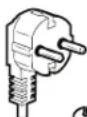

Type E and F
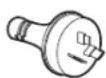

Type I
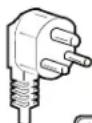

Type M
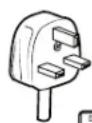
Type G
For Australia and New Zealand:
Your new appliance has been especially manufactured to meet all Australian Standards and Conditions.
Some notations in the installation instructions may refer to electrical requirements in other countries, so we draw your particular attention to these specific notes.
Your appliance needs to be plugged into a 230/240 V 50 Hz AC only 10 A earthed socket.
Electrical Requirements (Great Britain and Ireland only)
IMPORTANT: This refrigerator must be earthed.
Fuse Replacement
If the main lead of this refrigerator is fitted with a BS1363A, 13 A fused plug, to replace a fuse in this type plug use an A.S.T.A. approved fuse to BS 1362 type and proceed as follows:
- Remove the fuse cover (A) and fuse (B).
- Fit replacement 13 A fuse into the fuse cover.
- Reinsert both the fuse and its cover into the plug.
IMPORTANT: The fuse cover must be refitted when changing a fuse. If fuse cover is lost, the plug must not be used until a correct replacement cover is fitted. A correct replacement is identified by the colour insert or colour "word" embossed on the base of the plug. Replacement fuse covers are available at your local electrical shop.
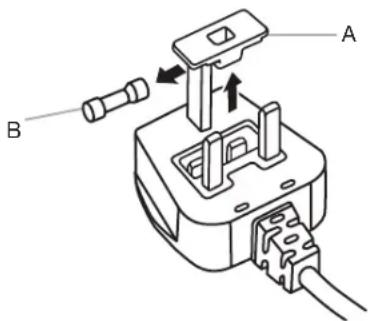
A. Fuse cover
B. Fuse
For the Republic of Ireland (only):
The information given in respect of Great Britain will frequently apply, but a third type of plug and socket is also used, the 2-pin, side earth type.
Socket/Plug (valid for both countries):
If the fitted plug is not suitable for your socket, please contact After-sales Service for further instruction. Please do not attempt to change the plug yourself. This procedure needs to be carried out by a qualified technician in compliance with the manufacturer's instructions and current standard safety regulations.
WARNING

Electrical Shock Hazard
Disconnect power before removing doors.
Failure to do so can result in death or electrical shock.
WARNING
Electrical Shock Hazard
Plug into a grounded (earthed) outlet.
Do not remove ground prong.
Do not use an adapter.
Do not use an extension cord.
Failure to follow these instructions can result in death, fire, or electrical shock.
- Plug into an grounded (earthed) socket.
- Return all removable parts and food to the drawers.
INSTALLATION INSTRUCTIONS
Getting Started
INSTALLATION CHECKLIST
√ Electrical Power
■ Plug refrigerator into a earthed socket.
√ Doors
If doors need to be removed during installation, see the "Remove and Replace Refrigerator Doors" and "Remove and Replace Freezer Door Fronts" sections.
■ Doors seal completely.
■ Refrigerator is level. Adjust leveling feet so they are snug against the floor.
■ Doors are even across the top. (Use door alignment feature if necessary).
Unpack the Refrigerator
Refrigerator Delivery
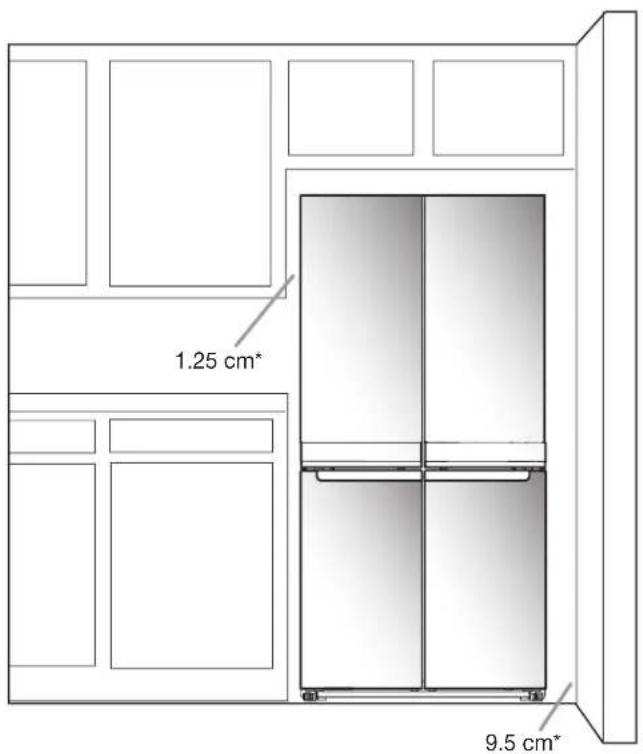
A minimum door opening of 838 mm (33") is required. If door opening is 914 mm (36") or less, then removal of doors, drawer and hinges is required.
Cart the refrigerator from the side for all door openings.
When Moving Your Refrigerator:
Your refrigerator is heavy. When moving the refrigerator for cleaning or service, be sure to cover the floor with cardboard or hardboard to avoid floor damage. Always pull the refrigerator straight out when moving it. Do not wiggle or "walk" the refrigerator when trying to move it, as floor damage could occur.
Remove the Packaging
■ Remove tape and glue residues from surfaces before turning on the refrigerator. Rub a small amount of liquid dish detergent over the adhesive with your fingers. Wipe with warm water and dry.
■ Do not use sharp instruments, rubbing alcohol, flammable fluids, or abrasive cleaners to remove tape or glue. These products can damage the surface of your refrigerator.
■ Dispose of/recycle all packaging materials.
Remove and Replace Refrigerator Doors
NOTE: Measure the width of your door opening to see whether or not you need to remove refrigerator doors to move refrigerator into your home. If door removal is necessary, see the following instructions.
IMPORTANT: If refrigerator was previously installed and you are moving it out of the home, turn refrigerator control off before you begin removing the doors. Unplug refrigerator or disconnect power. Remove food and adjustable door or utility bins from doors.
Gather required tools and read all instructions before removing doors.
TOOLS NEEDED: 6 mm socket wrench, 5 mm socket wrench and #2 Phillips screwdriver
WARNING
Electrical Shock Hazard
Disconnect power before removing doors.
Failure to do so can result in death or electrical shock.
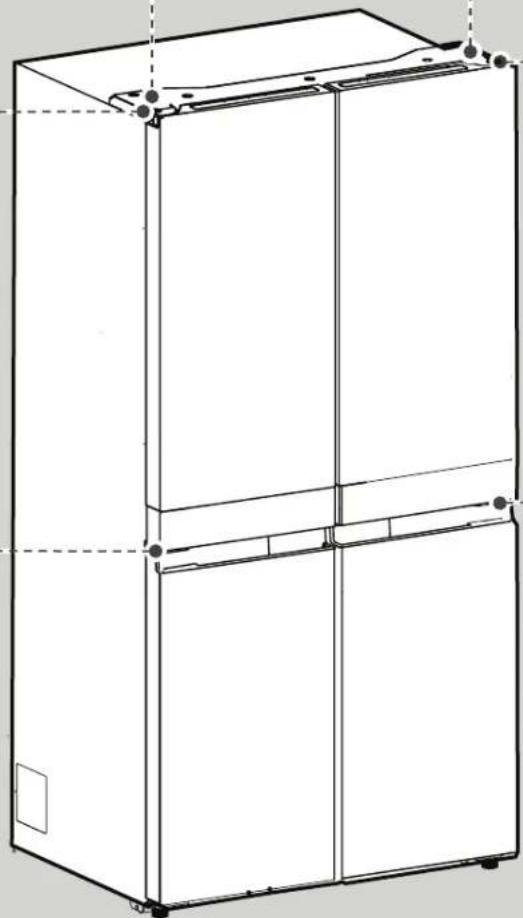
Top Left Hinge Cover
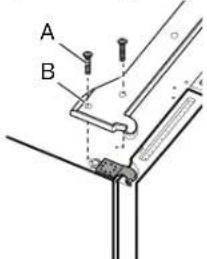
A. Top Hinge Cover screws
B. Top Hinge Cover
Top Left Hinge
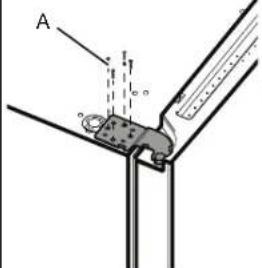
A. 5 mm socket screws
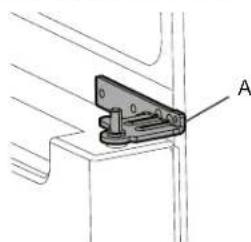
Middle Left Hinge
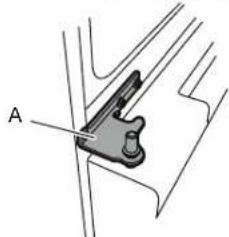
natural_image
Mechanical component diagram showing a bracket with labeled point A (no text or symbols beyond label)A. Hinge
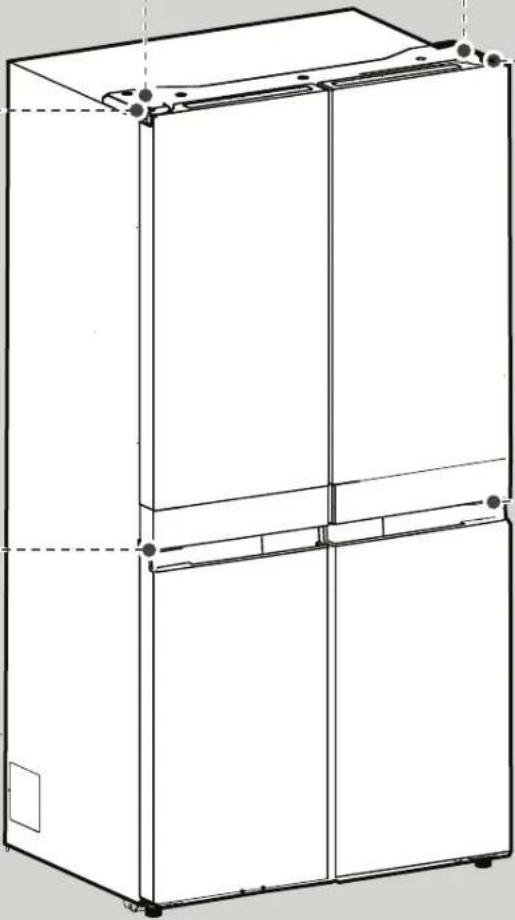
natural_image
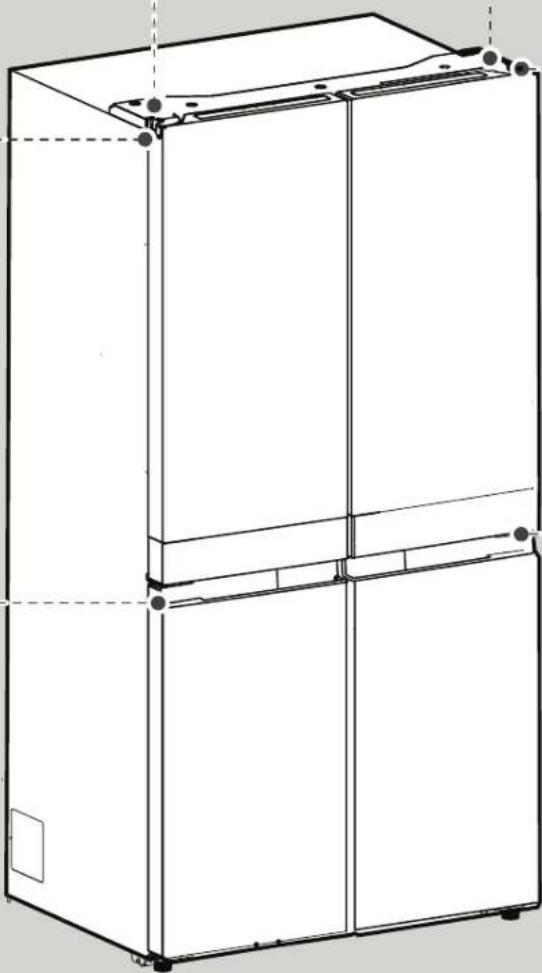
Line drawing of a multi-tiered refrigerator cabinet with mounting holes and front panel (no text or symbols)Top Right Hinge Cover
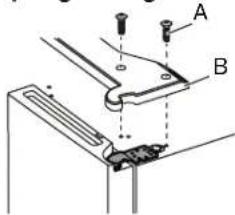
A. Top Hinge Cover screws
B. Top Hinge Cover
Top Right Hinge
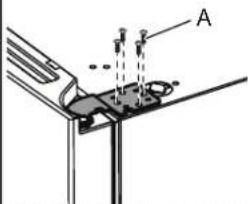
A. 5 mm socket screws
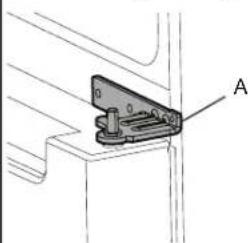
Middle Right Hinge
natural_image
Technical line drawing of a mechanical clamp or bracket assembly (no text or symbols)A. Hinge
Remove Right-Hand Door
- Unplug refrigerator or disconnect power.
- Keep refrigerator doors closed until you are ready to lift them free from the cabinet.
NOTE: Provide additional support for refrigerator door while the hinges are being removed. Do not depend on the door gasket magnets to hold the door in place while you are working. - Using a Phillips screwdriver, remove cover from top hinge.
- Using 5 mm socket wrench, remove four screws from top hinge and set aside.
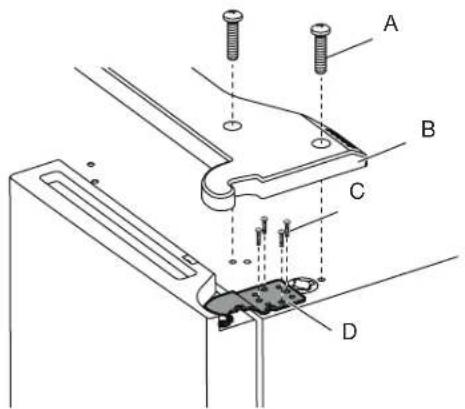
A. Top hinge cover screw
B. Top hinge cover
- Lift refrigerator door from the middle hinge pin. The top hinge will come away with the door.
Remove Left-Hand Door
IMPORTANT: The wiring for UI run through left-hand door hinge, so they must be disconnected before removing the door.
- Using a Phillips screwdriver, remove cover from top hinge.
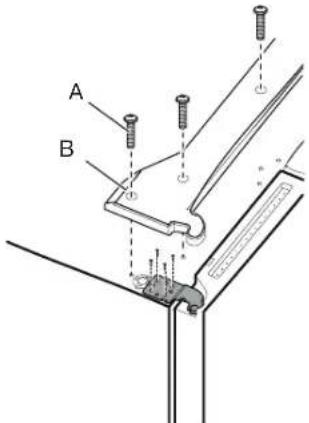
A. Top hinge cover screw
B. Top hinge cover
- Disconnect two wiring plugs located on top of the door hinge.
■ Grasp each side of wiring plugs. With your left thumb, press down to release the catch and pull the sections of the plugs apart.
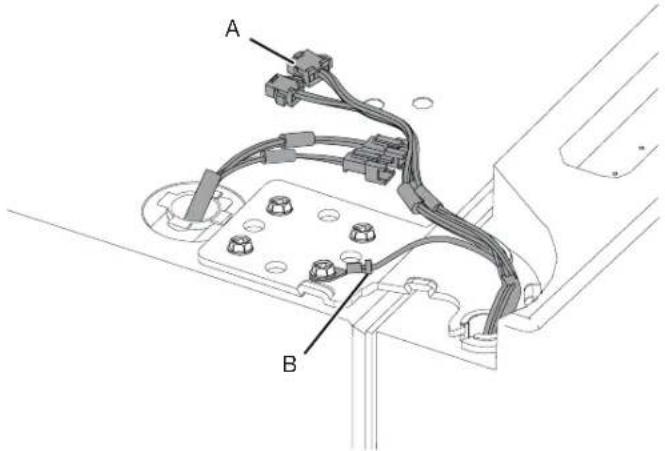
A. Wiring Plug
B. Ground (earth) connector
- Using 5 mm socket wrench, remove four internal screws from top hinge and set aside.
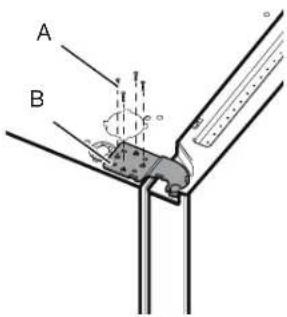
A. 5 mm socket screws
B. Top Hinge
NOTE: Provide additional support for refrigerator door while hinges are being removed. Do not depend on the door gasket magnets to hold the door in place while you are working.
- Lift refrigerator door from bottom hinge pin. The top hinge will come away with door.
NOTE: It may not be necessary to remove bottom hinges and brake feet assemblies to move the refrigerator through a doorway.
■ Only if necessary, use 6 mm socket wrench and #2 Phillips screwdriver to remove middle hinge.
Replace Right-Hand Refrigerator Door
- Set right-hand door onto middle hinge pin.
- Insert top hinge pin into open hole in top of refrigerator door.
- Using four 5 mm socket screws, fasten hinge to cabinet. Do not tighten screws completely.
Replace Left-Hand Refrigerator Door
- Set left-hand door onto middle hinge pin.
- Using four 5 mm socket screws, fasten hinge to cabinet. Do not tighten screws completely.
- Reconnect electrical wiring.
■ Push together two sections of wiring plug.
■ Reconnect earth wire to hinge screw.
Final Steps
- Completely tighten eight 5 mm socket screws.
- Replace top hinge covers.
Remove and Replace Freezer/Flexi Freeze Door
- Keep freezer doors closed until you are ready to lift them free from cabinet.
NOTE: Provide additional support for freezer door while hinges are being removed. Do not depend on door gasket magnets to hold door in place while you are working.
■ Using a #2 Phillips screwdriver and 6 mm socket wrench to remove middle hinge from cabinet.
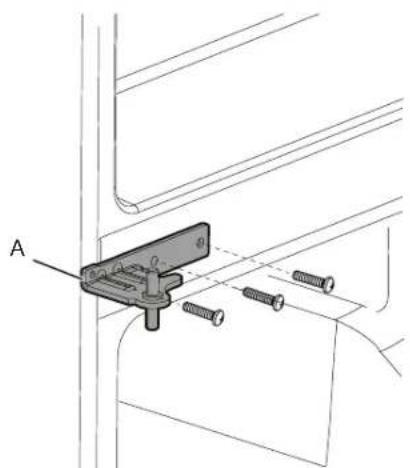
natural_image
Technical line drawing of a mechanical clamp or bracket assembly with screws and a labeled component (no text or symbols present)A. Middle hinge
■ Lift freezer door from the bottom hinge pin.
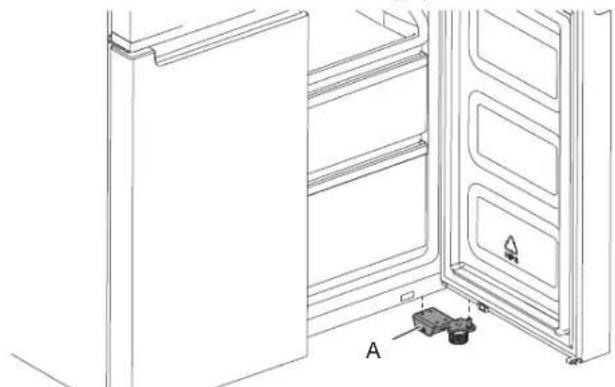
natural_image
Line drawing of an open refrigerator with a door, showing internal shelves and a small component labeled A (no text or symbols beyond label)A. Bottom hinge
Refrigerator Levelling
- Move refrigerator to its final location.
- Using hand, rotate the brake feet. Turn them counterclockwise until the rollers are off the floor and both brake feet are snug against the floor. This keeps refrigerator from rolling forward when opening the doors.
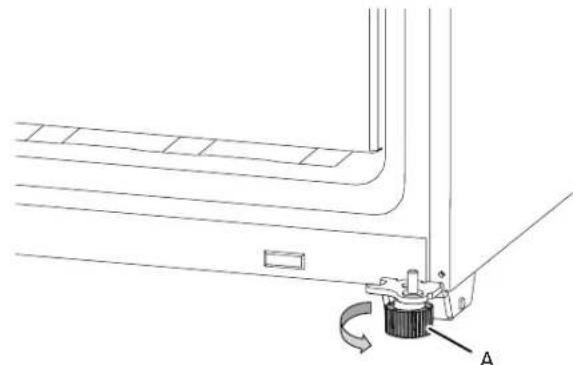
natural_image
Technical line drawing of a mechanical assembly with a curved component and labeled point A (no text or symbols present)A. Brake feet
IMPORTANT: If you need to make further adjustments involving brake feet, you must turn both brake feet same amount to keep the refrigerator level.
- Use a level to make sure refrigerator is level from side to side and front to back.
PARTS AND FEATURES
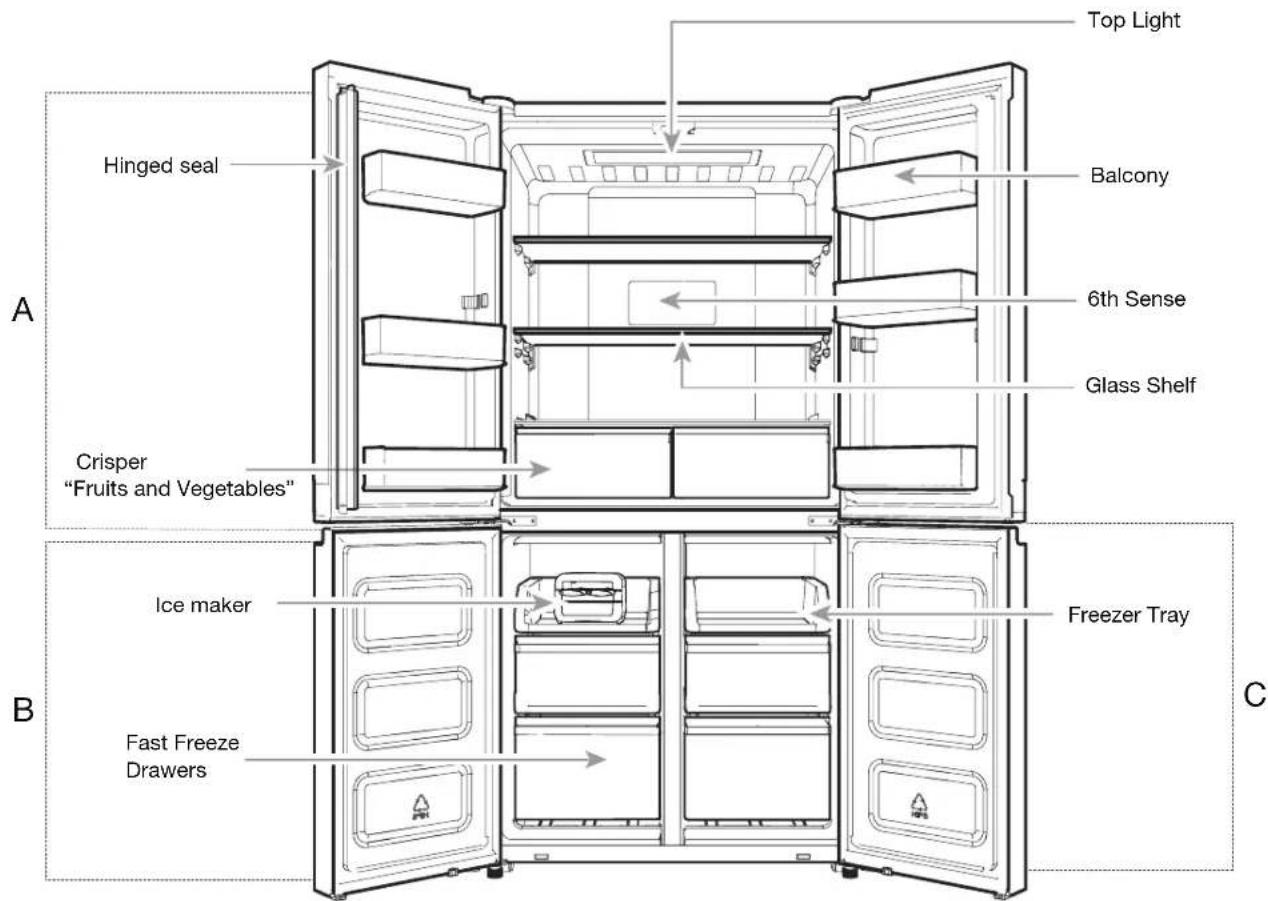
A. Refrigerator
B. Freezer
C. Flexi Freeze (only with WQ9 B1L, 6WM24NIHAS and WQ70900SXX)
NOTE FOR SERVICE:
Center divider can be removed by taking out the 3 screws on the right side (see picture below); With the center divider removed the evaporator area can be reached for service.
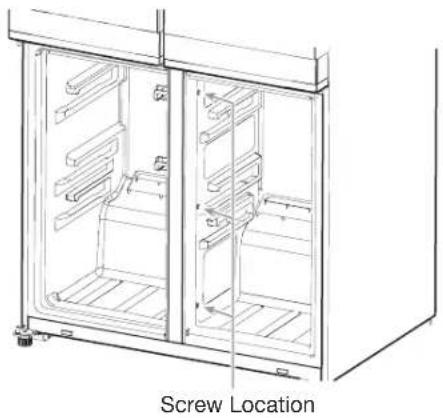
natural_image
Technical line drawing of a stainless steel refrigerator with labeled screw location (no text or symbols beyond label)STORAGE CAPACITY (WQ9 B1LUK and WQ70900SXX):
Fresh Food Compartment 387 L
Freezer Compartment 208 L
Total 595 L
STORAGE CAPACITY (6WM24NIHAS):
Total 603 L
Accessories:
■Ice Maker
Using the Controls
The touch-activated controls are located on the left hand refrigerator door. The control panel includes information about various buttons and indicators. Refrigerator and freezer temperature indicator shows last temperature set point.
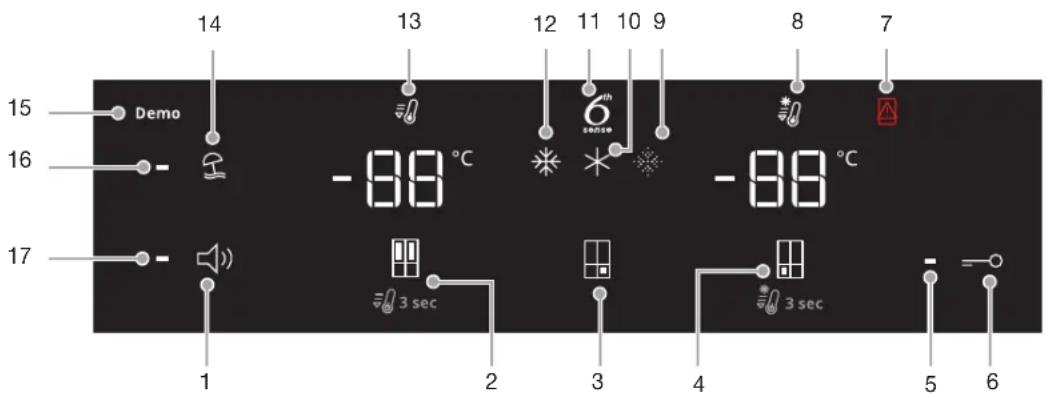
- Sound ON/OFF Button
- Refrigerator Temperature Button (hold 3 sec for Fast Cool)
- Flexi Freeze Preset Temperature Button (only with WQ9 B1LUK, 6WM24NIHAS and WQ70900SXX)
- Freezer Temp Button (hold 3 sec for Fast Freeze)
- Key Lock Indicator
- Key Lock Button
- Door Open Indicator
- Fast Freeze Indicator
-
Soft Freeze Indicator (only with WQ9 B1LUK, 6WM24NIHAS and WQ70900SXX)
-
Mild Freeze Indicator (only with WQ9 B1LUK, 6WM24NIHAS and WQ70900SXX)
- 6th Sense Indicator
- Traditional Freeze Indicator (only with WQ9 B1LUK, 6WM24NIHAS and WQ70900SXX)
- Fast Cool Indicator
- Holiday Mode Button
- Demo Mode Indicator (only with WQ9 B1LUK, 6WM24NIHAS and WQ70900SXX)
- Holiday Mode Indicator
- Sound Indicator
The Control Panel will automatically turn off after one minute of inactivity. To turn on the control panel, press any key.
- 88 Viewing and Adjusting Temperature Set Points
Adjusting Fresh Food and Freezer Compartment Temperature:
For your convenience, your refrigerator and freezer controls are preset at the factory.
When you first install your refrigerator, make sure that the controls are still set to the recommended set points. The factory recommended set points are 3^ C for the refrigerator and -18^ C for the freezer.
Pressing Refrigerator or Freezer Temperature button will toggle through temperature set points in Celsius (°C).
IMPORTANT:
■ Wait 24 hours before you put food into refrigerator. If you add food before refrigerator has cooled completely, your food may spoil.
NOTE: Adjusting the set points to a colder-than recommended setting will not cool compartments any faster.
If the temperature is too warm or too cold in the refrigerator or freezer, first check the air vents to be sure they are not blocked before adjusting the controls.
■ The recommended settings should be correct for normal household use. The controls are set correctly when milk or juice is as cold as you like and when ice cream is firm.
NOTE: Areas such as a garage, basement or porch may have higher humidity or extreme temperatures. You may need to adjust the temperature away from the recommended settings to accommodate for these conditions.
■ Wait at least 24 hours between adjustments. Recheck the temperatures before other adjustments are made.
6 ^th 6 ^th Sense Fresh Lock and Freeze Control
The 6 ^th SENSE Fresh Lock sensor ensures precise and consistent temperature control to preserve fresh food for longer, in the most natural way. Once a temperature variation is detected, the sensor activates a compressor that quickly restores the original temperature.
The 6 ^th SENSE Freeze sensor minimizes temperature fluctuations in freezer thanks to an innovative temperature management system. Freezer burns are reduced to preserving quality and color of food.
\* \* \* Flexi Freeze Setting (only with WQ9 B1LUK, 6WM24NIHAS and WQ70900SXX)
Flexi Freeze function allows you to toggle preset temperature for Flexi freeze compartment.
| Symbol Function Temperature | ||
| * | Traditional freezer -18°C | |
| * | Mild freezer -12°C | |
| Soft freezer -7°C | ||
* To activate/deactivate Coolest setting (-20°C), press Flexi Freeze Preset Temperature Button for 3 seconds. When the Coolest setting is activated, all three icons will be lit.
Adjusting Multi Temperature Setting
■ Traditional freezer (-18°C): Food already frozen and fresh food (max 12 months)
■ Mild freezer (-12°C): Food already frozen (max 1 month)
■ Soft freezer (-7°C): Food already frozen (max 1 week)
■ If Flexible Freezer is set with lower temperature than freezer, freezer will set at same temperature of Flexible Freezer.
■ Flexible Freezer compartment temperature might not be able to reach -7^ when the ambient temperature is around 10^ or colder.
When adjusting temperature set points, use the following chart as a guide:
| CONDITION TEMPERATURE ADJUSTMENT | |
| Refrigerator too cold Refrigerator setting 1° higher | |
| Refrigerator too warm Refrigerator setting 1° lower | |
| Freezer too cold Freezer setting 1° higher | |
| Freezer too warm/ too little ice | Freezer setting 1° lower |
NOTE: Before change temperature setting of Flexible Freezer, make sure that new temperature suits food which is already inside and food you would like to introduce in Flexible freezer.

Fast Cool
The Fast Cool feature assists with periods of high refrigerator use, full grocery loads, or temporarily warm room temperatures.
■ To turn on the Fast Cool feature, press and hold the Refrigerator Temperature button for 3 seconds. When feature is activated, the Fast Cool icon will be illuminated. The Fast Cool feature will remain on for 2 hours unless manually turned off.
■ To manually turn off the Fast Cool feature, press and hold the Refrigerator Temperature button for 3 seconds. The Fast Cool icon will turn off when feature is not activated.
■ Adjusting refrigerator temperature will automatically turn off the Fast Cool feature.

Fast Freeze
The amount of fresh food (in kg) that can be frozen in 24 hours is indicated on the appliance rating plate.
■ Press Freezer Temperature button for 3 seconds (until the Fast Freeze Indicator lights up), 24 hours before placing fresh food in the freezer. After placing fresh food in the freezer, 24 hours on Fast Freeze function is generally sufficient; After 50 hrs the fast freeze function automatically deactivates.
■ To manually turn off the Fast Freeze feature, press and hold the Freezer Temperature button for 3 seconds. The Fast Freeze icon will turn off.
■ Adjusting the freezer temperature will automatically turn off the Fast Freeze feature.

Holiday Mode
This mode is designed to avoid your appliance from wasting energy during times when it's not in regular use (when you are in holiday for example).
By selecting this function the temperature of fresh food compartment will automatically be set to 12^ C.
■ To use the Holiday mode, press mode button until Holiday mode indicator is lit on the display.
■ To exit the Holiday mode, press the mode button until no mode icon is lit on the display.
■ Adjusting the refrigerator temperature will automatically turn off the Holiday Mode feature.
IMPORTANT: If this mode is selected then all food and drinks must be removed from fresh food compartment.

Sound ON-OFF
Press button to activate/deactivate Sound Feedback.

Key Lock
■ Press and hold the Lock button for 3 seconds to activate lock feature.
■ To deactivate lock, press and hold the Lock button for 3 seconds.
The lock feature will ignore all interaction with control panel until the user unlocks the control panel. This feature is meant to avoid unintentional changing of settings.
Demo Mode (only with WQ9 B1LUK, 6WM24NIHAS and WQ70900SXX)
This mode is used when refrigerator is on display in a retail shop or if you want to turn the cooling off and deactivate all other functions (except interior lighting).
Demo mode can be used when going on extended holiday. See the “Holiday and Moving Care” section for proper steps on leaving your refrigerator in this mode for long periods of time.
■ If you turn on Demo mode, the "Demo" icon will light up on the display.
■ Enter or exit Demo mode by pressing and holding the Sound On or Off button and the Lock button simultaneously for 3 seconds.
In case Demo mode is activated, remove all food from both refrigerator, freezer and Flexible Freezer if present.
Additional features
Door Open Alarm
■ The Door Open Alarm feature sounds an alarm and blinks the "Door Open" icon when any of the four doors is open for 2 minutes or more.
■ The alarm will repeat every 5 minutes. Close all doors to turn it off.
NOTE: To mute audible alarm while keeping the doors open, such as while cleaning inside of refrigerator, touch any button on control panel. The alarm sound will be temporarily turned off, but the Door Open icon will still be displayed on the control panel.
Lighting the Refrigerator
The refrigerator has an interior light that comes on any time door is opened.
NOTE: The light is LED which does not need to be replaced. If the LED does not illuminate when the door is opened, call service to replace light.
REFRIGERATOR USE
Opening and Closing Doors
Warm up of side panel is normal at first product start up. Temperature will decrease after some hours.
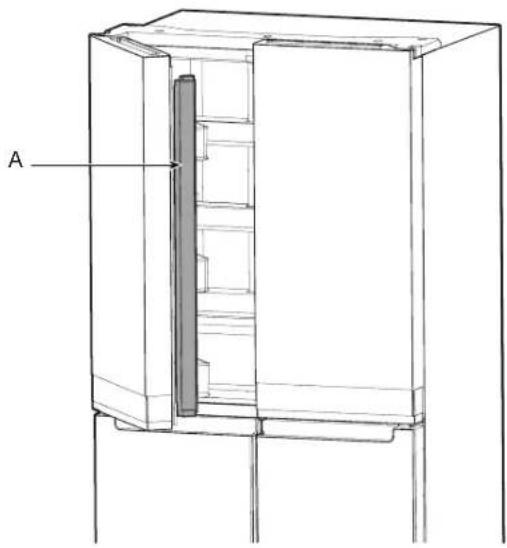
There are two fresh food compartment doors. The doors can be opened and closed either separately or together. There is a vertically hinged seal on left refrigerator door.
■ When left-side door is opened, hinged seal automatically folds inward so that it is out of the way.
■ When both doors are closed, the hinged seal automatically forms a seal between two doors.
NOTE: When closing the door, the hinged seal should be in correct position (be bent inside). Otherwise it will hit the right door or the fixing shaft.
natural_image
Technical line drawing of a refrigerator with labeled component A (no text or symbols beyond label)A. Hinged seal
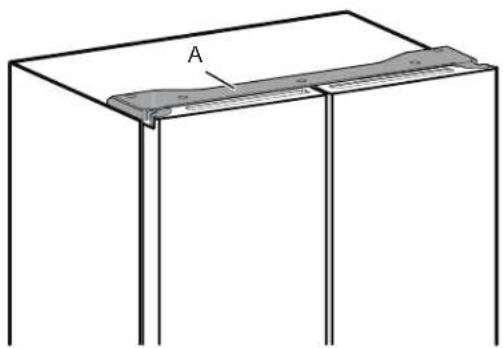
The fresh food compartment door switch is located in top left and right hinge cover.
■ For Freezer and Multi Temperature Zone, door switch is located in the bottom mullion.
■ The door switch uses magnet to sense door opening/closing.
■ Ensure there are no magnet or electronic devices (Speaker, Coolvox® etc.) within 7.62 cm of the hinge cap.
NOTE: The light will not turn on if door opening is not detected.
natural_image
Simple line drawing of a rectangular frame with a labeled section 'A' and a small shaded band, no text or symbols present.A. Hinge cover
Ice Maker
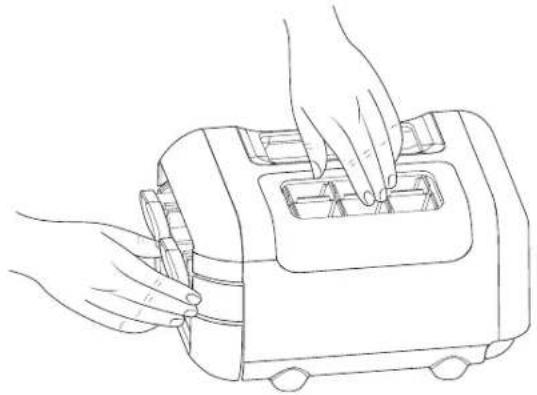
■ To make ice, fill ice tray with purified water and place Manual Ice maker into Freezer top shelf. Allow time till ice gets formed and once ice is ready, turn the knobs in clockwise direction to eject ice cubes into the ice container.
natural_image
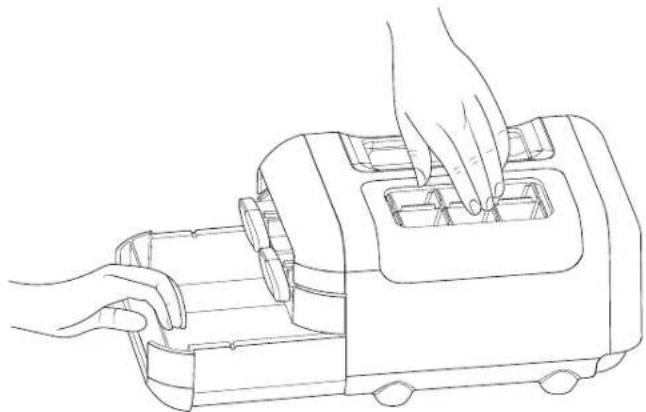
Line drawing of hands operating a portable toaster with cooling fans (no text or symbols)■ Lift ice container slightly and pullout ice container to get access to ice cubes.
natural_image
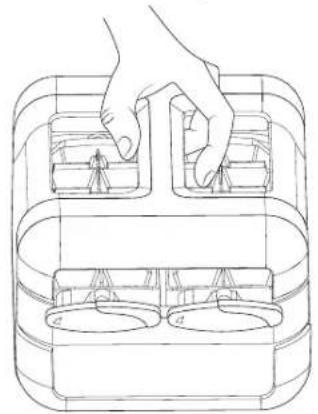
Line drawing of hands operating a portable device with internal compartments (no text or symbols)Manual ice maker assembly can be taken out of the freezer when ice is not required to make more compartment in freezer.
natural_image
Line drawing of a hand placing objects into a container with two circular compartments (no text or symbols)Food Storage
Egg Storage
It is recommended to store eggs at a consistent temperature to keep its freshness, so best is to keep them in the fridge on the middle shelf.
SHELVES, BINS AND DRAWERS
Important information to know about glass shelves and covers:
Do not clean glass shelves or covers with warm water when they are cold. Shelves and covers may break if exposed to sudden temperature changes or impact, such as bumping. Tempered glass is designed to shatter into many small, pebble-size pieces. This is normal. Glass shelves and covers are heavy. Use both hands when removing them to avoid dropping.
Shelf Height Adjustment
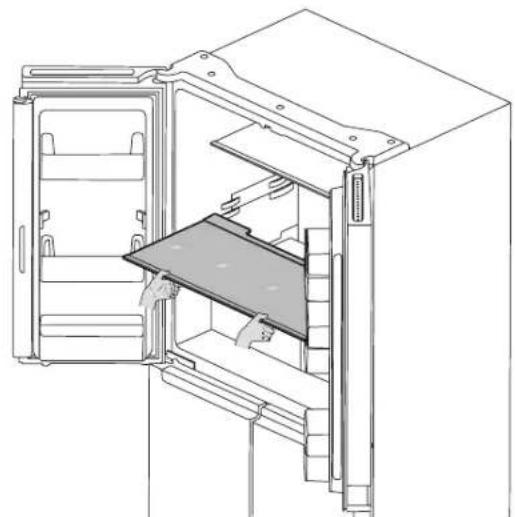
Shelf height can be adjusted by changing its location from bottom support to upper support and vice versa.
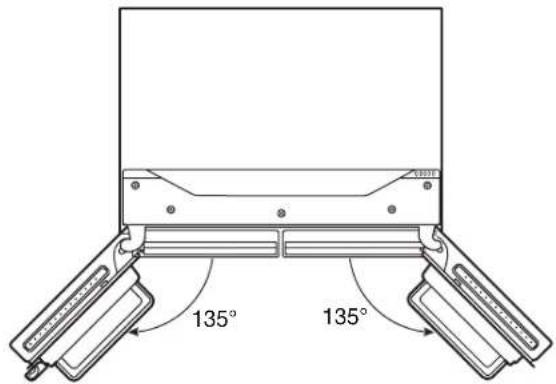
■ Open right side door to its full opening.
■ Take shelf out of refrigerator and place it to desired mounting position.
natural_image
Line drawing of a refrigerator interior showing door, front panel, and side shelves (no text or symbols)■ Ensure shelf is properly seated on the shelf mounts.
Shelves and Shelf Frames
The shelves in your refrigerator are adjustable to meet your individual storage needs.
Storing similar food items together in your refrigerator and adjusting the shelves to fit different heights of items will make finding the exact item you want easier. It will also reduce the amount of time the refrigerator door is open and save energy.
To remove and replace shelves:
- Open the right side door and left side door to its full opening.
- Remove middle shelf or top shelf by lifting it up and out of shelf supports. Then pull the shelf forward and tilt down to a vertical position. Turn shelf at an angle and pull out of the refrigerator.
- Remove the bottom shelf by lifting it up and out of the shelf supports. Then pull the shelf forward and tilt up to a vertical position. Turn the shelf at an angle and pull out of refrigerator.
- Replace middle and top shelves by putting shelf in the refrigerator at an angle with shelf front down. Lift front of the shelf up and slide in until the rear of shelf drops into shelf supports. Lower the front of shelf and make sure that the shelf is in position.
- Replace bottom shelf by putting shelf in refrigerator at an angle with shelf up. Lift front of shelf down and slide in until rear shelf drops into the shelf supports. Lower front of the shelf and make sure that shelf is in position.
Crispers
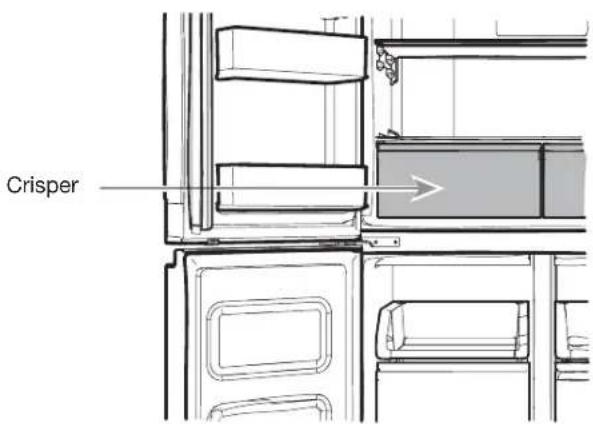
To remove and replace the Crispers:
- Grasp handle of the Crisper and slide Crisper straight out to the stop. Lift the Crisper off the bottom guide.
- Replace/putting back the Crisper by placing it on bottom Crisper guide and pushing it past the Crisper stop into position.
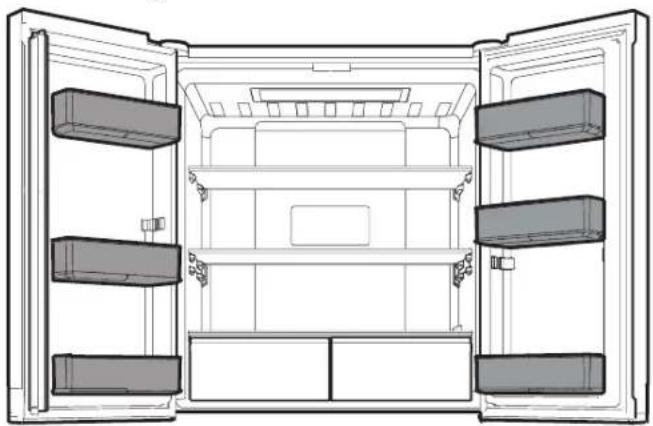
Refrigerator Balconies
The balcony on your refrigerator door are adjustable to meet your individual storage needs.
natural_image
Line drawing of an open refrigerator interior showing front, back, and side compartments (no text or symbols)Freezer Storage Compartments
Freezer Tray
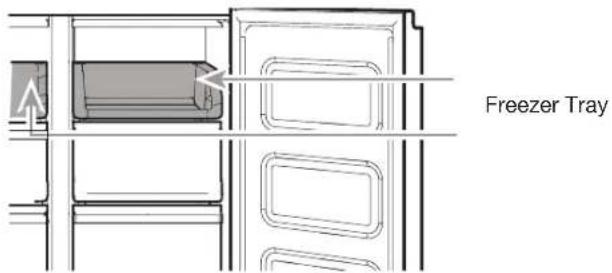
Freezer tray is useful to easily access frequently used products, freeze or simply store leftovers or small items.
Freezer Drawers
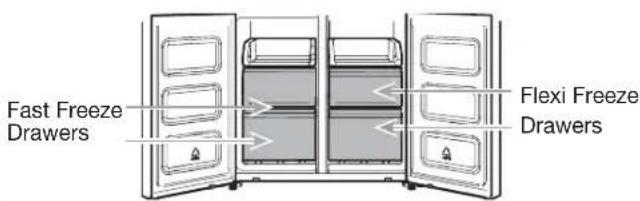
Fast Freeze compartment
■ Fast Freezer drawers allows you to conveniently store big volume items.
■ Fast Freeze option allows you to store all your frozen food safely and transparently.
NOTE: Freezer temperature might be cooled down to be same as Flexible Freezer Compartment temperature, when Freezer set to warmer than Flexible Freezer compartment.
Flexi Freeze Compartment (only with WQ9 B1LUK, 6WM24NIHAS and WQ70900SXX)
Flexi Freeze Compartment allows you to select one of three freezer temperature levels: -7^ , -12^ , -18^ and -20^ to provide the best storing conditions for different types of food. For maximum freezer capacity, you may remove the freezer drawer to expose the freezer shelf.
To remove the upper drawer:
- Grasp handle of the drawer and slide drawer straight out to the stop. Lift drawer off the bottom guide.
- Replace/putting back drawer by placing it on bottom drawer guide and pushing it past drawer stop into position.
Freezer Shelf (only with WQ9 B1LUK)
To maximize freezer capacity, you may remove mid drawer to expose freezer shelf beneath. You can then store upper drawer and load food directly on top of the shelf.
Audio Reference
Tone Assignment
| Tone Name Usage Examples | |
| Power On Cooling system is turned on every time the product is powered on. | |
| Key Press User presses a valid button. | |
| Invalid (Error) User presses two or more valid buttons at the same time. Count-down interruption for press-and-hold buttons. | |
| Engage Acknowledgement of entry into any mode. | |
| Disengage Acknowledgement of exit from any mode. | |
| Alert Door Ajar alert. |
This table is for quick reference only. See corresponding sections for details. In case of inconsistency, section details will prevail.
Accessories
To order accessories, contact the dealer from whom you purchased your refrigerator.
REFRIGERATOR CARE
Cleaning
WARNING

Explosion Hazard
Use nonflammable cleaner.
Failure to do so can result in death, explosion, or fire.
All of the Refrigerator, Freezer and Flexi freeze sections (only with WQ9 B1LUK, 6WM24NIHAS and WQ70900SXX) defrost automatically. However, clean all the sections about once a month to avoid build-up of odours. Wipe up spills immediately.
Exterior Cleaning
Please see the exterior cleaning information specific to your model.
Style 1 - Smooth Door
IMPORTANT: Damage to smooth finish due to improper use of cleaning products or using non-recommended cleaning products is not covered under the warranty. Sharp or blunt instruments will mar the finish.
| DO USE DO NOT USE | |
| √ Soft, clean cloth | ✕ Abrasive cloths✕ Paper towels or newsprint✕ Steel-wool pads |
| √ Warm, soapy water with a mild detergent | ✕ Abrasive powders or liquids✕ Window sprays✕ Ammonia✕ Acidic or vinegar-based Cleaners✕ Oven cleaners✕ Flammable fluids |
NOTE: Paper towels scratch and may dull clear coat of painted door. To avoid possible damage, use only soft, clean clothes to polish and wipe the doors.
Style 2 — Stainless Steel
IMPORTANT:
■ Use recommended stainless steel cleaners and cloths only. Damage to stainless steel finish due to improper use of cleaning products or using non-recommended cleaning products is not covered under the warranty.
■ Avoid exposing stainless steel appliances to caustic or corrosive elements such as high-salt, high-moisture, or high-humidity environments. Damage due to exposure to these elements is not covered under the warranty.
| DO USE DO NOT USE | |
| √ Soft, clean cloth | ✕ Abrasive cloths✕ Paper towels or newsprint✕ Steel-wool pads |
| √ Warm, soapy water with a mild detergent | ✕ Abrasive powders or liquids✕ Ammonia✕ Citrus-based cleaners✕ Acidic or vinegar-based cleaners✕ Oven cleaners |
| √ For heavy soil, use only a stainless steel cleaner designed for appliances. To order the cleaner, contact the dealer from whom you purchased your refrigerator. | ✕ Stainless steel cleaner is for stainless steel parts only. Do not allow the stainless steel cleaner and polish to come into contact with any plastic parts such as the trim pieces, dispenser covers, or door gaskets. |
Style 3 — Fingerprint-Resistant Stainless
IMPORTANT:
■ Avoid exposing stainless steel appliances to caustic or corrosive elements such as high-salt, high-moisture, or high-humidity environments. Damage due to exposure to these elements is not covered under the warranty.
| DO USE DO NOT USE | |
| √ Soft, clean cloth | ✕ Abrasive cloths✕ Paper towels or newsprint✕ Steel-wool pads |
| √ Warm, soapy water with a mild detergent | ✕ Abrasive powders or liquids✕ Window sprays✕ Ammonia✕ Acidic or vinegar-based cleaners✕ Oven cleaners✕ Flammable fluids |
NOTES:
If unintentional contact does occur, clean plastic part with a sponge and mild detergent in warm water. Dry thoroughly with a soft cloth.
■ Just because a cleaner is a liquid does not mean it is non-abrasive. Many liquid cleansers formulated to be gentle on tile and smooth surfaces still damage stainless steel.
■ Citric acid permanently discolours stainless steel.
■ To avoid damaging the finish of your stainless steel refrigerator:
Do not allow these substances to remain on the finish:
✗ Mustard Citrus-based Sauces
✗ Tomato juice Citrus-based products
✗ Marinara sauce
Interior Cleaning
- Unplug refrigerator or disconnect power.
- Hand wash, rinse, and dry removable parts and interior surfaces thoroughly. Use a clean sponge or soft cloth and a mild detergent in warm water.
NOTE: Do not use abrasive or harsh cleaners such as window sprays, scouring cleansers, flammable fluids, cleaning waxes, concentrated detergents, bleaches, or cleansers containing petroleum products on plastic parts, interior and door liners, or gaskets.
- Plug in refrigerator or reconnect power.
Condenser
This refrigerator has skin condenser on both sides of refrigerator. It is normal to feel warm on the sides.
Lights
The lights in both the fresh food and freezer compartments are LEDs which do not need to be replaced. If the lights do not illuminate when the door is opened, contact the dealer from whom you purchased your refrigerator.
Holiday and Moving Care
Holidays
If You Choose to Leave the Refrigerator On While You're Away:
- Use up any perishables and freeze other items.
- If your refrigerator has an automatic ice maker and is connected to the household water supply, turn off the water supply to the refrigerator. Property damage can occur if the water supply is not turned off.
- If you have an automatic ice maker, turn off the ice maker.
■ Press the switch to Off (O) for the door ice maker.
- Empty the ice bin.
If You Choose to Turn Off the Refrigerator Before You Leave:
NOTE: Put refrigerator in Demo Mode while on Holiday. See the "Using the Controls" section.
- Remove all food from the refrigerator.
- If your refrigerator has an automatic ice maker:
■ Turn off water supply to the ice maker at least 1 day ahead of time.
■ When last load of ice drops, press the switch to Off (O) for display to be unlit on the top inside of the refrigerator, depending on your model.
- Empty ice bin.
- Turn off temperature controls. See the "Using the Controls" section.
- Clean refrigerator, wipe it and dry well.
- Tape rubber or wood blocks to the tops of both doors to prop them open far enough for air to get in. This stops odours and mould from building up.
Moving
When you are moving your refrigerator to a new home, follow these steps to prepare it for the move.
- If your refrigerator has an automatic ice maker:
■ Turn off water supply to the ice maker at least 1 day ahead of time.
■ Disconnect water line from the back of the refrigerator.
■ When last load of ice drops, press the switch to Off (O) either on the ice maker or the control, depending on your model.
- Remove all food from refrigerator and pack all frozen food in dry ice.
- Empty ice bin.
- Unplug refrigerator.
- Clean, wipe and dry thoroughly.
- Take out all removable parts, wrap them well and tape them together so they don't shift and rattle during the move.
- Depending on the model, raise the front of the refrigerator so it rolls more easily or raise the levelling screws so they do not scrape the floor. See the "Adjust the Doors" or "Refrigerator Levelling and Door Closing" sections.
- Tape doors closed and tape the power cable to the back of the refrigerator.
When you get to your new home, put everything back and refer to the "Installation Instructions" section for preparation instructions.
Also, if your refrigerator has an automatic ice maker, remember to reconnect the water supply to the refrigerator.
TROUBLESHOOTING
First try the solutions suggested here to possibly avoid a service call.
WARNING

Electrical Shock Hazard
Plug into a grounded (earthed) outlet.
Do not remove ground prong.
Do not use an adapter.
Do not use an extension cord.
Failure to follow these instructions can result in death, fire, or electrical shock.
| If you experience Possible | Causes Solution | |
| Refrigerator Operation | ||
| The refrigerator will not operate. | Check electrical supply. Plug the power | cable into an earthed socket. |
| Do not use an extension cable. | ||
| Make sure there is power to the socket. Plug in a lamp to see if the socket is working. | ||
| Reset a tripped circuit breaker. Replace any blown fuses.NOTE: If problems continue, contact an electrician. | ||
| Check controls. Make sure the controls | are turned on. See the “Using the Controls” section. | |
| New installation. Allow 24 hours following installation for refrigerator to cool completely.NOTE: Adjusting the temperature controls to the coldest setting will not cool either compartment more quickly. | ||
| Refrigerator control is in Demo mode (on some models). | If refrigerator is in Demo mode, cooling is turned off and “Demo” will be illuminated on the control panel. See the “Using the Controls” section for more information. | |
| The motor seems to run too much. | High-efficiency compressor and fans. Larger, more efficient refrigerators run longer at lower, more energy efficient speeds. | |
| The room or outdoor temperature is hot. | It is normal for refrigerator to work longer under these conditions. For optimum performance, place refrigerator in an indoor, temperature-controlled environment. See the “Location Requirements” section. | |
| A large amount of warm food has been recently added. | Warm food will cause refrigerator to run longer until the air cools to the desired temperature. | |
| The door(s) are opened too frequently or for too long. | Warm air entering refrigerator causes it to run more. Open the door less often. | |
| The refrigerator door or freezer drawer is open. | Make sure refrigerator is level. See the “Refrigerator Levelling and Door Closing” section. Keep food and containers from blocking the door. | |
| The refrigerator control is set too cold. | Adjust refrigerator control to a less-cold setting until the refrigerator temperature is as desired. | |
| The door or drawer gasket is dirty, worn, or cracked. | Clean or change the gasket. Leaks in the door seal will cause refrigerator to run longer in order to maintain desired temperatures. | |
TROUBLESHOOTING
First try the solutions suggested here to possibly avoid a service call.
| If you experience Possible Causes | Solution | |
| The lights do not work. Your refrigerator is equipped with LED lighting which does not need to be replaced. | If there is power to the refrigerator and the lights do not illuminate when a door or drawer is opened, call for service or assistance. | |
| Doors have been open longer than 10 minutes. | ||
| The door switch is not sensing the door opening. | ||
| The Temperature Control UI does not turn on. | The Temperature Control UI went to sleep. | |
| The Temperature Control UI buttons are not working well. | ||
| The Temperature Control UI is not receiving power. | ||
| Unable to adjust setting on The Temperature Control UI. | Door is open and Door ajar alarm is activated. | |
| Unusual Noise | ||
| To listen to normal refrigerator sounds, go to the Product Help/FAQ section of the brand website and search for “normal sounds.” Below are listed some normal sounds with explanations. | ||
| The refrigerator seems noisy. The compressor in your new refrigerator regulates temperature more efficiently while using less energy and operates quietly. | Due to this reduction in operating noise, you may notice unfamiliar noises that are normal. | |
| Sound of the compressor running longer than expected. | High-efficiency compressor and fans. | |
| Pulsating/Whirring Fans/compressor adjusting to optimize performance during normal compressor operation. | This is normal. | |
| Popping Contraction/expansion of inside walls, especially during initial cool down. | This is normal. | |
| Hissing/Dripping Flow of refrigerant or flow of oil in the compressor. | This is normal. | |
| Vibration The refrigerator may not be steady. Adjust the levelling screws and lower the levelling foot firmly against the floor. See the “Refrigerator Levelling and Door Closing” section. | ||
| Sizzling Water dripping on the heater during Defrost cycle. | This is normal. | |
| Water running/Gurgling May be heard when ice melts during the Defrost cycle and water runs into the drain pan. | This is normal. | |
TROUBLESHOOTING
First try the solutions suggested here to possibly avoid a service call.
| If you experience Possible Causes Solution | ||
| Temperature and Moisture | ||
| Temperature is too warm. The refrigerator has just been installed. | The controls are not set correctly for the surrounding conditions. | Allow 24 hours following installation for refrigerator to cool completely. |
| The door(s) are opened often or not closed completely. Allows warm air to enter refrigerator. | Adjust the controls a setting colder. Check the temperature in 24 hours. See the "Using the Controls" section. | |
| A large load of food was recently added. | Minimize door openings and keep doors fully closed. | |
| Demo mode is on. Turn off the Holiday mode is on. Turn off the Holiday mode. See the "Using the Control" section. | Allow several hours for refrigerator to return to normal temperature. | |
| Temperature is too cold in the refrigerator/crisper. | The refrigerator air vent(s) are blocked. | If the air vent located in the middle rear of the fresh food compartment is blocked by items placed directly in front of it, the refrigerator will get too cold. Move items away from the air vent. |
| The controls are not set correctly for the surrounding conditions. | Adjust the controls a setting warmer. Check the temperature in 24 hours. See the "Using the Controls" section. | |
| Temperature is too cold in the temperature controlled drawer. | The control is not set correctly for the items stored in drawer. | Adjust the temperature setting. See the "Using the Controls" in the "Refrigerator Use" section. |
| There is interior moisture build-up.NOTE: Some moisture build-up is normal. | The room is humid. A humid environment contributes to moisture build-up. | Minimize door openings and close doors completely. |
| The door(s) are opened often or not closed completely. Allows humid air to enter the refrigerator. | Move food packages away from door. | |
| The door(s) are blocked open. | Push bin or shelf back into the correct position. | |
| A bin or shelf is in the way. Push storage liquid in open containers. | This adds humidity to refrigerator interior. Keep all containers tightly covered. | |
| There is frost/ice build-up in the freezer compartment. | The door is opened often or left open. | Minimize door openings and close drawer completely after use. |
| The door has poor door seal. | Ensure door seals are making full contact with the refrigerator cabinet to allow for an adequate seal. | |
| Temperature controls are not set correctly. | See the "Using the Controls" section for recommended temperature settings. | |
TROUBLESHOOTING
First try the solutions suggested here to possibly avoid a service call.
WARNING
Explosion Hazard
Use nonflammable cleaner.
Failure to do so can result in death, explosion, or fire.
To view an animation showing how to adjust and align the doors, refer to the Product Help/FAQ section of the brand website and search for “Door Closing and Door Alignment.”
| If you experience Possible | Causes Solution | |
| Doors | ||
| The doors will not close completely. | The door is blocked open. Move food packages away from door. | |
| A bin or shelf is in the way. Push bin or shelf back into the correct position. | ||
| Recently installed Remove all packaging materials. | ||
| The doors are difficult to open. | The door gaskets are dirty or sticky. Clean gaskets and contact surfaces with mild soap and warm water. Rinse and dry with soft cloth. | |
| The doors appear to be uneven. | The doors need to be aligned or the refrigerator needs to be levelled. | If you need to align door please call for service. |
| The refrigerator is unsteady or it rolls forward when opening and closing doors. | The refrigerator brake feet are not snug against the floor. | Turn both brake feet (one on each side) counterclockwise, the same amount, until they are snug against the floor. See the “Refrigerator Levelling and Door Closing” section. |
AFTER-SALES SERVICE
BEFORE CALLING THE AFTER-SALES SERVICE
- See if you can solve the problem by yourself with the help of the suggestions given in the TROUBLESHOOTING.
- Switch the appliance off and back on again to see if the fault persists.
IF AFTER THE ABOVE CHECKS THE FAULT STILL OCCURS, GET IN TOUCH WITH THE NEAREST AFTER-SALES SERVICE
To receive assistance, call the number shown on the warranty booklet or follow the instructions on the website www.whirlpool.eu
When contacting our Client After sales service, always specify:
■a brief description of the fault;
■the type and exact model of the appliance;
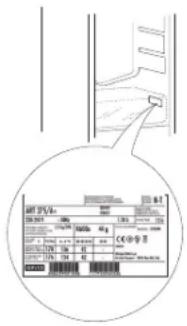
■the service number (number after the word Service on the rating plate). The service number is also indicated on the guarantee booklet;
■your full address;
■your telephone number.
If any repairs are required, please contact an authorised after sales service (to guarantee that original spare parts will be used and repairs carried out correctly).
Sommario
SICUREZZA DEL FRIGORIFERO....29
natural_image
Mechanical component diagram showing a bracket with labeled point A (no text or symbols beyond label)A. Cerniera
natural_image
Line drawing of a three-tier refrigerator cabinet (no text or labels)A. Viti a brugola 5 mm
Cerniera mediana destra
natural_image
Technical line drawing of a mechanical bracket or mounting bracket with labeled component A (no text or symbols beyond label)A. Cerniera
natural_image
Technical line drawing of a mechanical assembly with a labeled component 'A' (no text or symbols beyond label)A. Piedino frenato
natural_image
Line drawing of a refrigerator interior showing two doors with shelves and grilles (no text or symbols)natural_image
Technical line drawing of a refrigerator with labeled component A (no text or symbols beyond label)natural_image
Simple line drawing of a rectangular frame with a labeled component 'A' on top (no text or symbols beyond label)A. Copricerniera
natural_image
Line drawing of hands operating a portable device with a handle (no text or symbols)natural_image
Line drawing of hands operating a portable device with a handle (no text or symbols)natural_image
Line drawing of a hand placing objects into a container with two circular compartments (no text or symbols)natural_image
Line drawing of a refrigerator interior showing door, drawer, and shelf (no text or symbols)natural_image
Technical line drawing of an open refrigerator interior showing front, rear, and side compartments (no text or symbols)INSTRUCTIONS D'INSTALLATION....56
Pour commencer ....56
natural_image
Technical line drawing of a three-tiered rectangular cabinet or enclosure with mounting holes and dashed lines indicating hidden edges (no text or symbols present)natural_image
Technical line drawing of a mechanical clamp or bracket assembly (no text or symbols)A. Charnière
natural_image
Technical line drawing of a mechanical clamp or bracket assembly with screws and a labeled component (no text or symbols present)natural_image
Line drawing of a refrigerator interior showing door, front panel, and side panel with labeled component A (no text or symbols beyond labels)natural_image
Technical line drawing of a mechanical component with labeled part A (no text or symbols beyond label)natural_image
Line drawing of a refrigerator interior showing two doors with shelves and doors, no text or symbols presentEmplacement de la vis
CAPACITÉ DE STOCKAGE (WQ9 B1LUK et WQ70900SXX):
natural_image
Technical line drawing of a refrigerator with labeled component A (no text or symbols beyond label)natural_image
Simple line drawing of a rectangular frame with a labeled component 'A' on top, no text or symbols present.A. Couvre-charnière
Machine à glaçons
natural_image
Line drawing of hands operating a portable food appliance (no text or symbols)natural_image
Line drawing of hands operating a portable kitchen appliance (no text or symbols)natural_image
Line drawing of a hand placing objects into a container with two circular compartments (no text or symbols)Conservation des aliments
Œufs
natural_image
Line drawing of a refrigerator interior showing open door, front panel, and side shelves (no text or symbols)natural_image
Line drawing of an open refrigerator interior showing front, back, and side compartments (no text or symbols)natural_image
Line drawing of a three-tier refrigerator cabinet (no text or symbols)natural_image
Technical diagram of a mechanical assembly with labeled component A (no text or symbols present)natural_image
Technical line drawing of a mechanical bracket or clamp assembly with labeled component A (no text or symbols beyond label)A. Петля
natural_image
Technical line drawing of a mechanical clamp or bracket assembly with screws and a labeled component (no text or symbols present)A. Средняя петля
natural_image
Line drawing of a refrigerator interior showing door, shelves, and door panel with warning symbol (no text or labels)A. Нижняя петля
natural_image
Technical line drawing of a mechanical assembly with a knob and base mount (no text or symbols)A. Опорные ножки
natural_image
Line drawing of a double-door refrigerator with visible door, shelves, and ventilation slots (no text or symbols)Расположение винта
ХРАНЕНИЕ ПОТЕНЦИАЛА (WQ9 B1LUK и WQ70900SXX):
natural_image
Technical line drawing of a refrigerator with labeled component A (no text or symbols beyond label)natural_image
Simple line drawing of a rectangular frame with a labeled component 'A' on top, no text or symbols present.A. Крышка петли
Льдогенератор
natural_image
Line drawing of hands operating a portable device with a tray (no text or symbols)natural_image
Line drawing of hands operating a kitchen appliance with a tray (no text or symbols)natural_image
Line drawing of a hand placing objects into a container with two circular compartments (no text or symbols)Хранение продуктов
Хранение яиц
natural_image
Line drawing of a refrigerator interior showing door, drawer, and shelf (no text or symbols)natural_image
Line drawing of an open refrigerator interior showing front and back compartments (no text or symbols)natural_image
Diagram of a double door with internal compartments and ventilation ducts (no text or symbols)WHIRLPOOL EMEA S.P.A.
VIA CARLO PISACANE N.1,
ВИРЛПУЛ ЕМЕА С.П.А.
natural_image
Mechanical component diagram showing a bracket with labeled point A (no text or symbols beyond label)A. Zawias
natural_image
Technical line drawing of a multi-tiered refrigerator unit (no text or symbols)natural_image
Technical diagram of a mechanical assembly with labeled component A (no text or symbols present)natural_image
Technical line drawing of a mechanical clamp or bracket component (no text or symbols)A. Zawias
natural_image
Technical line drawing of a mechanical clamp or bracket assembly with screws and a labeled component (no text or symbols present)A. Środkowy zawias
natural_image
Line drawing of a refrigerator interior showing door, front panel, and side panel with labeled component A (no text or symbols beyond labels)A. Dolny zawias
natural_image
Technical line drawing of a mechanical assembly with a labeled component 'A' (no text or symbols beyond label)A. Nóżki blokujące
natural_image
Line drawing of a double-door refrigerator with visible door, shelves, and front panel (no text or symbols)Lokalizacja śruby
POJEMNOŚĆ PRZECHOWYWANIA (WQ9 B1LUK i WQ70900SXX):
natural_image
Technical line drawing of a refrigerator with labeled component A (no text or symbols beyond label)natural_image
Simple line drawing of a rectangular frame with a labeled component 'A' on top, no text or symbols present.A. Pokrywa zawiasu
Kostkarka do lodu
natural_image
Line drawing of hands operating a portable toaster (no text or symbols)natural_image
Line drawing of hands operating a portable kitchen machine (no text or symbols)natural_image
Line drawing of a hand placing objects into a container with two circular compartments (no text or symbols)natural_image
Line drawing of an open refrigerator with a tray and door, showing internal compartments and ventilation slots (no text or symbols)natural_image
Line drawing of an open refrigerator interior showing front, back, and side compartments (no text or symbols)Komory zamrażarki
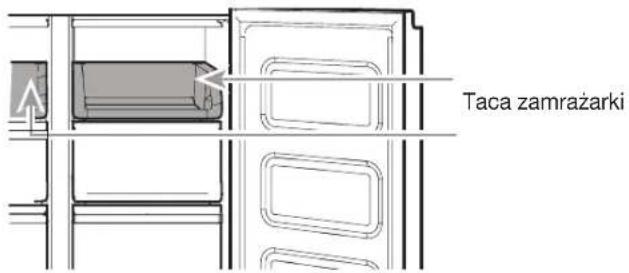
Taca zamrażarki
natural_image
Mechanical component diagram showing a lever mechanism with labeled point A (no text or symbols beyond label)A. Balama
natural_image
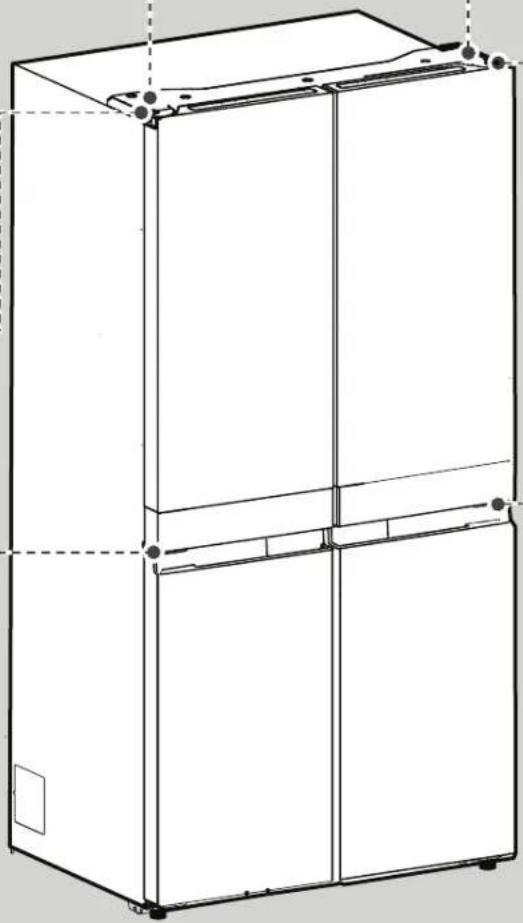
Technical line drawing of a three-tiered rectangular cabinet or enclosure with mounting holes and dashed-line hidden edges (no text or symbols)natural_image
Technical line drawing of a mechanical bracket or mounting bracket with labeled component A (no text or symbols beyond label)A. Balama
natural_image
Technical line drawing of a mechanical clamp or bracket assembly with screws and a labeled component (no text or symbols present)A. Balama mijlocie
natural_image
Line drawing of a refrigerator interior showing door, front panel, and side shelf with labeled component A (no text or symbols beyond label)natural_image
Technical line drawing of a mechanical assembly with a curved component and labeled point A (no text or symbols present)natural_image
Line drawing of a double-door refrigerator with visible shelves and door frame (no text or symbols)Locația şurubului
natural_image
Technical line drawing of a refrigerator with labeled component A (no text or symbols beyond label)natural_image
Simple line drawing of a rectangular frame with a labeled section 'A' and a small protrusion on the side (no text or symbols beyond label)A. Capac balama
natural_image
Line drawing of hands operating a portable food machine (no text or symbols)natural_image
Line drawing of hands operating a portable device with internal compartments (no text or symbols)natural_image
Line drawing of a hand placing objects into a container with two circular compartments (no text or symbols)natural_image
Technical line drawing of a refrigerator interior showing door, drawer, and shelf (no text or symbols)natural_image
Line drawing of an open refrigerator interior showing front and back compartments (no text or symbols)WAARSCHUWINGEN M.B.T. ELEKTRICITEIT
Scharnier links midden
natural_image
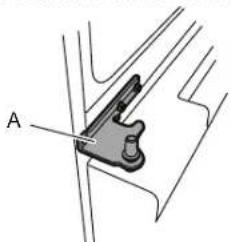
Mechanical component diagram showing a bracket with labeled point A (no text or symbols beyond label)A. Scharnier
natural_image
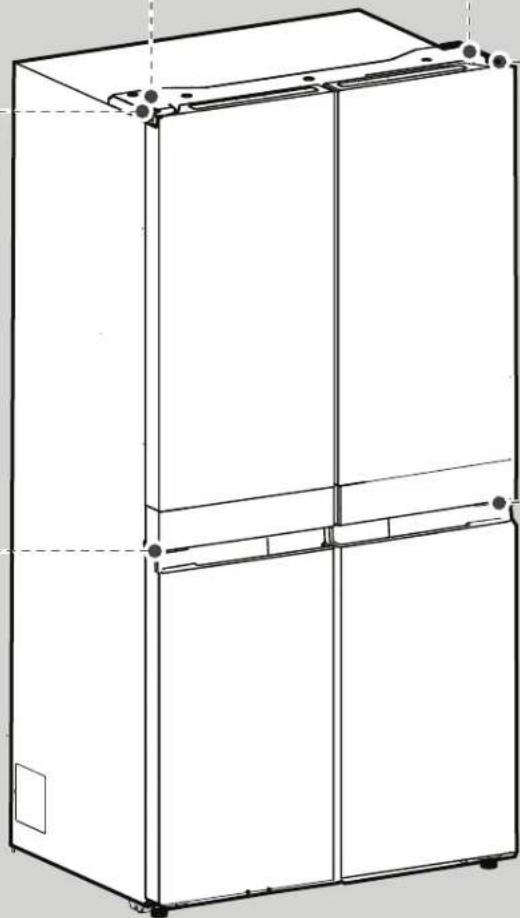
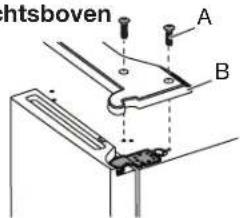
Line drawing of a three-tier refrigerator cabinet (no text or symbols)Afdekking scharnier rechtsboven
natural_image
Technical line drawing of a mechanical clamp or bracket component (no text or symbols)A. Scharnier
natural_image
Technical line drawing of a mechanical clamp or bracket assembly with screws and a labeled component (no text or symbols present)A. Middelste scharnier
natural_image
Line drawing of a refrigerator interior showing door, front panel, and side-mounted appliance (no text or symbols)A. Onderscharnier
natural_image
Technical line drawing of a mechanical assembly with a labeled component (A), showing no text or symbols beyond the label.A. Remvoeten
natural_image
Technical line drawing of a modern kitchen cabinet with labeled Schroef Locatie (no other text or symbols)OPSLAGCAPACITEIT (WQ9 B1LUK en WQ70900SXX):
natural_image
Technical line drawing of a refrigerator with labeled component A (no text or symbols beyond label)A. Scharnierend rubber
natural_image
Simple line drawing of a rectangular frame with a flat top and a small rectangular base, no text or symbols present.A. Afdekkap scharnier
IJsblokjesmaker
natural_image
Line drawing of hands operating a portable device with a tray (no text or symbols)natural_image
Line drawing of hands operating a portable device with internal compartments (no text or symbols)natural_image
Line drawing of a hand placing objects into a container with two circular compartments (no text or symbols)Bewaren van voedsel
Bewaren van eieren
natural_image
Technical line drawing of a refrigerator interior showing door, drawer, and shelf (no text or symbols)natural_image
Line drawing of an open refrigerator interior showing front, back, and side compartments (no text or symbols)natural_image
Line drawing of an open refrigerator with a door, showing internal shelves and a small component labeled A (no text or symbols beyond labels)A. Nedre gångjärn
natural_image
Technical line drawing of a mechanical assembly with a curved component and labeled point A (no text or symbols beyond label)A. Bromsfötter
natural_image
Technical line drawing of a two-door refrigerator with doors open and visible internal compartments (no text or symbols)Skruvplats
Sound On/Off (Ljud På/Av)
natural_image
Technical line drawing of a refrigerator with labeled component A (no text or symbols beyond label)A. Ledad tätning
natural_image
Simple line drawing of a rectangular frame with a labeled section 'A' on top, no text or symbols present.A. Gångjärnskåpa
Ismaskin
natural_image
Line drawing of hands operating a portable device with a handle (no text or symbols)natural_image
Line drawing of hands operating a portable kitchen appliance (no text or symbols)natural_image
Line drawing of a hand placing objects into a container with two labeled chambers (no text or symbols)Förvaring av mat
Förvaring av ägg
natural_image
Line drawing of a refrigerator interior showing open door, tray, and side panel (no text or symbols)natural_image
Architectural line drawing of a refrigerator interior showing doors, shelves, and storage compartments (no text or symbols)Frysavdelningar
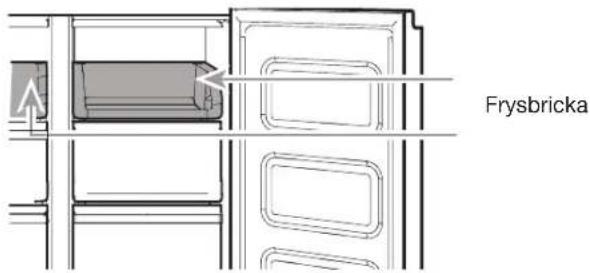
Frysbricka
HYLDER, D∅RHYLDER OG SKUFFER....205
Fryseafdelingens opbevaringsrum 206
Lydreference 206
Tilbehør 206
VEDLIGEHOLDELSE AF K∅LE-/FRYSESKABET ......207
Rengøring....207
Lamper 208
A. Sikringsdæksel
B. Sikring
Kun for Irland:
natural_image
Line drawing of a multi-tiered refrigerator cabinet with mounting holes and doorways (no text or labels)A. 5 mm unbrakoskruer
natural_image
Technical line drawing of a mechanical clamp or bracket assembly (no text or symbols)A. Hængsel
natural_image
Technical line drawing of a mechanical clamp or bracket assembly with screws and a labeled component (no text or symbols present)natural_image
Line drawing of an open refrigerator with a door, showing internal shelves and a small component labeled A (no text or symbols beyond label)A. Nederste hængsel
natural_image
Technical line drawing of a mechanical assembly with a curved component and labeled point A (no text or symbols beyond label)A. Bremsefod
natural_image
Line drawing of a skrue placering cabinet with internal compartments and mounting feet (no text or symbols on the diagram itself)OPBEVARINGSKAPACITET (WQ9 B1LUK og WQ70900SXX):
| Frisk madrum | 387 L | ||
| Fryserum | 208 | 1 | |
| i | alt | 595 |
OPBEVARINGSKAPACITET (6WM24NIHAS):
| i | alt | 603 | L |
Tilbehør:
■ Ismaskine
natural_image
Technical line drawing of a refrigerator with labeled component A (no text or symbols beyond label)natural_image
Simple line drawing of a rectangular frame with a labeled section 'A' and a small rectangular object on top (no text or symbols beyond label)A. Hængselsdæksel
Ismaskine
natural_image
Line drawing of hands operating a portable toaster (no text or symbols)natural_image
Line drawing of hands operating a portable device with internal compartments (no text or symbols)natural_image
Line drawing of a hand placing objects into a cylindrical container with two circular compartments (no text or symbols)Opbevaring af madvarer
Opbevaring af æg
natural_image
Technical line drawing of an open refrigerator with internal compartments and doorways (no text or symbols)natural_image
Architectural line drawing of a refrigerator interior showing doors, shelves, and storage compartments (no text or symbols)Fryseafdelingens opbevaringsrum
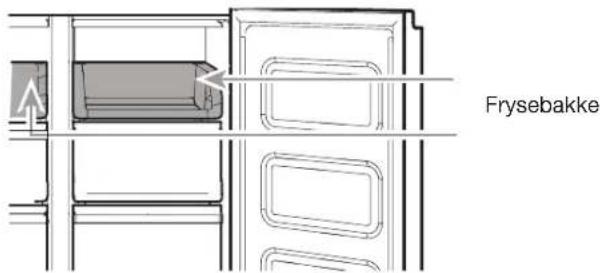
Frysebakke
KJ∅LESKAPETS SIKKERHET 216
HYLLER, BOKSER OG SKUFFER....227
Fryserlagringsrom 228
Lydreferanse 228
Tilbehør 228
PLEIE AV KJ∅LESKAPET....229
Rengjøring....229
Lys 230
KJ∅LESKAPETS SIKKERHET
A. Sikringsdeksel
B. Sikring
For Irland (kun):
A. ∅verste hengseldekselskrue
C. 5 mm sokkelskruer
B. ∅verste hengseldeksel
D. ∅verste hengsel
- Løft kjøleskapsdøren fra den midterste hengselpinnen. Den øverste hengselen vil komme av med døren.
Ta av venstre dør
natural_image
Technical line drawing of a mechanical clamp or bracket assembly with screws and a labeled component (no text or symbols present)A. Midtre hengsel
natural_image
Line drawing of an open refrigerator with a door, showing internal shelves and a small component labeled A (no text or symbols beyond label)A. Nedre hengsel
natural_image
Technical line drawing of a mechanical assembly with a curved component and labeled point A (no text or symbols present)A. Bremseføtter
natural_image
Line drawing of a double-door refrigerator with visible shelves and doors (no text or symbols)Skrue plassering
LAGRINGSKAPASITET (WQ9 B1LUK og WQ70900SXX):
| Fersk matkvarti | 387 | L | |
| Fryserom | 208 | L | |
| Total | 595 | L | |
| LAGRINGSKAPASITET (6WM24NIHAS): | |||
| Total | 603 | L | |
Tilbehør:
■ Ismaskinen
Bruke kontrollene
natural_image
Technical line drawing of a refrigerator with labeled component A (no text or symbols beyond label)A. Hengslet tetning
natural_image
Simple line drawing of a rectangular frame with a sloped edge and labeled point A, no text or symbols present.A. Hengseldeksel
Ismaskinen
natural_image
Line drawing of hands operating a portable toaster with cooling fins (no text or symbols)natural_image
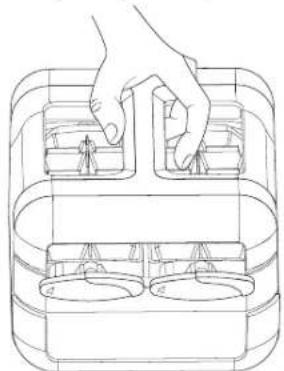
Line drawing of hands operating a portable kitchen appliance (no text or symbols)Den manuelle ismaskinenheten kan tas ut av fryseren när isen ikke er nødvendig for å gi mer plass i fryseren.
natural_image
Line drawing of a hand placing objects into a container with two circular compartments (no text or symbols)Oppbevaring av mat
Oppbevaring av egg
HYLLER, BOKSER OG SKUFFER
natural_image
Technical line drawing of a refrigerator interior showing door, drawer, and shelf (no text or symbols)natural_image
Technical line drawing of an open refrigerator interior showing front, rear, and side compartments (no text or symbols)Fryserlagringsrom
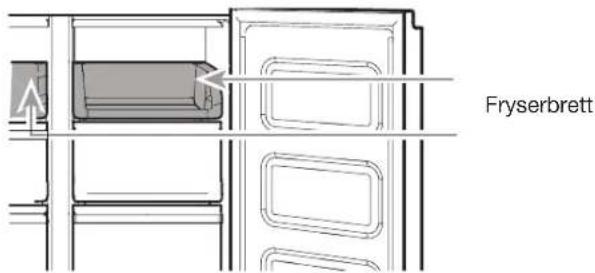
Fryserbrett
natural_image
Line drawing of a three-tier refrigerator cabinet (no text or labels)A. Parafusos de 5 mm
natural_image
Technical line drawing of a mechanical clamp or bracket assembly (no text or symbols)A. Dobradiça
natural_image
Technical line drawing of a mechanical clamp or bracket assembly with screws and a labeled component (no text or symbols present)A. Dobradiça central
natural_image
Line drawing of an open refrigerator with a door, showing internal compartments and a small labeled component (no text or symbols present)A. Dobradiça inferior
natural_image
Technical line drawing of a mechanical assembly with a curved component and labeled point A (no text or symbols present)A. Pés de travagem
natural_image
Line drawing of a refrigerator cabinet with open doors and side shelves (no text or symbols)natural_image
Technical line drawing of a refrigerator with labeled component A (no text or symbols beyond label)natural_image
Simple line drawing of a rectangular frame with a labeled section 'A' and a small object inside (no text or symbols beyond label)natural_image
Line drawing of hands operating a portable food machine (no text or symbols)natural_image
Line drawing of hands operating a kitchen grater with a tray (no text or symbols)natural_image
Line drawing of a hand placing objects into a container with two circular compartments (no text or symbols)natural_image
Technical line drawing of a refrigerator interior showing door, drawer, and shelf (no text or symbols)Para retirar e voltar a colocar as gavetas:
natural_image
Line drawing of an open refrigerator interior showing front, back, and side compartments (no text or symbols)natural_image
Line drawing of a multi-tiered refrigerator cabinet with mounting holes and ventilation slots (no text or labels)natural_image
Technical line drawing of a mechanical bracket assembly with screws and a labeled component (no text or symbols)A. Среден шарнир
natural_image
Line drawing of a refrigerator interior showing door, shelves, and battery compartment (no text or symbols)A. Долен шарнир
natural_image
Technical line drawing of a mechanical assembly with a rotating component and labeled point A (no text or symbols beyond label)A. Спирачни крачета
natural_image
Line drawing of a double-door refrigerator with visible door, shelves, and front panel (no text or symbols)Местоположение на винта
natural_image
Technical line drawing of a refrigerator interior showing internal shelves and door frame (no text or symbols)natural_image
Simple line drawing of a rectangular frame with a labeled component 'A' on top (no text or symbols beyond label)A. Капачка на шарнир
Ледогенератор
natural_image
Line drawing of hands operating a portable food machine (no text or symbols)natural_image
Line drawing of hands operating a kitchen grater with a handle (no text or symbols)natural_image
Line drawing of a hand placing objects into a container with two circular compartments (no text or symbols)natural_image
Line drawing of a refrigerator interior showing door, front panel, and side shelves (no text or symbols)natural_image
Line drawing of a refrigerator interior showing open doors, shelves, and storage compartments (no text or symbols)POLICE, POSUDE | LADICE ....298
Odjeljci za čuvanje u zamrzivaču 299
A. Poklopac osigurača
B. Osigurač
Za Republiku Irsku (samo za to tržište):
Često će se primjenjivati informacije koje su dane za Veliku Britaniju, ali se koristi i treća vrsta utikača i utičnice, 2-pinska, od tipa s bočnim uzemljenjem.
Utičnica/utikač (vrijedi za obje države):
Ako priloženi utikač nije prikladan za vašu utičnicu, javite se u postprodajnu službu kako biste dobili dodatne upute. Ne pokušavajte sami zamijeniti utikač. Taj postupak treba provesti kvalificirani tehničar u skladu s uputama proizvođača i trenutnim standardnim sigurnosnim odredbama.

UPOZORENJE
natural_image
Technical diagram of a mechanical clamp or bracket with labeled point A (no text or symbols present)A. Šarka
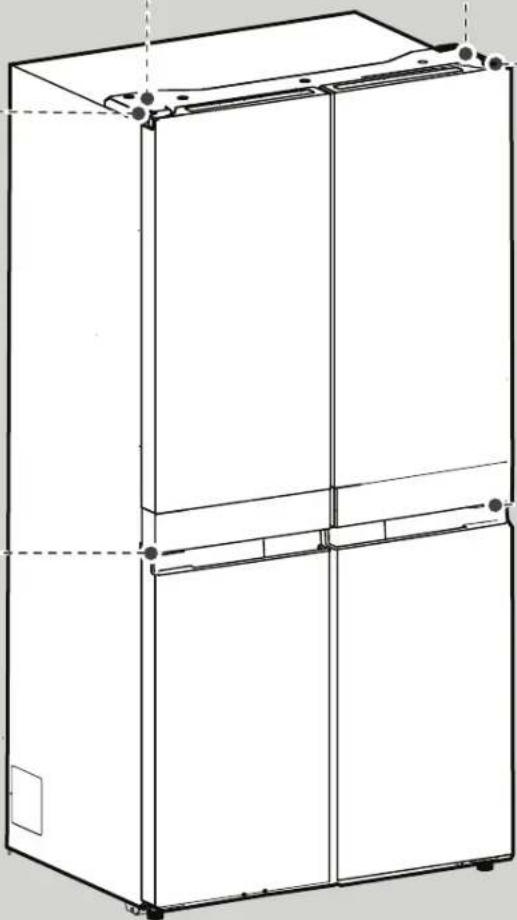
natural_image
Line drawing of a multi-tiered refrigerator cabinet (no text or labels)A. Vijci poklopca gornje šarke
B. Poklopac gornje šarke
Gornja desna šarka
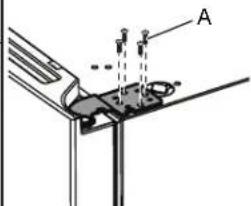
A. Utični vijci od 5 mm
Srednja desna šarka
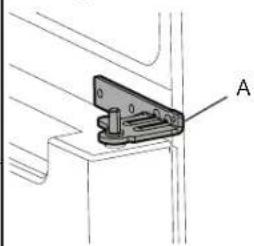
natural_image
Technical line drawing of a mechanical clamp or bracket assembly (no text or symbols)A. Šarka
Skinite desna vrata
- Hladnjak iskopčajte iz struje ili prekinite dovod električne energije.
- Vrata hladnjaka držite zatvorenima sve dok ne budete spremni da ih dignete i oslobodite od ormarića.
A. Vijak poklopca gornje šarke
C. Utični vijci od 5 mm
B. Poklopac gornje šarke
D. Gornja šarka
- Vrata hladnjaka podignite sa zatika srednje šarke. Gornja šarka skinut će se s vratima.
A. Vijak poklopca gornje šarke
B. Poklopac gornje šarke
natural_image
Technical line drawing of a mechanical clamp or bracket assembly with screws and a labeled component (no text or symbols present)A. Srednja šarka
natural_image
Line drawing of a refrigerator interior showing door, front panel, and side panel with labeled component A (no text or symbols beyond label)A. Donja šarka
Niveliranje hladnjaka
natural_image
Technical line drawing of a mechanical assembly with a labeled component 'A' (no text or symbols beyond label)A. Kočne nožice
natural_image
Technical line drawing of a dual-chamber refrigerator with no visible text or symbolsNavijte mjesto
SKUPLJANOST KAPACITETA (WQ9 B1LUK i WQ70900SXX):
natural_image
Technical line drawing of a refrigerator with labeled component A (no text or symbols beyond label)A. Brtvilo sa šarkama
natural_image
Simple line drawing of a rectangular frame with a labeled section 'A' and a small triangular object on the side (no text or symbols beyond label)A. Poklopac šarke
Uređaj za pravljenje leda
■ Da biste napravili led, pliticu s ledom napunite pročišćenom vodom, a uređaj za ručno pravljenje leda stavite na gornju policu zamrzivača. Ostavite dovoljno vremena da se led formira i čim je led spreman, okrugle regulacijske gumbe okrenite u smjeru okretanja kazaljki na satu kako bi se kockice leda izbacile u spremnik za led.
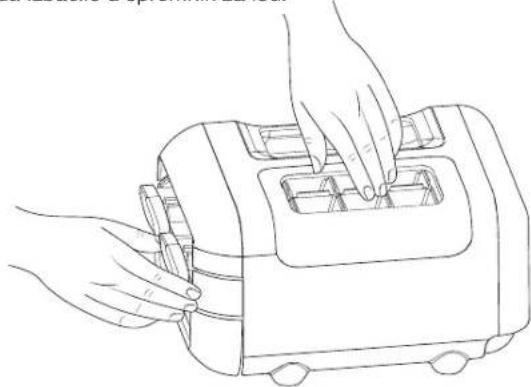
natural_image
Line drawing of hands operating a portable toaster (no text or symbols)■ Blago podignite spremnik s ledom i izvucite ga kako biste došli do kocki leda.
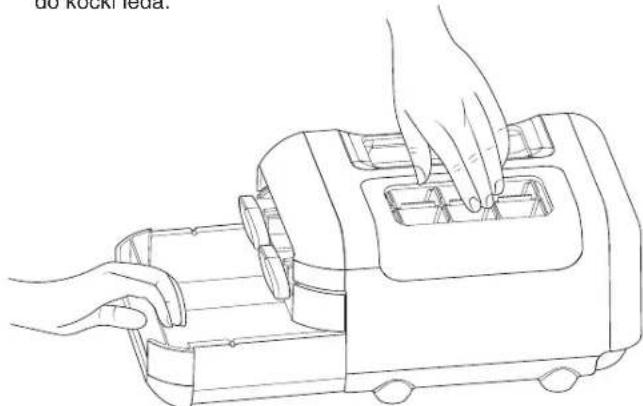
natural_image
Line drawing of hands operating a portable device with internal compartments (no text or symbols)natural_image
Line drawing of a hand placing objects into a container with two circular compartments (no text or symbols)Čuvanje hrane
Čuvanje jaja
POLICE, POSUDE I LADICE
Informacije koje je važno znati o staklenim policama i poklopcima:
Staklene police ili poklopce ne čistite toplom vodom dok su hladni. Police i poklopci mogli bi se slomiti ako se izlože naglim promjenama temperature ili udarcima, kao što je sudaranje. Temperirano staklo projektirano je tako da se razbije u mnogo malih komadića veličine oblutaka. To je normalno. Staklene police i poklopci su teški. Prilikom njihova vađenja koristite obje ruke kako ih ne bi ispustili.
Prilagodba visine police
natural_image
Line drawing of a refrigerator interior showing open door, tray, and side panel (no text or symbols)natural_image
Line drawing of an open refrigerator interior showing front, back, and side compartments (no text or symbols)POPREDAJNY SERVIS ....328
BEZPEČNOSTNÉ POKYNY
natural_image
Technical line drawing of a mechanical clamp or bracket assembly with screws and a labeled component (no text or symbols present)A. Stredný záves
natural_image
Line drawing of an open refrigerator with a small component labeled A, showing no text or symbols beyond the label.A. Spodný záves
natural_image
Technical line drawing of a mechanical assembly with a labeled component (A), showing no text or symbols beyond the label.natural_image
Line drawing of a refrigerator interior showing two doors with shelves and doors open, no text or symbols presentPoloha skrutky
SKLADOVACIA KAPACITA (WQ9 B1LUK a WQ70900SXX):
natural_image
Technical line drawing of a refrigerator internal structure (no text or symbols)A. Tesnenie so závesom
natural_image
Simple line drawing of a rectangular frame with a flat base and a small rectangular component labeled 'A' (no text or symbols beyond label)A. Kryt závesu
Výrobník ľadu
natural_image
Line drawing of hands operating a portable toaster (no text or symbols)natural_image
Line drawing of hands operating a portable device with internal compartments (no text or symbols)natural_image
Line drawing of a hand placing objects into a container with two circular compartments (no text or symbols)Skladovanie potravín
Skladovanie vajíčok
natural_image
Line drawing of a refrigerator interior showing open door, tray, and side panel (no text or symbols)natural_image
Line drawing of an open refrigerator interior showing front, rear, and side compartments (no text or symbols)Skladovacie oddelenia v mrazničke
Podnos v mrazničke
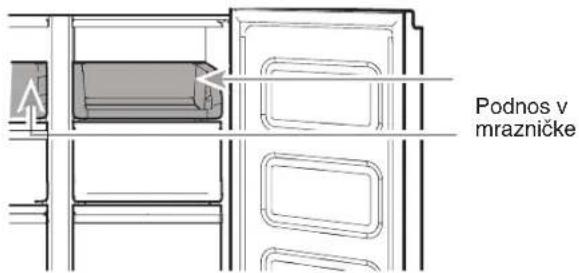
A. Kaitsme kate
B. Kaitse
natural_image
Mechanical component diagram showing a bracket with labeled point A (no text or symbols beyond label)A. Hing

natural_image
Technical line drawing of a multi-tiered refrigerator unit (no text or symbols)Ülemise parema hinge
kate
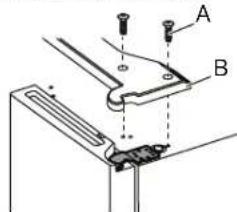
natural_image
Technical line drawing of a mechanical bracket or bracket assembly with labeled component A (no text or symbols beyond label)A. Hing
natural_image
Technical line drawing of a mechanical clamp or bracket assembly with screws and a labeled component (no text or symbols present)A. Keskmine hing
natural_image
Line drawing of a refrigerator interior showing door, front panel, and side panel with labeled component A (no text or symbols beyond labels)A. Alumine hing
Külmiku loodimine
natural_image
Technical line drawing of a mechanical assembly with a curved component and labeled point A (no text or symbols beyond label)A. Tugijalg
natural_image
Line drawing of a refrigerator cabinet with open doors and internal compartments (no text or symbols)Kruvi asukoht
SÄILITAMISKAVA (WQ9 B1LUK ja WQ70900SXX):
| Värske toidu pesa | 387 L | ||
| Sügavkülmkamber | 208 | L | |
| Kokku | 595 | L |
STORAGE CAPACITY (6WM24NIHAS):
| Kokku | 603 | L |
Tarvikud:
■Jäävalmistaja
Nuppude kasutamine
natural_image
Technical line drawing of a refrigerator with labeled component A (no text or symbols beyond label)A. Hingedel tihend
natural_image
Simple line drawing of a rectangular frame with a labeled component 'A' on top (no text or symbols beyond label)A. Hinge kate
Jäävalmistaja
natural_image
Line drawing of hands operating a portable toaster with cooling fans (no text or symbols)natural_image
Line drawing of hands operating a portable device with internal compartments (no text or symbols)natural_image
Line drawing of a hand placing objects into a container with two circular compartments (no text or symbols)natural_image
Technical line drawing of a refrigerator interior showing door, drawer, and shelf (no text or symbols)natural_image
Line drawing of an open refrigerator interior showing front, back, and side compartments (no text or symbols)A. Μεντεσές
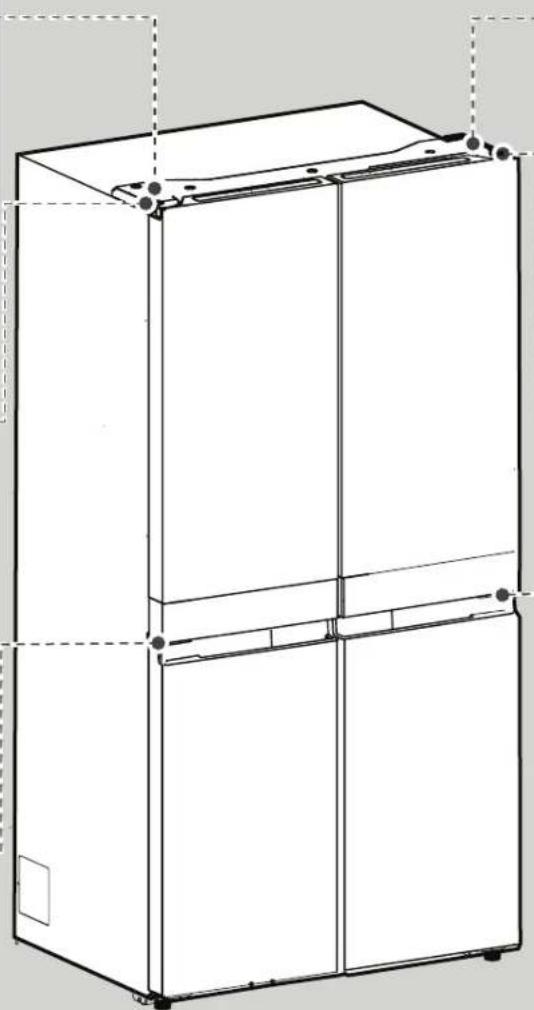
natural_image
Line drawing of a three-tier refrigerator cabinet with mounting feet and front panel (no text or symbols)natural_image
Technical line drawing of a mechanical clamp or bracket assembly (no text or symbols)A. Μεντεσές
natural_image
Technical line drawing of a mechanical clamp or bracket assembly with screws and a labeled component 'A' (no text or symbols beyond label)A. Μεσαίος μεντεσές
natural_image
Line drawing of a refrigerator interior showing door, front panel, and side panel with a small component labeled A (no text or symbols beyond label)A. Κάτω μεντεσές
natural_image
Technical line drawing of a mechanical assembly with a labeled component (A), showing no text or symbols beyond the label.natural_image
Line drawing of a refrigerator cabinet with open doors and internal shelves (no text or symbols)Θέση βιδών
ΑΠΟΘΗΚΕΥΣΗ (WQ9 B1LUK και WQ70900SXX):
natural_image
Technical line drawing of a refrigerator with labeled component A (no text or symbols beyond label)A. Αρθρωτό λάστιχο
natural_image
Simple line drawing of a rectangular frame with a labeled section 'A' on top, no text or symbols present.A. Κάλυμμα μεντεσέ
Παρασκευαστής πάγου
natural_image
Line drawing of hands operating a portable food kit (no text or symbols)natural_image
Line drawing of hands operating a portable device with internal compartments (no text or symbols)natural_image
Line drawing of a hand placing objects into a cylindrical container with internal compartments (no text or symbols)Συντήρηση τροφίμων
Συντήρηση αυγών
natural_image
Line drawing of a refrigerator interior showing door, tray, and shelf (no text or symbols)natural_image
Line drawing of a refrigerator interior showing open doors, shelves, and storage compartments (no text or symbols)natural_image
Line drawing of a three-tier refrigerator cabinet (no text or labels)natural_image
Technical diagram of a mechanical assembly with labeled component A (no text or symbols present)natural_image
Mechanical component diagram showing a bracket with labeled point A (no text or symbols present)A. Zsanér
középső Jobb zsanér
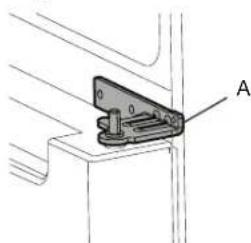
natural_image
Technical line drawing of a mechanical bracket or hinge component with labeled point A (no text or symbols beyond label)A. Zsanér
natural_image
Technical line drawing of a mechanical clamp or bracket assembly with screws and a labeled component (no text or symbols present)A. Középső zsanér
natural_image
Line drawing of a refrigerator interior showing door, front panel, and side panel with labeled component A (no text or symbols beyond labels)A. Alsó zsanér
natural_image
Technical line drawing of a mechanical assembly with a bracket and clamping tool (no text or symbols)A. Fékezöláb
natural_image
Technical line drawing of a double-door refrigerator with visible door, shelves, and wheels (no text or symbols)Csavarja a helyet
natural_image
Technical line drawing of a refrigerator with labeled component A (no text or symbols beyond label)A. Csuklós tömítés
natural_image
Simple line drawing of a rectangular frame with a labeled component 'A' on top, no text or symbols present.A. Zsanérfedél
Jégkocka-készítő
natural_image
Line drawing of hands operating a portable food machine (no text or symbols)natural_image
Line drawing of hands operating a portable kitchen appliance (no text or symbols)natural_image
Line drawing of a hand placing objects into a container with two circular compartments (no text or symbols)natural_image
Technical line drawing of a refrigerator interior showing door, drawer, and shelf (no text or symbols)natural_image
Line drawing of an open refrigerator interior showing front, back, and side compartments (no text or symbols)natural_image
Technical line drawing of a mechanical clamp or bracket with labeled point A (no text or symbols beyond label)A. Enge
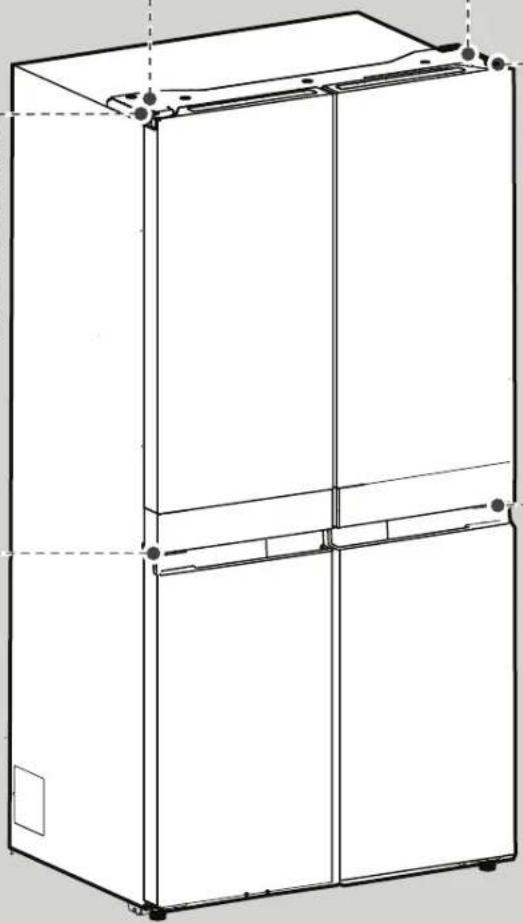
natural_image
Line drawing of a three-tiered refrigerator cabinet (no text or labels)natural_image
Technical diagram of a mechanical assembly with labeled component A (no text or symbols present)natural_image
Technical line drawing of a mechanical bracket or mounting bracket with labeled component A (no text or symbols beyond label)A. Enge
natural_image
Technical line drawing of a mechanical clamp or bracket assembly with screws and a labeled component (no text or symbols present)A. Vidējā enge
natural_image
Line drawing of a refrigerator interior showing door, front panel, and side panel with labeled component A (no text or symbols beyond label)A. Apakšējā enge
Ledusskapja limenošana
natural_image
Technical line drawing of a mechanical component with a curved arrow and labeled point A (no text or symbols beyond label)natural_image
Line drawing of a refrigerator cabinet with doors open and side panels, no text or symbols presentnatural_image
Technical line drawing of a refrigerator with labeled component A (no text or symbols beyond label)A. Enges blivējums
natural_image
Simple line drawing of a rectangular frame with a flat top and a small side panel labeled 'A' (no text or symbols beyond label)A. Enges pârsegs
natural_image
Line drawing of hands operating a toaster with cooling pan (no text or symbols)natural_image
Line drawing of hands operating a kitchen appliance with a tray and handle (no text or symbols)natural_image
Line drawing of a hand placing objects into a container with two circular compartments (no text or symbols)natural_image
Line drawing of a refrigerator interior showing door, tray, and shelf (no text or symbols)natural_image
Line drawing of an open refrigerator interior showing front, back, and side compartments (no text or symbols)A. Saugiklio dangtelis
B. Saugiklis
natural_image
Line drawing of an open refrigerator with a small component labeled A, showing no text or symbols beyond the label.A. Apatinis vyris
natural_image
Technical line drawing of a mechanical assembly with a curved component and labeled point A (no text or symbols present)A. Stabdymo kojelé
natural_image
Line drawing of a double-door refrigerator with visible door, shelves, and front panel (no text or symbols)natural_image
Technical line drawing of a refrigerator internal structure (no text or symbols)A. Vertikalus sandariklis
natural_image
Simple line drawing of a rectangular frame with a labeled section 'A' and a small rectangular object on top (no text or symbols beyond label)A. Vyrio dangtelis
natural_image
Line drawing of hands operating a portable food appliance (no text or symbols)natural_image
Line drawing of hands operating a portable kitchen appliance (no text or symbols)natural_image
Line drawing of a hand placing objects into a container with two circular compartments (no text or symbols)natural_image
Line drawing of an open refrigerator with a tray and door, showing internal compartments and mounting hardware (no text or symbols)natural_image
Line drawing of an open refrigerator interior showing front, back, and side compartments (no text or symbols)Šaldiklio skyriai
Šaldiklio padėklas
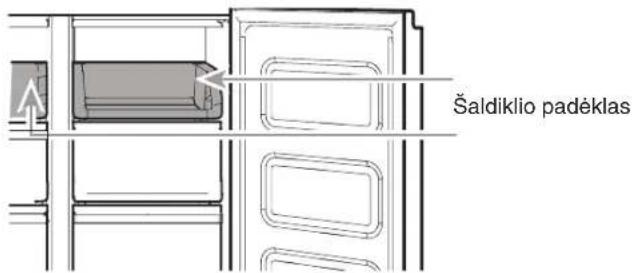
POLICE, NÁDOBY A ZÁSUVKY ....457
natural_image
Technical line drawing of a mechanical clamp or bracket assembly (no text or symbols)A. Pant
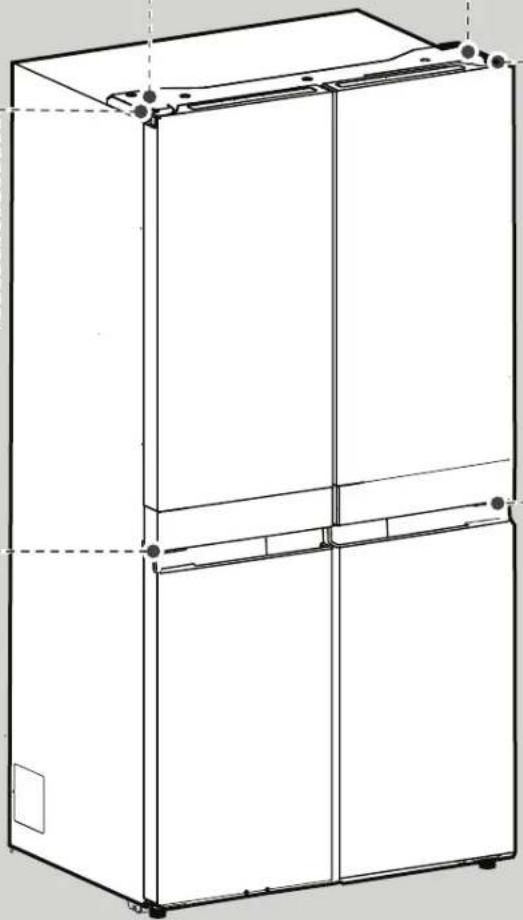
natural_image
Line drawing of a three-tier refrigerator cabinet (no text or labels)A. 5 mm šrouby
Pravý střední pant
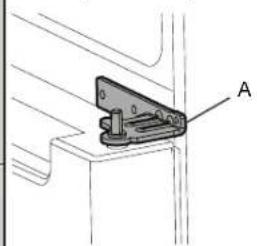
natural_image
Technical line drawing of a mechanical clamp or bracket assembly (no text or symbols)A. Pant
natural_image
Technical line drawing of a mechanical clamp or bracket assembly with screws and a labeled component (no text or symbols present)A. Středový pant
natural_image
Line drawing of an open refrigerator with a door, showing internal compartments and a small component labeled A (no text or symbols beyond labels)A. Spodní pant
natural_image
Technical line drawing of a mechanical assembly with a curved component and labeled point A (no text or symbols present)A. Brzdné nožky
natural_image
Technical line drawing of a refrigerator with labeled component A (no text or symbols beyond label)A. Závěsné těsnění
natural_image
Simple line drawing of a rectangular frame with a labeled section 'A' and a small rectangular object on top (no text or symbols beyond label)A. Kryt pantu
Výrobník ledu
natural_image
Line drawing of hands operating a portable toaster with cooling fans (no text or symbols)natural_image
Line drawing of hands operating a portable device with internal compartments (no text or symbols)natural_image
Line drawing of a hand placing objects into a container with two circular compartments (no text or symbols)Skladování potravin
Skladování vajec
POLICE, NÁDOBY A ZÁSUVKY
natural_image
Technical line drawing of a refrigerator interior showing door, drawer, and shelf (no text or labels)natural_image
Technical line drawing of an open refrigerator interior showing front, back, and side compartments (no text or symbols)
[NO TEXT]
Tip E in F
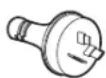

Tip I
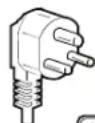
Tip M
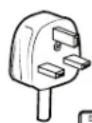
Tip G
Za Avstralijo in Novo Zelandijo:
A. Pokrov varovalke
B. Varovalka
Za Republiko Irsko (samo):
natural_image
Line drawing of an open refrigerator with a door, showing internal compartments and a small component labeled A (no text or symbols beyond label)A. Spodnji tečaj
natural_image
Technical line drawing of a mechanical component with a labeled section A (no text or symbols present)A. Zaporna noga
natural_image
Line drawing of a refrigerator interior showing two doors with shelves and doors, no text or symbols presentLokacija vijaka
KAPACITOST SKLADIŠČENJA (WQ9 B1LUK in WQ70900SXX):
Oddelek za svežo prehrano 387 L
Prostor za zamrzovanje 208 L
Skupaj 595 L
ZMOGLJIVOSTI (6WM24NIHAS):
Skupaj 603 L
Dodatki:
■ Izdelovalnik ledu
Uporaba tipk
natural_image
Technical line drawing of a refrigerator with labeled component A (no text or symbols beyond label)natural_image
Simple line drawing of a rectangular frame with a labeled section 'A' and a small curved object on top (no text or symbols beyond label)A. Pokrov tečaja
Izdelovalnik ledu
natural_image
Line drawing of hands operating a portable food machine (no text or symbols)■ Rahlo dvignite posodo z ledom in jo potegnite navzven, da dobite dostop do ledenih kock.
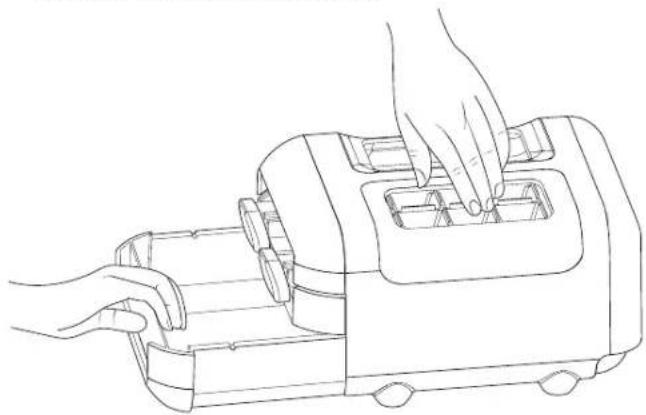
natural_image
Line drawing of hands operating a portable device with internal compartments (no text or symbols)natural_image
Line drawing of a hand placing objects into a container with two circular compartments (no text or symbols)Shranjevanje hrane
Shranjevanje jajc
natural_image
Line drawing of an open refrigerator with a tray and door, showing internal compartments and ventilation slots (no text or symbols)Police in okvirji polic
Police v hladilniku so nastavljive tako, da ustrezajo vašim potrebam po hrambi.
natural_image
Architectural line drawing of a refrigerator interior showing doors, shelves, and storage compartments (no text or symbols)Prostori za shranjevanje v zamrzovalniku
A. Cubierta de fusible
B. Fusible
natural_image
Line drawing of a three-tier refrigerator cabinet with mounting feet and front panel (no text or symbols)natural_image
Technical diagram of a mechanical assembly with labeled component A (no text or symbols present)A. Tornillos Allen de 5 mm
natural_image
Technical line drawing of a mechanical bracket or clamp assembly with labeled component A (no text or symbols beyond label)A. Bisagra
natural_image
Technical line drawing of a mechanical clamp or bracket assembly with screws and a labeled component (no text or symbols present)natural_image
Line drawing of a refrigerator interior showing door, shelves, and door lock (no text or symbols)A. Bisagra inferior
natural_image
Technical line drawing of a mechanical assembly with a labeled component (A), showing no text or symbols beyond the label.A. Pies de soporte
natural_image
Line drawing of a double-door refrigerator with visible shelves and doors (no text or symbols)natural_image
Technical line drawing of a refrigerator with labeled component A (no text or symbols beyond label)natural_image
Simple line drawing of a rectangular frame with a labeled section 'A' on top (no other text or symbols)natural_image
Line drawing of hands operating a toaster oven (no text or symbols)natural_image
Line drawing of hands operating a kitchen appliance (no text or symbols)natural_image
Line drawing of a container with internal compartments and a hand adjusting the top section (no text or symbols)natural_image
Line drawing of an open refrigerator with a tray and door (no text or symbols)natural_image
Line drawing of an open refrigerator interior showing front, back, and side compartments (no text or symbols)PFLEGE DES KÜHLSCHRANKS....528
Reinigung 528
Leuchten 529
Scharnier Mitte links
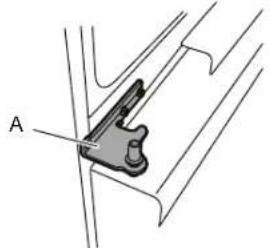
natural_image
Mechanical component diagram showing a bracket with labeled point A (no text or symbols beyond label)A. Scharnier
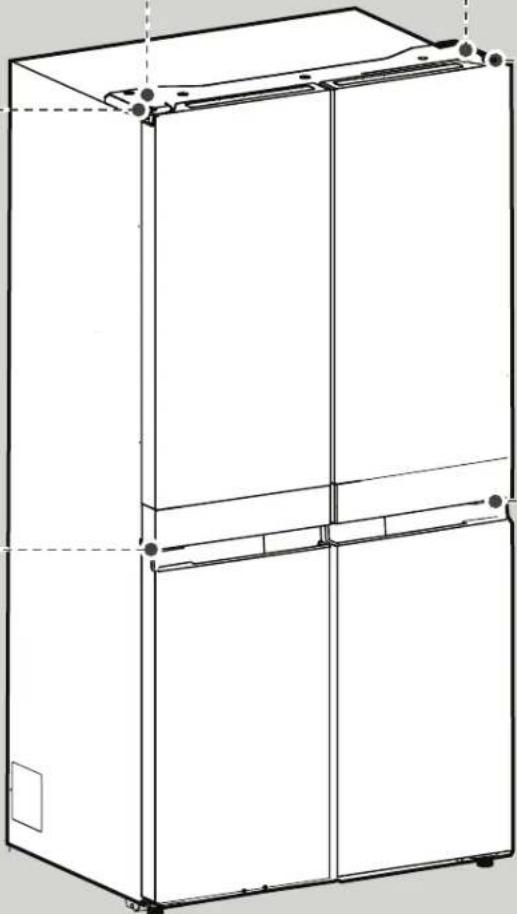
natural_image
Line drawing of a multi-tiered refrigerator cabinet (no text or labels)natural_image
Pure mechanical diagram showing a bracket with labeled point A and internal components (no text or symbols)natural_image
Technical line drawing of a mechanical clamp or bracket assembly (no text or symbols)A. Scharnier
natural_image
Technical line drawing of a mechanical bracket assembly with screws and a labeled component (no text or symbols)A. Mittleres Scharnier
natural_image
Line drawing of a refrigerator interior showing door, front panel, and side panel with a small component labeled 'A' (no text or symbols beyond label)natural_image
Technical line drawing of a mechanical assembly with labeled component A (no text or symbols present)A. Bremsfuß
natural_image
Line drawing of a two-door refrigerator with open doors and internal compartments (no text or symbols)Schraubenposition
natural_image
Technical line drawing of a cabinet or refrigerator with a vertical panel and labeled component 'A' (no text or symbols beyond label)natural_image
Simple line drawing of a rectangular frame with a labeled component 'A' on top, no text or symbols present.natural_image
Line drawing of hands operating a portable toaster (no text or symbols)natural_image
Line drawing of hands operating a portable kitchen appliance (no text or symbols)natural_image
Line drawing of a hand placing objects into a container with two circular compartments (no text or symbols)natural_image
Line drawing of a refrigerator interior showing door, front panel, and side shelf (no text or symbols)natural_image
Line drawing of an open refrigerator interior showing front, back, and side compartments (no text or symbols)First try the solutions suggested here to possibly avoid a service call.
WARNING

First try the solutions suggested here to possibly avoid a service call.
First try the solutions suggested here to possibly avoid a service call.
First try the solutions suggested here to possibly avoid a service call.
WARNING

Explosionsgefahr
XKAFEF, KAXEX U KXAXEN 549
Kompartimenti tal-Hażna tal-Freezer 550
Referenza tal-Awdjo 550
Accessorji....550
KIF TIEHU HSIEB IL-FRIGG....551
Tindif....551
Dwal 552
Kif Tieħu Hsiebha Meta Tmur fuq Vaganza jew Timxi
Xi Mkien lehor 552
INDIVIDWAZZJONI TA' SOLUZZJONI....553
SERVIZZ TA'WARA L-BEJGH 556
ISTRUZZJONIJIET DWAR IS-SIGURTÀ
TINDIF U MANUTENZJONI
A. Ghatu tal-fuse
B. Fuse
Ghar-Repubblika tal-Irlanda (biss):
L-informazzjoni moghtija fir-rigward tar-Renju Unit hafna drabi tapplika, imma jintuža wkoll it-tielet tip ta' plug u socket, it-tip 2-pin, ert mal-genb.
Socket/Plug (validu għaż-żewę pajjizi):
Jekk il-plug ipprovduta ma tkunx taqbel mas-socket tieghek, jekk jogħbok ikkuntattja lis-Servizz ta' Wara I-Bejgh ghal aktar istruzzjonijiet. Jekk jogħbokx tipprovax tibdel il-plug int stess. Din il-procedura trid titwettaq minn tekniku kwalifikat f'konformità mal-istruzzjonijiet tal-manifattur u I-ligiijiet dwar is-sigurtà standard attwali.
TWISSIJA
natural_image
Technical line drawing of a mechanical clamp or bracket assembly with screws and a labeled component (no text or symbols present)A. Ćappetta tan-nofs
■ Gholli l-bieba tal-freezer mill-pinn tač-ćappetta t'isfel.
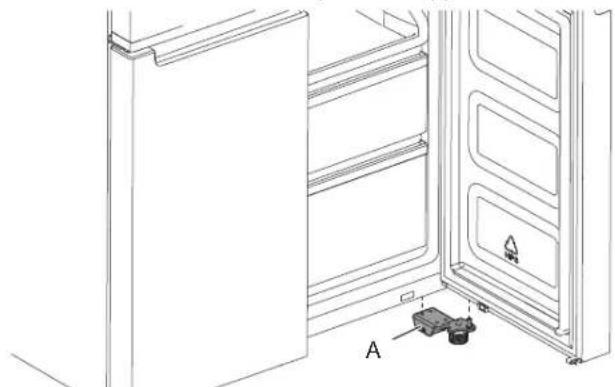
natural_image
Line drawing of an open refrigerator with a door, showing internal shelves and a small component labeled A (no text or symbols beyond label)A. Ćappetta t'isfel
Livellar tal-Frigg
- Mexxi l-frigg ghall-pożizzjoni finali taghha.
- B'idek, dawwar is-saqajn tal-brejkijiet. Dawwarhom kontra. I-arlogg sakemm ir-rollers jinqatghu minn mal-art u z-zewg saqajn tal-brejkijiet ikunu lixxi mal-art. Dan iwaqqaf lill-frigg milli tiżzerżag 'il quddiem meta tiftah il-bibien.
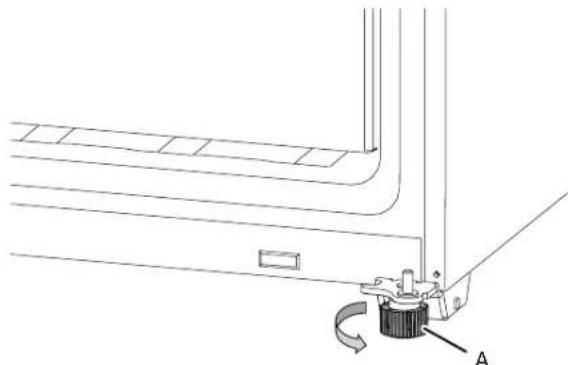
natural_image
Technical line drawing of a mechanical assembly with a labeled component 'A' (no text or symbols beyond label)A. Saqajn tal-brejkijiet
IMPORTANTI: Jekk ghandek bżonn tagħmel aktar aġgustamenti li jinvolvu s-saqajn tal-brejkijiet, jeħtieġ li ddawwar iż-żewġ saqajn tal-brejkijiet l-istess ammont biex il-frigġ tibqa' fl-istess livell.
- Uza livell biex tizgura li l-frigg hi livella minn naha ghal naha u minn quddiem ghal wara.
PARTS U KARATTERISTIĆI

A. Frigg
B. Freezer
C. Iffriżar Flessibbli (disponibbli biss f'WQ9 B1L, 6WM24NIHAS u WQ70900SXX)
NOTA GHAS-SERVICE:
Id-divider tać-centru jista' jitnehha billi tnehhi t-3 viti fuq in-naha tal-lemin (ara l-istampa t'hawn taht); Bid-divider tać-centru mnehhi, il-parti tal-evaporator tista' tintlaħaq biex tingħata service.
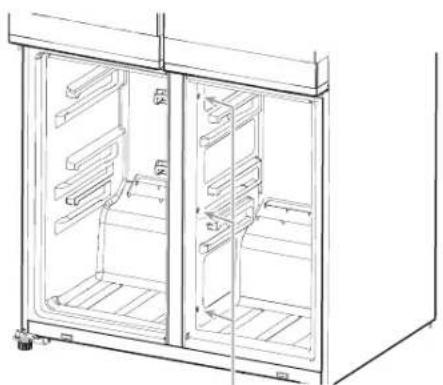
natural_image
Technical line drawing of a two-door refrigerator with visible door, shelves, and front panel (no text or symbols)Post tal-Vit
KAPAĆITÀ TAL-HAŻNA (WQ9 B1LUK u WQ70900SXX):
Kompartiment tal-Ikel Frisk 387 L
Kompartiment tal-Freezer 208 L
Total 595 L
KAPAĆITÀ TAL-HAŻNA (6WM24NIHAS):
Total 603 L
Accessorji:
■Apparat Ii Jaghmel is-Silg
Užu tal-Kontrolli
Il-kontrolli attivati billi tmiss jinsabu fuq ix-xellug tal-bieba tal-frigg. Il-panel tal-kontrolli jinkludi informazzjoni dwar diversi buttuni u indikaturi. L-indikatur tat-temperatura tal-frigg u l-freezer juri l-ahhar punt issettjat tat-temperatura.

- Buttuna IXGHEL/ITFI tal-Hoss
- Buttuna tat-Temperatura tal-Frigg (żommha magħfusa għal 3 sekondi għal Tkessiħ Malajr)
- Buttuna tat-Temperatura Ssettjata minn Qabel ta' Iffriżar Flessibbli (disponibbli biss f'WQ9 B1LUK, 6WM24NIHAS u WQ70900SXX)
- Buttuna tat-Temperatura tal-Freezer (żommha magħfusa għal 3 sekondi għal Iffriżar Malajr)
- Indikatur tal-Key Lock
- Buttuna tal-Key Lock
- Indikatur ta' Bieba Miftuha
-
Indikatur tal-Iffriżar Malajr
-
Indikatur tal-Iffriżar Baxx (disponibbli biss f'WQ9 B1LUK, 6WM24NIHAS u WQ70900SXX)
- Indikatur tal-Iffriżar Moderat (disponibbli biss f'WQ9 B1LUK, 6WM24NIHAS u WQ70900SXX)
- Indikatur 6th Sense
- Indikatur tal-Iffriżar Tradizzjonali (disponibbli biss f'WQ9 B1LUK, 6WM24NIHAS u WQ70900SXX)
- Indikatur tat-Tkessih Malajr
- Buttuna tal-Modalità ta' Vaganza
- Indikatur tal-Modalità Demo (disponibbli biss f'WQ9 B1LUK, 6WM24NIHAS u WQ70900SXX)
- Indikatur tal-Modalità ta' Vaganza
- Indikatur tal-Hoss
Il-Panel tal-Kontrolli jintefa wahdu wara minuta minghajr attività. Biex tixghel il-panel tal-kontrolli, aghfas buttuna li tkun.

Kif Tara u Tağgusta I-Punti Ssettjati tat-Temperatura
Kif Tağğusta t-Temperatura tal-Kompartiment tal-Ikel Frisk u tal-Freezer:
natural_image
Technical line drawing of a refrigerator with labeled component A (no text or symbols beyond label)A. Sigill b'cappetta (Hinged seal)
Is-switch tal-bieba tal-kompartiment tal-ikel frisk jinsab fl-ghatu tač-cappetta tax-xellug u tal-lemin ta' fuq.
■ Ghall-Freezer u z-Žona ta' Temperaturi Multipli, is-switch tal-bieba jinsab fl-istrixxa tal-qiegh.
■ Is-switch tal-bieba juža kalamita biex jinduna meta tinfetaħ/tinghalaq bieba.
- Żgura li m'hemm I-ebda kalamita jew apparat elettroniku (Speaker, Coolvox® ecc.) f'distanza ta' 7.62 cm jew inqas millghatu tać-ćappetta.
NOTA: Id-dawl ma jixghelx jekk ma jigix identifikat il-ftuh tal-bieba.
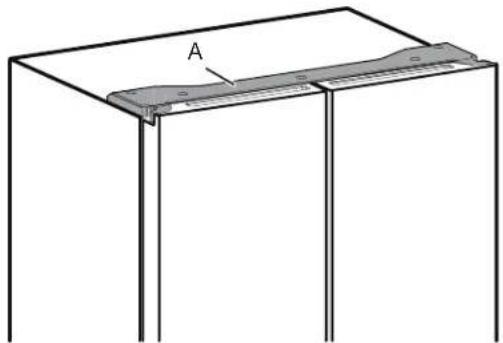
natural_image
Simple line drawing of a rectangular frame with a labeled component 'A' on top, no text or symbols present.A. Ghatu tać-ćappetta
Apparat li Jaghmel is-Silg
■ Biex tagħmel is-silġ, imla ice tray b’ilma ppurifikat u pogġi l-apparat li jagħmel is-silġ manwali fl-ixkaffa ta’ fuq tal-Freezer. Halli l-hin jghaddi sakemm is-silġ jifforma u ladarba s-silġ ikun lest, dawwar il-pumijiet skont l-arłogg biex titfa’ l-ice cubes fil-kontenitur tas-silġ.
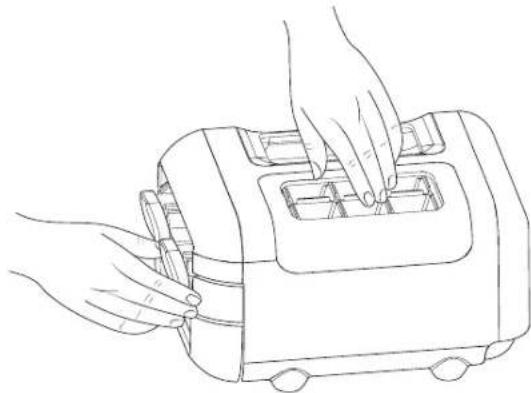
natural_image
Line drawing of hands operating a portable toaster (no text or symbols)■ Gholli kemm kemm il-kontenitur tas-silg u igbdu 'I barra biex tkun tista' taçcessa I-ice cubes.
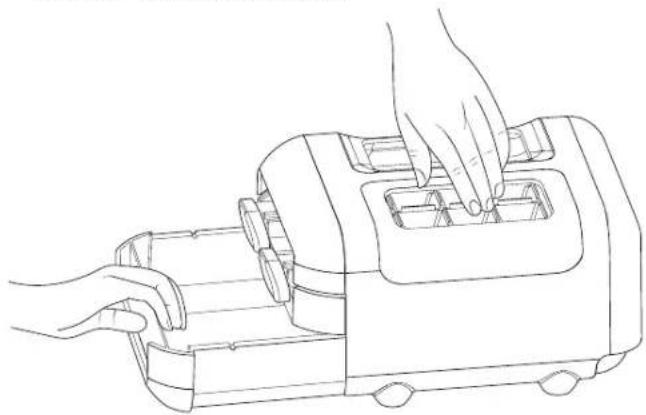
natural_image
Line drawing of hands operating a portable device with internal compartments (no text or symbols)L-assemblagg tal-apparat li jaghmel is-silg manwali jista' jinhareg mill-freezer meta s-silg ma jkunx mehtieg biex iżzid kompartiment fil-freezer.
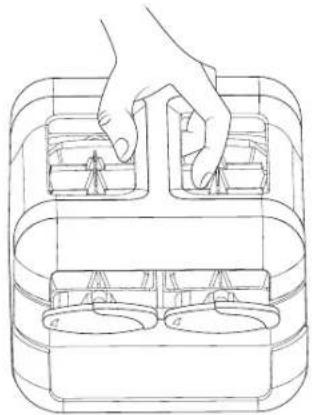
natural_image
Line drawing of a hand placing objects into a container with two circular compartments (no text or symbols)Hażna tal-Ikel
Hażna tal-Bajd
XKAFEF, KAXEX U KXAXEN
Informazzjoni importanti li ghandek tkun taf dwar l-ixkafef talhgieg u l-ghatjien:
Tnaddafx l-ixkafef tal-hgieg jew l-ghatjien b'ilma shun meta jkunu keshin. L-ixkafef u l-ghatjien jistghu jinkisru jekk jiigu esposti ghal tibdil f'daqqa fit-temperatura, jew impatt, bhal meta thabbathom ma' xi haaga. Hgieg tat-tip tempered hu mahsub biex jinkiser f'hafna bicciet zghar tad-daqs ta' caghka. Dan hu normali. L-ixkafef tal-hgieg u l-ghatjien huma tqal. Uza idejk it-tnejn meta tnehhihom minn posthom biex tevita li twaqqaghhom.
Ağğustament tal-Gholi tal-Ixkaffa
L-gholi tal-ixkaffa jista' jigi aggustat billi tibdllha postha missapport tal-qiegh ghas-sapport ta' fuq u bil-kontra.
■ Iftah il-bieba tal-lemin sal-massimu li tinfetah.
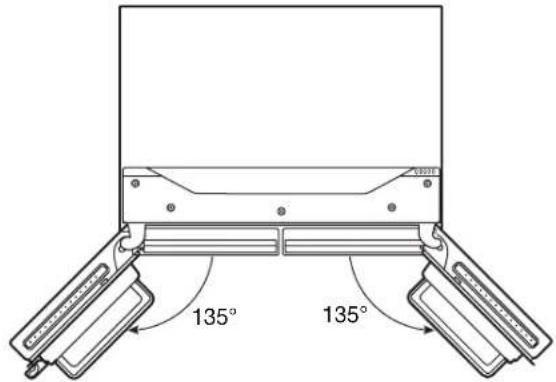
■ Ohrog l-ixkaffa mill-frigg u poggiha fil-pożizzjoni mmuntata li tixtieq.
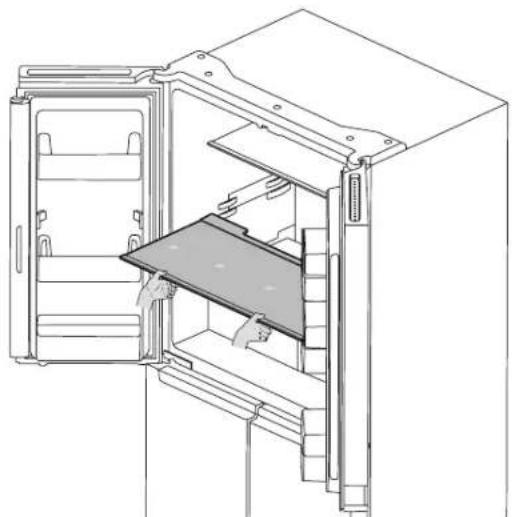
natural_image
Technical line drawing of a refrigerator interior showing door, drawer, and shelf (no text or symbols)- Žgura li l-ixkaffa hi mpoġġija sew fuq is-sapport tal-ixkaffa.
Biex tnehhi u ttpoggi f'posthom il-Kaxen:
- Aqbad il-manku tal-Kexxun u żerżaq il-Kexxun dritt 'il barra sal-waqfa. Gholli l-Kexxun mill-gwida tal-qiegh.
- Poğgi f'postu/poğgi I-Kexxun lura billi tpoğgih fuq il-gwida tal-Kexxun tal-qiegh u timbuttah lil hinn mill-waqfa tal-Kexxun sakemm ikun fil-pożizzjoni t-tajba.
Balconies (Xkafef) tal-Frigg
Il-balcony fuq il-bieba tal-frigg tieghek hija aggustabbli biex tissodisfa l-bżonnijiet individwali tieghek ghall-hażna.
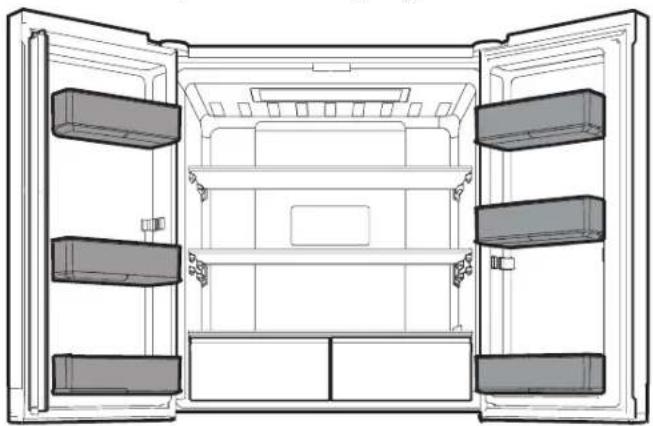
natural_image
Technical line drawing of an open refrigerator interior showing front, rear, and side compartments (no text or symbols)Kompartimenti tal-Hażna tal-Freezer
Tilar tal-Freezer (Freezer Tray)
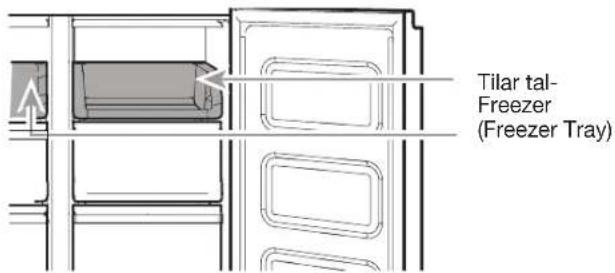
It-tilar tal-freezer huwa utli biex facilment taćcessa prodotti li tuža hafna, tiffriza jew sempliciment tahzen ikel li jifdal jew oggetti żghar.
Kxaxen tal-Freezer
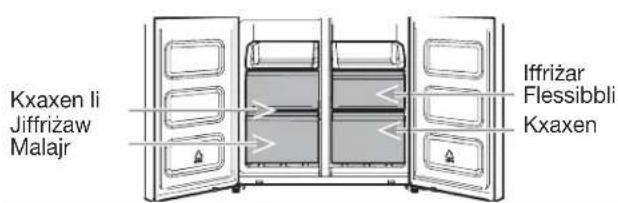
Kompartiment tal-Iffriżar Malajr
■ Il-kxaxen tal-lffriżar Malajr jippermettulek tahżen b'mod konvenjenti oggetti ta' volum kbir.
■ L-ghazla tal-Iffrizar Malajr tippermettilek tañzen l-ikel iffrizat kollu tieghek b'mod sigur u trasparenti.
NOTA: It-temperatura tal-freezer tista' titkessah biex tkun I-istess bhat-temperatura tal-Kompartiment tal-Freezer Flessibbli, meta I-Freezer ikun issettjat ghal temperatura aktar shuna mill-kompartiment tal-Freezer Flessibbli.
Il-Kompartiment tal-Iffriżar Flessibbli (disponibbli biss f'WQ9 B1LUK, 6WM24NIHAS u WQ70900SXX)
Il-Kompartiment tal-Iffrižar Flessibbli jippermettilek tagħžel wieħed minn tliet livelli tat-temperatura tal-freezer: -7°C, -12°C, -18°C u -20°C biex jipprovdi l-aħjar kundizzjonijiet ta’ħażna għal tipi differenti ta’ ikel.
Għall-kapacità massima tal-freezer, tista' tneħħi I-kexxun tal-freezer biex tesponi I-ixkaffa tal-freezer.
A. 퓨즈 커버
B. 弓丕
아일랜드(전용):
natural_image
Mechanical component diagram showing a bracket with labeled point A (no text or symbols beyond label)A. 힌지
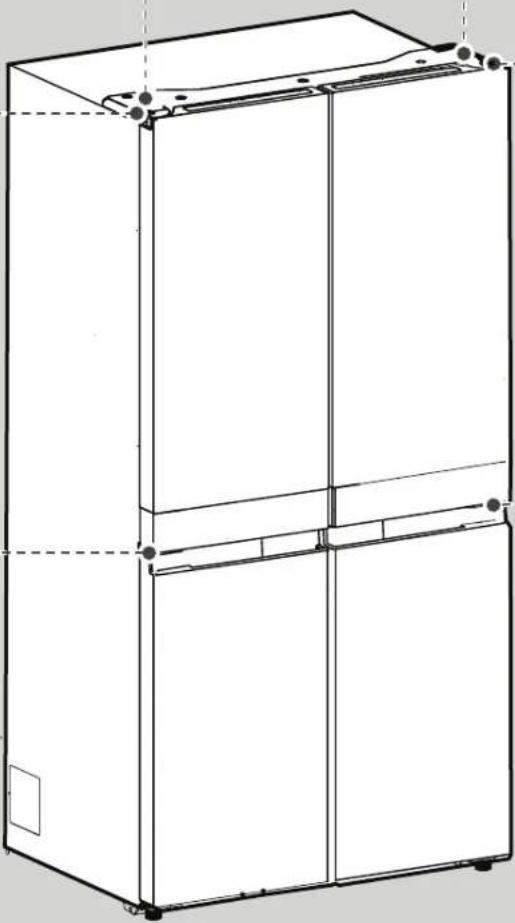
natural_image
Line drawing of a multi-tiered refrigerator cabinet with mounting holes and front panel (no text or symbols)오른쪽 상단 힌지 커버
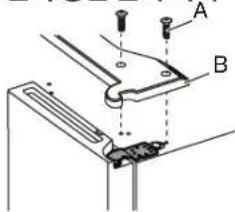
natural_image
Technical diagram showing a mechanical assembly with labeled component A (no text or symbols present)A.5mm 소켓 나사
오른쪽 중앙 힌지
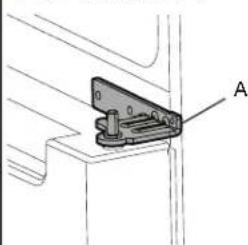
natural_image
Technical line drawing of a mechanical clamp or bracket assembly (no text or symbols)A. 힌지
오른쪽 도어 분리
A. 상단 힌지 커버 나사
C.5mm 소켓 나사
B. 상단 힌지 커버
D. 상단 힌지
natural_image
Technical line drawing of a mechanical clamp or bracket assembly with screws and a labeled component (no text or symbols present)A. 중앙 힌지
natural_image
Line drawing of a refrigerator interior showing door, front panel, and base with labeled component A (no text or symbols beyond label)A.하단 힌지
냉장고 수평 조정
natural_image
Technical line drawing of a mechanical component with a curved bracket and labeled part A (no text or symbols beyond label)A. 브레이크 다리
natural_image
Technical line drawing of a refrigerator with labeled component A (no text or symbols beyond label)A. 힌지 씻
natural_image
Simple line drawing of a rectangular frame with a labeled section 'A' and a small protrusion on the side (no text or symbols beyond label)A. 힌지 커버
제빙기
natural_image
Line drawing of hands operating a small kitchen appliance (no text or symbols)natural_image
Line drawing of hands operating a portable kitchen appliance (no text or symbols)natural_image
Line drawing of a hand placing objects into a container with two circular compartments (no text or symbols)음식물 보관
달갈 보관
natural_image
Line drawing of a refrigerator interior showing open door, tray, and side panel (no text or symbols)natural_image
Line drawing of an open refrigerator interior showing front, back, and side compartments (no text or symbols)냉동 보관실
냉동실 트레이
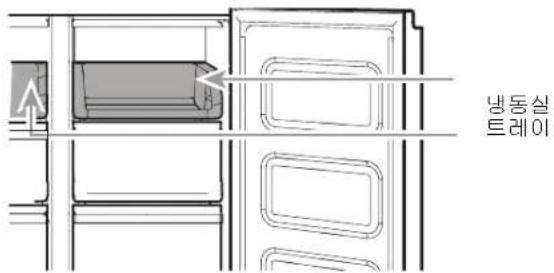
BD - 142004-01 (Gulf Technical Regulation for Low Voltage Electrical Equipment and Appliances BD - 142004-01)
冰箱安全維護
您與他人的安全都不容忽視。
A. 保險絲蓋
B. 保險絲
愛爾蘭(僅):
natural_image
Line drawing of a three-tier refrigerator cabinet (no text or symbols)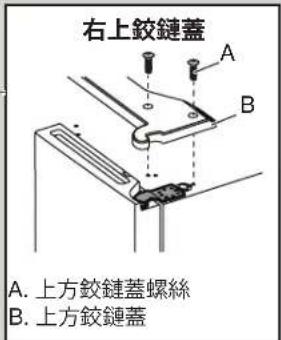
A. 上方鉸鏈蓋螺絲
C. 5 mm 插座螺絲
B. 上方鉸鏈蓋
D. 上方铰链
natural_image
Technical line drawing of a mechanical clamp or bracket assembly with screws and a labeled component (no text or symbols present)A. 中間鉸鏈
■ 從下方的鉸鏈插腳處抬起冰櫃門。
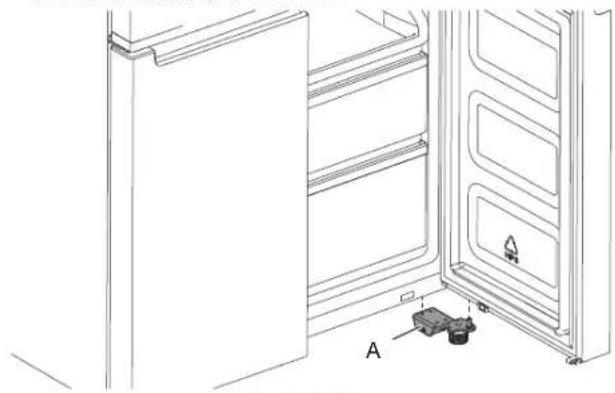
natural_image
Line drawing of a refrigerator interior showing door, front panel, and side shelf with labeled component A (no text or symbols beyond label)A. 下方铰链
冰箱的水平調整。
natural_image
Technical line drawing of a mechanical assembly with a curved component and labeled point A (no text or symbols beyond label)A. 制動腳座
natural_image
Technical line drawing of a refrigerator with labeled component A (no text or symbols beyond label)A. 銸鏈封條
natural_image
Simple line drawing of a rectangular frame with a labeled component 'A' on top, no text or symbols present.A. 銸鏈蓋
製冰器
natural_image
Line drawing of hands operating a portable food machine (no text or symbols)natural_image
Line drawing of hands operating a kitchen appliance (no text or symbols)natural_image
Line drawing of a hand placing objects into a container with two circular compartments (no text or symbols)食物儲存
儲存雞蛋
natural_image
Line drawing of a refrigerator interior showing door, drawer, and shelf (no text or symbols)■ 確保架子已妥善放在框架上。
架子和框架
可調整冰箱架,以迎合您的獨立儲存需要。
natural_image
Architectural line drawing of a refrigerator interior showing doors, shelves, and storage compartments (no text or symbols)冷凍儲存室
冷凍盒
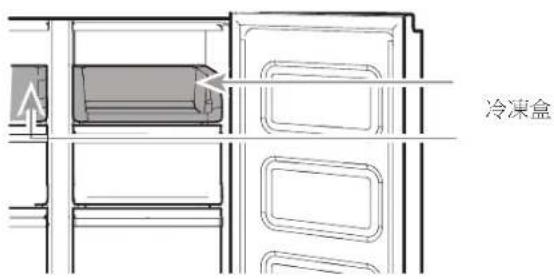
natural_image
Technical diagram of a mechanical clamp or bracket with labeled point A (no text or symbols beyond label)A. Петля
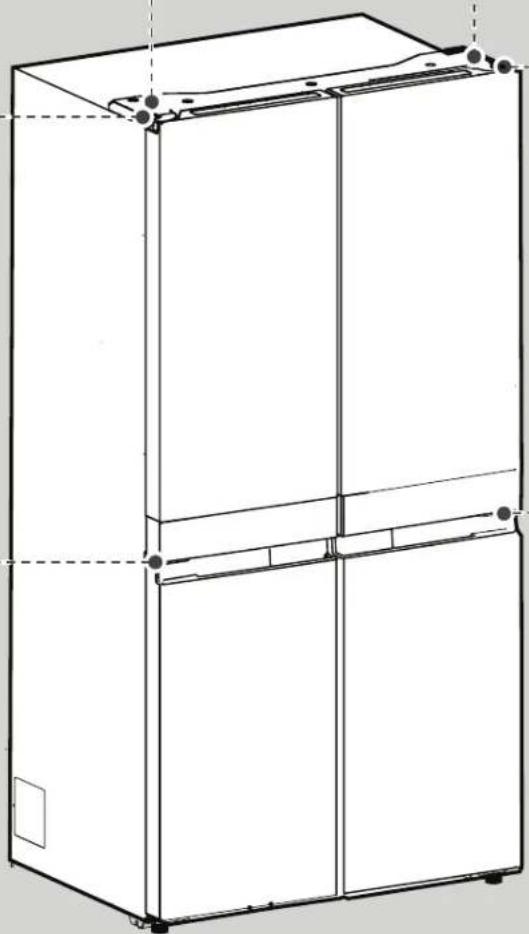
natural_image
Line drawing of a three-tier refrigerator cabinet (no text or labels)natural_image
Technical diagram showing a mechanical assembly with labeled component A (no text or symbols present)natural_image
Technical line drawing of a mechanical bracket or clamp assembly (no text or symbols)A. Петля
natural_image
Technical line drawing of a mechanical clamp or bracket assembly with screws and a labeled component (no text or symbols present)A. Середня петля
natural_image
Line drawing of a refrigerator interior showing door, shelves, and battery compartment (no text or symbols)A. Нижня петля
natural_image
Technical line drawing of a mechanical assembly with a labeled component 'A' (no text or symbols beyond label)A. Refrigerator
B. Freezer
C. Flexi Freeze (only with WQ9 B1L, 6WM24NIHAS and WQ70900SXX)
natural_image
Line drawing of a double-door refrigerator with visible door, shelves, and wheels (no text or symbols)natural_image
Technical line drawing of a refrigerator internal structure (no text or symbols)natural_image
Simple line drawing of a rectangular frame with a labeled section 'A' on top, no text or symbols present.A. Кришка петлі
Готувач льоду
natural_image
Line drawing of hands operating a portable toaster (no text or symbols)natural_image
Line drawing of a hand operating a small kitchen appliance with a handle (no text or symbols)natural_image
Line drawing of a hand placing objects into a container with two circular compartments (no text or symbols)natural_image
Line drawing of a refrigerator interior showing door, tray, and shelf (no text or symbols)natural_image
Line drawing of an open refrigerator interior showing front, back, and side compartments (no text or symbols)תְרָה בְּרָה
הכלה LED, which is a series of 100% increments.
natural_image
Line drawing of a refrigerator interior with doors open and back, showing storage compartments and doorways (no text or symbols).
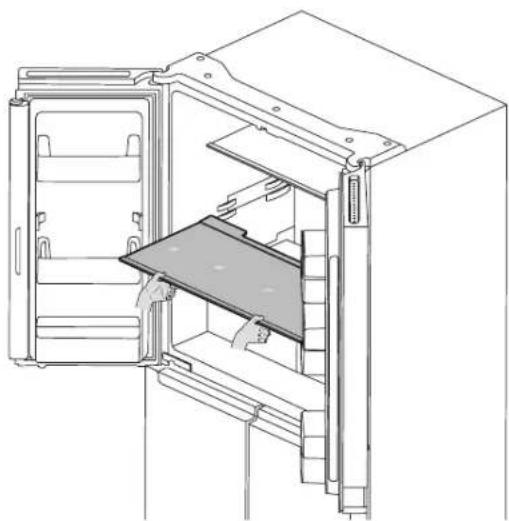
natural_image
Line drawing of an open refrigerator with a tray and door, showing internal compartments and ventilation slots (no text or symbols)■.תְרָה בְּבָם
תָרִי בְּרַע
תְקָרִיַעֹן
natural_image
Line drawing of hands operating a toaster with cooling fins (no text or symbols)natural_image
Line drawing of a hand using a portable device to press or install a tray (no text or symbols)natural_image
Line drawing of a hand placing objects into a container with two circular compartments (no text or symbols)||tn |ionx
אַלְרָה
natural_image
Technical line drawing of a refrigerator with internal shelves and door frame (no text or symbols)natural_image
Simple line drawing of a rectangular frame with a horizontal panel and a labeled angle θ (no text or symbols beyond the label)תַלְרָה אַבְרָה.
.הכלה 3הכלההוּרָהוּרָהוּרָהוּרָהוּרָהוּרָהוּרָהוּרָהוּרָהוּרָהוּרָהוּרָהוּרָהוּרָהוּרָה
(WQ70900SXX,6WM24NIHAS
(הכלההוּרָהוּרָהוּרָהוּרָהוּרָהוּרָהוּרָהוּרָהוּרָהוּרָהוּרָהוּרָהוּרָהוּרָהוּרָה)
natural_image
Line drawing of a refrigerator with doors open, showing internal compartments and storage tanks (no text or symbols)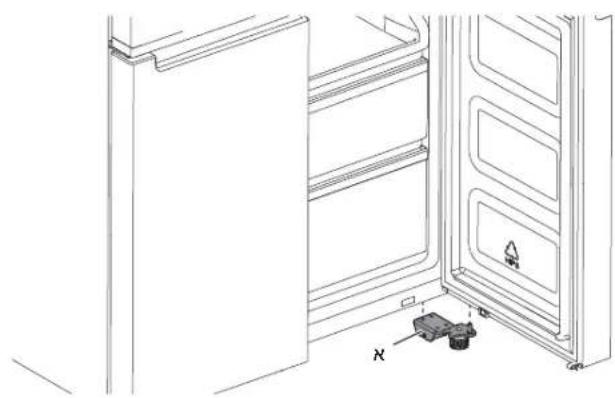
natural_image
Line drawing of a refrigerator interior showing door, front panel, and side panel with no text or symbolsתְרָה אַל.א
בַרְהָם הַרְהָם
natural_image
Technical line drawing of a mechanical assembly with a central component and directional arrow (no text or symbols)תְבָרִי הַלְהָם.
natural_image
Technical line drawing of a mechanical clamp or bracket assembly with screws and a labeled component (no text or symbols present)א. אַרְשָׁה
2.
תְרָה בַרִי הַלְשׁ
תְרָהוֹת אַל.א
ת.
m = 311
m = 311
m = 311
m = 311
m = 311
m = 311
广力云
广力云智慧零售收银系统
广力云智慧零售收银系统
广力云智慧零售收银系统
الإستعمال
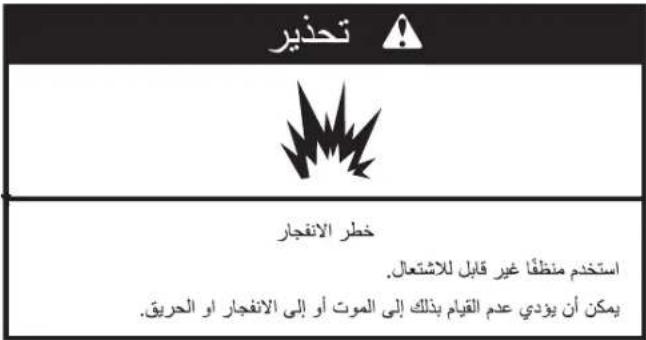
natural_image
Technical line drawing of a refrigerator interior showing door, shelf, and drawer (no text or symbols)صينية المgmtد
natural_image
Line drawing of a refrigerator interior showing open door, front panel, and side shelves (no text or symbols)■ على حوامله.
استخدام Buildings
صانع النج
natural_image
Line drawing of hands operating a toaster with cooling fan (no text or symbols)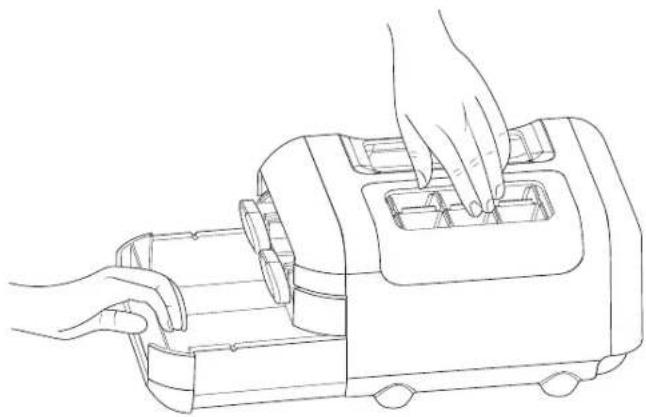
natural_image
Line drawing of hands operating a kitchen grater with a handle (no text or symbols)natural_image
Line drawing of a hand placing objects into a container with two circular compartments (no text or symbols)tangzǐn有必要غذّية

فتح وإغلاق الأبواب
natural_image
Simple line drawing of a rectangular frame with a labeled section 'A' and a small inset showing a horizontal bar (no text or symbols beyond label)A. غطاء مفصل
tangzǐn البيض
(WQ70900SXX,6WM24NIHAS
. يَقَاف الصوتي
.2(ل PTRID الترício)
.3 WQ9 B1L
.4 تجديد السريع
.5. مؤشر القل
.6 زر القل
.الباب المفتوح
التجميد السريع.
.9, WQ9 B
(WQ70900SXX
A. غطاء منصير
. منصير B
13....مolecularlymolecularlymolecularlymolecularlymolecularlymolecularlymolecularlymolecularlymolecularlymolecularlymolecularlymolecularlymolecularlymolecularlymolecularlymolecularlymolecularlymolecularlymolecularlymolecularlymolecularlymolecularlymolecularlymolecularlymolecularlymolecularlymolecularlymolecularlymolecularlymolecularlymolecularlymolecularlymolecularlymolecularlym molecularlymolecularlymolecularlymolecularlymolecularlymolecularlymolecularlymolecularlymolecularlymolecularlymolecularlymolecularlymolecularlymolecularlymolecularlymolecularlymolecularlymolecularlymolecularlymolecularlymolecularlymolecularlymolecularlymolecularlymolecularlymolecularlymolecularlymolecularlymolecularlymolecularlymolecularlymolecularlymolecularlymolecularglycymet

- Whirlpool
- FRENCH DOOR BOTTOM MOUNT REFRIGERATOR USE AND CARE GUIDE
- SAFETY INSTRUCTIONS
- PERMITTED USE
- IMPORTANT TO BE READ AND OBSERVED
- INSTALLATION
- ELECTRICAL WARNINGS
- CLEANING AND MAINTENANCE
- DISPOSAL OF PACKAGING MATERIALS
- DISPOSAL OF HOUSEHOLD APPLIANCES
- ENERGY SAVING TIPS
- REFRIGERATOR SAFETY
- Your safety and the safety of others are very important.
- ! DANGER
- WARNING
- Location Requirements
- Electrical Requirements
- Electrical Shock Hazard
- Recommended Earthing Method
- For Australia and New Zealand:
- Electrical Requirements (Great Britain and Ireland only)
- Fuse Replacement
- For the Republic of Ireland (only):
- Socket/Plug (valid for both countries):
- INSTALLATION INSTRUCTIONS
- Getting Started
- INSTALLATION CHECKLIST
- √ Electrical Power
- √ Doors
- Unpack the Refrigerator
- Refrigerator Delivery
- When Moving Your Refrigerator:
- Remove the Packaging
- Remove and Replace Refrigerator Doors
- Remove Right-Hand Door
- Remove Left-Hand Door
- Replace Right-Hand Refrigerator Door
- Replace Left-Hand Refrigerator Door
- Final Steps
- Remove and Replace Freezer/Flexi Freeze Door
- Refrigerator Levelling
- PARTS AND FEATURES
- NOTE FOR SERVICE:
- STORAGE CAPACITY (WQ9 B1LUK and WQ70900SXX):
- STORAGE CAPACITY (6WM24NIHAS):
- Using the Controls
- - 88 Viewing and Adjusting Temperature Set Points
- Adjusting Fresh Food and Freezer Compartment Temperature:
- IMPORTANT:
- th 6 th Sense Fresh Lock and Freeze Control
- \* \* \* Flexi Freeze Setting (only with WQ9 B1LUK, 6WM24NIHAS and WQ70900SXX)
- Adjusting Multi Temperature Setting
- Fast Cool
- Fast Freeze
- Holiday Mode
- Sound ON-OFF
- Key Lock
- Demo Mode (only with WQ9 B1LUK, 6WM24NIHAS and WQ70900SXX)
- Additional features
- Door Open Alarm
- Lighting the Refrigerator
- REFRIGERATOR USE
- Opening and Closing Doors
- Ice Maker
- Egg Storage
- SHELVES, BINS AND DRAWERS
- Important information to know about glass shelves and covers:
- Shelf Height Adjustment
- Shelves and Shelf Frames
- To remove and replace shelves:
- To remove and replace the Crispers:
- Refrigerator Balconies
- Freezer Storage Compartments
- Fast Freeze compartment
- Flexi Freeze Compartment (only with WQ9 B1LUK, 6WM24NIHAS and WQ70900SXX)
- To remove the upper drawer:
- Freezer Shelf (only with WQ9 B1LUK)
- Audio Reference
- Accessories
- REFRIGERATOR CARE
- Cleaning
- Explosion Hazard
- Exterior Cleaning
- Style 1 - Smooth Door
- Style 2 — Stainless Steel
- Style 3 — Fingerprint-Resistant Stainless
- NOTES:
- Do not allow these substances to remain on the finish:
- Interior Cleaning
- Condenser
- Lights
- Holiday and Moving Care
- Holidays
- If You Choose to Leave the Refrigerator On While You're Away:
- If You Choose to Turn Off the Refrigerator Before You Leave:
- Moving
- TROUBLESHOOTING
- AFTER-SALES SERVICE
- BEFORE CALLING THE AFTER-SALES SERVICE
- IF AFTER THE ABOVE CHECKS THE FAULT STILL OCCURS, GET IN TOUCH WITH THE NEAREST AFTER-SALES SERVICE
- Sommario
- SICUREZZA DEL FRIGORIFERO....29
- INSTRUCTIONS D'INSTALLATION....56
- CAPACITÉ DE STOCKAGE (WQ9 B1LUK et WQ70900SXX):
- Machine à glaçons
- Œufs
- ХРАНЕНИЕ ПОТЕНЦИАЛА (WQ9 B1LUK и WQ70900SXX):
- Льдогенератор
- Хранение яиц
- POJEMNOŚĆ PRZECHOWYWANIA (WQ9 B1LUK i WQ70900SXX):
- Kostkarka do lodu
- Komory zamrażarki
- WAARSCHUWINGEN M.B.T. ELEKTRICITEIT
- OPSLAGCAPACITEIT (WQ9 B1LUK en WQ70900SXX):
- IJsblokjesmaker
- Bewaren van eieren
- Sound On/Off (Ljud På/Av)
- Ismaskin
- Förvaring av ägg
- Frysavdelningar
- HYLDER, D∅RHYLDER OG SKUFFER....205
- VEDLIGEHOLDELSE AF K∅LE-/FRYSESKABET ......207
- Kun for Irland:
- Tilbehør:
- Ismaskine
- Opbevaring af madvarer
- Opbevaring af æg
- Fryseafdelingens opbevaringsrum
- KJ∅LESKAPETS SIKKERHET
- For Irland (kun):
- Ta av venstre dør
- Bruke kontrollene
- Ismaskinen
- Oppbevaring av mat
- Oppbevaring av egg
- HYLLER, BOKSER OG SKUFFER
- Para retirar e voltar a colocar as gavetas:
- Ледогенератор
- Za Republiku Irsku (samo za to tržište):
- Utičnica/utikač (vrijedi za obje države):
- UPOZORENJE
- Skinite desna vrata
- Niveliranje hladnjaka
- SKUPLJANOST KAPACITETA (WQ9 B1LUK i WQ70900SXX):
- Uređaj za pravljenje leda
- Čuvanje jaja
- POLICE, POSUDE I LADICE
- Informacije koje je važno znati o staklenim policama i poklopcima:
- Prilagodba visine police
- BEZPEČNOSTNÉ POKYNY
- SKLADOVACIA KAPACITA (WQ9 B1LUK a WQ70900SXX):
- Výrobník ľadu
- Skladovanie vajíčok
- Skladovacie oddelenia v mrazničke
- Külmiku loodimine
- Tarvikud:
- Nuppude kasutamine
- Jäävalmistaja
- ΑΠΟΘΗΚΕΥΣΗ (WQ9 B1LUK και WQ70900SXX):
- Παρασκευαστής πάγου
- Συντήρηση αυγών
- Jégkocka-készítő
- Ledusskapja limenošana
- Šaldiklio skyriai
- POLICE, NÁDOBY A ZÁSUVKY ....457
- Výrobník ledu
- Skladování vajec
- POLICE, NÁDOBY A ZÁSUVKY
- Za Avstralijo in Novo Zelandijo:
- Za Republiko Irsko (samo):
- KAPACITOST SKLADIŠČENJA (WQ9 B1LUK in WQ70900SXX):
- ZMOGLJIVOSTI (6WM24NIHAS):
- Dodatki:
- Uporaba tipk
- Izdelovalnik ledu
- Shranjevanje jajc
- Police in okvirji polic
- Prostori za shranjevanje v zamrzovalniku
- Explosionsgefahr
- XKAFEF, KAXEX U KXAXEN 549
- KIF TIEHU HSIEB IL-FRIGG....551
- INDIVIDWAZZJONI TA' SOLUZZJONI....553
- ISTRUZZJONIJIET DWAR IS-SIGURTÀ
- TINDIF U MANUTENZJONI
- Ghar-Repubblika tal-Irlanda (biss):
- Socket/Plug (validu għaż-żewę pajjizi):
- TWISSIJA
- Livellar tal-Frigg
- NOTA GHAS-SERVICE:
- KAPAĆITÀ TAL-HAŻNA (WQ9 B1LUK u WQ70900SXX):
- KAPAĆITÀ TAL-HAŻNA (6WM24NIHAS):
- Accessorji:
- Užu tal-Kontrolli
- Kif Tara u Tağgusta I-Punti Ssettjati tat-Temperatura
- Kif Tağğusta t-Temperatura tal-Kompartiment tal-Ikel Frisk u tal-Freezer:
- Apparat li Jaghmel is-Silg
- Hażna tal-Bajd
- XKAFEF, KAXEX U KXAXEN
- Informazzjoni importanti li ghandek tkun taf dwar l-ixkafef talhgieg u l-ghatjien:
- Ağğustament tal-Gholi tal-Ixkaffa
- Biex tnehhi u ttpoggi f'posthom il-Kaxen:
- Balconies (Xkafef) tal-Frigg
- Kompartimenti tal-Hażna tal-Freezer
- Kompartiment tal-Iffriżar Malajr
- Il-Kompartiment tal-Iffriżar Flessibbli (disponibbli biss f'WQ9 B1LUK, 6WM24NIHAS u WQ70900SXX)
- 아일랜드(전용):
- 오른쪽 도어 분리
- 냉장고 수평 조정
- 제빙기
- 달갈 보관
- 冰箱安全維護
- 愛爾蘭(僅):
- 冰箱的水平調整。
- 製冰器
- 儲存雞蛋
- 架子和框架
- 冷凍儲存室
- Готувач льоду
- תָרִי בְּרַע
- בַרְהָם הַרְהָם
- استخدام Buildings
- فتح وإغلاق الأبواب
Brand : WHIRLPOOL
Model : WQ9 B2L CH
Category : Fridge