
BM 850 - Baby monitors BABYFON - Free user manual and instructions
Find the device manual for free BM 850 BABYFON in PDF.



| Brand | Babyfon |
| Model | BM 850 |
| Product type | Baby monitor (audio) |
| Power supply | 4 NiMH AAA rechargeable batteries (included) or 4 AAA batteries; 9V/200mA power adapter |
| Number of channels | 4 channels (863-865 MHz) |
| Personal security code | Adjustable 2-letter name |
| Maximum range | Up to 400 m in open field |
| Electromagnetic pollution reduction (ESR) | Yes, automatic |
| Variable transmission power | Yes (Half/Full) |
| Adjustable sensitivity | Yes (on transmitter) |
| Adjustable volume | Yes (on receiver) |
| Acoustic range control | Alarm signal after 20s out of range |
| Keylock | Yes |
| Recharging of batteries | Automatic via power adapter |
| Charge status indicator | 3-bar display + alarm |
| Belt clip / wall mount | Yes |
| Care and cleaning | Clean with a soft dry or slightly damp cloth |
| Operating temperature | Below 40°C |
| Warranty | 24 months |
| Package contents | 1 transmitter, 1 receiver, 2 power adapters, 4 AAA rechargeable batteries, instructions, warranty card |
Frequently Asked Questions - BM 850 BABYFON
User questions about BM 850 BABYFON
0 question about this device. Answer the ones you know or ask your own.
Ask a new question about this device
Download the instructions for your Baby monitors in PDF format for free! Find your manual BM 850 - BABYFON and take your electronic device back in hand. On this page are published all the documents necessary for the use of your device. BM 850 by BABYFON.
USER MANUAL BM 850 BABYFON
2 Overview of operating elements and indicators 18
3 Security precautions 18
3.1 General 18
3.2 Intended purpose 18
3.3 Electro-snog in children's rooms 19
3.4 Protecting the devices 19
3.5 Using the plug-in charger 19
3.6 Battery packs and batteries 20
4 Setting up components / function test 20
4.1 Power supply 20
4.2 Switching on and basic setting 20
4.3 Function test 20
5 Adjusting the devices for operation 21
5.1 Reset function 21
5.2 Setting the channel and the personal security code 21
5.3 Setting the response sensitivity 22
5.4 Setting the transmission output 22
5.5 Setting the volume 22
5.6 Setting the range alarm (warning tone) 22
5.7 Keylock 22
6 Power supply 23
6.1 Battery pack status indicator 23
6.2 Chargng the battery packs 23
6.3 Battery operation 23
7 Range of the devices 24
8 Troubleshooting 24
81 Reset function 24
8.2 Malfunctions 24
Table of malfunctions 25
9 Contents and technical data 25
9.1 Contents 25
9.2 Technical data 25
9.3 License 25
10 Warranty 26
16
GB

1 Introducing your new BABYFON ⑧ BM 850
With your new BABYTON® RM 850 you have chosen a quality product from VIVANCO. You can rely on the support provided by your new Babyfion and always hear your baby, no matter where you are in your home.
N.B.: As the BABYFON ⑥ BM 850 is a radio frequency device, certain settings on both devices must be absolutely identical to ensure that the transmitter and receiver can communicate with each other. Please refer in particular to chapter "5.2 Setting the channel and the personal security code".
The BABYFON © BM 850 provides the following functions:
ESR - Electro-Smag Reduction
Thanks to a new technology the electro-smog occurring near your baby is reduced considerably. This function is activated automatically as soon as the Babyfon is switched on, no further adjustments are required.
Variable transmission output
If the transmitter and receiver are close together child's room and living room, you can reduce the transmission output. This considerably reduces any possible electro-smog (during transmission) even further. You protect your child from unnecessary electro-smog without impairing the functionality of the device at the same time.
863-865 MHz/4 channels
The BABYTON® BM 850 operates in the frequency range from 863 to 865 MHz. This eliminates interference from conventional baby-monitoring devices and with four different channels you can avoid any other unwanted influences.
Personal security coding
To ensure optimal protection from external FM applications your Babyton provides personal and individual coding. A personal code is created by entering a name or sequence of letters. This is transmitted simultaneously with the voice transmission. Only if this personal code corresponds to that of the receiver is the transmission accepted by the receiver and you hear only your own child.
Variable response sensitivity
To ensure optimal adaptation to your living conditions and ambient noise you can use the following steps:
determine when the BABYRUN ⑥ BM BSO switches turn on and transmits Acoustic range control
When the acoustic range is activated a warning tone tolls you that you are leaving the reception range. This warning tone stops automatically when you are back within the reception range.
Keylock function
The keylock prevents accidental adjustments to settings and thereby further increases the functional security of the device.
Battery pack charge function
The BABYTON 品 BM 850 is equipped with an integrated battery pack charge function for the gentle charging of environment-friendly nickel-metal hydride battery packs.
Battery pack status display
A symbol in the receiver display and a warning tone indicate that the battery packs need charging. On the transmitter this is indicated only by a flashing symbol in order not to disturb your child.
Belt clip / wall mounting
The BABYFON® BM 850 is fitted with a practical belt clip. Using a screw or hook you can also use the belt clip as a practical wall mounting.

2 Overview of operating elements and indicators
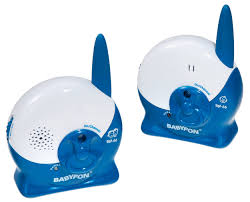
A Transmitter (baby)
B Receiver (parents) C Piat
DACapapter/plug-incharger
Rechargeable AAA battery packs
A Transmitter (baby)
A1 Display
A2 Confirmation button OK
A3 Selection buttons [DOWN,UP]
A4 Mode button (MODE)
A5 Microphone
A6 Connection socket for plug-in charger
A7 Control lamp for plug-in charger
A8Boltclip
A9 Battery pack compartment
B Receiver [parents]
B1 Display
B2 Confirmation button OK
B3 Selection buttons [DOWN,UP]
B4 Mode button (MODE)
BS Speaker
B6 Connection socket for plug-in charger
B7 Control lamp for plug-in charger
B8 Belt clip
B9 Battery pack compartment
C Display
C1 Transmission range indicator
C2 Alarm symbol
C3 Channel indicator
C4 Name display
C5 Battery pack status indicator
C6 Response sensitivity / volume
C7 Transmission / reception mode indicator
3 Security precautions
3.1 General
Before using the device for the first time, read these instructions carefully and keep them in a safe place for future reference.
-Under no circumstances is the BABYTON @ BM 850 a substitute for personal supervision
If the device can no longer be used, consult your local waste disposal organisation regarding correct disposal measures.
If you pass on the device to a third party, please include the instructions.
3.2 Intended purpose
The BABYFD (BM 850) was developed to transfer voice signals / sounds made by children. Signal tones, e.g. from breathing or heart tone monitoring equipment, cannot be transmitted!

Use of the BABYON. ⑤ BM 850 cannot replace, but only support the personal supervision of a child or person in need of care. We point out that we do not accept any responsibility whatsoever not covered by legal guarantee regulations. This applies in particular to this babyfion being used for medical purposes for which it is not intended. The device is designed for private use.
3.3 Electro-smog in children's rooms
Due to the low radiation level there is no risk to your child's health as a result of electro-smog, according to current knowledge.
We nevertheless recommend that you keep a safety distance of at least 1 metre between your baby and the BABYFON 念 BV80. The functionality of the BABYFON 念 BM 850 is not impaired by the safety distance!
Never place the transmitter inside the child's cot or playpen The original BabyfON is equipped with a voice control feature that allows the device to transmit only when your child actually makes a sound. Therefore the BABYFON 80 BM 850 transmits only when when required and not permanently. This sensible function prevents superfluous electro-smog
When using plug-in chargers [AC adapters] you can minimise low frequency magnetic fields by keeping a distance of 1 to 2 metres between the wall socket and the child scot.
Your Babylon is equipped with intelligent charging technology.
The plug-in charger becomes active only when the battery packs have been discharged below a certain lower limit. It then charges the battery packs up to a certain upper limit and becomes inactive again, the battery packs are now used as the power source. This means that you have optimal protection from additional electro-smog, even when the battery packs are being charged.
This ensures that there will be no risk of electro-smog from the BABYFON 們 BM 850 for your child.
图
When the devices are running they need sufficient air supply.
If you use batteries, remove them if the devices are not used for a long period as they could otherwise leak.
Switch off the devices after use
Protect electronic devices from moisture
The devices must under no circumstances come into contact with liquids. Therefore make sure that they are not submerged under water and that no liquid gets inside the casing.
Protect electronic devices from temperatures above 40°C. Therefore do not leave your BABYFON® BM 860 in strong sunlight and never place it on hospitals or close to other heat sources.
Always check before use that your BABYFON® BM 850 functions correctly (see "4.3 Function test").
Defective devices must not be used
Never carry out repairs yourself; contact your dealer if the need arises.
Never use caustic detergents to clean the devices as these could damage the plastic surfaces.
Clean the devices with a dry or slightly moist cloth
3.5 Using the plug-in charger
Connect the device only to a correctly installed mains socket with voltage which corresponds to that given on the nameplate of the plug-in charger.
Make sure that connecting cable is not positioned so that people could trip over it.
- Make sure that the connecting cable is not pinched, crushed or stretched.
When using an adapter or an extension cable, make sure that these comply with valid safety regulations. The maximum current given must not be exceeded.

3.6 Battery packs and batteries
- Keep battery packs and batteries away from children
Do not try to charge used, non-rechargeable batteries.
Batteries and battery packs must not be thrown away with domestic rubbish. As a consumer you are legally obliged to return used batteries/battery packs, regardless of whether or not they contain harmful substances. You can hand them in at your nearest collection point or wherever batteries/battery packs of the kind concerned are sold. We also take back batteries/battery packs free of charge.
If you wish to return your old batteries to us, please send them marked "Used" to the following address:
Vivanco GmbH, Ewige Weide 17, D-22926 Ahrensburg/Germany
4 Setting up components / function test
N.B.: Before inserting the battery packs supplied or connecting to the mains power supply, switch off the devices.
Note: To protect the display (C) from scratching during the manufacturing process a transparent film is attached. Remove this film.
4.1 Power supply
To insert or replace the battery packs
1. To insert and remove the battery packs the device should always be switched off and disconnected from the plug-in charger (DI). To switch off, press the mode button (MODE) for approx. 2 seconds
2. Slide down the lid of the battery pack compartment A9 or B9.
3. Place the 4 supplied battery packs in the battery pack compartment.
N.B.: Battery packs must be inserted with their plus and minus poles (+/-) positioned exactly as marked on the bottom of the battery pack co
Note: New battery packs must first be charged for at least 10 hours with the device switched off before they are ready to function. The charging of battery packs is described in Chapter "8 Power Supply".
4. Slide the lid back up until it clicks into place.
4.2 Switching on and basic setting
- Press the mode button (MODE) A4 / B4 for approx. 2 seconds. The devices are now switched on. Display A1 / B1 lights up. Then the basic display appears. On the receiver, background illumination is activated automatically.
- Check that the same channel indicator (C3 [example 'CH 11') appears on both devices. The same name display (C4) must also be set on both devices.
N.B.: In all operating modes the transmitter and receiver can only communicate if
these two settings are identical on both devices. To change these settings, please read Chapter "5.2 Setting the channel and the personal security code".
4.3 Function test
Ideally, the function test should be conducted by two people:
1. Press the mode button (MODE) A4 / B4 for approx. 2 seconds, thereby switching on both devices. If there is a loud whistling noise the two devices are standing too close together.

- Take one of the devices into another room.
speak into the microphone A5 on the transmitter.
The transmission / reception symbol C7 indicates that transmission is taking place. The transmission / reception symbol C7 also appears on the receiver and the spoken text is transmitted. If the receiver cannot hear anything, check the individual points in Chapter "B Troubleshooting".
5 Adjusting the devices for operation
Note: Before adjusting the devices to suit your requirements it is often advisable to perform a reset. This resets all settings to the default setting, ensuring that you have a safe basis to begin making your setting adjustments. Now devices already have the default settings.
5.1 Reset function
- Switch off the device by pressing the mode button (MOOE) A4 / B4 for approx. 2 seconds.
- Disconnect the AC adapter D and remove all the battery packs
- Press the "UP" and "OK" buttons simultaneously and reconnect the AC adapter D. Continue to hold the buttons down.
- All the display components appear successively. As soon as the alarm symbol C2 has appeared completely transparent, 5 seconds you can release the buttons.
- After the display has appeared in full (approx. 15 seconds), press the "DOWN" selection button and the word "BABYTON" appears on the display.
- Press the OK button. All memories are now erased and reset to the default setting.
5.2 Setting the channel and the personal security code
N.B.: The transmitter and receiver can only communicate if the channel and security code are identical on both devices.
By combining 4 channels with a personal security code you have numerous possibilities to prevent interference.
Setting the channel
You have a choice of 4 channels. Each channel is allocated a particular frequency in the radio frequency range. If there is too much interference on the selected channel, select another one, making sure that you select the same channel for both devices.
- Switch on the devices. To do so, press the mode button (MODE) A4 / B4 for approx. 2 seconds.
The display C lights up briefly and the symbols appear
2 Press the mode button (MODE) A4 / B4 once. The channel indicator C3*CH begins to flash. - Set the required channel [0 - 4] using the selection buttons (DOWN,UP) A3 / B3.
- Confirm the setting by pressing the confirmation button [OK] A2/7 B2. At the same time you exit the setting mode and skip to the setting of the personal security code.
Setting the personal security code
You have the option of giving your BABYFON 60 BM 850 a personal security code in the form of a name of your choice. This enables you to protect yourself against the reception of external radio transmissions on the same channel. If you can hear external radio signals or interference on the set channel, select another security code in order to prevent this, making sure that you select the same code for both devices.

F. Z
- The name display C4 begins to flash. You can now determine the letter for the first position. Using the selection buttons (DOWN/UP) A3 / B3 you can change the letter, then press the confirmation button (OK) / B2 to confirm it. All the letters of the alphabet from A to Z are available, plus a blank space. After confirmation the device skips to the next position.
- Keep repeating point 5 until you have entered the name of your choice and you have reached the end.
- Exit the setting by pressing the mode button (MODE) A4 / B4.
N.B.: Repeat the setting on the other device so that both devices have the same channel and security code settings.
5.3 Setting the response sensitivity Only on transmitter A

With the response sensitivity you set the volume at which the transmitter is activated and begins to transmit sound to the receiver. There are several settings available. Find the best setting by trial and error.
Press the selection buttons (DOWN/UP) A3 to adjust the response sensitivity. In the dis play the "Response sensitivity / volume" indicator C6 shows how sensitively the transmitter responds.
The transmission / reception indicator C7 lights up on the transmitter when it is activated and begins transmitting.
5.4 Setting the transmission output Only on transmitter A

If you are close to the child's room with your receiver (example: living room and child's room) you can reduce the transmission output on the transmitter. This considerably reduces any possible electro-smog (during transmission) even further. You protect your child from unnecessary electro-smog without impairing the functionality of the device as the same time. 1. Press the mode button until the transmission range indicator C1 starts flashing
- Press the selection buttons (DOWN/UP) A3 to change to half or full transmission
output.
- Confirm the selection with the confirmation button IDK) A2.
Note: If the range alarm goes off when using the receiver, reset the output to full.
5.5 Setting the volume Only on receiver Bi

You can set the receiver volume at one of several levels. Find the best level by trial and error. Press the selection buttons (DOWN/UP), B3 to set the volume.
5.6 Setting the range alarm/warning tone (Only on receiver B)

The range alarm activates a warning in the receiver when the transmitter and receiver are too far apart to ensure a proper transmission.
If the permitted range is exceeded for more than 30 seconds the alarm symbol C2 and the background illumination flash in the display. If the warning tone is activated, this also sounds:
-
Press the mode button (MODE) B4 until the alarm symbol C4 begins to flash.
-
To switch on the warning tone, press the confirmation button OKI B2. The alarm symbol C2 then appears permanently in the display.
To switch off the warning tone, press the mode button (MODE) B4 again and the alarm symbol C2 disappears.
5.7 Keylock
KEYLOCK
When the keylock is activated all the keys are locked. The settings can no longer be changed, e.g. if a child gets hold of the device and plays with it or if you carry the device in your pocket. This prevents operating errors.
- To switch on the keylock, press the confirmation button [OK] A2 / B2 for at least 2 seconds until "KEYLOCK" appears in the display.

KEYUNLOCK
- To switch off the keylock, press the confirmation button [OK] A2 / B2 for at least 2 seconds until "KEYDOWN" appears in the display.
With the keylock activated, "KEYLOCK" appears in the display if a key is pressed.
6 Power supply
6.1 Battery pack status indicator
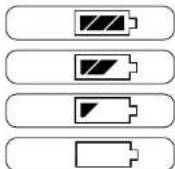
The battery pack status indicator C5 indicates how full the battery packs are or, if
batteries are used, how full these are:
Battery packs/batteries full 13 bars
The batteries or battery packs are full or nearly full, allowing operation for several hours. Battery packs/batteries 2/3 full (2 bars)
The batteries are partially emptied.
Battery packs/batteries 1/3 full (1 car)
The batteries are almost empty. Now is the time to replace the batteries or recharge the battery packs.
Battery packs/batteries empty
When the batteries or battery packs are empty the lost status bar disappears and the battery pack status indicator C5 begins to flash. The device also emits a warning tone. Proper operation is no longer possible and the device switches itself off automatically after a few seconds.
6.2 Charging the battery packs
The BABYFON 品 BM 850 comes with automatic charging control. To use this feature, the devices must be connected to the AC adapter D. If the battery pack condition fails to an insufficient level the BABYFON 品 BM 850 automatically begins charging the battery packs. When the battery packs have been charged the BABYFON 品 BM 850 automatically switches off battery charging.
Note: Thanks to this automatic charging control the battery packs are protected against
both unnecessary overcharging and total discharge, thereby increasing their service life.
-
Insert the small plug on the cable of the AC adaptor D into the connection socket for the plug-in charger A6 / E6 of the device concerned.
-
Plug the AC adapter D into a main socket with voltage that corresponds to that given on the charger's nameplate. The control lamp for the plug-in charger A7 / B7 lights up.
If the battery packs are empty, charging now begins and the battery pack status indicator CS indicates that charging is taking place.
- When the battery packs are fully charged the battery pack status indicator C5 shows full (13 hours) and the BARYCOM 60 RM 950 automatically stops charging.
When charging the battery packs, please observe the following:
N.B.: New battery packs must be charged for at least 10 hours without interruption
before use to ensure that they reach their full capacity.
- The battery pack charging time varies according to the type of battery pack used. The battery packs supplied need approx. 6-8 hours before they are fully charged.
Using the battery packs included with the set operation of up to two days is possible. This may vary depending on the mode of operation.
6.3 Battery operation
N.B.: When using batteries the plug-in charger must not be connected under any
circumstances as this could cause the batteries to overheat and thereby damage
the device.

Instead of the batteries supplied you can also use 4 AAA type batteries. Advantages
longer operating time than with battery packs:
greater range as batteries emit higher voltage than battery packs.
Disadvantages:
■ higher operating costs as they are not rechargeable.
■unkind to the environment as they are not reusable.
7 Range of the devices
In view of the physical diffusion characteristics of radio waves, you will have to determine the range of your
BABYFON BM 850 in your surroundings by trial and error. In optimal conditions, the range is up to 400 metres. However, the actual range depends very much on local conditions, e.g. location of the transmitter, type of building or atmospheric conditions. The range may also be reduced if you enclose the receiver in your hands.
The spreading of radio waves can be physically influenced only to a slight degree, with the result that there are places in the house or garden where radio contact does not take place although the transmitter and the receiver are only a few metres apart [in a straight line]. Due to the numerous factors influencing FM products it is not possible to give a
"rango guarantee". However, you should be able to move around freely with your BABYFON @ BM 850 within the house/apartment. You can easily determine the range in your surroundings by placing a radio in front of the BABYFON @ BM 850 transmitter. When you can hear the transmission clearly, move around with the receiver in the area where you have perfect functionality.
8 Troubleshooting
8.1 Reset function
You can reset the BABYFON @ BM 850 to the default setting if you have lost track of the settings or if the device locks up, i.e. it no longer reacts to keys being pressed. This allows subsequent function control (see '4 Setting components / function test' on page 5) and rules out malfunction. The following function steps are the same for both devices and must be performed for both devices:
- Switch off the device by pressing the mode button (MODE) A4 / B4 for approx. 2 seconds.
- Disconnect the AC adapter D and remove all the battery packs.
- Press the 'UP' and 'OK' buttons simultaneously and reconnect the AC adaptor D. Continue to hold the buttons down.
- All the display components appear successively. As soon as the alarm symbol C2 has appeared completely (approx. 6 seconds) you can release the buttons.
- After the display has appeared in full (approx. 15 seconds), press the "DOWN" selection button and the word "BABYTON" appears on the display.
- Press the OK button. All memories are now erased and reset to the default setting
8.2 Malfunctions
Should your BABYTON® BM 850 not function correctly, please proceed in the following order:
- Using the following table, try to find and correct the fault.
- Read the relevant section of these instructions carefully.
- Look on the Internet at www.babylion.com to see if the fault and its correction are described there.
- Consult your specialist dealer

8.3 Table of malfunctions
9.3 Licence
| Problem | Possible cause | Solution |
| Diskley and/or hard to read | Protective file is still on the display | Remove the protective film from the display |
| No display | Battery packs and insorbed incorrectly | Insert the battery packs according to the symbols on the bottom of the battery pack compartment |
| Battery packs are too weak | Charge the battery packs (see "5.2 Charging the battery packs") | |
| No transmission/no sound | Channel and personal security code are not differently on the two devices | Correct the setting (see "5.2 Setting the channel and the personal security code") |
| Transmitter does not switch automatically to transmission | Increase the response sensitivity (see "5.3 Setting the response sensitivity") | |
| Devices are outside the range | Reduce the distance between the devices | |
| Transmitter is not by the baby or too far away | Reduce the distance of the transmitter to the baby, keeping the minimum distance of 1 meter | |
| Batteries are empty | If you are using batteries, replace them | |
| There is interference in the transmission or external voices can be heard | Unfavourable selection of channel and/or security code | Change the another channel or select another security code (see "5.2 Setting the channel and the personal security code") |
| Load sleeping and whistling | Feedback because the distance between the devices is too small | Increase the distance between the devices or reduce the volume on the receiver (see "5.5 Setting the volume") |
| Battery packs are no longer charged | The AC adaptor is not connected to the mains supply | Check the connection |
| The plug of the AC adaptor not correctly connected to device | Insert the plug correctly in the connection socket for the plug in charger AE / BE | |
| The battery packs have recharged the end of their service life | Replace the battery packs | |
| Battery transmits overly little usage | Response sensitivity is set too high | Reduce the response sensitivity (see "5.3 Setting the response sensitivity") |
9 Contents and technical data
9.1 Contents
1x BABYFON 8M 850 transmitter,
1x BABYFON 8M 850 receiver,
4x AC adapters,
4x battery packs [AAA],
operating instructions,
warranty pass.
9.2 Technical data
No. of channels: 4
Frequencies:863 to 865 MHz
Power supply 4 NiMH battery packs (included)
or 4 NLCd battery packs
or 4 AAA batteries
Battery pack charge. AC adaptor 9 Volt/200mA Transmission output: max. 10 mW
This Vivanco FM product conforms with the European R&TTE directive for FM systems in non-harmonised frequency ranges. These systems can be sold and operated in the following countries: Germany, France, the Netherlands, Belgium, Spain, Portugal, Italy, Switzerland, Austria, Finland, Norway, Sweden, Denmark.
GB

GB

Operation is not permitted in all countries not named.
The declaration of conformity is included at the end of this manual
10 Warranty
The original BABYTON® BM B50 is subject to a strict quality inspection in order to guarantee maximum functionality. However, a technical defect can never be entirely ruled out. Should a claim nevertheless arise, you will immediately receive a replacement for your defective device from your specialist dealer, provided that the following points are observed:
- The warranty period is 24 months from the date of purchase.
- Only original accessories have been used.
The enclosed warranty card must have been completed fully by your specialist dealer and a copy of the purchase receipt must be included with the warranty card.
The set must be complete as described in this instruction manual. Only if the above points are observed can the device be exchanged immediately by your specialist dealer.
If the above points are not observed, Vivanco will naturally honour a warranty of 24 months from the date of purchase in accordance with legal warranty requirements. Please then send your act to the following address:
Vivance Service, Ewige Weide 17, D-22926 Ahronsburg/Germany
The following are not covered by any form of warranty:
devies tampered with by non-authorised persons
- damage caused by improper handling of the devices, failure to observe the instructions or damage caused by leaking batteries.
As a quality product the BABYFON 品 BM 850 naturally meets all national and European
License regulations in the licensed countries.
Technical data subject to alteration. Babyfon® is a registered trademark of Vivanco Germany 241003
F
BABYFON
BM 850
A工程技术 is a technical tool that is used to improve the performance of a system. It is a technique that can be used to improve the performance of a system.
A Emissor (alluded below)
Accumulator/pile canrh a 2/3 (2 barre)
Accumulator/pile scarich
Frequenics: 853 to 865 MHz
of 4 mini-penlights [AAA]
Opladen batterijen:Netvoading,9 Volt/200 mA
Zencyermogen,max.10mW
9.3 Vergunning
Vivanco Service, Evige Weide 17, D-22926 Ahrensburg/Germany
5.7 Nappainlukko (Keylock) 82
6 Virransyott 83
6.1 Akkijen varaeustila 83
6.2 Akkujen lataaminen 83
6.3 Kayltip paristujen avulla 83
7 Laitteiden kantama 84
5.7 Nappainlukko (Keylock)
KEYLOCK
KEYUNLOCK
Med reservation for teknska forandringar! Babyfon is a registered trademark of Vivanco Germany.
241003
56
92

BM 850BM 850


EC-Declaration of Conformity
Manufacturer/responsible person
Adress/Address:
Peter Zahari
VIVANCO GmbH
Ewige Weide 15
22926 Ahrensburg/Germany
Eriart, dass das Produkt / Declares that the product
Typ/type
BM050
Model1 model1
215/16360 Cordless Audio Device
Verwendungszweck/
Voice controlled radio microphone system
Intended use
Equity (Article 3.1 a of the R&TTE Directive)
cromagnetic compatibility (Article 3.1.b of the R&TTE Directive)
angewerdeNormen)
applied standards
EN 301 489-1 B:2002
cient use of the radio frequency spectrum (Article 3.2 of the R&TTE Directive)
(Place and date of the declaration of conformity)
Peter Zahari
(Noma in blood letters)



- ESR - Electro-Smag Reduction
- Variable transmission output
- 863-865 MHz/4 channels
- Personal security coding
- Variable response sensitivity
- Keylock function
- Battery pack charge function
- Battery pack status display
- Belt clip / wall mounting
- Overview of operating elements and indicators
- A Transmitter (baby)
- B Receiver [parents]
- C Display
- Security precautions
- General
- Intended purpose
- Electro-smog in children's rooms
- Your Babylon is equipped with intelligent charging technology.
- 图
- Using the plug-in charger
- Battery packs and batteries
- Setting up components / function test
- N.B.: Before inserting the battery packs supplied or connecting to the mains power supply, switch off the devices.
- Power supply
- N.B.: Battery packs must be inserted with their plus and minus poles (+/-) positioned exactly as marked on the bottom of the battery pack co
- Switching on and basic setting
- N.B.: In all operating modes the transmitter and receiver can only communicate if
- Function test
- Adjusting the devices for operation
- Reset function
- Setting the channel and the personal security code
- N.B.: The transmitter and receiver can only communicate if the channel and security code are identical on both devices.
- Setting the channel
- Setting the personal security code
- Z
- N.B.: Repeat the setting on the other device so that both devices have the same channel and security code settings.
- Setting the response sensitivity Only on transmitter A
- Setting the transmission output Only on transmitter A
- Setting the volume Only on receiver Bi
- Setting the range alarm/warning tone (Only on receiver B)
- Keylock
- KEYLOCK
- KEYUNLOCK
- Power supply
- Battery pack status indicator
- Charging the battery packs
- N.B.: New battery packs must be charged for at least 10 hours without interruption
- before use to ensure that they reach their full capacity.
- Battery operation
- N.B.: When using batteries the plug-in charger must not be connected under any
- Range of the devices
- Troubleshooting
- Reset function
- Malfunctions
- Contents and technical data
- Operation is not permitted in all countries not named.
- Warranty
- BM 850
- Vergunning
- Nappainlukko (Keylock)
- BM 850BM 850
- EC-Declaration of Conformity
Brand : BABYFON
Model : BM 850
Category : Baby monitors