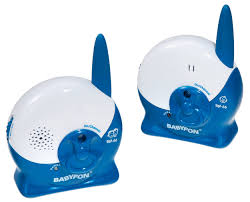
BM 66 - Baby monitor BABYFON - Free user manual and instructions
Find the device manual for free BM 66 BABYFON in PDF.



| Product type | Audio baby monitor |
| Brand | BABYFON |
| Model | BM 66 |
| Number of channels | 2 (A and B) |
| Frequency | 40.66 – 40.70 MHz |
| Outdoor range | Up to 250 meters |
| Power supply baby unit | 9V/200mA mains adapter or 4 R03 (AAA) non-rechargeable batteries |
| Power supply parent unit | 9V/200mA mains adapter, EAB 4 rechargeable battery pack (optional) or 4 R03 (AAA) batteries |
| Transmitted power | 10 mW max |
| Operating temperature | 10°C to 40°C |
| Main functions | Noise-activated automatic transmission, channel control, sensitivity adjustment, volume adjustment, operation indicator |
| Automatic digital audio control | Yes, to avoid interference |
| Low battery alarm | Audible signal and flashing indicator |
| Safety | Do not place the baby unit in the bed or playpen, minimum distance of 1 meter from the child, do not expose to water or excessive heat |
| Maintenance and cleaning | Clean with a damp cloth |
| Warranty | 12 months from date of purchase |
| Optional accessories | Babyfon EAB 4 rechargeable battery pack |
| Countries where use is authorized | Germany, France, Netherlands, Belgium, Spain, Portugal, Italy, Switzerland, Austria, Finland, Norway, Sweden, Denmark, Poland, Greece |
Frequently Asked Questions - BM 66 BABYFON
User questions about BM 66 BABYFON
0 question about this device. Answer the ones you know or ask your own.
Ask a new question about this device
Download the instructions for your Baby monitor in PDF format for free! Find your manual BM 66 - BABYFON and take your electronic device back in hand. On this page are published all the documents necessary for the use of your device. BM 66 by BABYFON.
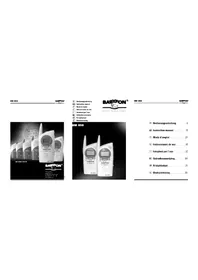
USER MANUAL BM 66 BABYFON
D Bedienungsanleitung ....4
GB Instruction manual .....10
F Mode d'emploi .....16
E Instrucciones de uso .....22
Istruzioni per l'uso .....28
NL Gebruiksaanwijzing ....34
SF N käyttöohjet 40
N Betjeningsveiledning .....46
natural_image
Simple line drawing of a medical or electrical device with a circular connector and cable, no text or symbols present.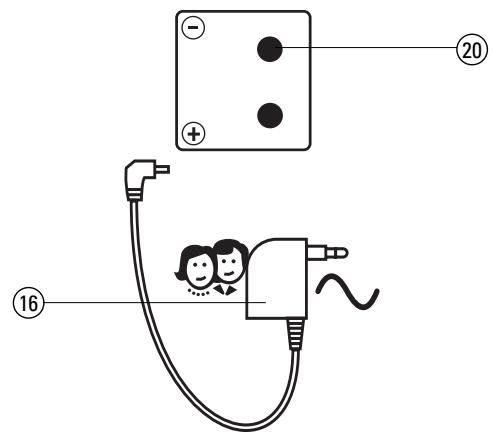
Babyfon BM 66
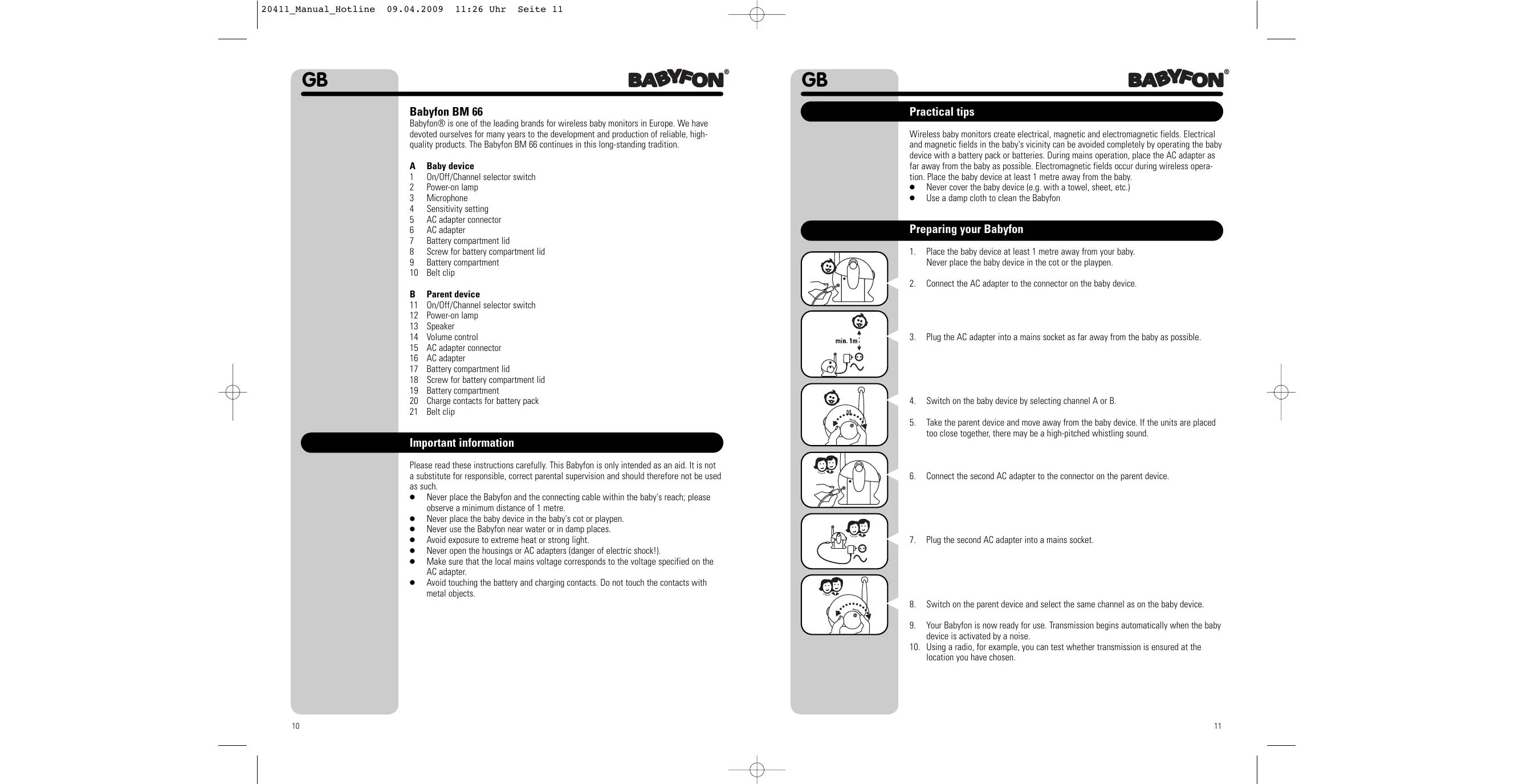
Babyfon® is one of the leading brands for wireless baby monitors in Europe. We have devoted ourselves for many years to the development and production of reliable, high-quality products. The Babyfon BM 66 continues in this long-standing tradition.
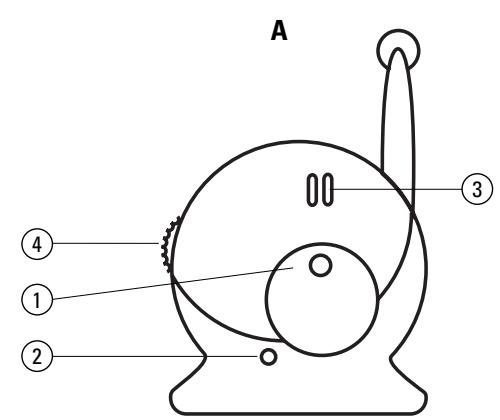
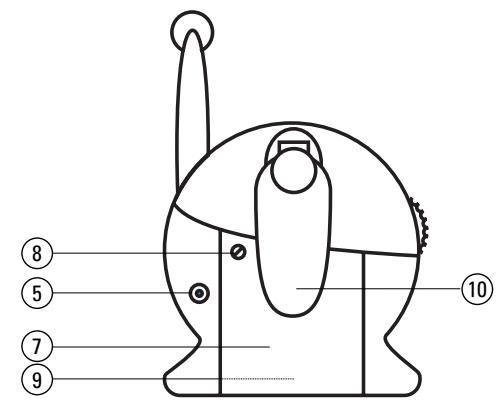
A Baby device
1 On/Off/Channel selector switch
2 Power-on lamp
3 Microphone
4 Sensitivity setting
5 AC adapter connector
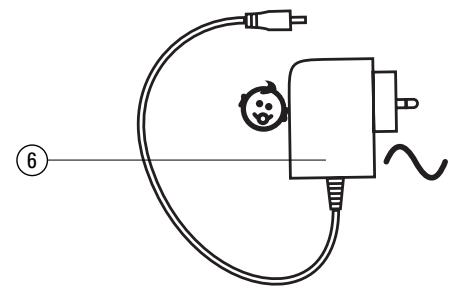
6 AC adapter
7 Battery compartment lid
8 Screw for battery compartment lid
9 Battery compartment
10 Belt clip
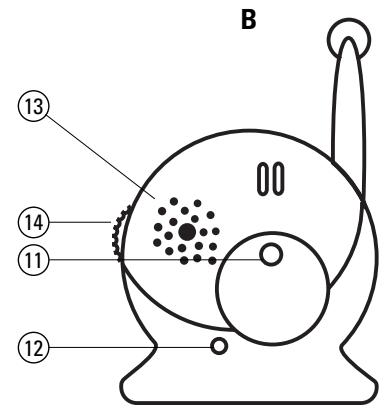
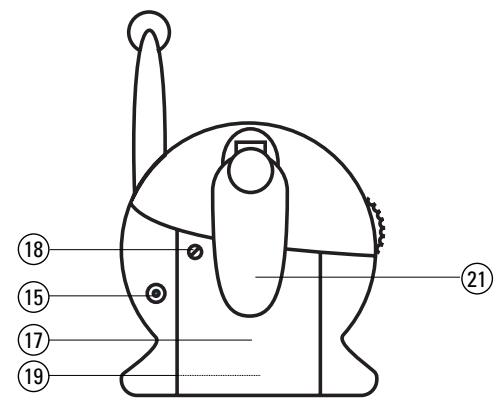
B Parent device
11 On/Off/Channel selector switch
12 Power-on lamp
13 Speaker
14 Volume control
15 AC adapter connector
16 AC adapter
17 Battery compartment lid
18 Screw for battery compartment lid
19 Battery compartment
20 Charge contacts for battery pack
21 Belt clip
Important information
Please read these instructions carefully. This Babyfon is only intended as an aid. It is not a substitute for responsible, correct parental supervision and should therefore not be used as such.
- Never place the Babyfon and the connecting cable within the baby's reach; please observe a minimum distance of 1 metre.
● Never place the baby device in the baby's cot or playpen.
● Never use the Babyfon near water or in damp places.
● Avoid exposure to extreme heat or strong light.
● Never open the housings or AC adapters (danger of electric shock!). - Make sure that the local mains voltage corresponds to the voltage specified on the AC adapter.
- Avoid touching the battery and charging contacts. Do not touch the contacts with metal objects.
Practical tips
Wireless baby monitors create electrical, magnetic and electromagnetic fields. Electrical and magnetic fields in the baby's vicinity can be avoided completely by operating the baby device with a battery pack or batteries. During mains operation, place the AC adapter as far away from the baby as possible. Electromagnetic fields occur during wireless operation. Place the baby device at least 1 metre away from the baby.
● Never cover the baby device (e.g. with a towel, sheet, etc.)
● Use a damp cloth to clean the Babyfon
Preparing your Babylon
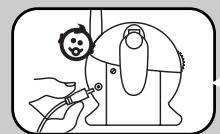
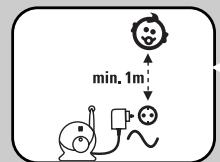
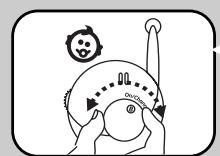

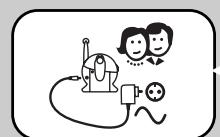
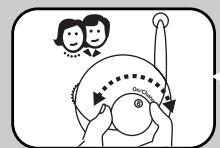
- Place the baby device at least 1 metre away from your baby. Never place the baby device in the cot or the playpen.
- Connect the AC adapter to the connector on the baby device.
- Plug the AC adapter into a mains socket as far away from the baby as possible.
- Switch on the baby device by selecting channel A or B.
- Take the parent device and move away from the baby device. If the units are placed too close together, there may be a high-pitched whistling sound.
- Connect the second AC adapter to the connector on the parent device.
- Plug the second AC adapter into a mains socket.
- Switch on the parent device and select the same channel as on the baby device.
- Your Babyfon is now ready for use. Transmission begins automatically when the baby device is activated by a noise.
- Using a radio, for example, you can test whether transmission is ensured at the location you have chosen.
Using your Babylon
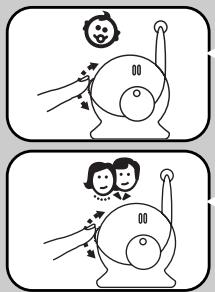
- Make sure that both devices are switched on and that the same channel is selected.
- Set the response sensitivity of the microphone on the baby device to the level you require. To begin with, we recommend a middle position that can later be adjusted as required.
- Set the volume on the parent device to the level required. If the baby device is activated by a noise in the baby's bedroom, transmission starts automatically and the power-on lamp of the parent device changes from green to red for the duration of the transmission.
Explanation of functions
Digital pilot tone / preventing interference
Besides the sounds made by the baby, the baby device also transmits an inaudible signal tone. The parent device only begins reception when this signal tone is received. This practically rules out the reception of external wireless baby monitors. In rare cases, however, interference from other wireless devices in the vicinity may occur. In the event of such interference or poor reception, switch both devices to the other channel.
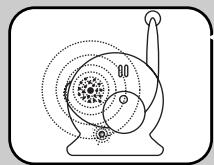
250 m range
In ideal conditions, the range of your Babyfon outdoors is approx. 250 metres. Obstacles such as walls, ceilings or large objects affect the range. The more obstacles there are between the baby and parent devices, the smaller the range becomes.
Using batteries or rechargeable battery packs
Parent device
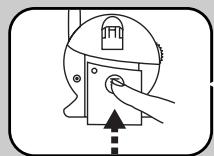
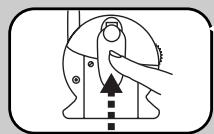
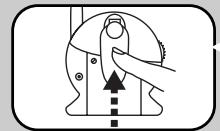
- Remove the belt clip from the device by sliding the clip downwards.
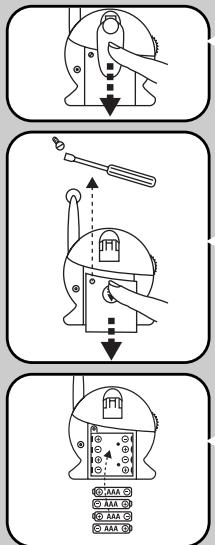
-
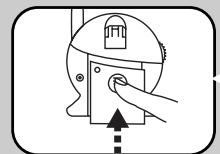
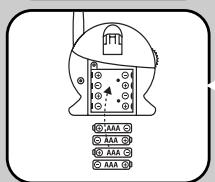
Open the battery compartment by loosening the screw on the battery compartment lid.
-
Insert four 1.5 V AAA batteries in the battery compartment, observing the correct polarity. You can use:
a. Non-rechargeable 1.5V AAA batteries
b. Standard AAA battery packs
c. Babyfon battery pack EAB 4 (available from specialist dealers)
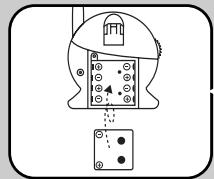
- When using standard 1.5V AAA battery packs, these must be removed from the battery compartment for charging and recharged using a standard battery pack charger.
-
When using the Babyfon battery pack EAB 4, this can be charged using the charging function integrated in the parent device. When inserting the battery pack, make sure that the polarity is correct and that the charging contact has been made in the battery compartment (see B20 on parent device).
-
Slide the battery compartment lid back on to the battery compartment and tighten the screw again. This ensures that the battery compartment cannot be opened by accident.
-
To re-attach the belt clip to the device, insert and slide upwards.
-
The charging time is approx. 15 hours.
Baby device
Proceed as you did with the parent device. However, Babyfon battery packs cannot be used and charged in the baby device.
Battery alarm
A signal tone and the flashing power-on lamp warn you as soon as the battery pack or batteries in the parent device are empty. You should then insert new batteries or recharge the battery pack.
Disposal of batteries / battery packs
Consider the environment when disposing of the batteries or battery packs, which must not be thrown away with domestic rubbish. Do not use old and new batteries or different battery types simultaneously. Remove batteries from the device if it is not to be used for a long time.
Specifications
| No. of channels: | 2 | |
| Frequency | 40.66 – 40.70 MHz | |
| Power supply: | Transmitter: | AC adapter plug 9 Volt/ 200mA or 4 AAA batteries(batteries not included) |
| Receiver: | AC adapter plug 9 Volt/ 200mA or battery pack (EAB 4 battery pack is available from specialist dealers) or 4 AAA batteries |
Transmitting power: max. 10 mW
Operating temperature: 10 to 40°C
Subject to alteration.
Babyfon® is a registered trademark of Vivanco AG, Ahrensburg
| Trouble-shooting | ||
| ProblemNo transmission / no sound | If your Babyfon BM 66 should not function properly, please proceed as follows:1. Using the following table of malfunctions, try to find and correct the fault.2. Read the corresponding section in these instructions carefully.3. Look on the Internet at www.vivanco.com to see whether the fault and its correction are described.4. Ask your dealer.5. Call the telephone hotline 01805 / 40 49 10 (€0.14/min.) for Germany (charges may vary when calling from a mobile phone). You will find contacts for Europe at www.vivanco.com. | |
| Possible cause | Solution | |
| Different channels set on both devices | Set both devices to same channel (A1/B11) | |
| Transmitter does not switch automatically to transmit | Increase response sensitivity (A4) | |
| Devices are outside range | Reduce distance between devices | |
| Transmitter is not by baby or too far away | Reduce distance of transmitter from baby, observing minimum distance of 1 metre | |
| Batteries are empty | If batteries are used, replace them | |
| Interference or another voice can be heard during transmission | Unfavourable choice of channel | Change to another channel (A1/B11) |
| Loud beeping and whistling noise | Feedback due to insufficient distance between devices | Increase distance between devices or reduce volume on receiver (B14) |
| Battery packs no longer being charged | AC adapter plug is not connected to power supply | Check connection |
| Plug of AC adapter not connected properly to device | Insert plug properly into connector socket (A5/B15) | |
| Battery packs have come to the end of their service life | Replace battery packs | |
| Babyfon transmits every tiny sound | Response sensitivity set too high | Reduce response sensitivity (A4) |
| Licence | |
| CE 0700 Ⓐ | This Vivanco FM product conforms with the European R&TTE directive for FM systems in non-harmonised frequency ranges. These systems can be sold and operated in the following countries:Germany, France, the Netherlands, Belgium, Spain, Portugal, Italy, Switzerland, Austria, |
Warranty
The warranty period is 12 months from the date of purchase. Please contact your specialist dealer or
Vivanco Service
Ewige Weide 17,
D-22926 Ahrensburg/Germany
A copy of the purchase receipt must be included.
Babyfon BM 66
D-22926 Ahrensburg/Germany
D-22926 Ahrensburg/Germany
D-22926 Ahrensburg/Germany
natural_image
Illustration of a hand using a tool to adjust a mechanical component (no text or symbols)- Avaa paristolokero irrottamalla paristolokeron kannen ruuvi.
D-22926 Ahrensburg/Germany
Mottaker
D-22926 Ahrensburg/Germany
EC-Declaration of Conformity
Hersteller / Manufacturer :
Adresse / Address:
VIVANCO GmbH
Ewige Weide 15
22926 Ahrensburg / Germany
complies with the essential requirements of Article 3 of the R&TTE 1999/5/EC Directive, if used for its intended use and that the following standards has been applied:
Health (Article 3.1.a of the R&TTE Directive)
Electromagnetic compatibility (Article 3.1.b of the R&TTE Directive)
The Ground Truth image displays a single, solid horizontal line. According to Rule 2 (UNDERSCORE & LINE RULES), this is a stylistic or background line, not a placeholder underscore. Therefore, the OCR result must ignore it. The provided OCR content is "____", which consists of four underscores. This is an incorrect interpretation of the line as a placeholder, violating the rule that stylistic lines must be ignored. The OCR has hallucinated text (underscores) where none should exist, violating the rule to ignore such lines. Hence, the OCR result is inconsistent with the Ground Truth.
Ausgabe
issue
efficient use of the radio frequency spectrum (Article 3.2 of the R&TTE Directive)
(Place and date of the declaration of conformity)



- Babyfon BM 66
- A Baby device
- B Parent device
- Important information
- Practical tips
- Preparing your Babylon
- Using your Babylon
- Explanation of functions
- Digital pilot tone / preventing interference
- m range
- Using batteries or rechargeable battery packs
- Parent device
- Baby device
- Battery alarm
- Disposal of batteries / battery packs
- Warranty
- Mottaker
- EC-Declaration of Conformity
Brand : BABYFON
Model : BM 66
Category : Baby monitor