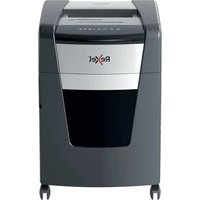
Optimum AutoFeed+ 300X - Shredder REXEL - Free user manual and instructions
Find the device manual for free Optimum AutoFeed+ 300X REXEL in PDF.

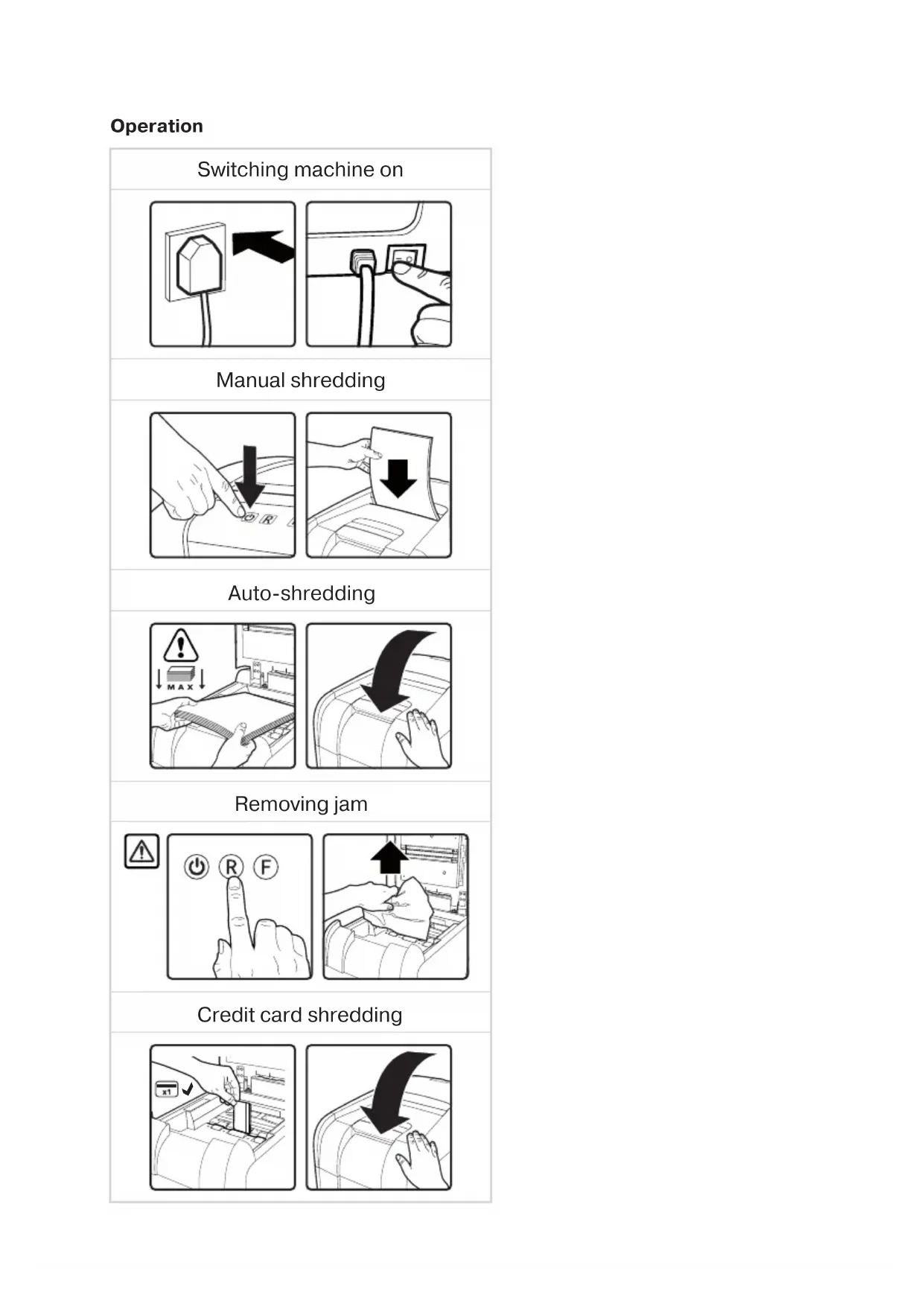


| Brand | Rexel |
| Model | Optimum AutoFeed+ 300X |
| Product type | Document shredder |
| Auto-feed capacity | 300 sheets (80 g/m²) |
| Security level | Cross-cut (P-4) |
| Input width | 220 mm (A4) |
| Feed type | Automatic (tray) and manual (slot) |
| Power supply | 230 V, 50 Hz |
| Dimensions (W x D x H) | 45 x 35 x 60 cm |
| Weight | 20 kg |
| Bin capacity | 30 liters |
| Operating cycle | Continuous with automatic cooling |
| Indicator lights | Ready, overheating, overload/jam, bin full, door open |
| Locking device | 4-digit code lock on the auto-feed cover |
| Safety | Automatic stop, overload protection, door-open stop |
| Lubrication | Rexel lubricating sheets (models 2101948 & 2101949) |
| Maintenance | Clean rollers and IR sensor with a dry cloth |
| Spare parts | Removable cutting head (for 45X models), optional plastic bags |
| Repairability | Repairable device, recommended service every 6 to 12 months by an authorized repairer |
| Warranty | 2 years |
| Destroyable materials | Paper, staples (max 26/6), paper clips (max 32 mm) |
| Non-destroyable materials | CD/DVD, plastic, bound documents, adhesive labels |
| Noise | 60 dB (estimated) |
| Power consumption | 500 W (estimated) |
Frequently Asked Questions - Optimum AutoFeed+ 300X REXEL
User questions about Optimum AutoFeed+ 300X REXEL
0 question about this device. Answer the ones you know or ask your own.
Ask a new question about this device
Download the instructions for your Shredder in PDF format for free! Find your manual Optimum AutoFeed+ 300X - REXEL and take your electronic device back in hand. On this page are published all the documents necessary for the use of your device. Optimum AutoFeed+ 300X by REXEL.
USER MANUAL Optimum AutoFeed+ 300X REXEL
Optimum AutoFeed+ 750M
start h
starten sie hier démarrez ici iniziare qui empieza aqui comece aqui begin hier start her
start her
Optimum AutoFeed+ 750M
Specifications
| Model Rexel Sheets Auto Cut Level Sheets | Manual | Bin size Amperage | |||
| Optimum AutoFeed+ 45X 45 P4 6 20 | |||||
| Optimum AutoFeed+ 50X 50 P4 6 20 | |||||
| Optimum AutoFeed+ 90X | 90 | P4 | 8 | 34 | |
| Optimum AutoFeed+ 100X 100 P4 8 34 | |||||
| Optimum AutoFeed+ 100M 100 P5 6 34 | |||||
| Optimum AutoFeed+ 130X 130 P4 8 44 | |||||
| Optimum AutoFeed+ 130M 130 P5 6 44 | |||||
| Optimum AutoFeed+ 150X | 150 P4 8 44 | ||||
| Optimum AutoFeed+ 150M 150 P5 6 44 | |||||
| Optimum AutoFeed+ 225X | 225 | P4 | 10 | 60 | |
| Optimum AutoFeed+ 225M 225 | P5 8 60 | ||||
| Optimum AutoFeed+ 300X | 300 | P4 | 10 | 60 | |
| Optimum AutoFeed+ 300M 300 | P5 8 60 | ||||
| Optimum AutoFeed+ 600X | 600 | P4 | 15 | 110 | |
| Optimum AutoFeed+ 600M | 600 | P5 | 10 | 110 | |
| Optimum AutoFeed+ 750X | 750 | P4 | 20 | 140 | |
| Optimum AutoFeed+ 750M | 750 | P5 | 15 | 140 | |
220-240V AC / 50-60Hz

To register and activate the warranty go to www.rexeleurope.com/register

C

Operation
Switching machine on
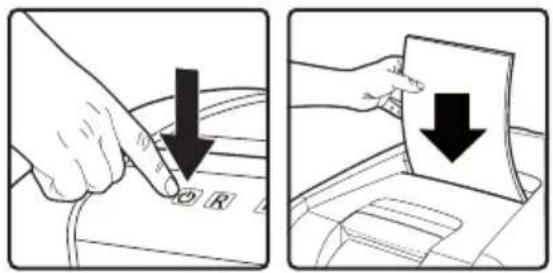
Manual shredding
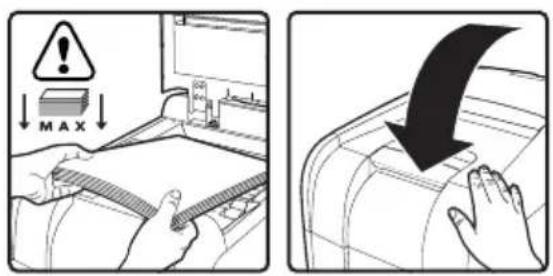
Auto-shredding
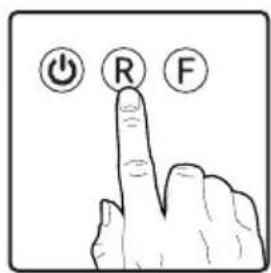
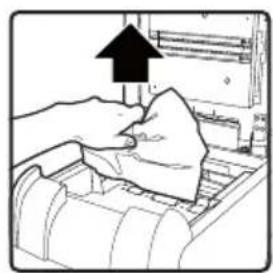
Removing jam

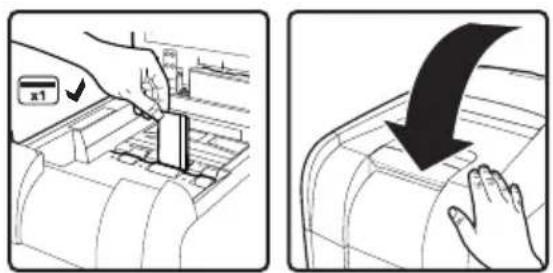
Credit card shredding

Please read and keep these important safety instructions

For a full copy of the operating instructions, hints & tips and troubleshooting guide, please visit www.rexeleurope.com/support or www.leitz.com

The following symbol which is found on the product indicates you could be seriously hurt or killed if you open the machine. DO NOT OPEN.

WARNING
Electrical shock hazard. Do not open. No user serviceable parts inside. Refer servicing to qualified service personnel.

Warning: Do not touch cutters, beware of sharp edges.

Warning: Moving parts hazard, keep hands away from rollers whilst in operation.
- Please read all the safety information and the instructions; the manufacturer is not liable for cases of material damage or personal injury caused by incorrect handling or non-compliance with the safety instructions. In such cases, the warranty will be voided.
- Only use the unit for its intended purpose.
- The unit must only be connected to a supply voltage corresponding to the electrical rating shown on the unit.
- Unit should be connected to a socket outlet near the equipment that is easily accessible.
- Do not connect multiple adaptors or use with an extension cable.
- Do not attempt to service or repair the unit yourself.
- If recycling, separate paper and credit card shreds.
- Do not use this unit if the cable or plug have been damaged.
- Care should be taken when moving equipment to avoid any unlevelled surfaces.
- The device is intended for use indoors. Never use outdoors.
- Keep the device away from moisture.
- Be vigilant at all times, and always be careful what you are doing. Do not use electrical equipment if you are lacking in concentration or awareness, or are under the influence of drugs, alcohol or medication. Even a moment of inattentiveness can lead to serious injuries when using electrical equipment.
- Do not attempt to open, modify or repair the device. Do not drop, puncture, break or expose to high pressure.
- Alterations to the device and technical modifications are not permitted.
- Check the device and cable (and if applicable, the adapter) for any damage before use. If there is any visible damage, a strong odour, or excessive overheating of components, unplug all the components immediately and stop using the device.
- Shredder must be disconnected from power source if not used for an extended period of time.
- Do not use spray cleaners or spray lubricants as these may present a risk of flash fire.
- Never bypass the safety interlock (strictly forbidden and dangerous, especially when unit is connected to a power source).
- Do not lean on the shredder door; this may damage the door and will not be covered by your warranty.
- Failure to follow these instructions could result in damage/injury and will invalidate your guarantee.
Warning symbols

Warning symbols

Keep loose jewellery clear

Ties and loose clothing hazard

Keep long hair clear

Do not reach into opening

This equipment is not intended for use by children

No aerosols. Do not use spray cleaners or lubricants, as these may present a risk of flash fire.

Max sheet capacity

No CDs

No heavy duty staples above 26mm

Warning: moving parts
Hopper filling symbols

Maximum sheet level

Warning: no heavy duty staples above 26mm

Warning: no more than 25 sheets stapled together

Warning: no bound documents

Warning: no multiple folded sheets

Warning: no paperclips above 32mm

Warning: no plastic sheets

Warning: no unopened mail

Warning: no magazines

Warning: no paper or card above 200gsm
ators
Icon Type Models Button / indication & action
| Control ButtonsStatus | All Models300 sheets upwards | Auto-start and stand-by button (press one time) | |
| Manual reverse button (hold down) | |||
| Manual forward run button (hold down) | |||
| Ready indication | |||
| Over heating indication (Allow to cool) | |||
| Overloaded / Jam indication (Reduce sheet / remove jam) | |||
| Bin full indication (open door (45X lift off head) and empty the bin) | |||
| Door open or shredder head removed indication (close door firmly or replace head on bin) | |||
| Hopper locked indication (unlock by entering 4 digit combination) | |||
| 1 | Hooper Locking combination buttons | ||
| 2 | |||
| 3 | |||
| 4 | |||
Operation
- Unpack the product.
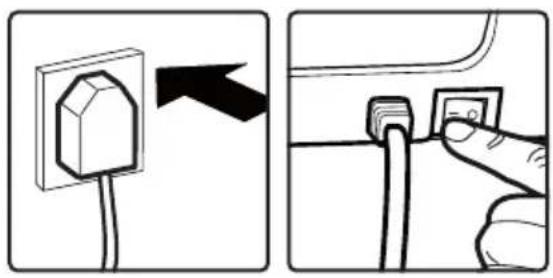
- Connect the shredder to mains supply.
- Ensure the ON/OFF button on the back of the machine is in the ON position, which will illuminate the blue standby symbol
- To load the shredder, simply lift the loading door handle to open the loading door and insert documents. You can open the door further to 90 degrees for easier access if required. Load up to MAX sheets at a time into the feed chamber. Do not fill above the MAX level, this could damage the shredder.
- The shredder will start the shredding cycle automatically ONLY after closing the loading door.
If there is still paper in the AutoFeed chamber after first attempt, open and re-close the paper loading door a second time.
Attention: If required you can now lock the loading door by entering a 4 digit code (see Locking the Paper Loading Door section).
- If you only have a few sheets to shred, you can use the manual feed slot, provided the auto feed chamber is empty.
- Insert paper to be shredded into the feed area. The shredder will detect the paper and start automatically.
- If the shredder is left in auto mode for more than 2 minutes without being used, the shredder will automatically turn back to sleep mode in order to save power.
- The shredder will automatically 'wake up' from sleep mode when paper is inserted into the shred mouth or you open the loading door. There is no need to press the Auto button
Locking the paper loading door
For additional security the paper loading door can be locked during the shredding of confidential material.
To lock shredder:
- Place documents in tray. Close paper loading door.
- Press any 4 digits. REMEMBER YOUR CODE!
Shredder unlocks automatically when:
- 4 digit code is re-entered.
- Shredding is complete.
- Shredder is inactive for 30 minutes (but documents remain in tray)
Bin full
The shredder will not function when the bin is full and the bin full symbol illuminated.
You should empty the bin.
- Pull open the bin slowly to empty.
- Push the empty bin back into place and press the auto button to resume shredding.
In the 45X the shredder head will be lifted off when the bin is full and this will stop the shredder. Remove the head, empty the bin and place the head back on ensuring it is the correct way around to continue.
The 600 or 750 sheet machines can be used with plastic bags (2020175B)
Over heating
If the AutoFeed shredder is used continuously without pausing, it may overheat and the cool down indicator will flash red. Please allow the shredder to cool down. When the shredder is ready to be used the thermometer symbol will no longer illuminate. If the shredder needs to cool down while shredding, no action is needed. The shredder will automatically restart shredding paper once it has cooled down after periods of continuous use. All you need to do is ensure paper is loaded into the chamber and the bin is empty when the machine is cooling down.
Optimum AutoFeed shredding capability
CAN shred the following:

- Stapled paper, 25mm within the corner
26/6 and 24/6 or smaller staples
Small sized paper

- Paperclipped paper, 25mm within the corner
- Capable of shredding small/medium paperclips (max. wire thickness = 0.9mm )
80/100gsm paper

A3 folded in half max. 2 sheets
300 sheets
80 gsm paper
-A4-210mm×297mm
-A5-148mm×210mm
- A3 single sheet folded in half to make A4
CAN shred (through the manual feed slot):

Thick paper or card < 200gsm

Glossy paper or a sheet covered with print on both sides.
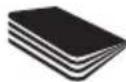
Multiple folded sheets (A3 sheets folded in half).
CANNOT shred the following:

Heavy duty staples. Check the staple leg length is not greater than 6mm.

Large clips. Check the length of the paperclip is not longer than 32mm

Plastic sheets, laminated documents, plastic folders.

Bulldog clips

Bound documents

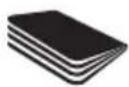
Magazines or other documents bound by multiple staples or clips.

Adhesive labels.


No aerosols

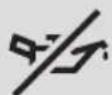
No Oil, only oil sheets

CDs & DVDs
Lubrication of the shredder
Only use Rexel Oil Sheets (2101948 & 2101949) to lubricate. ACCO Brands accepts no liability for product performance or safety when other types of lubricants are used on any part(s) of this machine. Rexel recommend using an oil sheet after the bin has been emptied three times (and every three bin emptying after this). Insert the oil sheet into the manual feed slot and NOT in the auto-feed chamber. Using an oil sheet in the auto-feed chamber will contaminate the feed rollers preventing the auto-feed mechanism shredding. Follow the maintenance instructions if the rollers become contaminated.
Maintenance
The rollers on the auto-feed mechanism may become dirty over time, please wipe clean with a dry cloth to maintain maximum product performance.
The auto-start infrared sensor, located in the paper feed entry slot, can occasionally become covered in paper-dust causing the shredder to run despite no paper being fed into the machine. Switch the shredder off at the rear of the machine and carefully clean the sensor using a cotton-swab.
Serviceable machines
(for 300 sheet and above) We recommend these machines are serviced every 6 to 12 months by a Rexel service engineer - see www.rexeleurope.com/ support for enquiries about maintenance contracts.
Waste Electrical and Electronic Equipment (WEEE)
- At the end of its useful life, your product is considered to be WEEE. As such, it is important to note that WEEE is not to be disposed of as unsorted municipal waste. It is to be collected separately such that it can be disassembled so its components and materials can be recycled, re-used, and recovered (burned for energy content in the production of electricity).
- Public collection points have been set up by municipalities for the collection of WEEE, free of charge to you.
- Please return your WEEE to the collection facility nearest your home or office.
- If you have difficulty locating a collection facility, the retailer that sold you the product should accept your WEEE.
- If you are no longer in contact with your retailer, please contact ACCO for assistance with this matter.
Recycling of WEEE is geared toward protecting the environment, protecting human health, preserving raw materials, improving sustainable development, and ensuring a better supply of commodities in the European Union. This will be achieved by retrieving valuable secondary raw materials and reducing the disposal of waste. You can contribute to the success of these goals by returning your WEEE to a collection facility. - Your product is marked with the WEEE symbol (wheelie bin with an X through it). This symbol is to inform you that the WEEE is not to be disposed of as unsorted municipal waste.
Guarantee
- Operation of this machine is guaranteed for two years within the date of purchase, subject to normal use. Within the guarantee period, ACCO Brands Europe will at its own discretion either repair or replace the defective machine free of charge. Defects due to misuse or use for inappropriate purposes are not covered under the guarantee.
- Proof of date of purchase will be required. Repairs or alterations made by persons not authorised by ACCO Brands Europe will invalidate the guarantee. It is our aim to ensure that our products perform to the specifications stated. This guarantee does not affect the legal rights which consumers have under applicable national legislation governing sale of goods.
- This guarantee does not apply to Australian customers—see warranty on page 104.

For a full copy of the operating instructions, hints
& tips and troubleshooting guide, please visit
www.rexeleurope.com/support or www.leitz.com

www.rexeleurope.com/support of www.leitz.com

ADVARSEL: Moving parts hazard, keep hands away from rollers whilst in operation.
www.rexeleurope.com/support ar www.leitz.com

Toliau pateiktas simbolis, esantis ant produkto, nurodo, kad jei atidarya-site mašina, galite rimtai susižeisti ar Žuti. NEATIDARYTI.

ASPEJI
Elektros smugio pavojus.
Neatidaryti, Vduje nera jokji
daliq, kurias naudotojas gali
prižirutech. Technige prižură turi
aliki kvalifikuoti darbuotcjai.

www.rexeleurope.com/support a6o www.leitz.com

HabeHeHn dai CmBol, kHn HaneCHo Ha Bpi6, 03NaHac, 10 BiDkPnuBaHHa npaPaTa MoKe np3BeCTn DO TjXkoTpaBMn a6o IetaIbHorO BNnAky.
HE BIDIKPUBATN!

OBEPEXHO! HBeBnEeKpIgKHeHnEeKpTWMHn CytmMn. He BxqHbMn? YcpePnAna hTa eRnMaTean, OoCIOyOyOyOyOyOyOyOyOyOyOyOyOyOyOyOyOyOyOyOyOyOyOyOyOyOyOyOyOyOyOyOyOyOyOyOyOyOyOyOyOyOyOyOyOyOyOyOyOyOyOy

NonepdkeHH: He TopkaTecpcpiKuHx qactnH; cTepeKITbcra roctpnx KpaIB.

PonepeJxHHe: He6e3neKa BiD pyxomnx qactnH. Pid qac po60Tu npictpoTO TpmaTe pykn Noadani BiD BANKIB.
O3HaONMTec 3 Ycima BiDOMOCTmnpo 6e3neky iHCTpyKUIMM; KOMNAHIN-BiPOOBHNk HE BIDNObIaE 3a MATEPIJIbHy uKOJy Ta TpaBMn IIOeI, IO CTaIIHACJIckOM HENpABUNBHOrO NOBOJKeHH3 OblaADHNNM abo HEBNKOHANH INCTpyKuI 13 6e3neKn. Ucbomy pa3I dio rapaHTI bye aHUYbOBAHO.
BukopocToByTe npntpi BnKIOHNO 3a npn3HaHeHHM.
PiEHyTee npctpiBnHNOHO Do TaKOro DKepeJ aENEKTPNHO CTpyM, HAnpyra koro BIDIOBidae eNEKTPNHm npamETpam,HaHeceHIM Ha pntCTpi.
PiEHyTe ue npctpi do eektpnHOI po3eTKU PO3aOByTc npraIdo koiJIerKO dCTATN.
He nieIeHnyTe ue oBnaHaHHa do po3raJyKya afo xdo uHypa-noDBxByBa.
He HamaraiTeCh 06ClyroByBAtn nn peMoHTyBatn ne npunctpi camoCTiHo.
- BTOPNHHOI nepepo6Kn BiDnIITb 06pi3Kn nanepy BiO 6p13KIB KpeuTHnx KapT.
3a6bopnoHReTcBcKOpNCTyBaTncnPnCtpoEm,KuO HOro shHyp a60 Bnky nookdoJeHO.
-5ydbTe 06epeKHMn NiD Hac nepemieHnHnO bOro O6naHaHHn,IO6 He HATpanNTn Ha HepiHi NOBepxHi Na nDnO3i.
- Cen npncpti npna3aueho dny EKcnnyatauBnKIOHOBcepeHH npmiueHH. YXoHOMy pa3i He KOpNCyTEcR Hm 3a MeKaMn npmiueh.
- BépèkītB npɪcṭpii BiD BOIOrn.
3abxdi 6ydbTe nIbHi o6epexHi. He KopnctuTecra eektpnHm
OblaHaHHM, kkoHe MaTe DOCTaTHIX 3HaHb npo HbOrO, He
MOKeTe 3OcepeDITNCA 60nepeSyBaTe Ni dIOHO HApKOTNHIX
3acobib, ankorolIO uNikB. Kaio nd ac EKnlyataui eekTPnHoro
OoblaHHBA Bn BTPATiMe yBary bdoa HMaNTb, Le MoKe npn3BeCTn
DO cepno3Hnx iUncdeHTIB I TpaBM.
- He HamaraiTeCeB iDHHaTn pncTpii, 3MiHOBaTH NOro KOHCTpyKciu Hn peMOHTyBaTH anapat. BepexiTb npncTpii BiN naDiHH, npOsbAHnro OTBOpBiy hMy, MexAHHIX NOLOMOK i DII BUCOKORO TNCKy.
3a60pOHeHO MoiNphiKyBaTu KOHCTpyKuio npnctpoIO Ta BHocHTn do HbOro TEXHiHi 3MiHN.
- Ipeed BUKOPINCTAHNIM pnpCTPOI nepeBipTe IHO CTAH i CTAH KABENIO (ta nepeXJINHKA, KIAO 3ACTOCOBYETCB). 3A HANBOCTI ydb-jnIX BUNIMIX O3HAK NOIKOJXeHb, CINBHO 3Anaxy YHADMIPHO RnepePBAHARKOMNOHEHTB HeaIRi BOID'HNAHTE BCIXOMNOHEHTBI ENEKTPNUHOI MEPEXI npINHITb BUKOPINCTAHNII pnpCTPOI.
KuO noPi6HOBa nanepy He BnKOpNCTOBcTbC npOTaROM TpBaIoro yacy, Ioro Heo6xIDHO BiDKnIOHTu BiD DxpePena KINBHeHH.
- He BnKOpNCToBMyTe aepo30JIbHI OOnIyBaHi a60 aepo30JIbHI MaCTnla, OCKJIbK Ue MoKE CnpNCHHTn Pn3NK pANTBOi NOXExi.
- YxodHompyaie He 06xOdbte 3anobixhe ABO6KyBaHn. Lc cybopo 3abopoeHO noc6blbo Hebe3neHNO, kUo npncptpi niKIOueHO do DkepeJXAIBeHHN.
He cnnpaItecHa nBepaTa noDpi6HIObAa panepy, ockInku ce MOKe np3BeCTn DO N0UKOJxEHn DBePrt, Ha RKe He NoUINPOETbcR rapaHTi.
HeDOTPMAHH LIX IHCTPYKII MOXe npu3BcTn DO NIOUKOJXEHNA MaHa Ta (a60) TpaBMyBaHHNIODei, a TAOKO Do pnpuINHeHHa II rapaHTI.
PonepejkyBaJIbHi cIMBOJIN

PonepeJxUyBaJIbHi CmMbOJIu

YHkaIe nOtpanIIHH HOBelipHX Bnpo6iBdo npictpo!
YnkaTe NOTpanHnKpaBatKn iHux eJeMeHTB Odary, kIe HJIbHO npnlaTb,do npncToIO!
YHnKaIeTne notpannaHHIOBROO BOLOCCo IO npncToIO!

He 3acobyIte pykn IIO npimMaIbHoro OTbOpY!

UeobnaDHaHHHe np3HaeHo DnBnKOpNCTaHH
He po3nnnoite aepo30ni no6n3y uboro npctpo! He BIKOPNCTOByTE aepo30bHI OHUYBaHI aoepo30blH MACTIN, OCKIbnK Ie MOKe CnpnHHTn pAnk paTTOBOI NOEXKi.

PponyckHa3daTHicTb

3a6b0pOHeNo yTuNl3yBaTn KOMnAkr-TnCKn!
YHnKaTe NOTpAnJIHHMaCnBHX CkO6 po3Mipom nOHa, 26 MM

PonepeJxekHHpyXOMiYactHH
PonepeJxUyBaJIbHi cIIMBOJn Ha BiDcIKy aBTOMaTNUHOrO NOdABAHN

P03HaKa MaKcImaJIbHOr pIBHra apKyuWiB

PonepeJxHn: yHnKaIe IOTpanJIHHMaCnBHX CkO6 po3MpOM IOHaD 26 MM

PonepeJxHHe 6IbIe 25 apkyuib,ckpinJeHnx pa3OM

PonepeJxehnHe npDip6HouTe 3uTI DOKymEnTu

PonepeJxehn: He npdi6HouTe pIacTKOBI JIcTNI

PonepeJxehnHe noDi6HIOTe noToby KOPECNOHDeHIOB 3aaneuataHnx KOHBepTax

PonepeJxehnHe noDi6HouTe xypHaIu
PonepeJxehnHe nopiHIOte apkyni nanepy a60 kapToHy 3i uInbHicTIO nHaD 200 r/M2
3haqok TmN Modeni Khonka/INDKaTOp i dia
| Kнокки Керуаннayaйдз | Yci мodyп | Кнокka abTomatунно ручу вожиму очікувань (натисни один pa3) |
| Кнокka ручно руху у зворотому наразмky (натисни i утprimуиte) | ||
| Кнокka ручно падавань визред (натисни i утprimуиte) | ||
| Индануарл Iндануарл Iндануарл Iндануарл Iндануарл Iндануарл Iндануарл Iндануарл Iндануарл Iндануарл Iндануарл Iндануарл Iндануарл Iндануарл Iндануарл Iнemannацю iЗ 4цфр) | ||
| Мodyпни 300 arkuшов iбише | Индануарл Iндануарл Iндануарл Iндануарл Iндануарл Iндануарл Iндануарл Iндануарл Iндануарл Iндануарл Iндануарл Iндануарл Iндануарл Iндануарл 1 2 3 4 |
Eknpnyataia
1.Po3nakyuTepnpucTpii.
2.Пд'едаутne noDiPbHOBaun anepydo eJekTpomepeki.
3.YctaHOBt BmHKaay,po3TaWOBAHn Ha 3aHnI NaHeI npncTPOIO,y nOLOXeHHN ON (yBIMKHeHO).PiCJzBOr iHNkATOp NOBnHE HEnepepBHO CBITNTIC CNHIM CBITJOM.
4. 5063aabaHTaxnTnoDpi6HOBaHnanepy, npocTo nIdHimItb pykyHaDBepraTx BiDCiKy 3aabaHTaxeHHra,BIDHNITb DBepraTa NOMICTb DOKymEnTH BcepeDnHy.3a Heo6xHocTi DBepraTa MoXHa BiDHNITn Ha 90 rpaDyCIB, 06bnonerHNTn DoCTyn Do BiDCiKy. ODoHocHo Do BiDCiKy ABTomTuHoro
IIOaBaHHa MOxHa 3aBaHTaxyBaTn TaKy KJIbKlCtB
apKywib nanepy, 0 He nepeBnuyBaTmMe MaKcImaJIbHy.
3abaHTaxeHn MaTepiAJI MaE 6yTN He BnUe No3HaUKN MAX,
iHaKHe NoPi6HOBaH naepy MoKe BnTn 3 naNy.
- NoppiHIOBau nanepy aTOMaTHo po3nOHe zIKNo npip6HeHHr TlIbKN ToDi, KOIN DBepraTa BiDcKiY 3aBaHTaxeHH6 Bye 3aunHeHO.
KIO nIcI npoi cnpoN y BiDckiy ABToMaTHHORO NOdaBHaHn panepy 3aIiWntbCn nanip, BiHHiTb i 3aHHiTb DBepra TbiDckiy 3aBaHTaxeHHn panepy ue pa3.
Ybara! Tenep 3a Heo6xIDHOCTI MoXHa 3a6bLOkyBaTN DBepeyTa BiDCiKy 3aBAHTaxeHHRA, BBIBuN 4-3HaHm KOd (INB. pO3diJ «5nOKyBaHH DaBPcT BiDCiKy 3aBAHTaxeHHra napey').
- 鄭卍 ΘeOe6xIDH NOIpi6HHTN Iiue DeeklbKa apKyuB, MoXHaCKOpNCtATnCRA npMmaHbHM OTBOPOM DIA NOdaBaHHBpyHOMypeXMMI3aYMOBn,LIO BicIK aBTOMaTHHOrNOdaBaHHN nopoxHi.
- BCTABTE apkyu i nanepy, 0o nipnraIaIb noDpi6HeHHIO, OO TBOpy dIy noDaui BpyHOMy peKIMi. Ioppi6HOBaB uRABNTb nanip i BBIMKHETbcra ABTomATUHO.
- RaIIO noDiPi6HIOBaHnapepynepe6yBaB aBtOMaTHHOMy peKIMIOBWe 2XBUNH,ane He BIKOpNCTOByEbCra, BiH aTOMaTHUHOpeeJe dopeKIMy OkiYBaHHaJIe eHepro3BepeKehnHa.
- NoppiHIOBau nanepy aTOMaTHNO BHXoDnTb i3 peKIMy OiKYBaHH, KOIN DO rOpIOBHN BCTaBHeHO napanip a60 BiuHnIOTBCa IBePcTa BAICky 3aBaHTaKeHH. KOnkY aBTOMaTHHO rNcKyHaTNCaTN He NOTpioHO.
KoHTeHep 3aNoBHeHo Do KpaIO
KoHTeHep 3aONBHeHO Do KpaIO Ta CBITbCRA CMBOJI 3aONBHeHHa KOHTeHepa HOpDipHOBaH nanepy He yHKIOHYBaTME.
Heo6xioHcnpoxkntKoHTeHep.
- NobilbHO BNTaHITb KOHTeHep, kKn CnId CNOpOXHHTN.
3acyhTe npOxHn KOHTeHep Ha Mice HaTNCITb KHONky abTomatuHoro nycky, 06 npoDobKntu po60Ty.
Ha moJIe 45X y pa3i 3aONBHeHH KONTeHepa BepxH YAcTnHa
noDi6HIObAa nanepy noHne NiIMMaTncra HAD Hm. Lc 3ynHHTb
po6Otu noDi6HIObAa nanepy. 3HIMITb BepxHIO YaCTnHy,
CnopoXHiKoTHeHep i BCTaHObit BepxHIO YaCTnHy Ha MicIe,
pepeKoHaBUnCb y II npabunblHoi opieHTaII.
JIHCTOBIMaMHnpo3mipom600a6o750MOxHa
BVKOPNCTOByBaTu 3 NOJIeTNIIEHOBUM NaKeTaMn (2020175B)
PpoaykTNBHiCTb noDi6HeHHa
Optimum AutoFeed MOXE noDipi6HIOBaTu:

3HNTn npip (kso c06a po3TaOByeTbcr He daJI, HIX 3a25 MM BiKyTa).
Cko6n 26/6 ta 24/6 a6o dpi6hii.
- Panip HeBENIKORo po3mipy (po3TaIOWbYETbcnNo ceHTpy).

Apkyui nanepy 3i ckpinkamn, kkuo ckpinka po3taowbaHa Ha biDCTani He 6ilbue 25 MM Bi KyTa (MoJeIb 300M: nopi6HeHHr TINbKN uepe3 OTBip IInaBaHHra B pyHOMy peKmI).
- Ckpinkn MaIoro/cepeHbOro po3mipy Ira nanepy (MaKc. TOBUNHa npOty 0,9 MM).
- Panip 3i uiJIbHicTIO > 80/100 r/M2 (TIINbKN uepe3 OTBIP nI NOdaBaHHN BpyHOMy peKIMJ).

- Panip φopMaTy A3, cklaJeHn HABniI (MaKc. 2 apKywi).
- 300 apkyuib.
- Panip 3i uiJIbHicHTO 80 r/M2:
-φopMaA4—210×297MM;
-ΦopMaA5—148×210MM; - nooHnOki apkyu foOpMaTy A3, cknadehi HABnI dny OtpmaHHa foOpMaTy A4.
Optimum AutoFeed MOXE noopri6HOBaTu (Yepe3 OTBip Ira noDaBaHHa B pyHOMy pexmi):

THICK PAPER
Lynkn napi np a6o kaptkn 3i unbHicTIO do 200 r/KB.M.

GLOSSY SHEETS
TnueBn npip a60 apkyi3dpykoBaHMM nokpTTm 3 060x60kib.

Kibka 3irHyntx apkyuib nanepy (nanip fopMaTy A3, cnadaenn Habnin).
Optimum AutoFeed HE MOXE noDi6HOBaTu:

MacnBhi cko6n. IpekeoHaHTecra, 10 DOBXHnHa HIXKn cKO6n He nepeBnue 6 MM.

Benvki ckpinKn nna nepy.
IpekeoHaTeCn, 10 DOBXnHa
ckpinKn nna nepy He
nepeBnUe 32 MM

JIaCTNKOBI JNCTN,JIaMiHOBaHI DOKyMeHTN,JIaCTNKOBI TEKN.

3atnckaydian nanepy.

3wntiDOKyMeHTN.

Kyphan ta iHui
DOKyMeHTn, kKi
3UNBaJIncr 3
BVKOpNCTaHHm 6araTbox
CKo6 a6o ckpinok.

HaKneiKn.


He po3nIIOJIte aepo30JI no6JN3y cboI npIcTpoI!

Hi macna, tiNbkn Macnhi JNCTU

Dnckn CD ta DVD.
Neperpibannn
Kuo noopip6HOBa npepy AutoFeed henepepbno npaoe BnpoDBx Tpmbanoro yacy, BiH moKe neperpiTcra, Toi iNkAtoP he06xIDHOCTO oxoJoxHH 6nMaTHme cepBOHM KOIbOpom OouekaiTe, nokn noDpi6HOBa npepy oxoIOHTBCr. KOn noDpi6HOBa npepy bye roTOBni DO npoOBeHH EKnlyataii, IHnkAtoP neperpiBaHH / Heo6xIDHOCTO oxoJoxHH 3rache. Raio niD qac uNKly NOpi6HeHH 3HaO6NTBCr OxonoDTNn oDpi6HOBaH npepy, He notpi6HO BVKOHyBaTN XoDHNX dI. UoHNO noDpi6HOBa DOCTaTHbOIO MipoO OxoJOnTBcR, BIh ABTomATuHNO pOdoBXNTb NOpi6HeHH naepy. NOK npncTpiOxOLOJkyETcb, DocTaTHbO Imue nepeKoHaTNC B TOMY, 10 nanip 3aBaHTXeHo Do Bicciy ABTomATuHOrO nOdaBAHH, a KOHTeHep npoxHi.
3mauYBaHHn oDipi6HIOBau nanepy
BnKOpNCToByIe TIN3MaUyBaHH TINbKc CneuianbHi apKyui
TIN3MaUyBaHH Rexel (2101948 i 2101949). Kopnpaiaj ACCO Brands He BiNIOBIAe 3a FyHKUoHAnbHicTB a6o 6e3neky npncptpoB p a3i 3actocyBaHH MaCTnla IHwOro TINy do 6yba
RKOI Ioro Detani. Rexel peKomeHdyE BnKOpNCToByBaTH OINH apKyui DnI 3MaUyBaHH NICr Tpnpa3OBOrC nOPOxHHeHH
KOnTeHepa (i KoxHI TPN KOUsKn CNopoxHIObC nICnra
LbOro). Po3TaWObYIte apKyUI DnI 3MaUyBaHH DO OTBOPy DnI
NoDaBaHH BpyHOMy peKmI, a HE Do BIDcIKy ABTomTuHORo
NoDaBaHH. RaIO NoDaBAtn apKyUI dNl 3MaUyBaHH uepe3 BiDcIK ABTomTuHORo NDoBaAHN, 3abPyHrTBcN oNdoBaJIbHi BaNIk, IMexHaI3M ABTomTuHORo NDoBaAHN npnnHNtB
po6Ot. Y pa3i 3abPyHHeHH BaNKIB BnKOHyIe IHCTpyKcii 3 texhiHOrO obcnyTOBvBaHH.
Texhichne 06cnyroByBaHHra
BaJIHKmexaH3My ABToMaTHUHO NOdaBAAHH MoKyTb i3
YacOM 3abpydHOBaTcR. IpOtnpaTe ix cyxoIO TKAHNHO, IO6
36epeRTMakCmAlbHo BnCOy npOdyKtNBHICTb pnpCTpOIO.
IhpaepboHn DaTnK ABTo3aNcy, po3TaObaHn Ha npimalmbHOMy OTBopi, MoKe BkPntncr NapepOBm NlOM, uepe3 1oNDPi6HOBaH npauOBaTMe, HabiYb RkUo B npimalmbHOMy OTBopi HemaC nanepy. BmKHiB noDiPi6HIOBaH naepy 3a Donomoroio nepemKacaHa 3aHni NaHeJI npiCTpoTO Ta ObepeXHO OHCTbTe DaTnK BAthm TaMnOHOM.
Ppauiooyi Maunnn
(Дя 300 apkyuib i Bnue)
KoXHi 6-12 micaiB peKOMeHIOBaHO 3aMOBnTn cepBicHe o6cIyROByBaHHN xnpCTpoIB, IIO 3diIChIOBaTMMyTb IHxHeHepn Rexel. Infopmaia np KOHTpaKTH 3 06cIyROByBaHHN doCTynHa ha caTI www.rexeurope.com/support.
Ytni3auiB iDxOiB eIekTpnuHoro n eIektpoHoro o6laHaHnra (WEEE)
- По завершени Терminу ekcnnyataii Вириб явся собю ВдхODи有很大 КгнORОй有很大 КгнPORHORO oblaдання (WEEE). 3Верпь уразу, по ВдхODи有很大 КгнPORHOROй有很大 КгнPORHORO oblaдань (WEEE) Заворноюю Ровим СмITTЯ. Taki ВдхODи мадь 3биратся Okремо, по IX можна Булpoць ран ta NobTOPHOперpoшNTи, NOВТOPНВИКОPGИСТач peKУпЕРУВATиixhi KOMПОНERTN Ta MaTePIAJI (Як пално Дли ВирбMuTBA有很大 КгнPORHORO oblaдань (WEEE))))
- Micuebi opraHn BlaDn CTBopuINr rpoMaCbKi nyKTH npniOMy BTOpHHO CnpOBHH nIa 36npaHH bIXoJIB eJeKTPnuHOrO Ta eJeKTPoHHOrO oBaHaHH (WEEE). IaTnx, XTo 3dae BiXoHN, NocLyTu TAKNX NyKTHiB 6e3KoUToBHi.
- BydI nacka, doCTaBTe bIXdoN eIeKtpnHOrO Ta eIeKtpoHHOrO
0bIaHaHHra (WEEE) do NyHKTy npHOMy BTOpHHOI CnpOBHH,
IO po3TaWObYeTBcR Na6Jn3y BaWOrO 6dyNHky H OphiCy.
-Як soo BAM CKNaHNO 3'ЯсуВAtn po3TaWyBaHnpyHKTy npiNOMY BTOpHnHOI cnpOBuHN,po3dpi6Hn pOpaDaBeCb,yAKoTBO KynHnUeI npICTpIi,MaE npuHrTu BiXoDn eNeKtpuHOrTo Ta eNeKtpOHoro ObJaHaHnH (WEEE).
3a BiCyTHoCTi 3B'3kY 3 po3DiPi6Hm IpoDauCem IpoCIMo BAC 3B'3aTnC8 3 ACCO DIA OTPMaHnI DOONOMG IN B PO3B'3aHHi uei np6IeMn.
BtopunHna nepepo6ka BiXoDIB eektpnHoro Ta eektpoHHoro 0bIaHaHnra (WEEE) Mae Ha Meti 3axnCT HABKOINHbOre cepeobnua, 36epexehnra 3dopOB'JIODei, OuaadnBe CTabIeHHr DO 3anacib CnpOBnHr Ta MaTePiaNIB, yDOCKOHJIeHHr CTaIoro pO3BNTKy Ta IOKpauehe NocTayHnCNOxNBuNX ToBapir Do kpaIH CbponecBkoRcOco3y. Lc Docraetcbr 3aB4Kn BiHOBHeHHIO ciHHOI BTOpHHOI CnpOBnHn CKOpOeHHIO yTNlI3auii BiXoDIB. Bu MoKeTe 3pO6nTu CbiB BHecOK y DocraHHeHHr ONCAHNX Uine, 3daOHy BiXoDi eEkeTpHOrTo Ta eektpoHHoro 0bIaHaHHra (WEEE) do npHKTy npInOMy BTOpHHOI CnpOBnHn.
Bau BnpiMiCTNb CmBOL 一 _ i BiXoOn eNektpHoro Ta eNektpOHoro o6naHaHHra (WEEE) (nepecyBnKoHTeHep dIa CmITT, kni nepekpcneHo). LcE CNMBO 03Haue, uO biXoOn eNektpuHoro Ta eNektpOHoro 6NaHaHHra (WEEE) He MaIOb yTuJIi3yBaTnc pa3OM i3 HecOPTOBaHIM NO6yTOBIM CMITTAM.
TapaHTia
Bnpo6Hnk rapaHTye HopMaJIbHy po60Tu 6oTO anapata BnpoDobK DBOX pOKIB BID DAu NOKyIKN (3a yMOBN HOPMaJIbHOI ekCnlyataui). YnpOobK rapaHTiHoro nepioDy KOMNaHIA ACCO Brands Europe Ha BlachN pO3cyd 6e3KOuTobHO 3a6pe anapat, IO Mae DeΦeKTn, HA peMOHT a6o Jx 3aMInHb Ioro HA HOBNI. YHHHa rapaHTiRe He NoUmpIOEtCBr HA DeΦeKTn, 3ymOBJIeHI HnPaBUNbHM BUKOpNCaHHM UBOr npICTpOIO a60 JIoRO BUKOpNCaHHM He 3a npN3HaueHHM.
Дя rapанитинообслговангього постpoю Heo6xidHe nTBePdKHeHn DaTn NOrO KynBJI. PemOH a60 3MiHa KOHCTpykii npcStpoio 3 60ky oc6,ЯкIM KMpania ACCO Brands Europe He haDana taki nobHObaxeHH, npn3BeDe do npinnHeHHa II rapaHTi. Mn 3abXdi pOBMo BCE moXInBe, 6pealbHa po6ToHa loPoNYkii BiDnOBiDaIa 3aRbNeHM xapakTepcntkam. Lra rapaHTi He BnNbae Ha 3aKOHHI npaba CNoXnBaivB, Bu3NaueHi YHHM DePjKaBHm 3aKOHDoABCTBOM, 10 peryIOe npdoJx TObApIB.
- Lra rapaHTi He CTocyETbCnOxNBaUIB B ABCTpaJIi; IuB. rapaHTIO Ha CTOp. 104.


Ppocn npoHTaB n COxpaHnB DOKymeT C 3TNIM BAXHBIM INHCTpyKcIyAMN IO TEXHnke 6e3onachOCTn.
Длгплученя плнов Всрси ИНСТРКПИ NO 3KСЛУАТAU,аДРЕСОВ СЕВСHБIX LEHTPOB,COBETOB NO ICSNOЛьЗОВАHЮ YCTPОИCTBA,a TAKKE CБЕDEHIN O NONСKE N YCTPAHEHIN HENCNPABHOCTeI NOCETITE Be6caNT www.rexeleurope.com/support nIIu www.leitz.com

HaHHb3Hak,HaxOJaunicnHaN3denn,03HaayaeT,TO BMOKeTe NOLyHTb CepBe3HyTOpaBMnuNOr6HyTB,ecnOTKpoEt yCTpOInCTBO. HEOTKPbIBATb.

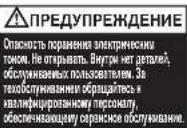

PpeynpeXeHHe:He npKacaiTecb K pexyUeMy MExAHn3My,6epenTecb ocTpblx KpOMok.

PpeynpexdHe:OnachocTB,NCXoJaaOT DBNjxuXcnaCTei.BoBpempaobTbycTpoiCTBa depKnte pykn noaIbIe ot BAIIKOB.
O3HaKOMbTeCb Co BcEMN CBeDeHnMn O6e3OnaCHOCTN IN HCHtpyKunmM; KOMnAHnI-N3rOTOBuTEb He Hecet OTBETCTBEHHOCTN 3a MATEpnaNbHbIy Uyep6 NIN TpaBMblIOJe, ObycIOBLeHHbIe HnpBaUNbHbIM 06paueHnEM C o6OpYDoBAHnEM NIN HeBbIOJIeHnEM yka3AHI NO 6e3OnaCHOCTN. B TakHX CJUYARX DeIcTBe RapaHTNI anHynIpyeTcR.
- IcnoJIb3yIte yCTpoNCTBO TOnIbKO nO npRmOMy Ha3HaueHnIO.
JaHHOeYCTPOINCTBOJONJXHOIOKNIOAHTBCOTJbKO KNTOCHNYKINITAHCN HANPRAJEHEM, COOTBETCTBYIOUMBEINUHNHAM, YKA3aHHBMHaYCTPOINCTBE.
- YCTPOICTBO DOJIXHO HAXOIMTBcB B6JIIN3N OT CTeBOI PO3ETKN C yIO6HbIM DCOTyONM.
He nodknoahepe3 pa3BETBnTeIy yDnHInTeIb.
He npdpnpHmMaTe nonbTOK 06cnykBaTb nIpeMOHTnPOBaTb yCTpOINCTBO CAMOCTOReJIbHO.
B cnyuae nepeaun Ha bTOpHHyIO nepepaOtky cneIyET OTdIeIb 6ope3kn 6ymarnOT OCTaKOB KpeINTHbIX KapT.
He nCnoIb3yIe yCTpoIcTBO c noBpeXdHnMaM CTeBOrO uHypa nn BUNK.
- Pn nepemeueheny yctpoiCTBa co6JIOaIte octopoxHOCTb n36eaiTe HepOBhIX NOBepxHOCTe.
JaHHOy ycTPOiCTBO npeHa3haeHO IINCnOJIb3OBAHnI TOnBko BHyTPNOMeUeHn.HnB KOEM Cnyae He 3KnPlyaTpyte erO BHe NOMeUeHn.
- Bepernty yctpoiCTBO O T BnaI.
Bcerda 6yIbTe 6dTeIbHbI OCTOpOxHbI. He noJIb3yIteCb 3NEKTPueeCKIM OobpyoDBaHNEM,ecNI He BnaJeTe DOCTaOTHyBMN 3HAHNNMIOHE,He MOKeTe DOCTATOHO COCEpEOTOHTCBnIbO HAXOINTECb IOI BO3JeCTBmE HApKOTNeCKNX CpeCTB,AnKOrOJI NmMeNKAMeTOB.EcNI BO BPem EKcNpyatauN 3NEKTPueeCKORO 0obpyoDBaHNBbl OTBJeTeCb Daxe HaMrHOBeHne,ETO MOKeT npINBECTK CepBe3HbIM PONCCJECTBnM TpaMaM.
He npdpnHmMaTe nObltOK OTkpblb, n3MeHHTb KOHcTpKUHO UINn OTPeMOHTPOBAtb yCTPOICTBO. Bepernte YCTPOICTBO O TnpaENHn, PpOBoHHaNOr NT B HEM, MExAHueCKHX NIOLOMK N03DeTBCNBAICOKO DABREHN.
3aippeHNO MoiNpUOBaT KOHCTpyKuIO yCTPOIcTB N BHOCITB HERO TEXHnueckne H3MeHeHH.
- PpeJncNoJIb3OBAHnEM yCTpoIcTba npOBepbTe erO coCToHHe n COCTOAHHE KAbEJa (a TaXKe nepExoDnHaK, eCJN npIMeHReTc).PnI HAnuNN KaKnx-ILNO BNDMbIX pN3HAKOB NOBpeKDeHNI, CNJIbHOrO 3aIaxa IINype3MEpHOrO nepeRpeBaHnK COMIOHeHTOB HeMeJeHHO OTOeDNHITe BCE KMOHOHTbl OT 3NeKTPueHcckO CETn IN PpeKpaTIte NCNoJIb3OBAHHe YCTPOIcTba.
- YHNUTOXINTeBdoJNXeH6bITbOTKJIIOUeHOTcETN,ECIMOHdIITeBHOE BpEMrHENCNOB3yETC.
He nCnoB3yIe a3pO30bHbIe HCTRue CpeDCTBa IIN a3pO30bHbIE CMA3Kn, TAK KAK 3TO MOKET PnIBECTN K IOXApY.
HnKOrda He o6xOHTe 3aunTHyIO 6b0KnPobkY (cTPO 3aPpeoHO n onaCHO,OC6eHHo KOrda yCTpOJCTBO NOKIIIOHeO K cTeN nITAHNA).
He onnpaIeTcB Na DBePuy yHnTuToXKeTEnI, NocKoNbKy 3TO MOxET npInBeCTN K NOBpeXeHnIO DBepcbl, KOtOpoe He NOKpbBaTeCra rapaHTne.
HeBbIIOJIHHeHne 3TNX INCHpyKmMooKET pNBEcT N NOBpeJKeHNIO yCTPOINCTBA,NOUYEHNI TOpABMbI aHHyIpOBaHIO rapaHTTN.
PpeynpejkaIOuIne cIMBOJbI

PpeDynpexdaIOuIe CnMBOJIbI

He donyckaute nonadahn ykpaehn B yctpoictBO

He donyckai Te nonaHaHn rAJICTyKOB nDpynx CBO6OdbHX 3IeMeHToB OJExdBi B yCTpoiNCTBO

He donyckaTe nonadHn DInHHbX BOIOB yCTpoIcTBO

He 3acOBbBaIe pyKINpHEmHOe OTBepCTne

3To yCTpOINCTBO He npedHa3HauEHO nIe NcNoB3OBaHNn DEbMn

3anpeaetcncnoB3oBaTb a030n. He nocnb3yTe a030nbHbIe NCTAe CpeCTBa nn a3p030lbHbIE CMA3KN, TAK KAK 3TO MOKeT npNBecTN K NOxApy.

Ppynckna cncocbnoctb

3anpeaaetcyaHHTOkaTbKOMnAKT-DNCKN

He donyckaTe nonaDaHnO ueH npOuHbIX cKo6 pa3Mepom CbIe 26 MM

PpeDynpexKdHHe: DnBxUneCRA KOMHOHeHTbl
Ppeynpexdaioune cmbolbHa OTceke aBTOMaTnuecko IodauN

OTMeTka MaKcMaJIbHOrO yPoBHa JInCTOB

PpeynpekndHe: He donyckaTe nopaHnOueHb npouhix cko6 pa3mepom CbIe 26 MM

PpeDynpexDeHne: He 6oJee 25 nuctOB, cKpeJIeHHbIX BMECTe

IpeynpeXeHHe: He yHnTuKaiTe DOKyMeHTbIB nepenJIte

PpeDynpexKeHHe: He DOnpyCKaTe NonaDaHnra JInCTOB, CIOXeHHbIX B HecKoJIbKO pa3

PpeDynpexJeHHeIOnyckaTe nonaHaHnCkpenok pa3Mepom 60Jee 32 MM

IpeynpexdHHe: He yHnHToxKaJTe JnCTbI n3 nlaCTnKa

PpeynpeKdHHe: He yHHToKaIte NoTOByIO KoppeCnOHDeHcNIO B 3aneaTaHHbIX KOHBepTax

PpeDynpexdHHe: He yHmTuXaJIe Te KypHaJIbI

PpeynpejckJeHne:He yHnTuKajTe JnCTbI 6yMaRn nn KAPToHa IIOTHOCbIO CbbIe 200r/M2
3NaOK Type Models Khonka/HdMkatop n DeiCTBne
| Kнокату pro ly COSTORHIM Индikatopb coctory Кнокату pro ly COSTORHIM | Bce moedm | Kнока abTo3aIpycka i peximma OxNiJaHnna (HaxMnTe oDin pa3) |
| Kнока рун Horo obpaTHoro xOda (HaxMnTe i ydepXnBaYte) | ||
| Kнока рун Hor no daHn BpeRd (HaxMnTe i ydepXnBaYte) | ||
| Индikatop rotobHocTn | ||
| Индikatop neperpeBa (ДaIte yHnHToxNteJIO oxlaJntbcS) | ||
| Индikatop n3lniShka/3amTnA (Зберпte Лшнe псstы / yctpaHnte 3amTne) | ||
| Индikatop zaoJIHHeHnRA KOP3InbI (OTKpoIte DBepUy i OnycToShite KOP3InHy; ДЯ 45X — ChIMITE BepXHIOU qactb yHnHToxNteJIi N OnycToShite KOP3InHy) | ||
| Индikatop OTKpbITnRA DBepUb Плс ChryTnRA BepXNeJ qactn yHnHToxNteJII (HadExHNo 3akPoiTe ДВeRpUy IПL YCTaHOBITE Na MeCTO BepXHIOU qactb NaD Kop3InHOI) | ||
| Modem Na 300 mIoCTOB M BoJee | Индikatop bLOknpOBKn DBePcbl 3aRpy3OCHOr OTOSeKa (ДЯ pa36bLOknpOBKn HeobXOduMo BVeCTN KOMbHaauJIO n3 4 zuΦp) | |
| БLOknpOBKa DBepUb 3aRpy3OCHOr OTSeKa — KONpKa 1 ДЯ KodOBoi KOMbHaauJN | ||
| БLOknpOBKa DBepUb 3aRpy3OCHOr OTSeKa — KONpKa 2 ДЯ KodOBoi KOMbHaauJN | ||
| БLOknpOBKa DBepUb 3aRpy3OCHOr OTSeKa — KONpKa 3 ДЯ KodOBoi KOMbHaauJN | ||
| БLOknpOBKa DBepUb 3aRpy3OCHOr OTSeKa — KONpKa 4 ДЯ KodOBoi KOMbHaauJN |
3Kcnpnyatauia
- Pacnakyte yctpoiCTBO.
- Podknioute yHnTuToXKeTJIb 6yMaK cTeN 3eKeKTPoNtAHnA.
3.YcTaHOBnTe pacNoJoxeHHb Ha 3aHHe nHaHEn yCTpoIcTBA BbIKIOuATEnel B noJoxeHne ON (BKL.).PpN 3OM INdKATOp DOLKeH HENpepbIBHO CBETNTBCR CINHM LBeTOM. -
4TObbl3arpy3ntb6ymaryB yHnHToxNtIe, npocTo noDnHmTe pyky Ha DBePte 3arpy3OHHOro OTcKa,OTKpoIe DBepu IN NOMeCTNTe DOkMeHTb BHyTpB. Ppi Heo6xoDMOCn MOxHO OTKpbIb DBepy Ha 90 rpaIycOB, YTO6bl ObJeHrMtb DoCTyn K OTcKeY. OJHOBpeMeHHo B OTcK ABTomAtneckO NOaH MOKHO 3arpykaTb KOINHeCTBO JInCTOB 6ymarn He 6OJIee MaKcImaJIbHorO. 3arpyka86ymary, He npeBbIaIte OTMeTKy MAX, NocKoJIbKy 3TO MoKET BbIEcTHy HnHToxNtIe N3 CTpOJ.
-
YHHTOKNTeIb aBtOMaTnueckn HauHET pa6Oy TOJbKO nocJe 3aKpbITNIA DBepcIb 3aRpy3oHOrO OTcKa.
EcIn nocJe nepBoN pONbITKn B OTceKe aBtOMaTnuecko Npdaun octaHecr 6ymara,OTkpoTe n 3akpoTe dBepuy 3aRpy3OCHoro OTceKa 6ymarne pa3.
BHHMaHHe! Tenepb B Cnyae Heo6xOIMOCn MOXHO 3a6IOKnPOBaT bDcpey 3aRpy3OHorO OTCeKa, BBeJ4-3HaHbI KOd (CM. pa3dEe «BloKIpOBka DBepubl 3aRpy3OHorO OTCeKa 6ymarN»).
- EcnH Heo6xOIMO yHnHTOXNtB JINuB HeCKoJIbKO JIcTOB, MOKHO NcNOJb3OBAtB PnneMHoe OTBepCTne IINr NOaH IN B pyHOM peXmme npyCIOBn, YTO OTCEK aBTOMaTuecko NODaH NcyT.
- NomeCTte IInCTbI, npEHa3NaeHHbIe IaYHHTOKeHHa, B OTBepCTne IaI Noaun B pyHOM pexnme. YHHToKnteIb 6hApyKNT 6yMaIy IN BKIOHITcA ABTomAtueeKn.
- Ecn yHnHTOKeTb 6ymar HaxoNTcB aABTomaTneckOM pexKmE n He nCNoIb3yeTc 60Jee 2 MInHy, OH aBTOMaTneckn nepexoINT B CnAun peXmB LcJIax 3KOHOmn 3JeKTpo3Heprnn.
9.YHNUTOXKNTeB6yMaR aBTOMaTHUeCKN BbIXOJNT N3peXIMAt OXINDAHn,KOgA BTOPIOBHy BCTabJIeTc8yMaRa JINBOOTKpbIBAeTCa DBePca 3aRpy3OuHOro OTcKa.KHOKNY ABTO3aNyCkaAaxMAtb npn 3TOM He Tpe6yeTcra.
Блорва Дерци 3arpy30horo otceka 6ymaru
IЯ obecneueHndoonHnTeBHO6e3oNaCHO npnyuHTOKeHHN KOHnDEHnAaNbHbIX MaTePnaNoB MOxHO 3a6loKnOpBaTb DBepy 3aRpy3OyHOrO OtCEKa 6yMaRn.
PpoeDpya 6IoknpoBKn yHHToKntTeJra:
- NomecHTe DOKyMeHbI B JIoTOK. 3aKpOte DBepuy 3aRpy3oHOrO OTeKa 6ymarN.
2.BBeInTe JIO6bIe 4 UΦpbl.3ANOMHNTE CBOI KOJI
YHHTOKNtEnbymarpa36JIOKnyETcABTOMaTneckn,eCNI:
- NOBTOPOHO BVEeH3aHaHHbI 4-3HaHbIKoJ;
- yHNUTOXKeHHe DOKyMeHTOB 3aBepSeHo;
yHHTOxKITeJIb6ymarHe paBOTaET B TeueHne 30 MHyT (HO DOKyMeHTbIOCTaIOTcB JIOTKe).
Kop3nHa 3aNoJIHeHa
EcnI KOp3nHa dIg OTXoIOB 3aONHeHa n IOcBceHbaeTcR CmBOJI 3aONHeHnKop3nHbYHnHTOxNtTeNb pa6oTaTb He 6yJeT.
Heo6xoDIMO onyctOuHTb KOp3nHy dIa OTOxOdB.
MeDHeHOBbIDBnHbTe KOp3nHy nOCHNTe ee.
3aDbHbTe NcyTIO KOp3INHy DnO TxOIOB Ha MeCTO IN HaxMNTe KHONKy aBTO3aNcKa, YTO6bl BO306HOBbYHHTOKeHne.
Ha moJIeI 45X npn 3anONHeHnn KOp3nHbBepxHra qactb
yHHTOKeJHnHaHET HaN He nPnIOHaHMaTbC.3To npnBeTeK
octaHOBe YHHTOKe JnE CHIMITE BepxHIOU qactb,OnycTOWnte
kop3HH yCTaHOBtBE BepxHIOU qactb Ha MeCTO,y6eINBUNCB B
ee npabNJbHoOpNEHTaun.
MaunHbHa 600 mnn 750 nncTOB moYr nCIOJIb3OBaTbc C NOINNTnNEHOBBIMn NaKetamn (2020175B)
3ΦΦeKTHBHOCTb yHNUTOXKeHHa
Optimum AutoFeed IO3BOJARET yHnTuKaTb:

- CkpennenHHbeCKo6aMnIncTb6ymarN (cKO6aDOLXHa HaxOHTbcr He DaJIbWe YEM B 25 MM OT yrla).
Cko6b2 26/6 n 24/6 nnn Mehheero pa3mepa.
-Бумагнебольшоюразмepa,pacnonaraemyio noцentpy.

- JIcTb6ymarncoCKpenkamnpynycnobnn,TOCKpenka HaxoNTcHnpaacctoHnHHe60nee25MMOTyra (MOeJIb300M:ynHHTOKeHnTOJbKOpeep3OTBepCTne IINIOaUNBpyHOMpeXnme).
- CkpenerMajoro/cpeHero pa3mepa (MaKc. TOnuHa npoBOJOKN = 0,9 MM).
-Бумara nnotHOCTbIO>80/100r/M2(TOJIbKO uepe3OTBepCTne IINIPOdaH BpyHOM pexIMe).

- Eymara φopmata A3, cnoxeHHa nonoanm (MaKc. 2 Jncta).
·300JINCTOB. - Bymara nloTHocTbIO 80 r/M2:
-φopMaT A4 - 210 × 297 MM;
-ΦopMaT A5—148×210MM; - OINHOHbIe JnCTbI φOpMaTa A3, CLOXeHHbIe NOnoam IIna NOnyuHnA φOpMaTa A4.
Optimum AutoFeed IO3BOJRAET yHnHToXaTb (Yepe3 OTBepCTne dIЯ nOdaun B pyHOM pexime):

NIOTHa6ymara nnKapTOckn NIOHTOcTBIO<200r/KB.M.

TJHueBa 6ymara nn JNCTbC DByCTOpOHHe neaTbIO.
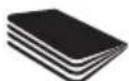
HeckoIbKO CIOXeHHbIX
JIcTOb 6ymaHn (Haipmep,
JIcTbI cOpMaTa A3,
CIOXeHHbIe NOnJaM).
Optimum AutoFeed HE NO3BOJARET yHnTuKaTB:

OcHb npouhBie cKo6bl.
Y6eNTecB, yTO dINHa HOxKn
cKo6bl He npeBbIaet 6 MM.

BolbwaCkpenka.Y6eintecb, 70DnHa CkpenKn Dny 6ymarH He npebbiwaeT 32 MM.

IuctbH3 nactka,
lamHHPOBaHHbIE
DOKyMeHTbI,
NOIN3TNJHeHOBBie NaKN.

CkpenKu Tuna Bulldog

DokymentbI B nepeenneTe

KypHaJIbI npyTne
DOKyMeHTbl,
ckpeHnEHHbIe
HECKoJIbKIMN CKO6aMNIJN cKePknA M

Hakleyn


3anpeaetcnaCnOJIb3OBaTb aap03oJIn
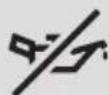
HeMaCNo,TOJIbKO MaCJIaHbIe JINCTbI

KOMnKaT-ДnCKn DVDs-DnCKn
Neperp
Pn DInTeBHom HnpepbHbOM NcNoIb3OBAHN yHuHToXnteB AutoFeed Moxet neperpeTbcr. Pn 20m INHdkatop Heo6xoIMOCtN OxJaxKeHn8 6ydt MraTb KpaChbIM UBeTOM .NoOxDnTe, noka yHuHToXnteB oxJaNTcR. Korda yHuHToXnteB CHOBa 6ydt rTOB K paBoTe, INHdkatop nepepeBa / Heo6xoIMocTn OxJaxKeHn NoracHeT. Ecn BO Bpem aPoToBt yHuHToXnteLIO Notpe6yEtCoxJaxKeHnE, Hkaknx DeHCTBn npedpnHmAtb He Tpe6yEtC. KaK TOnbKO yHuHToXnteB DOCTaTOUHO OxJaNTcR, OH ABTomATneCKn npOdoXnT yHuHToXKeHn 6ymar. Noka ycTpoiCTBO OxJaxKaAetcR, DOCTaTOHNO IuMb y6eJITbCB R To TTo Bymara 3aRpyKeHa B OTCEK ABTOMaTHeCKO IooaH N KOp3Ha NyctA.
Cma3bIbaHne yHnHToXnTeJra
Ncnoj3yIe Inra Cma3Kn TOnbKO CneuaJIbHbIe IInCTbRexel (2101948 n 2101949).Kopnpaunr ACCO Brands He 6epet Ha ce6ra OTBETCTBEHHOCTH 3a FyHKUHOHaJIbHOCTb Nnn 6e3oNaCHOCt b yctpoiCTBa npu NCNoJb3OBaHN CMA3Kn DpyrTO TnHa Na IIO6oN 13 Detaleyn yctpoiCTBa. Rexel pekomeHdyET nCNOJb3OBaTb OINH INCT dIra CMA3Kn IocNe TPOeKpaTHOrO ONyTOWeHn KOp3NHiD IIN OTXODB (I NOcNE 3TORO KaKdIe TPN KOp3NHi B ONOPOXHIAOTc).PomeauIte IInCT dIra CMA3Kn B OTBepCTne IIN POnaHn B pyHOM pekmme, a HE B OTCEK ABToMaTHueCKo NpA H POnaJe IInCTOB dIra CMA3Kn UpeE3 OTCEK ABToMaTHueCKo NpOaN 3aFpr3HHTcN POnaIOUWe BALNK, IN MExaHn3M ABTONOJaHn PpeKpatNT paBoTy. B cnyae 3aqrpa3HeHn BAInKOB CJeNyTe INHCTpyKUINM IO TexHnueCKOM O6cnyKBaHNIO.
TexHnueckoe 6cIyXnBaHne
BaJIHKmexAHn3Ma aBTOMaTHueckOIOdaunMOryT CO BpeMeHem 3aIpaHTbCJ. IpoTnpaIte IN cyXoN TKaHbU, YTO6bl COxpaHTb MaKcIMaJIbHO BILCOKyoI pOn3BOIDTeJIbHOCTb yCTpOHTBA.
HΦpaKpaChbI DaTnK ABTo3aNycka, paCNoIOKeHHbI Ha IpiEMHom OTBepCTN, MoKET NOKpbITcB6yMaXHOI bILbIO, Bpe3yIbTaTe Yero yHyuTOxNTeJIb Byet pa6oTaTb, daJe ecIn B npemHoe yCTpoiCTBO He noDaHa 6yMara. BbIKIOUHTe yHyuTOxNTeJIb C NOMOJIO NepeKJIouaTeJIa Ha 3aDHeI naHEn yCTpOiCTBa IN OCTOpOXHO OHNCTNe DaTHNK C NOMOJIO BAHTHO TaMnOHa.
NcnpaBhble MaunHbI
(300nctOBvBb)
Odn pa3 B 6-12 mecraepekomeHyeTc3aKa3bBaTb cepBnchoe ocbnykubahne ycTpoCTb NHKehepaMn Rexel.
Информaceaюкотрах tax Ha obcnykubahne doctynha ha caite www.rexeleurope.com/support.
Ytln3aun OTxOIOB 3JIeKtpnueckoro n 3JIeKtpoHOrO o6OpyDobAHna (WEEE)
-ПослеЗавершенисрoka ekcnлуатци BaW npOdykT
пинаджNTК OTXODam 3JekTpnueCKORI И 3JekTpOHHORO
оборUDOBANH (WEEE). COOTBeTCTBENHO, Heo6xOДМО npINHЯТь
BO BHIMAHNE CLEnyIOUee.
- OTxoIb3JKeKtpnueckoro 3JKeKtpOnHOrO 6OpdyoBaHn (WEEE) He doJXHb yTINuN3npuOBaTcKa KAc HecOptnpObaHHbE 6blTOBbIe OTxObl. OHn DOJXHb CObupTaC8 OTeJIbHo, 4To6bl INx MoXHO 6blpo pa3O6paTB NOBtOPHO nepepa60TaB, NOBtOPHO NCIOJB3OBA Tb INI pekyepnpOBA Tb INX KOMNoHEThbl IN MaTePnaJIb (B KaueCTBe TOJInBa Ira pereHepaunn 3Heprnn Ppi nPiOn3BODCTBE 3JKeKtpnueCTBa).
- MecthbIe opraHb IblacTn co3dJIIN o6IeCTBeHHbIe NyHKtbl npHeMa yTInIbCbIpbJr lIc6Opa OTOXIOB 3JIeKTPnueCKORIO 3JIeKTPoHHOrO o6OpUOBaHnA WEEE. YcIytn TaKnx NpHKTOB 6ecIINaTHbI drr cdaIOxN.
- Poxjnyiucta,IOCTabTe OTxOdbI 3NeKtpueeCKOrO n 3NeKtpoHHoro 6OpUpoBaHnra (WEEE) B 6NJaWn K BaWeMy Domy nn Ofncy nyHKT npHema yTuNbcbIpb.
- PnB03HKnHOBeHm TpydHocTe C BbIcHeHEm MeToHaxOxKeHn npHema yTINbCbIpB, npOdaBu, npOdaBwB Bam yCTpOcTBQ, DOJKeH pNnHrTb OTXoDbI 3JIeKTPuYeCKOrO n 3JIeKTPoHHOrO o6OpyDobAHn (WEEE).
- Ppi OTCyTCTBnC CBy3n C pO3HnHbIM npOaBcOM nPoCmBac CBy3aTbcA C ACCO DnI NpOyuHn IOMoU BpeuHn 3TOrO BOnpoca.
·NOBTOPHЯ nepepa60ka OTXoOB 3JIeKtpueckoro IN 3JIeKtpoHHoro 6ObOpuOBaHnra (WEEE) HappaBHeHa Ha 3aunTy OKpyKaIOUe CpeDbI, CoxpaHHeNe 3dOpOBbI JIoDei, CoxpaHHeNe 3aIACOB CbIPbI N MaTePnAIOB, COBepSeHCTBOBaHne yTOyHNBOrO pa3BHTnI N oBeCneHEn IyUwe IOCTABKn B EbponeEckn Ko3TobApOB HapOnHO rNotpe6JIeHn. 3To DOCTnRAeTCr NyTEM BOCCTAHOBLeHn CEHHORO BTOpuHOrO CbIPbI N COkPaUeHn yTIN3aUnn OTxODOB. BblMOKeTe BHEcTN CBoI BKnAD BDOCTnKeHne 3Tnx CEJeI, CdABaor OTXoDJI 3JIeKtpueckoro IN 3JIeKtpoHHoro 6ObOpuOBaHnra (WEEE) B npHK TnpMa yTINbCbIPbI.
- Bau npOdyKT nMeet CnMBoJ «OTxOdbI 3JIeKtpuueckoro n 3JIeKtpoHOrO o6OpUdoBaHnra" (WEEE) (pepeepkHytbi nepeDbNIXHO MyCopHbIK KOHTeHep). 3TOT CnMBoJ O3HaayeT, 4TO OTxOdbI 3JIeKtpuueckoro n 3JIeKtpoHOrO o6OpUdoBaHnra (WEEE) He dOJIxHbI yTINIm3npoBaTbcRA KAK HecopTpupoBaHHbIe 6bITOBBe OTXOdbI.
TapaNTya
Pa6oTa daHOrO yctpoCTBa oBecneuHaBeTcB dByxIeThei rapaHTne O t DaTb npno6peTeHnpi nycOBn HOpMaJIbHOJ 3KcnIyataU. B pAmkax rapaHTnHoro nepnoJa KOMNaHnA ACCO Brands Europe Ha cBoe ycMTopeHne npOn3BeDet IIn60 peMOHT, IIn60 3aMeHy HeNCnpaBHoro yctpoCTBa 6ecnlaTHo. DaHHa rapaHTnHe pacnPoCTpaHrTcH a HeNCnpaBHocTn, Bbl3BaHhble HecO6JIIODeHnem npaBnI 3KcnIyataU. IN INCNOJB3OBAHmE IN3DeJINB HEnpeDyCMTopeHHbIX CEJAX.
- Heo6xOIMO NOtBepXeHene DaTb npno6peTeHn. Pa60Tb Ipo pemOH TY moNΦKauM, npOBeEHHbe NuaAMn, He yNoIHOmoeHHbIMKOMNaHnei ACCO Brands Europe, npeKpaiaot DeiCTBne rapaHTm. Mbl cTpeMMc8 oBeCneHTb BbICOKNE 3KcNlyaTaUOnHbIe CBOICTBa N3dEInr COIaCHO npEOCTaBHeHNO CNeuΦKauM. DAnHra rapaHTn He 3aTpaRnBaet OpNDueCKne npaba Notpe6nteJIeB Pamkax COOTBeTCTByIOe HoAUHOHaIbHOro 3aKOHOdaTeIbCTBa, peryInpuyIOeTo pOdoJy TObApOB.
JaHnra rapaHTna He npImeHmMa K3aKa3yKam B AbcTpaJIIn. CMOTpIte NOpO6HyIO INΦOpMaUIO O rapaHTn Ha cTpaHnCe 104.

OcbI MaHbI3dbI Kayinci3dk HycKayapbIH OKbIHbI3 XaHE CaKTan KObIHbI3.

PaiDalaHy HcayIapbIbIH TOJIbK KeIipMecIH, Kbl3Met KepCteTy OpTalbIKTapbIH MeKeHkaIapbIH, PaiJaJI KeHeCTepi XeHe aKayIbIKTapdbXIO HyCKayIbIFbIH any ywiH www.rexeleurope.com/support Hemece www.leitz.com caTbHa kpiH3

HIMTe TabIaTbIH KeNeci TaHa KypblfBhl aWKaH KaFda Ci3di KaTTbJ KaPaKaTTaHyBhlH HeMece eYiH3 MymKih eKeHi6iDipei. AUYFA BOJMAIbI.

ECKI
TOKCORYXuyi63ap.Auynya
BOMIMdbu.1WUHqNnDaaNhyuB
KoMMETKcpeTeYin 6bEaNkTcp
XoK. KCMETKcpeCeYyui BInKiTr
MAMAHAYxinyiHs.


EckepTy: KeckiTepeY iYCTaMaHbI3; eTKip KblapbHaH a6aB 60JIbHbI3.
Eckey:Ko3FaNaTbH 6eJIkTeP Kayni 6ap. Kymbc icten TypFaH Ke3de KoIaIpaBbHb3dbI polIKTepeH anlbc yTaHb3.
Bapbik kayinci3dk aknapaTbH xhe HcykaynapdbokbH3; eHnpyui dybpic yctamaydaH HEMece kayinci3dk HcckaynapbHa cai konlndhaydthyibdaH MaTePnaIabH 3akmbmdanyH HEmece aamhbHxapaKaTTahByuHH kayantb60ImaIdb. Mydai kafdaInapda Keinikdk kapaMcb360nybMyMKH.
KypbIFbHbTEK OHbIH apHaIFaH MaKaTbI yIiH naJaIaHbHbI3.
KypbIbIbTeK KypblbIa KepeTirre HneKtpnik peTnHrke cainke KeetIH Kyat KepheyIe KocblnyKepek.
KpybIbfohain kon xekti3y60laTbH KypaIHaXakBHeepderi po3eTKara Kocblnykepek.
BipHepe po3eKaIbI aIaIaTePre KocnAHyI HEmeCe y3apKbI Ka6eJbMeH naIaIaHa6aHbI.
Kypbifbifa 03iHj3 Kb3MET Kepcetyre Hemece OHbi XeHdyeTre apeket etnehi3.
- ΘHneykaFdaBbHdaTpyaIFaHKaFa36eH HecneKapTaCbHbH TpyamdapbH6eniH3.
KaBJI HeMeCe aIacbI 3aKbIMdaIFaH 6oJcA, 6yI KpybIIFbIHbI naJaIaN6aHbI3.
KypaIbIxblNxblTyKe3InDeKaHdAaDa6ipTericEmec6eTepdeh aynak6onyuHnabAn6onykepek.
KpybIbfFIMapat iwiHde naJaIaNHyra apHaIFaH. EwKaWah cbiptTnaiJaIaH6aHbI3.
KypbIbIbIbI bIbIaIah aIbIc YCTaHbI3.
Bapbik yakbTTa cak 60bnHb3 xhe apkaah icTe XaTkai icih3re aban 60bnHb3. HazapbHb3dbI WObFbPAnHy HEMece xa6bpap 60ny MmKIN 60lmafan Xa4nA da Hemece eciptKHH, ANKORoBdi HEMece depinepin AcepIne 60fAHXa4nA da 3neKtpnIK KypanDb naDANAHy 60maJbI. 3neKtpnIK KypanDb naDANAHy Ke3iHde MYKNTCb3dBtBb16ip Cti De KaTbI anATTAPra Xhe XkapakattPa 8KeNyi MymKIN.
KypblfblbIaIyfa,03repyTre HEmece XHdyeTre apeket etneHia. TyCyprE, Tcyre, CbHdbpyFa HEmece KaTbI KbICbIM TyCyprE 60ImaBbl.
KypbIyfRa e3reptynep xacayra XaHE texHnkaIbIK e3reptynep Xacayra 60mmaIbI.
- NaIaHaB6bTaH bpyh KpybIbMeH KaBeIbe (XaHe KOJaBaJIaTbIH 6Ocna, aanTpe)3aKbIMHbIXoKtIbFbIH TEKcePi3. KaIaN da 6ip KeiPeHIT 3aKbIM, KaTbI niC HemeCe KOMNoHEHTepIH KaTbI KaIbIN KeTIg ANFaH JaFdaIa, DaPbIK, KOMNoHEHTepDi 6ipDeH axbpaTbHb3 XaHE KpybIbHbI NaIaDaHybl TOKtaTbHbI3.
TypaFbIu y3ak yaKbI 60bI naIaIaNbIMaNTbIH 6oNca,ON KyaT Ke3iHeH axbpaTbNybl TIC.
Cnpe Ta3apTkblTapDb HeMece Cnpe MaIaNfBtAPdb naIdaIaH6anB3,ce6bi 6ynap eTpEny KATEpiH TydbpyMiymKIN.
Kayinciik caKaTHbIPbIw KynbIH ewKaaHaenemeyre 60MaIbI (KataH TbiM cAlbHaIx XHe oCipeCe, KpybIFb KyAT Ke3iHe KocBnFAH Ke3e Kayinti).
TypaftbueciriHcyeHHeH3;6yncikTi3akbIMdaybMYMKHxHEON KenindikTeKaMTbImaNbl.
OcbyHcyKaynapbOpbHdAmay3aKbIMdb/JapaKaTbTydbpybJxHe KeniniririhiXapamCb3 etyi MYMKIN.
Eckenpy TaH6anapbl

EckepTu TaHbajapbl

Boc awekejleepj xakbnatnab3

TantcykTepeM6ocKIMdepjXaKaBnDaTnHaB3

¥3bIHwJtBjXaKbIHdTaNaHb3

BepycaHbIaybHaJkaKbIHdAmhbl3

Bykpan 6aapanapbHn naIaIahyiba haphaMaHa

A3p03o1bepdi naaandahyra 60lanma db. Cnpre TaapTkiuTapdu HeMece cnpre MaNaFbUHpTaepi naiaanhaBHa, ce6e6blap eTeHy katepiH tydbpyMiymKIN.

Papak CbHbIMdbIbIfbI

blkwaam dnuckinepdi calyfa 6oImaIbI

26 MM-DeH XOFapbI eKKaHdai YnKeH KaNcbIpMaJap 60mMay Kepek

EckepTy:Ko3FaJatbH 6eJIikTeP
ABTOMaTTbI Tpye 6epy eckepTyinH TaH6anapbl

EHXOFAPBnnapKepcTeKiui

EckepTy: 26 MM-DeH KOFapbI eWKaHdAa KbickblTap 60Jmaybl Kepek

EckepTy: 25 npaKaTah apTbIK, 6ipre KbiCtbpJFaH npaKaTap 6oJMaBly KepeK

EckepTy: eWkaHdaa 6aJHaHraH KyaTap 6oJMaBb KepeK

EckepTy: 6ipHeWe 6yKTeIReH npaKTapFa pyKcat etiImeNi

EckepTy:32 MM-DeH XOFapbI eKKaHdai KaFa3 KblckblTapbl 60lmaybl Kepek

EckepTy:Пл actNKnapaKTap60JmaybKepeK

Eckenpy: aMbimFaH xaTAP 60lmaybKepeK

EckepTy: KypHaIaIap 6oImMaybKepeK

EckepTy: 200 r/M2-TaH KofapbI eUKaHdai KaFa3 Hemece KapTa 6oJMaybKepeK
| Icon Typi Modèle déper Tûme/INHINHATOP X3e āpekēr | |||
| R F | Баckaу Туймени | Балььк yuīnēр300 падak көне одд көn | Авто İcke косу көне кУтту Туймени (бip рет bacy) |
| Колmэн кайтapy Туймени (басын Туру) | |||
| Колmэн щлfa карай İcke косу Туймени (басын Туру) | |||
| Даьий Иndикоторь | |||
| Ка ttы Кысу Иndикоторь (Турасыштын салкынданын кутпiz) | |||
| Асыра жуктay Иndикоторь / KeNTелic Иndикоторь (парakтары оазайынiz / KeNTelici/Tальп.Tастаныз) | |||
| Себet толы Иndикоторь (ecikti aшынizхэн себetti Бocatынiz; 45X - урасыш басын кetepin shыfasынizхэн себetti Бocatынiz) | |||
| Есik aшын hemece Турасыш басын aшынFaHAN Иndикоторь (ecikti мыктāн кäбынiz hemece Бacstы себetke кайт calынiz) | |||
| 1 | Cany ecirí Kūlīntālɪdɪn HINDIKA TOPBí (4 санын Tɪpkesimi dɪ eHIriZy apkblɪs aшынiz) | Cany eciríн Kūlīntay - kayinciədɪk Tipkesimi Туймeci 1 | |
| 2 | Cany eciríн Kūlīntay - kayinciədɪk Tipkesimi Туймeci 2 | ||
| 3 | Cany eciríн Kūlīntay - kayinciədɪk Tipkesimi Tуймeci 3 | ||
| 4 | Cany eciríн Kūlīntay - kayinciədɪk Tipkesimi Tуйmeci 4 | ||
Xymbic
- ΘΗΠДΙΚΟραδύνΑH αλήβίι3.
- TypaFbIbTbKyaTKeJicHe KocBbHb3.
- KypbIIFbHbIH apTbIHdaFBi KOCY/OLIPY TyImeciHiH KOCY NO3UcRbIHda 60JyBH KaMTaMaCbI3 etiH3, OJI KEK KYTy TaHbAcbIH JkaFaDbI
-
TypaftbIbIbIyKTey yuiH cany ecirih ayu yuiH cany eciriH, TyTKacbIH XaH faHa KeTePIn, KyKaTTapDbI cAlbHbI3. KaXeT 6oJcA, OaH KOn Jxetki3y yuiH ecikTi 90 rpaDycka api kapa auybIbI3Fa 6oJaBb. ABTomATbI TypDe 6epy 6eImiHe 6ip yaKbITTa eH KOFapFbI npak CbIMdbIbIFbHa deiH xkyTeH3. «MAX» DeHreHHeH acbIpMaHbI3, ce6e6I 6yI TypaftbIbTI 3aKbIMdaybl MYMKIH.
-
TypabibcanyeciriXabilraHHaHKINH TpyayuKNIH ABOTOMATbI Typde bactaIbI.
BipinwapekeTHeKeIHABTomattb Type6epy6enimHde aIi de Kara3 bOla, Kara3 cany ecirih ekHwi pet auibn, Xabhbl.
Haap ayapbHb3: KaKet 6oNca, eHdi cany ecirih 4 caHdbK KOtBte HrI3y apKbblkyblntayhbl3fa 6oNaBl («KaFa3 cany ecirih Kylbntay» 6eimH kapaHb3).
- Erep TEK 6ipHeWe npaKaTbI Tpyay Kepek 6oNca, KOImen 6epy YcBn NaIdaIaNbHbI3Fa 6oNabI, 6yI Ke3e abTomATbI Typde 6epy 6eJIIMi 6oc 6oNybl Kepek.
- TypanybI KepeK KaFa3DbI KOImeH 6epy yrcbHa caIbHbI3. TypaftbIi KaFa3DbI aHbIKTaIdbI XeHe aBTOMaTTbI Typde icKe KocblnabI.
- Typabibw abTO peXMIHne 2 MNHTaH KEN yaKbIT 60bI naJaHaHbIma KaNdbipbnca,TypaBbW KyATbYHEMDey yUH YKbIpeXMIHe ABToMaTbI Typde eTeDi.
- Typafti KaFa3 Typafti ay3bHa caJIbIHFaH Ke3de HEmecCaIy eciri aUbIFaHda yKbI peXIMiHEA BtOMaTTb Typee “OraHabI”. ABTO icke Koc TYmeciH bacydbH KaKeti KOK.
Kara3 cany ecirn kynbntay
KocbIMwaKayinci3ik yuiH KaFa3 canyecirH KynnmaTepeNaIdbI Tpyay Ke3iHne KynblntayFa 60naIbI.
TypaftbItbyKynbIyayuhi:
- KykaTAPdbiHayara cabibh3.Ka4a3canyecirHka6bHb3.
2.Ke3 KeIreH 4caHbI6acbHbI3.KOJIbIHbI3IbIECTE CAKTAHbl3!
TypaBbI KynIbKeIeI yaKbITapJa aTOMaTTbI TypDe aWbJaDbI:
4caHbIK KOI KaTaeHriinreHe.
-Typay aarktafHaHa.
- TypaBbI 30 MmHyT BoMbI XyMbI cIcTeMeReHHe (6ipak KxKaTTap HayaDa TypraHda)
Ce6eTToJIbI
TypaftbIeceBToJIke3KeJHeXHHeceBEToJItaHbAcTaHaBIn TypFaHJaXyMbICiTeMeNJI.
Ce6eTt 6ocatYbHb3 KepeK.
- Bocaty yuhiin cebetti kaiian cbiptka Taptbihiz.
BoccebTI kaTadaOpbHa NTepi3 KHe TpydbkaIFactbpyuIH ABTO ickeKcy tyMecin 6acbHb3.
45X moJenH de TpaBbI 6acblce6T ToHaKe3e OdaH KeTepeiJI. By Iy TpaBbITbH TypaybH TOKaTaJa. Bactb UbFapbl aBlHbI3, c6eTTI 6ocTabHbI3 KaHe bactb KaTadaH OPhbHa TOJbIFbIMe CaBlHybIH KaMTaMaCbI3 eTe OTbPbIN CaBlHbI3.
600 Hemece 750 napakTBk MaunHanaapdbI nactKanbIK naKeTepMeH naDanaHyFa 6oana (2020175B)
Typay ka6ijeti
Optimum AutoFeed tpyaftbIshkeneceinepeI typA JIADbI:

KancbipbifahKaFa3,KancbipMa6pybIbIeHKe6i25MM.
26/6 XeHe 24/6 HeMeCe KIiUipeK KaNcbIpMaIap.
- OptrafatypanaHbIncaIbIHFaHKiWiEJIWeMdiKaFa3.

XaptbicihAH 6yKTeJIReH A3 KaFa3b, eH Ke6i2 npak.
300 napak.
- 80 r/M2 kaFa3
-A4-210MM×297MM
-A5-148MM×210MM
-A36ipnapA4eJHemHxacayyuiH xaptbcbIHn6yKTeIreH.
Optimum AutoFeed typai anaabi (KoJMeH 6epy yacbl apkblbl):

KaJIbIH KaFa3 HemeCe KapTa < 200r / M^2

KbntbipKaF3Hemeceeki KaBHaDaBaacnacBbap npak.
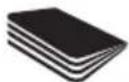
Biphewe pet 6yKTeJreH napakTap (KapTbnai 6yKTeJreH A3 npakTapbl).
Optimum AutoFeed tpaftbIbI KeIeci KaFa3dapdbI Tpaai AImAIMDbI:

YKeH KAncbipManap.KancbipMa aFbHbH y3bHbFb6 MM-DeH YKeH eMeCTirH TeKcePiH3.

YlKeH KaFa3 KbickbIITapbl. KaFa3 KbickbIbHbIH Y3bIHDbIFbl 32 MM-DeH acnaiTbIHbIH TeKcepiJ3

IInactNKnapaKTap,
IaMHaTTaTaNfAHKyKaTTap,
IInactNKKaTaNap.

BnybDg KblckblTapbl.

BaiJanaHaH KyXaTap.

KypnaIap
Hemece KeTereh
KaicbIpMaIapMeH
Hemece KbICbIITapMeH
baIaHaHbacka
KxKaTTap.

XabicKaK XancbipMaIap.


Aa03oJIbIepi naIdaIaNHyra60MaIbIbI

MaJxok,TeK MaJIbI npaKaTap

blkwaDnckinepe MeH DVD Dnckinepi.
KaTbIKbICy
ABTOMATbI Type6epyTypaftbl y3iikci3, y3iicci3
naiDanaHbIcA, ON KaTTb Kbl3yMymKIn XaHe caJIbIHdaTy
HHNKaTOPb Kbl3bl TYCTe XblNTbIKTAaNbl TpyaftblTHbIH
caNkbldaybH KyTIH. TypaftbKaiTaDaH naJaDalaHyra daBbIH
Ke3de,KaTTb Kbl3y / calKnblHaTy HNNkATOpbl eWeidi. Typaftbl
TypayuKlJI Ke3iHne caIKblHaDaybl KaKeT eTce, EwKaHdai
opekET Kepek EMEc; Typaftbl CaIKblHaFaHHaH KeiH KaFa3dbI
TypaydbAbTOMaTTb Type KaTb GacTaNb. KypflfblCaIKbIHan
XaTKAH Ke3de bapLbIK opblHaYbHb3 Kepek apekET - KaFa3dbIH
ABTOMATbI Type6epy6oImHe caJIbHybHxHe ce6eTTIH 5oc
6OlybH KaMTaMaCbI3 ety.
TypaftbltblMaJnay
MaJlay yuHn Tek Rexel Oil Sheets (2101948 & 2101949) MaBIn naJaIaHaHbH3. ACCO Brands MaJNaFbIHTapdbH, backa Typnepi Ocb KypbIbHbH Ke3 KeJrEh 6eNtepiHe nJaIaHaHbIFaH Ke3JeHIMHH XyMbICbHEmece Kayinc3diY uHIN eWkaHdai kayankepuiikri Ka6bIbDamaBdR. Rexel ce6eT yu pet 6ocatbIfAHn Kein Ma npaftbH NaJaIaHaHyDb YcblAdbI (Kehe OdaH Kein ap6ip yw KOkbc TactaBd).Mn npaftbH ABToMaTTb Type6epy 6eNimHe EMEC, KOnMeH 6ePy YcblHa caJIbH3. Ma npaftbH ABToMaTTb Type6epy 6eNimHe neJaIaHaY ABToMaTTb Type6epy MExAH3MiH IN XyMbIC ICTeyIHe Keepri KeTIpin, 6epy pONKTePIH 3akBmDaBb. POnIKTe BynHnce, TexHKaIbK Kb3Met KepCETy HcckaynapbH OpBHdaHb3.
TexHnkaJIbIK Kbl3MeT KepeTy
AbTomatbI Type6ep MexaHn3Mihderi poNkTepe yaBt eTe Kele kipJeDi, eHMHH eH, XorapFbI eHMdiirH caKtay yuH Ta3a WybepeKeH cypTIN TypbHb3.
Ehri3y yrcbHa opHaIaCKaH aBTo icKe Kocy uHpaKa3bIn ceHCopb KeJe KaFa3 WaHbIme Hka6blbIn, TypaFbIHTbIH KypblfBa eKahdai KaFa3 caHb6aT pyFaH Ke3de de icKe KocblbHa eKenyi MyMKIn. TypaFbIHTbI KypblfHbH apTbHaH eWipin3 XHe CEcOpdbMaKaTa ry6KaHb naDaIaN abaIaN Ta3aIaNb3.
PaindaJanaHyfa 6oJaTbH MaunHaJap
(300napaKaTahXoFapbI)
Eyn KpybIybnapBn ap 6-12 an caBnH Rexel Kbi3MeT KepcTeY nHexepeiHe KepCteTydi YcbHnMbI3-TexHnKaIbIK Kbi3MeT KepcTeY boBnHa KaTakTinep TypaIbI cypaynap yuiH www.rexeleurope. com/support caTbH KapaHbI3.
3neKtpnik XaHe 3neKtpoHdbIK Ka6dbikTapdbIH KaIdbikTapbl (WEEE)
- 3iHIN KbI3MeT Mep3iMHH COhIHa eHIMH3 WEE6 60bln KapactbipbIaNbI. CoHbIKTaH, WEE6 eHIMHIn cypbITaIIMaFAH KOMMyHaIIbIK KOKlc peTIHe TaCTaIIMaybKepeKTirH eCKePTy MaHbI3DbI 60bln TaBbIaNbI. OJ KOMNoHEHTTePI MeH MaTePnAIIapBn KaTt EHNeyre, KaTn aNdaIaNHyfKaKe H KaIIbHa KeNTipyRe 60lanbDaa etin 6eLWeKTeNy iYsiH 6eKe JKHAnlybTiNc (3JeKTP TorbH bIFapya 3HeprnHb KaIIbHa KeNTipy YsIH XaHApMa petiHne).
KofamdkxHay opbHapbH MyHnUanJntTep WEEE eHIMdepHxHay yuH xacaFaH, ci3 yuH terIH. - WEEE eHimih3di yHHi3re HeMece KeHceHi3re XaKbH opHaIaACKaH XnHay OPhbHa anapbHbI3.
XnHay opHbIH Ta6yda KnbHbIKTap TybIHaca, ci3re eHimdi catKaH catuWEE eHimiHi zi Ka6bldayKepek. - CaTybImeH baiJHaHbIcTa 6oJMaCaHb3, oCb McSeIe 6oBbHua KMeK aIy yuH IN ACCO kOMnHaHrcbHa xabaplaHbI3.
- WEEE eHIMdepiH KaTt eHdey KopuHaF anOpTaHb KOPfayFa, aAam DeHCayIbIbH KOPfayFa, uNKi3aTTapDbCaKTayFa, TypaKTBdaMydbxKaKcapTyFa xHe EyponaBk OdaKaTAYap yCbHbCTapBHH xAkCapTyb KaTMaMaCb3 eTyRe 6aftTTaJFaH. ByFaH KyHdbekHI peT uNKi3aTTapDbany XHe KaJIbKTB TaCTaydbiaa3ay apKbIbIKoNKeTki3ineDi.WEEE eHIMh3di XnHay opHbHa anapy apKbIbIOcb MaKcattapFa XeTyre YneC KOCA aJAcB3.
- ΘHimin3 WEEE TaHbAme H6enrIneHRe (X TaHbAcB 6ap KOKbc ce6eTi). Byan TaHba cIre WEEE eHimHc cybINTaJMaFaH KOMMyHaJIbIK KOKbc peTHe TactaImaybKepeKTirH xa6apJaYra apHaJIFaH.
Kenildk
- Ocbl KpybIbIbHbI HxMyMbIcBHa KaIbITb I naIdaIaNbIraH
kaIaIda caTbI aIFaH KyHHeH bactan eki KbyIFa KeiIik
6epine.i. KeniNik Mep3imi KezIHne ACCO Brands Europe
KOMnAHnrcBcE3 KapaybIMeAkAYbI KpybIbFbHbI terIH XeHdei
HeMece aybICTpaIb.I Dypbc NaIdaIaNbHaydAn HeMece TnicTi
emec MaKCaTTap yuH naiJaIaNyDah TyBHDAfAH aKaynap
KenlIkTe KaMTbImaIdbl. - Catbn any KyHHin denei tanan etinei, ACCO Brands Europe
KOMnHaHrcb pyKcT eTneReH aAdmAp TapanbHaH JkacFaH
XeHDeynep Hemece 3reptyIep KeniJikTi JkapAmcb3 eteDi.
ΘHimepim3dn Kepctinre H texHkaJIbIK, depeKtepre cai
60nyhK KamTaMaCb3 ety 63dIH MaKCaTbIMb3. Byk KeiJik
Tayapnapdb catyDb bAckapaTbH KOJaHaBicTaFb IYTTbIK
3aHaMaIap aCbIH Da TyTbIHyWBInap NeJeHETH 3aHdbI
KyKbIKTapfa acep etneNdi. - Byn keninik abcTpaIIaIK, TyTbHybInapFa KOndaHbIMaIdbI - 104-6etteri keninikti KaapHa3.

alebo www.leitz.com.

Nasledujuci symbol, ktory
najdete na produits, uvadza,
zev pripeade otvorenia
pristroja by ste sa mohli
važne alebo smtel'ne zranit'.

VYSTRAHA Nebzepecestvo zasiajnutha elektryk im primod, Neptyvalya. Vo vidru sa hennacsozjo zidne selastci, Korovc yersi by mohol kralnye, Kralnye kralnye kralnye servisi zverte kvalikovanyan pracovnikom.
NEOTVARAJTE.

Varovanie: Nedotykajte sa rezacich nozov. Davajte pozor na ostre hrany.

Varovanie: Nebezpečenstvo - pohyblíve Časti. Pocas použivania sa rukami nepribljúte k valcom.
aaii ybi jie. aiiyaiyaiyaiyaiyaiyaiyaiyaiyaiyaiyaiyaiyaiyaiyaiyaiyaiyaiyaiyaiyaiyaiyaiyaiyaiyaiyaiyaiyaiyaiyaiyaiyaiyaiyaiyaiyaiyaiyaiyaiyaiyaiyaiyaiyaiyaiyaiyaiyaiyaiy
1dolal jorj Sij. pji4 gj biol .2
Lulolgjzssll jao
4 0g 11 g J 1s
jail
gss 30 31
(20 一 _ 4 ^ 一
alicaiuill
a aal 1000
a.1111
Sulogjgdl jde biaol g sfoa aal
.
14 54X 45X
aalgglg jnss
iLacgawlldsj
Jz Jz Jz Jz Jz Jz Jz Jz Jz Jz Jz Jz Jz Jz Jz Jz Jz Jz Jz Jz Jz Jz Jz Jz Jz Jz Jz Jz Jz Jz Jz Jz Jz Jz Jz Jz Jz Jz Jz Jz Jz Jz Jz Jz Jz Jz Jz Jz Jz Jz Jz
aJzAaI11j00g2y
a151 a1511 3g 3g b2g 3g g 3g 3g
plo 25 aJy jc dall a 1 y 3y 4y 5y 6y 7y
.(100M)
(0.9dlllclaw)pallalwjj/3xilll 1y
.()>80/100


Optimum AutoFeed
315j 2y j031y 3u (iui)A3
111 111 111 111

aalllg aalllg

Optimum AutoFeed
auii1,2≤wlll 15

10 32 4 2

Jb joo 5i. juiu uuiu

slll 1

5.12.11 1234567890

.

4

yol yol yol yol yol yol yol

j1j1b2a. 2yj L 2jll


aill
jg jy g y 1000000000000000000000000000000000000000000000000
zizg jygl 1yj 1 yj 1 yj 1 yj 1 yj 1 yj 1 yj 1 yj 1 yj 1 yj 1 yj 1 yj 1 yj 1 yj 1 yj 1 yj 1 yj 1 yj 1 yj 1 yj 1 yj 1 yj 1 yj 1 yj 1 yj 1 yj 1
aIulal g aO
-Rexel jaoiueo 6-12 6-12 oioiiey f)
jaiil a
Rexel (2101948, 2101949) Cuyjg jg w y ACO Brands ag Ls
Oo (e) c g y jy g Jg REXEL
Cg y Bg REXEL
Bg y Bg REXEL
Bg y Bg REXEL
Bg y Bg REXEL
Bg y Bg REXEL
Bg y Bg REXEL
Jolal
Ae Aee aee eae ee eae ae eae ae eae ae eae ae ae ae ae ae ae ae ae ae ae ae ae ae ae ae ae ae ae ae ae ae ae ae ae ae ae ae ae ae ae ae ae ae ae ae ae ae ae ae ae ae ae ae ae ae ae ae ae ae ae ae ae ae ae ae ae ae ae ae ae ae ae ae ae ae ae ae ae ae ae ae ae ae ae ae ae ae ae ae ae ae aaee
A 100000000000000000000000000000000000000000000000000000000000000000000000000
aannnllnnnne n - annnnnne nnne nne nne nne nne nne nne nne nne nne nne nne nne nne nne nne nne nne nne nne nne nne nne nne nne nne nne nne nne nne nne nne nne nne nne nne nne nne nne nne nne nne nne nne nne nne nne nne nne nne nne
(WEEE)
ylll llll yla jn aaii gaiyll yall aygiie 1111111111111111111111111111111111111111111111
alall lglai gaoaiol alllgaoial bai yauuui ciull cai a
g j 111 111 111 111
a ci yjai gll a jil g jiaagai jao yjai yjai g jai
ACCO 2Jus Jus Jus Jus Jus Jus Jus Jus
a 100000000000000000000000000000000000000000000000000000000000000000000000000000
This document details the terms and conditions of the warranty against defects provided with this product. Please disregard any other representation contained on this product's packaging or provided with this product which constitutes or appears to constitute a warranty against defects.
WARRANTY AGAINST DEFECTS
This product comes with ACCO Brands Australia Pty Ltd (ACCO Brands) warranty against defects, the details and conditions of which are set out below.
Subject to the terms and conditions set out in this warranty, ACCO Brands will (at ACCO Brands' option) repair or replace this product with a new or refurbished product if it contains defects which are a result of faulty manufacturer workmanship or materials.
PERIOD OF WARRANTY
You may claim on this warranty if you notify ACCO Brands within 2 years of the date of purchase in the manner set out below and if you comply with the other conditions of this warranty.
WHO CAN CLAIM UNDER THIS WARRANTY?
This warranty applies to and can be exercised by the original purchaser of the product only. This warranty is not transferrable to any other person or party under any circumstances.
WHAT THIS WARRANTY DOES NOT COVER
If we reasonably consider that any of the following situations are present, this warranty does not apply. The situations to which this warranty does not apply are:
- any cosmetic damage;
- any product where the product's serial number is no longer present or visible;
- loss or damage caused by factors beyond ACCO Brands' control including, but not limited to, damage or failure due to power fluctuations, overload, excessive heat or humidity;
- any product which has not been installed and/or maintained according to any care or operating instructions provided with the product;
- any alterations or repairs to the product not authorised in writing or performed by ACCO Brands;
- damage or defects caused to the product due to unusual, abnormal, non-recommended or negligent use of the product;
- any wearable component in any product, including but not limited to blades, slitters, cutting sticks, cutting light bulbs, drill bits, base boards, feed wheels, separators, fuses, cutters and carriers, manual punches and cutting disks, light bulbs and staple inserts; or
- liability based on any service agreement entered into with third parties.
PROCEDURE FOR MAKING A CLAIM
Any claim made under this warranty must be made by sending the faulty product to ACCO Brands at the address noted below, together with the following information in writing:
- Your name or company name (if applicable);
- Your address;
- Your telephone number;
- Contact name:
- Machine type, model number and serial number;
Proof of your purchase of this product, such as your receipt; and
A detailed description of the defect you believe the product to have.
WHAT WE WILL DO TO HONOUR THIS WARRANTY
Upon delivery to us we will organise for the product to be assessed to determine if the fault or problem is covered by this warranty. We will advise you by telephone, email or in writing whether the fault is covered by this warranty.
STATUTORY GUARANTEES AND YOUR OTHER RIGHTS AND REMEDIES
This warranty against defects is provided in addition to other rights or remedies you, as a consumer, may have under a law in relation to this product.
Our goods come with guarantees that cannot be excluded under the Australian Consumer Law.
You are entitled to a replacement or refund for a major failure and for compensation for any reasonably foreseeable loss or damage. You are also entitled to have the goods repaired or replaced if the goods fail to be of acceptable quality and the failure does not amount to a major failure.
CONTACTING US
ACCO Brands Australia Pty Ltd (ABN 16000265047) Australia and New Zealand Distributor
Locked Bag 50
Blacktown BC NSW 2148
For product purchased in Australia call: 1300 278 546 Email: enquiry.nsw@acco.com
For product purchased in New Zealand call: 0800 800 526 Email: enquiry.nz@acco.com

ACCO Brands Europe
Oxford House
Aylesbury HP21 8SZ
United Kingdom

- Operation
- Please read and keep these important safety instructions
- WARNING
- Warning symbols
- Hopper filling symbols
- Locking the paper loading door
- Bin full
- Over heating
- Optimum AutoFeed shredding capability
- CAN shred the following:
- CAN shred (through the manual feed slot):
- CANNOT shred the following:
- Lubrication of the shredder
- Maintenance
- Serviceable machines
- Waste Electrical and Electronic Equipment (WEEE)
- Guarantee
- ASPEJI
- HE BIDIKPUBATN!
- PonepejkyBaJIbHi cIMBOJIN
- PonepeJxUyBaJIbHi cIIMBOJn Ha BiDcIKy aBTOMaTNUHOrO NOdABAHN
- Eknpnyataia
- KoHTeHep 3aNoBHeHo Do KpaIO
- PpoaykTNBHiCTb noDi6HeHHa
- Optimum AutoFeed MOXE noDipi6HIOBaTu:
- Optimum AutoFeed MOXE noopri6HOBaTu (Yepe3 OTBip Ira noDaBaHHa B pyHOMy pexmi):
- Optimum AutoFeed HE MOXE noDi6HOBaTu:
- Neperpibannn
- 3mauYBaHHn oDipi6HIOBau nanepy
- Texhichne 06cnyroByBaHHra
- Ppauiooyi Maunnn
- Ytni3auiB iDxOiB eIekTpnuHoro n eIektpoHoro o6laHaHnra (WEEE)
- TapaHTia
- Ppocn npoHTaB n COxpaHnB DOKymeT C 3TNIM BAXHBIM INHCTpyKcIyAMN IO TEXHnke 6e3onachOCTn.
- PpeynpejkaIOuIne cIMBOJbI
- Ppeynpexdaioune cmbolbHa OTceke aBTOMaTnuecko IodauN
- 3Kcnpnyatauia
- Блорва Дерци 3arpy30horo otceka 6ymaru
- Kop3nHa 3aNoJIHeHa
- 3ΦΦeKTHBHOCTb yHNUTOXKeHHa
- Optimum AutoFeed IO3BOJARET yHnTuKaTb:
- Optimum AutoFeed IO3BOJRAET yHnHToXaTb (Yepe3 OTBepCTne dIЯ nOdaun B pyHOM pexime):
- Optimum AutoFeed HE NO3BOJARET yHnTuKaTB:
- Neperp
- Cma3bIbaHne yHnHToXnTeJra
- TexHnueckoe 6cIyXnBaHne
- NcnpaBhble MaunHbI
- Ytln3aun OTxOIOB 3JIeKtpnueckoro n 3JIeKtpoHOrO o6OpyDobAHna (WEEE)
- TapaNTya
- OcbI MaHbI3dbI Kayinci3dk HycKayapbIH OKbIHbI3 XaHE CaKTan KObIHbI3.
- ECKI
- Eckenpy TaH6anapbl
- ABTOMaTTbI Tpye 6epy eckepTyinH TaH6anapbl
- Xymbic
- Kara3 cany ecirn kynbntay
- Ce6eTToJIbI
- Typay ka6ijeti
- Optimum AutoFeed tpyaftbIshkeneceinepeI typA JIADbI:
- Optimum AutoFeed typai anaabi (KoJMeH 6epy yacbl apkblbl):
- Optimum AutoFeed tpaftbIbI KeIeci KaFa3dapdbI Tpaai AImAIMDbI:
- KaTbIKbICy
- TypaftbltblMaJnay
- TexHnkaJIbIK Kbl3MeT KepeTy
- PaindaJanaHyfa 6oJaTbH MaunHaJap
- 3neKtpnik XaHe 3neKtpoHdbIK Ka6dbikTapdbIH KaIdbikTapbl (WEEE)
- Kenildk
- NEOTVARAJTE.
- alicaiuill
- iLacgawlldsj
- aill
- aIulal g aO
- jaiil a
- Jolal
- (WEEE)
- WARRANTY AGAINST DEFECTS
- PERIOD OF WARRANTY
- WHO CAN CLAIM UNDER THIS WARRANTY?
- WHAT THIS WARRANTY DOES NOT COVER
- PROCEDURE FOR MAKING A CLAIM
- WHAT WE WILL DO TO HONOUR THIS WARRANTY
- STATUTORY GUARANTEES AND YOUR OTHER RIGHTS AND REMEDIES
- CONTACTING US
Brand : REXEL
Model : Optimum AutoFeed+ 300X
Category : Shredder