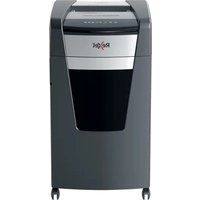
Momentum Extra XP418+ - Shredder REXEL - Free user manual and instructions
Find the device manual for free Momentum Extra XP418+ REXEL in PDF.


| Product type | Document shredder |
| Brand | Rexel |
| Model | Momentum Extra XP418+ |
| Sheets per pass | Up to 12 sheets (80 g/m²) |
| Cut type | Cross-cut |
| Security level | P-4 |
| Bin capacity | 30 liters |
| Anti-jam technology | Yes, thickness detection system |
| Reverse function | Yes, manual button |
| Auto standby | Yes, after 30 minutes of inactivity |
| Indicator lights | Ready, overheating, overload, bin full, door open |
| CD and credit card destruction | Yes, dedicated slot |
| Accepted materials | Paper, staples (up to 26/6), paper clips (max 32 mm), CDs, credit cards |
| Prohibited materials | Plastic, bindings, adhesive labels, CDs in paper slot |
| Child safety | Not intended for children, door lock |
| Maintenance | Lubrication with Rexel special sheets every 3 bin empties |
| Warranty | 2 years |
| Power supply | Mains (230 V) |
| Weight | 10 kg |
| Dimensions (W x D x H) | 350 x 260 x 530 mm |
| Color | Black |
Frequently Asked Questions - Momentum Extra XP418+ REXEL
User questions about Momentum Extra XP418+ REXEL
0 question about this device. Answer the ones you know or ask your own.
Ask a new question about this device
Download the instructions for your Shredder in PDF format for free! Find your manual Momentum Extra XP418+ - REXEL and take your electronic device back in hand. On this page are published all the documents necessary for the use of your device. Momentum Extra XP418+ by REXEL.
USER MANUAL Momentum Extra XP418+ REXEL
natural_image
Exterior view of a Rexel brand disposable water dispenser (no visible text or symbols on body)start here
starten sie hier démarrez ici iniziare qui empieza aqui comece aqui begin hier start her
start her
börja här
aloita tästä
alusta siit
sāc šeit
praděti čia
rozpocznij tutaj
починай тут
начинать здесь
мунда бастаныз
začněte zde
tu začnite
kezdés itt
începe aici
ξεκινήστε εδώ
buradan başlayın
أبدا هنا
natural_image
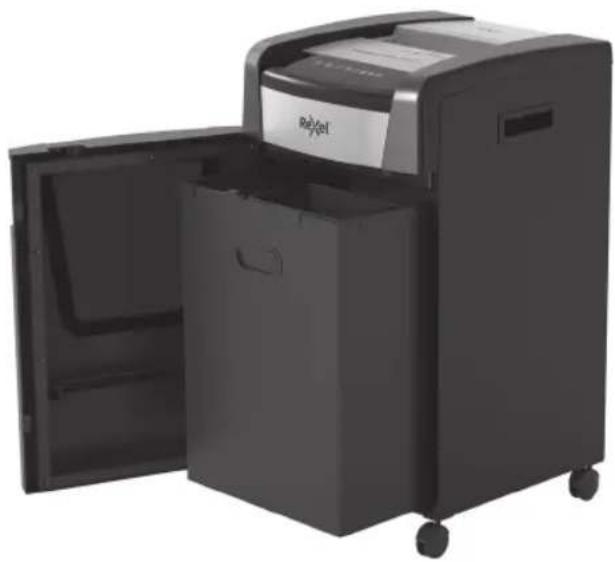
Exterior view of a black Rojet printer with open door and wheels (no visible text or symbols)Momentum+ Momentum Extra+
Specifications
| Model Cut size Sheets A4 | @ 80gsm | Entry width | Bin size litres | Amperage | |
| Momentum P420+ P4 20 | 230 | 30 | |||
| Momentum P515+ | P5 15 | ||||
| Momentum Extra XP418+ P4 18 | 45 | ||||
| Momentum Extra XP512+ P5 12 | |||||
| Momentum Extra XP420+ P4 20 | 60 | ||||
| Momentum Extra XP514+ P5 14 | |||||
| Momentum Extra XP422+ P4 22 | 85 | ||||
| Momentum Extra XP516+ P5 16 | |||||
| Momentum Extra XP426+ P4 | A4=26 / A3=19 | 310 120 | |||
| Momentum Extra XP520+ P5 | A4-20 / A3-13 |
EN 4
DE 8
FR 12
IT 16
ES 20
PT 24
NL 28
DA 32
NO 36
SV 40
FI 44
ET 48
LV 52
LT 56
PL 60
UK 64
RU 68
KK 72
CS 76
SK 80
HU 84
RO 88
GR 92
TR 96
AR 100
220-240V AC / 50Hz

To register and activate the warranty go to www.rexeleurope.com/register

CE
EAC
UK CA

natural_image
Line drawings of two different household appliances with a power button and electrical plug (no text or symbols)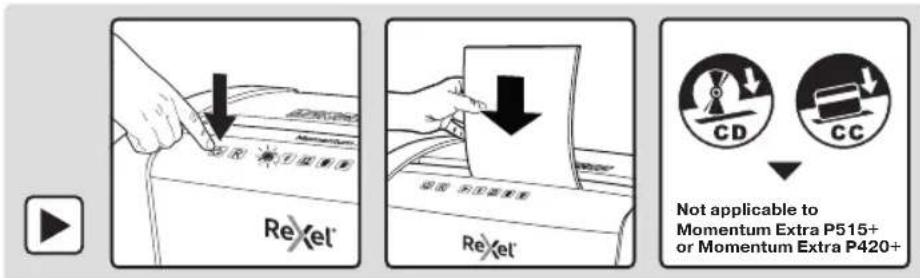
ReXel®

Please read and keep these important safety instructions

For a full copy of the operating instructions, hints & tips and troubleshooting guide, please visit www.rexeleurope.com/support

The following symbol which is found on the product indicates you could be seriously hurt or killed if you open the machine. DO NOT OPEN.

WARNING Electrical shock hazard. Do not open. No user serviceable parts inside. Refer servicing to qualified service personnel.

Warning: Do not touch cutters, beware of sharp edges.

Warning: Moving parts hazard, keep hands away.
- Please read all the safety information and the instructions; the manufacturer is not liable for cases of material damage or personal injury caused by incorrect handling or non-compliance with the safety instructions. In such cases, the warranty will be voided.
- Only use the unit for its intended purpose.
- The unit must only be connected to a supply voltage corresponding to the electrical rating shown on the unit.
- Unit should be connected to a socket outlet near the equipment that is easily accessible.
- Do not connect multiple adaptors or use with an extension cable.
- Do not attempt to service or repair the unit yourself.
• If recycling, separate paper and credit card shreds. - Do not use this unit if the cable or plug have been damaged.
- Care should be taken when moving equipment to avoid any unlevelled surfaces.
• The device is intended for use indoors. Never use outdoors. - Keep the device away from moisture.
- Be vigilant at all times, and always be careful what you are doing. Do not use electrical equipment if you are lacking in concentration or awareness, or are under the influence of drugs, alcohol or medication. Even a moment of inattentiveness can lead to serious injuries when using electrical equipment.
- Do not attempt to open, modify or repair the device. Do not drop, puncture, break or expose to high pressure.
- Alterations to the device and technical modifications are not permitted.
- Check the device and cable (and if applicable, the adapter) for any damage before use. If there is any visible damage, a strong odour, or excessive overheating of components, unplug all the components immediately and stop using the device.
- Shredder must be disconnected from power source if not used for an extended period of time.
- Do not use spray cleaners or spray lubricants as these may present a risk of flash fire.
- Never bypass the safety interlock (strictly forbidden and dangerous, especially when unit is connected to a power source).
- Do not lean on the shredder door; this may damage the door and will not be covered by your warranty.
- Failure to follow these instructions could result in damage/injury and will invalidate your guarantee.
Warning symbols

Warning symbols

Keep loose jewellery clear

This means do not shred Credit Cards

Ties and loose clothing hazard

Keep long hair clear

Do not reach into opening

This equipment is not intended for use by children

No aerosols. Do not use spray cleaners or lubricants, as these may present a risk of flash fire.

Max sheet capacity

Warning: do not shred CD in paper feed slot

No heavy duty staples above 26mm

Warning: moving parts

Warning: This equipment is not intended for use by children. Avoid touching the media feed opening with the hands, clothing or hair. Unplug this equipment when not in use for an extended period of time. Hazardous moving parts are in this equipment; keep body parts away from moving parts.

Warning: The power cord must be connected to a socket-outlet with earthing connection.


Only shred CDs and credit cards in the separate slot, as indicated.
| Icon Type Button / indication & action(troubleshoot) | ||
 | Control buttons | Auto-start and stand-by button(press one time) |
 | Manual reverse button(hold down) | |
 | Manual forward run button(hold down) | |
 | Status indications | Ready indicator, ready to shred and no overload |
 | Over heating indication(Allow to cool) | |
 | Overloaded / Jam indication(Reduce sheets / remove jammed paper) | |
 | Bin full indication(open door and empty the bin) | |
 | Door open or shredder head removedindication (close door firmly) | |
Operation
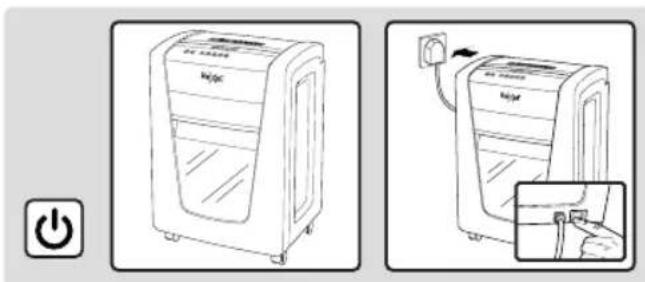
- Remove the shredder from the packaging and place the bin inside the shredder housing. Plug the power cord into the rear of the shredder.
- Connect the shredder to an appropriate mains supply.
Ensure the on/o switch is in the 'on' position. The blue shredder in operation icon ▶ will flash every 3 seconds.
- To commence shredding press the button. The flashing icon changes to a solid blue light. You are now able to shred.
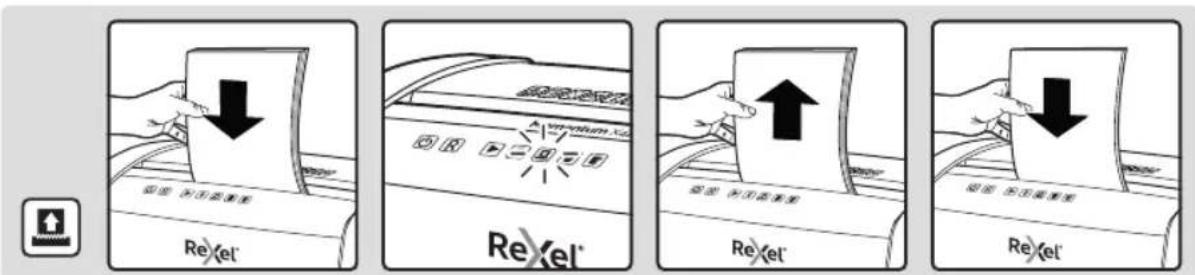
- Insert paper to be shredded into the feed area. The Anti-Jam Mechanism will sense the thickness of the paper being shredded.
If the paper stack thickness is greater than the shredder's sheet capacity, the Anti-Jam indicator will turn on. Please remove the stack of paper and reduce the number of sheets to within the specified capacity ☐.
If the paper stack thickness is within the specified sheet capacity, the blue Ready triangle will remain on and paper will be shredded ▶.
Note: Make sure the paper to be inserted is neatly stacked.
If the paper thickness is within the shredder's capacity, the motor will start and your documents will be shredded. The cutters will stop once the shredding process is complete.
-
If the paper thickness is greater than the shredder's capacity the auto reverse icon will flash red and the motor will stop.
-
If this happens, remove some of the sheets from the paper stack and re-try. The shredder will automatically start and allow the paper to be shredded.
- If the shredder is left in shredder operational mode for more than 30 minutes without being used the shredder will automatically switch oil in order to save power.

Warning: Do NOT under any circumstances use any metal objects (scissors, letter openers, etc.) in an attempt to clear the entry.
Anti-Jam Technology
This shredder will only shred stacks of paper within the specified sheet capacity; if there are too many sheets, the stack of paper will be rejected and the shredder will not start.
During the shredding process do not attempt to add more paper as this will cause a paper overload and auto-reverse will start; paper will then need to be removed.
Reverse function
- Should you wish to reverse the shredding direction whilst shredding a document a reverse function R has been fitted for your convenience.
- By pressing the reverse button the cutters will change direction allowing the retrieval of the document being shredded.
- The reverse function will only run whilst [R] is being pressed. When the reverse button is released the shredder will revert to ready mode.
Operation time
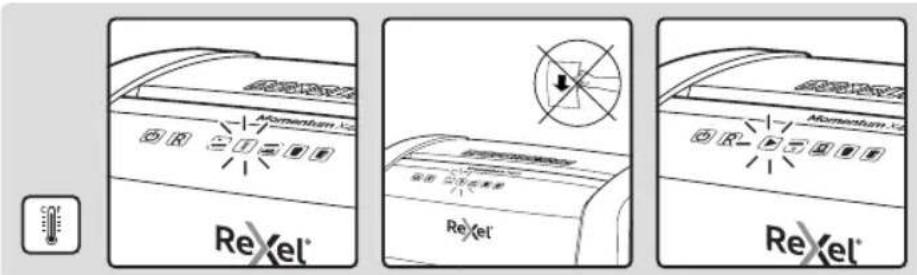
When the shredder is used continuously, the shredder may overheat. If this occurs the overheat icon will illuminate red.
When the shredder is ready to be used again the red overheat icon will go out.
To resume shredding, press the On button and start feeding documents into the feed slot.

Only shred CDs and credit cards in the separate slot, as indicated.
ReXel®
Momentum+ & Momentum Extra+ shredding capability
CAN shred the following:

• Stapled paper, 25mm within the corner
• 26/6 and 24/6 or smaller staples
- Small sized paper

• Paperclipped paper, 25mm within the corner
- Capable of shredding small/medium paperclips (max. wire thickness = 0.9 mm)
• >80/100gsm paper

Thick paper or card <200gsm

Glossy paper or a sheet covered with print on both sides.
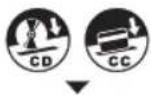
Warning! Only shred CD in machines with a separate CD shredding slot.
CANNOT shred the following:

Heavy duty staples. Check the staple leg length is not greater than 6mm.

Large clips. Check the length of the paperclip is not longer than 32mm.

Plastic sheets, laminated documents, plastic folders.

Bulldog clips

Bound documents

Adhesive labels.

Magazines or other documents bound by multiple staples or clips.


No aerosols No oil


Warning! Never shred CDs in the paper feed slot.
Bin full
When the bin is full the shredder will not function and the bin full symbol will illuminate and flash red.
When this happens you must empty the bin.
Pull out the bin to empty.
Once the bin is empty, push it back in and press the On button to resume shredding.

WARNING: The shredder bin must be fully pushed closed for the machine to operate.
- Empty the shredder bin when it is full otherwise the shredder's performance will be adversely affected. Operating the shredder with a full shredder bin can result in paper jamming in the cutters, which will increase the machine's noise level.
- Do not force down shredder paper in the bin using your feet.
Door open
If the door is opened during shredding as a safety precaution the shredder will instantly stop, and the door open symbol on the indicator panel will flash red.
To resume shredding, shut the door and press the ⏻ button.

WARNING
- The shredder DOOR must be fully pushed closed for the machine to operate.
Lubrication of the shredder
Only use Rexel Oil Sheets (2101948 / 2101949) to lubricate. ACCO Brands accepts no liability for product performance or safety when other types of lubricants are used on any part(s) of this machine. Rexel recommend using an oil sheet after the bin has been emptied three times (and every three bin emptying after this).
Accessories
Only use Rexel accessories:
Oil Sheets - 2101948 / 2101949
Waste Electrical and Electronic Equipment (WEEE)
Electrical and electronic devices contain materials and substances that can have damaging effects on human health and the environment. This symbol indicates that this device must not be treated as unsorted municipal waste but must be collected separately. Dispose of the device via a collection point for the recycling of waste electrical and electronic equipment within the EU, UK and in other European countries that operate separate collection systems for waste electrical and electronic equipment. By disposing of the device in the proper manner, you help to avoid possible hazards for the environment and public health that could otherwise be caused by improper treatment of waste equipment. The recycling of materials contributes to the conservation of natural resources.
Guarantee
Operation of this machine is guaranteed for two years within the date of purchase, subject to normal use. Within the guarantee period, ACCO Brands Europe will at its own discretion either repair of replace the defective machine free of charge. Defects due to misuse or use for inappropriate purposes are not covered under the guarantee.
Proof of date of purchase will be required. Repairs or alterations made by persons not authorised by ACCO Brands Europe will invalidate the guarantee. It is our aim to ensure that our products perform to the specifications stated. This guarantee does not affect the legal rights which consumers have under applicable national legislation governing sale of goods.
This guarantee does not apply to Australian customers - see end of manual.
ReXel®

To resume shredding, press the On button and start feeding documents into the feed slot.

This document details the terms and conditions of the warranty against defects provided with this product. Please disregard any other representation contained on this product's packaging or provided with this product which constitutes or appears to constitute a warranty against defects.
WARRANTY AGAINST DEFECTS
This product comes with ACCO Brands Australia Pty Ltd (ACCO Brands) warranty against defects, the details and conditions of which are set out below.
Subject to the terms and conditions set out in this warranty, ACCO Brands will (at ACCO Brands' option) repair or replace this product with a new or refurbished product if it contains defects which are a result of faulty manufacturer workmanship or materials.
PERIOD OF WARRANTY
You may claim on this warranty if you notify ACCO Brands within 2 years of the date of purchase in the manner set out below and if you comply with the other conditions of this warranty.
WHO CAN CLAIM UNDER THIS WARRANTY?
This warranty applies to and can be exercised by the original purchaser of the product only. This warranty is not transferrable to any other person or party under any circumstances.
WHAT THIS WARRANTY DOES NOT COVER
If we reasonably consider that any of the following situations are present, this warranty does not apply. The situations to which this warranty does not apply are:
- any cosmetic damage;
- any product where the product's serial number is no longer present or visible;
- loss or damage caused by factors beyond ACCO Brands' control including, but not limited to, damage or failure due to power fluctuations, overload, excessive heat or humidity;
- any product which has not been installed and/or maintained according to any care or operating instructions provided with the product;
- any alterations or repairs to the product not authorised in writing or performed by ACCO Brands;
- damage or defects caused to the product due to unusual, abnormal, non-recommended or negligent use of the product;
- any wearable component in any product, including but not limited to blades, slitters, cutting sticks, cutting light bulbs, drill bits, base boards, feed wheels, separators, fuses, cutters and carriers, manual punches and cutting disks, light bulbs and staple inserts; or
- liability based on any service agreement entered into with third parties.
PROCEDURE FOR MAKING A CLAIM
Any claim made under this warranty must be made by sending the faulty product to ACCO Brands at the address noted below, together with the following information in writing:
- Your name or company name (if applicable);
- Your address;
- Your telephone number;
- Contact name;
• Machine type, model number and serial number;
• Proof of your purchase of this product, such as your receipt; and - A detailed description of the defect you believe the product to have.
WHAT WE WILL DO TO HONOUR THIS WARRANTY
Upon delivery to us we will organise for the product to be assessed to determine if the fault or problem is covered by this warranty. We will advise you by telephone, email or in writing whether the fault is covered by this warranty.
STATUTORY GUARANTEES AND YOUR OTHER RIGHTS AND REMEDIES
This warranty against defects is provided in addition to other rights or remedies you, as a consumer, may have under a law in relation to this product.
Our goods come with guarantees that cannot be excluded under the Australian Consumer Law.
You are entitled to a replacement or refund for a major failure and for compensation for any reasonably foreseeable loss or damage. You are also entitled to have the goods repaired or replaced if the goods fail to be of acceptable quality and the failure does not amount to a major failure.
CONTACTING US
ACCO Brands Australia Pty Ltd (ABN 16 000 265 047)
Australia and New Zealand Distributor
Locked Bag 50
Blacktown BC NSW 2148
For product purchased in Australia call: 1300 278 546
Email: enquiry.nsw@acco.com
For product purchased in New Zealand call: 0800 800 526
Email: enquiry.nz@acco.com
_
| _
一
1

- start here
- start her
- начинать здесь
- 220-240V AC / 50Hz
- ReXel®
- Please read and keep these important safety instructions
- Warning symbols
- Operation
- Anti-Jam Technology
- Reverse function
- Operation time
- Momentum+ & Momentum Extra+ shredding capability
- CAN shred the following:
- CANNOT shred the following:
- Bin full
- Door open
- WARNING
- Lubrication of the shredder
- Accessories
- Waste Electrical and Electronic Equipment (WEEE)
- Guarantee
- WARRANTY AGAINST DEFECTS
- PERIOD OF WARRANTY
- WHO CAN CLAIM UNDER THIS WARRANTY?
- WHAT THIS WARRANTY DOES NOT COVER
- PROCEDURE FOR MAKING A CLAIM
- WHAT WE WILL DO TO HONOUR THIS WARRANTY
- STATUTORY GUARANTEES AND YOUR OTHER RIGHTS AND REMEDIES
- CONTACTING US
Brand : REXEL
Model : Momentum Extra XP418+
Category : Shredder