 ManualGo.com
 KM 8550 W Bp Pack - Vacuum Cleaner Kärcher - Free user manual and instructions
Find the device manual for free KM 8550 W Bp Pack Kärcher in PDF.



Download the instructions for your Vacuum Cleaner in PDF format for free! Find your manual KM 8550 W Bp Pack - Kärcher and take your electronic device back in hand. On this page are published all the documents necessary for the use of your device. KM 8550 W Bp Pack by Kärcher.
USER MANUAL KM 8550 W Bp Pack Kärcher
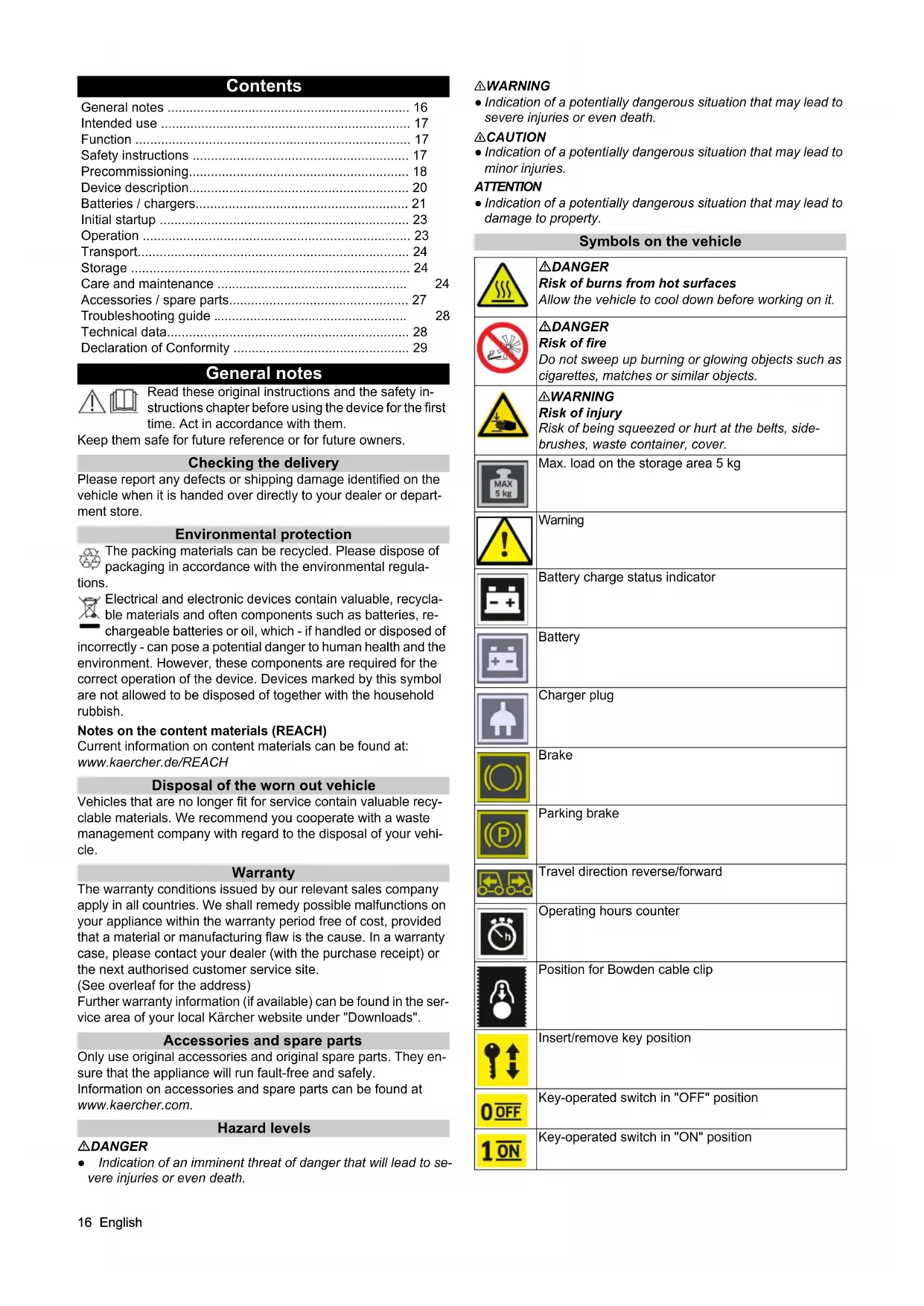
- dB(A)333 KM 85/50 W Bp (1.351-116.0) KM 85/50 W Bp *IN (1.351-118.0) KM 85/50 W Bp Pack (1.351-117.0) KM 85/50 W Bp Pack 2SB (1.351-119.0)16 English Contents General notes Read these original instructions and the safety in- structions chapter before using the device for the first time. Act in accordance with them. Keep them safe for future reference or for future owners. Checking the delivery Please report any defects or shipping damage identified on the vehicle when it is handed over directly to your dealer or depart- ment store. Environmental protection The packing materials can be recycled. Please dispose of packaging in accordance with the environmental regula- tions. Electrical and electronic devices contain valuable, recycla- ble materials and often components such as batteries, re- chargeable batteries or oil, which - if handled or disposed of incorrectly - can pose a potential danger to human health and the environment. However, these components are required for the correct operation of the device. Devices marked by this symbol are not allowed to be disposed of together with the household rubbish. Notes on the content materials (REACH) Current information on content materials can be found at: www.kaercher.de/REACH Disposal of the worn out vehicle Vehicles that are no longer fit for service contain valuable recy- clable materials. We recommend you cooperate with a waste management company with regard to the disposal of your vehi- cle. Warranty The warranty conditions issued by our relevant sales company apply in all countries. We shall remedy possible malfunctions on your appliance within the warranty period free of cost, provided that a material or manufacturing flaw is the cause. In a warranty case, please contact your dealer (with the purchase receipt) or the next authorised customer service site. (See overleaf for the address) Further warranty information (if available) can be found in the ser- vice area of your local Kärcher website under "Downloads". Accessories and spare parts Only use original accessories and original spare parts. They en- sure that the appliance will run fault-free and safely. Information on accessories and spare parts can be found at www.kaercher.com. Hazard levels DANGER ● Indication of an imminent threat of danger that will lead to se- vere injuries or even death. 몇 WARNING ● Indication of a potentially dangerous situation that may lead to severe injuries or even death. 몇 CAUTION ● Indication of a potentially dangerous situation that may lead to minor injuries. ATTENTION ● Indication of a potentially dangerous situation that may lead to damage to property. Symbols on the vehicle General notes p. 16
- Intended use p. 17
- Function p. 17
- Safety instructions p. 17
- Precommissioning p. 18
- Device description p. 20
- Batteries / chargers p. 21
- Initial startup p. 23
- Operation p. 23
- Transport p. 24
- Storage p. 24
- Care and maintenance p. 24
- Accessories / spare parts p. 27
- Troubleshooting guide p. 28
- Technical data p. 28
- Declaration of Conformity DANGER Risk of burns from hot surfaces Allow the vehicle to cool down before working on it. DANGER Risk of fire Do not sweep up burning or glowing objects such as cigarettes, matches or similar objects. 몇 WARNING Risk of injury Risk of being squeezed or hurt at the belts, side- brushes, waste container, cover. Max. load on the storage area 5 kg Warning Battery charge status indicator Battery Charger plug Brake Parking brake Travel direction reverse/forward Operating hours counter Position for Bowden cable clip Insert/remove key position Key-operated switch in "OFF" position Key-operated switch in "ON" positionEnglish 17 Intended use Use the battery-operated sweeper for cleaning surfaces indoors and outdoors. The sweeper is designed for commercial use. Only use the sweeper in accordance with the information in these operating instructions. Any other use is considered improper use. The manufacturer assumes no liability for any resultant damage. The user is solely responsible for the risk. No modifications must be made to the sweeper. Only the areas approved by the company or the company's rep- resentatives must be driven on and cleaned. Foreseeable misuse The device is not designed for continuously driving on slopes. Do not drive on slopes with a gradient of 15% for longer than 3 minutes. Never sweep or suction up explosive liquids, gases, non-diluted acids or solvents (e.g. petrol, paint thinner, heating oil) because they form explosive vapours or mixtures in conjunction with the suction air. Never sweep or suction up acetone, non-diluted acids or sol- vents, as they will corrode and damage the materials used on the device. Never sweep or suction up reactive metal dusts (e.g. aluminium, magnesium, zinc). They form explosive gases in conjunction with highly alkaline or acidic cleaning agents. Do not sweep or suction up burning or smouldering objects. There is a risk of fire. Do not sweep up any harmful substances. Standing in hazard zones is prohibited. Operation in explosive spaces is prohibited. Carrying passengers is prohibited. This device must not be used to push/pull or transport objects. Suitable sweeping surfaces ● Asphalt ● Industrial floor ● Screed ● Concrete ● Paving stones Function The sweeper operates using the direct-throw principle. p. 29
1. The rotating side brush cleans corners and edges of the
sweeping surface, and conveys the waste into the path of the roller brush.
2. The rotating roller brush conveys the swept material directly
into the waste container.
3. The dust which is swirled up in the waste container is separat-
ed by a dust filter, and the suction fan suctions the filtered clean air.
4. The dust filter is cleaned manually by the user.
Safety instructions Safety devices Safety devices protect the user and may not taken out of opera- tion or functionally circumvented. Adhere to the safety instructions in the chapters! Safety instructions for operation 몇 WARNING ● Only use the device for its proper use. Take into account the local conditions and beware of third parties, in par- ticular children, when working with the device. ● Check the de- vice with the operating devices to make sure it is in proper condition and operational safe and reliable. If it is not in perfect condition, you must not use it. ● Adhere to the respective safety regulations in hazard zones (e.g. service stations). Never operate the device in explosive spaces. ● The device is not intended for use by persons with restricted physical, sensory or mental abili- ties or those lacking in experience and / or lacking in knowledge. ● Only people who have been instructed on how to use the de- vice, or have proven their ability to operate it, and have been ex- plicitly instructed to use it, must use the device.ATTENTION ● Before starting work, the operator must check whether the safe- ty devices have been attached properly and are fully functional. ● The device operator is responsible for accidents with other peo- ple and their property.WARNING ● The operator must wear close-fitting clothing and sturdy footwear. Avoid loose-fitting clothing. ● Children must be supervised to prevent them from playing with the appliance. ● Children and adolescents must not operate the device.ATTENTION ● Check the immediate vicinity before setting off (e.g. children). Make sure you have a sufficient view. ● Never leave the device unattended unless the device is secured against unintentional movement. When the device is at a standstill, apply the parking brake and remove the key from the Coarse dirt flap Filter dedusting Filter change Raise roller brush Lower roller brush Lower side brush Raise side brush Side brush sweeping pattern adjustment Travel drive release Travel drive lock Blower off (wet sweeping mode) Blower on (sweeping mode) Lashing point18 English key-operated switch.CAUTION ● Do not use the device in areas in which there is a possibility of being struck by falling objects. Safety instructions for driving Note ● The list on the risk of overturning is not necessarily com- prehensive.DANGER ● Danger of tilting if hill or slope is too steep! Observe the maximum permissible values in the technical data when driving up hills and slopes. ● Danger of tilting in case of excessive tilting at side! Observe the maximum permissible values in the technical data when driving lateral to the travel di- rection. ● Danger of tilting on unstable subsurfaces! Only use the device on firm subsurfaces. 몇 WARNING ● Risk of accident due to not adapting speed. Ap- proach corners slowly. Battery-operated devices DANGER ● Risk of explosion! Only charge batteries with a suitable charger ● Highly explosive gas is produced when charg- ing batteries in confined spaces. Only charge batteries in well ventilated spaces. ● Keep naked flames away from the battery or the battery charging room, and do not generate sparks or smoke in the vicinity of a battery of a battery charging room. ● Risk of explosion and short circuits. Do not place tools or similar items on the battery. 몇 CAUTION ● Risk of injury from battery acid. Adhere to the re- spective safety regulations. ATTENTION ● Adhere to the operating instruction of the manu- facturer of the battery and charger. Adhere to the recommenda- tions of the legislature regarding the handling of batteries. ● Never leave batteries in a discharged state. Charge batteries again as soon as possible. ● Keep batteries clean and dry in or- der to avoid leakage currents. Protect batteries from contamina- tion, e.g. from metal dust. ● Dispose of used batteries in an environmentally friendly manner in accordance with the EC Di- rective 91/157/EEC or the respective national regulations. Safety instructions for transportation 몇 CAUTION ● In order to prevent accidents or injuries, you must take into ac- count the weight of the device, see chapter Technical data in the operating instructions. ● Shut the motor down prior to transportation. Secure the device, taking into account its weight. See chapter Technical data in the operating instructions. Care and maintenance 몇 WARNING ● Disconnect the battery before working on the electrical system. ● Switch off the device and pull the key out of the key-operated switch before cleaning, performing mainte- nance, replacing parts or changing to a different function. 몇 CAUTION ● Repairs may only be carried out by approved customer service sites or staff qualified in this area who are famil- iar with all relevant safety instructions. ATTENTION ● Adhere to the safety inspection requirements for mobile devices for industrial use in accordance with the locally applicable regulations (e.g. in Germany: VDE 0701). ● Short-cir- cuits or other damage. Do not clean the device with a hose or high-pressure water jet. ● Always wear suitable gloves when working on the device. Precommissioning Unloading instructions DANGER Risk of accidents when unloading the device Use a suitable ramp when unloading the device. Do not use a forklift to unload / load the device. Be aware of the weight of the device when unloading / loading. See also the chapter “Technical data”. Figure: Build a ramp
1. Connect the battery and charge if necessary.
2. Fit the push handle and lever.
3. Use the enclosed boards to build a ramp according to the
4. Cut the plastic packing strips and remove the film.
5. Remove the strap fastening at the attachment points.
6. Unscrew the three marked floor boards and the squared tim-
7. Position the boards on the edge of the pallet; align the boards
so that they lie in front on the wheels on the device. Screw the boards tight.
8. Place the squared timber under the boards as a support.
9. Remove the wooden blocks locking the wheels.
10.Release the parking brake. 11.Carefully drive the device off the pallet via the ramp or push it off the pallet (see chapter “Moving the device without its own drive”).English 19 Mount the push handle and hand lever Note The push handle is removed and placed in the packaging on de- livery of the device. This must be mounted on the device. The hand levers for the brake and the coarse dirt flap are not yet installed and must be attached to the push handle. Adjustments do not need to be made, these are already set correctly at the fac- tory. 1 Push handle 2 Star screws (2x) 3 Coarse dirt flap hand lever 4 Brake hand lever 5 Sheathed cable clips (2x)
1. Fasten the push handle with the star screws.
2. Fasten the hand lever for the coarse dirt flap on the left in the
travel direction and the hand lever for the brake on the right on the push handle as shown in the figure.
3. Fix both sheathed cables with the clips on the push handle.
Opening/closing/removing the cover 몇 CAUTION Risk of crushing fingers Only use the recessed grip provided to open and close the cover. ATTENTION Risk of burns from a hot drive motor The drive motor can get hot during operation. Do not touch hot surfaces. Pay attention to the warning symbols. Note It is necessary to open or remove the cover: 1 To connect / install the batteries. 2 for maintenance and cleaning work. 3 To readjust the side brushes. Note The device will not move if the device cover is not completely closed, (cover switch). 1 Device cover, removed 2 Swivel bearings (2x) 3 Mount for swivel bearing
1. Opening the cover: Grasp the device cover by the recessed
grip and slowly swivel it forward. The swivel bearings hold the device cover in its end position.
2. Removing the cover: Swivel the device cover forwards until
just before the end position, then remove it upwards.
3. Closing the cover: Slowly swivel the device cover back.
Pushing the device (without self-propulsion) The drive must be deactivated to push the device. This is done with a lever mechanism that decouples the drive. Figure: Lever position up - device can be pushed 1 Lever 2 Push handle
1. Switch off the device and remove the key from the key-operat-
3. Push the lever up. The drive is decoupled and the push handle
4. Device can be pushed.
5. After moving, push the lever down again.
Installing the side brush The side brush(es) are not attached to the device on delivery. They are in the waste container.
1. Attach the side brushes to the device before initial startup. See
chapter "Readjusting/changing the side brushes".20 English Device description Device illustration The device is available in 4 different versions: ● KM 85/50 W Bp (1.351-116.0) Without batteries and charger, with 1 side brush ● KM 85/50 W Bp *IN (1.351-118.0) Without batteries and charger, with 1 side brush ● KM 85/50 W Bp Pack (1.351-117.0) With batteries and charger, with 1 side brush ● KM 85/50 W Bp Pack 2SB (1.351-119.0) With batteries and charger, with 2 side brush 1 Cover 2 Right side brush – Swivels inwards on contact (protection against damage) 3 Steering roller 4 Sealing strips 5 Drive wheels 6 Charging plug 7 “Homebase” holder 8 Storage space (max. 5 kg) 9 Coarse dirt flap lever 10 Push handle 11 Brake/parking brake lever 12 Batteries Only with variants 1.351-117.0 and 1.351-119.0 13 Charger Only with variants 1.351-117.0 and 1.351-119.0 14 Left side brush Only with variant 1.351-119.0 – Swivels inwards on contact (protection against damage) Control elements 1 Key-operated switch 2 Charge monitoring display for battery 3 Storage 4 Roller brush lever 5 Side brush lever 6 Drink holder 7 Blower "on/off" rotary switch 8 Device cover recessed grip 9 Operating hours display Blower switch ATTENTION Malfunction Do not select any intermediate positions 1 Blower rotary switch (mechanical) 2 Switch position OFF - blower is off 3 Switch position ON - blower is on
1. When sweeping dry surfaces: Switch on the blower with the
2. When sweeping damp surfaces: Switch off the blower with the
switch.English 21 Key-operated switch 1 Key-operated switch 2 Off position Key can be removed/inserted from the key-operated switch 3 Position 0/OFF The device is ready 4 Position I/ON The device is switched on and ready for use
1. Turn the key-operated switch to the appropriate position, it will
2. Remove the key from the key-operated switch when parking
the device. Manual dust filter cleaning ATTENTION Health risk Only operate the filter cleaning when the waste container is fitted. 1 Manual dust filter cleaning
1. Move the handle back and forth several times to clean the fil-
ter. Push handle 1 Push handle 2 Brake lever/parking brake 3 Brake lever lock 4 Coarse dirt flap lever
1. Pull the brake lever to brake.
2. Apply the parking brake when parking the device.
a Pull the brake lever until it can be locked. b To release, pull the brake lever and release the lock. c Always keep the brake disc free from oil or grease. Clean the disc at regular intervals.
3. To sweep larger objects in, pull the lever and lift the coarse dirt
flap. a Pull the lever of the coarse dirt flap to drive over fixed obsta- cles (up to 30 mm). b When the lever is released, the coarse dirt flap returns to its original position. Roller brush and side brush lever 1 Roller brush lever 2 Side brush lever
1. Lower the roller brush.
a Lever forwards: The roller brush is lowered - the machine is ready to sweep. b Lever backwards: The lever latches into place. The roller brush rises.
2. Lower the side brush for cleaning close to the edge.
a Lever forwards: The side brush(es) are lowered. b Lever backwards: The lever latches into place. The side brush(es) are raised. Batteries / chargers ATTENTION Only use the batteries and chargers recommended by the manufacturer Only replace batteries with batteries of the same type. Before disposing of the vehicle, remove the battery and dispose of it in accordance with national or local regulations.22 English Warning symbols Observe the following warnings when handling the batteries: Safety instructions DANGER Risk of fire and explosion Do not place tools or other objects on the battery. Naked flames and smoking must be strictly avoided. Ensure the room is well ventilated when charging batteries. Only use batteries and chargers approved by Kärcher (original spare parts). 몇 WARNING Environmental risk due to improper disposal of batteries Ensure that defect or used batteries are disposed of safely (con- tact a waste management company or Kärcher Service). Procedures in the event of unintentional release of battery acid When used normally, and when observing the instructions, lead- acid batteries do not pose any risk. However, keep in mind that lead-acid batteries contain sulphuric acid which can cause serious chemical burns and corrosion.
1. If there is spillage or, if the battery is leaking, acid is escaping,
lay down a binding agent such as sand. Do not let it reach the sewer system, soil or a body of water.
2. Neutralise the acid with lime/baking soda and dispose of it ac-
cording to local regulations.
3. Contact a waste management company to dispose of faulty
4. Rinse out your eyes or rinse off your skin with copious
amounts of fresh water if acid splashes into your eyes or onto your skin.
5. Then consult a doctor immediately.
6. Wash any contaminated clothing with water.
Order numbers and dimensions of batteries and chargers Note The KM 85/50 W Bp Pack and KM 85/50 W Bp Pack 2SB variants are delivered with batteries and charger. ● Kärcher order numbers for recommended batteries and chargers ● When using other batteries Installing / connecting batteries ATTENTION Risk of damage as a result of incorrect polarity Make sure you connect the cables to the correct terminals. Figure: Installation and connection of the batteries 1 Batteries 2 Negative cable to the battery connector 3 Positive cable to the battery connector 4 Connection cable 5 Spacers (2x)
1. Switch off the device and remove the key from the key-operat-
2. Open or remove the device cover.
3. Place both batteries in the mount.
4. Insert both spacers.
5. Connect the connection cables as shown.
6. Connect the negative and positive cables to the battery con-
nector as shown. Observe notes in the instructions for the battery, on the battery and in these operating instructions. Wear eye protection. Keep acids and batteries away from children. Risk of explosion Fire, sparks, open flames and smoking are prohibited. Risk of acid burns First aid. Warning Disposal Do not throw batteries in the bin. Battery set Maintenance- free Order no. * Volume
- The order no. of the battery set contains 2 batteries ** Minimum volume of battery charging room *** Minimum airflow between battery charging room and environ- ment Charger Order no. Required quantity 24 V / 12 A 6.654-329.0 1 Maximum dimensions per battery * L x W x H 362 x 174 x 290 mm
- 2 batteries are requiredEnglish 23 Charging batteries DANGER Risk of fatal injury from electric shock Only operate the charger from an appropriate power supply with sufficient fuse protection. Only use the charger in dry rooms with sufficient ventilation. ATTENTION Risk of damage due to deep discharge The device has deep discharge protection, i.e. when the permit- ted minimum capacity level is reached, you have to drive the de- vice directly to the charging station and avoid slopes. ATTENTION Risk of damage caused by charger Do not connect the charger to the device controller plug connec- tor. Note Adhere to the safety instructions for charging batteries. For further information on charging, please read the operating in- structions for the charger and act accordingly. 1 Mains cable with IEC connector 2 Charger 3 LED displays – Yellow = battery charging – Green = battery > 80% charged – Green = battery fully charged – Red = battery empty 4 Charger plug connector 5 Battery plug connector
1. Shut down the device safely.
2. Unplug the battery connector at the device.
3. Connect the charger plug connector to the battery plug con-
4. Connect the IEC connector to the charger. Connect the mains
cable to the domestic mains socket. The charging process be- gins. Carry out the charging process in accordance with the infor- mation in the operating instructions for the charger.
5. Charge the batteries for 10-12 hours.
The recommended chargers (for the respective batteries) are electronically controlled and finish the charging process auto- matically. Initial startup Before startup
1. Check the charging state of the battery by setting the key-op-
erated switch to position I (operation). a The charging state of the battery is displayed after approx. 5 seconds with different coloured LEDs (green, yellow, red) on the charge monitoring display. b If the display is yellow or red, charge the battery.
2. Check the roller brush and side brush for any tangled pieces
of tape. a This check can be made with the waste container removed. b For safety reasons, tangled pieces of tape must only be re- moved when removed.
3. Operate the manual dust filter cleaning and clean the dust fil-
Operation Driving the device ATTENTION Risk of accident when reversing The device can move forward and backward at the same speed. You should therefore carefully pull the push handle to the rear when reversing.
1. Insert the key in the key-operated switch and turn to the “I/ON”
position, the device is ready for operation.
2. Release the parking brake.
3. Driving forward: Push the push handle forward.
4. Driving in reverse: Pull the push handle back.
5. To drive over fixed obstacles (up to 30 mm), raise the coarse
6. Drive over fixed obstacles of more than 30 mm in height only
via a suitable ramp. Information on sweeping operation DANGER Risk of injury from stones or chippings When the coarse dirt flap is open, beware of people, animals and objects in the vicinity (projectile stones or chippings are danger- ous). Do not carry out any cleaning work with the waste container re- moved. 몇 CAUTION Risk of damage due to parcel tape or similar material Do not sweep parcel tape, pieces of string or similar items (dam- age to the sweeping mechanics). Note Adjust the sweeping speed to the conditions in order to achieve optimum cleaning results. Sweeping with roller brush and side brush 1 Push handle 2 Roller brush lever 3 Side brush lever 4 Coarse dirt flap lever
1. Carry out cleaning work in the forward travel direction by push-
ing the push handle forward.
2. Lower the roller brush by pushing the roller brush lever on the
control panel forwards. The roller brush lowers. a Switch on the suction fan at the rotary switch on dry surfac- es. b Work without a suction fan on wet or damp surfaces.
3. For cleaning close to the edge, lower the side brush by push-
ing the side brush lever on the control panel forwards.24 English a The side brush only starts up if the roller brush is switched on.
4. To pick up larger objects (30 mm), actuate the coarse dirt flap
5. Clean the dust filter regularly.
6. To protect the batteries, the device switches itself off com-
pletely when the battery charge is low. a Always recharge batteries in good time. See chapter “Charging the batteries”. b If the device has switched itself off, decouple the drive and push the device to the charging station. See chapter “Push- ing the device”. Emptying the waste container ATTENTION Health risk from dust Wear a dust mask and safety goggles when emptying the waste container. Note Operate the manual dust filter cleaning system several times be- fore emptying the waste container. 1 Waste container lock (2x) 2 Waste container handle 3 Waste container transport rollers (2x) 4 Recessed grip
1. Push both locks of the waste container upwards (open).
2. Hold the waste container by the handle and pull it out on the
3. To empty, hold the waste container by the handle and re-
4. Push in the waste container completely.
5. Check whether the waste container has clicked into place.
Stopping and parking the device
1. Park the device on a level surface.
2. Apply the parking brake.
3. Remove the key from the key-operated switch.
4. Raise the roller brush and side brush.
5. Empty the waste container.
6. Charge the battery.
Transport 몇 CAUTION Risk of injury and damage Be aware of the weight of the device during transportation. 1 Fastening area above the push handle 2 Fastening area at the front (under the device cover) 3 Positioning aid for tension belt
1. Note the markings for fastening areas on the base frame
2. Apply the parking brake.
3. Remove the battery connector and key from the key-operated
4. Secure the device to the wheels with wedges.
5. Secure the device with ropes or lashing straps.
6. When transporting in vehicles, secure the device against slip-
ping and tipping over according to the applicable guidelines. Storage 몇 WARNING Risk of injury and damage Note the weight of the device.
1. Place the device in a dry, protected place on an even surface.
2. Remove the key from the key-operated switch.
3. Clean the vehicle inside and out.
4. Pull off the outer battery connector.
5. Recharge the battery every 2 months.
Care and maintenance General notes DANGER Risk of accidents and injuries due to unintentional move- ment of the device Switch off the device and remove the key from the key-operated switch before carrying out any care and maintenance work. Disconnect the central battery plug connector. Note ● Adhere to the safety instructions for care and maintenance. Cleaning the device 몇 CAUTION Risk of short circuits due to water stream Do not clean the device with a hose or high-pressure water jet. DANGER Health risk from dust Wear a dust mask and safety goggles when cleaning with com- pressed air. ATTENTION Risk of damage to the surfaces Do not use any scouring agents or aggressive cleaning agents for cleaning purposes.
1. Blow out the inside of the device with compressed air.
2. Clean the inside and outside of the device with a damp cloth,
soaked in mild detergent.English 25 Maintenance intervals Maintenance by the customer Note All servicing and maintenance work must be performed by a qual- ified specialist. If necessary, you can consult a Kärcher specialist dealer at any time. ● Daily maintenance 1 Check the roller brush and side brush for any tangled pieces of tape. 2 Check that the control elements are fully functional. 3 Dedust the dust filter. ● Weekly maintenance 1 Check the moving parts to make sure that they move smooth- ly. 2 Check the sealing strips in the sweeping area for correct ad- justment and for wear. 3 Check the roller brush and side brush for wear. 4 Check the dust filter and clean the filter box as necessary. 5 Check the tension of belts, check for wear and check that they are functional. ● Maintenance after wear 1 Adjust or change sealing strips. 2 Replace the roller brush. 3 Replace the side brush. 4 Change brake pads. Note See chapter "Maintenance work" for descriptions. Maintenance by Customer Service Note To ensure the validity of warranty claims, all servicing and main- tenance work during the warranty period must be performed by an authorised Customer Service department. 1 Have maintenance work carried out according to the inspec- tion checklist. Maintenance work Checking the roller brush for entangled pieces of tape
1. Check the roller brush and side brush for any tangled pieces
of tape. a The inspection can be made with the waste containers re- moved. b For safety reasons, tangled pieces of tape must only be re- moved when removed. Replacing / inspecting the roller brush Removing the roller brush 1 Roller brush 2 Bearing plate 3 Knurled screws 4 Cover plate
1. Switch off the device and remove the key from the key-operat-
2. Lower the roller brush.
3. Unscrew the knurled screws.
4. Remove the bearing plate and cover plate.
5. Pull out the roller brush.
Installing the roller brush Figure: Installation position seen from the rear (with the waste container removed)
1. Be sure to install the roller brush in the correct installation po-
sition (the roller brush mounts are identical).
2. Install the cover plate and bearing plate in reverse order.26 English
Adjusting/changing side brushes Adjusting the sweeping pattern If the side brush is worn, readjust the sweeping pattern using the adjusting screw. Figure without device cover 1 Adjusting screw 2 Side brushes
2. Adjust the sweeping pattern of the side brush with the adjust-
ing screw. a Turn clockwise (-) - the side brush is raised b Turn anticlockwise (+) - the side brush is lowered
3. If the cleaning performance is not satisfactory despite having
readjusted the sweeping pattern several times, the side brush is too worn and needs to be replaced. Replacing the side brush ATTENTION Risk of injury and damage Remove the batteries and the sweep container before tilting the device. Secure the tipped device before changing the side brush. Changing the side brush when the device is tilted is described. 1 Device tilted backwards 2 Side brushes 3 Screw
4. Remove the waste container.
5. Remove the battery.
6. Tilt the device to the rear and secure it against tipping down.
7. Unscrew the screw on the underside.
8. Remove the side brush.
9. If necessary, clean the mount.
10.Attach the new side brush to the driver and fasten it in place with the screw. 11.Adjust the sweeping pattern with the adjusting screw after changing the side brush. Replacing the dust filter DANGER Health risk from dust Wear a dust mark and safety goggles when working on the filter system. 1 Locks (2x) 2 Dust filter (flat filter) 3 Filter box
1. Switch off the device and remove the key from the key-operat-
2. Operate the manual dust filter cleaning.
4. Lower the filter box with the dust filter down to the end stop.
5. Remove the dust filter upwards.
6. Check the dust filter.
a Clean it by vacuuming off dirt or tapping off carefully. b Use a new dust filter if it is damaged or heavily soiled. ATTENTION Risk of damage to the dust filter. When closing the filter box, make sure that the dust filter is cor- rectly inserted into the filter box. All 4 corners of the dust filter must be flush with the filter box.English 27 Replacing / setting the sealing strips Note The trailing distance of the front and rear sealing strip defines how much the sealing lip folds backwards when driving the de- vice forwards. When set correctly, there must be a gap between the side sealing strips and the floor. 1 Fastening 2 Side sealing strip 3 Front sealing strip 4 Rear sealing strip
1. Unfasten the fastening of the sealing strips.
2. Set the sealing strip by shifting it in the elongated holes.
a Refer to the table for the values.
3. Once the settings are correct, fasten the sealing strips.
Fuses Check the fuses 1 Main fuse 2 Fuse
2. Replace the defective fuse only with a fuse of the same fuse
3. The device is ready for use when the main breaker is
4. If the main breaker is up, the breaker has triggered
and the device is not ready for operation. Press the breaker. If the main breaker triggers repeatedly, the cause must be checked. In this case contact Customer Service. Accessories / spare parts The following is an overview (excerpts thereof) of wear parts or optionally available accessories. Sealing strips Setting values Side sealing strips Distance from ground 1 - -2 mm Front sealing strip Trailing distance 10-15 mm Rear sealing strip Trailing distance 5-10 mm Accessories Description Order no. Side brush, stand- ard For indoor and outdoor surfac-
6.906-132.0 Side brush, soft For fine dust, on indoor and outdoor surfaces Moisture resistant 6.905-626.0 Side brush, hard For removal of stubborn dirt, for outdoor use Moisture resistant 6.905-625.0 Roller brush, standard For indoor and outdoor surfac-
Wear and moisture resistant 4.762-430.0 Roller brush, soft For fine dust, on indoor and outdoor surfaces Moisture resistant 4.762-442.0 Roller brush, hard For removal of stubborn dirt, for outdoor use Moisture resistant 4.762-443.0 Dust filter Replace the flat filter at least 1x annually Moisture resistant, washable 5.731-585.0 Sealing strip, side Left and right 5.400-723.0 Sealing strip, rear 5.394-834.0 Sealing strip, front 5.394-832.0 Side brush attach- ment kit, left Has to be installed by Custom- er Service 2.850-266.0 Home Base ac- cessories Description Order no. Adapter For securing to Home Base rail (device) 5.035-488.0 Double hook Can only be used in conjunc- tion with adapter 6.980-077.0 Detergent contain-
Can only be used in conjunc- tion with adapter 4.070-006.0 Coarse dirt pliers set Coarse dirt pliers including at- tachment to the device 4.035-524.028 English Troubleshooting guide You can remedy minor faults using the following overview. Contact the Customer Service department in the case of any faults not listed! DANGER Risk of accidents and injuries due to unintentional move- ment of the device Switch off the device and remove the key from the key-operated switch before carrying out any care and maintenance work. Unplug the central battery connector or disconnect the battery. DANGER Risk of electric shock When working on electronic components, unplug the battery plug or disconnect the battery. Repair work and work on electrical components must only be per- formed by your authorised Customer Service. Technical data Malfunction Remedy Device does not move or only moves slowly Key-operated switch to position I. Activate travel drive (deactivate decoupling). Charge the battery. Check the belt and chain. Check main breaker, activate it by pressing if it has triggered. Check the connected battery terminals. Check the central battery connector. Fully close the device cover (cover switch). Dust when sweeping / insuffi- cient suction power Empty the waste container. Check / replace the seals. Check / clean / replace the dust filter. a Check that the dust filter is seated correctly. b In case of light soiling, clean the dust filter. c In case of damage or heavy soiling, replace the dust filter. Check the sealing strips for wear / set / replace them. When dry sweeping: Switch on the blower. Completely raise the side brush. Sweeping performance not satisfactory Check the roller brush and side brushes for wear, adjust the sweeping pattern or replace if neces- sary. Check the sealing strips for wear, adjust or replace them if necessary. Check that the coarse dirt flap is fully functional. Check that the roller brush is correctly in place. Activation of roller brush / side brush not working Lower the roller brush and/or side brushes. Check the adjustment of the Bowden cables. Contact Customer Service. The roller brush / side brush are not running Check the roller brush / side brush for any tangled pieces of tape. Have the micro switch checked by Customer Service. KM 85/50 W Bp (1.351-116.0) KM 85/50 W Bp *IN (1.351-118.0) KM 85/50 W Bp Pack (1.351-117.0) KM 85/50 W Bp Pack 2SB (1.351-119.0) Device performance data Operation duration with fully loaded battery h 2,5 2,5 2,5 Travel speed, forwards km/h 4,5 4,5 4,5 Travel speed, backwards km/h 4,5 4,5 4,5 Climbing ability (max.) % 15 15 15 Working width without side brushes mm 615 615 615 Working width with 1 side brushes mm 850 850 850 Working width with 2 side brushes mm 1085 Theoretical surface performance Surface performance with 1 side brushes m
/h 3825 3825 3825 Surface performance with 2 side brushes m
/h 4882 Degree of protection IPX3 IPX3 IPX3 Battery Battery type --- Maintenance-free Maintenance-free Battery capacity Ah --- 115 115 Working voltage of the battery V 24 2x12 = 24 2x12 = 24 Charger Mains voltage V 95 - 253 95 - 253 Frequency Hz --- 50/60 50/60 Protection class --- II II Ambient conditionsEnglish 29 Subject to technical modifications. Declaration of Conformity We hereby declare that the machine described below complies with the relevant basic safety and health requirements in the EU Directives, both in its basic design and construction as well as in the version placed in circulation by us. This declaration is invali- dated by any changes made to the machine that are not ap- proved by us. Product: Sweeper vacuum Type: 1.351-xxx.0 Currently applicable EU Directives 2006/42/EC (+2009/127/EC) 2014/30/EU 2000/14/EC Harmonised standards used EN 60335-1 EN 60335-2-72 EN 55012: 2007 + A1: 2009 EN 55014-1: 2006+A1: 2009+A2: 2011 EN 55014-2: 1997+A1: 2001+A2: 2008 EN 61000-3-2: 2014 EN 61000-3-3: 2013 EN 62233: 2008 Applied conformity evaluation method 2000/14/EG: Annex V Sound power level dB(A) Measured: 82 Guaranteed: 83 The signatories act on behalf of and with the authority of the com- pany management. Documentation supervisor: S. Reiser Alfred Kärcher SE & Co. KG Alfred-Kärcher-Str. 28 - 40 71364 Winnenden (Germany) Ph.: +49 7195 14-0 Fax: +49 7195 14-2212 Winnenden, /02/01 Ambient temperature °C -5 bis +40 -5 bis +40 -5 bis +40 Humidity, non-condensing % 0 - 90 0 - 90 0 - 90 Dimensions and weights Length mm 1550 1550 1550 Width mm 1000 1000 1100 Height mm 1120 1120 1120 Weight kg 140 226 227 Approved total weight kg 300 300 300 Waste container Waste container volume l (kg) 50 50 50 Filter and suction system Filter system Flat fold filter, man- ual cleaning Flat fold filter, man- ual cleaning Flat fold filter, man- ual cleaning Filter area m